Upgrade to Pro — share decks privately, control downloads, hide ads and more …

2026-10-28 Jagu'e'r月末 Tech Lunch Online#18 - Go...

Sponsored · Ship Features Fearlessly Turn features on and off without deploys. Used by thousands of Ruby developers. →

2026-10-28 Jagu'e'r月末 Tech Lunch Online#18 - Google Cloud を語る! Cloud Run のプロビジョニングとデプロイの隙間を埋める - tfstate との連携 / Cloud Run Deploy and Provisioning

[月末 Tech Lunch Online#18 - Google Cloud を語る!- - connpass](https://jaguer-tech-lunch.connpass.com/event/408350/)
で話した内容。

Cloud Run のプロビジョニングとデプロイをどう境界を引いて、どう値を受け渡して、どう連携していくといいのか。
最近の私見です。

Avatar for SUZUKI Masashi

SUZUKI Masashi

October 27, 2026

More Decks by SUZUKI Masashi

Other Decks in Technology

Transcript

  1. Cloud Run のプロビジョニングとデプロイの隙 間を埋める - tfstate との連携 2026-10-28 Jagu'e'r月末 Tech

    Lunch Online#18 - Google Cloud を語る! すずきまさし Copyright © 3-shake, Inc. All Rights Reserved.
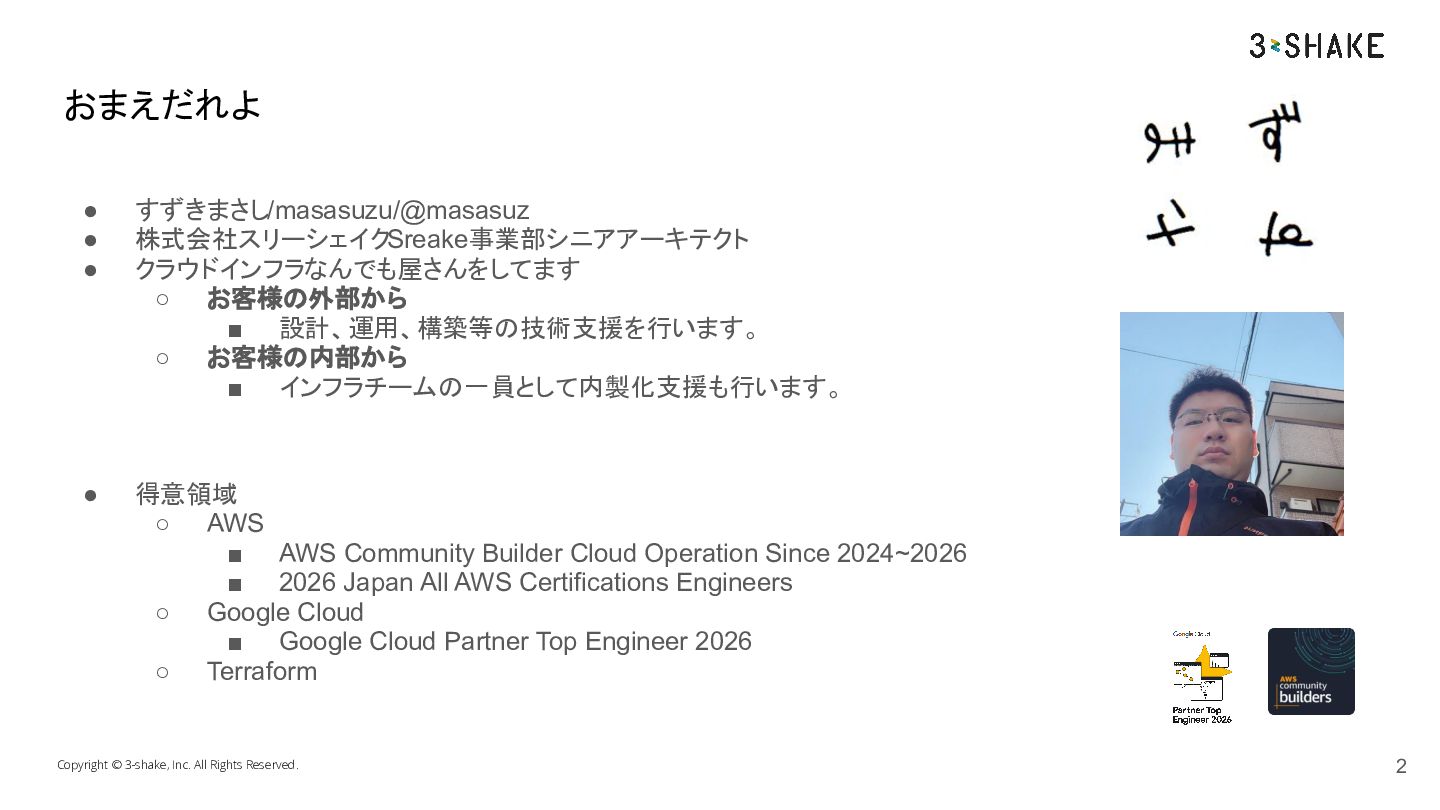
  2. おまえだれよ • • • すずきまさし/masasuzu/@masasuz 株式会社スリーシェイクSreake事業部シニアアーキテクト クラウドインフラなんでも屋さんをしてます ◦ お客様の外部から ▪

    設計、運用、構築等の技術支援を行います。 ◦ お客様の内部から ▪ インフラチームの一員として内製化支援も行います。 • 得意領域 ◦ AWS ▪ AWS Community Builder Cloud Operation Since 2024~2026 ▪ 2026 Japan All AWS Certifications Engineers ◦ Google Cloud ▪ Google Cloud Partner Top Engineer 2026 ◦ Terraform Copyright © 3-shake, Inc. All Rights Reserved. 2
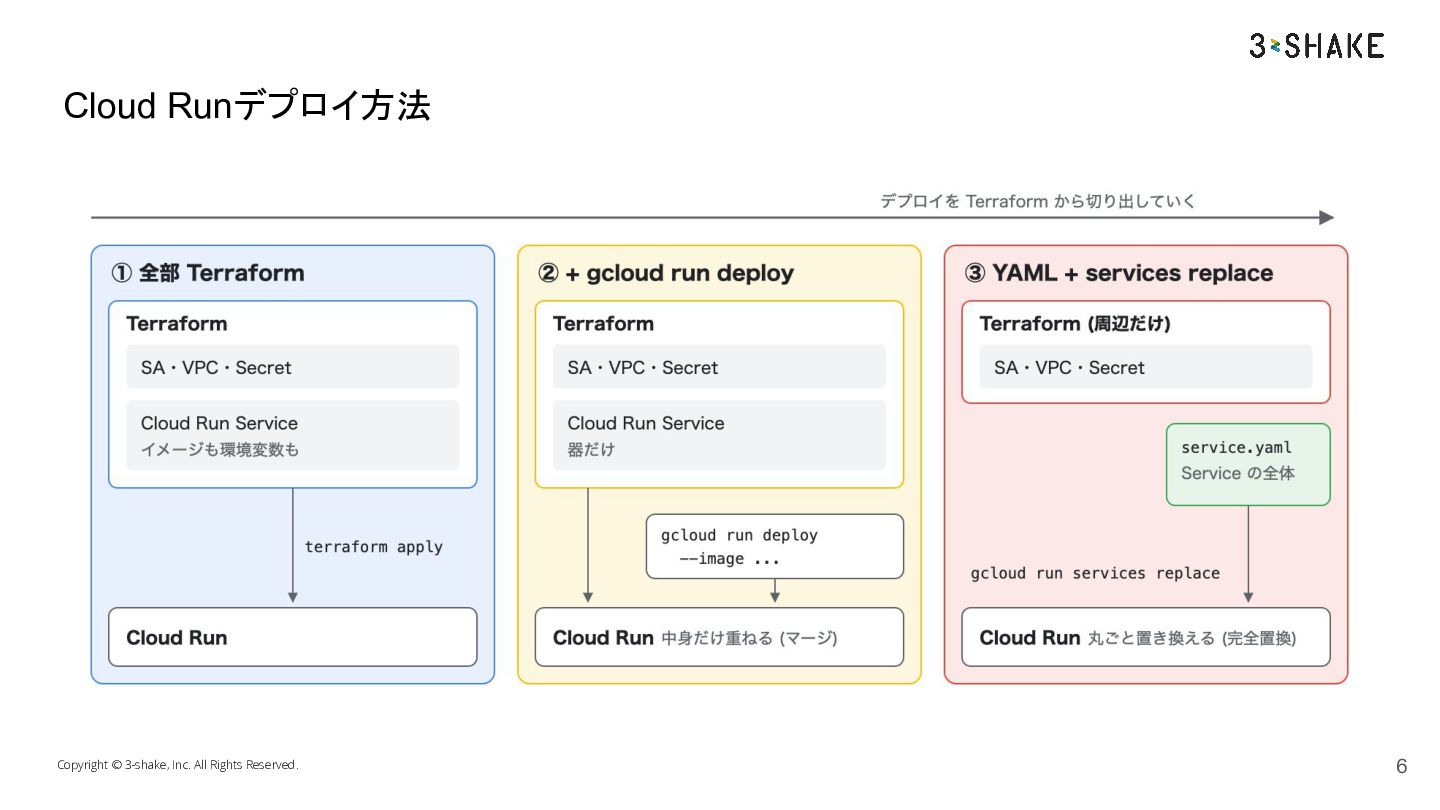
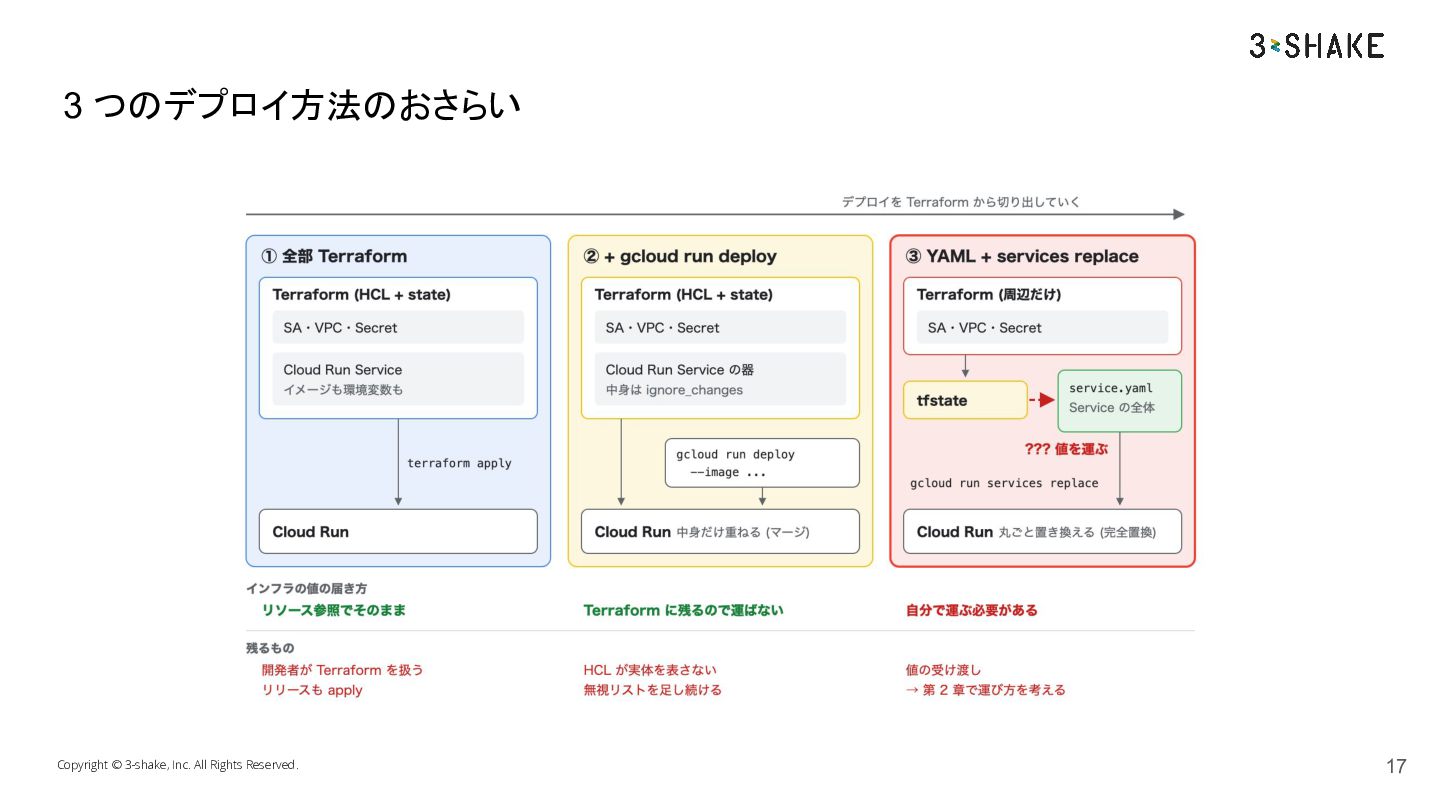
  3. Cloud Run のプロビジョニングとデプロイ • • • Cloud Runはインフラリソースでありつつも、アプリケーションそのものでもあります。 Terraformですべて管理することもできますし、デプロイ側でも管理することができます。 インフラプロビジョニングを

    Terraform前提で行うときに Cloud Runのデプロイをするときに、どう境界を引 いて、どういう方法を取るといいのかを今回話します。 Copyright © 3-shake, Inc. All Rights Reserved. 3
  4. 目次 1. 2. 3. Cloud Run のデプロイと Terraform の境界線 パラメータを

    tfstate と連携する clrnd の紹介 Copyright © 3-shake, Inc. All Rights Reserved. 4
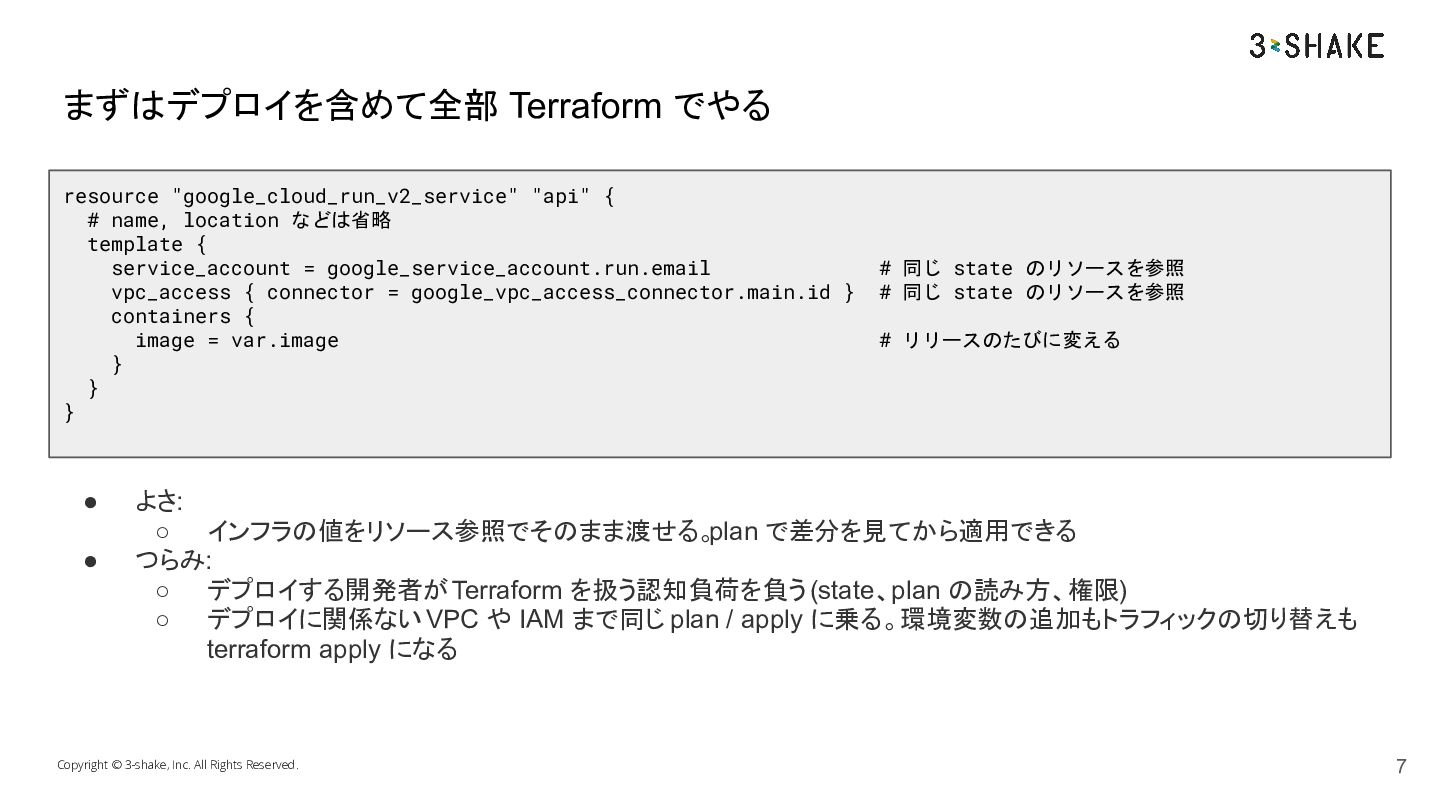
  5. まずはデプロイを含めて全部 Terraform でやる resource "google_cloud_run_v2_service" "api" { # name, location

    などは省略 template { service_account = google_service_account.run.email vpc_access { connector = google_vpc_access_connector.main.id } containers { image = var.image } } } • • # 同じ state のリソースを参照 # 同じ state のリソースを参照 # リリースのたびに変える よさ: ◦ インフラの値をリソース参照でそのまま渡せる。plan で差分を見てから適用できる つらみ: ◦ デプロイする開発者が Terraform を扱う認知負荷を負う (state、plan の読み方、権限) ◦ デプロイに関係ない VPC や IAM まで同じ plan / apply に乗る。環境変数の追加もトラフィックの切り替えも terraform apply になる Copyright © 3-shake, Inc. All Rights Reserved. 7
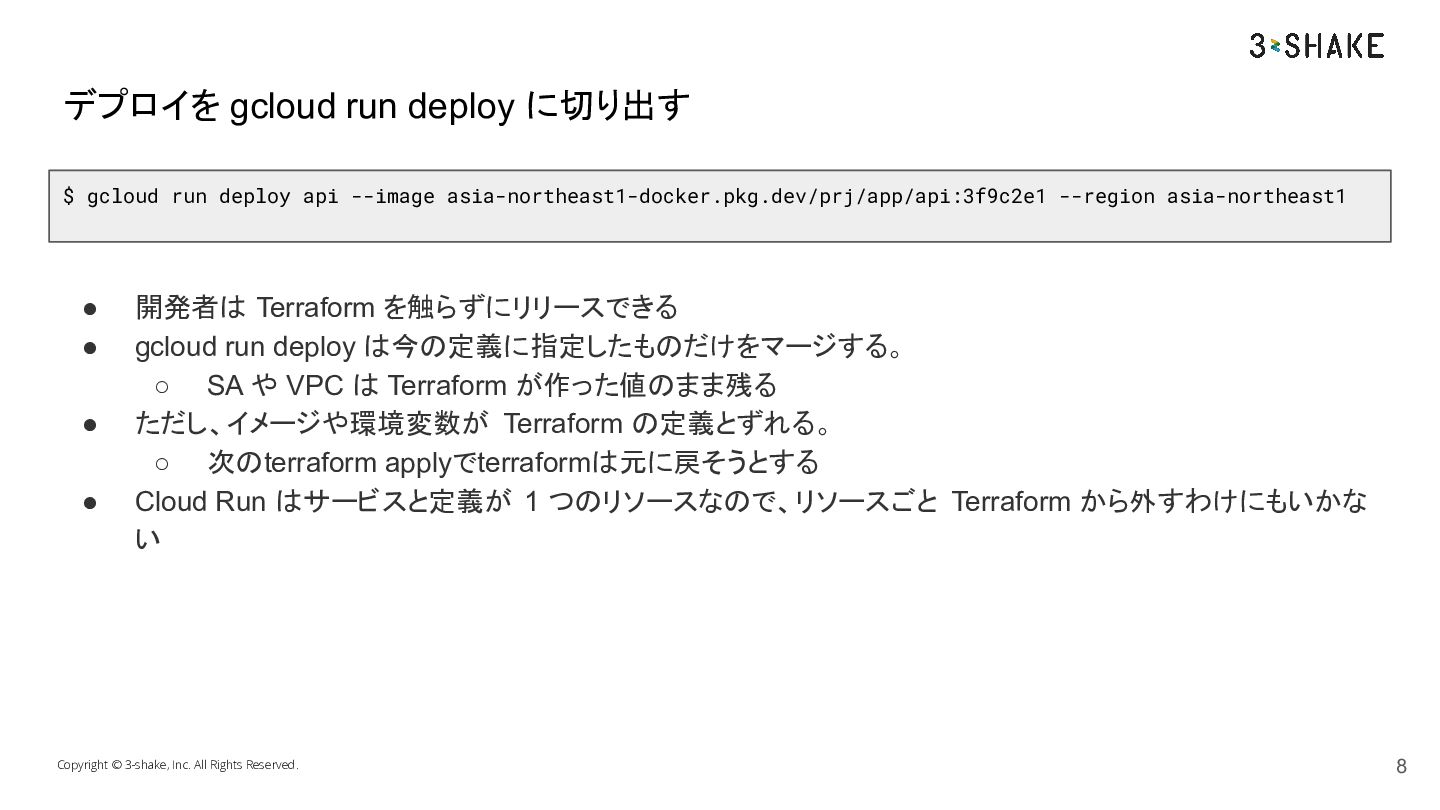
  6. デプロイを gcloud run deploy に切り出す $ gcloud run deploy api

    --image asia-northeast1-docker.pkg.dev/prj/app/api:3f9c2e1 --region asia-northeast1 • • • • 開発者は Terraform を触らずにリリースできる gcloud run deploy は今の定義に指定したものだけをマージする。 ◦ SA や VPC は Terraform が作った値のまま残る ただし、イメージや環境変数が Terraform の定義とずれる。 ◦ 次のterraform applyでterraformは元に戻そうとする Cloud Run はサービスと定義が 1 つのリソースなので、リソースごと Terraform から外すわけにもいかな い Copyright © 3-shake, Inc. All Rights Reserved. 8
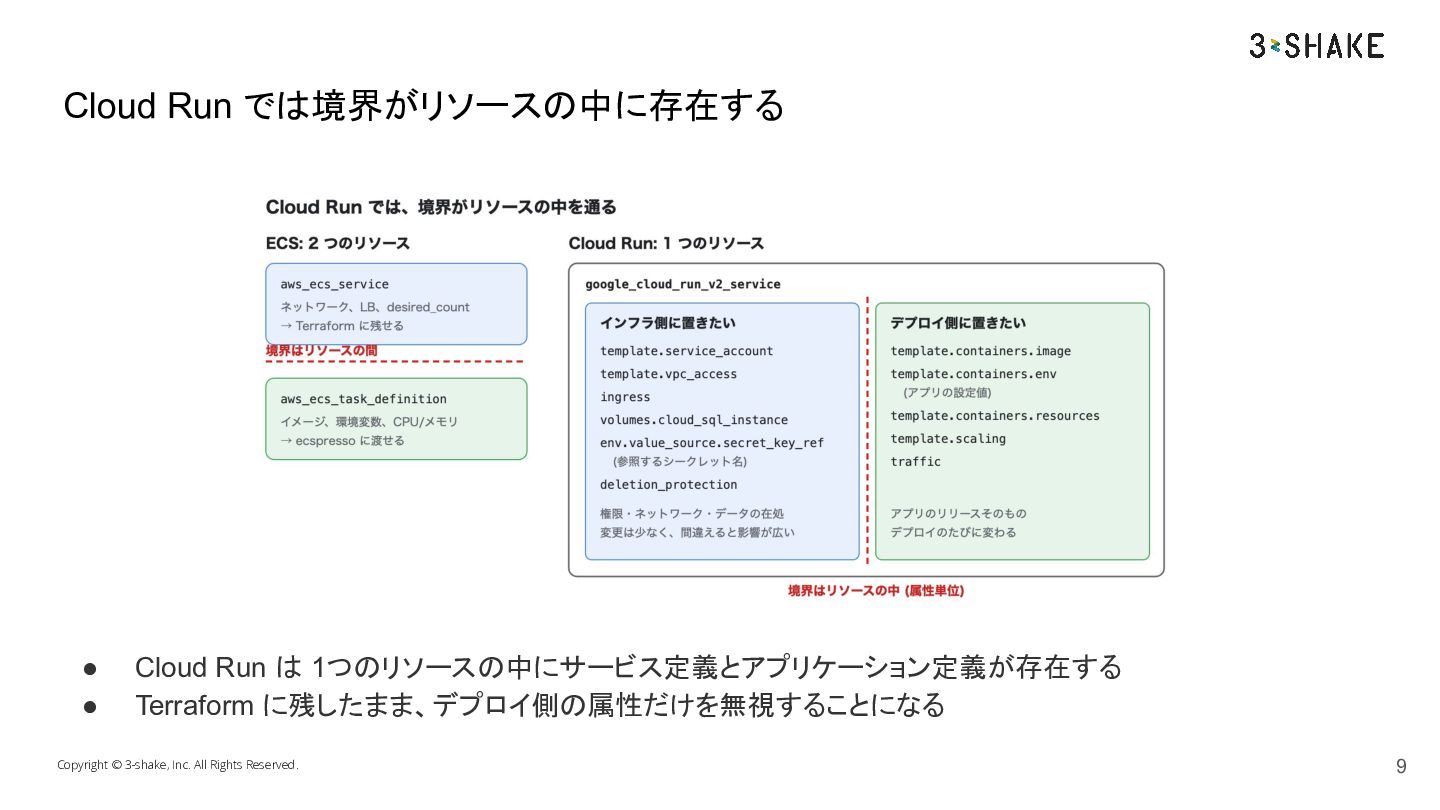
  7. Cloud Run では境界がリソースの中に存在する • • Cloud Run は 1つのリソースの中にサービス定義とアプリケーション定義が存在する Terraform

    に残したまま、デプロイ側の属性だけを無視することになる Copyright © 3-shake, Inc. All Rights Reserved. 9
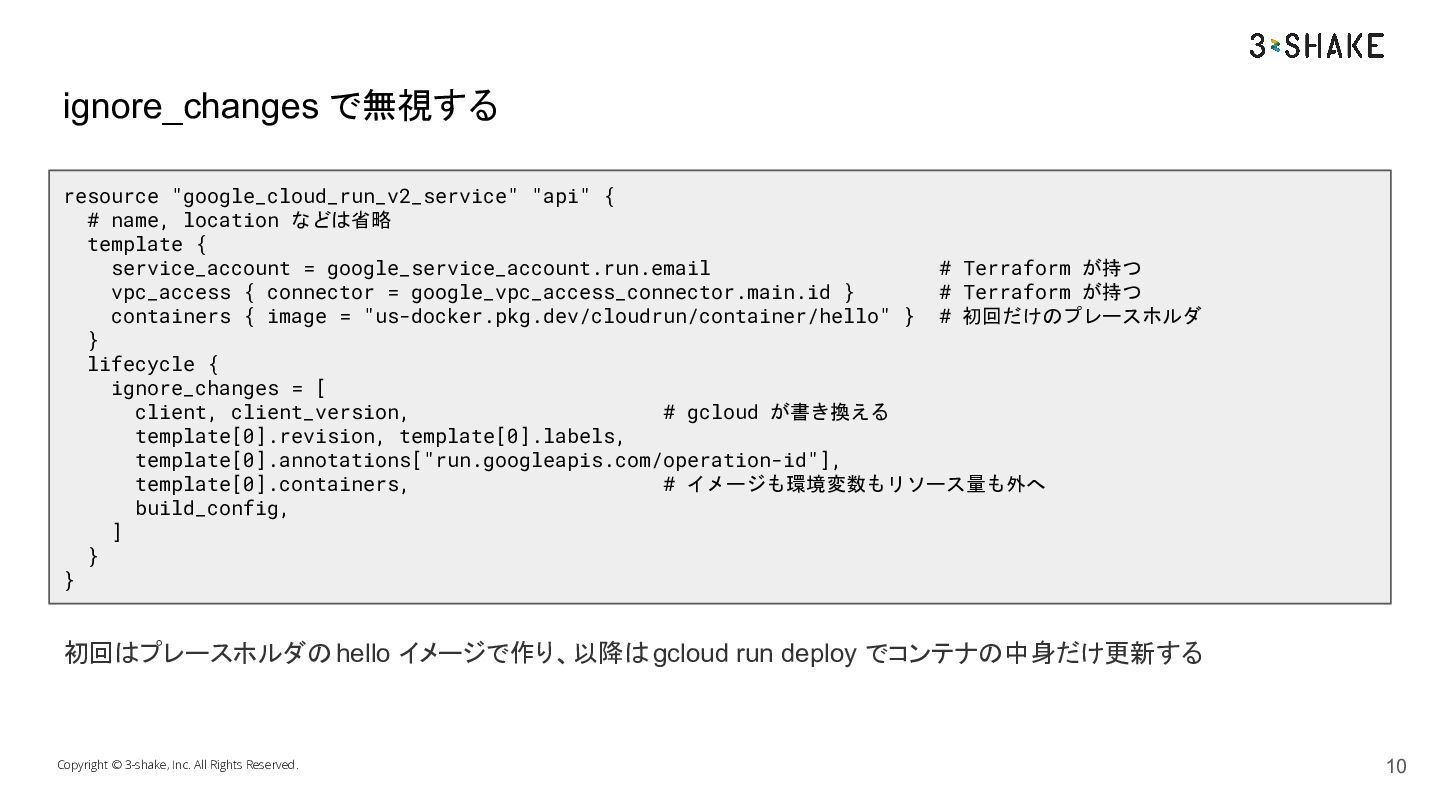
  8. ignore_changes で無視する resource "google_cloud_run_v2_service" "api" { # name, location などは省略

    template { service_account = google_service_account.run.email # Terraform が持つ vpc_access { connector = google_vpc_access_connector.main.id } # Terraform が持つ containers { image = "us-docker.pkg.dev/cloudrun/container/hello" } # 初回だけのプレースホルダ } lifecycle { ignore_changes = [ client, client_version, # gcloud が書き換える template[0].revision, template[0].labels, template[0].annotations["run.googleapis.com/operation-id"], template[0].containers, # イメージも環境変数もリソース量も外へ build_config, ] } } 初回はプレースホルダの hello イメージで作り、以降は gcloud run deploy でコンテナの中身だけ更新する Copyright © 3-shake, Inc. All Rights Reserved. 10
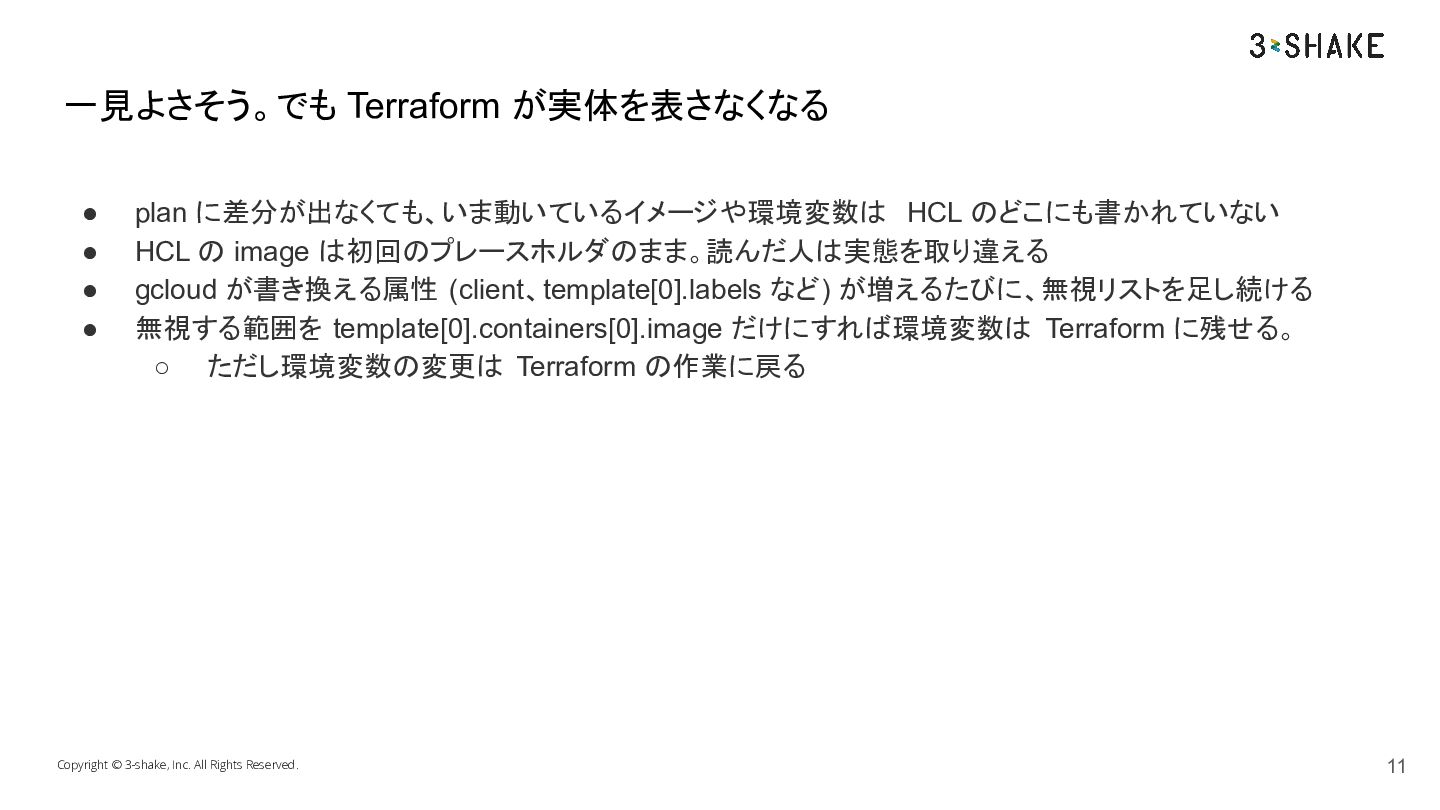
  9. 一見よさそう。でも Terraform が実体を表さなくなる • • • • plan に差分が出なくても、いま動いているイメージや環境変数は HCL

    のどこにも書かれていない HCL の image は初回のプレースホルダのまま。読んだ人は実態を取り違える gcloud が書き換える属性 (client、template[0].labels など) が増えるたびに、無視リストを足し続ける 無視する範囲を template[0].containers[0].image だけにすれば環境変数は Terraform に残せる。 ◦ ただし環境変数の変更は Terraform の作業に戻る Copyright © 3-shake, Inc. All Rights Reserved. 11
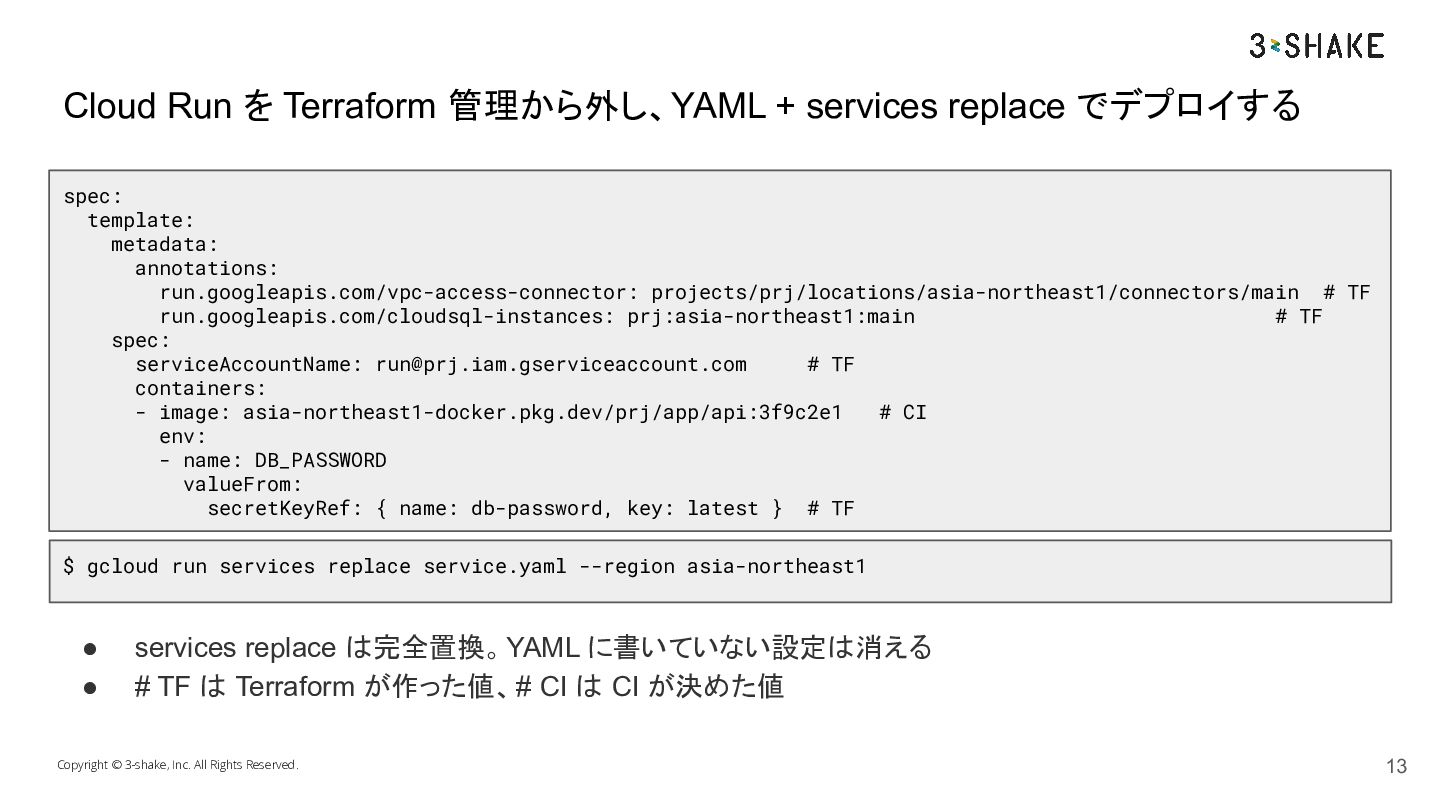
  10. Cloud Run を Terraform 管理から外し、YAML + services replace でデプロイする spec:

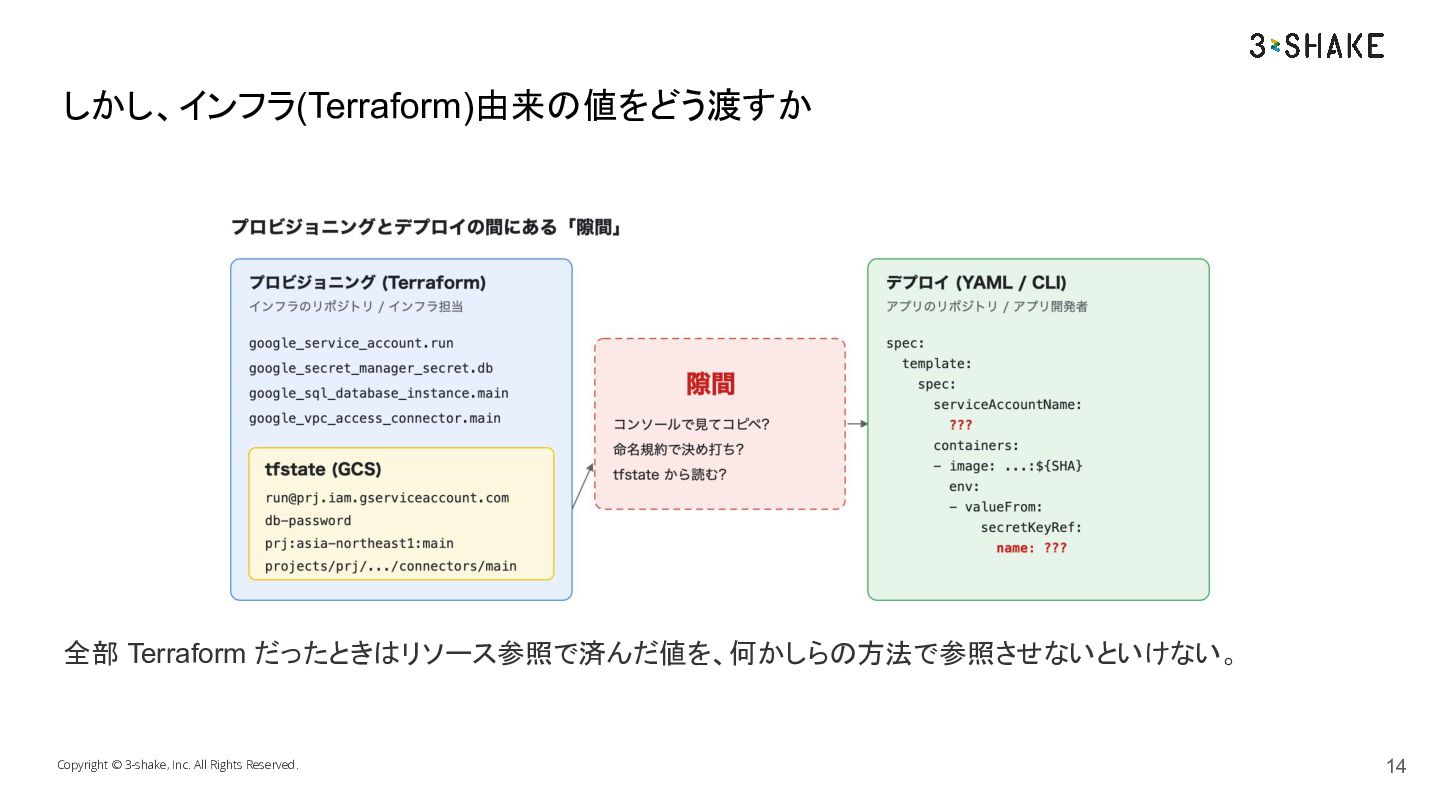
    template: metadata: annotations: run.googleapis.com/vpc-access-connector: projects/prj/locations/asia-northeast1/connectors/main # TF run.googleapis.com/cloudsql-instances: prj:asia-northeast1:main # TF spec: serviceAccountName: [email protected] # TF containers: - image: asia-northeast1-docker.pkg.dev/prj/app/api:3f9c2e1 # CI env: - name: DB_PASSWORD valueFrom: secretKeyRef: { name: db-password, key: latest } # TF $ gcloud run services replace service.yaml --region asia-northeast1 • • services replace は完全置換。 YAML に書いていない設定は消える # TF は Terraform が作った値、# CI は CI が決めた値 Copyright © 3-shake, Inc. All Rights Reserved. 13
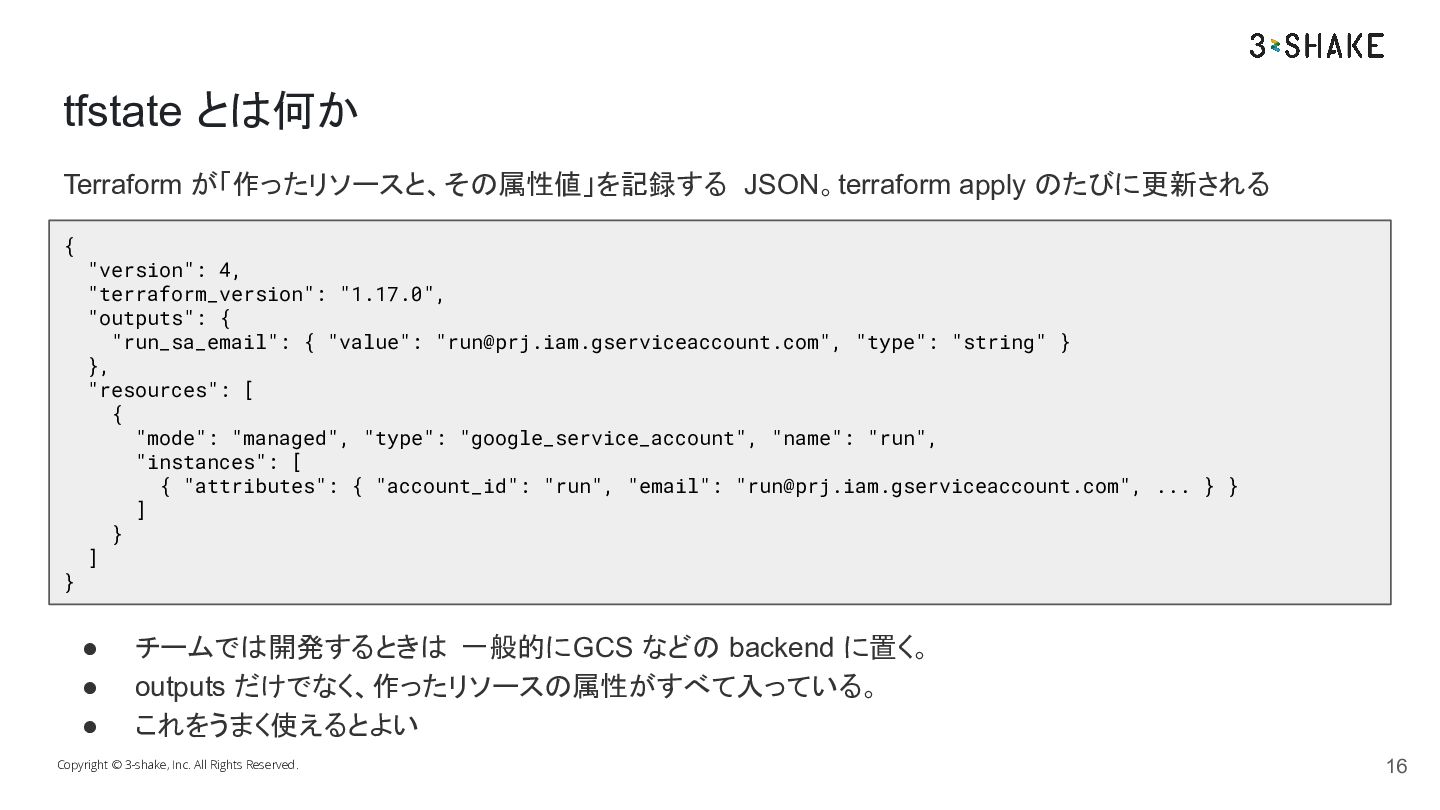
  11. tfstate とは何か Terraform が「作ったリソースと、その属性値」を記録する JSON。terraform apply のたびに更新される { } "version":

    4, "terraform_version": "1.17.0", "outputs": { "run_sa_email": { "value": "[email protected]", "type": "string" } }, "resources": [ { "mode": "managed", "type": "google_service_account", "name": "run", "instances": [ { "attributes": { "account_id": "run", "email": "[email protected]", ... } } ] } ] • • • チームでは開発するときは 一般的にGCS などの backend に置く。 outputs だけでなく、作ったリソースの属性がすべて入っている。 これをうまく使えるとよい Copyright © 3-shake, Inc. All Rights Reserved. 16
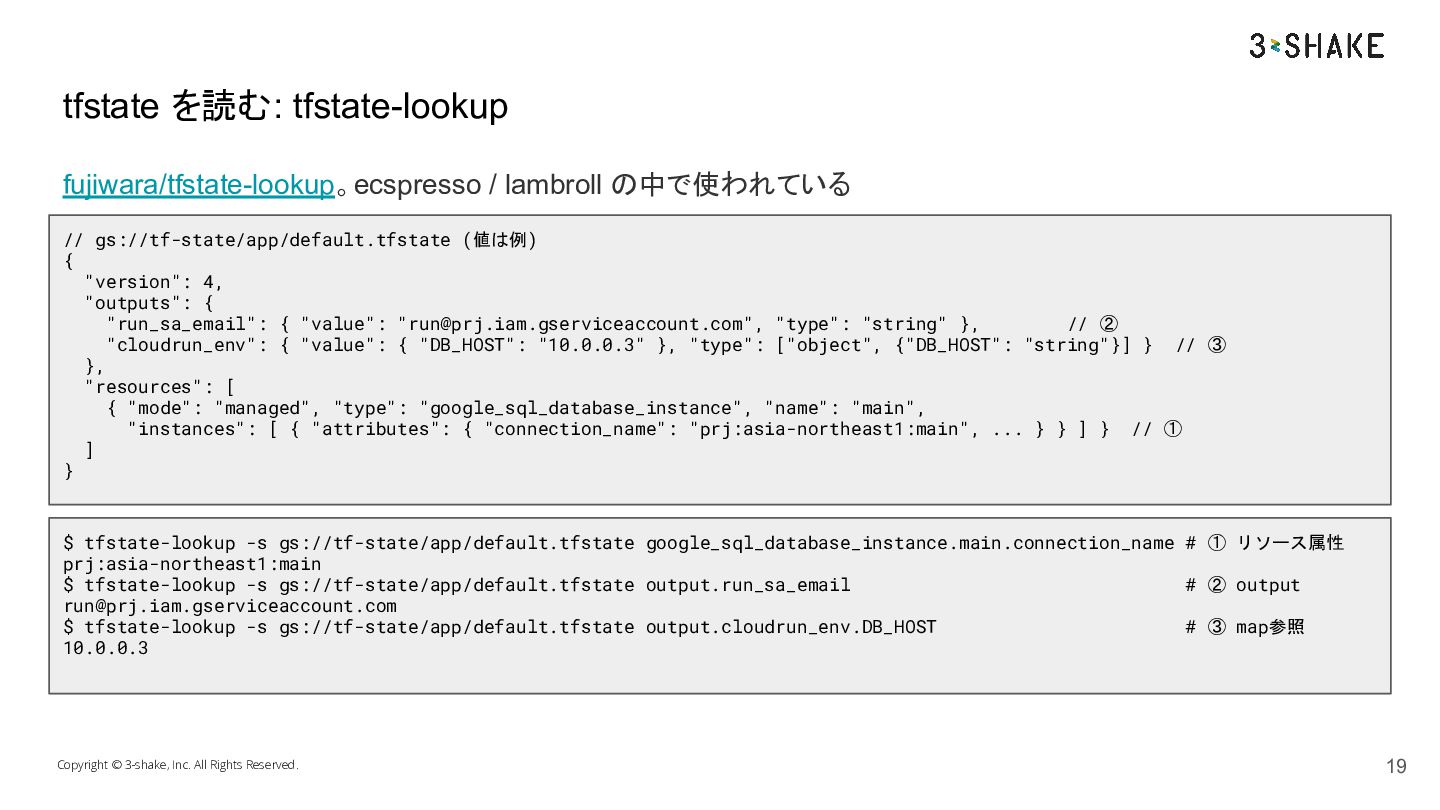
  12. tfstate を読む: tfstate-lookup fujiwara/tfstate-lookup。ecspresso / lambroll の中で使われている // gs://tf-state/app/default.tfstate (値は例)

    { "version": 4, "outputs": { "run_sa_email": { "value": "[email protected]", "type": "string" }, // ② "cloudrun_env": { "value": { "DB_HOST": "10.0.0.3" }, "type": ["object", {"DB_HOST": "string"}] } // ③ }, "resources": [ { "mode": "managed", "type": "google_sql_database_instance", "name": "main", "instances": [ { "attributes": { "connection_name": "prj:asia-northeast1:main", ... } } ] } // ① ] } $ tfstate-lookup -s gs://tf-state/app/default.tfstate google_sql_database_instance.main.connection_name # ① リソース属性 prj:asia-northeast1:main $ tfstate-lookup -s gs://tf-state/app/default.tfstate output.run_sa_email # ② output [email protected] $ tfstate-lookup -s gs://tf-state/app/default.tfstate output.cloudrun_env.DB_HOST # ③ map参照 10.0.0.3 Copyright © 3-shake, Inc. All Rights Reserved. 19
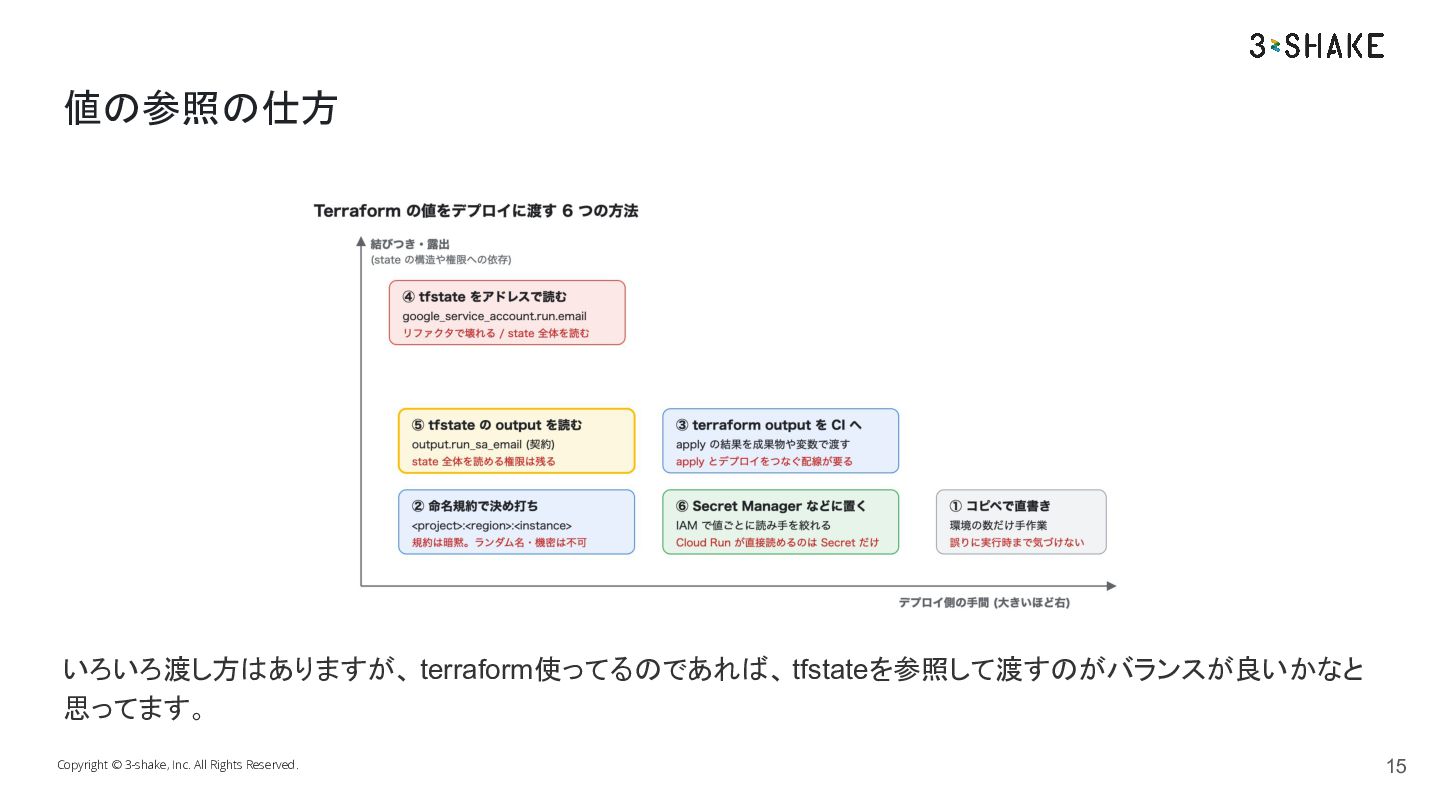
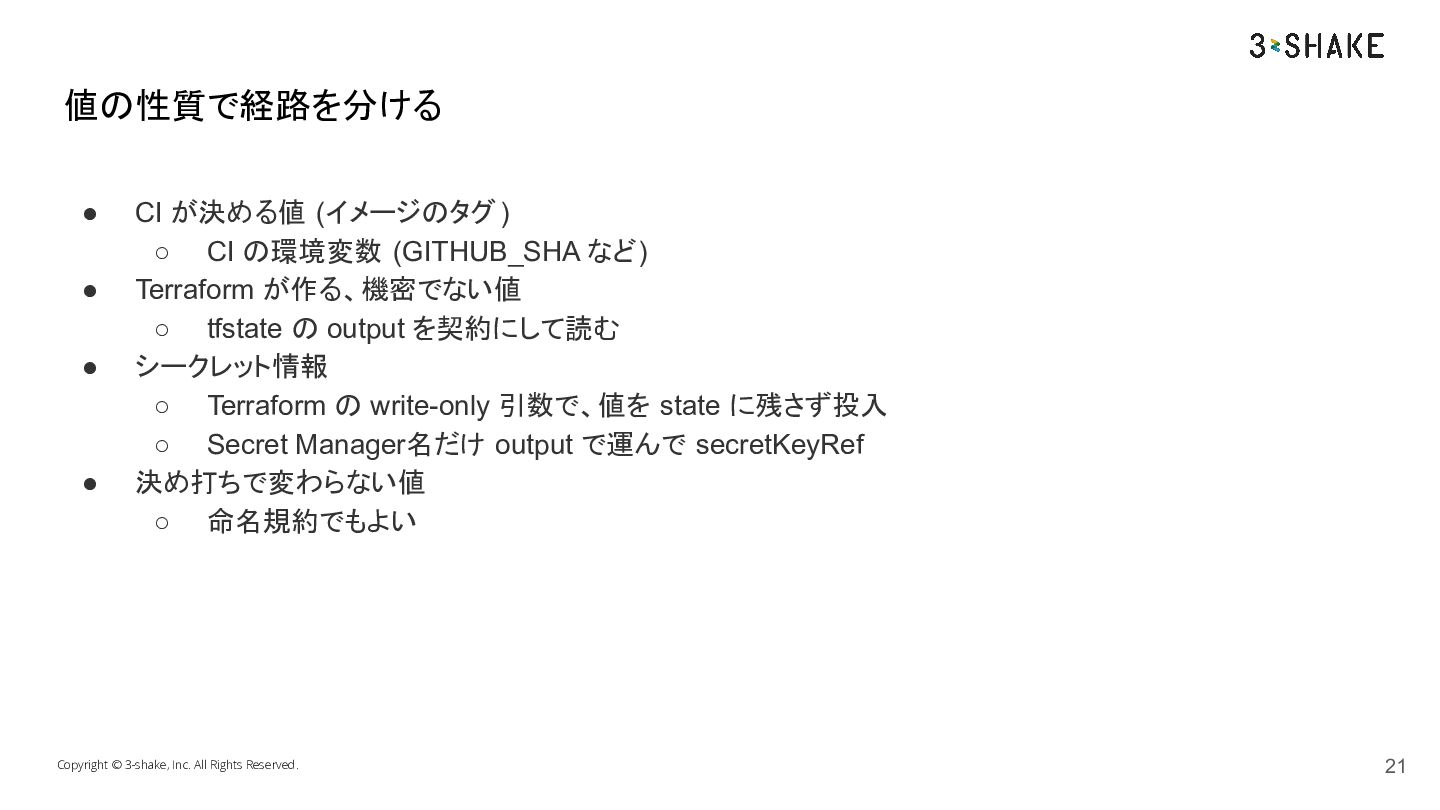
  13. 値の性質で経路を分ける • • • • CI が決める値 (イメージのタグ ) ◦

    CI の環境変数 (GITHUB_SHA など) Terraform が作る、機密でない値 ◦ tfstate の output を契約にして読む シークレット情報 ◦ Terraform の write-only 引数で、値を state に残さず投入 ◦ Secret Manager名だけ output で運んで secretKeyRef 決め打ちで変わらない値 ◦ 命名規約でもよい Copyright © 3-shake, Inc. All Rights Reserved. 21
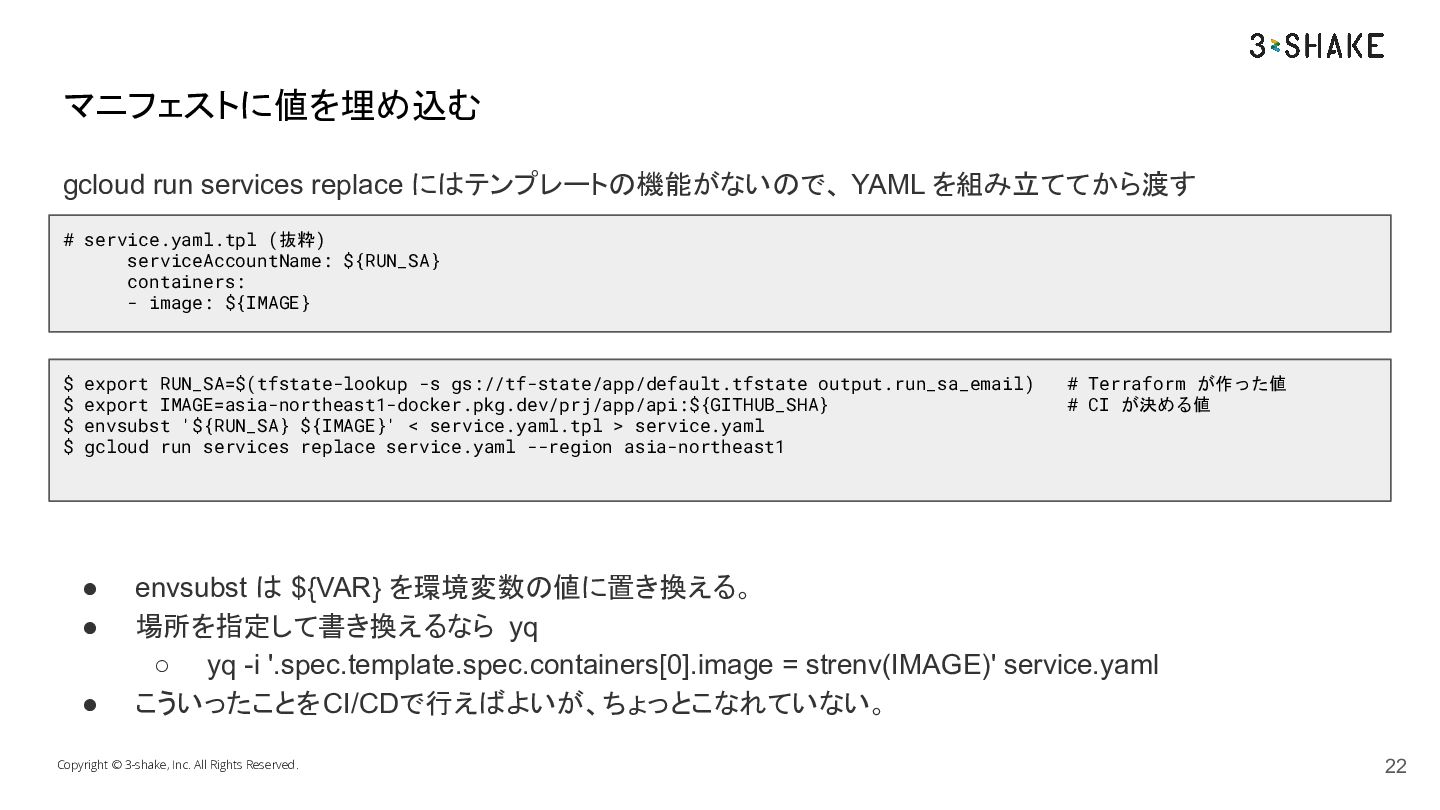
  14. マニフェストに値を埋め込む gcloud run services replace にはテンプレートの機能がないので、 YAML を組み立ててから渡す # service.yaml.tpl

    (抜粋) serviceAccountName: ${RUN_SA} containers: - image: ${IMAGE} $ export RUN_SA=$(tfstate-lookup -s gs://tf-state/app/default.tfstate output.run_sa_email) $ export IMAGE=asia-northeast1-docker.pkg.dev/prj/app/api:${GITHUB_SHA} $ envsubst '${RUN_SA} ${IMAGE}' < service.yaml.tpl > service.yaml $ gcloud run services replace service.yaml --region asia-northeast1 • • • # Terraform が作った値 # CI が決める値 envsubst は ${VAR} を環境変数の値に置き換える。 場所を指定して書き換えるなら yq ◦ yq -i '.spec.template.spec.containers[0].image = strenv(IMAGE)' service.yaml こういったことを CI/CDで行えばよいが、ちょっとこなれていない。 Copyright © 3-shake, Inc. All Rights Reserved. 22
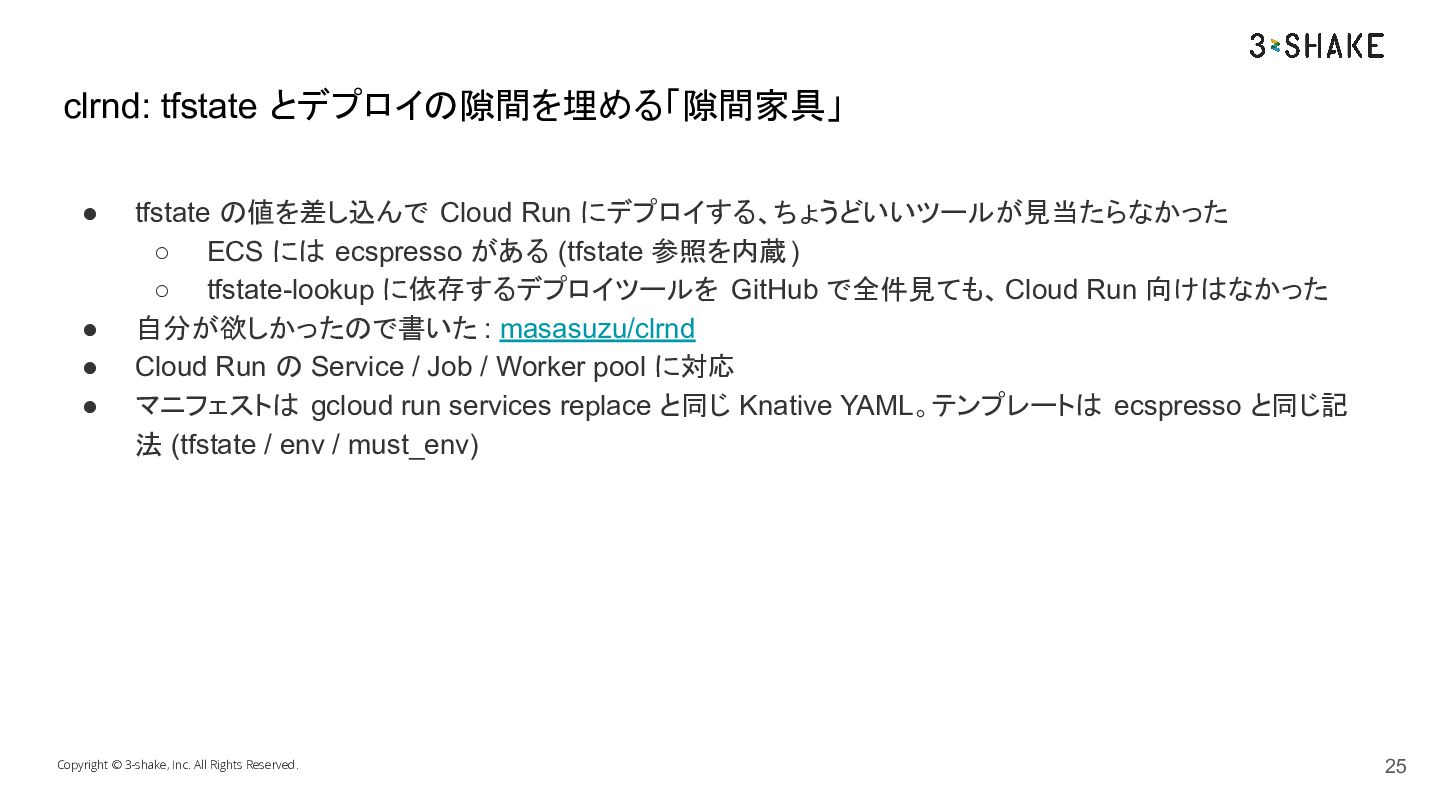
  15. clrnd: tfstate とデプロイの隙間を埋める「隙間家具」 • • • • tfstate の値を差し込んで Cloud

    Run にデプロイする、ちょうどいいツールが見当たらなかった ◦ ECS には ecspresso がある (tfstate 参照を内蔵) ◦ tfstate-lookup に依存するデプロイツールを GitHub で全件見ても、 Cloud Run 向けはなかった 自分が欲しかったので書いた : masasuzu/clrnd Cloud Run の Service / Job / Worker pool に対応 マニフェストは gcloud run services replace と同じ Knative YAML。テンプレートは ecspresso と同じ記 法 (tfstate / env / must_env) Copyright © 3-shake, Inc. All Rights Reserved. 25
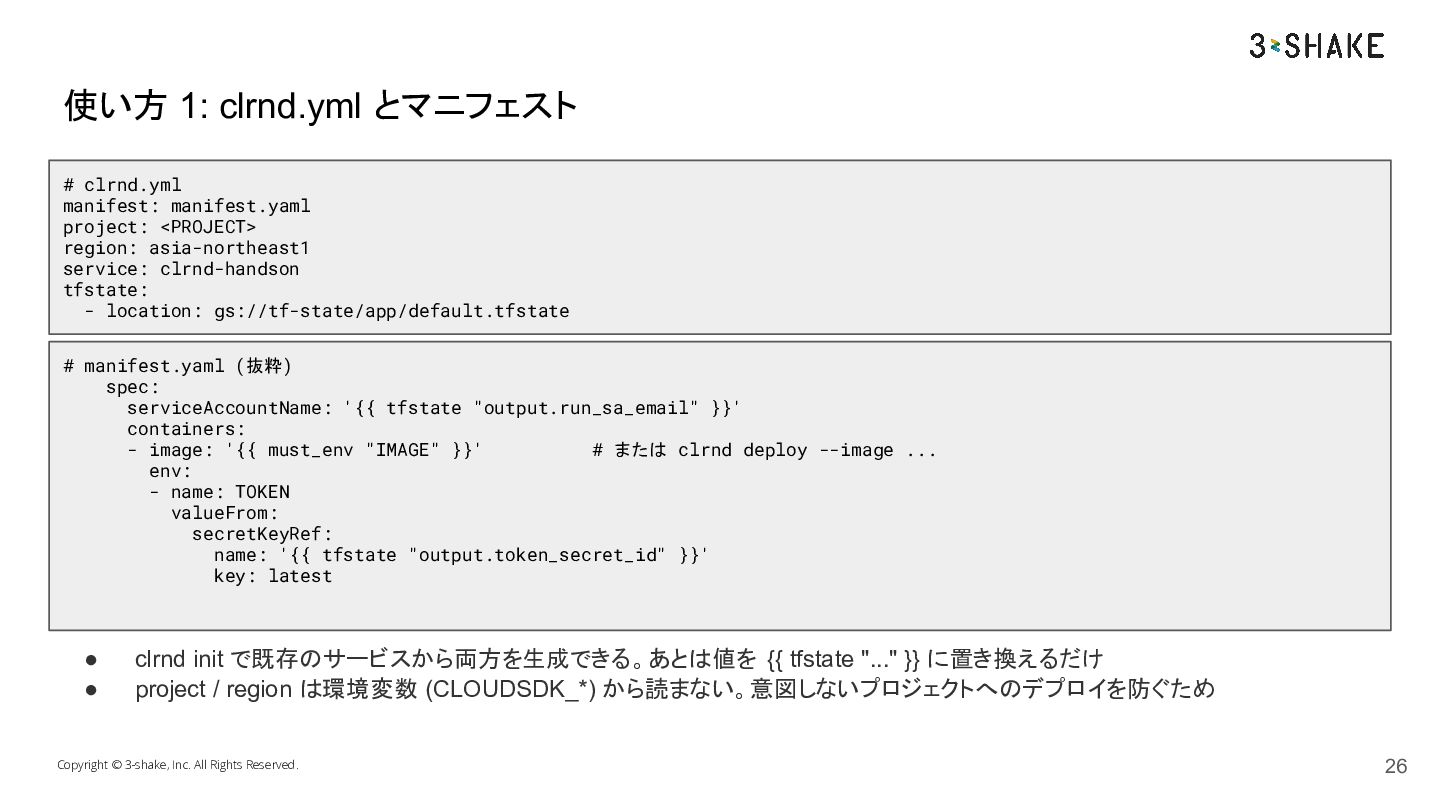
  16. 使い方 1: clrnd.yml とマニフェスト # clrnd.yml manifest: manifest.yaml project: <PROJECT>

    region: asia-northeast1 service: clrnd-handson tfstate: - location: gs://tf-state/app/default.tfstate # manifest.yaml (抜粋) spec: serviceAccountName: '{{ tfstate "output.run_sa_email" }}' containers: - image: '{{ must_env "IMAGE" }}' # または clrnd deploy --image ... env: - name: TOKEN valueFrom: secretKeyRef: name: '{{ tfstate "output.token_secret_id" }}' key: latest • • clrnd init で既存のサービスから両方を生成できる。あとは値を {{ tfstate "..." }} に置き換えるだけ project / region は環境変数 (CLOUDSDK_*) から読まない。意図しないプロジェクトへのデプロイを防ぐため Copyright © 3-shake, Inc. All Rights Reserved. 26
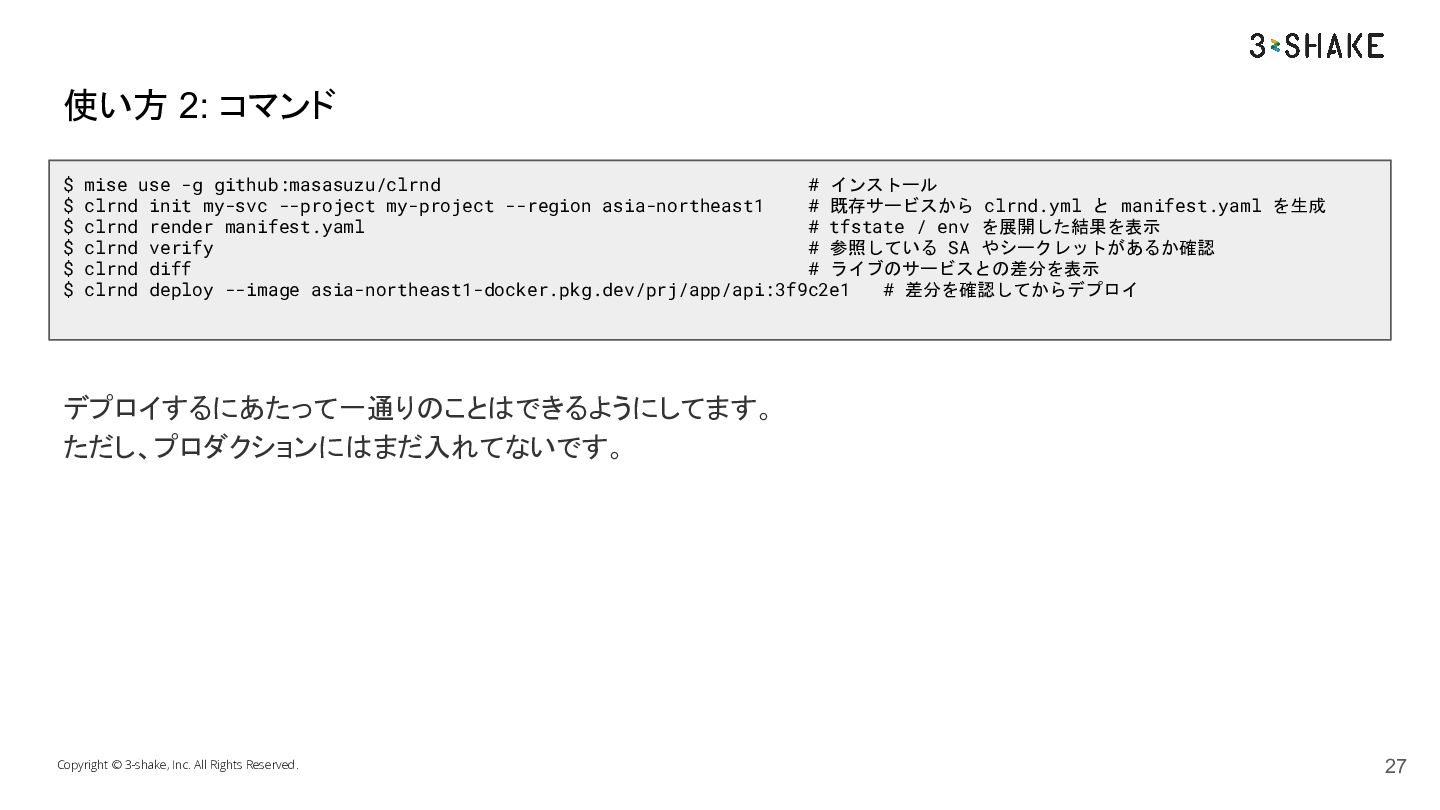
  17. 使い方 2: コマンド $ mise use -g github:masasuzu/clrnd # インストール

    $ clrnd init my-svc --project my-project --region asia-northeast1 # 既存サービスから clrnd.yml と manifest.yaml を生成 $ clrnd render manifest.yaml # tfstate / env を展開した結果を表示 $ clrnd verify # 参照している SA やシークレットがあるか確認 $ clrnd diff # ライブのサービスとの差分を表示 $ clrnd deploy --image asia-northeast1-docker.pkg.dev/prj/app/api:3f9c2e1 # 差分を確認してからデプロイ デプロイするにあたって一通りのことはできるようにしてます。 ただし、プロダクションにはまだ入れてないです。 Copyright © 3-shake, Inc. All Rights Reserved. 27
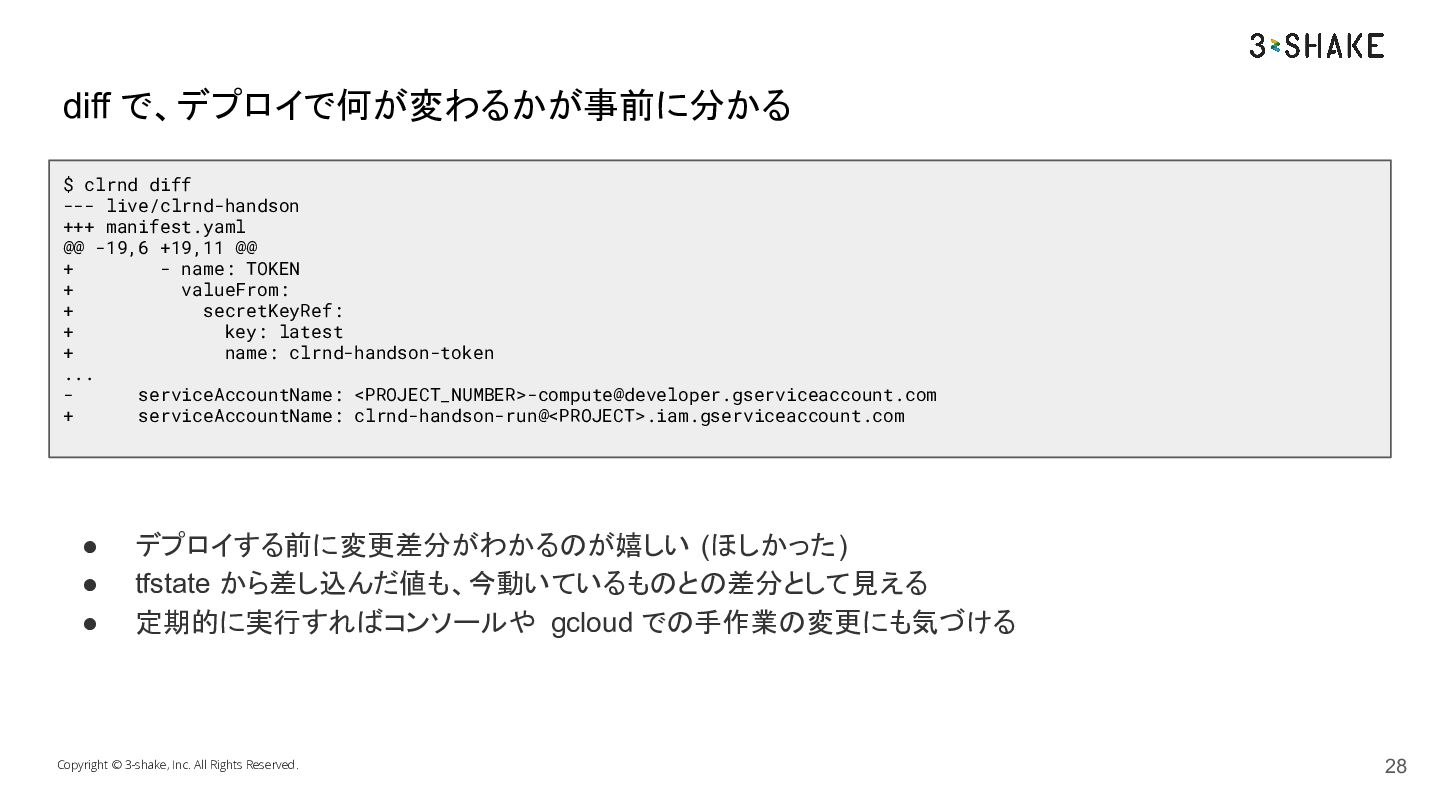
  18. diff で、デプロイで何が変わるかが事前に分かる $ clrnd diff --- live/clrnd-handson +++ manifest.yaml @@

    -19,6 +19,11 @@ + - name: TOKEN + valueFrom: + secretKeyRef: + key: latest + name: clrnd-handson-token ... serviceAccountName: <PROJECT_NUMBER>[email protected] + serviceAccountName: clrnd-handson-run@<PROJECT>.iam.gserviceaccount.com • • • デプロイする前に変更差分がわかるのが嬉しい (ほしかった) tfstate から差し込んだ値も、今動いているものとの差分として見える 定期的に実行すればコンソールや gcloud での手作業の変更にも気づける Copyright © 3-shake, Inc. All Rights Reserved. 28
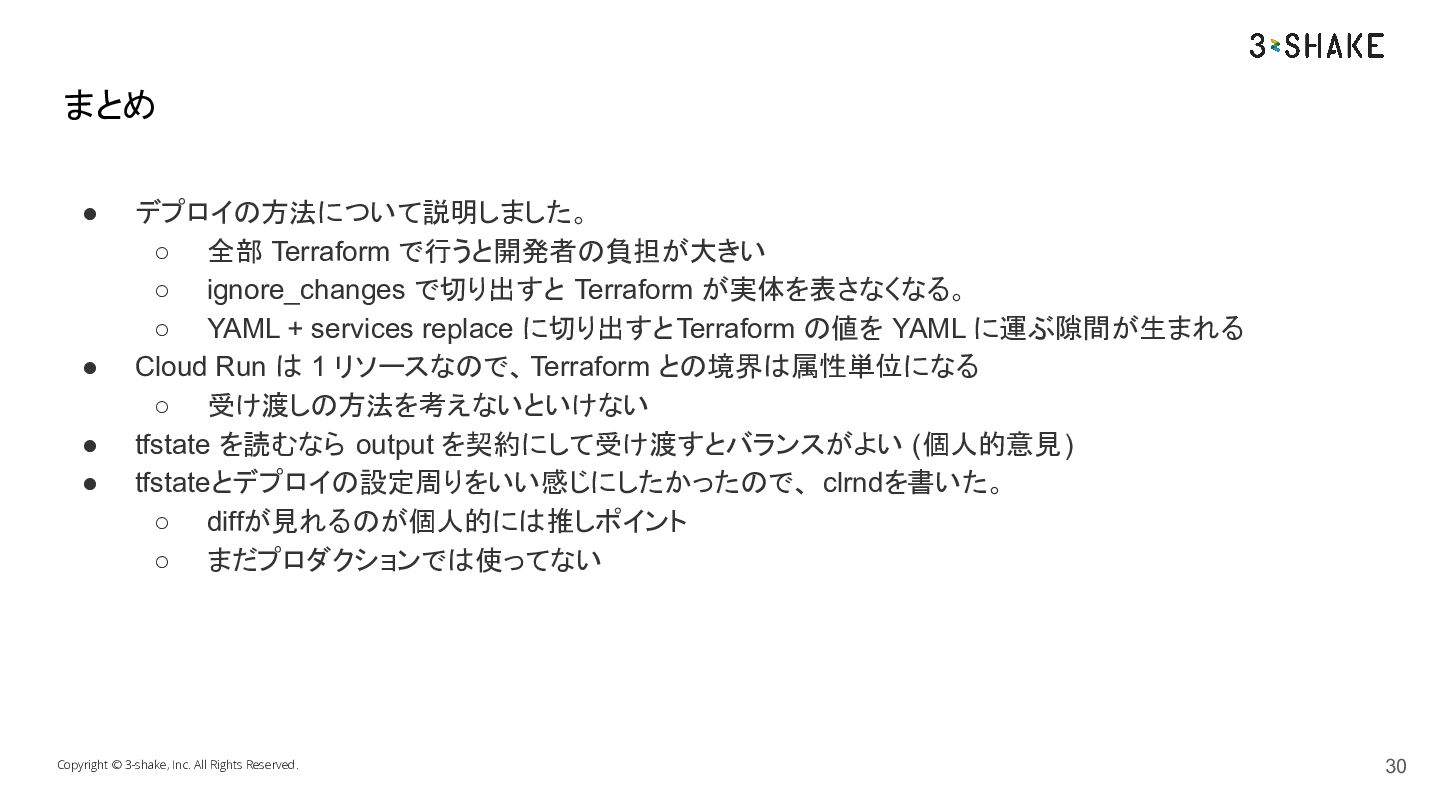
  19. まとめ • • • • デプロイの方法について説明しました。 ◦ 全部 Terraform で行うと開発者の負担が大きい

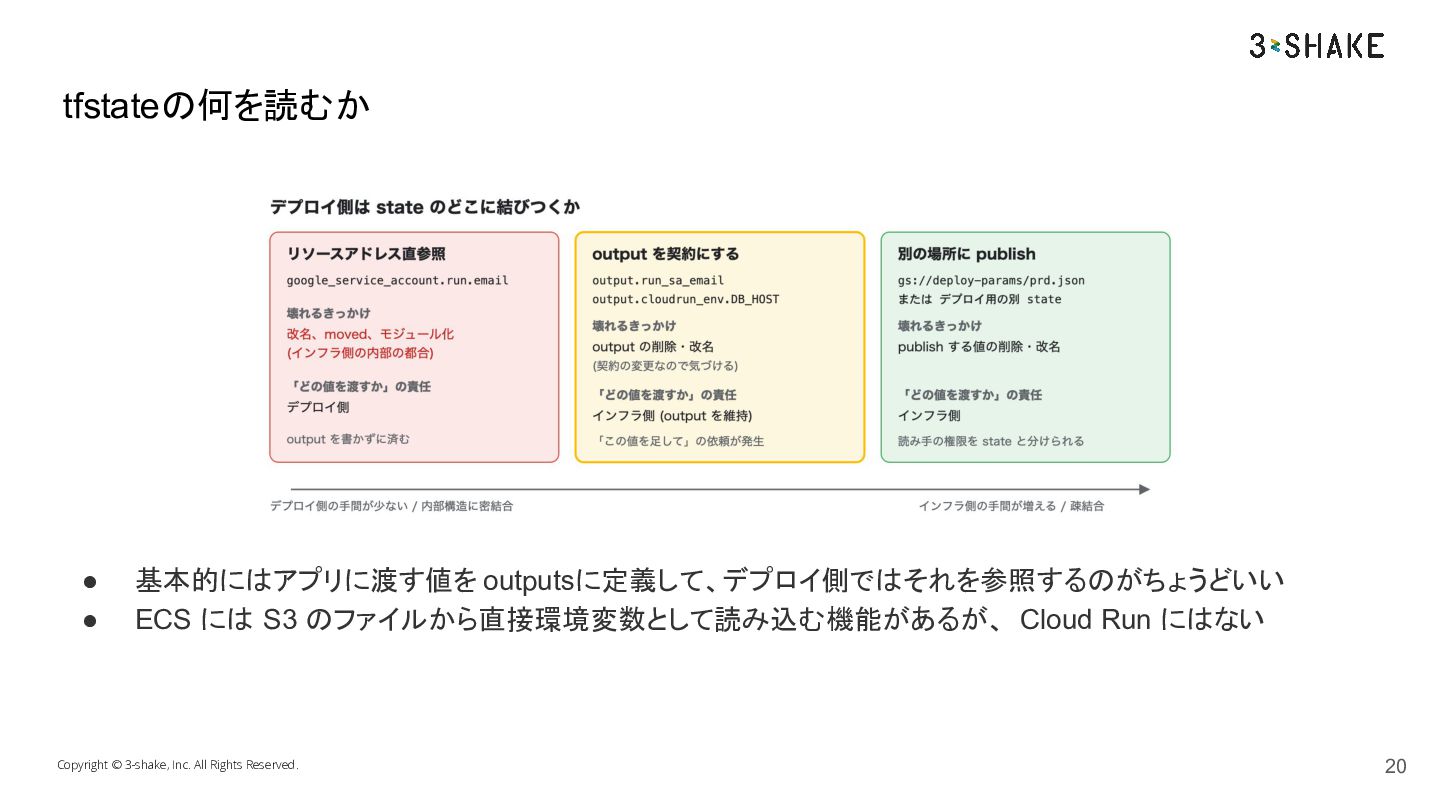
    ◦ ignore_changes で切り出すと Terraform が実体を表さなくなる。 ◦ YAML + services replace に切り出すとTerraform の値を YAML に運ぶ隙間が生まれる Cloud Run は 1 リソースなので、 Terraform との境界は属性単位になる ◦ 受け渡しの方法を考えないといけない tfstate を読むなら output を契約にして受け渡すとバランスがよい (個人的意見) tfstateとデプロイの設定周りをいい感じにしたかったので、 clrndを書いた。 ◦ diffが見れるのが個人的には推しポイント ◦ まだプロダクションでは使ってない Copyright © 3-shake, Inc. All Rights Reserved. 30