Upgrade to Pro
— share decks privately, control downloads, hide ads and more …
Speaker Deck
Sign up for free
Menu
Search
Features
All features
Private URLs
Password Protection
Custom URLS
Scheduled publishing
Remove Branding
Restrict embedding
Deck Collections
Notes
Features
All features
Private URLs
Password Protection
Custom URLS
Scheduled publishing
Remove Branding
Restrict embedding
Deck Collections
Notes
Explore
Featured decks
Featured speakers
Programming
Technology
Storyboards
Explore
Featured decks
Featured speakers
Programming
Technology
Storyboards
Pricing
Search
Sign in
Sign up for free
Validateの作業方法
Search
Naho Rikitake
June 20, 2018
44
0
Share
Embed
Copy iframe code
Copy JS code
Copy link
Start on current slide
Validateの作業方法
Naho Rikitake
June 20, 2018
More Decks by Naho Rikitake
See All by Naho Rikitake
Tasking Managerの使い方
nahor
0
76
Featured
See All Featured
Primal Persuasion: How to Engage the Brain for Learning That Lasts
tmiket
0
500
Redefining SEO in the New Era of Traffic Generation
szymonslowik
1
480
[RailsConf 2023] Rails as a piece of cake
palkan
59
7.1k
Performance Is Good for Brains [We Love Speed 2024]
tammyeverts
12
1.9k
Bootstrapping a Software Product
garrettdimon
PRO
306
120k
Odyssey Design
rkendrick25
PRO
2
870
"I'm Feeling Lucky" - Building Great Search Experiences for Today's Users (#IAC19)
danielanewman
230
23k
Agile Actions for Facilitating Distributed Teams - ADO2019
mkilby
0
310
Organizational Design Perspectives: An Ontology of Organizational Design Elements
kimpetersen
PRO
1
850
How to optimise 3,500 product descriptions for ecommerce in one day using ChatGPT
katarinadahlin
PRO
3
3.9k
The Power of CSS Pseudo Elements
geoffreycrofte
82
6.6k
[RailsConf 2023 Opening Keynote] The Magic of Rails
eileencodes
31
10k
Transcript
Validateの作業方法 1A118184 力武 南帆
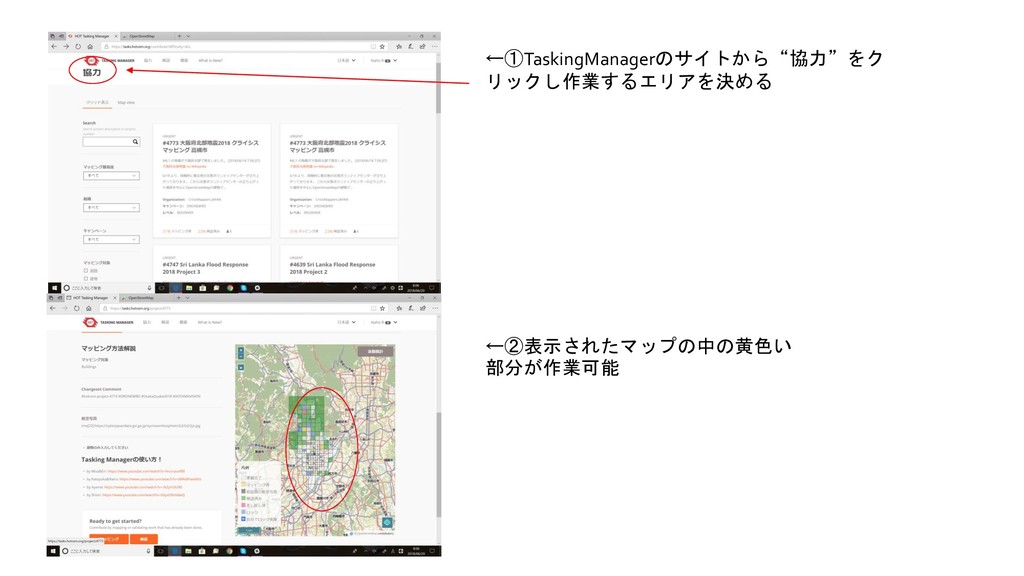
←①TaskingManagerのサイトから“協力”をク リックし作業するエリアを決める ←②表示されたマップの中の黄色い 部分が作業可能
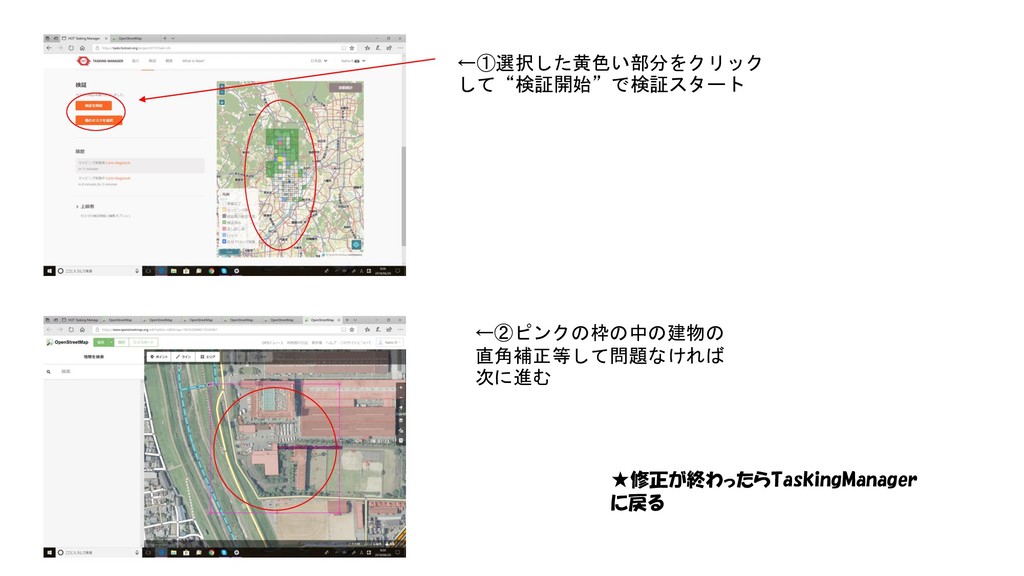
←①選択した黄色い部分をクリック して“検証開始”で検証スタート ←②ピンクの枠の中の建物の 直角補正等して問題なければ 次に進む ★修正が終わったらTaskingManager に戻る
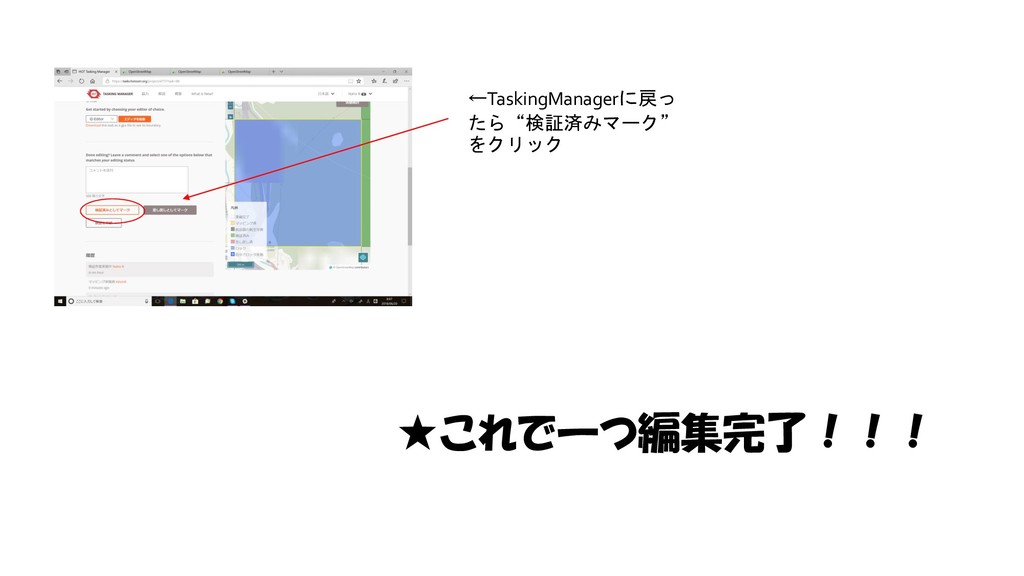
←TaskingManagerに戻っ たら“検証済みマーク” をクリック ★これで一つ編集完了!!!
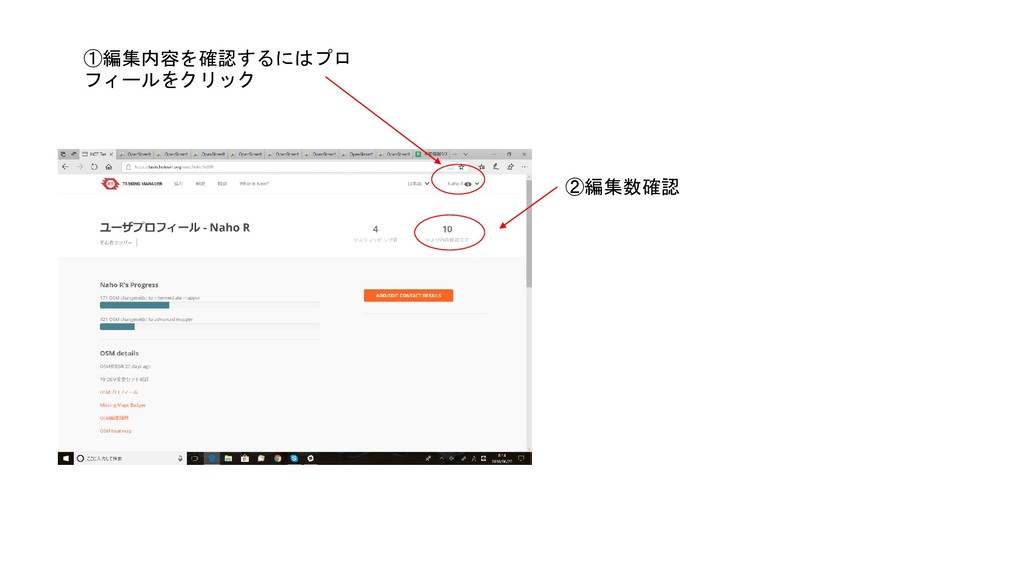
①編集内容を確認するにはプロ フィールをクリック ②編集数確認


 nahor
nahor
 tmiket
 szymonslowik
 palkan
 tammyeverts
 garrettdimon
 rkendrick25
 danielanewman
 mkilby
 kimpetersen
 katarinadahlin
 geoffreycrofte
 eileencodes