Upgrade to Pro
— share decks privately, control downloads, hide ads and more …
Speaker Deck
Sign up for free
Menu
Search
Features
All features
Private URLs
Password Protection
Custom URLS
Scheduled publishing
Remove Branding
Restrict embedding
Deck Collections
Notes
Features
All features
Private URLs
Password Protection
Custom URLS
Scheduled publishing
Remove Branding
Restrict embedding
Deck Collections
Notes
Explore
Featured decks
Featured speakers
Programming
Technology
Storyboards
Explore
Featured decks
Featured speakers
Programming
Technology
Storyboards
Pricing
Search
Sign in
Sign up for free
Tasking Managerの使い方
Search
Naho Rikitake
June 15, 2018
How-to & DIY
76
0
Share
Embed
Copy iframe code
Copy JS code
Copy link
Start on current slide
Tasking Managerの使い方
Naho Rikitake
June 15, 2018
More Decks by Naho Rikitake
See All by Naho Rikitake
Validateの作業方法
nahor
0
44
Other Decks in How-to & DIY
See All in How-to & DIY
ボードゲーム × 専用収納 〜3Dプリントで埋めるニッチな隙間〜 / Board Games × Custom Storage
handlename
0
410
私がカンファレンスのプロポーザルを書くときに考えていること
kotomin_m
1
830
AWS/JAWS-UG Community Updates at JAWS-UG Kagoshima
awsjcpm
0
110
JAWS-UG鹿児島2.0 reboot - JAWS-UG/AWS Communitiesのご紹介
awsjcpm
0
140
スタックチャンはカワイイの夢を見るか?
syumme01
0
210
なぜJAWS-UGはこんなにも活発なのか?
awsjcpm
1
280
JAWS-UG/AWS Community Update 彩の国埼玉支部1周年記念
awsjcpm
1
210
OSSコミュニティがくれた「人との繋がり」
tanahiro2010
2
470
OpenClawハンズオンでのトラブルとデバイス向けなんちゃらクロー #IoTLT vol133
n0bisuke2
1
320
251011「ひとりより、みんなで!」 九州の支部で始めた、新しい連携のかたち
east_takumi
2
410
Kernel/VM探検隊@関西 12回目 イベント会場から懇親会会場までの道のりマップ
fadis
0
120
とある地方技術勉強会に集うエンジニアたちのこれまでとこれから
pharaohkj
1
230
Featured
See All Featured
The Illustrated Guide to Node.js - THAT Conference 2024
reverentgeek
1
570
The Myth of the Modular Monolith - Day 2 Keynote - Rails World 2024
eileencodes
28
3.7k
Are puppies a ranking factor?
jonoalderson
2
4.1k
Technical Leadership for Architectural Decision Making
baasie
3
600
A better future with KSS
kneath
240
18k
Lightning talk: Run Django tests with GitHub Actions
sabderemane
0
300
Joys of Absence: A Defence of Solitary Play
codingconduct
1
550
StorybookのUI Testing Handbookを読んだ
zakiyama
31
7k
Why You Should Never Use an ORM
jnunemaker
PRO
61
10k
Avoiding the “Bad Training, Faster” Trap in the Age of AI
tmiket
0
270
Skip the Path - Find Your Career Trail
mkilby
1
260
Ecommerce SEO: The Keys for Success Now & Beyond - #SERPConf2024
aleyda
1
2.2k
Transcript
TASKING MANAGERの使い方 1A118184 194番 力武 南帆
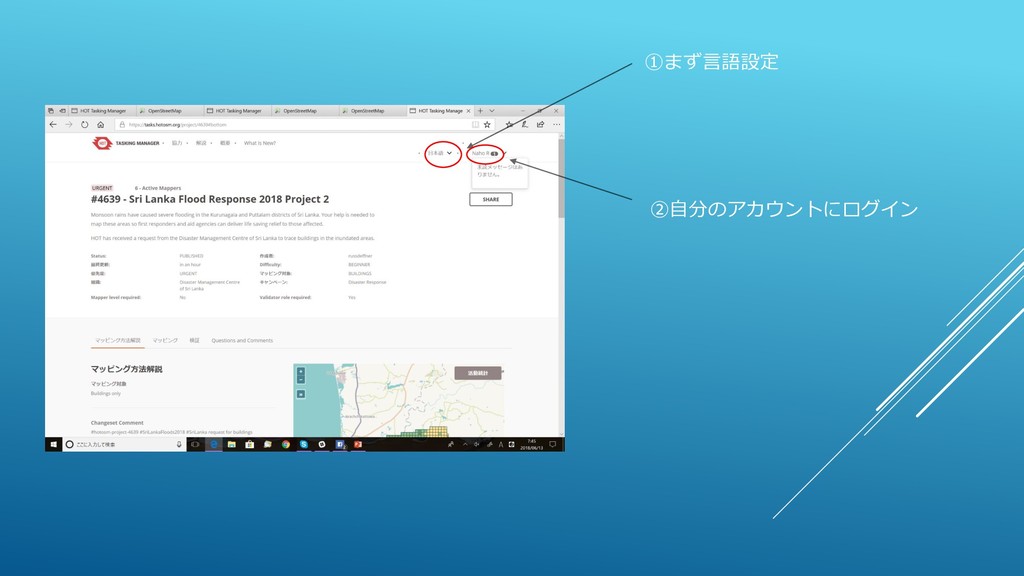
①まず言語設定 ②自分のアカウントにログイン
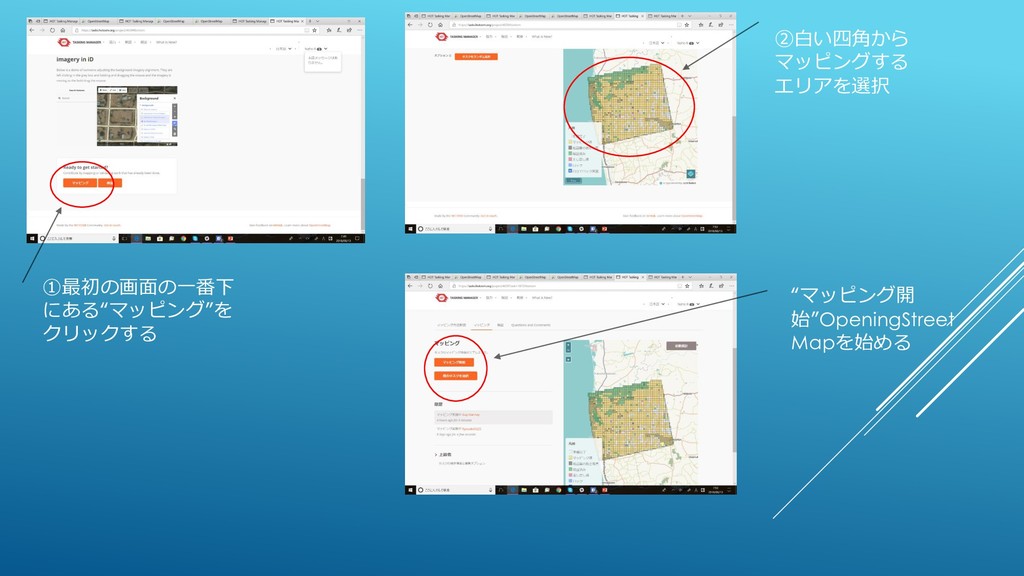
①最初の画面の一番下 にある“マッピング”を クリックする ②白い四角から マッピングする エリアを選択 “マッピング開 始”OpeningStreet Mapを始める
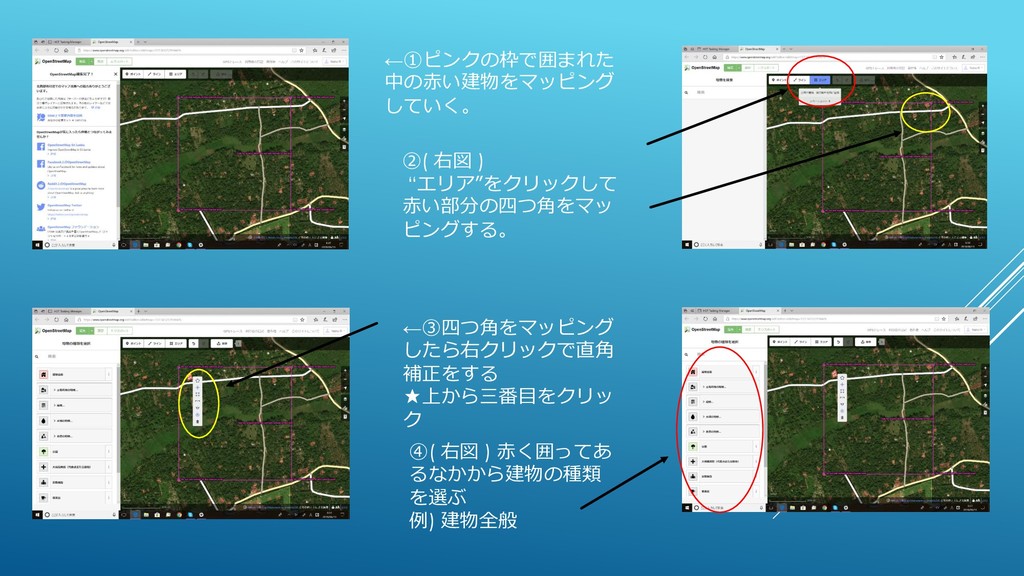
←①ピンクの枠で囲まれた 中の赤い建物をマッピング していく。 ②( 右図 ) “エリア”をクリックして 赤い部分の四つ角をマッ ピングする。 ←③四つ角をマッピング
したら右クリックで直角 補正をする ★上から三番目をクリッ ク ④( 右図 ) 赤く囲ってあ るなかから建物の種類 を選ぶ 例) 建物全般
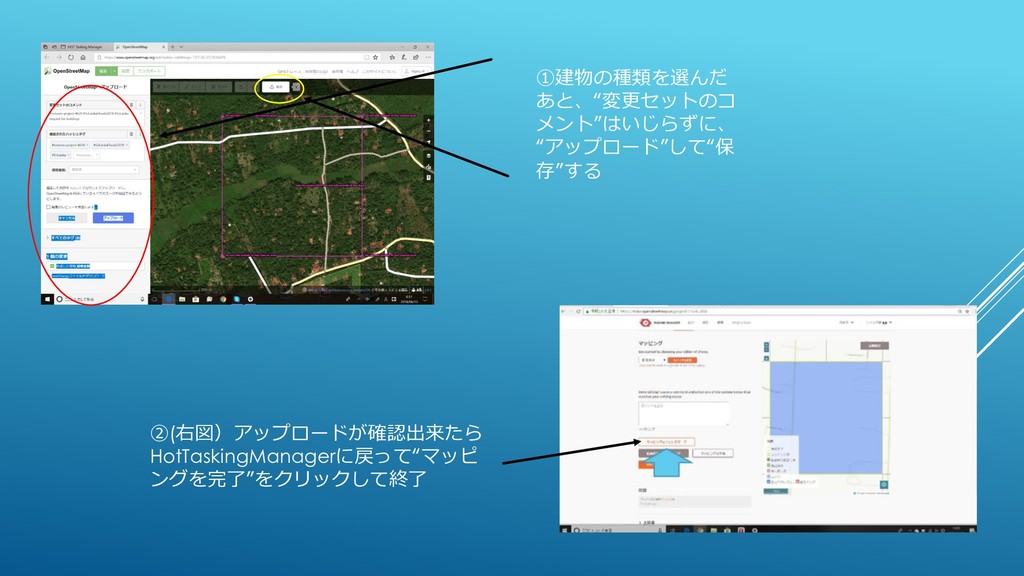
①建物の種類を選んだ あと、“変更セットのコ メント”はいじらずに、 “アップロード”して“保 存”する ②(右図)アップロードが確認出来たら HotTaskingManagerに戻って“マッピ ングを完了”をクリックして終了
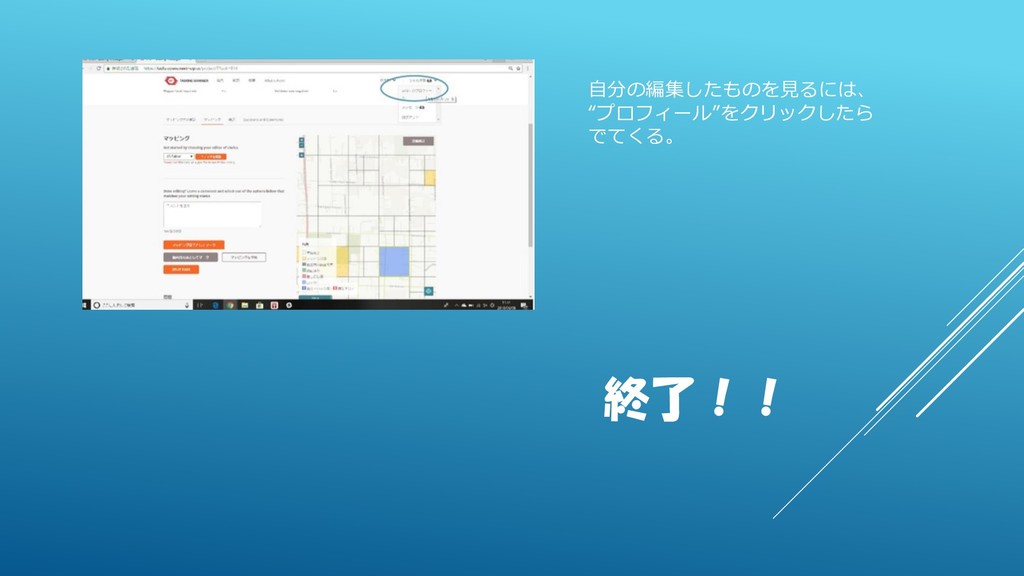
自分の編集したものを見るには、 “プロフィール”をクリックしたら でてくる。 終了!!


 nahor
nahor
 handlename
.jpg) kotomin_m
kotomin_m
 awsjcpm
 syumme01
 tanahiro2010
 n0bisuke2
 east_takumi
 fadis
fadis
 pharaohkj
 reverentgeek
 eileencodes
 jonoalderson
 baasie
 kneath
 sabderemane
 codingconduct
 zakiyama
 jnunemaker
 tmiket
 mkilby
 aleyda