Share
Firebase for Apple Developers
In this talk, we are going to walk you through the building blocks for creating modern applications on Apple’s platforms using SwiftUI and Firebase.
We will cover the following topics:
- Setting up an architecture for data-driven applications
- What’s new in SwiftUI’s application life cycle
- Syncing data in realtime across multiple devices with Cloud Firestore
- Mapping Firestore documents in a type-safe way using the Codable protocol
- Storing images and other large files in Cloud Storage
- Using Firebase in WidgetKit and on watchOS
- How async/await (new in Swift 5.5) will affect the way we write asynchronous code (plus some surprises in Firebase's code base)
Firebase is always evolving, so we will also talk about how we’re making use of Apple’s latest technologies in our own code base, for example
- Combine
- async/await
- SwiftUI view modifiers
No matter if you’re a seasoned Firebase user or just wondering what it is all about, you should leave this session with a deeper understanding of what Firebase it and how you can use it your apps on Apple’s platforms.

Peter Friese
Transcript
140 slides
-
Peter Friese | Developer Advocate, Firebase Charlo!e Liang | So"ware
Engineer, Firebase + Firebase for Apple Developers @charlo!eCLiang @pete#riese -
Architecture Swi!UI 2 Life Cycle Firebase Firestore Authentication Combine async/await
Completion block WidgetKit -
Drill-down navigation Three-column layout (iPad / Mac) Single source of
truth Driving factors UI always in sync -
Challenge #1 This needs to be a binding But this
isn’t a list of bindings -
struct BookShelfView: View { @Binding var bookShelf: BookShelf var body:
some View { List { ForEach(Array(bookShelf.books.enumerated()), id: \.element.id) { index, item in BookRowView(book: $bookShelf.books[index]) } .onDelete { indexSet in bookShelf.books.remove(atOffsets: indexSet) } } .navigationTitle(bookShelf.title) } } Solution #1: iterate over enumerated items ! -
struct BookShelfView: View { @Binding var bookShelf: BookShelf var body:
some View { List { ForEach($bookShelf.books) { $book in BookRowView(book: $book) } .onDelete { indexSet in bookShelf.books.remove(atOffsets: indexSet) } } .navigationTitle(bookShelf.title) } } Solution #1: use list bindings Everything is now bindable -
struct BookEditView: View { @Binding var book: Book @ObservedObject var
bookEditViewModel: BookEditViewModel init(book: Binding<Book>) { self._book = book self.bookEditViewModel = BookEditViewModel(book: book.wrappedValue) } var body: some View { TextField("Book title", text: $bookEditViewModel.book.title) } func save() { self.book = bookEditViewModel.book dismiss() } } Solution 2: use inner @ObservableObject -
class BookEditViewModel: ObservableObject { @Published var book: Book @Published var
isISBNValid: Bool = true init(book: Book) { self.book = book self.$book .map { checkISBN(isbn: $0.isbn) } .assign(to: &$isISBNValid) } } Solution 2: use inner @ObservableObject Bonus: use Combine to perform validation -
Architecture Swi!UI 2 Life Cycle Firebase Firestore Authentication Combine async/await
Completion block WidgetKit -
Run with confidence Crashlytics Performance Monitoring Test Lab App Distribution
Engage users Analytics Predictions Cloud Messaging Remote Config A/B Testing Dynamic Links In-app Messaging Develop apps faster Auth Cloud Functions Cloud Firestore Hosting ML Kit Realtime Database Cloud Storage bit.ly/what-is-firebase Extensions Machine Learning -
SwiftUI 2: No more AppDelegate! import SwiftUI @main struct BookShelfApp:
App { @StateObject var store = BookShelfStore(shelves: BookShelf.samples) var body: some Scene { WindowGroup { NavigationView { BookShelvesView(store: store) Text("Select a shelf to see its books") Text("Select a book to see its details") } } } } -
Solution 1: use initialiser import SwiftUI @main struct BookShelfApp: App
{ @StateObject var store = BookShelfStore(shelves: BookShelf.samples) var body: some Scene { WindowGroup { NavigationView { BookShelvesView(store: store) Text("Select a shelf to see its books") Text("Select a book to see its details") } -
Solution 1: use initialiser import SwiftUI @main struct BookShelfApp: App
{ @StateObject var store = BookShelfStore(shelves: BookShelf.samples) var body: some Scene { WindowGroup { NavigationView { BookShelvesView(store: store) Text("Select a shelf to see its books") Text("Select a book to see its details") } init() { FirebaseApp.configure() } -
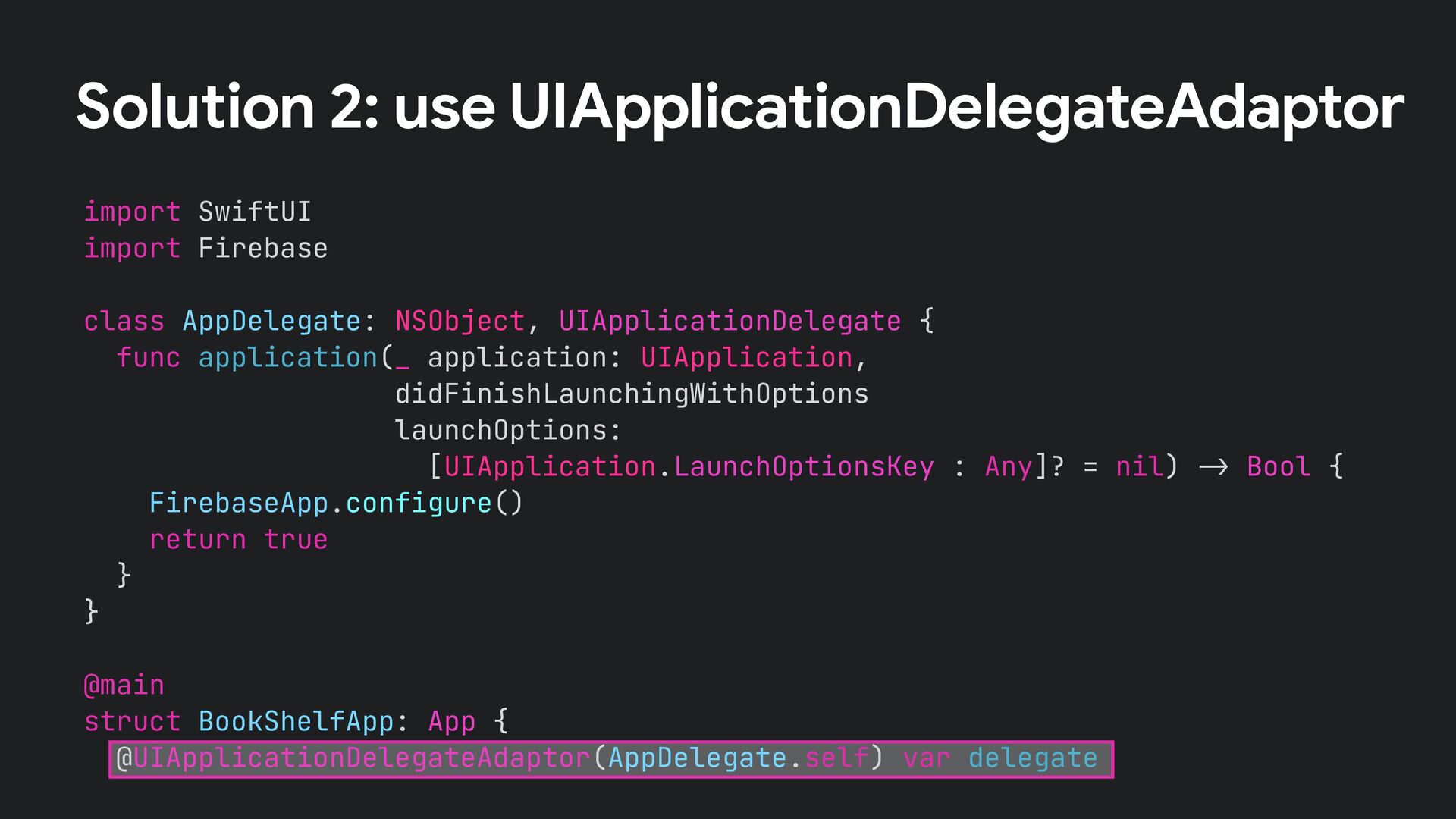
Solution 2: use UIApplicationDelegateAdaptor import SwiftUI import Firebase class AppDelegate:
NSObject, UIApplicationDelegate { func application(_ application: UIApplication, didFinishLaunchingWithOptions launchOptions: [UIApplication.LaunchOptionsKey : Any]? = nil) !" Bool { FirebaseApp.configure() return true } } @main struct BookShelfApp: App { @UIApplicationDelegateAdaptor(AppDelegate.self) var delegate -
Watch the scene phase Handle deep links Continue user activities
Do more with the new life cycle -
Watch the scene phase Handle deep links Continue user activities
Learn more pete#riese.dev/ultimate-guide-to-swi!ui2-application-lifecycle/ -
Architecture Swi!UI 2 Life Cycle Firebase Firestore Authentication Combine async/await
Completion block WidgetKit -
bird_type: airspeed: coconut_capacity: isNative: icon: vector: distances_traveled: "swallow" 42.733 0.62
false <binary data> { x: 36.4255, y: 25.1442, z: 18.8816 } [42, 39, 12, 42] Document -
struct Book: Identifiable { var id = String? var shelfId:
String? var userId: String? var title: String var author: String var isbn: String var pages: Int var isRead: Bool = false var coverEditionKey: String? } Data Model -
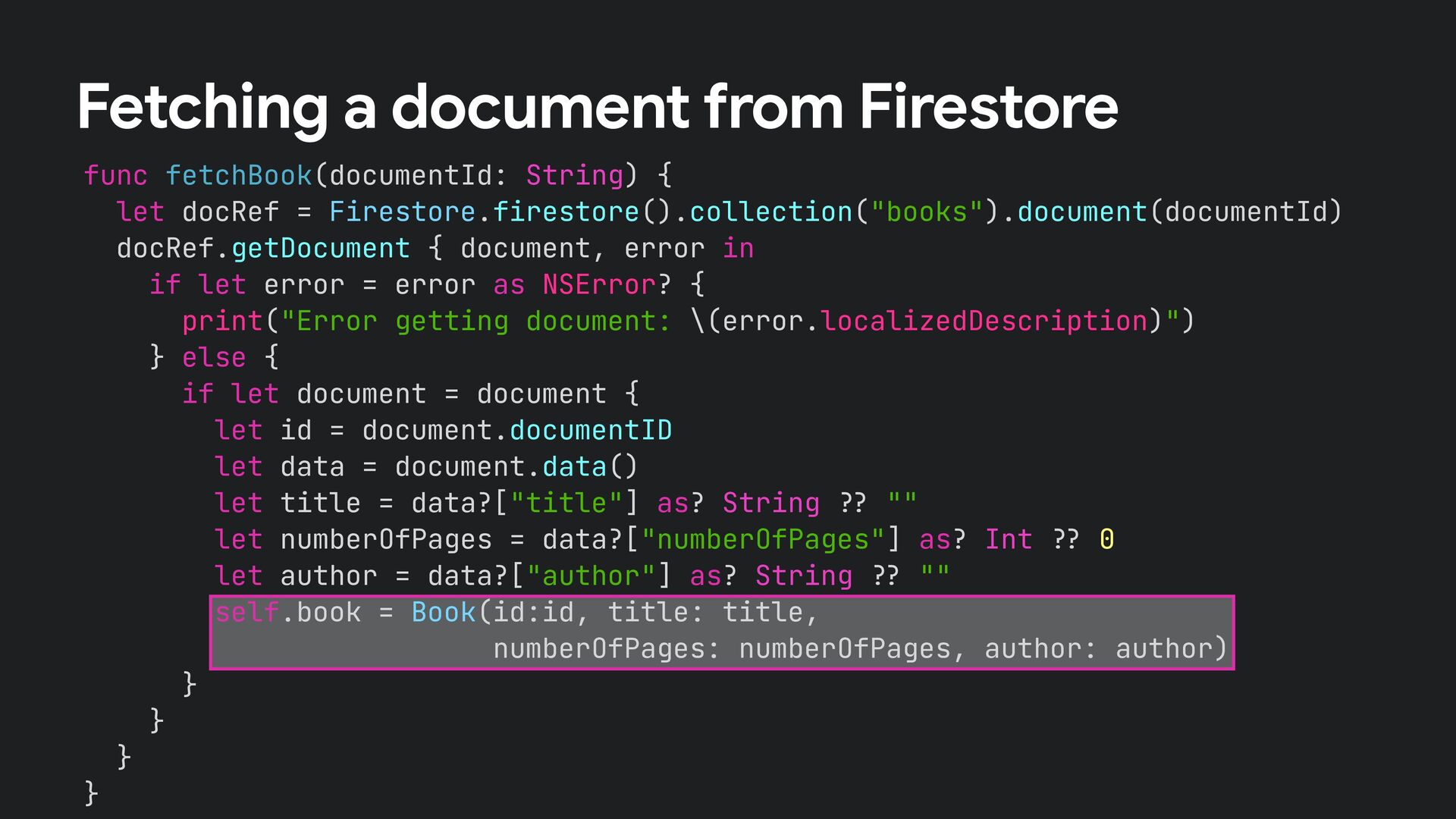
func fetchBook(documentId: String) { let docRef = Firestore.firestore().collection("books").document(documentId) docRef.getDocument {
document, error in if let error = error as NSError? { print("Error getting document: \(error.localizedDescription)") } else { if let document = document { let id = document.documentID let data = document.data() let title = data?["title"] as? String !# "" let numberOfPages = data?["numberOfPages"] as? Int !# 0 let author = data?["author"] as? String !# "" self.book = Book(id:id, title: title, numberOfPages: numberOfPages, author: author) } } } } Fetching a document from Firestore -
func fetchBook(documentId: String) { let docRef = Firestore.firestore().collection("books").document(documentId) docRef.getDocument {
document, error in if let error = error as NSError? { print("Error getting document: \(error.localizedDescription)") } else { if let document = document { let id = document.documentID let data = document.data() let title = data?["title"] as? String !# "" let numberOfPages = data?["numberOfPages"] as? Int !# 0 let author = data?["author"] as? String !# "" self.book = Book(id:id, title: title, numberOfPages: numberOfPages, author: author) } } } } Fetching a document from Firestore if let document = document { let id = document.documentID let data = document.data() let title = data?["title"] as? String !# "" let numberOfPages = data?["numberOfPages"] as? Int !# 0 let author = data?["author"] as? String !# "" self.book = Book(id:id, title: title, numberOfPages: numberOfPages, author: author) } Can we do better? -
func fetchBook(documentId: String) { let docRef = Firestore.firestore().collection("books").document(documentId) docRef.getDocument {
document, error in if let error = error as NSError? { print("Error getting document: \(error.localizedDescription)") } else { if let document = document { let id = document.documentID let data = document.data() let title = data?["title"] as? String !# "" let numberOfPages = data?["numberOfPages"] as? Int !# 0 let author = data?["author"] as? String !# "" self.book = Book(id:id, title: title, numberOfPages: numberOfPages, author: author) } } } } Fetching a document from Firestore -
func fetchBook(documentId: String) { let docRef = Firestore.firestore().collection("books").document(documentId) docRef.getDocument {
document, error in if let error = error as NSError? { print("Error getting document: \(error.localizedDescription)") } else { } } } Mapping data using Codable if let document = document { do { self.book = try document.data(as: Book.self) } catch { print(error) } } -
BookShelfView BookEditView BookDetailsView BookRowView Source of Truth books: [Book] @ObservableObject
@Binding Book Book Book Review: Architecture -
BookShelfView BookDetailsView BookRowView Source of Truth books: [Book] @ObservableObject @Binding
Book Book Review: Architecture Snapshot Listener -
class BookStore: ObservableObject { var db = Firestore.firestore() private var
listenerRegistration: ListenerRegistration? @Published var books = [Book]() func subscribe() { listenerRegistration = db.collection("books") .addSnapshotListener { [weak self] (querySnapshot, error) in guard let documents = querySnapshot!$documents else { return } self!$books = documents.compactMap { queryDocumentSnapshot in let result = Result { try queryDocumentSnapshot.data(as: Book.self) } switch result { case .success(let book): if let book = book { return book Fetching a collection of documents -
import Foundation import Combine import Firebase import FirebaseFirestoreSwift import os
class BookStore: ObservableObject { !% MARK: - Dependencies var db = Firestore.firestore() !% MARK: - Publishers @Published var user: User? @Published var books = [Book]() !% MARK: - Private attributes @Published private var userId: String = "unknown" private var listenerRegistration: ListenerRegistration? private var cancellables = Set<AnyCancellable>() Fetching a collection of documents -
!% A Book value could not be initialized from the
DocumentSnapshot. switch error { case DecodingError.typeMismatch(_, let context): self!$logger.debug("\(error.localizedDescription): \ (context.debugDescription)") case DecodingError.valueNotFound(_, let context): self!$logger.debug("\(error.localizedDescription): \ (context.debugDescription)") case DecodingError.keyNotFound(_, let context): self!$logger.debug("\(error.localizedDescription): \ (context.debugDescription)") case DecodingError.dataCorrupted(let key): self!$logger.debug("\(error.localizedDescription): \ (key.debugDescription)") default: self!$logger.debug("Error decoding document: \ (error.localizedDescription)") } return nil } } } } Fetching a collection of documents -
!% A Book value could not be initialized from the
DocumentSnapshot. switch error { case DecodingError.typeMismatch(_, let context): self!$logger.debug("\(error.localizedDescription): \ (context.debugDescription)") case DecodingError.valueNotFound(_, let context): self!$logger.debug("\(error.localizedDescription): \ (context.debugDescription)") case DecodingError.keyNotFound(_, let context): self!$logger.debug("\(error.localizedDescription): \ (context.debugDescription)") case DecodingError.dataCorrupted(let key): self!$logger.debug("\(error.localizedDescription): \ (key.debugDescription)") default: self!$logger.debug("Error decoding document: \ (error.localizedDescription)") } return nil } } } } Fetching a collection of documents about 100 lines of code -
struct BookShelfView: View { @FirestoreQuery( collectionPath: "books", predicates: [ .where("userId",
isEqualTo: userId), ] ) var books: Result<[Book], Error> @State var userId = "F18EBA5E" var body: some View { List(books) { book in Text(book.title) } } } Firestore Property Wrapper Firebase 8.9.0 @FloWritesCode @mo&enditlevsen Thanks to -
Architecture Swi!UI 2 Life Cycle Firebase Firestore Authentication Combine async/await
Completion block WidgetKit -
Notification Service Extension Noti%cation Service Extension + Firebase Messaging Be!er
visualisation of noti%cations Available in watchOS as well -
Watch the scene phase Handle deep links Continue user activities
Learn more h"ps://%rebase.blog/posts/2019/09/fcm-image-noti%cation -
Firebase + WidgetKit Mini travel blog How to initialise Firebase
How to access Firebase services -
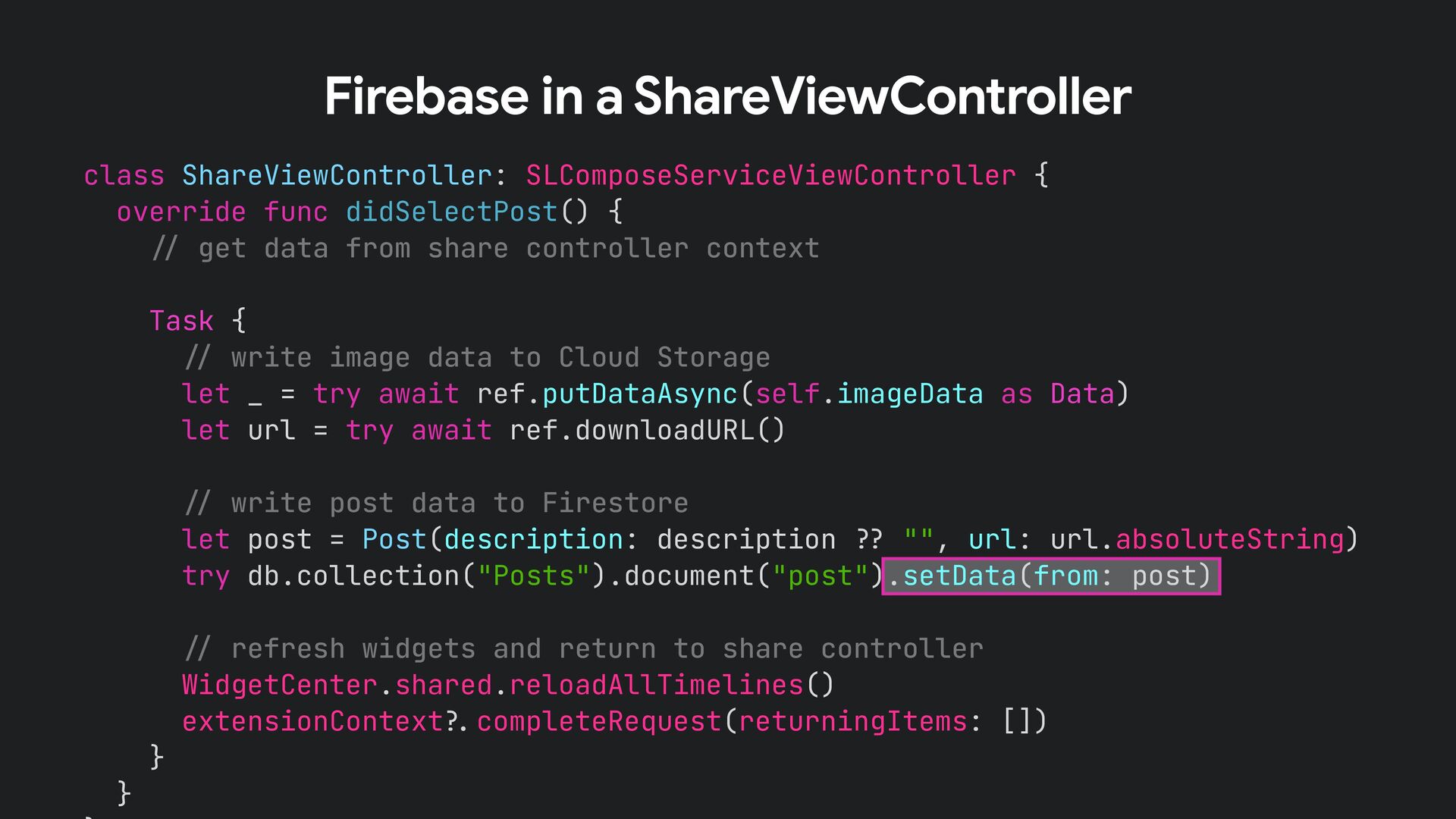
class ShareViewController: SLComposeServiceViewController { override func didSelectPost() { !" get
data from share controller context Task { !" write image data to Cloud Storage let _ = try await ref.putDataAsync(self.imageData as Data) let url = try await ref.downloadURL() !" write post data to Firestore let post = Post(description: description !# "", url: url.absoluteString) try db.collection("Posts").document("post").setData(from: post) !" refresh widgets and return to share controller WidgetCenter.shared.reloadAllTimelines() extensionContext!$completeRequest(returningItems: []) } } Firebase in a ShareViewController -
func getTimeline(for configuration: ConfigurationIntent, in context: Context, completion: @escaping (Timeline<Entry>)
!" Void) { if FirebaseApp.app() !& nil { FirebaseApp.configure() } Task { let (image, text) = try await PostRepository.getPost(imageName: “image.png") let entry = SimpleEntry( date: Calendar.current.date(byAdding: .minute, value: 15, to: Date())!, configuration: configuration, image: image, text: text ) let timeline = Timeline(entries: [entry], policy: .atEnd) completion(timeline) } } Firebase in a Widget -
import FirebaseStorage import FirebaseStorageSwift import FirebaseFirestore import FirebaseFirestoreSwift struct PostRepository
{ static func getPost(imageName: String) async throws !" (UIImage, String) { let ref = Storage.storage().reference().child(imageName) let data = try await ref.data(maxSize: 20 * 1024 * 2048) let image = UIImage(data: data)! let db = Firestore.firestore() let docRef = db.collection("Posts").document("post") let document = try await docRef.getDocument() let post = try document.data(as: Post.self) return (image, post.description) Firebase in a Widget -
Architecture Swi!UI 2 Life Cycle Firebase Firestore Authentication Combine async/await
Completion block WidgetKit -
Sign in the user Update the data model Secure users’
data How to implement Firebase Authentication? -
func signIn() { registerStateListener() if Auth.auth().currentUser !& nil { Auth.auth().signInAnonymously()
} } Anonymous Authentication -
SignInWithAppleButton( onRequest: { !!' }, onCompletion: { result in !!'
let appleIDToken = appleIDCredential.identityToken let idTokenString = String(data: appleIDToken, encoding: .utf8) let credential = OAuthProvider.credential(withProviderID: “apple.com", idToken: idTokenString, rawNonce: nonce) Auth.auth().signIn(with: credential) { (authResult, error) in if (error !( nil) { !!' } print(“User signed in") dismiss() } } ).frame(width: 280, height: 45, alignment: .center) Sign in with Apple -
SignInWithAppleButton( onRequest: { !!' }, onCompletion: { result in !!'
let appleIDToken = appleIDCredential.identityToken let idTokenString = String(data: appleIDToken, encoding: .utf8) let credential = OAuthProvider.credential(withProviderID: “apple.com", idToken: idTokenString, rawNonce: nonce) Auth.auth().signIn(with: credential) { (authResult, error) in if (error !( nil) { !!' } print(“User signed in") dismiss() } } ).frame(width: 280, height: 45, alignment: .center) Sign in with Apple Firebase SDK -
All books are stored in one single collection Which user
do they belong to? -
let query = db.collection("books") .whereField("userId", isEqualTo: self.userId) query .addSnapshotListener {
[weak self] (querySnapsho guard let documents = querySnapshot!$documents els Signed in user -
rules_version = '2'; service cloud.firestore { match /databases/{database}/documents { match
/{document=**} { allow create: if request.auth !( null; allow read, update, delete: if request.auth !( null !) resource.data.userId !& request.auth.uid; } } } Security Rules Only signed-in users can create new documents Only owners may read and modify a document -
Architecture Swi!UI 2 Life Cycle Firebase Firestore Authentication Combine async/await
Completion block WidgetKit -
auth!$signInAnonymously() let user = auth!$currentUser print("User signed in with user
ID: \(user!$uid)") This might be nil -
auth!$signInAnonymously() let user = auth!$currentUser print("User signed in with user
ID: \(user!$uid)") auth!$signInAnonymously { result, error in guard let result = result else { return } print("User signed in with user ID: \(result.user.uid)") } Do this instead -
auth!$signInAnonymously() let user = auth!$currentUser print("User signed in with user
ID: \(user!$uid)") auth!$signInAnonymously { result, error in guard let result = result else { return } print("User signed in with user ID: \(result.user.uid)") } @Published var user: User? !!' auth!$signInAnonymously() .map{ $0.user } .replaceError(with: nil) .assign(to: &$user) Even better -
Architecture Swi!UI 2 Life Cycle Firebase Firestore Authentication Combine async/await
Completion block WidgetKit -
extension ArticleAnalyser { func process(url: String, completion: @escaping (Article) !"
Void) { self.fetchArticle(from: url) { result in switch result { case .failure(let error): print(error.localizedDescription) case .success(let html): self.extractTitle(from: html) { result in switch result { case .failure(let error): print(error.localizedDescription) case .success(let title): self.extractText(from: html) { result in switch result { case .failure(let error): print(error.localizedDescription) case .success(let text): self.extractImage(from: url) { result in Problem: Callback Pyramid of Doom -
extension AsyncArticleAnalyser { func process(url: String) async throws !" Article
{ let htmlText = try await fetchArticle(from: url) let text = try await extractText(from: htmlText) let title = try await extractTitle(from: htmlText) let imageUrl = try await extractImage(from: url) let tags = await inferTags(from: text) return Article(url: url, title: title, tags: tags, imageUrlString: imageUrl) } } Solution: Use async/await Swift 5.5 -
func fetchArticle(from url: String) async throws !" String { guard
let url = URL(string: url) else { throw AnalyserError.badURL } return try await withUnsafeThrowingContinuation { continuation in URLSession.shared.downloadTask(with: url) { (localUrl, urlResponse, error) in guard let localUrl = localUrl else { continuation.resume(throwing: AnalyserError.badURL) return } if let htmlText = try? String(contentsOf: localUrl) { continuation.resume(returning: htmlText) } } .resume() } } Solution: Use async/await Swift 5.5 -
auth!$signInAnonymously { result, error in guard let result = result
else { return } print("User signed in with user ID: \(result.user.uid)") } do { let result = try await Auth.auth().signIn(withEmail: email, password: password) print("User signed in with user ID: \(result.user.uid)") } catch { print(error) } Works with Firebase, too! Callback-style -
Architecture Swi!UI 2 Life Cycle Firebase Firestore Authentication Combine async/await
Completion block WidgetKit -
Architecture Swi!UI 2 Life Cycle Firebase Firestore Authentication Combine async/await
Completion block WidgetKit -
Credits %nish by Megan Chown from the Noun Project Time
by Nikita Kozin from the Noun Project pipe by Komkrit Noenpoempisut from the Noun Project Passpo& by ProSymbols from the Noun Project spiral by Alexander Skowalsky from the Noun Project Architecture by Ervin Bolat from the Noun Project Firebase logos cou&esy h"ps://%rebase.google.com/brand-guidelines Firebase logos cou&esy h"ps://%rebase.google.com/brand-guidelines Thanks! Hea& by Roman from the Noun Project Dashboard by BomSymbols from the Noun Project
 peterfriese
 usagi0920_pochi
 shiita0903
 ktombow
 rkaga
 dalinaum
 akihisaikeda
 bicstone
 har1101
 veronikapj
 yosuke_furukawa
 csswizardry
 helenjbeal
 axbom
 nikkihalliwell
 livdayseo
 stephenakadiri
 samlambert
 varn
 zakiyama
 keathley
 honnibal
 michaelherold