Upgrade to Pro — share decks privately, control downloads, hide ads and more …

2FA, WTF? (Topconf Linz 2016)

Phil Nash
February 03, 2016

2FA, WTF? (Topconf Linz 2016)

Everyone is hacking everything. Everything is vulnerable. Your site, your users, even you. Are you worried about this? You should be! Don't worry, Phil is not trying to scare you (that much). You have plenty of safeguards against attempts on your applications' user data. We all (hopefully) recognise Two Factor Auth as one of those safeguards, but what actually goes on under the hood of 2FA?

You will discover how to generate one-time passwords and implement 2FA in your applications, and hear the only real-life compelling use case for QR codes. Together, we'll make the web a more secure place.

----

Links:

notp package: https://www.npmjs.com/package/notp

Authy: https://www.authy.com/developers/
Tutorial on implementing Authy with Node and Express: https://www.twilio.com/docs/tutorials/walkthrough/two-factor-authentication/node/express
Authy OneTouch: https://www.authy.com/product/options/#onetouch

Top passwords 2015: https://www.teamsid.com/worst-passwords-2015/
Ashley Madison passwords: http://cynosureprime.blogspot.ie/2015/09/how-we-cracked-millions-of-ashley.html

Phil Nash

February 03, 2016
Tweet

More Decks by Phil Nash

Other Decks in Programming

Transcript

  1. 2FA, WTF?

    View Slide

  2. HACKERS

    View Slide

  3. ARE

    View Slide

  4. EVERYWHERE

    View Slide

  5. View Slide

  6. View Slide

  7. View Slide

  8. Phil Nash
    @philnash
    h p:/
    /philna.sh
    [email protected]

    View Slide

  9. 2FA, WTF?

    View Slide

  10. TWO FACTOR
    AUTHENTICATION

    View Slide

  11. Two Factor Authen ca on
    2FA is a security process in which a user provides
    two different forms of iden fica on in order to
    authen cate themself with a system.
    The two forms must come from different categories.
    Normally something you know and something you
    have.

    View Slide

  12. WHY?

    View Slide

  13. MAT HONAN

    View Slide

  14. Mat Honan's Hackers' Timeline
    1.  Found Gmail address on his personal site
    2.  Entered address in Gmail and found his @me.com
    back up email
    3.  Called Amazon to add a credit card to file
    4.  Called Amazon again to reset password and got
    access
    5.  4:33pm: called Apple to reset password
    6.  4:50pm: reset AppleID password and gained access
    to email

    View Slide

  15. Mat Honan's Hackers' Timeline
    7.  4:52pm: reset Gmail account password
    8.  5:01pm: wiped iPhone
    9.  5:02pm: reset Twi er password
    10.  5:05pm: wiped MacBook and deleted Google
    account
    11.  5:12pm: posted to Twi er taking credit for the hack

    View Slide

  16. @MAT

    View Slide

  17. WHY?

    View Slide

  18. View Slide

  19. ASHLEY MADISON

    View Slide

  20. Ashley Madison Top 10 Passwords
    1.  123456
    2.  12345
    3.  password
    4.  DEFAULT
    5.  123456789
    6.  qwerty
    7.  12345678
    8.  abc123
    9.  NSFW
    10.  1234567

    View Slide

  21. Ashley Madison Top 10 Passwords
    1.  123456 ‐ 120,511 users
    2.  12345 ‐ 48,452 users
    3.  password ‐ 39,448 users
    4.  DEFAULT ‐ 34,275 users
    5.  123456789 ‐ 26,620 users
    6.  qwerty ‐ 20,778 users
    7.  12345678 ‐ 14,172 users
    8.  abc123 ‐ 10,869 users
    9.  NSFW ‐ 10,683 users
    10.  1234567 ‐ 9,468 users
    Source: h p:/
    /qz.com/501073/the‐top‐100‐passwords‐on‐ashley‐madison/

    View Slide

  22. HOW?

    View Slide

  23. User Registra on Flow
    1.  Visit registra on page
    2.  Sign up with username and password
    3.  User is logged in

    View Slide

  24. User Log In Flow
    1.  Visit login page
    2.  Enter username and password
    3.  System verifies details
    4.  User is logged in

    View Slide

  25. SMS

    View Slide

  26. User Registra on Flow
    1.  Visit registra on page
    2.  Sign up with username, password and phone nunber
    3.  User is logged in

    View Slide

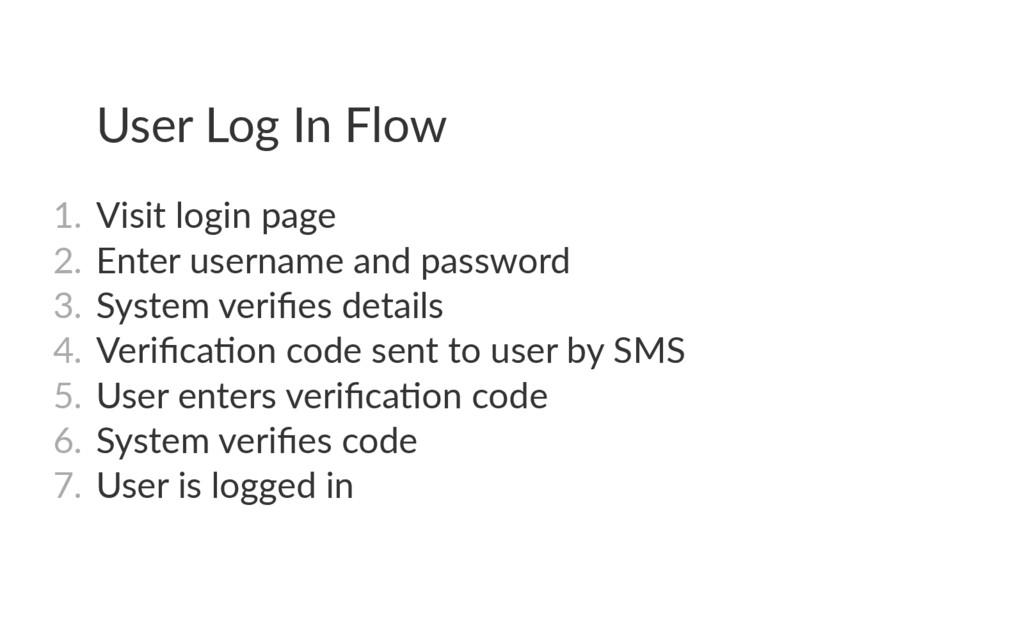
  27. User Log In Flow
    1.  Visit login page
    2.  Enter username and password
    3.  System verifies details
    4.  Verifica on code sent to user by SMS
    5.  User enters verifica on code
    6.  System verifies code
    7.  User is logged in

    View Slide

  28. PROS/CONS

    View Slide

  29. SOFT TOKEN

    View Slide

  30. User Registra on Flow
    1.  Visit registra on page
    2.  Sign up with username, password
    3.  Generate a secret for the user
    4.  Share the secret somehow
    5.  User is logged in

    View Slide

  31. User Log In Flow
    1.  Visit login page
    2.  Enter username and password
    3.  System verifies details
    4.  User opens auth app
    5.  User finds app verifica on code and enters on site
    6.  System verifies code
    7.  User is logged in

    View Slide

  32. SECRETS

    View Slide

  33. HOTP/TOTP

    View Slide

  34. HOTP
    H
    O
    T
    P
    (
    K
    ,
    C
    ) = T
    r
    u
    n
    c
    a
    t
    e
    (
    H
    M
    A
    C
    (
    K
    ,
    C
    )
    ) & 0
    x
    7
    F
    F
    F
    F
    F
    F
    F
    H
    O
    T
    P
    -
    V
    a
    l
    u
    e = H
    O
    T
    P
    (
    K
    ,
    C
    ) m
    o
    d 1
    0
    d

    View Slide

  35. h ps:/
    /github.com/guyht/notp

    View Slide

  36. TOTP

    View Slide

  37. DEMO

    View Slide

  38. SHARING
    SECRETS

    View Slide

  39. QR code
    otpauth:/
    /TYPE/LABEL?PARAMETERS
    otpauth:/
    /totp/Example:[email protected]?secret=JBSWY3DPEHPK3PXP&issuer=Example

    View Slide

  40. View Slide

  41. PROS/CONS

    View Slide

  42. CAN IT BE
    BETTER?

    View Slide

  43. FRIENDS DON'T LET
    FRIENDS WRITE THEIR
    OWN AUTHENTICATION
    FRAMEWORKS

    View Slide

  44. FRIENDS DON'T LET
    FRIENDS WRITE THEIR
    OWN TWO FACTOR
    AUTHENTICATION
    FRAMEWORKS

    View Slide

  45. View Slide

  46. User Registra on Flow
    1.  Visit registra on page
    2.  Sign up with username, password and phone nunber
    3.  System registers User with Authy
    4.  User is logged in

    View Slide

  47. User Log In Flow
    1.  Visit login page
    2.  Enter username and password
    3.  System verifies details
    4.  Authy prompts user
    5.  User finds app verifica on code and enters on site
    6.  System verifies code with Authy
    7.  User is logged in

    View Slide

  48. THE FUTURE

    View Slide

  49. PUSH
    NOTIFICATIONS

    View Slide

  50. View Slide

  51. PROS/CONS

    View Slide

  52. SUMMARY

    View Slide

  53. USERS ARE
    BAD WITH
    PASSWORDS

    View Slide

  54. OTHER
    WEBSITES ARE
    BAD WITH
    PASSWORDS

    View Slide

  55. 2FA CAN BE
    PUSH, TOKEN
    OR SMS

    View Slide

  56. 2FA IS FOR
    YOUR USERS

    View Slide

  57. View Slide

  58. THANKS!

    View Slide

  59. View Slide

  60. Thanks!
    @philnash
    h p:/
    /philna.sh
    [email protected]

    View Slide