Upgrade to Pro — share decks privately, control downloads, hide ads and more …

AWS Infrastructure as Code の新機能 2025 総まとめ ~ SA ...

Sponsored · Ship Features Fearlessly Turn features on and off without deploys. Used by thousands of Ruby developers.
Avatar for Kenji Kono Kenji Kono
February 24, 2026

AWS Infrastructure as Code の新機能 2025 総まとめ ~ SA 4人による怒涛のデモ祭り ~

AWS Infrastructure as Code (IaC) の2025年の主要なアップデート紹介です。IaC MCP Server, CDK CLI の新しいオプション (--yes, --package-managerなど), CloudFormation Drift-Aware Change Sets, CDK Refactorなどを説明しています。

『JAWS-UG CDK支部#24 2025年のAWS CDKアップデート振り返り』で、同じくSAの Anan Kikuchi, Hiroki Yamazaki, Yukihiro Yoshikawa-san と一緒にお話しました!

Avatar for Kenji Kono

Kenji Kono

February 24, 2026
Tweet

More Decks by Kenji Kono

Other Decks in Programming

Transcript

  1. © 2024, Amazon Web Services, Inc. or its affiliates. All

    rights reserved. AWS Infrastructure as Code の 新機能 2025 総まとめ ~ SA 4⼈による怒涛のデモ祭り ~ Kenji Kono / Yukihiro Yoshikawa / Hiroki Yamazaki / Anan Kikuchi ソリューション アーキテクト アマゾン ウェブ サービス ジャパン合同会社 2026/2/24 1
  2. © 2024, Amazon Web Services, Inc. or its affiliates. All

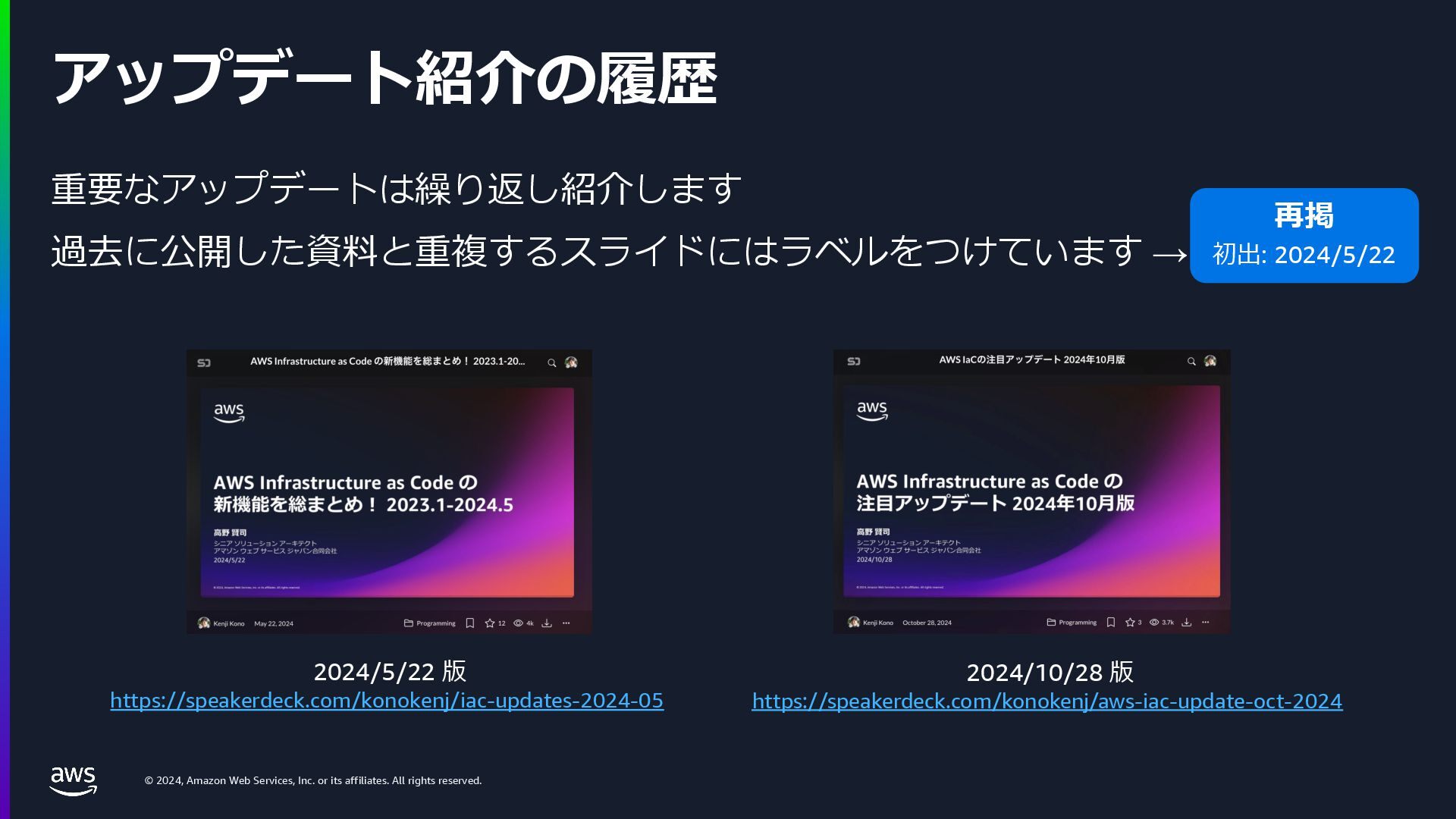
    rights reserved. アップデート紹介の履歴 重要なアップデートは繰り返し紹介します 過去に公開した資料と重複するスライドにはラベルをつけています → 2024/5/22 版 https://speakerdeck.com/konokenj/iac-updates-2024-05 再掲 初出: 2024/5/22 2024/10/28 版 https://speakerdeck.com/konokenj/aws-iac-update-oct-2024
  3. © 2024, Amazon Web Services, Inc. or its affiliates. All

    rights reserved. IaC 全般 / 開発ツールのアップデート
  4. © 2024, Amazon Web Services, Inc. or its affiliates. All

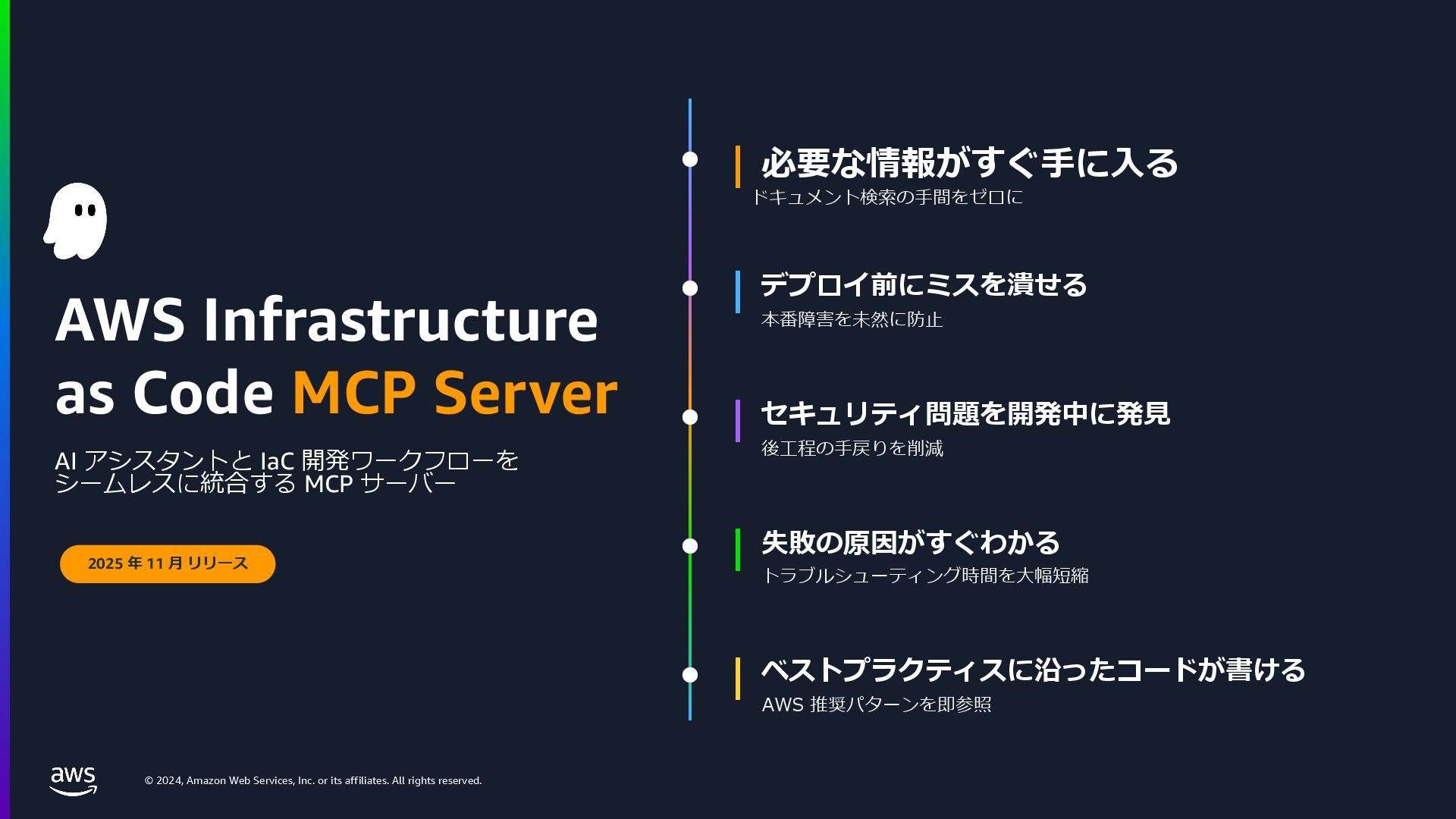
    rights reserved. AWS Infrastructure as Code MCP Server AI アシスタントと IaC 開発ワークフローを シームレスに統合する MCP サーバー 2025 年 11 ⽉ リリース 必要な情報がすぐ⼿に⼊る デプロイ前にミスを潰せる セキュリティ問題を開発中に発⾒ 失敗の原因がすぐわかる ベストプラクティスに沿ったコードが書ける ドキュメント検索の⼿間をゼロに 本番障害を未然に防⽌ 後⼯程の⼿戻りを削減 トラブルシューティング時間を⼤幅短縮 AWS 推奨パターンを即参照
  5. © 2024, Amazon Web Services, Inc. or its affiliates. All

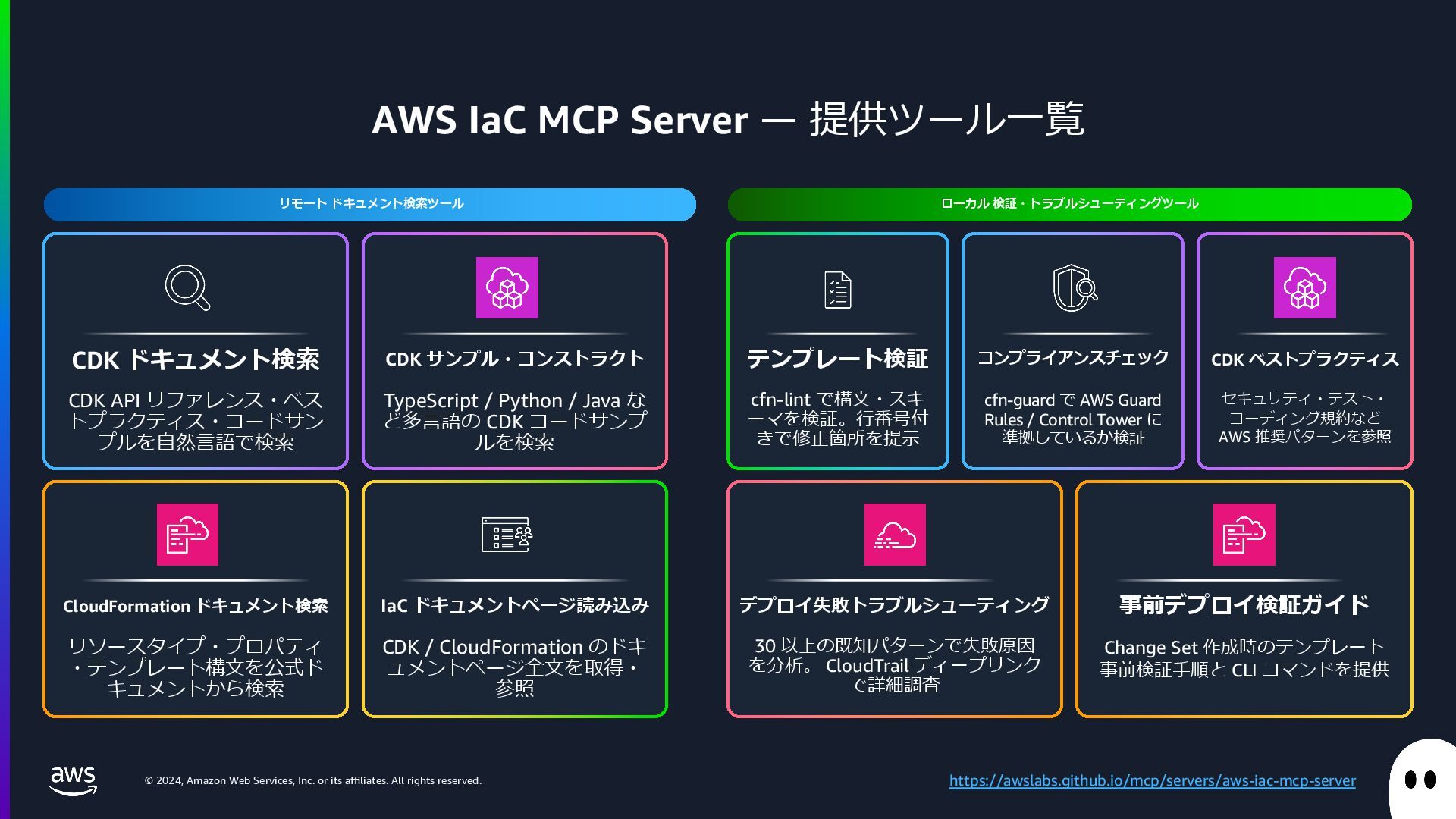
    rights reserved. AWS IaC MCP Server ̶ 提供ツール⼀覧 リモート ドキュメント検索ツール ローカル 検証・トラブルシューティングツール CDK ドキュメント検索 CDK API リファレンス・ベス トプラクティス・コードサン プルを⾃然⾔語で検索 CDK サンプル・コンストラクト TypeScript / Python / Java な ど多⾔語の CDK コードサンプ ルを検索 CloudFormation ドキュメント検索 リソースタイプ・プロパティ ・テンプレート構⽂を公式ド キュメントから検索 IaC ドキュメントページ読み込み CDK / CloudFormation のドキ ュメントページ全⽂を取得・ 参照 テンプレート検証 cfn-lint で構⽂・スキ ーマを検証。⾏番号付 きで修正箇所を提⽰ コンプライアンスチェック cfn-guard で AWS Guard Rules / Control Tower に 準拠しているか検証 CDK ベストプラクティス セキュリティ・テスト・ コーディング規約など AWS 推奨パターンを参照 デプロイ失敗トラブルシューティング 30 以上の既知パターンで失敗原因 を分析。 CloudTrail ディープリンク で詳細調査 事前デプロイ検証ガイド Change Set 作成時のテンプレート 事前検証⼿順と CLI コマンドを提供 https://awslabs.github.io/mcp/servers/aws-iac-mcp-server
  6. © 2024, Amazon Web Services, Inc. or its affiliates. All

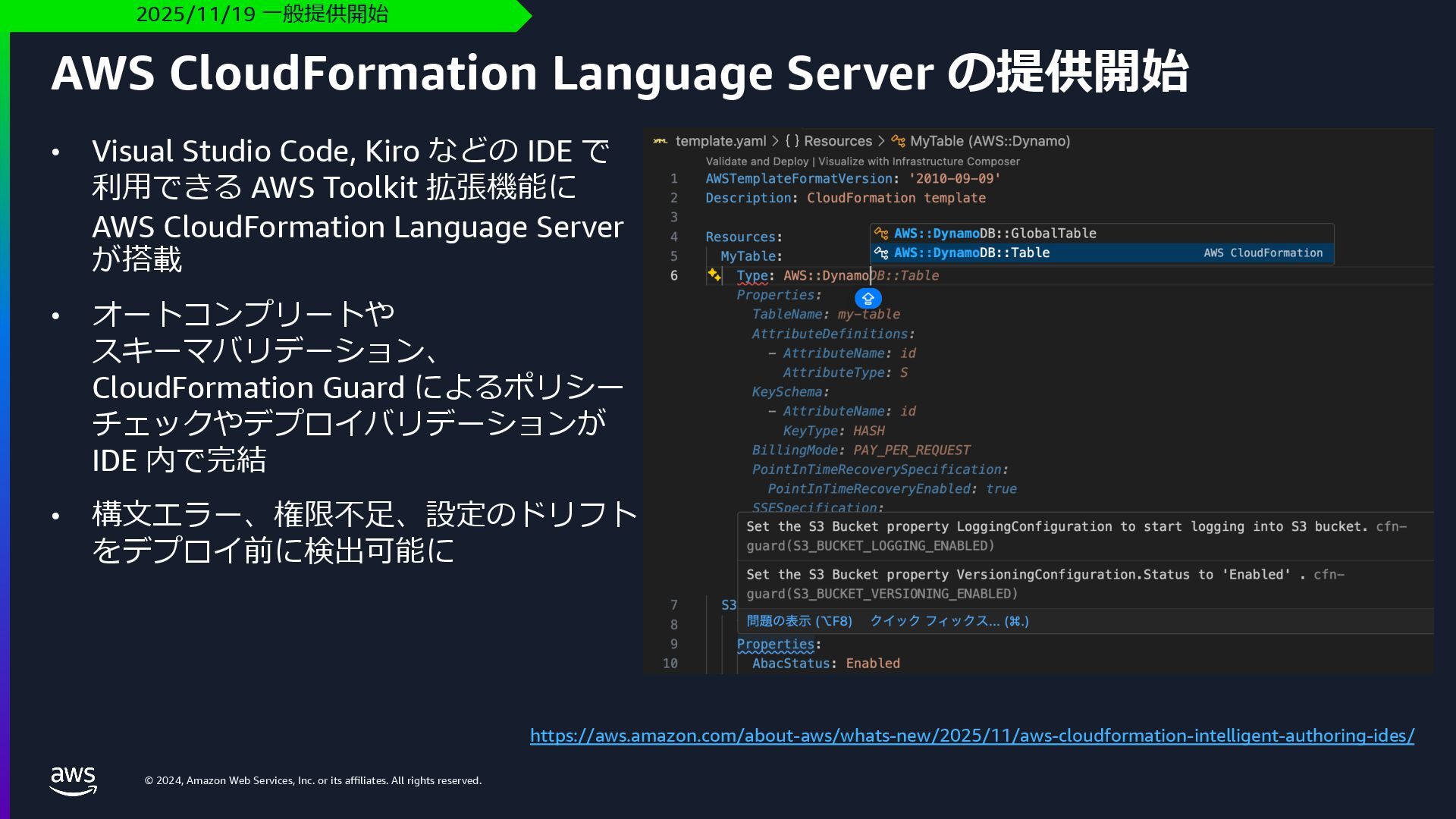
    rights reserved. AWS CloudFormation Language Server の提供開始 2025/11/19 ⼀般提供開始 https://aws.amazon.com/about-aws/whats-new/2025/11/aws-cloudformation-intelligent-authoring-ides/ • Visual Studio Code, Kiro などの IDE で 利⽤できる AWS Toolkit 拡張機能に AWS CloudFormation Language Server が搭載 • オートコンプリートや スキーマバリデーション、 CloudFormation Guard によるポリシー チェックやデプロイバリデーションが IDE 内で完結 • 構⽂エラー、権限不⾜、設定のドリフト をデプロイ前に検出可能に
  7. © 2024, Amazon Web Services, Inc. or its affiliates. All

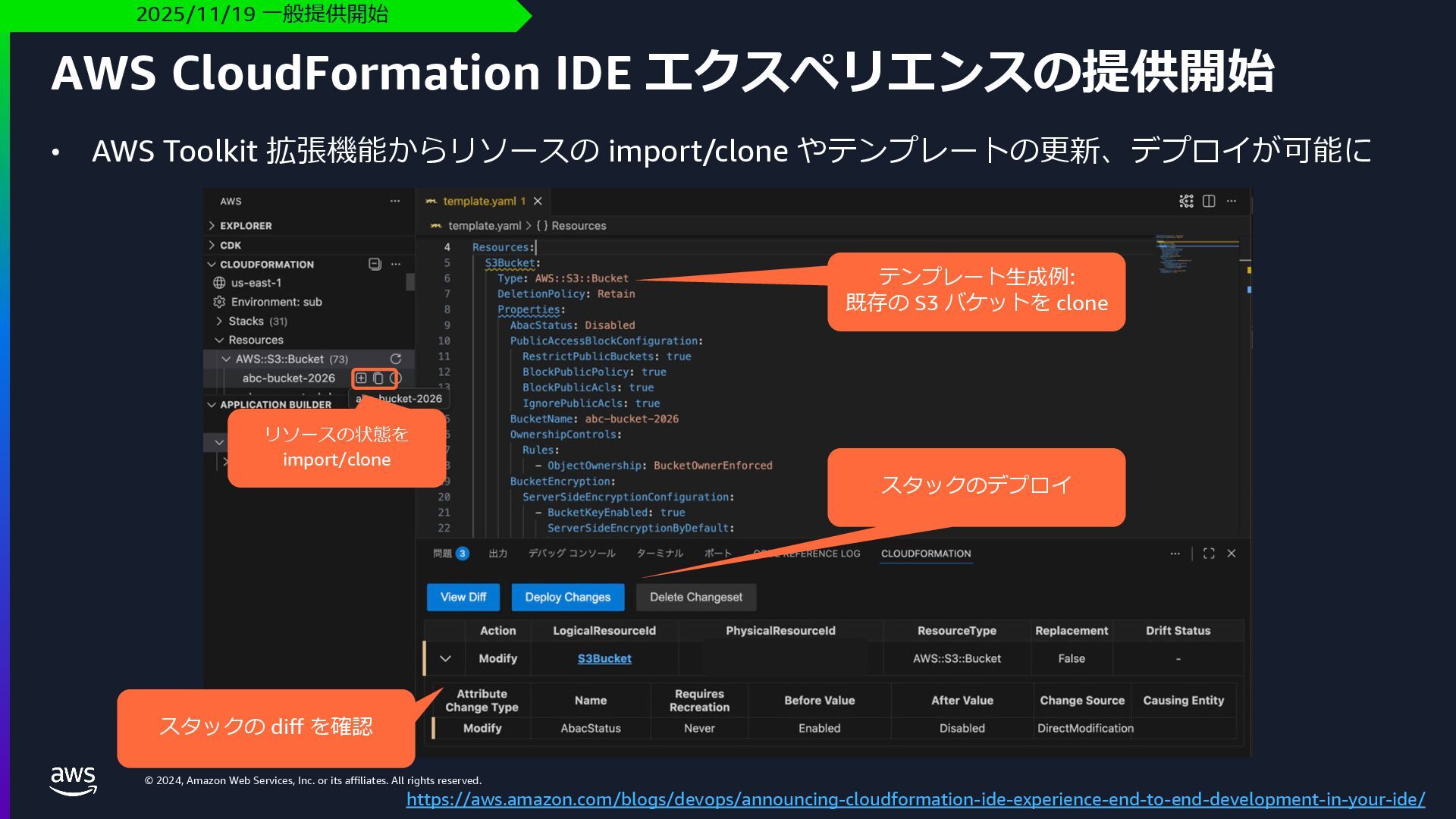
    rights reserved. AWS CloudFormation IDE エクスペリエンスの提供開始 2025/11/19 ⼀般提供開始 https://aws.amazon.com/blogs/devops/announcing-cloudformation-ide-experience-end-to-end-development-in-your-ide/ • AWS Toolkit 拡張機能からリソースの import/clone やテンプレートの更新、デプロイが可能に リソースの状態を import/clone テンプレート⽣成例: 既存の S3 バケットを clone スタックの diff を確認 スタックのデプロイ
  8. © 2024, Amazon Web Services, Inc. or its affiliates. All

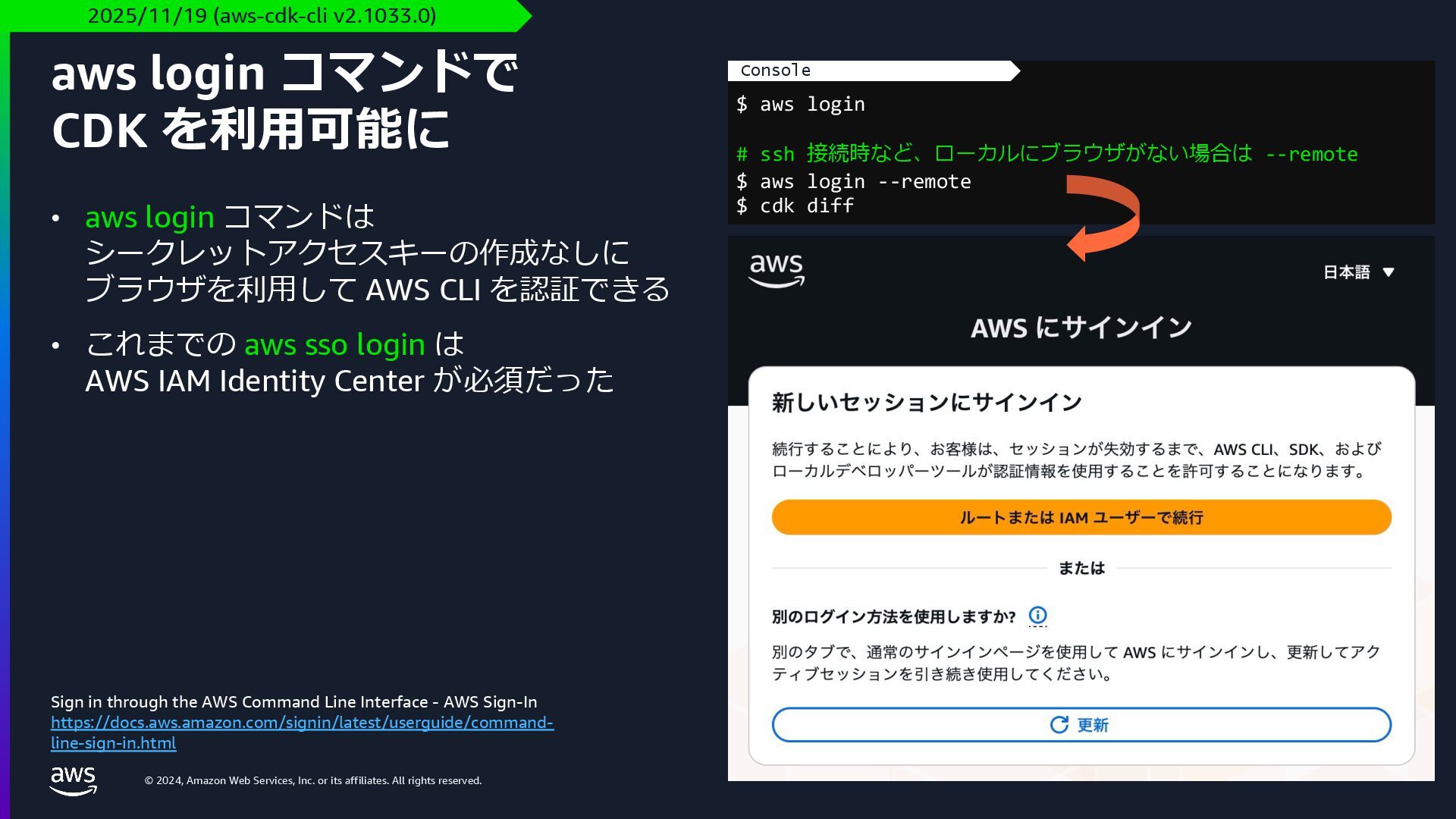
    rights reserved. • aws login コマンドは シークレットアクセスキーの作成なしに ブラウザを利⽤して AWS CLI を認証できる • これまでの aws sso login は AWS IAM Identity Center が必須だった aws login コマンドで CDK を利⽤可能に 2025/11/19 (aws-cdk-cli v2.1033.0) Sign in through the AWS Command Line Interface - AWS Sign-In https://docs.aws.amazon.com/signin/latest/userguide/command- line-sign-in.html $ aws login # ssh 接続時など、ローカルにブラウザがない場合は --remote $ aws login --remote $ cdk diff Console
  9. © 2024, Amazon Web Services, Inc. or its affiliates. All

    rights reserved. AWS CDK CLI のアップデート
  10. © 2024, Amazon Web Services, Inc. or its affiliates. All

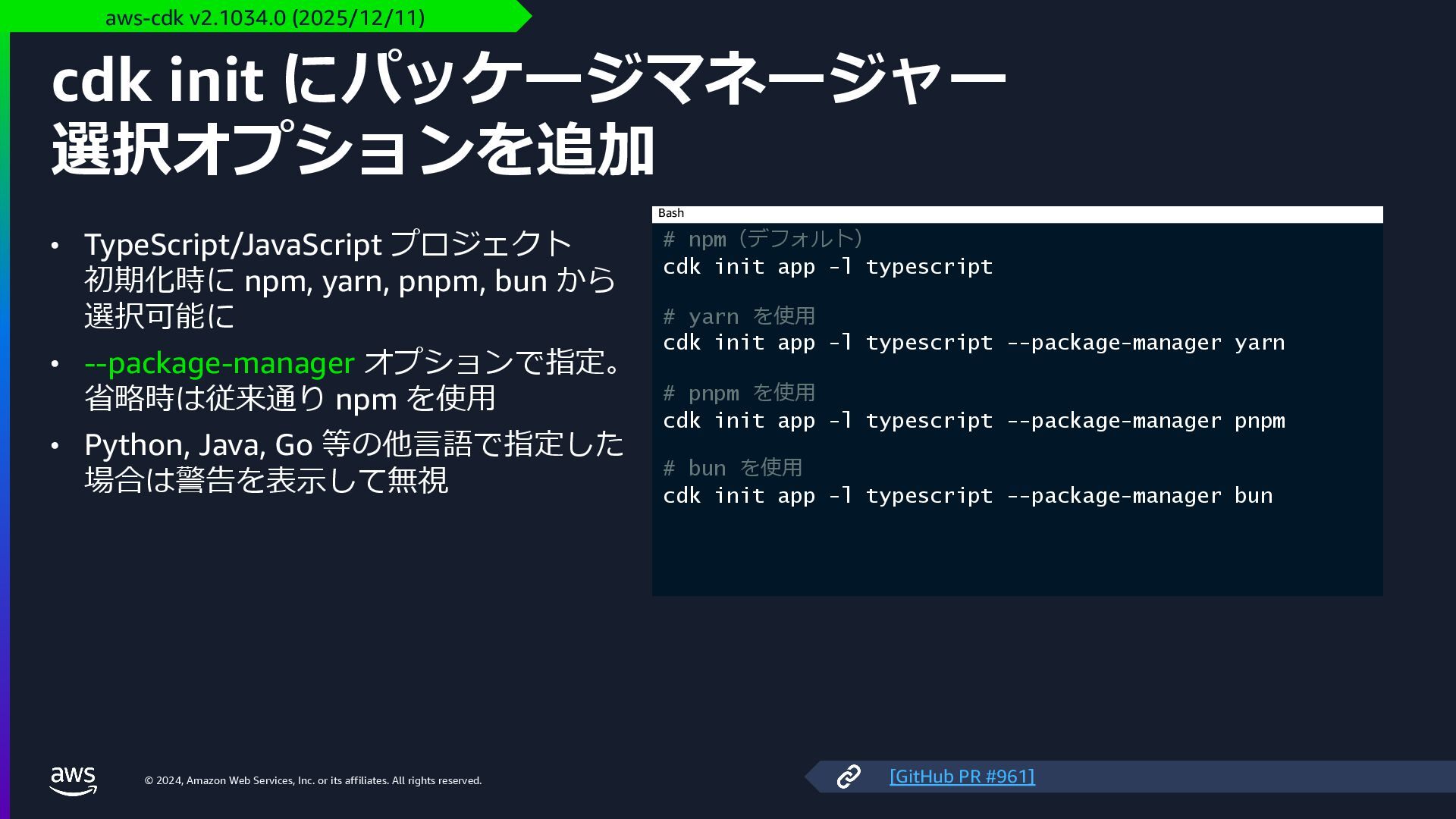
    rights reserved. cdk init にパッケージマネージャー 選択オプションを追加 • TypeScript/JavaScript プロジェクト 初期化時に npm, yarn, pnpm, bun から 選択可能に • --package-manager オプションで指定。 省略時は従来通り npm を使⽤ • Python, Java, Go 等の他⾔語で指定した 場合は警告を表⽰して無視 aws-cdk v2.1034.0 (2025/12/11) # npm(デフォルト) cdk init app -l typescript # yarn を使⽤ cdk init app -l typescript --package-manager yarn # pnpm を使⽤ cdk init app -l typescript --package-manager pnpm # bun を使⽤ cdk init app -l typescript --package-manager bun Bash [GitHub PR #961]
  11. © 2024, Amazon Web Services, Inc. or its affiliates. All

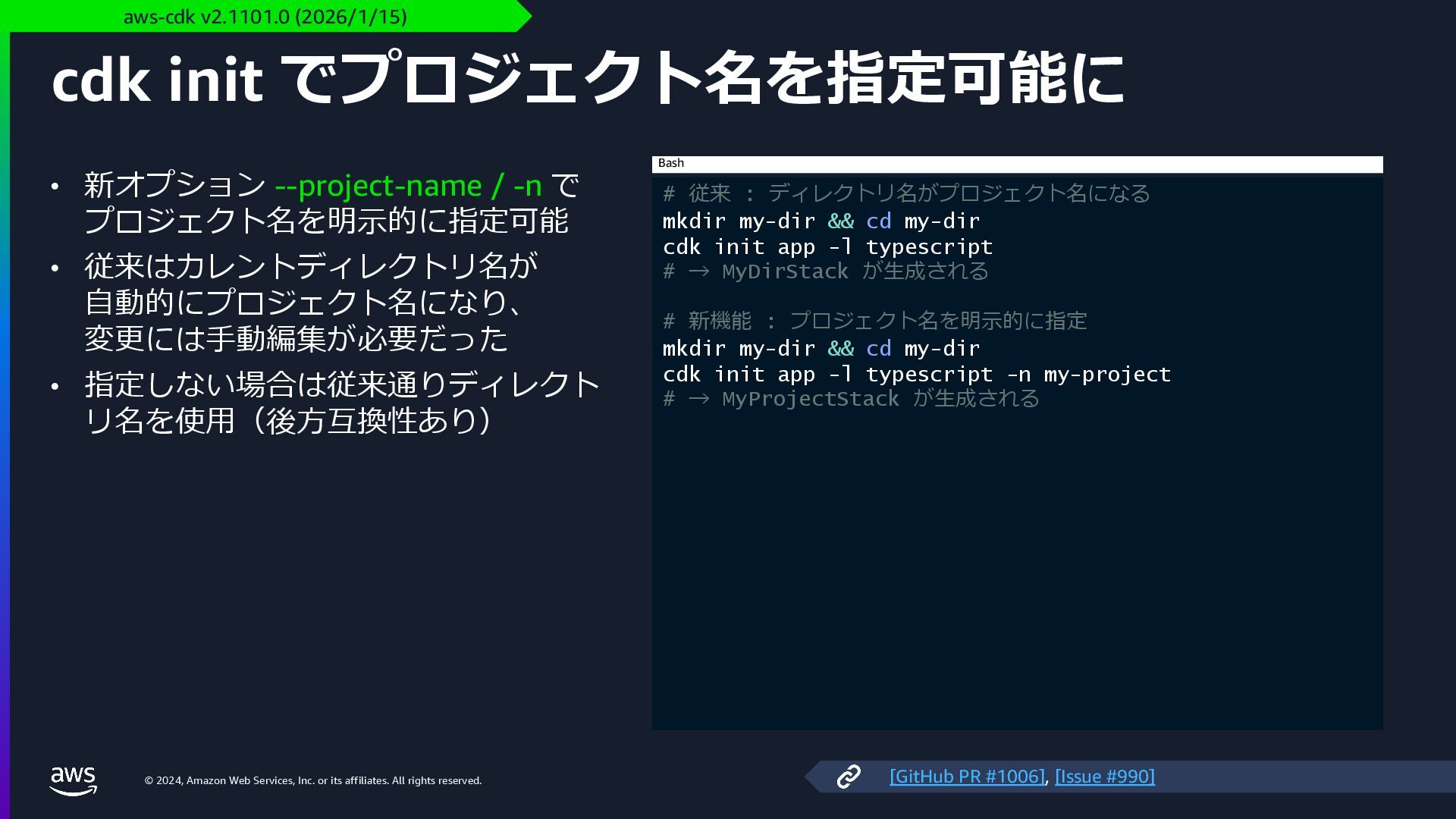
    rights reserved. cdk init でプロジェクト名を指定可能に • 新オプション --project-name / -n で プロジェクト名を明⽰的に指定可能 • 従来はカレントディレクトリ名が ⾃動的にプロジェクト名になり、 変更には⼿動編集が必要だった • 指定しない場合は従来通りディレクト リ名を使⽤(後⽅互換性あり) aws-cdk v2.1101.0 (2026/1/15) # 従来 : ディレクトリ名がプロジェクト名になる mkdir my-dir && cd my-dir cdk init app -l typescript # → MyDirStack が⽣成される # 新機能 : プロジェクト名を明⽰的に指定 mkdir my-dir && cd my-dir cdk init app -l typescript -n my-project # → MyProjectStack が⽣成される Bash [GitHub PR #1006], [Issue #990]
  12. © 2024, Amazon Web Services, Inc. or its affiliates. All

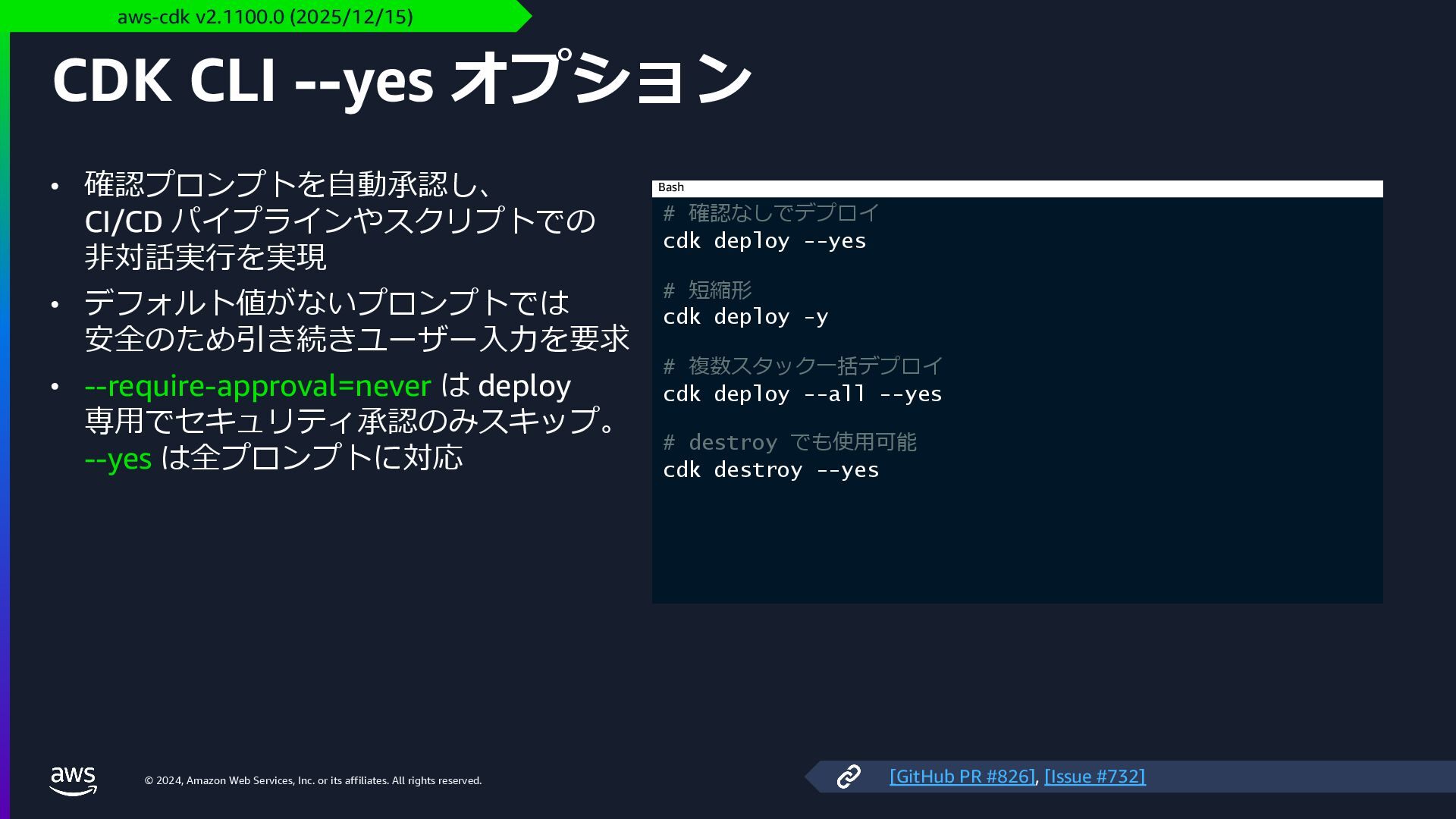
    rights reserved. CDK CLI --yes オプション • 確認プロンプトを⾃動承認し、 CI/CD パイプラインやスクリプトでの ⾮対話実⾏を実現 • デフォルト値がないプロンプトでは 安全のため引き続きユーザー⼊⼒を要求 • --require-approval=never は deploy 専⽤でセキュリティ承認のみスキップ。 --yes は全プロンプトに対応 aws-cdk v2.1100.0 (2025/12/15) # 確認なしでデプロイ cdk deploy --yes # 短縮形 cdk deploy -y # 複数スタック⼀括デプロイ cdk deploy --all --yes # destroy でも使⽤可能 cdk destroy --yes Bash [GitHub PR #826], [Issue #732]
  13. © 2024, Amazon Web Services, Inc. or its affiliates. All

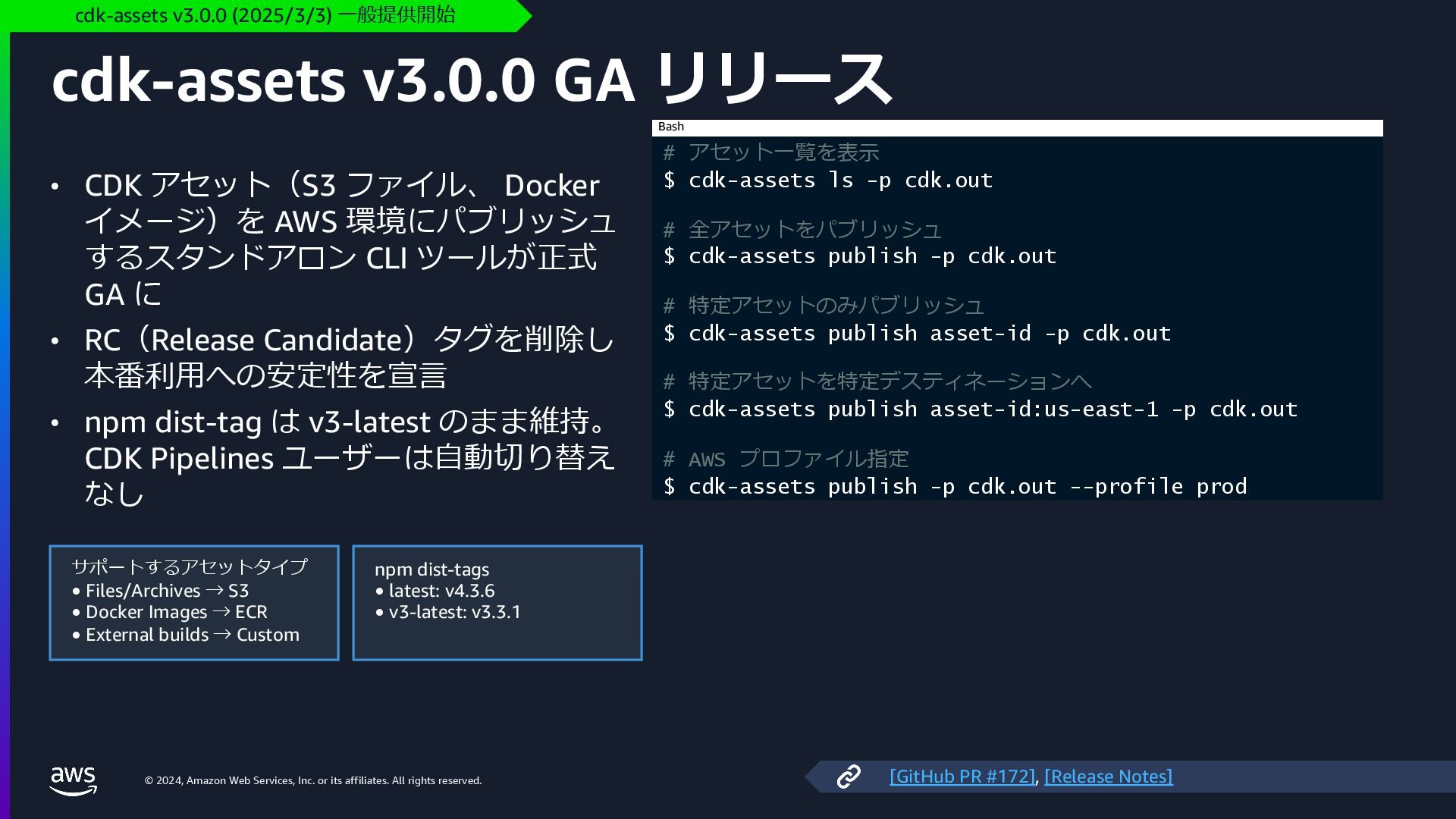
    rights reserved. cdk-assets v3.0.0 GA リリース • CDK アセット(S3 ファイル、 Docker イメージ)を AWS 環境にパブリッシュ するスタンドアロン CLI ツールが正式 GA に • RC(Release Candidate)タグを削除し 本番利⽤への安定性を宣⾔ • npm dist-tag は v3-latest のまま維持。 CDK Pipelines ユーザーは⾃動切り替え なし cdk-assets v3.0.0 (2025/3/3) ⼀般提供開始 # アセット⼀覧を表⽰ $ cdk-assets ls -p cdk.out # 全アセットをパブリッシュ $ cdk-assets publish -p cdk.out # 特定アセットのみパブリッシュ $ cdk-assets publish asset-id -p cdk.out # 特定アセットを特定デスティネーションへ $ cdk-assets publish asset-id:us-east-1 -p cdk.out # AWS プロファイル指定 $ cdk-assets publish -p cdk.out --profile prod Bash サポートするアセットタイプ • Files/Archives → S3 • Docker Images → ECR • External builds → Custom npm dist-tags • latest: v4.3.6 • v3-latest: v3.3.1 [GitHub PR #172], [Release Notes]
  14. © 2024, Amazon Web Services, Inc. or its affiliates. All

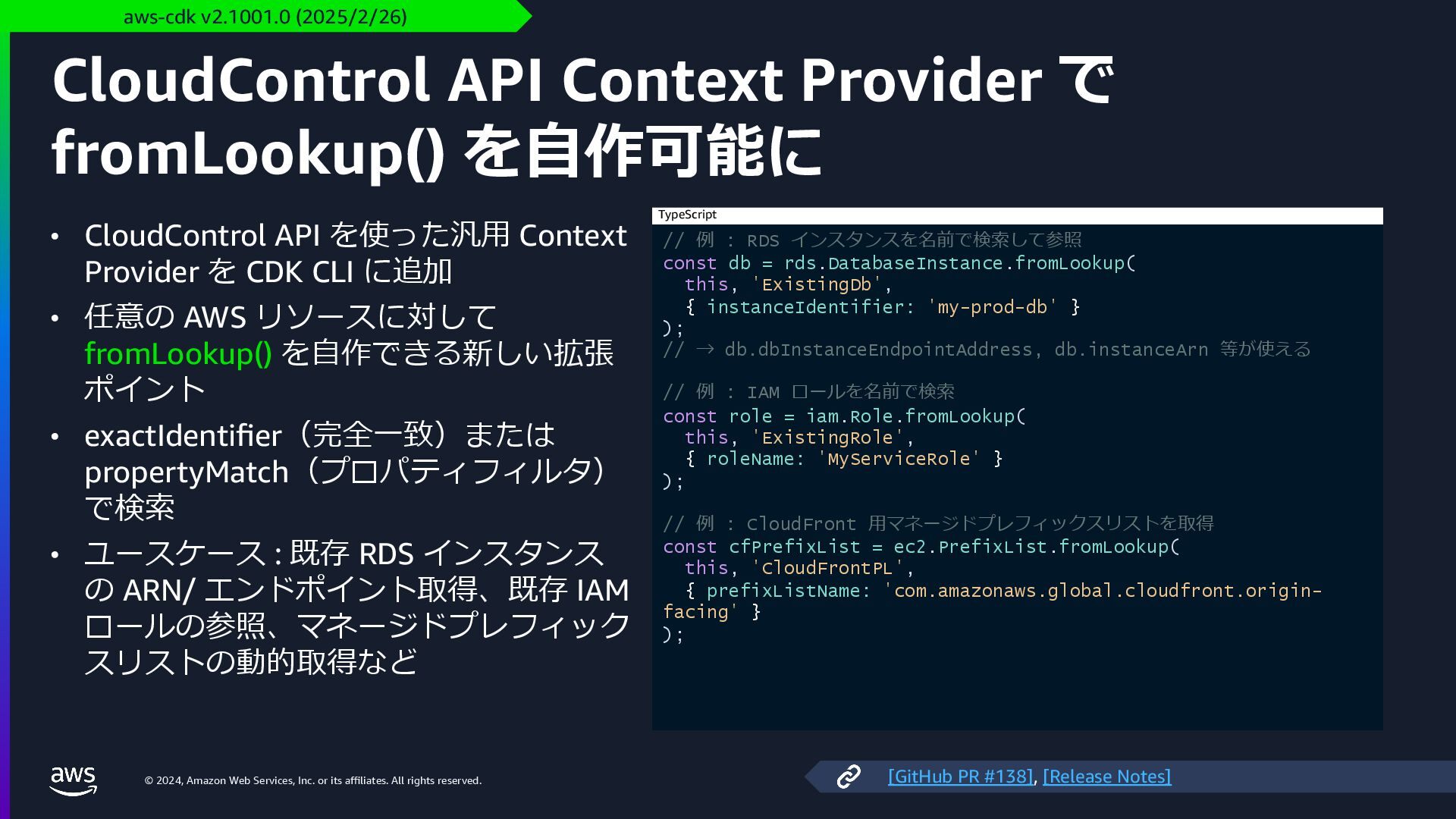
    rights reserved. CloudControl API Context Provider で fromLookup() を⾃作可能に • CloudControl API を使った汎⽤ Context Provider を CDK CLI に追加 • 任意の AWS リソースに対して fromLookup() を⾃作できる新しい拡張 ポイント • exactIdentifier(完全⼀致)または propertyMatch(プロパティフィルタ) で検索 • ユースケース : 既存 RDS インスタンス の ARN/ エンドポイント取得、既存 IAM ロールの参照、マネージドプレフィック スリストの動的取得など aws-cdk v2.1001.0 (2025/2/26) // 例 : RDS インスタンスを名前で検索して参照 const db = rds.DatabaseInstance.fromLookup( this, 'ExistingDb', { instanceIdentifier: 'my-prod-db' } ); // → db.dbInstanceEndpointAddress, db.instanceArn 等が使える // 例 : IAM ロールを名前で検索 const role = iam.Role.fromLookup( this, 'ExistingRole', { roleName: 'MyServiceRole' } ); // 例 : CloudFront ⽤マネージドプレフィックスリストを取得 const cfPrefixList = ec2.PrefixList.fromLookup( this, 'CloudFrontPL', { prefixListName: 'com.amazonaws.global.cloudfront.origin- facing' } ); TypeScript [GitHub PR #138], [Release Notes]
  15. © 2024, Amazon Web Services, Inc. or its affiliates. All

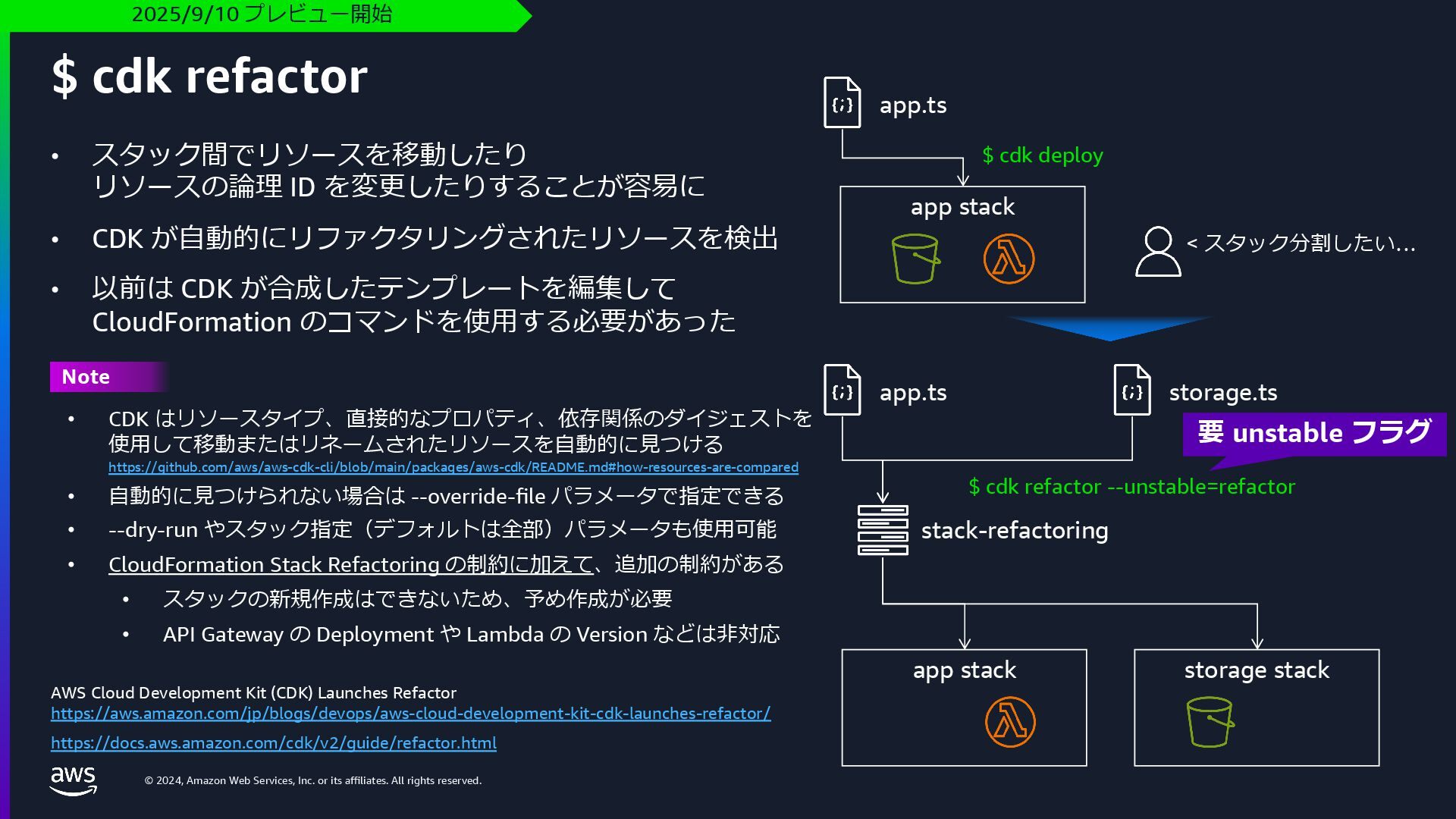
    rights reserved. • スタック間でリソースを移動したり リソースの論理 ID を変更したりすることが容易に • CDK が⾃動的にリファクタリングされたリソースを検出 • 以前は CDK が合成したテンプレートを編集して CloudFormation のコマンドを使⽤する必要があった $ cdk refactor AWS Cloud Development Kit (CDK) Launches Refactor https://aws.amazon.com/jp/blogs/devops/aws-cloud-development-kit-cdk-launches-refactor/ https://docs.aws.amazon.com/cdk/v2/guide/refactor.html 2025/9/10 プレビュー開始 app.ts app stack app stack storage stack app.ts storage.ts $ cdk deploy stack-refactoring $ cdk refactor --unstable=refactor < スタック分割したい… Note • CDK はリソースタイプ、直接的なプロパティ、依存関係のダイジェストを 使⽤して移動またはリネームされたリソースを⾃動的に⾒つける https://github.com/aws/aws-cdk-cli/blob/main/packages/aws-cdk/README.md#how-resources-are-compared • ⾃動的に⾒つけられない場合は --override-file パラメータで指定できる • --dry-run やスタック指定(デフォルトは全部)パラメータも使⽤可能 • CloudFormation Stack Refactoring の制約に加えて、追加の制約がある • スタックの新規作成はできないため、予め作成が必要 • API Gateway の Deployment や Lambda の Version などは⾮対応 要 unstable フラグ
  16. © 2024, Amazon Web Services, Inc. or its affiliates. All

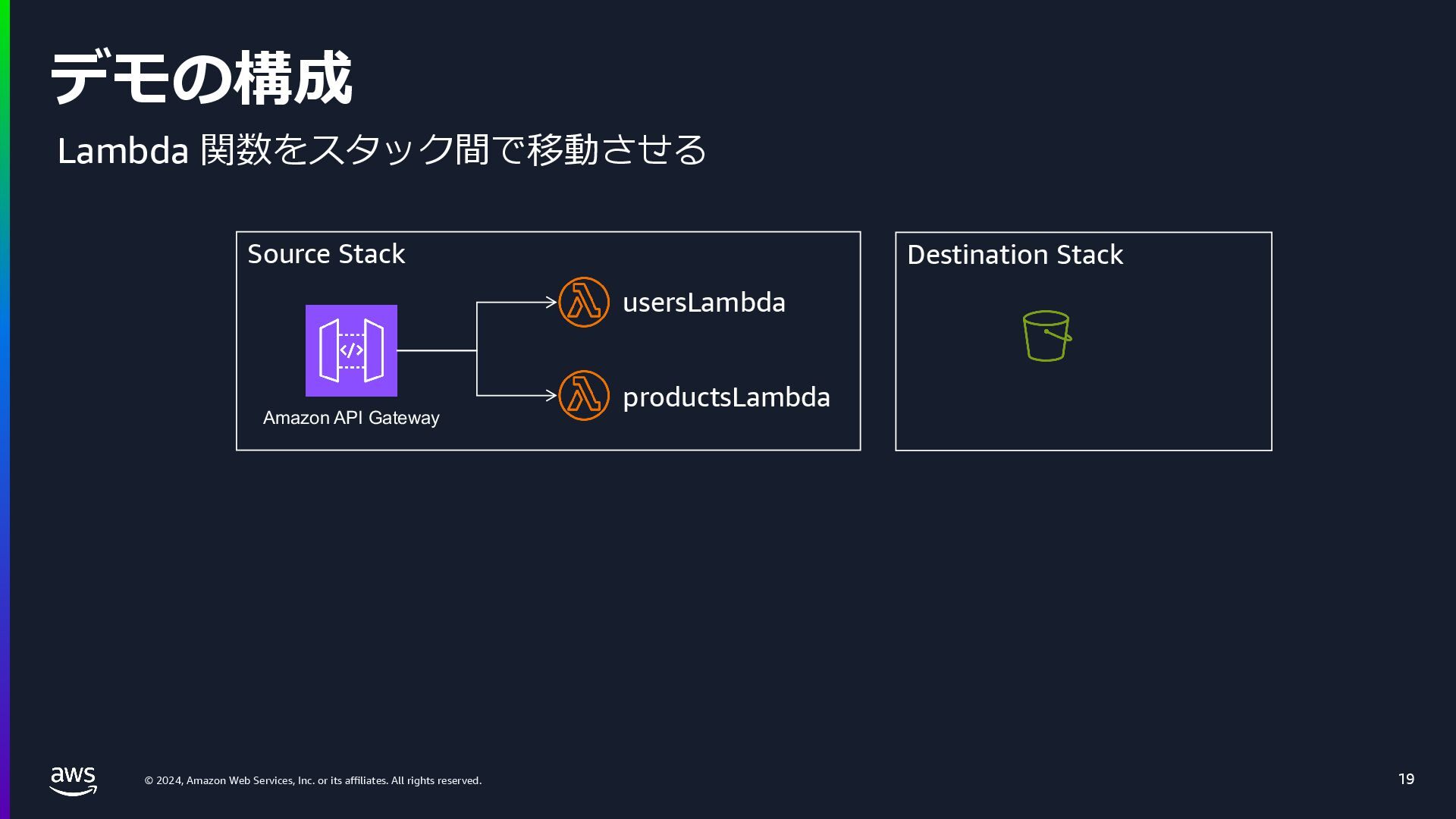
    rights reserved. デモの構成 19 Source Stack Amazon API Gateway usersLambda productsLambda Destination Stack Lambda 関数をスタック間で移動させる
  17. © 2024, Amazon Web Services, Inc. or its affiliates. All

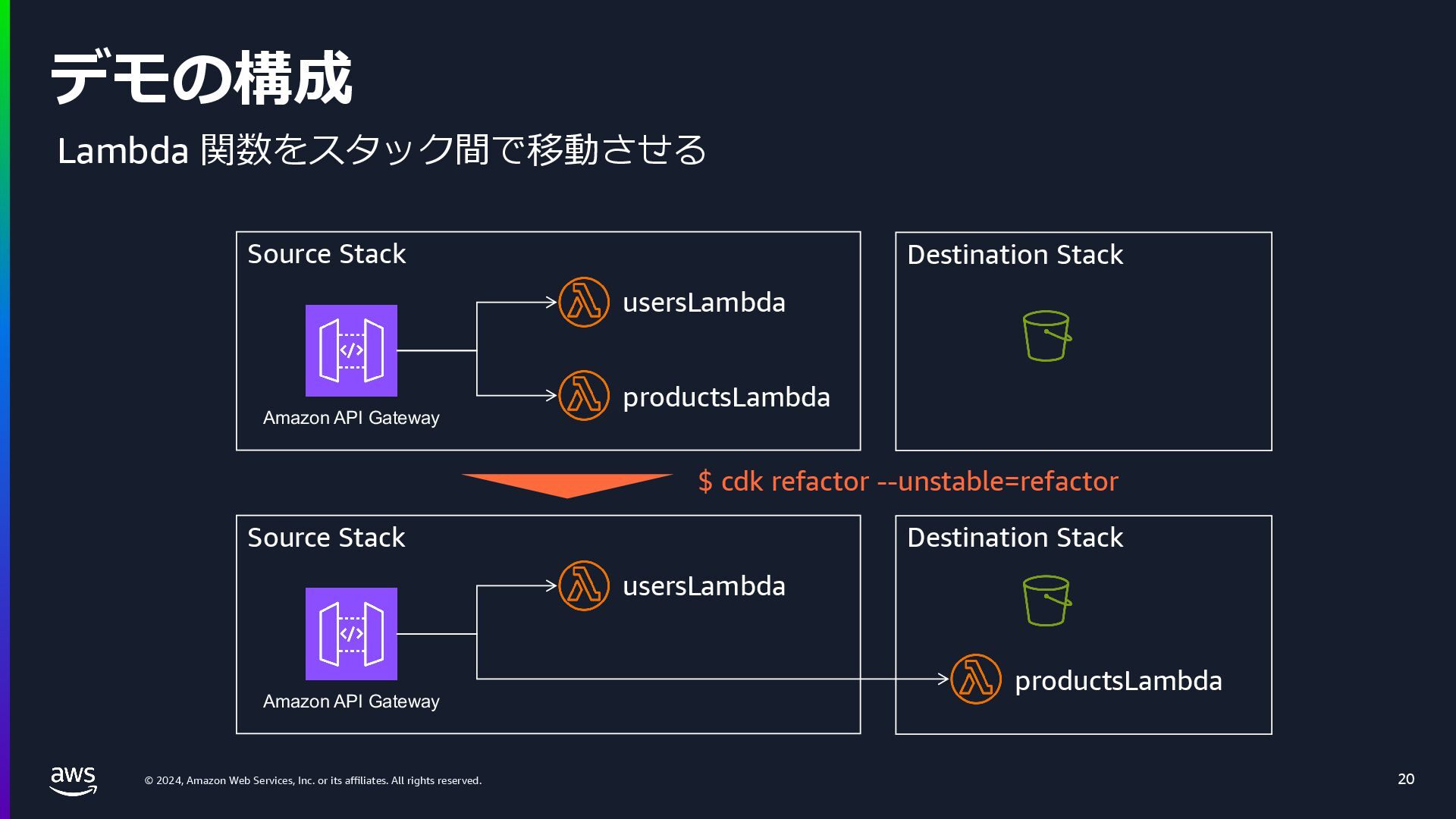
    rights reserved. デモの構成 20 Source Stack Amazon API Gateway usersLambda productsLambda Destination Stack Source Stack Amazon API Gateway usersLambda productsLambda Destination Stack $ cdk refactor --unstable=refactor Lambda 関数をスタック間で移動させる
  18. © 2024, Amazon Web Services, Inc. or its affiliates. All

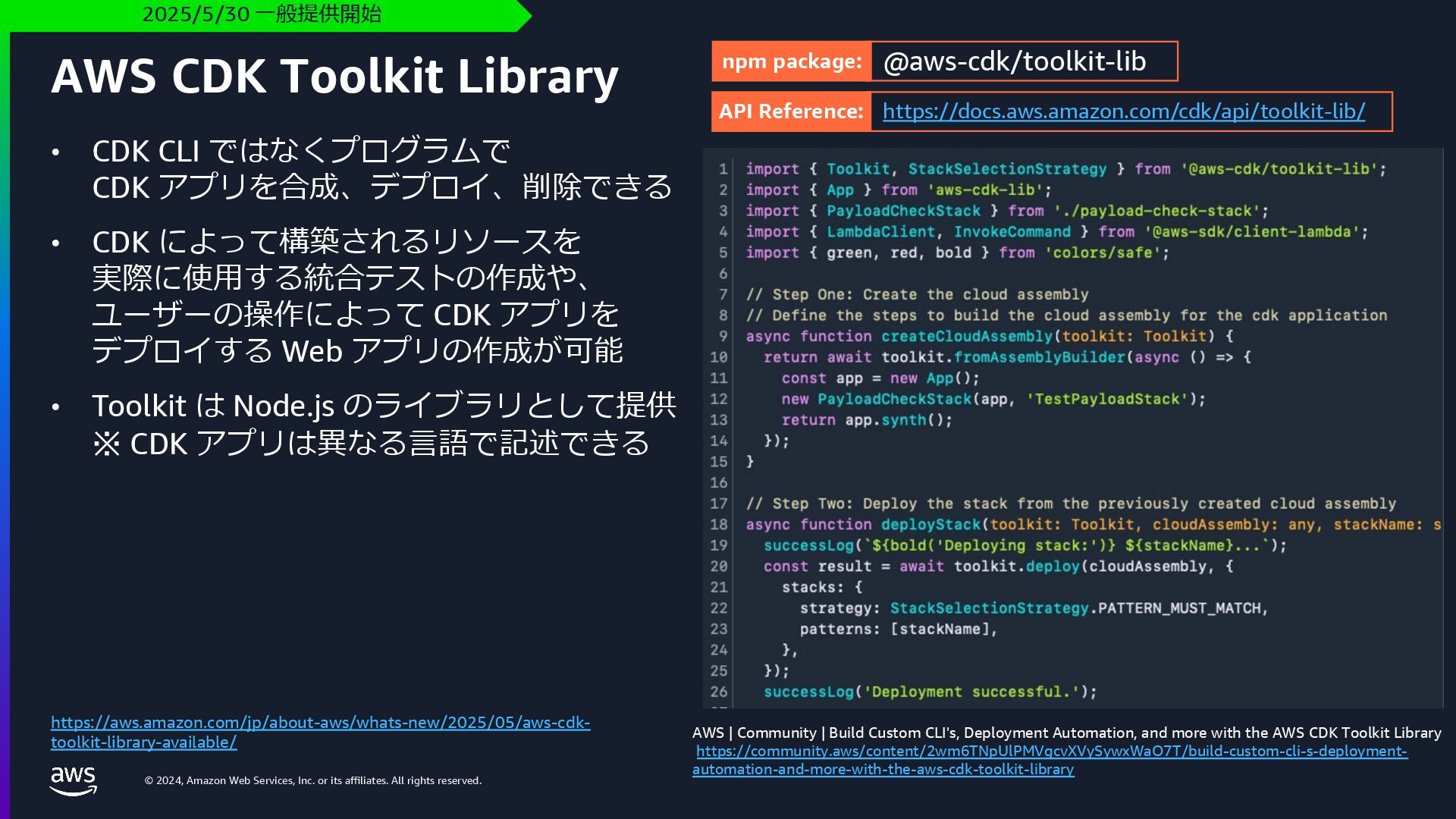
    rights reserved. • CDK CLI ではなくプログラムで CDK アプリを合成、デプロイ、削除できる • CDK によって構築されるリソースを 実際に使⽤する統合テストの作成や、 ユーザーの操作によって CDK アプリを デプロイする Web アプリの作成が可能 • Toolkit は Node.js のライブラリとして提供 ※ CDK アプリは異なる⾔語で記述できる AWS CDK Toolkit Library 2025/5/30 ⼀般提供開始 https://aws.amazon.com/jp/about-aws/whats-new/2025/05/aws-cdk- toolkit-library-available/ AWS | Community | Build Custom CLI's, Deployment Automation, and more with the AWS CDK Toolkit Library https://community.aws/content/2wm6TNpUlPMVgcvXVySywxWaO7T/build-custom-cli-s-deployment- automation-and-more-with-the-aws-cdk-toolkit-library npm package: @aws-cdk/toolkit-lib API Reference: https://docs.aws.amazon.com/cdk/api/toolkit-lib/
  19. © 2024, Amazon Web Services, Inc. or its affiliates. All

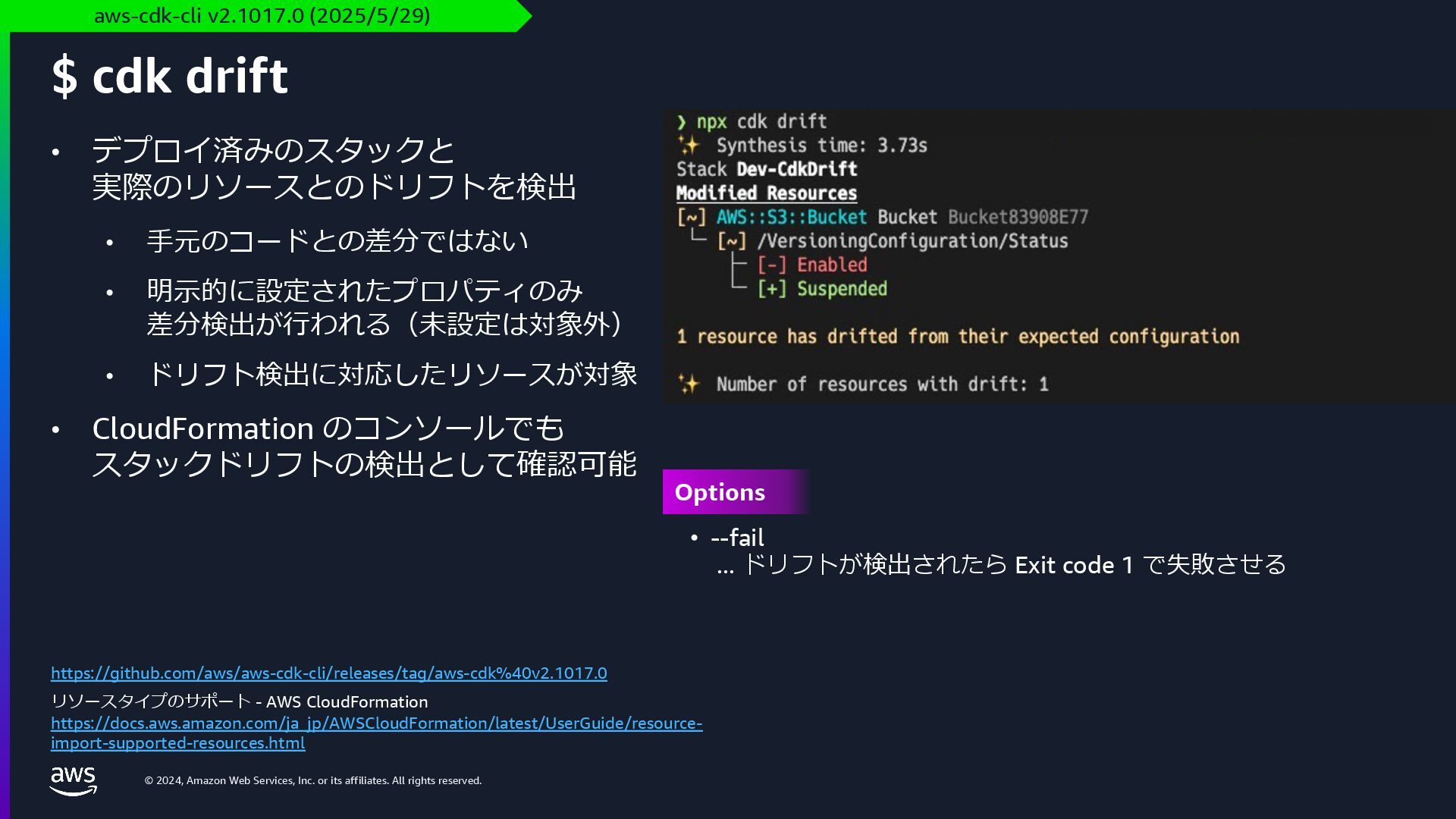
    rights reserved. • デプロイ済みのスタックと 実際のリソースとのドリフトを検出 • ⼿元のコードとの差分ではない • 明⽰的に設定されたプロパティのみ 差分検出が⾏われる(未設定は対象外) • ドリフト検出に対応したリソースが対象 • CloudFormation のコンソールでも スタックドリフトの検出として確認可能 $ cdk drift aws-cdk-cli v2.1017.0 (2025/5/29) https://github.com/aws/aws-cdk-cli/releases/tag/aws-cdk%40v2.1017.0 リソースタイプのサポート - AWS CloudFormation https://docs.aws.amazon.com/ja_jp/AWSCloudFormation/latest/UserGuide/resource- import-supported-resources.html • --fail ... ドリフトが検出されたら Exit code 1 で失敗させる Options
  20. © 2024, Amazon Web Services, Inc. or its affiliates. All

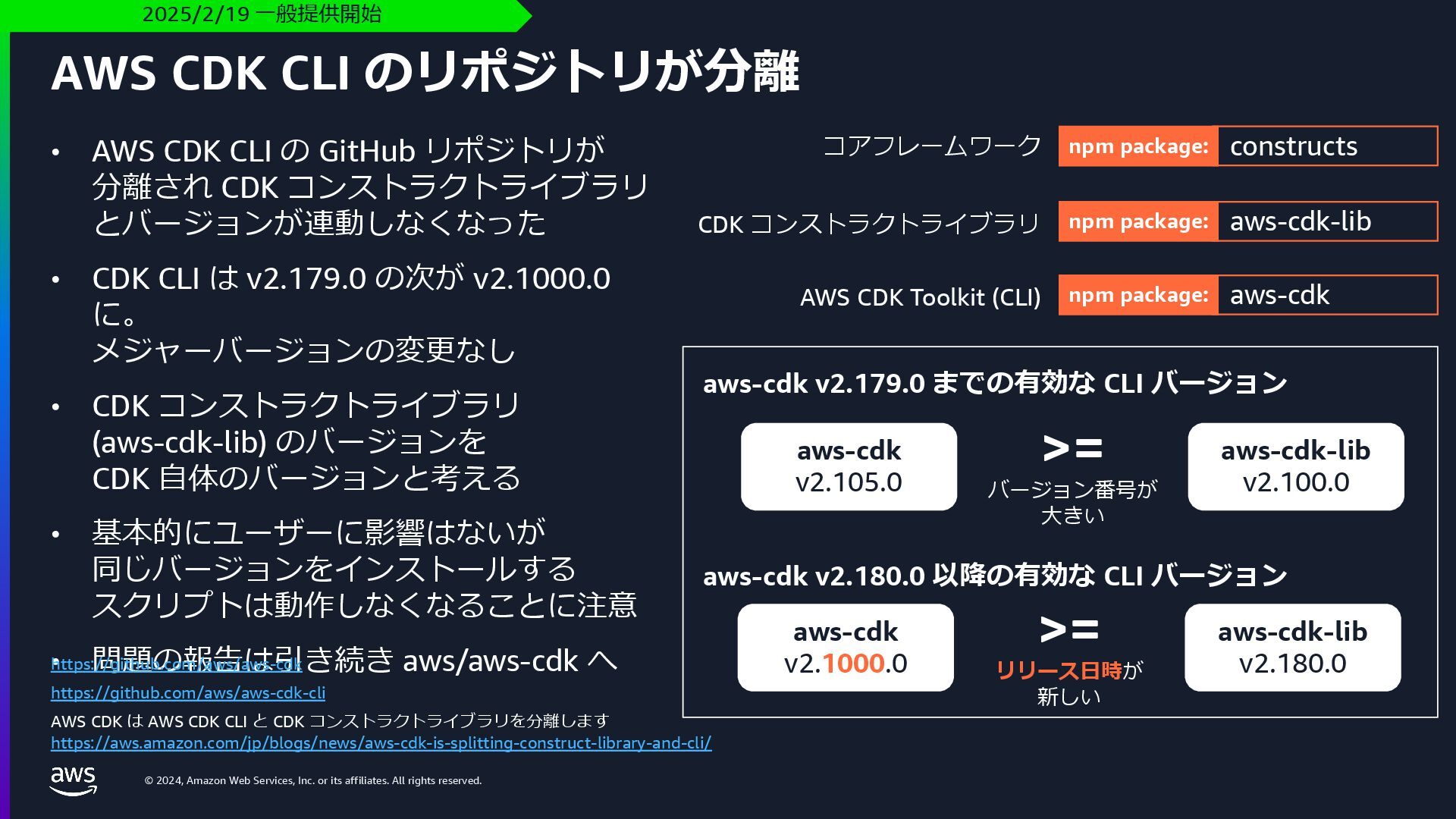
    rights reserved. • AWS CDK CLI の GitHub リポジトリが 分離され CDK コンストラクトライブラリ とバージョンが連動しなくなった • CDK CLI は v2.179.0 の次が v2.1000.0 に。 メジャーバージョンの変更なし • CDK コンストラクトライブラリ (aws-cdk-lib) のバージョンを CDK ⾃体のバージョンと考える • 基本的にユーザーに影響はないが 同じバージョンをインストールする スクリプトは動作しなくなることに注意 • 問題の報告は引き続き aws/aws-cdk へ AWS CDK CLI のリポジトリが分離 2025/2/19 ⼀般提供開始 https://github.com/aws/aws-cdk https://github.com/aws/aws-cdk-cli AWS CDK は AWS CDK CLI と CDK コンストラクトライブラリを分離します https://aws.amazon.com/jp/blogs/news/aws-cdk-is-splitting-construct-library-and-cli/ aws-cdk v2.105.0 aws-cdk v2.179.0 までの有効な CLI バージョン >= aws-cdk-lib v2.100.0 バージョン番号が ⼤きい aws-cdk v2.1000.0 >= aws-cdk-lib v2.180.0 リリース⽇時が 新しい aws-cdk v2.180.0 以降の有効な CLI バージョン コアフレームワーク CDK コンストラクトライブラリ AWS CDK Toolkit (CLI) npm package: constructs npm package: aws-cdk-lib npm package: aws-cdk
  21. © 2024, Amazon Web Services, Inc. or its affiliates. All

    rights reserved. AWS CDK の新しい Construct
  22. © 2024, Amazon Web Services, Inc. or its affiliates. All

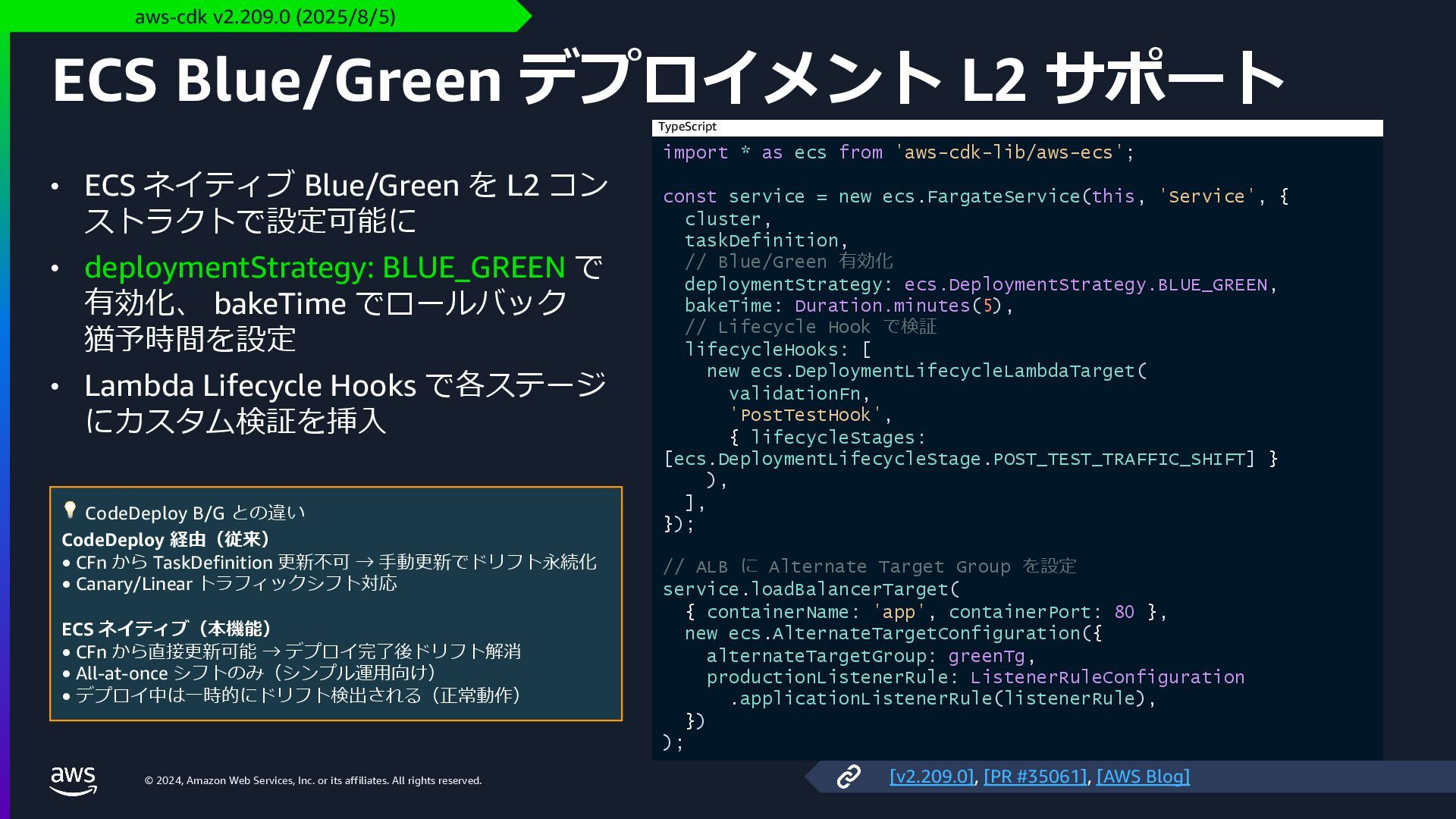
    rights reserved. ECS Blue/Green デプロイメント L2 サポート • ECS ネイティブ Blue/Green を L2 コン ストラクトで設定可能に • deploymentStrategy: BLUE_GREEN で 有効化、 bakeTime でロールバック 猶予時間を設定 • Lambda Lifecycle Hooks で各ステージ にカスタム検証を挿⼊ aws-cdk v2.209.0 (2025/8/5) import * as ecs from 'aws-cdk-lib/aws-ecs'; const service = new ecs.FargateService(this, 'Service', { cluster, taskDefinition, // Blue/Green 有効化 deploymentStrategy: ecs.DeploymentStrategy.BLUE_GREEN, bakeTime: Duration.minutes(5), // Lifecycle Hook で検証 lifecycleHooks: [ new ecs.DeploymentLifecycleLambdaTarget( validationFn, 'PostTestHook', { lifecycleStages: [ecs.DeploymentLifecycleStage.POST_TEST_TRAFFIC_SHIFT] } ), ], }); // ALB に Alternate Target Group を設定 service.loadBalancerTarget( { containerName: 'app', containerPort: 80 }, new ecs.AlternateTargetConfiguration({ alternateTargetGroup: greenTg, productionListenerRule: ListenerRuleConfiguration .applicationListenerRule(listenerRule), }) ); TypeScript [v2.209.0], [PR #35061], [AWS Blog] 💡 CodeDeploy B/G との違い CodeDeploy 経由(従来) • CFn から TaskDefinition 更新不可 → ⼿動更新でドリフト永続化 • Canary/Linear トラフィックシフト対応 ECS ネイティブ(本機能) • CFn から直接更新可能 → デプロイ完了後ドリフト解消 • All-at-once シフトのみ(シンプル運⽤向け) • デプロイ中は⼀時的にドリフト検出される(正常動作)
  23. © 2024, Amazon Web Services, Inc. or its affiliates. All

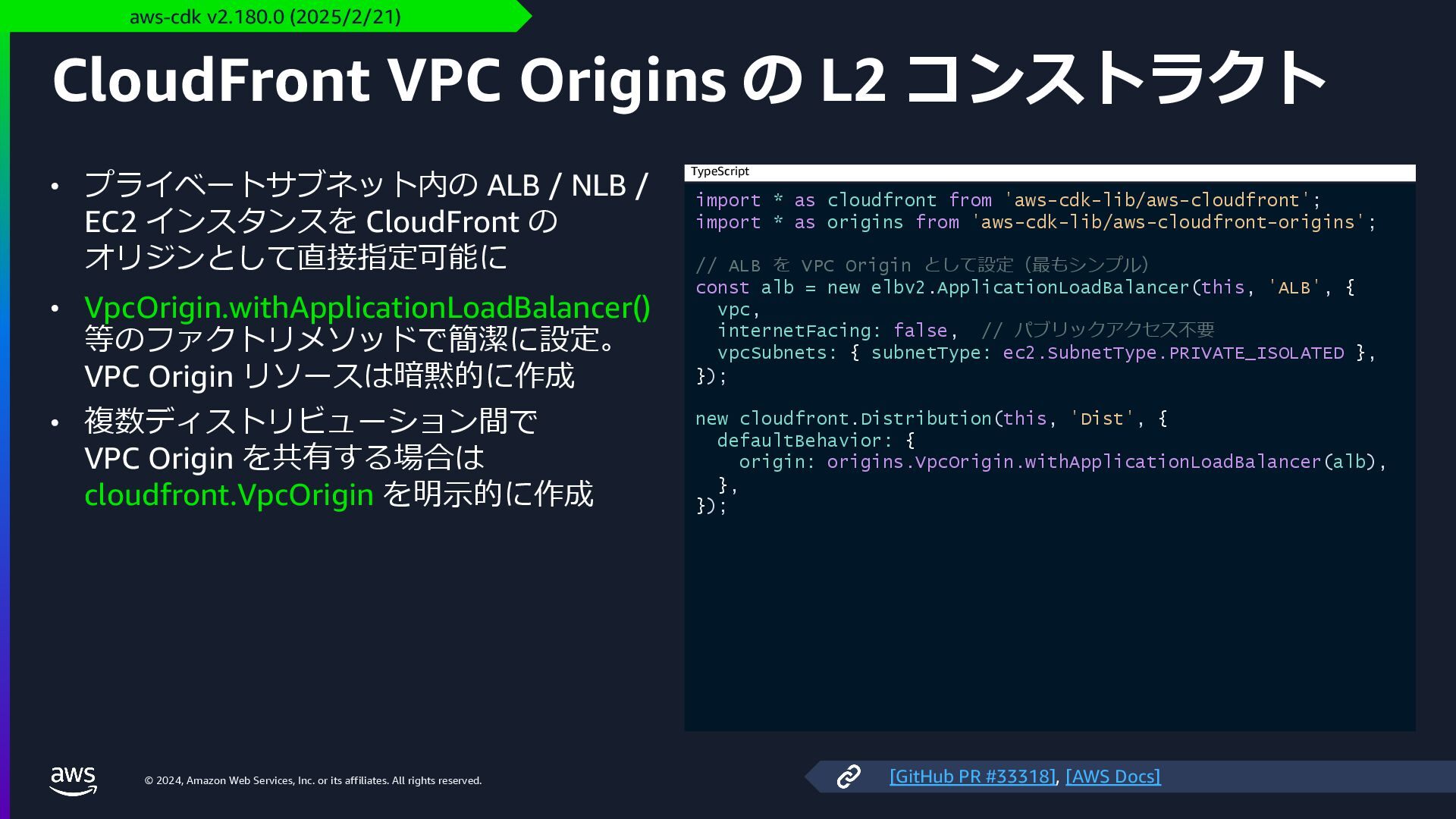
    rights reserved. CloudFront VPC Origins の L2 コンストラクト • プライベートサブネット内の ALB / NLB / EC2 インスタンスを CloudFront の オリジンとして直接指定可能に • VpcOrigin.withApplicationLoadBalancer() 等のファクトリメソッドで簡潔に設定。 VPC Origin リソースは暗黙的に作成 • 複数ディストリビューション間で VPC Origin を共有する場合は cloudfront.VpcOrigin を明⽰的に作成 aws-cdk v2.180.0 (2025/2/21) import * as cloudfront from 'aws-cdk-lib/aws-cloudfront'; import * as origins from 'aws-cdk-lib/aws-cloudfront-origins'; // ALB を VPC Origin として設定(最もシンプル) const alb = new elbv2.ApplicationLoadBalancer(this, 'ALB', { vpc, internetFacing: false, // パブリックアクセス不要 vpcSubnets: { subnetType: ec2.SubnetType.PRIVATE_ISOLATED }, }); new cloudfront.Distribution(this, 'Dist', { defaultBehavior: { origin: origins.VpcOrigin.withApplicationLoadBalancer(alb), }, }); TypeScript [GitHub PR #33318], [AWS Docs]
  24. © 2024, Amazon Web Services, Inc. or its affiliates. All

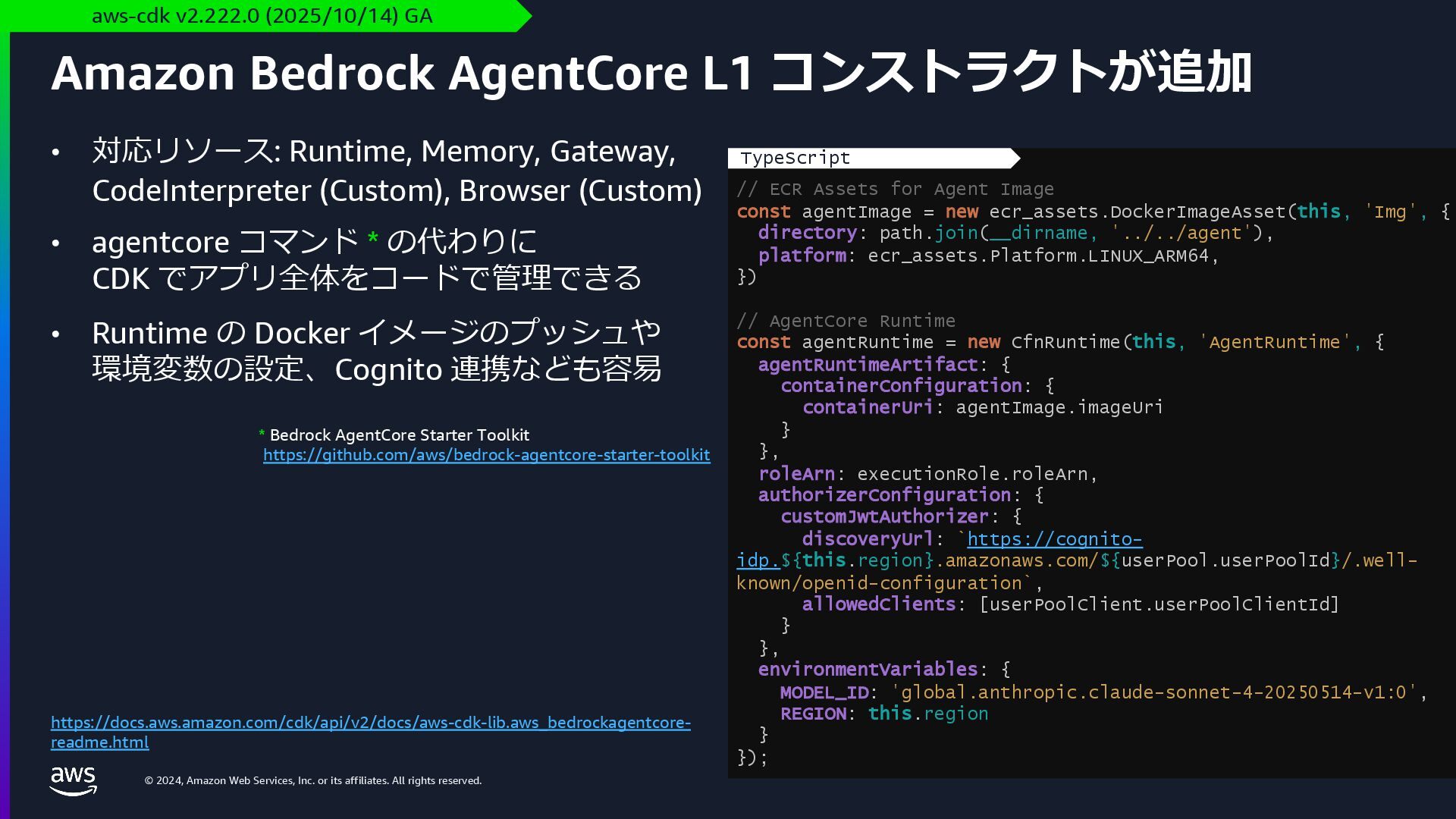
    rights reserved. • 対応リソース: Runtime, Memory, Gateway, CodeInterpreter (Custom), Browser (Custom) • agentcore コマンド * の代わりに CDK でアプリ全体をコードで管理できる • Runtime の Docker イメージのプッシュや 環境変数の設定、Cognito 連携なども容易 Amazon Bedrock AgentCore L1 コンストラクトが追加 aws-cdk v2.222.0 (2025/10/14) GA https://docs.aws.amazon.com/cdk/api/v2/docs/aws-cdk-lib.aws_bedrockagentcore- readme.html // ECR Assets for Agent Image const agentImage = new ecr_assets.DockerImageAsset(this, 'Img', { directory: path.join(__dirname, '../../agent'), platform: ecr_assets.Platform.LINUX_ARM64, }) // AgentCore Runtime const agentRuntime = new CfnRuntime(this, 'AgentRuntime', { agentRuntimeArtifact: { containerConfiguration: { containerUri: agentImage.imageUri } }, roleArn: executionRole.roleArn, authorizerConfiguration: { customJwtAuthorizer: { discoveryUrl: `https://cognito- idp.${this.region}.amazonaws.com/${userPool.userPoolId}/.well- known/openid-configuration`, allowedClients: [userPoolClient.userPoolClientId] } }, environmentVariables: { MODEL_ID: 'global.anthropic.claude-sonnet-4-20250514-v1:0', REGION: this.region } }); TypeScript * Bedrock AgentCore Starter Toolkit https://github.com/aws/bedrock-agentcore-starter-toolkit
  25. © 2024, Amazon Web Services, Inc. or its affiliates. All

    rights reserved. AWS CDK の新しいコア機能
  26. © 2024, Amazon Web Services, Inc. or its affiliates. All

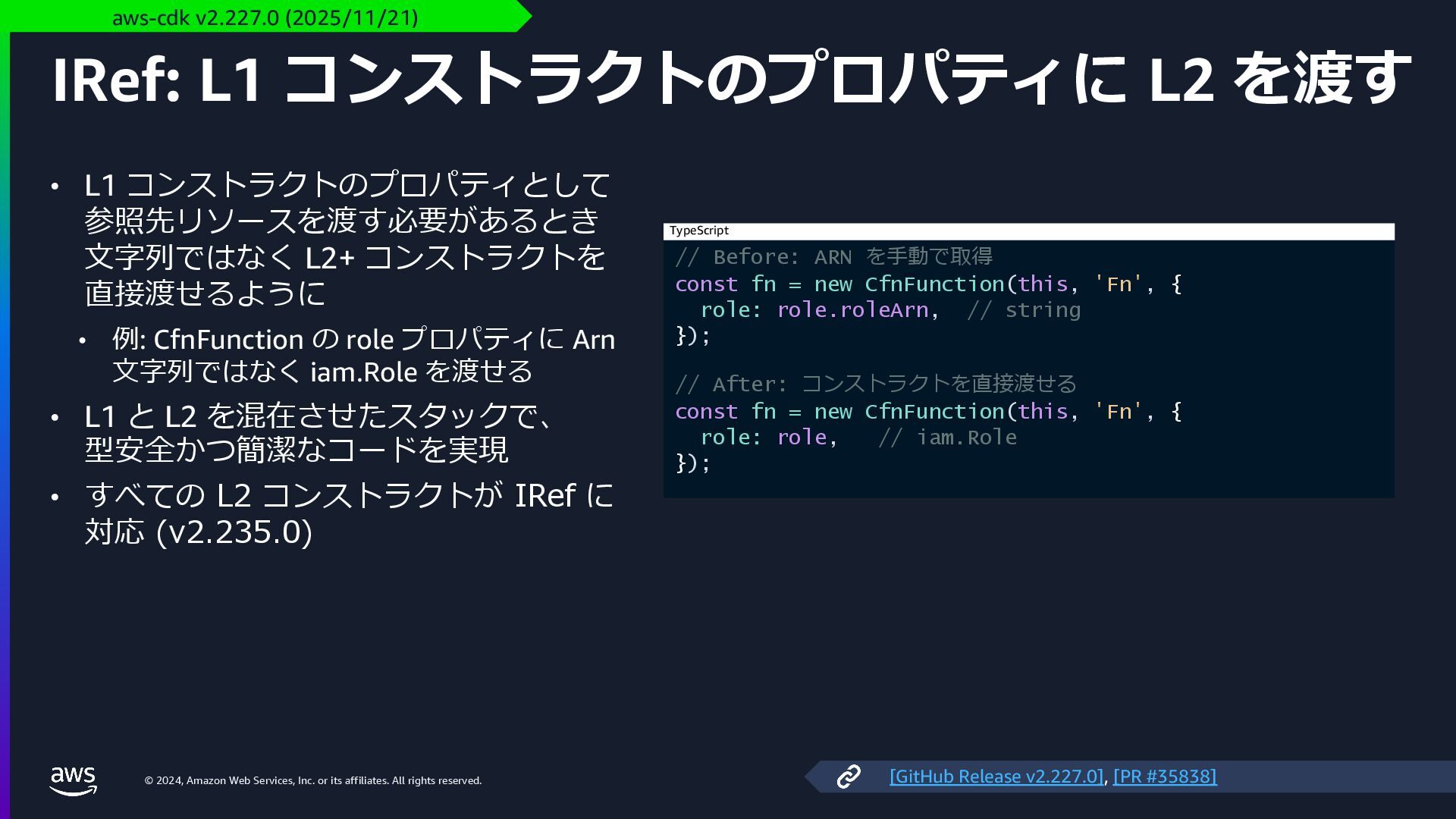
    rights reserved. IRef: L1 コンストラクトのプロパティに L2 を渡す • L1 コンストラクトのプロパティとして 参照先リソースを渡す必要があるとき ⽂字列ではなく L2+ コンストラクトを 直接渡せるように • 例: CfnFunction の role プロパティに Arn ⽂字列ではなく iam.Role を渡せる • L1 と L2 を混在させたスタックで、 型安全かつ簡潔なコードを実現 • すべての L2 コンストラクトが IRef に 対応 (v2.235.0) aws-cdk v2.227.0 (2025/11/21) // Before: ARN を⼿動で取得 const fn = new CfnFunction(this, 'Fn', { role: role.roleArn, // string }); // After: コンストラクトを直接渡せる const fn = new CfnFunction(this, 'Fn', { role: role, // iam.Role }); TypeScript [GitHub Release v2.227.0], [PR #35838]
  27. © 2024, Amazon Web Services, Inc. or its affiliates. All

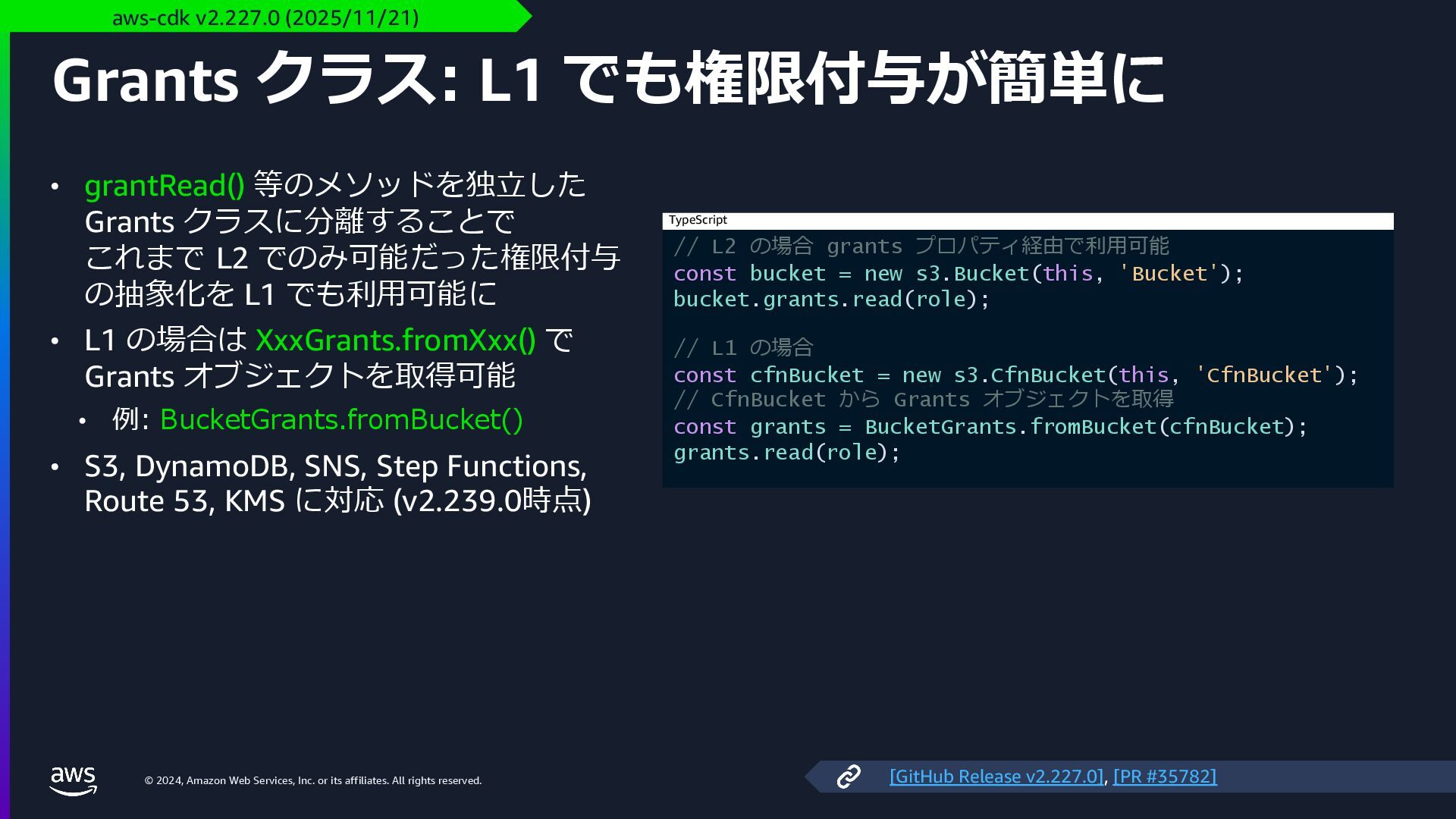
    rights reserved. Grants クラス: L1 でも権限付与が簡単に • grantRead() 等のメソッドを独⽴した Grants クラスに分離することで これまで L2 でのみ可能だった権限付与 の抽象化を L1 でも利⽤可能に • L1 の場合は XxxGrants.fromXxx() で Grants オブジェクトを取得可能 • 例: BucketGrants.fromBucket() • S3, DynamoDB, SNS, Step Functions, Route 53, KMS に対応 (v2.239.0時点) aws-cdk v2.227.0 (2025/11/21) // L2 の場合 grants プロパティ経由で利⽤可能 const bucket = new s3.Bucket(this, 'Bucket'); bucket.grants.read(role); // L1 の場合 const cfnBucket = new s3.CfnBucket(this, 'CfnBucket'); // CfnBucket から Grants オブジェクトを取得 const grants = BucketGrants.fromBucket(cfnBucket); grants.read(role); TypeScript [GitHub Release v2.227.0], [PR #35782]
  28. © 2024, Amazon Web Services, Inc. or its affiliates. All

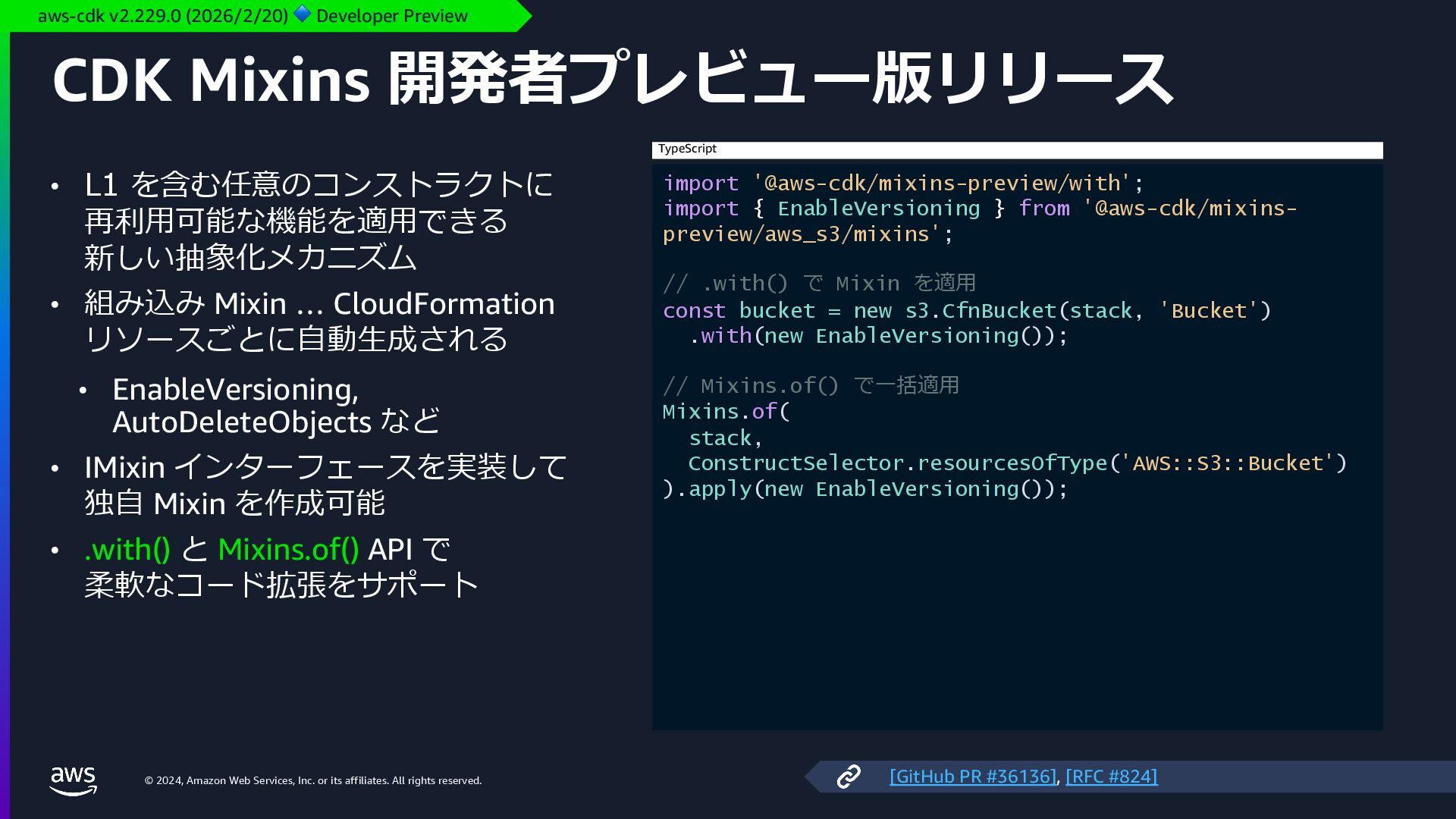
    rights reserved. CDK Mixins 開発者プレビュー版リリース • L1 を含む任意のコンストラクトに 再利⽤可能な機能を適⽤できる 新しい抽象化メカニズム • 組み込み Mixin … CloudFormation リソースごとに⾃動⽣成される • EnableVersioning, AutoDeleteObjects など • IMixin インターフェースを実装して 独⾃ Mixin を作成可能 • .with() と Mixins.of() API で 柔軟なコード拡張をサポート aws-cdk v2.229.0 (2026/2/20) 🔷 Developer Preview import '@aws-cdk/mixins-preview/with'; import { EnableVersioning } from '@aws-cdk/mixins- preview/aws_s3/mixins'; // .with() で Mixin を適⽤ const bucket = new s3.CfnBucket(stack, 'Bucket') .with(new EnableVersioning()); // Mixins.of() で⼀括適⽤ Mixins.of( stack, ConstructSelector.resourcesOfType('AWS::S3::Bucket') ).apply(new EnableVersioning()); TypeScript [GitHub PR #36136], [RFC #824]
  29. © 2024, Amazon Web Services, Inc. or its affiliates. All

    rights reserved. AWS CloudFormation の新機能
  30. © 2024, Amazon Web Services, Inc. or its affiliates. All

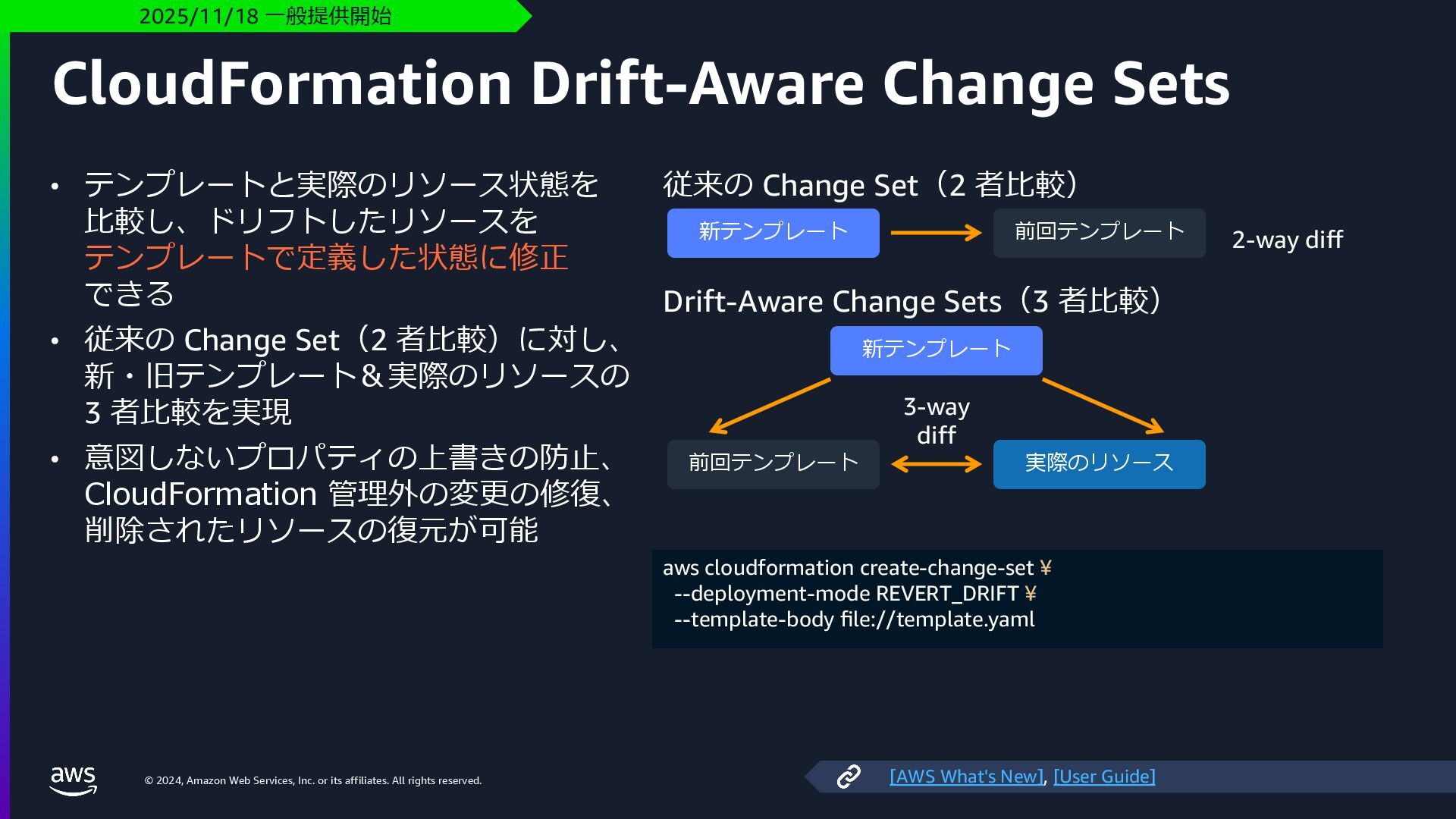
    rights reserved. CloudFormation Drift-Aware Change Sets • テンプレートと実際のリソース状態を ⽐較し、ドリフトしたリソースを テンプレートで定義した状態に修正 できる • 従来の Change Set(2 者⽐較)に対し、 新・旧テンプレート&実際のリソースの 3 者⽐較を実現 • 意図しないプロパティの上書きの防⽌、 CloudFormation 管理外の変更の修復、 削除されたリソースの復元が可能 2025/11/18 ⼀般提供開始 従来の Change Set(2 者⽐較) 新テンプレート 前回テンプレート 2-way diff Drift-Aware Change Sets(3 者⽐較) 新テンプレート 前回テンプレート 実際のリソース 3-way diff aws cloudformation create-change-set ¥ --deployment-mode REVERT_DRIFT ¥ --template-body file://template.yaml [AWS What's New], [User Guide]
  31. © 2024, Amazon Web Services, Inc. or its affiliates. All

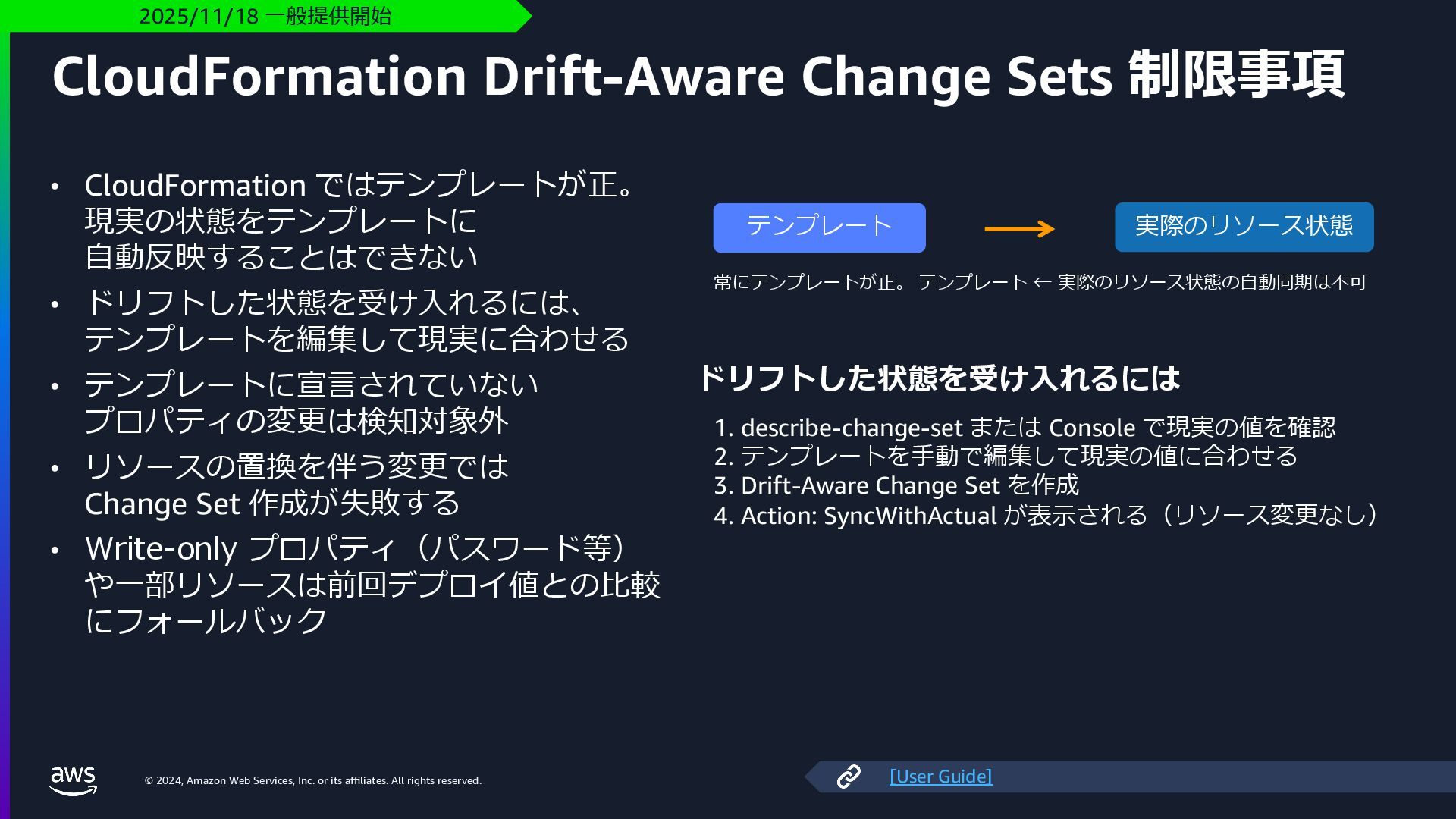
    rights reserved. CloudFormation Drift-Aware Change Sets 制限事項 • CloudFormation ではテンプレートが正。 現実の状態をテンプレートに ⾃動反映することはできない • ドリフトした状態を受け⼊れるには、 テンプレートを編集して現実に合わせる • テンプレートに宣⾔されていない プロパティの変更は検知対象外 • リソースの置換を伴う変更では Change Set 作成が失敗する • Write-only プロパティ(パスワード等) や⼀部リソースは前回デプロイ値との⽐較 にフォールバック 2025/11/18 ⼀般提供開始 実際のリソース状態 テンプレート 常にテンプレートが正。 テンプレート ← 実際のリソース状態の⾃動同期は不可 ドリフトした状態を受け⼊れるには 1. describe-change-set または Console で現実の値を確認 2. テンプレートを⼿動で編集して現実の値に合わせる 3. Drift-Aware Change Set を作成 4. Action: SyncWithActual が表⽰される(リソース変更なし) [User Guide]
  32. © 2024, Amazon Web Services, Inc. or its affiliates. All

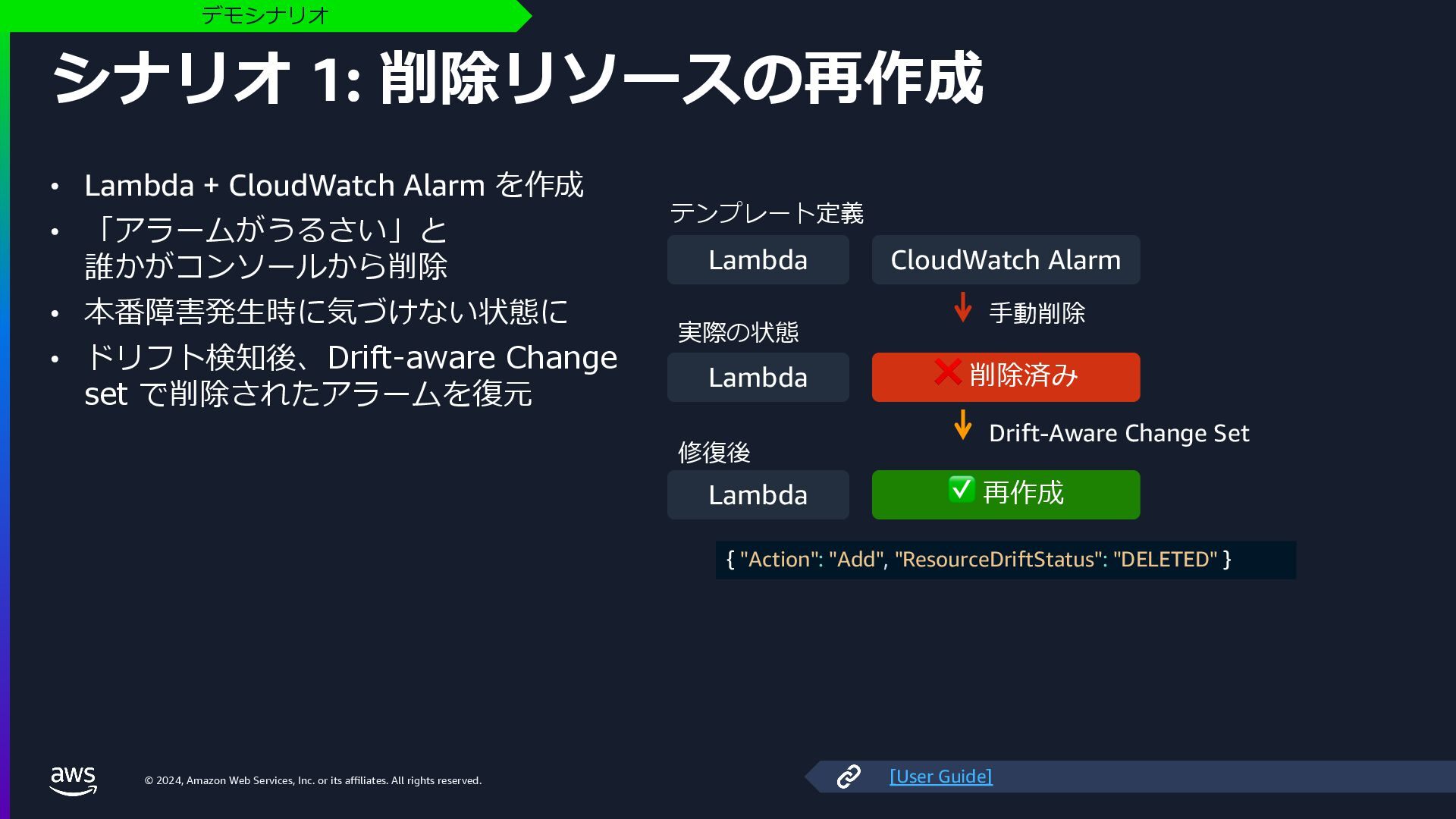
    rights reserved. シナリオ 1: 削除リソースの再作成 • Lambda + CloudWatch Alarm を作成 • 「アラームがうるさい」と 誰かがコンソールから削除 • 本番障害発⽣時に気づけない状態に • ドリフト検知後、Drift-aware Change set で削除されたアラームを復元 デモシナリオ テンプレート定義 Lambda CloudWatch Alarm ⼿動削除 実際の状態 Lambda ❌ 削除済み Drift-Aware Change Set 修復後 Lambda ✅ 再作成 { "Action": "Add", "ResourceDriftStatus": "DELETED" } [User Guide]
  33. © 2024, Amazon Web Services, Inc. or its affiliates. All

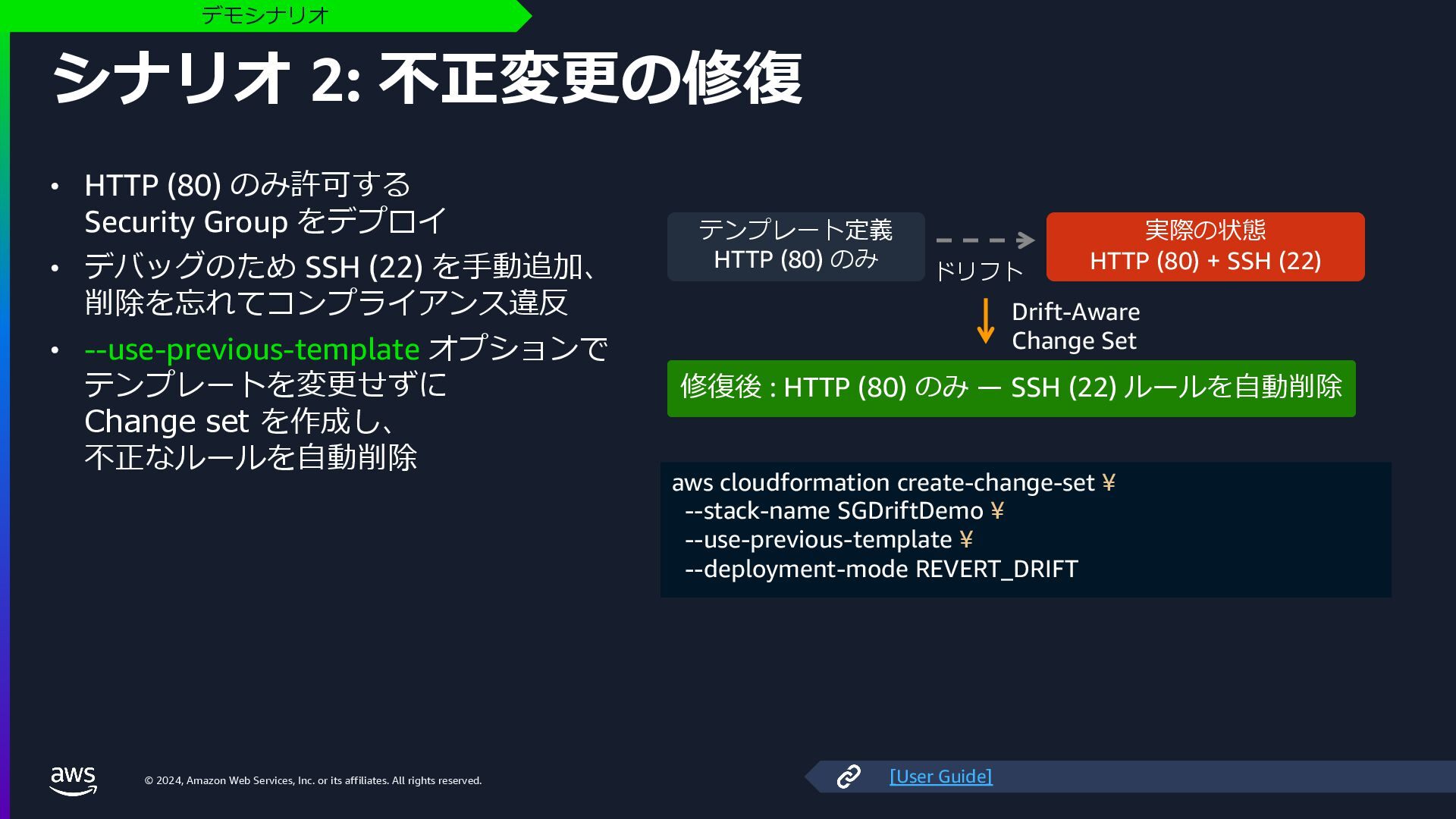
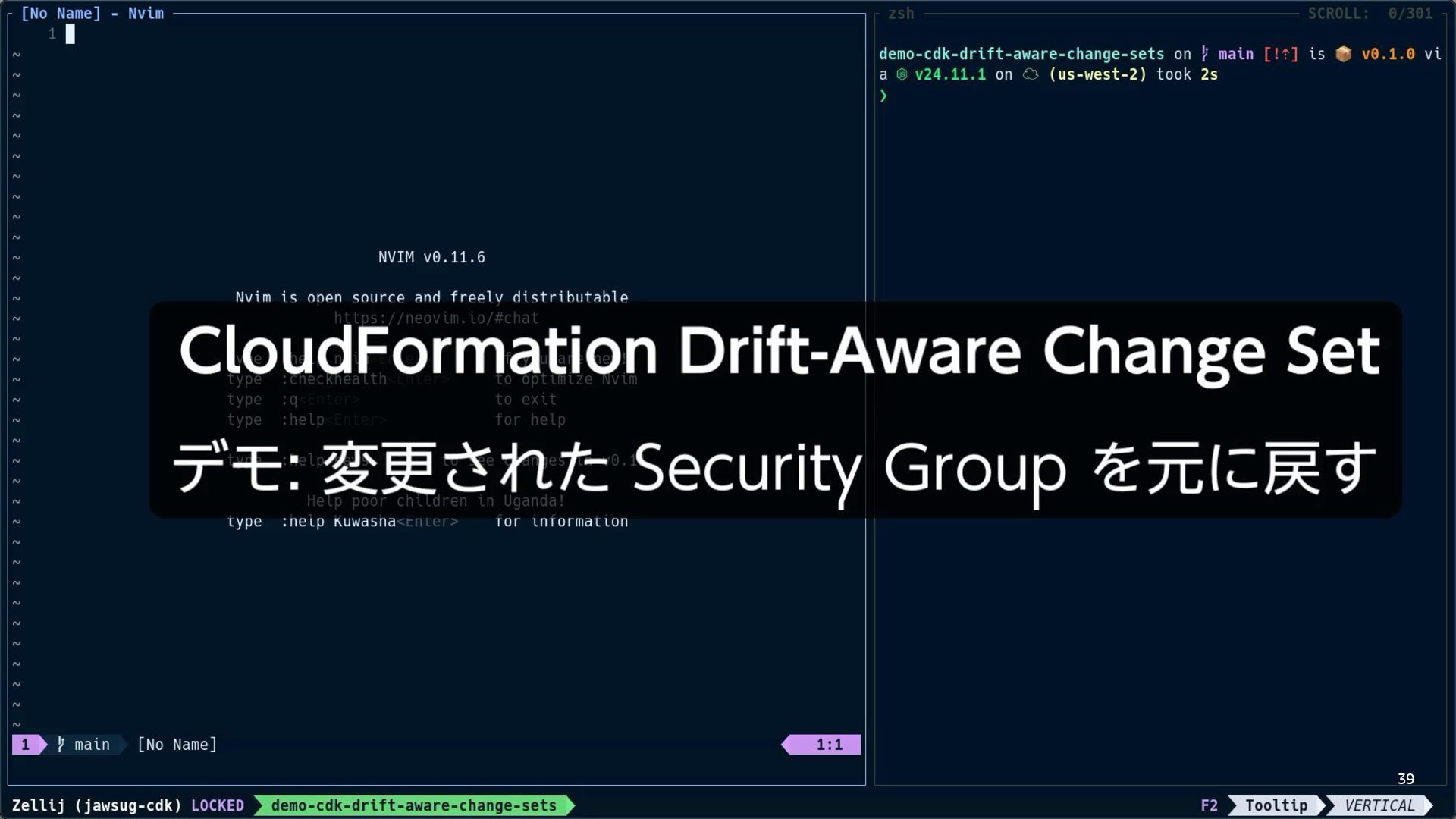
    rights reserved. シナリオ 2: 不正変更の修復 • HTTP (80) のみ許可する Security Group をデプロイ • デバッグのため SSH (22) を⼿動追加、 削除を忘れてコンプライアンス違反 • --use-previous-template オプションで テンプレートを変更せずに Change set を作成し、 不正なルールを⾃動削除 デモシナリオ テンプレート定義 HTTP (80) のみ ドリフト 実際の状態 HTTP (80) + SSH (22) Drift-Aware Change Set 修復後 : HTTP (80) のみ ̶ SSH (22) ルールを⾃動削除 aws cloudformation create-change-set ¥ --stack-name SGDriftDemo ¥ --use-previous-template ¥ --deployment-mode REVERT_DRIFT [User Guide]
  34. © 2024, Amazon Web Services, Inc. or its affiliates. All

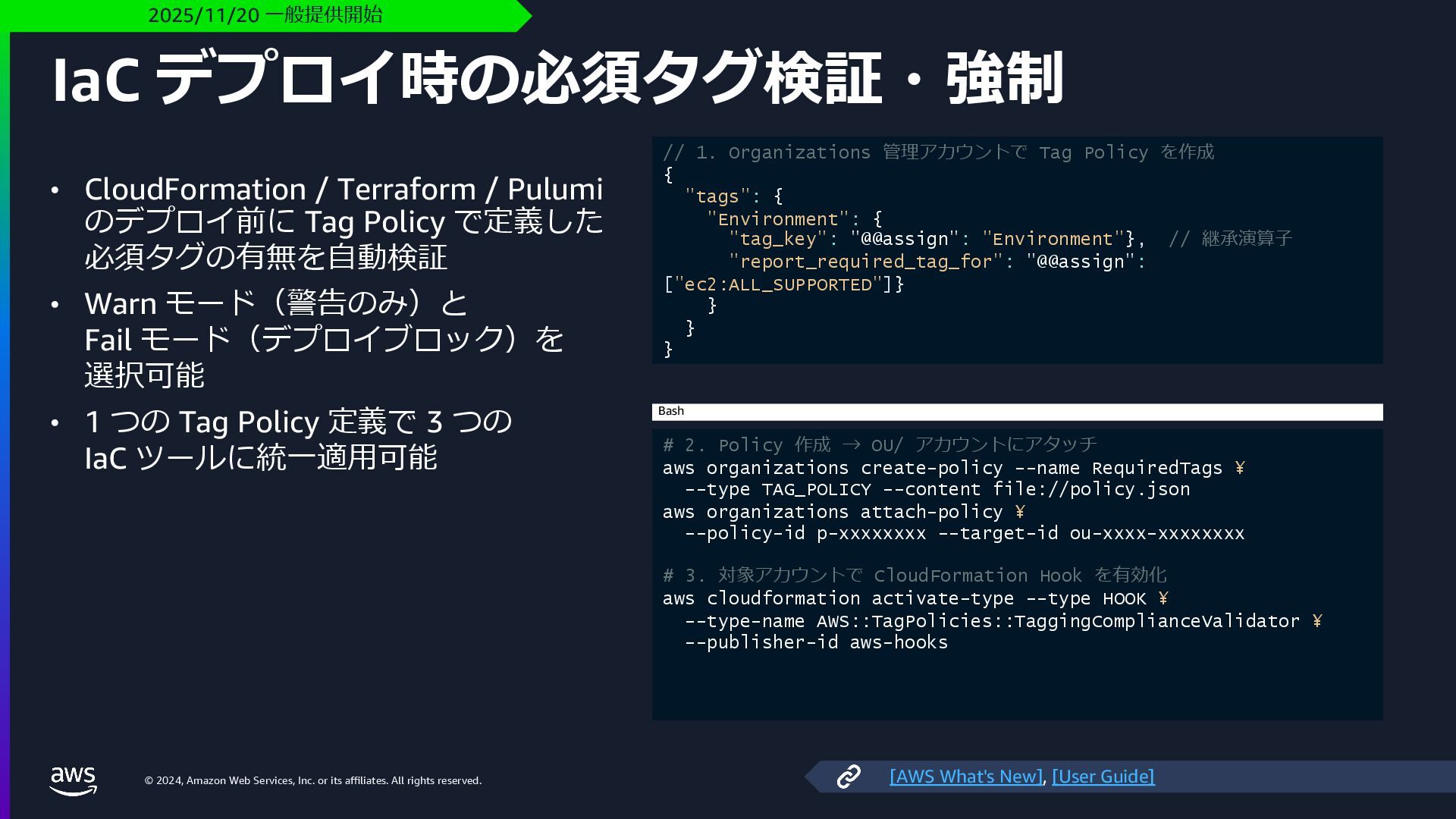
    rights reserved. IaC デプロイ時の必須タグ検証・強制 • CloudFormation / Terraform / Pulumi のデプロイ前に Tag Policy で定義した 必須タグの有無を⾃動検証 • Warn モード(警告のみ)と Fail モード(デプロイブロック)を 選択可能 • 1 つの Tag Policy 定義で 3 つの IaC ツールに統⼀適⽤可能 2025/11/20 ⼀般提供開始 // 1. Organizations 管理アカウントで Tag Policy を作成 { "tags": { "Environment": { "tag_key": "@@assign": "Environment"}, // 継承演算⼦ "report_required_tag_for": "@@assign": ["ec2:ALL_SUPPORTED"]} } } } # 2. Policy 作成 → OU/ アカウントにアタッチ aws organizations create-policy --name RequiredTags ¥ --type TAG_POLICY --content file://policy.json aws organizations attach-policy ¥ --policy-id p-xxxxxxxx --target-id ou-xxxx-xxxxxxxx # 3. 対象アカウントで CloudFormation Hook を有効化 aws cloudformation activate-type --type HOOK ¥ --type-name AWS::TagPolicies::TaggingComplianceValidator ¥ --publisher-id aws-hooks Bash [AWS What's New], [User Guide]
  35. © 2024, Amazon Web Services, Inc. or its affiliates. All

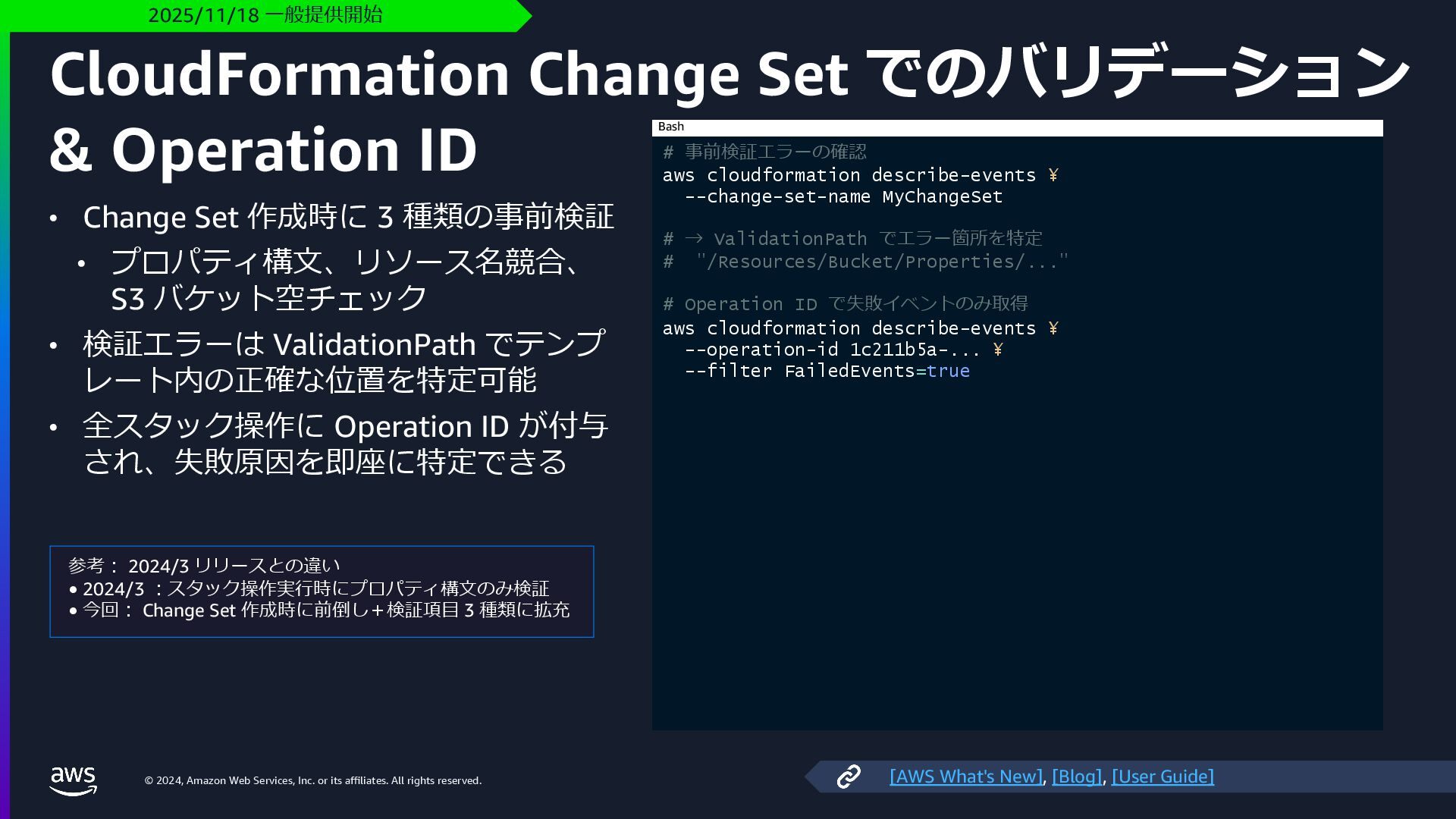
    rights reserved. CloudFormation Change Set でのバリデーション & Operation ID • Change Set 作成時に 3 種類の事前検証 • プロパティ構⽂、リソース名競合、 S3 バケット空チェック • 検証エラーは ValidationPath でテンプ レート内の正確な位置を特定可能 • 全スタック操作に Operation ID が付与 され、失敗原因を即座に特定できる 2025/11/18 ⼀般提供開始 参考︓ 2024/3 リリースとの違い • 2024/3 ︓スタック操作実⾏時にプロパティ構⽂のみ検証 • 今回︓ Change Set 作成時に前倒し+検証項⽬ 3 種類に拡充 # 事前検証エラーの確認 aws cloudformation describe-events ¥ --change-set-name MyChangeSet # → ValidationPath でエラー箇所を特定 # "/Resources/Bucket/Properties/..." # Operation ID で失敗イベントのみ取得 aws cloudformation describe-events ¥ --operation-id 1c211b5a-... ¥ --filter FailedEvents=true Bash [AWS What's New], [Blog], [User Guide]
  36. © 2024, Amazon Web Services, Inc. or its affiliates. All

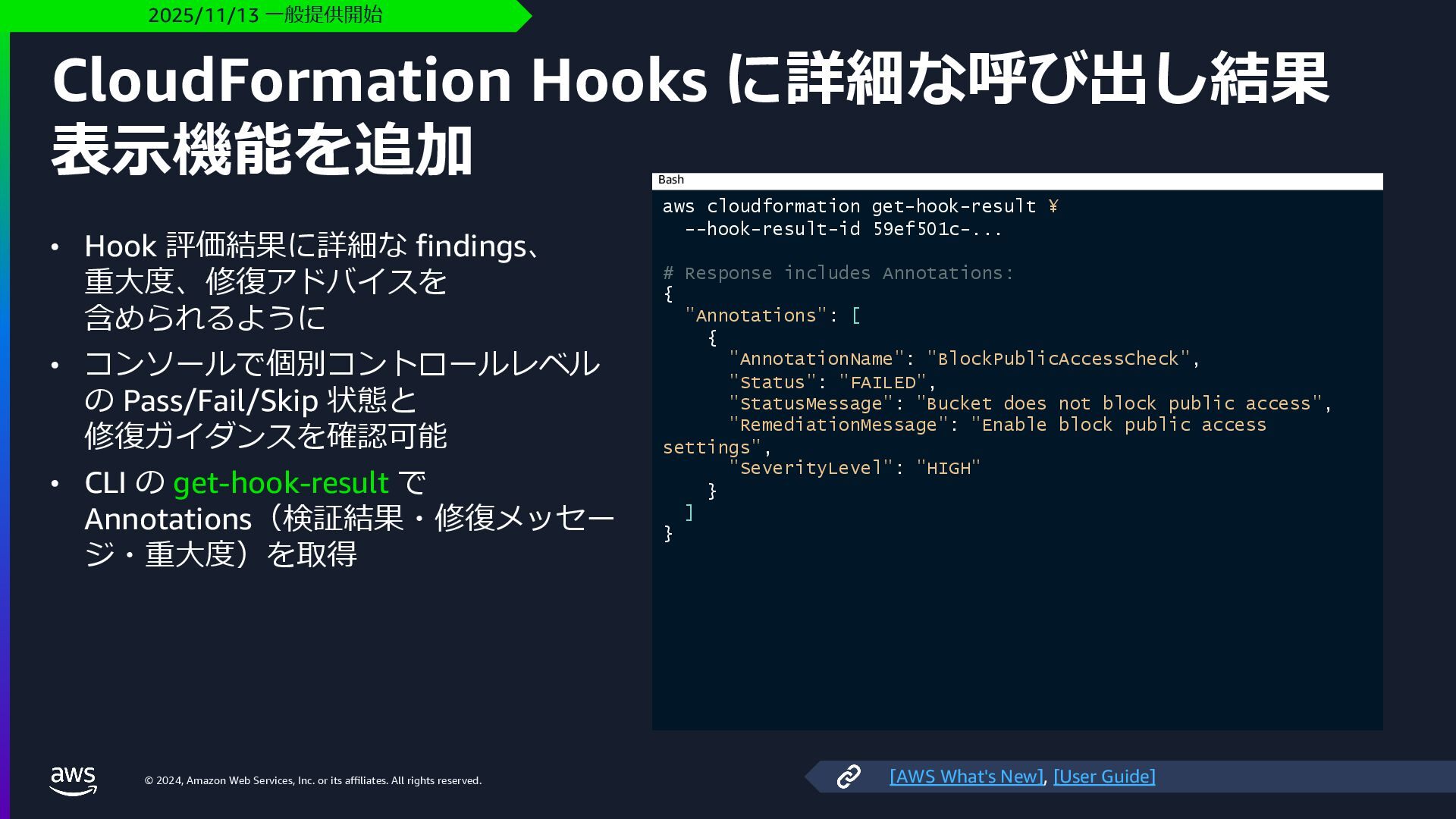
    rights reserved. CloudFormation Hooks に詳細な呼び出し結果 表⽰機能を追加 • Hook 評価結果に詳細な findings、 重⼤度、修復アドバイスを 含められるように • コンソールで個別コントロールレベル の Pass/Fail/Skip 状態と 修復ガイダンスを確認可能 • CLI の get-hook-result で Annotations(検証結果・修復メッセー ジ・重⼤度)を取得 2025/11/13 ⼀般提供開始 aws cloudformation get-hook-result ¥ --hook-result-id 59ef501c-... # Response includes Annotations: { "Annotations": [ { "AnnotationName": "BlockPublicAccessCheck", "Status": "FAILED", "StatusMessage": "Bucket does not block public access", "RemediationMessage": "Enable block public access settings", "SeverityLevel": "HIGH" } ] } Bash [AWS What's New], [User Guide]
  37. © 2024, Amazon Web Services, Inc. or its affiliates. All

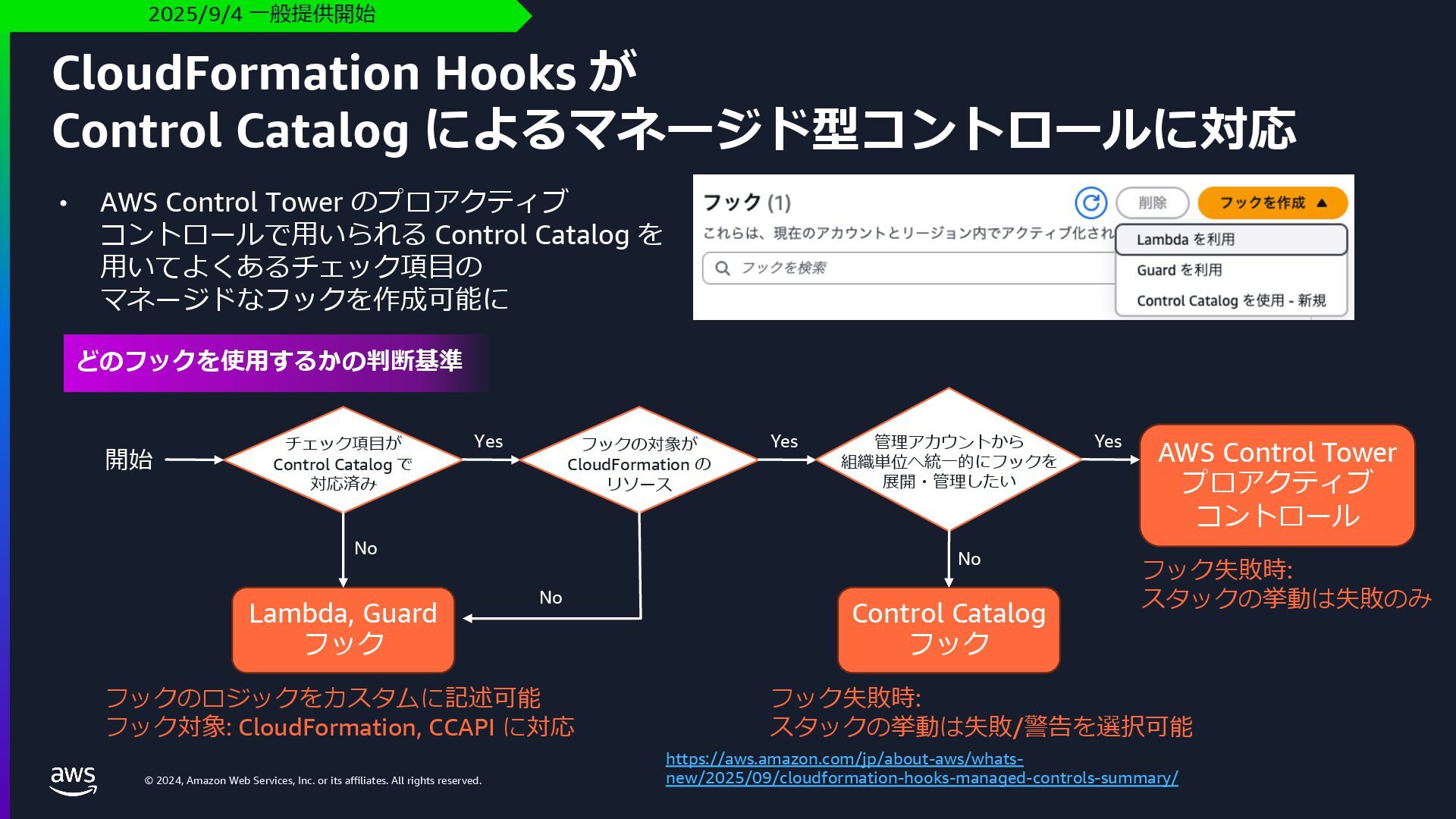
    rights reserved. CloudFormation Hooks が Control Catalog によるマネージド型コントロールに対応 2025/9/4 ⼀般提供開始 https://aws.amazon.com/jp/about-aws/whats- new/2025/09/cloudformation-hooks-managed-controls-summary/ • AWS Control Tower のプロアクティブ コントロールで⽤いられる Control Catalog を ⽤いてよくあるチェック項⽬の マネージドなフックを作成可能に AWS Control Tower プロアクティブ コントロール Control Catalog フック Lambda, Guard フック 開始 チェック項⽬が Control Catalog で 対応済み No Yes フックの対象が CloudFormation の リソース Yes No フックのロジックをカスタムに記述可能 フック対象: CloudFormation, CCAPI に対応 管理アカウントから 組織単位へ統⼀的にフックを 展開・管理したい Yes No フック失敗時: スタックの挙動は失敗/警告を選択可能 フック失敗時: スタックの挙動は失敗のみ どのフックを使⽤するかの判断基準
  38. © 2024, Amazon Web Services, Inc. or its affiliates. All

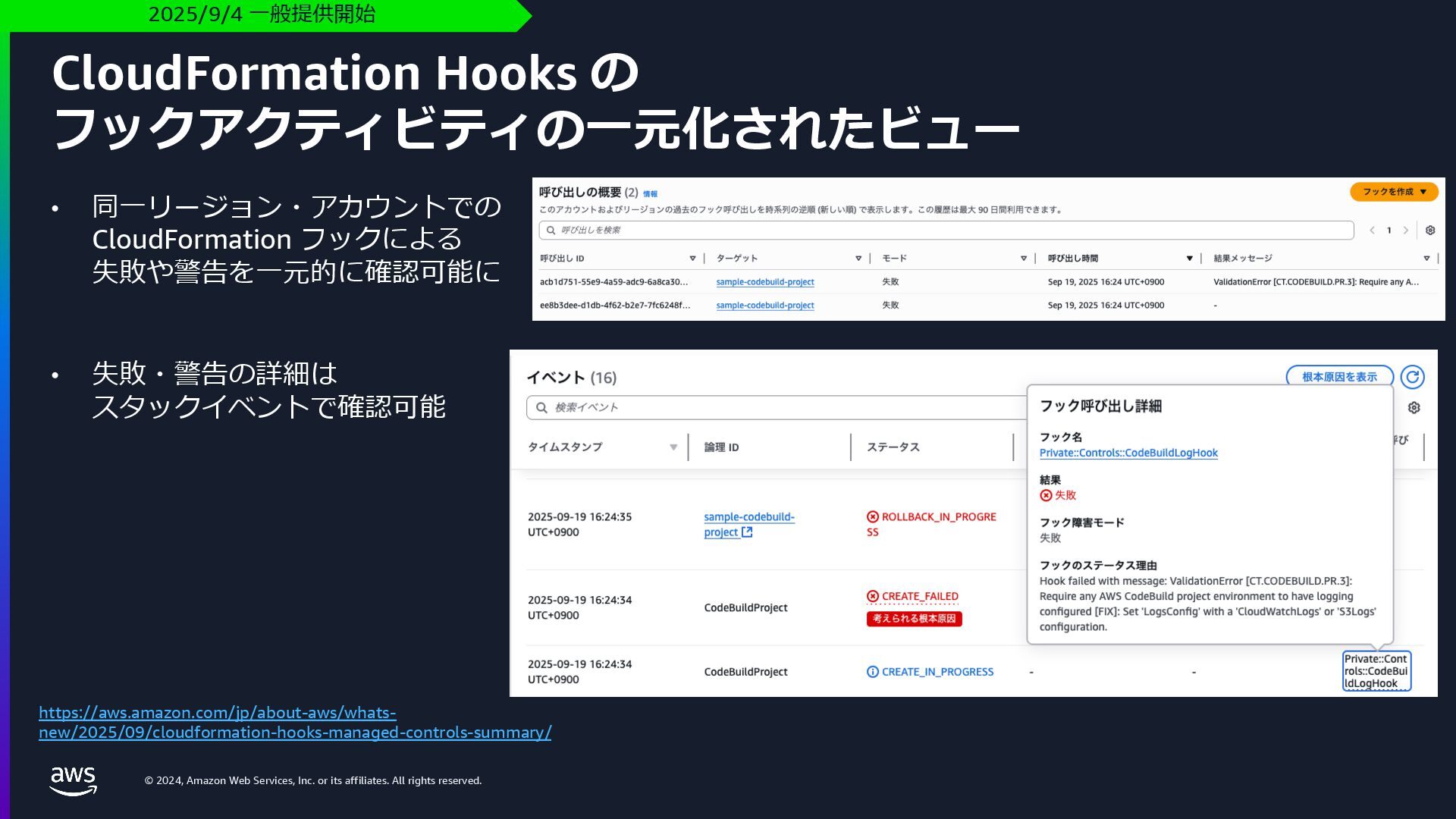
    rights reserved. CloudFormation Hooks の フックアクティビティの⼀元化されたビュー 2025/9/4 ⼀般提供開始 https://aws.amazon.com/jp/about-aws/whats- new/2025/09/cloudformation-hooks-managed-controls-summary/ • 同⼀リージョン・アカウントでの CloudFormation フックによる 失敗や警告を⼀元的に確認可能に • 失敗・警告の詳細は スタックイベントで確認可能
  39. © 2024, Amazon Web Services, Inc. or its affiliates. All

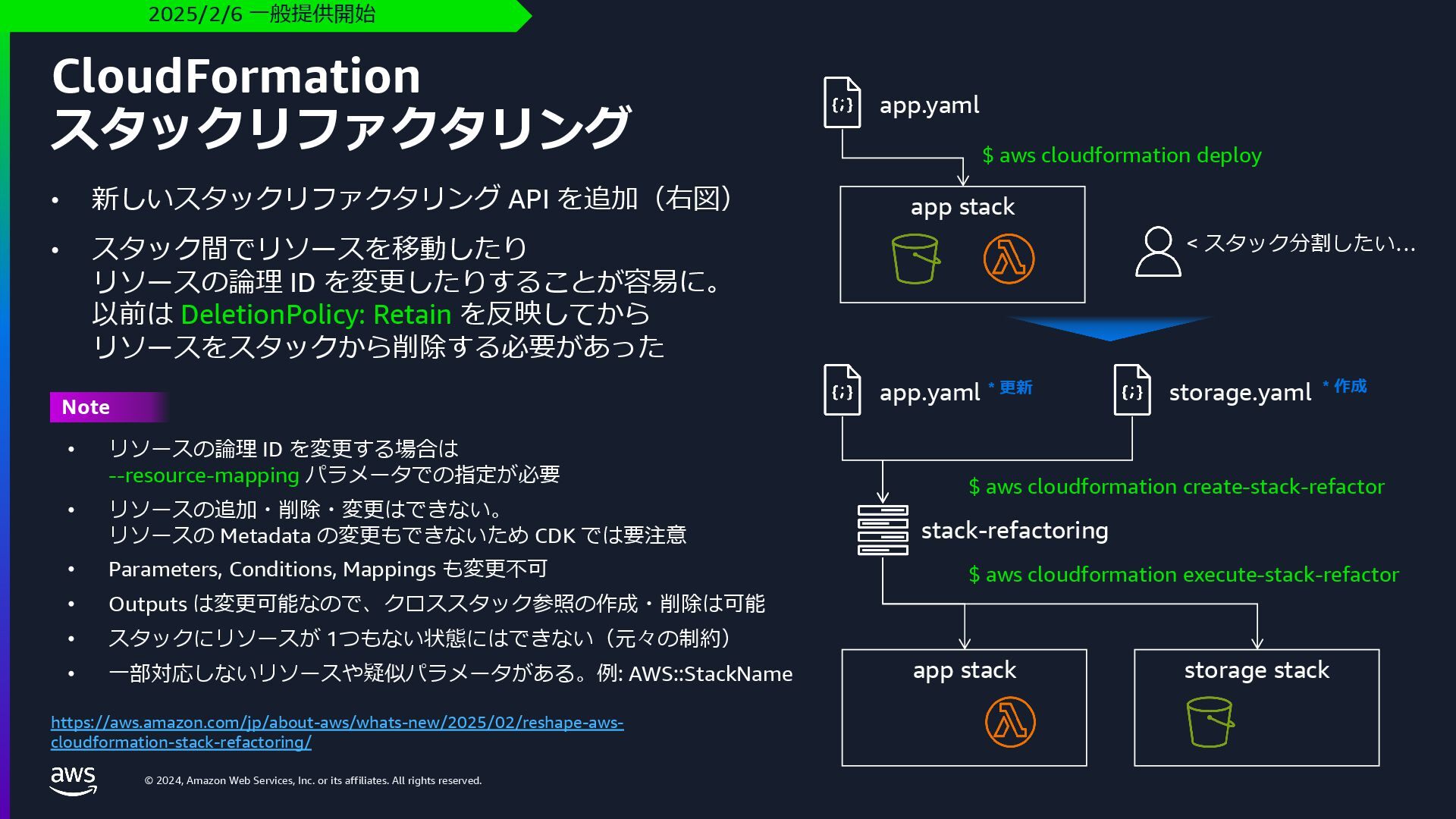
    rights reserved. • 新しいスタックリファクタリング API を追加(右図) • スタック間でリソースを移動したり リソースの論理 ID を変更したりすることが容易に。 以前は DeletionPolicy: Retain を反映してから リソースをスタックから削除する必要があった CloudFormation スタックリファクタリング https://aws.amazon.com/jp/about-aws/whats-new/2025/02/reshape-aws- cloudformation-stack-refactoring/ 2025/2/6 ⼀般提供開始 app.yaml app stack app stack storage stack app.yaml storage.yaml $ aws cloudformation deploy stack-refactoring $ aws cloudformation create-stack-refactor $ aws cloudformation execute-stack-refactor * 更新 * 作成 < スタック分割したい… Note • リソースの論理 ID を変更する場合は --resource-mapping パラメータでの指定が必要 • リソースの追加・削除・変更はできない。 リソースの Metadata の変更もできないため CDK では要注意 • Parameters, Conditions, Mappings も変更不可 • Outputs は変更可能なので、クロススタック参照の作成・削除は可能 • スタックにリソースが 1つもない状態にはできない(元々の制約) • ⼀部対応しないリソースや疑似パラメータがある。例: AWS::StackName
  40. © 2024, Amazon Web Services, Inc. or its affiliates. All

    rights reserved. AWS CloudFormation StackSets の新機能
  41. © 2024, Amazon Web Services, Inc. or its affiliates. All

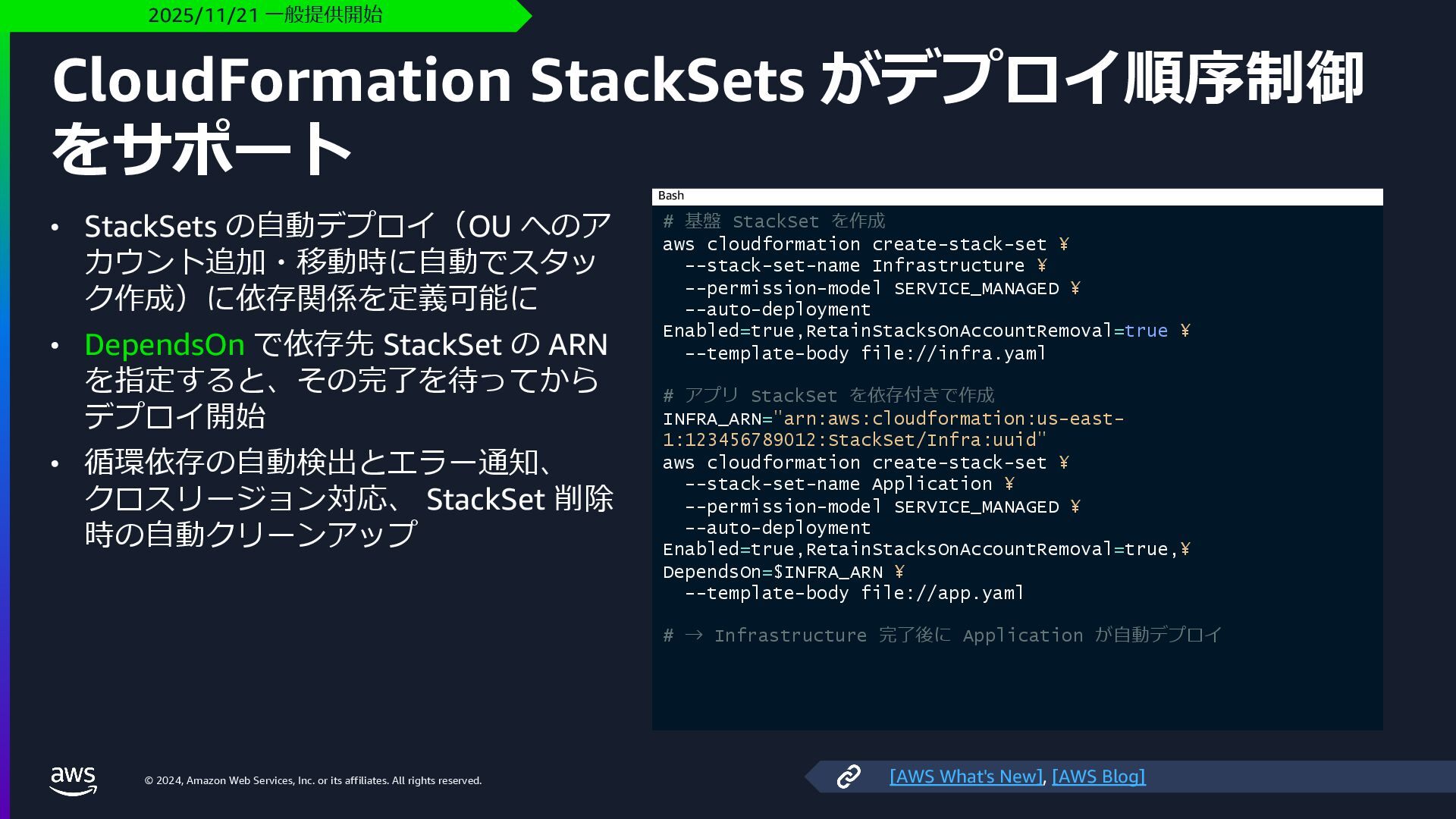
    rights reserved. CloudFormation StackSets がデプロイ順序制御 をサポート • StackSets の⾃動デプロイ(OU へのア カウント追加・移動時に⾃動でスタッ ク作成)に依存関係を定義可能に • DependsOn で依存先 StackSet の ARN を指定すると、その完了を待ってから デプロイ開始 • 循環依存の⾃動検出とエラー通知、 クロスリージョン対応、 StackSet 削除 時の⾃動クリーンアップ 2025/11/21 ⼀般提供開始 # 基盤 StackSet を作成 aws cloudformation create-stack-set ¥ --stack-set-name Infrastructure ¥ --permission-model SERVICE_MANAGED ¥ --auto-deployment Enabled=true,RetainStacksOnAccountRemoval=true ¥ --template-body file://infra.yaml # アプリ StackSet を依存付きで作成 INFRA_ARN="arn:aws:cloudformation:us-east- 1:123456789012:StackSet/Infra:uuid" aws cloudformation create-stack-set ¥ --stack-set-name Application ¥ --permission-model SERVICE_MANAGED ¥ --auto-deployment Enabled=true,RetainStacksOnAccountRemoval=true,¥ DependsOn=$INFRA_ARN ¥ --template-body file://app.yaml # → Infrastructure 完了後に Application が⾃動デプロイ Bash [AWS What's New], [AWS Blog]
  42. © 2024, Amazon Web Services, Inc. or its affiliates. All

    rights reserved. Thank you! Kenji Kono @konokenj