Upgrade to Pro
— share decks privately, control downloads, hide ads and more …
Speaker Deck
Sign up for free
Menu
Search
Features
All features
Private URLs
Password Protection
Custom URLS
Scheduled publishing
Remove Branding
Restrict embedding
Deck Collections
Notes
Features
All features
Private URLs
Password Protection
Custom URLS
Scheduled publishing
Remove Branding
Restrict embedding
Deck Collections
Notes
Explore
Featured decks
Featured speakers
Programming
Technology
Storyboards
Explore
Featured decks
Featured speakers
Programming
Technology
Storyboards
Pricing
Search
Sign in
Sign up for free
GAEアプリをCI/CDして結果をSlackに通知した話 / GAE App CICD Sla...
Search
Sponsored
·
SiteGround - Reliable hosting with speed, security, and support you can count on.
→
qushot
January 31, 2019
Programming
1.1k
0
Share
Embed
Copy iframe code
Copy JS code
Copy link
Start on current slide
GAEアプリをCI/CDして結果をSlackに通知した話 / GAE App CICD Slack notification
qushot
January 31, 2019
More Decks by qushot
See All by qushot
よく使っているライブラリ&ツール紹介
qushot
0
100
Other Decks in Programming
See All in Programming
JAWS-UG 東京支部が始める、JAWS-UG支部コラボ / JAWS-UG lunchtime LT Collaboration
y0hgi
0
270
Herb in Rails 8.2: Your ERB views, now HTML-aware @ Rails World 2026, Austin, Texas
marcoroth
0
220
When benchmarks go bad - what I learned from measuring performance wrong
hollycummins
0
220
FactoryBotをやめればRSpecは速くなるのか?
yuta_onishi_97
0
330
Everything will be SERVERLESS — 信じて運用した10年の経験値 / Everything Will be Serverless — Lessons Learned from 10 Years of Operational Experience
seike460
PRO
1
1.1k
パスワード再設定メールのURLについて知っておこう
uyuki234
0
160
AIに “答え“を書かせるのを やめてみた
___akari11
0
120
UnityでSystem.Net.WebSocketsなWebSocketサーバが動かないのでUnity Monoのコードを覗いてみた / about implementing websocket server with unity mono
drumath2237
1
610
APNsからLive Activityを開始する話
yumnumm
0
170
Agents on Rails - Rails at Scale 2026
irinanazarova
0
560
Verilogで学ぶCPU自作入門
uyuki234
8
4.1k
The Rails Doctrine Decade
koic
2
590
Featured
See All Featured
The Organizational Zoo: Understanding Human Behavior Agility Through Metaphoric Constructive Conversations (based on the works of Arthur Shelley, Ph.D)
kimpetersen
PRO
0
500
Leo the Paperboy
mayatellez
10
2.4k
Art, The Web, and Tiny UX
lynnandtonic
304
22k
What does AI have to do with Human Rights?
axbom
PRO
1
2.5k
Effective software design: The role of men in debugging patriarchy in IT @ Voxxed Days AMS
baasie
1
570
Exploring anti-patterns in Rails
aemeredith
4
540
From Legacy to Launchpad: Building Startup-Ready Communities
dugsong
0
360
WCS-LA-2024
lcolladotor
0
890
Easily Structure & Communicate Ideas using Wireframe
afnizarnur
194
17k
We Have a Design System, Now What?
morganepeng
55
8.4k
A Guide to Academic Writing Using Generative AI - A Workshop
ks91
PRO
1
520
A better future with KSS
kneath
240
18k
Transcript
GAEアプリをCI/CDして 結果をSlackに通知した話 2019/1/31 Go(Un)Conference LT大会 5kg
Google Cloud Platform プレミアパートナー 自己紹介 名前: 本 雄太朗 (@qushot) 所属:
クラウドエース株式会社 業務: サーバサイド(GAE, GKE)をGoで開発 Go歴: 2年弱
None
前置き
Google App Engine GoogleのインフラでWebアプリを実行できるPaaS。 開発者はアプリのコードだけ書いてればいいので楽。 Go 1.11対応(beta)。
Cloud Build 基本的にはコンテナイメージをビルドするためのサービス。 GitHubなどのリポジトリにPushすると 設定ファイルに従ってビルド・テスト・デプロイなどの処理ができる。
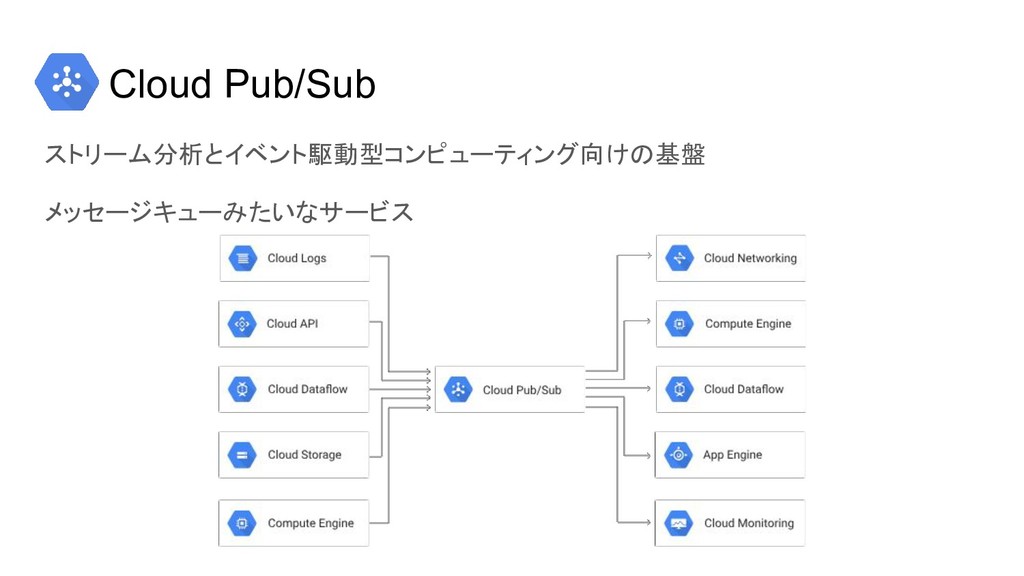
Cloud Pub/Sub ストリーム分析とイベント駆動型コンピューティング向けの基盤 メッセージキューみたいなサービス
Google Cloud Functions イベント駆動型のサーバーレスコンピューティングプラットフォーム。 HTTPリクエストやGCP/Firebaseでのイベントをトリガーに関数を実行する。 Go 1.11対応(beta)
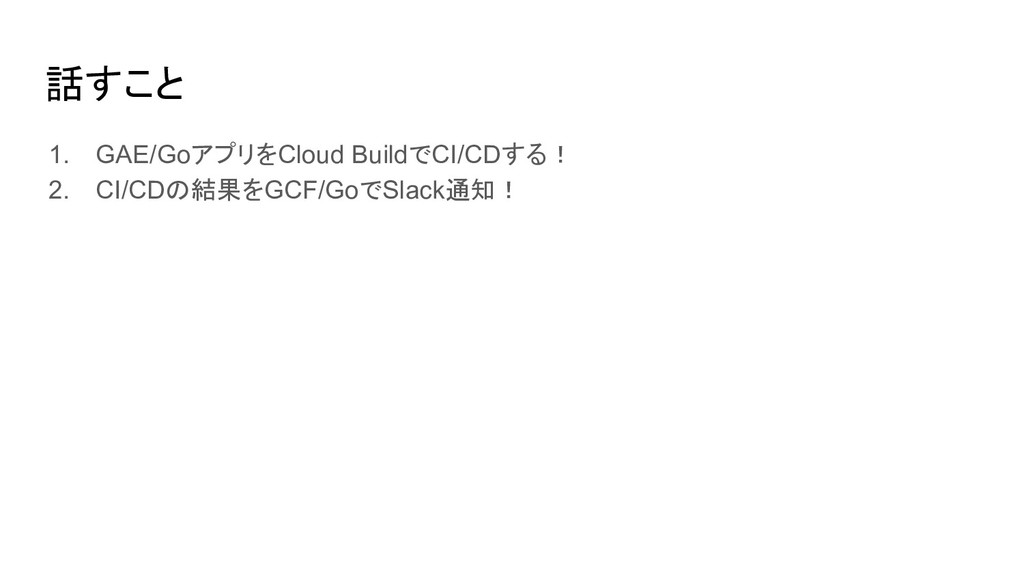
話すこと 1. GAE/GoアプリをCloud BuildでCI/CDする! 2. CI/CDの結果をGCF/GoでSlack通知!
GAE/GoアプリをCloud BuildでCI/CD
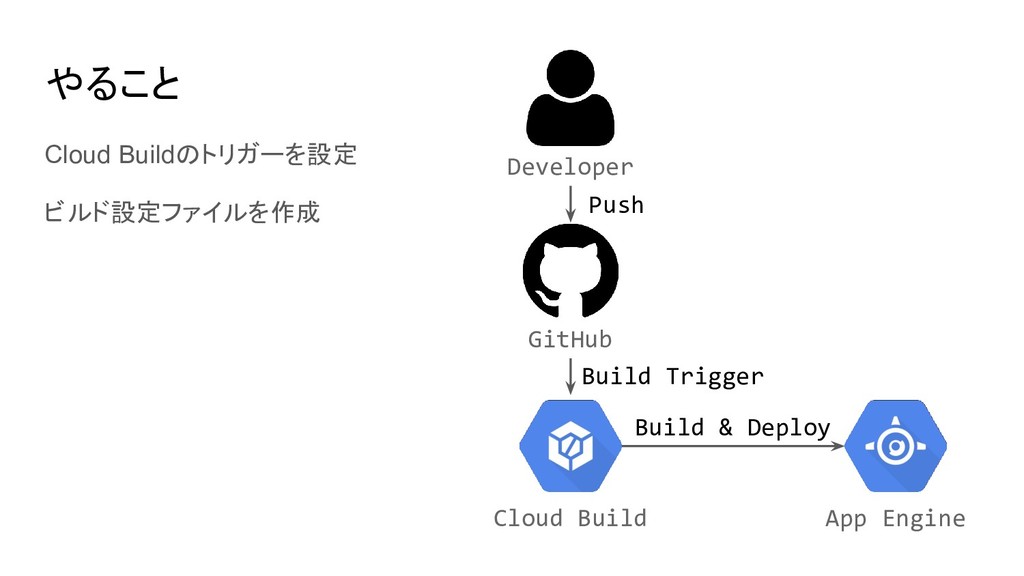
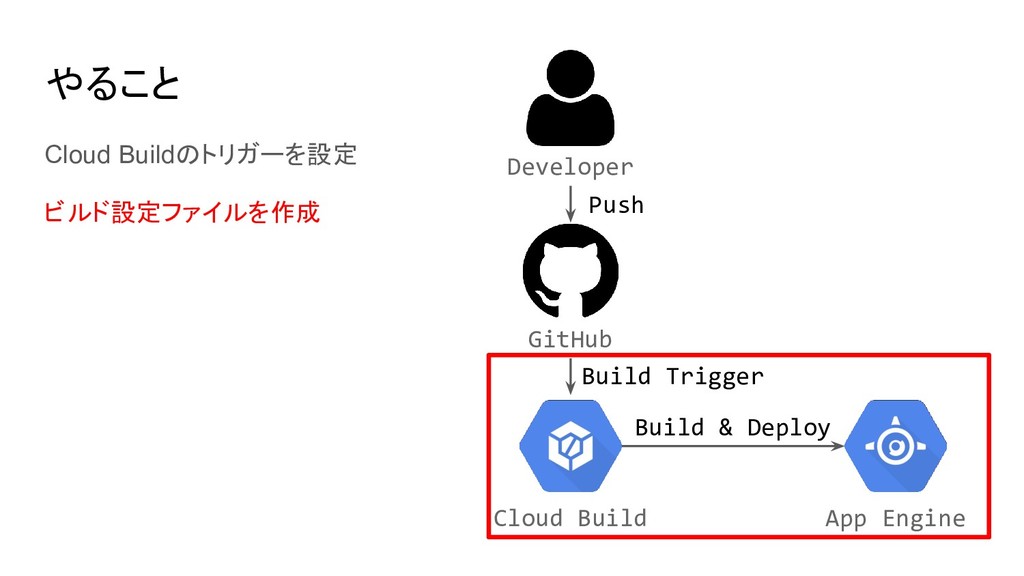
やること Cloud Buildのトリガーを設定 ビルド設定ファイルを作成 Developer Cloud Build GitHub App Engine
Build Trigger Build & Deploy Push
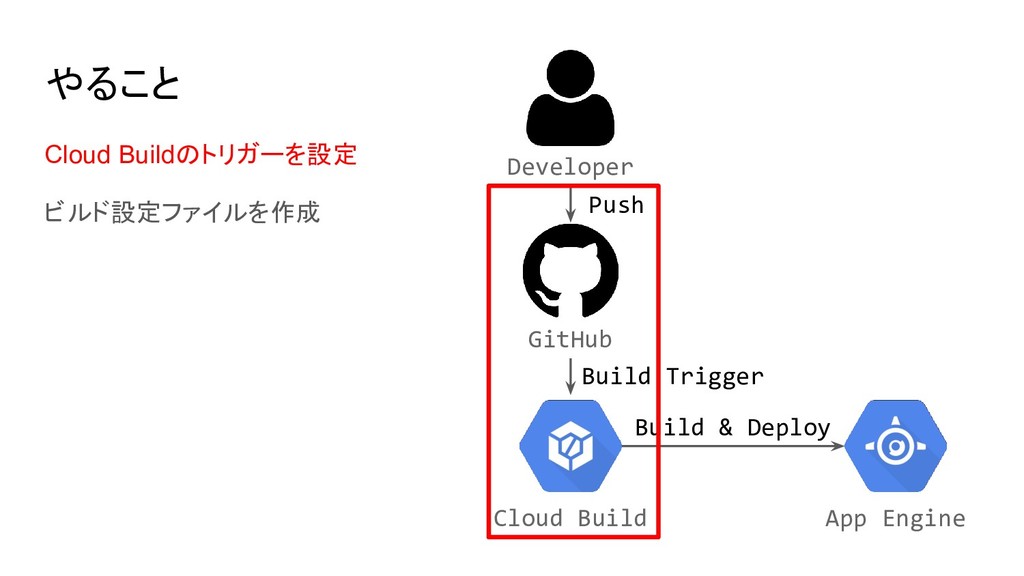
やること Cloud Buildのトリガーを設定 ビルド設定ファイルを作成 Developer Cloud Build GitHub App Engine
Build Trigger Build & Deploy Push
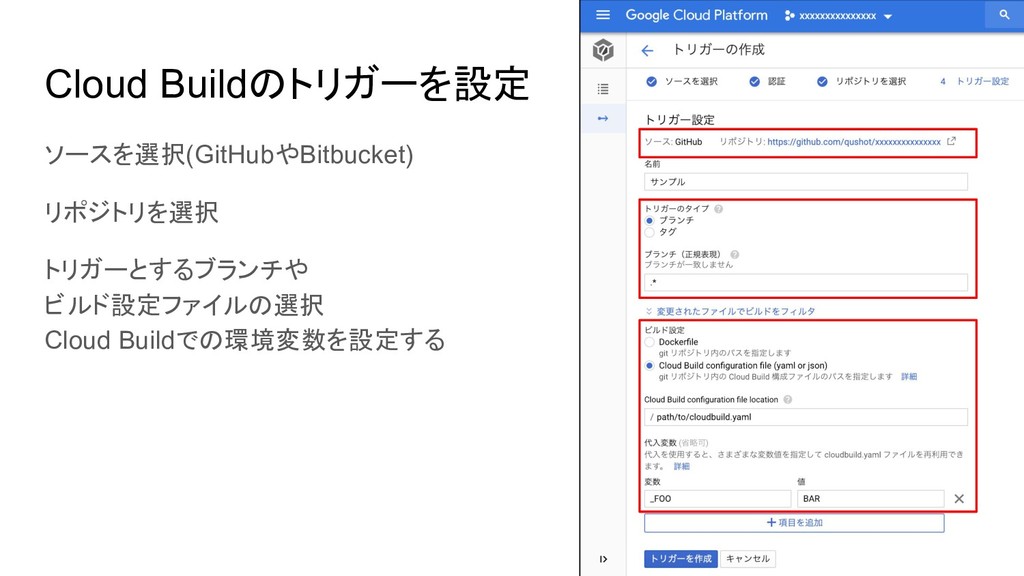
Cloud Buildのトリガーを設定 ソースを選択(GitHubやBitbucket) リポジトリを選択 トリガーとするブランチや ビルド設定ファイルの選択 Cloud Buildでの環境変数を設定する
やること Cloud Buildのトリガーを設定 ビルド設定ファイルを作成 Developer Cloud Build GitHub App Engine
Build Trigger Build & Deploy Push
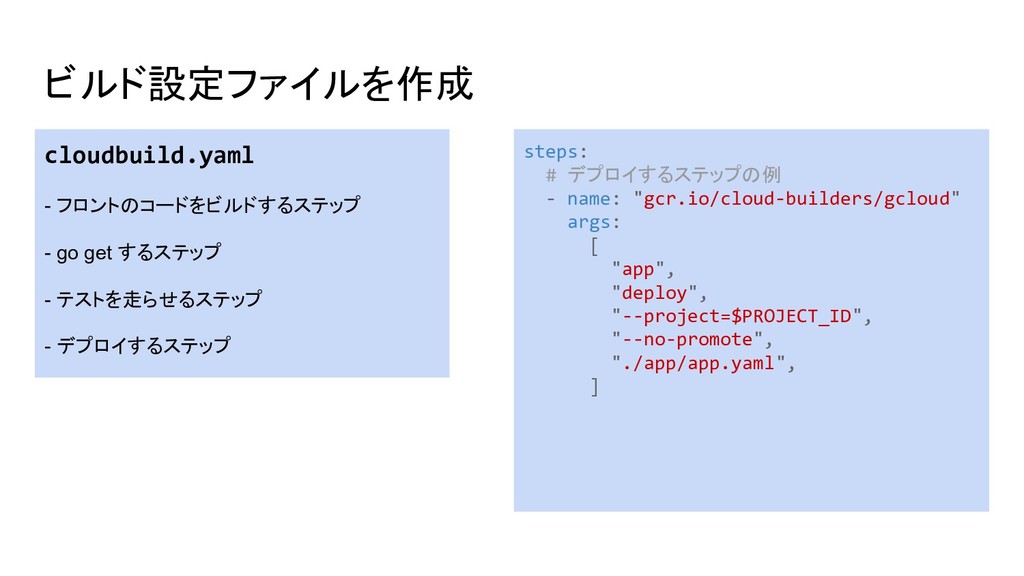
ビルド設定ファイルを作成 cloudbuild.yaml - フロントのコードをビルドするステップ - go get するステップ - テストを走らせるステップ
- デプロイするステップ steps: # デプロイするステップの例 - name: "gcr.io/cloud-builders/gcloud" args: [ "app", "deploy", "--project=$PROJECT_ID", "--no-promote", "./app/app.yaml", ]
CI/CDの結果をGCF/GoでSlack通知
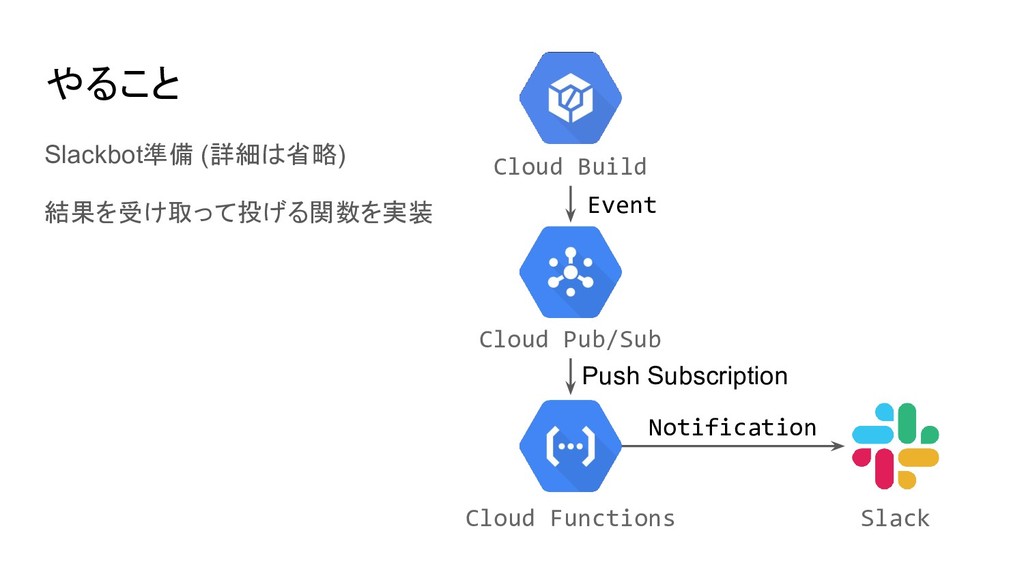
やること Slackbot準備 (詳細は省略) 結果を受け取って投げる関数を実装 Cloud Build Cloud Functions Cloud Pub/Sub
Slack Push Subscription Notification Event
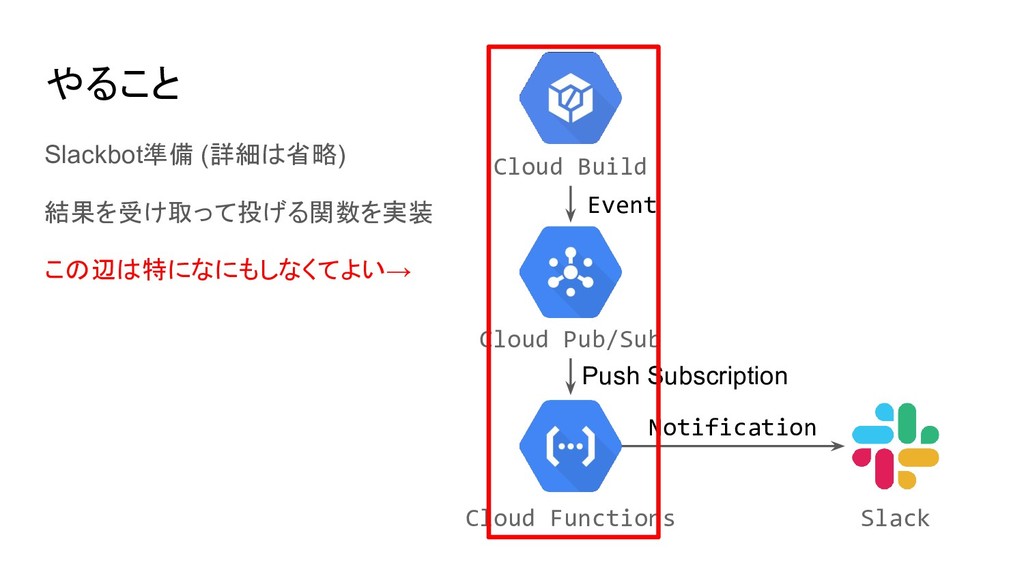
やること Slackbot準備 (詳細は省略) 結果を受け取って投げる関数を実装 この辺は特になにもしなくてよい→ Cloud Build Cloud Functions Cloud
Pub/Sub Slack Push Subscription Notification Event
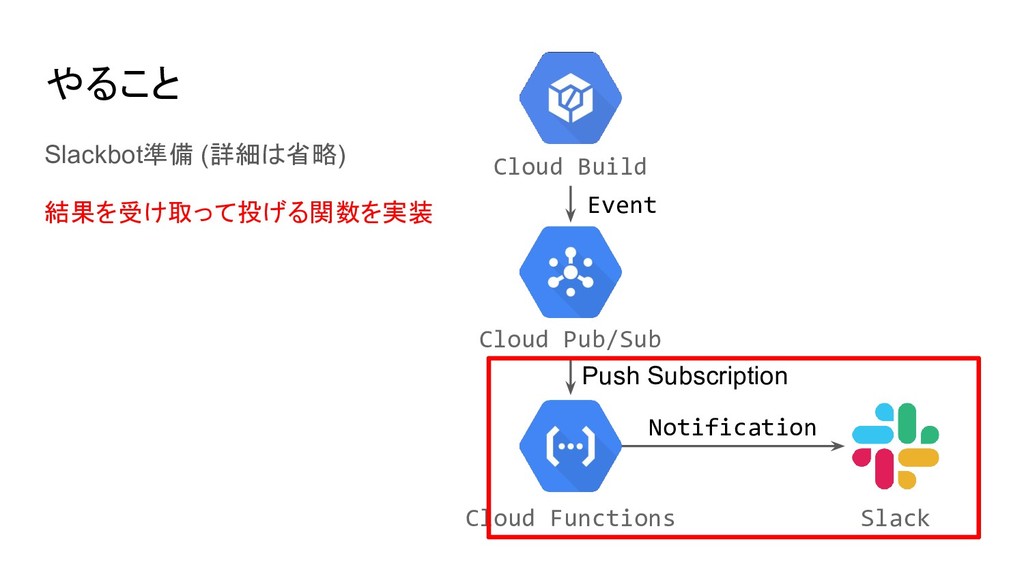
やること Slackbot準備 (詳細は省略) 結果を受け取って投げる関数を実装 Cloud Build Cloud Functions Cloud Pub/Sub
Slack Push Subscription Notification Event
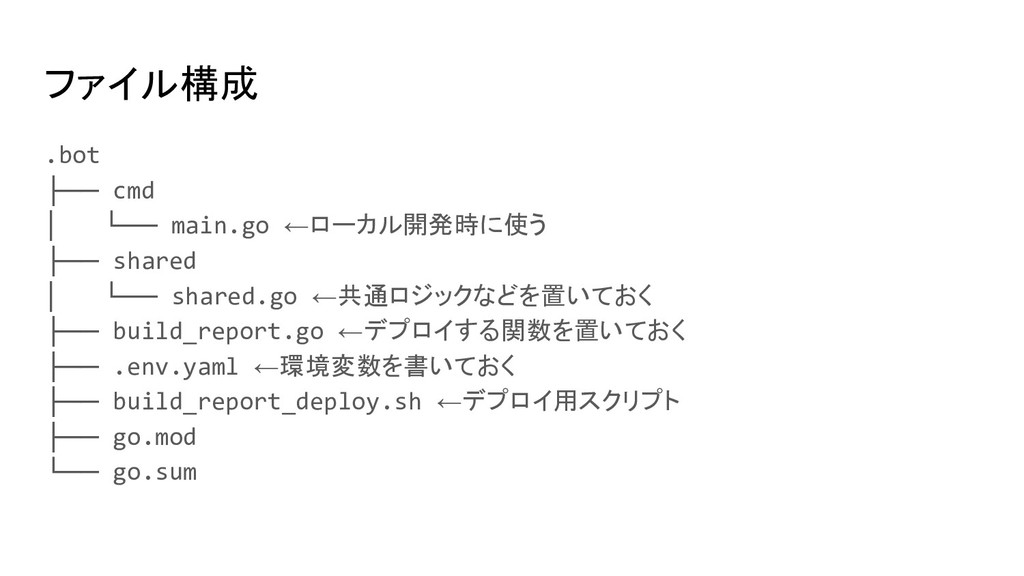
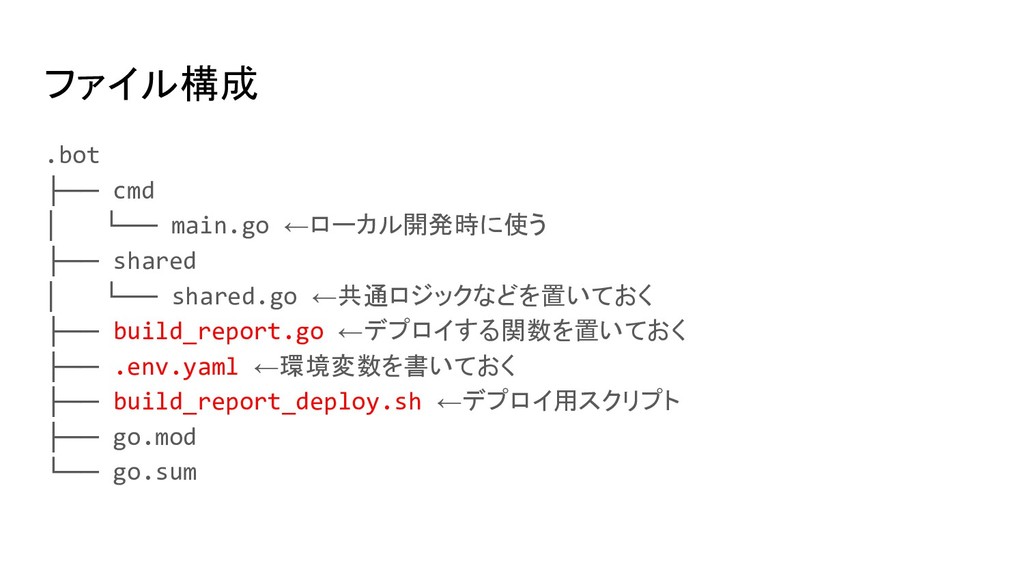
ファイル構成 .bot ├── cmd │ └── main.go ←ローカル開発時に使う ├── shared
│ └── shared.go ←共通ロジックなどを置いておく ├── build_report.go ←デプロイする関数を置いておく ├── .env.yaml ←環境変数を書いておく ├── build_report_deploy.sh ←デプロイ用スクリプト ├── go.mod └── go.sum
ファイル構成 .bot ├── cmd │ └── main.go ←ローカル開発時に使う ├── shared
│ └── shared.go ←共通ロジックなどを置いておく ├── build_report.go ←デプロイする関数を置いておく ├── .env.yaml ←環境変数を書いておく ├── build_report_deploy.sh ←デプロイ用スクリプト ├── go.mod └── go.sum
関数を実装する build_report.go // PubSubからのメッセージ受ける構造体 type PubSubMessage struct { Data []byte
`json:"data"` } // ↑のbyte配列をUnmarshalするための構造体 // 関数はPublicに func BuildReport(ctx context.Context, m PubSubMessage) error { // 処理 return nil } type build struct { Status string `json:"status"` LogURL string `json:"logUrl"` }
関数を実装する build_report.go // PubSubからのメッセージ受ける構造体 type PubSubMessage struct { Data []byte
`json:"data"` } // ↑のbyte配列をUnmarshalするための構造体 // 関数はPublicに func BuildReport(ctx context.Context, m PubSubMessage) error { // 処理 return nil } type build struct { Status string `json:"status"` LogURL string `json:"logUrl"` } json.Unmarshalして、 buildのStatusが “SUCCESS” の場合は成功 Statusが “FAILURE”, “INTERNAL_ERROR”, “TIMEOUT” の場合は失敗 の通知を飛ばす処理を書く ※Statusには上記以外のものもあるので、気をつけないと通知まみれになる
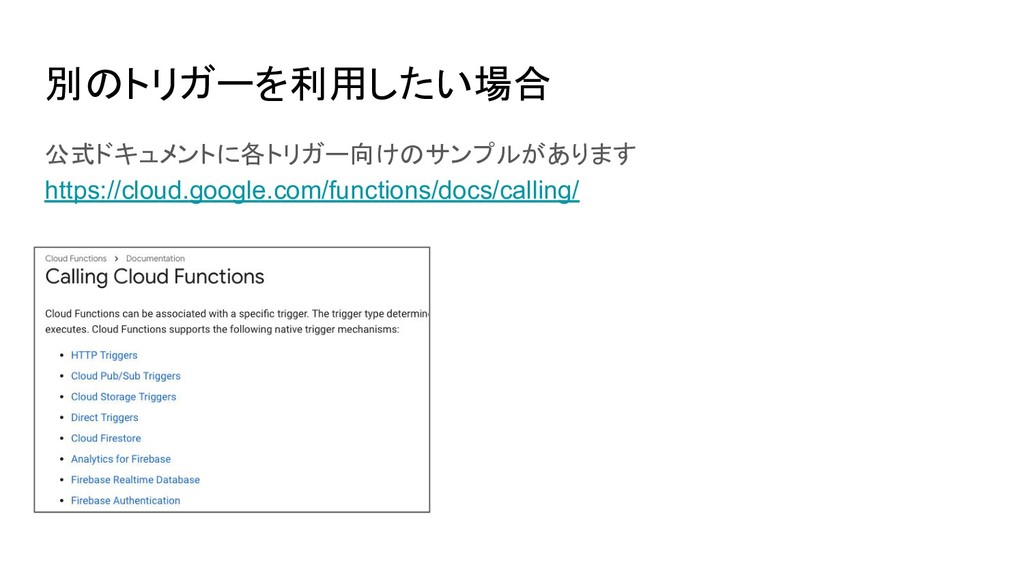
別のトリガーを利用したい場合 公式ドキュメントに各トリガー向けのサンプルがあります https://cloud.google.com/functions/docs/calling/
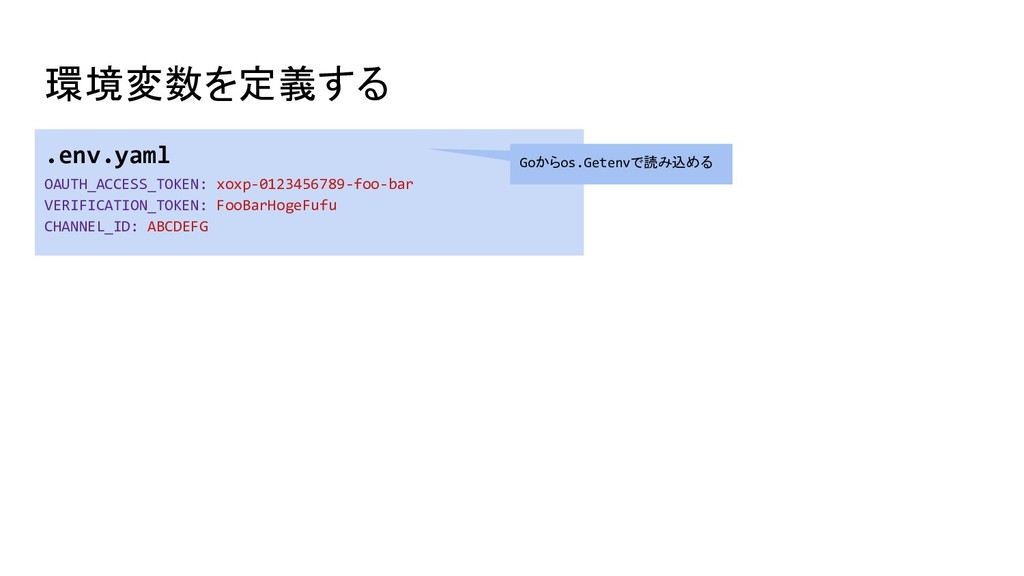
環境変数を定義する .env.yaml OAUTH_ACCESS_TOKEN: xoxp-0123456789-foo-bar VERIFICATION_TOKEN: FooBarHogeFufu CHANNEL_ID: ABCDEFG Goからos.Getenvで読み込める
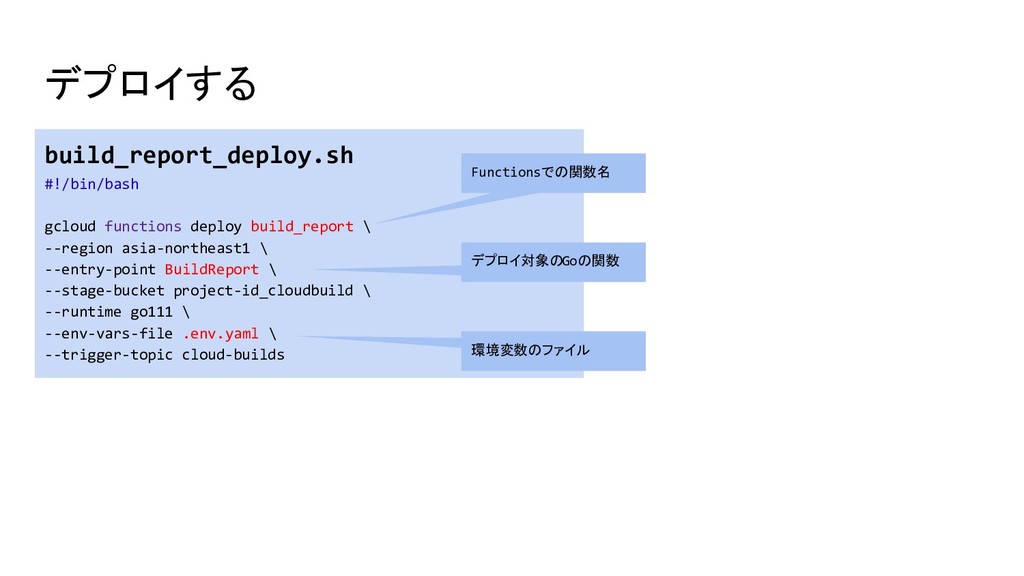
デプロイする build_report_deploy.sh #!/bin/bash gcloud functions deploy build_report \ --region asia-northeast1
\ --entry-point BuildReport \ --stage-bucket project-id_cloudbuild \ --runtime go111 \ --env-vars-file .env.yaml \ --trigger-topic cloud-builds Functionsでの関数名 デプロイ対象のGoの関数 環境変数のファイル
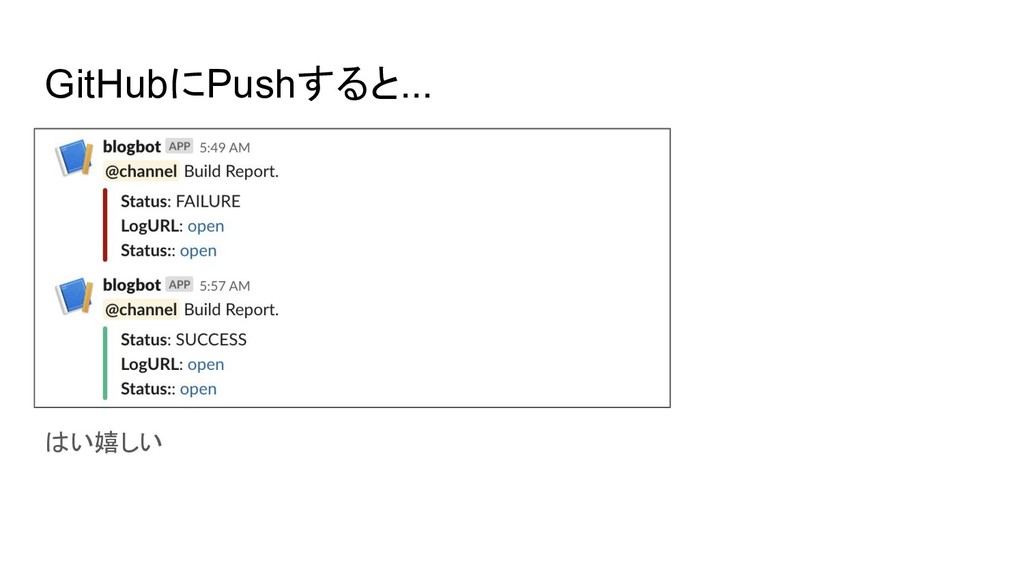
GitHubにPushすると... はい嬉しい
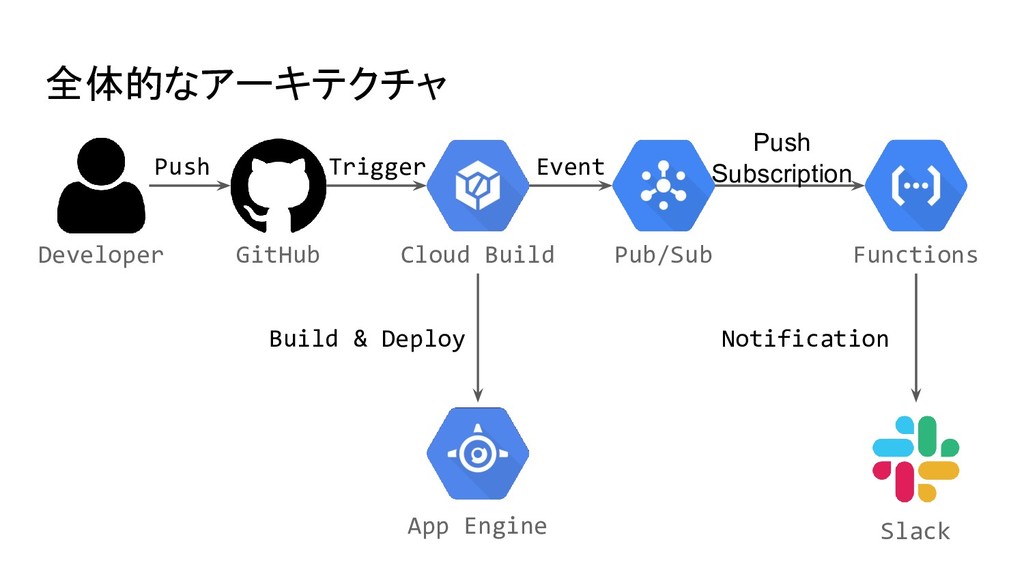
全体的なアーキテクチャ Developer Cloud Build GitHub App Engine Trigger Build &
Deploy Push Pub/Sub Functions Slack Event Push Subscription Notification
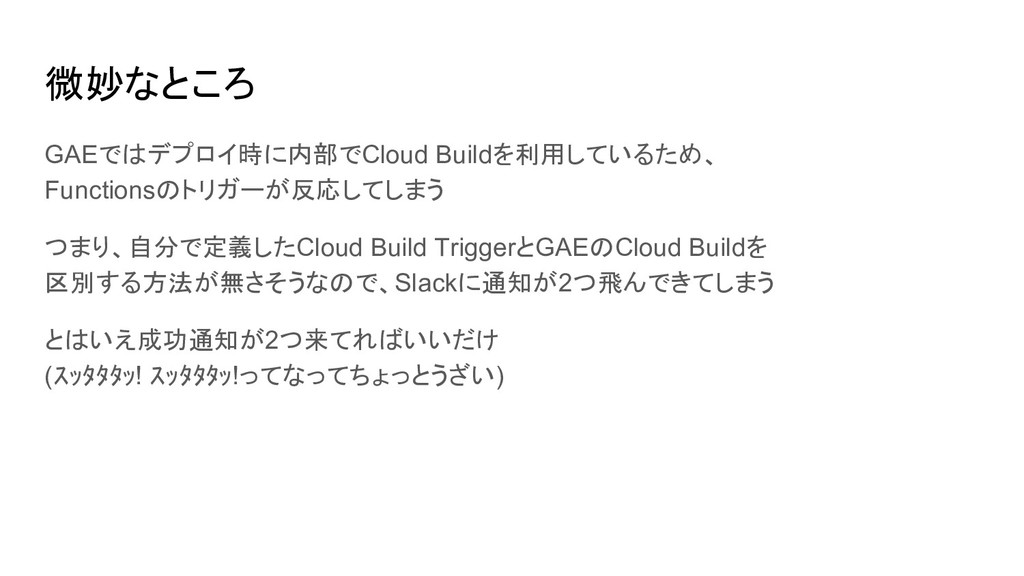
微妙なところ GAEではデプロイ時に内部でCloud Buildを利用しているため、 Functionsのトリガーが反応してしまう つまり、自分で定義したCloud Build TriggerとGAEのCloud Buildを 区別する方法が無さそうなので、Slackに通知が2つ飛んできてしまう とはいえ成功通知が2つ来てればいいだけ
(スッタタタッ! スッタタタッ!ってなってちょっとうざい)
せっかくなら 通知だけじゃ便利とは言えないよね! Slack Interactive Message [1] とか使って botからバージョンの切り替えとかやりたいよね! というわけでApp Engine
Admin APIを叩こう! [1] Slack Interactive Message の例
と思いきや Go向けのクライアントライブラリが無い・・・[1] 自動生成されたライブラリ(やたら項目が多くてダルい)とか REST APIは提供されているので叩け無いことはないケド・・・ [1] https://cloud.google.com/appengine/docs/admin-api/client-libraries
Googleさん、お願いします^^
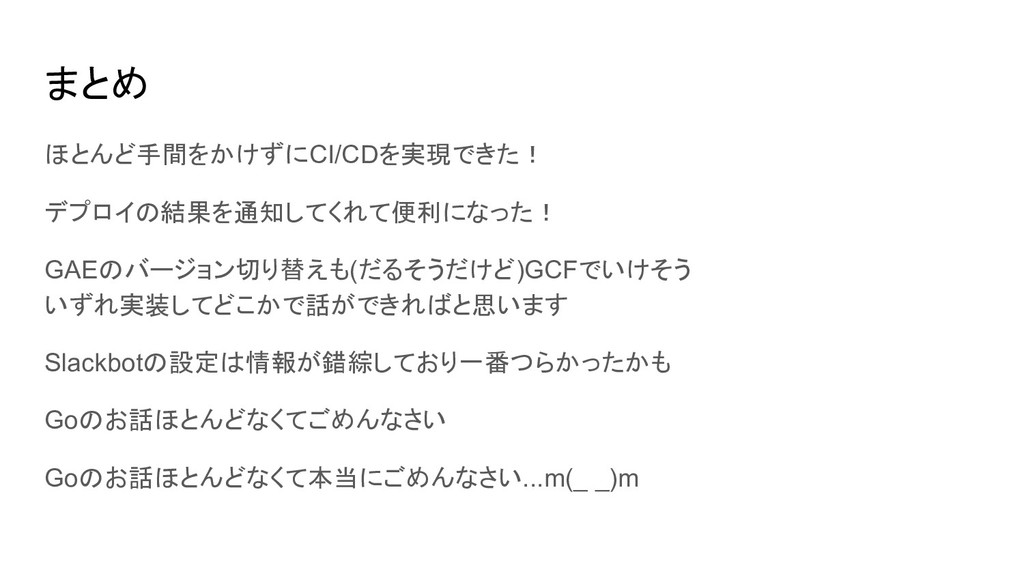
まとめ ほとんど手間をかけずにCI/CDを実現できた! デプロイの結果を通知してくれて便利になった! GAEのバージョン切り替えも(だるそうだけど)GCFでいけそう いずれ実装してどこかで話ができればと思います Slackbotの設定は情報が錯綜しており一番つらかったかも Goのお話ほとんどなくてごめんなさい Goのお話ほとんどなくて本当にごめんなさい...m(_ _)m
現在クラウドエースでは 絶賛社員募集中です! GCPやGoでの開発・運用に 興味があれば @qushot まで!
ご清聴ありがとうございました!

 SiteGround - Reliable hosting with speed, security, and support you can count on.


 qushot
 y0hgi
y0hgi
 marcoroth
 hollycummins
 yuta_onishi_97
 seike460
 uyuki234
 ___akari11
 drumath2237
.jpg) yumnumm
yumnumm
 irinanazarova
 koic
koic
 kimpetersen
 mayatellez
 lynnandtonic
 axbom
axbom
 baasie
 aemeredith
 dugsong
 lcolladotor
 afnizarnur
 morganepeng
 ks91
ks91
 kneath


![関数を実装する build_report.go // PubSubからのメッセージ受ける構造体 type PubSubMessage struct { Data []byte](https://files.speakerdeck.com/presentations/9da22e62a9cd4ab88f8791fe4f25e158/slide_21.jpg)
![関数を実装する build_report.go // PubSubからのメッセージ受ける構造体 type PubSubMessage struct { Data []byte](https://files.speakerdeck.com/presentations/9da22e62a9cd4ab88f8791fe4f25e158/slide_22.jpg)
![せっかくなら 通知だけじゃ便利とは言えないよね! Slack Interactive Message [1] とか使って botからバージョンの切り替えとかやりたいよね! というわけでApp Engine](https://files.speakerdeck.com/presentations/9da22e62a9cd4ab88f8791fe4f25e158/slide_29.jpg)
![と思いきや Go向けのクライアントライブラリが無い・・・[1] 自動生成されたライブラリ(やたら項目が多くてダルい)とか REST APIは提供されているので叩け無いことはないケド・・・ [1] https://cloud.google.com/appengine/docs/admin-api/client-libraries](https://files.speakerdeck.com/presentations/9da22e62a9cd4ab88f8791fe4f25e158/slide_30.jpg)