Upgrade to Pro
— share decks privately, control downloads, hide ads and more …
Speaker Deck
Sign up for free
Menu
Search
Features
All features
Private URLs
Password Protection
Custom URLS
Scheduled publishing
Remove Branding
Restrict embedding
Deck Collections
Notes
Features
All features
Private URLs
Password Protection
Custom URLS
Scheduled publishing
Remove Branding
Restrict embedding
Deck Collections
Notes
Explore
Featured decks
Featured speakers
Programming
Technology
Storyboards
Explore
Featured decks
Featured speakers
Programming
Technology
Storyboards
Pricing
Search
Sign in
Sign up for free
Validateのやり方.pdf
Search
Sponsored
·
Your Podcast. Everywhere. Effortlessly.
Share. Educate. Inspire. Entertain. You do you. We'll handle the rest.
→
rina37
June 20, 2018
Education
33
0
Share
Embed
Copy iframe code
Copy JS code
Copy link
Start on current slide
Validateのやり方.pdf
rina37
June 20, 2018
More Decks by rina37
See All by rina37
1A118155_皆川理奈_課題2.pdf
rina37
0
180
Other Decks in Education
See All in Education
形骸化しない社内勉強会の取り組み - オーナーシップの作り方 / In-house study session
soudai
PRO
1
430
EL GEOPARQUE MUNDIAL UNESCO VOLCANES DE CALATRAVA: DE LA INVESTIGACIÓN CIENTÍFICA A LA TRANSPOSICIÓN DIDÁCTICA EN EL AULA
juanmartin2026
0
33k
Requirements Analysis and Prototyping - Lecture 3 - Human-Computer Interaction (1023841ANR)
signer
PRO
0
1.8k
マークシート試験のTeX言語を用いた自動採点について
doratex
0
6.1k
AIの力を100%引き出すために
frievea
0
610
Sanapilvet opetuksessa
matleenalaakso
1
36k
[2026後期火5] 論理学(京都大学文学部 後期 第2回)「量化子の導入」
yatabe
0
180
【ホスト用】ainiチャット操作ガイド
ainischool
0
120
エビデンスベースト英語教育入門:エビデンスは科学的知見(だけ)ではない,制度だ!
terasawat
0
230
GENERAL PHARMACOLOGY
pawan_pharm
0
210
Antigravityを使ってGeminiAPI(NanobananaPro)と連携して挿絵メーカーを作った
yoshimura_datam
0
260
25-26 CBT Library top items
cbtlibrary
0
360
Featured
See All Featured
Practical Orchestrator
shlominoach
192
12k
The Director’s Chair: Orchestrating AI for Truly Effective Learning
tmiket
1
330
BBQ
matthewcrist
90
10k
Paper Plane
katiecoart
PRO
5
54k
Darren the Foodie - Storyboard
khoart
PRO
4
4k
コードの90%をAIが書く世界で何が待っているのか / What awaits us in a world where 90% of the code is written by AI
rkaga
63
46k
We Have a Design System, Now What?
morganepeng
55
8.4k
The Curse of the Amulet
leimatthew05
3
16k
The Impact of AI in SEO - AI Overviews June 2024 Edition
aleyda
6
1.2k
Abbi's Birthday
coloredviolet
4
10k
Agile Actions for Facilitating Distributed Teams - ADO2019
mkilby
0
310
How to build a perfect <img>
jonoalderson
1
6.1k
Transcript
Validateのやり方
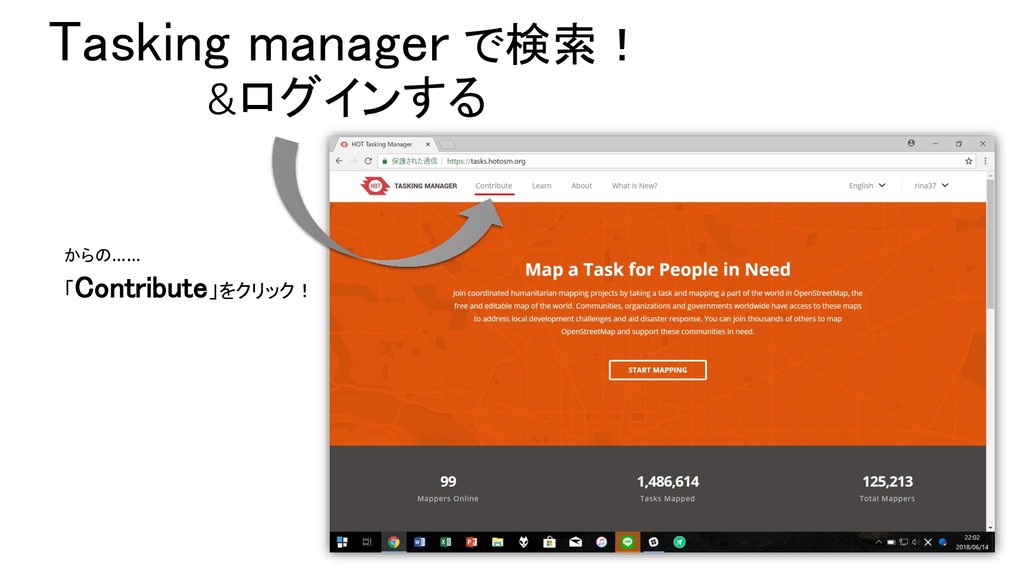
Tasking manager で検索! &ログインする からの…… 「Contribute」をクリック!
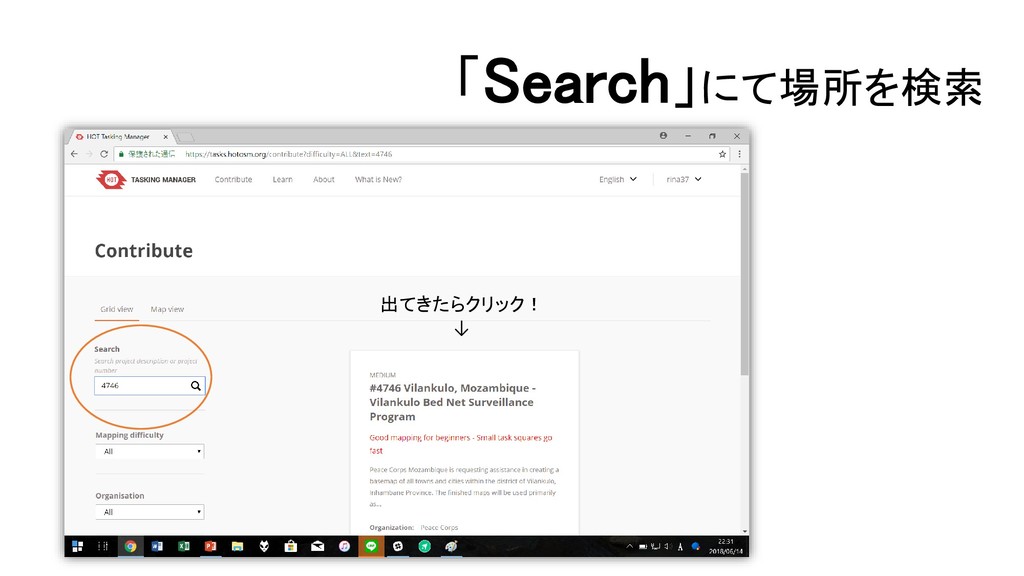
「Search」にて場所を検索 出てきたらクリック! ↓
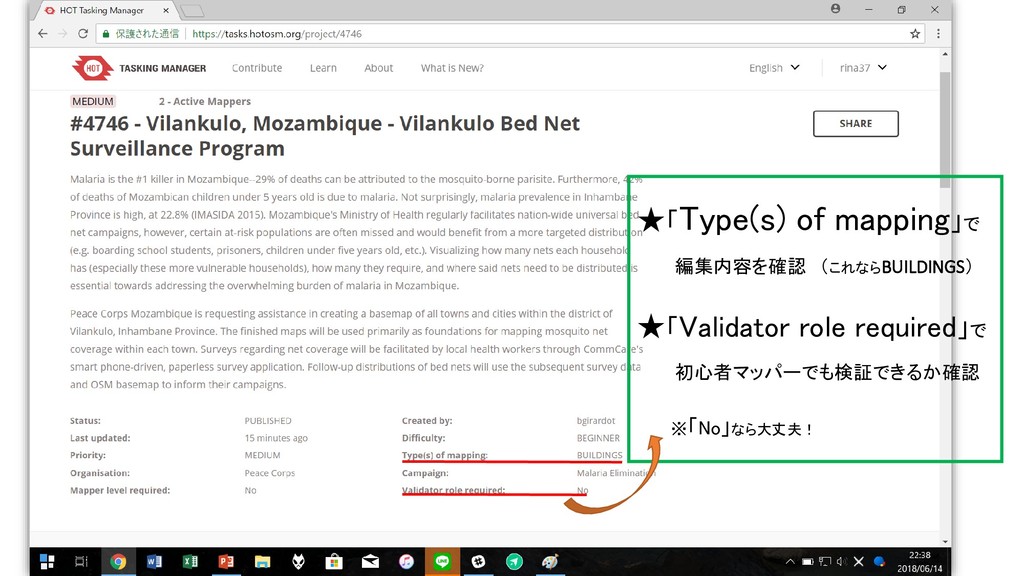
★「Type(s) of mapping」で 編集内容を確認 (これならBUILDINGS) ★「Validator role required」で 初心者マッパーでも検証できるか確認 ※「No」なら大丈夫!
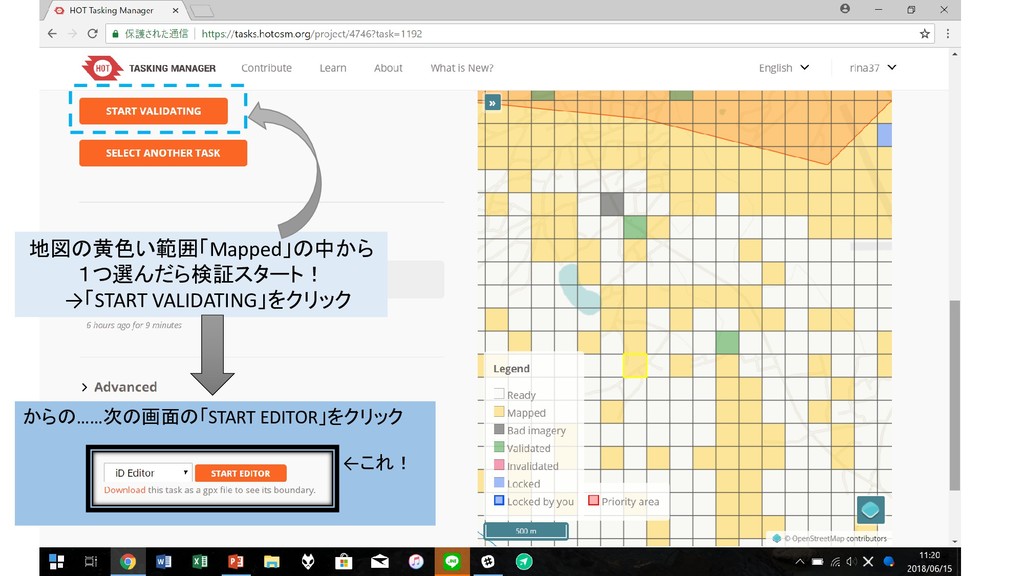
地図の黄色い範囲「Mapped」の中から 1つ選んだら検証スタート! →「START VALIDATING」をクリック からの……次の画面の「START EDITOR」をクリック ←これ!
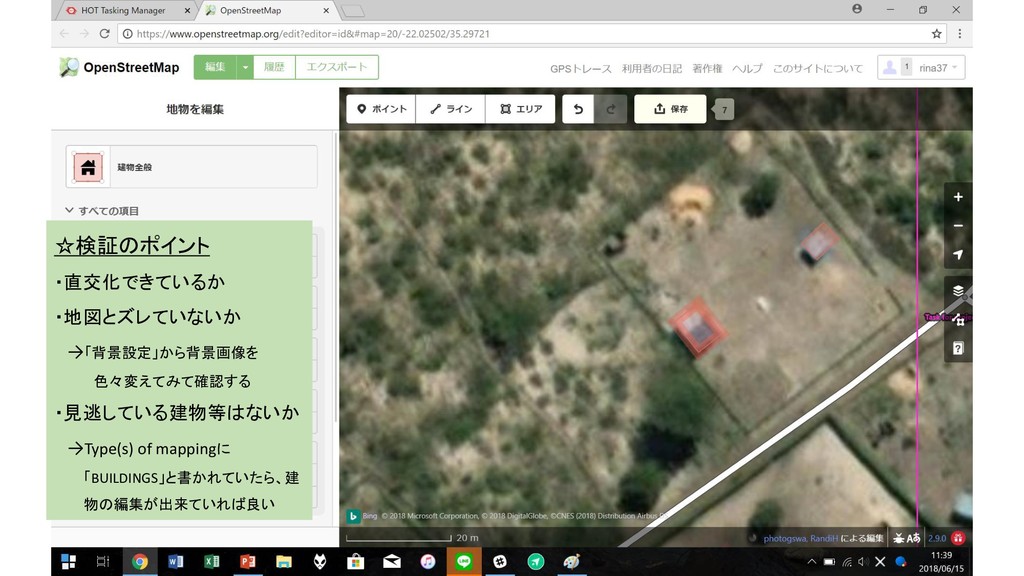
☆検証のポイント ・直交化できているか ・地図とズレていないか →「背景設定」から背景画像を 色々変えてみて確認する ・見逃している建物等はないか →Type(s) of mappingに 「BUILDINGS」と書かれていたら、建
物の編集が出来ていれば良い
☆検証が終わったら保存! ⇒「保存」をクリックし、次の画 面の「アップロード」をクリック すると保存完了
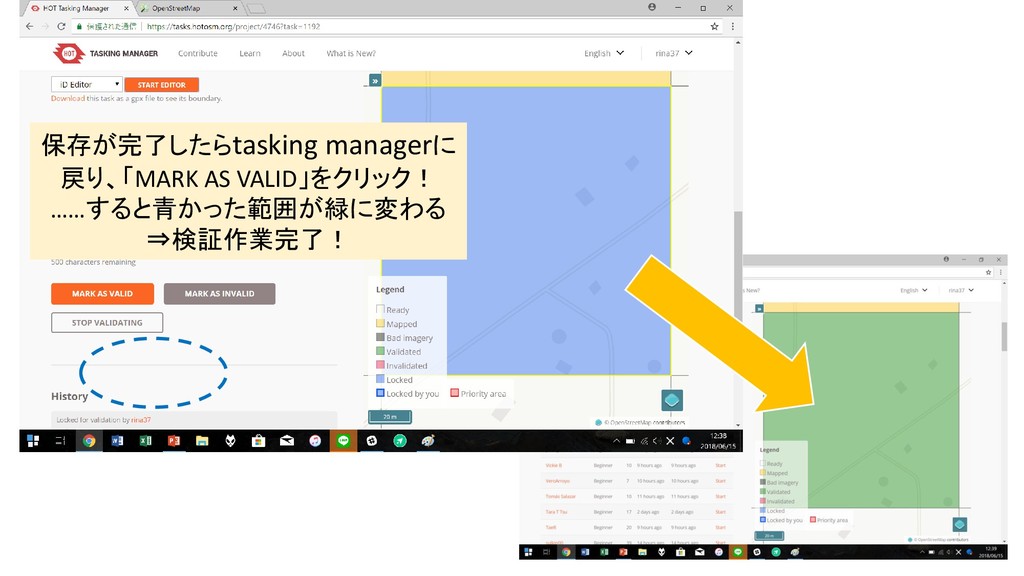
保存が完了したらtasking managerに 戻り、「MARK AS VALID」をクリック! ……すると青かった範囲が緑に変わる ⇒検証作業完了!
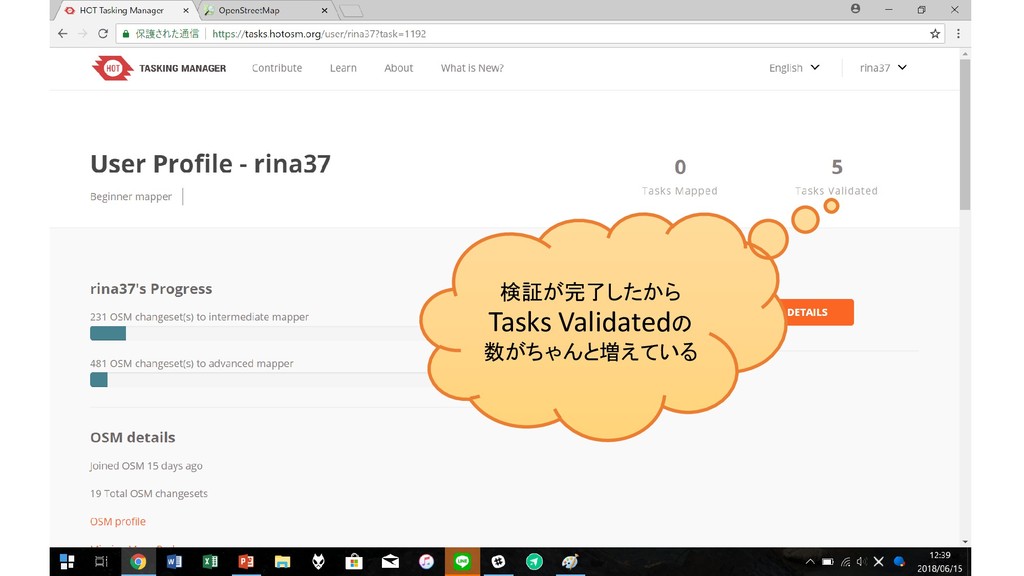
検証が完了したから Tasks Validatedの 数がちゃんと増えている
None
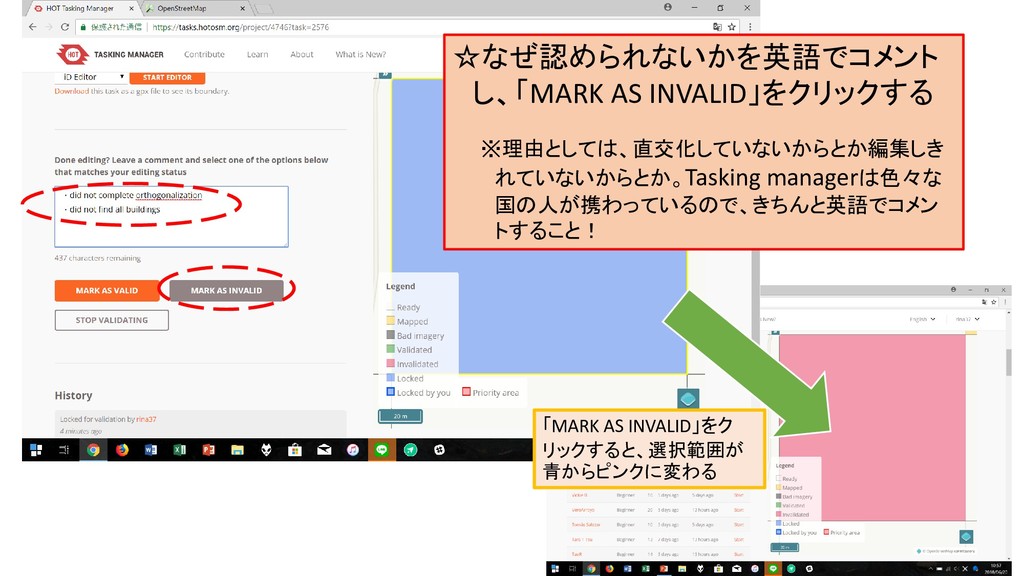
☆なぜ認められないかを英語でコメント し、「MARK AS INVALID」をクリックする ※理由としては、直交化していないからとか編集しき れていないからとか。Tasking managerは色々な 国の人が携わっているので、きちんと英語でコメン トすること! 「MARK
AS INVALID」をク リックすると、選択範囲が 青からピンクに変わる
今回は検証作業を10回やったら任務完了!


 rina37
 soudai
 juanmartin2026
 signer
 doratex
 frievea
 matleenalaakso
 yatabe
 ainischool
 terasawat
 pawan_pharm
 yoshimura_datam
 cbtlibrary
 shlominoach
 tmiket
 matthewcrist
 katiecoart
 khoart
 rkaga
rkaga
 morganepeng
 leimatthew05
 aleyda
 coloredviolet
 mkilby
 jonoalderson