Automattic • Front end / WordPress developer • Building websites for over 16 years • Building good websites for 6+ years • Working with WordPress for 5+ years
tweaks and adjustments to your site • You don’t have to alter core files • You won’t lose functionality if you change themes • It can easily be moved with the site
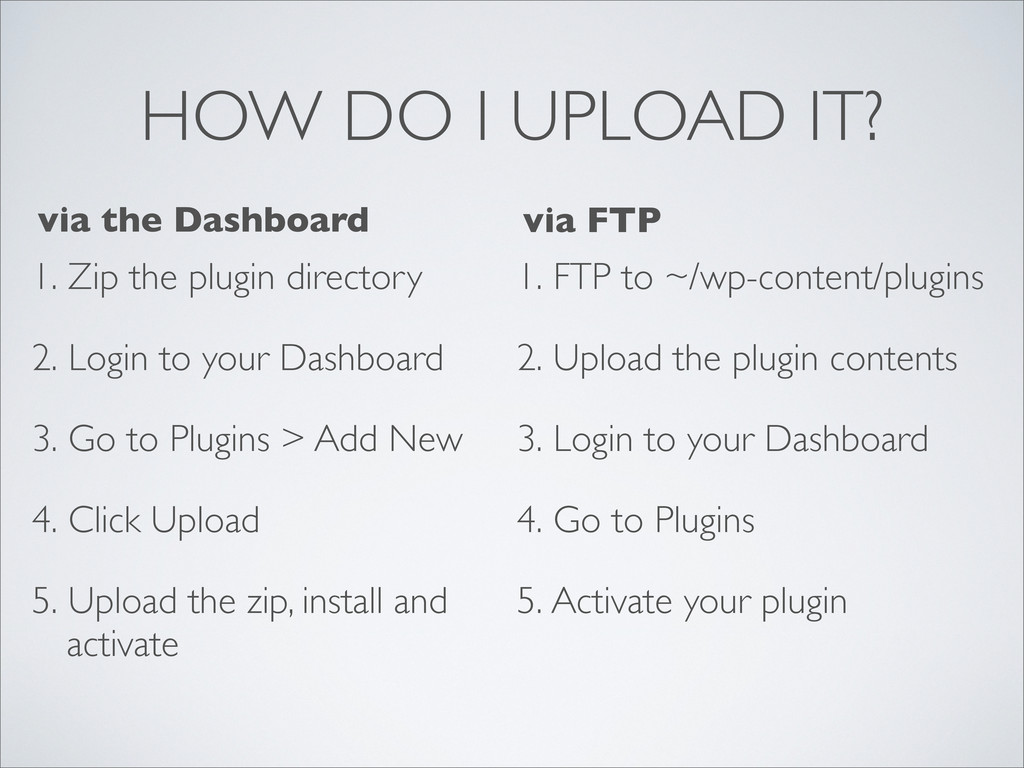
2. Login to your Dashboard 3. Go to Plugins > Add New 4. Click Upload 5. Upload the zip, install and activate 1. FTP to ~/wp-content/plugins 2. Upload the plugin contents 3. Login to your Dashboard 4. Go to Plugins 5. Activate your plugin via the Dashboard via FTP


 sorah
sorah
 mixplace
 y0hgi
y0hgi
 yutobara
 hschwentner
 kenjiyoneyama
 timakin
 minodriven
 tmikov2023
 tosite
 iwatsukayura
 clockmaker
 garrettdimon
 stephenakadiri
 pedronauck
 panda_program
 mfonobong
 davetheseo
 kristinabergwall1
 cassininazir
 zakiyama
 tmiket
 axbom
axbom
 palkan