Upgrade to Pro
— share decks privately, control downloads, hide ads and more …
Speaker Deck
Sign up for free
Menu
Search
Features
All features
Private URLs
Password Protection
Custom URLS
Scheduled publishing
Remove Branding
Restrict embedding
Deck Collections
Notes
Features
All features
Private URLs
Password Protection
Custom URLS
Scheduled publishing
Remove Branding
Restrict embedding
Deck Collections
Notes
Explore
Featured decks
Featured speakers
Programming
Technology
Storyboards
Explore
Featured decks
Featured speakers
Programming
Technology
Storyboards
Pricing
Search
Sign in
Sign up for free
Master of Puppet
Search
Sebastian Hempel
October 19, 2010
Programming
1.2k
0
Share
Embed
Copy iframe code
Copy JS code
Copy link
Start on current slide
Master of Puppet
Einführung in das Konfigurationsmanagement mit Puppet für Administratorn
Sebastian Hempel
October 19, 2010
More Decks by Sebastian Hempel
See All by Sebastian Hempel
Wer spricht denn da? - Logging in Java (JCON 2022)
shempel
0
53
Kryptographie für Einsteiger
shempel
0
850
Jobs as Code - Jenkins Pipeline Jobs
shempel
0
870
Kryptogragire für Java-Entwickler
shempel
0
1.3k
Integration von MicroServices
shempel
0
1.6k
Dokumentation schreiben kann Spaß machen! (2017)
shempel
0
1.1k
Minifliegen im Schwarm
shempel
0
1.3k
Puppenspielerein
shempel
0
1.2k
Puppet für Entwickler
shempel
0
2k
Other Decks in Programming
See All in Programming
Optunaを作ったときにやりたかったこと、その後 (2026/10/16, Optuna Meetup #3)
iwiwi
1
430
contenteditable と日本語入力に向き合う
colorful12
0
200
phperだってパンチカードでコーディングしたい
o0h
PRO
0
330
【加筆修正版】Laravel のアプリケーションをどこにデプロイするか #phpcon_ehime
akase244
0
150
機械に任せるテスト、人が見るテスト ⽣成AIで引き直した、運⽤保守フェーズの線引き
dske104
0
190
JAWS-UG 東京支部が始める、JAWS-UG支部コラボ / JAWS-UG lunchtime LT Collaboration
y0hgi
0
280
Everything will be SERVERLESS — 信じて運用した10年の経験値 / Everything Will be Serverless — Lessons Learned from 10 Years of Operational Experience
seike460
PRO
1
1.1k
npm との違いを手がかりにGo の依存管理を理解したい
optim
0
340
S3 TablesのIcebergデータに、AIエージェントからアクセスしてみた / 20261016developersio2026joetsu-accessing-iceberg-in-s3tables-via-agent
kasacchiful
PRO
0
150
作れる、でも消せるか?──安全に「枯らして消す」機能削除術 / Drain, Then Delete
chobishiba
2
660
[ハンズオン]AIへの指示だけで「五目並べ」を作ってみよう
satoshi256kbyte
1
380
Jetpack Compose Mechanisms
skydoves
3
820
Featured
See All Featured
Raft: Consensus for Rubyists
vanstee
142
7.8k
Taking LLMs out of the black box: A practical guide to human-in-the-loop distillation
inesmontani
PRO
3
2.5k
Building Better People: How to give real-time feedback that sticks.
wjessup
370
20k
Bootstrapping a Software Product
garrettdimon
PRO
306
120k
Building AI with AI
inesmontani
PRO
1
1.3k
Game over? The fight for quality and originality in the time of robots
wayneb77
1
300
30 Presentation Tips
portentint
PRO
1
430
コードの90%をAIが書く世界で何が待っているのか / What awaits us in a world where 90% of the code is written by AI
rkaga
63
46k
Getting science done with accelerated Python computing platforms
jacobtomlinson
2
540
How to build an LLM SEO readiness audit: a practical framework
nmsamuel
2
950
Bash Introduction
62gerente
615
220k
Git: the NoSQL Database
bkeepers
PRO
433
67k
Transcript
Master of Puppets
Konfiguration durch Aktionen
Sage mir, wie die Konfiguration aussehen soll.
Wie funktioniert Puppet
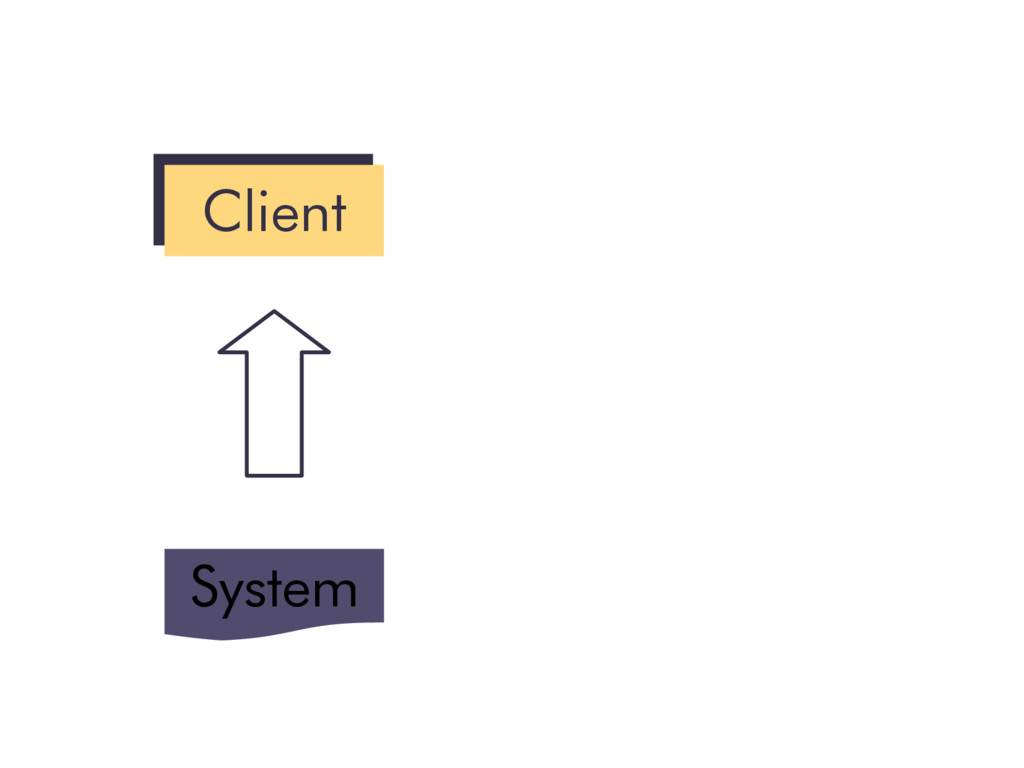
Client Client System
Master Modules Client Client System
Master Modules Client Client System
Puppet stellt jedes mal die gewünschte Konfiguration her
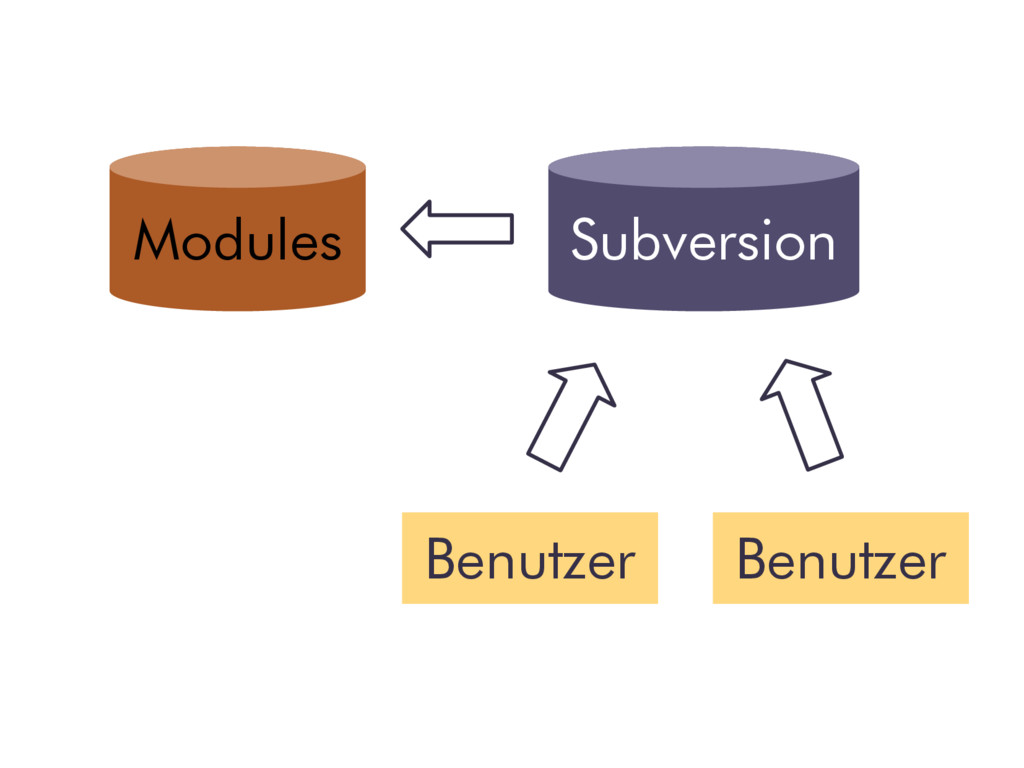
Modules Subversion Benutzer Benutzer
Manifeste und Module
class sdv { user { "sdv": name => "sdv", home
=> "/home/sdv", shell => "/bin/bash", ensure => present } }
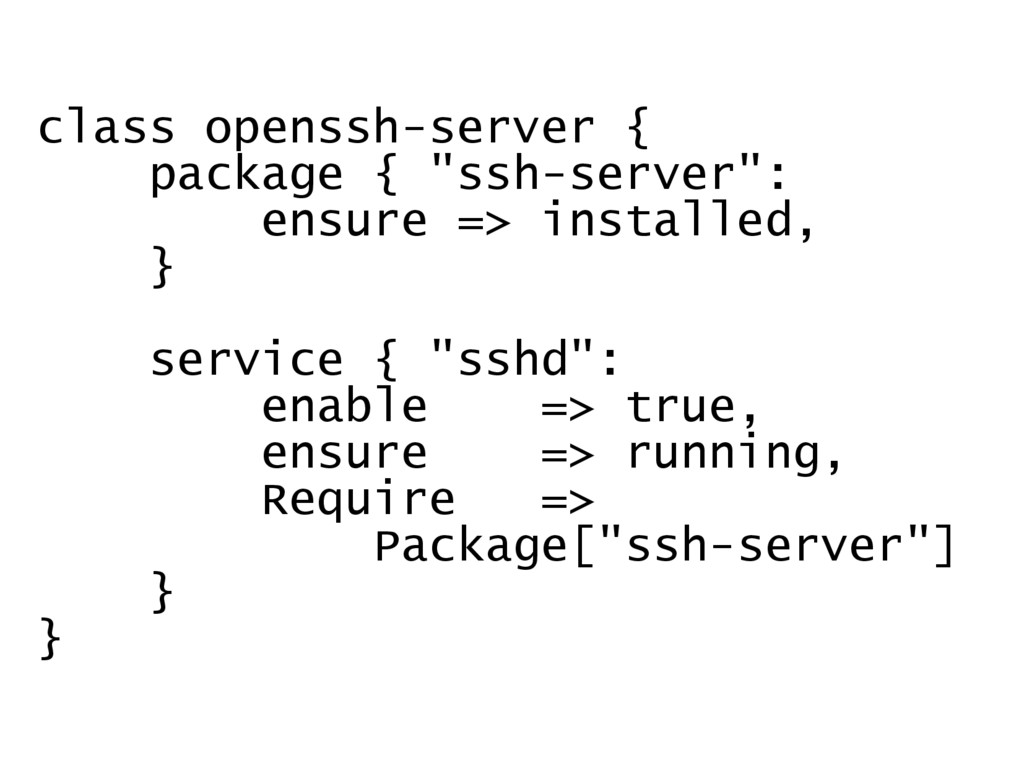
class openssh-server { package { "ssh-server": ensure => installed, }
service { "sshd": enable => true, ensure => running, Require => Package["ssh-server"] } }
Modul Manifest(e) Datei(en) PlugIn(s) Template(s)
Puppet Specials
architecture => x86_64 domain => hello.world.com fqdn => demo.hello.world.com hardwaremodel
=> x86_64 hostname => demo id => root interfaces => eth0 ipaddress => 10.3.xxx.xxx ipaddress_eth0 => 10.3.xxx.xxx is_virtual => true state => Abnahme
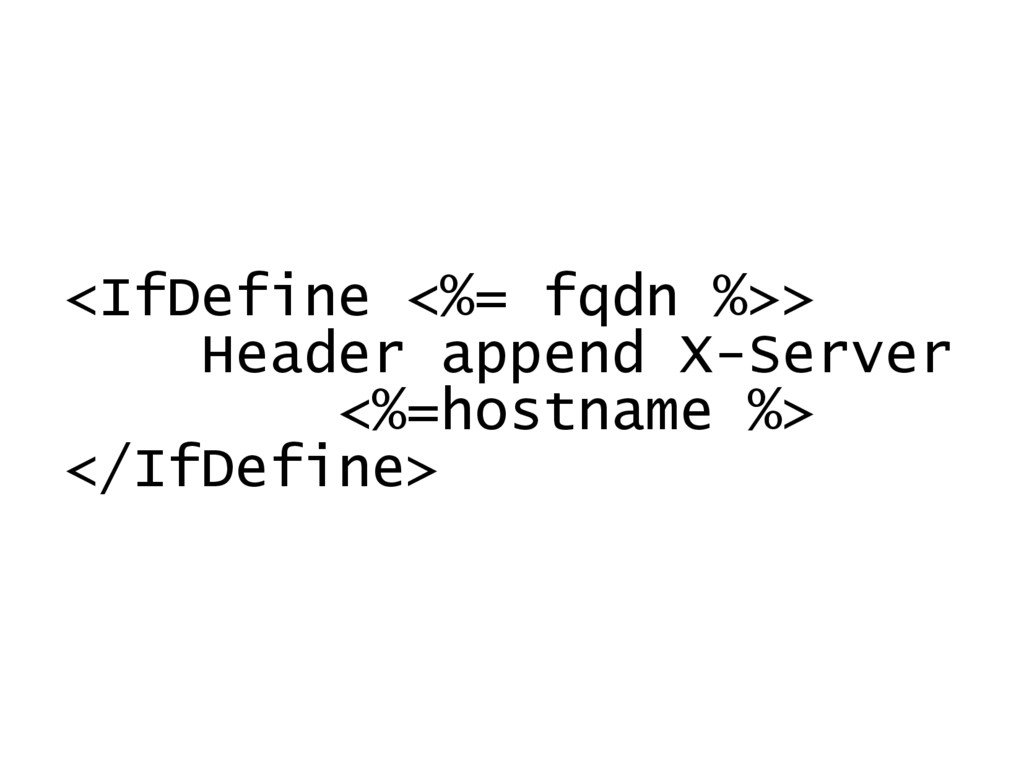
<IfDefine <%= fqdn %>> Header append X-Server <%=hostname %> </IfDefine>
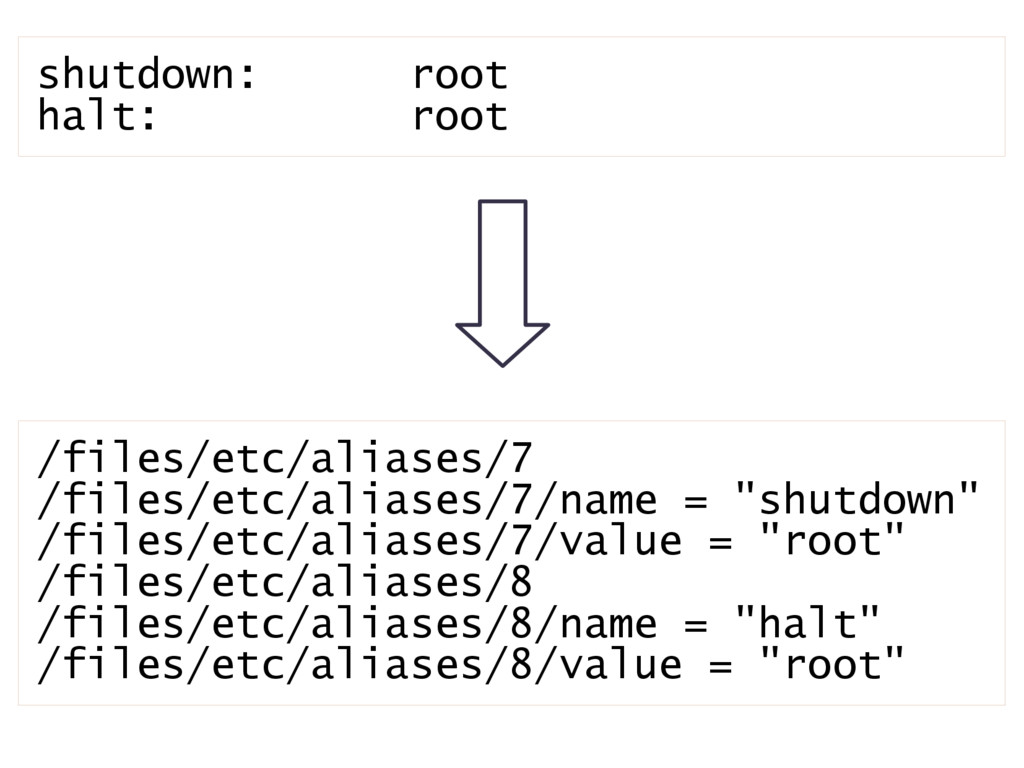
/files/etc/aliases/7 /files/etc/aliases/7/name = "shutdown" /files/etc/aliases/7/value = "root" /files/etc/aliases/8 /files/etc/aliases/8/name =
"halt" /files/etc/aliases/8/value = "root" shutdown: root halt: root
Wie geht es weiter?
Implementierung Tipps und Tricks
Bildnachweis 1. Gonzo / KLEPER / Flickr 2. My First
Shell Script / Erin Donahue / Flickr 19. New blank books / Paperama / Flickr
Sebastian Hempel Staatliche geprüfter Informatiker Selbständiger Software- Entwickler und Dozent
in den Bereichen Java und OpenSource Clean Code Developer
[email protected]
http://www.it-hempel.de/


 shempel
 iwiwi
iwiwi
 colorful12
 o0h
o0h
 akase244
 dske104
 y0hgi
y0hgi
 seike460
 optim
optim
 kasacchiful
 chobishiba
 satoshi256kbyte
 skydoves
 vanstee
 inesmontani
 wjessup
 garrettdimon
 wayneb77
 portentint
 rkaga
rkaga
 jacobtomlinson
 nmsamuel
 62gerente
 bkeepers