Share
Embed
Mastering Gradle 3
Gradle tips for Android. Presented talk at GDG DevFest Baroda 2017. Simple and straightforward tips with "Why?" & "How?".
Sneh Pandya
October 01, 2017
Transcript
27 slides
-
• It is for everyone! • Gradle!? • Tips →
What, Why & How? • Resources! Quickie -
• Build Automation Tool or Build System • Groovy based
→ DSL • Java, Groovy, Scala, etc What is Gradle? -
android { buildTypes { release { shrinkResources true minifyEnabled true
proguardFiles getDefaultProguardFile(‘proguard-android.txt’), ‘proguard-rules.txt’ } } } Shrink code & resources -
minifyEnabled → ProGuard (project) → remove unused code shrinkResources →
remove unused resources only minifyEnabled vs shrinkResources? -
Spoiler! Don’t forget to add ProGuard files on Play Store
for deobfuscation on crashes -
productFlavors { dev { minSdkVersion 21 } prod { minSdkVersion
16 } } Avoid Legacy MultiDex •Legacy multiDex == multiDex + minSdkVersion < 21 •Slows down build significantly •Android Studio 2.3+ avoids this automatically, whenever possible -
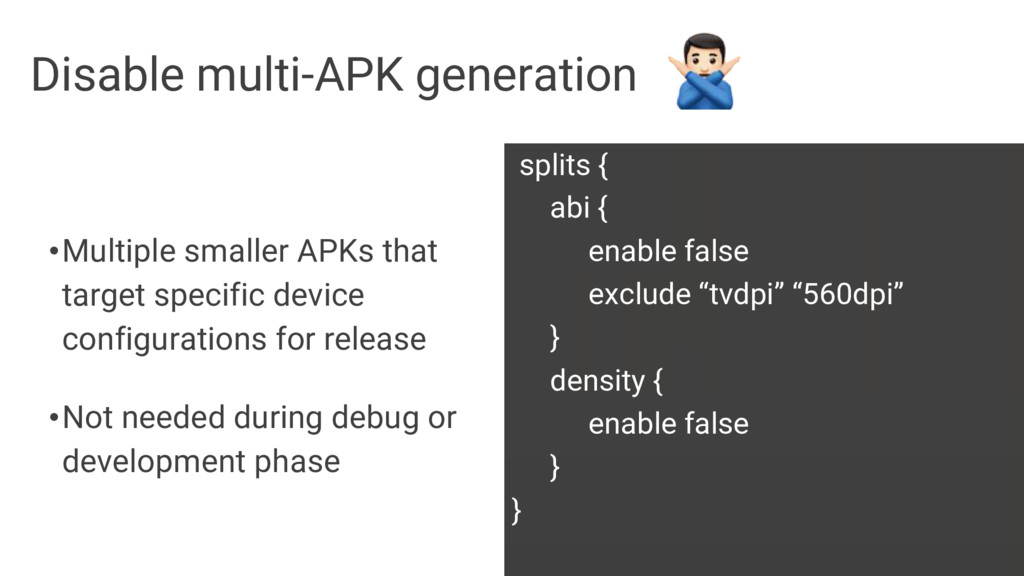
splits { abi { enable false exclude “tvdpi” “560dpi” }
density { enable false } } Disable multi-APK generation •Multiple smaller APKs that target specific device configurations for release •Not needed during debug or development phase -
productFlavors { dev { minSdkVersion 21 resConfigs (“en”, “xhdpi”) .
. . } } Include minimal resources -
android { aaptOptions { cruncherEnabled false } } Disable PNG
crunching •Android Build Tools perform PNG size optimizations by default -
• Android Asset Packaging Tool • Check pixel values (RGB,
Grayscale, etc) • Test opacity • Test pixel value → matrix index conversion What the heck is ‘aapt’? -
android { dexOptions { preDexLibraries true maxProcessCount 8 //default 4
javaMaxHeapSize “4g” } } Use DEX options •Android uses DEX instead of bytecode •Builds are generated faster •Specifies maximum memory allocation for Dex compiler -
android { buildTypes { debug { ext.alwaysUpdateBuildId false . .
. } Use Crashlytics “properly”! •apply plugin:‘io.fabric’ •Generates on every new build! -
android { dependencies { compile ‘com.android.support:appcompat-v7:26.0+’ //don’t do this! compile
‘com.android.support:appcompat-v7:26.0.1’ //do this } } Don’t use dynamic versions -
org.gradle.jvmargs=-Xmx1536m //Default Dex compiler memory (min) org.gradle.jvmargs=-Xmx3096m //Default Dex compiler
memory •Dex compiler runs within the build process, rather than separate VM-process •Enough memory provided by default in Android Studio 2.1+ Gradle arguments (gradle.properties) -
gradle=build -x lint -x lintVitalRelease //avoids lint checks •Lint checking:
50%~ time! •Not good for debug builds •Perfect for release builds Gradle arguments (gradle.properties) -
org.gradle.daemon=true //decreases the startup & execution time org.gradle.parallel=true //builds project
in parallel (multi-module) org.gradle.caching=true //store task outputs from previous builds org.gradle.configureondemand=true //only required projects changes Gradle arguments (gradle.properties) -
android { dependencies { implementation project(‘:libXYZ’) //compile is now deprecated
api project(‘:libABC’) //works same as compile } } Dependency config in Gradle 3.0 -
android { dependencies { compile(‘com.google.firebase:firebase-core:11.2.0’) { exclude group: ‘com.google.android.gms’, module:
‘play-services-basement’ } } } Conflicting & repeating dependencies -
buildTypes.each { it.buildConfigField ‘String’, ‘API_URL’, ‘“https://api.github.com/”’ it.resValue ‘String’, ‘API_KEY’, ‘“1948123213”’
. . . } BONUS Tip: Use buildConfig -
def keystorePropertiesFile = rootProject.file(“../../ABCProject/keystore.properties”) def keystoreProperties = new Properties() keystoreProperties.load(new
FileInputStream(keystorePropertiesFile)) android { signingConfigs { debug { keyAlias keystoreProperties [‘keyAlias’] keyPassword keystoreProperties [‘keyPassword’] storePassword keystoreProperties [‘storePassword’] storeFile file(“$project.rootDir/settings/keystore/xyzproject”) . . . } BONUS Tip: Keystore in build.gradle -
•Brought to you by Google! •Better compression & transparency •Smaller
than PNGs & JPGs •Android Studio 2.3+ supports WebP conversion •Easy to convert •Lossy → Android 4.0 (API 14); Lossless → Android 4.3 (API 18) BONUS Tip: WebP instead of PNGs! -
•Documentation (https://developer.android.com/studio/build/gradle-tips.html) •Proguard Snippets (https://github.com/krschultz/android-proguard-snippets) •Gradle, Please! (http://gradleplease.appspot.com) •Proguard, Please!
(http://proguardplease.com) •Known Issues: http://tools.android.com/knownissues Useful Resources!