at Auth0 • Blogger at goodheads.io • Organizer of Lagos PHP & Laravel Meetups • Self-Acclaimed Evangelist • Fire Ambassador • Open Sourcerer • Google Developer Expert @unicodeveloper
- User Identities. • Almost every application needs some form of process to manage user identities. • Authentication • Authorization What the Hell is Identity Management?
than one Identity Provider? 2. Do you have multiple applications which will need to authenticate? Now do they use the same stack? 3. What analytics will you need for account creation and authentication events? 4. How will you flag and mitigate anomalies in user management and authentication events? Ask Yourself the Following Questions?
vulnerabilities? 6. Can you/your team securely configure authentication infrastructure? On-premises and in private cloud instances? 7. What is your Multifactor Authentication Strategy? How will you integrate it across different clients? Ask Yourself the Following Questions?
for your service? 9. Can you federate with partners who use Active Directory behind the firewall? 10. Have you thought about implementing brute-force protection and DDOS prevention? Identity systems are an attractive target for attacks. Ask Yourself the Following Questions?
your user store? 12. How will you implement OpenID Connect across development stacks and clients? 13. How will you handle reports from the security community of vulnerabilities in your identity implement? Ask Yourself the Following Questions?
data breach in 2014 ❖ Dropbox Data breach: 68 million user account details leaked ❖ LinkedIn Data breach: 117 million emails and passwords leaked in 2012 What about Security? Oh Major Key!
Passwordless ( SMS, Magic Link, Touch ID) • Guardian ( Multi-Factor Authentication made easy) • Supports over 30 social login providers • Breached Password detection • Anomaly detection • Single Sign On More info here https://auth0.com/how-it-works
We maintain over 100 open source projects including your favorites: passportjs, node-jsonwebtoken and express-jwt • A team of highly experienced & world-class specialists including Jared( creator of passport), Eugene Kogan( Security expert, previously at the US Department of Defense) • Auth0 is OpenID Certified, SOC Type II Certified and offers HIPAA BAA Compliance
the app to unlock a tasty plate of Ugali • Users should be able to sign in with either username & password, facebook, google, or twitter • User Analytics needed. Let’s Build an App: KE Food Quest
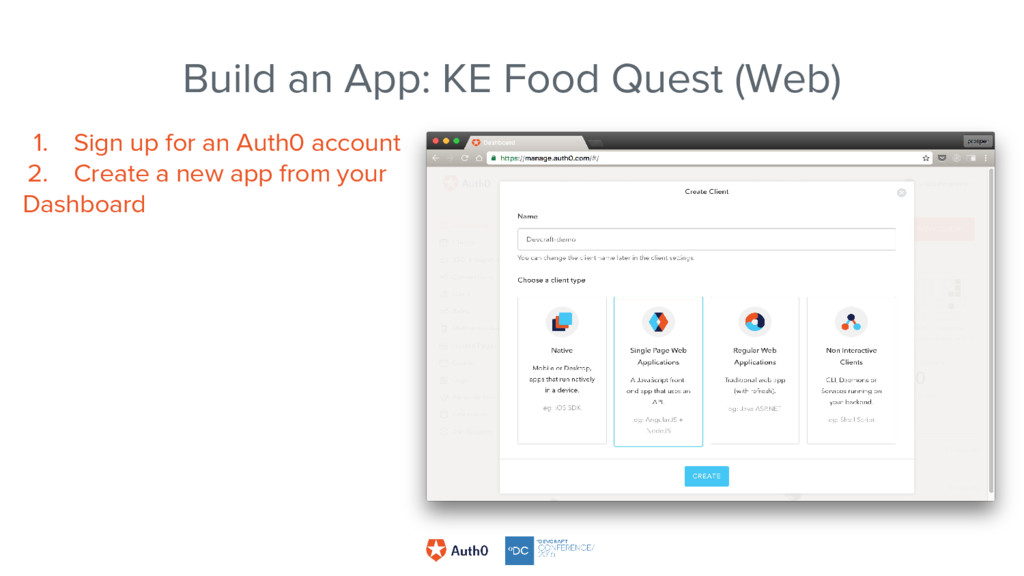
app to get started with a boilerplate for any technology you want to use. - AngularJS - React - Vue - Aurelia - Ember - CycleJS ...many more! Build an App: KE Food Quest (Web)
method, initialize the Lock class 5. Implement auth0 login using the Lock class. i. Setup Lock ii. Setup lock callback iii. Clean up the Lock class onDestroy (to prevent memory leakage) iv. Validate token
login using the Lock class. i. Setup Lock ii. Setup lock callback iii. Clean up the Lock class onDestroy (to prevent memory leakage) iv. Validate token
login using the Lock class. i. Setup Lock ii. Setup lock callback iii. Clean up the Lock class onDestroy (to prevent memory leakage) iv. Validate token
login using the Lock class. i. Setup Lock ii. Setup lock callback iii. Clean up the Lock class onDestroy (to prevent memory leakage) iv. Validate token
id tokens The refresh token doesn’t expire, so use it to request for a new IdToken Basically, create a delegation token with the refresh token A delegation token is a token that can be used to request for another resource
surprisingly, a really big deal, both to these proud institutions, and to the federal government. Ever since this project started, we’ve become the NIH’s shining example of how to share data among disparate institutions.” - David Bernick, Director of Technology, Harvard Medical School Department of Bioinformatics “Setting up our application to integrate with one partner and then having that partner act as a service hub for dozens of identity systems helps simplify work for our core development teams, while allowing our customer base to grow exponentially.” – Cris Concepcion, Engineering Manager at Safari Books Online “Thanks you for your help. We saw over 1.3 million registrations and our campaign got a social media sentiment score of over 95% positive, so it has been deemed a great success!!” — AKQA – Agency implementing the campaign for Marks and Spencer Companies that trust Auth0 - https://auth0.com/customers


 unicodeveloper
 akihisaikeda
 itsmedreamwalker
 seyfoyun
 bicstone
 omatty198
 ziobrando
 inariku
 jame2408
 yuta_onishi_97
 raeminkang
 dalinaum
 a_matsuda
 aleyda
 codingconduct
 sarafernandez
 rasmusluckow
 akademiya2063
 cassininazir
 badams
 mayatellez
 axbom
 davidcarrasco
 smashingmag