Upgrade to Pro
— share decks privately, control downloads, hide ads and more …
Speaker Deck
Sign up for free
Menu
Search
Features
All features
Private URLs
Password Protection
Custom URLS
Scheduled publishing
Remove Branding
Restrict embedding
Deck Collections
Notes
Features
All features
Private URLs
Password Protection
Custom URLS
Scheduled publishing
Remove Branding
Restrict embedding
Deck Collections
Notes
Explore
Featured decks
Featured speakers
Programming
Technology
Storyboards
Explore
Featured decks
Featured speakers
Programming
Technology
Storyboards
Pricing
Search
Sign in
Sign up for free
JavaScriptを使いこなそう
Search
Nishimura Wataru
April 09, 2022
Programming
190
0
Share
Embed
Copy iframe code
Copy JS code
Copy link
Start on current slide
JavaScriptを使いこなそう
Nishimura Wataru
April 09, 2022
More Decks by Nishimura Wataru
See All by Nishimura Wataru
Minecraft Modding in 1.7.10 環境構築編 @ 電脳隊
watarunishimura
0
94
Other Decks in Programming
See All in Programming
Seven New Principles of Software Engineering
yegor256
0
450
自作Discord音声botをLambda MicroVMsに移行した話 / Migrating My Discord Voice Bot to Lambda MicroVMs
akihisaikeda
1
290
社内AIエージェント「Askワンバン」における コストチューニングの取り組み
t0yohei
0
160
Vapor Mode でアクセシビリティは 壊れないか検証した話
fuqda
1
320
FactoryBotをやめればRSpecは速くなるのか?
yuta_onishi_97
0
1.5k
PumaからFalconに移行したRailsアプリケーションでの実践
falcon8823
0
350
Event is what happens
moro
2
3.6k
クラウドゲーミングのパフォーマンス最適化に挑む / Cloud Gaming Performance Tuning
vivion
0
320
複数ドメインを一つのアプリに統合するFlutterの設計と運用_FlutterKaigi2026登壇資料(須永高弘)
takahirosunaga
0
150
React Native経験者が Flutterを30⽇間触って驚いたこと
3saito
0
150
Python Lambdaにおけるテストしやすい設計とAI支援の活用 / Designing Testable Python Lambda Functions with AI
kitano_yuichi
1
290
우리의 Nitro Modules는 당신의 Turbo Modules보다 아름답다
l2hyunwoo
0
250
Featured
See All Featured
Automating Front-end Workflow
addyosmani
1370
210k
Jess Joyce - The Pitfalls of Following Frameworks
techseoconnect
PRO
1
470
Design in an AI World
tapps
1
380
The Art of Delivering Value - GDevCon NA Keynote
reverentgeek
16
2.2k
Fantastic passwords and where to find them - at NoRuKo
philnash
53
4k
ピンチをチャンスに:未来をつくるプロダクトロードマップ #pmconf2020
aki_iinuma
128
56k
A designer walks into a library…
pauljervisheath
211
25k
Have SEOs Ruined the Internet? - User Awareness of SEO in 2025
akashhashmi
0
540
Optimizing for Happiness
mojombo
378
71k
The Power of CSS Pseudo Elements
geoffreycrofte
82
6.6k
The Web Performance Landscape in 2024 [PerfNow 2024]
tammyeverts
12
1.4k
Accessibility Awareness
sabderemane
1
290
Transcript
JavaScriptを使いこなそう 西村 航 ( @wataru_nishi731 ) 未完Project Webpack 勉強会用資料 1
目次 1. JavaScriptをおさらい 2. 一歩進んだJavaScriptの使い方 3. ES2015とかって何? 4. CommonJS /
ES Modules を知ろう! 5. バンドルツールを活用してJavaScriptを使いこなそう 6. バンドルツールでの軽量化 2
JavaScriptをおさらい JavaScriptの一番簡単な使い方をおさらいしましょう <html> <head> <title>Sample website</title> </head> <body> <h1>Heading</h1> </body>
<script> // Hello, World! を出力 console.log("Hello, World!") </script> </html> さすがにこの使い方で使うことは少ない 3
一般的な使い方 index.html <html> <!-- <head></head> は省略 --> <body> <h1>Heading</h1> <button
id="button">Push me!</button> </body> <!-- index.js で読み込み --> <script src="index.js"></script> </html> index.js var item = document.querySelector("#button") item.addEventListner("click", function(){ console.log("Button Clicked!") }) 4
実際に使うときは jquery等の外部ライブラリを<head>で読み込む <head> <script src="https://code.jquery.com/jquery-3.6.0.slim.min.js"crossorigin="anonymous"></script> </head> 複数のJavaScriptを利用したプログラムの記述 <!-- メイン -->
<script src="index.js"></script> <!-- サブ --> <script src="alert.js"></script> 5
一歩進んだJavaScriptの使い方 ES2015からの機能を使う(これは後で回収します) const , let , arrow function JavaScriptモジュール (ES
Modules) 6
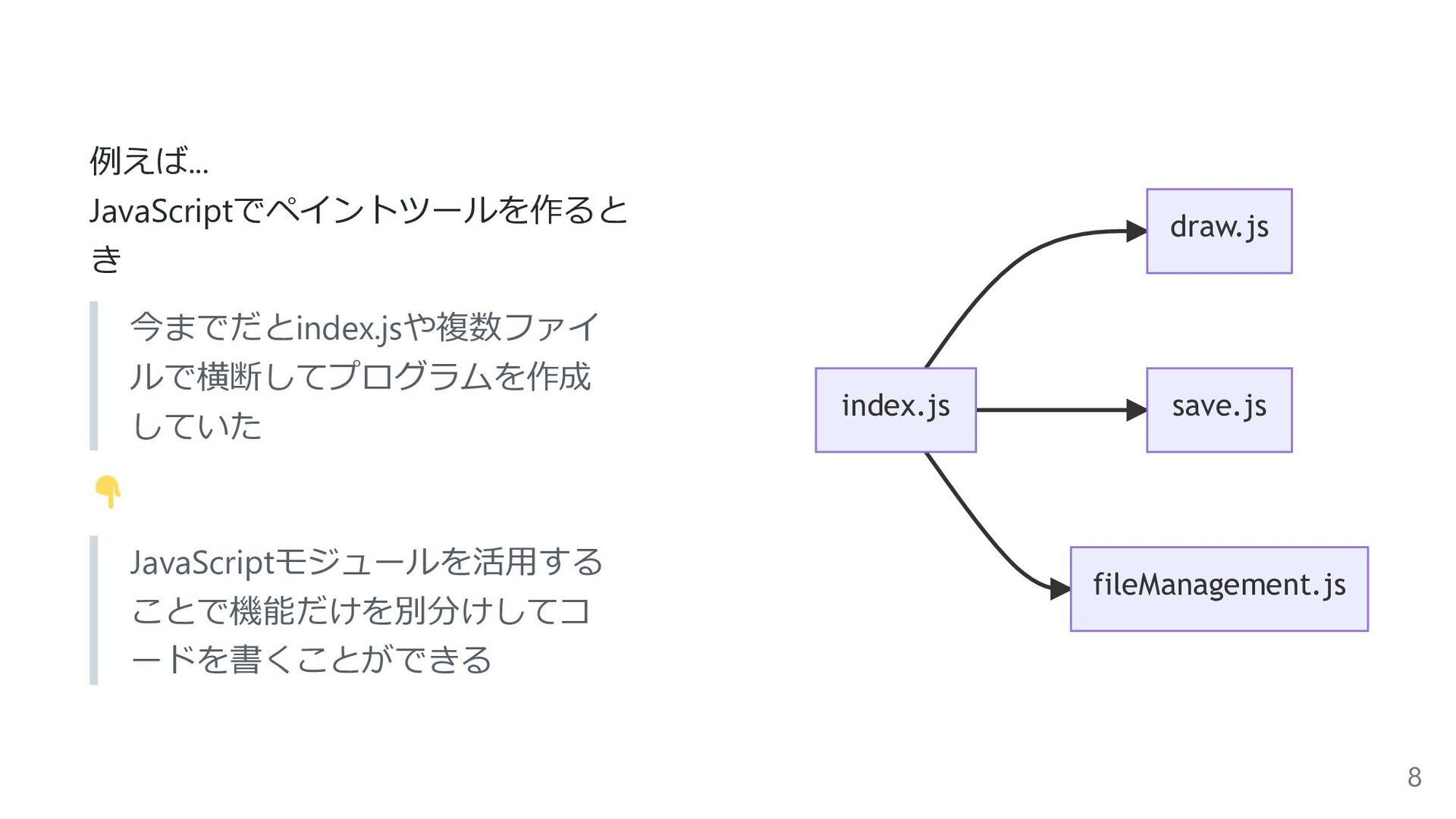
JavaScript モジュール JavaScriptの関数やオブジェクト、変数をモジュール化されたファイルを通して、分割 して扱う方法 7
index.js draw.js save.js fileManagement.js 例えば... JavaScriptでペイントツールを作ると き 今までだとindex.jsや複数ファイ ルで横断してプログラムを作成 していた
JavaScriptモジュールを活用する ことで機能だけを別分けしてコ ードを書くことができる 8
参考 こんな風に使います https://github.com/mdn/js-examples/tree/master/modules/basic-modules 9
コード実例 export import を利用してモジュール機能を利用 modules/draw.js const drawRectangle = (x,y,w,h) =>
{ // 長方形を描画 } export { drawRectangle } index.js // importで読み込み import { drawRectangle } from "./modules/draw.js" // 読み込み時に実行 window.onload = (event) => { drawReactangle() } 10
ES2015とかって何? JavaScriptには規格が存在しており、規格を定めている機関Ecma International の名前 からECMAScriptと呼びます ES2015は2015年にリリースされたECMAScriptのバージョンです。 2015年以降毎年更新され、現在ES2022のリリース待ちです。 11
ES2015でリリースされた機能 const let による宣言 アロー関数(arrow function) etc... ES2017でリリースされた機能 async/await を利用した非同期処理
ES2018でリリースされた機能 オブジェクトのスプレッド演算子 などなど 12
CommonJS / ES Modules を知ろう 先ほどのモジュールを利用した開発には2つの方法があります。 Common JS ウェブブラウザ環境外で一般的に使われているモジュールシステム Node.jsが採用しており、メインのモジュールシステムがこれ
module.exports = { // export したい内容を指定 } const object = require("./module.js") 13
ES Modules JavaScript Native なモジュールシステム Node.js でも使えるし、クライアントサイド JavaScriptでも使える export import
を利用してモジュールを管理する defaultエクスポートや名前付きエクスポートなどCommonJSに比べ選択肢の幅が広く 後述の Tree Shaking で活用される 14
バンドルツールを活用してJavaScriptを使いこなそう webpack や vite と呼ばれるバンドルツールを利用することで、 先ほどのモジュールシステムで利用されるたくさんのモジュールファイルを管理可 能。 15
バンドルツールでの軽量化 方法はSplitChunkやTree Shakingなど利用方法はいろいろあるが、今回取り上げるのは Tree Shaking Tree Shakingとは? モジュールを組み合わせてバンドルするときに、使わないコードを含めないでバンド ルすることでバンドル後のファイルサイズ(ビルドサイズ)を小さくし、読み込み速 度を上げることができる。
例えば、lodashと呼ばれるライブラリ群も適切に利用することでビルドサイズを大幅 に削減できる。 16


 watarunishimura
 yegor256
 akihisaikeda
 t0yohei
 fuqda
 yuta_onishi_97
 falcon8823
 moro
 vivion
 takahirosunaga
 3saito
 kitano_yuichi
 l2hyunwoo
 addyosmani
 techseoconnect
 tapps
 reverentgeek
 philnash
 aki_iinuma
 pauljervisheath
 akashhashmi
 mojombo
 geoffreycrofte
 tammyeverts
 sabderemane