Share
Embed
詳解 WindowInsets
新型コロナウイルスによって中止となった DroidKaigi 2020 にて2日目11:00より発表予定だった「詳解 WindowInsets」の資料です

Yuta Takahashi
February 21, 2020
Transcript
160 slides
-
髙橋 佑太 Yuta Takahashi 2019年6⽉より株式会社 justInCase にて Android / Server
side (Kotlin) の開発に従事。 保険のサービスをつくっています。 @yt_hizi @yt-tkhs -
1. Edge-to-edge について 2. WindowInsets の概要 3. Edge-to-edge をアプリに適⽤する 4.
WindowInsets のなかみ 5. まとめ アジェンダ -
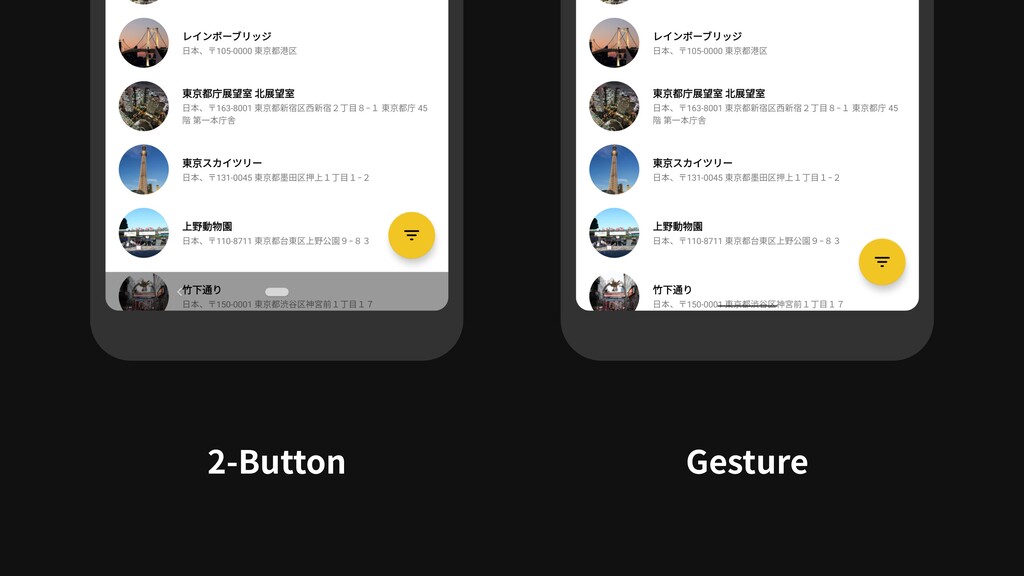
Gesture ・Gesture Navigation の導⼊により アプリが利⽤できる画⾯の領域が拡⼤した ・Android 10 からは Edge-to-edge に対応する
ことが推奨されている ・Android P 以下での対応は任意 Android 10 -
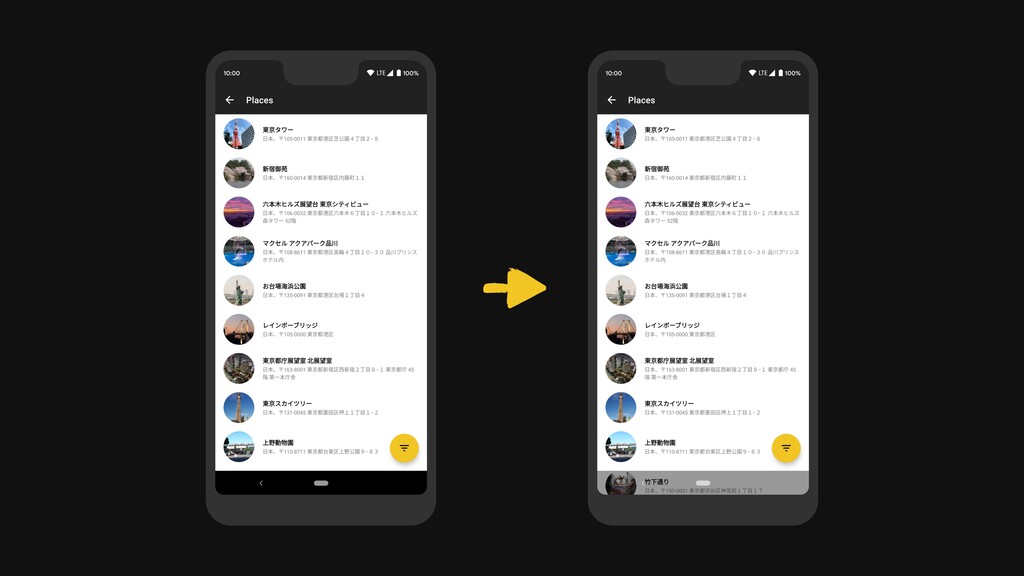
Edge-to-edge 対応 — Navigation bar 参考: https://developers-jp.googleblog.com/2019/10/gesture-navigation-going-edge-to-edge.html ・Gesture navigation により,
Navigation bar は ⼩さく⽬⽴たなくなったため, 背後にコンテンツを 描画することが推奨されている -
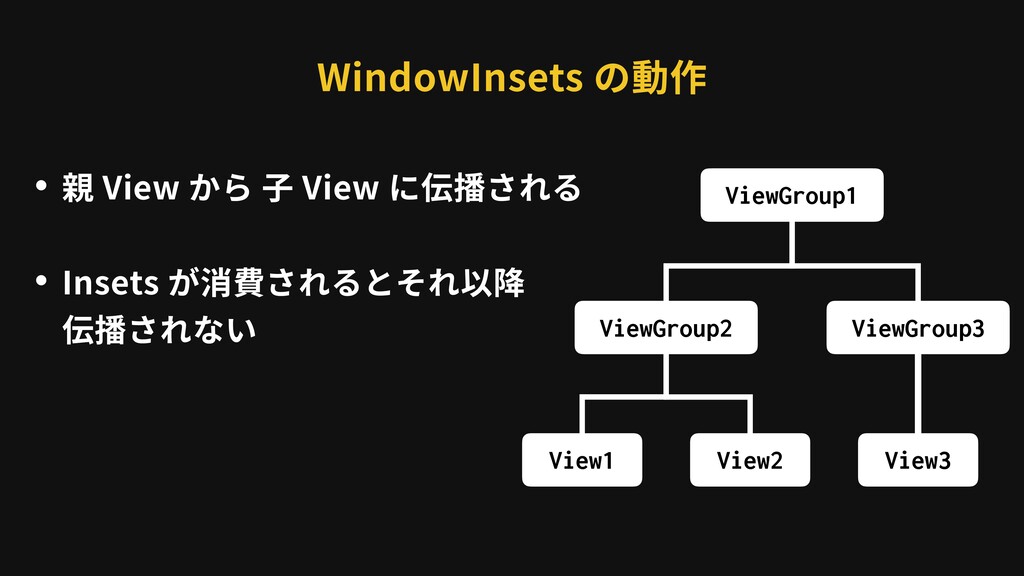
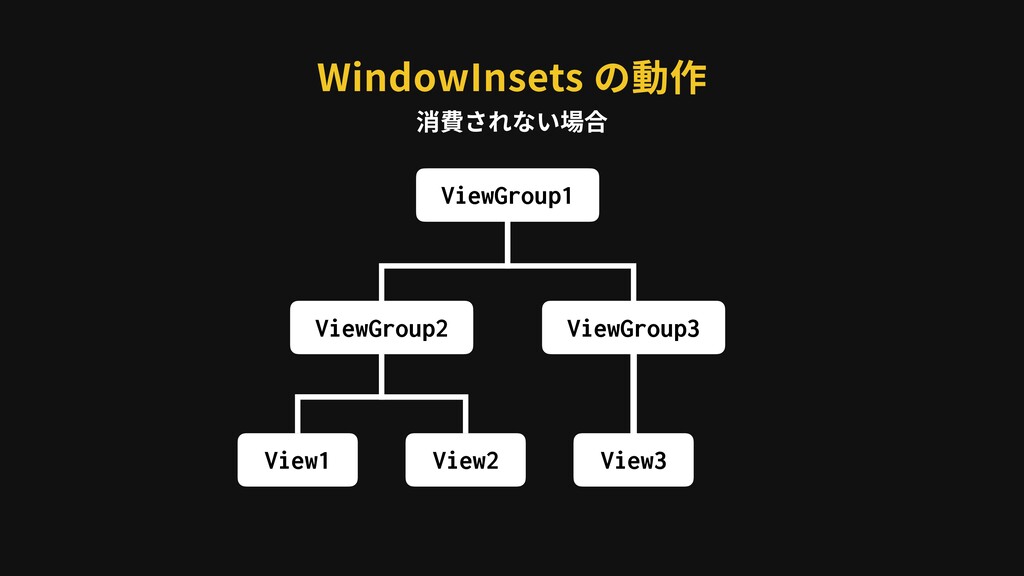
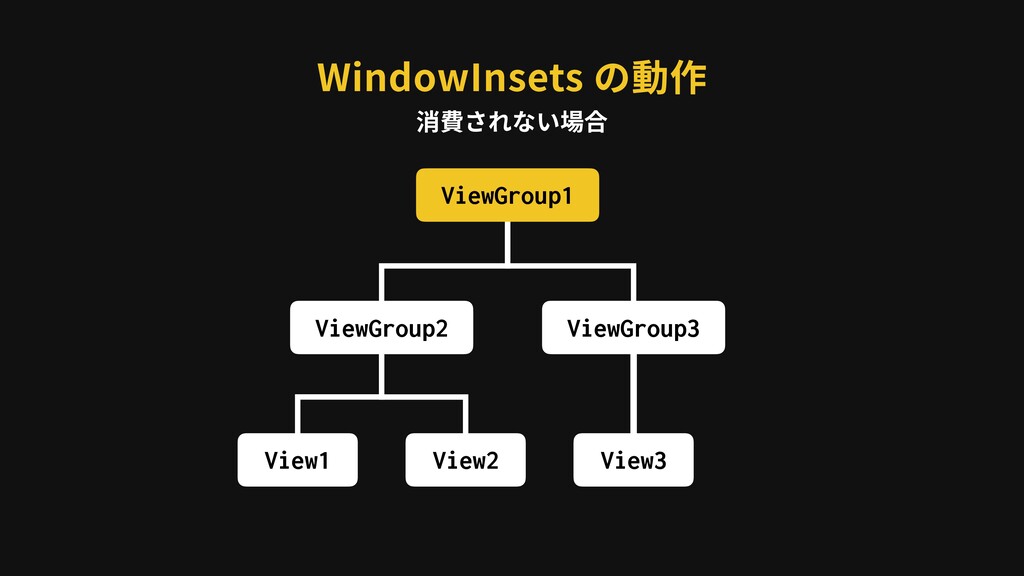
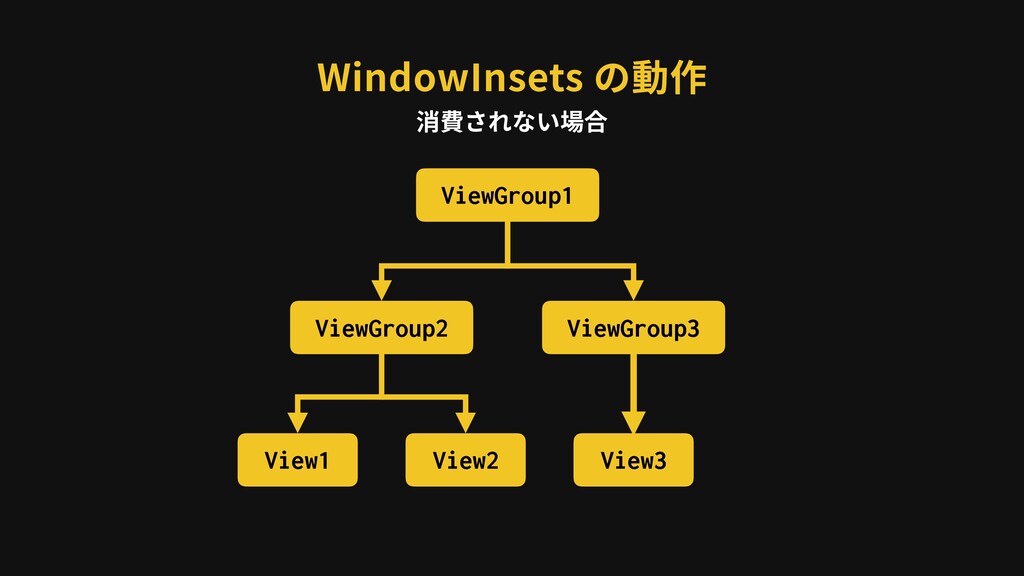
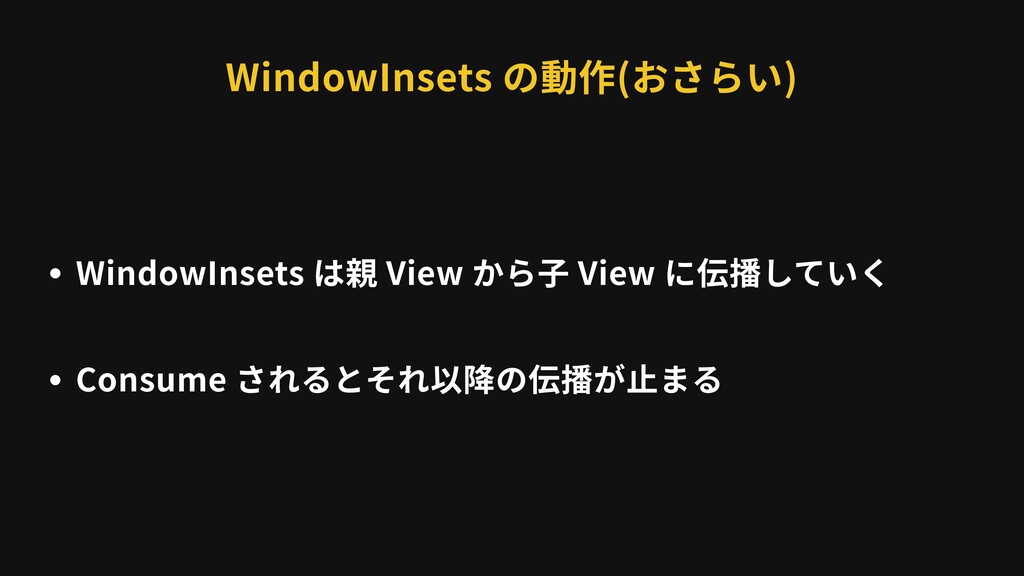
WindowInsets の動作 ・親 View から ⼦ View に伝播される ・Insets が消費されるとそれ以降
伝播されない ViewGroup1 ViewGroup2 ViewGroup3 View1 View2 View3 -
WindowInsets の動作 ViewGroup1 ViewGroup2 ViewGroup3 View1 View2 View3 Consume ⼦View
に伝播されない ViewGroup2 で消費された場合 -
WindowInsets の動作 ViewGroup1 ViewGroup3 View1 View2 View3 ViewGroup2 Consume したことが伝わる
ViewGroup2 で消費された場合 ⼦View に伝播されない -
WindowInsets の動作 ViewGroup1 ViewGroup3 View1 View2 View3 ViewGroup2 同階層のViewに伝播されない Consume
したことが伝わる ViewGroup2 で消費された場合 ⼦View に伝播されない -
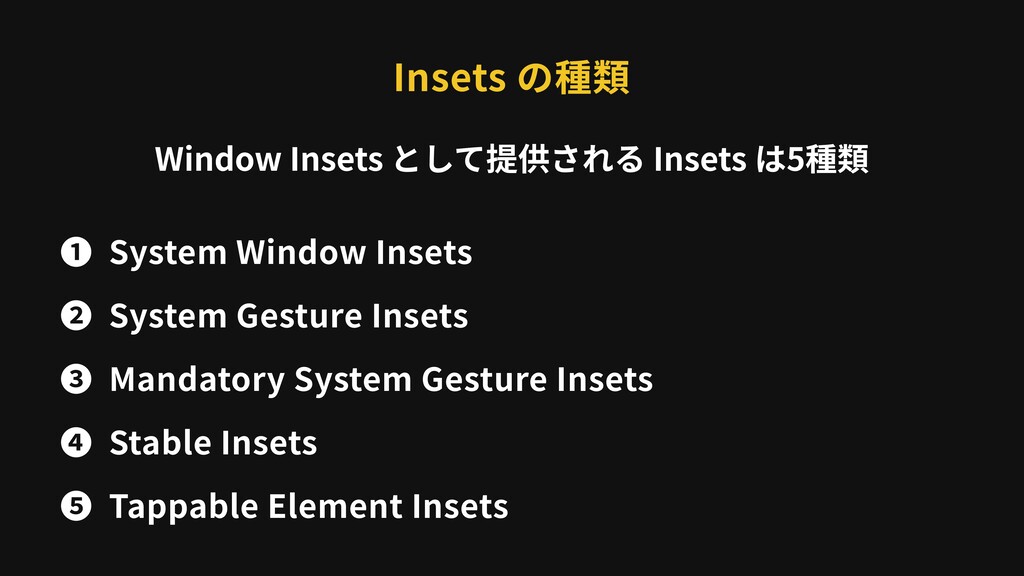
Insets の種類 ❶ System Window Insets ❷ System Gesture Insets
❸ Mandatory System Gesture Insets ❹ Stable Insets ❺ Tappable Element Insets Window Insets として提供される Insets は5種類 -
System Window Insets ・表⽰されている Status bar, Navigation bar のサイズ ・Edge-to-edge
対応の際によくつかう ⚠ View.SYSTEM_UI_FLAG_LAYOUT_STABLE を指定すると⾮表⽰でも取得できる -
System Window Insets Gesture Navigation の場合 Bottom Right Top Left
Status bar の⾼さ Navigation bar の⾼さ 171px 0px 0px 56px ⚠ Pixel 3 XL の場合 -
System Gesture Insets ・ジェスチャー操作を受け付ける System UI のサイズ ・Status bar や
Gesture navigation の状態に影響される ・Edge-to-edge 対応の際に⽤いる -
System Gesture Insets 171px 84px 84px 112px Status bar の通知パネル表⽰
Gesture navigation のホーム/アプリ切替 Gesture navigation の Back Gesture navigation の Back Gesture Navigation の場合 Bottom Right Top Left ⚠ Pixel 3 XL の場合 Navigation bar の⾼さより⼤きい -
Mandatory System Gesture Insets ・アプリ側でコントロールできない, ジェスチャー操作を 受け付ける System UI のサイズ
・Gesture Navigation の設定によって 部分的に除外できない領域のみが取得できる -
Mandatory System Gesture Insets 171px 0px 0px 112px Status bar
の通知パネル表⽰ Gesture navigation のホーム/アプリ切替 Bottom Right Top Left Gesture Navigation の場合 View.setSystemGestureExclusionRects() によってオーバライド可能 ⚠ Pixel 3 XL の場合 -
Stable Insets ・Status bar, Navigation bar のサイズ ・System bar の可視性にかかわらず取得できる
・View階層の上位にある DecorView で消費されるが System Window Insets で代替可能なため使うことはない -
Stable Insets Gesture Navigation の場合 Bottom Right Top Left Status
bar の⾼さ Navigation bar の⾼さ 171px 0px 0px 56px ⚠ Pixel 3 XL の場合 -
Tappable Element Insets 171px 0px 0px 0px Status bar の通知パネル表⽰
Bottom Right Top Left Pixel 3 XL / Gesture Navigation の場合 ⚠ Pixel 3 XL の場合 -
consume* その他のAPI ・Insets を消費するためのメソッド ・それ以降の Insets の伝達が⽌まり, Insets が反映されなく
なる ・将来的になくなる可能性がある (後述) consumeSystemWindowInsets() consumeSystemGestureInsets() -
・androidx.core:core に, バージョン間の差異を 吸収できる WindowInsetsCompat が⽤意されている ・Gesture Navigation 関連の Insets
を取得するには 1.2.0-alpha01 以降を使⽤する必要がある WindowInsets 最新版は 1.3.0-alpha01 (2020年2⽉21⽇現在) -
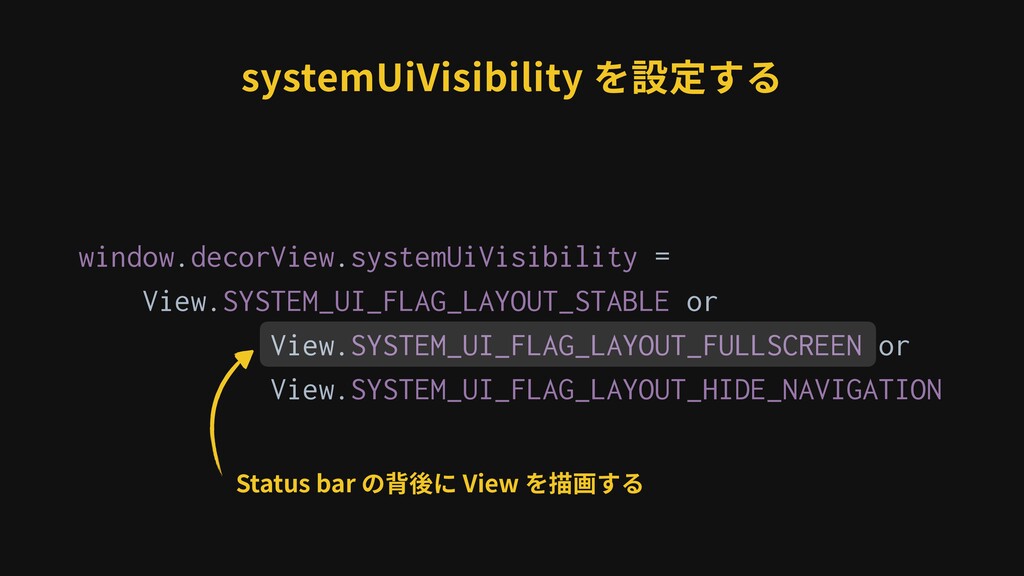
systemUiVisibility を設定する window.decorView.systemUiVisibility = View.SYSTEM_UI_FLAG_LAYOUT_STABLE or View.SYSTEM_UI_FLAG_LAYOUT_FULLSCREEN or View.SYSTEM_UI_FLAG_LAYOUT_HIDE_NAVIGATION Status
bar / Navigation bar が⾮表⽰の場合でも Insets の値を取得できるようにする -
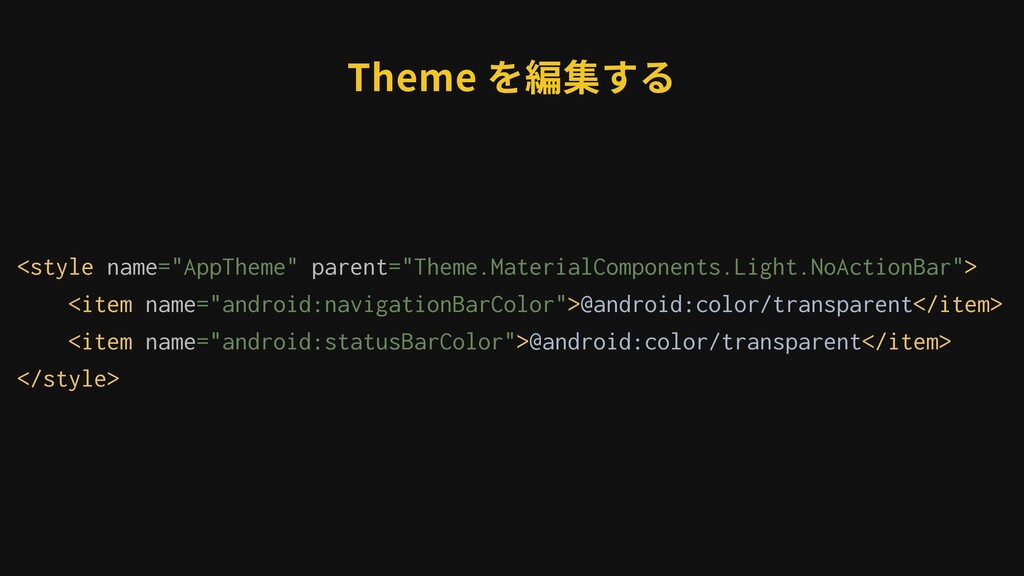
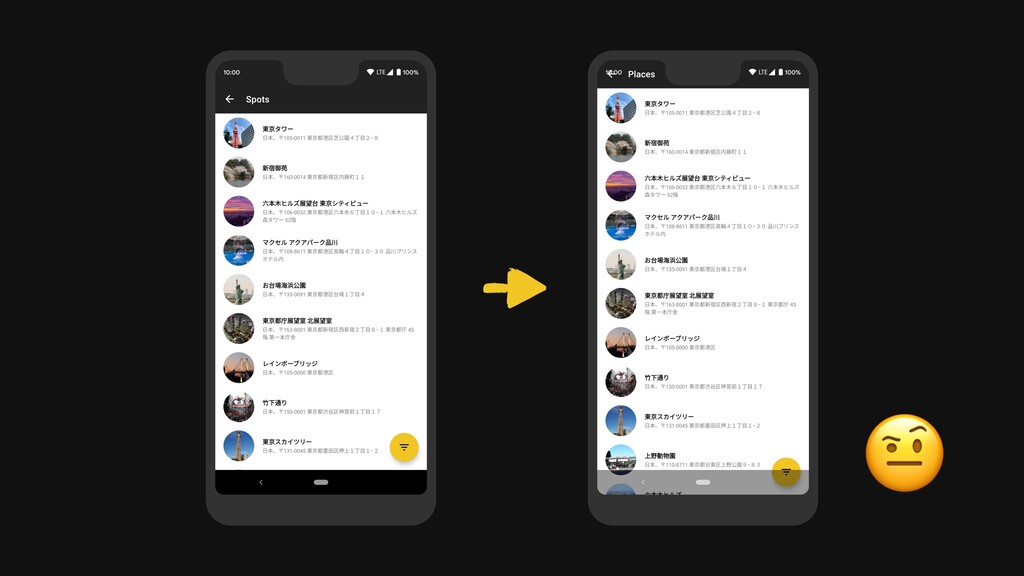
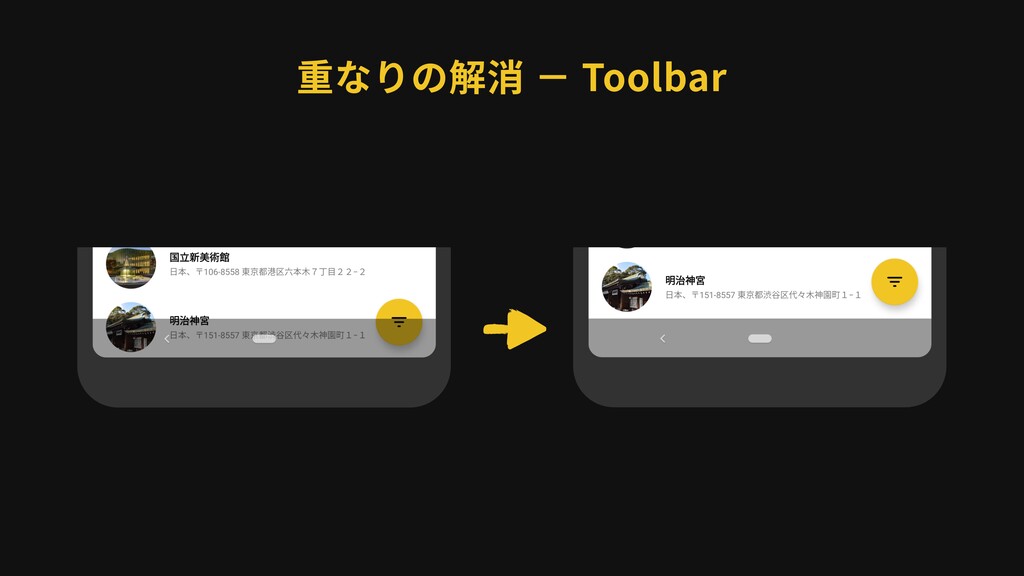
・Toolbar が Status bar と重なる ・FAB が Navigation bar と重なる
・RecyclerView が Navigation bar と重なる (⼀番下までスクロールしたとき) WindowInsets を使って解消していく -
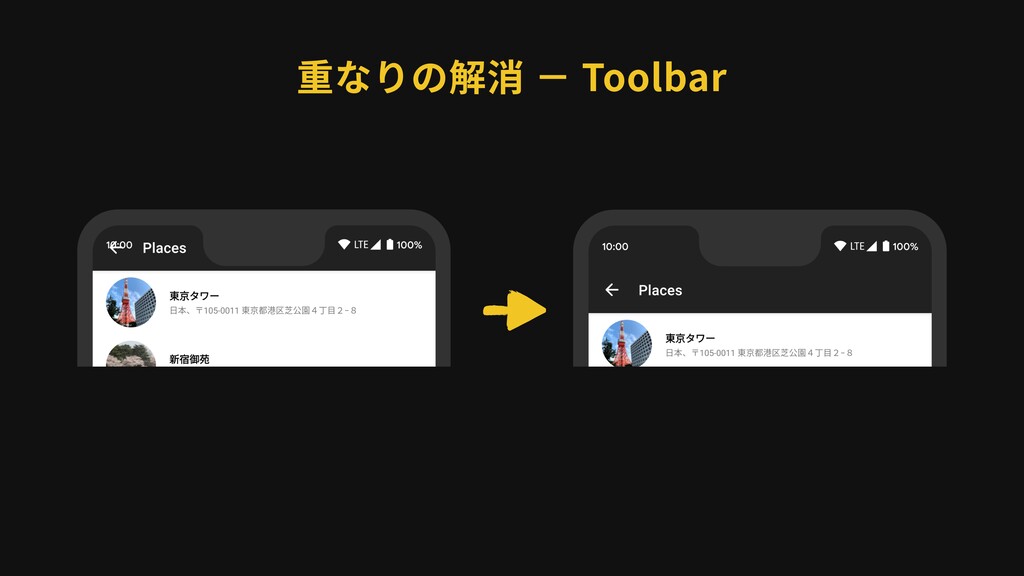
重なりの解消 − Toolbar ViewCompat.setOnApplyWindowInsetsListener(binding.toolbar) { _, insets -> binding.toolbar.updatePadding( left
= insets.systemWindowInsets.left, top = insets.systemWindowInsets.top, right = insets.systemWindowInsets.right ) insets } -
ViewCompat.setOnApplyWindowInsetsListener(binding.toolbar) { _, insets -> binding.toolbar.updatePadding( left = insets.systemWindowInsets.left, top
= insets.systemWindowInsets.top, right = insets.systemWindowInsets.right ) insets } 重なりの解消 − Toolbar WindowInsets の値を取得する -
ViewCompat.setOnApplyWindowInsetsListener(binding.toolbar) { _, insets -> binding.toolbar.updatePadding( left = insets.systemWindowInsets.left, top
= insets.systemWindowInsets.top, right = insets.systemWindowInsets.right ) insets } 重なりの解消 − Toolbar Status bar の Height -
重なりの解消 − Toolbar 画⾯回転時には Left または Right に Status bar
の⾼さが⼊る ViewCompat.setOnApplyWindowInsetsListener(binding.toolbar) { _, insets -> binding.toolbar.updatePadding( left = insets.systemWindowInsets.left, top = insets.systemWindowInsets.top, right = insets.systemWindowInsets.right ) insets } -
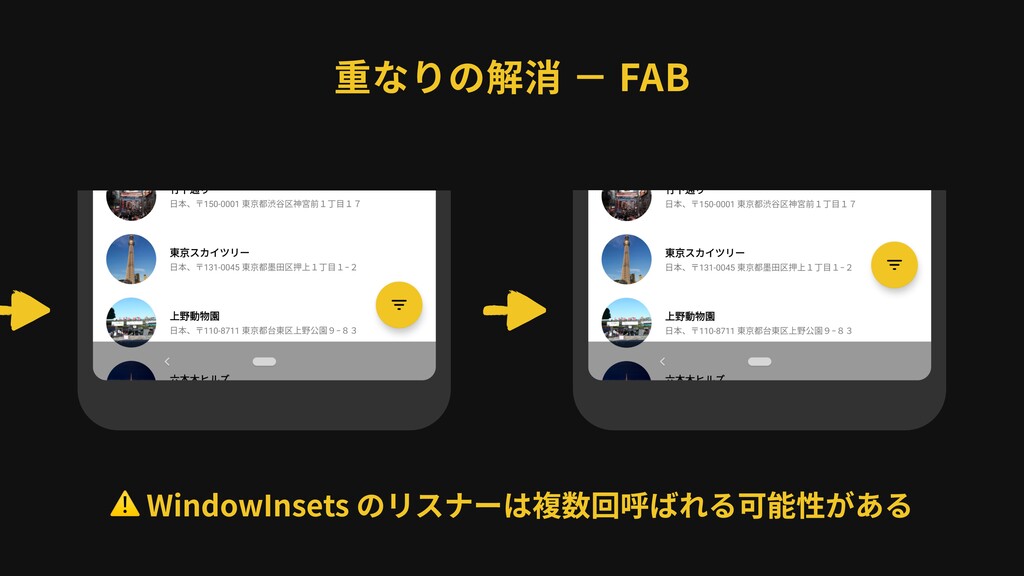
FAB の margin に Navigation bar の⾼さ分を 追加してあげればよさそう...? 重なりの解消 −
FAB あらかじめ 16dp の bottom margin が セットされている -
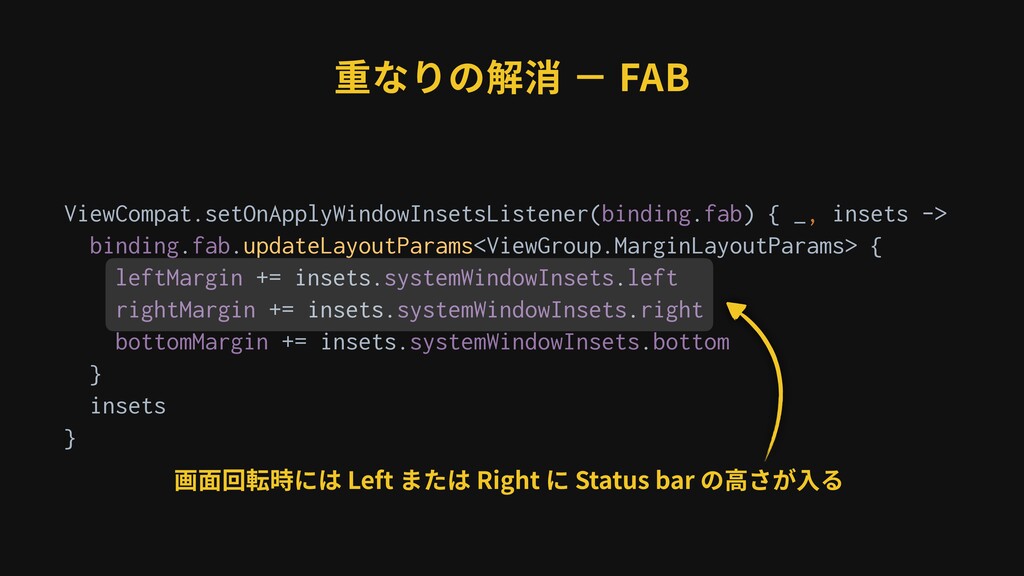
重なりの解消 − FAB ViewCompat.setOnApplyWindowInsetsListener(binding.fab) { _, insets -> binding.fab.updateLayoutParams<ViewGroup.MarginLayoutParams> {
leftMargin += insets.systemWindowInsets.left rightMargin += insets.systemWindowInsets.right bottomMargin += insets.systemWindowInsets.bottom } insets } -
ViewCompat.setOnApplyWindowInsetsListener(binding.fab) { _, insets -> binding.fab.updateLayoutParams<ViewGroup.MarginLayoutParams> { leftMargin += insets.systemWindowInsets.left
rightMargin += insets.systemWindowInsets.right bottomMargin += insets.systemWindowInsets.bottom } insets } 重なりの解消 − FAB Navigation bar の Height -
ViewCompat.setOnApplyWindowInsetsListener(binding.fab) { _, insets -> binding.fab.updateLayoutParams<ViewGroup.MarginLayoutParams> { leftMargin += insets.systemWindowInsets.left
rightMargin += insets.systemWindowInsets.right bottomMargin += insets.systemWindowInsets.bottom } insets } 重なりの解消 − FAB 画⾯回転時には Left または Right に Status bar の⾼さが⼊る -
重なりの解消 − FAB 複数回呼び出されることを前提に, 冪等性を確保しておく必要がある ViewCompat.setOnApplyWindowInsetsListener(binding.fab) { _, insets ->
binding.fab.updateLayoutParams<ViewGroup.MarginLayoutParams> { leftMargin += insets.systemWindowInsets.left rightMargin += insets.systemWindowInsets.right bottomMargin += insets.systemWindowInsets.bottom } insets } -
重なりの解消 − FAB val fabLeftMargin = binding.fab.marginLeft val fabRightMargin =
binding.fab.marginRight val fabBottomMargin = binding.fab.marginBottom ViewCompat.setOnApplyWindowInsetsListener(binding.fab) {a_, insets -> binding.fab.updateLayoutParams<ViewGroup.MarginLayoutParams> {a leftMargin = fabLeftMargin + insets.systemWindowInsets.left rightMargin = fabRightMargin + insets.systemWindowInsets.right bottomMargin = fabBottomMargin + insets.systemWindowInsets.bottom }anim insets }anim -
val fabLeftMargin = binding.fab.marginLeft val fabRightMargin = binding.fab.marginRight val fabBottomMargin
= binding.fab.marginBottom ViewCompat.setOnApplyWindowInsetsListener(binding.fab) {a_, insets -> binding.fab.updateLayoutParams<ViewGroup.MarginLayoutParams> {a leftMargin = fabLeftMargin + insets.systemWindowInsets.left rightMargin = fabRightMargin + insets.systemWindowInsets.right bottomMargin = fabBottomMargin + insets.systemWindowInsets.bottom }anim insets }anim 重なりの解消 − FAB 各 margin の初期値を保持しておく -
val fabLeftMargin = binding.fab.marginLeft val fabRightMargin = binding.fab.marginRight val fabBottomMargin
= binding.fab.marginBottom ViewCompat.setOnApplyWindowInsetsListener(binding.fab) {a_, insets -> binding.fab.updateLayoutParams<ViewGroup.MarginLayoutParams> {a leftMargin = fabLeftMargin + insets.systemWindowInsets.left rightMargin = fabRightMargin + insets.systemWindowInsets.right bottomMargin = fabBottomMargin + insets.systemWindowInsets.bottom }anim insets }anim 重なりの解消 − FAB 各 margin の初期値 + Navigation bar のサイズ -
重なりの解消 − RecyclerView ViewCompat.setOnApplyWindowInsetsListener(binding.recyclerView) { _, insets -> binding.recyclerView.updatePadding(bottom =
insets.systemWindowInsets.bottom) insets } -
重なりの解消 − RecyclerView ViewCompat.setOnApplyWindowInsetsListener(binding.recyclerView) { _, insets -> binding.recyclerView.updatePadding(bottom =
insets.systemWindowInsets.bottom) insets } Navigation bar の Height -
<androidx.recyclerview.widget.RecyclerView android:id="@+id/recycler_view" android:layout_width="match_parent" android:layout_height="match_parent" android:clipToPadding="false" android:elevation="2dp" … /> 重なりの解消 −
RecyclerView Padding の領域にも⼦ View を描画する (スクロール時にアイテムが表⽰されるように) -
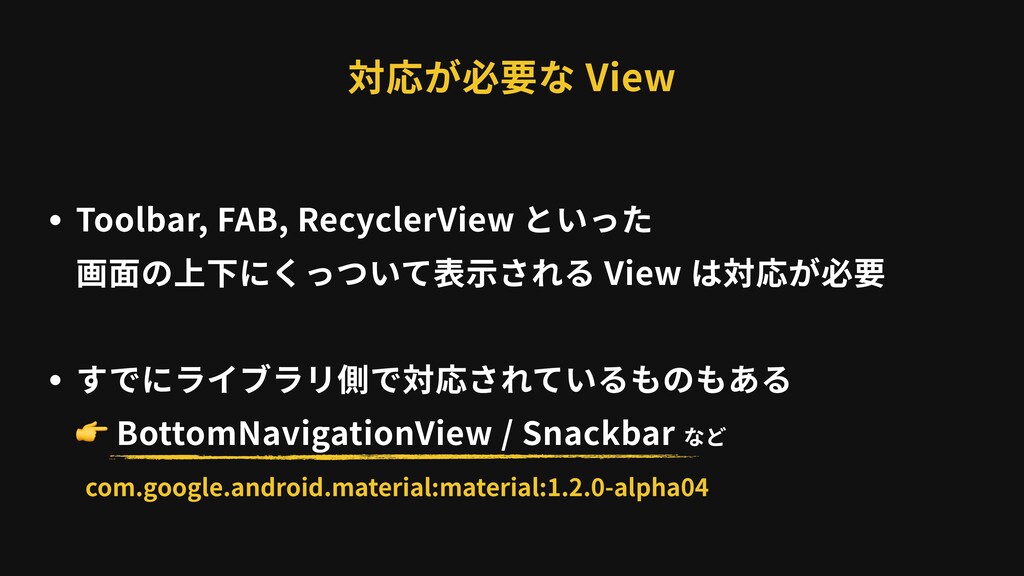
・Toolbar, FAB, RecyclerView といった 画⾯の上下にくっついて表⽰される View は対応が必要 ・すでにライブラリ側で対応されているものもある BottomNavigationView /
Snackbar など 対応が必要な View com.google.android.material:material:1.2.0-alpha04 -
BottomNavigationView private void applyWindowInsets() { ViewUtils.doOnApplyWindowInsets( this, new ViewUtils.OnApplyWindowInsetsListener() {
@NonNull @Override public androidx.core.view.WindowInsetsCompat onApplyWindowInsets( View view, @NonNull androidx.core.view.WindowInsetsCompat insets, @NonNull RelativePadding initialPadding) { initialPadding.bottom += insets.getSystemWindowInsetBottom(); initialPadding.applyToView(view); return insets; }anim }); }anim -
private void applyWindowInsets() { ViewUtils.doOnApplyWindowInsets( this, new ViewUtils.OnApplyWindowInsetsListener() { @NonNull
@Override public androidx.core.view.WindowInsetsCompat onApplyWindowInsets( View view, @NonNull androidx.core.view.WindowInsetsCompat insets, @NonNull RelativePadding initialPadding) { initialPadding.bottom += insets.getSystemWindowInsetBottom(); initialPadding.applyToView(view); return insets; }anim }); }anim BottomNavigationView コンストラクタから呼ばれる -
private void applyWindowInsets() { ViewUtils.doOnApplyWindowInsets( this, new ViewUtils.OnApplyWindowInsetsListener() { @NonNull
@Override public androidx.core.view.WindowInsetsCompat onApplyWindowInsets( View view, @NonNull androidx.core.view.WindowInsetsCompat insets, @NonNull RelativePadding initialPadding) { initialPadding.bottom += insets.getSystemWindowInsetBottom(); initialPadding.applyToView(view); return insets; }anim }); }anim BottomNavigationView padding bottom に Navigation bar の⾼さを追加 -
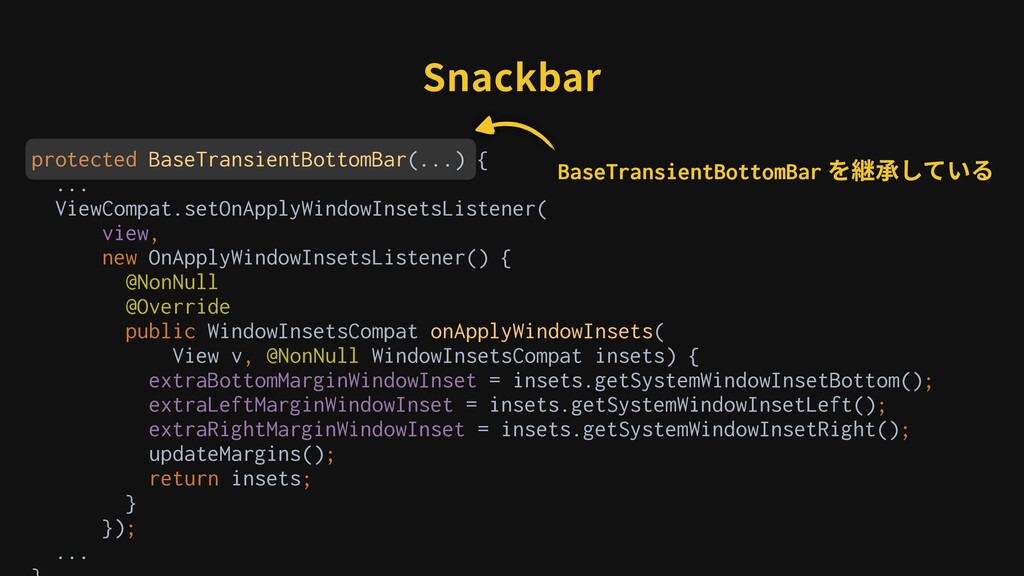
Snackbar protected BaseTransientBottomBar(...) { ... ViewCompat.setOnApplyWindowInsetsListener( view, new OnApplyWindowInsetsListener() {
@NonNull @Override public WindowInsetsCompat onApplyWindowInsets( View v, @NonNull WindowInsetsCompat insets) { extraBottomMarginWindowInset = insets.getSystemWindowInsetBottom(); extraLeftMarginWindowInset = insets.getSystemWindowInsetLeft(); extraRightMarginWindowInset = insets.getSystemWindowInsetRight(); updateMargins(); return insets; }anim }); ... -
protected BaseTransientBottomBar(...) { ... ViewCompat.setOnApplyWindowInsetsListener( view, new OnApplyWindowInsetsListener() { @NonNull
@Override public WindowInsetsCompat onApplyWindowInsets( View v, @NonNull WindowInsetsCompat insets) { extraBottomMarginWindowInset = insets.getSystemWindowInsetBottom(); extraLeftMarginWindowInset = insets.getSystemWindowInsetLeft(); extraRightMarginWindowInset = insets.getSystemWindowInsetRight(); updateMargins(); return insets; }anim }); ... Snackbar BaseTransientBottomBar を継承している -
protected BaseTransientBottomBar(...) { ... ViewCompat.setOnApplyWindowInsetsListener( view, new OnApplyWindowInsetsListener() { @NonNull
@Override public WindowInsetsCompat onApplyWindowInsets( View v, @NonNull WindowInsetsCompat insets) { extraBottomMarginWindowInset = insets.getSystemWindowInsetBottom(); extraLeftMarginWindowInset = insets.getSystemWindowInsetLeft(); extraRightMarginWindowInset = insets.getSystemWindowInsetRight(); updateMargins(); return insets; }anim }); ... Snackbar Navigation Bar の⾼さを各 margin に設定 Left / Right は画⾯回転時にも重ならないようにするため -
ViewRootImpl ・View 階層の最上位にあるクラス ・ViewParent を継承しているが これ⾃⾝は View ではない ViewRootImpl DecorView
ViewGroup ViewGroup ViewGroup View View View View の親として振る舞うためのインタフェース この他に ViewGroup が実装している -
DecorView ・すべての View のルートとなる View ・FrameLayout を継承している ViewRootImpl DecorView ViewGroup
ViewGroup ViewGroup View View View ➡ ViewGroup ➡ View -
WindowInsets の⽣成 android.view.ViewRootImpl private void performTraversals() { ... if (mFirst)
{ ... dispatchApplyInsets(host); } else { ... }anim }anim -
private void performTraversals() { ... if (mFirst) { ... dispatchApplyInsets(host);
} else { ... }anim }anim 毎フレームの描画時に呼ばれる WindowInsets の⽣成 android.view.ViewRootImpl -
private void performTraversals() { ... if (mFirst) { ... dispatchApplyInsets(host);
} else { ... }anim }anim 初回のみ WindowInsets の処理を⾏う WindowInsets の⽣成 android.view.ViewRootImpl -
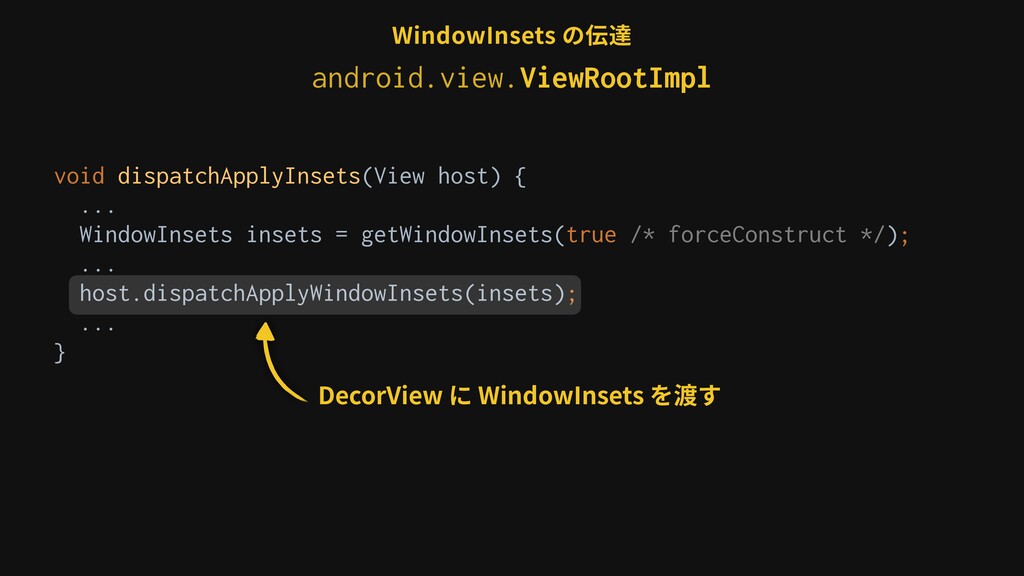
void dispatchApplyInsets(View host) { ... WindowInsets insets = getWindowInsets(true /*
forceConstruct */); ... host.dispatchApplyWindowInsets(insets); ... }anim WindowInsets を計算し, View 階層の最上位にある View に渡す WindowInsets の⽣成 android.view.ViewRootImpl -
void dispatchApplyInsets(View host) { ... WindowInsets insets = getWindowInsets(true /*
forceConstruct */); ... host.dispatchApplyWindowInsets(insets); ... }anim WindowInsets の計算 WindowInsets の⽣成 android.view.ViewRootImpl -
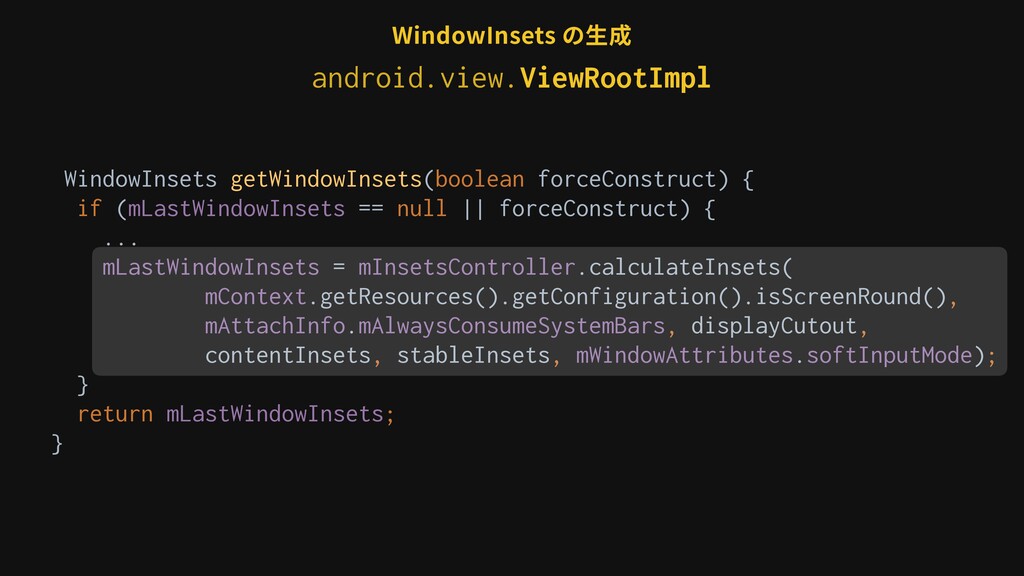
WindowInsets getWindowInsets(boolean forceConstruct) { if (mLastWindowInsets == null || forceConstruct)
{ ... mLastWindowInsets = mInsetsController.calculateInsets( mContext.getResources().getConfiguration().isScreenRound(), mAttachInfo.mAlwaysConsumeSystemBars, displayCutout, contentInsets, stableInsets, mWindowAttributes.softInputMode); } return mLastWindowInsets; } WindowInsets の⽣成 android.view.ViewRootImpl -
public WindowInsets calculateInsets(boolean isScreenRound, boolean alwaysConsumeSystemBars, DisplayCutout cutout, Rect legacyContentInsets,
Rect legacyStableInsets, int legacySoftInputMode) { mLastLegacyContentInsets.set(legacyContentInsets); mLastLegacyStableInsets.set(legacyStableInsets); mLastLegacySoftInputMode = legacySoftInputMode; mLastInsets = mState.calculateInsets(mFrame, isScreenRound, alwaysConsumeSystemBars, cutout, legacyContentInsets, legacyStableInsets, legacySoftInputMode, null /* typeSideMap */); return mLastInsets; } WindowInsets の⽣成 android.view.InsetsController 実際に WindowInsets を計算しているクラス -
WindowInsets getWindowInsets(boolean forceConstruct) { if (mLastWindowInsets == null || forceConstruct)
{ ... mLastWindowInsets = mInsetsController.calculateInsets( mContext.getResources().getConfiguration().isScreenRound(), mAttachInfo.mAlwaysConsumeSystemBars, displayCutout, contentInsets, stableInsets, mWindowAttributes.softInputMode); } return mLastWindowInsets; } WindowInsets の⽣成 android.view.ViewRootImpl -
void dispatchApplyInsets(View host) { ... WindowInsets insets = getWindowInsets(true /*
forceConstruct */); ... host.dispatchApplyWindowInsets(insets); ... }anim WindowInsets の⽣成 android.view.ViewRootImpl -
void dispatchApplyInsets(View host) { ... WindowInsets insets = getWindowInsets(true /*
forceConstruct */); ... host.dispatchApplyWindowInsets(insets); ... }anim DecorView に WindowInsets を渡す WindowInsets の⽣成 android.view.ViewRootImpl -
void dispatchApplyInsets(View host) { ... WindowInsets insets = getWindowInsets(true /*
forceConstruct */); ... host.dispatchApplyWindowInsets(insets); ... }anim DecorView に WindowInsets を渡す WindowInsets の伝達 android.view.ViewRootImpl -
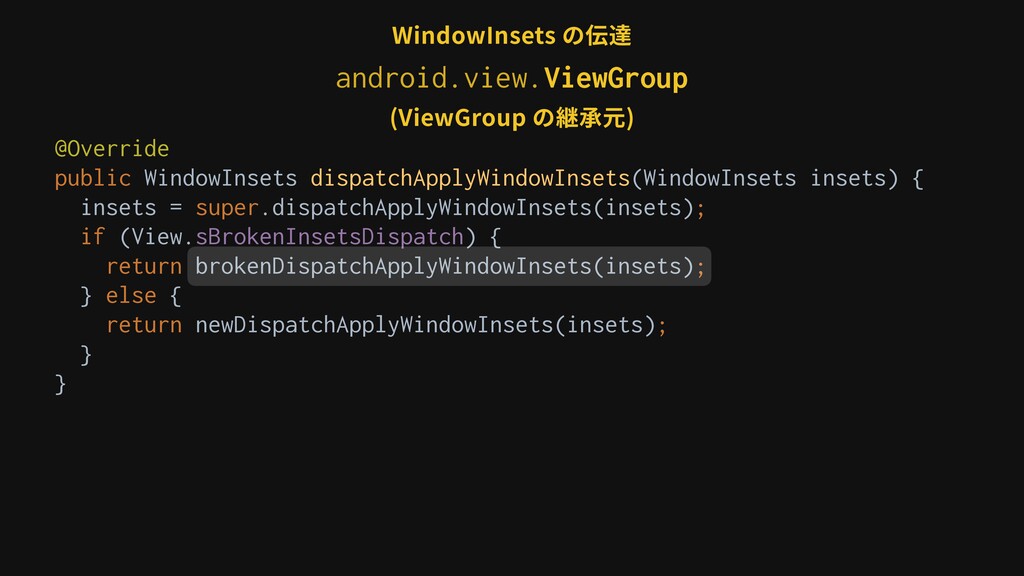
@Override public WindowInsets dispatchApplyWindowInsets(WindowInsets insets) { insets = super.dispatchApplyWindowInsets(insets); if
(View.sBrokenInsetsDispatch) { return brokenDispatchApplyWindowInsets(insets); } else { return newDispatchApplyWindowInsets(insets); }anim }anim WindowInsets の伝達 (DecorView の継承元) android.view.ViewGroup -
@Override public WindowInsets dispatchApplyWindowInsets(WindowInsets insets) { insets = super.dispatchApplyWindowInsets(insets); if
(View.sBrokenInsetsDispatch) { return brokenDispatchApplyWindowInsets(insets); } else { return newDispatchApplyWindowInsets(insets); }anim }anim (DecorView の継承元) WindowInsets の伝達 android.view.ViewGroup -
public WindowInsets dispatchApplyWindowInsets(WindowInsets insets) { try { mPrivateFlags3 |= PFLAG3_APPLYING_INSETS;
if (mListenerInfo != null && mListenerInfo.mOnApplyWindowInsetsListener != null) { return mListenerInfo .mOnApplyWindowInsetsListener .onApplyWindowInsets(this, insets); } else { return onApplyWindowInsets(insets); } } finally { mPrivateFlags3 &= ~PFLAG3_APPLYING_INSETS; } (ViewGroup の継承元) WindowInsets の伝達 android.view.View -
@Override public WindowInsets dispatchApplyWindowInsets(WindowInsets insets) { insets = super.dispatchApplyWindowInsets(insets); if
(View.sBrokenInsetsDispatch) { return brokenDispatchApplyWindowInsets(insets); } else { return newDispatchApplyWindowInsets(insets); }anim }anim (DecorView の継承元) WindowInsets の伝達 android.view.ViewGroup -
@Override public WindowInsets dispatchApplyWindowInsets(WindowInsets insets) { insets = super.dispatchApplyWindowInsets(insets); if
(View.sBrokenInsetsDispatch) { return brokenDispatchApplyWindowInsets(insets); } else { return newDispatchApplyWindowInsets(insets); }anim }anim (ViewGroup の継承元) WindowInsets の伝達 android.view.ViewGroup -
private WindowInsets brokenDispatchApplyWindowInsets(WindowInsets insets) { if (!insets.isConsumed()) { final int
count = getChildCount(); for (int i = 0; i < count; i++) { insets = getChildAt(i).dispatchApplyWindowInsets(insets); if (insets.isConsumed()) { break; }anim }anim }anim return insets; }anim (ViewGroup の継承元) WindowInsets の伝達 android.view.ViewGroup -
(ViewGroup の継承元) WindowInsets の伝達 private WindowInsets brokenDispatchApplyWindowInsets(WindowInsets insets) { if
(!insets.isConsumed()) { final int count = getChildCount(); for (int i = 0; i < count; i++) { insets = getChildAt(i).dispatchApplyWindowInsets(insets); if (insets.isConsumed()) { break; }anim }anim }anim return insets; }anim android.view.ViewGroup -
private WindowInsets brokenDispatchApplyWindowInsets(WindowInsets insets) { if (!insets.isConsumed()) { final int
count = getChildCount(); for (int i = 0; i < count; i++) { insets = getChildAt(i).dispatchApplyWindowInsets(insets); if (insets.isConsumed()) { break; }anim }anim }anim return insets; }anim (ViewGroup の継承元) WindowInsets の伝達 android.view.ViewGroup -
private WindowInsets brokenDispatchApplyWindowInsets(WindowInsets insets) { if (!insets.isConsumed()) { final int
count = getChildCount(); for (int i = 0; i < count; i++) { insets = getChildAt(i).dispatchApplyWindowInsets(insets); if (insets.isConsumed()) { break; }anim }anim }anim return insets; }anim (ViewGroup の継承元) ⼦ View に WindowInsets を渡す WindowInsets の伝達 android.view.ViewGroup -
private WindowInsets brokenDispatchApplyWindowInsets(WindowInsets insets) { if (!insets.isConsumed()) { final int
count = getChildCount(); for (int i = 0; i < count; i++) { insets = getChildAt(i).dispatchApplyWindowInsets(insets); if (insets.isConsumed()) { break; }anim }anim }anim return insets; }anim (ViewGroup の継承元) ⼦ View で消費されたら, それ以降の⼦ View には渡さない WindowInsets の伝達 android.view.ViewGroup -
private WindowInsets brokenDispatchApplyWindowInsets(WindowInsets insets) { if (!insets.isConsumed()) { final int
count = getChildCount(); for (int i = 0; i < count; i++) { insets = getChildAt(i).dispatchApplyWindowInsets(insets); if (insets.isConsumed()) { break; }anim }anim }anim return insets; }anim (ViewGroup の継承元) ⼦ View が ViewGroup の場合 WindowInsets の伝達 android.view.ViewGroup -
⼦ View が ViewGroup の場合は 同様にこの View の⼦ View (孫
View) に伝達していく WindowInsets の伝達 @Override public WindowInsets dispatchApplyWindowInsets(WindowInsets insets) { insets = super.dispatchApplyWindowInsets(insets); if (View.sBrokenInsetsDispatch) { return brokenDispatchApplyWindowInsets(insets); } else { return newDispatchApplyWindowInsets(insets); }anim }anim android.view.ViewGroup -
private WindowInsets brokenDispatchApplyWindowInsets(WindowInsets insets) { if (!insets.isConsumed()) { final int
count = getChildCount(); for (int i = 0; i < count; i++) { insets = getChildAt(i).dispatchApplyWindowInsets(insets); if (insets.isConsumed()) { break; }anim }anim }anim return insets; }anim ⼦ View が View の場合 WindowInsets の伝達 android.view.ViewGroup -
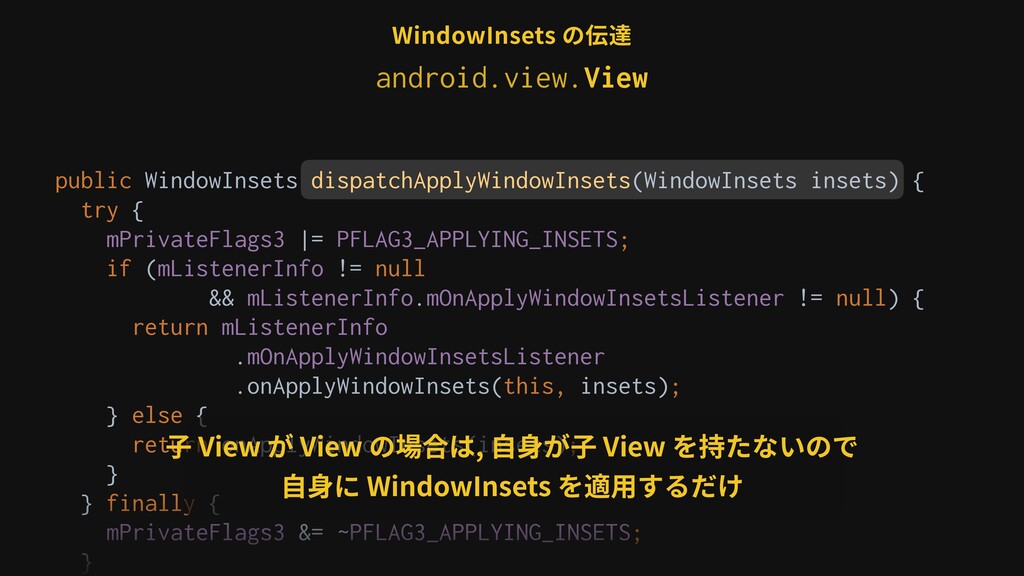
public WindowInsets dispatchApplyWindowInsets(WindowInsets insets) { try { mPrivateFlags3 |= PFLAG3_APPLYING_INSETS;
if (mListenerInfo != null && mListenerInfo.mOnApplyWindowInsetsListener != null) { return mListenerInfo .mOnApplyWindowInsetsListener .onApplyWindowInsets(this, insets); } else { return onApplyWindowInsets(insets); } } finally { mPrivateFlags3 &= ~PFLAG3_APPLYING_INSETS; } ⼦ View が View の場合は, ⾃⾝が⼦ View を持たないので ⾃⾝に WindowInsets を適⽤するだけ WindowInsets の伝達 android.view.View -
@Override public WindowInsets dispatchApplyWindowInsets(WindowInsets insets) { insets = super.dispatchApplyWindowInsets(insets); if
(View.sBrokenInsetsDispatch) { return brokenDispatchApplyWindowInsets(insets); } else { return newDispatchApplyWindowInsets(insets); }anim }anim WindowInsets の内部 android.view.ViewGroup -
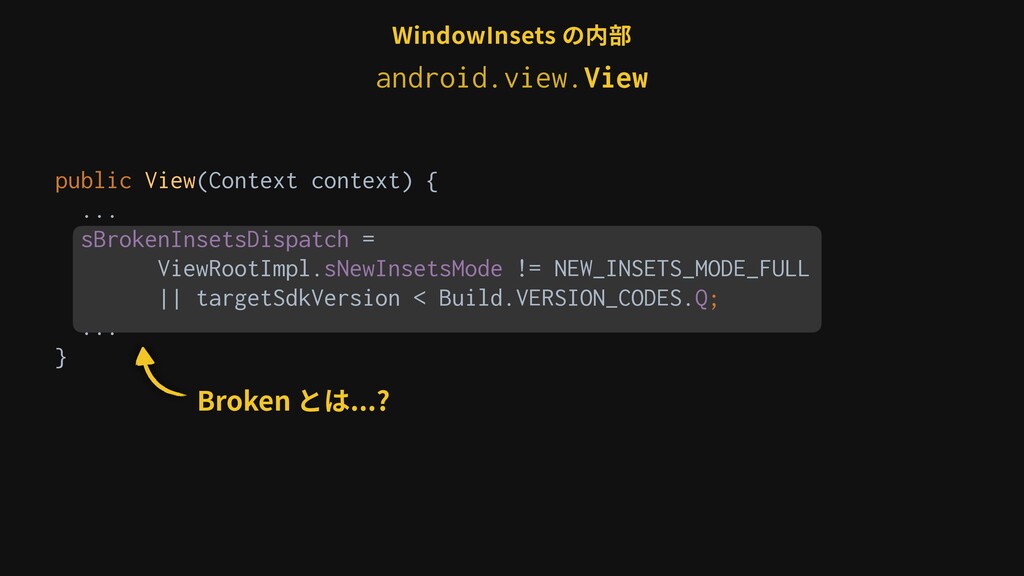
WindowInsets の内部 public View(Context context) { ... sBrokenInsetsDispatch = ViewRootImpl.sNewInsetsMode
!= NEW_INSETS_MODE_FULL || targetSdkVersion < Build.VERSION_CODES.Q; ... } sNewInsetsMode が NEW_INSETS_MODE_FULL でないか Android Q 未満の場合は true android.view.View -
private static final String USE_NEW_INSETS_PROPERTY = "persist.wm.new_insets"; public static int
sNewInsetsMode = SystemProperties.getInt(USE_NEW_INSETS_PROPERTY, 0); public static final int NEW_INSETS_MODE_NONE = 0; public static final int NEW_INSETS_MODE_IME = 1; public static final int NEW_INSETS_MODE_FULL = 2; WindowInsets の内部 ͝ͱʹઃఆ͞ΕͨڥมͷΑ͏ͳͷ Pixel 3 XL(API29) Ͱ NEW_INSETS_MODE_NONE android.view.ViewRootImpl -
WindowInsets の内部 Broken とは...? public View(Context context) { ... sBrokenInsetsDispatch
= ViewRootImpl.sNewInsetsMode != NEW_INSETS_MODE_FULL || targetSdkVersion < Build.VERSION_CODES.Q; ... } android.view.View -
WindowInsets の内部 /** * Prior to Q, {@link #dispatchApplyWindowInsets} had
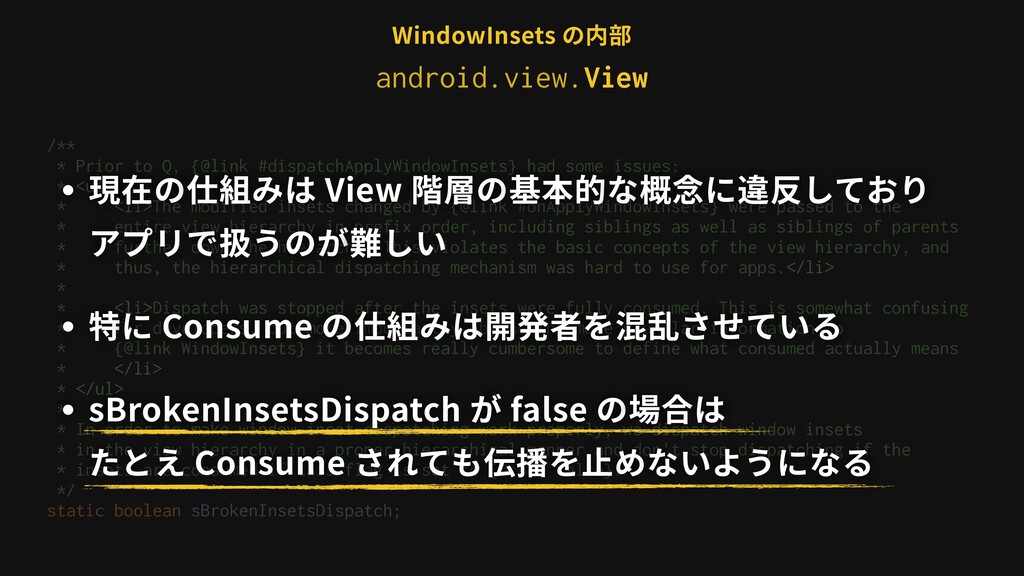
some issues: * <ul> * <li>The modified insets changed by {@link #onApplyWindowInsets} were passed to the * entire view hierarchy in prefix order, including siblings as well as siblings of parents * further down the hierarchy. This violates the basic concepts of the view hierarchy, and * thus, the hierarchical dispatching mechanism was hard to use for apps.</li> * * <li>Dispatch was stopped after the insets were fully consumed. This is somewhat confusing * for developers, but more importantly, by adding more granular information to * {@link WindowInsets} it becomes really cumbersome to define what consumed actually means * </li> * </ul> * * In order to make window inset dispatching work properly, we dispatch window insets * in the view hierarchy in a proper hierarchical manner and don't stop dispatching if the * insets are consumed if this flag is set to {@code false}. */ static boolean sBrokenInsetsDispatch; android.view.View -
/** * Prior to Q, {@link #dispatchApplyWindowInsets} had some issues:
* <ul> * <li>The modified insets changed by {@link #onApplyWindowInsets} were passed to the * entire view hierarchy in prefix order, including siblings as well as siblings of parents * further down the hierarchy. This violates the basic concepts of the view hierarchy, and * thus, the hierarchical dispatching mechanism was hard to use for apps.</li> * * <li>Dispatch was stopped after the insets were fully consumed. This is somewhat confusing * for developers, but more importantly, by adding more granular information to * {@link WindowInsets} it becomes really cumbersome to define what consumed actually means * </li> * </ul> * * In order to make window inset dispatching work properly, we dispatch window insets * in the view hierarchy in a proper hierarchical manner and don't stop dispatching if the * insets are consumed if this flag is set to {@code false}. */ static boolean sBrokenInsetsDispatch; ・現在の仕組みは View 階層の基本的な概念に違反しており アプリで扱うのが難しい ・特に Consume の仕組みは開発者を混乱させている ・sBrokenInsetsDispatch が false の場合は たとえ Consume されても伝播を⽌めないようになる WindowInsets の内部 android.view.View -
@Override public WindowInsets dispatchApplyWindowInsets(WindowInsets insets) { insets = super.dispatchApplyWindowInsets(insets); if
(View.sBrokenInsetsDispatch) { return brokenDispatchApplyWindowInsets(insets); } else { return newDispatchApplyWindowInsets(insets); }anim }anim WindowInsets の内部 android.view.ViewGroup -
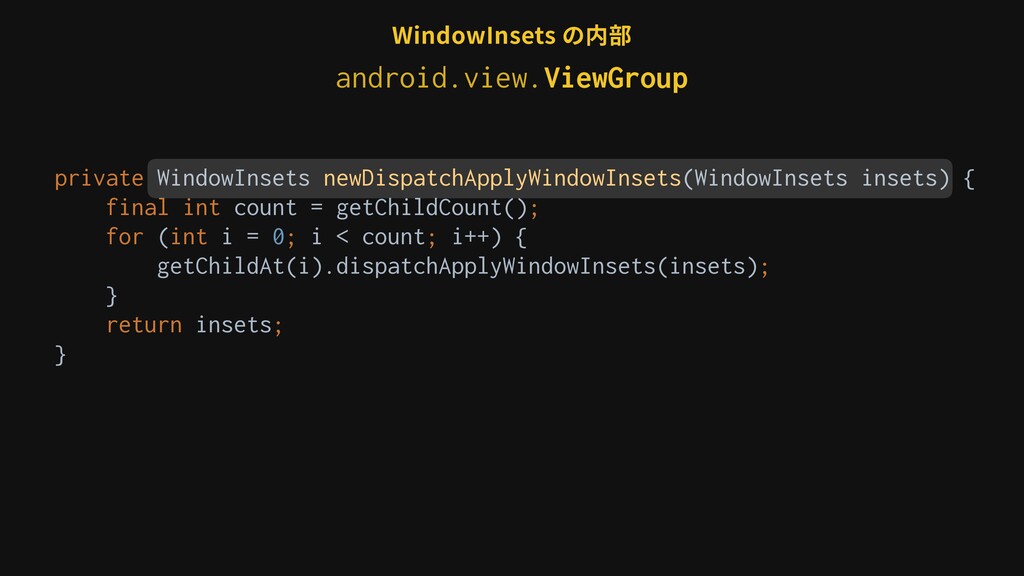
private WindowInsets newDispatchApplyWindowInsets(WindowInsets insets) { final int count = getChildCount();
for (int i = 0; i < count; i++) { getChildAt(i).dispatchApplyWindowInsets(insets); }anim return insets; }anim WindowInsets の内部 android.view.ViewGroup -
private WindowInsets newDispatchApplyWindowInsets(WindowInsets insets) { final int count = getChildCount();
for (int i = 0; i < count; i++) { getChildAt(i).dispatchApplyWindowInsets(insets); }anim return insets; }anim WindowInsets の内部 Consume に関するチェックがなくなっている android.view.ViewGroup -
WindowInsets の内部 /** * If set to 2, the view
system will switch from using rectangles retrieved from window to * dispatch to the view hierarchy to using {@link InsetsController}, that derives the insets * directly from the full configuration, enabling richer information about the insets state, as * well as new APIs to control it frame-by-frame, and synchronize animations with it. * <p> * Only set this to 2 once the new insets system is productionized and the old APIs are * fully migrated over. * <p> * If set to 1, this will switch to a mode where we only use the new approach for IME, but not * for the status/navigation bar. */ private static final String USE_NEW_INSETS_PROPERTY = "persist.wm.new_insets"; android.view.ViewRootImpl -
/** * If set to 2, the view system will
switch from using rectangles retrieved from window to * dispatch to the view hierarchy to using {@link InsetsController}, that derives the insets * directly from the full configuration, enabling richer information about the insets state, as * well as new APIs to control it frame-by-frame, and synchronize animations with it. * <p> * Only set this to 2 once the new insets system is productionized and the old APIs are * fully migrated over. * <p> * If set to 1, this will switch to a mode where we only use the new approach for IME, but not * for the status/navigation bar. */ private static final String USE_NEW_INSETS_PROPERTY = "persist.wm.new_insets"; ・NEW_INSETS_MODE_FULL になると InsetsController を使った新しい⽅式で WindowInsets が 計算される ・新しいInsetsの仕組みがリリースされ, 古いAPIが全て移⾏ された時に NEW_INSETS_MODE_FULL になる WindowInsets の内部 android.view.ViewRootImpl -
/** * If set to 2, the view system will
switch from using rectangles retrieved from window to * dispatch to the view hierarchy to using {@link InsetsController}, that derives the insets * directly from the full configuration, enabling richer information about the insets state, as * well as new APIs to control it frame-by-frame, and synchronize animations with it. * <p> * Only set this to 2 once the new insets system is productionized and the old APIs are * fully migrated over. * <p> * If set to 1, this will switch to a mode where we only use the new approach for IME, but not * for the status/navigation bar. */ private static final String USE_NEW_INSETS_PROPERTY = "persist.wm.new_insets"; ・NEW_INSETS_MODE_FULL になると InsetsController を使った新しい⽅式で WindowInsets が 計算される ・新しいInsetsの仕組みがリリースされ, 古いAPIが全て移⾏ された時に NEW_INSETS_MODE_FULL になる WindowInsets の内部 ❓ android.view.ViewRootImpl -
WindowInsets getWindowInsets(boolean forceConstruct) { if (mLastWindowInsets == null || forceConstruct)
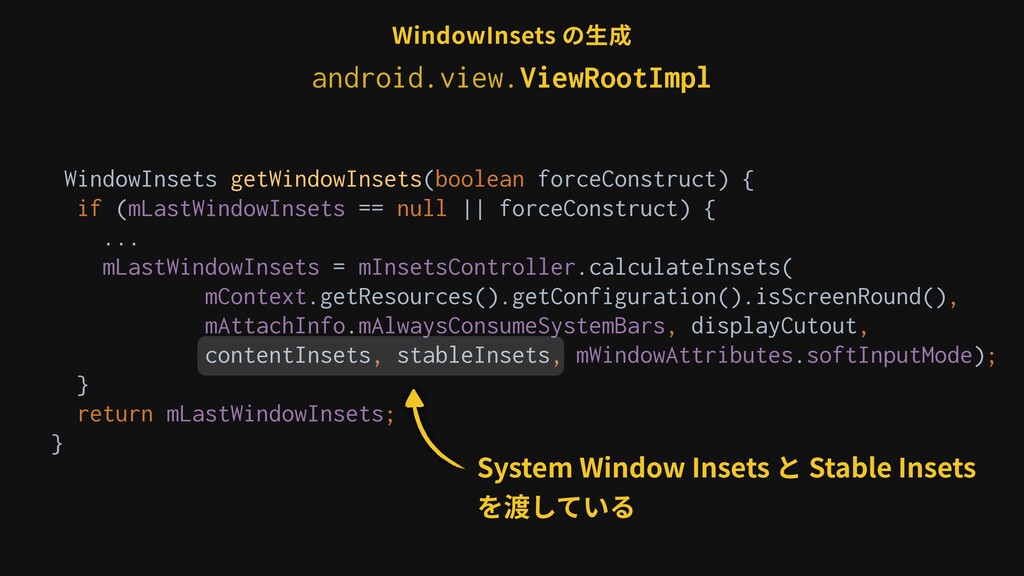
{ ... mLastWindowInsets = mInsetsController.calculateInsets( mContext.getResources().getConfiguration().isScreenRound(), mAttachInfo.mAlwaysConsumeSystemBars, displayCutout, contentInsets, stableInsets, mWindowAttributes.softInputMode); } return mLastWindowInsets; } WindowInsets の⽣成 System Window Insets と Stable Insets を渡している android.view.ViewRootImpl -
WindowInsets getWindowInsets(boolean forceConstruct) { if (mLastWindowInsets == null || forceConstruct)
{ ... mLastWindowInsets = mInsetsController.calculateInsets( mContext.getResources().getConfiguration().isScreenRound(), mAttachInfo.mAlwaysConsumeSystemBars, displayCutout, contentInsets, stableInsets, mWindowAttributes.softInputMode); } return mLastWindowInsets; } WindowInsets の⽣成 ❶ System Window Insets ❷ System Gesture Insets ❸ Mandatory System Gesture Insets ❹ Stable Insets ❺ Tappable Element Insets android.view.ViewRootImpl -
WindowInsets getWindowInsets(boolean forceConstruct) { if (mLastWindowInsets == null || forceConstruct)
{ ... mLastWindowInsets = mInsetsController.calculateInsets( mContext.getResources().getConfiguration().isScreenRound(), mAttachInfo.mAlwaysConsumeSystemBars, displayCutout, contentInsets, stableInsets, mWindowAttributes.softInputMode); } return mLastWindowInsets; } WindowInsets の⽣成 ❶ System Window Insets ❷ System Gesture Insets ❸ Mandatory System Gesture Insets ❹ Stable Insets ❺ Tappable Element Insets レガシーな⽅法により事前に計算されている android.view.ViewRootImpl -
WindowInsets getWindowInsets(boolean forceConstruct) { if (mLastWindowInsets == null || forceConstruct)
{ ... mLastWindowInsets = mInsetsController.calculateInsets( mContext.getResources().getConfiguration().isScreenRound(), mAttachInfo.mAlwaysConsumeSystemBars, displayCutout, contentInsets, stableInsets, mWindowAttributes.softInputMode); } return mLastWindowInsets; } WindowInsets の⽣成 ❶ System Window Insets ❷ System Gesture Insets ❸ Mandatory System Gesture Insets ❹ Stable Insets ❺ Tappable Element Insets InsetsController を使って計算されている android.view.ViewRootImpl -
ありがとうございました @yt_hizi この資料は Apache License, Version 2.0 でライセンスされた The Android
Open Source Project の成果物を含んでいます
 ytakahashi
 simas
 har1101
 miccheng
 veronikapj
 kumaiu
 umigishiaoi
 drumath2237
 slobodan
 ryunen344
 3saito
 fuqda
 nokonoko1203
 rkaga
 auna
 reverentgeek
 iamctodd
 tammyeverts
 skipperchong
 palkan
 livdayseo
 akosma
 orderedlist
 szymonslowik
 sabderemane