Upgrade to Pro — share decks privately, control downloads, hide ads and more …

Let it compute and browse (Code Interpreter and...

Let it compute and browse (Code Interpreter and Browser) | Learn Amazon Bedrock AgentCore with Kiro 05

This Level 300 deck shows how to give an agent two built-in tools of Amazon Bedrock AgentCore: Code Interpreter, which runs Python in a sandbox environment so that sums are exact instead of guessed by the model, and Browser, which opens a web page that has no API in an isolated browser driven with Playwright through the Automation endpoint, while a person can watch and take over through the Live View endpoint. On the help desk agent of a made-up online electronics shop, deployed to the Tokyo Region, it totals the refunds of 12 returns, reads a delivery date from a carrier tracking page, compares Gateway, Code Interpreter and Browser, covers the cautions for outside pages, generated code and irreversible actions, and stops the sessions afterward, shown with figures of what happened and real terminal output, as deck 05 (Build it out) of the series Learn Amazon Bedrock AgentCore with Kiro.

Avatar for Riku INADA

Riku INADA PRO

November 11, 2026

More Decks by Riku INADA

Other Decks in Technology

Transcript

  1. Learn Amazon Bedrock AgentCore with Kiro 05 Build it out

    Level 300 Let it compute and browse Code Interpreter and Browser As of November 2026 November 2026 Riku Inada Amazon Web Services Japan © 2026, Amazon Web Services, Inc. or its affiliates. All rights reserved. 05 Kiro + AgentCore 1
  2. Introduction About me Riku Inada Amazon Web Services Japan G.K.

    Solutions Architect Works mainly with manufacturing customers Recent work Promoting the AI-Driven Development Life Cycle (AI-DLC) Writing and speaking about Kiro and AWS Amplify © 2026, Amazon Web Services, Inc. or its affiliates. All rights reserved. X @inada_riku Speaker Deck speakerdeck.com/inariku Zenn zenn.dev/inariku GitHub github.com/inariku 2
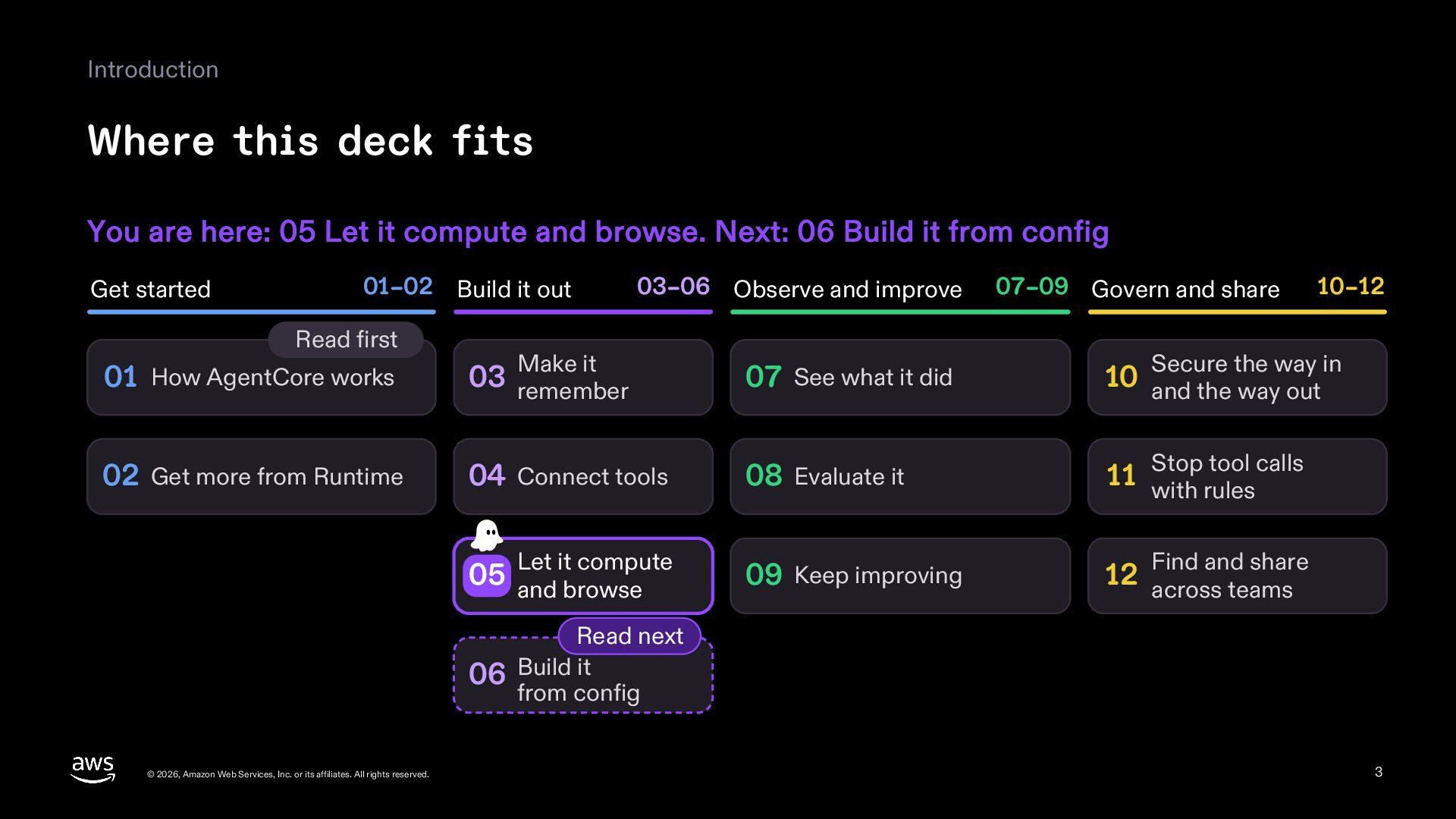
  3. Introduction Where this deck fits You are here: 05 Let

    it compute and browse. Next: 06 Build it from config Get started 01–02 Build it out Read first 03–06 Observe and improve Make it 07–09 Govern and share 10–12 Secure the way in 01 How AgentCore works 03 remember 07 See what it did 10 and the way out 02 Get more from Runtime 04 Connect tools 08 Evaluate it tool calls 11 Stop with rules 09 Keep improving 12 across teams Let it compute 05 and browse Find and share Read next 06 Build it from config © 2026, Amazon Web Services, Inc. or its affiliates. All rights reserved. 3
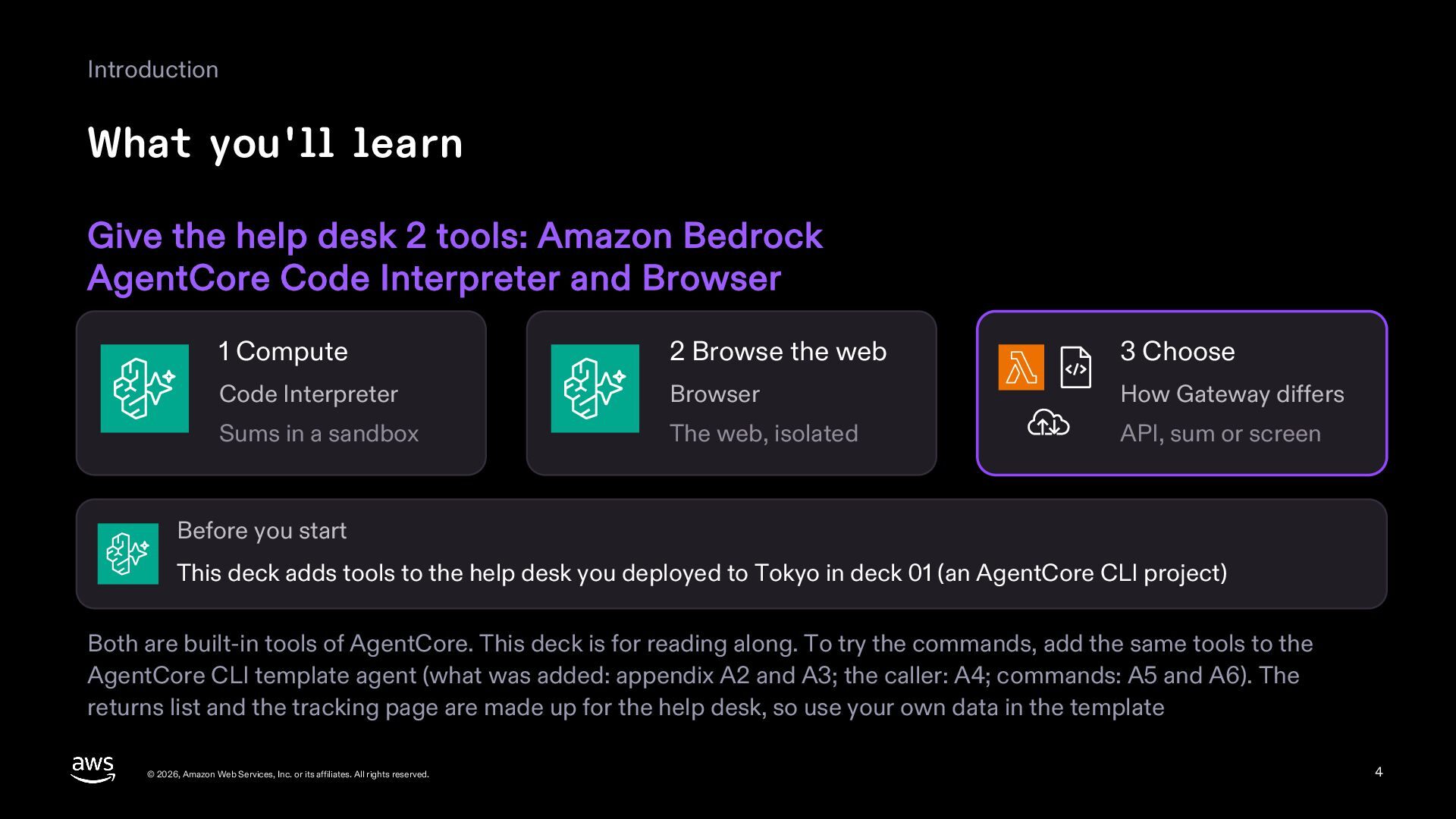
  4. Introduction What you'll learn Give the help desk 2 tools:

    Amazon Bedrock AgentCore Code Interpreter and Browser 1 Compute 2 Browse the web 3 Choose Code Interpreter Browser How Gateway differs Sums in a sandbox The web, isolated API, sum or screen Before you start This deck adds tools to the help desk you deployed to Tokyo in deck 01 (an AgentCore CLI project) Both are built-in tools of AgentCore. This deck is for reading along. To try the commands, add the same tools to the AgentCore CLI template agent (what was added: appendix A2 and A3; the caller: A4; commands: A5 and A6). The returns list and the tracking page are made up for the help desk, so use your own data in the template © 2026, Amazon Web Services, Inc. or its affiliates. All rights reserved. 4
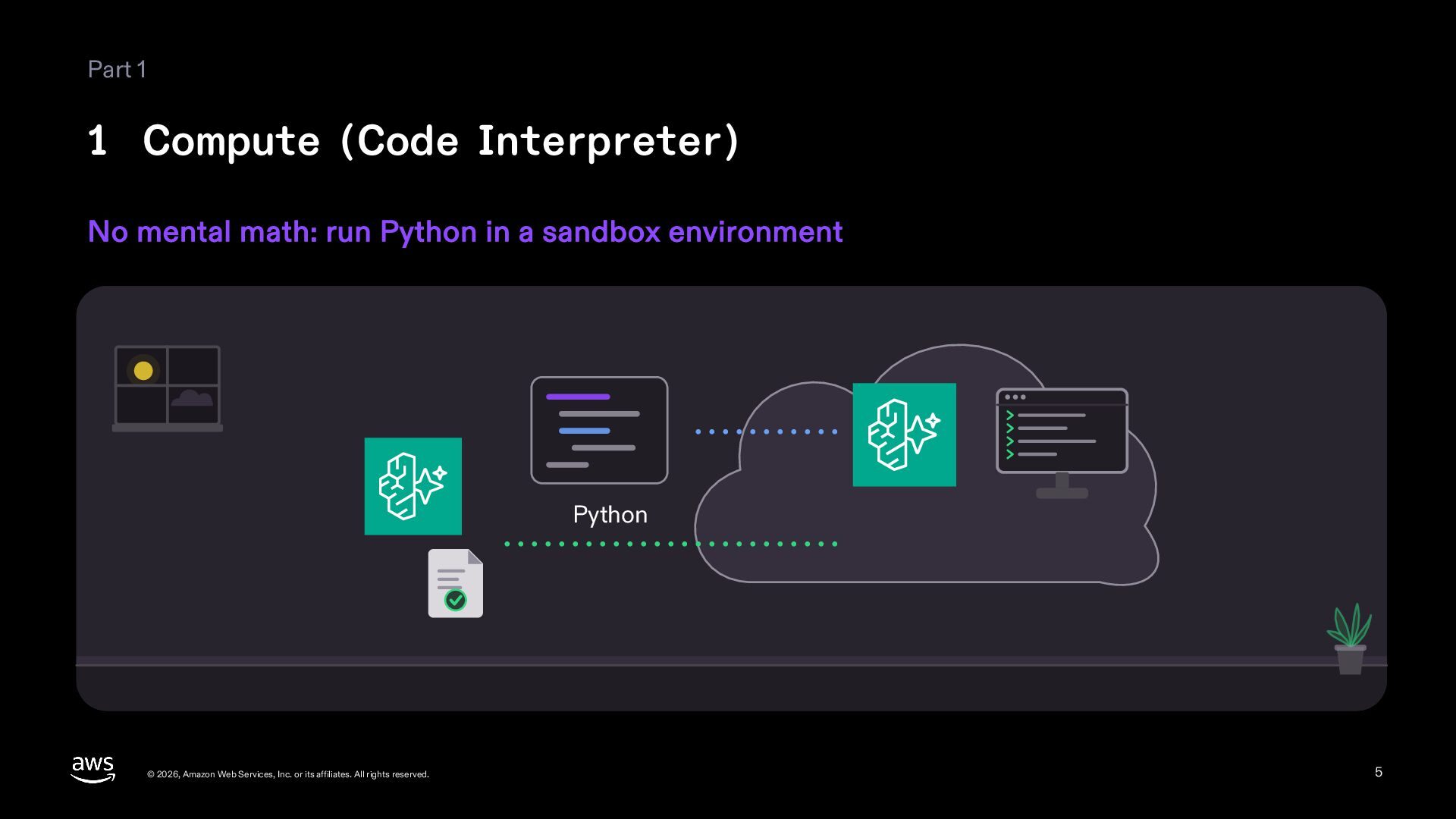
  5. Part 1 1 Compute (Code Interpreter) No mental math: run
    Python in a sandbox environment Python © 2026, Amazon Web Services, Inc. or its affiliates. All rights reserved. 5
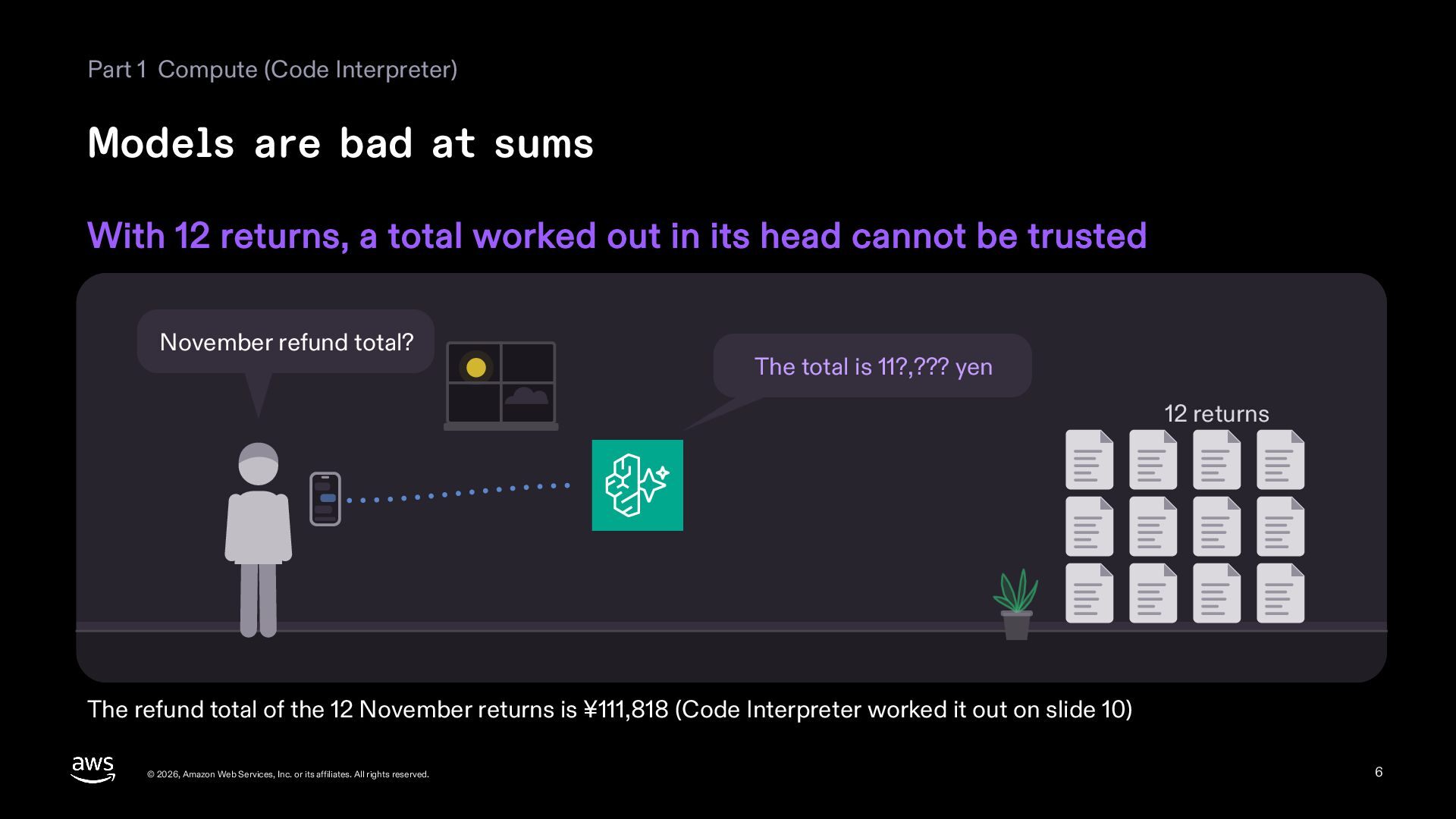
  6. Part 1 Compute (Code Interpreter) Models are bad at sums

    With 12 returns, a total worked out in its head cannot be trusted November refund total? The total is 11?,??? yen 12 returns The refund total of the 12 November returns is ¥111,818 (Code Interpreter worked it out on slide 10) © 2026, Amazon Web Services, Inc. or its affiliates. All rights reserved. 6
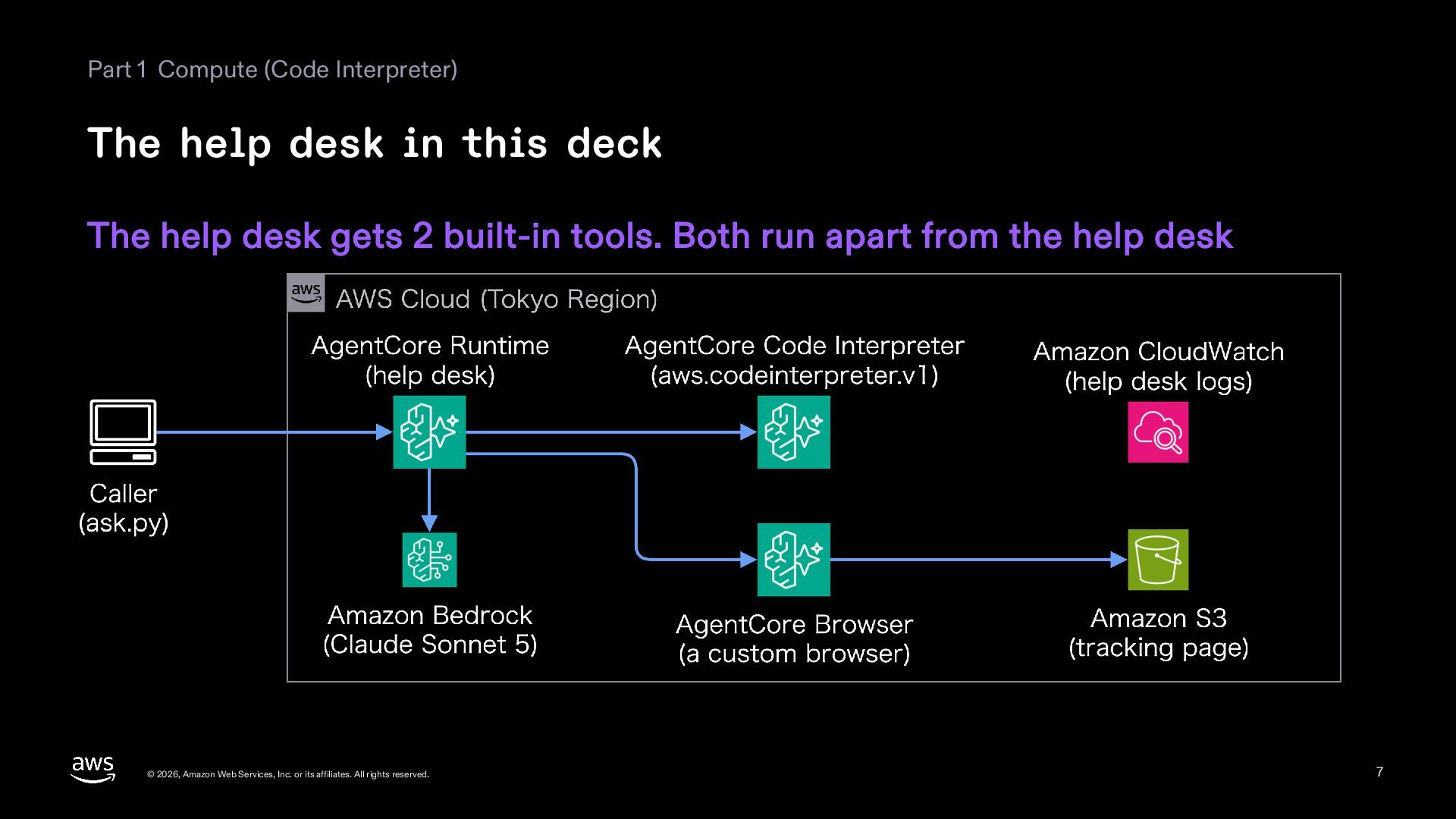
  7. Part 1 Compute (Code Interpreter) The help desk in this

    deck The help desk gets 2 built-in tools. Both run apart from the help desk © 2026, Amazon Web Services, Inc. or its affiliates. All rights reserved. 7
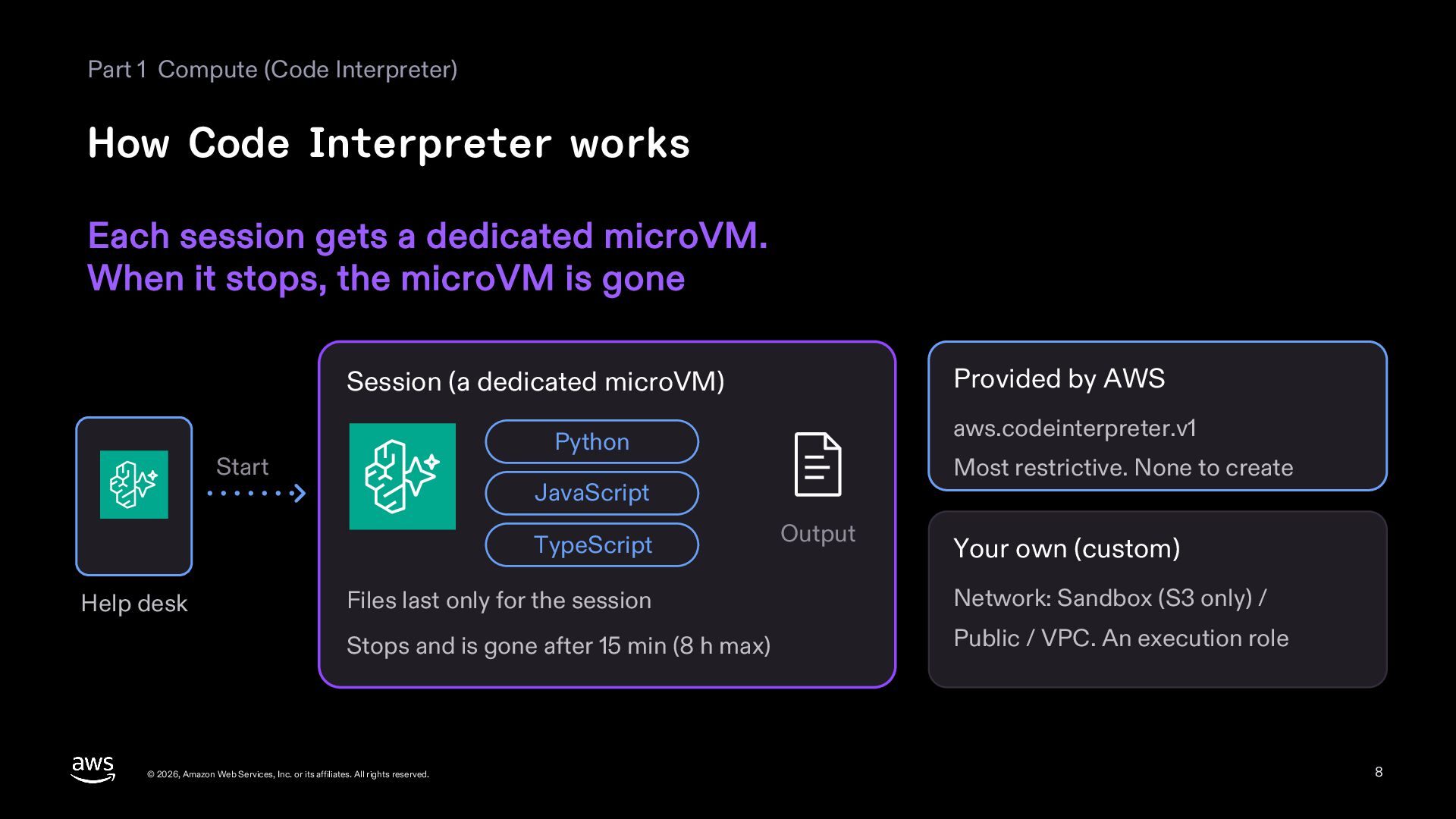
  8. Part 1 Compute (Code Interpreter) How Code Interpreter works Each

    session gets a dedicated microVM. When it stops, the microVM is gone Provided by AWS Session (a dedicated microVM) Start Most restrictive. None to create JavaScript TypeScript Help desk aws.codeinterpreter.v1 Python Output Your own (custom) Files last only for the session Network: Sandbox (S3 only) / Stops and is gone after 15 min (8 h max) Public / VPC. An execution role © 2026, Amazon Web Services, Inc. or its affiliates. All rights reserved. 8
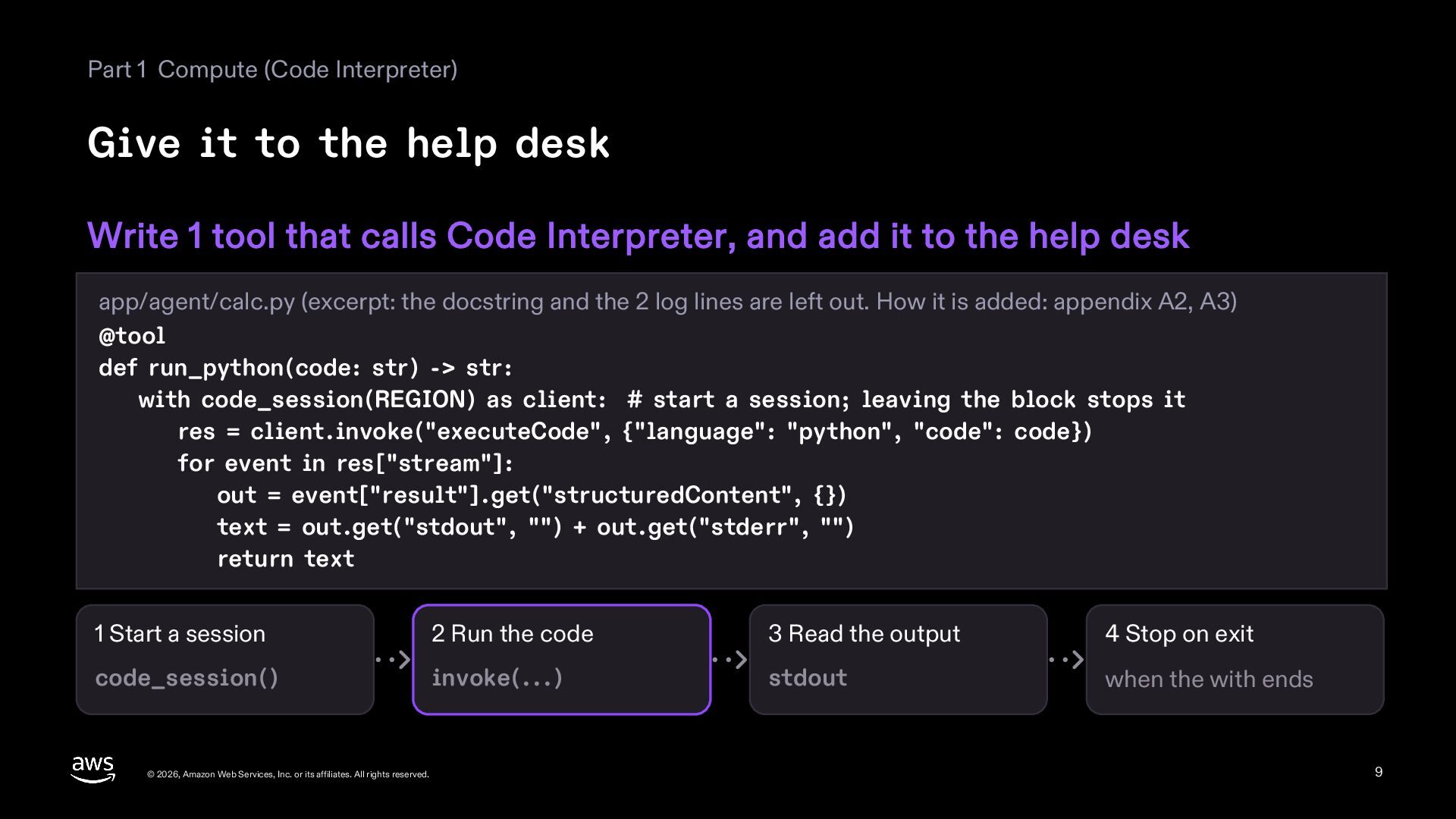
  9. Part 1 Compute (Code Interpreter) Give it to the help

    desk Write 1 tool that calls Code Interpreter, and add it to the help desk app/agent/calc.py (excerpt: the docstring and the 2 log lines are left out. How it is added: appendix A2, A3) @tool def run_python(code: str) -> str: with code_session(REGION) as client: # start a session; leaving the block stops it res = client.invoke("executeCode", {"language": "python", "code": code}) for event in res["stream"]: out = event["result"].get("structuredContent", {}) text = out.get("stdout", "") + out.get("stderr", "") return text 1 Start a session 2 Run the code 3 Read the output 4 Stop on exit code_session() invoke(...) stdout when the with ends © 2026, Amazon Web Services, Inc. or its affiliates. All rights reserved. 9
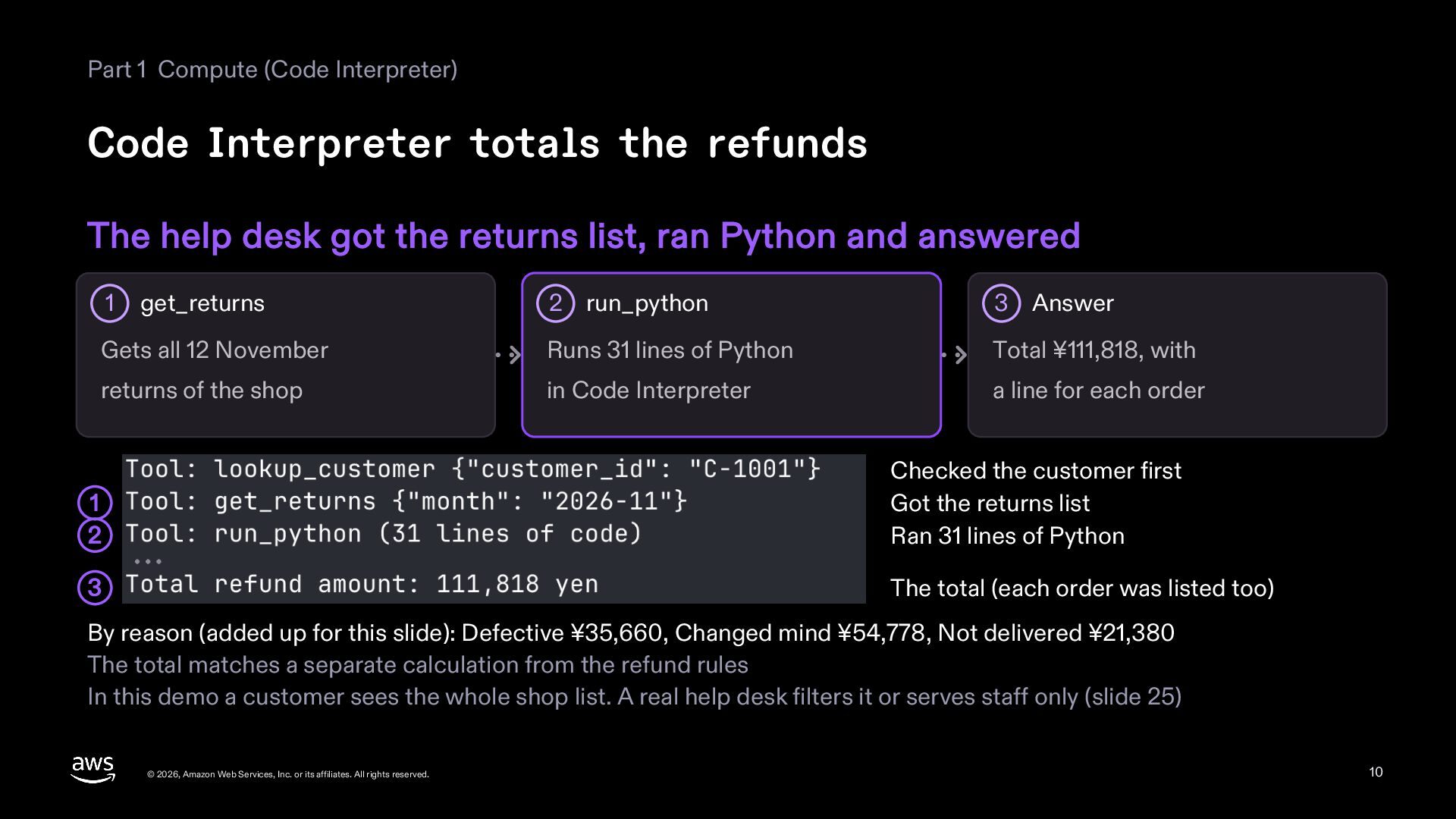
  10. Part 1 Compute (Code Interpreter) Code Interpreter totals the refunds

    The help desk got the returns list, ran Python and answered 2 run_python 3 Answer Gets all 12 November Runs 31 lines of Python Total ¥111,818, with returns of the shop in Code Interpreter a line for each order 1 get_returns 1 2 Checked the customer first Got the returns list Ran 31 lines of Python 3 The total (each order was listed too) By reason (added up for this slide): Defective ¥35,660, Changed mind ¥54,778, Not delivered ¥21,380 The total matches a separate calculation from the refund rules In this demo a customer sees the whole shop list. A real help desk filters it or serves staff only (slide 25) © 2026, Amazon Web Services, Inc. or its affiliates. All rights reserved. 10
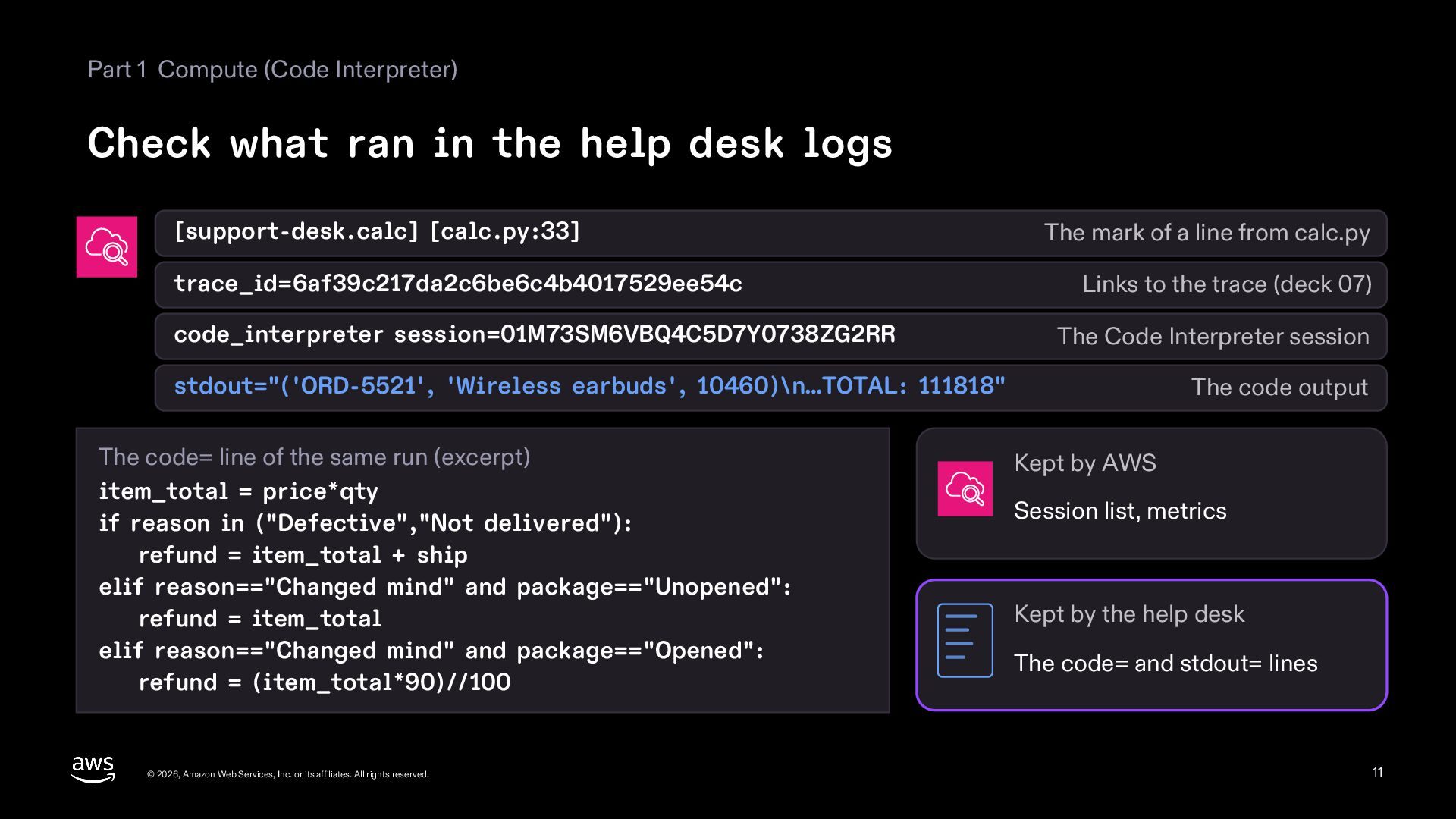
  11. Part 1 Compute (Code Interpreter) Check what ran in the

    help desk logs [support-desk.calc] [calc.py:33] trace_id=6af39c217da2c6be6c4b4017529ee54c code_interpreter session=01M73SM6VBQ4C5D7Y0738ZG2RR The mark of a line from calc.py Links to the trace (deck 07) The Code Interpreter session stdout="('ORD-5521', 'Wireless earbuds', 10460)\n…TOTAL: 111818" The code= line of the same run (excerpt) item_total = price*qty if reason in ("Defective","Not delivered"): refund = item_total + ship elif reason=="Changed mind" and package=="Unopened": refund = item_total elif reason=="Changed mind" and package=="Opened": refund = (item_total*90)//100 © 2026, Amazon Web Services, Inc. or its affiliates. All rights reserved. The code output Kept by AWS Session list, metrics Kept by the help desk The code= and stdout= lines 11
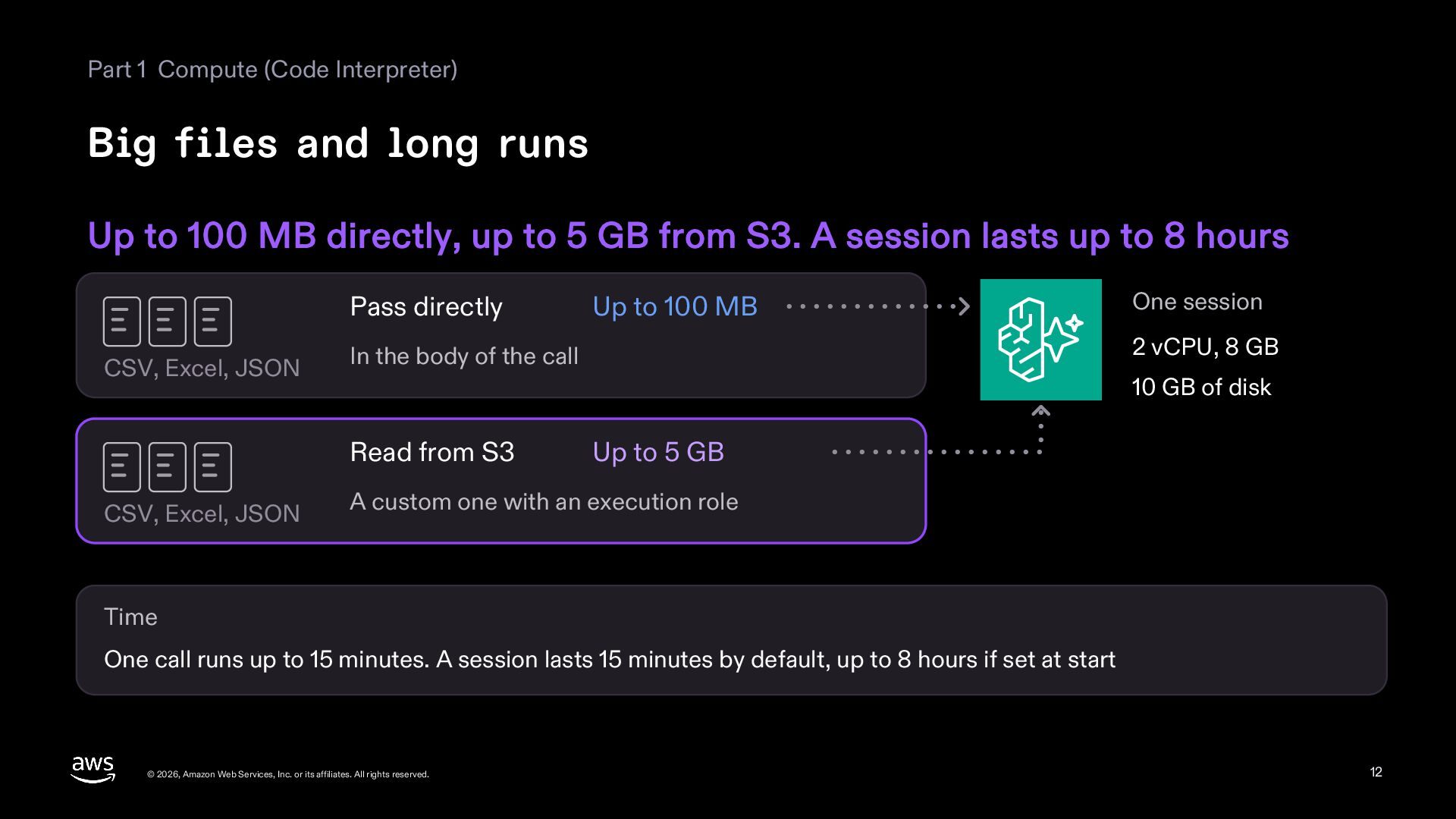
  12. Part 1 Compute (Code Interpreter) Big files and long runs

    Up to 100 MB directly, up to 5 GB from S3. A session lasts up to 8 hours Pass directly CSV, Excel, JSON One session 2 vCPU, 8 GB In the body of the call 10 GB of disk Read from S3 CSV, Excel, JSON Up to 100 MB Up to 5 GB A custom one with an execution role Time One call runs up to 15 minutes. A session lasts 15 minutes by default, up to 8 hours if set at start © 2026, Amazon Web Services, Inc. or its affiliates. All rights reserved. 12
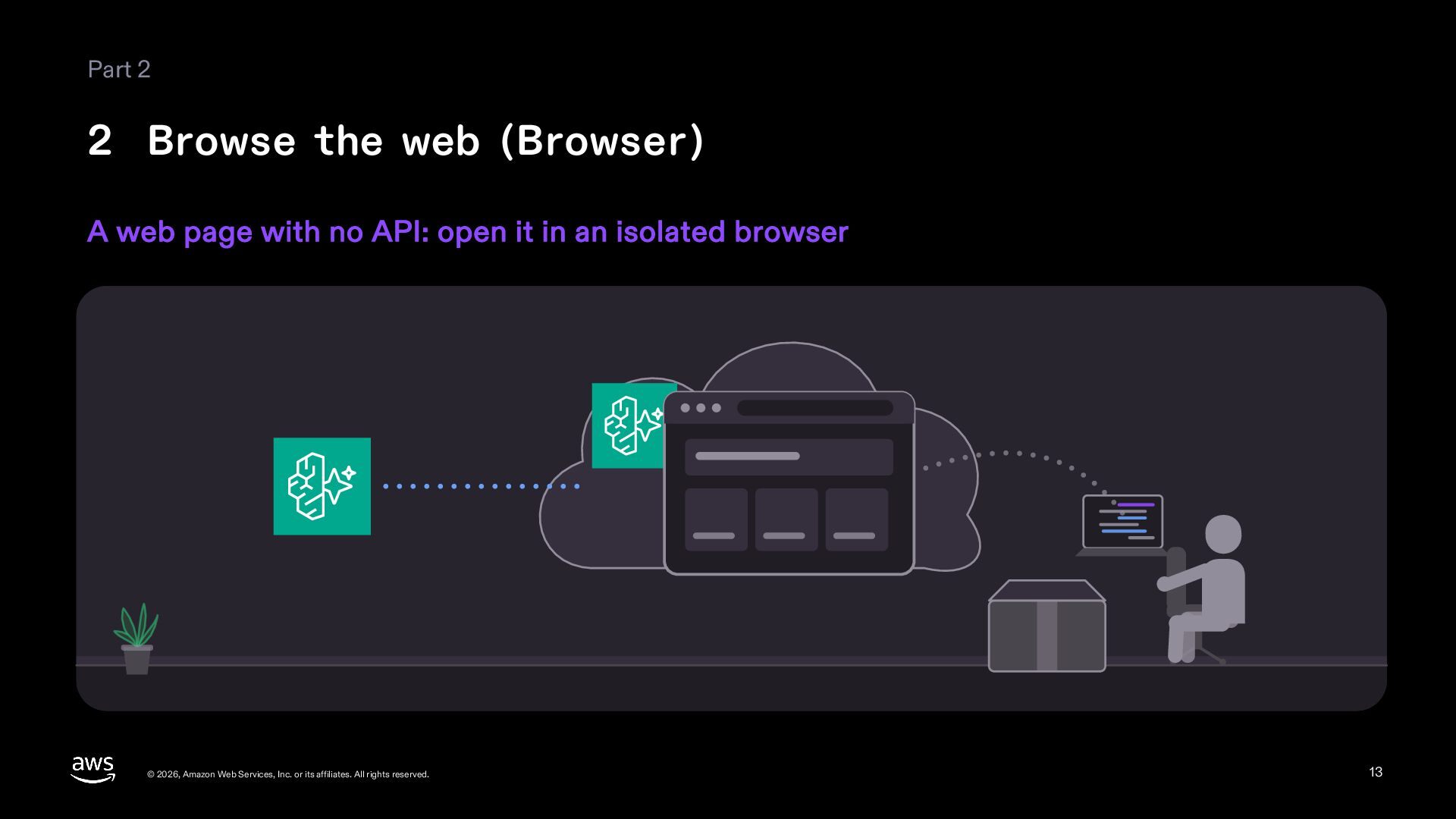
  13. Part 2 2 Browse the web (Browser) A web page

    with no API: open it in an isolated browser © 2026, Amazon Web Services, Inc. or its affiliates. All rights reserved. 13
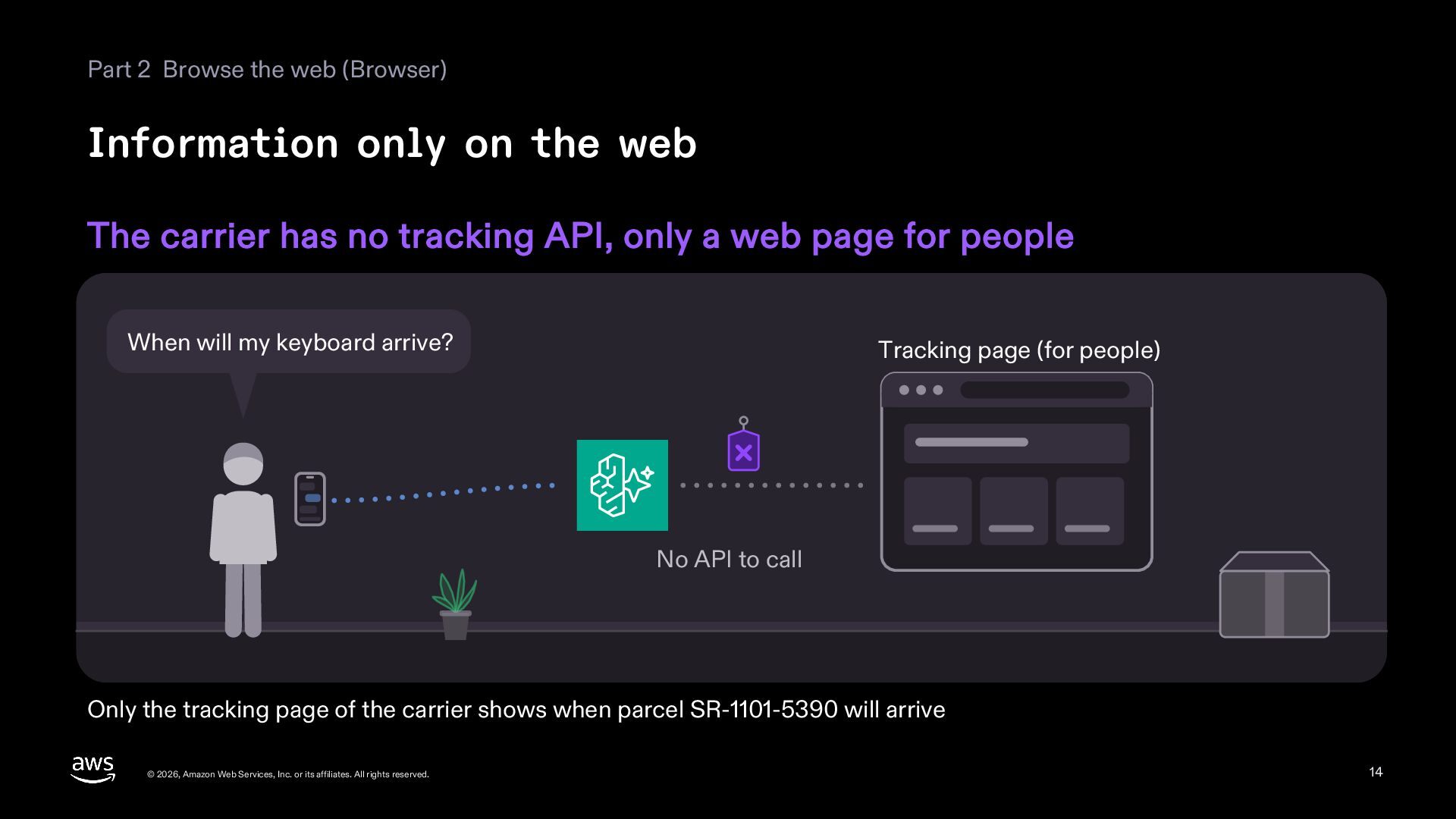
  14. Part 2 Browse the web (Browser) Information only on the

    web The carrier has no tracking API, only a web page for people When will my keyboard arrive? Tracking page (for people) No API to call Only the tracking page of the carrier shows when parcel SR-1101-5390 will arrive © 2026, Amazon Web Services, Inc. or its affiliates. All rights reserved. 14
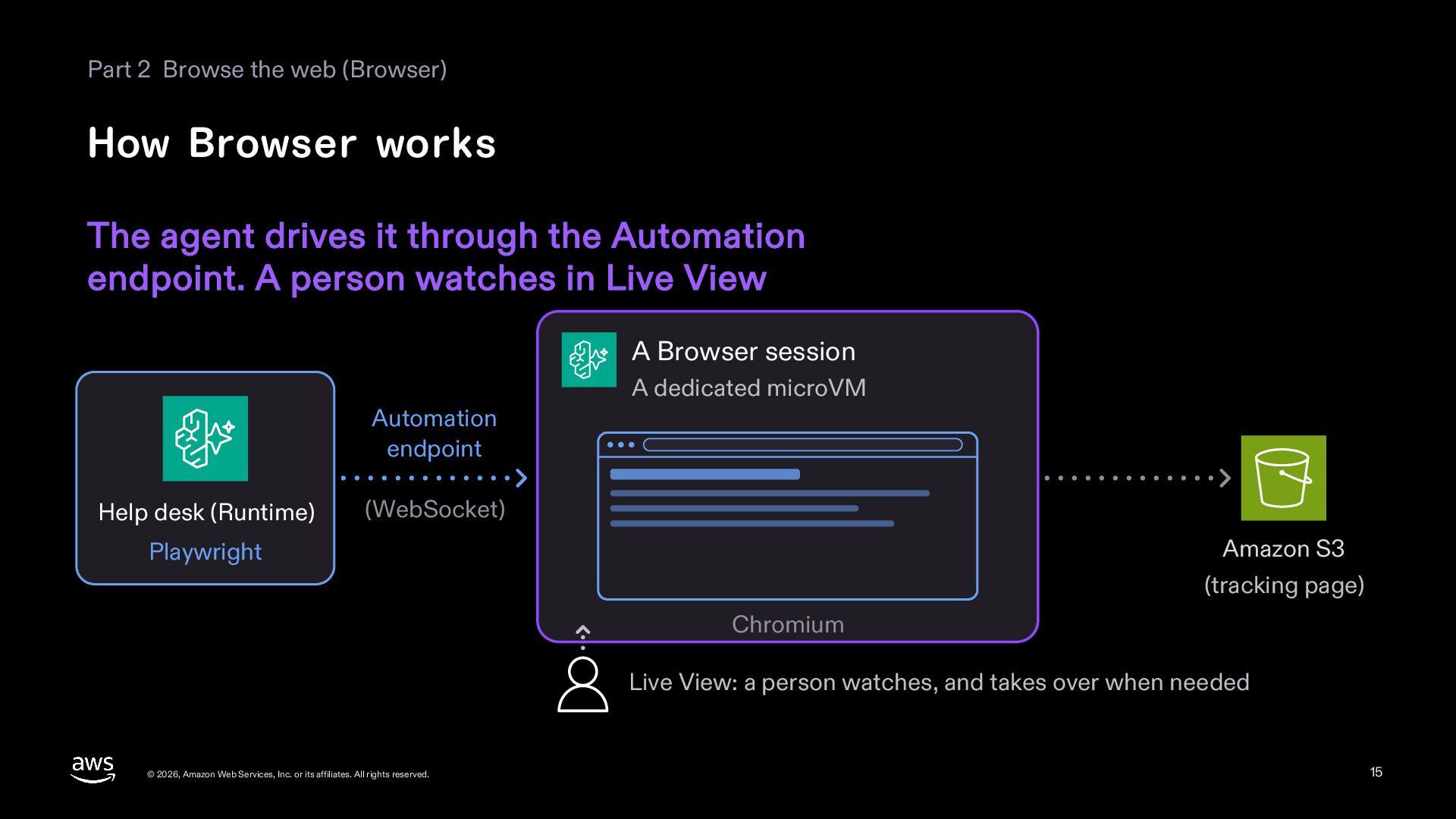
  15. Part 2 Browse the web (Browser) How Browser works The

    agent drives it through the Automation endpoint. A person watches in Live View A Browser session A dedicated microVM Automation endpoint Help desk (Runtime) (WebSocket) Amazon S3 Playwright (tracking page) Chromium Live View: a person watches, and takes over when needed © 2026, Amazon Web Services, Inc. or its affiliates. All rights reserved. 15
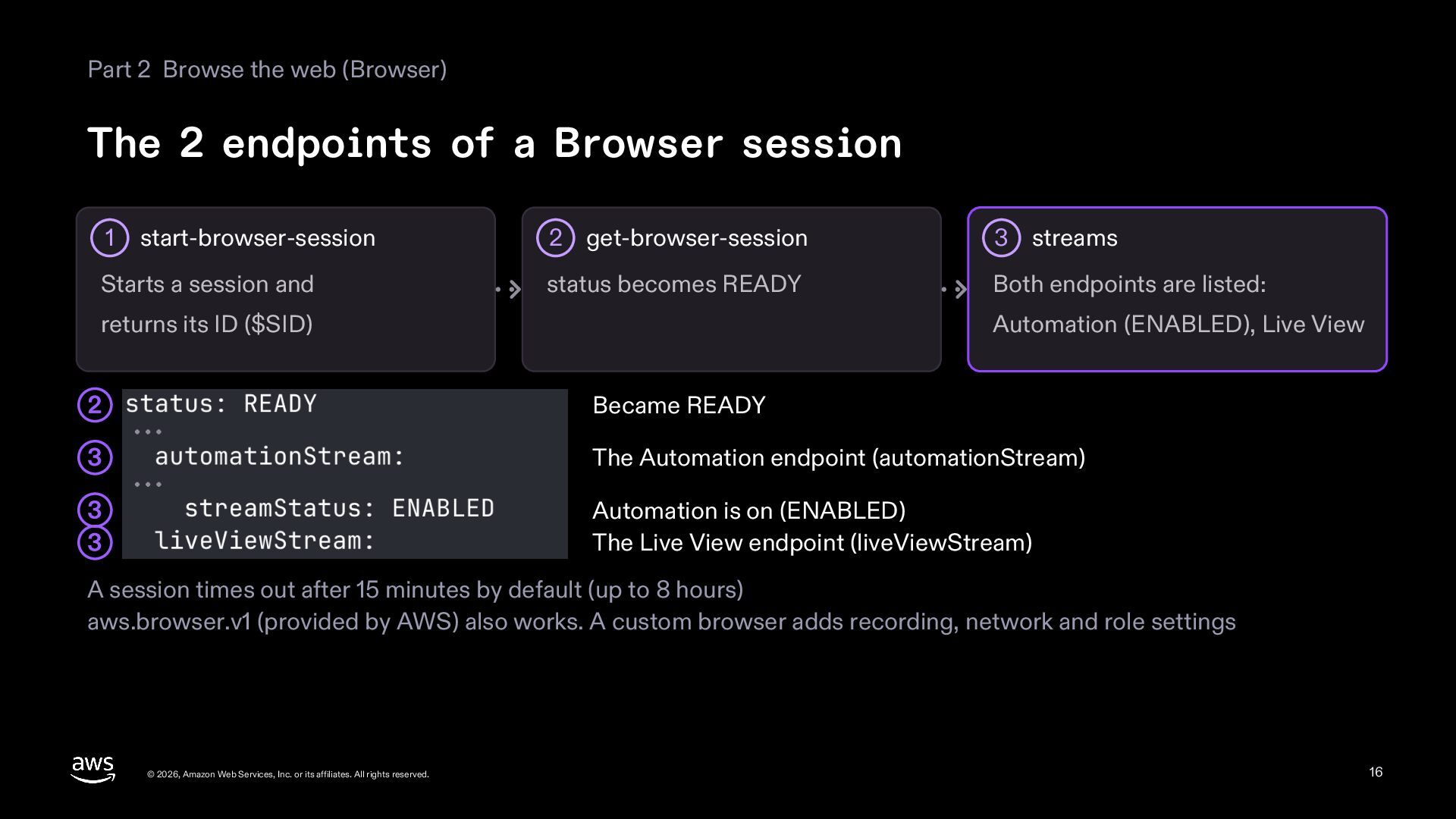
  16. Part 2 Browse the web (Browser) The 2 endpoints of

    a Browser session 1 start-browser-session Starts a session and 2 get-browser-session 3 streams status becomes READY Both endpoints are listed: returns its ID ($SID) Automation (ENABLED), Live View 2 Became READY 3 The Automation endpoint (automationStream) 3 3 Automation is on (ENABLED) The Live View endpoint (liveViewStream) A session times out after 15 minutes by default (up to 8 hours) aws.browser.v1 (provided by AWS) also works. A custom browser adds recording, network and role settings © 2026, Amazon Web Services, Inc. or its affiliates. All rights reserved. 16
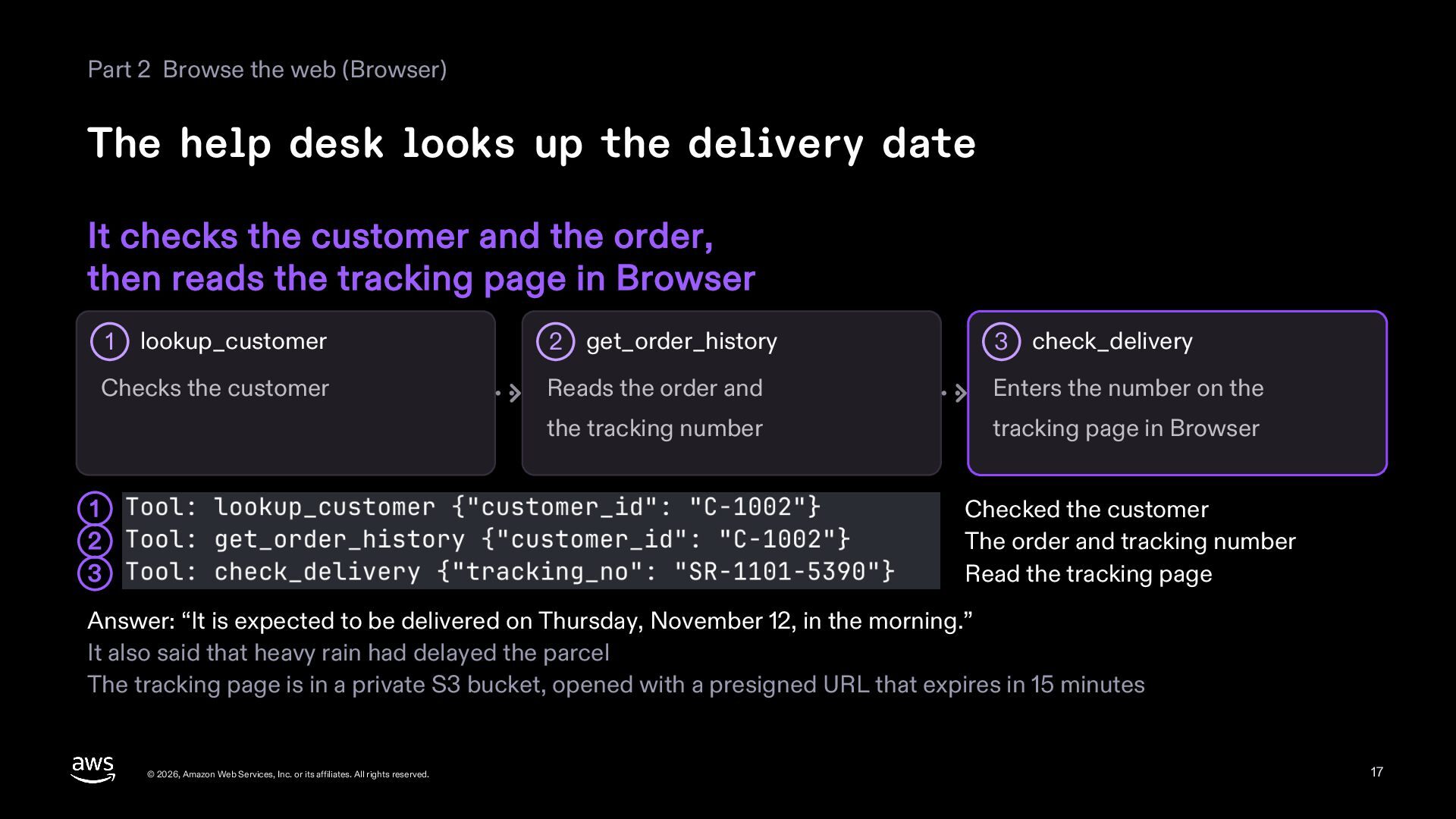
  17. Part 2 Browse the web (Browser) The help desk looks

    up the delivery date It checks the customer and the order, then reads the tracking page in Browser lookup_customer 2 get_order_history 3 check_delivery Checks the customer Reads the order and Enters the number on the the tracking number tracking page in Browser 1 Checked the customer The order and tracking number Read the tracking page 1 2 3 Answer: “It is expected to be delivered on Thursday, November 12, in the morning.” It also said that heavy rain had delayed the parcel The tracking page is in a private S3 bucket, opened with a presigned URL that expires in 15 minutes © 2026, Amazon Web Services, Inc. or its affiliates. All rights reserved. 17
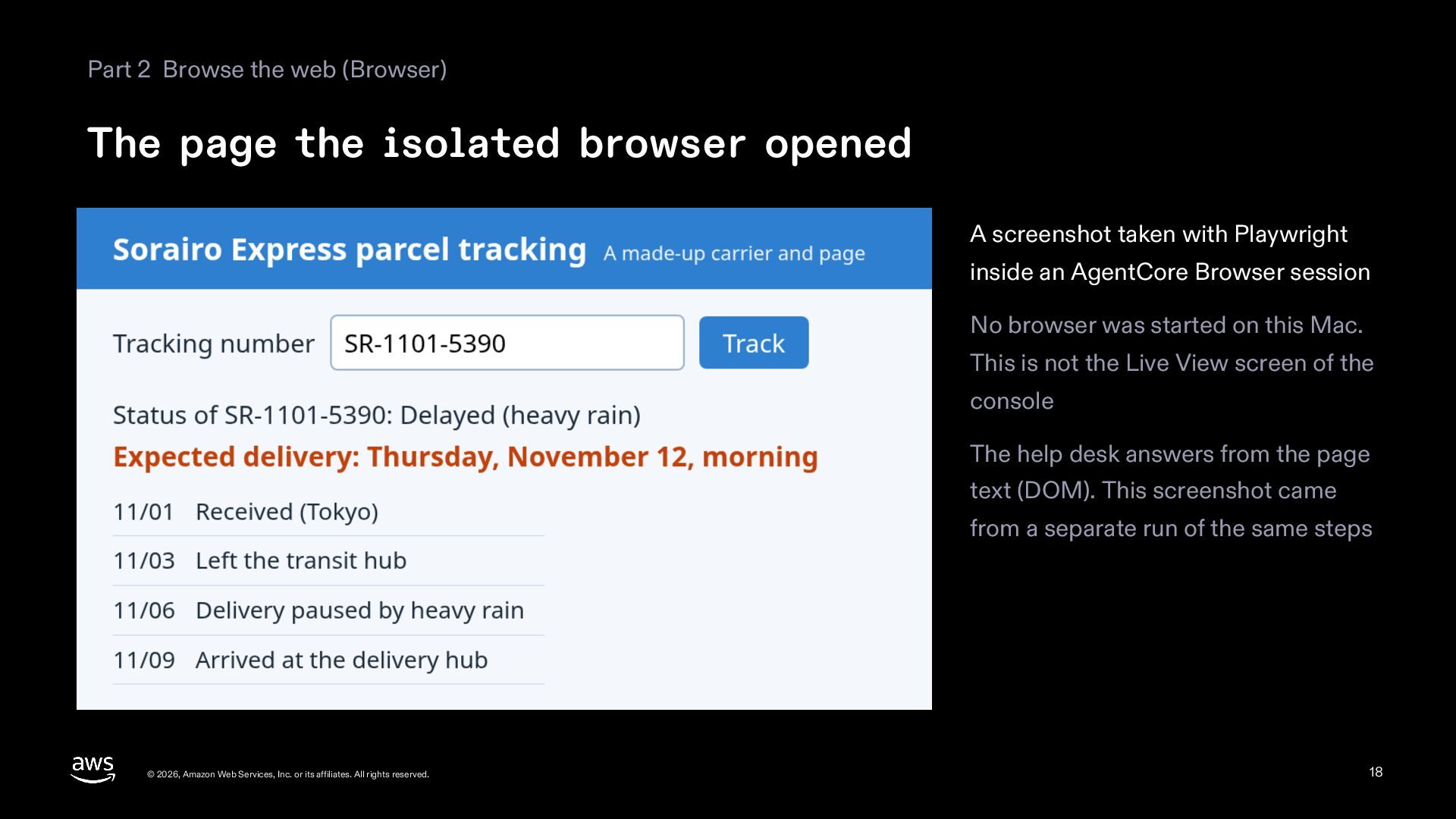
  18. Part 2 Browse the web (Browser) The page the isolated

    browser opened A screenshot taken with Playwright inside an AgentCore Browser session No browser was started on this Mac. This is not the Live View screen of the console The help desk answers from the page text (DOM). This screenshot came from a separate run of the same steps © 2026, Amazon Web Services, Inc. or its affiliates. All rights reserved. 18
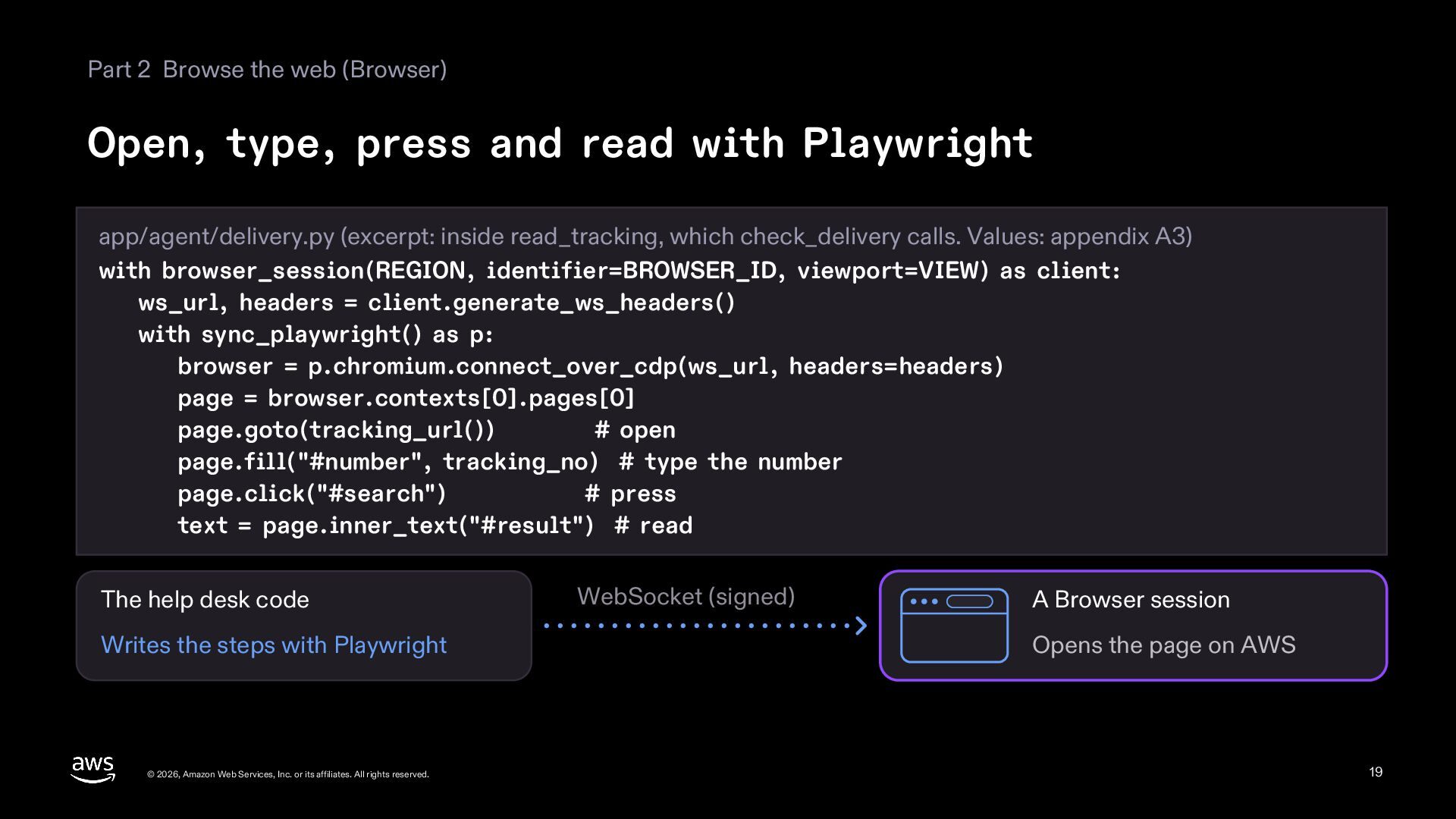
  19. Part 2 Browse the web (Browser) Open, type, press and

    read with Playwright app/agent/delivery.py (excerpt: inside read_tracking, which check_delivery calls. Values: appendix A3) with browser_session(REGION, identifier=BROWSER_ID, viewport=VIEW) as client: ws_url, headers = client.generate_ws_headers() with sync_playwright() as p: browser = p.chromium.connect_over_cdp(ws_url, headers=headers) page = browser.contexts[0].pages[0] page.goto(tracking_url()) # open page.fill("#number", tracking_no) # type the number page.click("#search") # press text = page.inner_text("#result") # read The help desk code Writes the steps with Playwright © 2026, Amazon Web Services, Inc. or its affiliates. All rights reserved. WebSocket (signed) A Browser session Opens the page on AWS 19
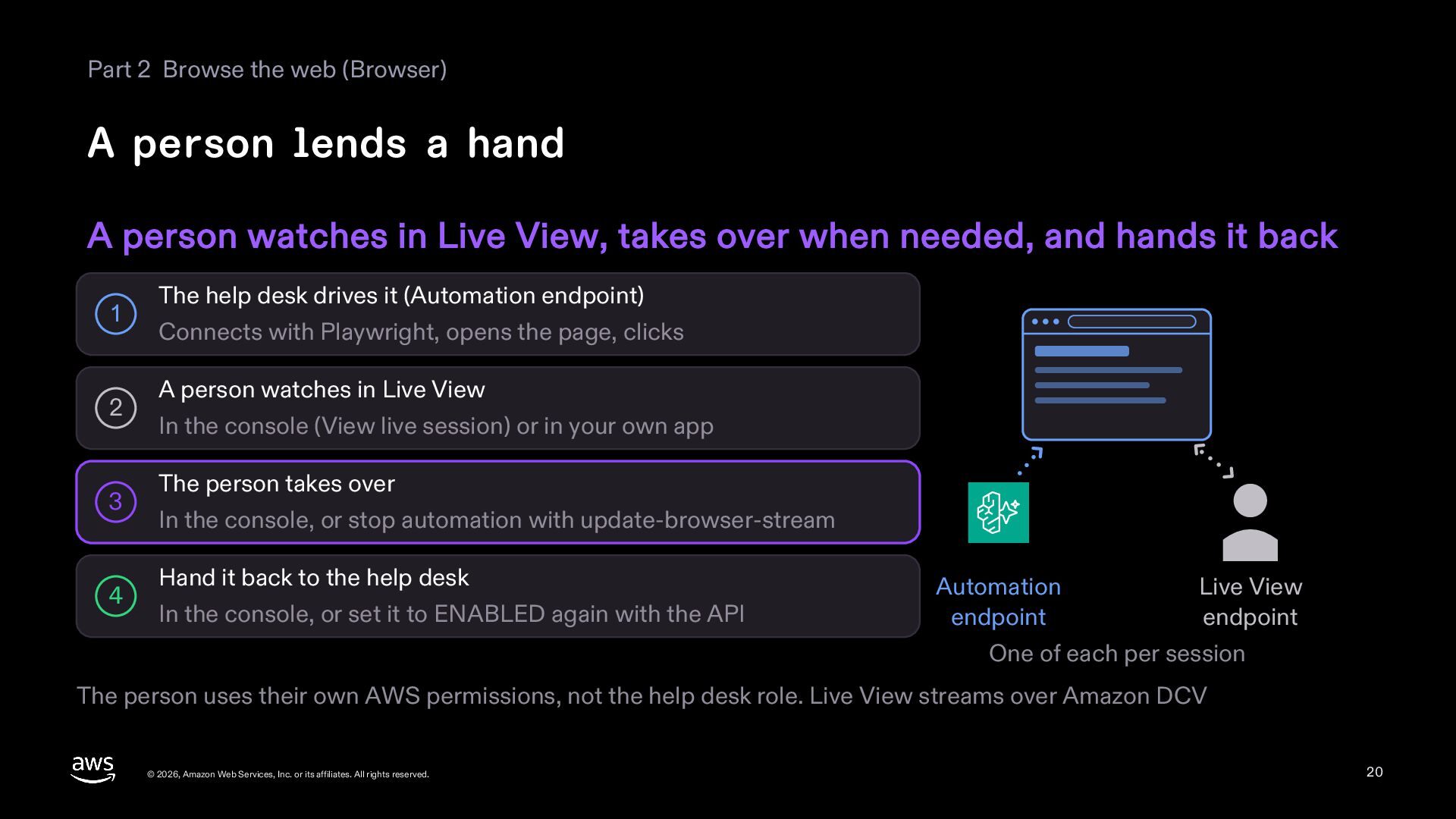
  20. Part 2 Browse the web (Browser) A person lends a

    hand A person watches in Live View, takes over when needed, and hands it back 1 2 3 4 The help desk drives it (Automation endpoint) Connects with Playwright, opens the page, clicks A person watches in Live View In the console (View live session) or in your own app The person takes over In the console, or stop automation with update-browser-stream Hand it back to the help desk In the console, or set it to ENABLED again with the API Automation endpoint Live View endpoint One of each per session The person uses their own AWS permissions, not the help desk role. Live View streams over Amazon DCV © 2026, Amazon Web Services, Inc. or its affiliates. All rights reserved. 20
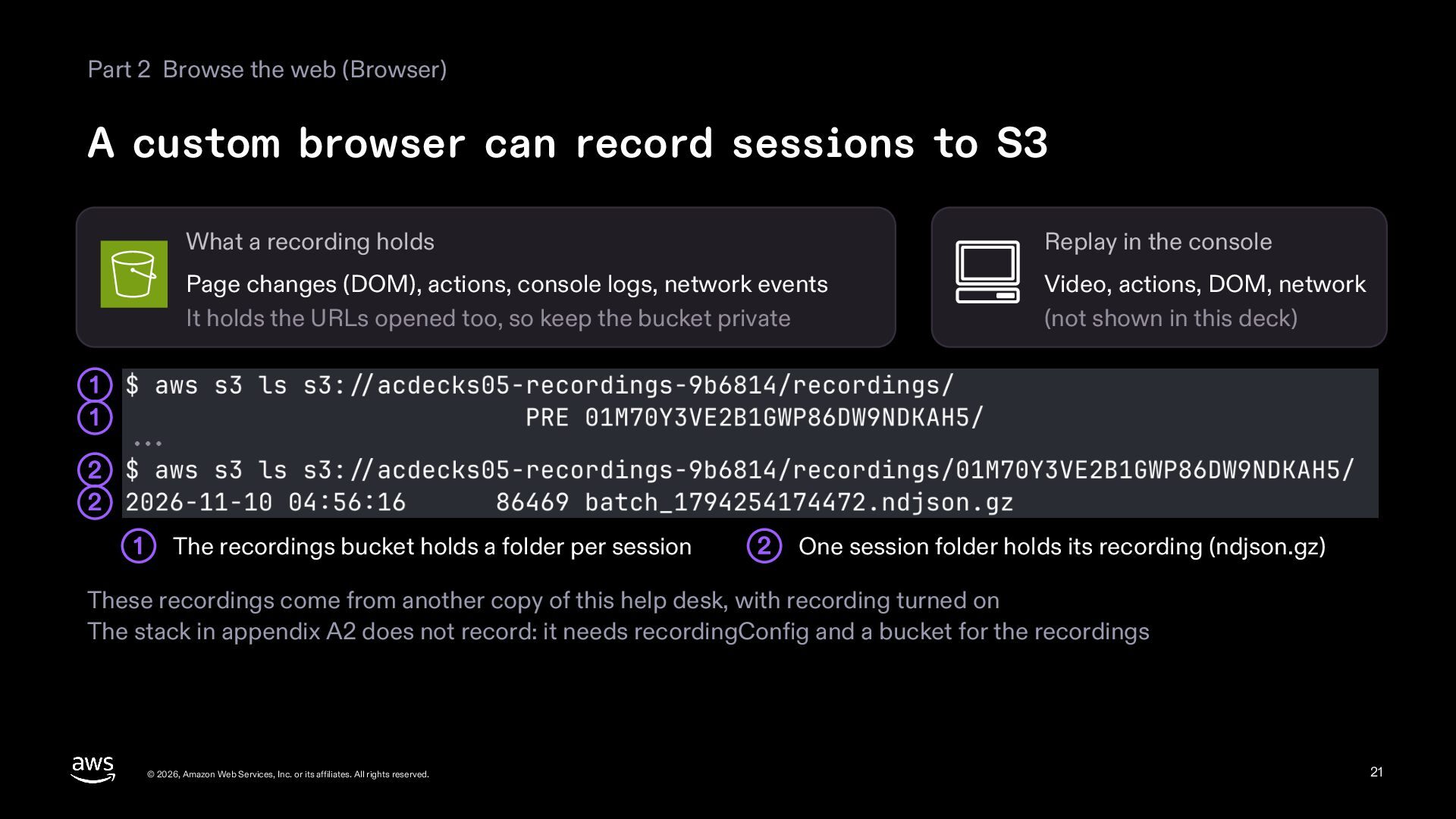
  21. Part 2 Browse the web (Browser) A custom browser can

    record sessions to S3 What a recording holds Replay in the console Page changes (DOM), actions, console logs, network events It holds the URLs opened too, so keep the bucket private Video, actions, DOM, network (not shown in this deck) 1 1 2 2 1 The recordings bucket holds a folder per session 2 One session folder holds its recording (ndjson.gz) These recordings come from another copy of this help desk, with recording turned on The stack in appendix A2 does not record: it needs recordingConfig and a bucket for the recordings © 2026, Amazon Web Services, Inc. or its affiliates. All rights reserved. 21
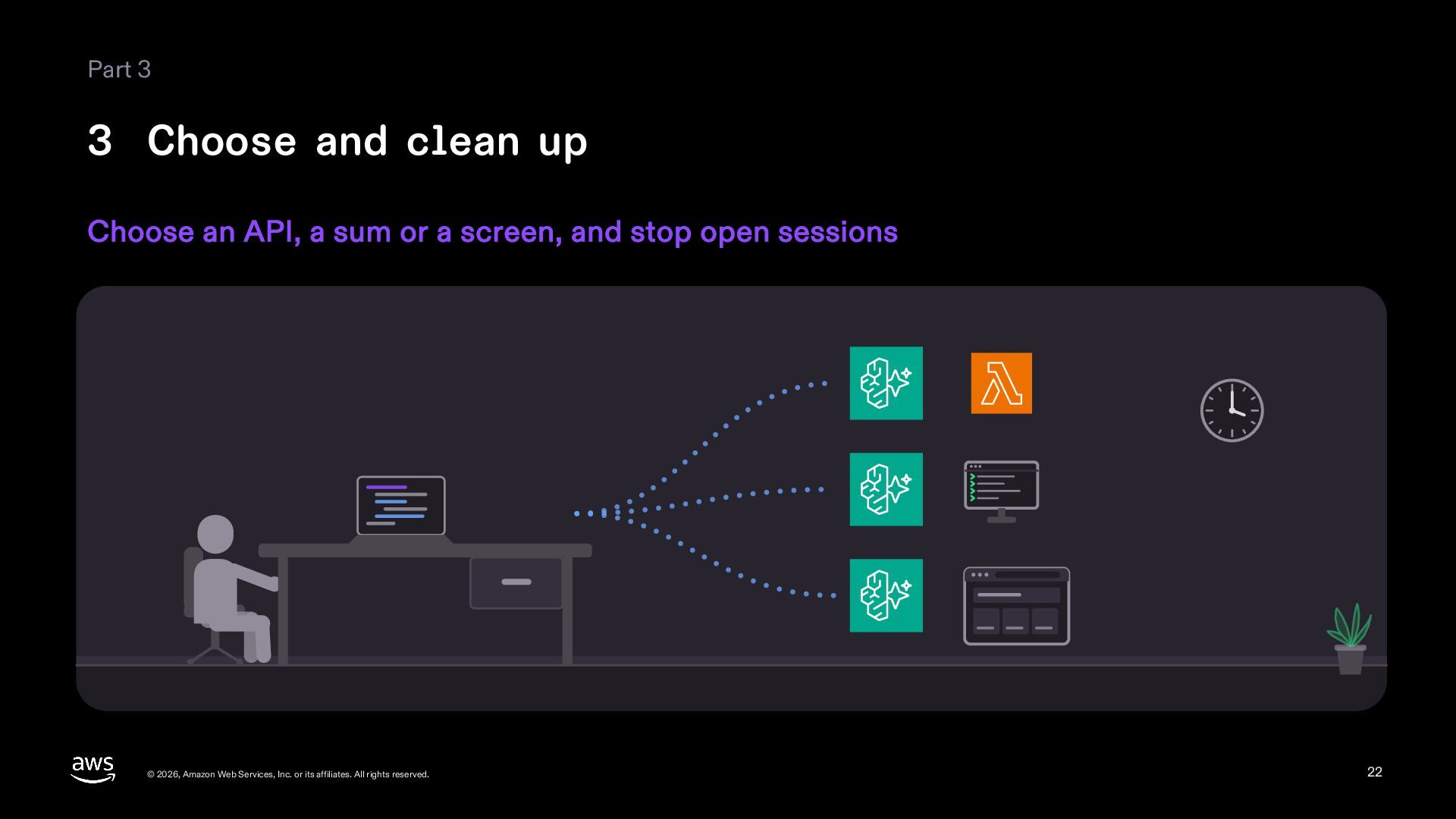
  22. Part 3 3 Choose and clean up Choose an API,

    a sum or a screen, and stop open sessions © 2026, Amazon Web Services, Inc. or its affiliates. All rights reserved. 22
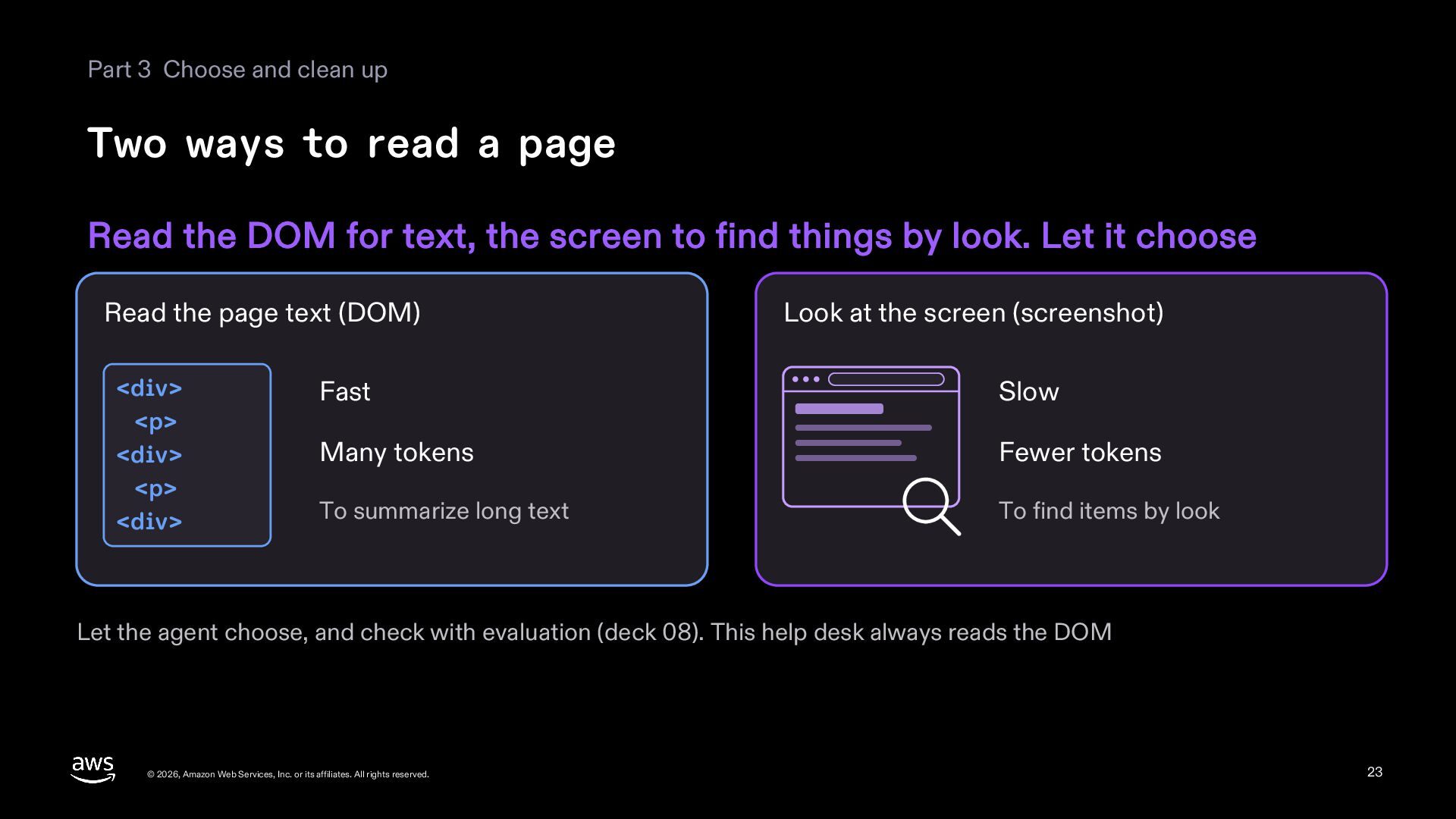
  23. Part 3 Choose and clean up Two ways to read

    a page Read the DOM for text, the screen to find things by look. Let it choose Read the page text (DOM) <div> <p> <div> <p> <div> Look at the screen (screenshot) Fast Slow Many tokens Fewer tokens To summarize long text To find items by look Let the agent choose, and check with evaluation (deck 08). This help desk always reads the DOM © 2026, Amazon Web Services, Inc. or its affiliates. All rights reserved. 23
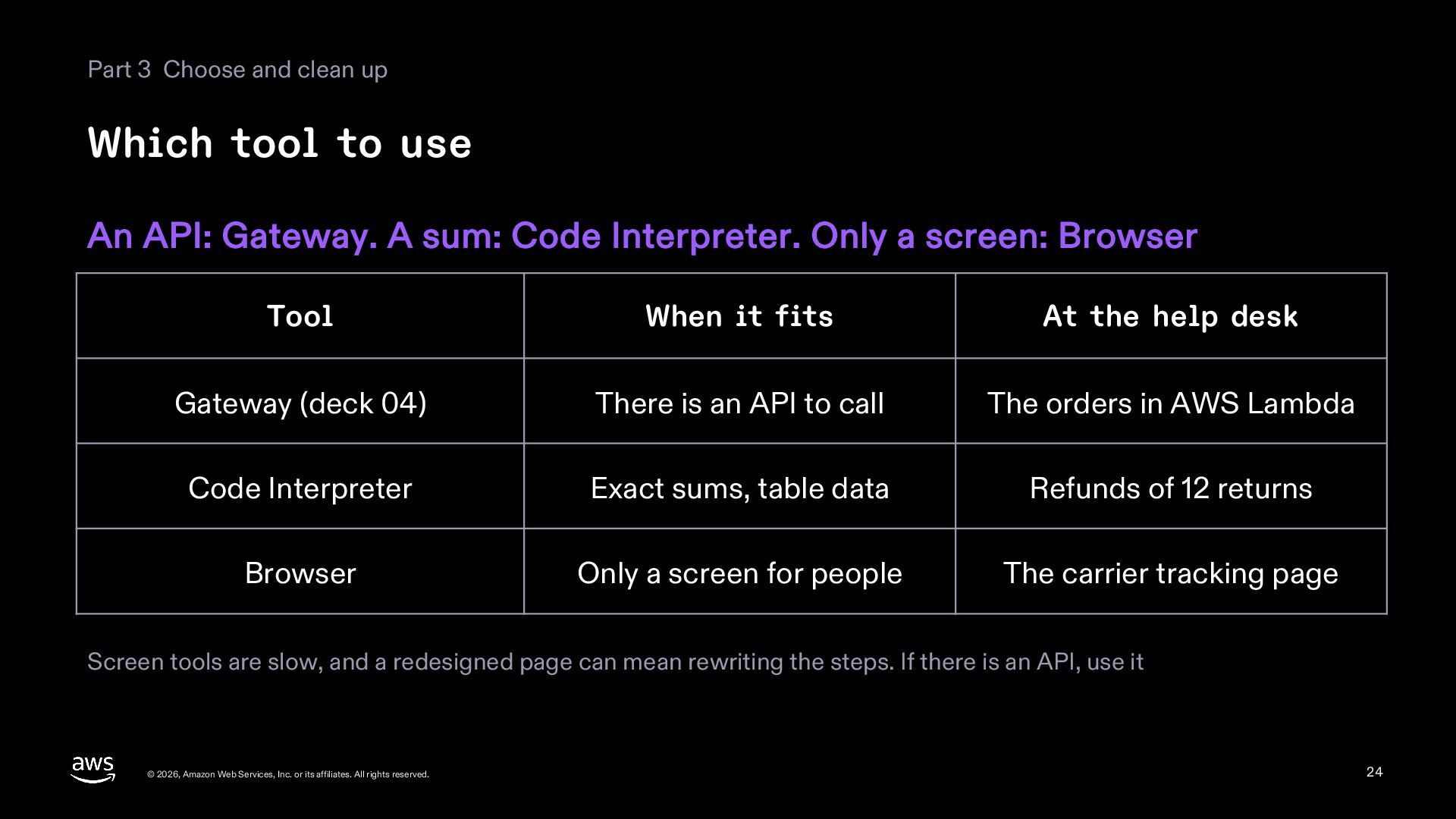
  24. Part 3 Choose and clean up Which tool to use

    An API: Gateway. A sum: Code Interpreter. Only a screen: Browser Tool When it fits At the help desk Gateway (deck 04) There is an API to call The orders in AWS Lambda Code Interpreter Exact sums, table data Refunds of 12 returns Browser Only a screen for people The carrier tracking page Screen tools are slow, and a redesigned page can mean rewriting the steps. If there is an API, use it © 2026, Amazon Web Services, Inc. or its affiliates. All rights reserved. 24
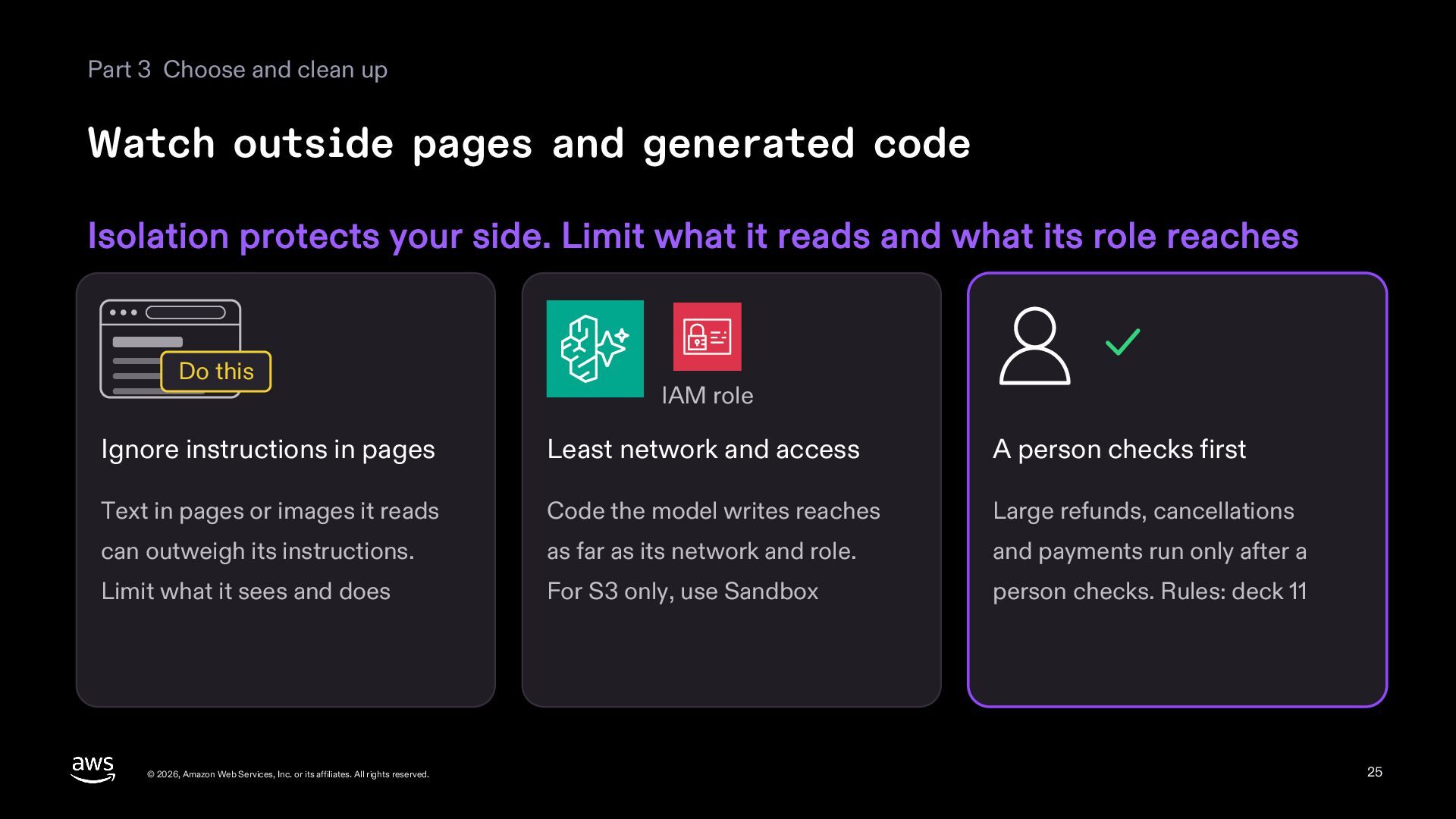
  25. Part 3 Choose and clean up Watch outside pages and

    generated code Isolation protects your side. Limit what it reads and what its role reaches Do this IAM role Ignore instructions in pages Least network and access A person checks first Text in pages or images it reads Code the model writes reaches Large refunds, cancellations can outweigh its instructions. as far as its network and role. and payments run only after a Limit what it sees and does For S3 only, use Sandbox person checks. Rules: deck 11 © 2026, Amazon Web Services, Inc. or its affiliates. All rights reserved. 25
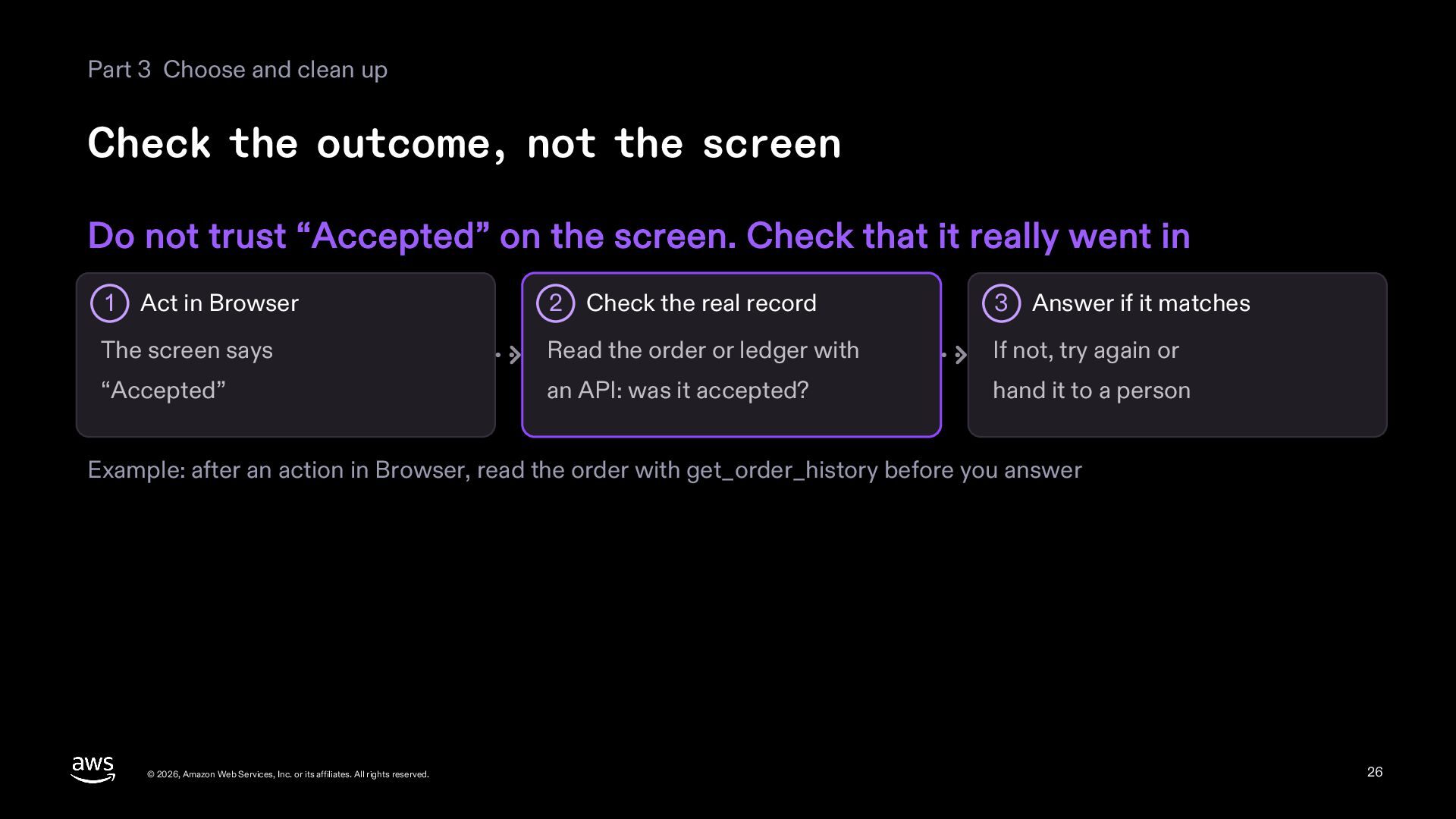
  26. Part 3 Choose and clean up Check the outcome, not

    the screen Do not trust “Accepted” on the screen. Check that it really went in 2 Check the real record 3 Answer if it matches The screen says Read the order or ledger with If not, try again or “Accepted” an API: was it accepted? hand it to a person 1 Act in Browser Example: after an action in Browser, read the order with get_order_history before you answer © 2026, Amazon Web Services, Inc. or its affiliates. All rights reserved. 26
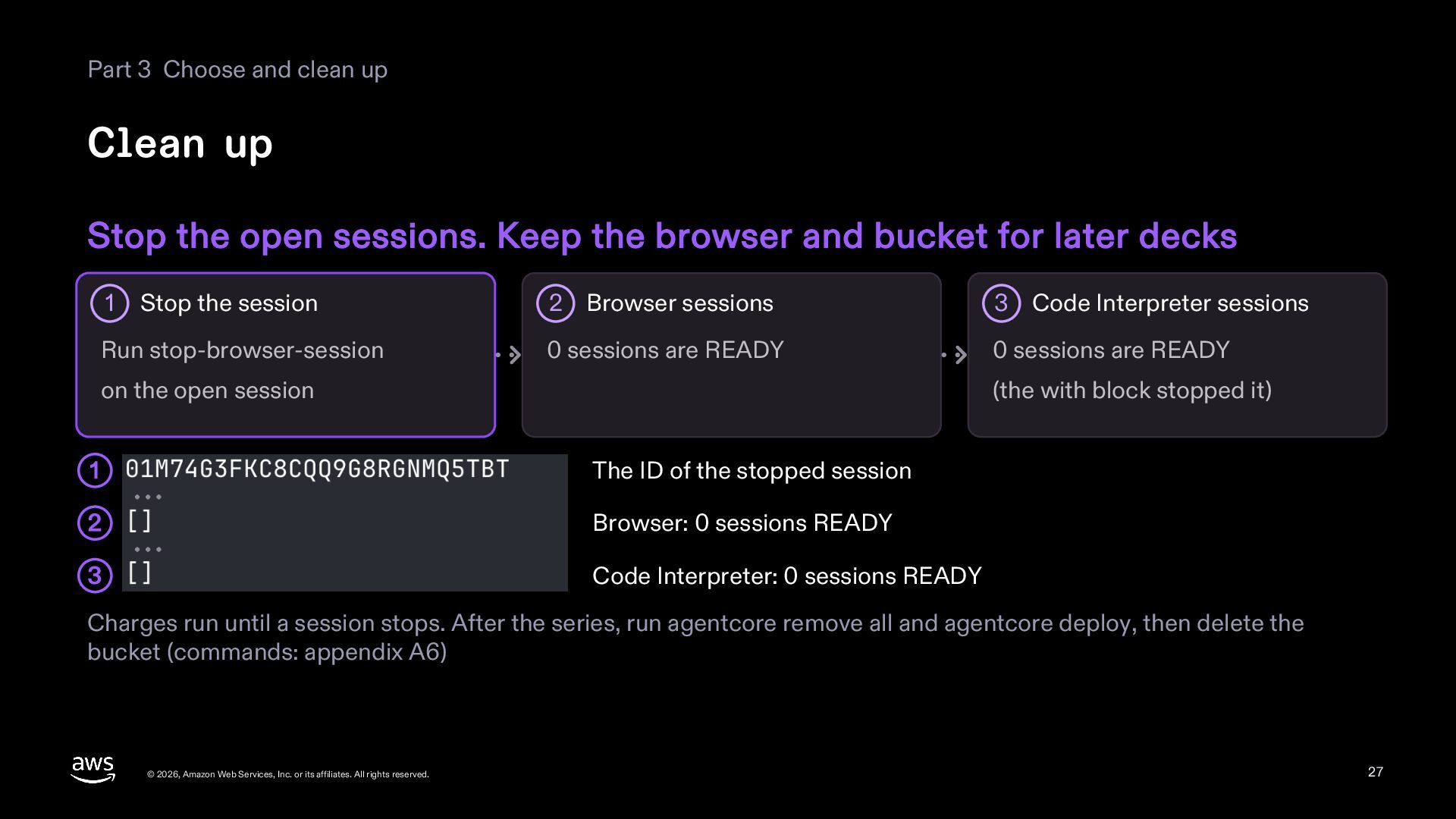
  27. Part 3 Choose and clean up Clean up Stop the

    open sessions. Keep the browser and bucket for later decks Stop the session 2 Browser sessions 3 Code Interpreter sessions Run stop-browser-session 0 sessions are READY 0 sessions are READY 1 on the open session (the with block stopped it) 1 The ID of the stopped session 2 Browser: 0 sessions READY 3 Code Interpreter: 0 sessions READY Charges run until a session stops. After the series, run agentcore remove all and agentcore deploy, then delete the bucket (commands: appendix A6) © 2026, Amazon Web Services, Inc. or its affiliates. All rights reserved. 27
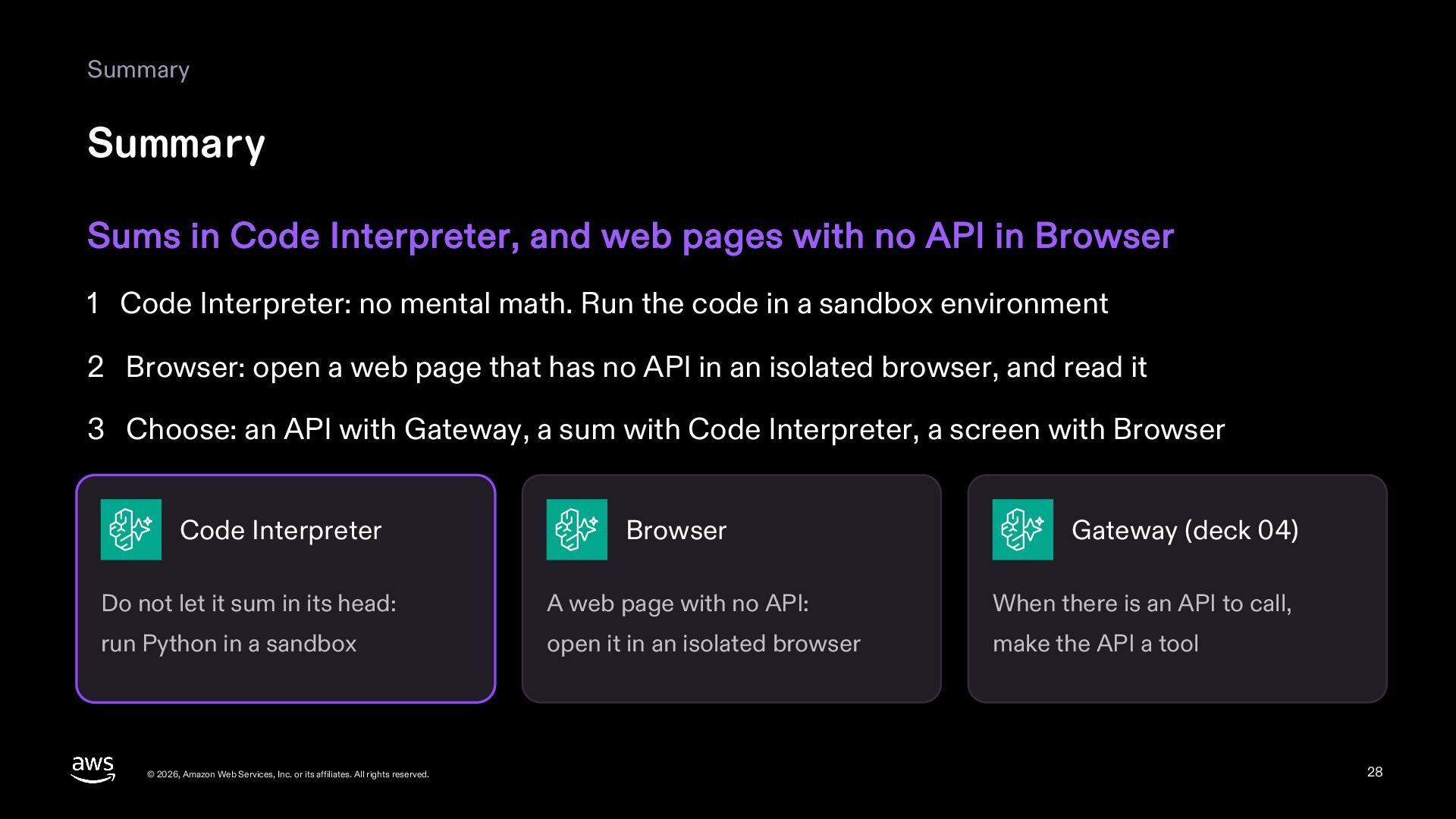
  28. Summary Summary Sums in Code Interpreter, and web pages with

    no API in Browser 1 Code Interpreter: no mental math. Run the code in a sandbox environment 2 Browser: open a web page that has no API in an isolated browser, and read it 3 Choose: an API with Gateway, a sum with Code Interpreter, a screen with Browser Code Interpreter Browser Gateway (deck 04) Do not let it sum in its head: A web page with no API: When there is an API to call, run Python in a sandbox open it in an isolated browser make the API a tool © 2026, Amazon Web Services, Inc. or its affiliates. All rights reserved. 28
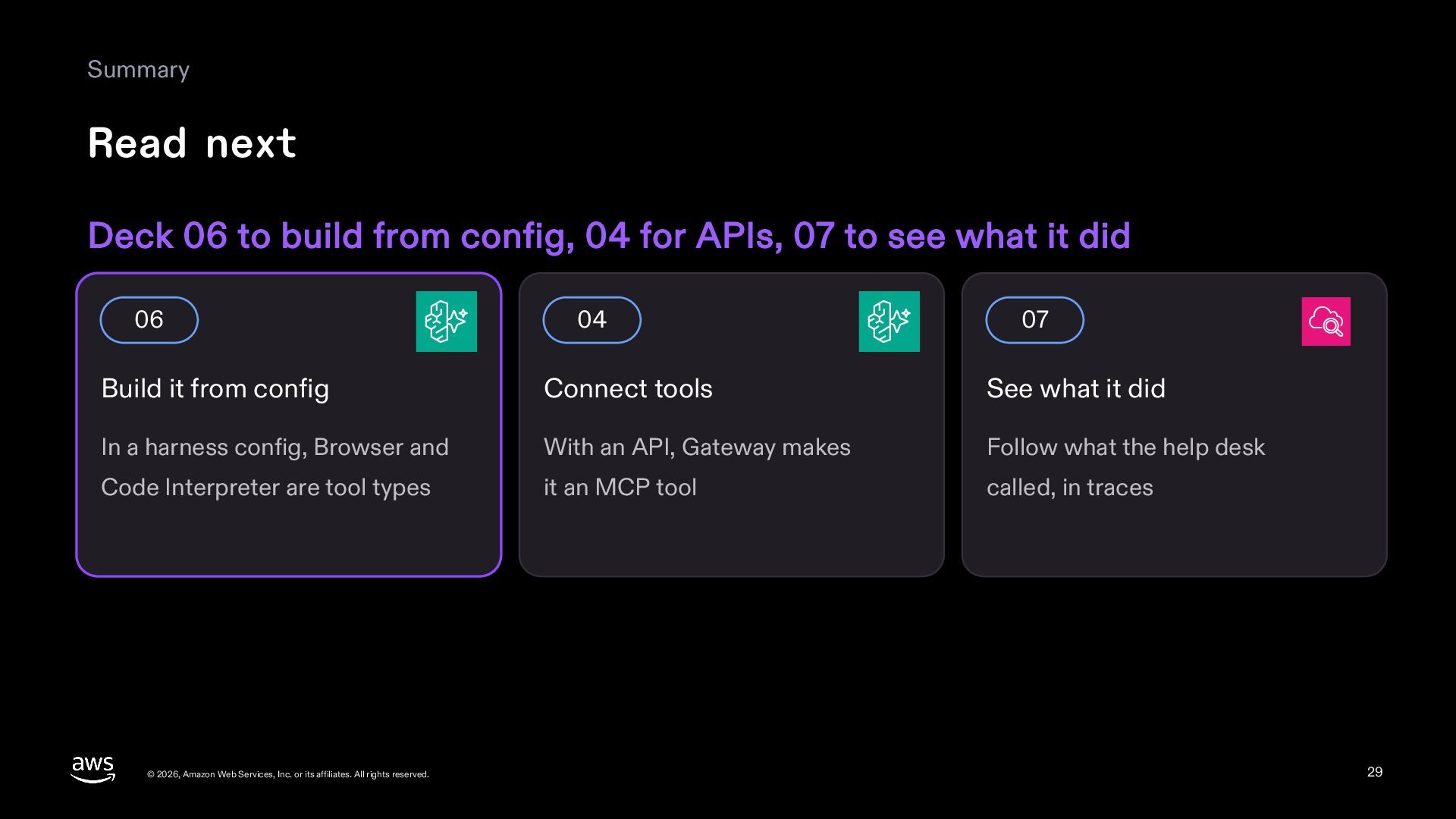
  29. Summary Read next Deck 06 to build from config, 04

    for APIs, 07 to see what it did 06 04 07 Build it from config Connect tools See what it did In a harness config, Browser and With an API, Gateway makes Follow what the help desk Code Interpreter are tool types it an MCP tool called, in traces © 2026, Amazon Web Services, Inc. or its affiliates. All rights reserved. 29
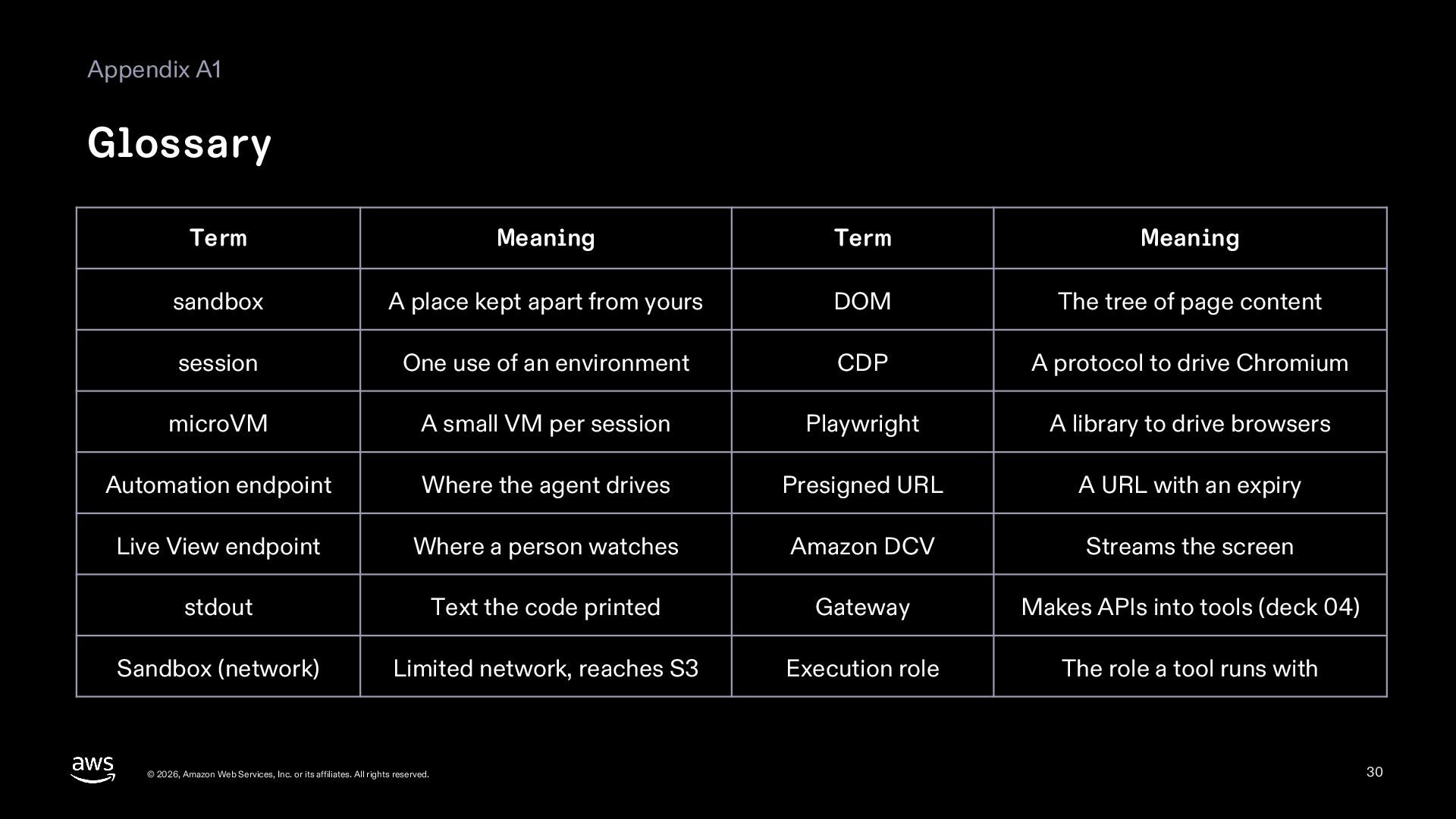
  30. Appendix A1 Glossary Term Meaning Term Meaning sandbox A place

    kept apart from yours DOM The tree of page content session One use of an environment CDP A protocol to drive Chromium microVM A small VM per session Playwright A library to drive browsers Automation endpoint Where the agent drives Presigned URL A URL with an expiry Live View endpoint Where a person watches Amazon DCV Streams the screen stdout Text the code printed Gateway Makes APIs into tools (deck 04) Sandbox (network) Limited network, reaches S3 Execution role The role a tool runs with © 2026, Amazon Web Services, Inc. or its affiliates. All rights reserved. 30
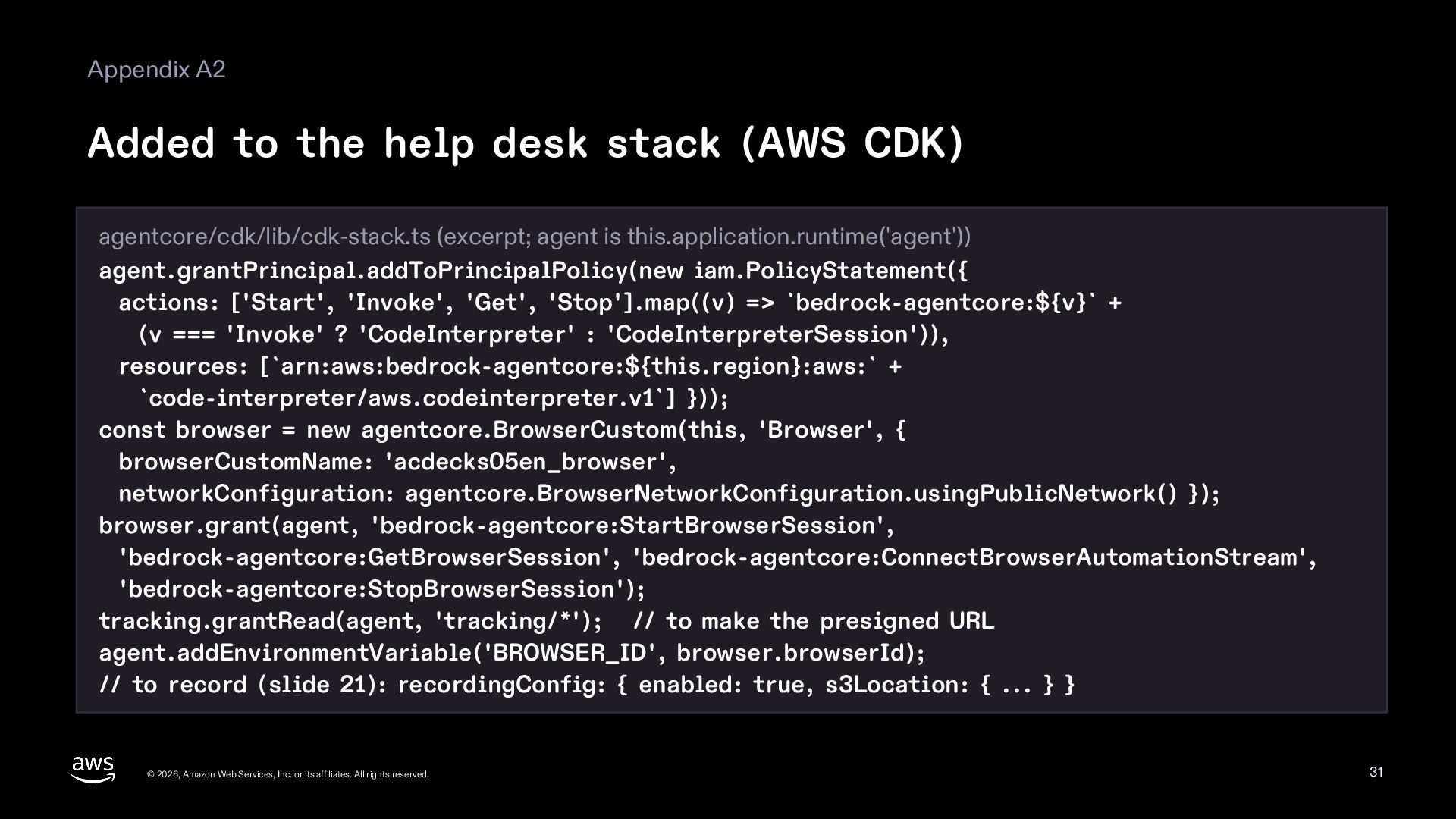
  31. Appendix A2 Added to the help desk stack (AWS CDK)

    agentcore/cdk/lib/cdk-stack.ts (excerpt; agent is this.application.runtime('agent')) agent.grantPrincipal.addToPrincipalPolicy(new iam.PolicyStatement({ actions: ['Start', 'Invoke', 'Get', 'Stop'].map((v) => `bedrock-agentcore:${v}` + (v === 'Invoke' ? 'CodeInterpreter' : 'CodeInterpreterSession')), resources: [`arn:aws:bedrock-agentcore:${this.region}:aws:` + `code-interpreter/aws.codeinterpreter.v1`] })); const browser = new agentcore.BrowserCustom(this, 'Browser', { browserCustomName: 'acdecks05en_browser', networkConfiguration: agentcore.BrowserNetworkConfiguration.usingPublicNetwork() }); browser.grant(agent, 'bedrock-agentcore:StartBrowserSession', 'bedrock-agentcore:GetBrowserSession', 'bedrock-agentcore:ConnectBrowserAutomationStream', 'bedrock-agentcore:StopBrowserSession'); tracking.grantRead(agent, 'tracking/*'); // to make the presigned URL agent.addEnvironmentVariable('BROWSER_ID', browser.browserId); // to record (slide 21): recordingConfig: { enabled: true, s3Location: { ... } } © 2026, Amazon Web Services, Inc. or its affiliates. All rights reserved. 31
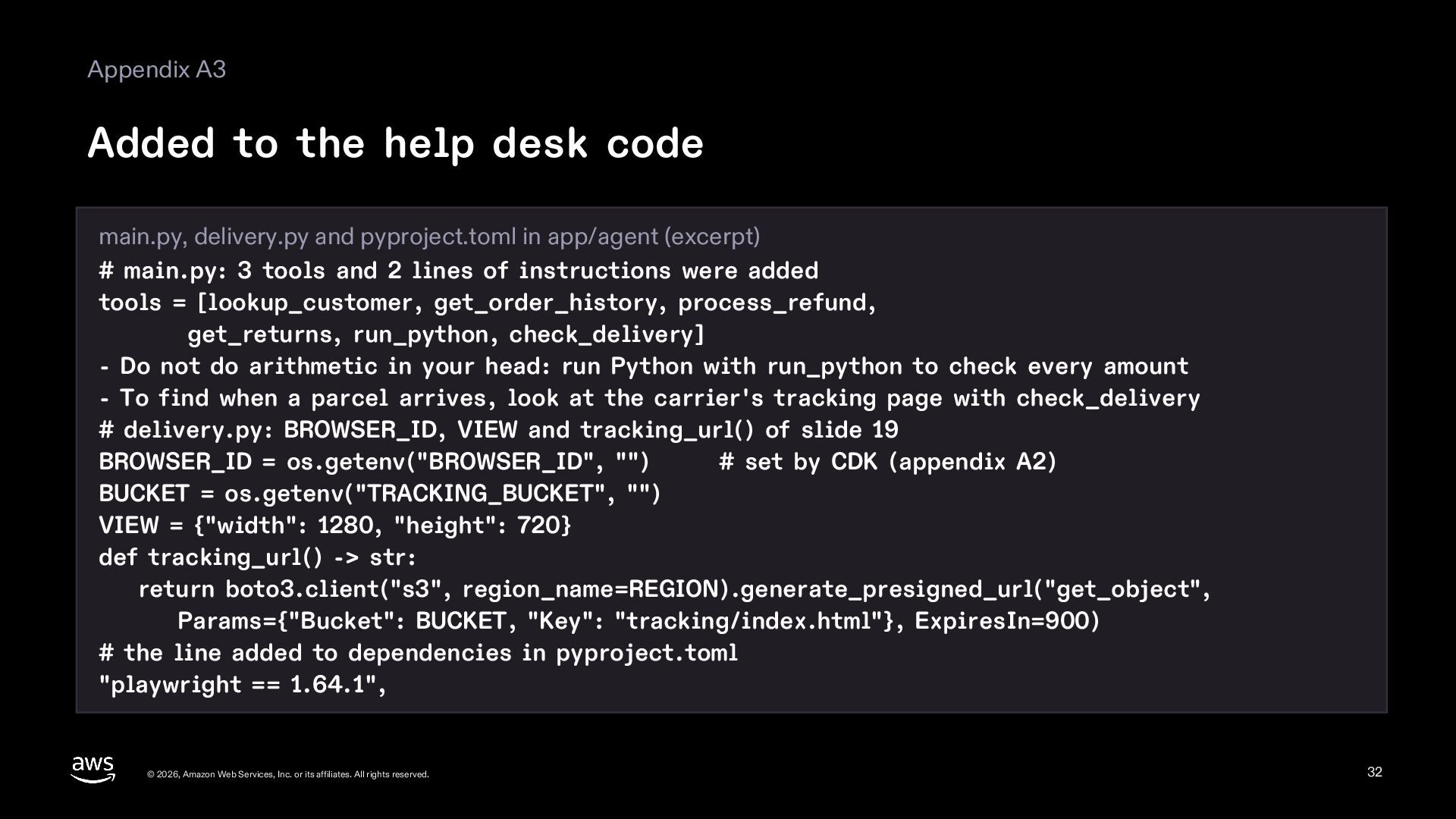
  32. Appendix A3 Added to the help desk code main.py, delivery.py

    and pyproject.toml in app/agent (excerpt) # main.py: 3 tools and 2 lines of instructions were added tools = [lookup_customer, get_order_history, process_refund, get_returns, run_python, check_delivery] - Do not do arithmetic in your head: run Python with run_python to check every amount - To find when a parcel arrives, look at the carrier's tracking page with check_delivery # delivery.py: BROWSER_ID, VIEW and tracking_url() of slide 19 BROWSER_ID = os.getenv("BROWSER_ID", "") # set by CDK (appendix A2) BUCKET = os.getenv("TRACKING_BUCKET", "") VIEW = {"width": 1280, "height": 720} def tracking_url() -> str: return boto3.client("s3", region_name=REGION).generate_presigned_url("get_object", Params={"Bucket": BUCKET, "Key": "tracking/index.html"}, ExpiresIn=900) # the line added to dependencies in pyproject.toml "playwright == 1.64.1", © 2026, Amazon Web Services, Inc. or its affiliates. All rights reserved. 32
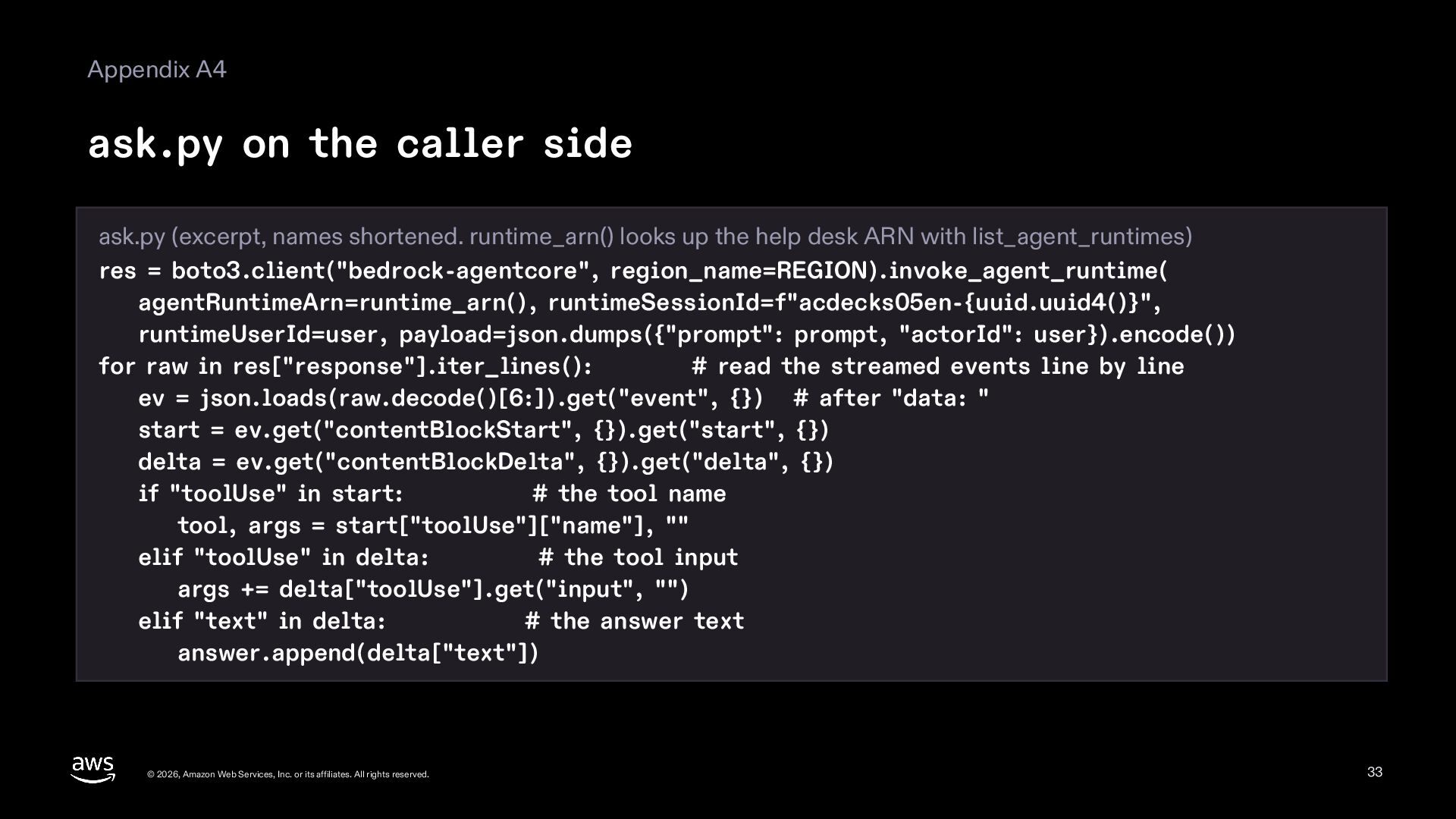
  33. Appendix A4 ask.py on the caller side ask.py (excerpt, names

    shortened. runtime_arn() looks up the help desk ARN with list_agent_runtimes) res = boto3.client("bedrock-agentcore", region_name=REGION).invoke_agent_runtime( agentRuntimeArn=runtime_arn(), runtimeSessionId=f"acdecks05en-{uuid.uuid4()}", runtimeUserId=user, payload=json.dumps({"prompt": prompt, "actorId": user}).encode()) for raw in res["response"].iter_lines(): # read the streamed events line by line ev = json.loads(raw.decode()[6:]).get("event", {}) # after "data: " start = ev.get("contentBlockStart", {}).get("start", {}) delta = ev.get("contentBlockDelta", {}).get("delta", {}) if "toolUse" in start: # the tool name tool, args = start["toolUse"]["name"], "" elif "toolUse" in delta: # the tool input args += delta["toolUse"].get("input", "") elif "text" in delta: # the answer text answer.append(delta["text"]) © 2026, Amazon Web Services, Inc. or its affiliates. All rights reserved. 33
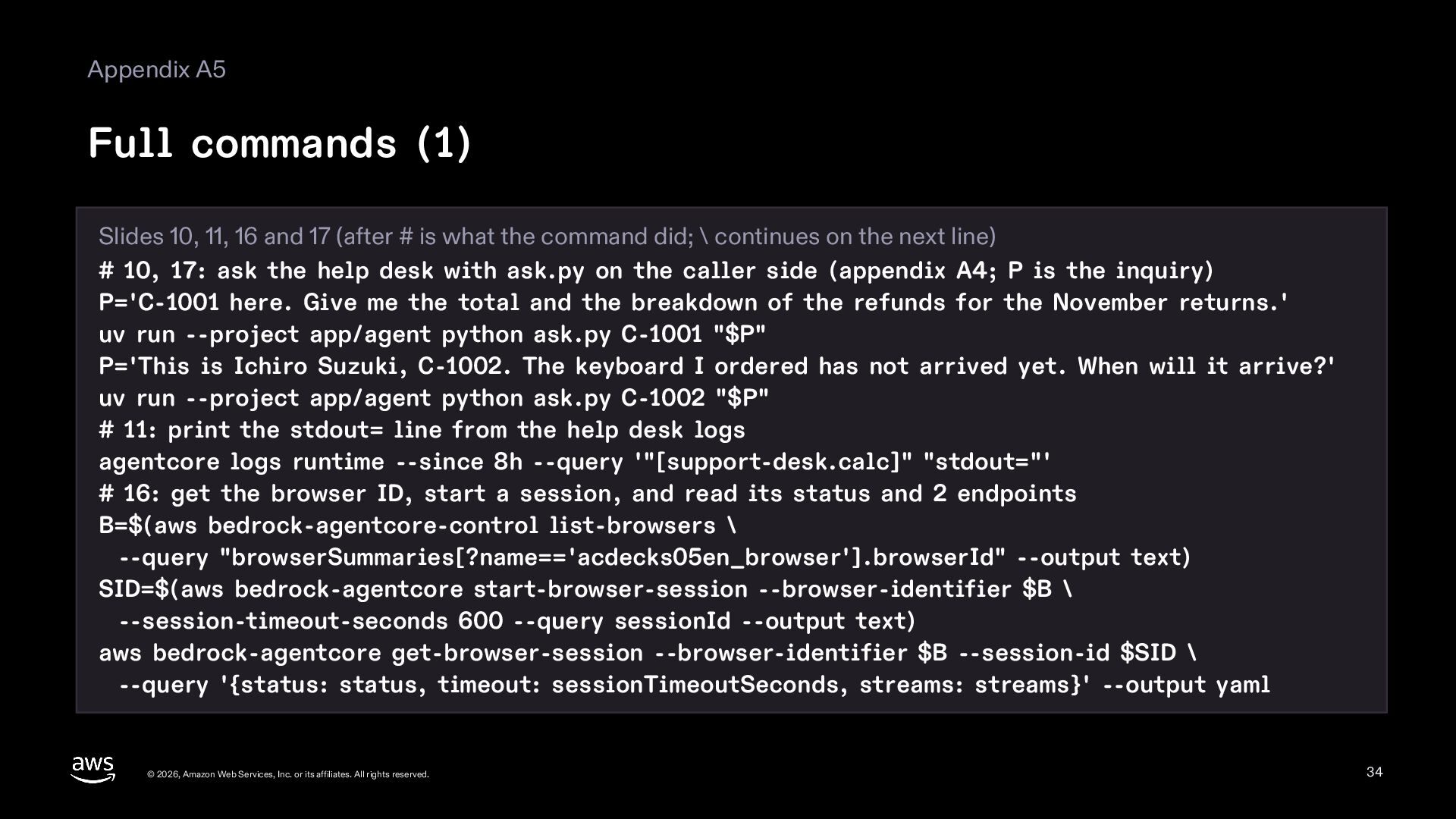
  34. Appendix A5 Full commands (1) Slides 10, 11, 16 and

    17 (after # is what the command did; \ continues on the next line) # 10, 17: ask the help desk with ask.py on the caller side (appendix A4; P is the inquiry) P='C-1001 here. Give me the total and the breakdown of the refunds for the November returns.' uv run --project app/agent python ask.py C-1001 "$P" P='This is Ichiro Suzuki, C-1002. The keyboard I ordered has not arrived yet. When will it arrive?' uv run --project app/agent python ask.py C-1002 "$P" # 11: print the stdout= line from the help desk logs agentcore logs runtime --since 8h --query '"[support-desk.calc]" "stdout="' # 16: get the browser ID, start a session, and read its status and 2 endpoints B=$(aws bedrock-agentcore-control list-browsers \ --query "browserSummaries[?name=='acdecks05en_browser'].browserId" --output text) SID=$(aws bedrock-agentcore start-browser-session --browser-identifier $B \ --session-timeout-seconds 600 --query sessionId --output text) aws bedrock-agentcore get-browser-session --browser-identifier $B --session-id $SID \ --query '{status: status, timeout: sessionTimeoutSeconds, streams: streams}' --output yaml © 2026, Amazon Web Services, Inc. or its affiliates. All rights reserved. 34
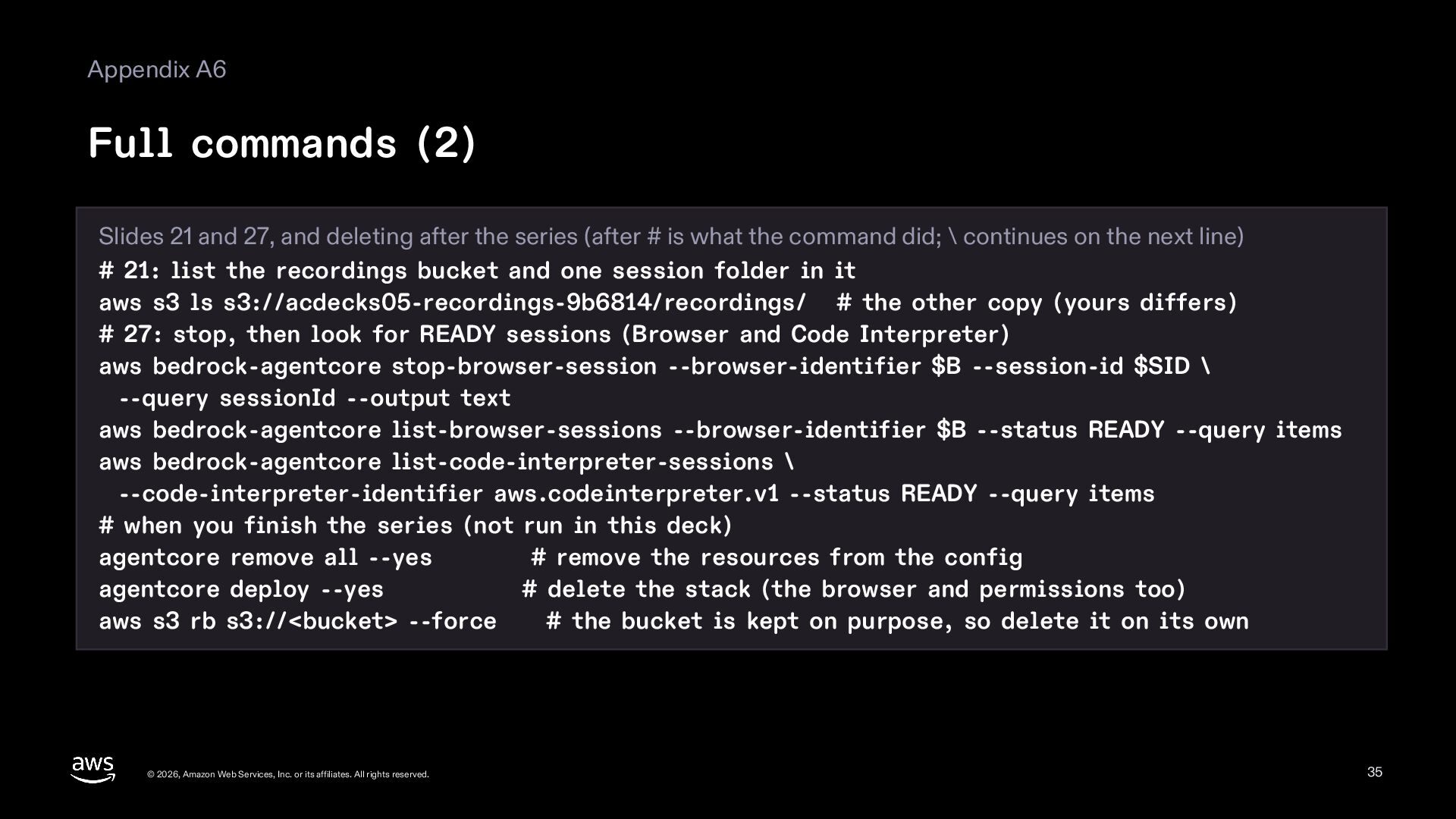
  35. Appendix A6 Full commands (2) Slides 21 and 27, and

    deleting after the series (after # is what the command did; \ continues on the next line) # 21: list the recordings bucket and one session folder in it aws s3 ls s3://acdecks05-recordings-9b6814/recordings/ # the other copy (yours differs) # 27: stop, then look for READY sessions (Browser and Code Interpreter) aws bedrock-agentcore stop-browser-session --browser-identifier $B --session-id $SID \ --query sessionId --output text aws bedrock-agentcore list-browser-sessions --browser-identifier $B --status READY --query items aws bedrock-agentcore list-code-interpreter-sessions \ --code-interpreter-identifier aws.codeinterpreter.v1 --status READY --query items # when you finish the series (not run in this deck) agentcore remove all --yes # remove the resources from the config agentcore deploy --yes # delete the stack (the browser and permissions too) aws s3 rb s3://<bucket> --force # the bucket is kept on purpose, so delete it on its own © 2026, Amazon Web Services, Inc. or its affiliates. All rights reserved. 35
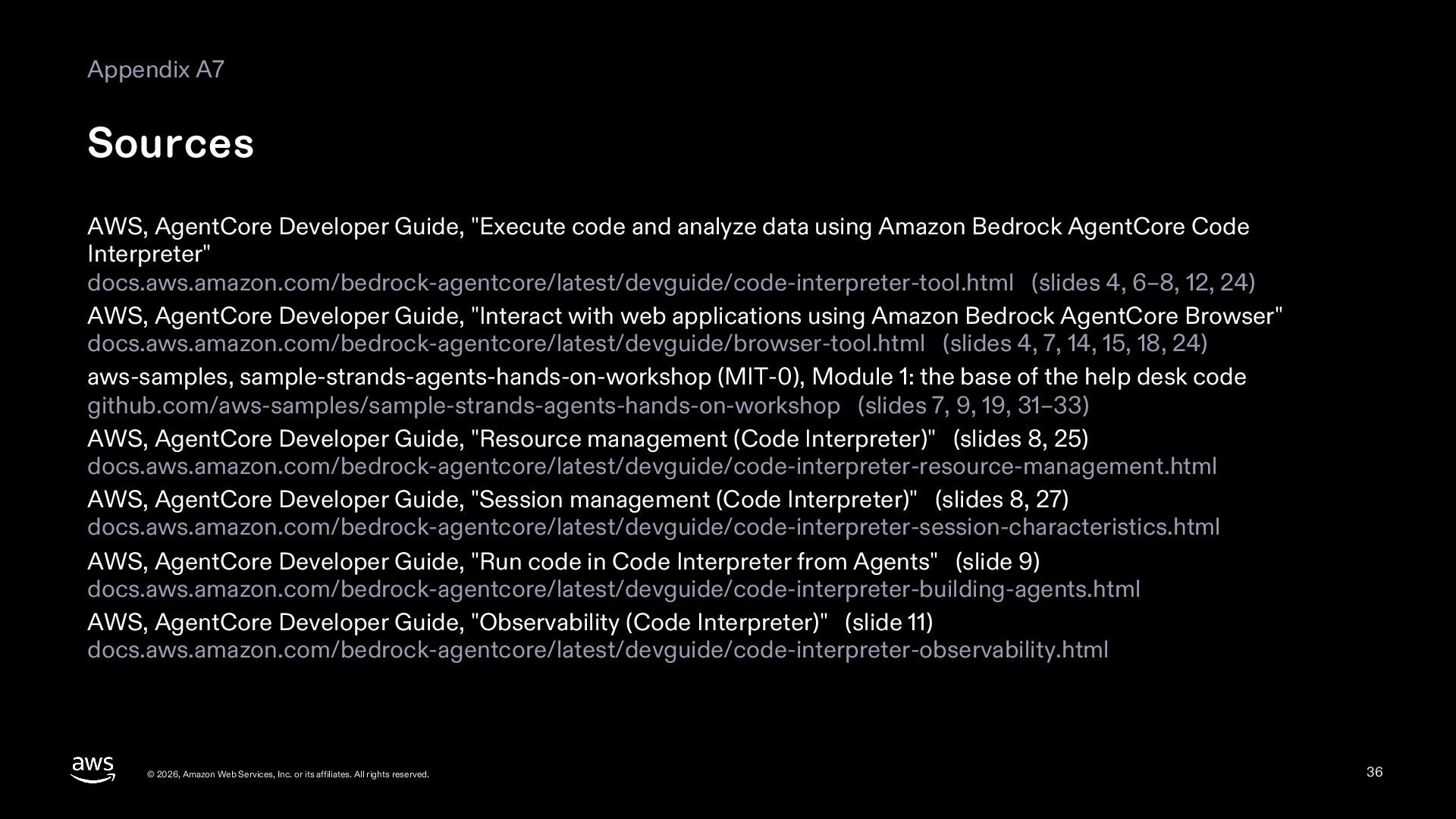
  36. Appendix A7 Sources AWS, AgentCore Developer Guide, "Execute code and

    analyze data using Amazon Bedrock AgentCore Code Interpreter" docs.aws.amazon.com/bedrock-agentcore/latest/devguide/code-interpreter-tool.html (slides 4, 6–8, 12, 24) AWS, AgentCore Developer Guide, "Interact with web applications using Amazon Bedrock AgentCore Browser" docs.aws.amazon.com/bedrock-agentcore/latest/devguide/browser-tool.html (slides 4, 7, 14, 15, 18, 24) aws-samples, sample-strands-agents-hands-on-workshop (MIT-0), Module 1: the base of the help desk code github.com/aws-samples/sample-strands-agents-hands-on-workshop (slides 7, 9, 19, 31–33) AWS, AgentCore Developer Guide, "Resource management (Code Interpreter)" (slides 8, 25) docs.aws.amazon.com/bedrock-agentcore/latest/devguide/code-interpreter-resource-management.html AWS, AgentCore Developer Guide, "Session management (Code Interpreter)" (slides 8, 27) docs.aws.amazon.com/bedrock-agentcore/latest/devguide/code-interpreter-session-characteristics.html AWS, AgentCore Developer Guide, "Run code in Code Interpreter from Agents" (slide 9) docs.aws.amazon.com/bedrock-agentcore/latest/devguide/code-interpreter-building-agents.html AWS, AgentCore Developer Guide, "Observability (Code Interpreter)" (slide 11) docs.aws.amazon.com/bedrock-agentcore/latest/devguide/code-interpreter-observability.html © 2026, Amazon Web Services, Inc. or its affiliates. All rights reserved. 36
  37. Appendix A8 Sources (cont.) AWS, AgentCore Developer Guide, "Using Terminal

    Commands with an execution role" (slides 12, 25) docs.aws.amazon.com/bedrock-agentcore/latest/devguide/code-interpreter-s3-integration.html AWS, AgentCore Developer Guide, "Quotas for Amazon Bedrock AgentCore" (slides 12, 16) docs.aws.amazon.com/bedrock-agentcore/latest/devguide/bedrock-agentcore-limits.html Anthropic, January 2026, Demystifying evals for AI agents (slides 14, 23, 24, 26) www.anthropic.com/engineering/demystifying-evals-for-ai-agents OpenAI, April 2025, A practical guide to building agents (slides 14, 24, 25) cdn.openai.com/business-guides-and-resources/a-practical-guide-to-building-agents.pdf AWS, AgentCore Developer Guide, "Fundamentals (Browser)" (slides 15, 16) docs.aws.amazon.com/bedrock-agentcore/latest/devguide/browser-resource-session-management.html AWS, AgentCore Developer Guide, "Managing Browser Sessions" (slides 16, 20, 25, 27) docs.aws.amazon.com/bedrock-agentcore/latest/devguide/browser-managing-sessions.html AWS, AgentCore Developer Guide, "Using AgentCore Browser with Playwright" (slide 19) docs.aws.amazon.com/bedrock-agentcore/latest/devguide/browser-quickstart-playwright.html © 2026, Amazon Web Services, Inc. or its affiliates. All rights reserved. 37
  38. Appendix A9 Sources (cont.) AWS, AgentCore Developer Guide, "Session Recording

    and Replay" (slides 20, 21) docs.aws.amazon.com/bedrock-agentcore/latest/devguide/browser-session-recording.html AWS, AgentCore Developer Guide, "Live View" (slide 20) docs.aws.amazon.com/bedrock-agentcore/latest/devguide/browser-dcv-integration.html Anthropic, Computer use tool (Claude Docs), the safety section (slide 25) platform.claude.com/docs/en/agents-and-tools/tool-use/computer-use-tool AWS, Amazon Bedrock AgentCore pricing (slide 27) aws.amazon.com/bedrock/agentcore/pricing/ © 2026, Amazon Web Services, Inc. or its affiliates. All rights reserved. 38