Upgrade to Pro — share decks privately, control downloads, hide ads and more …

Structured output と Streaming | Kiro と学ぶ Strand...

Structured output と Streaming | Kiro と学ぶ Strands Agents 06

Strands Agents の Agent から Pydantic のスキーマで型のある値を受け取る方法 (structured_output_model、検証のやり直し、強制のやり直し、試行の上限) とその仕組みを、公式ドキュメントと、東京の Amazon Bedrock で動かした本物の出力で示す。答えを stream_async と callback handler で流す方法、FastAPI での返し方、届くイベントの順と中身、送る分だけを転送する形も扱う。Level 200。

Avatar for Riku INADA

Riku INADA PRO

November 11, 2026

More Decks by Riku INADA

Other Decks in Technology

Transcript

  1. Kiro と学ぶ Strands Agents 06 作り込む Structured output と Streaming

    型のある答えと、流れる答え Level 200 / 2026-11 時点 2026 年 11 ⽉ 稲⽥ ⼤陸 アマゾン ウェブ サービス ジャパン © 2026, Amazon Web Services, Inc. or its affiliates. All rights reserved. 06 Kiro + Strands Agents 1
  2. はじめに ⾃⼰紹介 稲⽥ ⼤陸 いなだ りく (いなりく) アマゾン ウェブ サービス

    ジャパン合同会社 ソリューションアーキテクト 製造業のお客様を中⼼に⽀援 最近の取り組み AI 駆動開発ライフサイクルの推進 Kiro と AWS Amplify の情報発信 © 2026, Amazon Web Services, Inc. or its affiliates. All rights reserved. X @inada_riku Speaker Deck speakerdeck.com/inariku Zenn zenn.dev/inariku GitHub github.com/inariku 2
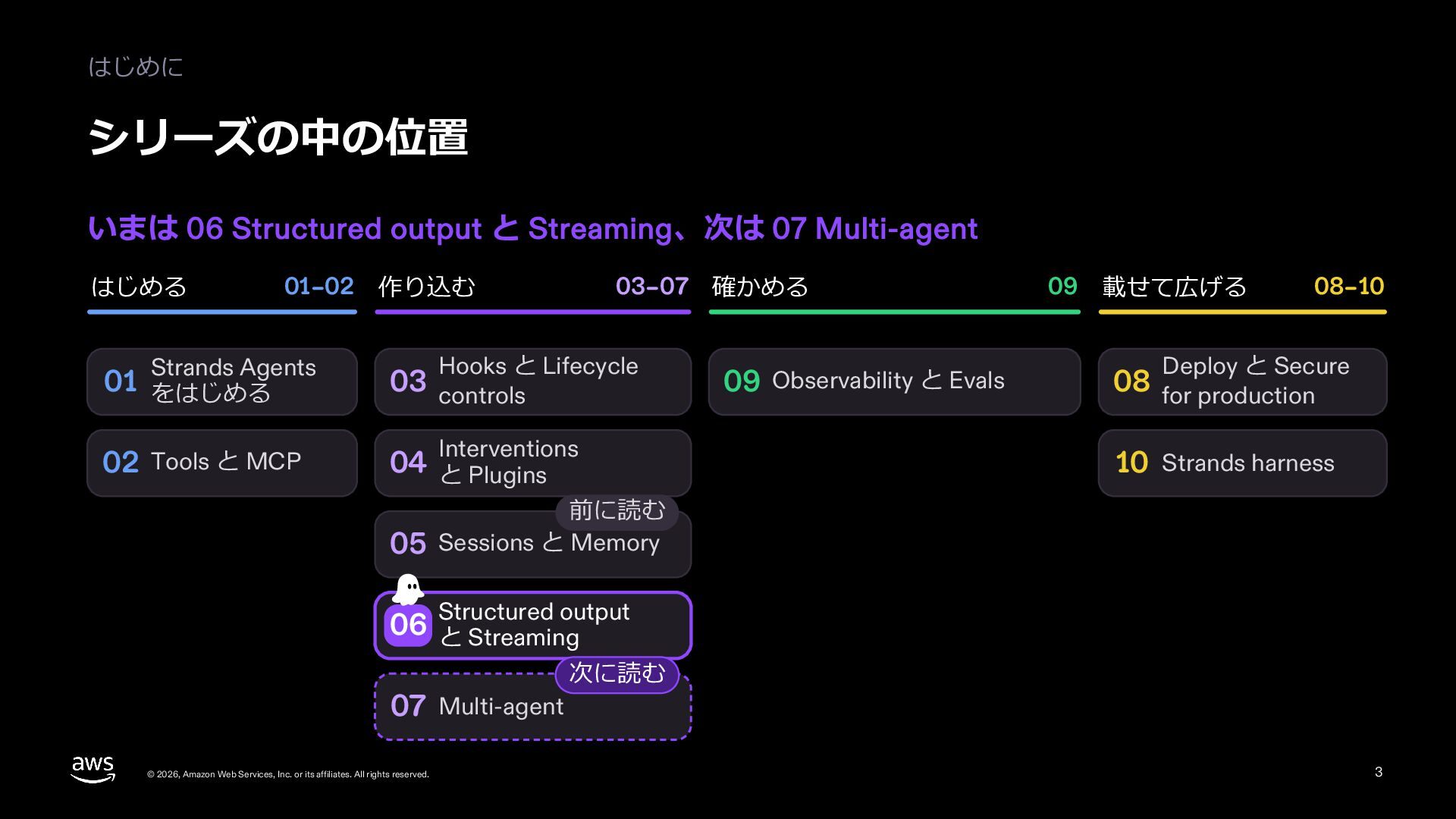
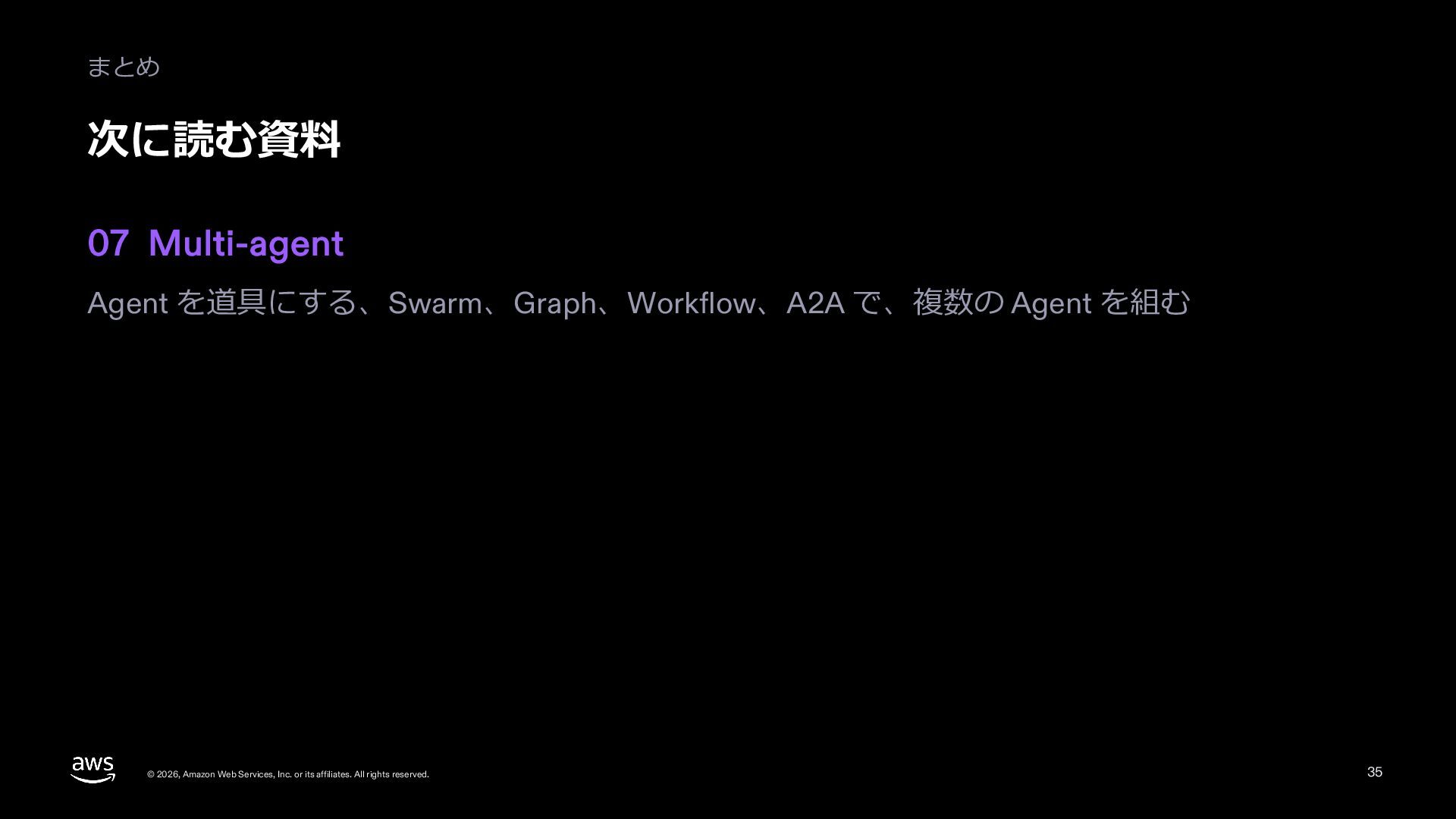
  3. はじめに シリーズの中の位置 いまは 06 Structured output と Streaming、次は 07 Multi-agent

    はじめる 01–02 作り込む Strands Agents 03–07 確かめる Hooks と Lifecycle 01 をはじめる 03 controls 02 Tools と MCP 04 と Plugins Interventions 09 Observability と Evals 09 載せて広げる 08–10 Deploy と Secure 08 for production 10 Strands harness 前に読む 05 Sessions と Memory output 06 Structured と Streaming 07 Multi-agent © 2026, Amazon Web Services, Inc. or its affiliates. All rights reserved. 次に読む 3
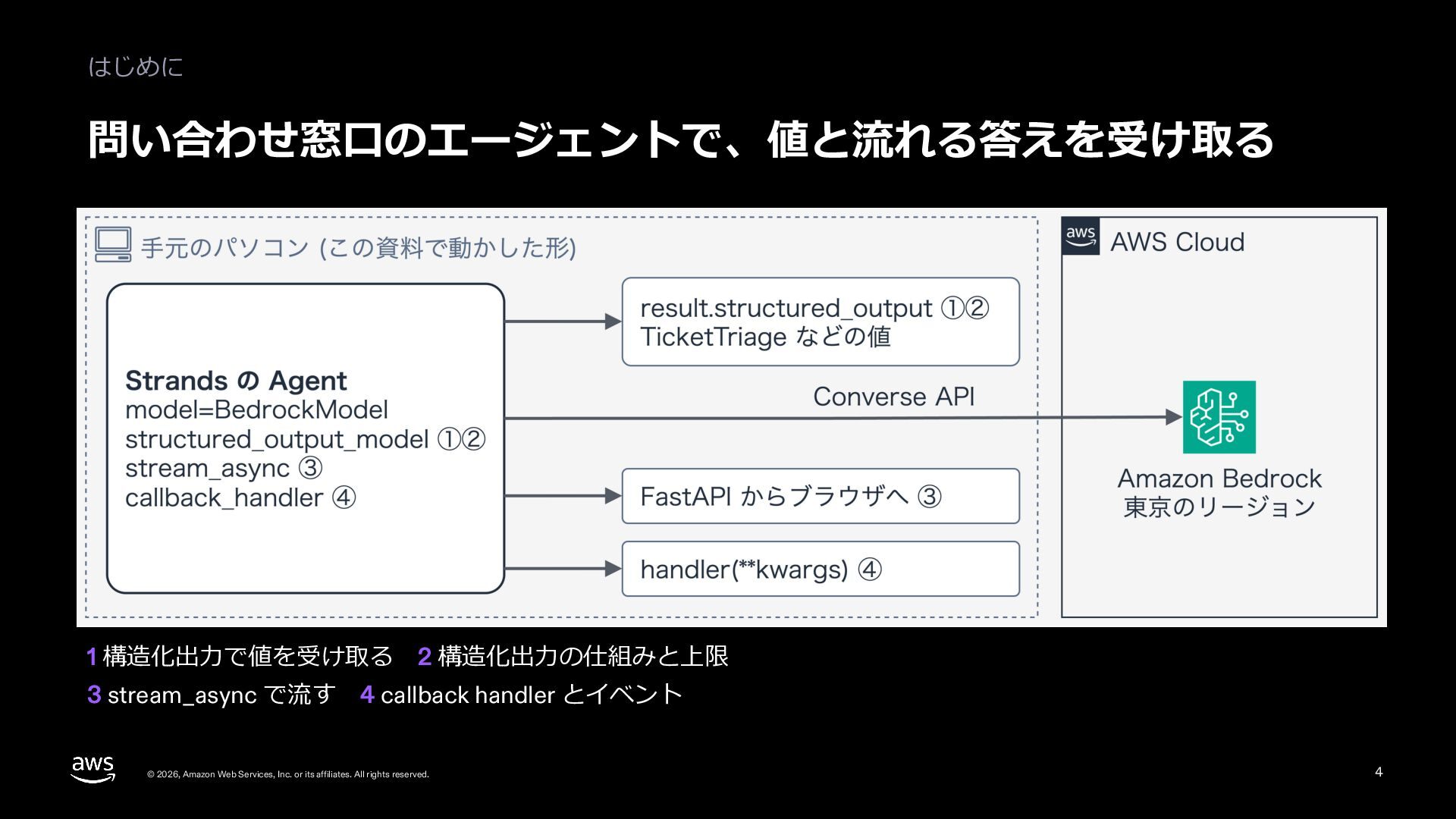
  4. 06 Structured output と Streaming TicketTriage 第 1 部 構造化出⼒で

    値を受け取る © 2026, Amazon Web Services, Inc. or its affiliates. All rights reserved. 5
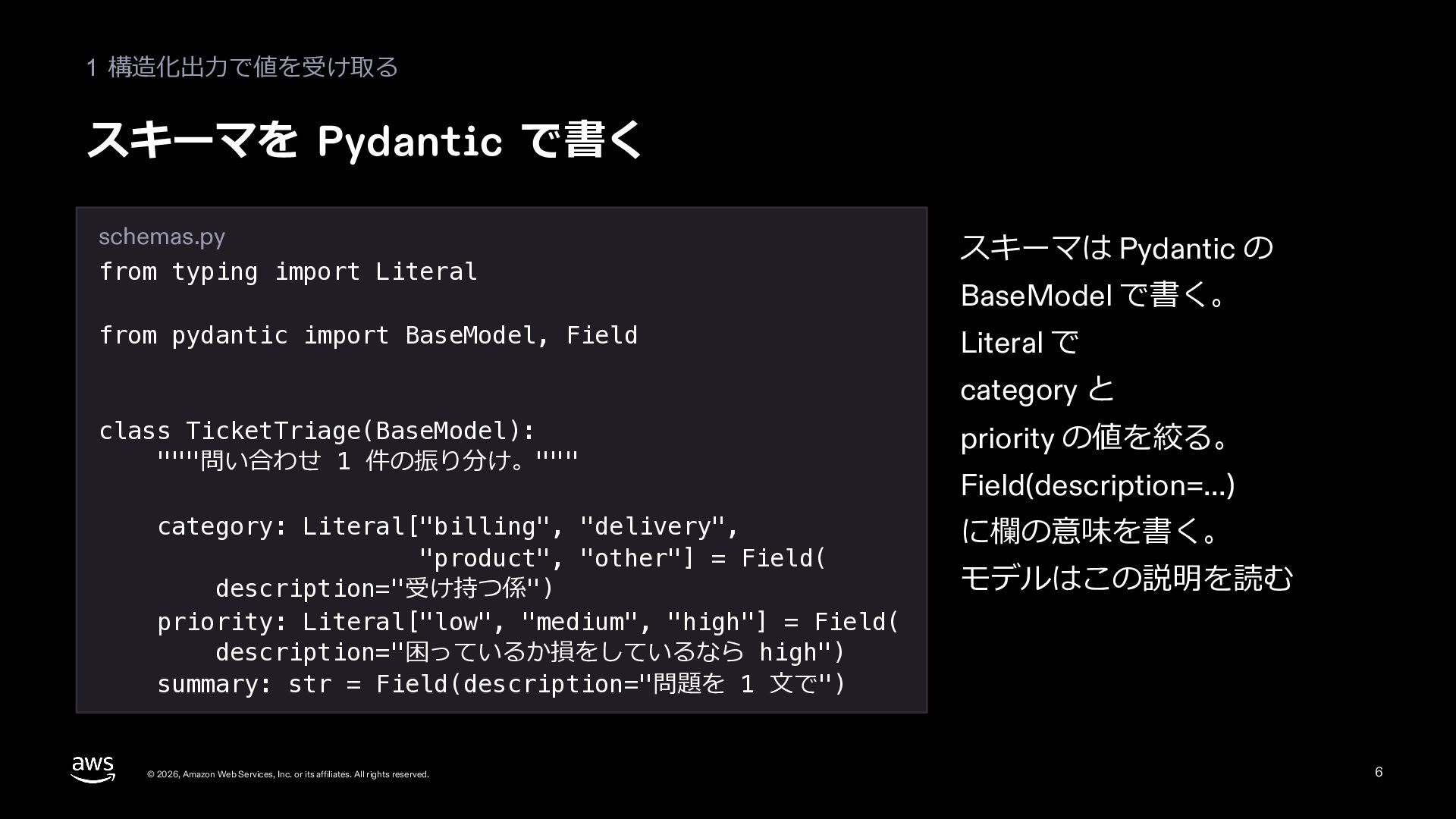
  5. 1 構造化出⼒で値を受け取る スキーマを Pydantic で書く schemas.py from typing import Literal

    スキーマは Pydantic の from pydantic import BaseModel, Field Literal で BaseModel で書く。 category と class TicketTriage(BaseModel): """問い合わせ 1 件の振り分け。""" category: Literal["billing", "delivery", "product", "other"] = Field( description="受け持つ係") priority: Literal["low", "medium", "high"] = Field( description="困っているか損をしているなら high") summary: str = Field(description="問題を 1 ⽂で") © 2026, Amazon Web Services, Inc. or its affiliates. All rights reserved. priority の値を絞る。 Field(description=...) に欄の意味を書く。 モデルはこの説明を読む 6
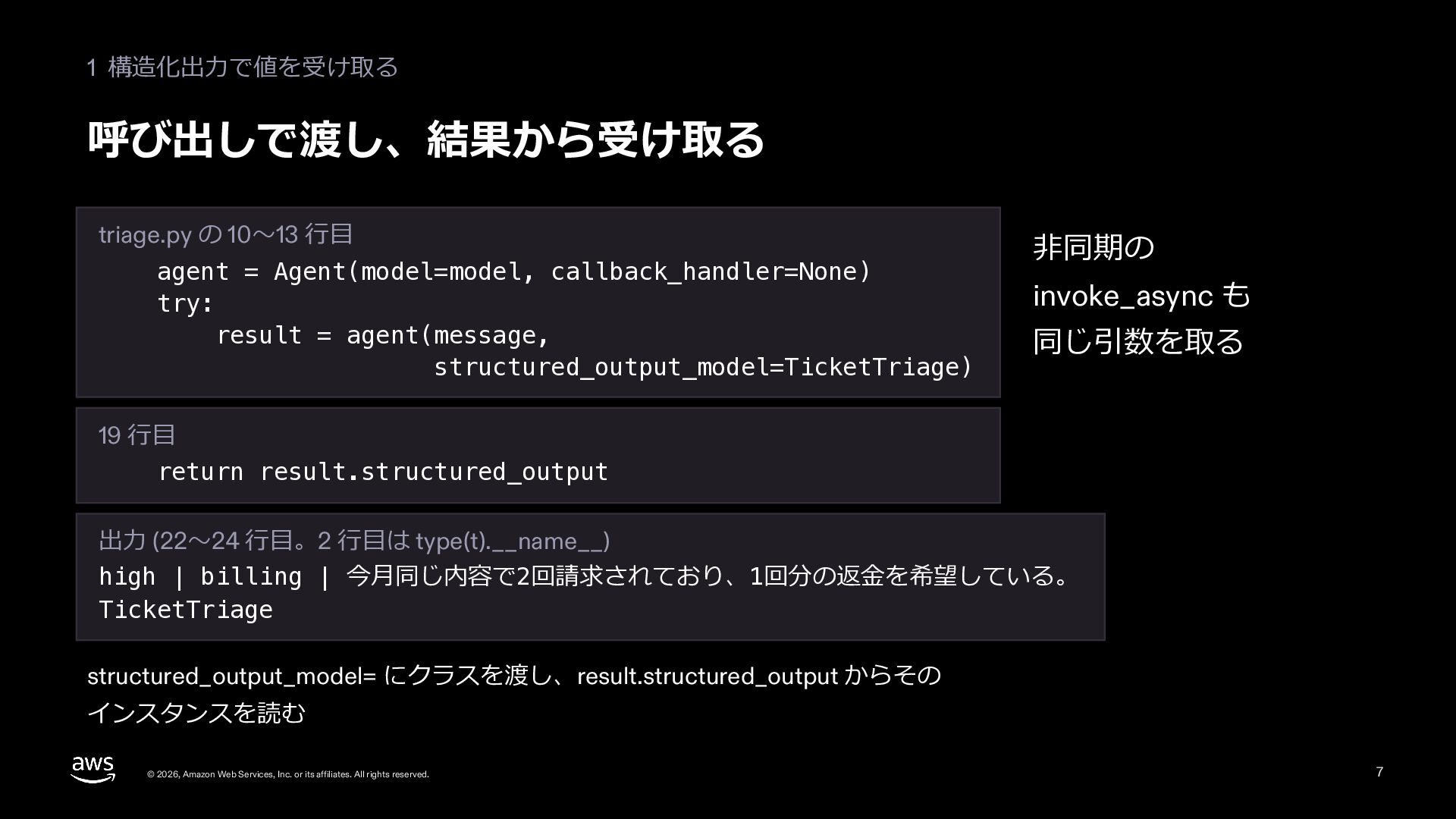
  6. 1 構造化出⼒で値を受け取る 呼び出しで渡し、結果から受け取る triage.py の 10〜13 ⾏⽬ agent = Agent(model=model,

    callback_handler=None) try: result = agent(message, structured_output_model=TicketTriage) ⾮同期の invoke_async も 同じ引数を取る 19 ⾏⽬ return result.structured_output 出⼒ (22〜24 ⾏⽬。2 ⾏⽬は type(t).__name__) high | billing | 今⽉同じ内容で2回請求されており、1回分の返⾦を希望している。 TicketTriage structured_output_model= にクラスを渡し、result.structured_output からその インスタンスを読む © 2026, Amazon Web Services, Inc. or its affiliates. All rights reserved. 7
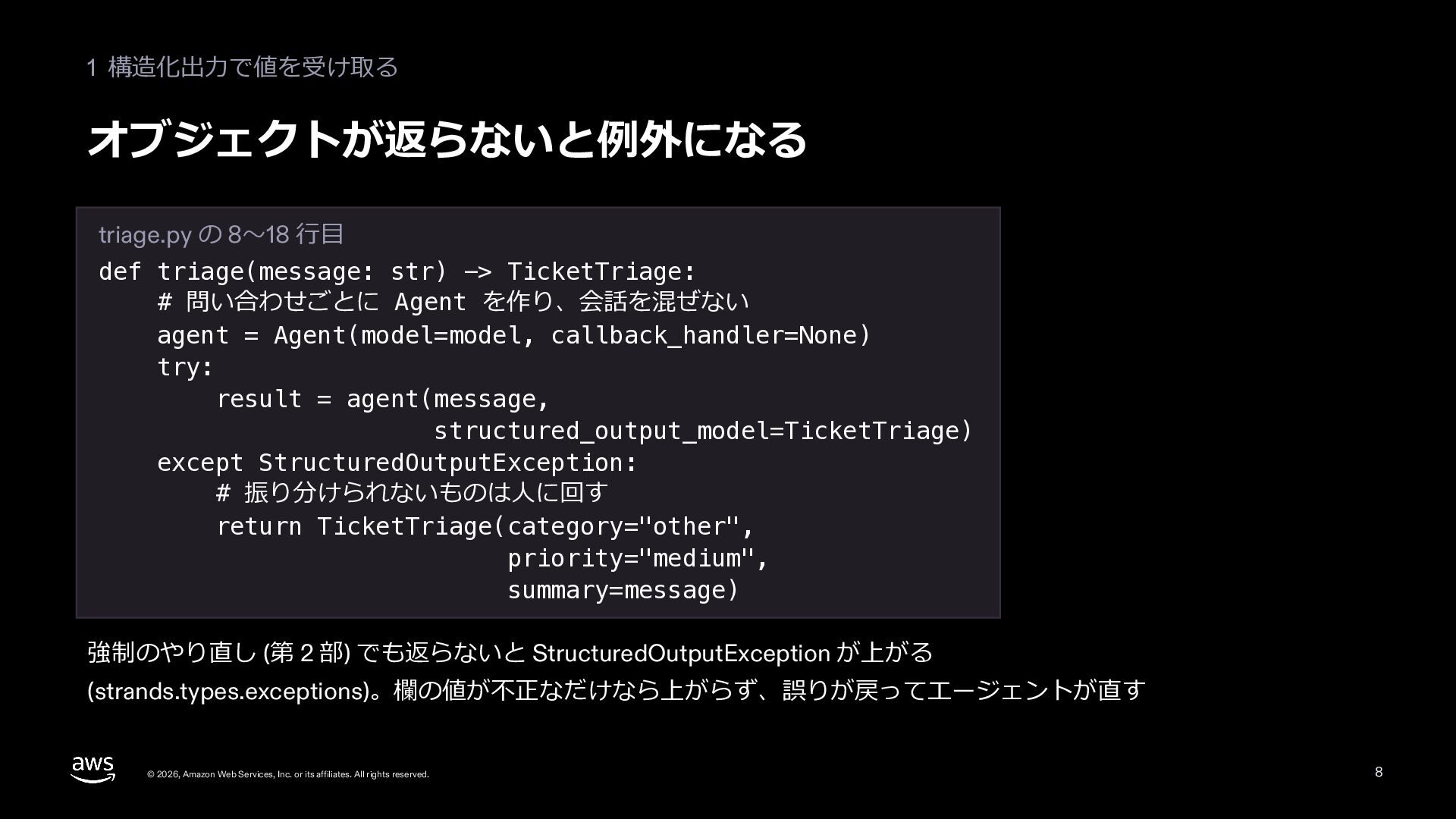
  7. 1 構造化出⼒で値を受け取る オブジェクトが返らないと例外になる triage.py の 8〜18 ⾏⽬ def triage(message: str)

    -> TicketTriage: # 問い合わせごとに Agent を作り、会話を混ぜない agent = Agent(model=model, callback_handler=None) try: result = agent(message, structured_output_model=TicketTriage) except StructuredOutputException: # 振り分けられないものは⼈に回す return TicketTriage(category="other", priority="medium", summary=message) 強制のやり直し (第 2 部) でも返らないと StructuredOutputException が上がる (strands.types.exceptions)。欄の値が不正なだけなら上がらず、誤りが戻ってエージェントが直す © 2026, Amazon Web Services, Inc. or its affiliates. All rights reserved. 8
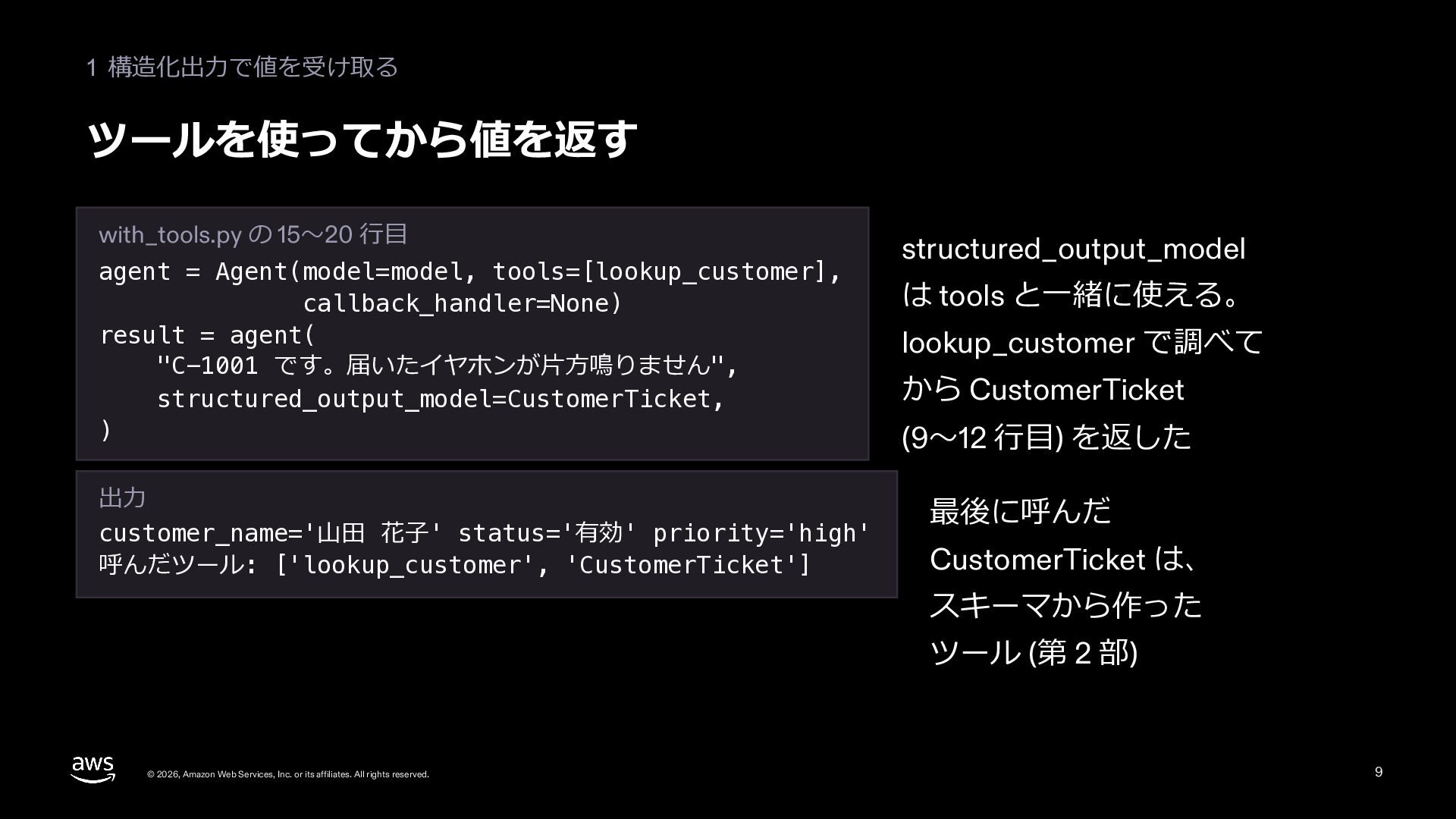
  8. 1 構造化出⼒で値を受け取る ツールを使ってから値を返す with_tools.py の 15〜20 ⾏⽬ agent = Agent(model=model,

    tools=[lookup_customer], callback_handler=None) result = agent( "C-1001 です。届いたイヤホンが⽚⽅鳴りません", structured_output_model=CustomerTicket, ) 出⼒ customer_name='⼭⽥ 花⼦' status='有効' priority='high' 呼んだツール: ['lookup_customer', 'CustomerTicket'] structured_output_model は tools と⼀緒に使える。 lookup_customer で調べて から CustomerTicket (9〜12 ⾏⽬) を返した 最後に呼んだ CustomerTicket は、 スキーマから作った ツール (第 2 部) © 2026, Amazon Web Services, Inc. or its affiliates. All rights reserved. 9
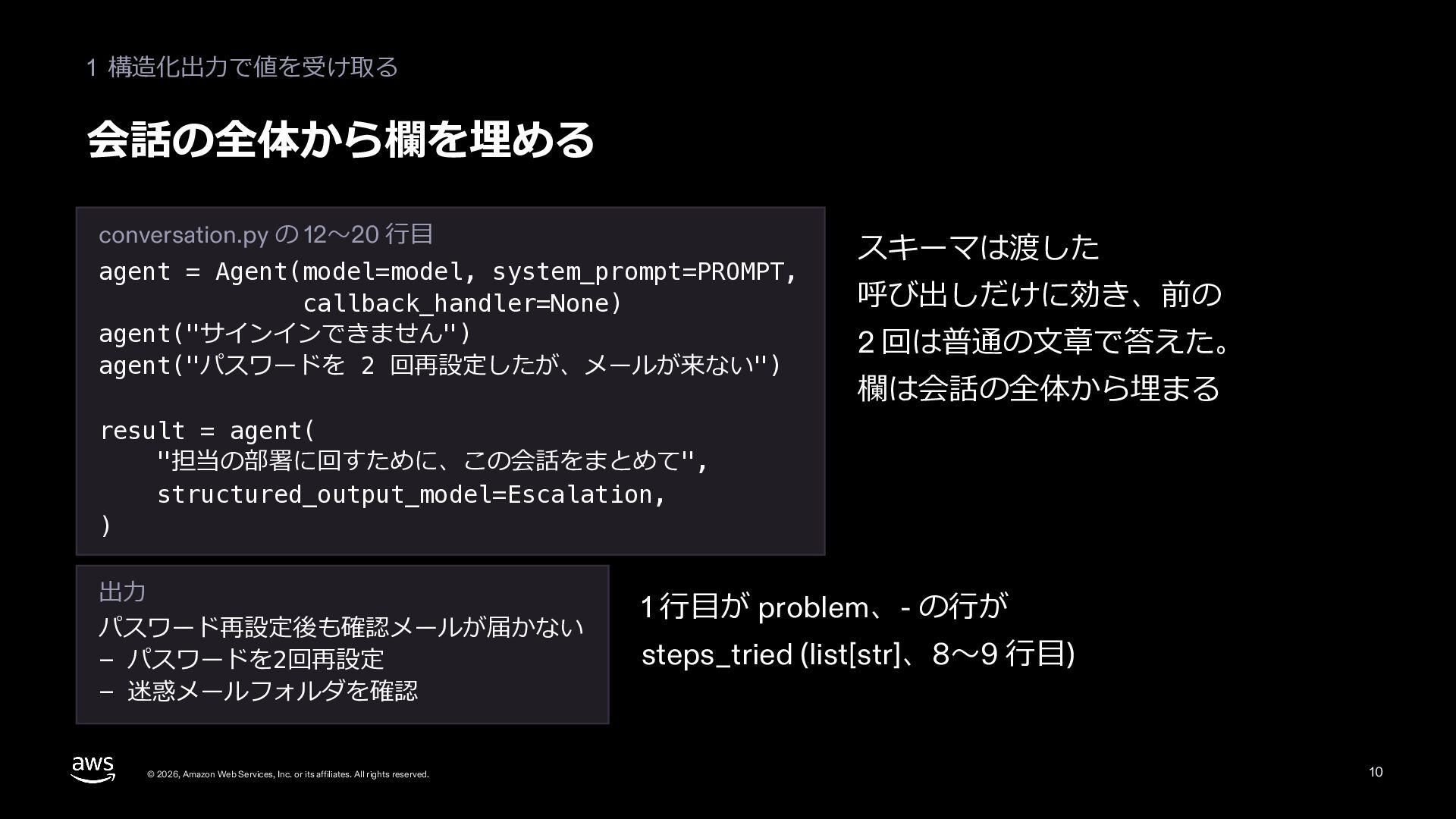
  9. 1 構造化出⼒で値を受け取る 会話の全体から欄を埋める conversation.py の 12〜20 ⾏⽬ agent = Agent(model=model,

    system_prompt=PROMPT, callback_handler=None) agent("サインインできません") agent("パスワードを 2 回再設定したが、メールが来ない") スキーマは渡した 呼び出しだけに効き、前の 2 回は普通の⽂章で答えた。 欄は会話の全体から埋まる result = agent( "担当の部署に回すために、この会話をまとめて", structured_output_model=Escalation, ) 出⼒ パスワード再設定後も確認メールが届かない - パスワードを2回再設定 - 迷惑メールフォルダを確認 © 2026, Amazon Web Services, Inc. or its affiliates. All rights reserved. 1 ⾏⽬が problem、- の⾏が steps_tried (list[str]、8〜9 ⾏⽬) 10
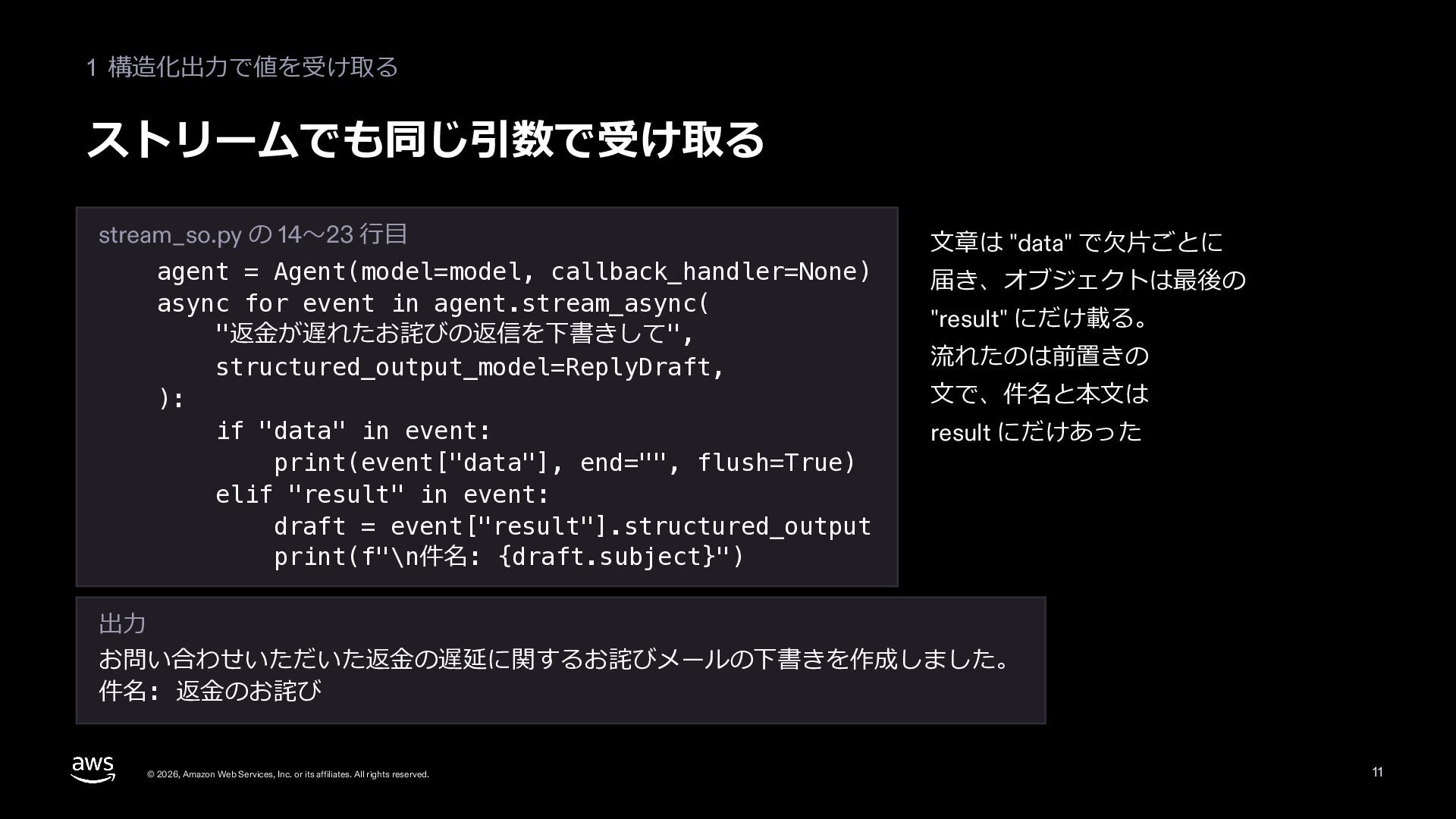
  10. 1 構造化出⼒で値を受け取る ストリームでも同じ引数で受け取る stream_so.py の 14〜23 ⾏⽬ agent = Agent(model=model,

    callback_handler=None) async for event in agent.stream_async( "返⾦が遅れたお詫びの返信を下書きして", structured_output_model=ReplyDraft, ): if "data" in event: print(event["data"], end="", flush=True) elif "result" in event: draft = event["result"].structured_output print(f"\n件名: {draft.subject}") ⽂章は "data" で⽋⽚ごとに 届き、オブジェクトは最後の "result" にだけ載る。 流れたのは前置きの ⽂で、件名と本⽂は result にだけあった 出⼒ お問い合わせいただいた返⾦の遅延に関するお詫びメールの下書きを作成しました。 件名: 返⾦のお詫び © 2026, Amazon Web Services, Inc. or its affiliates. All rights reserved. 11
  11. 06 Structured output と Streaming 第 2 部 構造化出⼒の 仕組みと上限

    © 2026, Amazon Web Services, Inc. or its affiliates. All rights reserved. 12
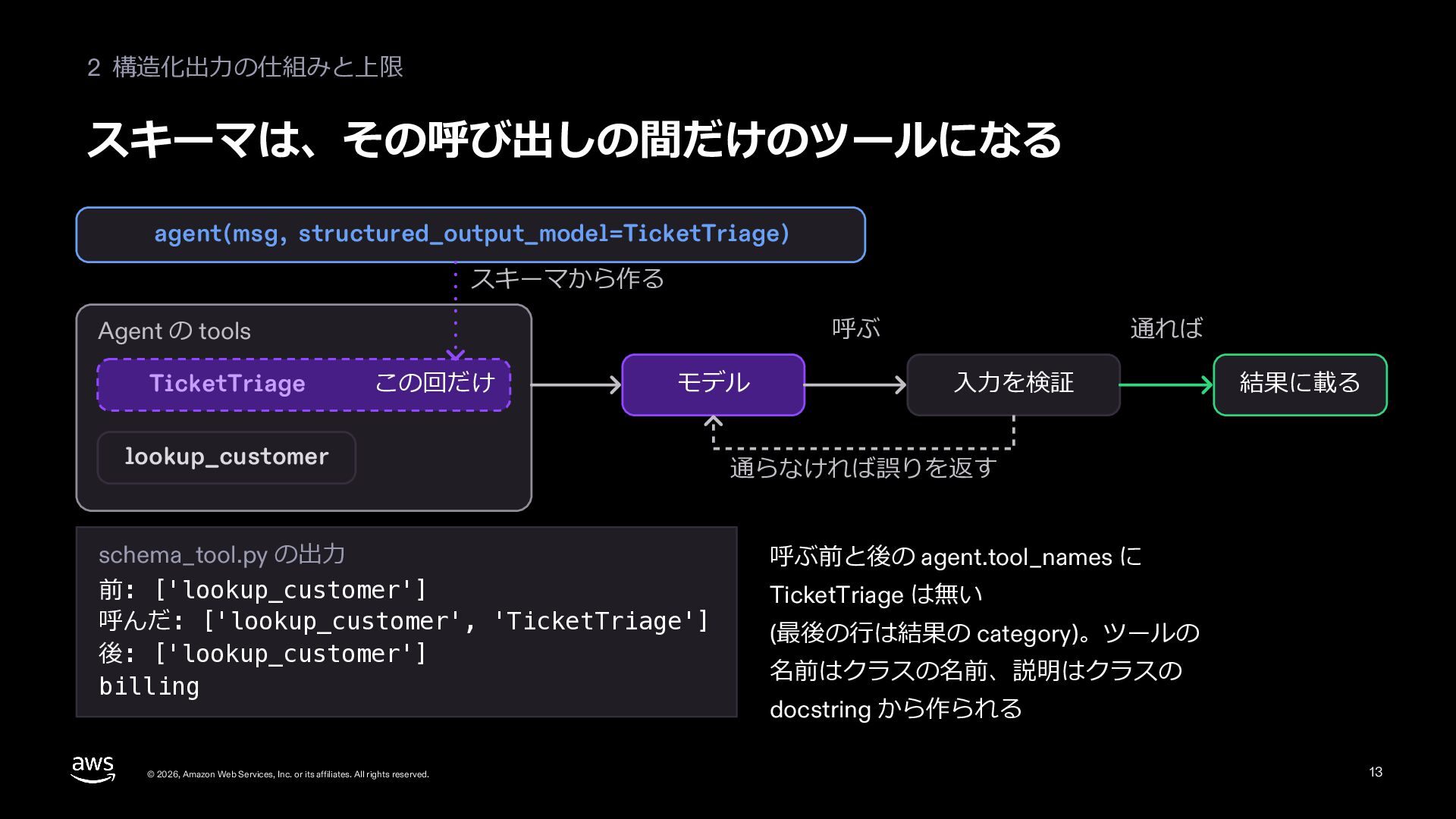
  12. 2 構造化出⼒の仕組みと上限 スキーマは、その呼び出しの間だけのツールになる agent(msg, structured_output_model=TicketTriage) スキーマから作る 呼ぶ Agent の tools

    TicketTriage この回だけ モデル lookup_customer schema_tool.py の出⼒ 前: ['lookup_customer'] 呼んだ: ['lookup_customer', 'TicketTriage'] 後: ['lookup_customer'] billing © 2026, Amazon Web Services, Inc. or its affiliates. All rights reserved. 通れば ⼊⼒を検証 結果に載る 通らなければ誤りを返す 呼ぶ前と後の agent.tool_names に TicketTriage は無い (最後の⾏は結果の category)。ツールの 名前はクラスの名前、説明はクラスの docstring から作られる 13
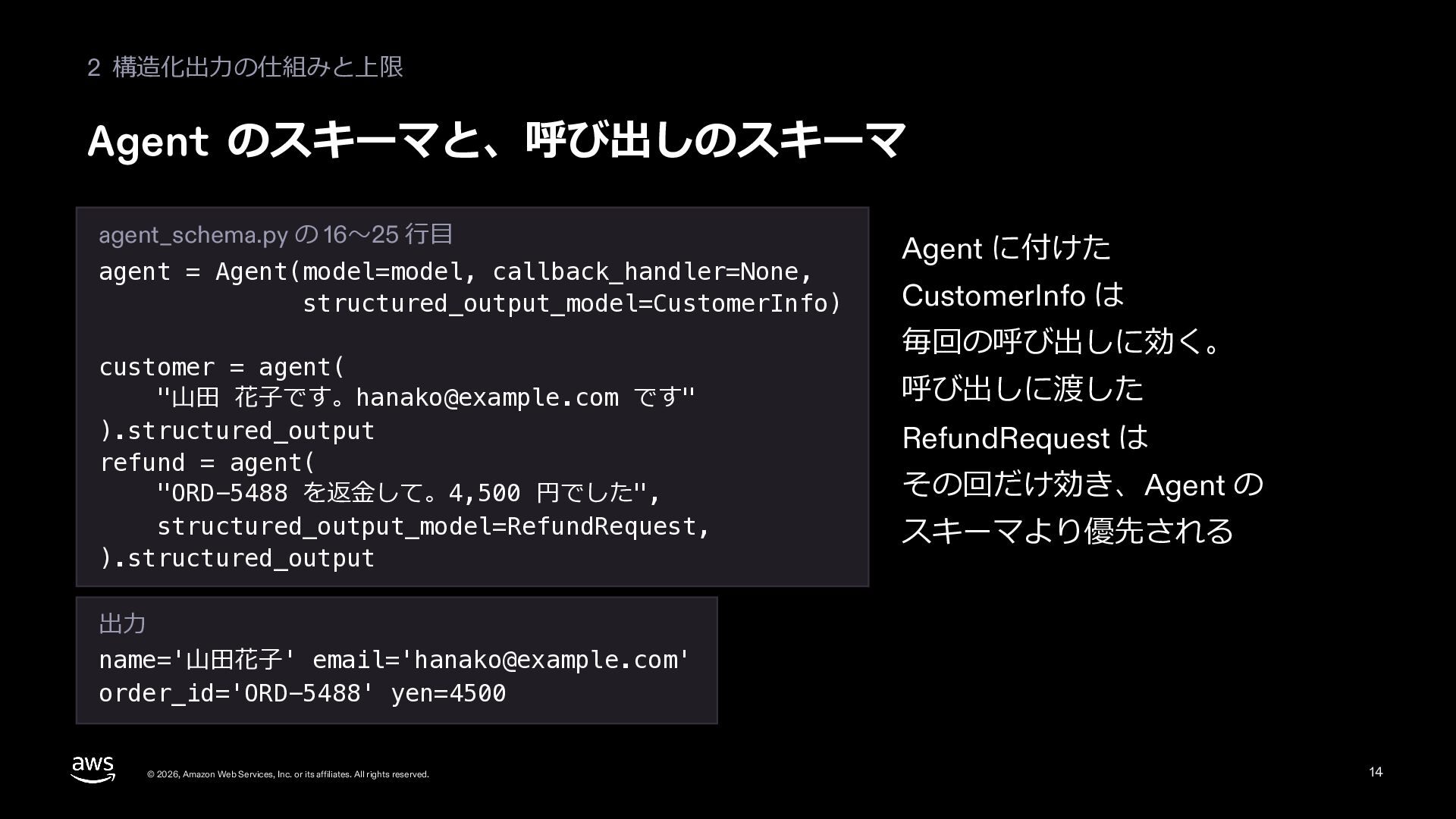
  13. 2 構造化出⼒の仕組みと上限 Agent のスキーマと、呼び出しのスキーマ agent_schema.py の 16〜25 ⾏⽬ agent =

    Agent(model=model, callback_handler=None, structured_output_model=CustomerInfo) customer = agent( "⼭⽥ 花⼦です。[email protected] です" ).structured_output refund = agent( "ORD-5488 を返⾦して。4,500 円でした", structured_output_model=RefundRequest, ).structured_output Agent に付けた CustomerInfo は 毎回の呼び出しに効く。 呼び出しに渡した RefundRequest は その回だけ効き、Agent の スキーマより優先される 出⼒ name='⼭⽥花⼦' email='[email protected]' order_id='ORD-5488' yen=4500 © 2026, Amazon Web Services, Inc. or its affiliates. All rights reserved. 14
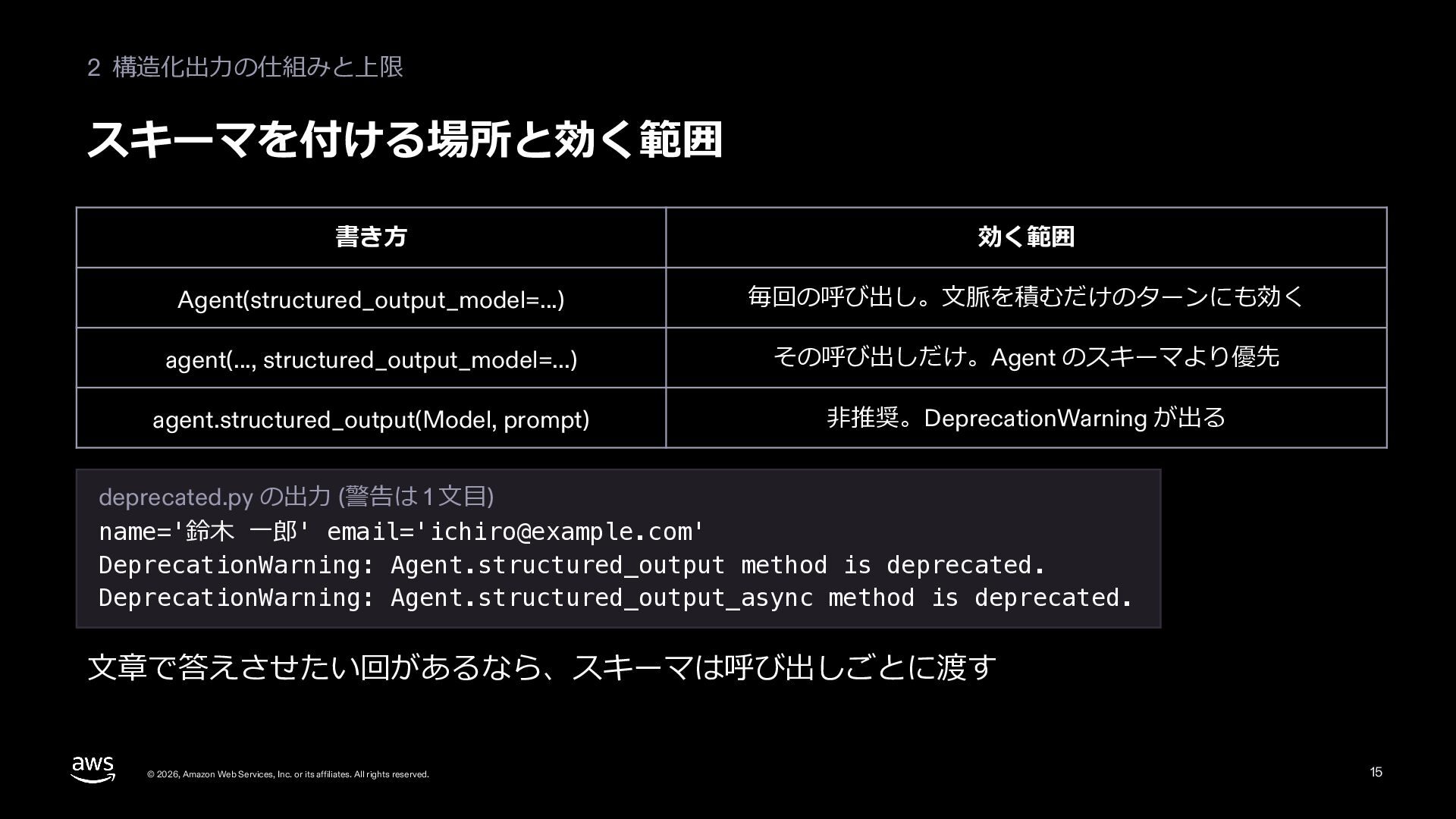
  14. 2 構造化出⼒の仕組みと上限 スキーマを付ける場所と効く範囲 書き⽅ 効く範囲 Agent(structured_output_model=...) 毎回の呼び出し。⽂脈を積むだけのターンにも効く agent(..., structured_output_model=...) その呼び出しだけ。Agent

    のスキーマより優先 agent.structured_output(Model, prompt) ⾮推奨。DeprecationWarning が出る deprecated.py の出⼒ (警告は 1 ⽂⽬) name='鈴⽊ ⼀郎' email='[email protected]' DeprecationWarning: Agent.structured_output method is deprecated. DeprecationWarning: Agent.structured_output_async method is deprecated. ⽂章で答えさせたい回があるなら、スキーマは呼び出しごとに渡す © 2026, Amazon Web Services, Inc. or its affiliates. All rights reserved. 15
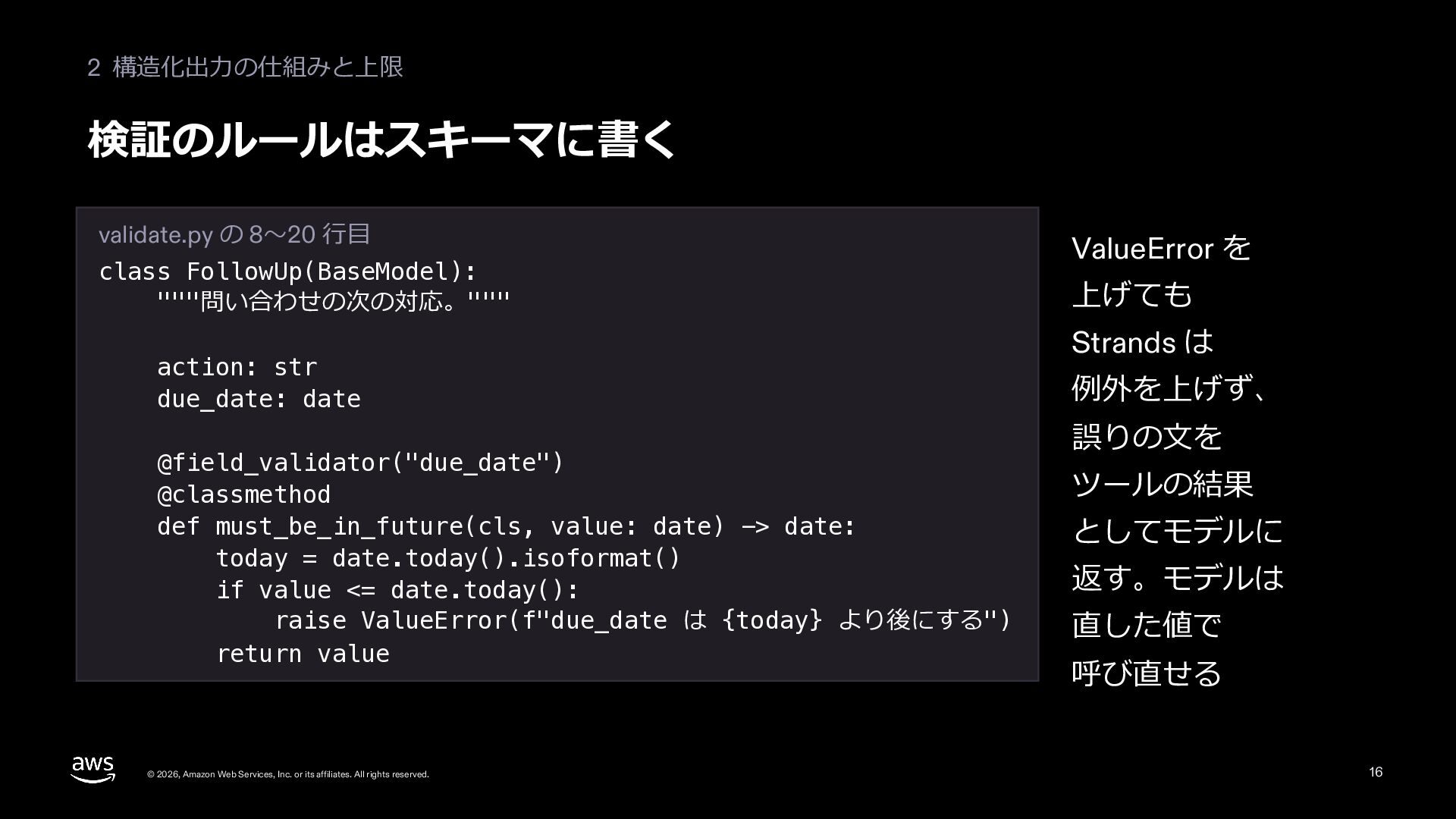
  15. 2 構造化出⼒の仕組みと上限 検証のルールはスキーマに書く validate.py の 8〜20 ⾏⽬ class FollowUp(BaseModel): """問い合わせの次の対応。"""

    action: str due_date: date @field_validator("due_date") @classmethod def must_be_in_future(cls, value: date) -> date: today = date.today().isoformat() if value <= date.today(): raise ValueError(f"due_date は {today} より後にする") return value © 2026, Amazon Web Services, Inc. or its affiliates. All rights reserved. ValueError を 上げても Strands は 例外を上げず、 誤りの⽂を ツールの結果 としてモデルに 返す。モデルは 直した値で 呼び直せる 16
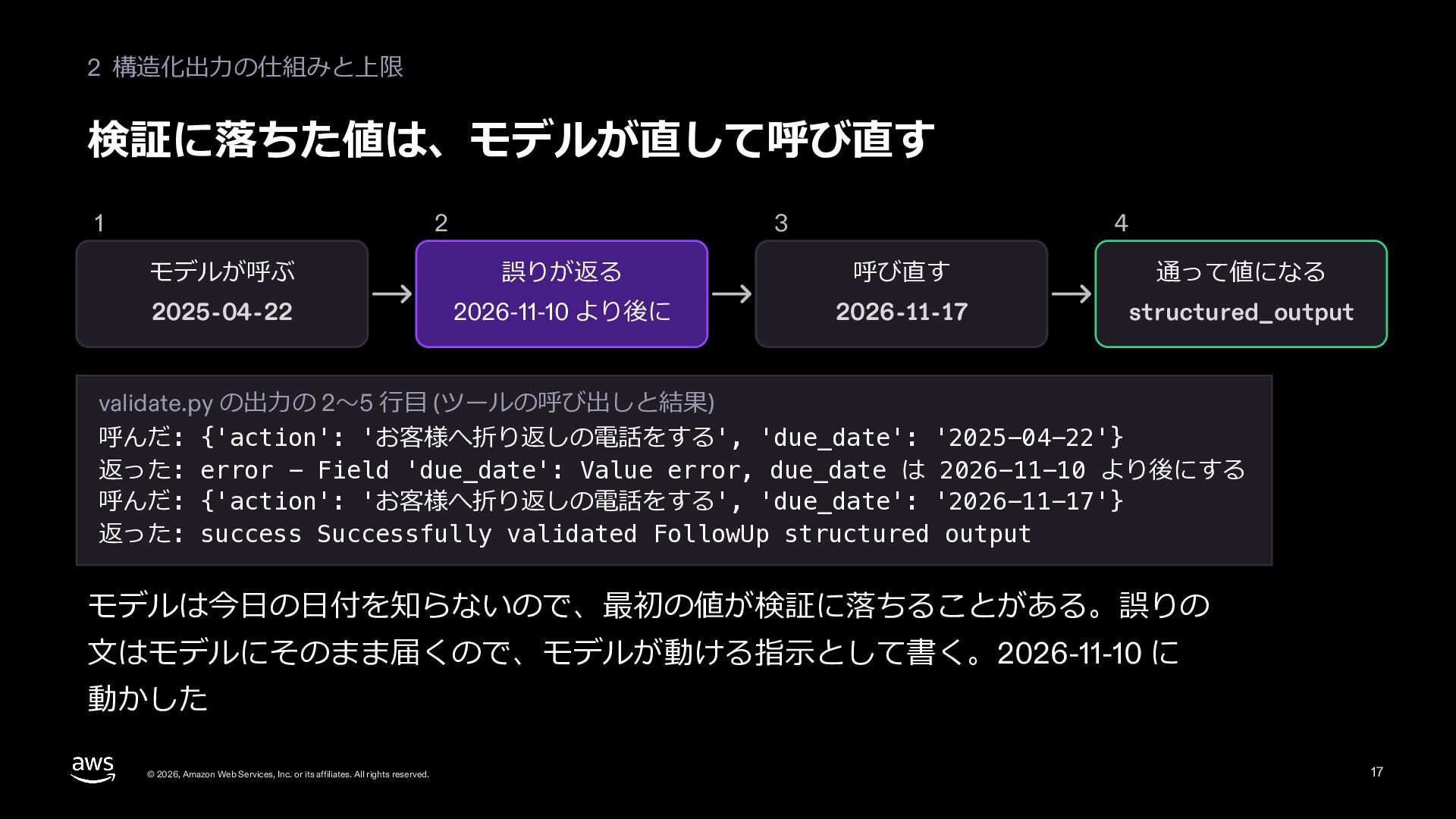
  16. 2 構造化出⼒の仕組みと上限 検証に落ちた値は、モデルが直して呼び直す 1 2 3 4 モデルが呼ぶ 誤りが返る 呼び直す

    通って値になる 2025-04-22 2026-11-10 より後に 2026-11-17 structured_output validate.py の出⼒の 2〜5 ⾏⽬ (ツールの呼び出しと結果) 呼んだ: {'action': 'お客様へ折り返しの電話をする', 'due_date': '2025-04-22'} 返った: error - Field 'due_date': Value error, due_date は 2026-11-10 より後にする 呼んだ: {'action': 'お客様へ折り返しの電話をする', 'due_date': '2026-11-17'} 返った: success Successfully validated FollowUp structured output モデルは今⽇の⽇付を知らないので、最初の値が検証に落ちることがある。誤りの ⽂はモデルにそのまま届くので、モデルが動ける指⽰として書く。2026-11-10 に 動かした © 2026, Amazon Web Services, Inc. or its affiliates. All rights reserved. 17
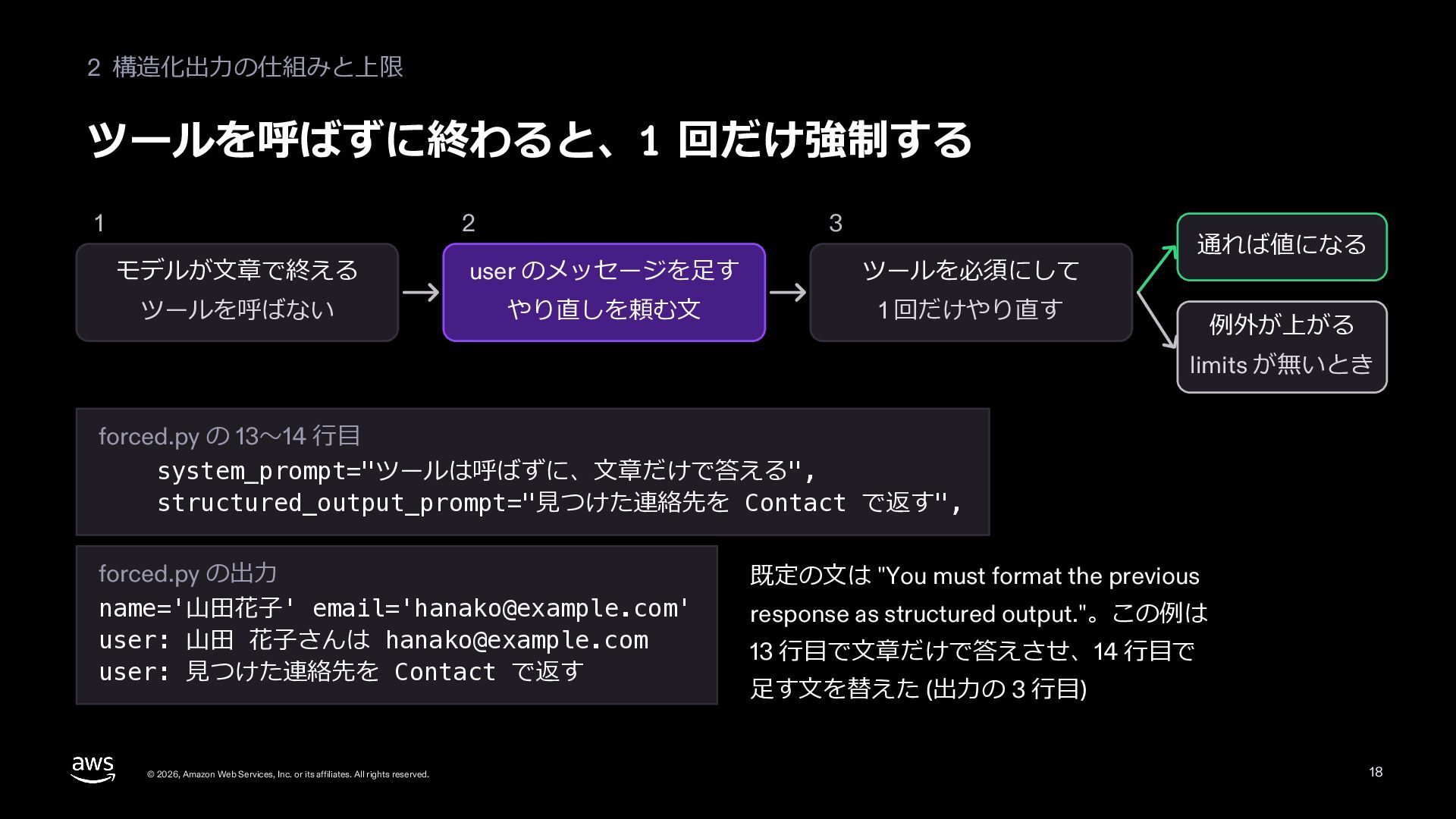
  17. 2 構造化出⼒の仕組みと上限 ツールを呼ばずに終わると、1 回だけ強制する 1 2 3 モデルが⽂章で終える user のメッセージを⾜す

    ツールを必須にして ツールを呼ばない やり直しを頼む⽂ 1 回だけやり直す 通れば値になる 例外が上がる limits が無いとき forced.py の 13〜14 ⾏⽬ system_prompt="ツールは呼ばずに、⽂章だけで答える", structured_output_prompt="⾒つけた連絡先を Contact で返す", forced.py の出⼒ name='⼭⽥花⼦' email='[email protected]' user: ⼭⽥ 花⼦さんは [email protected] user: ⾒つけた連絡先を Contact で返す © 2026, Amazon Web Services, Inc. or its affiliates. All rights reserved. 既定の⽂は "You must format the previous response as structured output."。この例は 13 ⾏⽬で⽂章だけで答えさせ、14 ⾏⽬で ⾜す⽂を替えた (出⼒の 3 ⾏⽬) 18
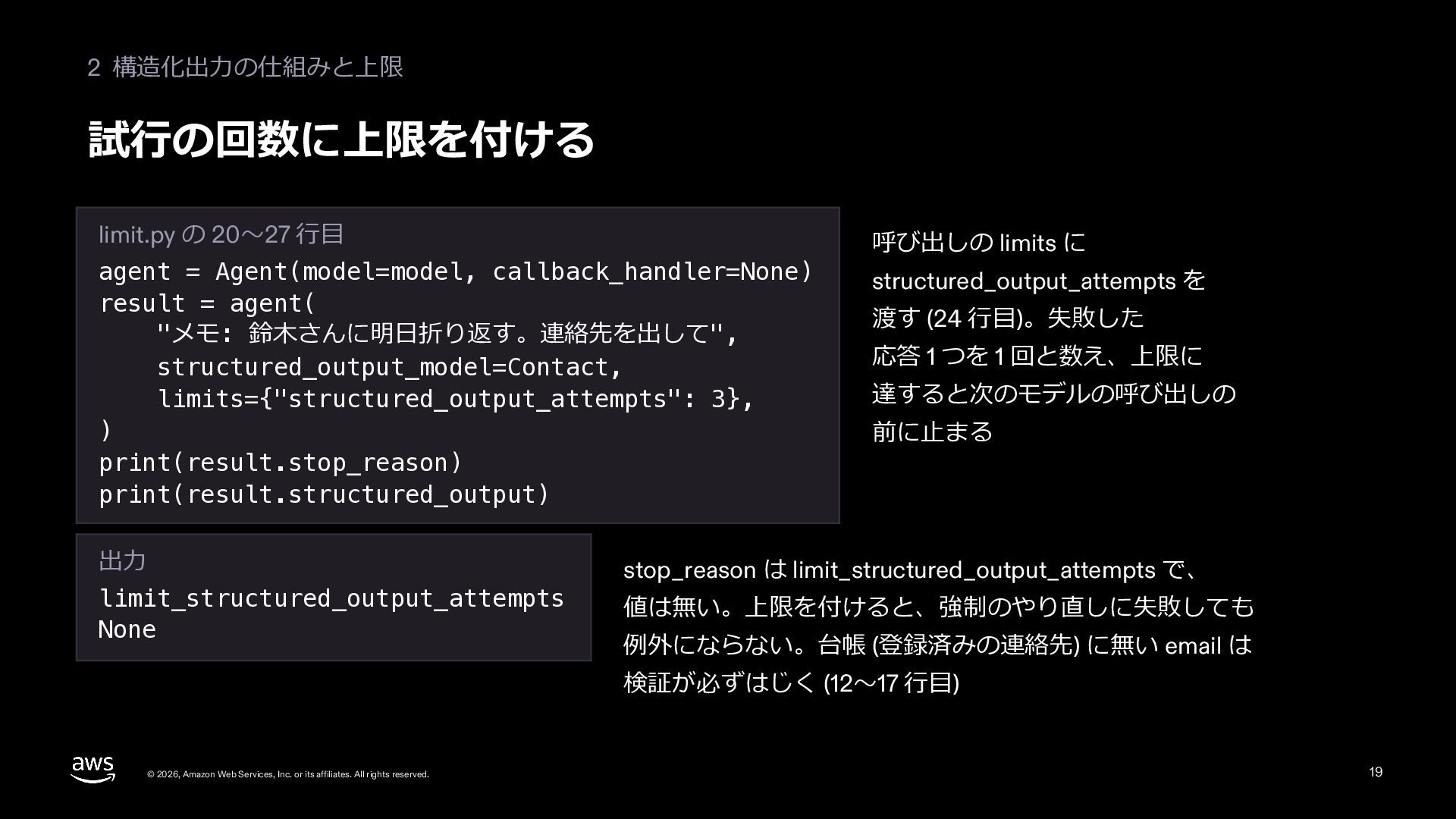
  18. 2 構造化出⼒の仕組みと上限 試⾏の回数に上限を付ける limit.py の 20〜27 ⾏⽬ agent = Agent(model=model,

    callback_handler=None) result = agent( "メモ: 鈴⽊さんに明⽇折り返す。連絡先を出して", structured_output_model=Contact, limits={"structured_output_attempts": 3}, ) print(result.stop_reason) print(result.structured_output) 出⼒ limit_structured_output_attempts None 呼び出しの limits に structured_output_attempts を 渡す (24 ⾏⽬)。失敗した 応答 1 つを 1 回と数え、上限に 達すると次のモデルの呼び出しの 前に⽌まる stop_reason は limit_structured_output_attempts で、 値は無い。上限を付けると、強制のやり直しに失敗しても 例外にならない。台帳 (登録済みの連絡先) に無い email は 検証が必ずはじく (12〜17 ⾏⽬) © 2026, Amazon Web Services, Inc. or its affiliates. All rights reserved. 19
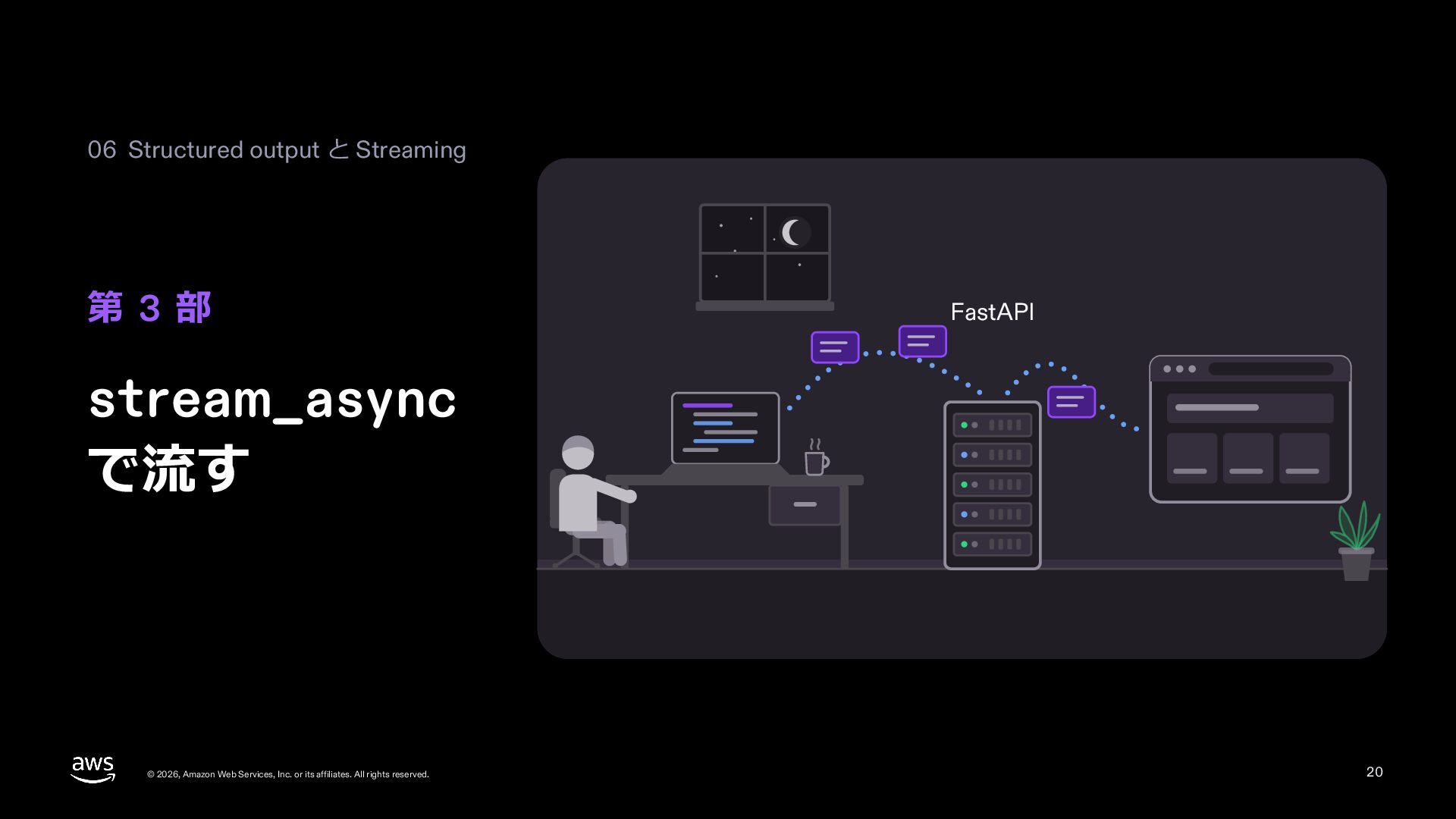
  19. 06 Structured output と Streaming 第 3 部 FastAPI stream_async

    で流す © 2026, Amazon Web Services, Inc. or its affiliates. All rights reserved. 20
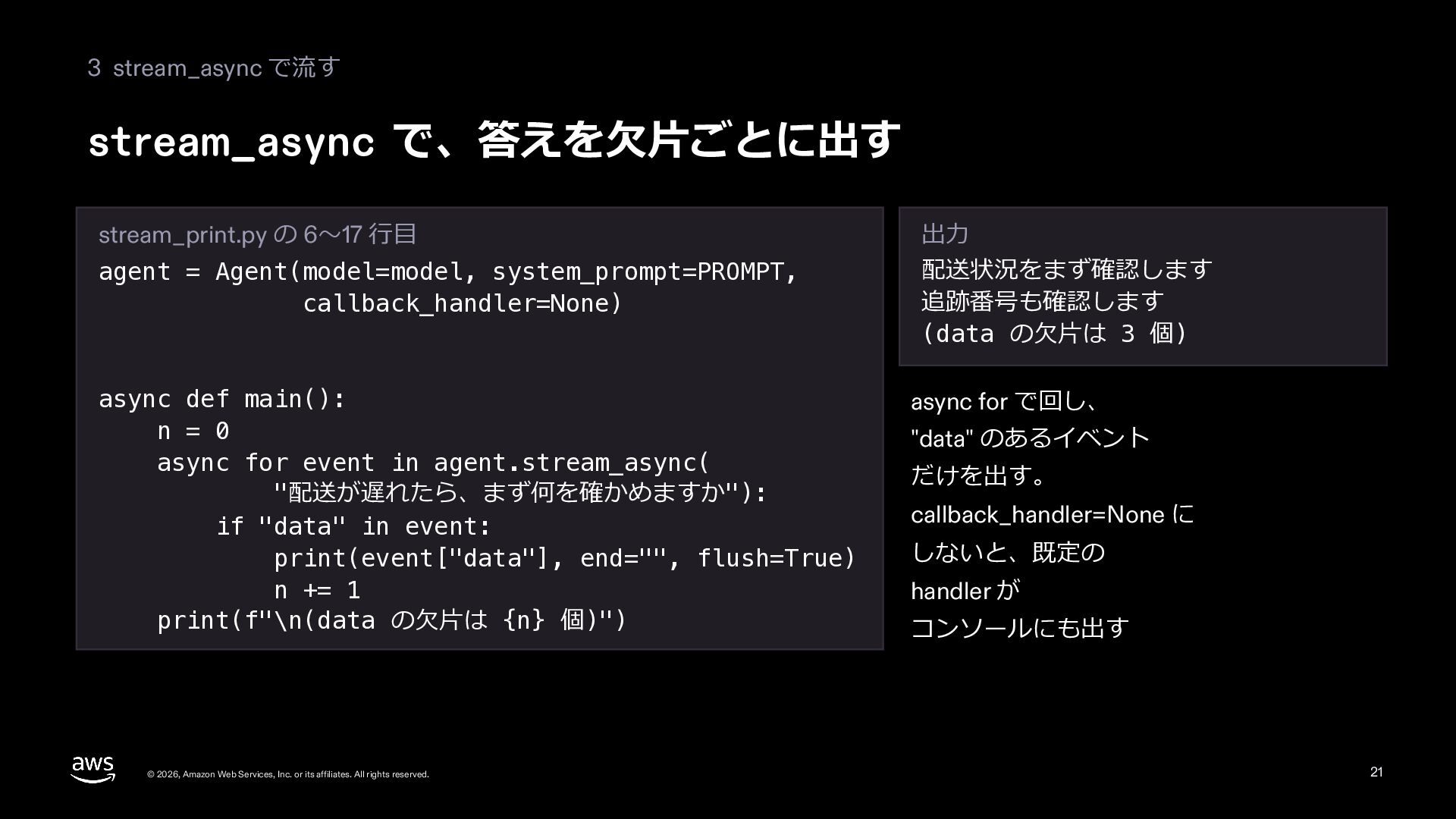
  20. 3 stream_async で流す stream_async で、答えを⽋⽚ごとに出す stream_print.py の 6〜17 ⾏⽬ agent

    = Agent(model=model, system_prompt=PROMPT, callback_handler=None) async def main(): n = 0 async for event in agent.stream_async( "配送が遅れたら、まず何を確かめますか"): if "data" in event: print(event["data"], end="", flush=True) n += 1 print(f"\n(data の⽋⽚は {n} 個)") © 2026, Amazon Web Services, Inc. or its affiliates. All rights reserved. 出⼒ 配送状況をまず確認します 追跡番号も確認します (data の⽋⽚は 3 個) async for で回し、 "data" のあるイベント だけを出す。 callback_handler=None に しないと、既定の handler が コンソールにも出す 21
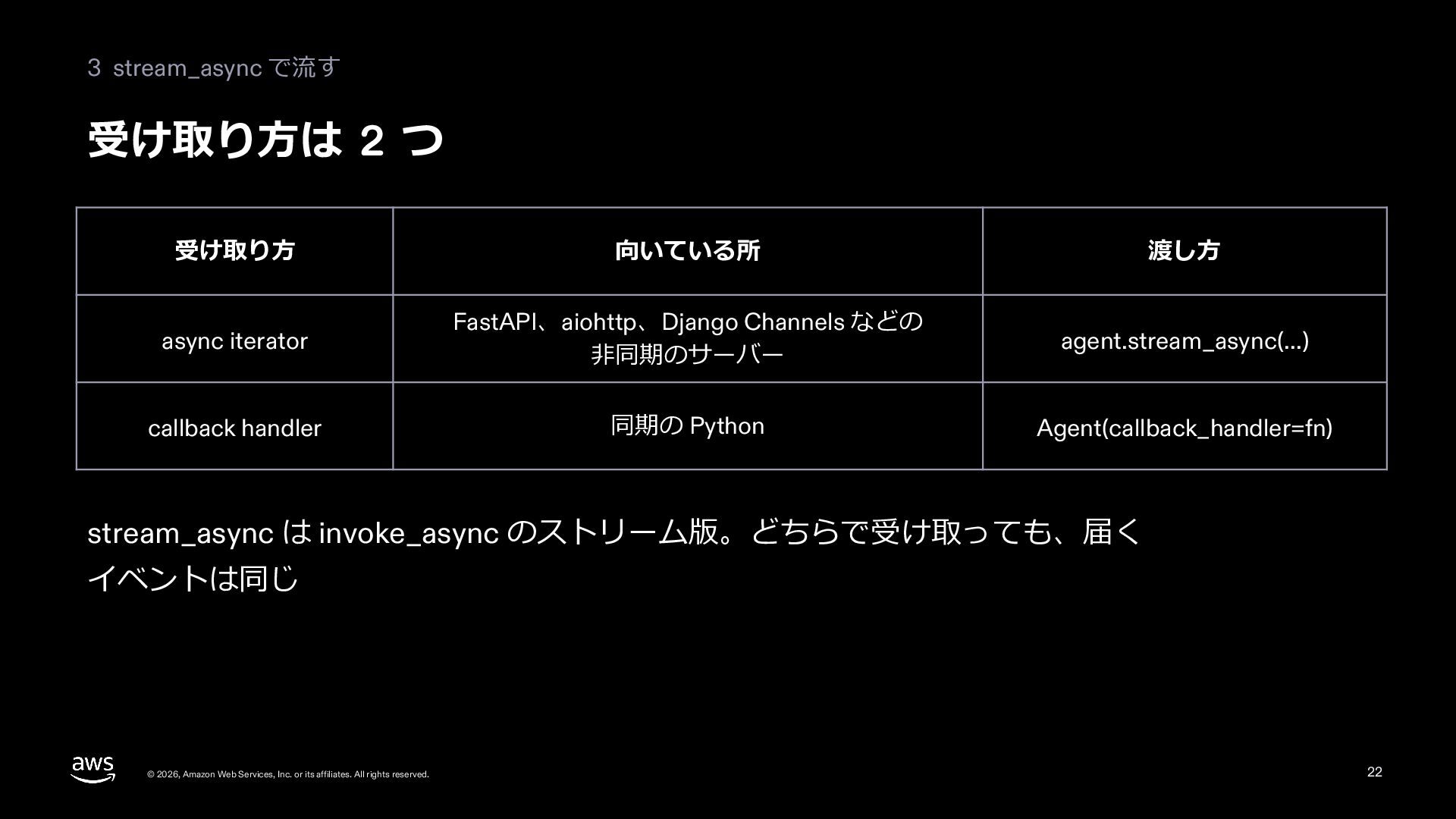
  21. 3 stream_async で流す 受け取り⽅は 2 つ 受け取り⽅ 向いている所 渡し⽅ async

    iterator FastAPI、aiohttp、Django Channels などの ⾮同期のサーバー agent.stream_async(...) callback handler 同期の Python Agent(callback_handler=fn) stream_async は invoke_async のストリーム版。どちらで受け取っても、届く イベントは同じ © 2026, Amazon Web Services, Inc. or its affiliates. All rights reserved. 22
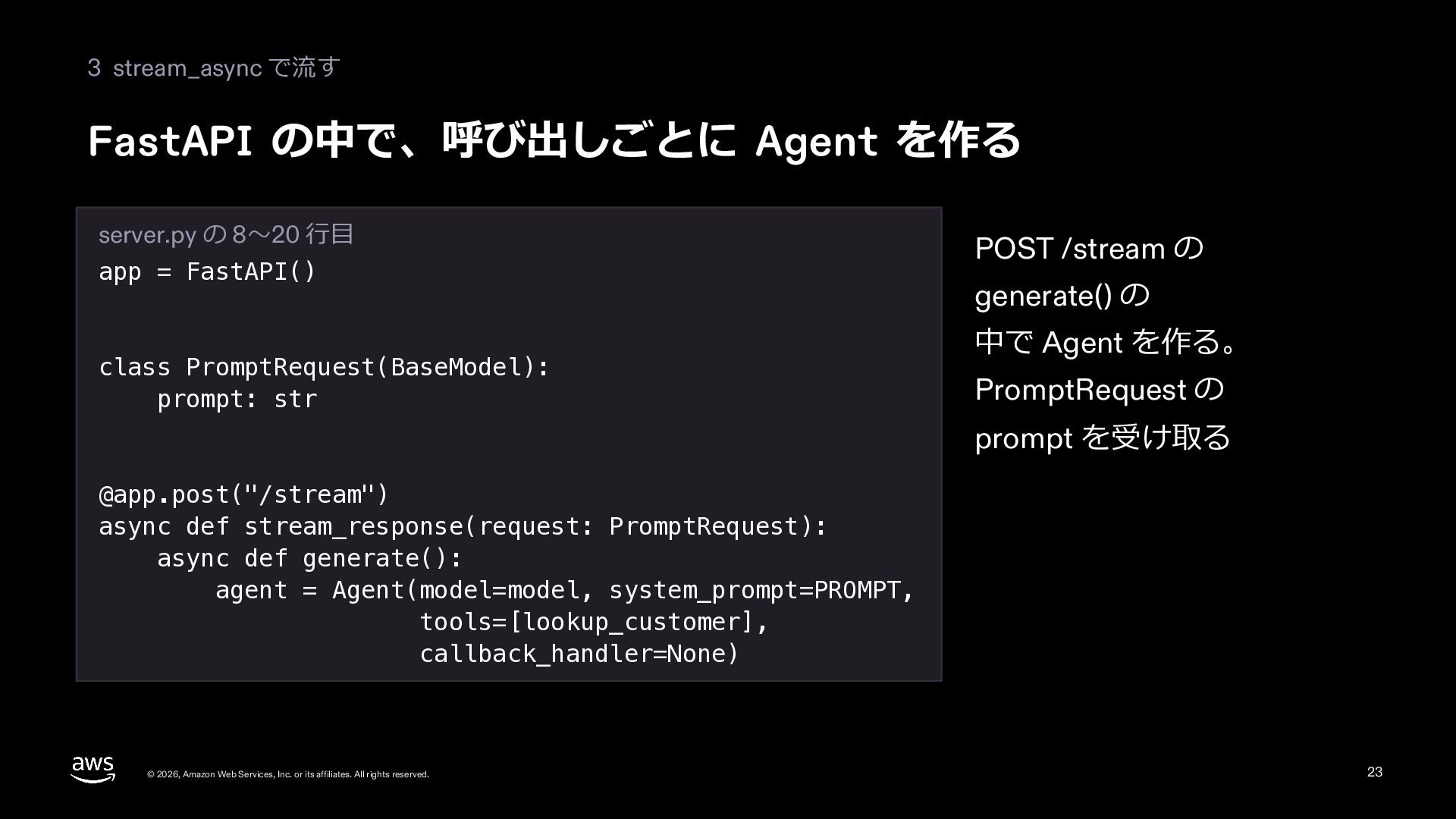
  22. 3 stream_async で流す FastAPI の中で、呼び出しごとに Agent を作る server.py の 8〜20

    ⾏⽬ app = FastAPI() class PromptRequest(BaseModel): prompt: str POST /stream の generate() の 中で Agent を作る。 PromptRequest の prompt を受け取る @app.post("/stream") async def stream_response(request: PromptRequest): async def generate(): agent = Agent(model=model, system_prompt=PROMPT, tools=[lookup_customer], callback_handler=None) © 2026, Amazon Web Services, Inc. or its affiliates. All rights reserved. 23
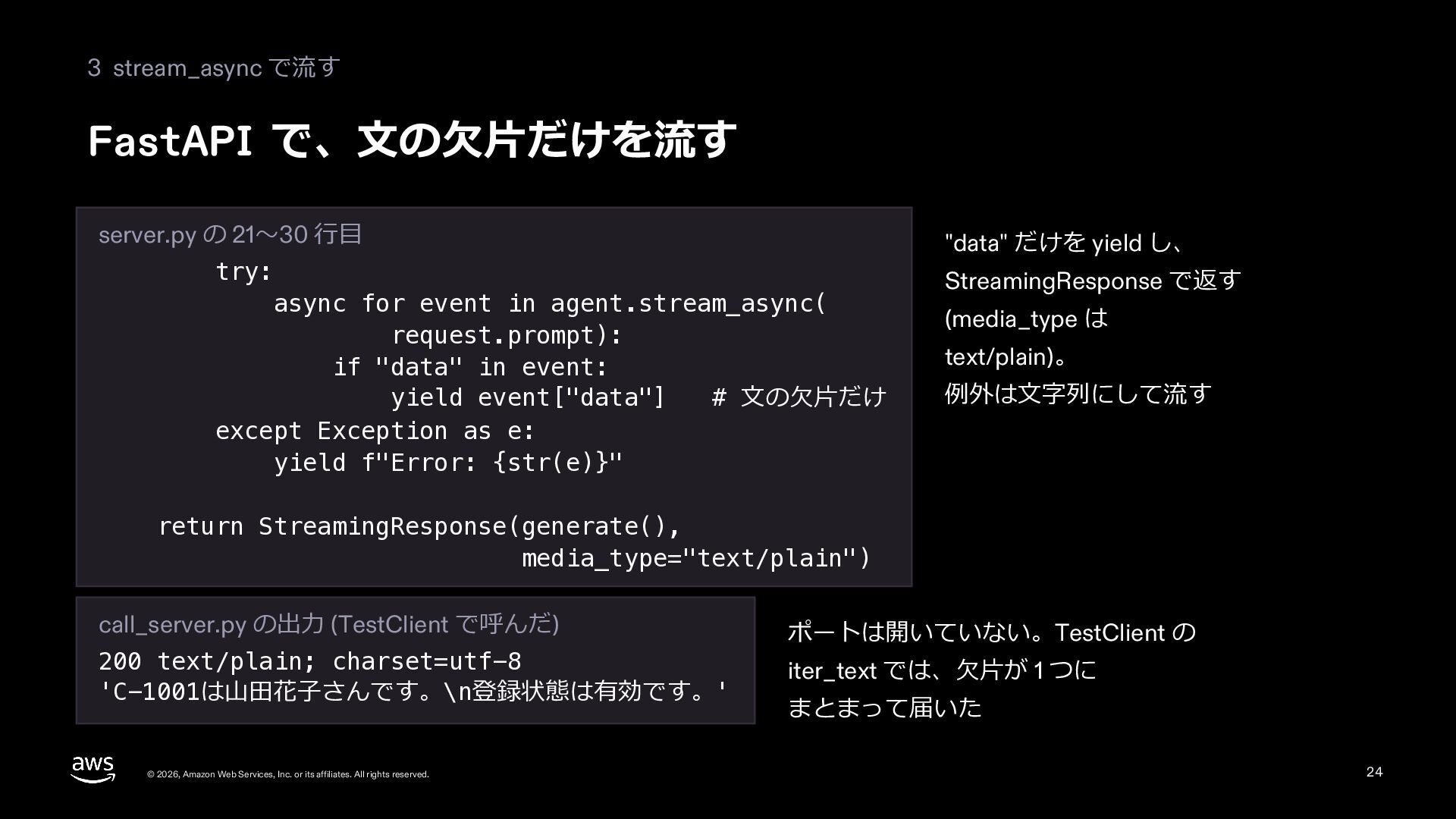
  23. 3 stream_async で流す FastAPI で、⽂の⽋⽚だけを流す server.py の 21〜30 ⾏⽬ try:

    async for event in agent.stream_async( request.prompt): if "data" in event: yield event["data"] # ⽂の⽋⽚だけ except Exception as e: yield f"Error: {str(e)}" "data" だけを yield し、 StreamingResponse で返す (media_type は text/plain)。 例外は⽂字列にして流す return StreamingResponse(generate(), media_type="text/plain") call_server.py の出⼒ (TestClient で呼んだ) 200 text/plain; charset=utf-8 'C-1001は⼭⽥花⼦さんです。\n登録状態は有効です。' © 2026, Amazon Web Services, Inc. or its affiliates. All rights reserved. ポートは開いていない。TestClient の iter_text では、⽋⽚が 1 つに まとまって届いた 24
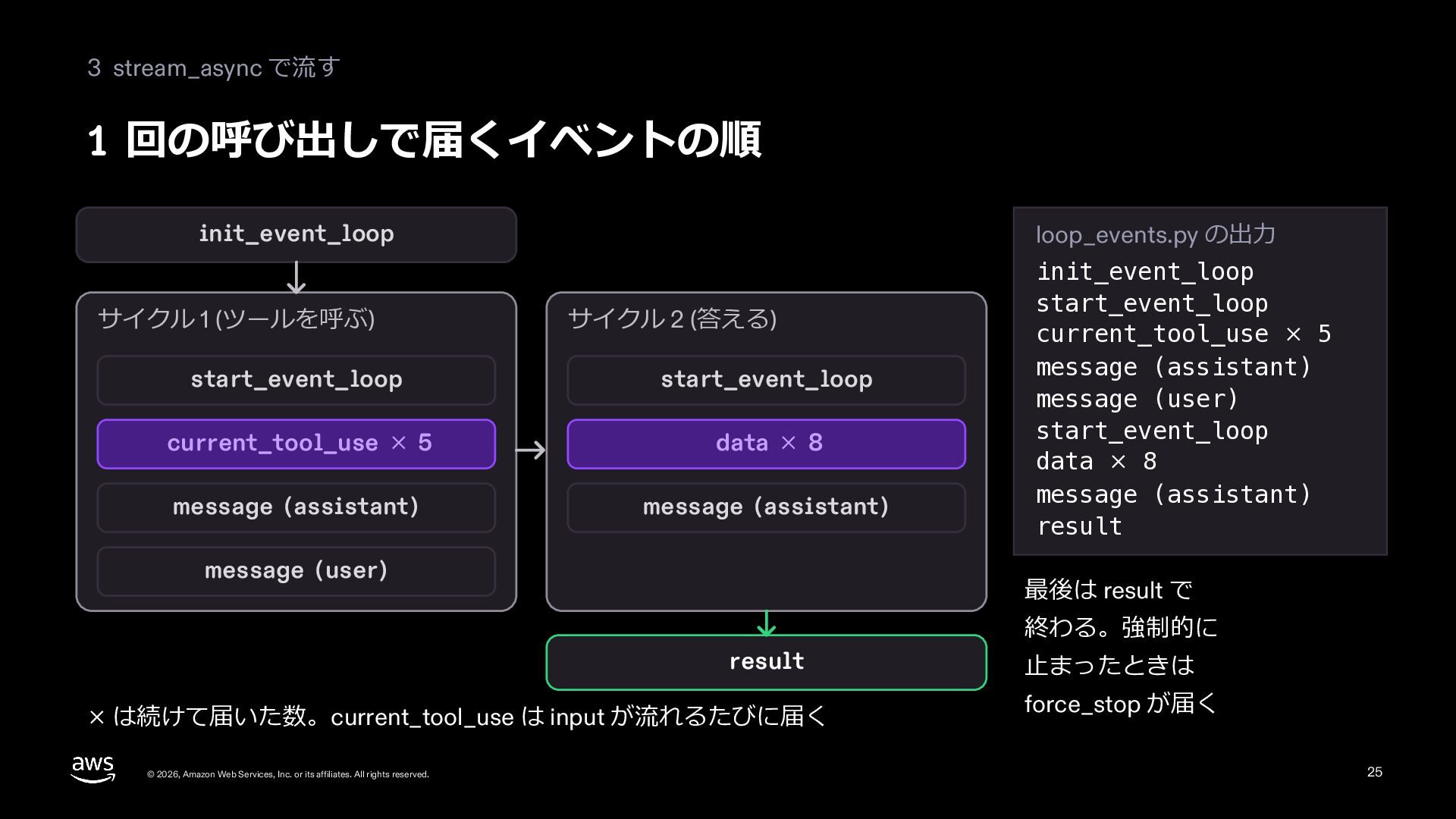
  24. 3 stream_async で流す 1 回の呼び出しで届くイベントの順 loop_events.py の出⼒ init_event_loop サイクル 1

    (ツールを呼ぶ) サイクル 2 (答える) start_event_loop start_event_loop current_tool_use × 5 data × 8 message (assistant) message (assistant) message (user) 最後は result で result × は続けて届いた数。current_tool_use は input が流れるたびに届く © 2026, Amazon Web Services, Inc. or its affiliates. All rights reserved. init_event_loop start_event_loop current_tool_use × 5 message (assistant) message (user) start_event_loop data × 8 message (assistant) result 終わる。強制的に ⽌まったときは force_stop が届く 25
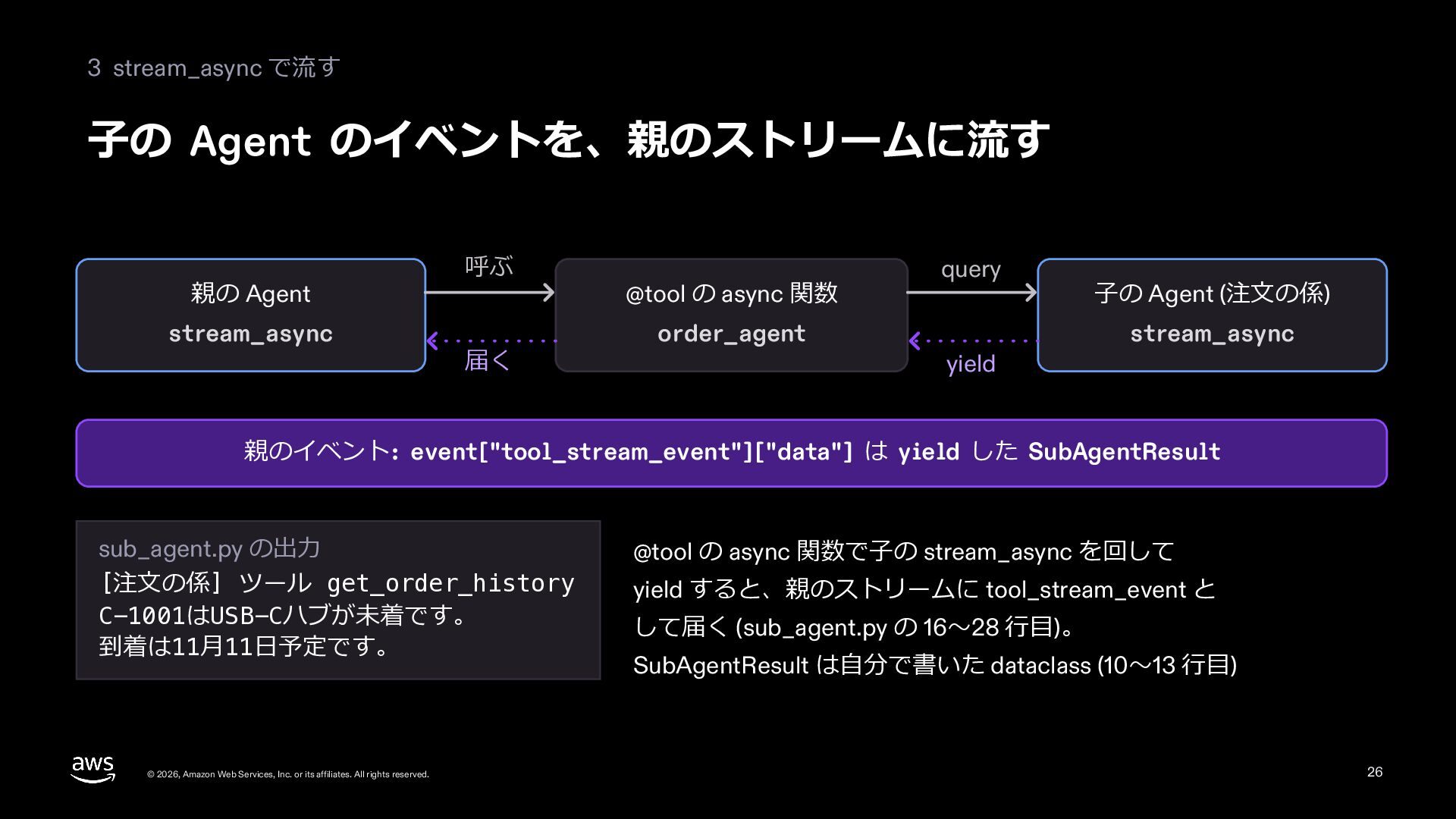
  25. 3 stream_async で流す ⼦の Agent のイベントを、親のストリームに流す 親の Agent stream_async 呼ぶ

    届く @tool の async 関数 order_agent query yield ⼦の Agent (注⽂の係) stream_async 親のイベント: event["tool_stream_event"]["data"] は yield した SubAgentResult sub_agent.py の出⼒ [注⽂の係] ツール get_order_history C-1001はUSB-Cハブが未着です。 到着は11⽉11⽇予定です。 © 2026, Amazon Web Services, Inc. or its affiliates. All rights reserved. @tool の async 関数で⼦の stream_async を回して yield すると、親のストリームに tool_stream_event と して届く (sub_agent.py の 16〜28 ⾏⽬)。 SubAgentResult は⾃分で書いた dataclass (10〜13 ⾏⽬) 26
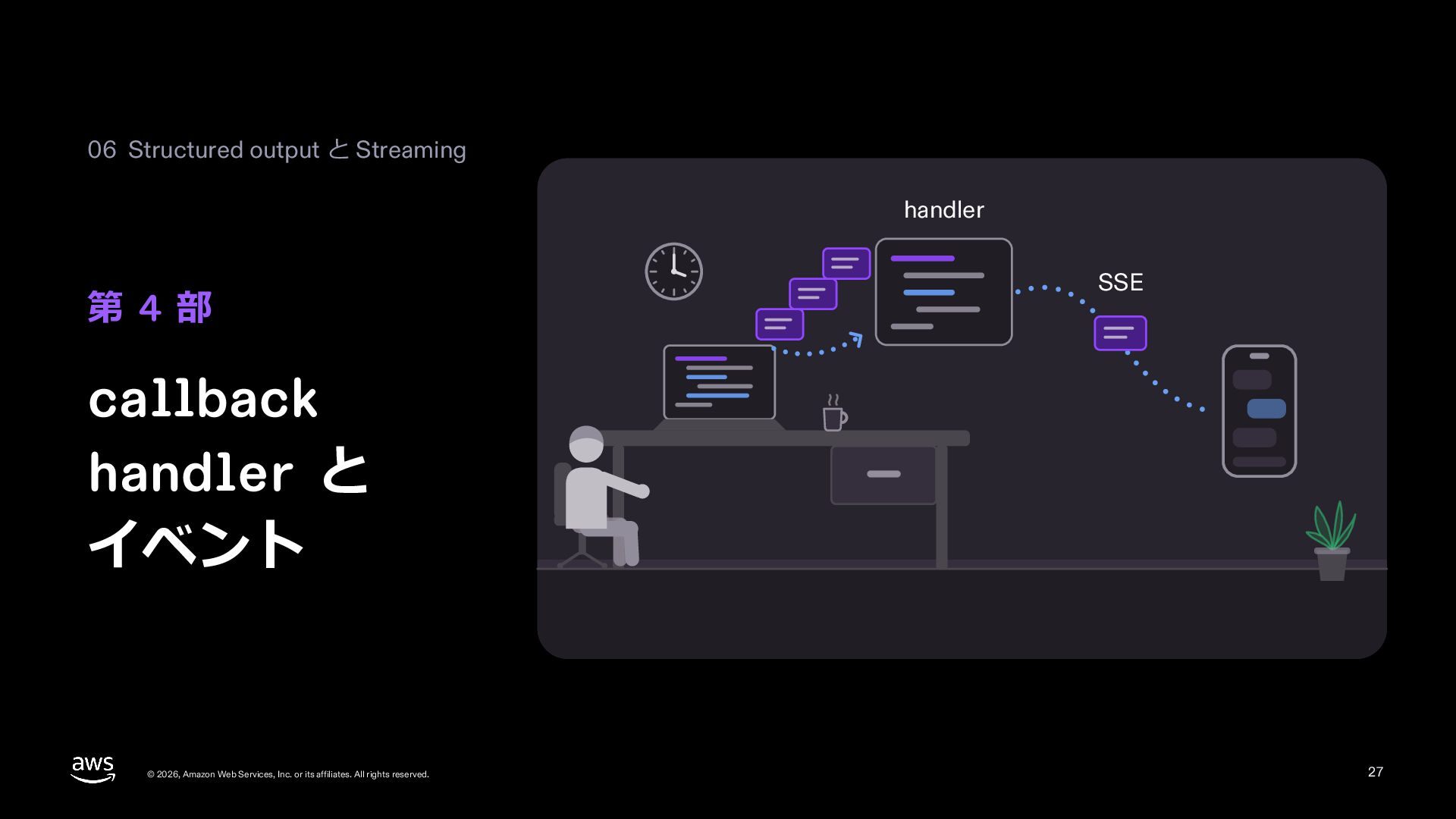
  26. 06 Structured output と Streaming handler 第 4 部 SSE

    callback handler と イベント © 2026, Amazon Web Services, Inc. or its affiliates. All rights reserved. 27
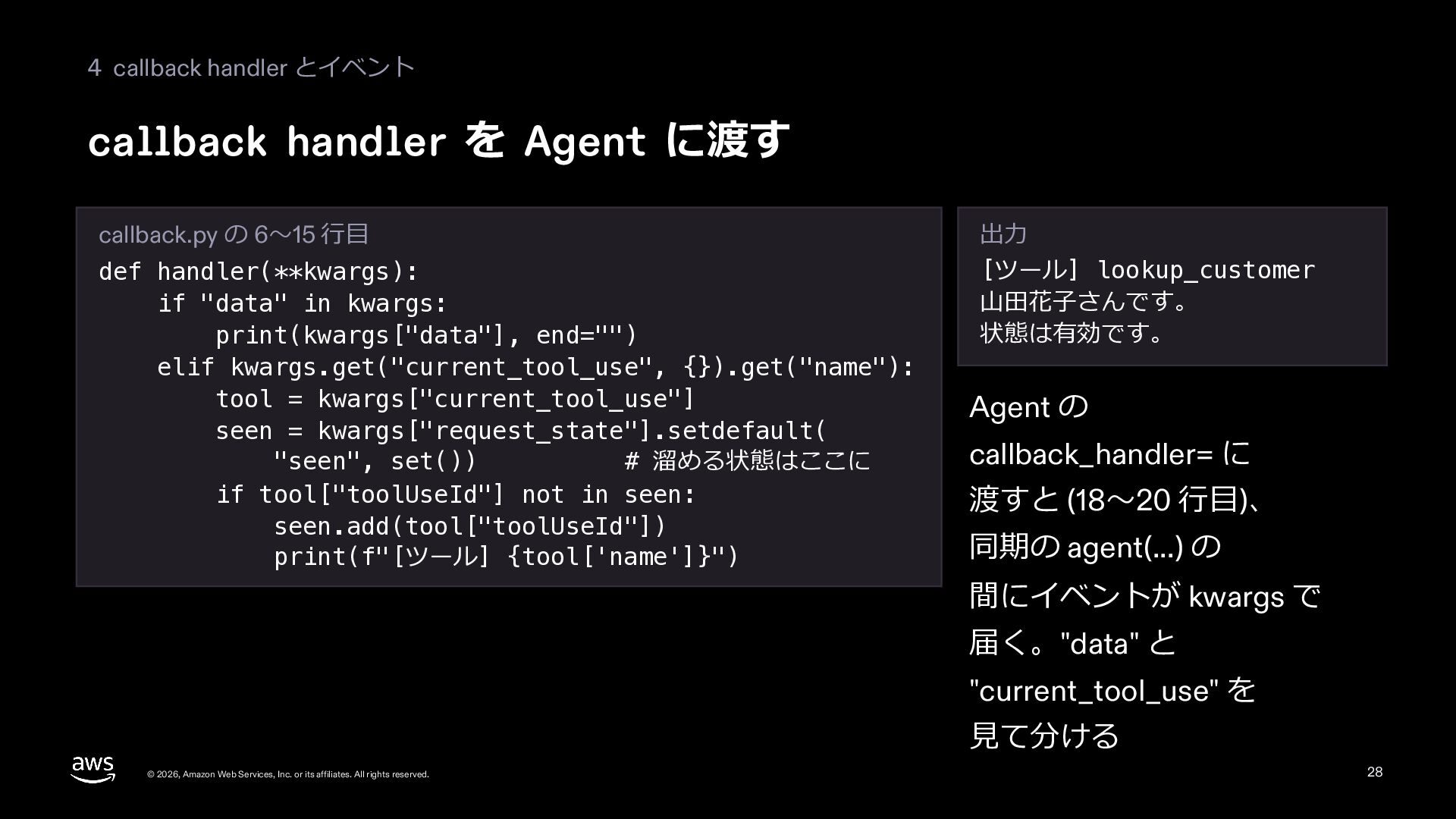
  27. 4 callback handler とイベント callback handler を Agent に渡す callback.py

    の 6〜15 ⾏⽬ def handler(**kwargs): if "data" in kwargs: print(kwargs["data"], end="") elif kwargs.get("current_tool_use", {}).get("name"): tool = kwargs["current_tool_use"] seen = kwargs["request_state"].setdefault( "seen", set()) # 溜める状態はここに if tool["toolUseId"] not in seen: seen.add(tool["toolUseId"]) print(f"[ツール] {tool['name']}") 出⼒ [ツール] lookup_customer ⼭⽥花⼦さんです。 状態は有効です。 Agent の callback_handler= に 渡すと (18〜20 ⾏⽬)、 同期の agent(...) の 間にイベントが kwargs で 届く。"data" と "current_tool_use" を ⾒て分ける © 2026, Amazon Web Services, Inc. or its affiliates. All rights reserved. 28
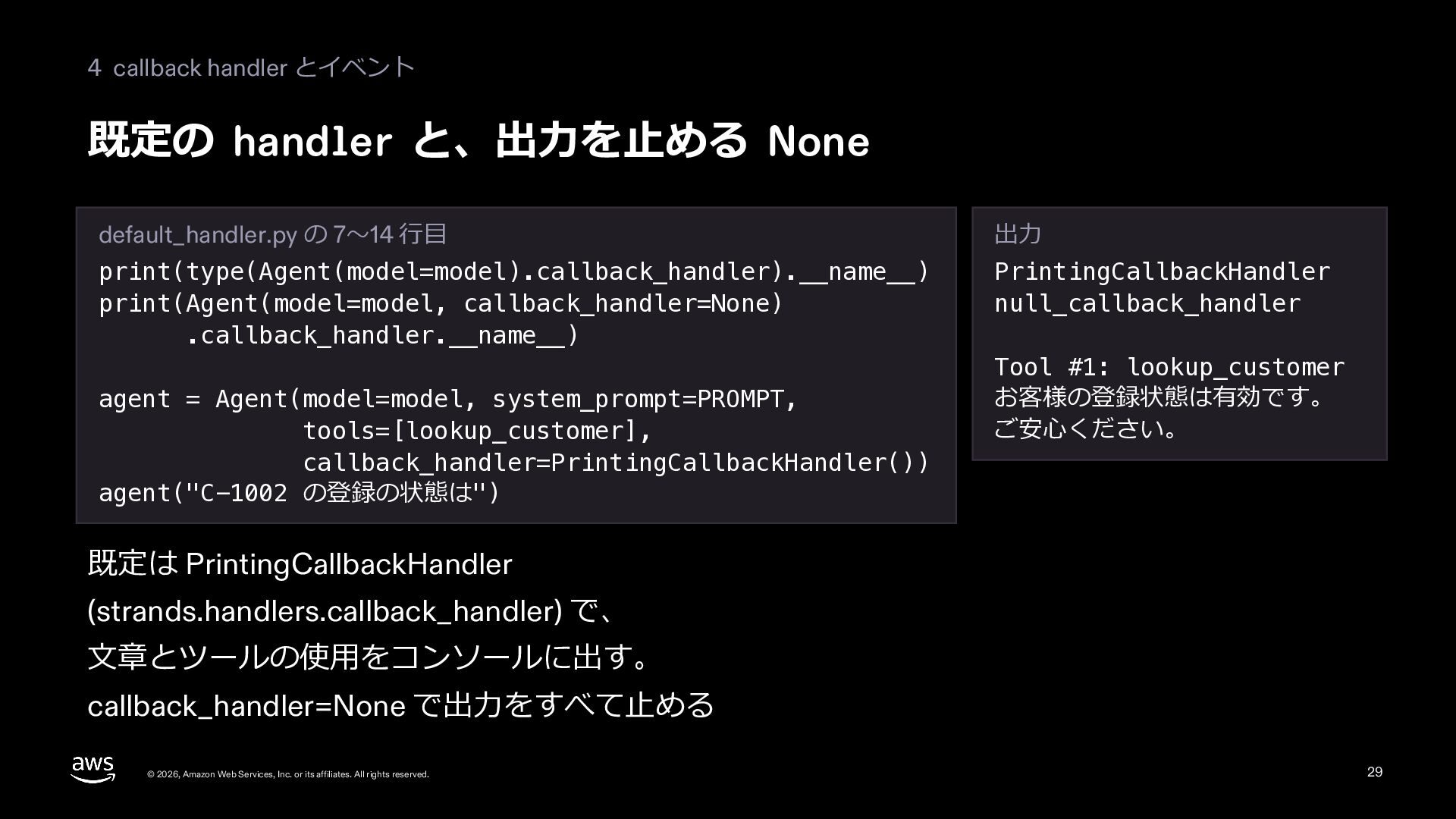
  28. 4 callback handler とイベント 既定の handler と、出⼒を⽌める None default_handler.py の

    7〜14 ⾏⽬ 出⼒ print(type(Agent(model=model).callback_handler).__name__) print(Agent(model=model, callback_handler=None) .callback_handler.__name__) PrintingCallbackHandler null_callback_handler agent = Agent(model=model, system_prompt=PROMPT, tools=[lookup_customer], callback_handler=PrintingCallbackHandler()) agent("C-1002 の登録の状態は") Tool #1: lookup_customer お客様の登録状態は有効です。 ご安⼼ください。 既定は PrintingCallbackHandler (strands.handlers.callback_handler) で、 ⽂章とツールの使⽤をコンソールに出す。 callback_handler=None で出⼒をすべて⽌める © 2026, Amazon Web Services, Inc. or its affiliates. All rights reserved. 29
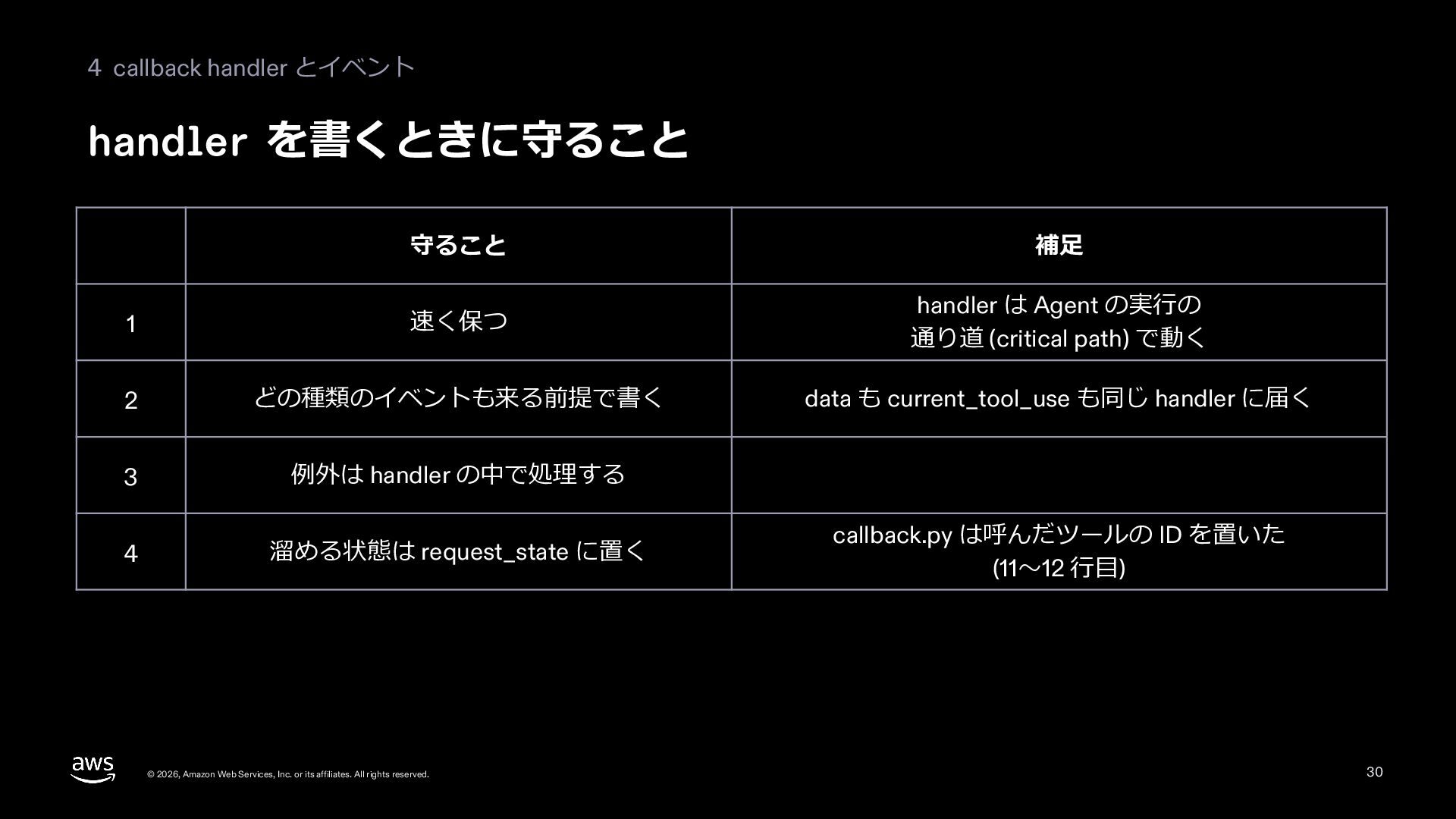
  29. 4 callback handler とイベント handler を書くときに守ること 守ること 補⾜ 1 速く保つ

    handler は Agent の実⾏の 通り道 (critical path) で動く 2 どの種類のイベントも来る前提で書く data も current_tool_use も同じ handler に届く 3 例外は handler の中で処理する 4 溜める状態は request_state に置く © 2026, Amazon Web Services, Inc. or its affiliates. All rights reserved. callback.py は呼んだツールの ID を置いた (11〜12 ⾏⽬) 30
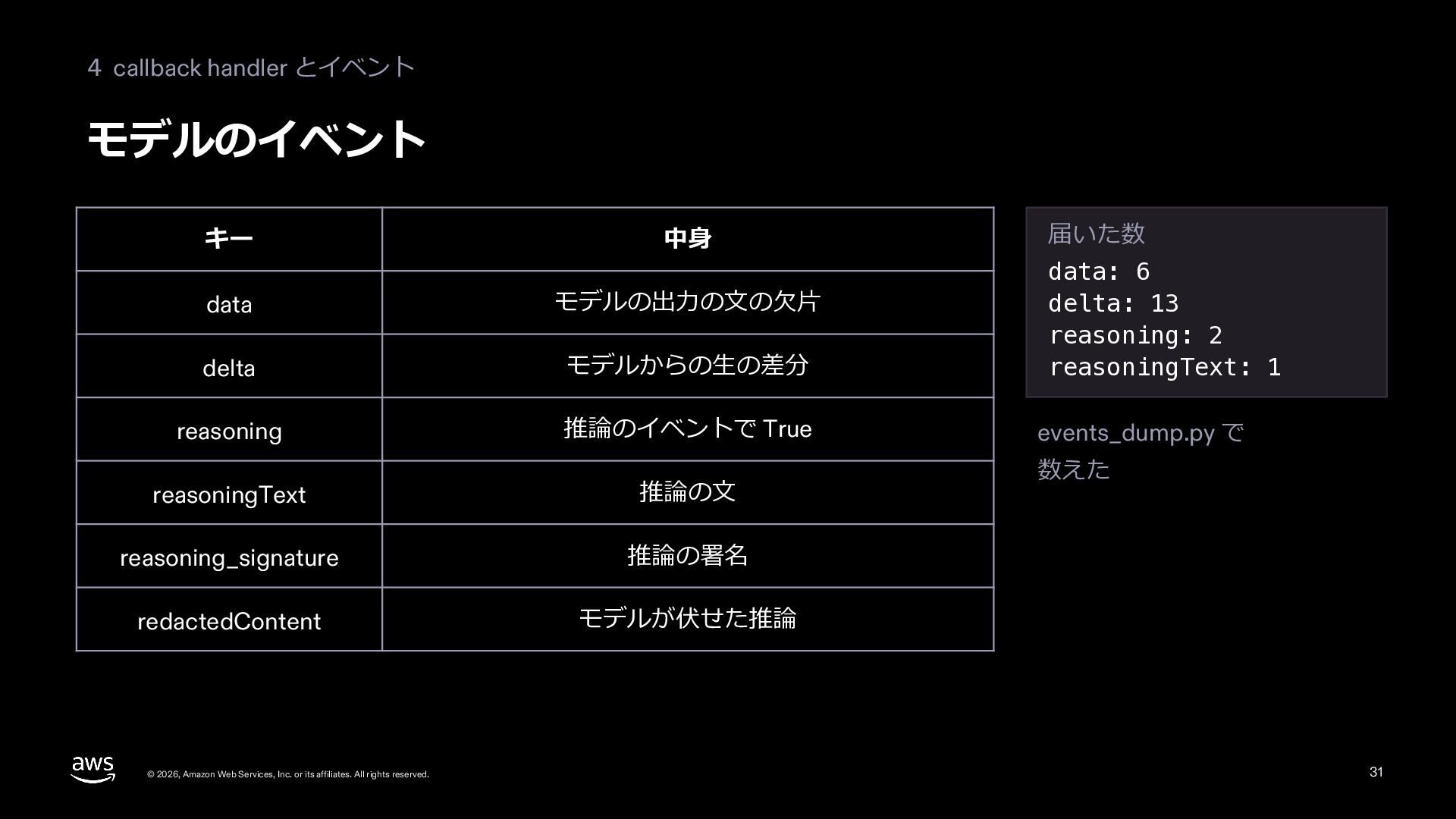
  30. 4 callback handler とイベント モデルのイベント 届いた数 キー 中⾝ data モデルの出⼒の⽂の⽋⽚

    delta モデルからの⽣の差分 data: 6 delta: 13 reasoning: 2 reasoningText: 1 reasoning 推論のイベントで True events_dump.py で reasoningText 推論の⽂ reasoning_signature 推論の署名 redactedContent モデルが伏せた推論 © 2026, Amazon Web Services, Inc. or its affiliates. All rights reserved. 数えた 31
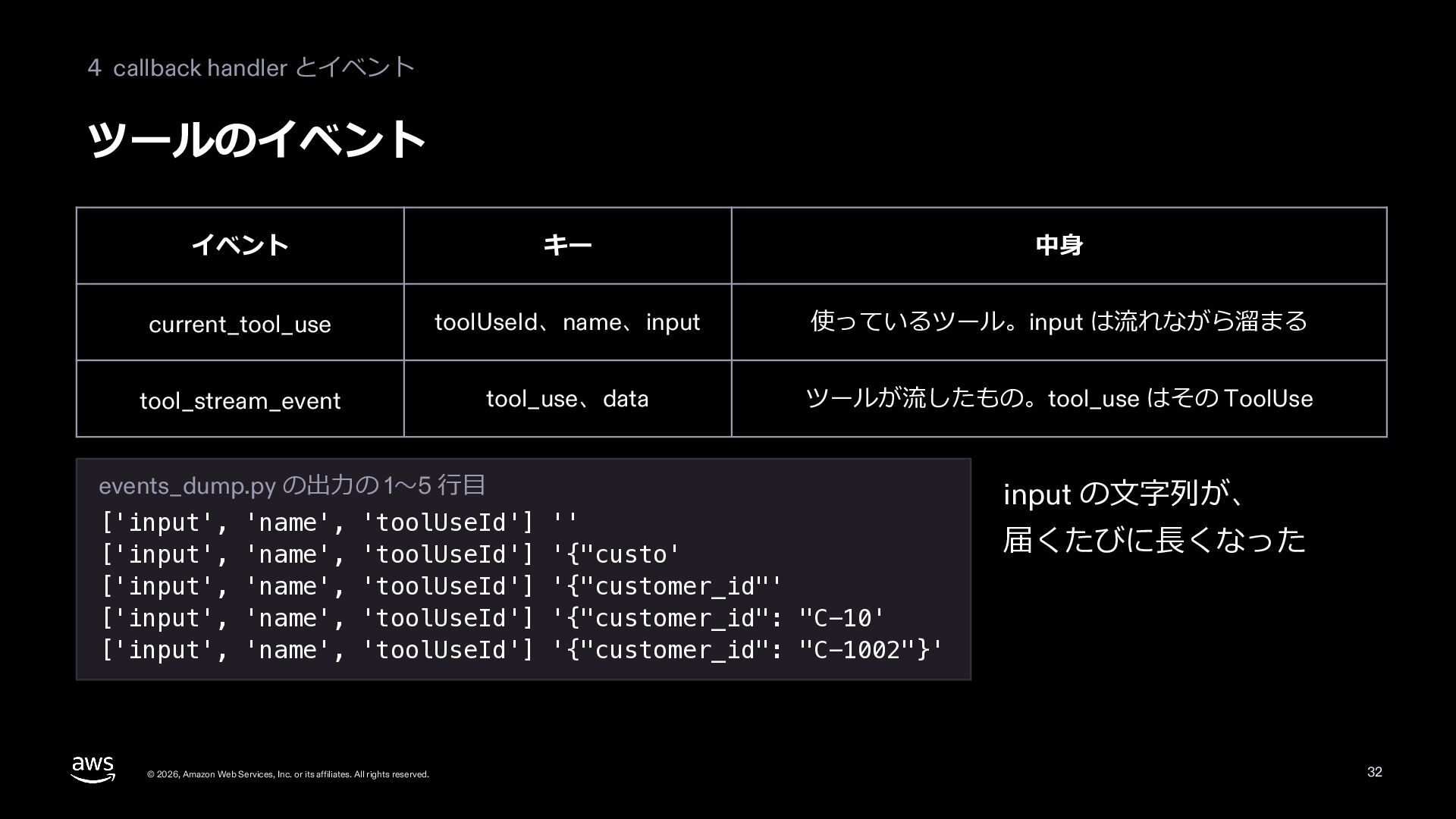
  31. 4 callback handler とイベント ツールのイベント イベント キー 中⾝ current_tool_use toolUseId、name、input

    使っているツール。input は流れながら溜まる tool_stream_event tool_use、data ツールが流したもの。tool_use はその ToolUse events_dump.py の出⼒の 1〜5 ⾏⽬ ['input', 'name', 'toolUseId'] '' ['input', 'name', 'toolUseId'] '{"custo' ['input', 'name', 'toolUseId'] '{"customer_id"' ['input', 'name', 'toolUseId'] '{"customer_id": "C-10' ['input', 'name', 'toolUseId'] '{"customer_id": "C-1002"}' © 2026, Amazon Web Services, Inc. or its affiliates. All rights reserved. input の⽂字列が、 届くたびに⻑くなった 32
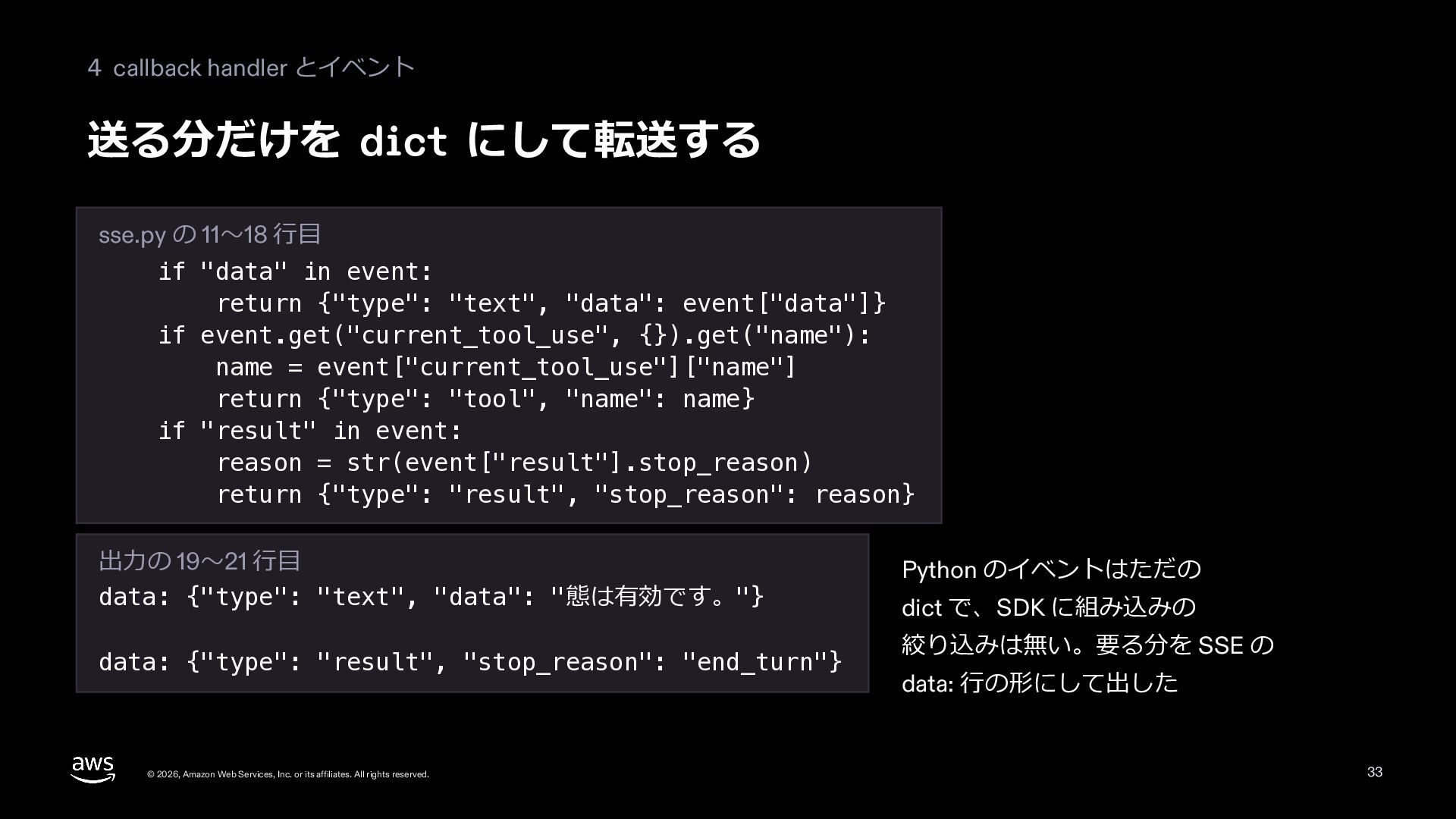
  32. 4 callback handler とイベント 送る分だけを dict にして転送する sse.py の 11〜18

    ⾏⽬ if "data" in event: return {"type": "text", "data": event["data"]} if event.get("current_tool_use", {}).get("name"): name = event["current_tool_use"]["name"] return {"type": "tool", "name": name} if "result" in event: reason = str(event["result"].stop_reason) return {"type": "result", "stop_reason": reason} 出⼒の 19〜21 ⾏⽬ data: {"type": "text", "data": "態は有効です。"} data: {"type": "result", "stop_reason": "end_turn"} © 2026, Amazon Web Services, Inc. or its affiliates. All rights reserved. Python のイベントはただの dict で、SDK に組み込みの 絞り込みは無い。要る分を SSE の data: ⾏の形にして出した 33
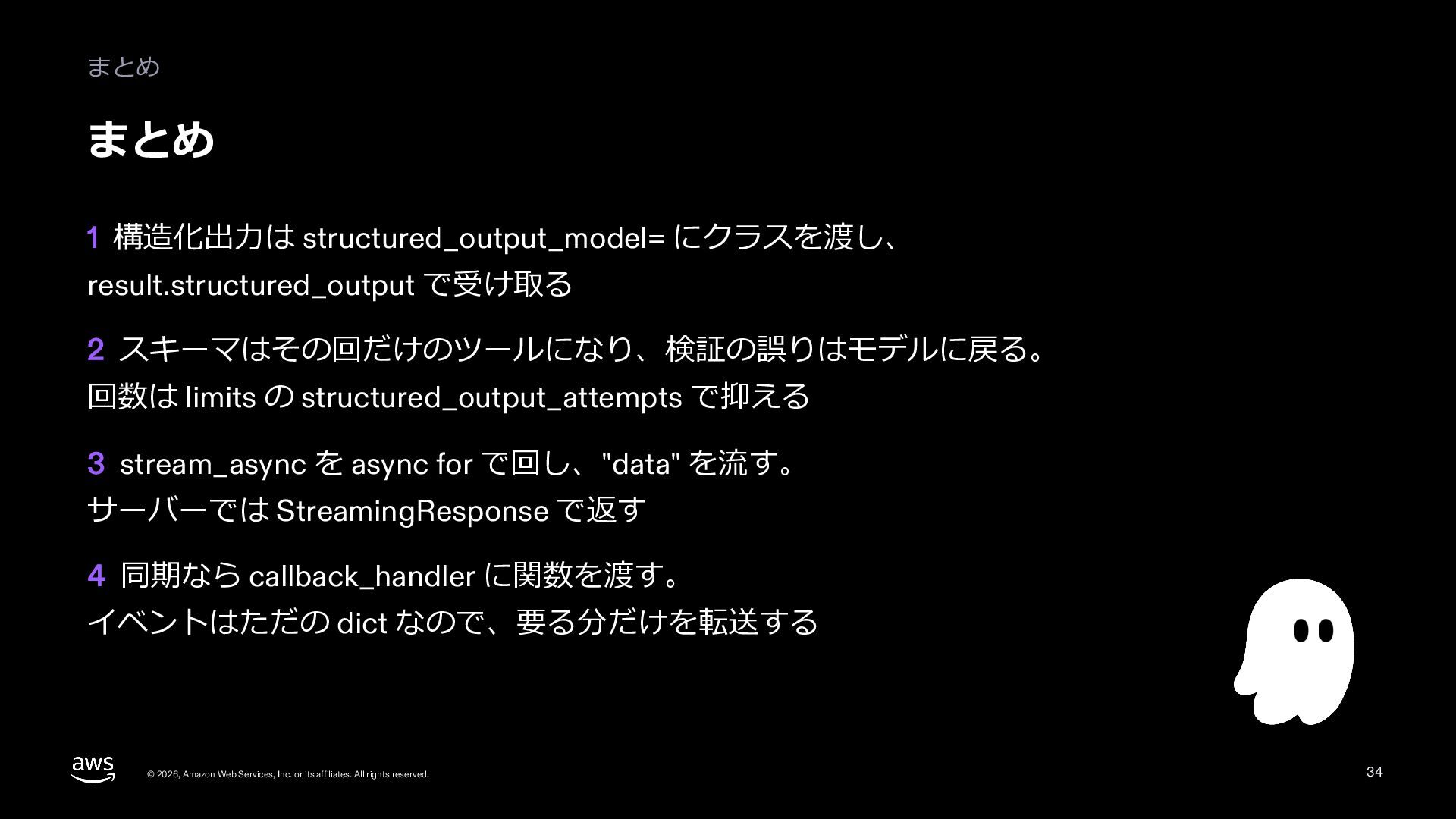
  33. まとめ まとめ 1 構造化出⼒は structured_output_model= にクラスを渡し、 result.structured_output で受け取る 2 スキーマはその回だけのツールになり、検証の誤りはモデルに戻る。

    回数は limits の structured_output_attempts で抑える 3 stream_async を async for で回し、"data" を流す。 サーバーでは StreamingResponse で返す 4 同期なら callback_handler に関数を渡す。 イベントはただの dict なので、要る分だけを転送する © 2026, Amazon Web Services, Inc. or its affiliates. All rights reserved. 34
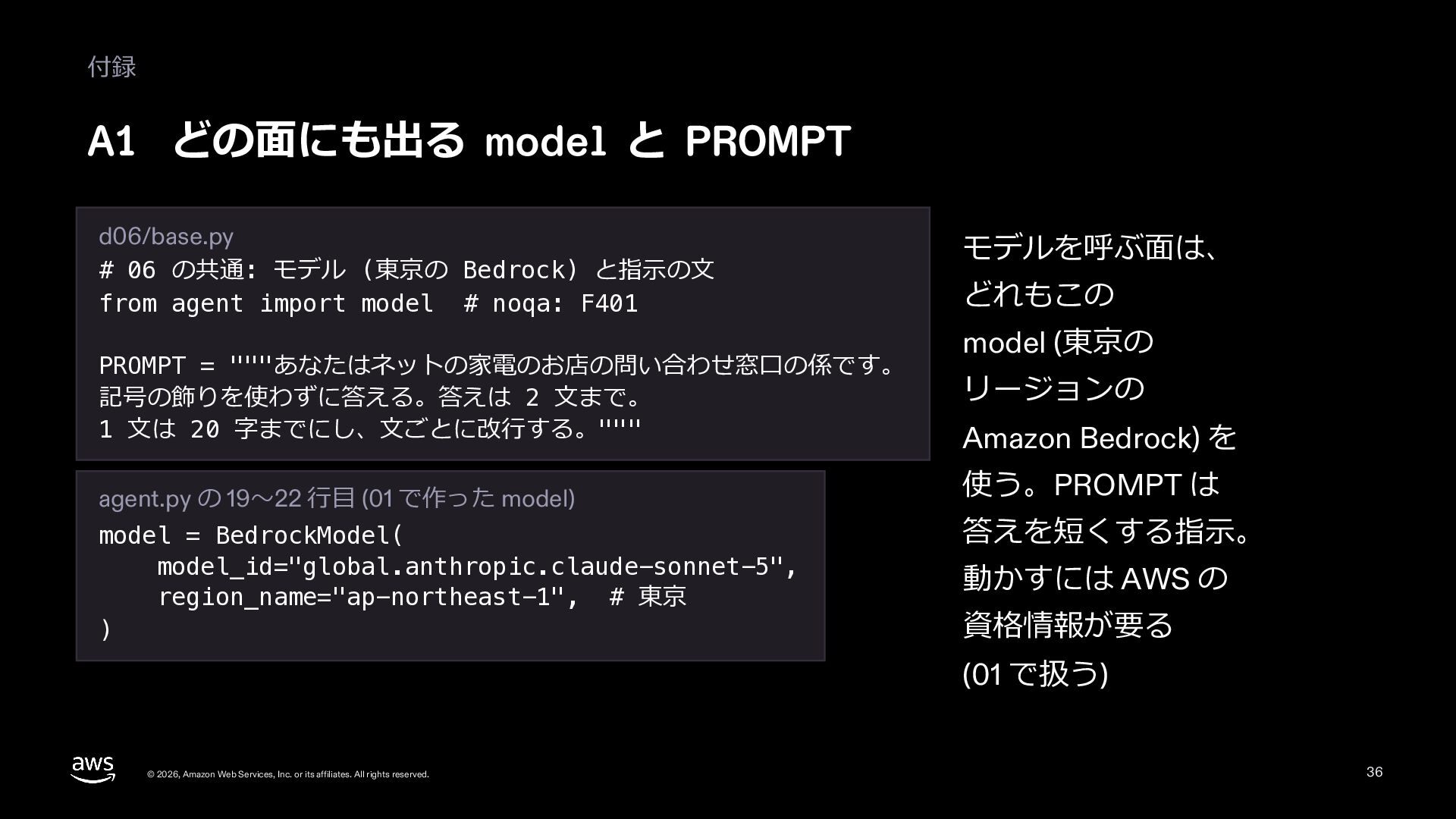
  34. 付録 A1 どの⾯にも出る model と PROMPT d06/base.py # 06 の共通:

    モデル (東京の Bedrock) と指⽰の⽂ from agent import model # noqa: F401 PROMPT = """あなたはネットの家電のお店の問い合わせ窓⼝の係です。 記号の飾りを使わずに答える。答えは 2 ⽂まで。 1 ⽂は 20 字までにし、⽂ごとに改⾏する。""" agent.py の 19〜22 ⾏⽬ (01 で作った model) model = BedrockModel( model_id="global.anthropic.claude-sonnet-5", region_name="ap-northeast-1", # 東京 ) モデルを呼ぶ⾯は、 どれもこの model (東京の リージョンの Amazon Bedrock) を 使う。PROMPT は 答えを短くする指⽰。 動かすには AWS の 資格情報が要る (01 で扱う) © 2026, Amazon Web Services, Inc. or its affiliates. All rights reserved. 36
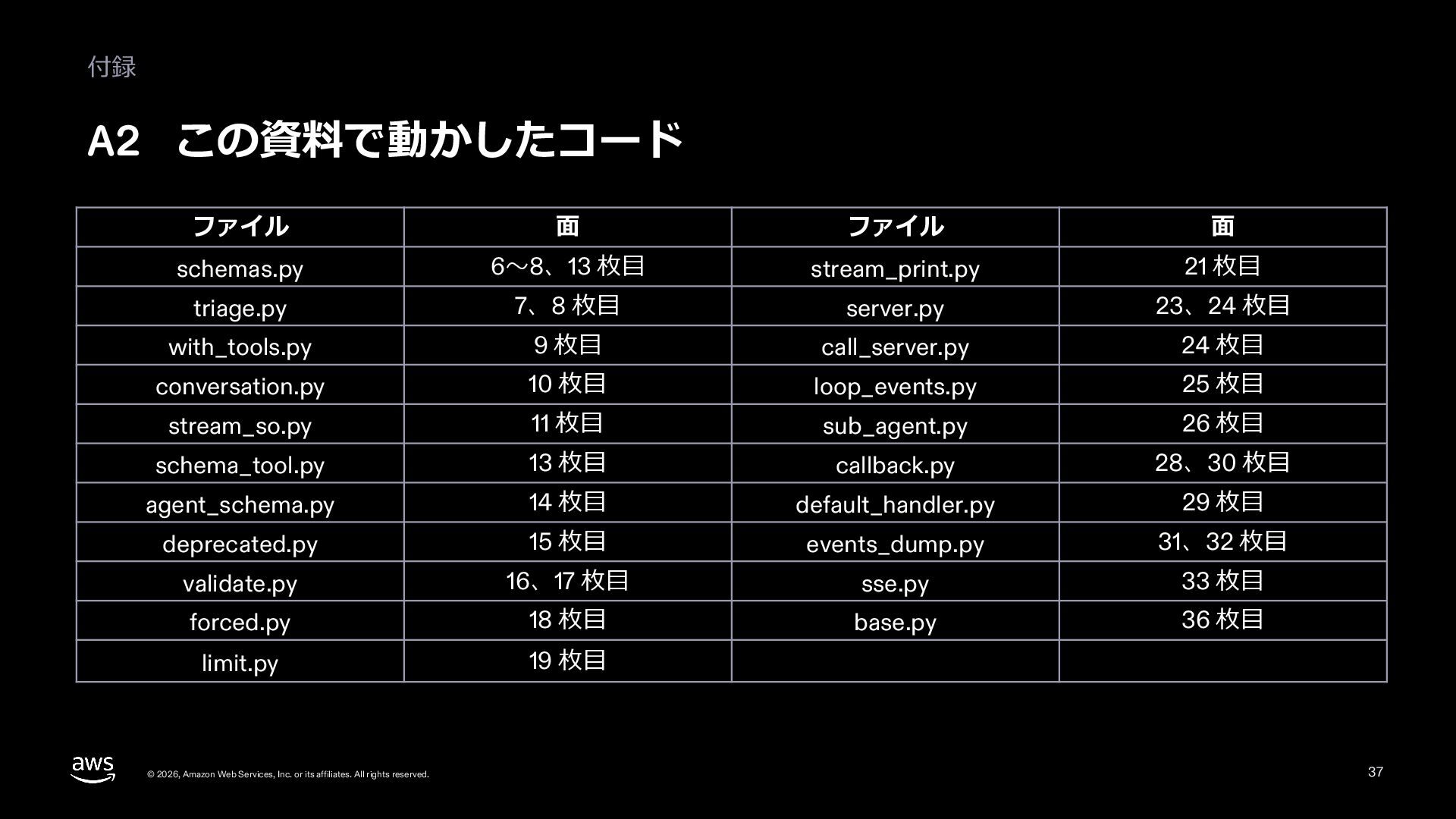
  35. 付録 A2 この資料で動かしたコード ファイル ⾯ ファイル ⾯ schemas.py 6〜8、13 枚⽬

    stream_print.py 21 枚⽬ triage.py 7、8 枚⽬ server.py 23、24 枚⽬ with_tools.py 9 枚⽬ call_server.py 24 枚⽬ conversation.py 10 枚⽬ loop_events.py 25 枚⽬ stream_so.py 11 枚⽬ sub_agent.py 26 枚⽬ schema_tool.py 13 枚⽬ callback.py 28、30 枚⽬ agent_schema.py 14 枚⽬ default_handler.py 29 枚⽬ deprecated.py 15 枚⽬ events_dump.py 31、32 枚⽬ validate.py 16、17 枚⽬ sse.py 33 枚⽬ forced.py 18 枚⽬ base.py 36 枚⽬ limit.py 19 枚⽬ © 2026, Amazon Web Services, Inc. or its affiliates. All rights reserved. 37
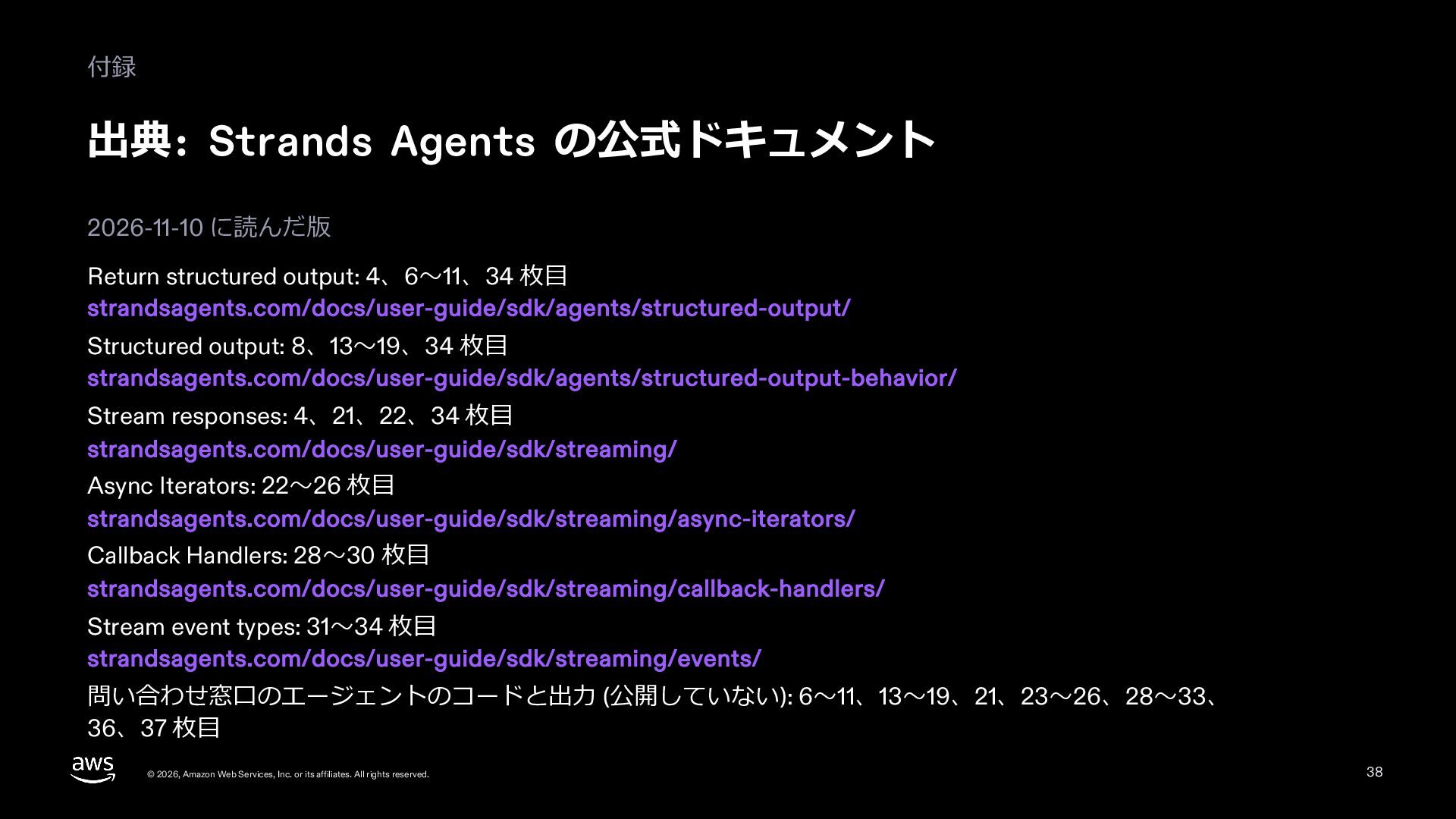
  36. 付録 出典: Strands Agents の公式ドキュメント 2026-11-10 に読んだ版 Return structured output:

    4、6〜11、34 枚⽬ strandsagents.com/docs/user-guide/sdk/agents/structured-output/ Structured output: 8、13〜19、34 枚⽬ strandsagents.com/docs/user-guide/sdk/agents/structured-output-behavior/ Stream responses: 4、21、22、34 枚⽬ strandsagents.com/docs/user-guide/sdk/streaming/ Async Iterators: 22〜26 枚⽬ strandsagents.com/docs/user-guide/sdk/streaming/async-iterators/ Callback Handlers: 28〜30 枚⽬ strandsagents.com/docs/user-guide/sdk/streaming/callback-handlers/ Stream event types: 31〜34 枚⽬ strandsagents.com/docs/user-guide/sdk/streaming/events/ 問い合わせ窓⼝のエージェントのコードと出⼒ (公開していない): 6〜11、13〜19、21、23〜26、28〜33、 36、37 枚⽬ © 2026, Amazon Web Services, Inc. or its affiliates. All rights reserved. 38