Upgrade to Pro — share decks privately, control downloads, hide ads and more …

Build it from config (AgentCore harness) | Lear...

Build it from config (AgentCore harness) | Learn Amazon Bedrock AgentCore with Kiro 06

Level 300. A made-up online shop's help desk is built as an AgentCore harness: you write two files, harness.yaml and system-prompt.md, deploy them with the AgentCore CLI in the Tokyo Region, and Amazon Bedrock AgentCore runs the loop, the tools from an AgentCore Gateway (deck 04), the memory and the records, while an inline function hands each refund back to the shop's app to wait for the store manager. Real terminal output and figures with the official icons show the stop and the answer, narrowing tools with allowedTools, lifecycle hooks, versions and endpoints that keep production on version 2, export to Strands code, when to choose Runtime instead, and the cleanup; this is deck 06 of the Build it out part of Learn Amazon Bedrock AgentCore with Kiro.

Avatar for Riku INADA
Riku INADA PRO

November 11, 2026

More Decks by Riku INADA

Other Decks in Technology

Transcript

  1. Learn Amazon Bedrock AgentCore with Kiro 06 Build it out

    Level 300 Build it from config AgentCore harness As of November 2026 (AgentCore CLI 1.0.2) November 2026 Riku Inada Amazon Web Services Japan © 2026, Amazon Web Services, Inc. or its affiliates. All rights reserved. 06 Kiro + AgentCore 1
  2. Introduction About me Riku Inada Amazon Web Services Japan G.K.

    Solutions Architect Works mainly with manufacturing customers Recent work Promoting the AI-Driven Development Life Cycle (AI-DLC) Writing and speaking about Kiro and AWS Amplify © 2026, Amazon Web Services, Inc. or its affiliates. All rights reserved. X @inada_riku Speaker Deck speakerdeck.com/inariku Zenn zenn.dev/inariku GitHub github.com/inariku 2
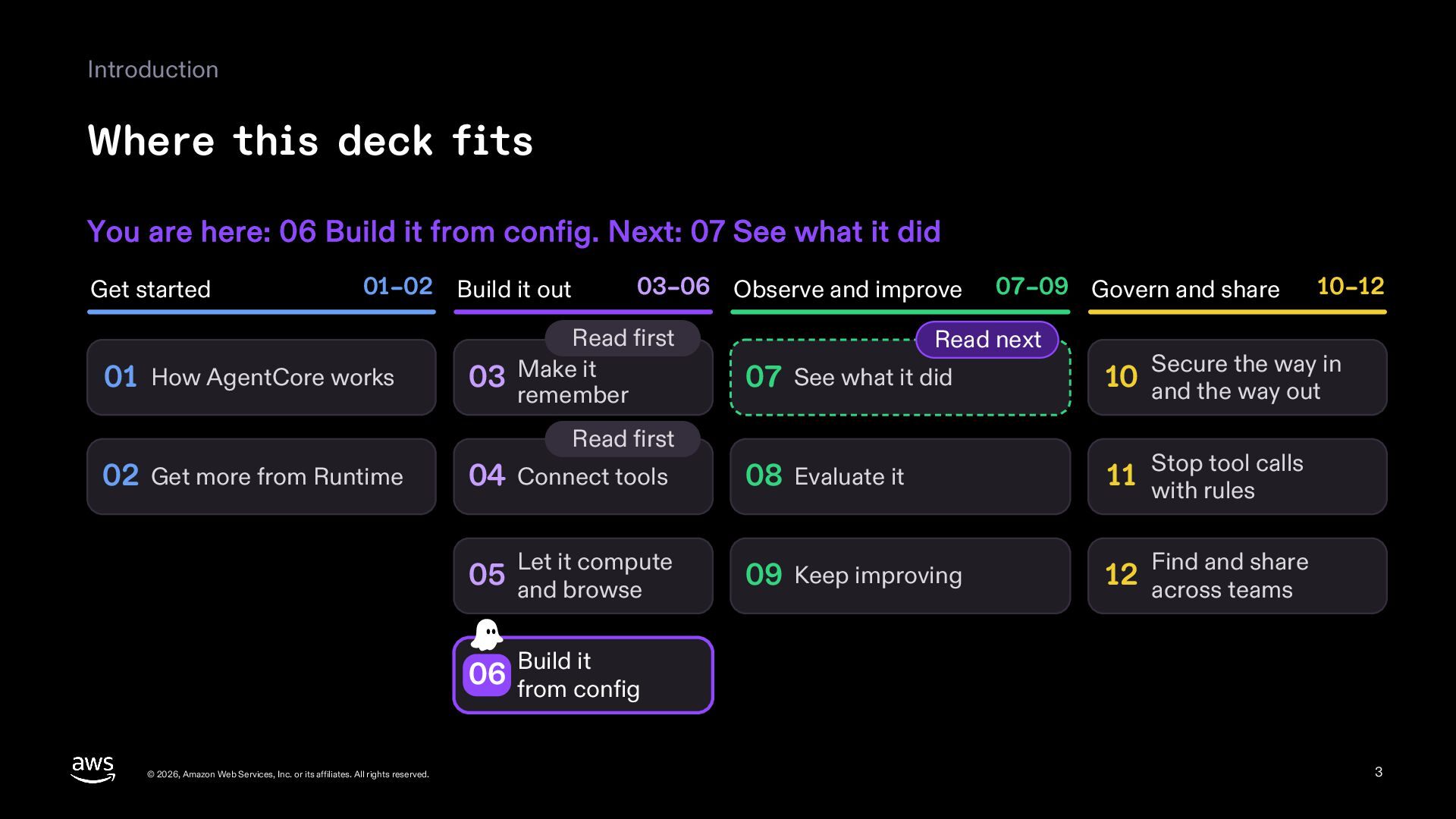
  3. Introduction Where this deck fits You are here: 06 Build

    it from config. Next: 07 See what it did Get started 01–02 Build it out 01 How AgentCore works 03–06 Observe and improve Read first 03 Make it remember Read next 04 Connect tools Let it compute 05 and browse 10–12 Secure the way in 07 See what it did 10 and the way out 08 Evaluate it tool calls 11 Stop with rules 09 Keep improving 12 across teams Read first 02 Get more from Runtime 07–09 Govern and share Find and share Build it 06 from config © 2026, Amazon Web Services, Inc. or its affiliates. All rights reserved. 3
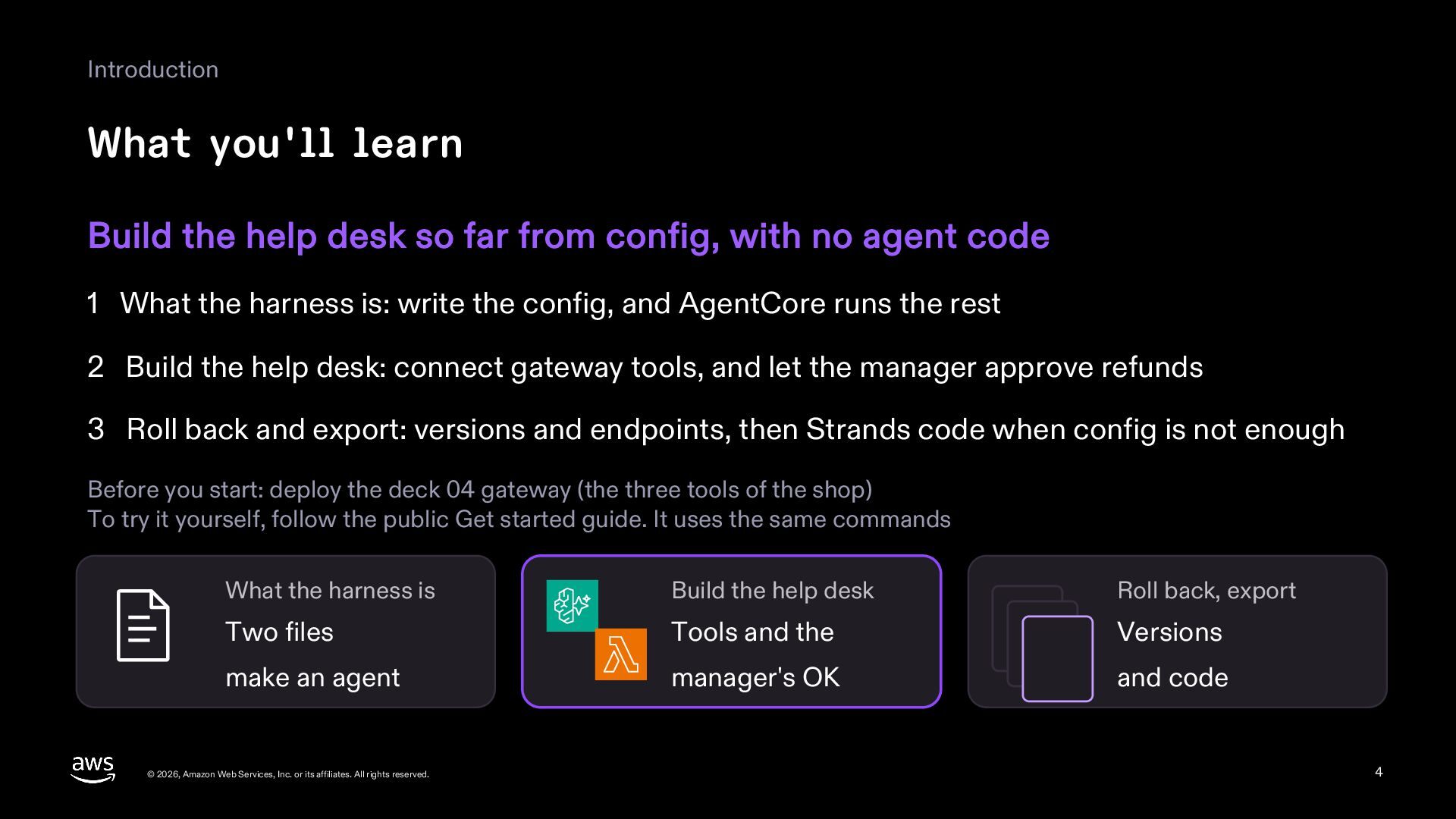
  4. Introduction What you'll learn Build the help desk so far

    from config, with no agent code 1 What the harness is: write the config, and AgentCore runs the rest 2 Build the help desk: connect gateway tools, and let the manager approve refunds 3 Roll back and export: versions and endpoints, then Strands code when config is not enough Before you start: deploy the deck 04 gateway (the three tools of the shop) To try it yourself, follow the public Get started guide. It uses the same commands What the harness is Build the help desk Roll back, export Two files Tools and the Versions make an agent manager's OK and code © 2026, Amazon Web Services, Inc. or its affiliates. All rights reserved. 4
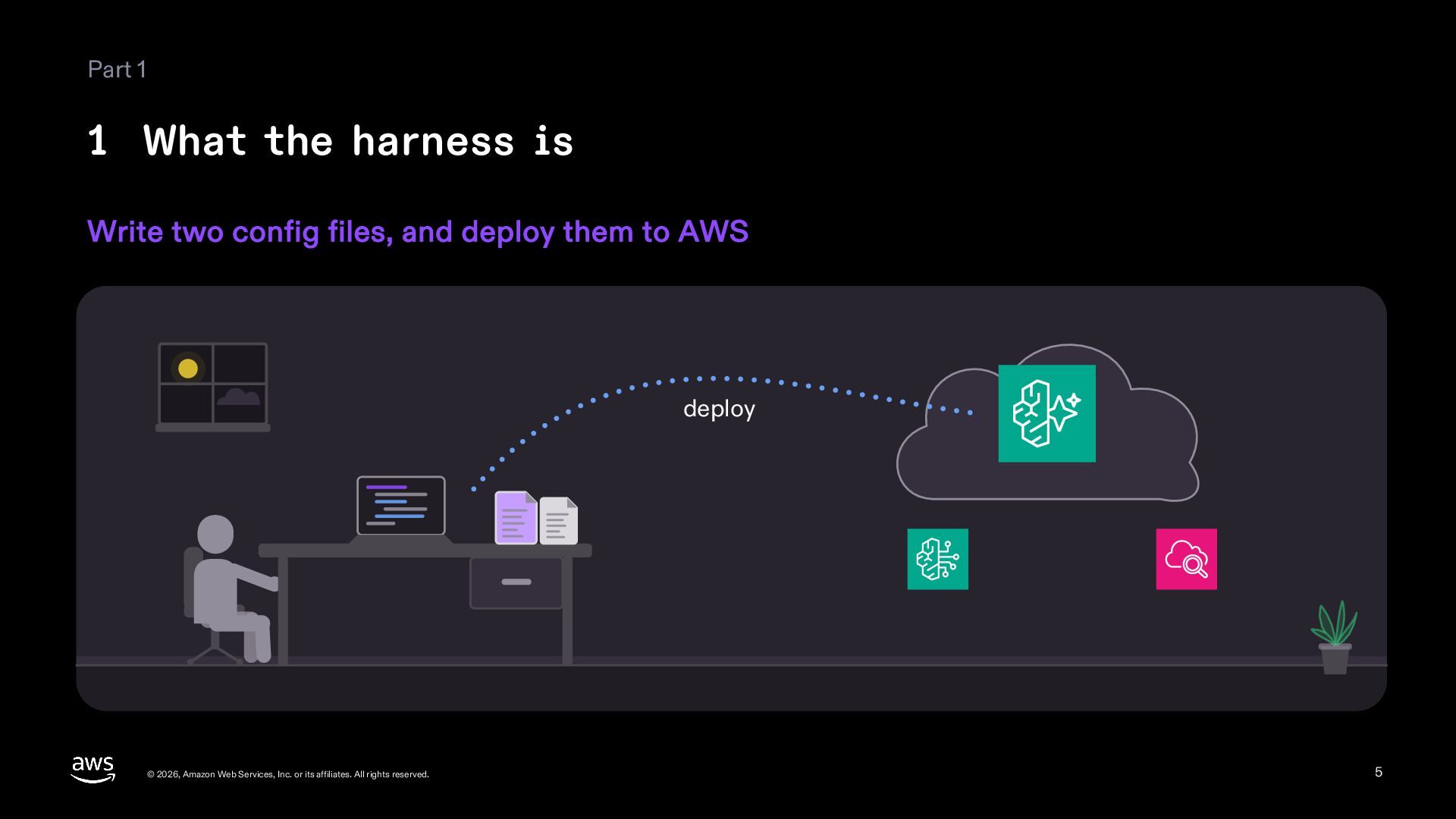
  5. Part 1 1 What the harness is Write two config

    files, and deploy them to AWS deploy © 2026, Amazon Web Services, Inc. or its affiliates. All rights reserved. 5
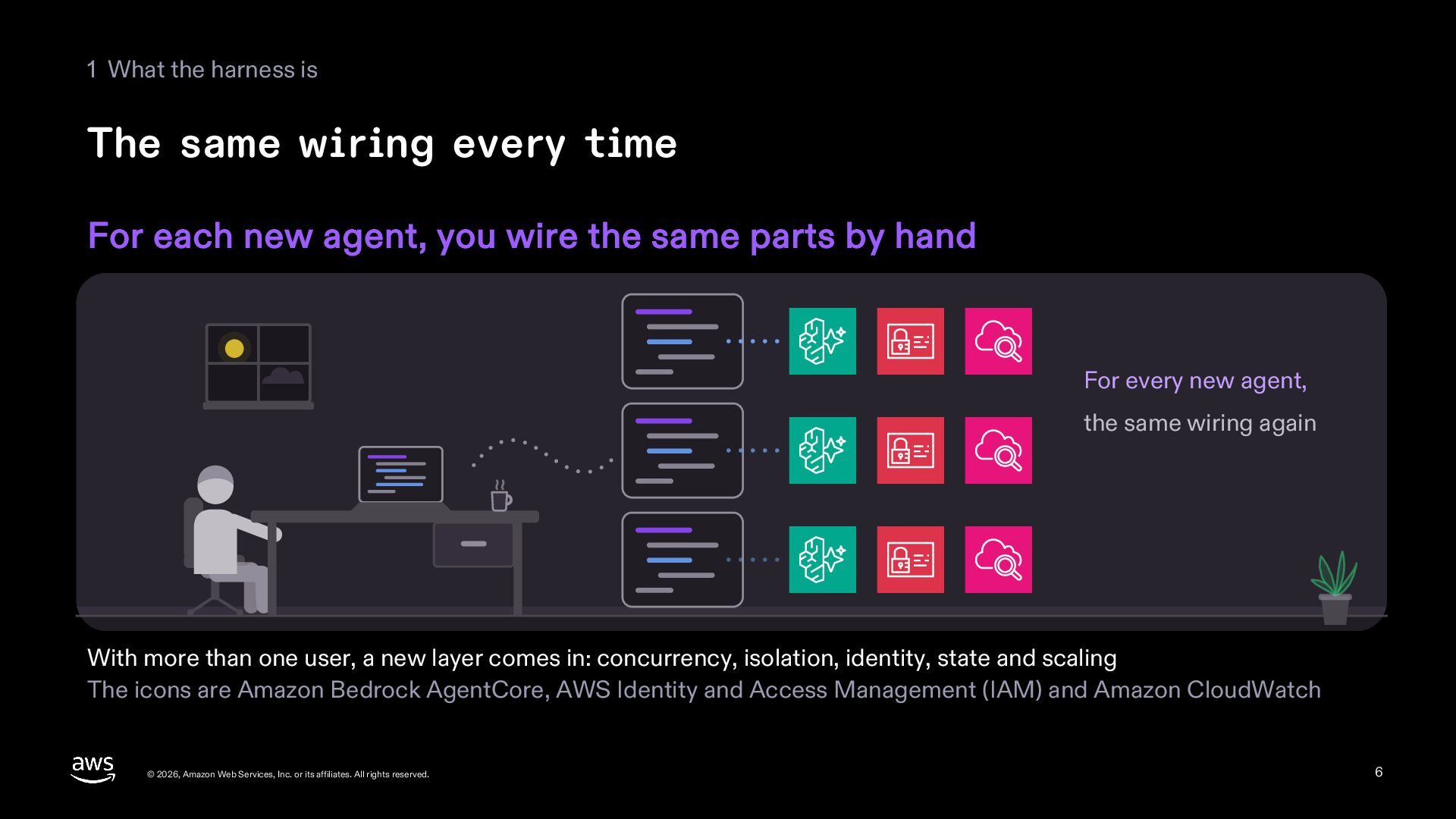
  6. 1 What the harness is The same wiring every time

    For each new agent, you wire the same parts by hand For every new agent, the same wiring again With more than one user, a new layer comes in: concurrency, isolation, identity, state and scaling The icons are Amazon Bedrock AgentCore, AWS Identity and Access Management (IAM) and Amazon CloudWatch © 2026, Amazon Web Services, Inc. or its affiliates. All rights reserved. 6
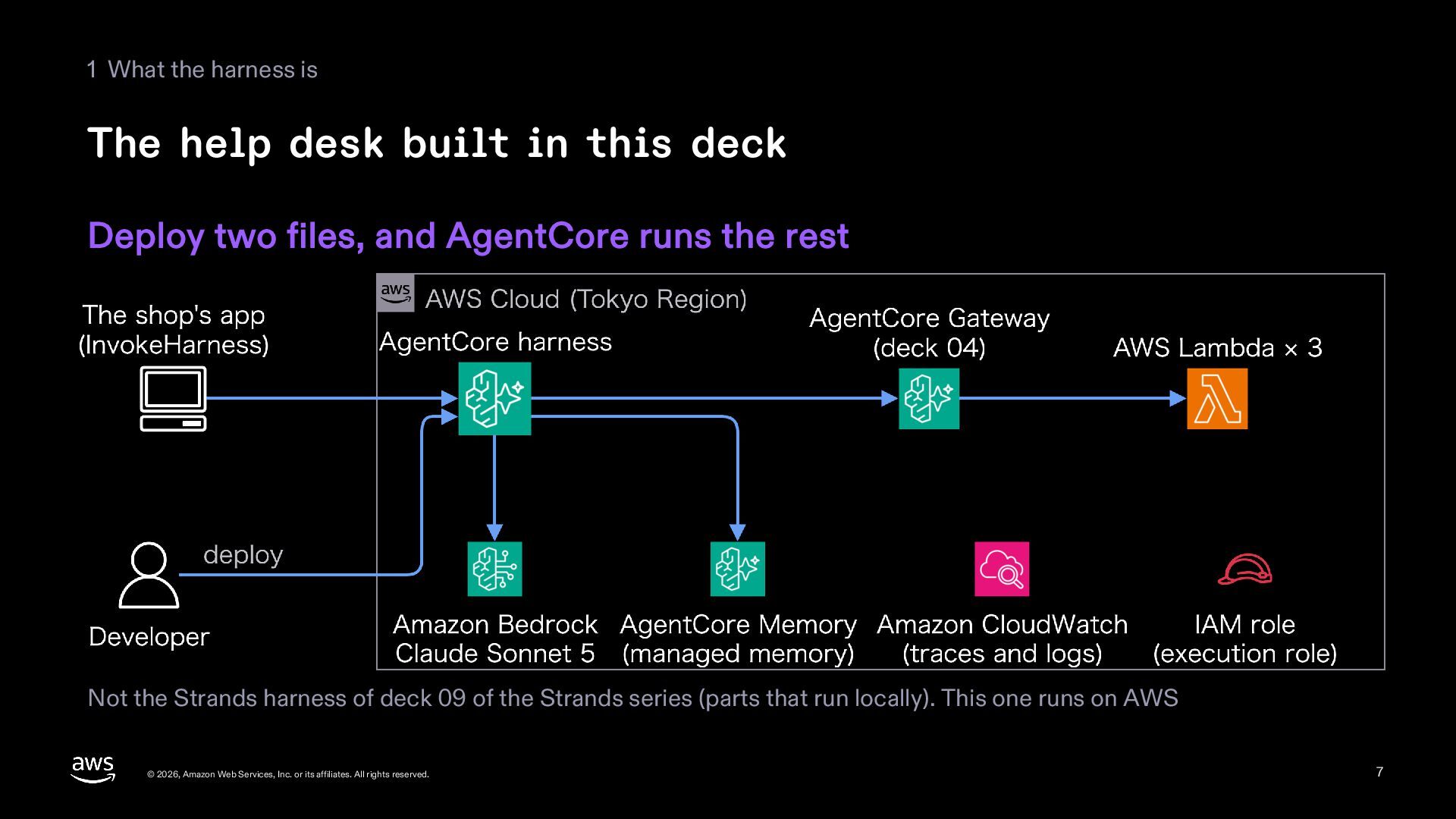
  7. 1 What the harness is The help desk built in

    this deck Deploy two files, and AgentCore runs the rest Not the Strands harness of deck 09 of the Strands series (parts that run locally). This one runs on AWS © 2026, Amazon Web Services, Inc. or its affiliates. All rights reserved. 7
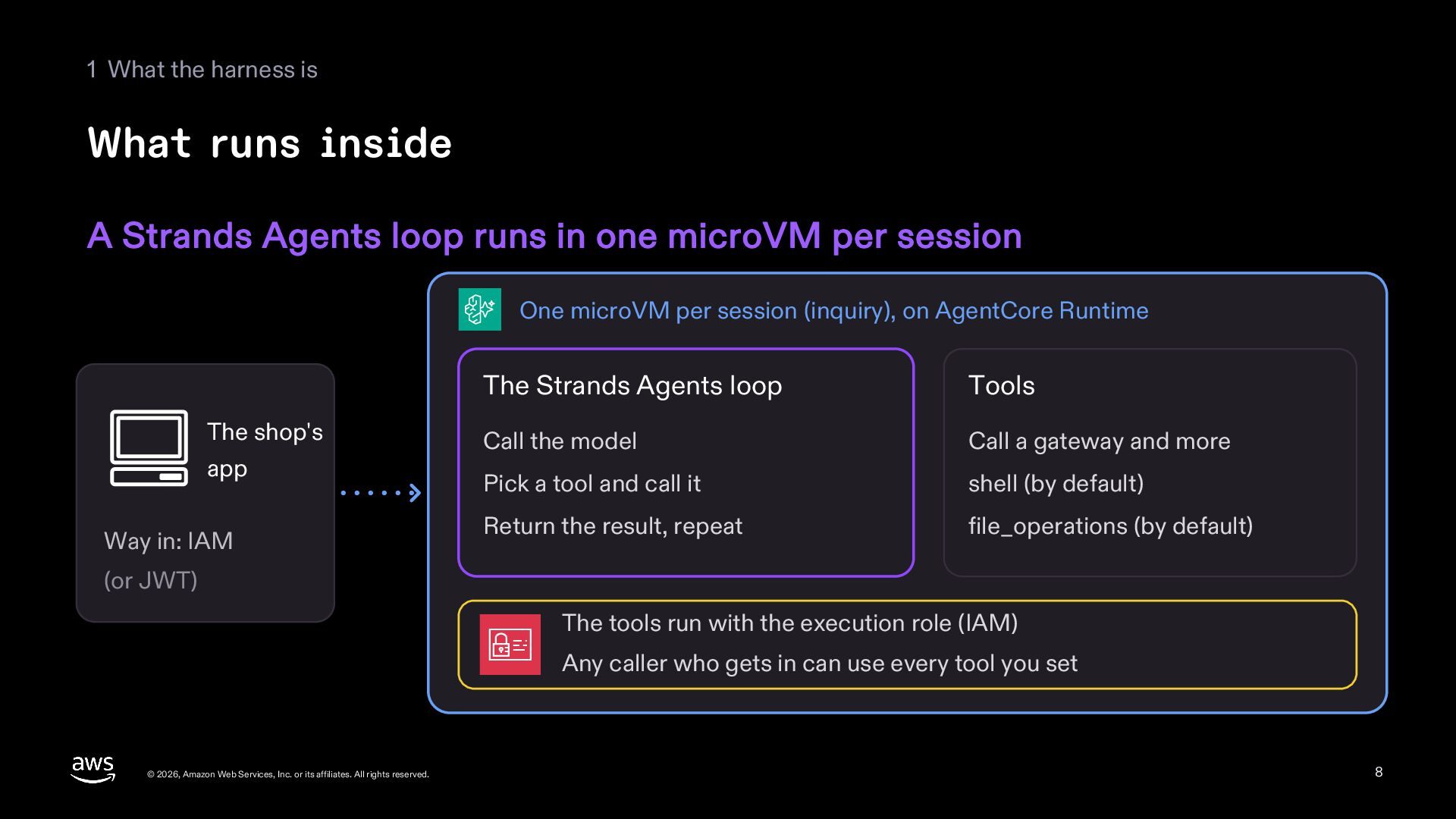
  8. 1 What the harness is What runs inside A Strands

    Agents loop runs in one microVM per session One microVM per session (inquiry), on AgentCore Runtime The shop's app Way in: IAM The Strands Agents loop Tools Call the model Call a gateway and more Pick a tool and call it shell (by default) Return the result, repeat file_operations (by default) (or JWT) The tools run with the execution role (IAM) Any caller who gets in can use every tool you set © 2026, Amazon Web Services, Inc. or its affiliates. All rights reserved. 8
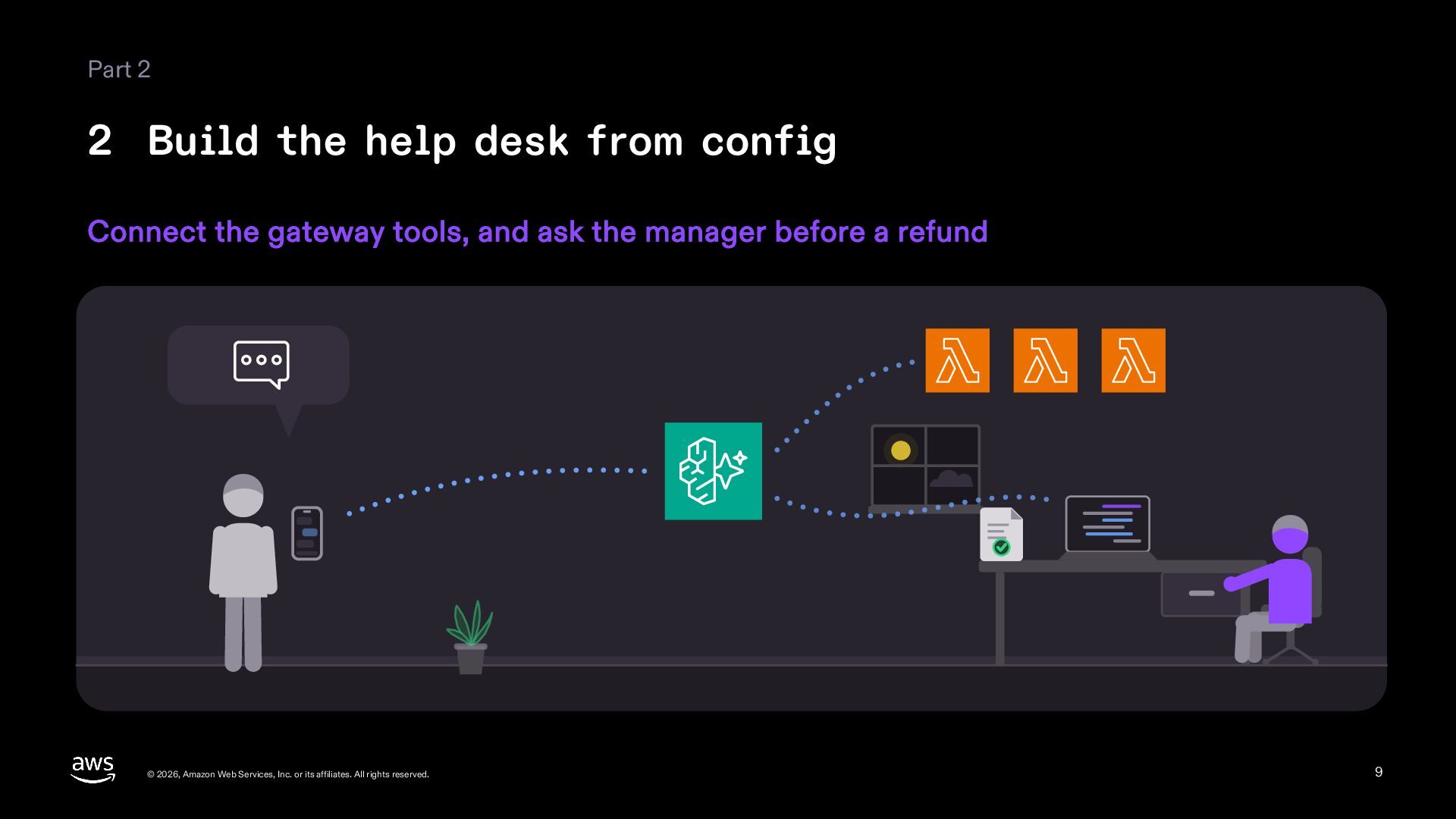
  9. Part 2 2 Build the help desk from config Connect

    the gateway tools, and ask the manager before a refund © 2026, Amazon Web Services, Inc. or its affiliates. All rights reserved. 9
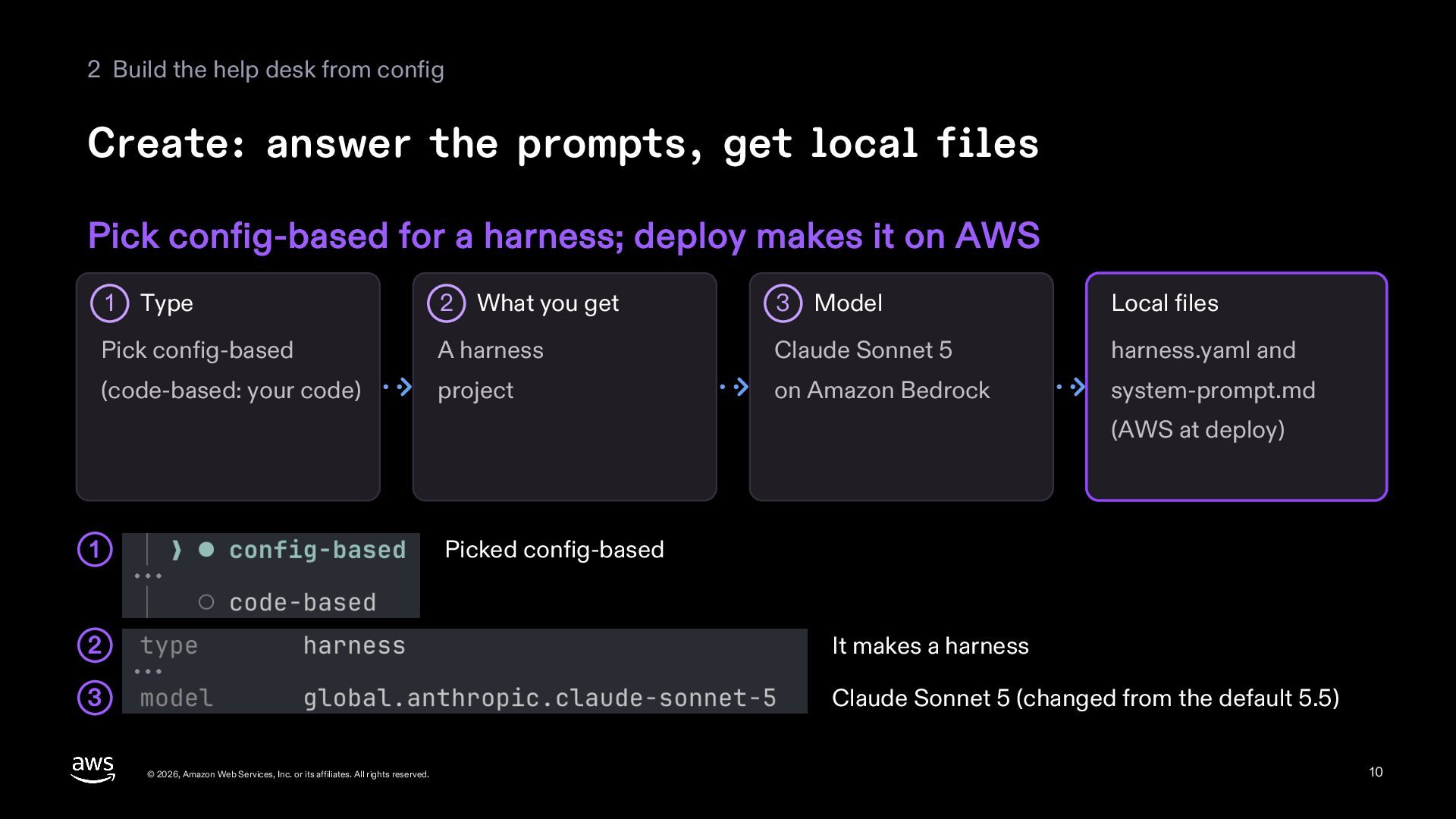
  10. 2 Build the help desk from config Create: answer the

    prompts, get local files Pick config-based for a harness; deploy makes it on AWS 2 What you get 3 Model Local files Pick config-based A harness Claude Sonnet 5 harness.yaml and (code-based: your code) project on Amazon Bedrock system-prompt.md 1 Type (AWS at deploy) Picked config-based 1 2 It makes a harness 3 Claude Sonnet 5 (changed from the default 5.5) © 2026, Amazon Web Services, Inc. or its affiliates. All rights reserved. 10
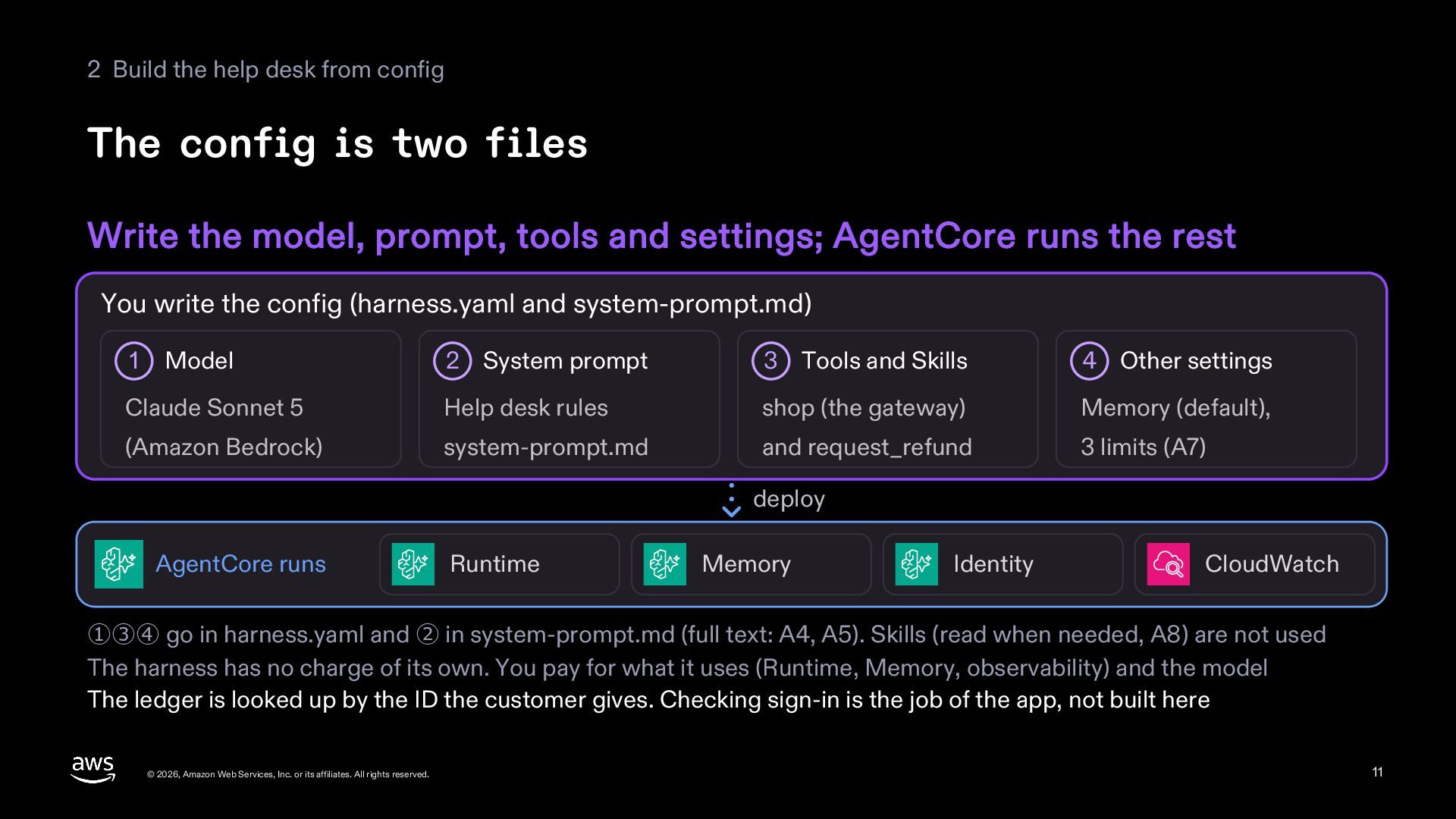
  11. 2 Build the help desk from config The config is

    two files Write the model, prompt, tools and settings; AgentCore runs the rest You write the config (harness.yaml and system-prompt.md) 2 System prompt 3 Tools and Skills 4 Other settings Claude Sonnet 5 Help desk rules shop (the gateway) Memory (default), (Amazon Bedrock) system-prompt.md and request_refund 3 limits (A7) 1 Model deploy AgentCore runs Runtime Memory Identity CloudWatch ①③④ go in harness.yaml and ② in system-prompt.md (full text: A4, A5). Skills (read when needed, A8) are not used The harness has no charge of its own. You pay for what it uses (Runtime, Memory, observability) and the model The ledger is looked up by the ID the customer gives. Checking sign-in is the job of the app, not built here © 2026, Amazon Web Services, Inc. or its affiliates. All rights reserved. 11
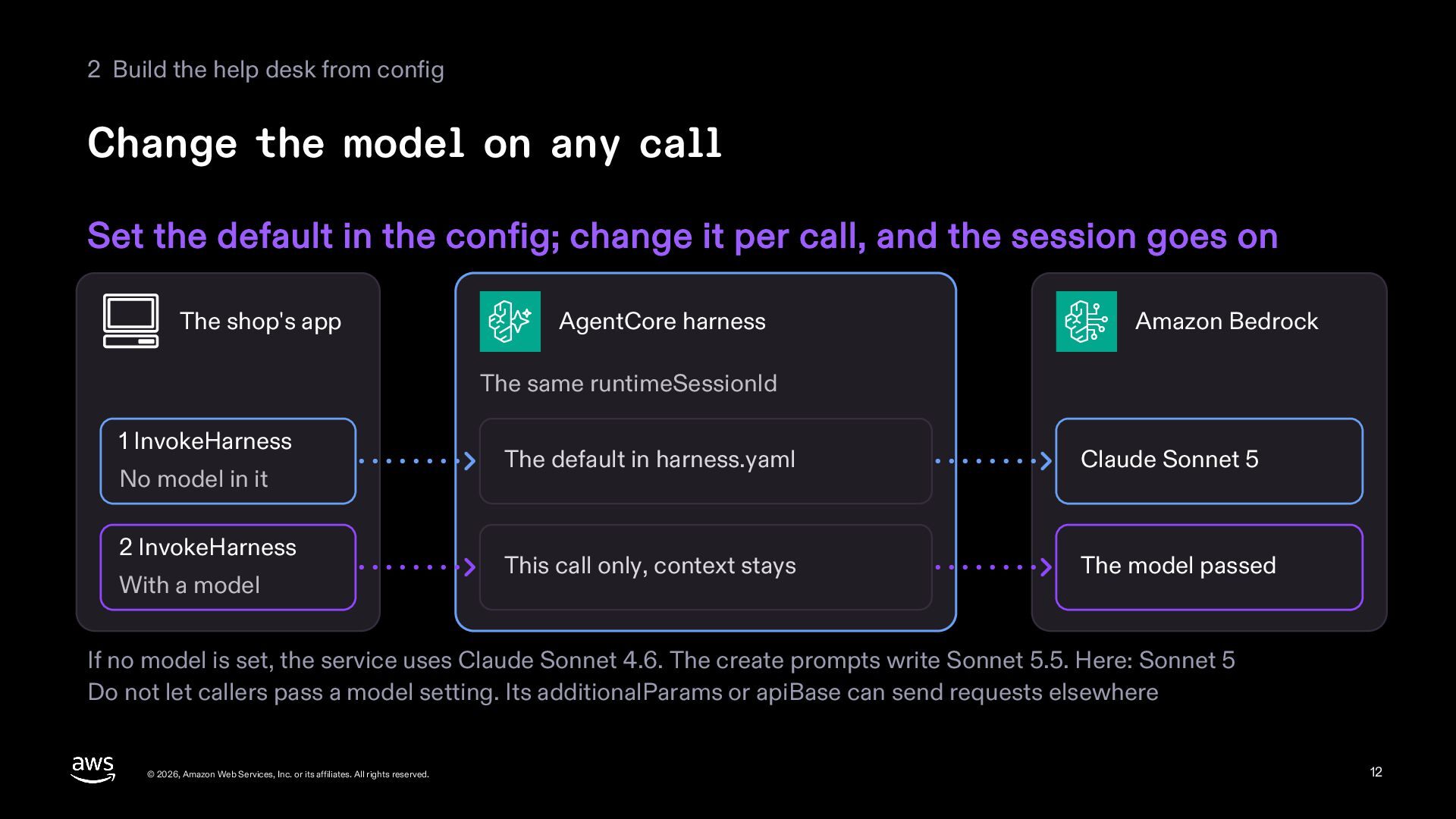
  12. 2 Build the help desk from config Change the model

    on any call Set the default in the config; change it per call, and the session goes on The shop's app AgentCore harness Amazon Bedrock The same runtimeSessionId 1 InvokeHarness No model in it 2 InvokeHarness With a model The default in harness.yaml Claude Sonnet 5 This call only, context stays The model passed If no model is set, the service uses Claude Sonnet 4.6. The create prompts write Sonnet 5.5. Here: Sonnet 5 Do not let callers pass a model setting. Its additionalParams or apiBase can send requests elsewhere © 2026, Amazon Web Services, Inc. or its affiliates. All rights reserved. 12
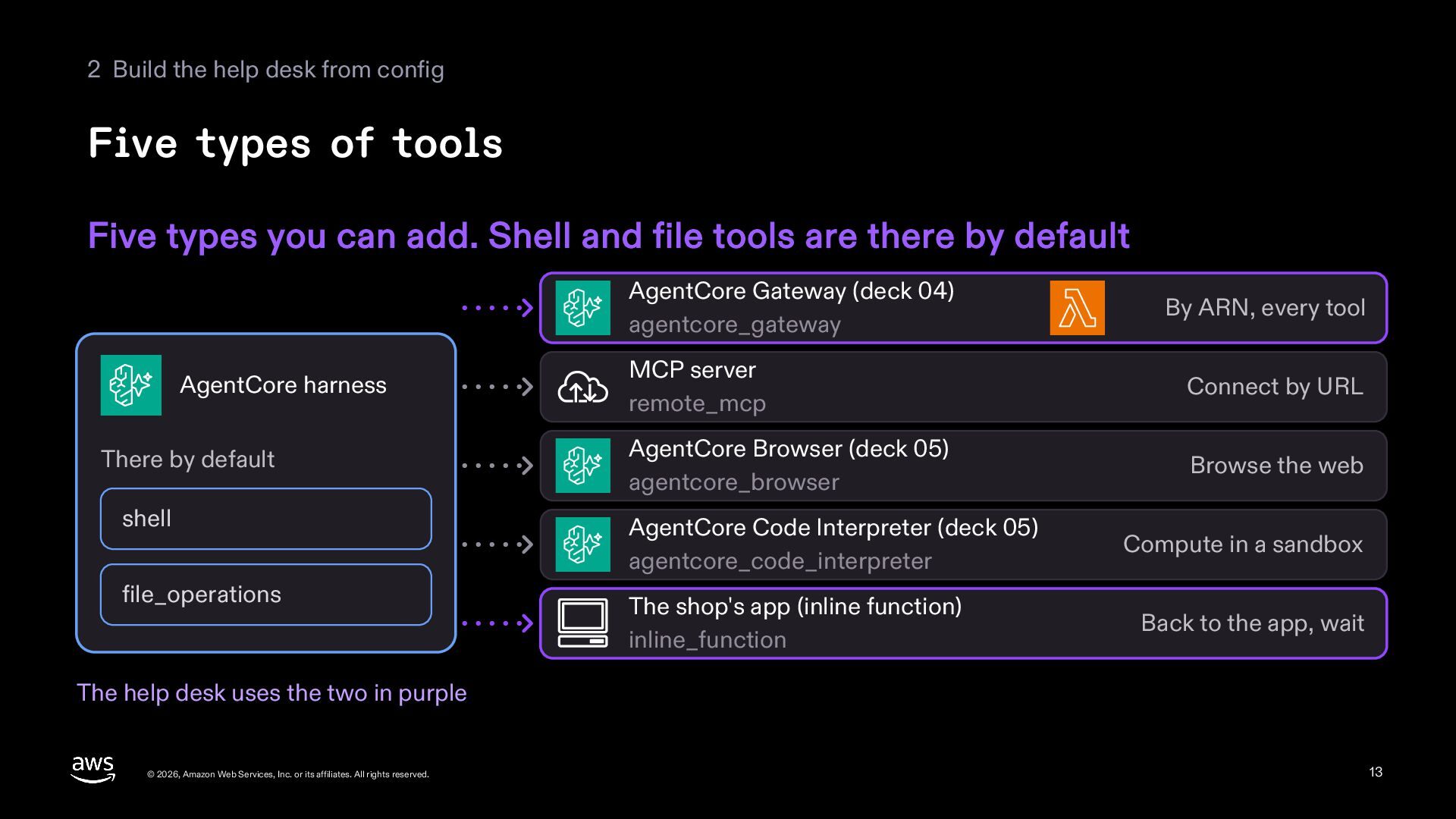
  13. 2 Build the help desk from config Five types of

    tools Five types you can add. Shell and file tools are there by default AgentCore Gateway (deck 04) agentcore_gateway AgentCore harness There by default By ARN, every tool MCP server remote_mcp Connect by URL AgentCore Browser (deck 05) agentcore_browser Browse the web shell AgentCore Code Interpreter (deck 05) agentcore_code_interpreter file_operations The shop's app (inline function) inline_function Compute in a sandbox Back to the app, wait The help desk uses the two in purple © 2026, Amazon Web Services, Inc. or its affiliates. All rights reserved. 13
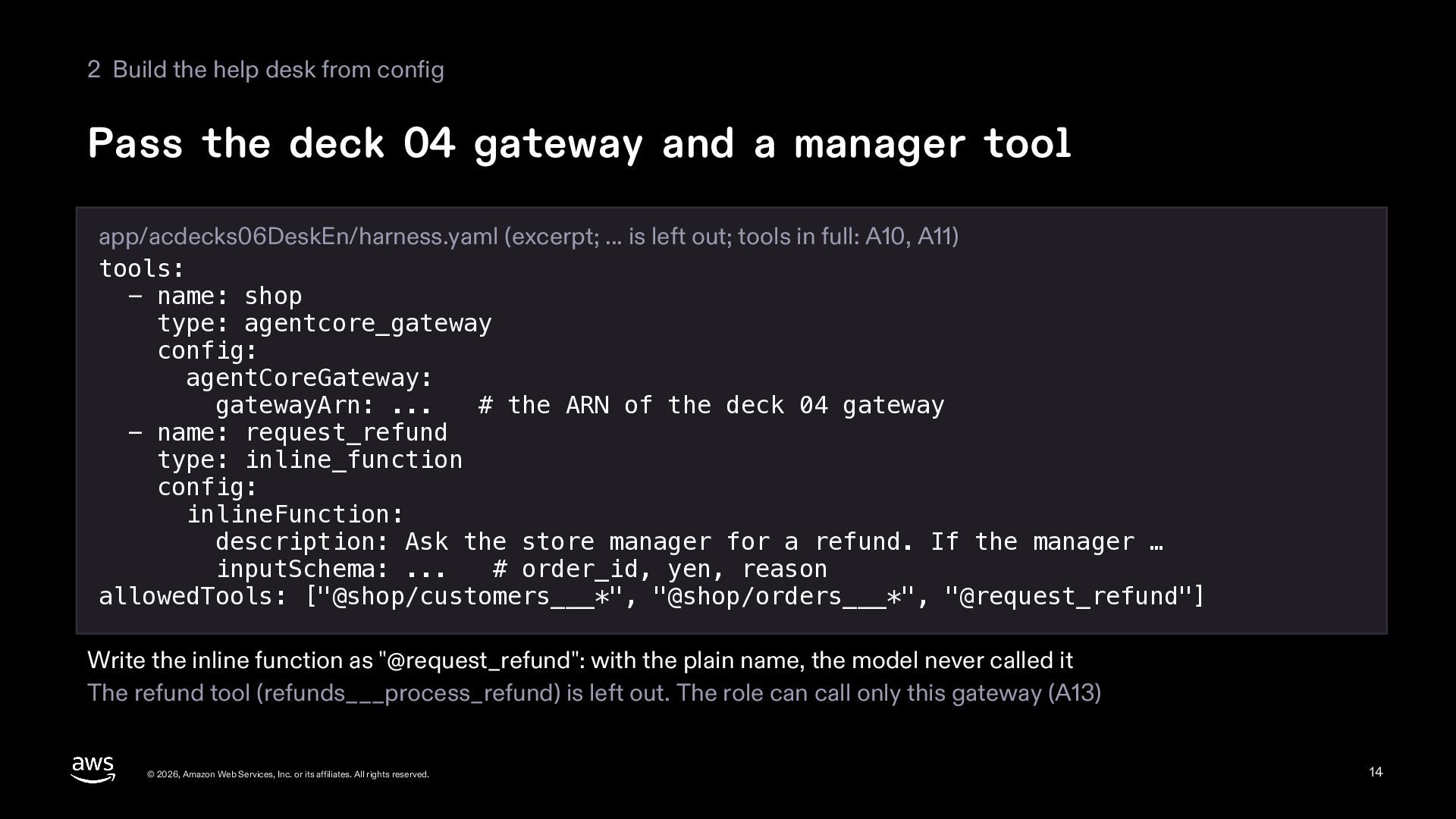
  14. 2 Build the help desk from config Pass the deck

    04 gateway and a manager tool app/acdecks06DeskEn/harness.yaml (excerpt; ... is left out; tools in full: A10, A11) tools: - name: shop type: agentcore_gateway config: agentCoreGateway: gatewayArn: ... # the ARN of the deck 04 gateway - name: request_refund type: inline_function config: inlineFunction: description: Ask the store manager for a refund. If the manager … inputSchema: ... # order_id, yen, reason allowedTools: ["@shop/customers___*", "@shop/orders___*", "@request_refund"] Write the inline function as "@request_refund": with the plain name, the model never called it The refund tool (refunds___process_refund) is left out. The role can call only this gateway (A13) © 2026, Amazon Web Services, Inc. or its affiliates. All rights reserved. 14
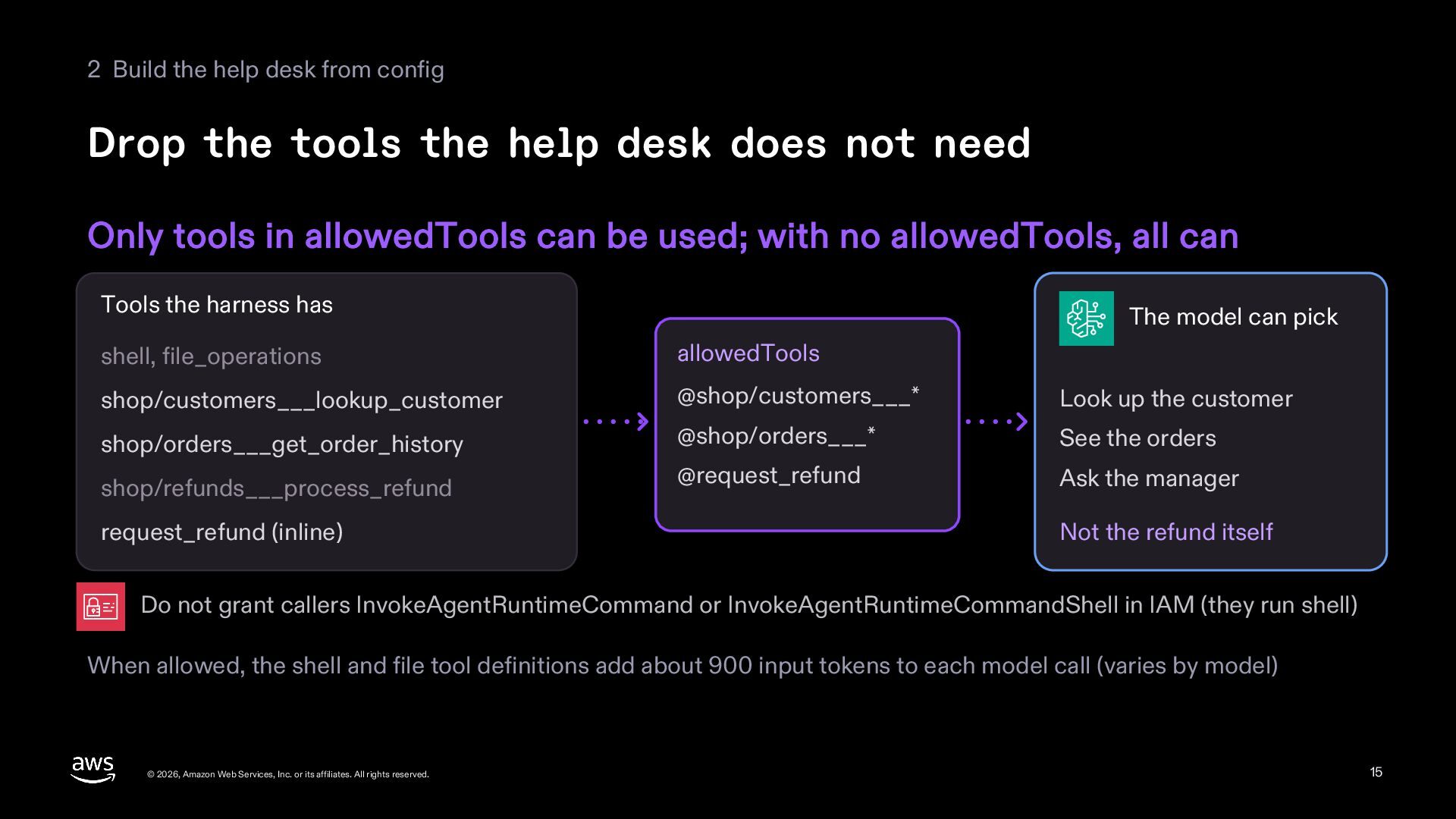
  15. 2 Build the help desk from config Drop the tools

    the help desk does not need Only tools in allowedTools can be used; with no allowedTools, all can Tools the harness has The model can pick shell, file_operations allowedTools shop/customers___lookup_customer @shop/customers___* Look up the customer shop/orders___get_order_history @shop/orders___* See the orders @request_refund Ask the manager shop/refunds___process_refund request_refund (inline) Not the refund itself Do not grant callers InvokeAgentRuntimeCommand or InvokeAgentRuntimeCommandShell in IAM (they run shell) When allowed, the shell and file tool definitions add about 900 input tokens to each model call (varies by model) © 2026, Amazon Web Services, Inc. or its affiliates. All rights reserved. 15
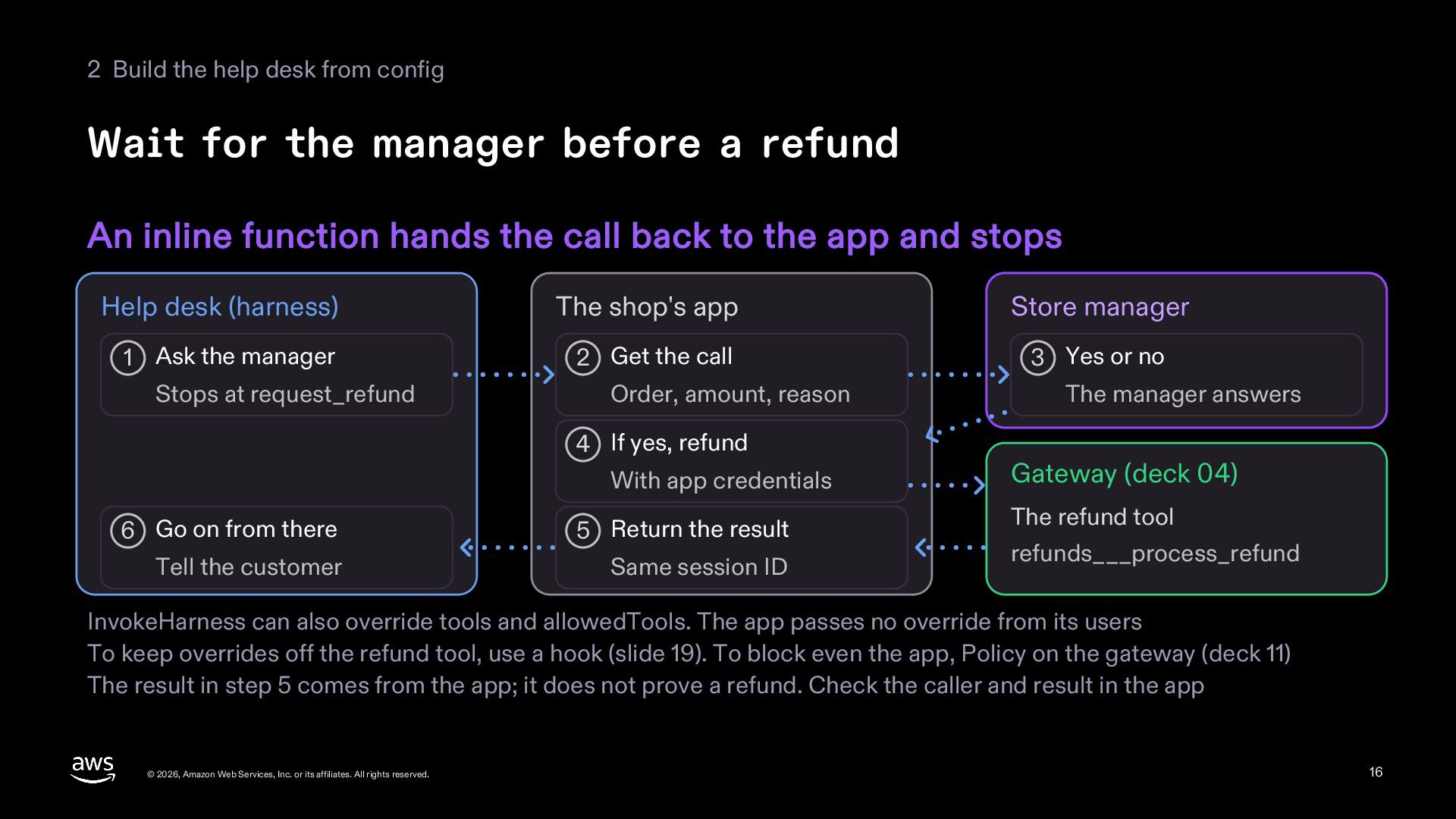
  16. 2 Build the help desk from config Wait for the

    manager before a refund An inline function hands the call back to the app and stops Help desk (harness) 1 Ask the manager Stops at request_refund The shop's app 2 Get the call Order, amount, reason 4 If yes, refund With app credentials 6 Go on from there Tell the customer 5 Return the result Same session ID Store manager 3 Yes or no The manager answers Gateway (deck 04) The refund tool refunds___process_refund InvokeHarness can also override tools and allowedTools. The app passes no override from its users To keep overrides off the refund tool, use a hook (slide 19). To block even the app, Policy on the gateway (deck 11) The result in step 5 comes from the app; it does not prove a refund. Check the caller and result in the app © 2026, Amazon Web Services, Inc. or its affiliates. All rights reserved. 16
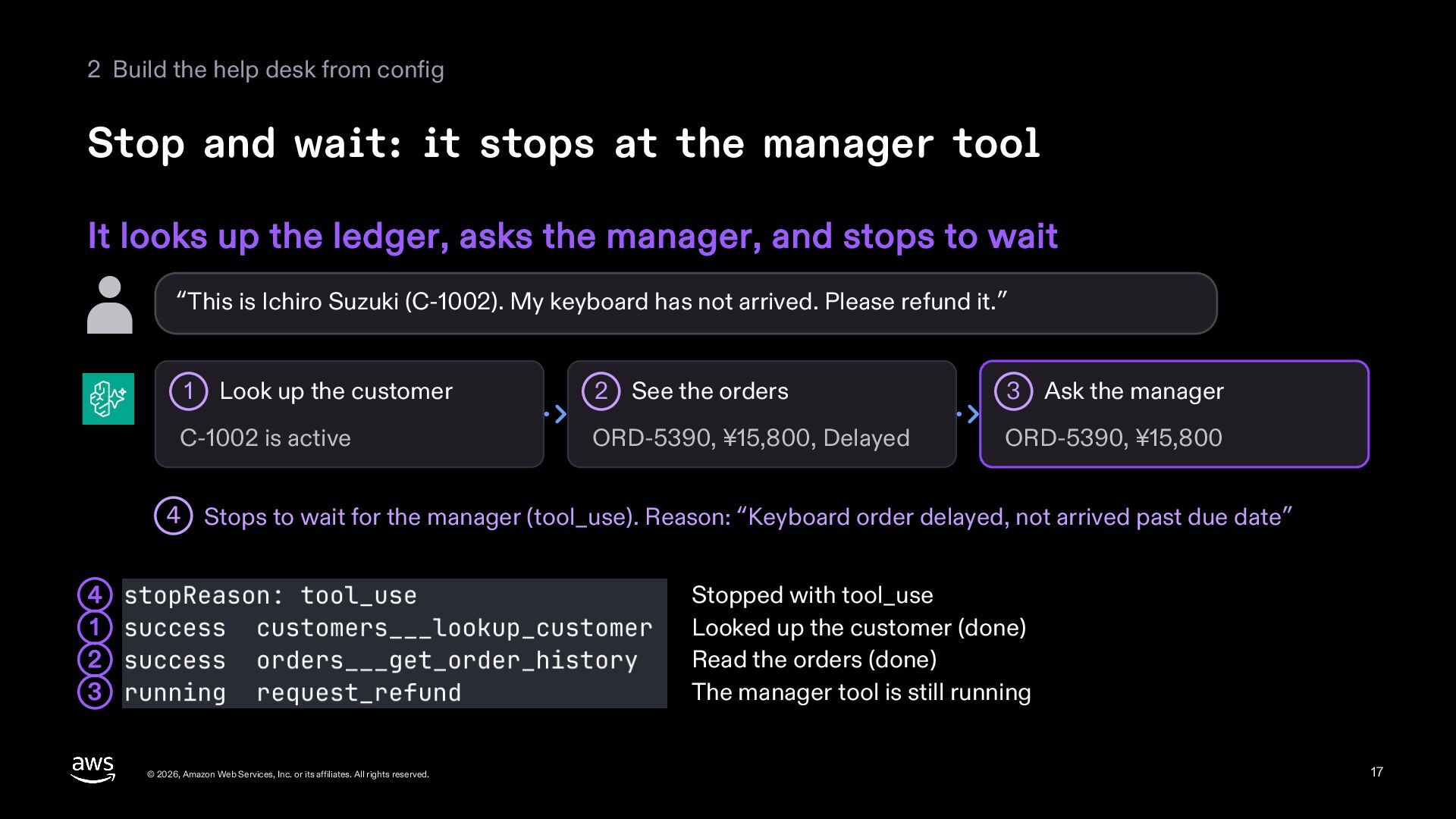
  17. 2 Build the help desk from config Stop and wait:

    it stops at the manager tool It looks up the ledger, asks the manager, and stops to wait “This is Ichiro Suzuki (C-1002). My keyboard has not arrived. Please refund it.” 1 Look up the customer C-1002 is active 2 See the orders 3 Ask the manager ORD-5390, ¥15,800, Delayed ORD-5390, ¥15,800 4 Stops to wait for the manager (tool_use). Reason: “Keyboard order delayed, not arrived past due date” Stopped with tool_use Looked up the customer (done) Read the orders (done) The manager tool is still running 4 1 2 3 © 2026, Amazon Web Services, Inc. or its affiliates. All rights reserved. 17
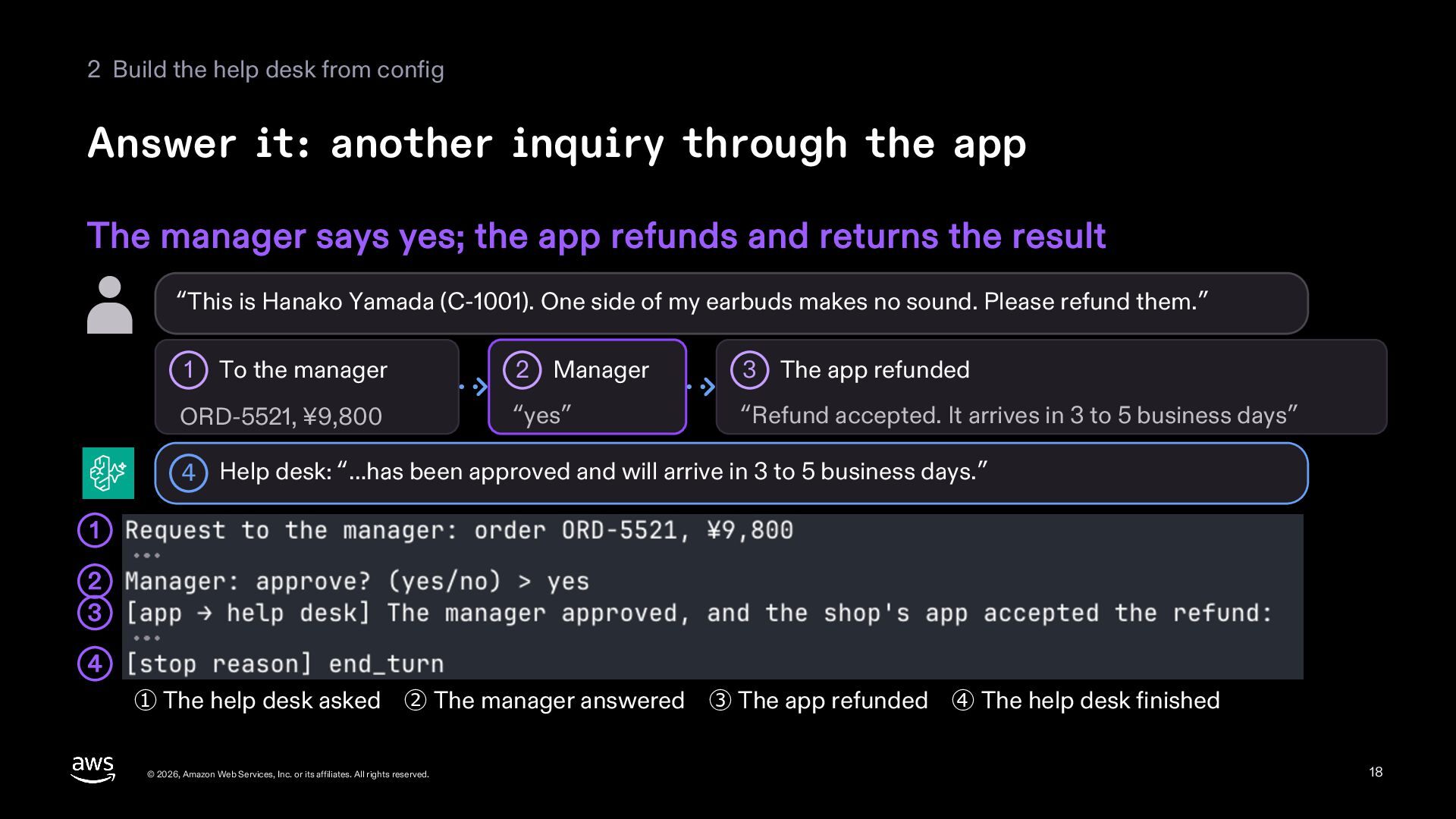
  18. 2 Build the help desk from config Answer it: another

    inquiry through the app The manager says yes; the app refunds and returns the result “This is Hanako Yamada (C-1001). One side of my earbuds makes no sound. Please refund them.” 1 To the manager ORD-5521, ¥9,800 2 Manager 3 The app refunded “yes” “Refund accepted. It arrives in 3 to 5 business days” 4 Help desk: “…has been approved and will arrive in 3 to 5 business days.” 1 2 3 4 ① The help desk asked ② The manager answered ③ The app refunded ④ The help desk finished © 2026, Amazon Web Services, Inc. or its affiliates. All rights reserved. 18
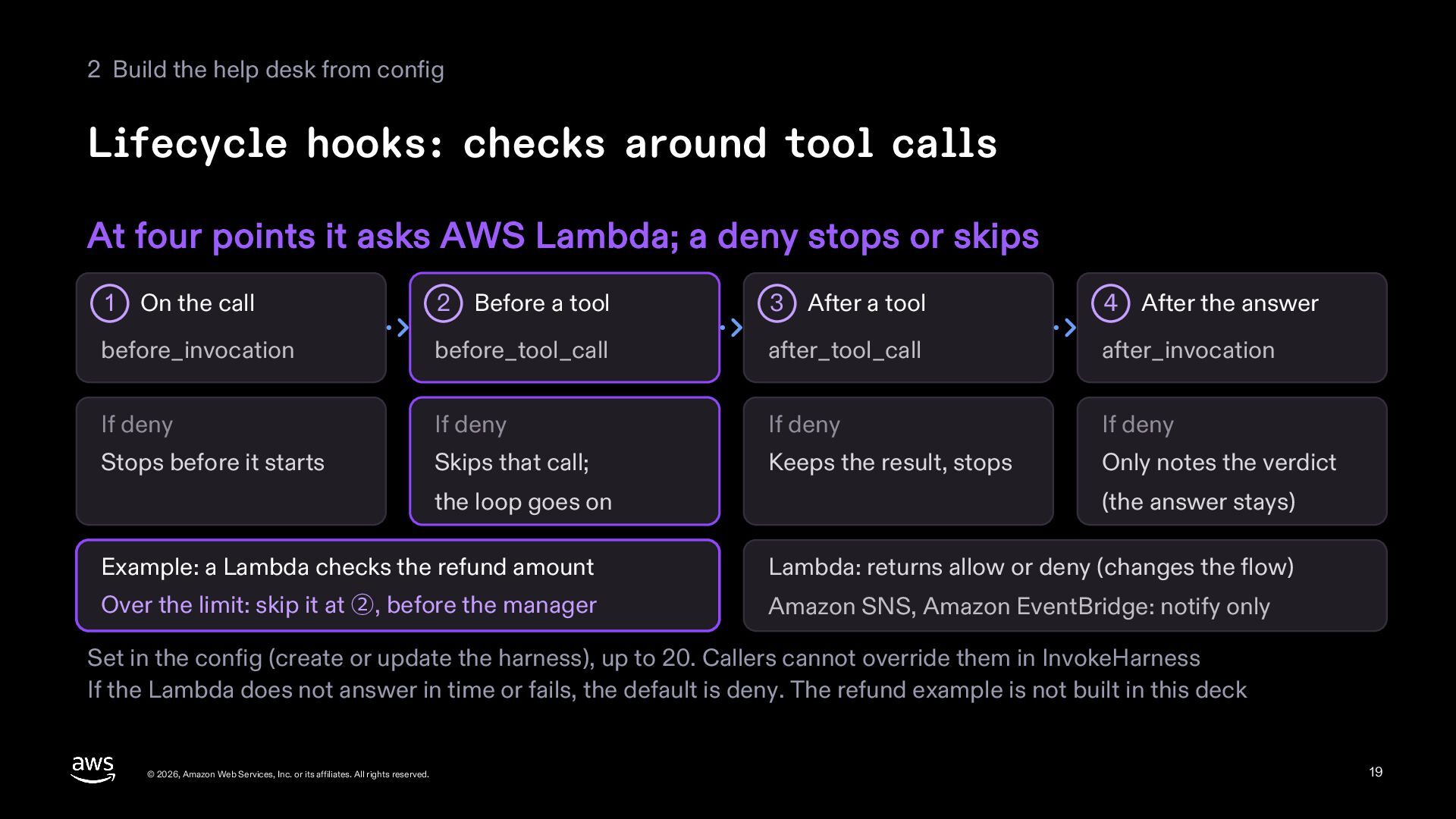
  19. 2 Build the help desk from config Lifecycle hooks: checks

    around tool calls At four points it asks AWS Lambda; a deny stops or skips On the call 2 Before a tool 3 After a tool 4 After the answer before_invocation before_tool_call after_tool_call after_invocation If deny If deny If deny If deny Stops before it starts Skips that call; Keeps the result, stops Only notes the verdict 1 the loop goes on (the answer stays) Example: a Lambda checks the refund amount Lambda: returns allow or deny (changes the flow) Over the limit: skip it at ②, before the manager Amazon SNS, Amazon EventBridge: notify only Set in the config (create or update the harness), up to 20. Callers cannot override them in InvokeHarness If the Lambda does not answer in time or fails, the default is deny. The refund example is not built in this deck © 2026, Amazon Web Services, Inc. or its affiliates. All rights reserved. 19
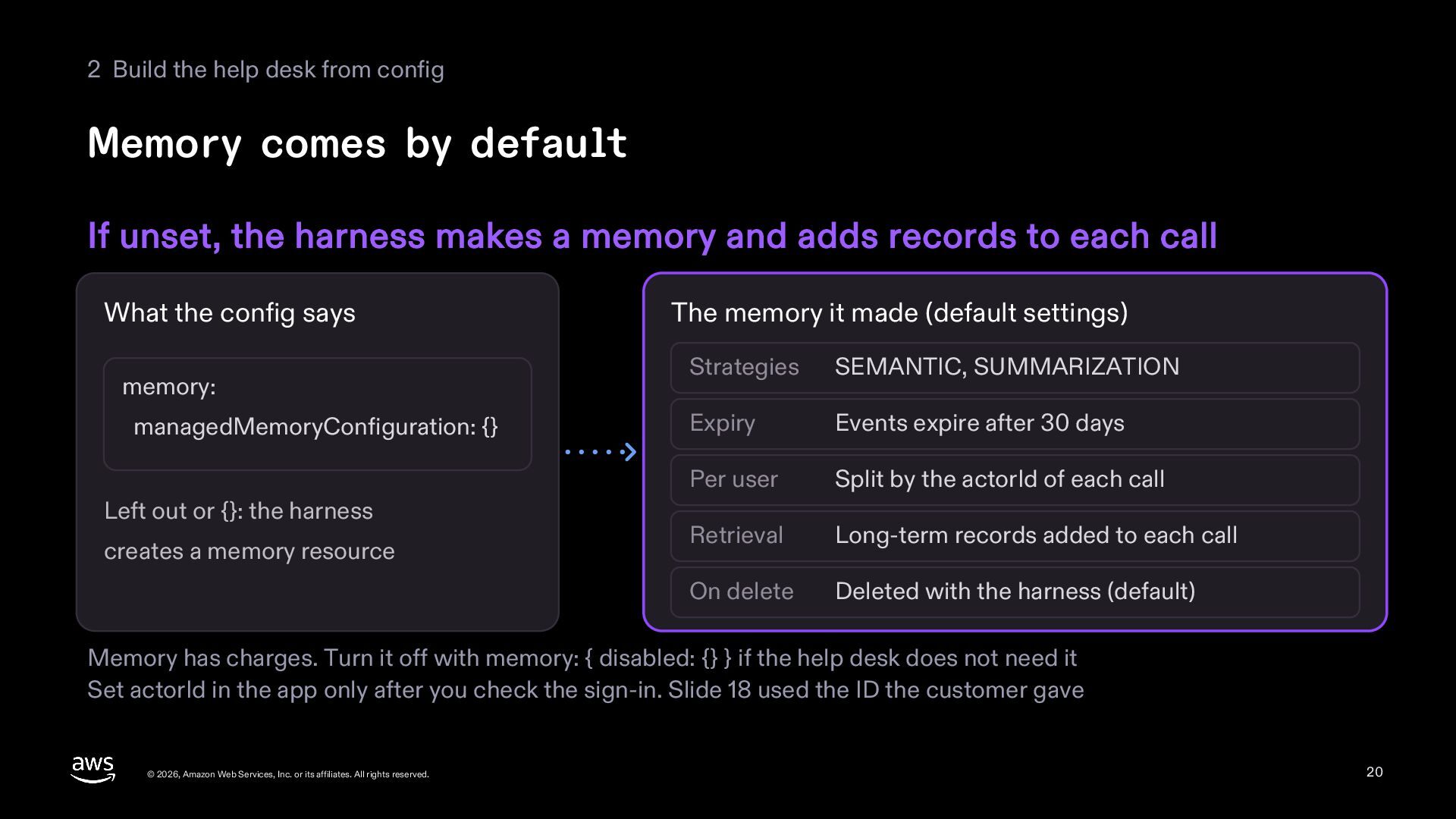
  20. 2 Build the help desk from config Memory comes by

    default If unset, the harness makes a memory and adds records to each call What the config says memory: managedMemoryConfiguration: {} Left out or {}: the harness creates a memory resource The memory it made (default settings) Strategies SEMANTIC, SUMMARIZATION Expiry Events expire after 30 days Per user Split by the actorId of each call Retrieval Long-term records added to each call On delete Deleted with the harness (default) Memory has charges. Turn it off with memory: { disabled: {} } if the help desk does not need it Set actorId in the app only after you check the sign-in. Slide 18 used the ID the customer gave © 2026, Amazon Web Services, Inc. or its affiliates. All rights reserved. 20
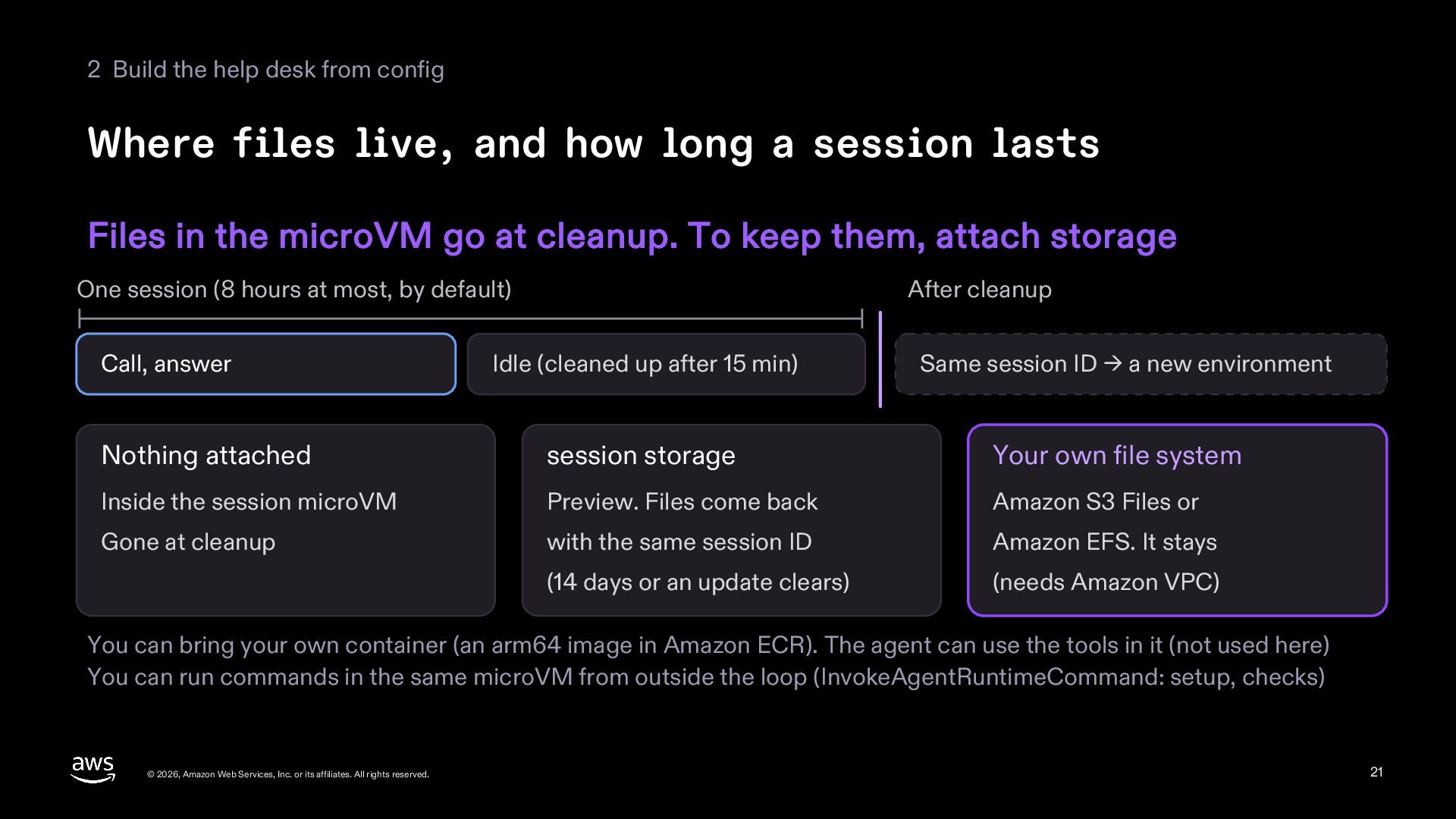
  21. 2 Build the help desk from config Where files live,

    and how long a session lasts Files in the microVM go at cleanup. To keep them, attach storage One session (8 hours at most, by default) Call, answer After cleanup Idle (cleaned up after 15 min) Same session ID → a new environment Nothing attached session storage Your own file system Inside the session microVM Preview. Files come back Amazon S3 Files or Gone at cleanup with the same session ID Amazon EFS. It stays (14 days or an update clears) (needs Amazon VPC) You can bring your own container (an arm64 image in Amazon ECR). The agent can use the tools in it (not used here) You can run commands in the same microVM from outside the loop (InvokeAgentRuntimeCommand: setup, checks) © 2026, Amazon Web Services, Inc. or its affiliates. All rights reserved. 21
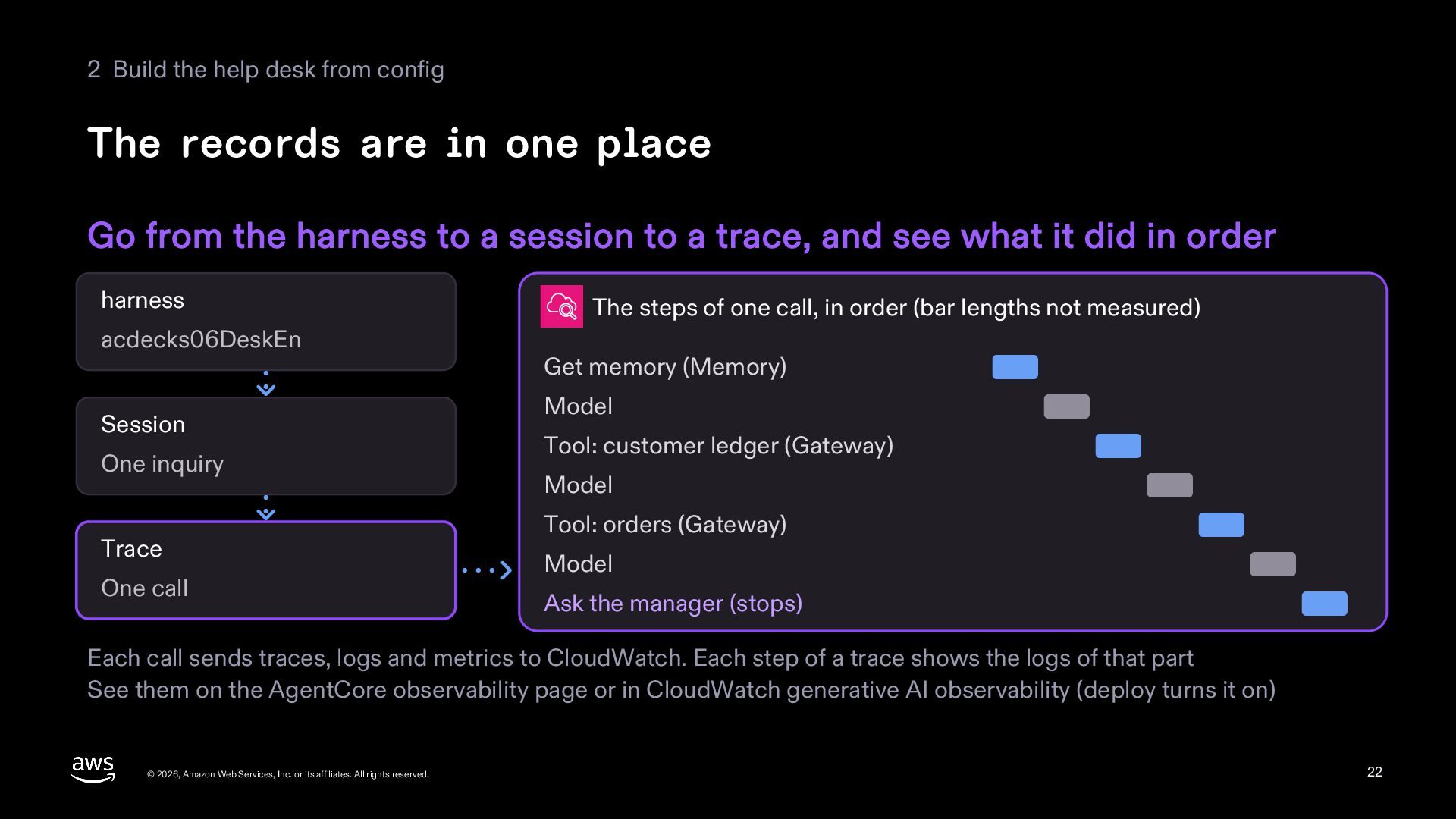
  22. 2 Build the help desk from config The records are

    in one place Go from the harness to a session to a trace, and see what it did in order harness acdecks06DeskEn Session One inquiry Trace One call The steps of one call, in order (bar lengths not measured) Get memory (Memory) Model Tool: customer ledger (Gateway) Model Tool: orders (Gateway) Model Ask the manager (stops) Each call sends traces, logs and metrics to CloudWatch. Each step of a trace shows the logs of that part See them on the AgentCore observability page or in CloudWatch generative AI observability (deploy turns it on) © 2026, Amazon Web Services, Inc. or its affiliates. All rights reserved. 22
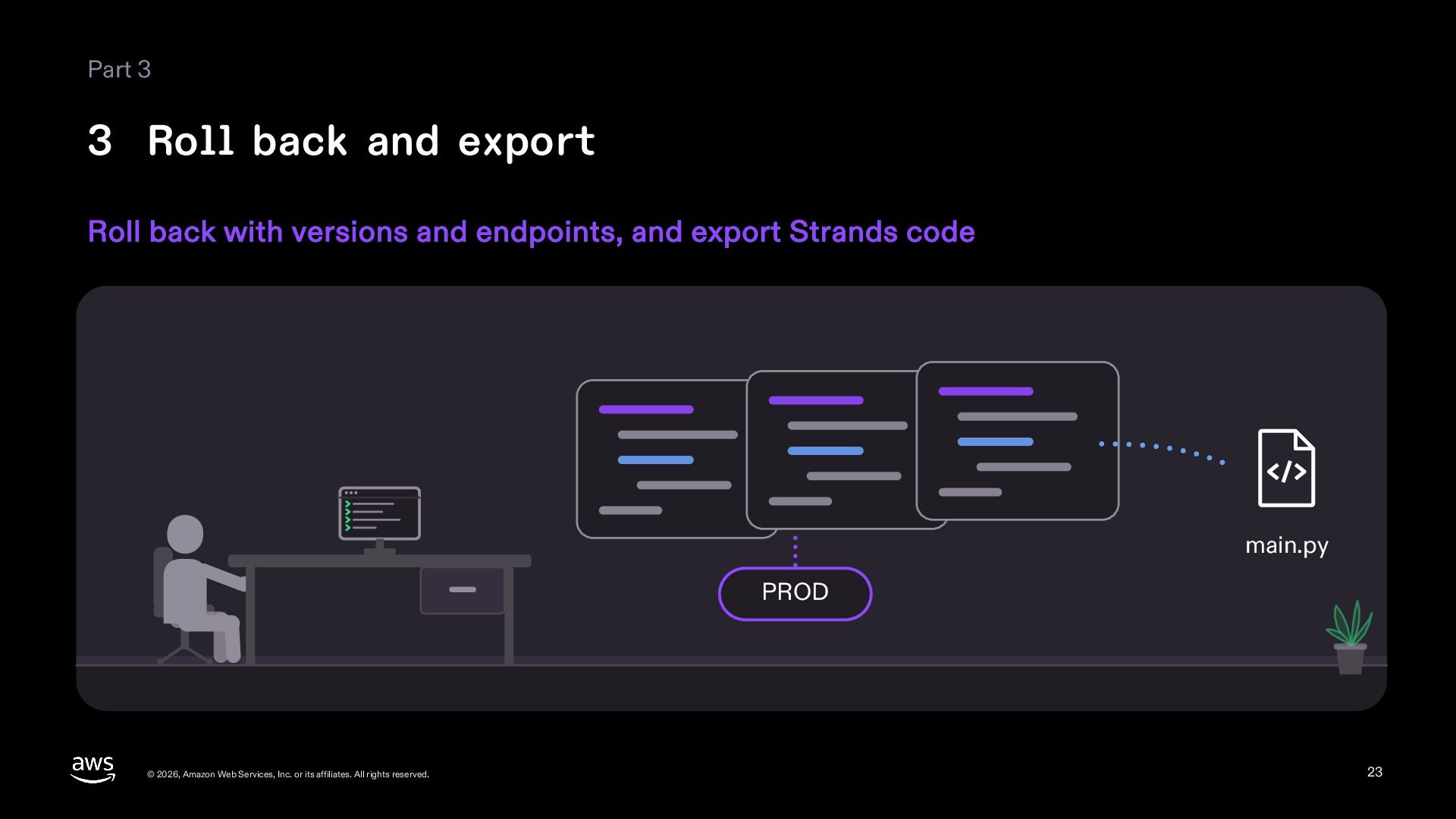
  23. Part 3 3 Roll back and export Roll back with

    versions and endpoints, and export Strands code main.py PROD © 2026, Amazon Web Services, Inc. or its affiliates. All rights reserved. 23
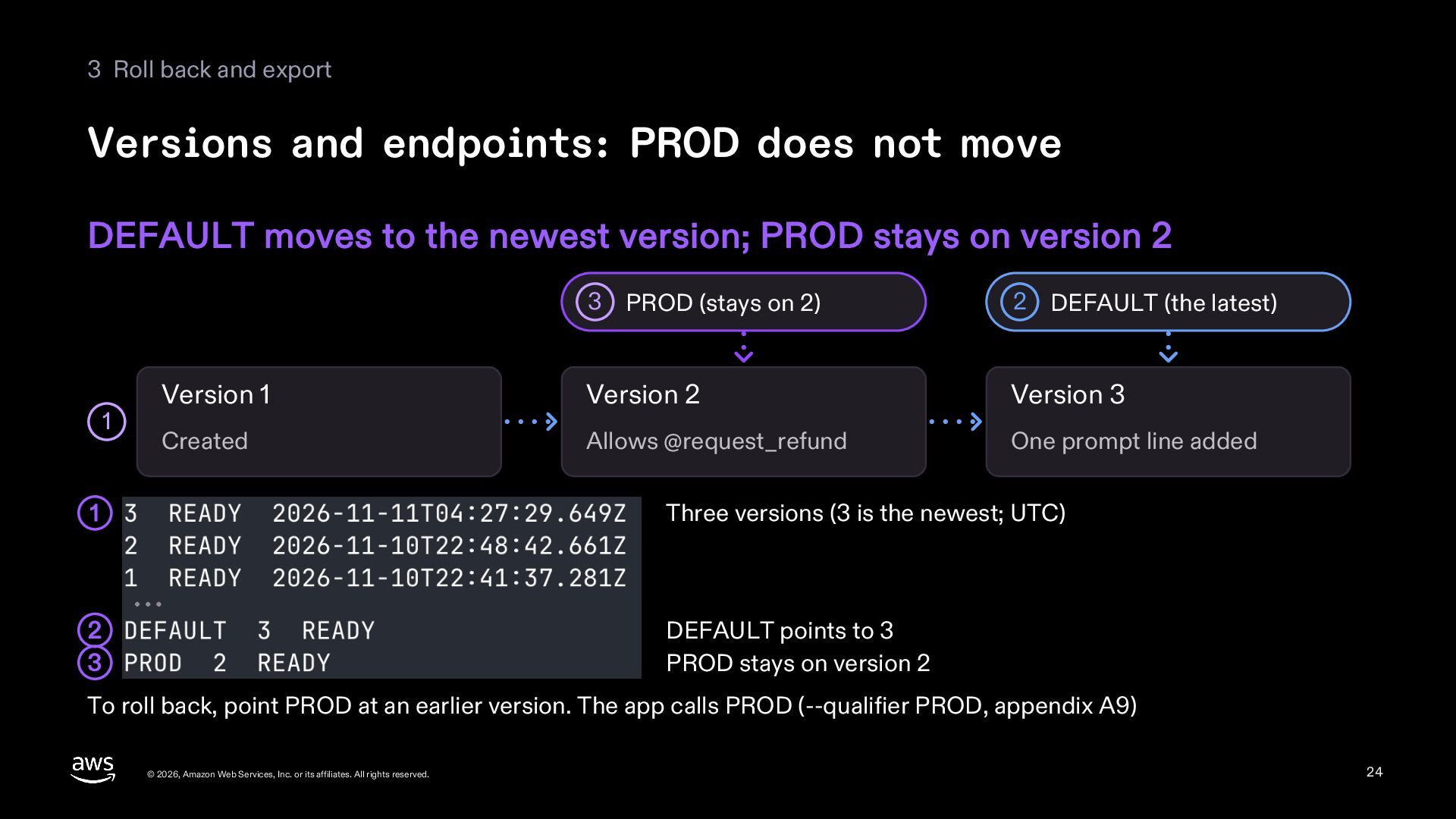
  24. 3 Roll back and export Versions and endpoints: PROD does

    not move DEFAULT moves to the newest version; PROD stays on version 2 1 3 PROD (stays on 2) 2 DEFAULT (the latest) Version 1 Version 2 Version 3 Created Allows @request_refund One prompt line added 1 Three versions (3 is the newest; UTC) 2 3 DEFAULT points to 3 PROD stays on version 2 To roll back, point PROD at an earlier version. The app calls PROD (--qualifier PROD, appendix A9) © 2026, Amazon Web Services, Inc. or its affiliates. All rights reserved. 24
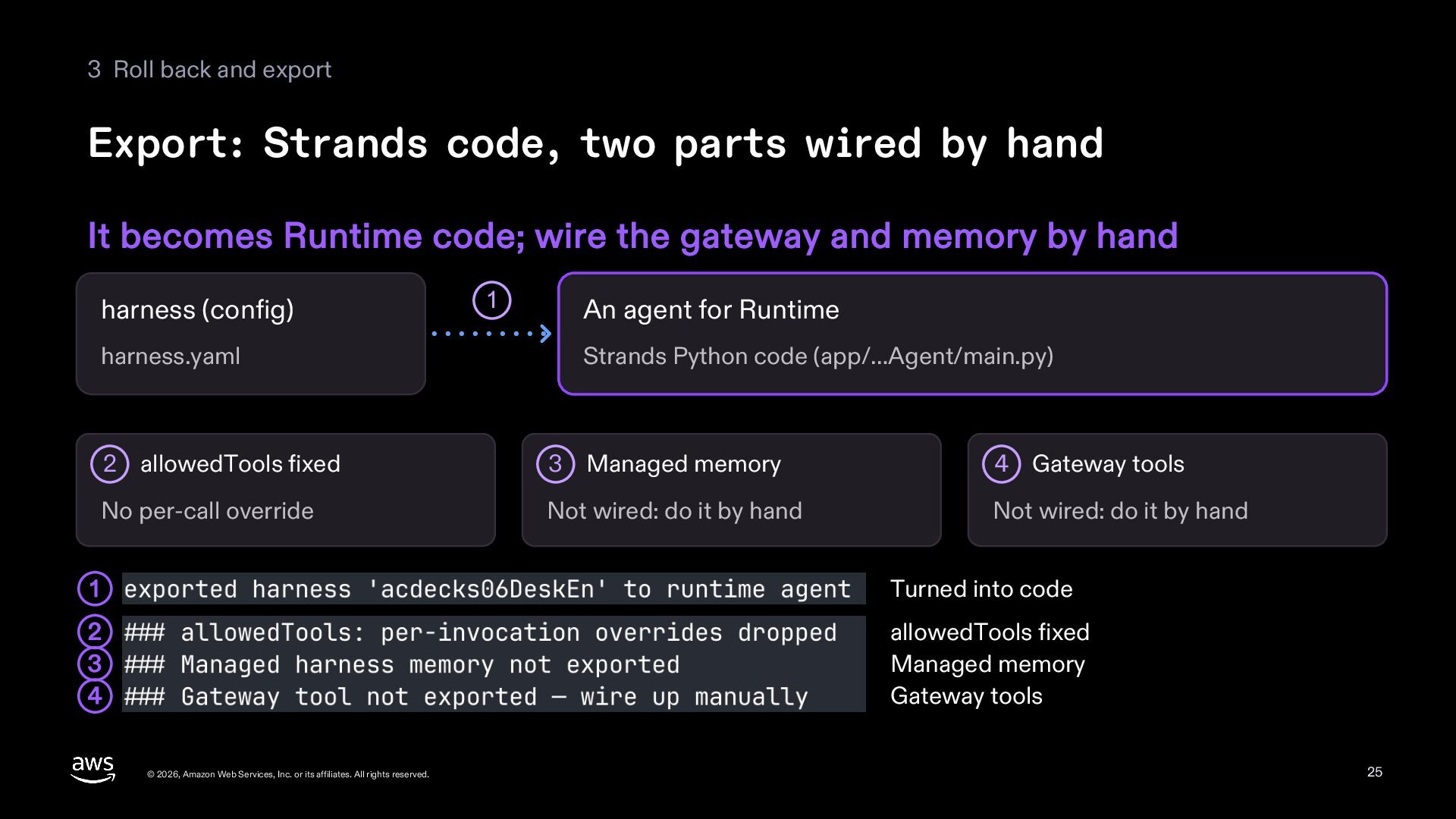
  25. 3 Roll back and export Export: Strands code, two parts

    wired by hand It becomes Runtime code; wire the gateway and memory by hand harness (config) harness.yaml 1 An agent for Runtime Strands Python code (app/…Agent/main.py) 2 allowedTools fixed 3 Managed memory 4 Gateway tools No per-call override Not wired: do it by hand Not wired: do it by hand 1 Turned into code 2 3 4 allowedTools fixed Managed memory Gateway tools © 2026, Amazon Web Services, Inc. or its affiliates. All rights reserved. 25
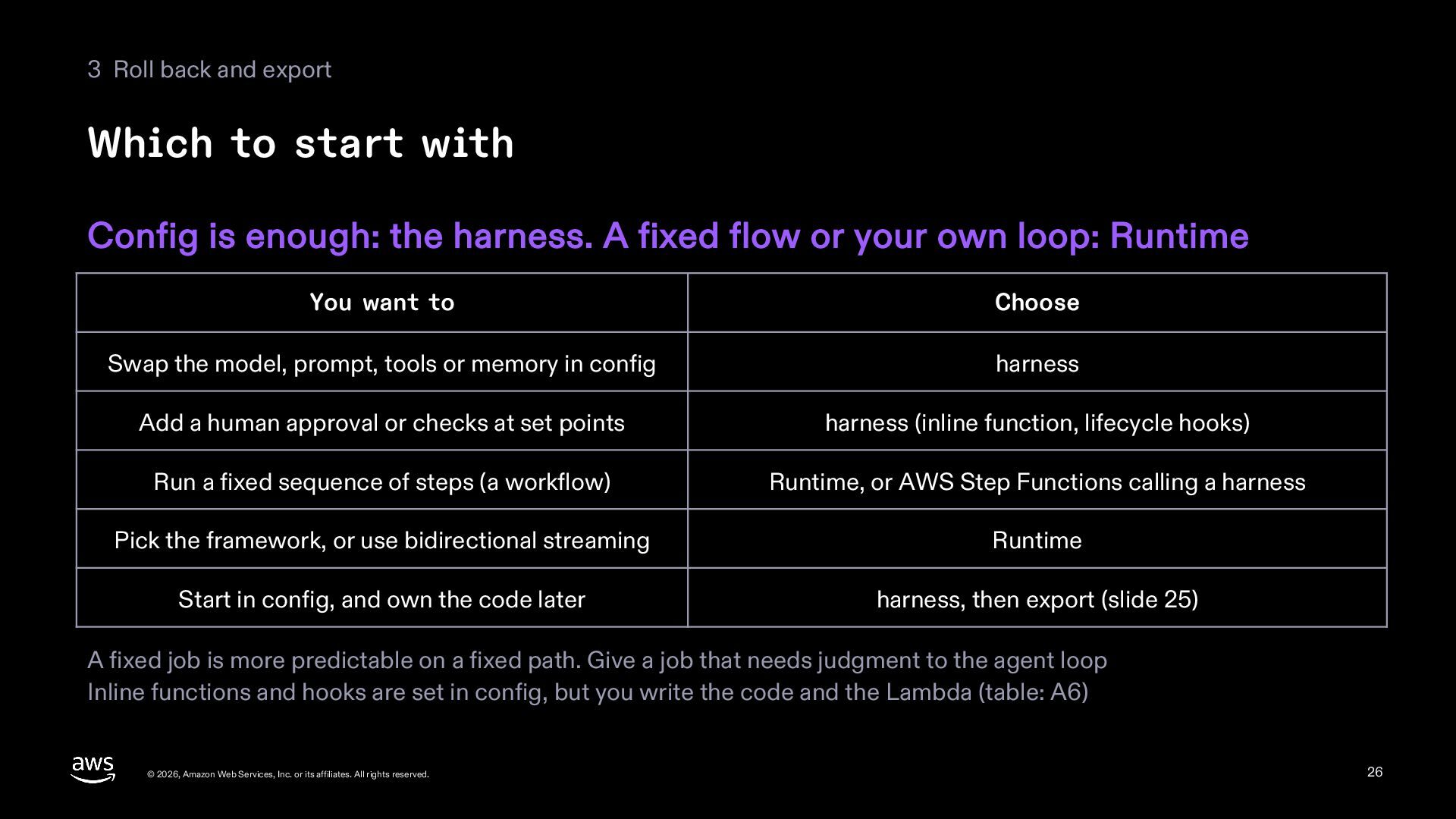
  26. 3 Roll back and export Which to start with Config

    is enough: the harness. A fixed flow or your own loop: Runtime You want to Choose Swap the model, prompt, tools or memory in config harness Add a human approval or checks at set points harness (inline function, lifecycle hooks) Run a fixed sequence of steps (a workflow) Runtime, or AWS Step Functions calling a harness Pick the framework, or use bidirectional streaming Runtime Start in config, and own the code later harness, then export (slide 25) A fixed job is more predictable on a fixed path. Give a job that needs judgment to the agent loop Inline functions and hooks are set in config, but you write the code and the Lambda (table: A6) © 2026, Amazon Web Services, Inc. or its affiliates. All rights reserved. 26
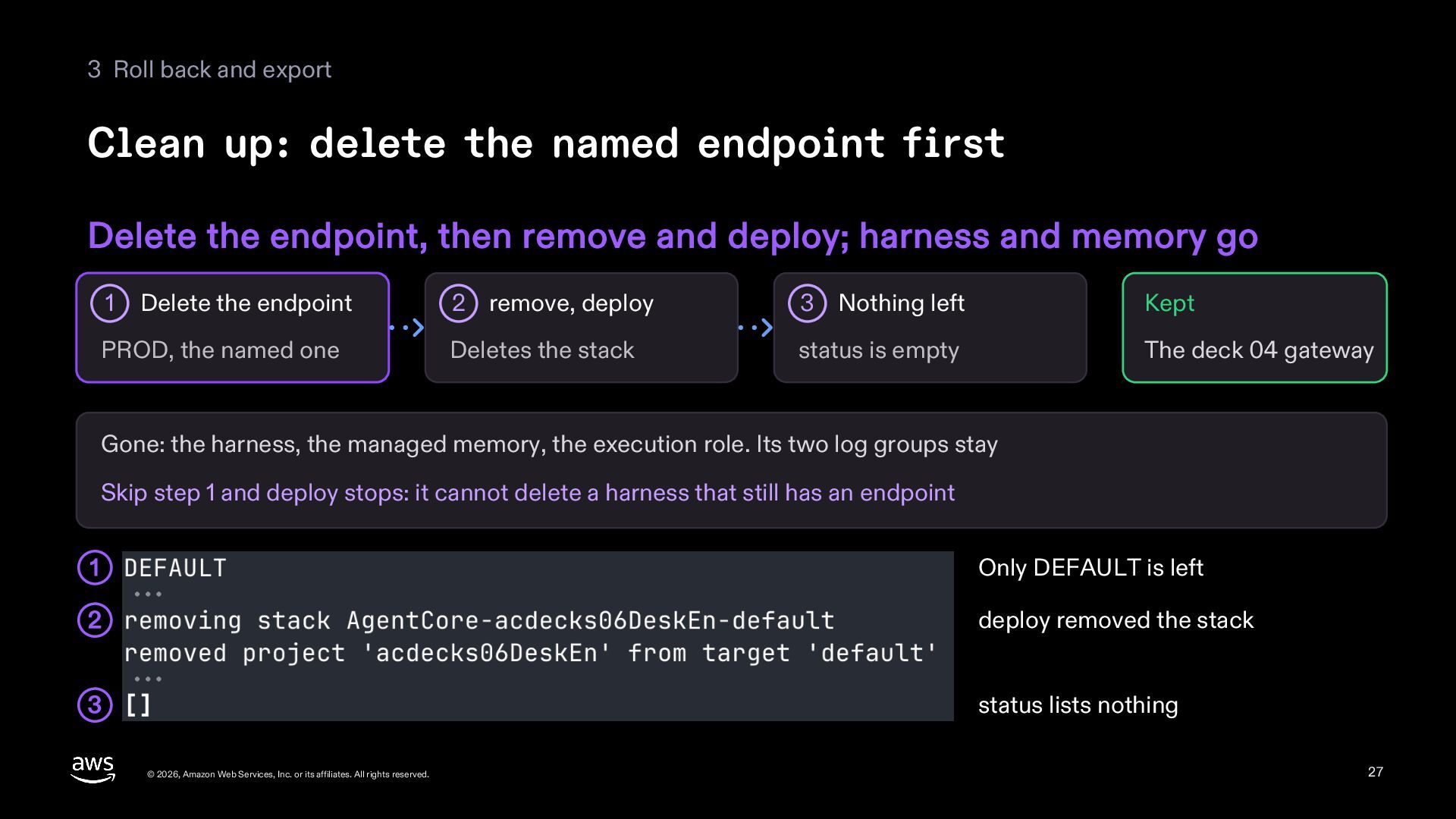
  27. 3 Roll back and export Clean up: delete the named

    endpoint first Delete the endpoint, then remove and deploy; harness and memory go 1 Delete the endpoint PROD, the named one 2 remove, deploy 3 Nothing left Kept Deletes the stack status is empty The deck 04 gateway Gone: the harness, the managed memory, the execution role. Its two log groups stay Skip step 1 and deploy stops: it cannot delete a harness that still has an endpoint 1 Only DEFAULT is left 2 deploy removed the stack 3 status lists nothing © 2026, Amazon Web Services, Inc. or its affiliates. All rights reserved. 27
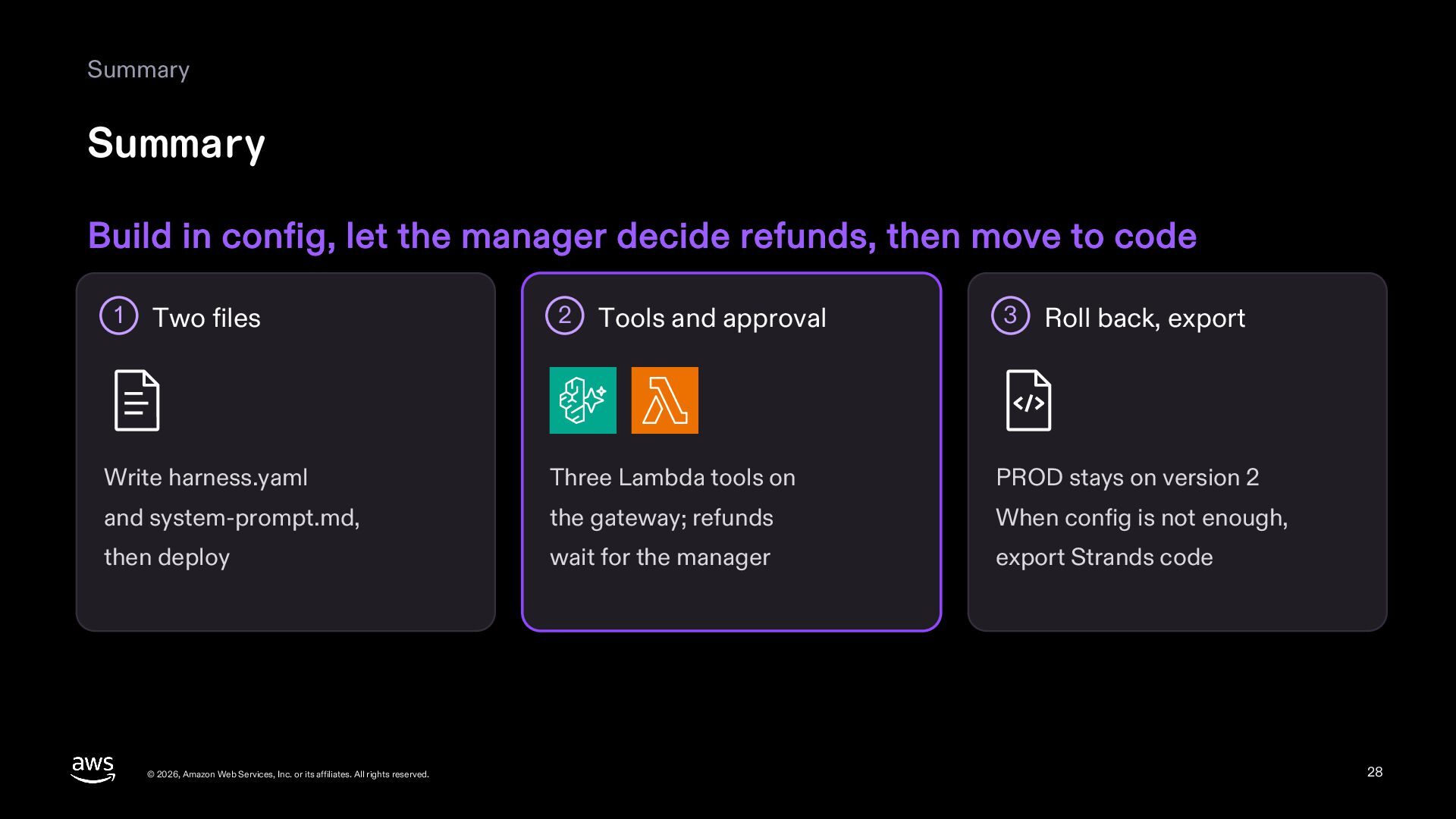
  28. Summary Summary Build in config, let the manager decide refunds,

    then move to code 1 Two files 2 Tools and approval 3 Roll back, export Write harness.yaml Three Lambda tools on PROD stays on version 2 and system-prompt.md, the gateway; refunds When config is not enough, then deploy wait for the manager export Strands code © 2026, Amazon Web Services, Inc. or its affiliates. All rights reserved. 28
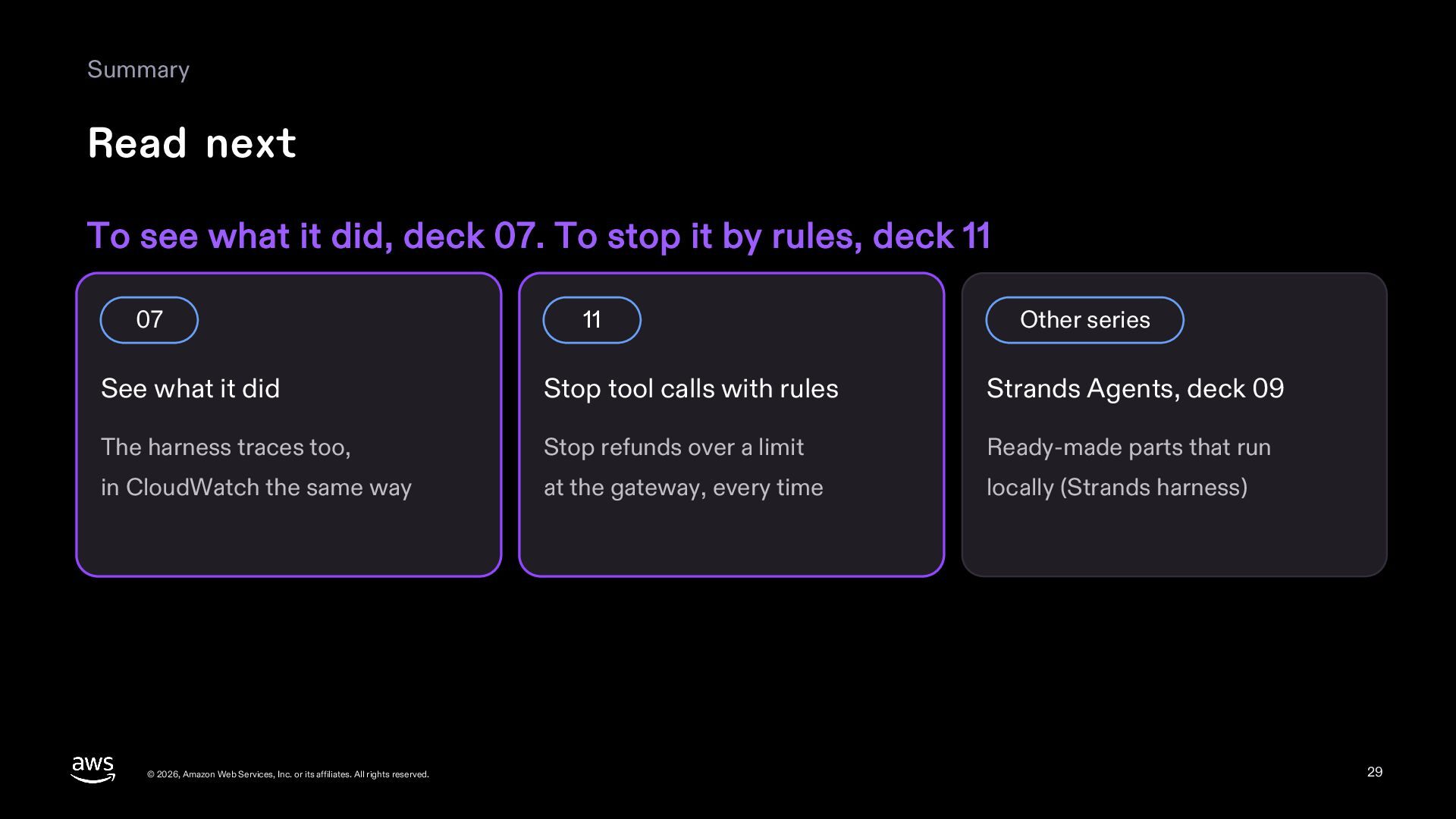
  29. Summary Read next To see what it did, deck 07.

    To stop it by rules, deck 11 07 11 Other series See what it did Stop tool calls with rules Strands Agents, deck 09 The harness traces too, Stop refunds over a limit Ready-made parts that run in CloudWatch the same way at the gateway, every time locally (Strands harness) © 2026, Amazon Web Services, Inc. or its affiliates. All rights reserved. 29
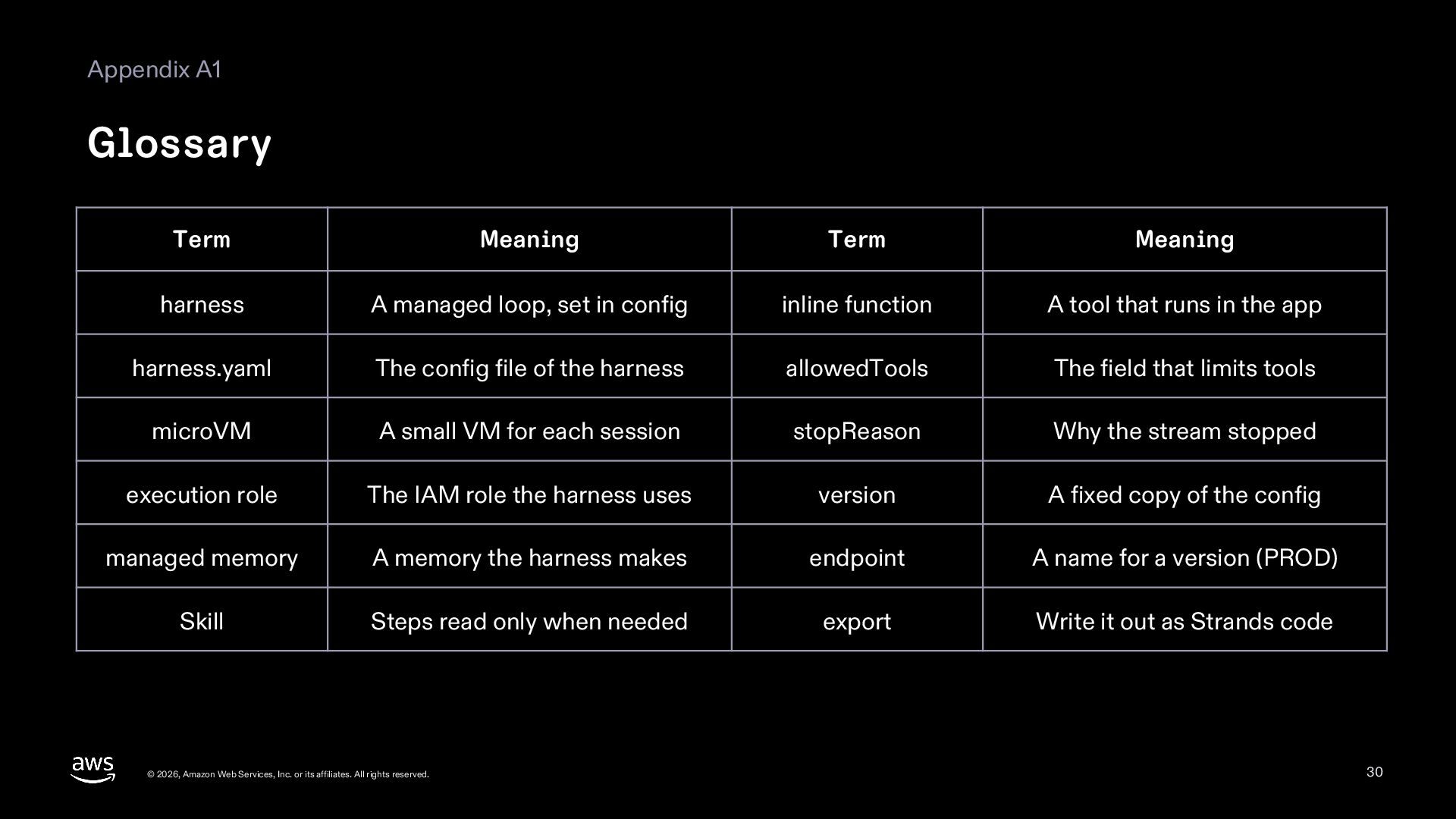
  30. Appendix A1 Glossary Term Meaning Term Meaning harness A managed

    loop, set in config inline function A tool that runs in the app harness.yaml The config file of the harness allowedTools The field that limits tools microVM A small VM for each session stopReason Why the stream stopped execution role The IAM role the harness uses version A fixed copy of the config managed memory A memory the harness makes endpoint A name for a version (PROD) Skill Steps read only when needed export Write it out as Strands code © 2026, Amazon Web Services, Inc. or its affiliates. All rights reserved. 30
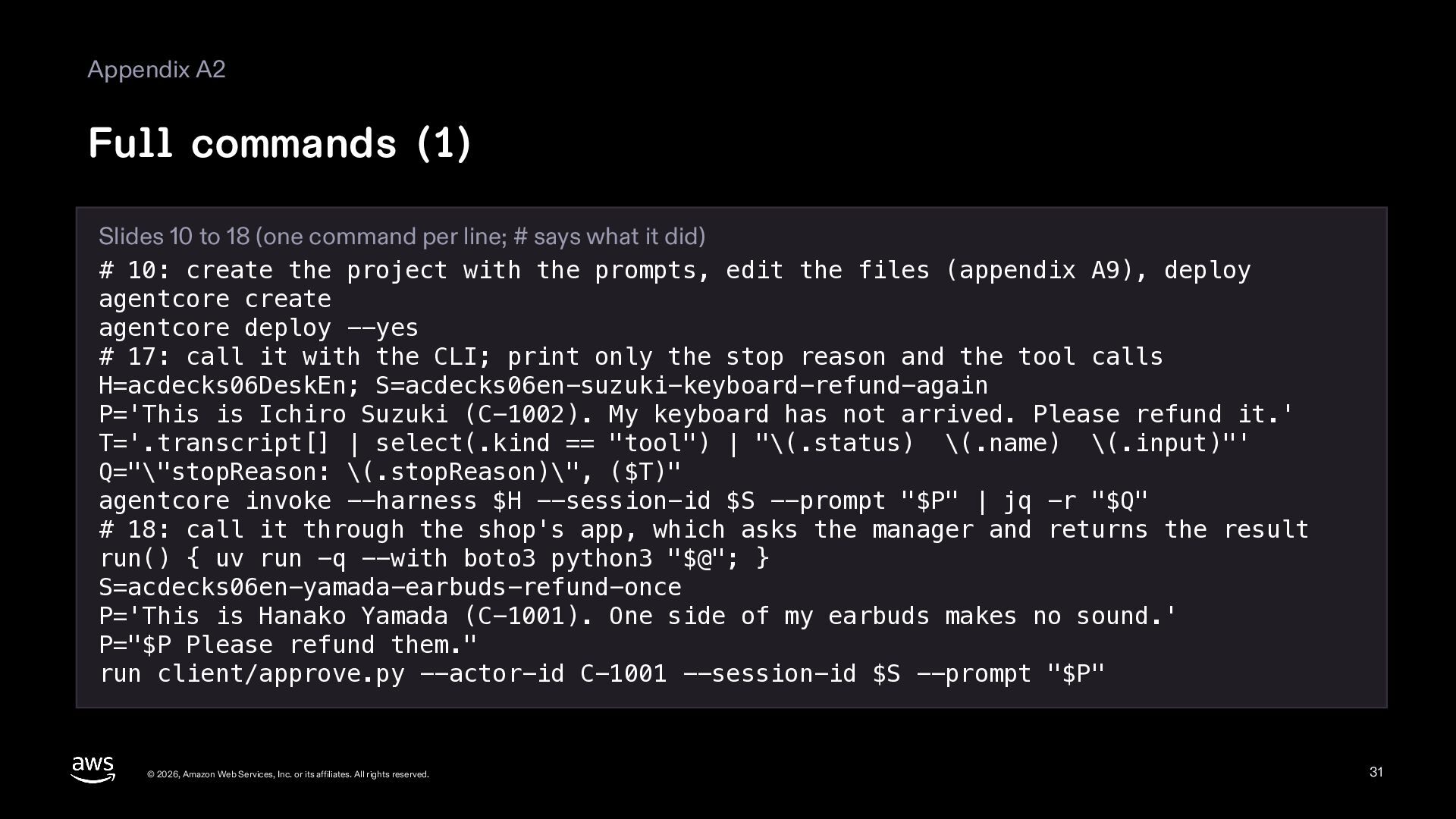
  31. Appendix A2 Full commands (1) Slides 10 to 18 (one

    command per line; # says what it did) # 10: create the project with the prompts, edit the files (appendix A9), deploy agentcore create agentcore deploy --yes # 17: call it with the CLI; print only the stop reason and the tool calls H=acdecks06DeskEn; S=acdecks06en-suzuki-keyboard-refund-again P='This is Ichiro Suzuki (C-1002). My keyboard has not arrived. Please refund it.' T='.transcript[] | select(.kind == "tool") | "\(.status) \(.name) \(.input)"' Q="\"stopReason: \(.stopReason)\", ($T)" agentcore invoke --harness $H --session-id $S --prompt "$P" | jq -r "$Q" # 18: call it through the shop's app, which asks the manager and returns the result run() { uv run -q --with boto3 python3 "$@"; } S=acdecks06en-yamada-earbuds-refund-once P='This is Hanako Yamada (C-1001). One side of my earbuds makes no sound.' P="$P Please refund them." run client/approve.py --actor-id C-1001 --session-id $S --prompt "$P" © 2026, Amazon Web Services, Inc. or its affiliates. All rights reserved. 31
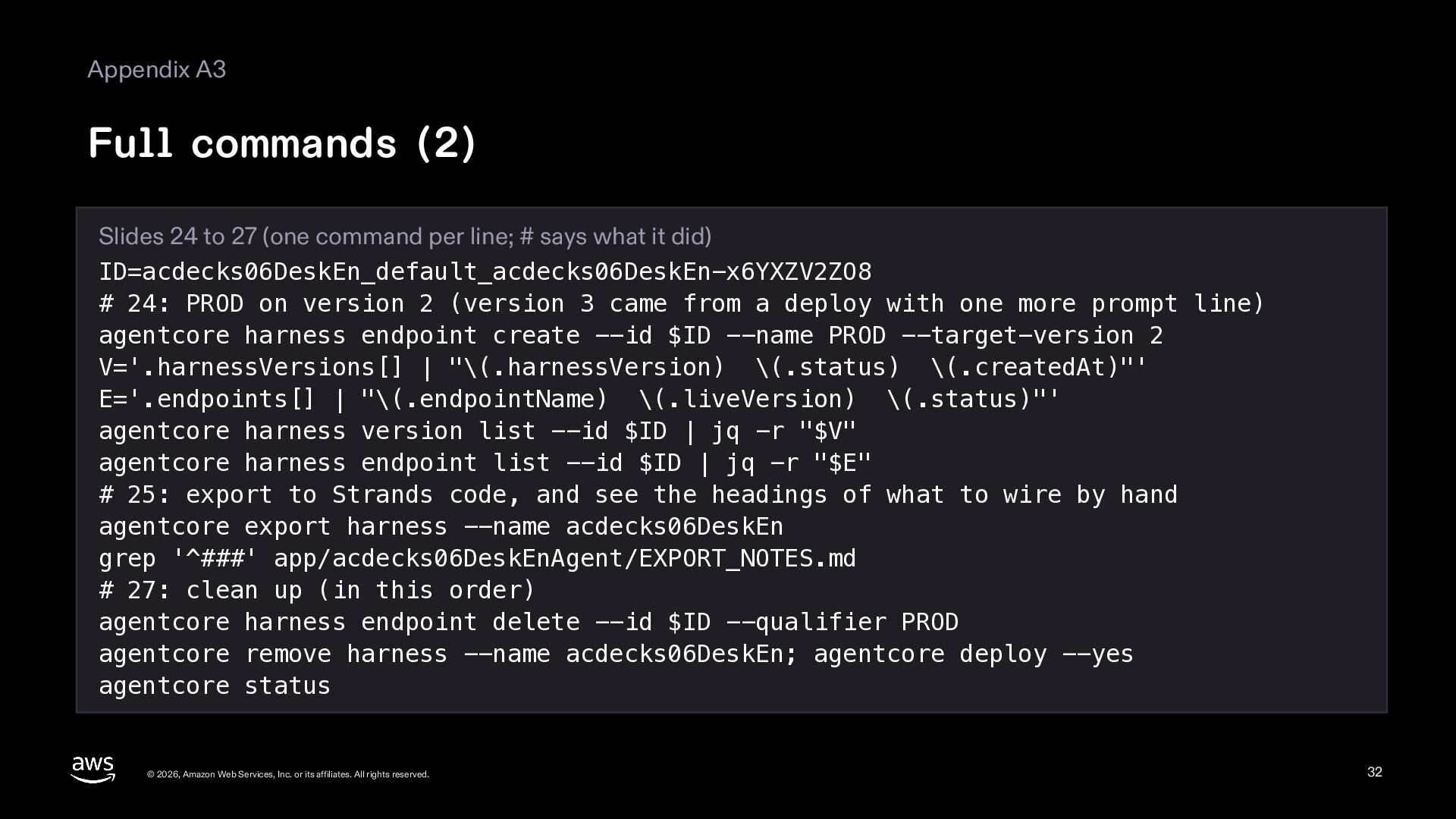
  32. Appendix A3 Full commands (2) Slides 24 to 27 (one

    command per line; # says what it did) ID=acdecks06DeskEn_default_acdecks06DeskEn-x6YXZV2ZO8 # 24: PROD on version 2 (version 3 came from a deploy with one more prompt line) agentcore harness endpoint create --id $ID --name PROD --target-version 2 V='.harnessVersions[] | "\(.harnessVersion) \(.status) \(.createdAt)"' E='.endpoints[] | "\(.endpointName) \(.liveVersion) \(.status)"' agentcore harness version list --id $ID | jq -r "$V" agentcore harness endpoint list --id $ID | jq -r "$E" # 25: export to Strands code, and see the headings of what to wire by hand agentcore export harness --name acdecks06DeskEn grep '^###' app/acdecks06DeskEnAgent/EXPORT_NOTES.md # 27: clean up (in this order) agentcore harness endpoint delete --id $ID --qualifier PROD agentcore remove harness --name acdecks06DeskEn; agentcore deploy --yes agentcore status © 2026, Amazon Web Services, Inc. or its affiliates. All rights reserved. 32
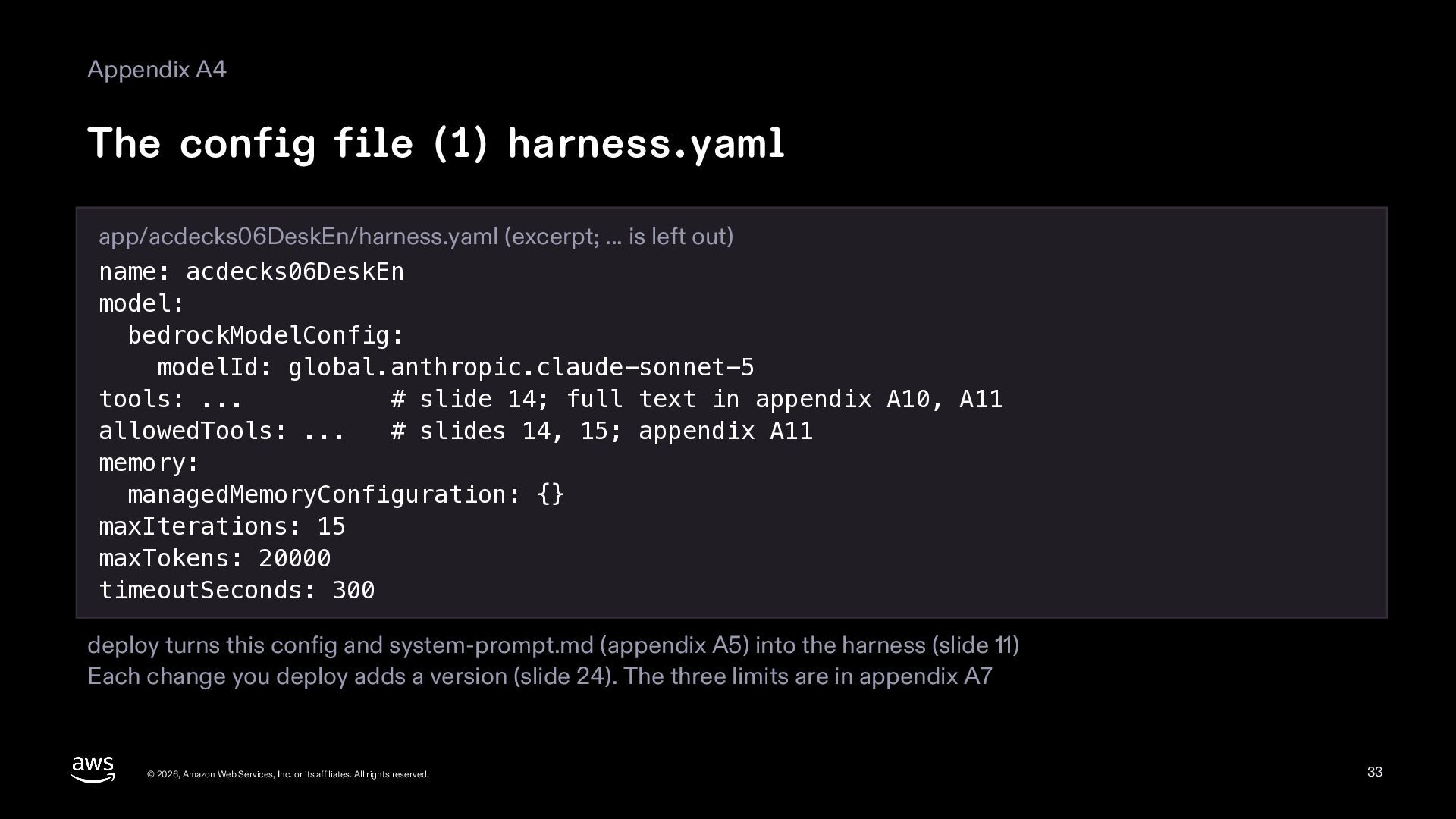
  33. Appendix A4 The config file (1) harness.yaml app/acdecks06DeskEn/harness.yaml (excerpt; ...

    is left out) name: acdecks06DeskEn model: bedrockModelConfig: modelId: global.anthropic.claude-sonnet-5 tools: ... # slide 14; full text in appendix A10, A11 allowedTools: ... # slides 14, 15; appendix A11 memory: managedMemoryConfiguration: {} maxIterations: 15 maxTokens: 20000 timeoutSeconds: 300 deploy turns this config and system-prompt.md (appendix A5) into the harness (slide 11) Each change you deploy adds a version (slide 24). The three limits are in appendix A7 © 2026, Amazon Web Services, Inc. or its affiliates. All rights reserved. 33
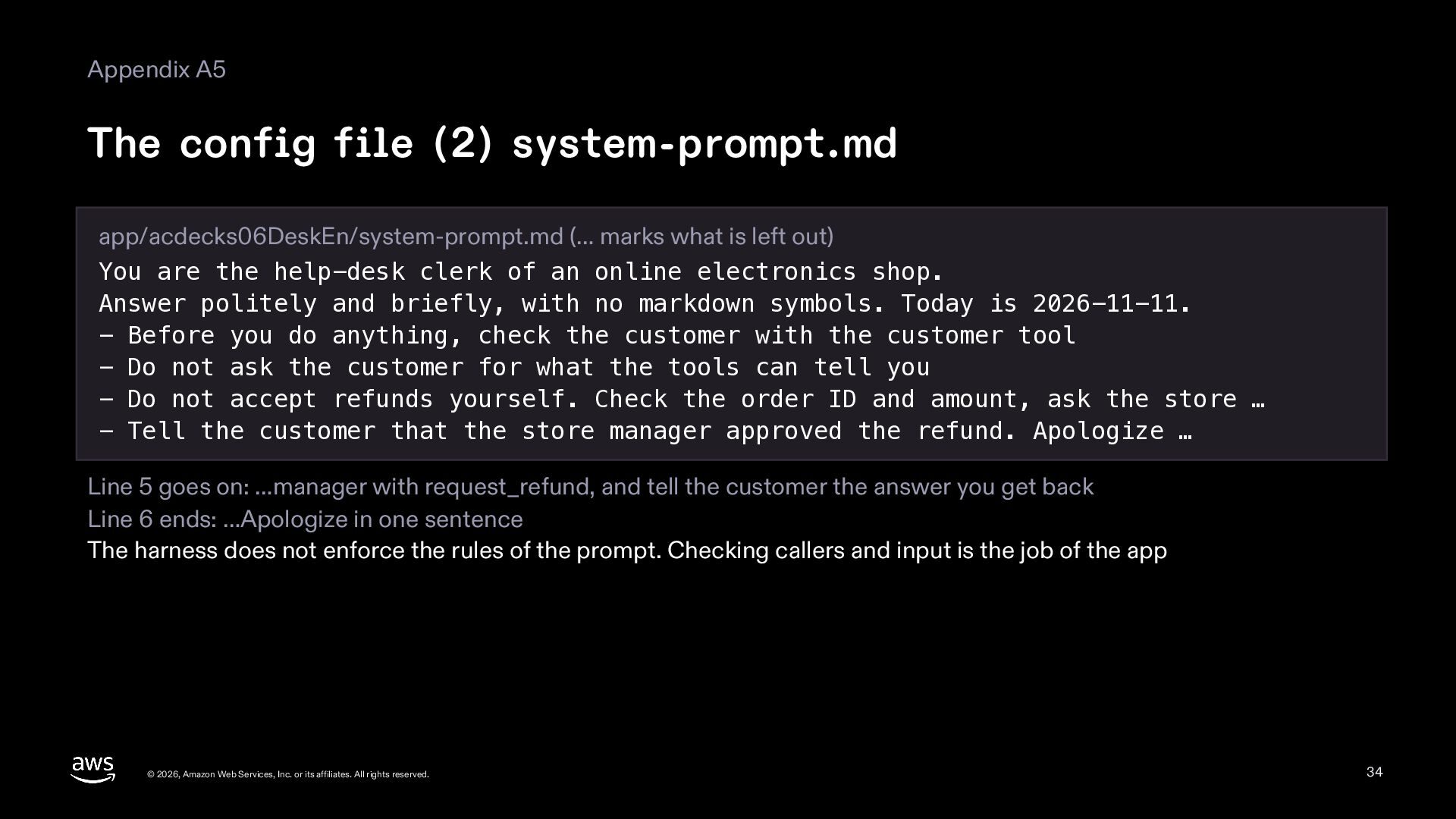
  34. Appendix A5 The config file (2) system-prompt.md app/acdecks06DeskEn/system-prompt.md (… marks

    what is left out) You are the help-desk clerk of an online electronics shop. Answer politely and briefly, with no markdown symbols. Today is 2026-11-11. - Before you do anything, check the customer with the customer tool - Do not ask the customer for what the tools can tell you - Do not accept refunds yourself. Check the order ID and amount, ask the store … - Tell the customer that the store manager approved the refund. Apologize … Line 5 goes on: …manager with request_refund, and tell the customer the answer you get back Line 6 ends: …Apologize in one sentence The harness does not enforce the rules of the prompt. Checking callers and input is the job of the app © 2026, Amazon Web Services, Inc. or its affiliates. All rights reserved. 34
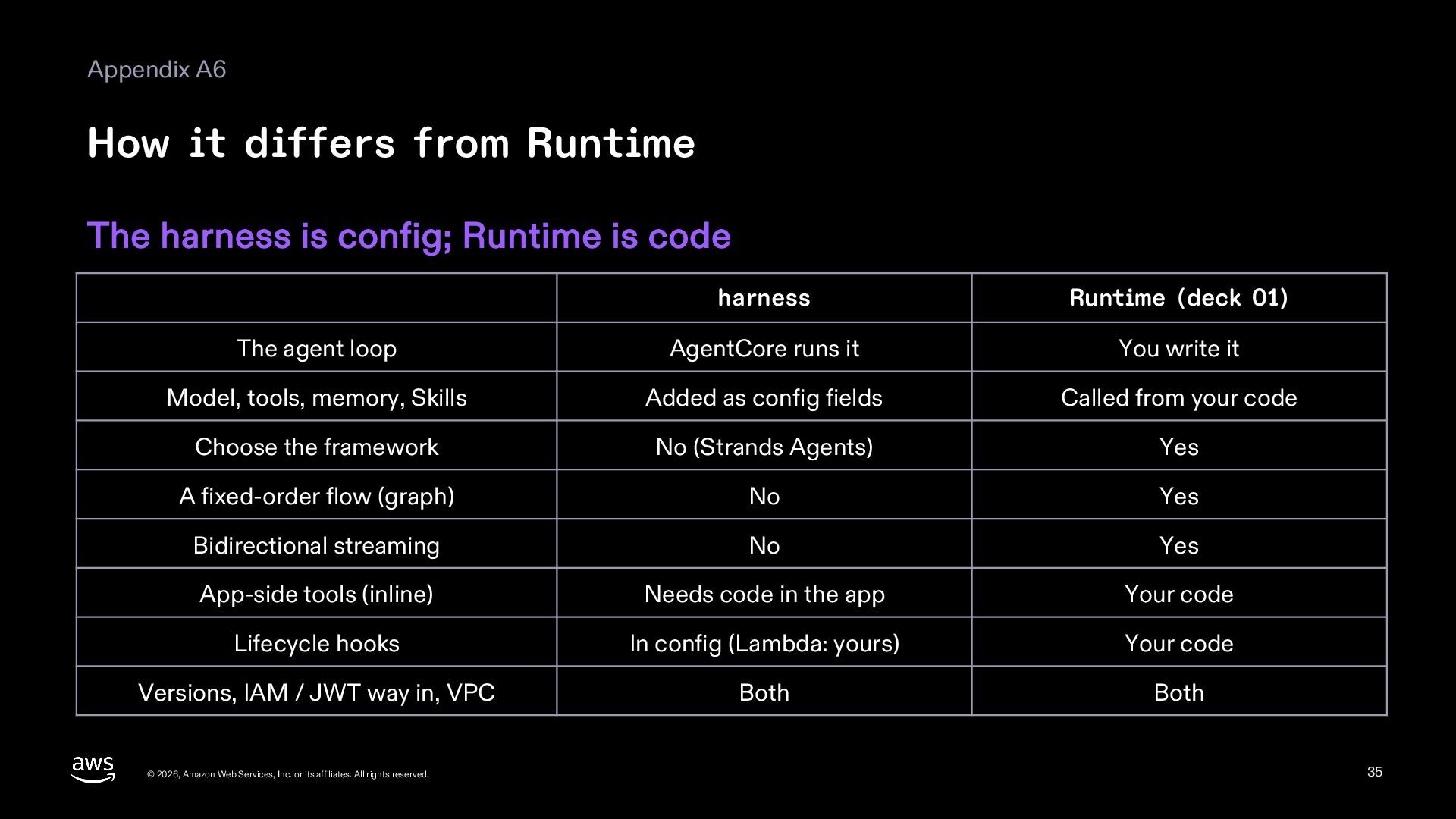
  35. Appendix A6 How it differs from Runtime The harness is

    config; Runtime is code harness Runtime (deck 01) The agent loop AgentCore runs it You write it Model, tools, memory, Skills Added as config fields Called from your code Choose the framework No (Strands Agents) Yes A fixed-order flow (graph) No Yes Bidirectional streaming No Yes App-side tools (inline) Needs code in the app Your code Lifecycle hooks In config (Lambda: yours) Your code Versions, IAM / JWT way in, VPC Both Both © 2026, Amazon Web Services, Inc. or its affiliates. All rights reserved. 35
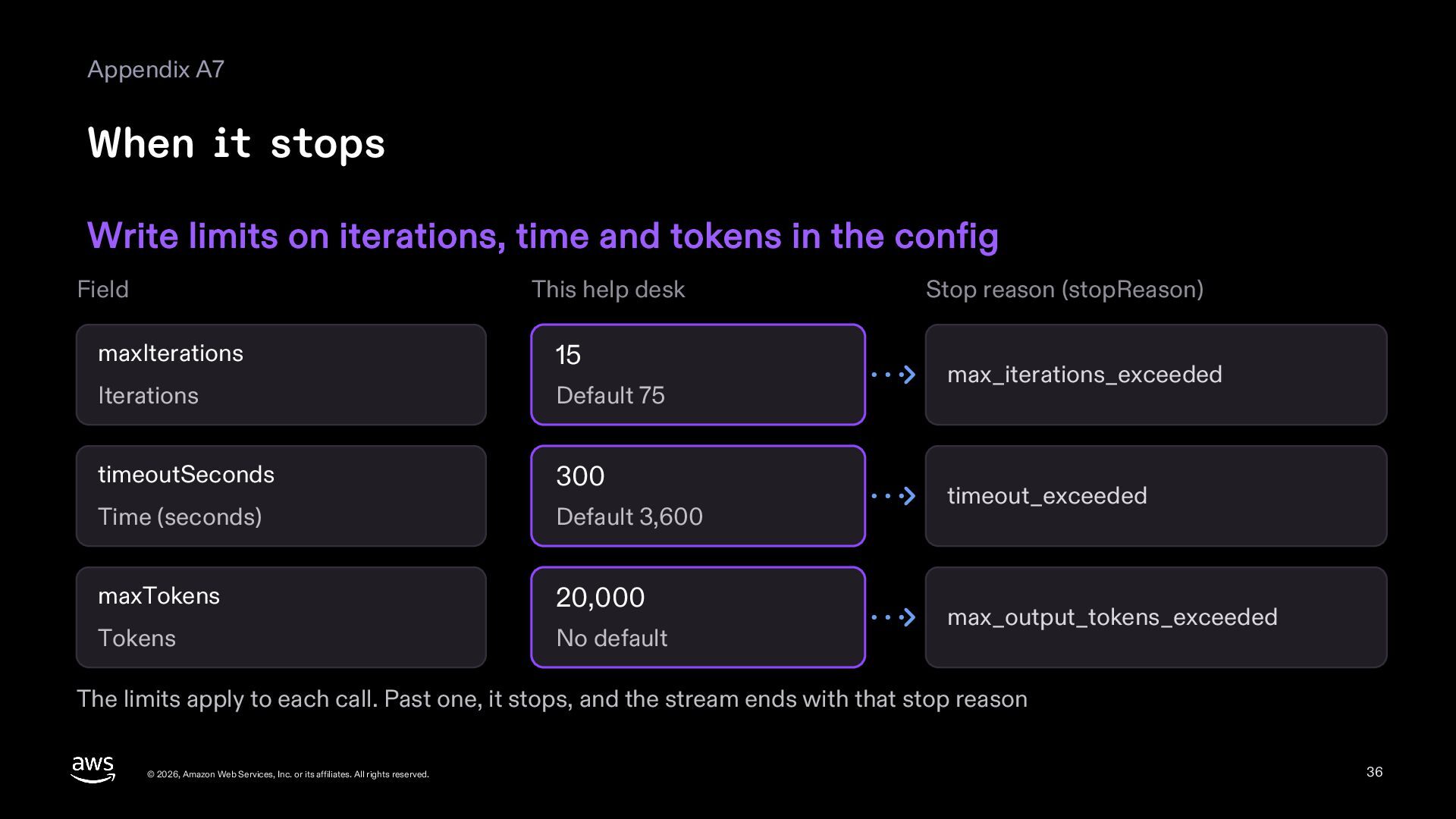
  36. Appendix A7 When it stops Write limits on iterations, time

    and tokens in the config Field This help desk maxIterations 15 Iterations Default 75 timeoutSeconds 300 Time (seconds) Default 3,600 maxTokens 20,000 Tokens No default Stop reason (stopReason) max_iterations_exceeded timeout_exceeded max_output_tokens_exceeded The limits apply to each call. Past one, it stops, and the stream ends with that stop reason © 2026, Amazon Web Services, Inc. or its affiliates. All rights reserved. 36
  37. Appendix A8 Skills are read only when needed First only

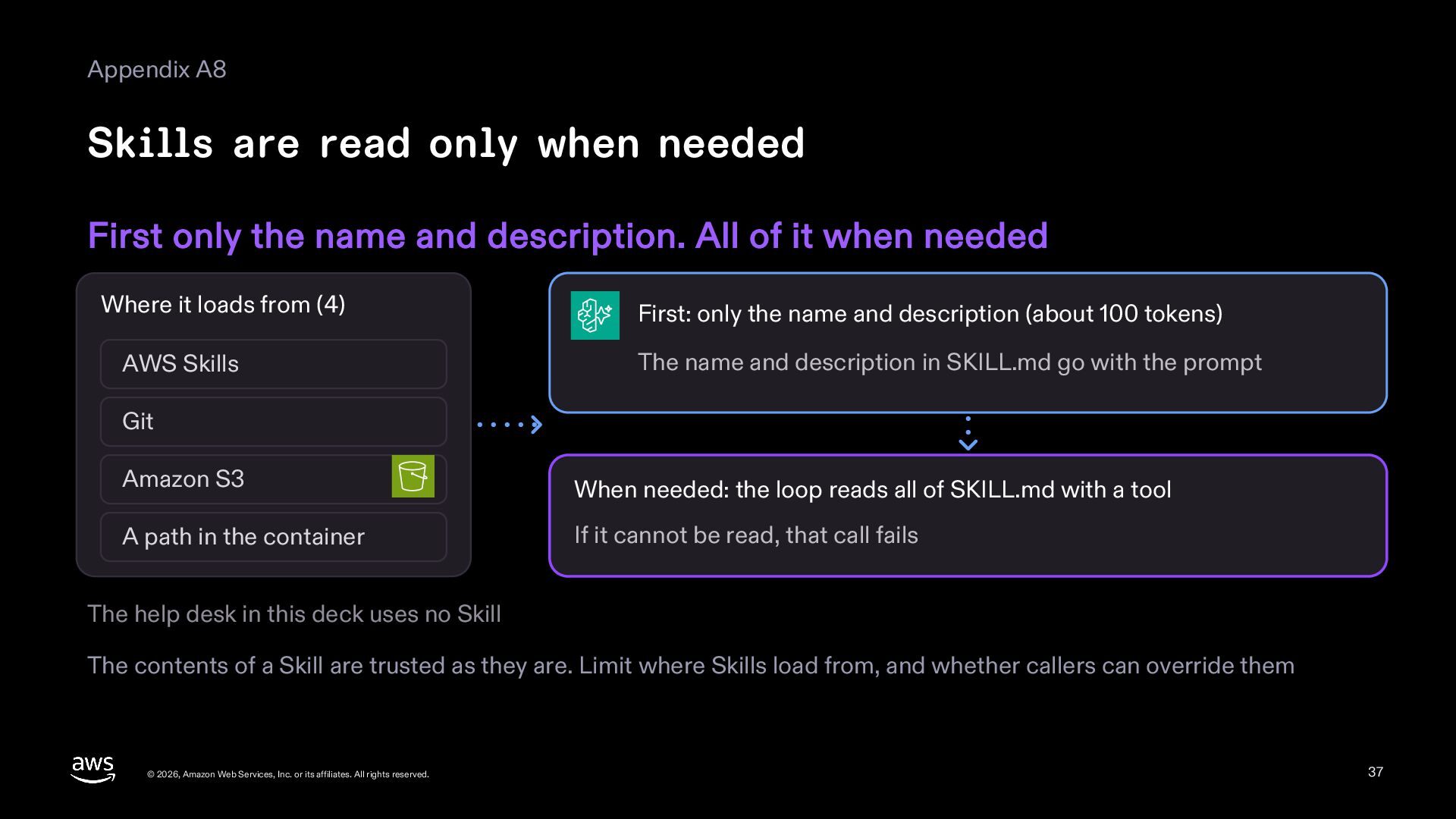
    the name and description. All of it when needed Where it loads from (4) AWS Skills First: only the name and description (about 100 tokens) The name and description in SKILL.md go with the prompt Git Amazon S3 When needed: the loop reads all of SKILL.md with a tool A path in the container If it cannot be read, that call fails The help desk in this deck uses no Skill The contents of a Skill are trusted as they are. Limit where Skills load from, and whether callers can override them © 2026, Amazon Web Services, Inc. or its affiliates. All rights reserved. 37
  38. Appendix A9 Full commands (3) to build it again After

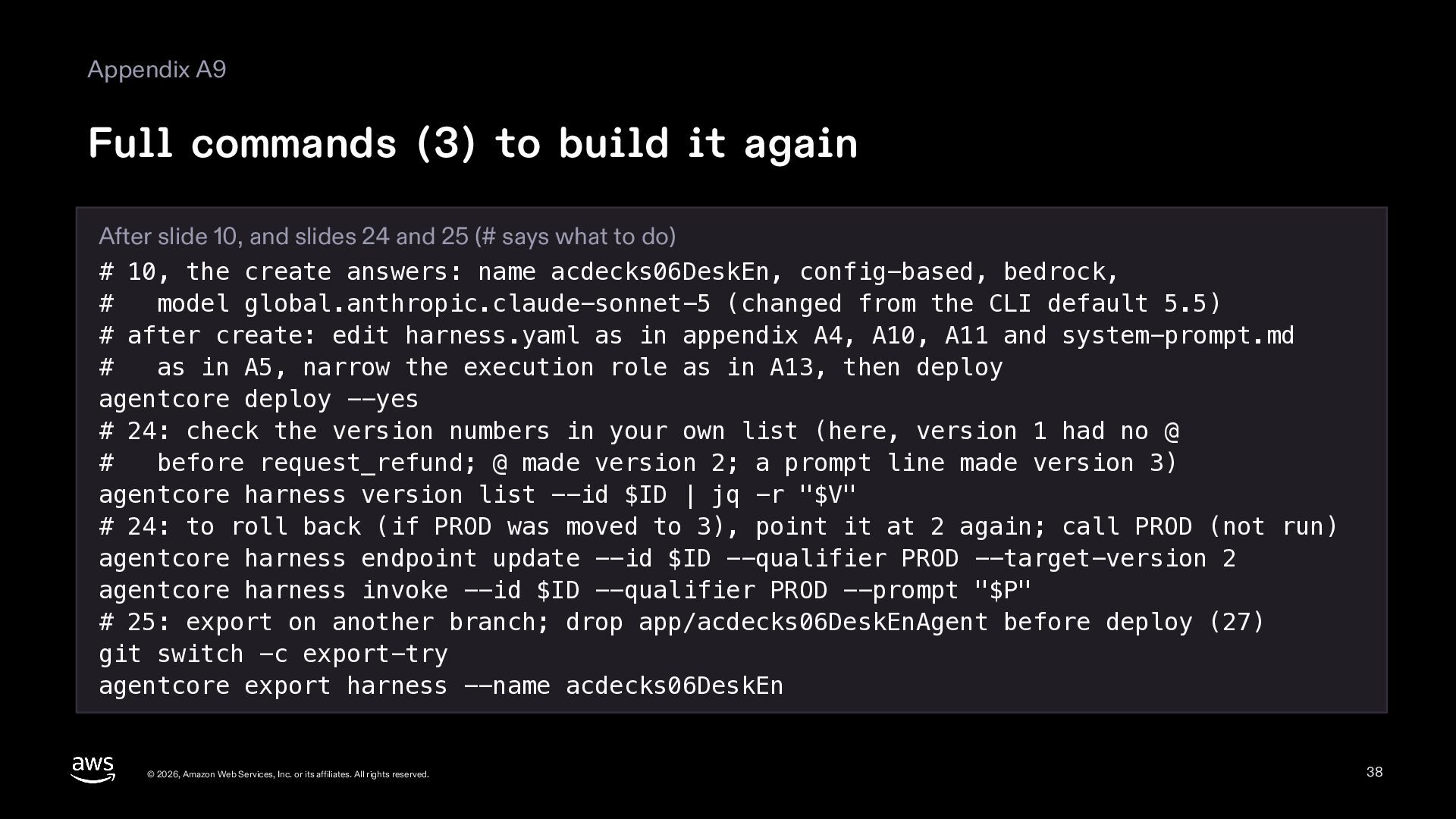
    slide 10, and slides 24 and 25 (# says what to do) # 10, the create answers: name acdecks06DeskEn, config-based, bedrock, # model global.anthropic.claude-sonnet-5 (changed from the CLI default 5.5) # after create: edit harness.yaml as in appendix A4, A10, A11 and system-prompt.md # as in A5, narrow the execution role as in A13, then deploy agentcore deploy --yes # 24: check the version numbers in your own list (here, version 1 had no @ # before request_refund; @ made version 2; a prompt line made version 3) agentcore harness version list --id $ID | jq -r "$V" # 24: to roll back (if PROD was moved to 3), point it at 2 again; call PROD (not run) agentcore harness endpoint update --id $ID --qualifier PROD --target-version 2 agentcore harness invoke --id $ID --qualifier PROD --prompt "$P" # 25: export on another branch; drop app/acdecks06DeskEnAgent before deploy (27) git switch -c export-try agentcore export harness --name acdecks06DeskEn © 2026, Amazon Web Services, Inc. or its affiliates. All rights reserved. 38
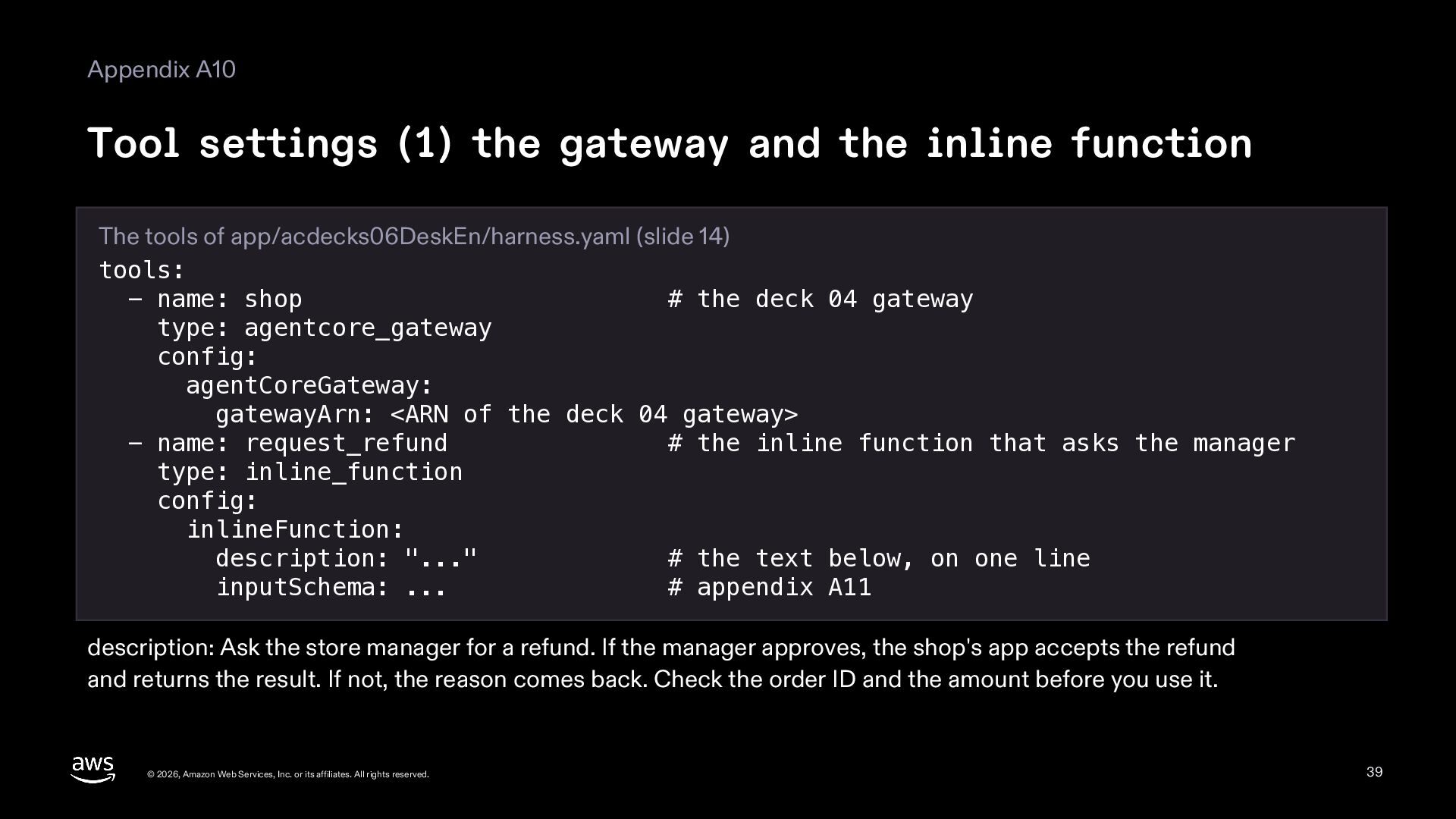
  39. Appendix A10 Tool settings (1) the gateway and the inline

    function The tools of app/acdecks06DeskEn/harness.yaml (slide 14) tools: - name: shop # the deck 04 gateway type: agentcore_gateway config: agentCoreGateway: gatewayArn: <ARN of the deck 04 gateway> - name: request_refund # the inline function that asks the manager type: inline_function config: inlineFunction: description: "..." # the text below, on one line inputSchema: ... # appendix A11 description: Ask the store manager for a refund. If the manager approves, the shop's app accepts the refund and returns the result. If not, the reason comes back. Check the order ID and the amount before you use it. © 2026, Amazon Web Services, Inc. or its affiliates. All rights reserved. 39
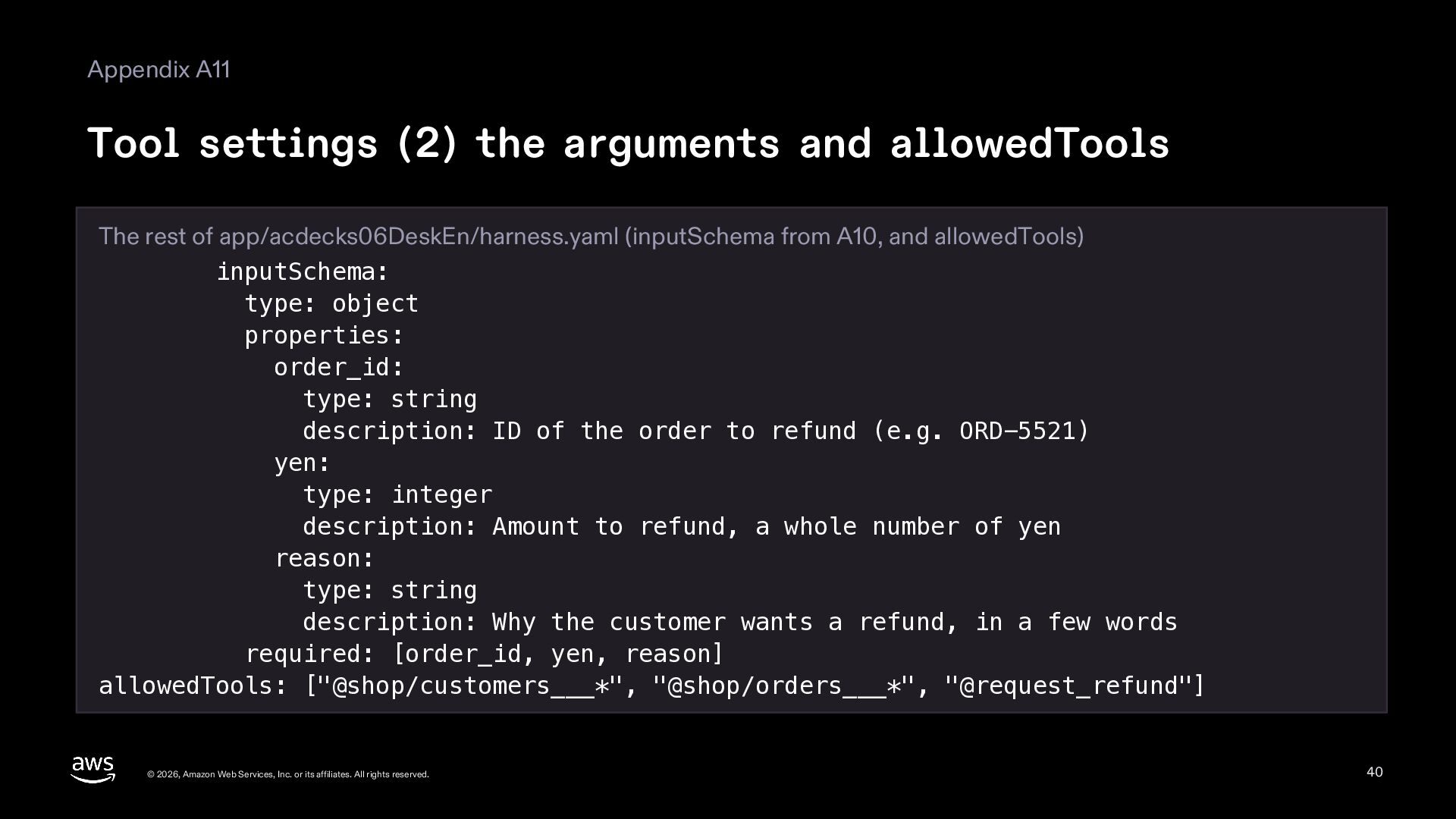
  40. Appendix A11 Tool settings (2) the arguments and allowedTools The

    rest of app/acdecks06DeskEn/harness.yaml (inputSchema from A10, and allowedTools) inputSchema: type: object properties: order_id: type: string description: ID of the order to refund (e.g. ORD-5521) yen: type: integer description: Amount to refund, a whole number of yen reason: type: string description: Why the customer wants a refund, in a few words required: [order_id, yen, reason] allowedTools: ["@shop/customers___*", "@shop/orders___*", "@request_refund"] © 2026, Amazon Web Services, Inc. or its affiliates. All rights reserved. 40
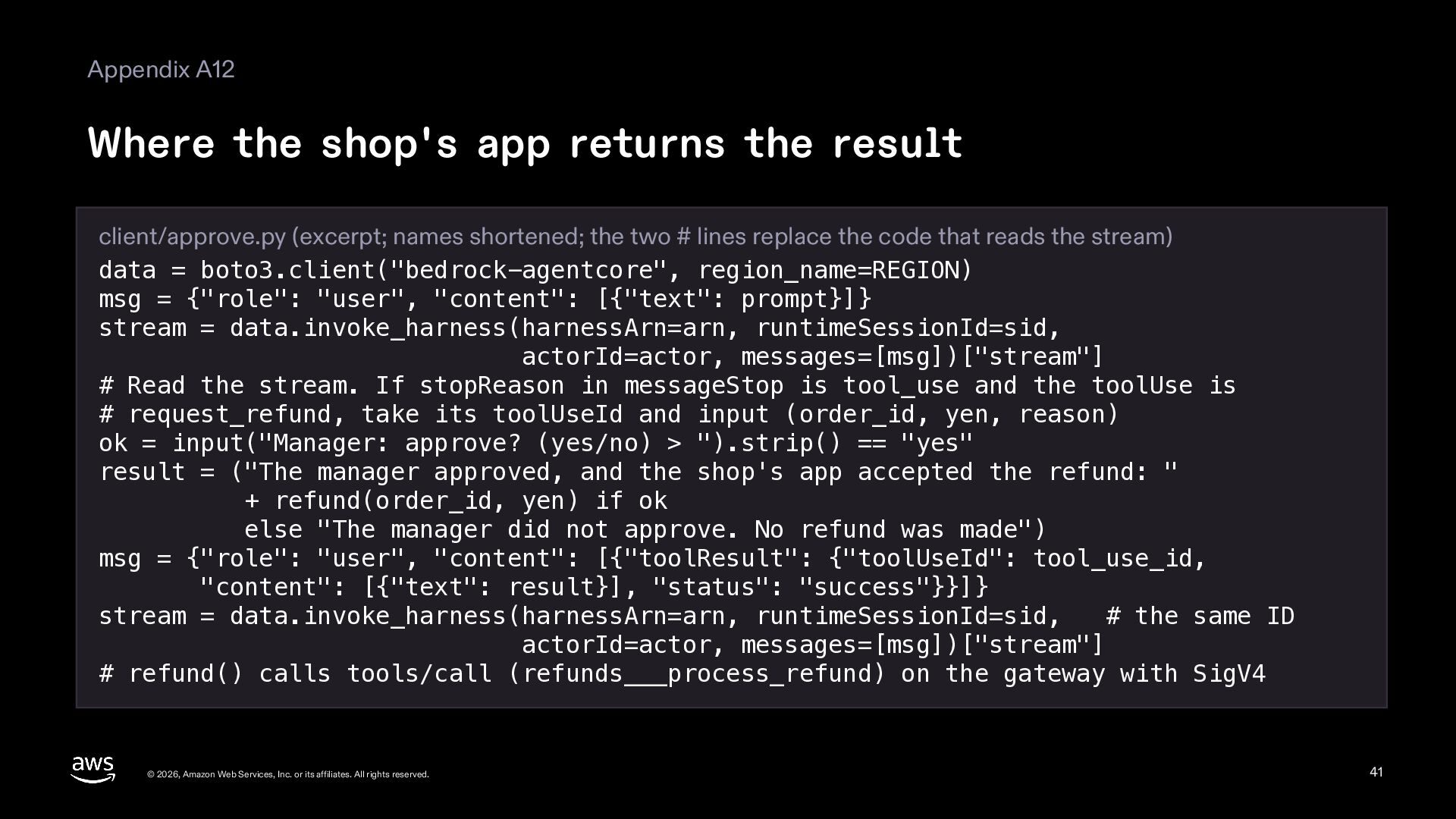
  41. Appendix A12 Where the shop's app returns the result client/approve.py

    (excerpt; names shortened; the two # lines replace the code that reads the stream) data = boto3.client("bedrock-agentcore", region_name=REGION) msg = {"role": "user", "content": [{"text": prompt}]} stream = data.invoke_harness(harnessArn=arn, runtimeSessionId=sid, actorId=actor, messages=[msg])["stream"] # Read the stream. If stopReason in messageStop is tool_use and the toolUse is # request_refund, take its toolUseId and input (order_id, yen, reason) ok = input("Manager: approve? (yes/no) > ").strip() == "yes" result = ("The manager approved, and the shop's app accepted the refund: " + refund(order_id, yen) if ok else "The manager did not approve. No refund was made") msg = {"role": "user", "content": [{"toolResult": {"toolUseId": tool_use_id, "content": [{"text": result}], "status": "success"}}]} stream = data.invoke_harness(harnessArn=arn, runtimeSessionId=sid, # the same ID actorId=actor, messages=[msg])["stream"] # refund() calls tools/call (refunds___process_refund) on the gateway with SigV4 © 2026, Amazon Web Services, Inc. or its affiliates. All rights reserved. 41
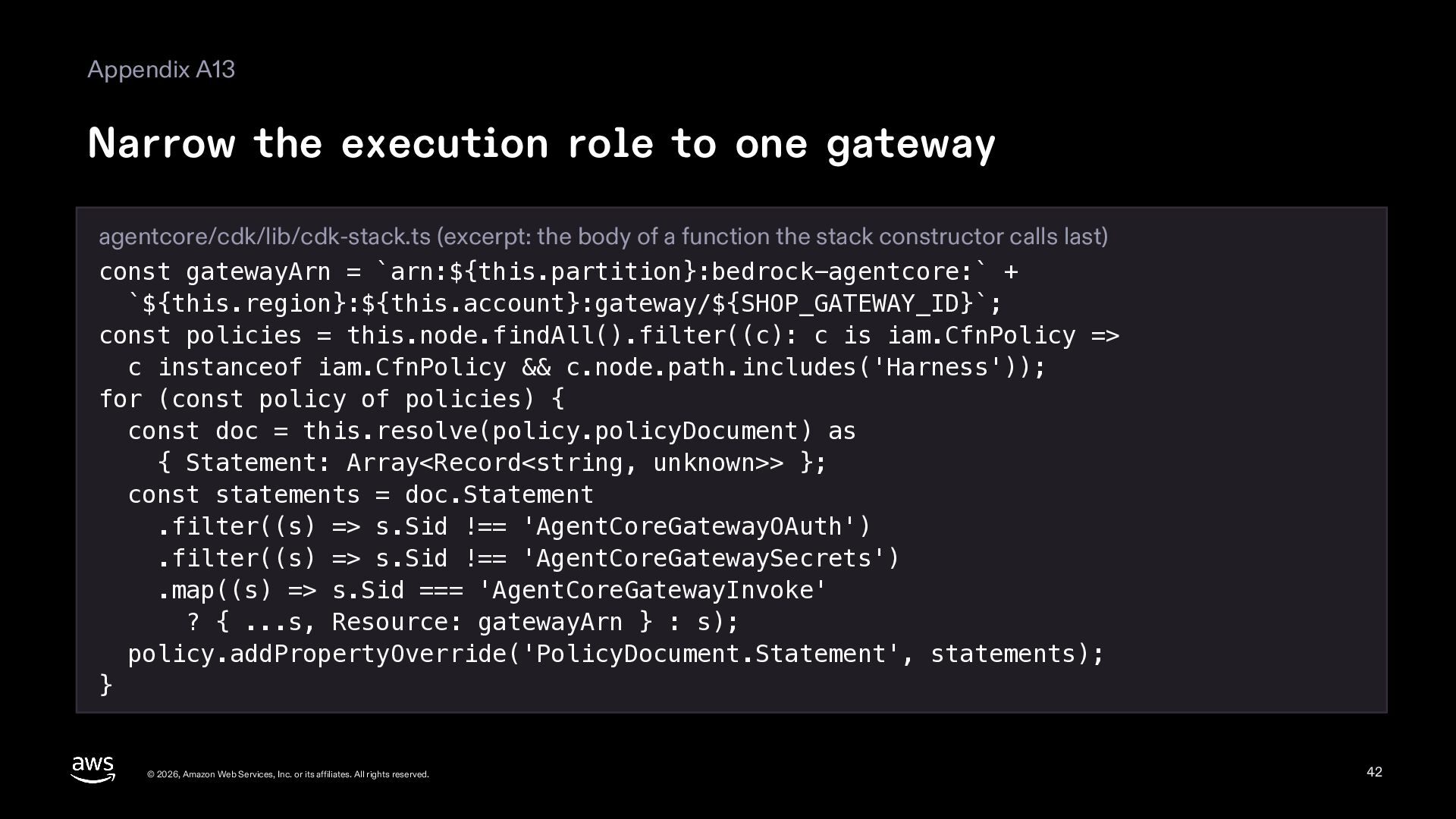
  42. Appendix A13 Narrow the execution role to one gateway agentcore/cdk/lib/cdk-stack.ts

    (excerpt: the body of a function the stack constructor calls last) const gatewayArn = `arn:${this.partition}:bedrock-agentcore:` + `${this.region}:${this.account}:gateway/${SHOP_GATEWAY_ID}`; const policies = this.node.findAll().filter((c): c is iam.CfnPolicy => c instanceof iam.CfnPolicy && c.node.path.includes('Harness')); for (const policy of policies) { const doc = this.resolve(policy.policyDocument) as { Statement: Array<Record<string, unknown>> }; const statements = doc.Statement .filter((s) => s.Sid !== 'AgentCoreGatewayOAuth') .filter((s) => s.Sid !== 'AgentCoreGatewaySecrets') .map((s) => s.Sid === 'AgentCoreGatewayInvoke' ? { ...s, Resource: gatewayArn } : s); policy.addPropertyOverride('PolicyDocument.Statement', statements); } © 2026, Amazon Web Services, Inc. or its affiliates. All rights reserved. 42
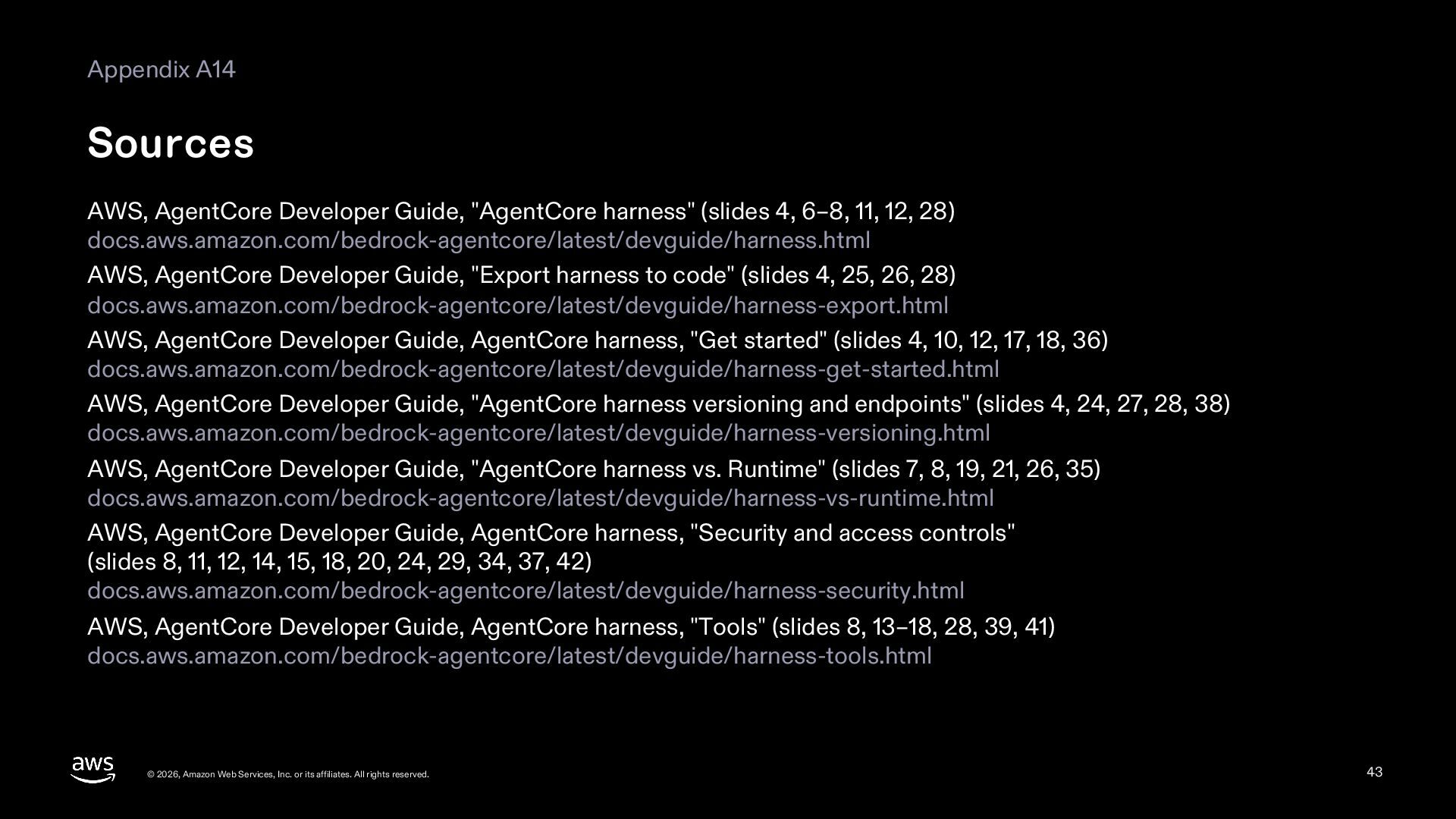
  43. Appendix A14 Sources AWS, AgentCore Developer Guide, "AgentCore harness" (slides

    4, 6–8, 11, 12, 28) docs.aws.amazon.com/bedrock-agentcore/latest/devguide/harness.html AWS, AgentCore Developer Guide, "Export harness to code" (slides 4, 25, 26, 28) docs.aws.amazon.com/bedrock-agentcore/latest/devguide/harness-export.html AWS, AgentCore Developer Guide, AgentCore harness, "Get started" (slides 4, 10, 12, 17, 18, 36) docs.aws.amazon.com/bedrock-agentcore/latest/devguide/harness-get-started.html AWS, AgentCore Developer Guide, "AgentCore harness versioning and endpoints" (slides 4, 24, 27, 28, 38) docs.aws.amazon.com/bedrock-agentcore/latest/devguide/harness-versioning.html AWS, AgentCore Developer Guide, "AgentCore harness vs. Runtime" (slides 7, 8, 19, 21, 26, 35) docs.aws.amazon.com/bedrock-agentcore/latest/devguide/harness-vs-runtime.html AWS, AgentCore Developer Guide, AgentCore harness, "Security and access controls" (slides 8, 11, 12, 14, 15, 18, 20, 24, 29, 34, 37, 42) docs.aws.amazon.com/bedrock-agentcore/latest/devguide/harness-security.html AWS, AgentCore Developer Guide, AgentCore harness, "Tools" (slides 8, 13–18, 28, 39, 41) docs.aws.amazon.com/bedrock-agentcore/latest/devguide/harness-tools.html © 2026, Amazon Web Services, Inc. or its affiliates. All rights reserved. 43
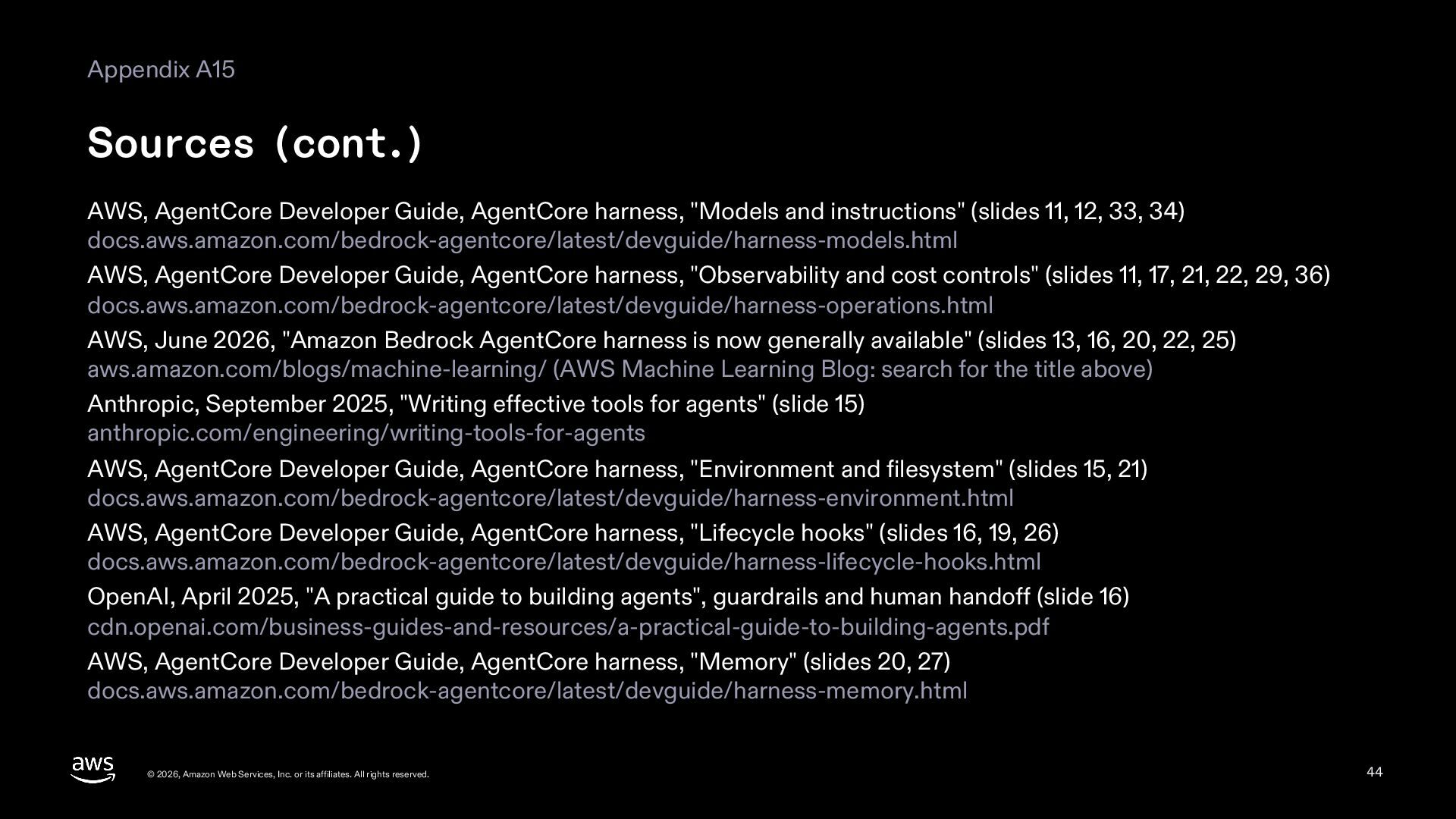
  44. Appendix A15 Sources (cont.) AWS, AgentCore Developer Guide, AgentCore harness,

    "Models and instructions" (slides 11, 12, 33, 34) docs.aws.amazon.com/bedrock-agentcore/latest/devguide/harness-models.html AWS, AgentCore Developer Guide, AgentCore harness, "Observability and cost controls" (slides 11, 17, 21, 22, 29, 36) docs.aws.amazon.com/bedrock-agentcore/latest/devguide/harness-operations.html AWS, June 2026, "Amazon Bedrock AgentCore harness is now generally available" (slides 13, 16, 20, 22, 25) aws.amazon.com/blogs/machine-learning/ (AWS Machine Learning Blog: search for the title above) Anthropic, September 2025, "Writing effective tools for agents" (slide 15) anthropic.com/engineering/writing-tools-for-agents AWS, AgentCore Developer Guide, AgentCore harness, "Environment and filesystem" (slides 15, 21) docs.aws.amazon.com/bedrock-agentcore/latest/devguide/harness-environment.html AWS, AgentCore Developer Guide, AgentCore harness, "Lifecycle hooks" (slides 16, 19, 26) docs.aws.amazon.com/bedrock-agentcore/latest/devguide/harness-lifecycle-hooks.html OpenAI, April 2025, "A practical guide to building agents", guardrails and human handoff (slide 16) cdn.openai.com/business-guides-and-resources/a-practical-guide-to-building-agents.pdf AWS, AgentCore Developer Guide, AgentCore harness, "Memory" (slides 20, 27) docs.aws.amazon.com/bedrock-agentcore/latest/devguide/harness-memory.html © 2026, Amazon Web Services, Inc. or its affiliates. All rights reserved. 44
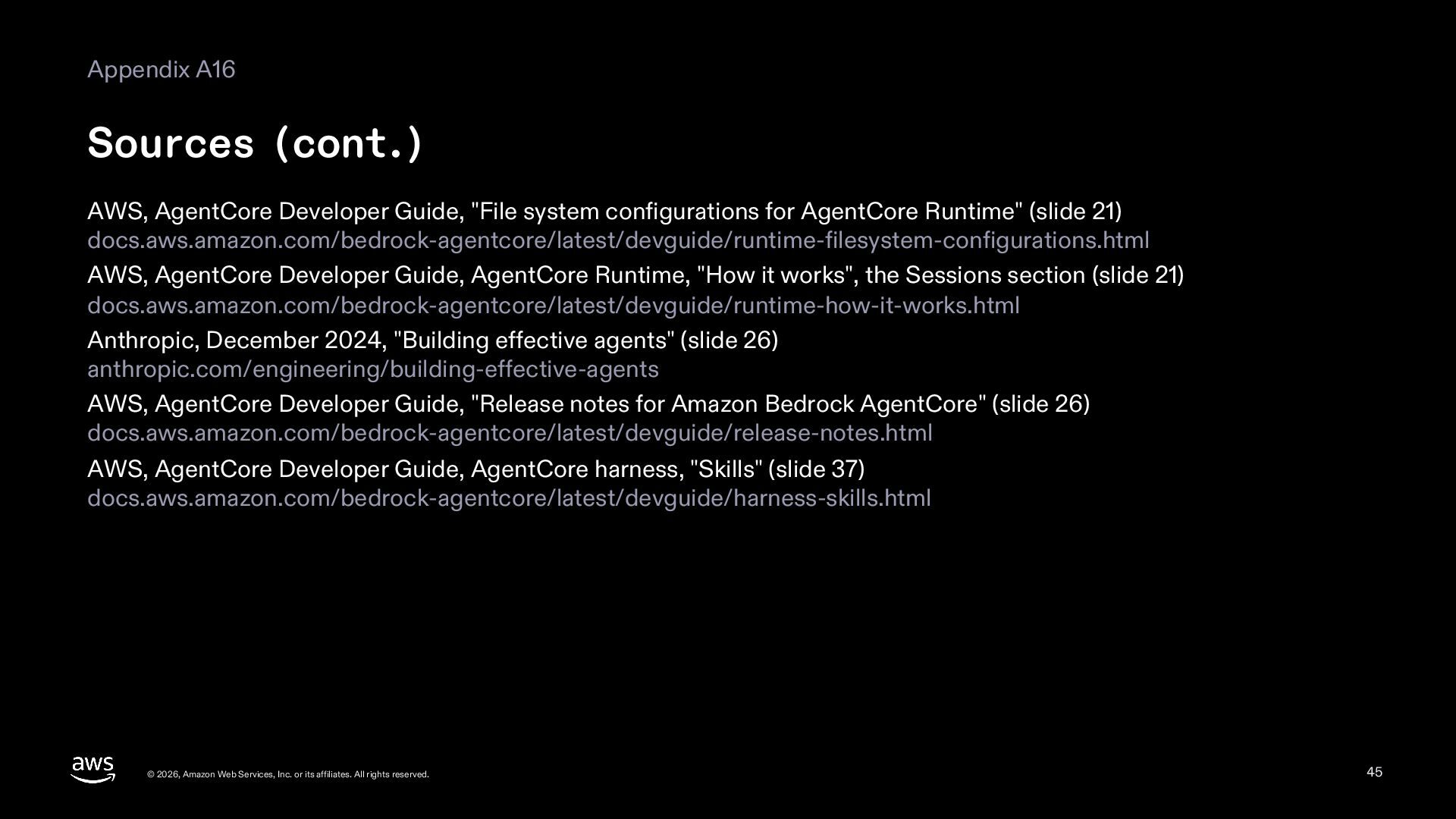
  45. Appendix A16 Sources (cont.) AWS, AgentCore Developer Guide, "File system

    configurations for AgentCore Runtime" (slide 21) docs.aws.amazon.com/bedrock-agentcore/latest/devguide/runtime-filesystem-configurations.html AWS, AgentCore Developer Guide, AgentCore Runtime, "How it works", the Sessions section (slide 21) docs.aws.amazon.com/bedrock-agentcore/latest/devguide/runtime-how-it-works.html Anthropic, December 2024, "Building effective agents" (slide 26) anthropic.com/engineering/building-effective-agents AWS, AgentCore Developer Guide, "Release notes for Amazon Bedrock AgentCore" (slide 26) docs.aws.amazon.com/bedrock-agentcore/latest/devguide/release-notes.html AWS, AgentCore Developer Guide, AgentCore harness, "Skills" (slide 37) docs.aws.amazon.com/bedrock-agentcore/latest/devguide/harness-skills.html © 2026, Amazon Web Services, Inc. or its affiliates. All rights reserved. 45