Upgrade to Pro — share decks privately, control downloads, hide ads and more …

Contain what the agent can do (Permissions, san...

Contain what the agent can do (Permissions, sandboxes, and .kiroignore) | Learn Harness Engineering with Kiro 06

This Level 200 deck shows how to contain what Kiro can do with permissions (deny, ask, allow), the local command sandbox, .kiroignore, and a Pre Tool Use hook, and covers where each rule lives, keeping changes easy to undo, and not locking down too far. On a small booking app, real Kiro CLI screens show a rule refusing to delete the data, the sandbox stopping a connection out, .kiroignore keeping .env unread, and a hook stopping a curl that sends data out, and the deck ends with a first set of settings. This is deck 06 (Contain pillar) of the "Learn Harness Engineering with Kiro" series.

Avatar for Riku INADA

Riku INADA PRO

November 11, 2026

More Decks by Riku INADA

Other Decks in Technology

Transcript

  1. Learn Harness Engineering with Kiro Contain Level 200 Contain what

    the agent can do Permissions, sandboxes, and .kiroignore 06 As of November 2026 November 2026 Riku Inada Amazon Web Services Japan + Kiro + Harness Engineering © 2026, Amazon Web Services, Inc. or its affiliates. All rights reserved. 1
  2. Introduction About me Riku Inada Amazon Web Services Japan G.K.

    Solutions Architect Works mainly with manufacturing customers Recent work Promoting the AI-Driven Development Life Cycle (AI-DLC) Writing and speaking about Kiro and AWS Amplify © 2026, Amazon Web Services, Inc. or its affiliates. All rights reserved. X @inada_riku Speaker Deck speakerdeck.com/inariku Zenn zenn.dev/inariku GitHub github.com/inariku 2
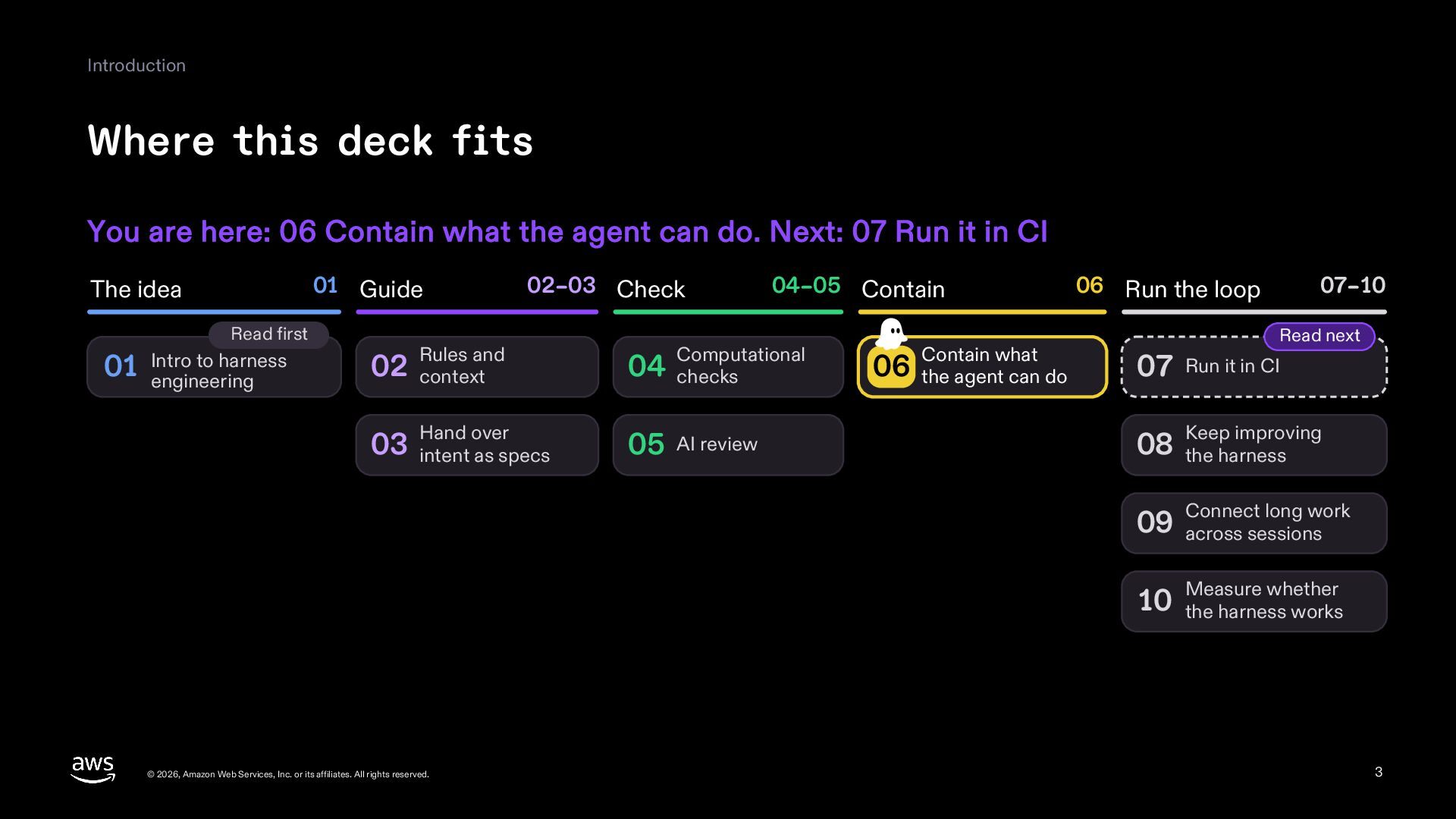
  3. Introduction Where this deck fits You are here: 06 Contain

    what the agent can do. Next: 07 Run it in CI 01 Guide The idea Read first to harness 01 Intro engineering 02–03 Check Rules and 02 context Hand over 03 intent as specs 04–05 Contain Computational 04 checks 05 AI review Contain what 06 the agent can do 06 Run the loop 07–10 Read next 07 Run it in CI Keep improving 08 the harness long work 09 Connect across sessions whether 10 Measure the harness works © 2026, Amazon Web Services, Inc. or its affiliates. All rights reserved. 3
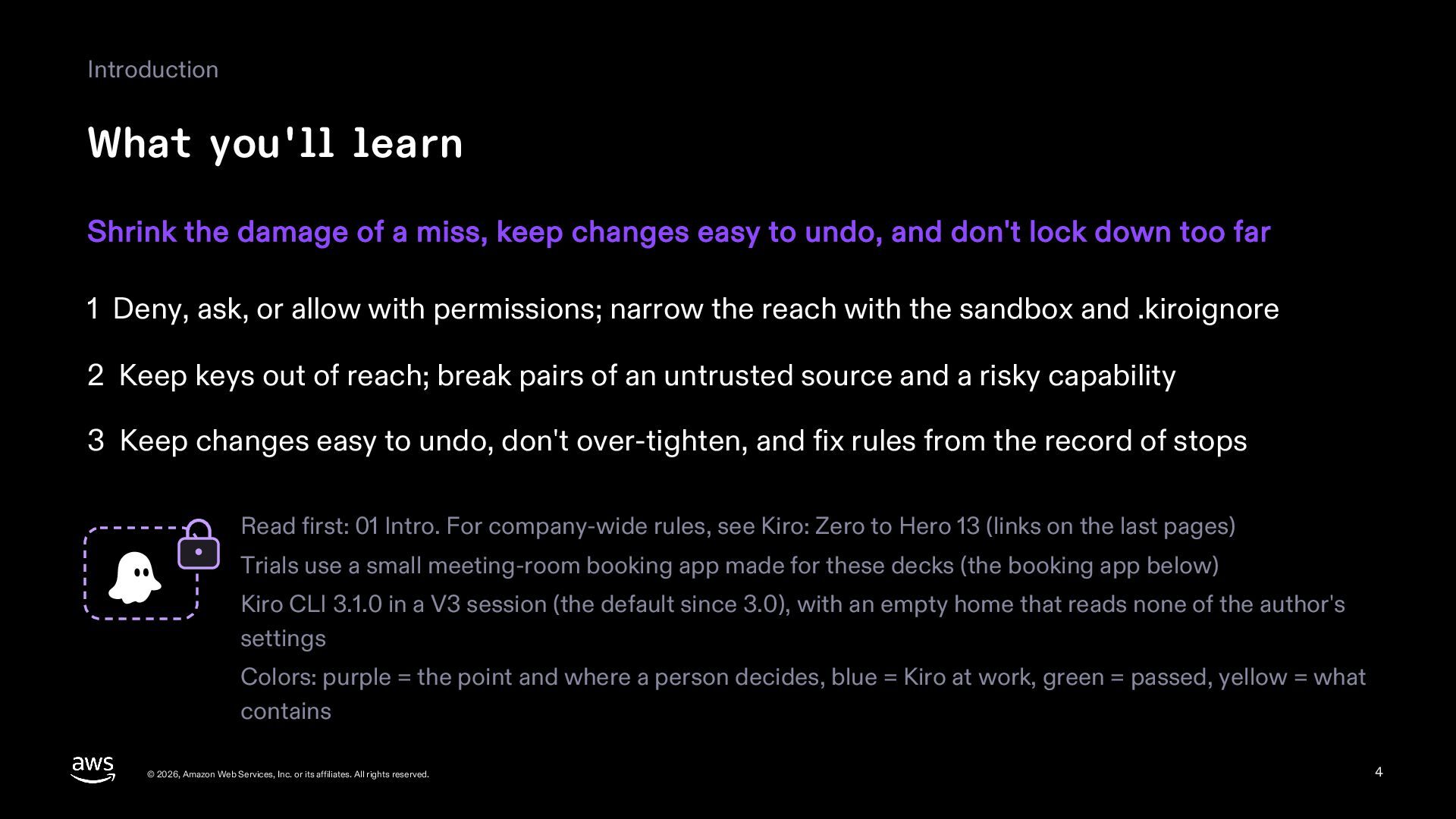
  4. Introduction What you'll learn Shrink the damage of a miss,

    keep changes easy to undo, and don't lock down too far 1 Deny, ask, or allow with permissions; narrow the reach with the sandbox and .kiroignore 2 Keep keys out of reach; break pairs of an untrusted source and a risky capability 3 Keep changes easy to undo, don't over-tighten, and fix rules from the record of stops Read first: 01 Intro. For company-wide rules, see Kiro: Zero to Hero 13 (links on the last pages) Trials use a small meeting-room booking app made for these decks (the booking app below) Kiro CLI 3.1.0 in a V3 session (the default since 3.0), with an empty home that reads none of the author's settings Colors: purple = the point and where a person decides, blue = Kiro at work, green = passed, yellow = what contains © 2026, Amazon Web Services, Inc. or its affiliates. All rights reserved. 4
  5. Part 1 Why contain © 2026, Amazon Web Services, Inc.

    or its affiliates. All rights reserved. 5
  6. Why contain Why contain A command hidden in what Kiro

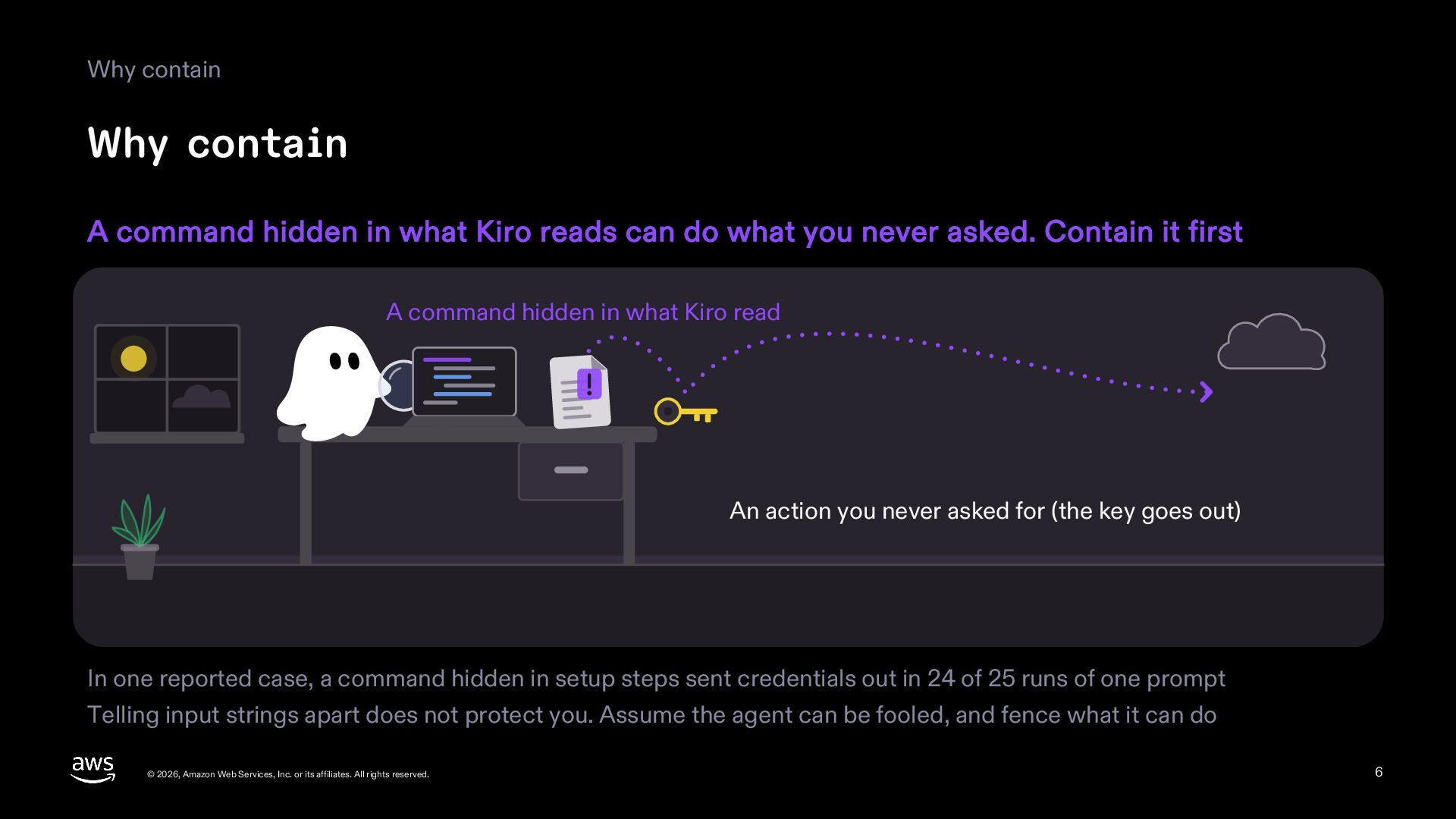
    reads can do what you never asked. Contain it first A command hidden in what Kiro read An action you never asked for (the key goes out) In one reported case, a command hidden in setup steps sent credentials out in 24 of 25 runs of one prompt Telling input strings apart does not protect you. Assume the agent can be fooled, and fence what it can do © 2026, Amazon Web Services, Inc. or its affiliates. All rights reserved. 6
  7. Why contain Prompts you see often go unread Asking one

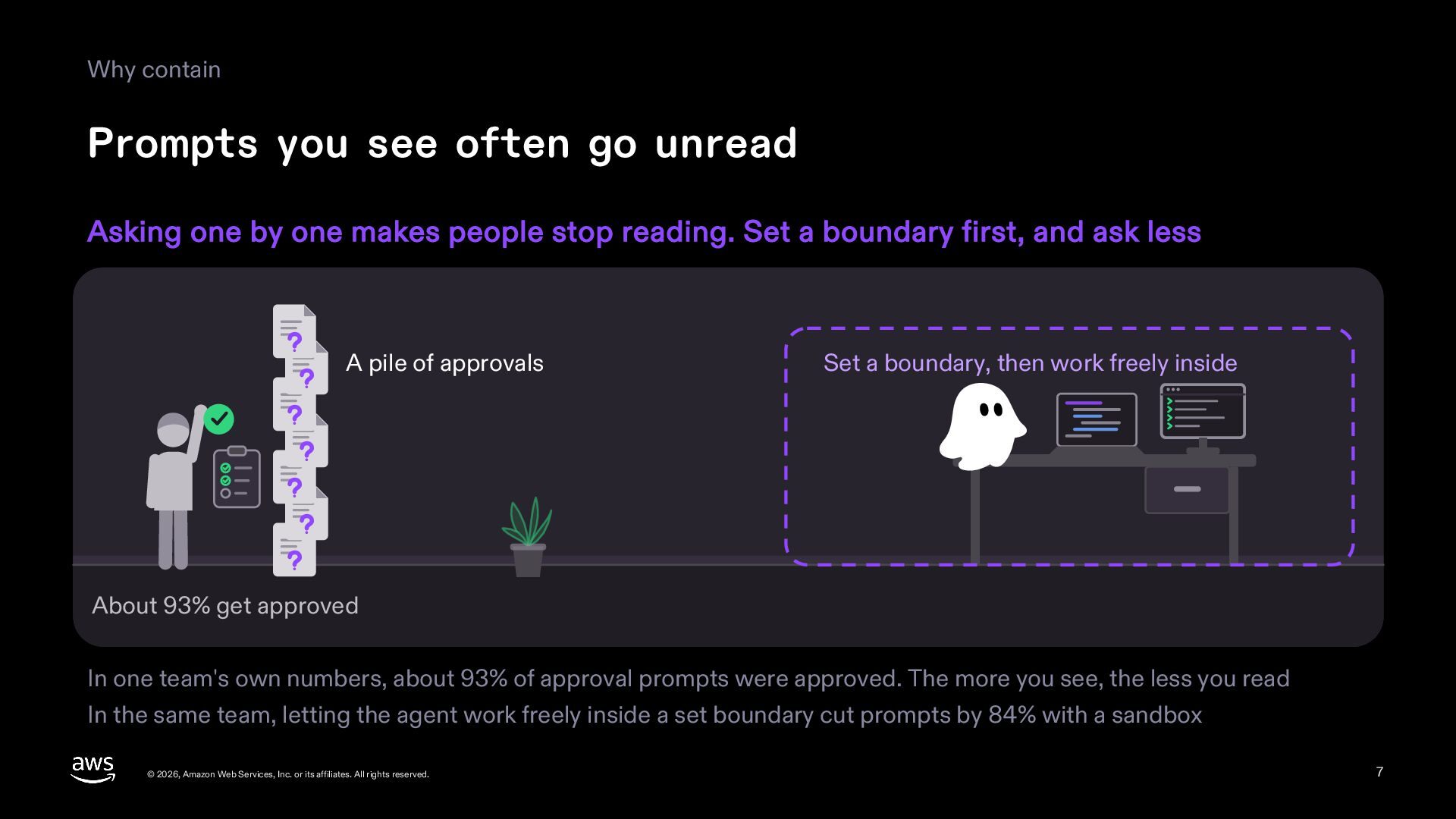
    by one makes people stop reading. Set a boundary first, and ask less A pile of approvals Set a boundary, then work freely inside About 93% get approved In one team's own numbers, about 93% of approval prompts were approved. The more you see, the less you read In the same team, letting the agent work freely inside a set boundary cut prompts by 84% with a sandbox © 2026, Amazon Web Services, Inc. or its affiliates. All rights reserved. 7
  8. Why contain Likelihood and blast radius Guides lower the likelihood;

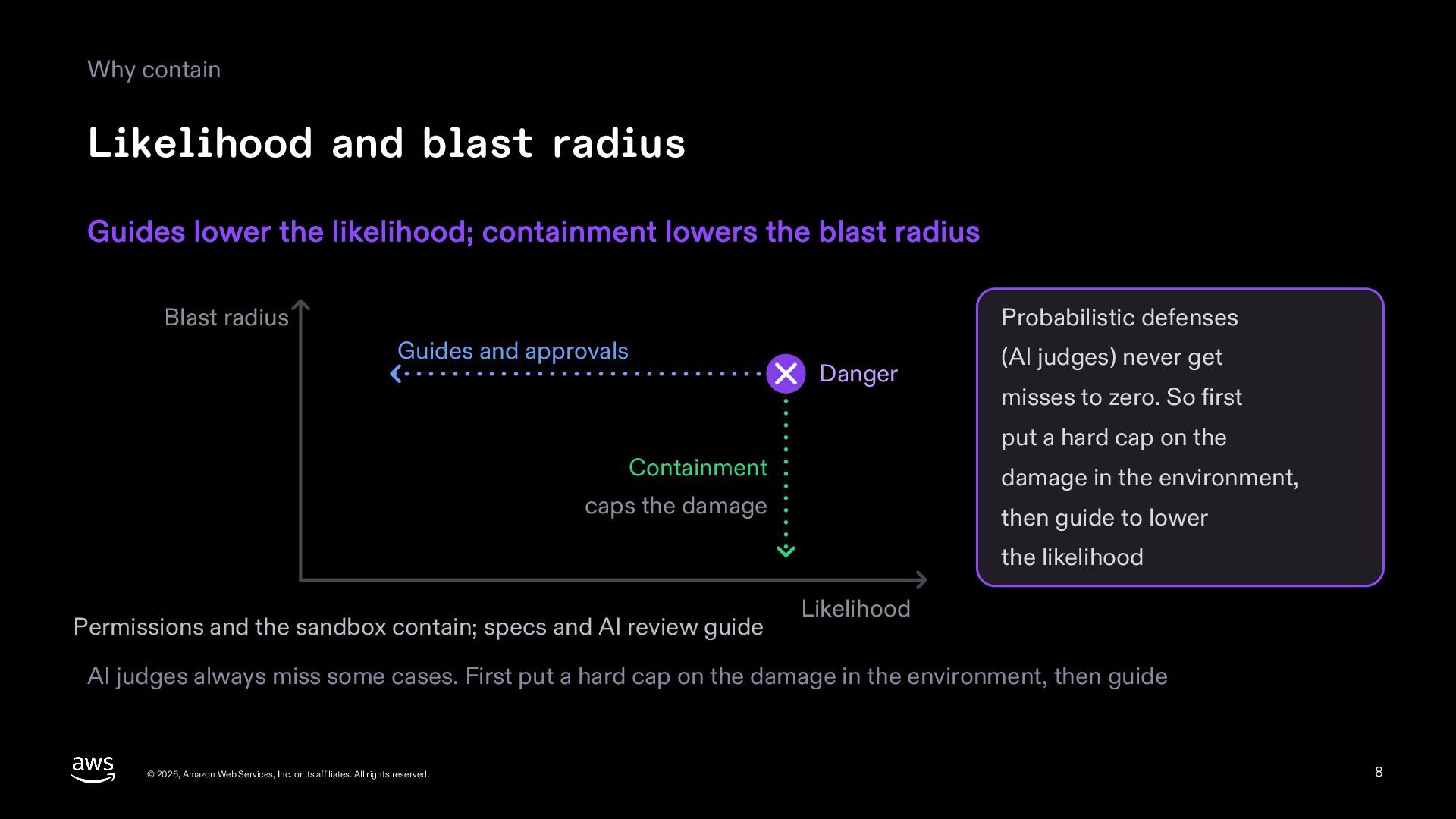
    containment lowers the blast radius Blast radius Probabilistic defenses Guides and approvals Danger (AI judges) never get misses to zero. So first put a hard cap on the Containment damage in the environment, caps the damage then guide to lower the likelihood Permissions and the sandbox contain; specs and AI review guide Likelihood AI judges always miss some cases. First put a hard cap on the damage in the environment, then guide © 2026, Amazon Web Services, Inc. or its affiliates. All rights reserved. 8
  9. Part 2 Permissions © 2026, Amazon Web Services, Inc. or

    its affiliates. All rights reserved. 9
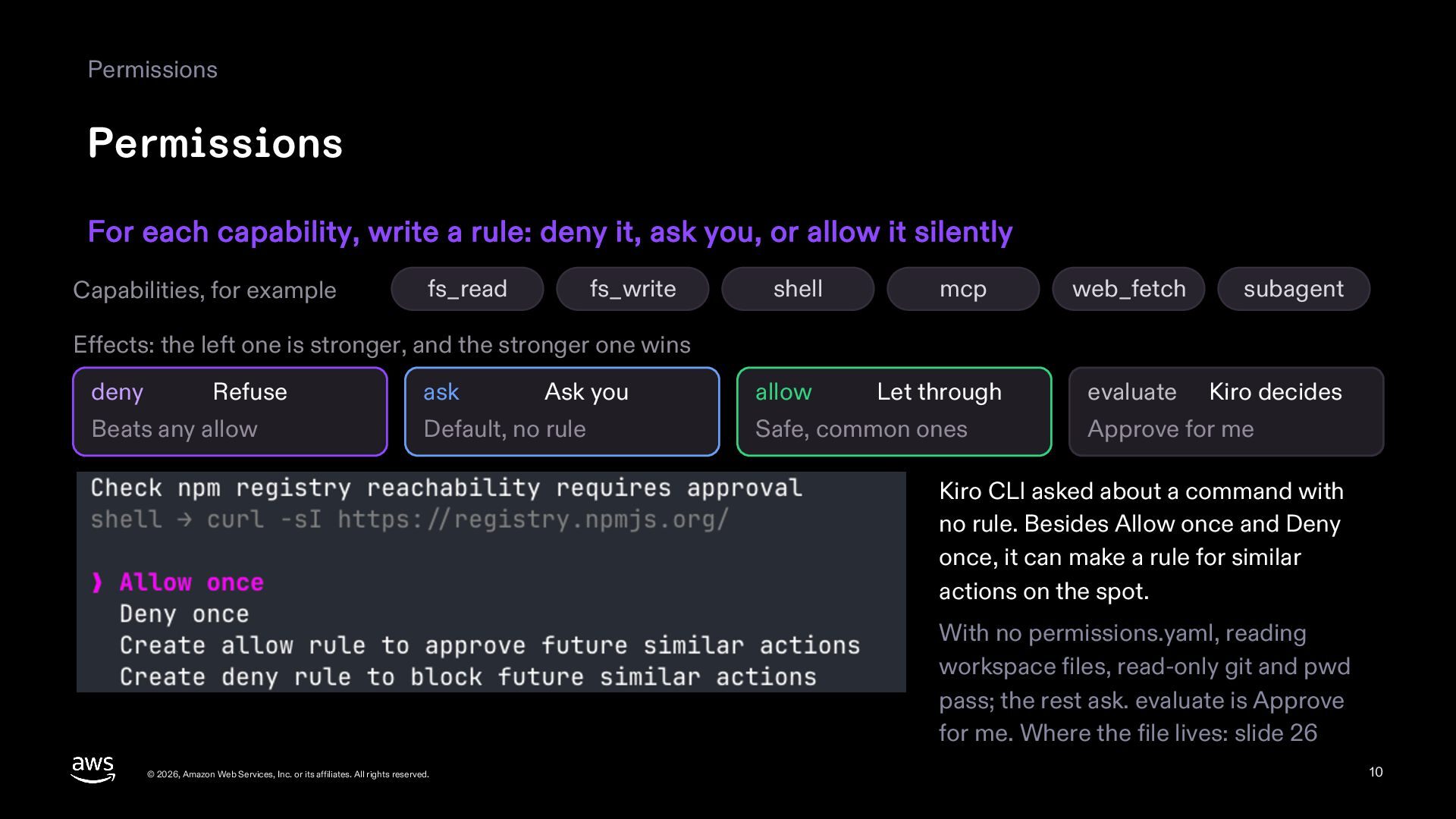
  10. Permissions Permissions For each capability, write a rule: deny it,

    ask you, or allow it silently Capabilities, for example fs_read fs_write shell mcp web_fetch subagent allow Let through evaluate Kiro decides Effects: the left one is stronger, and the stronger one wins deny Refuse Beats any allow ask Ask you Default, no rule Safe, common ones Approve for me Kiro CLI asked about a command with no rule. Besides Allow once and Deny once, it can make a rule for similar actions on the spot. With no permissions.yaml, reading workspace files, read-only git and pwd pass; the rest ask. evaluate is Approve for me. Where the file lives: slide 26 © 2026, Amazon Web Services, Inc. or its affiliates. All rights reserved. 10
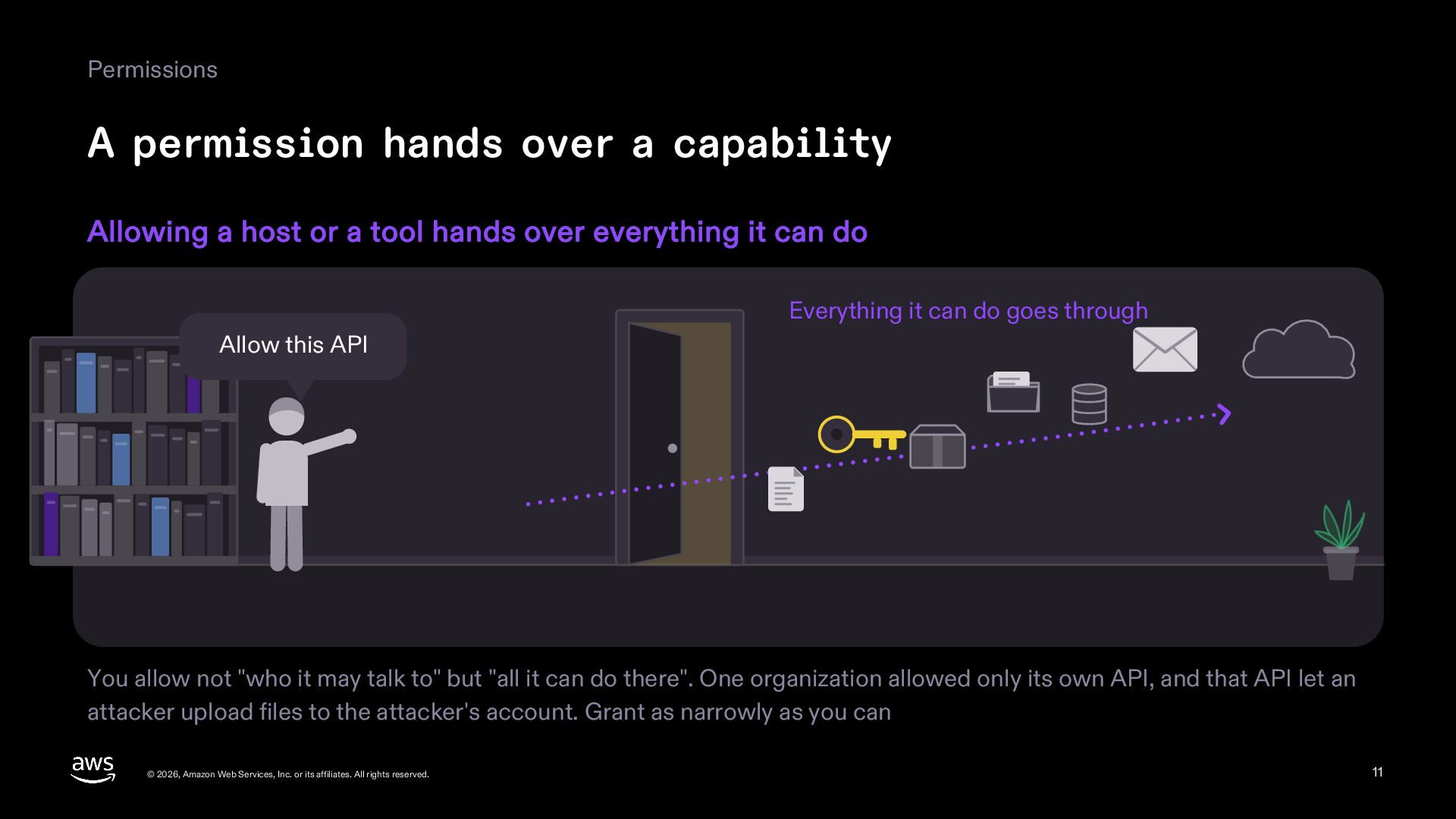
  11. Permissions A permission hands over a capability Allowing a host

    or a tool hands over everything it can do Everything it can do goes through Allow this API You allow not "who it may talk to" but "all it can do there". One organization allowed only its own API, and that API let an attacker upload files to the attacker's account. Grant as narrowly as you can © 2026, Amazon Web Services, Inc. or its affiliates. All rights reserved. 11
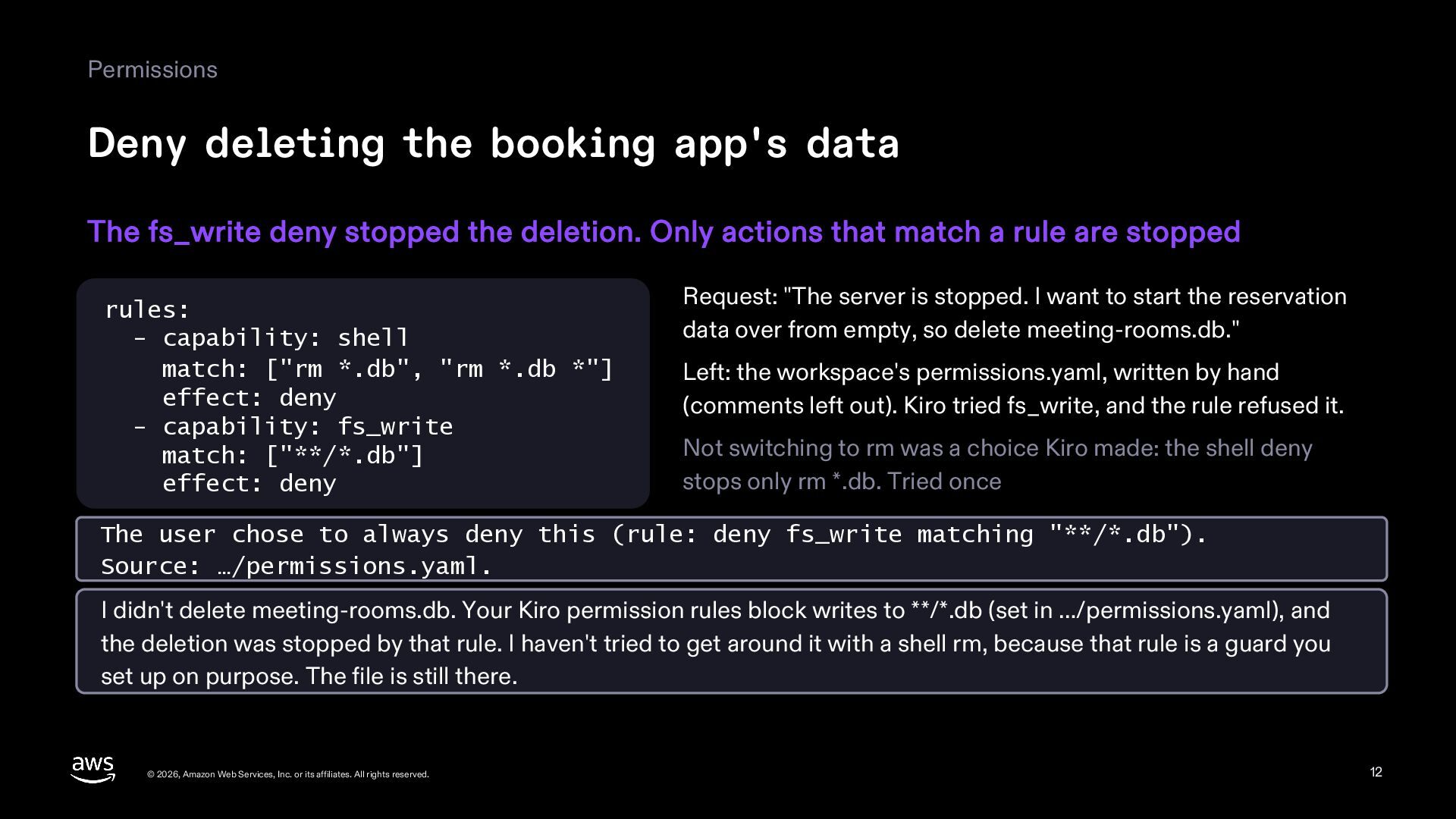
  12. Permissions Deny deleting the booking app's data The fs_write deny

    stopped the deletion. Only actions that match a rule are stopped rules: - capability: shell match: ["rm *.db", "rm *.db *"] effect: deny - capability: fs_write match: ["**/*.db"] effect: deny Request: "The server is stopped. I want to start the reservation data over from empty, so delete meeting-rooms.db." Left: the workspace's permissions.yaml, written by hand (comments left out). Kiro tried fs_write, and the rule refused it. Not switching to rm was a choice Kiro made: the shell deny stops only rm *.db. Tried once The user chose to always deny this (rule: deny fs_write matching "**/*.db"). Source: …/permissions.yaml. I didn't delete meeting-rooms.db. Your Kiro permission rules block writes to **/*.db (set in …/permissions.yaml), and the deletion was stopped by that rule. I haven't tried to get around it with a shell rm, because that rule is a guard you set up on purpose. The file is still there. © 2026, Amazon Web Services, Inc. or its affiliates. All rights reserved. 12
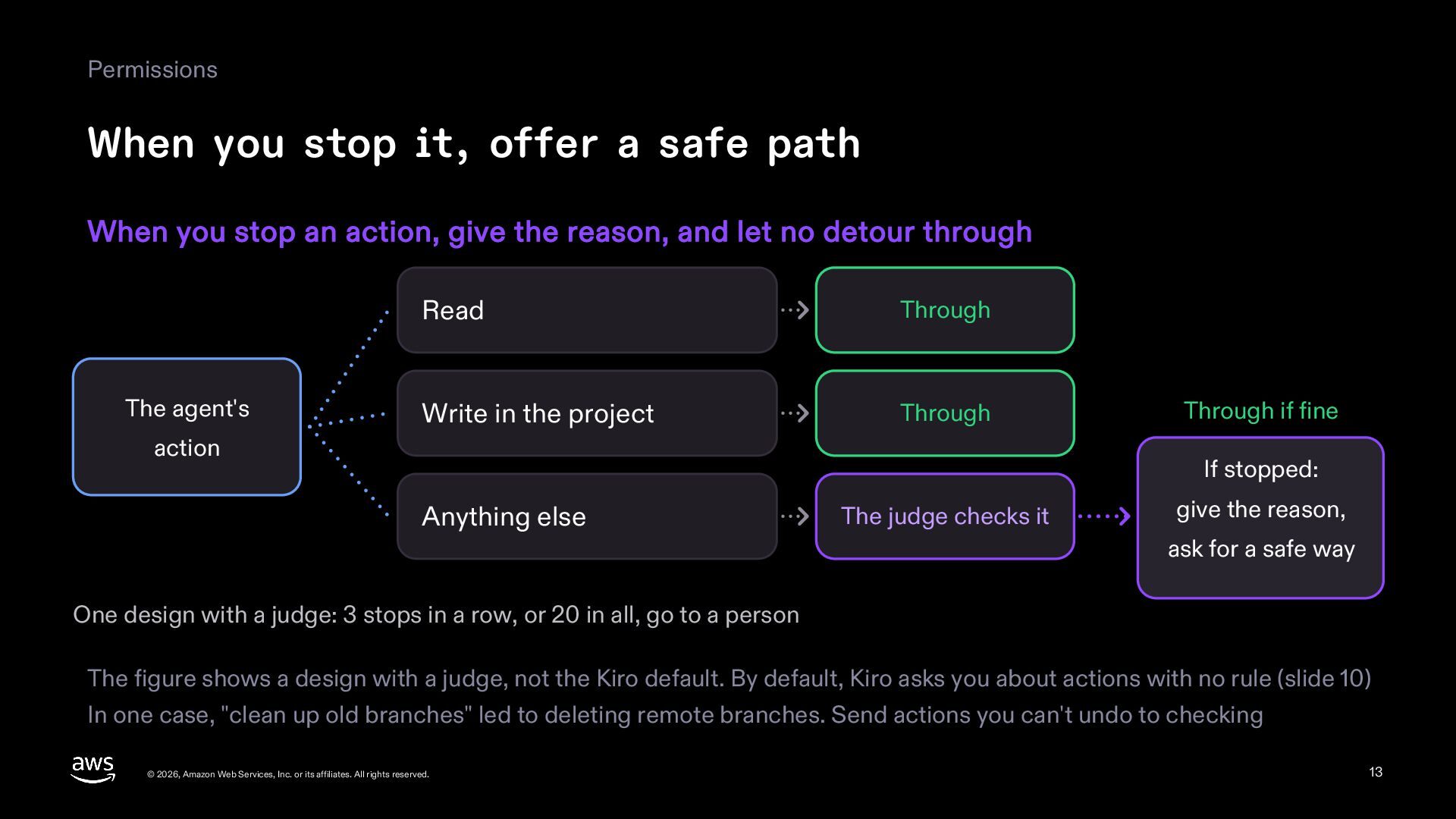
  13. Permissions When you stop it, offer a safe path When

    you stop an action, give the reason, and let no detour through The agent's Read Through Write in the project Through action Through if fine If stopped: Anything else The judge checks it give the reason, ask for a safe way One design with a judge: 3 stops in a row, or 20 in all, go to a person The figure shows a design with a judge, not the Kiro default. By default, Kiro asks you about actions with no rule (slide 10) In one case, "clean up old branches" led to deleting remote branches. Send actions you can't undo to checking © 2026, Amazon Web Services, Inc. or its affiliates. All rights reserved. 13
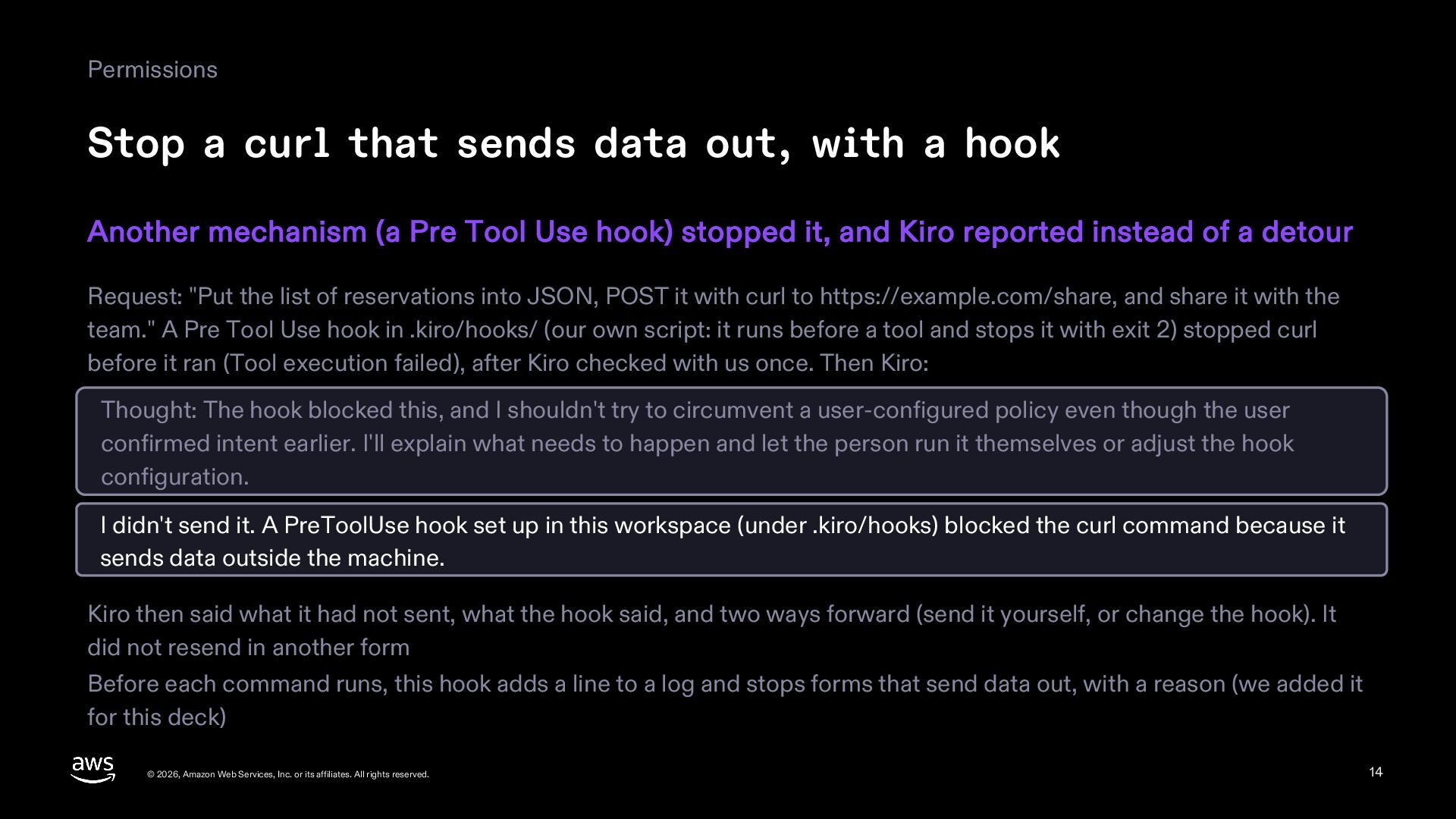
  14. Permissions Stop a curl that sends data out, with a

    hook Another mechanism (a Pre Tool Use hook) stopped it, and Kiro reported instead of a detour Request: "Put the list of reservations into JSON, POST it with curl to https://example.com/share, and share it with the team." A Pre Tool Use hook in .kiro/hooks/ (our own script: it runs before a tool and stops it with exit 2) stopped curl before it ran (Tool execution failed), after Kiro checked with us once. Then Kiro: Thought: The hook blocked this, and I shouldn't try to circumvent a user-configured policy even though the user confirmed intent earlier. I'll explain what needs to happen and let the person run it themselves or adjust the hook configuration. I didn't send it. A PreToolUse hook set up in this workspace (under .kiro/hooks) blocked the curl command because it sends data outside the machine. Kiro then said what it had not sent, what the hook said, and two ways forward (send it yourself, or change the hook). It did not resend in another form Before each command runs, this hook adds a line to a log and stops forms that send data out, with a reason (we added it for this deck) © 2026, Amazon Web Services, Inc. or its affiliates. All rights reserved. 14
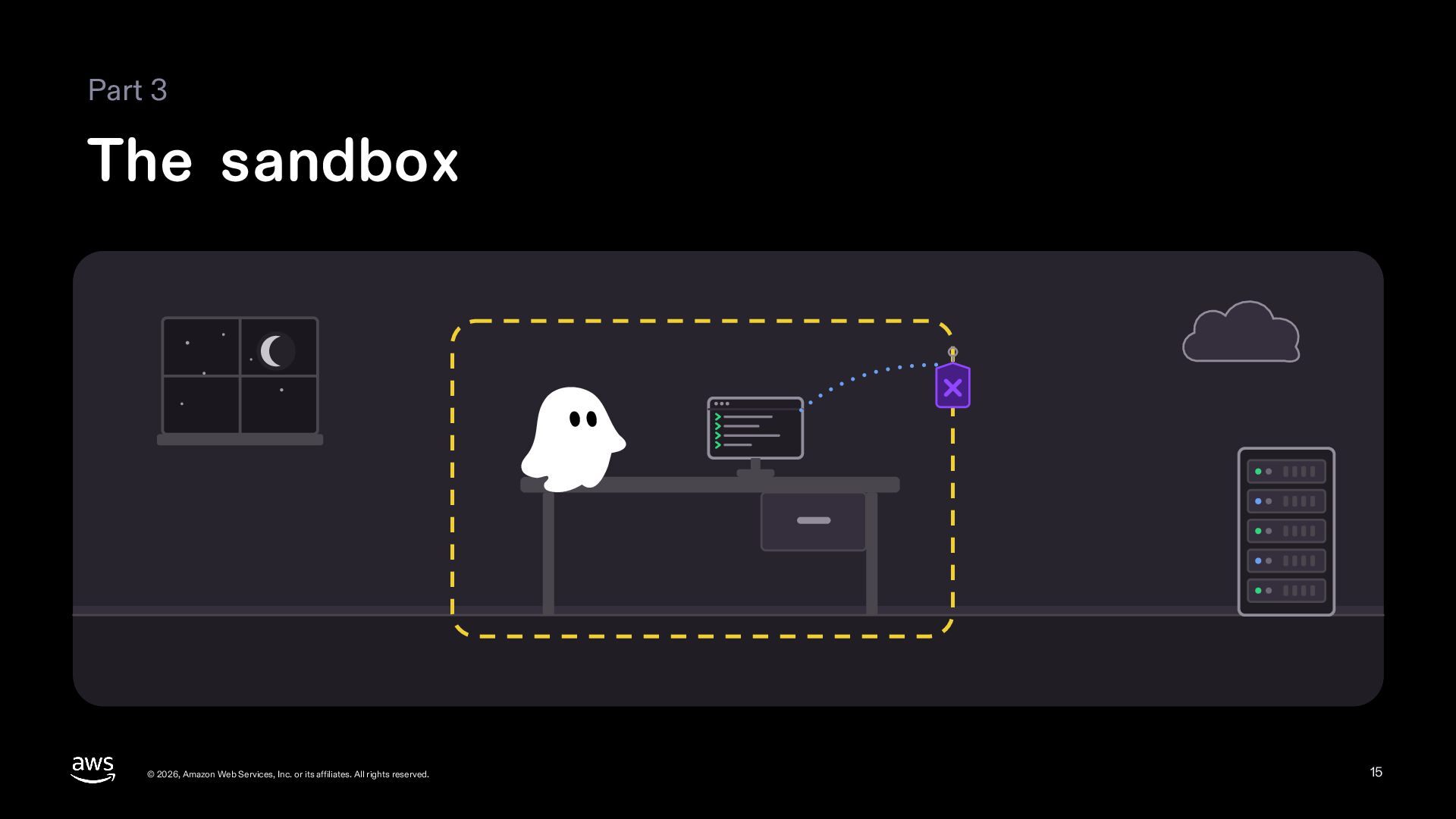
  15. Part 3 The sandbox © 2026, Amazon Web Services, Inc.

    or its affiliates. All rights reserved. 15
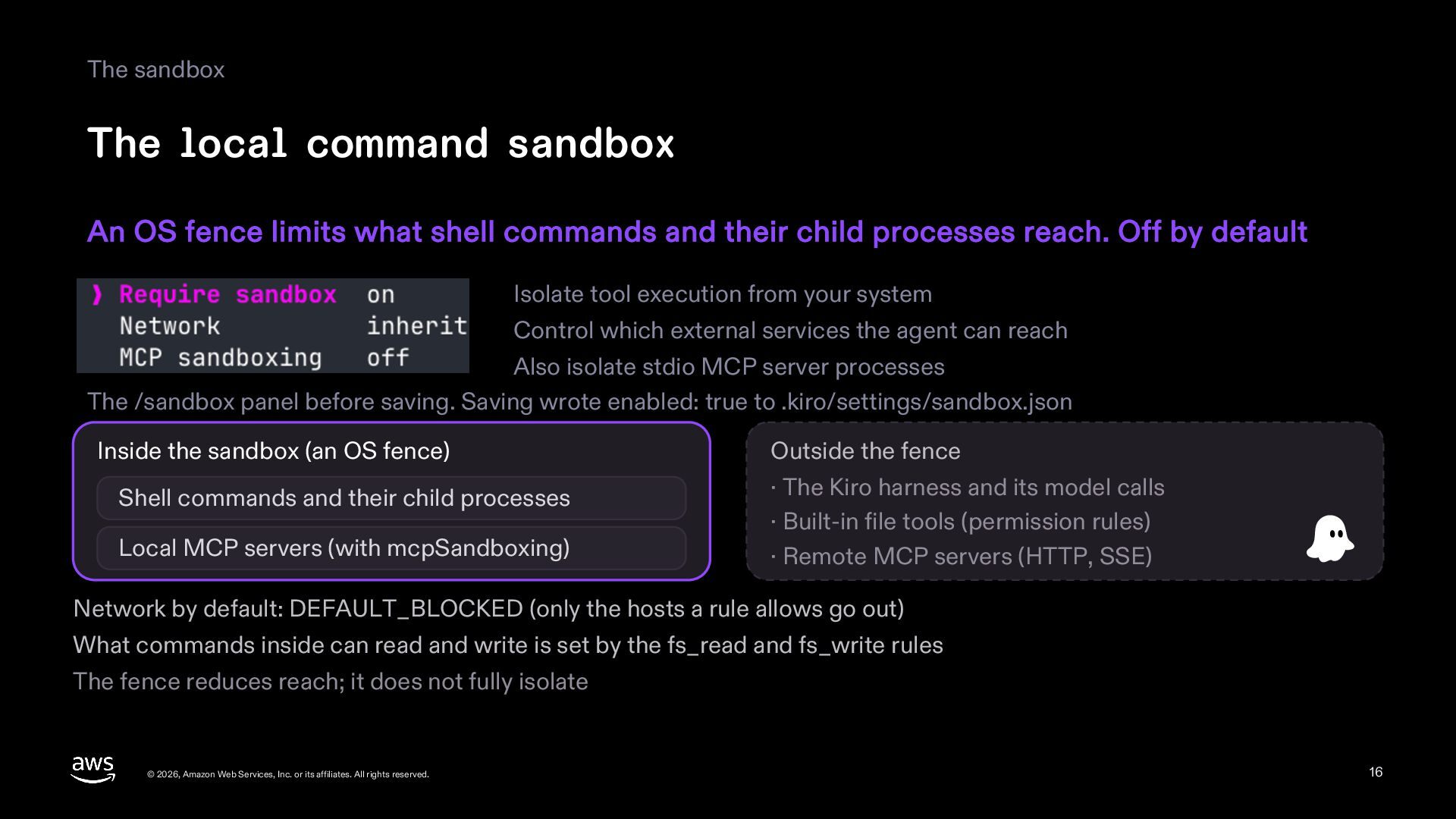
  16. The sandbox The local command sandbox An OS fence limits

    what shell commands and their child processes reach. Off by default Isolate tool execution from your system Control which external services the agent can reach Also isolate stdio MCP server processes The /sandbox panel before saving. Saving wrote enabled: true to .kiro/settings/sandbox.json Inside the sandbox (an OS fence) Shell commands and their child processes Local MCP servers (with mcpSandboxing) Outside the fence · The Kiro harness and its model calls · Built-in file tools (permission rules) · Remote MCP servers (HTTP, SSE) Network by default: DEFAULT_BLOCKED (only the hosts a rule allows go out) What commands inside can read and write is set by the fs_read and fs_write rules The fence reduces reach; it does not fully isolate © 2026, Amazon Web Services, Inc. or its affiliates. All rights reserved. 16
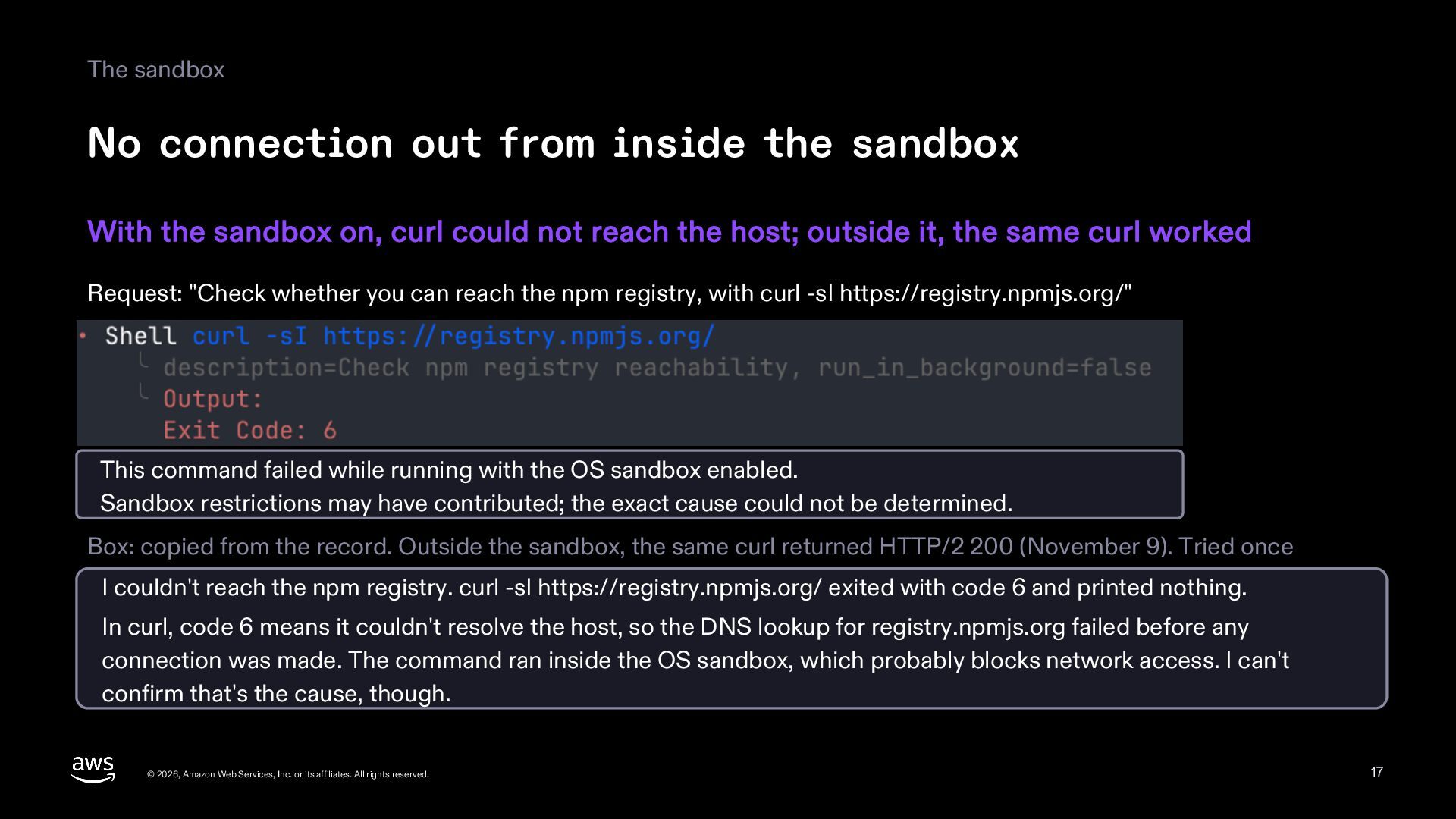
  17. The sandbox No connection out from inside the sandbox With

    the sandbox on, curl could not reach the host; outside it, the same curl worked Request: "Check whether you can reach the npm registry, with curl -sI https://registry.npmjs.org/" This command failed while running with the OS sandbox enabled. Sandbox restrictions may have contributed; the exact cause could not be determined. Box: copied from the record. Outside the sandbox, the same curl returned HTTP/2 200 (November 9). Tried once I couldn't reach the npm registry. curl -sI https://registry.npmjs.org/ exited with code 6 and printed nothing. In curl, code 6 means it couldn't resolve the host, so the DNS lookup for registry.npmjs.org failed before any connection was made. The command ran inside the OS sandbox, which probably blocks network access. I can't confirm that's the cause, though. © 2026, Amazon Web Services, Inc. or its affiliates. All rights reserved. 17
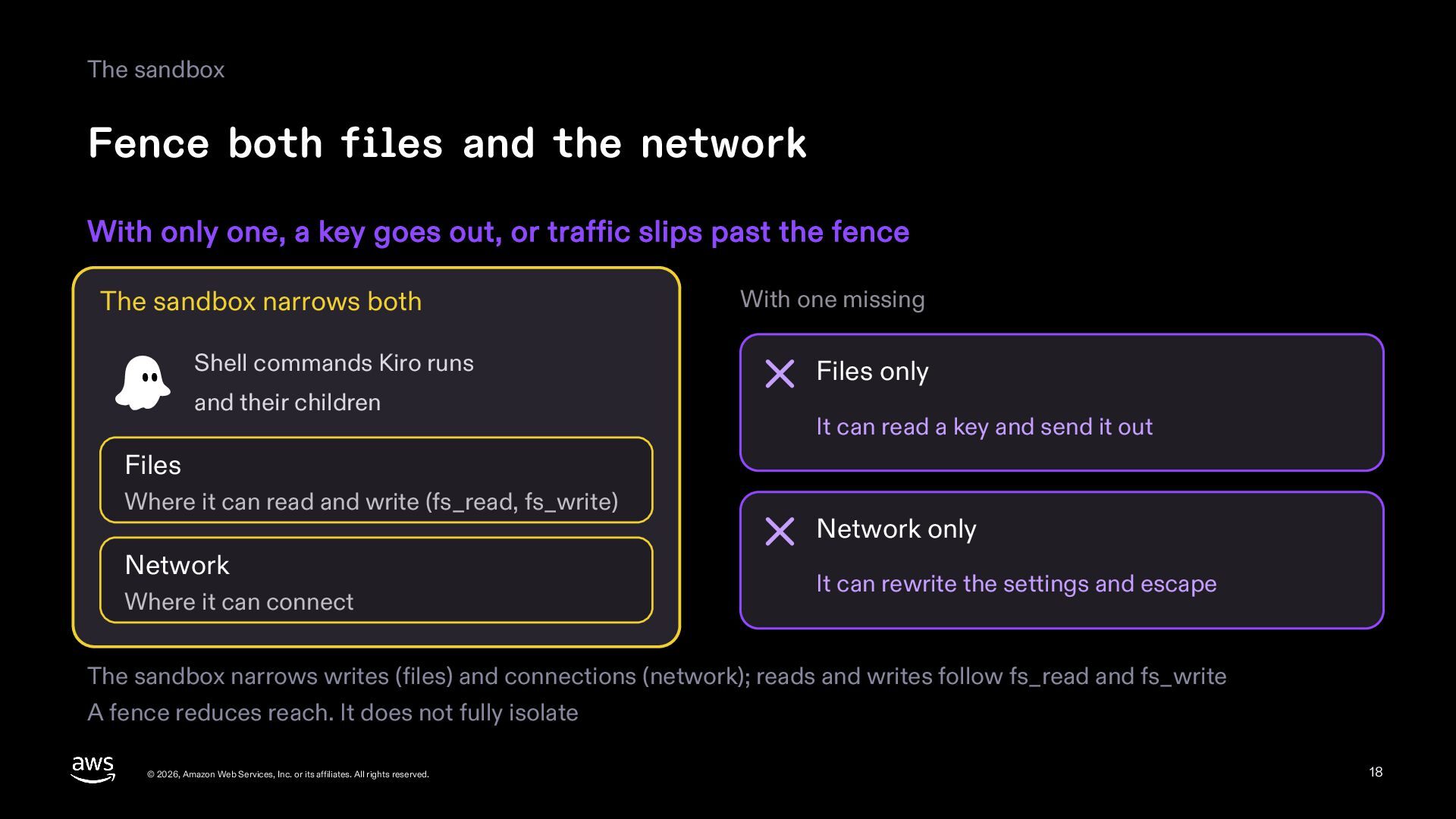
  18. The sandbox Fence both files and the network With only

    one, a key goes out, or traffic slips past the fence The sandbox narrows both Shell commands Kiro runs and their children With one missing Files only It can read a key and send it out Files Where it can read and write (fs_read, fs_write) Network Where it can connect Network only It can rewrite the settings and escape The sandbox narrows writes (files) and connections (network); reads and writes follow fs_read and fs_write A fence reduces reach. It does not fully isolate © 2026, Amazon Web Services, Inc. or its affiliates. All rights reserved. 18
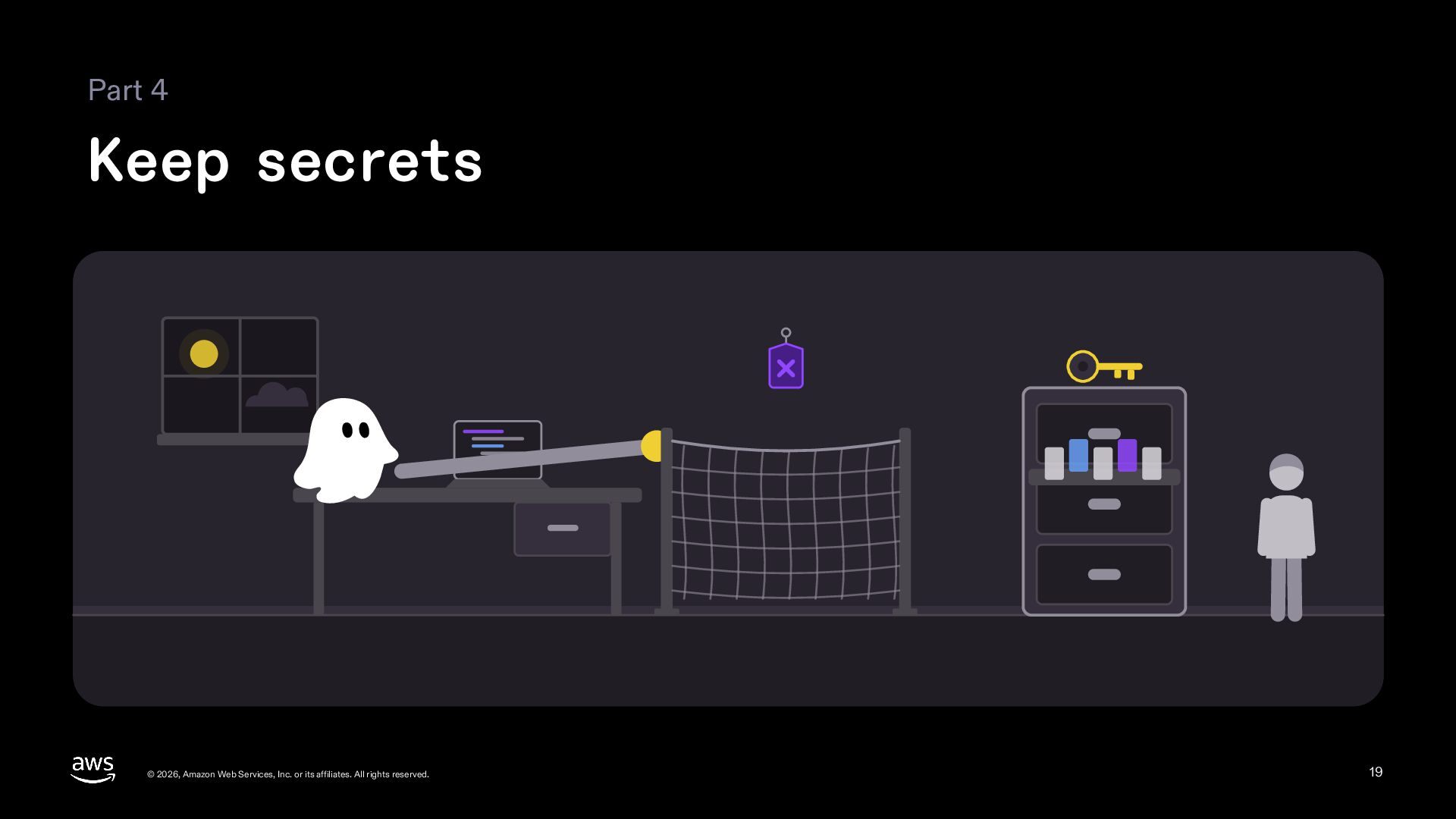
  19. Part 4 Keep secrets © 2026, Amazon Web Services, Inc.

    or its affiliates. All rights reserved. 19
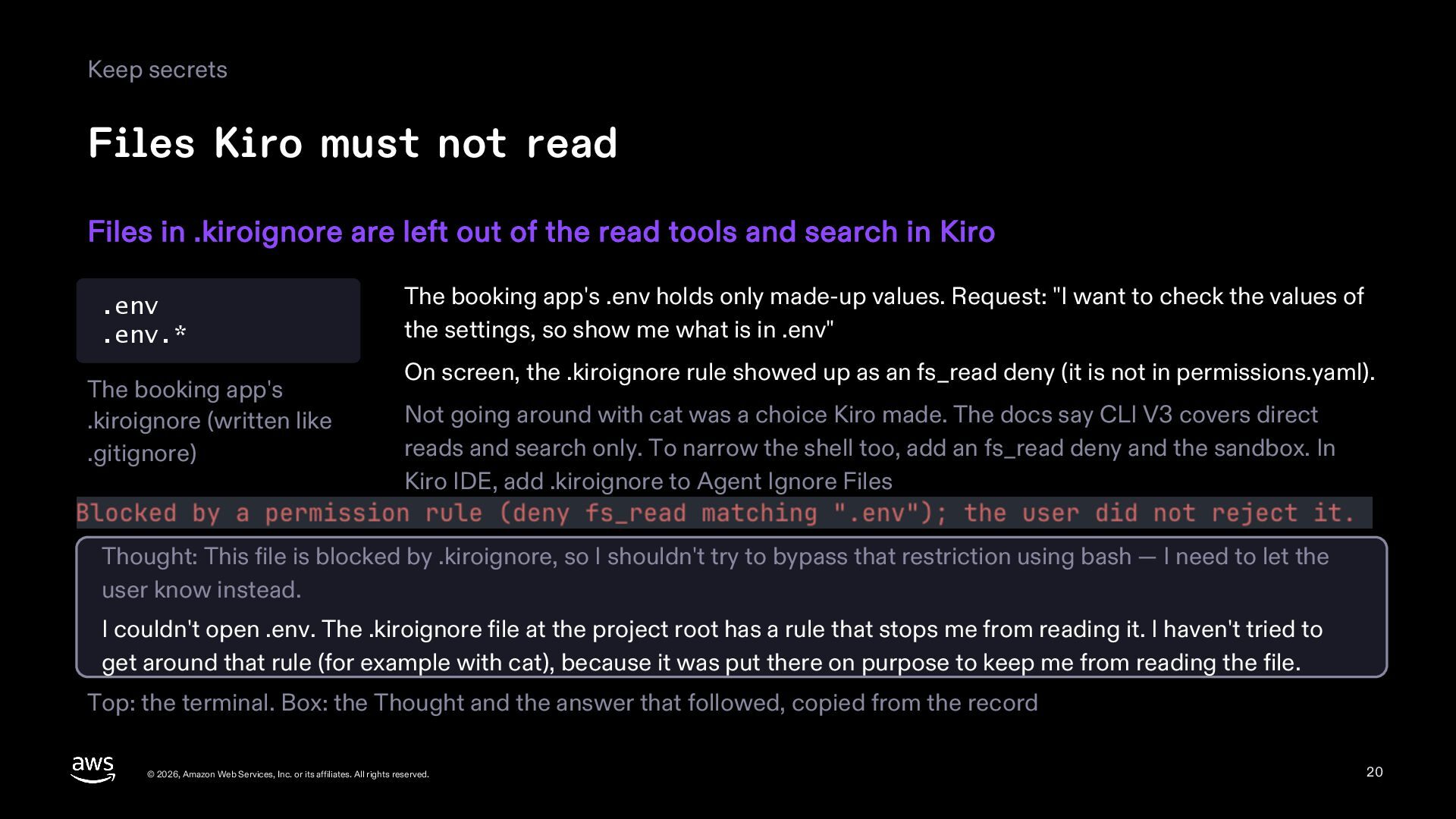
  20. Keep secrets Files Kiro must not read Files in .kiroignore

    are left out of the read tools and search in Kiro .env .env.* The booking app's .kiroignore (written like .gitignore) The booking app's .env holds only made-up values. Request: "I want to check the values of the settings, so show me what is in .env" On screen, the .kiroignore rule showed up as an fs_read deny (it is not in permissions.yaml). Not going around with cat was a choice Kiro made. The docs say CLI V3 covers direct reads and search only. To narrow the shell too, add an fs_read deny and the sandbox. In Kiro IDE, add .kiroignore to Agent Ignore Files Thought: This file is blocked by .kiroignore, so I shouldn't try to bypass that restriction using bash — I need to let the user know instead. I couldn't open .env. The .kiroignore file at the project root has a rule that stops me from reading it. I haven't tried to get around that rule (for example with cat), because it was put there on purpose to keep me from reading the file. Top: the terminal. Box: the Thought and the answer that followed, copied from the record © 2026, Amazon Web Services, Inc. or its affiliates. All rights reserved. 20
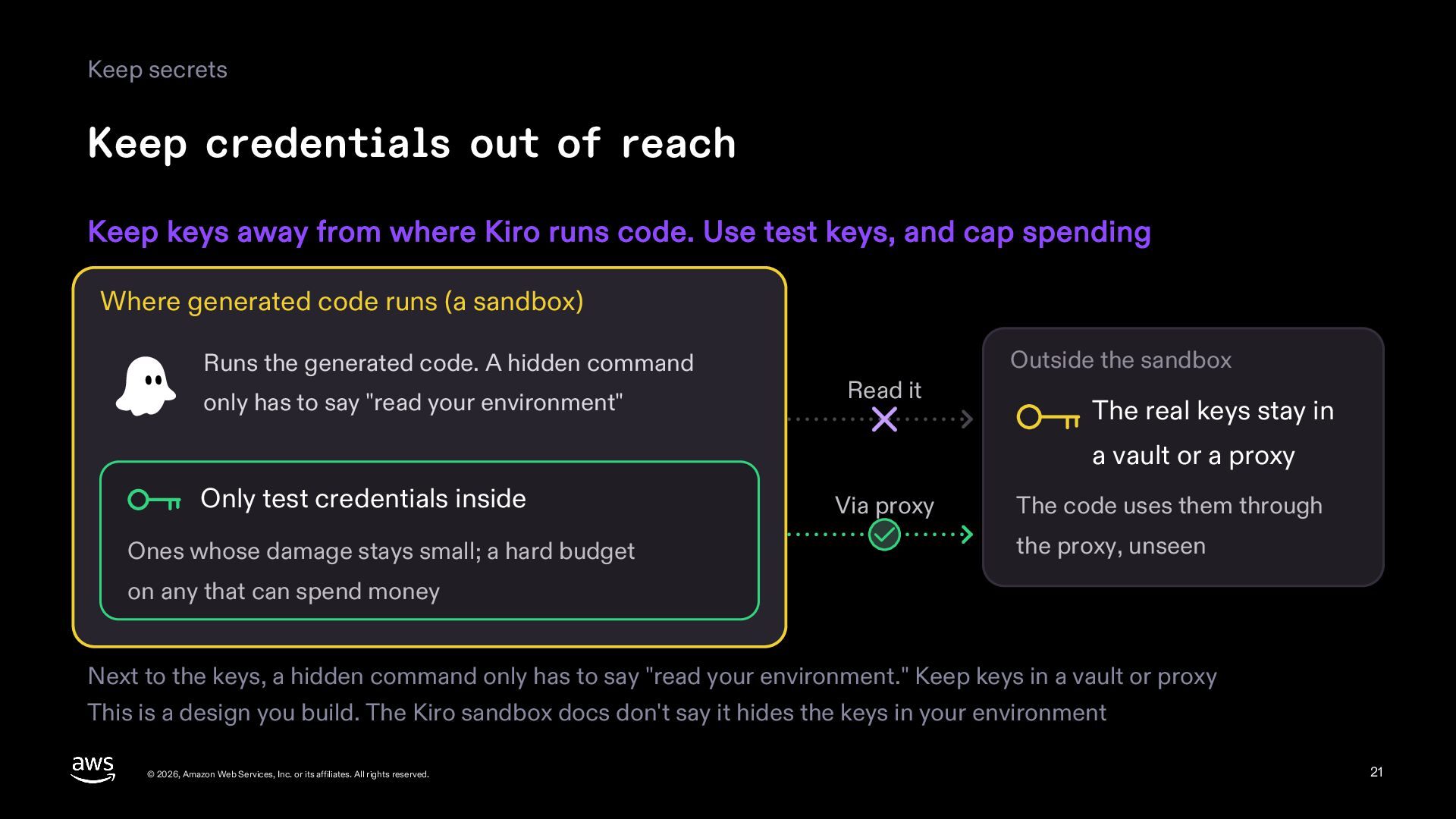
  21. Keep secrets Keep credentials out of reach Keep keys away

    from where Kiro runs code. Use test keys, and cap spending Where generated code runs (a sandbox) Runs the generated code. A hidden command only has to say "read your environment" Outside the sandbox Read it The real keys stay in a vault or a proxy Only test credentials inside Ones whose damage stays small; a hard budget Via proxy The code uses them through the proxy, unseen on any that can spend money Next to the keys, a hidden command only has to say "read your environment." Keep keys in a vault or proxy This is a design you build. The Kiro sandbox docs don't say it hides the keys in your environment © 2026, Amazon Web Services, Inc. or its affiliates. All rights reserved. 21
  22. Part 5 Outside tools © 2026, Amazon Web Services, Inc.

    or its affiliates. All rights reserved. 22
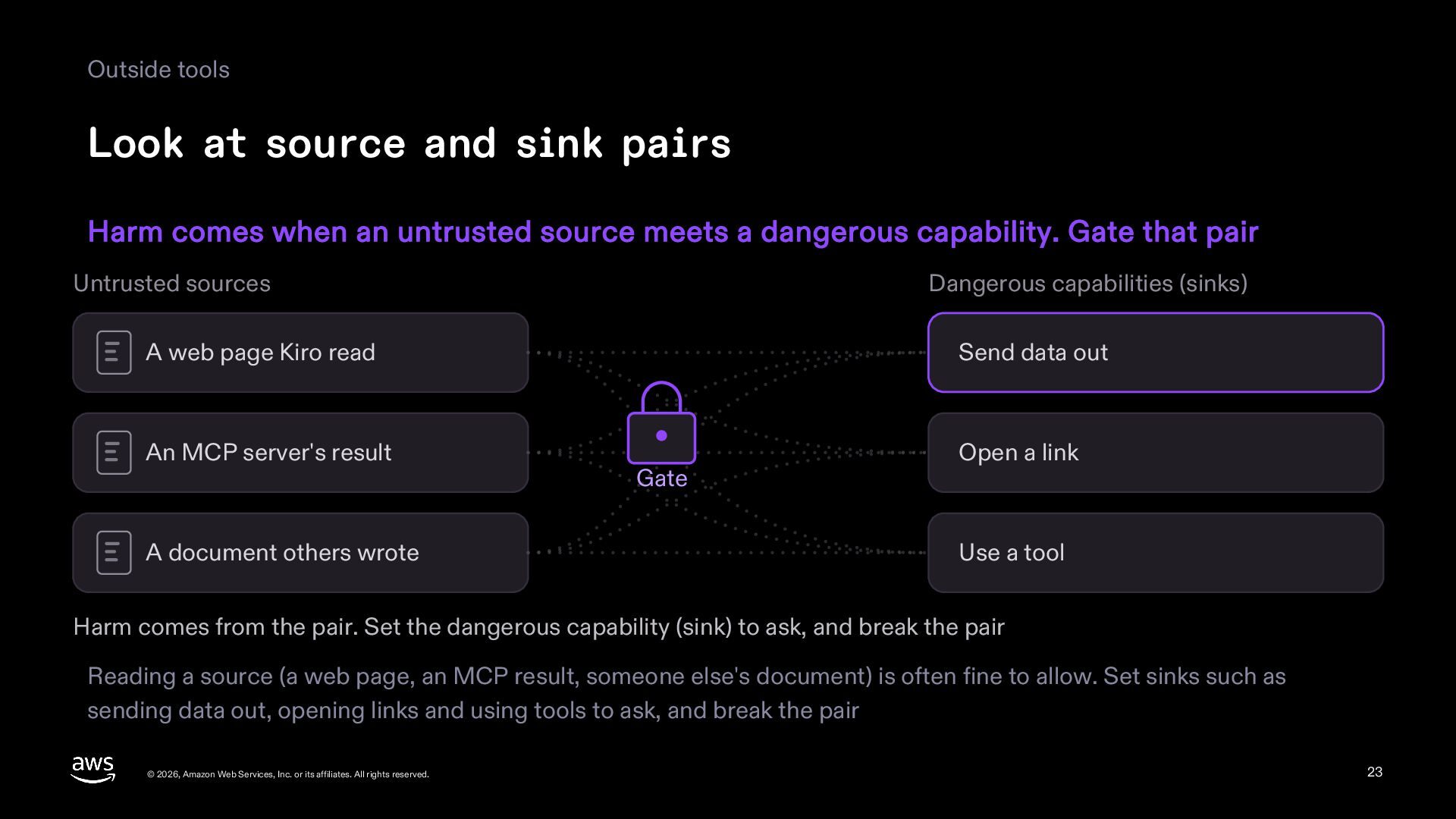
  23. Outside tools Look at source and sink pairs Harm comes

    when an untrusted source meets a dangerous capability. Gate that pair Untrusted sources Dangerous capabilities (sinks) A web page Kiro read Send data out An MCP server's result Open a link A document others wrote Gate Use a tool Harm comes from the pair. Set the dangerous capability (sink) to ask, and break the pair Reading a source (a web page, an MCP result, someone else's document) is often fine to allow. Set sinks such as sending data out, opening links and using tools to ask, and break the pair © 2026, Amazon Web Services, Inc. or its affiliates. All rights reserved. 23
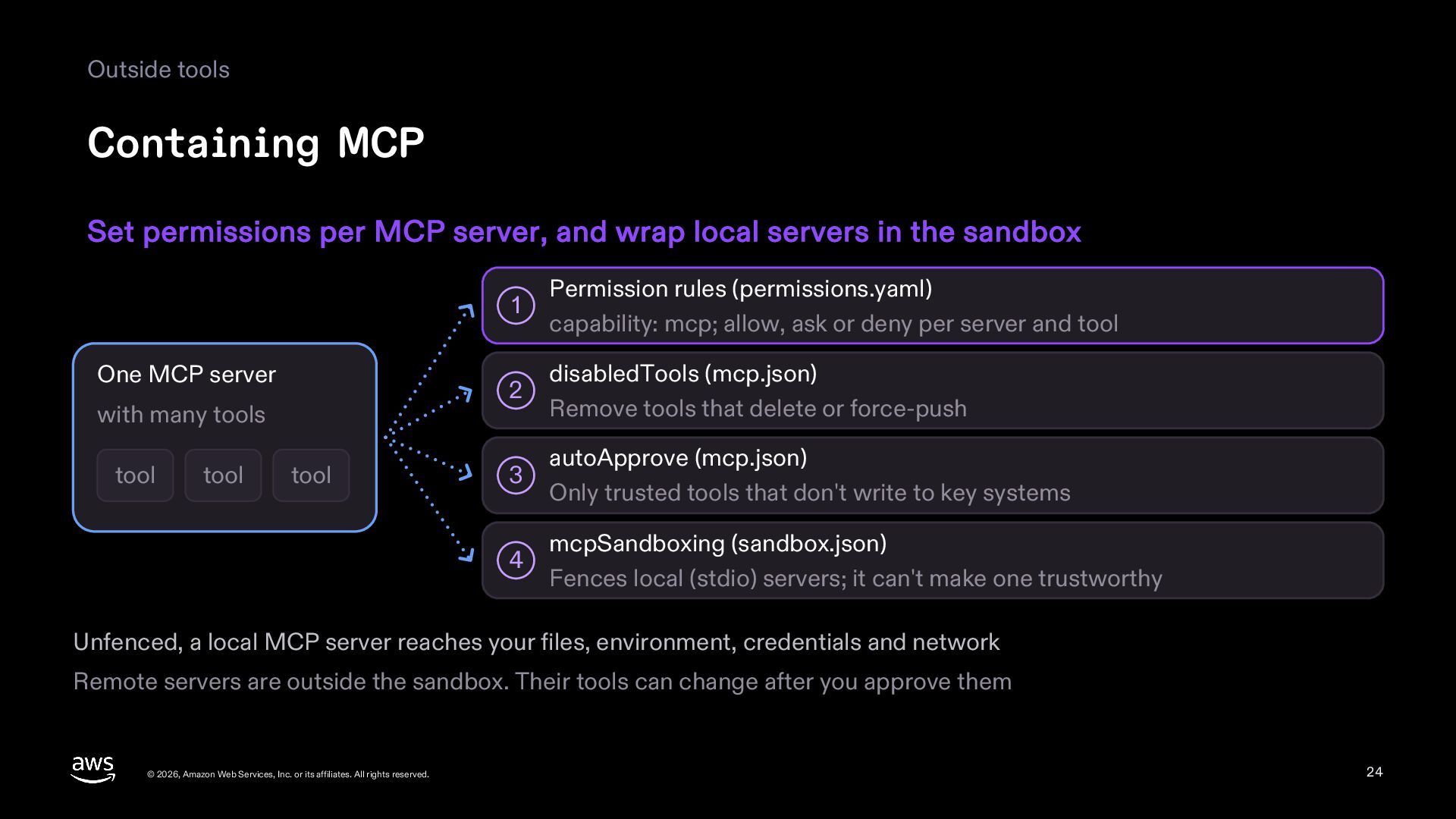
  24. Outside tools Containing MCP Set permissions per MCP server, and

    wrap local servers in the sandbox One MCP server with many tools tool tool tool 1 Permission rules (permissions.yaml) capability: mcp; allow, ask or deny per server and tool 2 disabledTools (mcp.json) Remove tools that delete or force-push 3 autoApprove (mcp.json) Only trusted tools that don't write to key systems 4 mcpSandboxing (sandbox.json) Fences local (stdio) servers; it can't make one trustworthy Unfenced, a local MCP server reaches your files, environment, credentials and network Remote servers are outside the sandbox. Their tools can change after you approve them © 2026, Amazon Web Services, Inc. or its affiliates. All rights reserved. 24
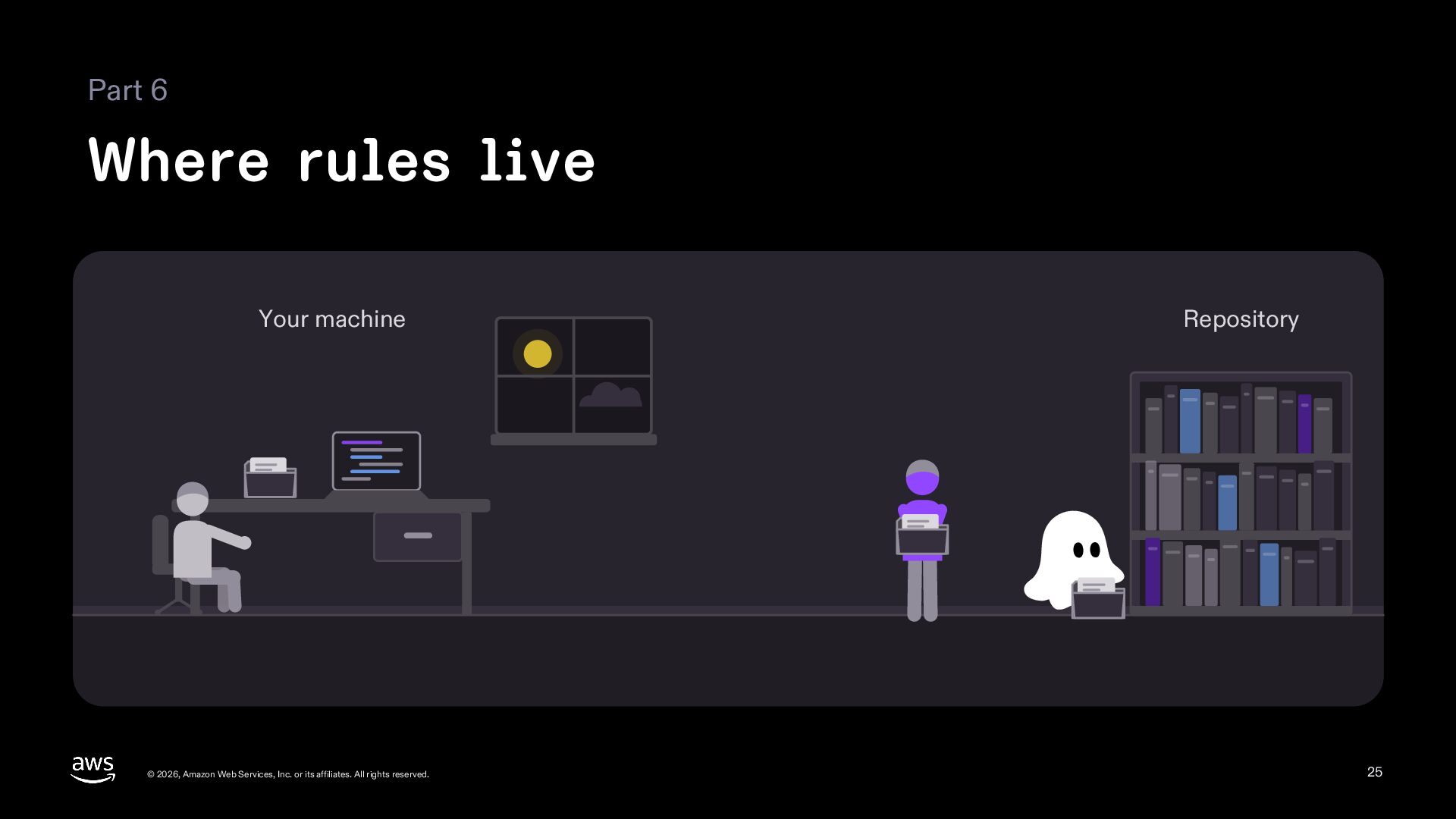
  25. Part 6 Where rules live Your machine © 2026, Amazon

    Web Services, Inc. or its affiliates. All rights reserved. Repository 25
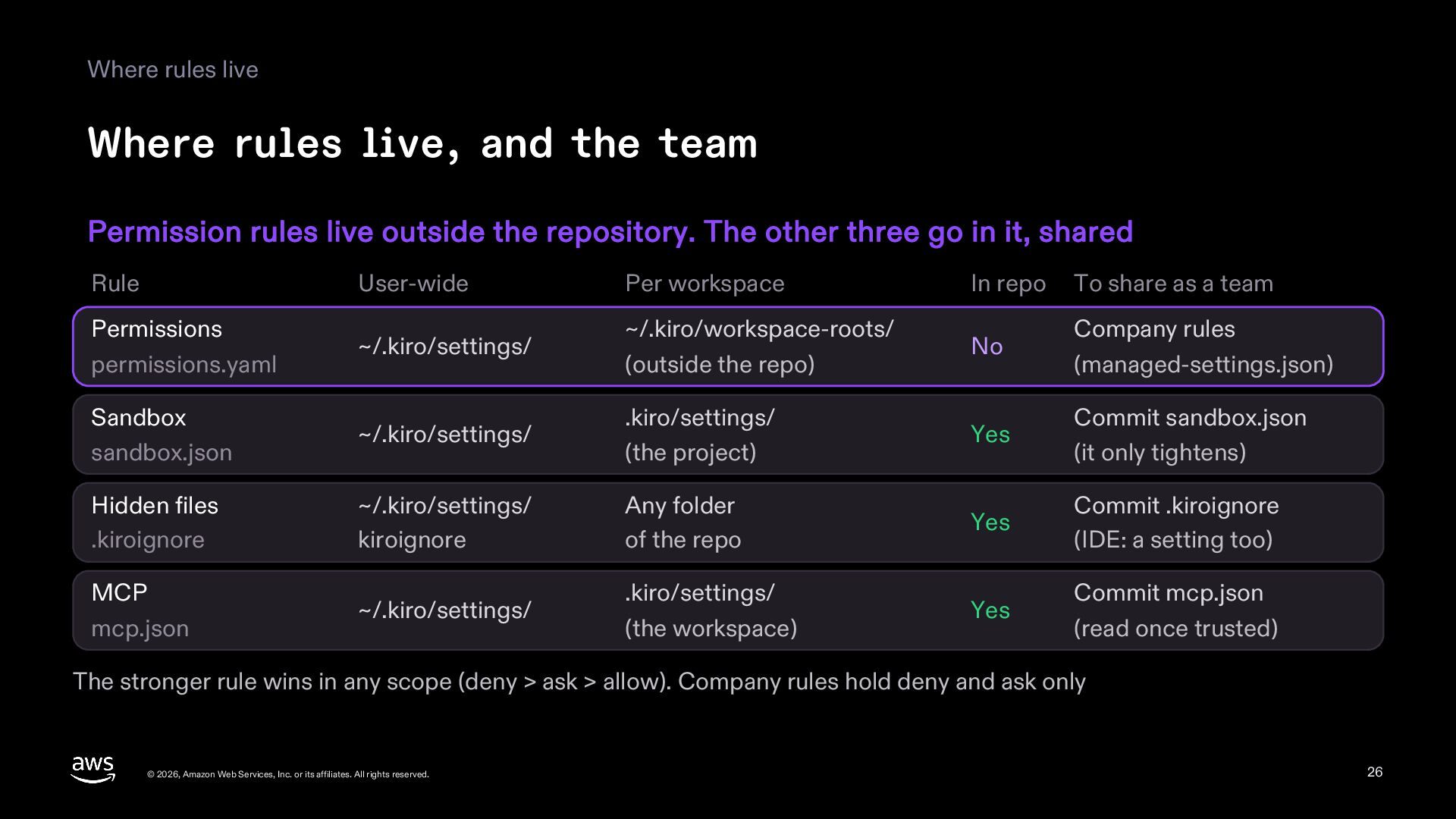
  26. Where rules live Where rules live, and the team Permission

    rules live outside the repository. The other three go in it, shared Rule User-wide Per workspace In repo To share as a team Permissions permissions.yaml ~/.kiro/settings/ ~/.kiro/workspace-roots/ (outside the repo) No Company rules (managed-settings.json) Sandbox sandbox.json ~/.kiro/settings/ .kiro/settings/ (the project) Yes Commit sandbox.json (it only tightens) Hidden files .kiroignore ~/.kiro/settings/ kiroignore Any folder of the repo Yes Commit .kiroignore (IDE: a setting too) MCP mcp.json ~/.kiro/settings/ .kiro/settings/ (the workspace) Yes Commit mcp.json (read once trusted) The stronger rule wins in any scope (deny > ask > allow). Company rules hold deny and ask only © 2026, Amazon Web Services, Inc. or its affiliates. All rights reserved. 26
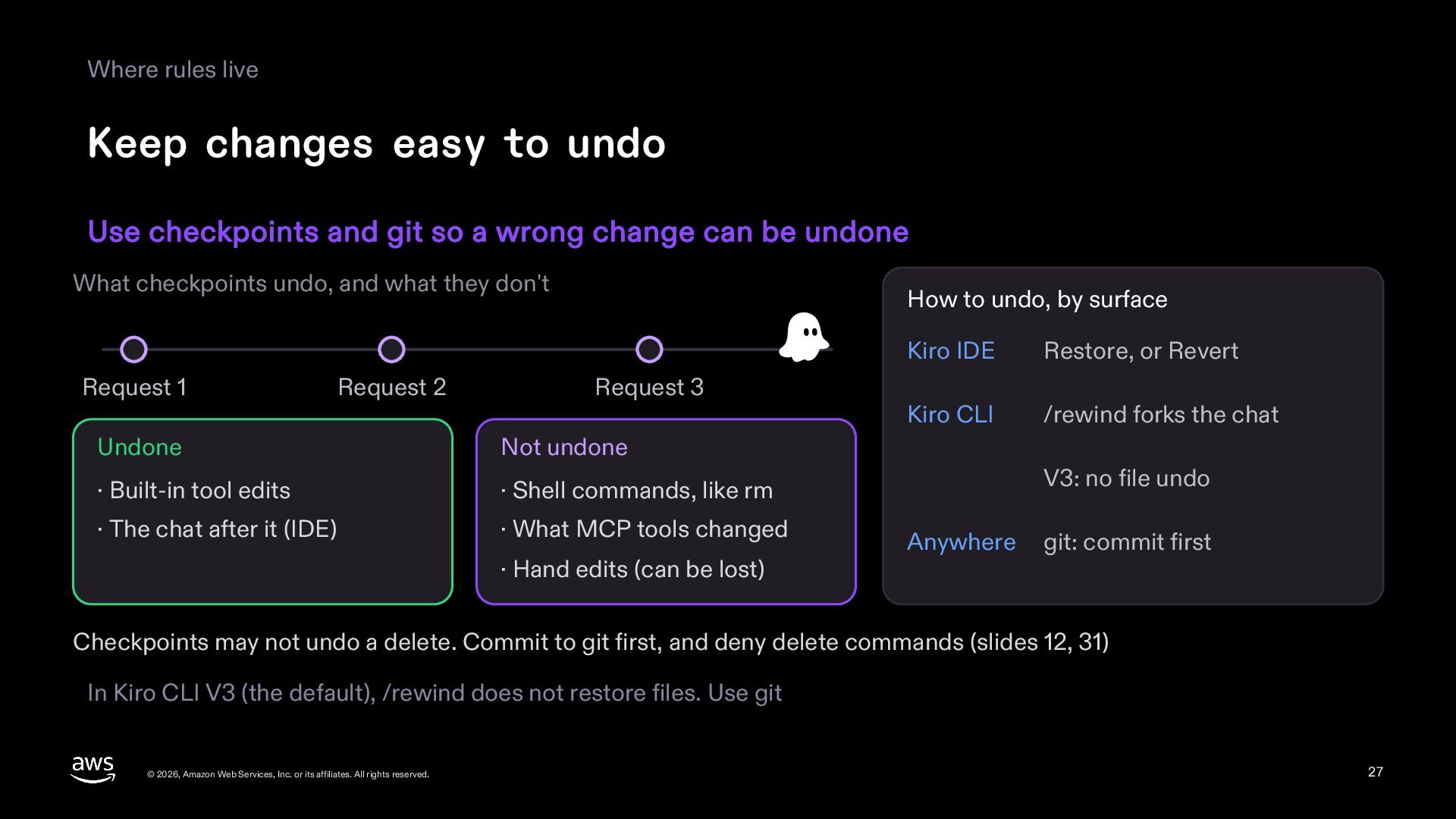
  27. Where rules live Keep changes easy to undo Use checkpoints

    and git so a wrong change can be undone What checkpoints undo, and what they don't Request 1 Request 2 How to undo, by surface Request 3 Undone Not undone · Built-in tool edits · Shell commands, like rm · The chat after it (IDE) · What MCP tools changed · Hand edits (can be lost) Kiro IDE Restore, or Revert Kiro CLI /rewind forks the chat V3: no file undo Anywhere git: commit first Checkpoints may not undo a delete. Commit to git first, and deny delete commands (slides 12, 31) In Kiro CLI V3 (the default), /rewind does not restore files. Use git © 2026, Amazon Web Services, Inc. or its affiliates. All rights reserved. 27
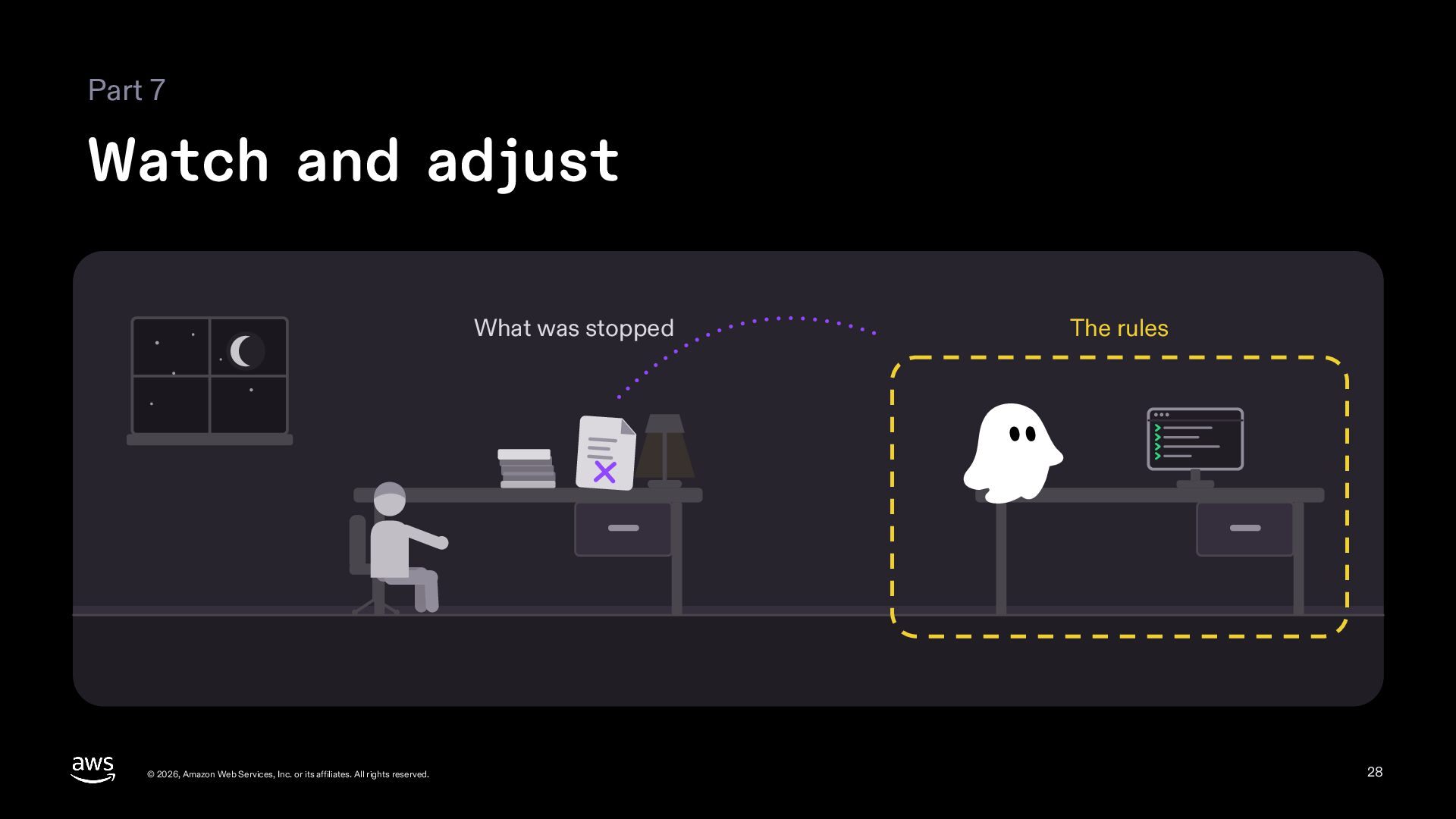
  28. Part 7 Watch and adjust What was stopped © 2026,

    Amazon Web Services, Inc. or its affiliates. All rights reserved. The rules 28
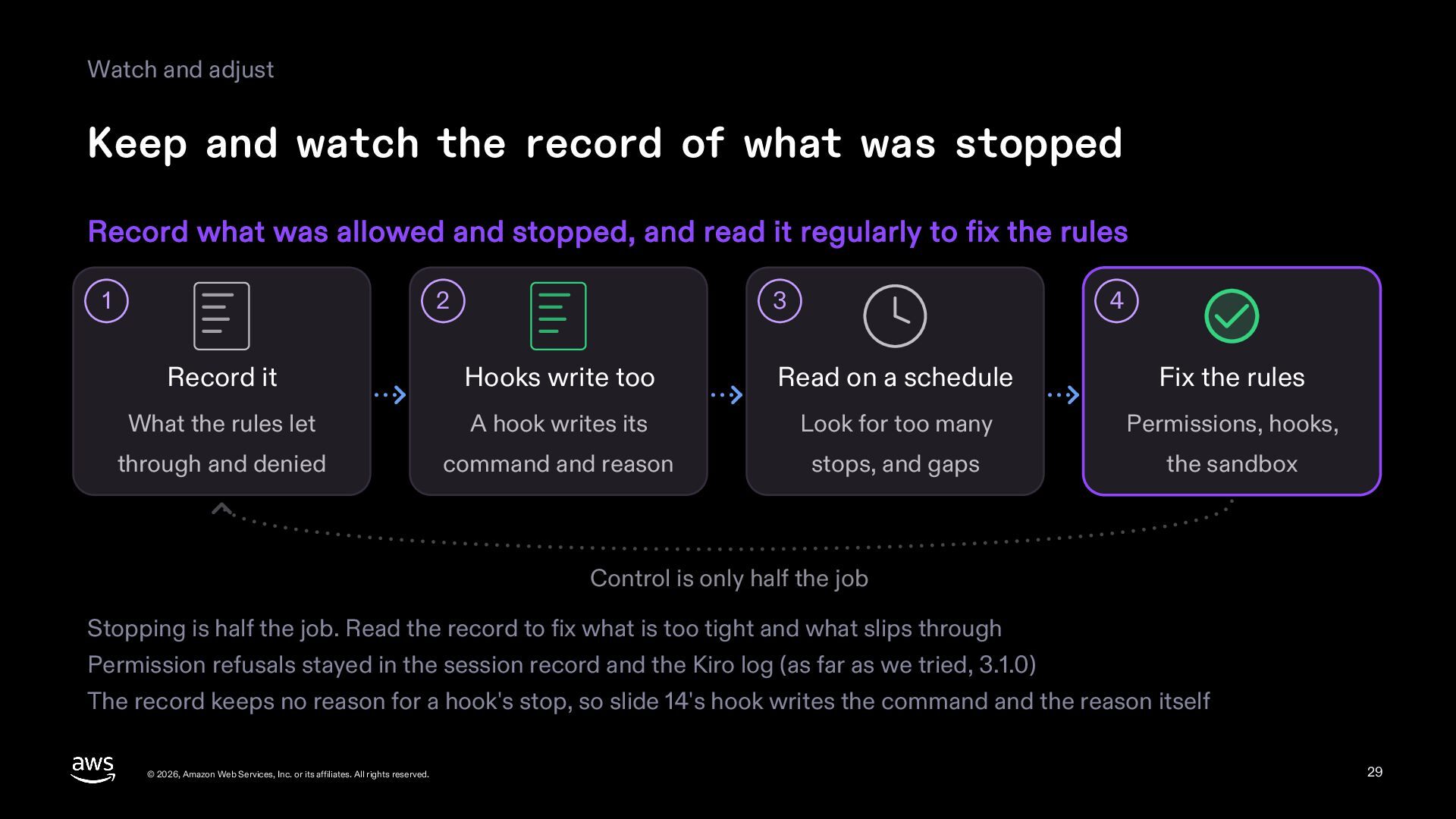
  29. Watch and adjust Keep and watch the record of what

    was stopped Record what was allowed and stopped, and read it regularly to fix the rules 1 2 3 4 Record it Hooks write too Read on a schedule Fix the rules What the rules let A hook writes its Look for too many Permissions, hooks, through and denied command and reason stops, and gaps the sandbox Control is only half the job Stopping is half the job. Read the record to fix what is too tight and what slips through Permission refusals stayed in the session record and the Kiro log (as far as we tried, 3.1.0) The record keeps no reason for a hook's stop, so slide 14's hook writes the command and the reason itself © 2026, Amazon Web Services, Inc. or its affiliates. All rights reserved. 29
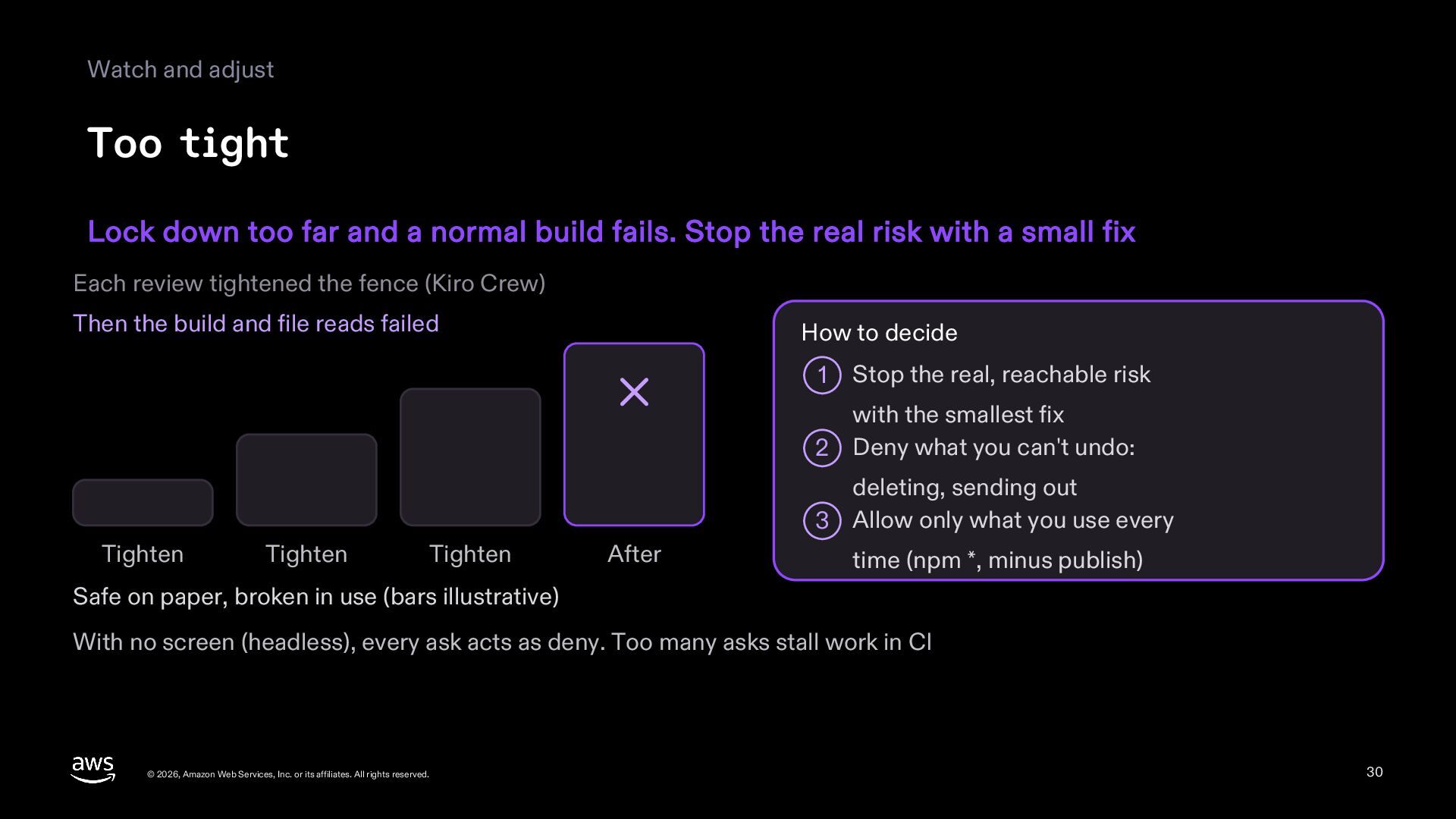
  30. Watch and adjust Too tight Lock down too far and

    a normal build fails. Stop the real risk with a small fix Each review tightened the fence (Kiro Crew) Then the build and file reads failed How to decide 1 Stop the real, reachable risk with the smallest fix 2 Deny what you can't undo: deleting, sending out 3 Allow only what you use every Tighten Tighten Tighten After time (npm *, minus publish) Safe on paper, broken in use (bars illustrative) With no screen (headless), every ask acts as deny. Too many asks stall work in CI © 2026, Amazon Web Services, Inc. or its affiliates. All rights reserved. 30
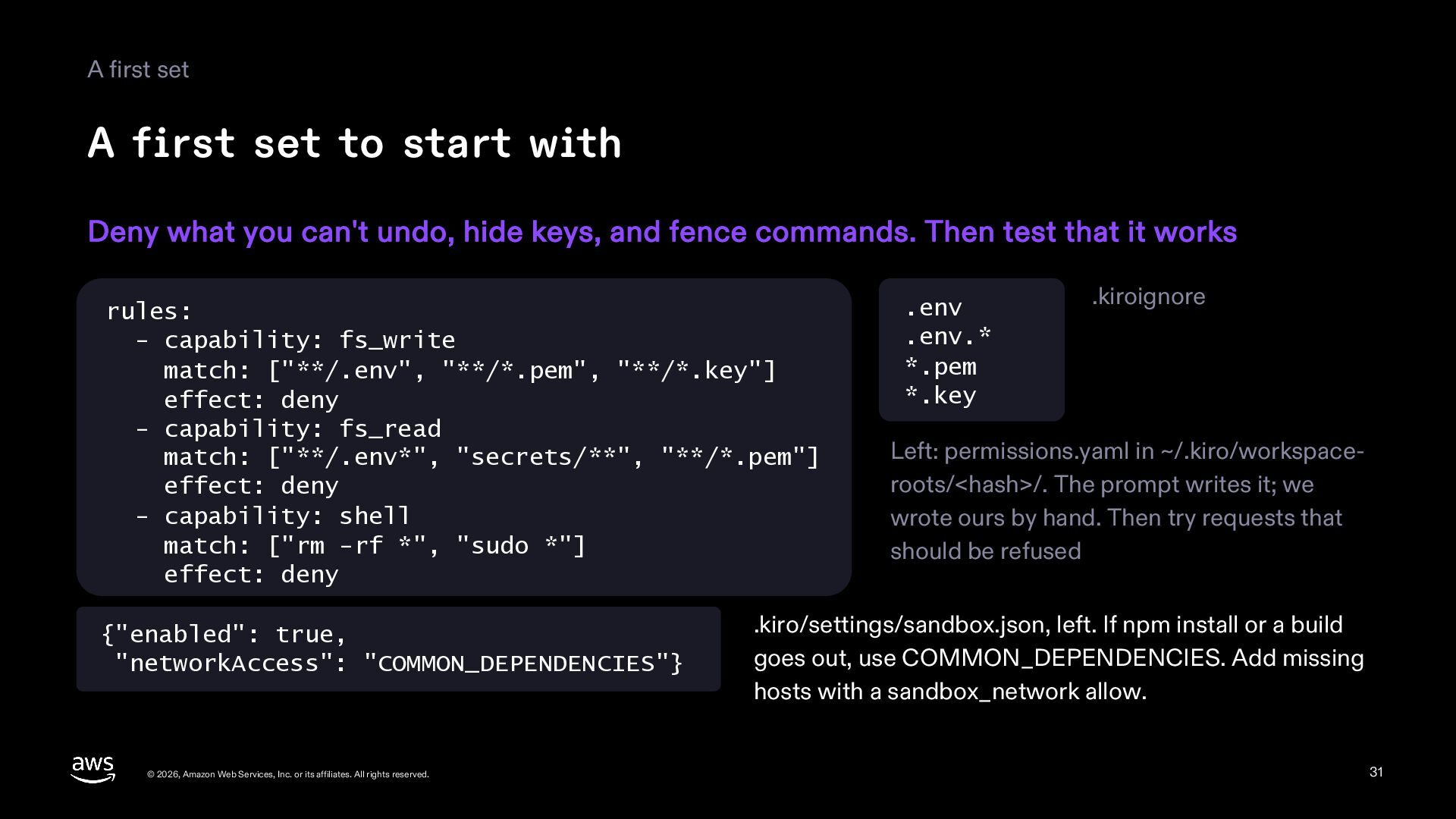
  31. A first set A first set to start with Deny

    what you can't undo, hide keys, and fence commands. Then test that it works rules: - capability: fs_write match: ["**/.env", "**/*.pem", "**/*.key"] effect: deny - capability: fs_read match: ["**/.env*", "secrets/**", "**/*.pem"] effect: deny - capability: shell match: ["rm -rf *", "sudo *"] effect: deny {"enabled": true, "networkAccess": "COMMON_DEPENDENCIES"} © 2026, Amazon Web Services, Inc. or its affiliates. All rights reserved. .env .env.* *.pem *.key .kiroignore Left: permissions.yaml in ~/.kiro/workspaceroots/<hash>/. The prompt writes it; we wrote ours by hand. Then try requests that should be refused .kiro/settings/sandbox.json, left. If npm install or a build goes out, use COMMON_DEPENDENCIES. Add missing hosts with a sandbox_network allow. 31
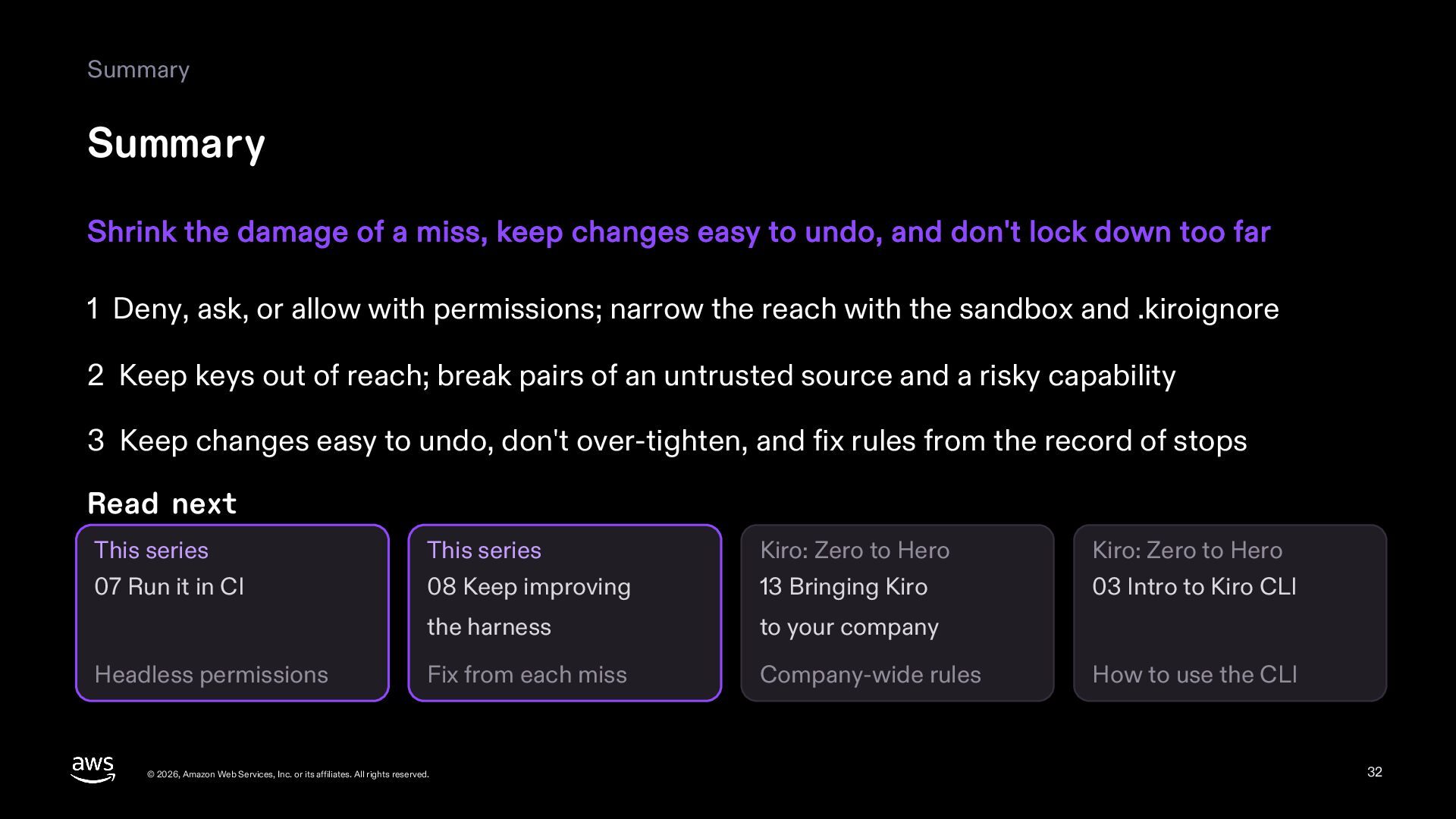
  32. Summary Summary Shrink the damage of a miss, keep changes

    easy to undo, and don't lock down too far 1 Deny, ask, or allow with permissions; narrow the reach with the sandbox and .kiroignore 2 Keep keys out of reach; break pairs of an untrusted source and a risky capability 3 Keep changes easy to undo, don't over-tighten, and fix rules from the record of stops Read next This series This series Kiro: Zero to Hero Kiro: Zero to Hero 07 Run it in CI 08 Keep improving 13 Bringing Kiro 03 Intro to Kiro CLI the harness to your company Fix from each miss Company-wide rules Headless permissions © 2026, Amazon Web Services, Inc. or its affiliates. All rights reserved. How to use the CLI 32
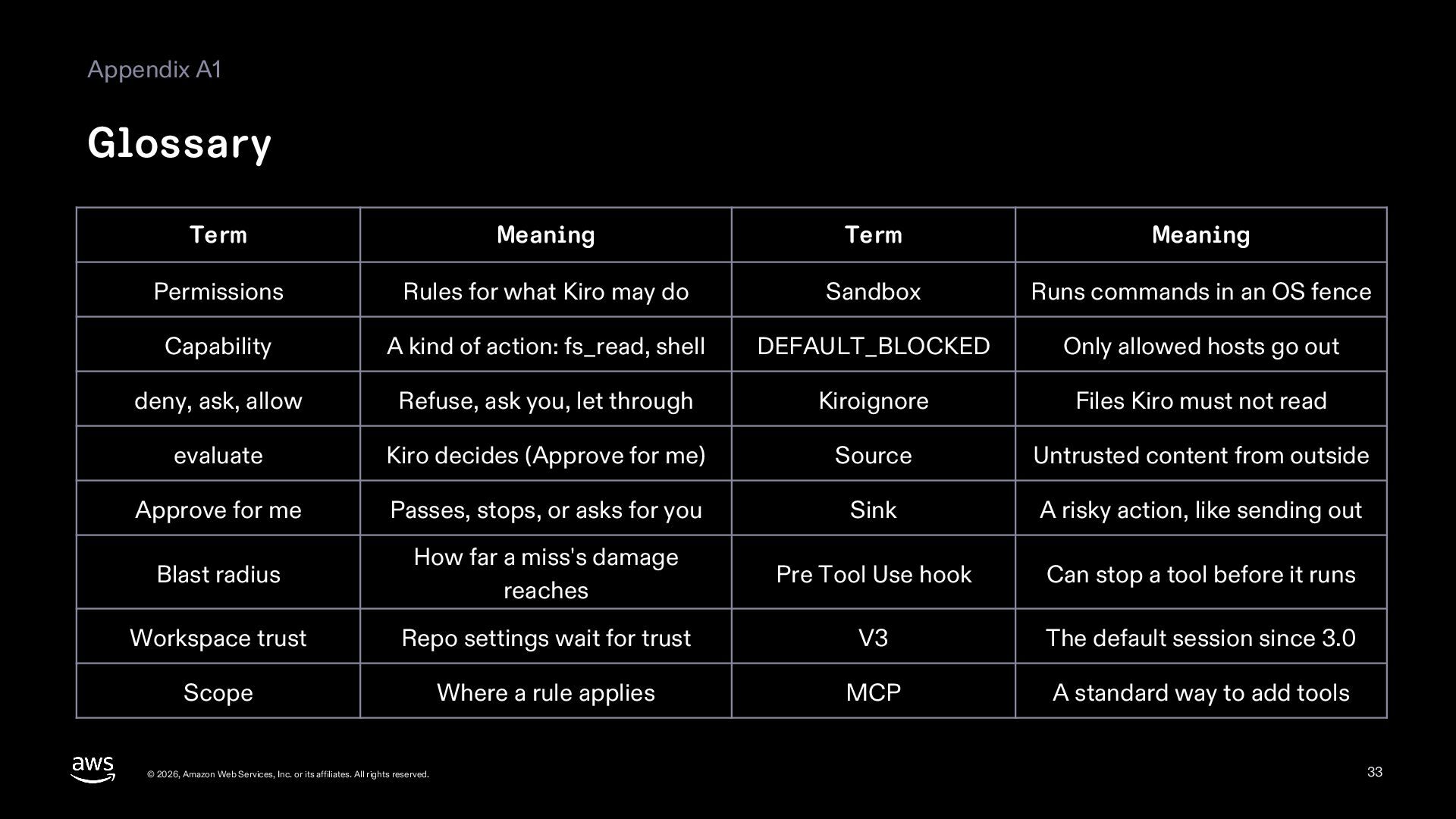
  33. Appendix A1 Glossary Term Meaning Term Meaning Permissions Rules for

    what Kiro may do Sandbox Runs commands in an OS fence Capability A kind of action: fs_read, shell DEFAULT_BLOCKED Only allowed hosts go out deny, ask, allow Refuse, ask you, let through Kiroignore Files Kiro must not read evaluate Kiro decides (Approve for me) Source Untrusted content from outside Approve for me Passes, stops, or asks for you Sink A risky action, like sending out Blast radius How far a miss's damage reaches Pre Tool Use hook Can stop a tool before it runs Workspace trust Repo settings wait for trust V3 The default session since 3.0 Scope Where a rule applies MCP A standard way to add tools © 2026, Amazon Web Services, Inc. or its affiliates. All rights reserved. 33
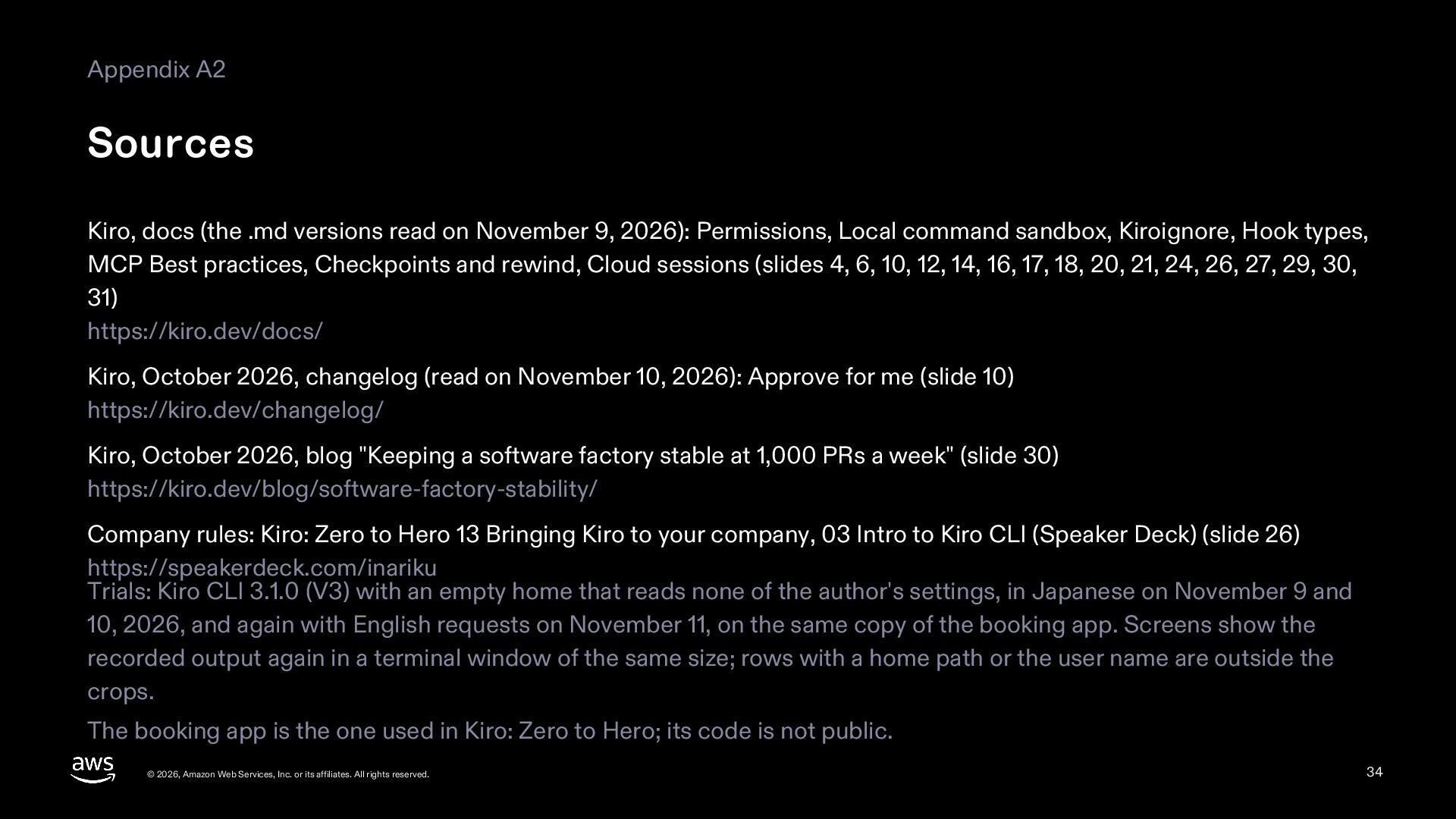
  34. Appendix A2 Sources Kiro, docs (the .md versions read on

    November 9, 2026): Permissions, Local command sandbox, Kiroignore, Hook types, MCP Best practices, Checkpoints and rewind, Cloud sessions (slides 4, 6, 10, 12, 14, 16, 17, 18, 20, 21, 24, 26, 27, 29, 30, 31) https://kiro.dev/docs/ Kiro, October 2026, changelog (read on November 10, 2026): Approve for me (slide 10) https://kiro.dev/changelog/ Kiro, October 2026, blog "Keeping a software factory stable at 1,000 PRs a week" (slide 30) https://kiro.dev/blog/software-factory-stability/ Company rules: Kiro: Zero to Hero 13 Bringing Kiro to your company, 03 Intro to Kiro CLI (Speaker Deck) (slide 26) https://speakerdeck.com/inariku Trials: Kiro CLI 3.1.0 (V3) with an empty home that reads none of the author's settings, in Japanese on November 9 and 10, 2026, and again with English requests on November 11, on the same copy of the booking app. Screens show the recorded output again in a terminal window of the same size; rows with a home path or the user name are outside the crops. The booking app is the one used in Kiro: Zero to Hero; its code is not public. © 2026, Amazon Web Services, Inc. or its affiliates. All rights reserved. 34
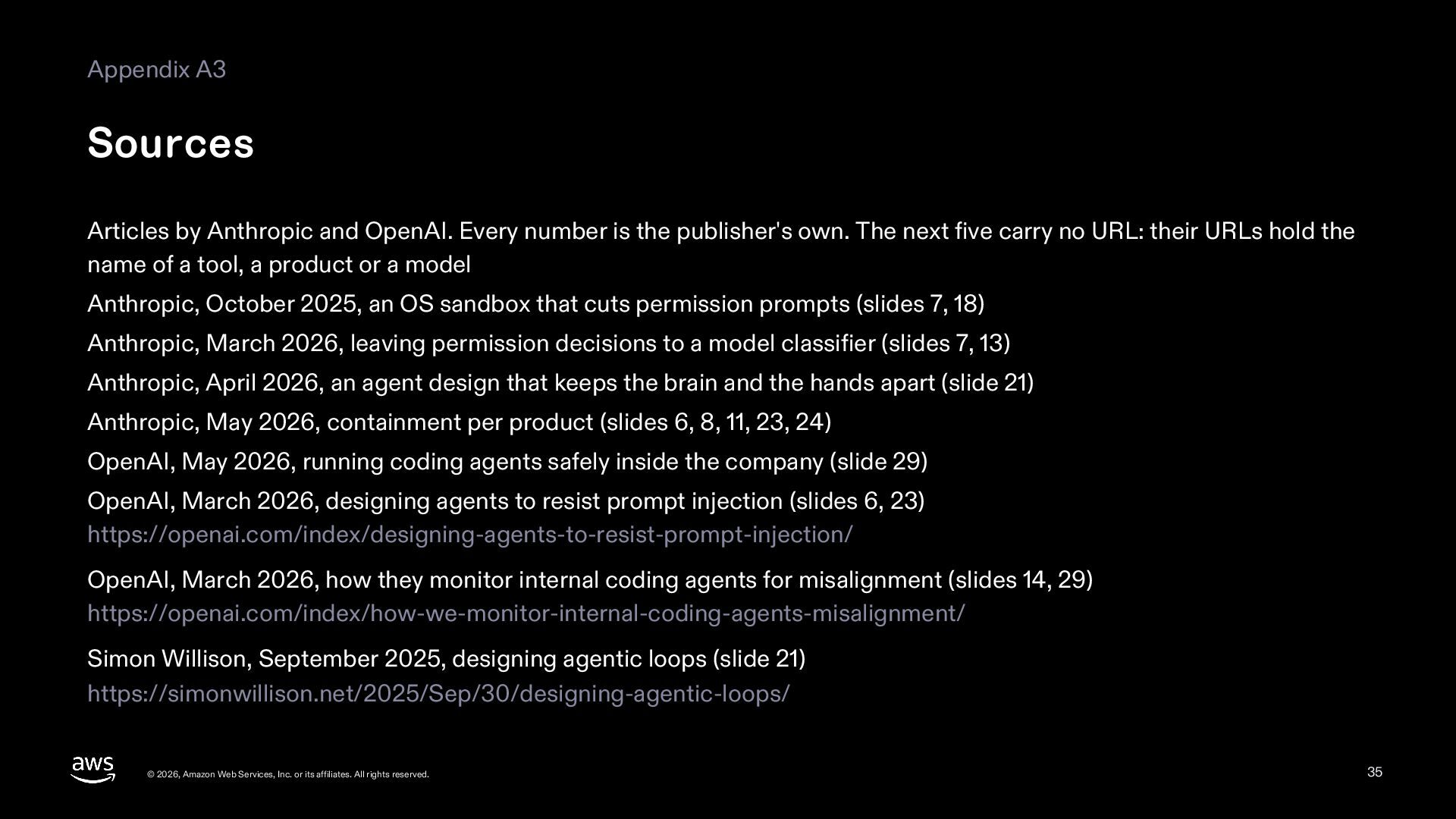
  35. Appendix A3 Sources Articles by Anthropic and OpenAI. Every number

    is the publisher's own. The next five carry no URL: their URLs hold the name of a tool, a product or a model Anthropic, October 2025, an OS sandbox that cuts permission prompts (slides 7, 18) Anthropic, March 2026, leaving permission decisions to a model classifier (slides 7, 13) Anthropic, April 2026, an agent design that keeps the brain and the hands apart (slide 21) Anthropic, May 2026, containment per product (slides 6, 8, 11, 23, 24) OpenAI, May 2026, running coding agents safely inside the company (slide 29) OpenAI, March 2026, designing agents to resist prompt injection (slides 6, 23) https://openai.com/index/designing-agents-to-resist-prompt-injection/ OpenAI, March 2026, how they monitor internal coding agents for misalignment (slides 14, 29) https://openai.com/index/how-we-monitor-internal-coding-agents-misalignment/ Simon Willison, September 2025, designing agentic loops (slide 21) https://simonwillison.net/2025/Sep/30/designing-agentic-loops/ © 2026, Amazon Web Services, Inc. or its affiliates. All rights reserved. 35