Share
Embed
Sessions と Memory | Kiro と学ぶ Strands Agents 05
Strands Agents の Agent に、会話履歴と agent.state、スナップショット、再起動しても続きから話せる SnapshotSessionManager と Storage、セッションをまたいで知識を持ち越す MemoryManager、context window に会話を収める context_manager と conversation manager を足す方法を、strandsagents.com の公式ドキュメントを元に、構成図、流れの図、コードと本物の出力で説明する Level 300 の資料です。家電のお店の問い合わせ窓口のエージェント (データは架空) を Strands Agents 1.64.0 と東京のリージョンの Amazon Bedrock で動かし、2 回目のプロセスが前の注文番号を答えるところ、別の Agent が search_memory で置き配の希望を思い出すところ、12,000 字近いツールの結果が履歴の中で短くなるところを出力で見せます。

Riku INADA PRO
November 09, 2026
Transcript
40 slides
-
Kiro と学ぶ Strands Agents 05 作り込む Sessions と Memory State
と Context management Level 300 / 2026-11 時点 2026 年 11 ⽉ 稲⽥ ⼤陸 アマゾン ウェブ サービス ジャパン © 2026, Amazon Web Services, Inc. or its affiliates. All rights reserved. 05 Kiro + Strands Agents 1 -
はじめに ⾃⼰紹介 稲⽥ ⼤陸 いなだ りく (いなりく) アマゾン ウェブ サービス
ジャパン合同会社 ソリューションアーキテクト 製造業のお客様を中⼼に⽀援 最近の取り組み AI 駆動開発ライフサイクルの推進 Kiro と AWS Amplify の情報発信 © 2026, Amazon Web Services, Inc. or its affiliates. All rights reserved. X @inada_riku Speaker Deck speakerdeck.com/inariku Zenn zenn.dev/inariku GitHub github.com/inariku 2 -
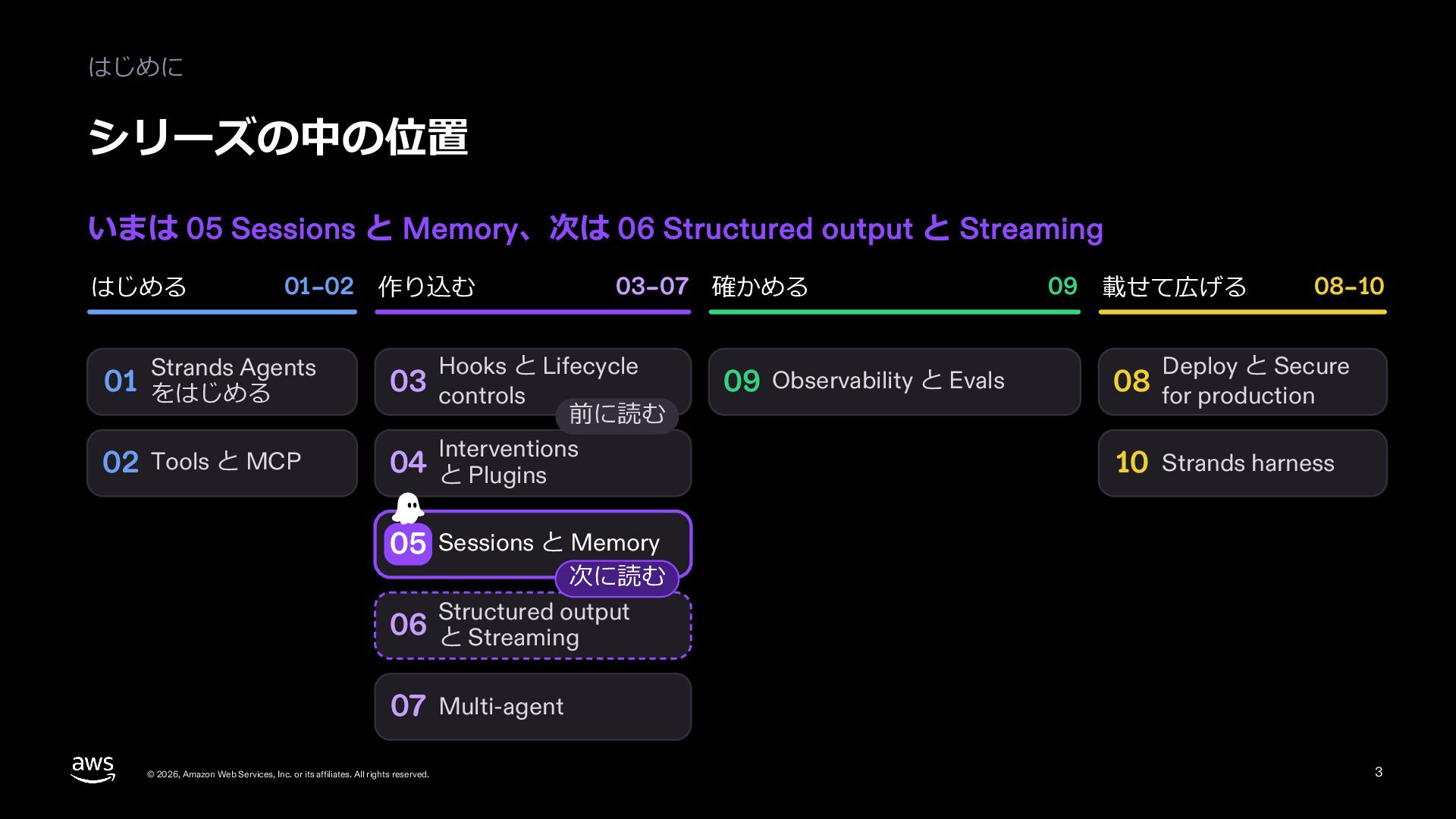
はじめに シリーズの中の位置 いまは 05 Sessions と Memory、次は 06 Structured output
と Streaming はじめる 01–02 作り込む Strands Agents 01 をはじめる 02 Tools と MCP 03–07 確かめる Hooks と Lifecycle 03 controls 前に読む Interventions 04 と Plugins 09 Observability と Evals 09 載せて広げる 08–10 Deploy と Secure 08 for production 10 Strands harness 05 Sessions と Memory 次に読む output 06 Structured と Streaming 07 Multi-agent © 2026, Amazon Web Services, Inc. or its affiliates. All rights reserved. 3 -
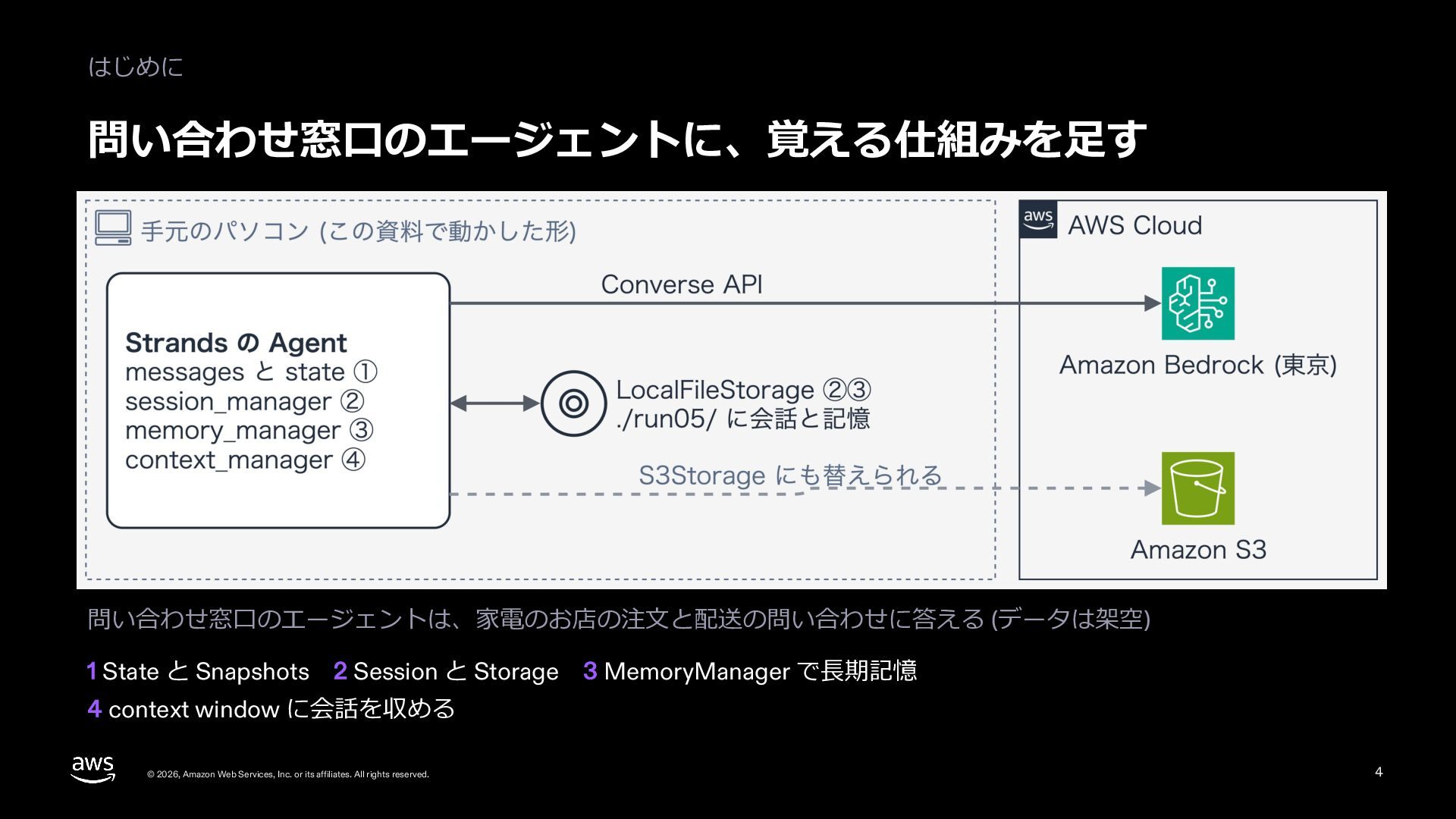
はじめに 問い合わせ窓⼝のエージェントに、覚える仕組みを⾜す 問い合わせ窓⼝のエージェントは、家電のお店の注⽂と配送の問い合わせに答える (データは架空) 1 State と Snapshots 2 Session
と Storage 3 MemoryManager で⻑期記憶 4 context window に会話を収める © 2026, Amazon Web Services, Inc. or its affiliates. All rights reserved. 4 -
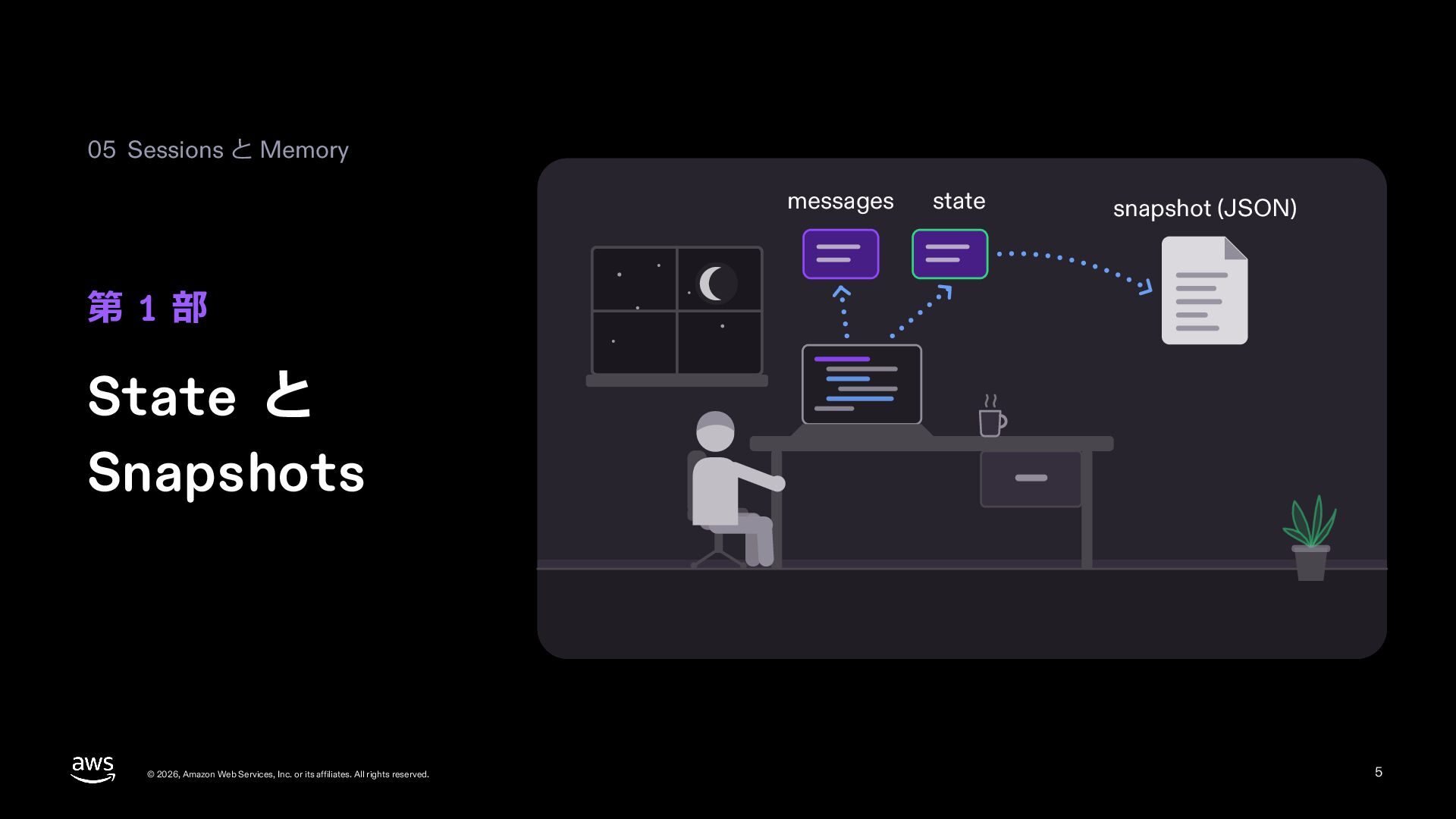
05 Sessions と Memory messages state snapshot (JSON) 第 1
部 State と Snapshots © 2026, Amazon Web Services, Inc. or its affiliates. All rights reserved. 5 -
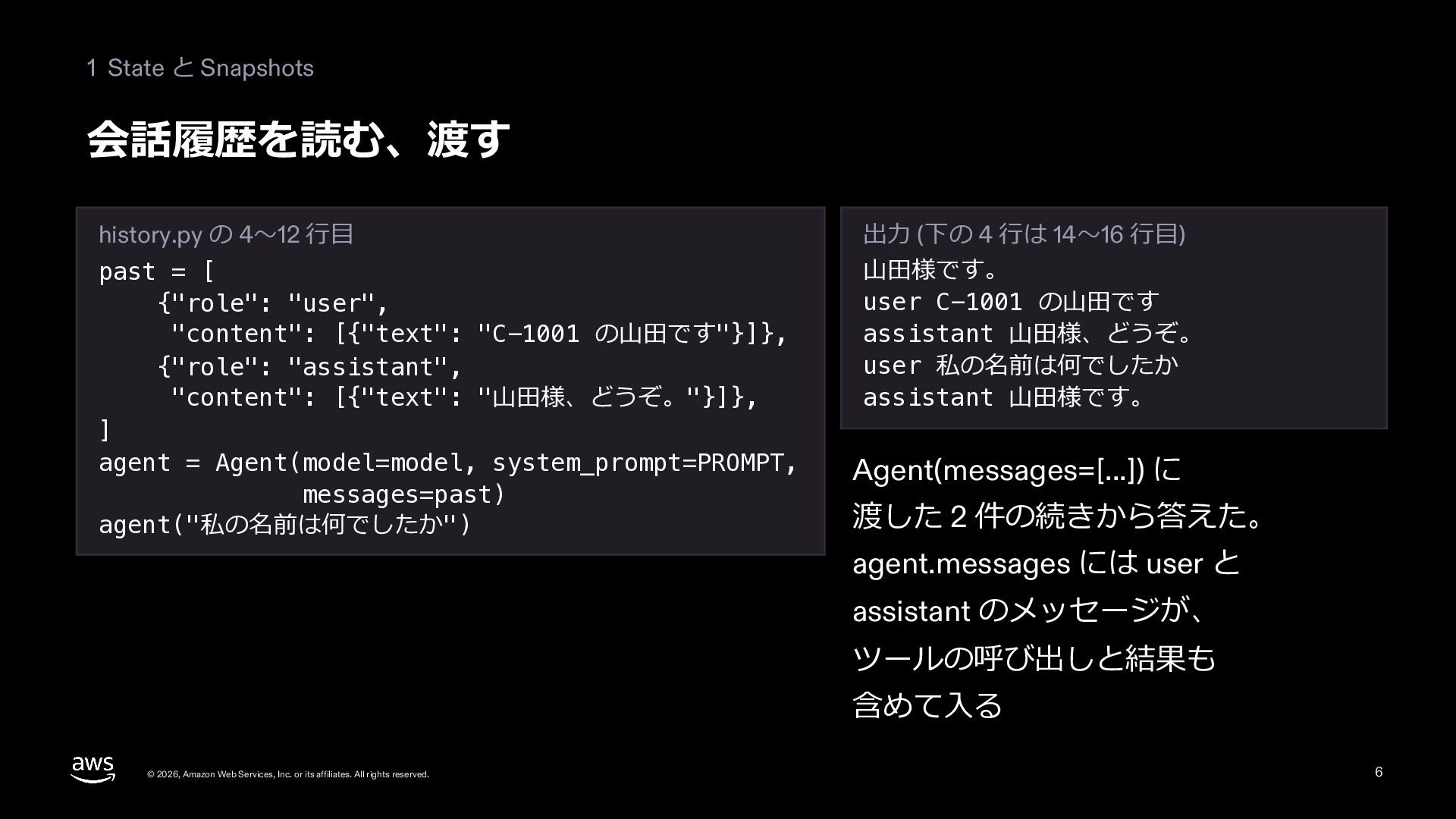
1 State と Snapshots 会話履歴を読む、渡す history.py の 4〜12 ⾏⽬ past
= [ {"role": "user", "content": [{"text": "C-1001 の⼭⽥です"}]}, {"role": "assistant", "content": [{"text": "⼭⽥様、どうぞ。"}]}, ] agent = Agent(model=model, system_prompt=PROMPT, messages=past) agent("私の名前は何でしたか") 出⼒ (下の 4 ⾏は 14〜16 ⾏⽬) ⼭⽥様です。 user C-1001 の⼭⽥です assistant ⼭⽥様、どうぞ。 user 私の名前は何でしたか assistant ⼭⽥様です。 Agent(messages=[...]) に 渡した 2 件の続きから答えた。 agent.messages には user と assistant のメッセージが、 ツールの呼び出しと結果も 含めて⼊る © 2026, Amazon Web Services, Inc. or its affiliates. All rights reserved. 6 -
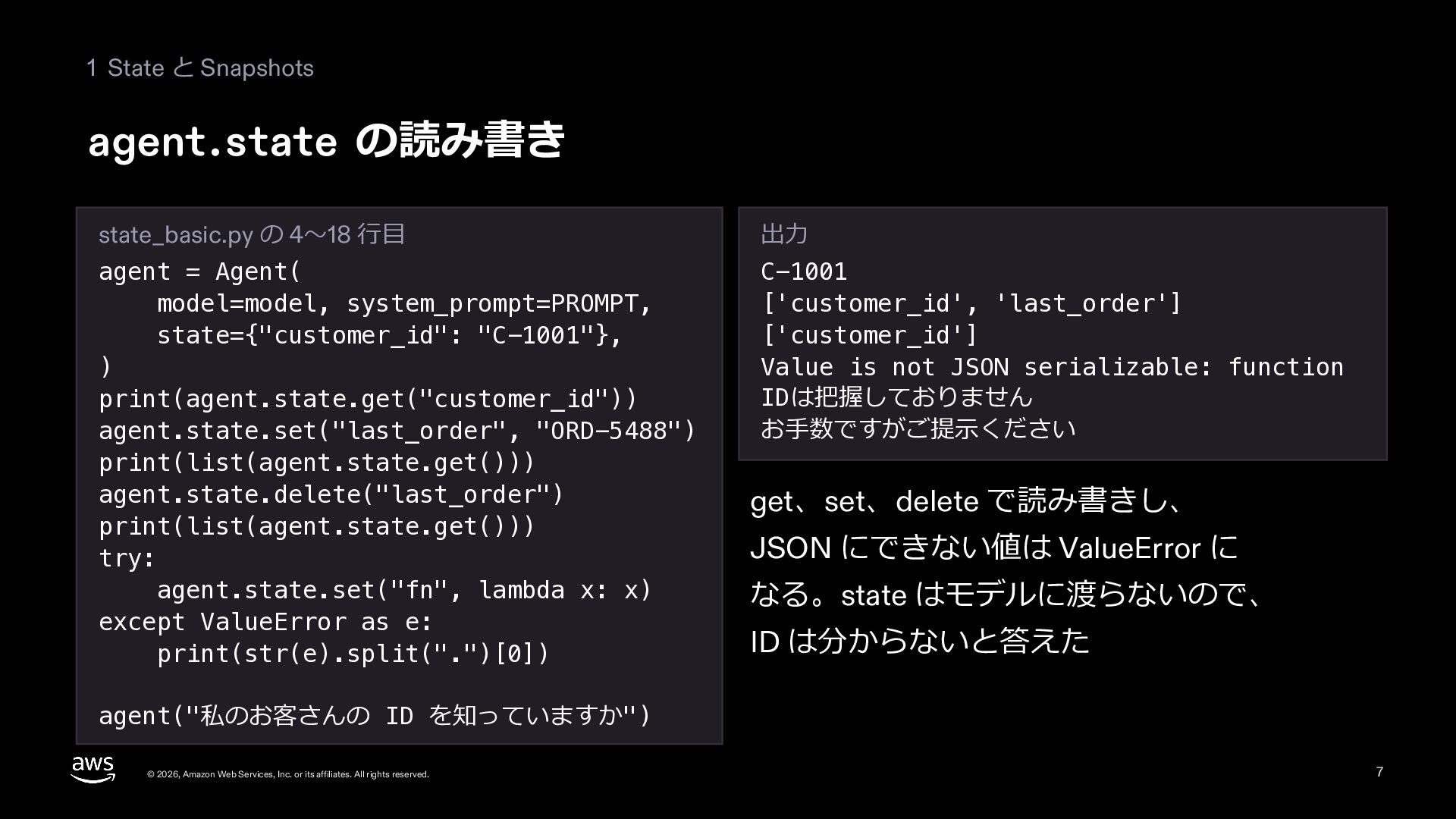
1 State と Snapshots agent.state の読み書き state_basic.py の 4〜18 ⾏⽬
出⼒ agent = Agent( model=model, system_prompt=PROMPT, state={"customer_id": "C-1001"}, ) print(agent.state.get("customer_id")) agent.state.set("last_order", "ORD-5488") print(list(agent.state.get())) agent.state.delete("last_order") print(list(agent.state.get())) try: agent.state.set("fn", lambda x: x) except ValueError as e: print(str(e).split(".")[0]) C-1001 ['customer_id', 'last_order'] ['customer_id'] Value is not JSON serializable: function IDは把握しておりません お⼿数ですがご提⽰ください get、set、delete で読み書きし、 JSON にできない値は ValueError に なる。state はモデルに渡らないので、 ID は分からないと答えた agent("私のお客さんの ID を知っていますか") © 2026, Amazon Web Services, Inc. or its affiliates. All rights reserved. 7 -
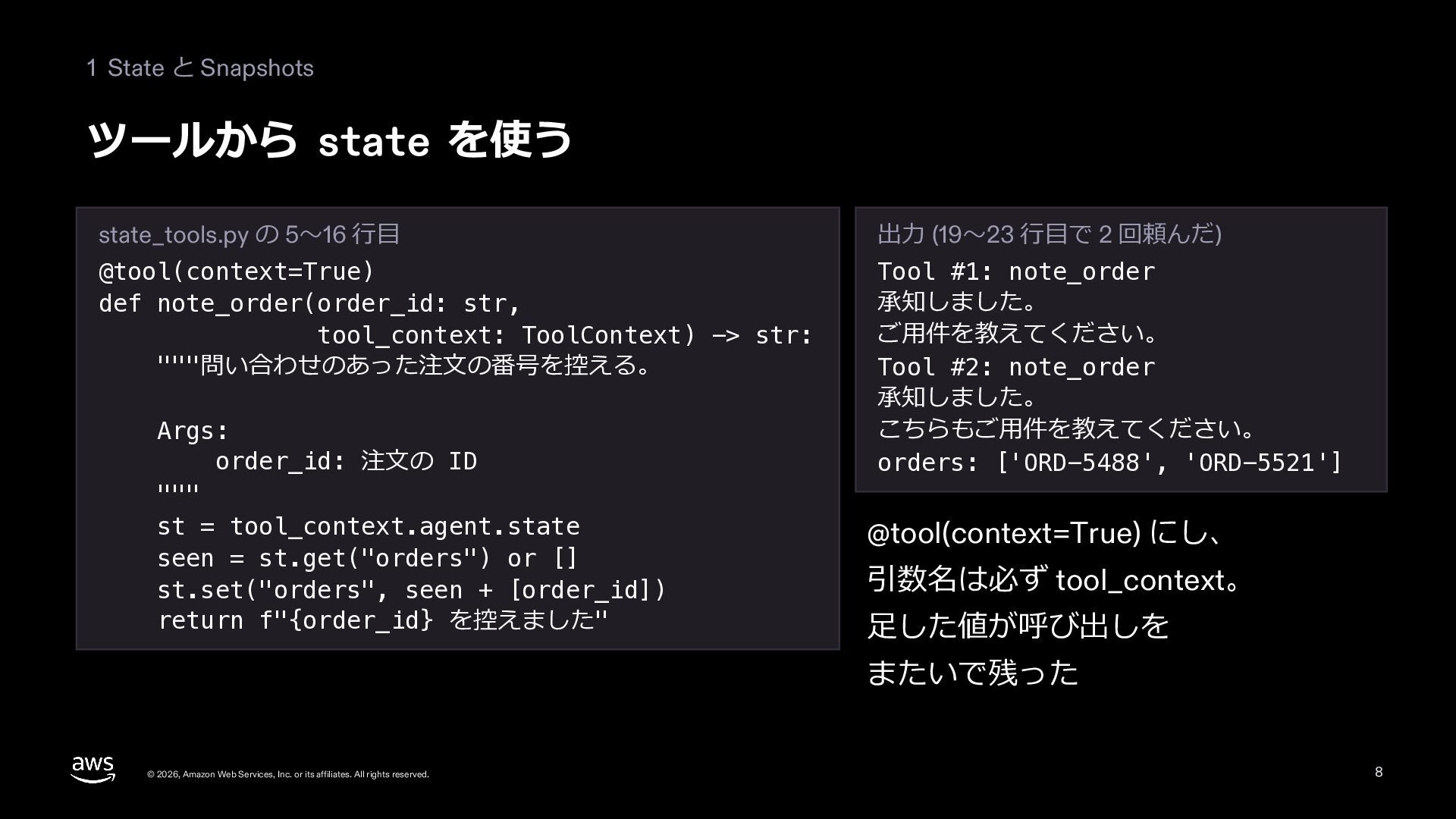
1 State と Snapshots ツールから state を使う state_tools.py の 5〜16
⾏⽬ 出⼒ (19〜23 ⾏⽬で 2 回頼んだ) @tool(context=True) def note_order(order_id: str, tool_context: ToolContext) -> str: """問い合わせのあった注⽂の番号を控える。 Tool #1: note_order 承知しました。 ご⽤件を教えてください。 Tool #2: note_order 承知しました。 こちらもご⽤件を教えてください。 orders: ['ORD-5488', 'ORD-5521'] Args: order_id: 注⽂の ID """ st = tool_context.agent.state seen = st.get("orders") or [] st.set("orders", seen + [order_id]) return f"{order_id} を控えました" @tool(context=True) にし、 引数名は必ず tool_context。 ⾜した値が呼び出しを またいで残った © 2026, Amazon Web Services, Inc. or its affiliates. All rights reserved. 8 -
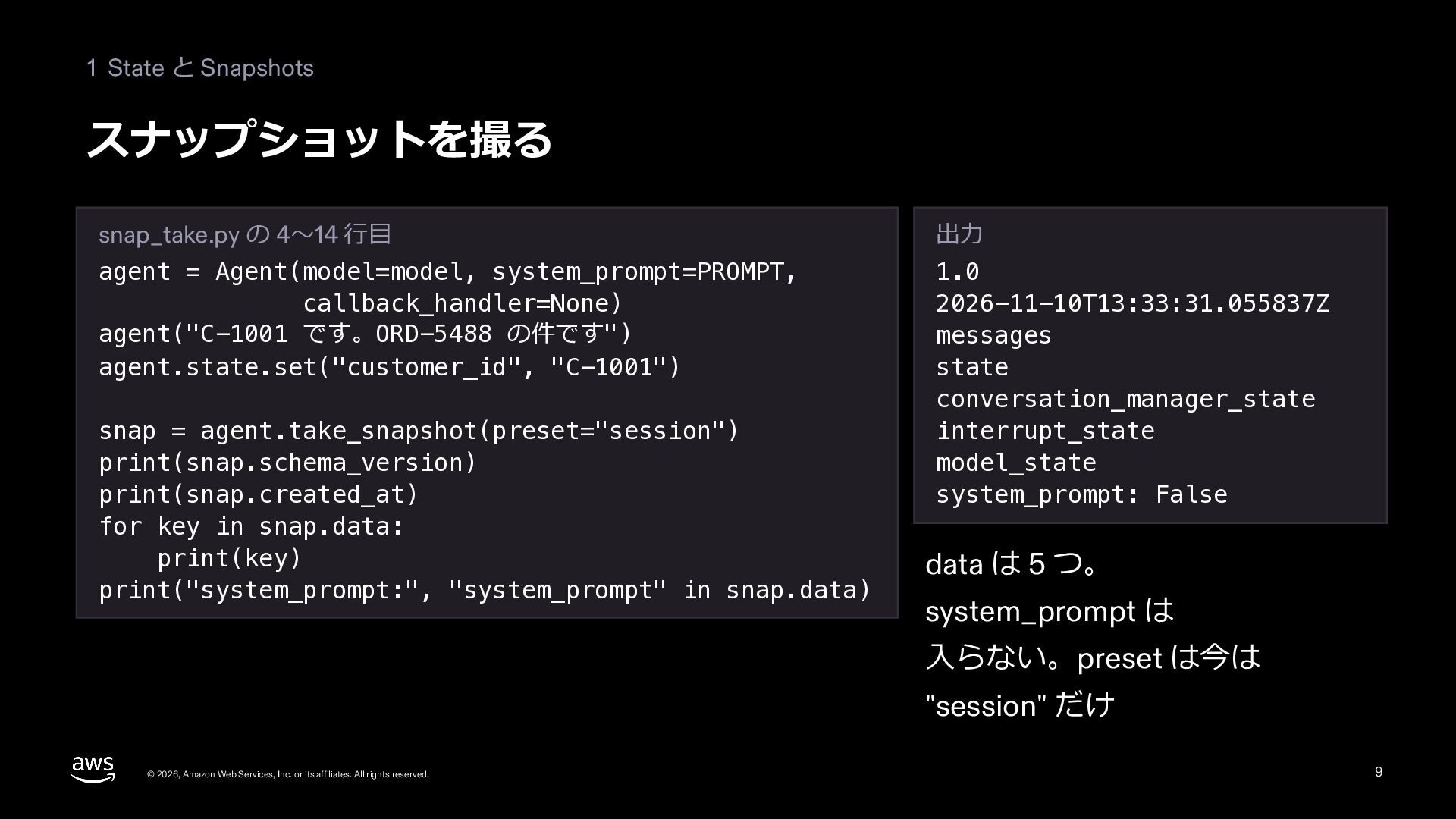
1 State と Snapshots スナップショットを撮る snap_take.py の 4〜14 ⾏⽬ 出⼒
agent = Agent(model=model, system_prompt=PROMPT, callback_handler=None) agent("C-1001 です。ORD-5488 の件です") agent.state.set("customer_id", "C-1001") 1.0 2026-11-10T13:33:31.055837Z messages state conversation_manager_state interrupt_state model_state system_prompt: False snap = agent.take_snapshot(preset="session") print(snap.schema_version) print(snap.created_at) for key in snap.data: print(key) print("system_prompt:", "system_prompt" in snap.data) data は 5 つ。 system_prompt は ⼊らない。preset は今は "session" だけ © 2026, Amazon Web Services, Inc. or its affiliates. All rights reserved. 9 -
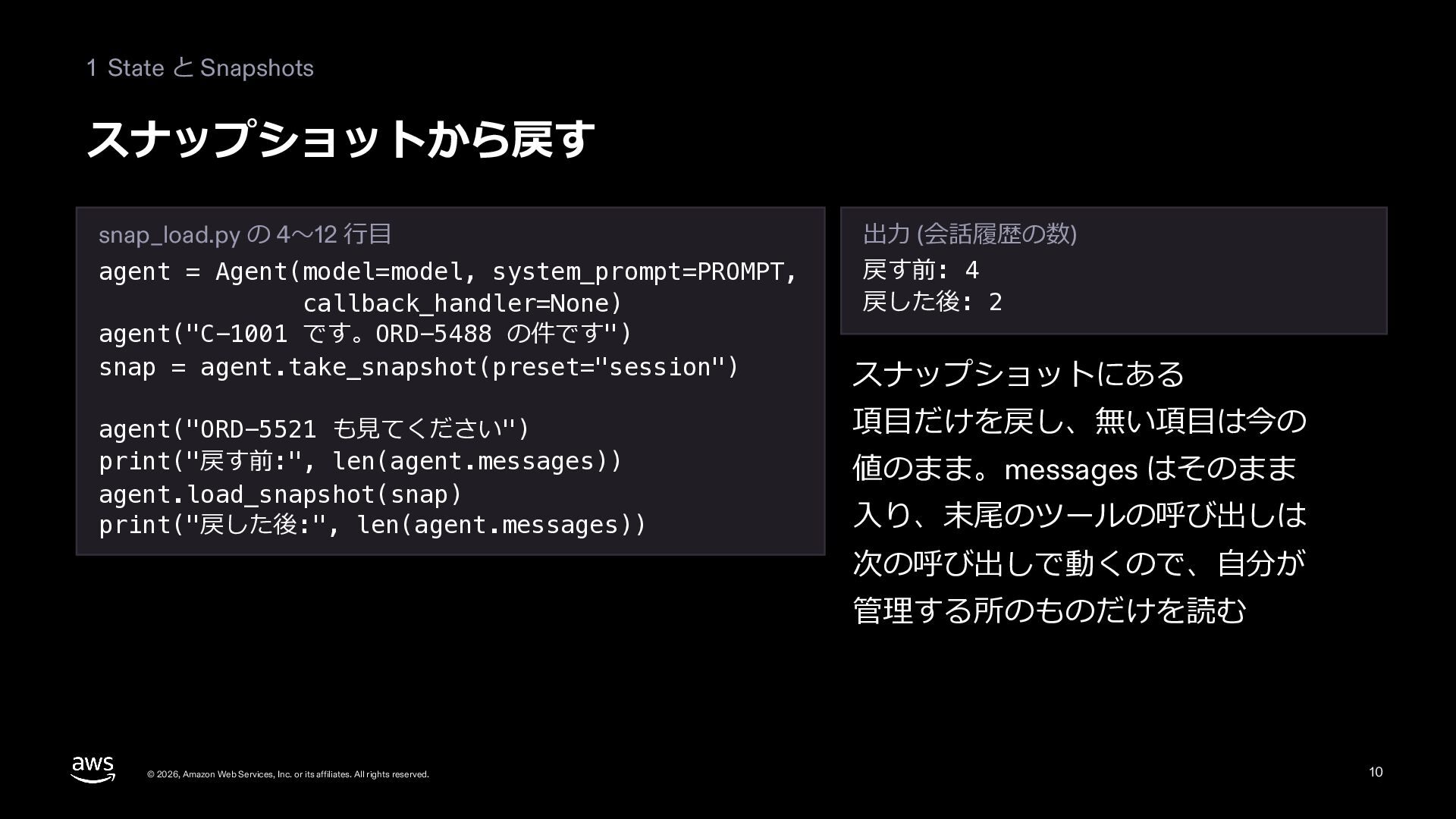
1 State と Snapshots スナップショットから戻す snap_load.py の 4〜12 ⾏⽬ agent
= Agent(model=model, system_prompt=PROMPT, callback_handler=None) agent("C-1001 です。ORD-5488 の件です") snap = agent.take_snapshot(preset="session") agent("ORD-5521 も⾒てください") print("戻す前:", len(agent.messages)) agent.load_snapshot(snap) print("戻した後:", len(agent.messages)) 出⼒ (会話履歴の数) 戻す前: 4 戻した後: 2 スナップショットにある 項⽬だけを戻し、無い項⽬は今の 値のまま。messages はそのまま ⼊り、末尾のツールの呼び出しは 次の呼び出しで動くので、⾃分が 管理する所のものだけを読む © 2026, Amazon Web Services, Inc. or its affiliates. All rights reserved. 10 -
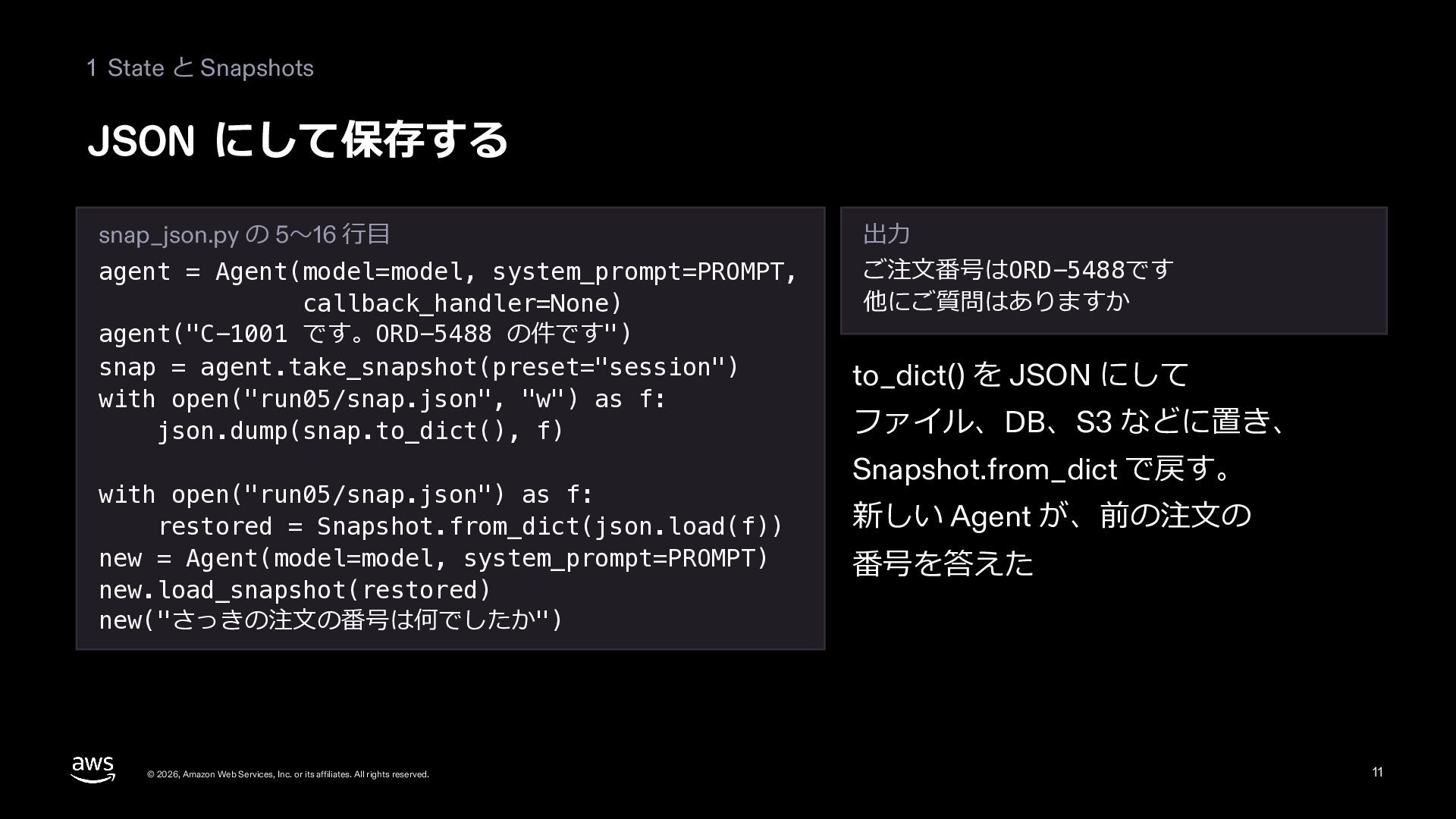
1 State と Snapshots JSON にして保存する snap_json.py の 5〜16 ⾏⽬
agent = Agent(model=model, system_prompt=PROMPT, callback_handler=None) agent("C-1001 です。ORD-5488 の件です") snap = agent.take_snapshot(preset="session") with open("run05/snap.json", "w") as f: json.dump(snap.to_dict(), f) with open("run05/snap.json") as f: restored = Snapshot.from_dict(json.load(f)) new = Agent(model=model, system_prompt=PROMPT) new.load_snapshot(restored) new("さっきの注⽂の番号は何でしたか") © 2026, Amazon Web Services, Inc. or its affiliates. All rights reserved. 出⼒ ご注⽂番号はORD-5488です 他にご質問はありますか to_dict() を JSON にして ファイル、DB、S3 などに置き、 Snapshot.from_dict で戻す。 新しい Agent が、前の注⽂の 番号を答えた 11 -
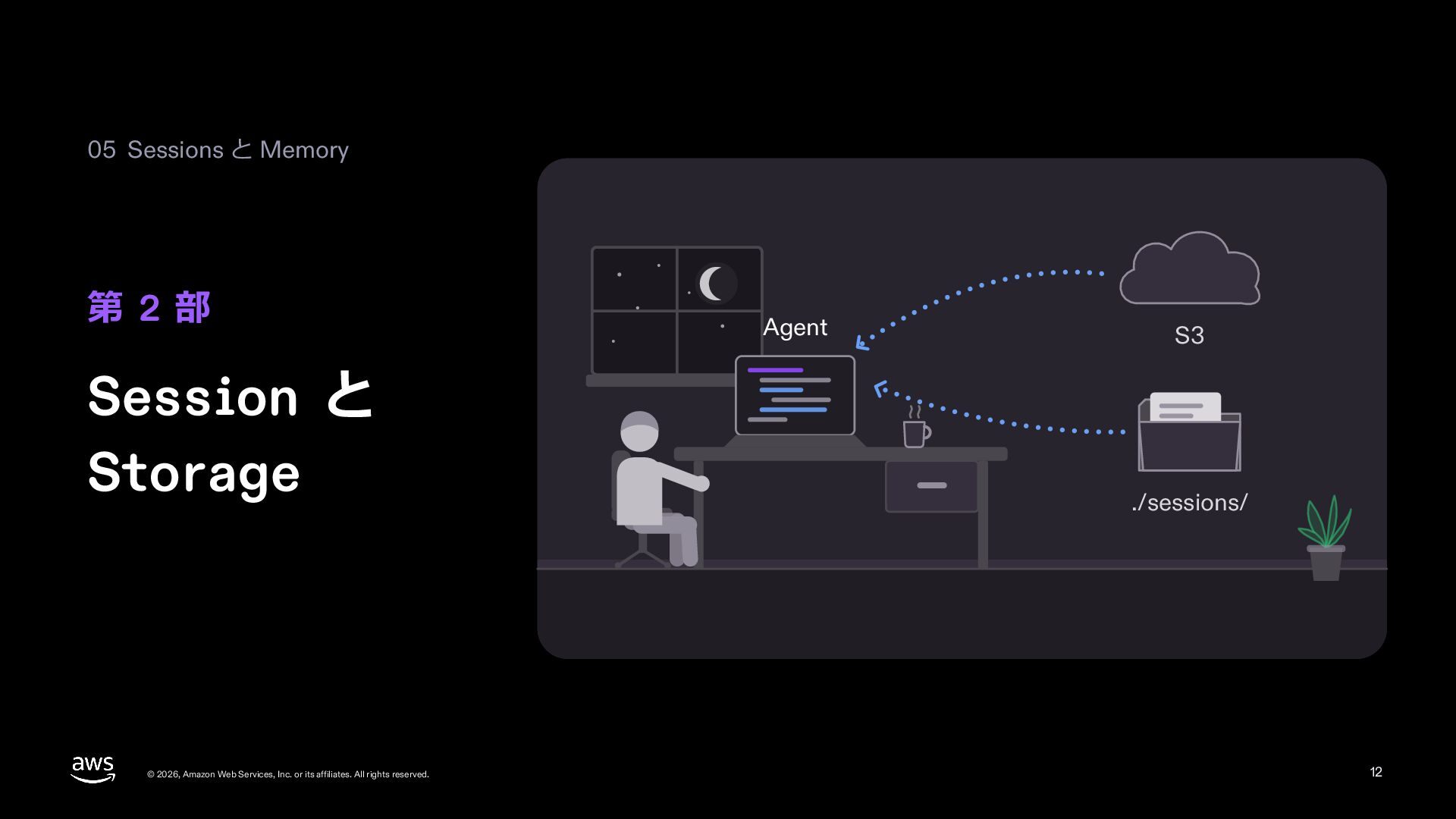
05 Sessions と Memory 第 2 部 Session と Storage
© 2026, Amazon Web Services, Inc. or its affiliates. All rights reserved. Agent S3 ./sessions/ 12 -
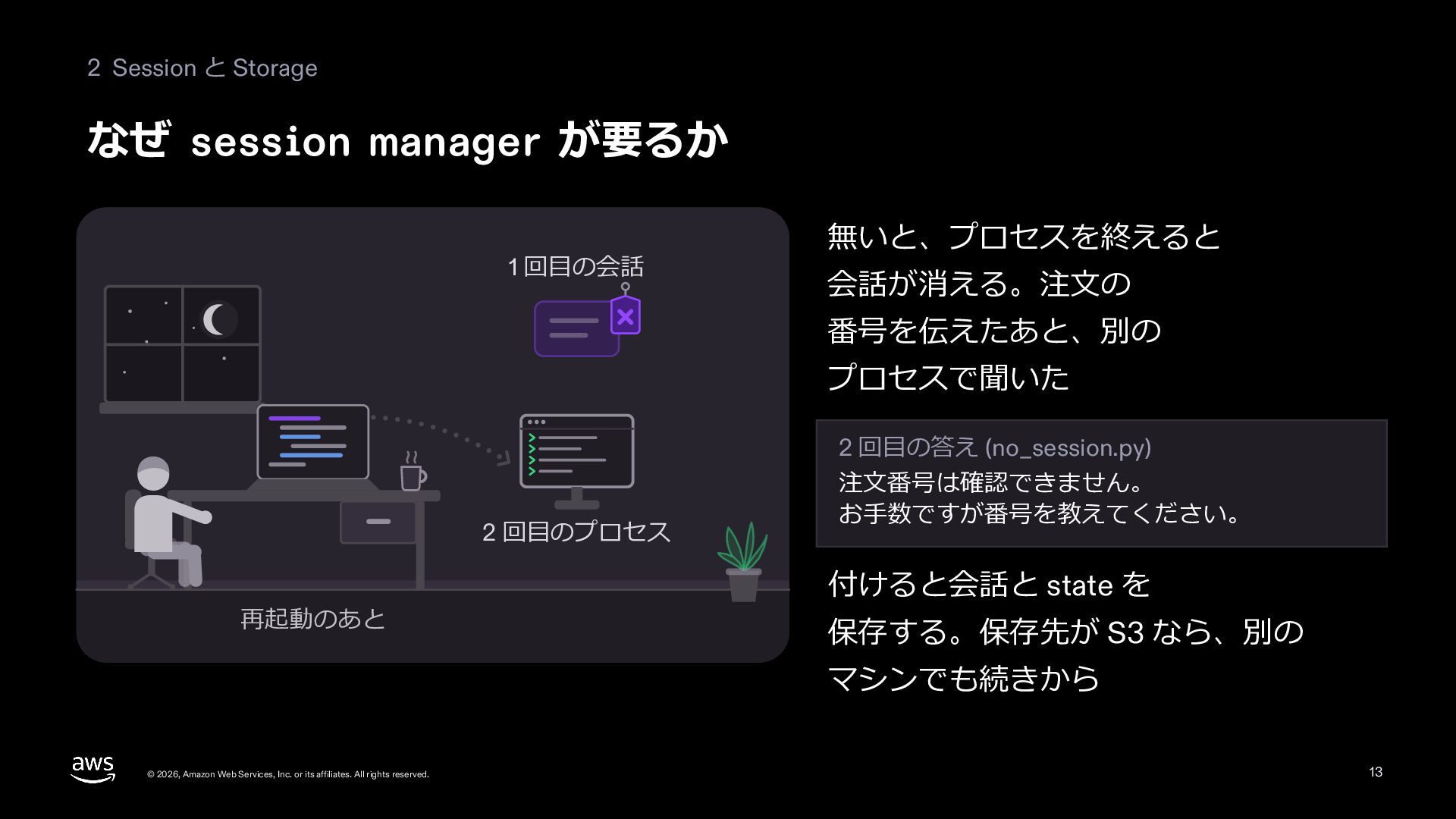
2 Session と Storage なぜ session manager が要るか 1 回⽬の会話
無いと、プロセスを終えると 会話が消える。注⽂の 番号を伝えたあと、別の プロセスで聞いた 2 回⽬のプロセス 再起動のあと 2 回⽬の答え (no_session.py) 注⽂番号は確認できません。 お⼿数ですが番号を教えてください。 付けると会話と state を 保存する。保存先が S3 なら、別の マシンでも続きから © 2026, Amazon Web Services, Inc. or its affiliates. All rights reserved. 13 -
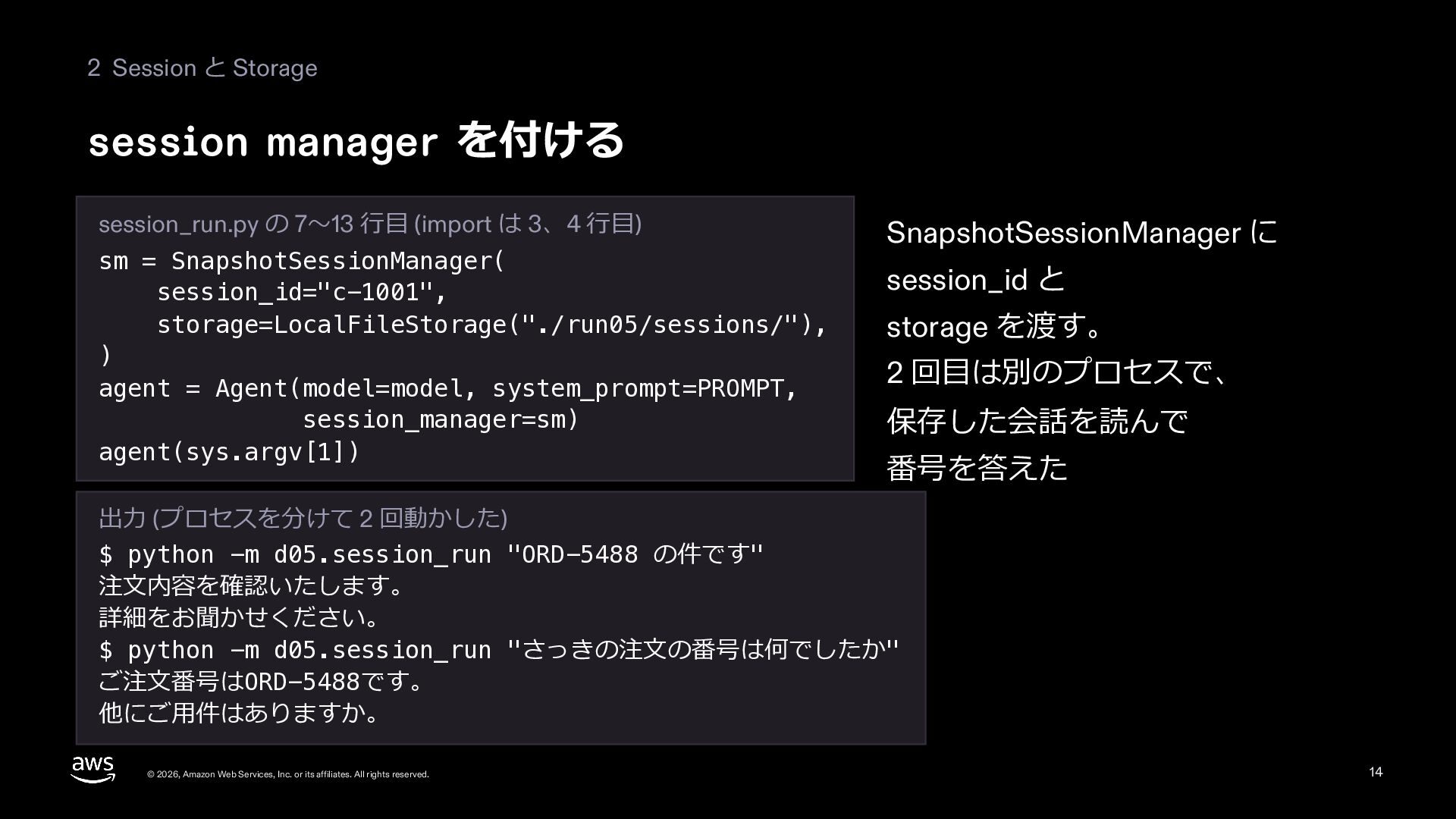
2 Session と Storage session manager を付ける session_run.py の 7〜13
⾏⽬ (import は 3、4 ⾏⽬) sm = SnapshotSessionManager( session_id="c-1001", storage=LocalFileStorage("./run05/sessions/"), ) agent = Agent(model=model, system_prompt=PROMPT, session_manager=sm) agent(sys.argv[1]) SnapshotSessionManager に session_id と storage を渡す。 2 回⽬は別のプロセスで、 保存した会話を読んで 番号を答えた 出⼒ (プロセスを分けて 2 回動かした) $ python -m d05.session_run "ORD-5488 の件です" 注⽂内容を確認いたします。 詳細をお聞かせください。 $ python -m d05.session_run "さっきの注⽂の番号は何でしたか" ご注⽂番号はORD-5488です。 他にご⽤件はありますか。 © 2026, Amazon Web Services, Inc. or its affiliates. All rights reserved. 14 -
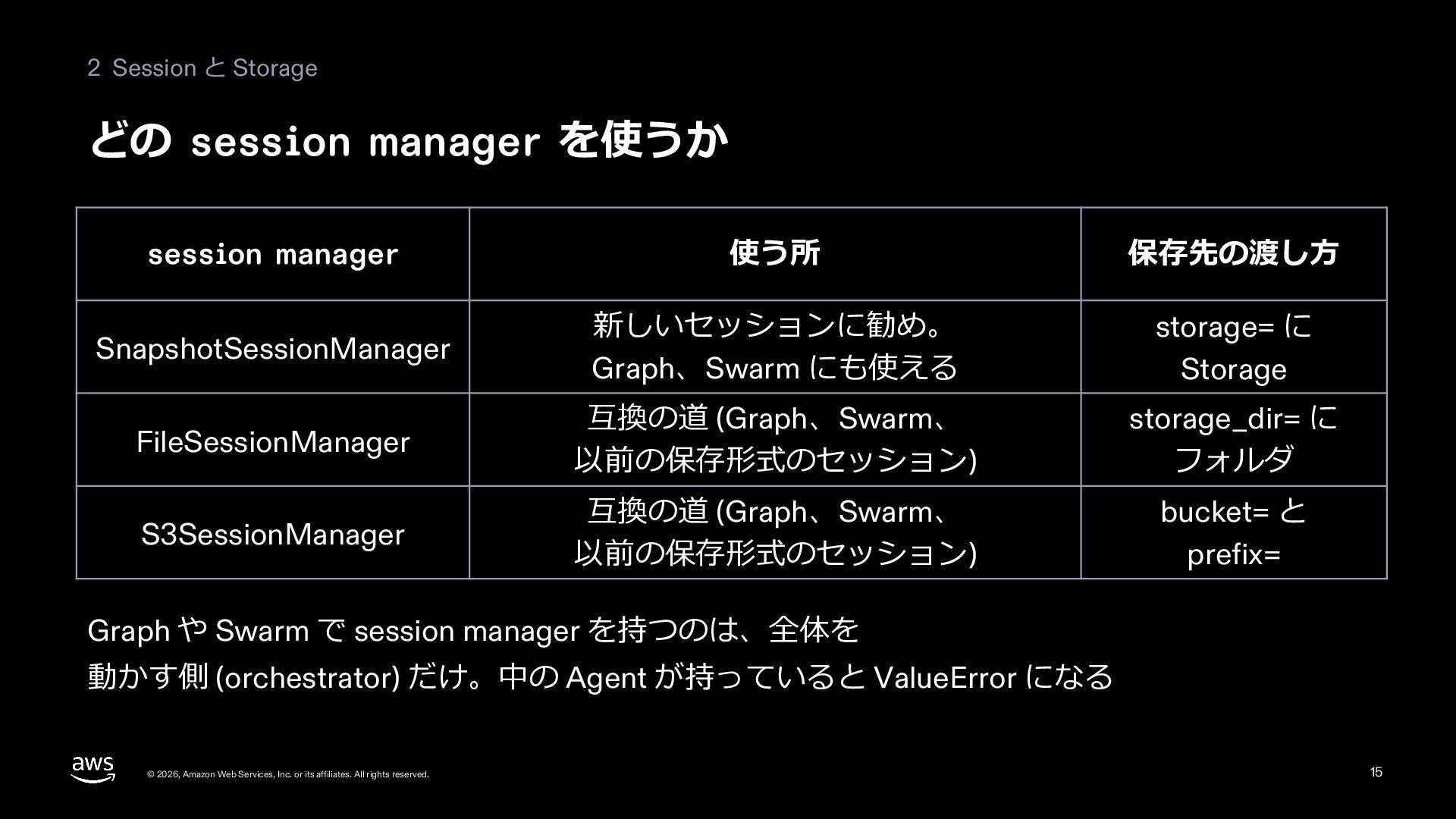
2 Session と Storage どの session manager を使うか session manager
使う所 保存先の渡し⽅ SnapshotSessionManager 新しいセッションに勧め。 Graph、Swarm にも使える storage= に Storage FileSessionManager 互換の道 (Graph、Swarm、 以前の保存形式のセッション) storage_dir= に フォルダ S3SessionManager 互換の道 (Graph、Swarm、 以前の保存形式のセッション) bucket= と prefix= Graph や Swarm で session manager を持つのは、全体を 動かす側 (orchestrator) だけ。中の Agent が持っていると ValueError になる © 2026, Amazon Web Services, Inc. or its affiliates. All rights reserved. 15 -
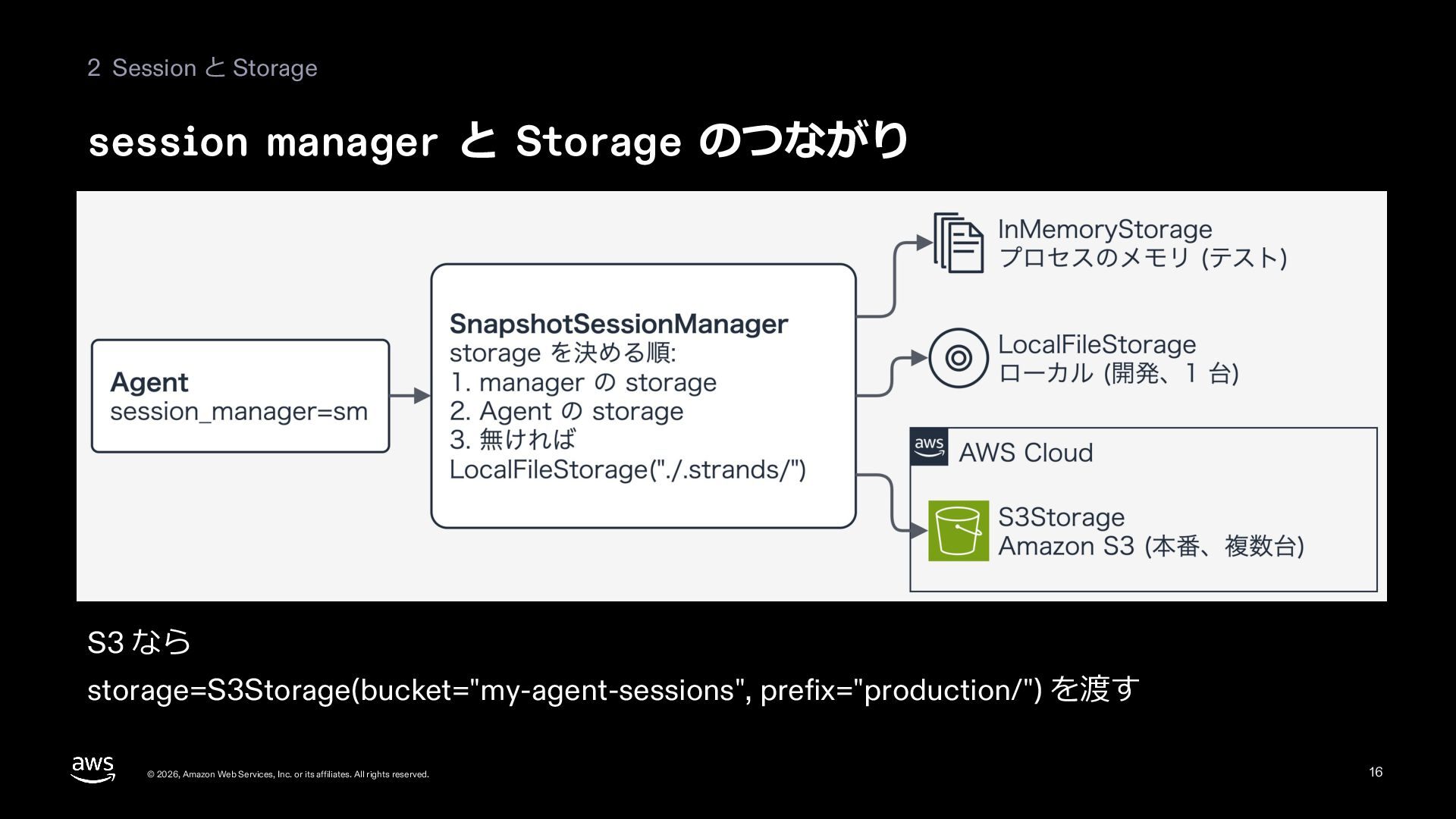
2 Session と Storage session manager と Storage のつながり S3
なら storage=S3Storage(bucket="my-agent-sessions", prefix="production/") を渡す © 2026, Amazon Web Services, Inc. or its affiliates. All rights reserved. 16 -
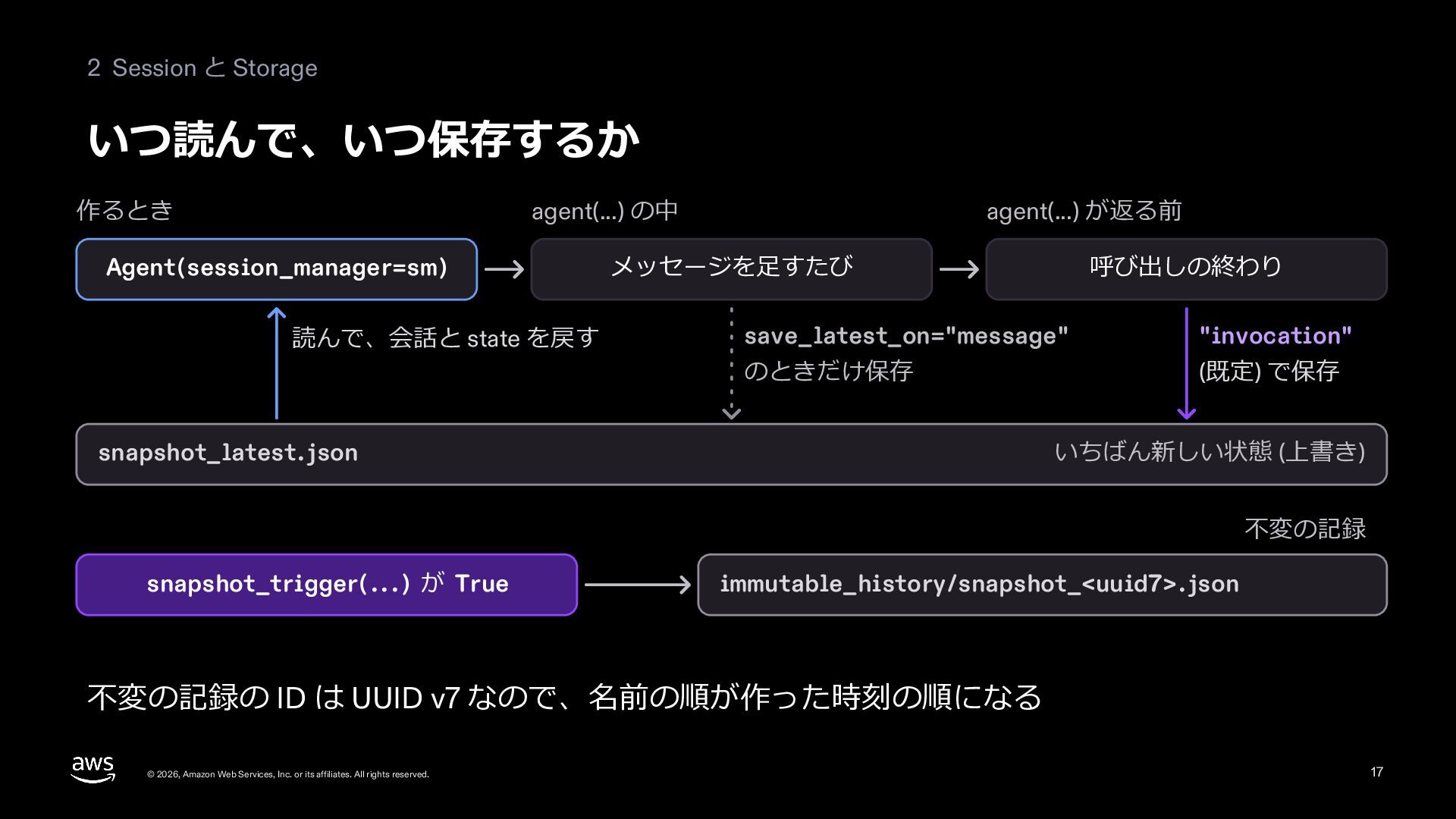
2 Session と Storage いつ読んで、いつ保存するか 作るとき agent(...) の中 Agent(session_manager=sm) 読んで、会話と
state を戻す agent(...) が返る前 メッセージを⾜すたび 呼び出しの終わり save_latest_on="message" "invocation" のときだけ保存 (既定) で保存 いちばん新しい状態 (上書き) snapshot_latest.json 不変の記録 snapshot_trigger(...) が True immutable_history/snapshot_<uuid7>.json 不変の記録の ID は UUID v7 なので、名前の順が作った時刻の順になる © 2026, Amazon Web Services, Inc. or its affiliates. All rights reserved. 17 -
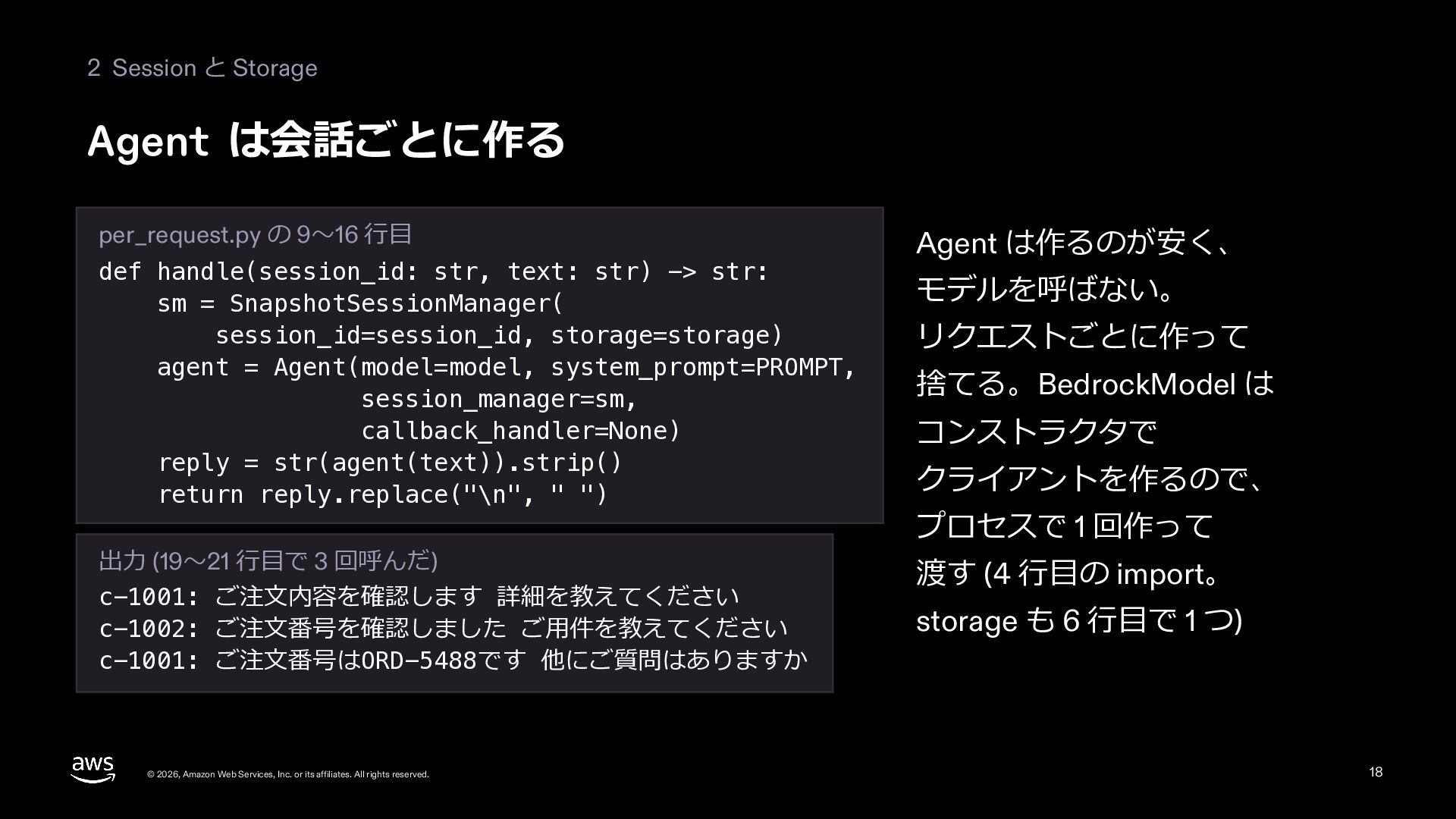
2 Session と Storage Agent は会話ごとに作る per_request.py の 9〜16 ⾏⽬
def handle(session_id: str, text: str) -> str: sm = SnapshotSessionManager( session_id=session_id, storage=storage) agent = Agent(model=model, system_prompt=PROMPT, session_manager=sm, callback_handler=None) reply = str(agent(text)).strip() return reply.replace("\n", " ") 出⼒ (19〜21 ⾏⽬で 3 回呼んだ) c-1001: ご注⽂内容を確認します 詳細を教えてください c-1002: ご注⽂番号を確認しました ご⽤件を教えてください c-1001: ご注⽂番号はORD-5488です 他にご質問はありますか © 2026, Amazon Web Services, Inc. or its affiliates. All rights reserved. Agent は作るのが安く、 モデルを呼ばない。 リクエストごとに作って 捨てる。BedrockModel は コンストラクタで クライアントを作るので、 プロセスで 1 回作って 渡す (4 ⾏⽬の import。 storage も 6 ⾏⽬で 1 つ) 18 -
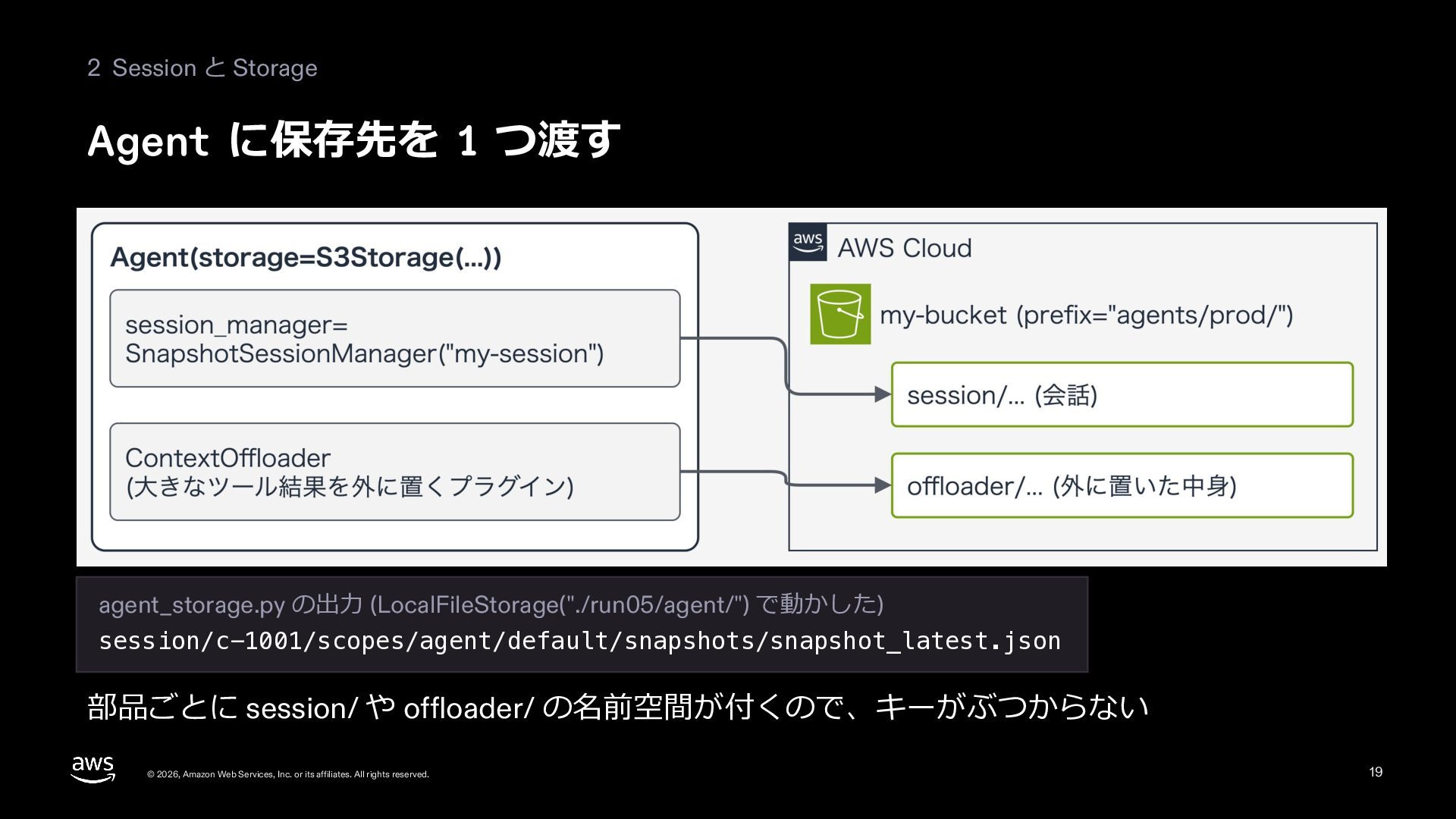
2 Session と Storage Agent に保存先を 1 つ渡す agent_storage.py の出⼒
(LocalFileStorage("./run05/agent/") で動かした) session/c-1001/scopes/agent/default/snapshots/snapshot_latest.json 部品ごとに session/ や offloader/ の名前空間が付くので、キーがぶつからない © 2026, Amazon Web Services, Inc. or its affiliates. All rights reserved. 19 -
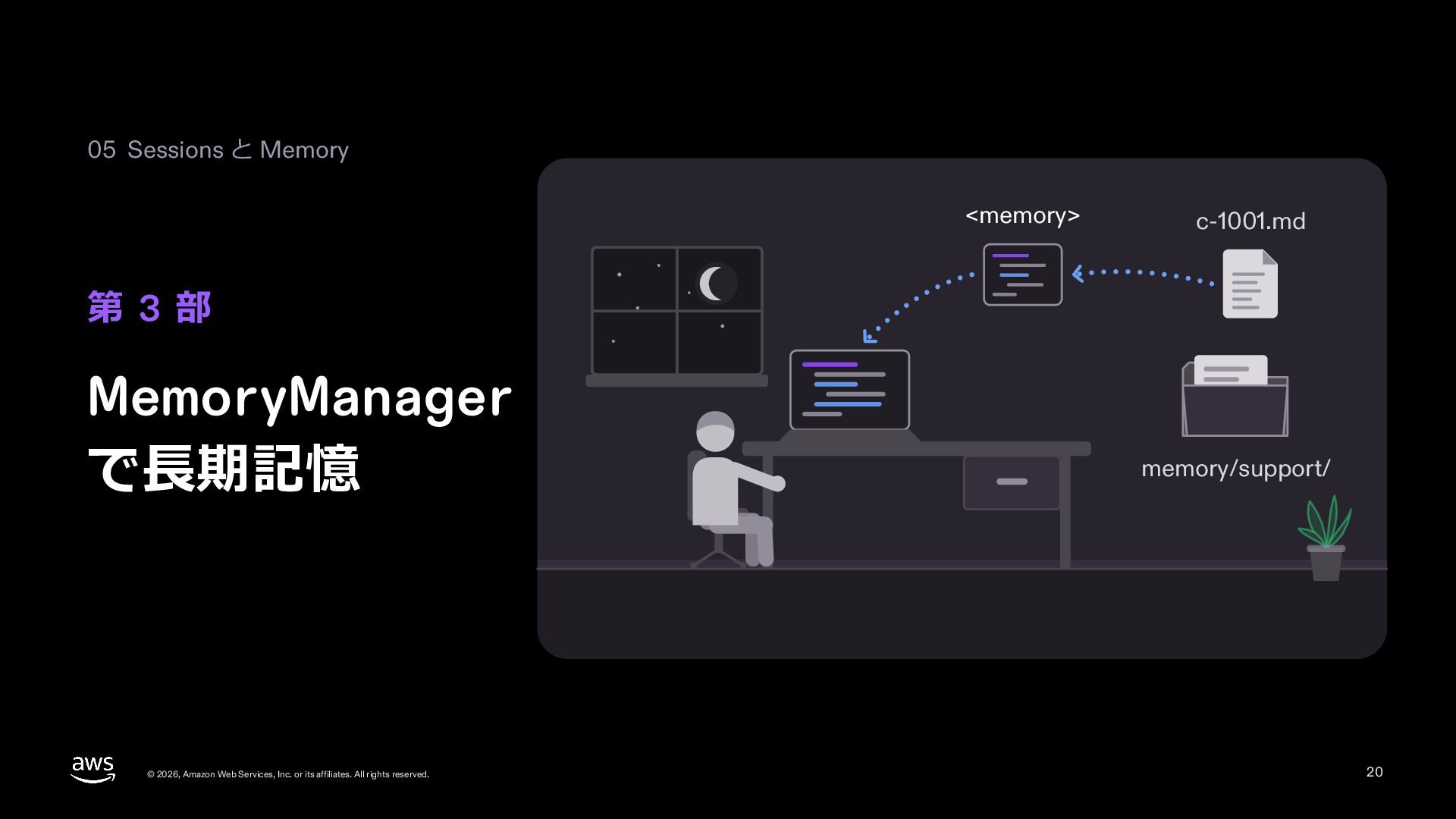
05 Sessions と Memory <memory> c-1001.md 第 3 部 MemoryManager
で⻑期記憶 © 2026, Amazon Web Services, Inc. or its affiliates. All rights reserved. memory/support/ 20 -
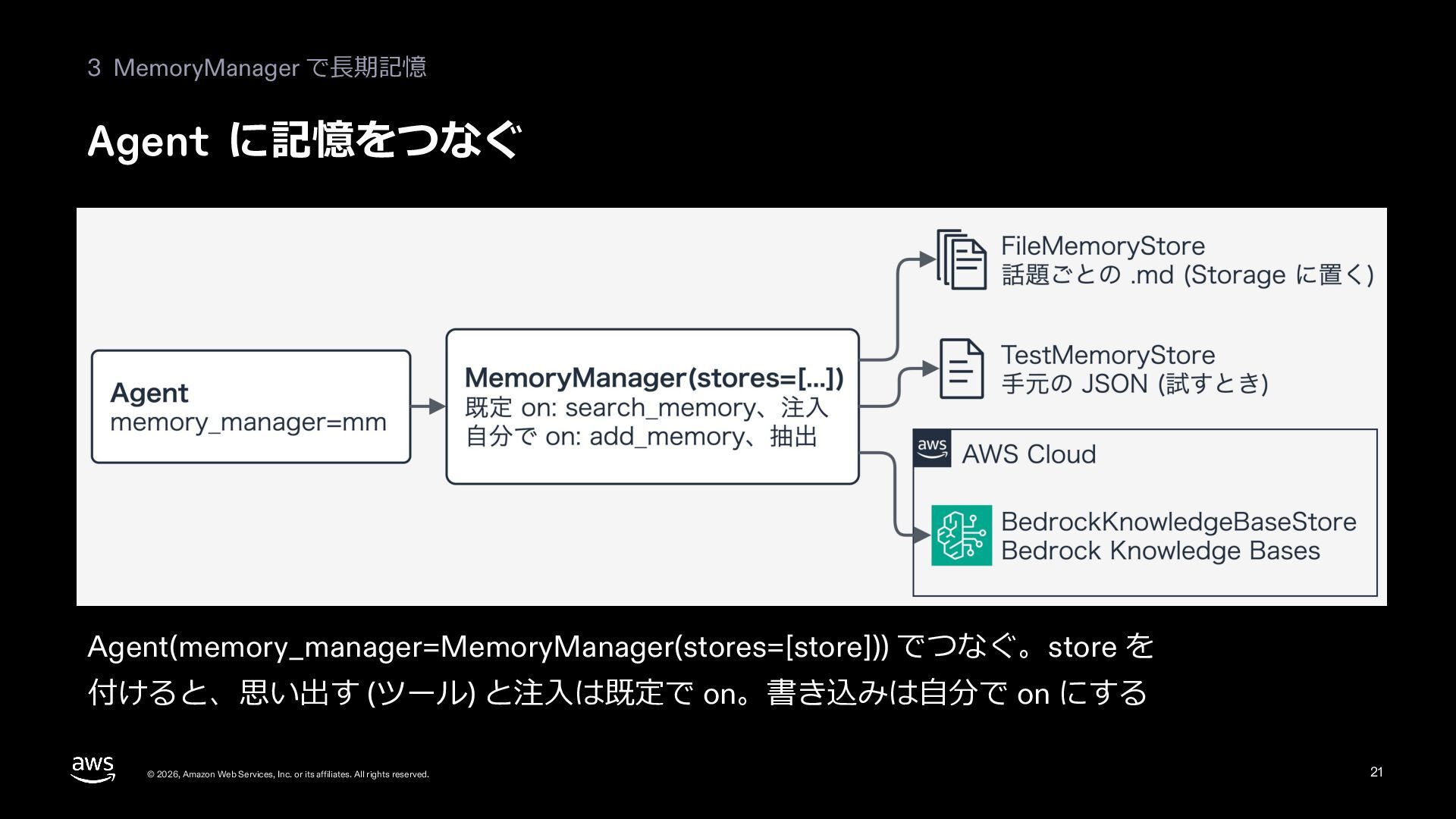
3 MemoryManager で⻑期記憶 Agent に記憶をつなぐ Agent(memory_manager=MemoryManager(stores=[store])) でつなぐ。store を 付けると、思い出す (ツール)
と注⼊は既定で on。書き込みは⾃分で on にする © 2026, Amazon Web Services, Inc. or its affiliates. All rights reserved. 21 -
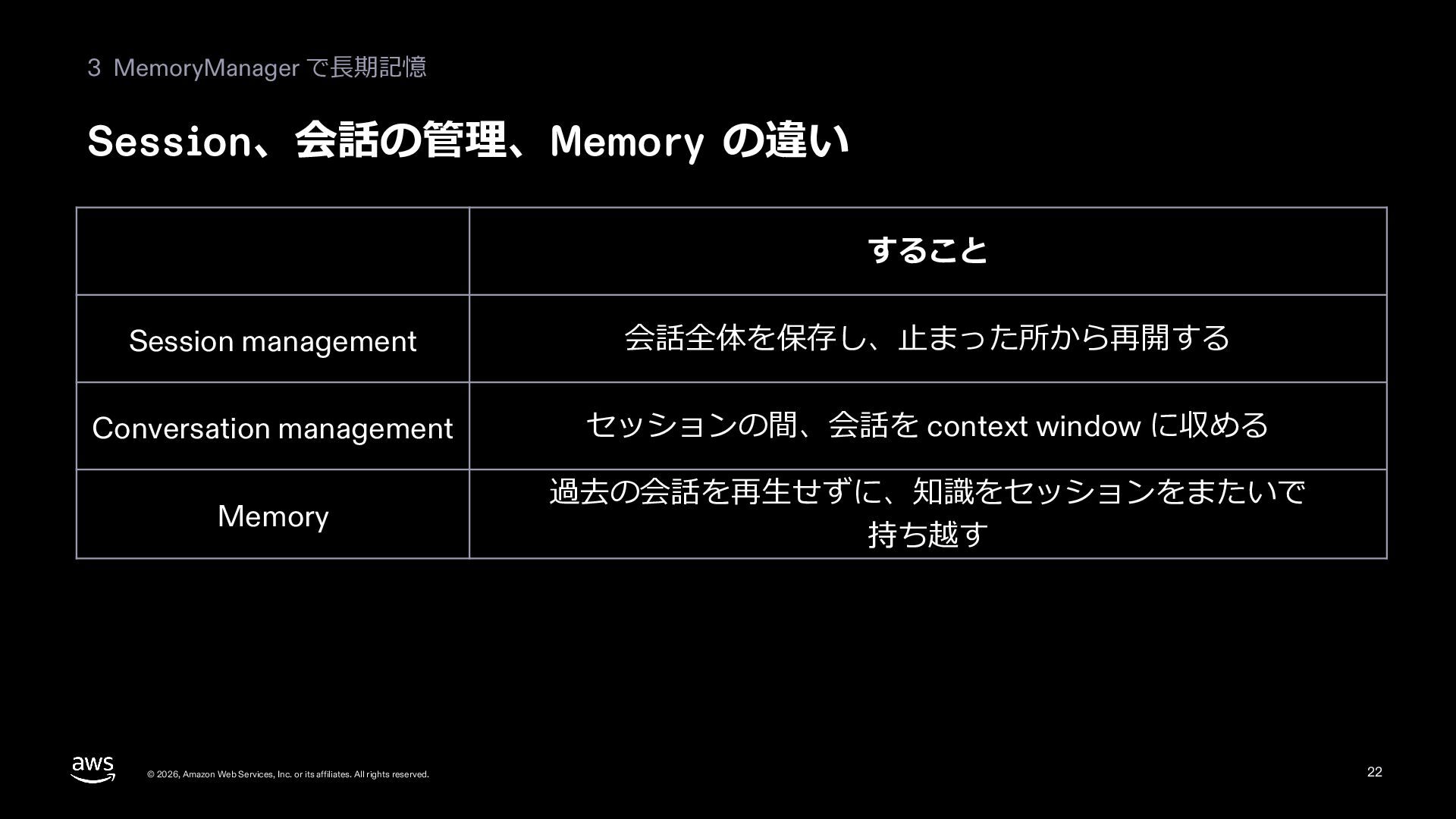
3 MemoryManager で⻑期記憶 Session、会話の管理、Memory の違い すること Session management 会話全体を保存し、⽌まった所から再開する Conversation
management セッションの間、会話を context window に収める Memory 過去の会話を再⽣せずに、知識をセッションをまたいで 持ち越す © 2026, Amazon Web Services, Inc. or its affiliates. All rights reserved. 22 -
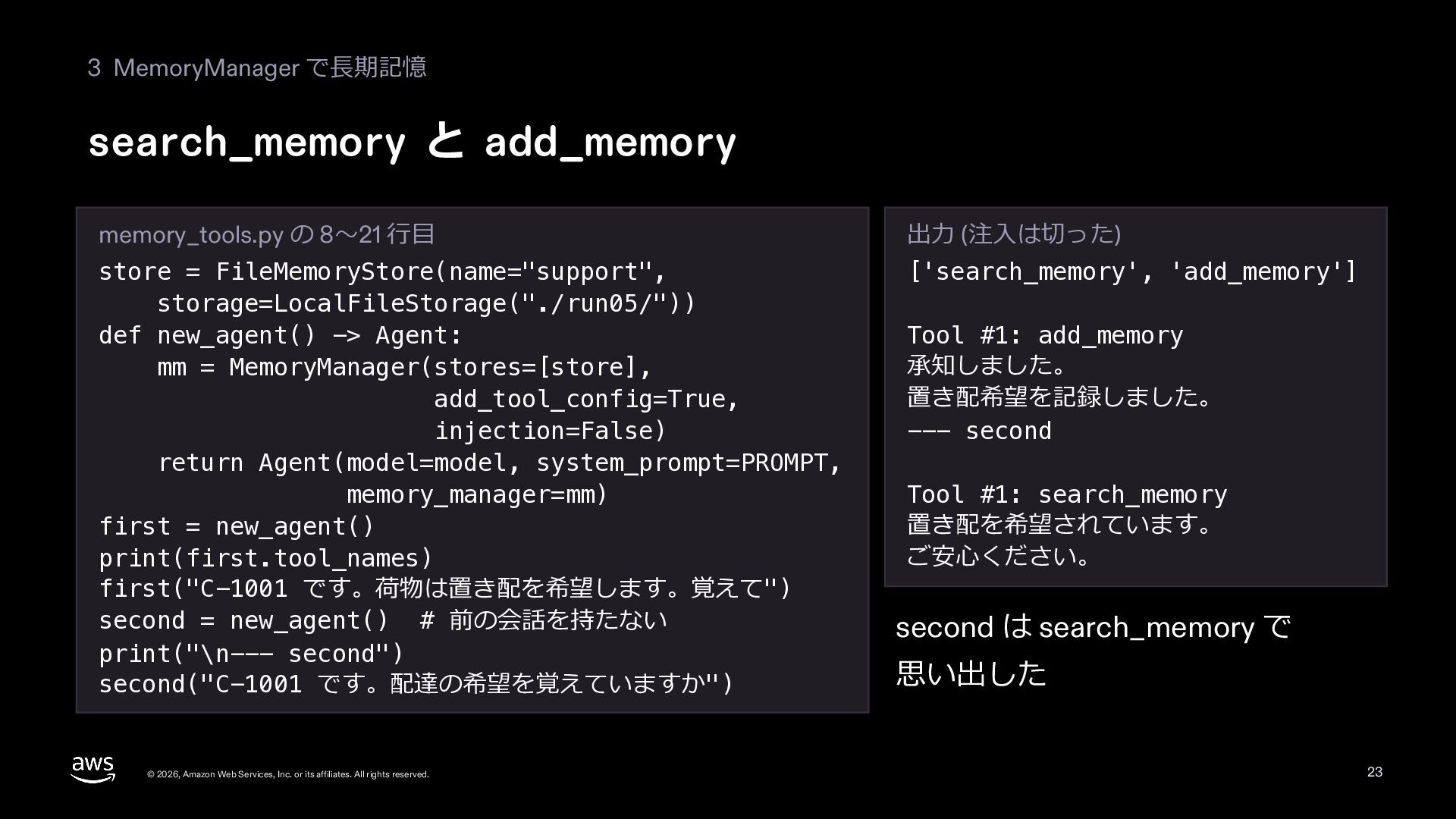
3 MemoryManager で⻑期記憶 search_memory と add_memory memory_tools.py の 8〜21 ⾏⽬
出⼒ (注⼊は切った) store = FileMemoryStore(name="support", storage=LocalFileStorage("./run05/")) def new_agent() -> Agent: mm = MemoryManager(stores=[store], add_tool_config=True, injection=False) return Agent(model=model, system_prompt=PROMPT, memory_manager=mm) first = new_agent() print(first.tool_names) first("C-1001 です。荷物は置き配を希望します。覚えて") second = new_agent() # 前の会話を持たない print("\n--- second") second("C-1001 です。配達の希望を覚えていますか") ['search_memory', 'add_memory'] © 2026, Amazon Web Services, Inc. or its affiliates. All rights reserved. Tool #1: add_memory 承知しました。 置き配希望を記録しました。 --- second Tool #1: search_memory 置き配を希望されています。 ご安⼼ください。 second は search_memory で 思い出した 23 -
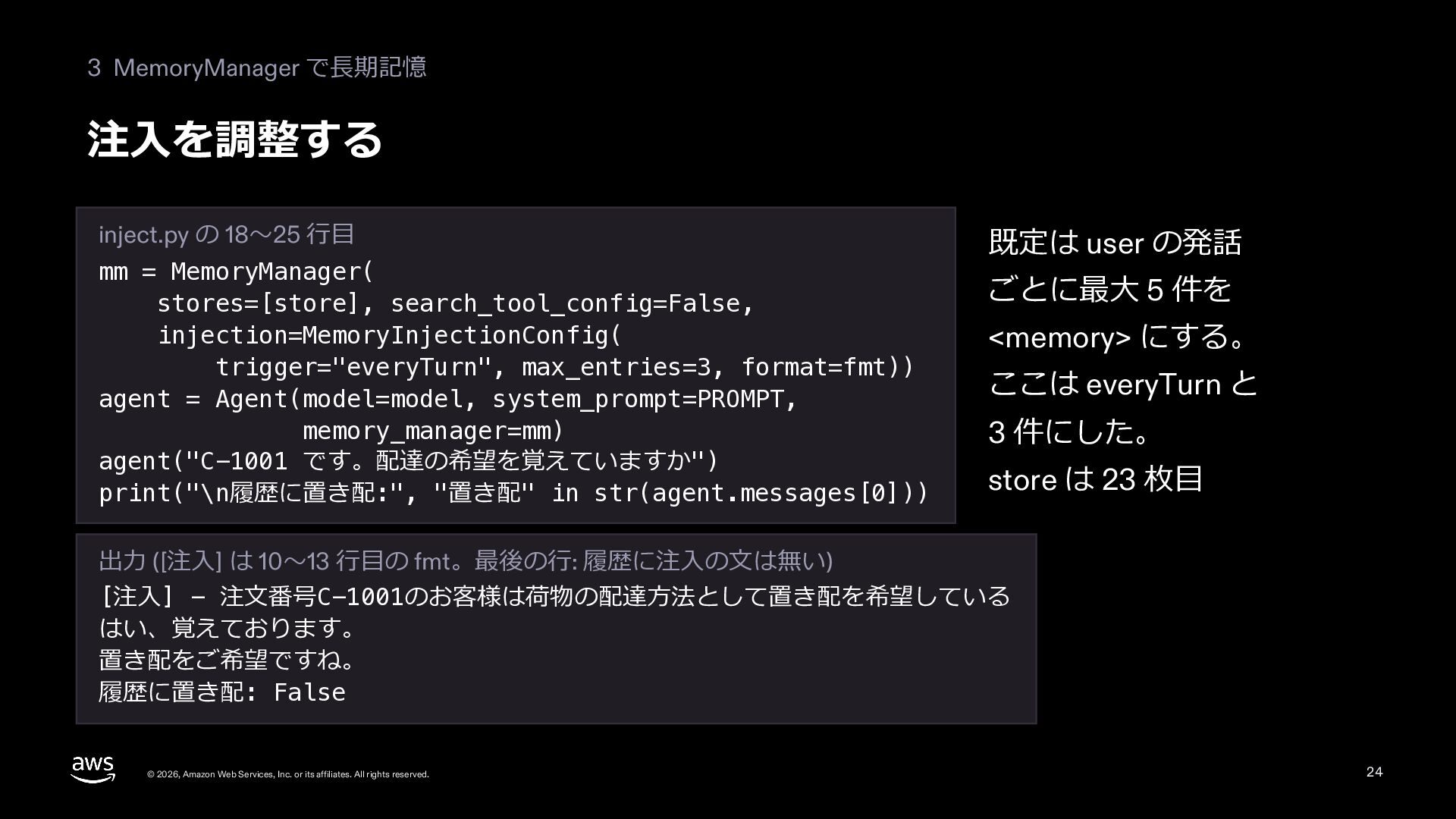
3 MemoryManager で⻑期記憶 注⼊を調整する inject.py の 18〜25 ⾏⽬ mm =
MemoryManager( stores=[store], search_tool_config=False, injection=MemoryInjectionConfig( trigger="everyTurn", max_entries=3, format=fmt)) agent = Agent(model=model, system_prompt=PROMPT, memory_manager=mm) agent("C-1001 です。配達の希望を覚えていますか") print("\n履歴に置き配:", "置き配" in str(agent.messages[0])) 既定は user の発話 ごとに最⼤ 5 件を <memory> にする。 ここは everyTurn と 3 件にした。 store は 23 枚⽬ 出⼒ ([注⼊] は 10〜13 ⾏⽬の fmt。最後の⾏: 履歴に注⼊の⽂は無い) [注⼊] - 注⽂番号C-1001のお客様は荷物の配達⽅法として置き配を希望している はい、覚えております。 置き配をご希望ですね。 履歴に置き配: False © 2026, Amazon Web Services, Inc. or its affiliates. All rights reserved. 24 -
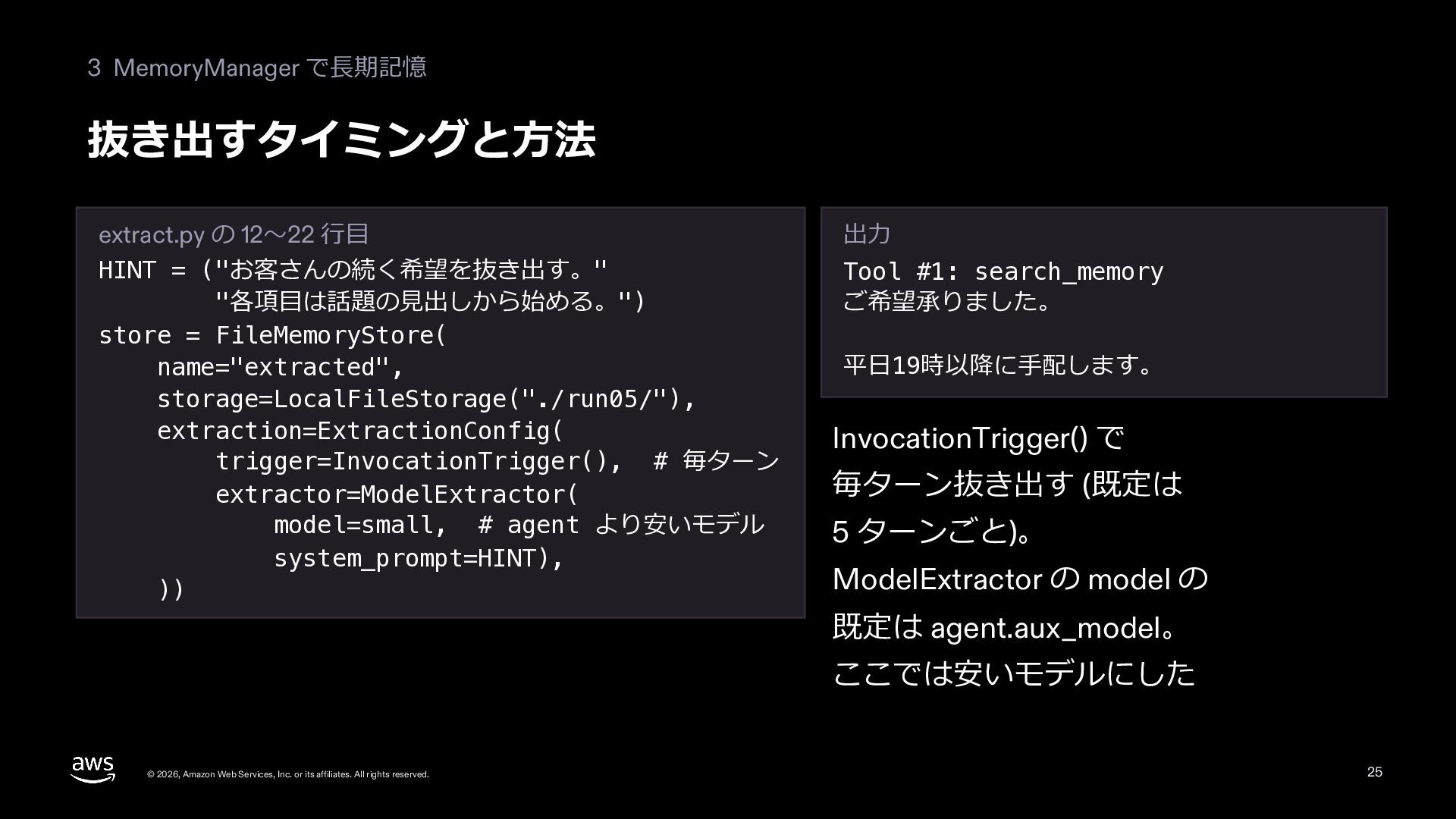
3 MemoryManager で⻑期記憶 抜き出すタイミングと⽅法 extract.py の 12〜22 ⾏⽬ HINT =
("お客さんの続く希望を抜き出す。" "各項⽬は話題の⾒出しから始める。") store = FileMemoryStore( name="extracted", storage=LocalFileStorage("./run05/"), extraction=ExtractionConfig( trigger=InvocationTrigger(), # 毎ターン extractor=ModelExtractor( model=small, # agent より安いモデル system_prompt=HINT), )) 出⼒ Tool #1: search_memory ご希望承りました。 平⽇19時以降に⼿配します。 InvocationTrigger() で 毎ターン抜き出す (既定は 5 ターンごと)。 ModelExtractor の model の 既定は agent.aux_model。 ここでは安いモデルにした © 2026, Amazon Web Services, Inc. or its affiliates. All rights reserved. 25 -
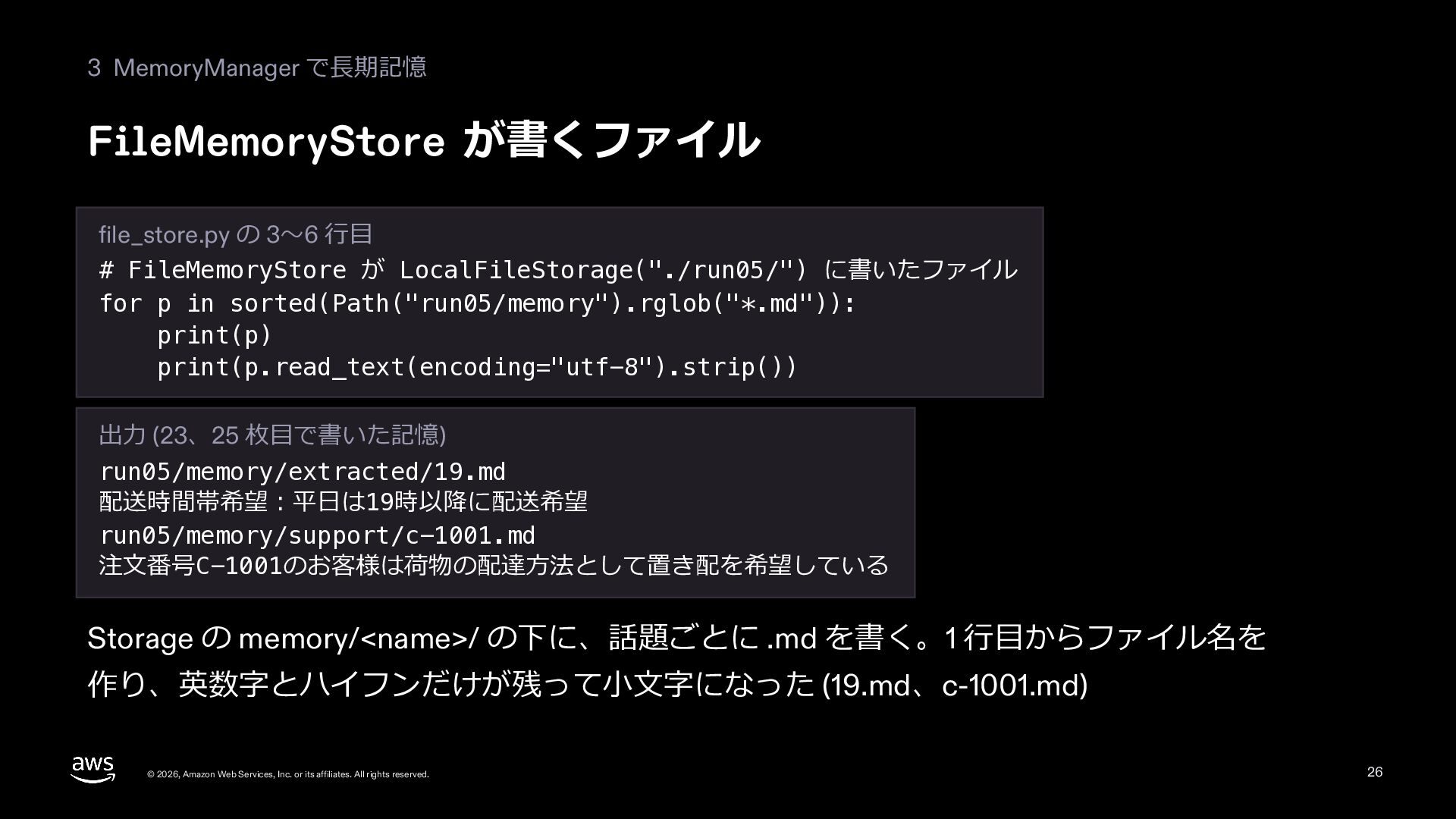
3 MemoryManager で⻑期記憶 FileMemoryStore が書くファイル file_store.py の 3〜6 ⾏⽬ #
FileMemoryStore が LocalFileStorage("./run05/") に書いたファイル for p in sorted(Path("run05/memory").rglob("*.md")): print(p) print(p.read_text(encoding="utf-8").strip()) 出⼒ (23、25 枚⽬で書いた記憶) run05/memory/extracted/19.md 配送時間帯希望︓平⽇は19時以降に配送希望 run05/memory/support/c-1001.md 注⽂番号C-1001のお客様は荷物の配達⽅法として置き配を希望している Storage の memory/<name>/ の下に、話題ごとに .md を書く。1 ⾏⽬からファイル名を 作り、英数字とハイフンだけが残って⼩⽂字になった (19.md、c-1001.md) © 2026, Amazon Web Services, Inc. or its affiliates. All rights reserved. 26 -
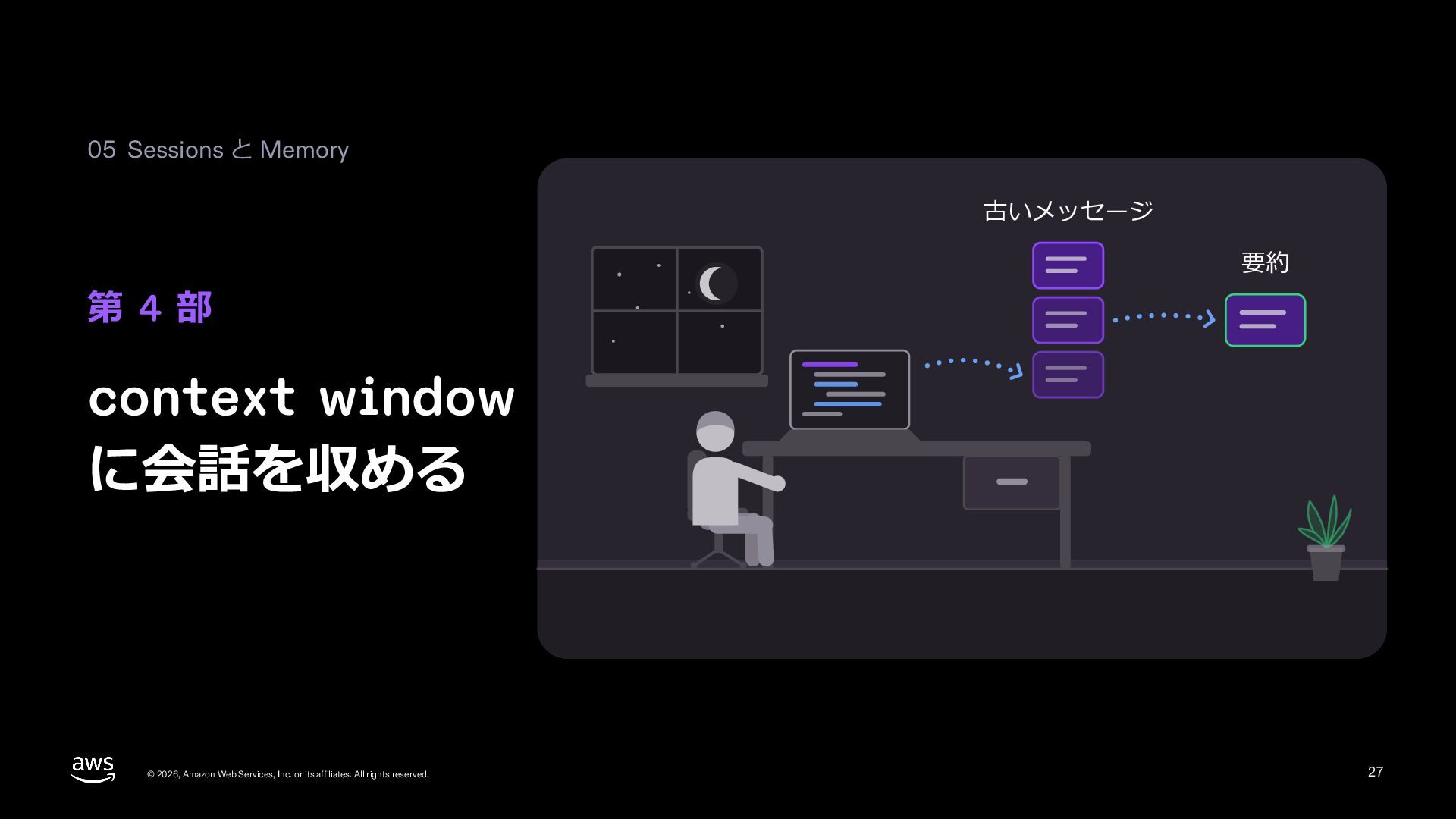
05 Sessions と Memory 古いメッセージ 要約 第 4 部 context
window に会話を収める © 2026, Amazon Web Services, Inc. or its affiliates. All rights reserved. 27 -
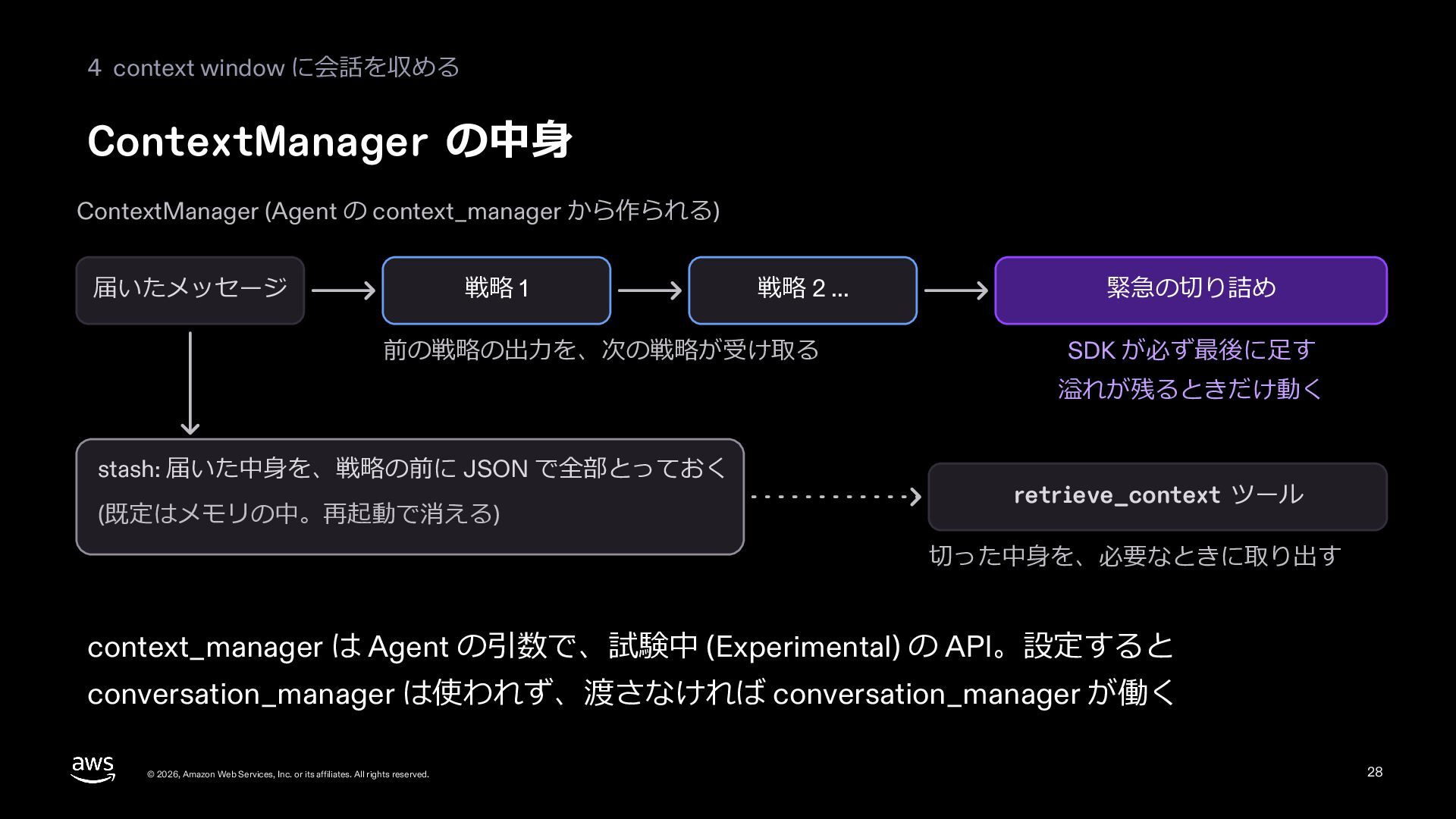
4 context window に会話を収める ContextManager の中⾝ ContextManager (Agent の context_manager
から作られる) 届いたメッセージ 戦略 1 戦略 2 ... 前の戦略の出⼒を、次の戦略が受け取る 緊急の切り詰め SDK が必ず最後に⾜す 溢れが残るときだけ動く stash: 届いた中⾝を、戦略の前に JSON で全部とっておく (既定はメモリの中。再起動で消える) retrieve_context ツール 切った中⾝を、必要なときに取り出す context_manager は Agent の引数で、試験中 (Experimental) の API。設定すると conversation_manager は使われず、渡さなければ conversation_manager が働く © 2026, Amazon Web Services, Inc. or its affiliates. All rights reserved. 28 -
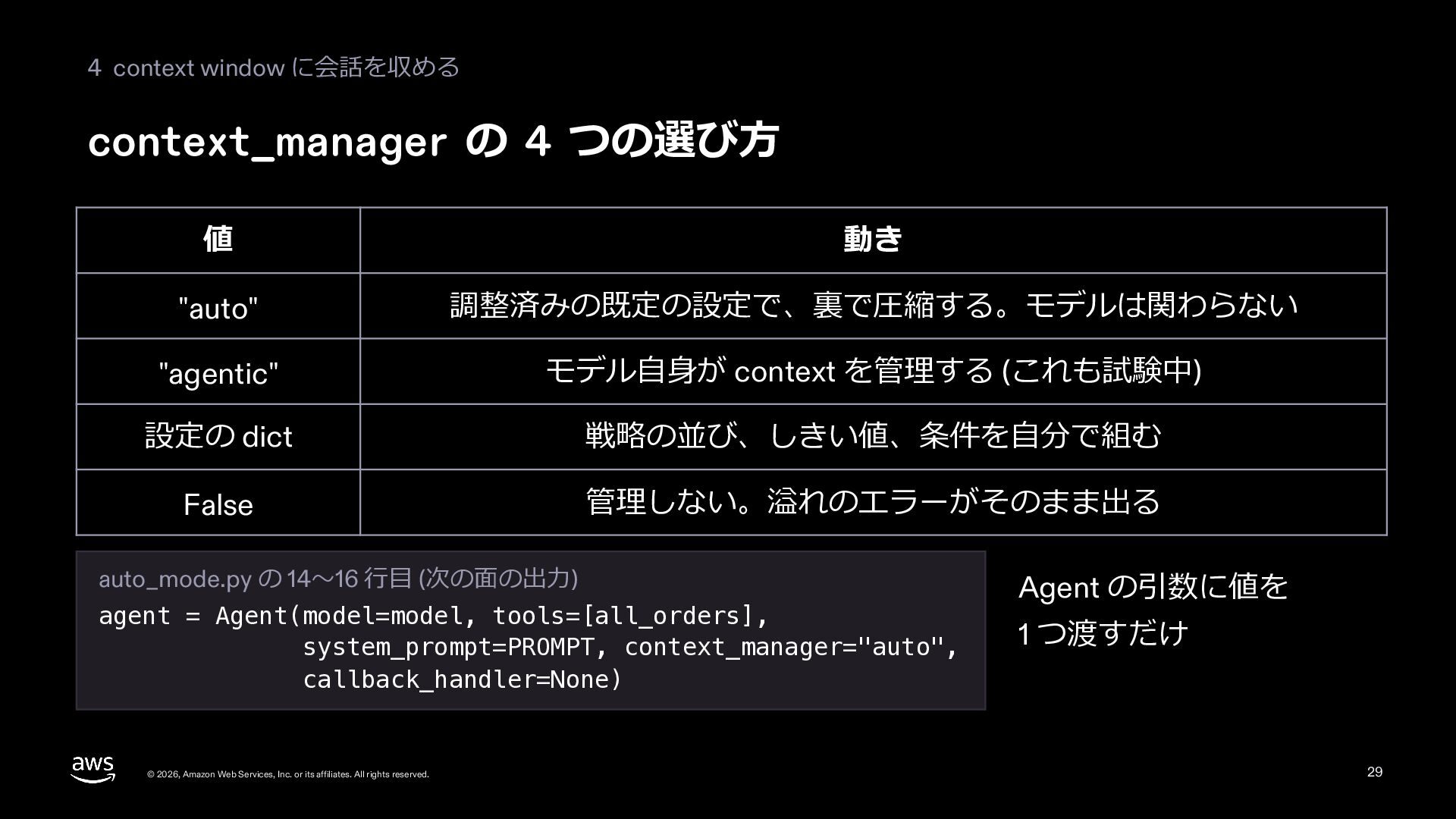
4 context window に会話を収める context_manager の 4 つの選び⽅ 値 動き
"auto" 調整済みの既定の設定で、裏で圧縮する。モデルは関わらない "agentic" モデル⾃⾝が context を管理する (これも試験中) 設定の dict 戦略の並び、しきい値、条件を⾃分で組む False 管理しない。溢れのエラーがそのまま出る auto_mode.py の 14〜16 ⾏⽬ (次の⾯の出⼒) agent = Agent(model=model, tools=[all_orders], system_prompt=PROMPT, context_manager="auto", callback_handler=None) © 2026, Amazon Web Services, Inc. or its affiliates. All rights reserved. Agent の引数に値を 1 つ渡すだけ 29 -
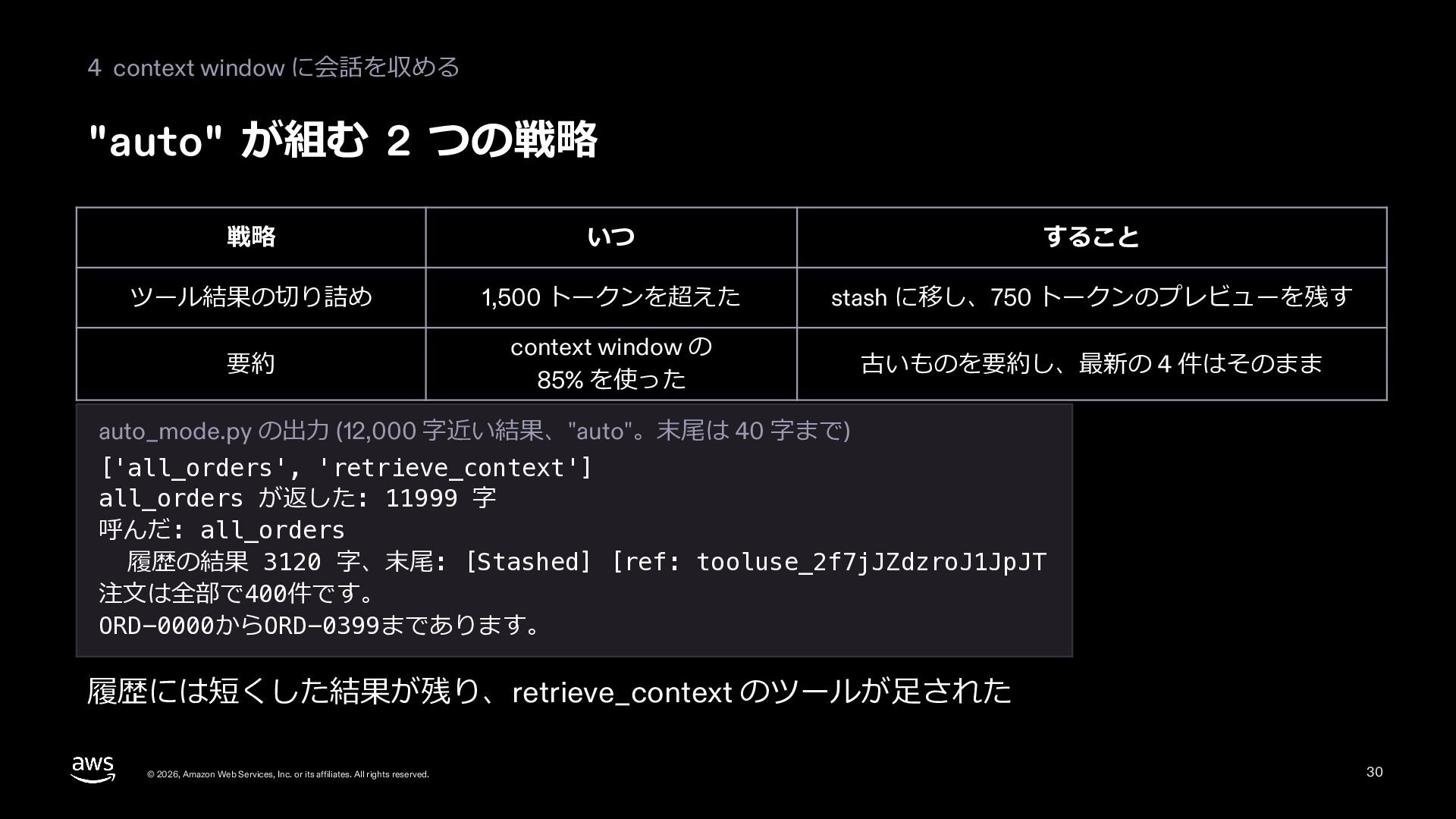
4 context window に会話を収める "auto" が組む 2 つの戦略 戦略 いつ
すること ツール結果の切り詰め 1,500 トークンを超えた stash に移し、750 トークンのプレビューを残す 要約 context window の 85% を使った 古いものを要約し、最新の 4 件はそのまま auto_mode.py の出⼒ (12,000 字近い結果、"auto"。末尾は 40 字まで) ['all_orders', 'retrieve_context'] all_orders が返した: 11999 字 呼んだ: all_orders 履歴の結果 3120 字、末尾: [Stashed] [ref: tooluse_2f7jJZdzroJ1JpJT 注⽂は全部で400件です。 ORD-0000からORD-0399まであります。 履歴には短くした結果が残り、retrieve_context のツールが⾜された © 2026, Amazon Web Services, Inc. or its affiliates. All rights reserved. 30 -
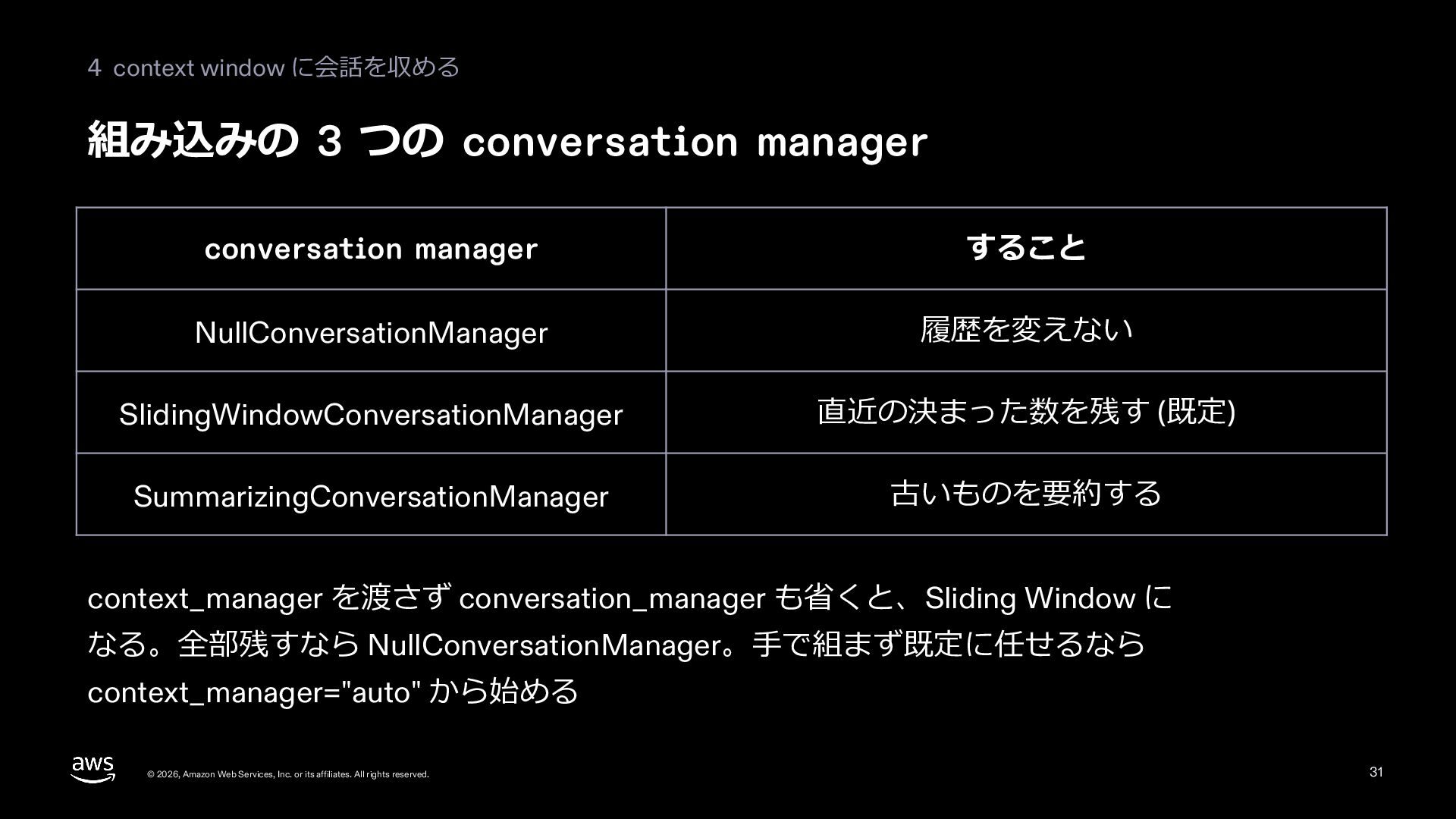
4 context window に会話を収める 組み込みの 3 つの conversation manager conversation
manager すること NullConversationManager 履歴を変えない SlidingWindowConversationManager 直近の決まった数を残す (既定) SummarizingConversationManager 古いものを要約する context_manager を渡さず conversation_manager も省くと、Sliding Window に なる。全部残すなら NullConversationManager。⼿で組まず既定に任せるなら context_manager="auto" から始める © 2026, Amazon Web Services, Inc. or its affiliates. All rights reserved. 31 -
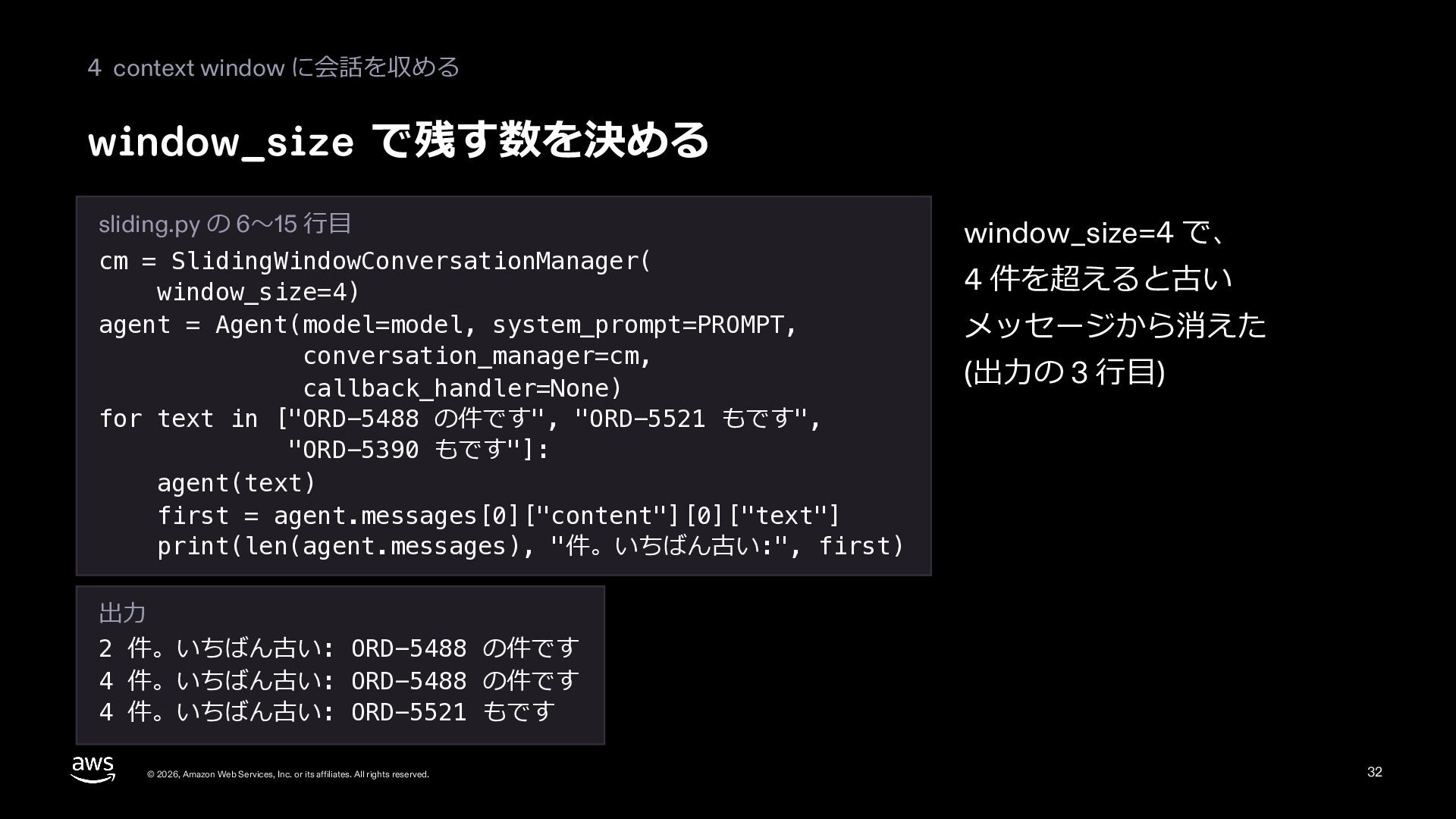
4 context window に会話を収める window_size で残す数を決める sliding.py の 6〜15 ⾏⽬
cm = SlidingWindowConversationManager( window_size=4) agent = Agent(model=model, system_prompt=PROMPT, conversation_manager=cm, callback_handler=None) for text in ["ORD-5488 の件です", "ORD-5521 もです", "ORD-5390 もです"]: agent(text) first = agent.messages[0]["content"][0]["text"] print(len(agent.messages), "件。いちばん古い:", first) window_size=4 で、 4 件を超えると古い メッセージから消えた (出⼒の 3 ⾏⽬) 出⼒ 2 件。いちばん古い: ORD-5488 の件です 4 件。いちばん古い: ORD-5488 の件です 4 件。いちばん古い: ORD-5521 もです © 2026, Amazon Web Services, Inc. or its affiliates. All rights reserved. 32 -
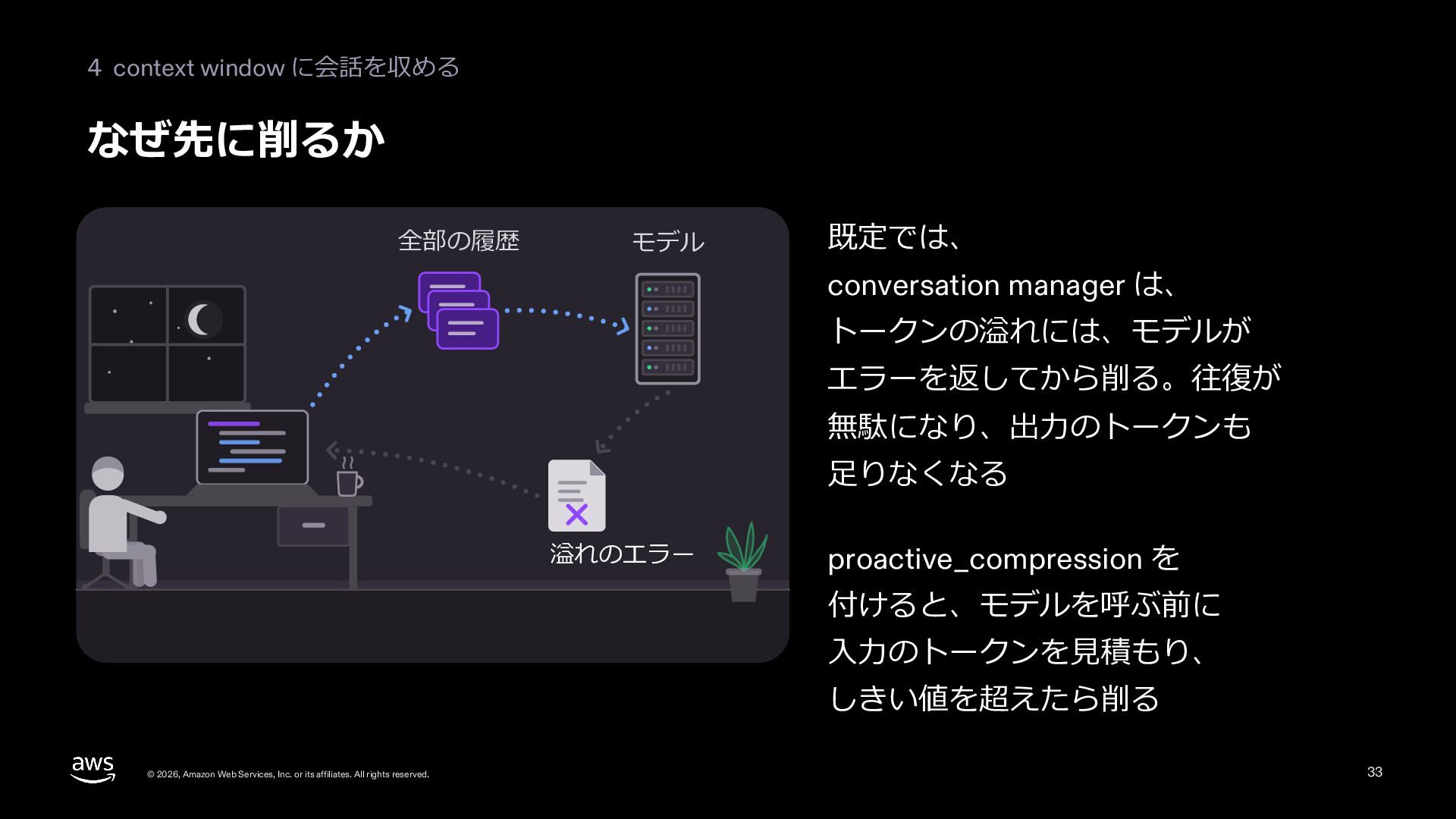
4 context window に会話を収める なぜ先に削るか 全部の履歴 モデル 既定では、 conversation manager
は、 トークンの溢れには、モデルが エラーを返してから削る。往復が 無駄になり、出⼒のトークンも ⾜りなくなる 溢れのエラー proactive_compression を 付けると、モデルを呼ぶ前に ⼊⼒のトークンを⾒積もり、 しきい値を超えたら削る © 2026, Amazon Web Services, Inc. or its affiliates. All rights reserved. 33 -
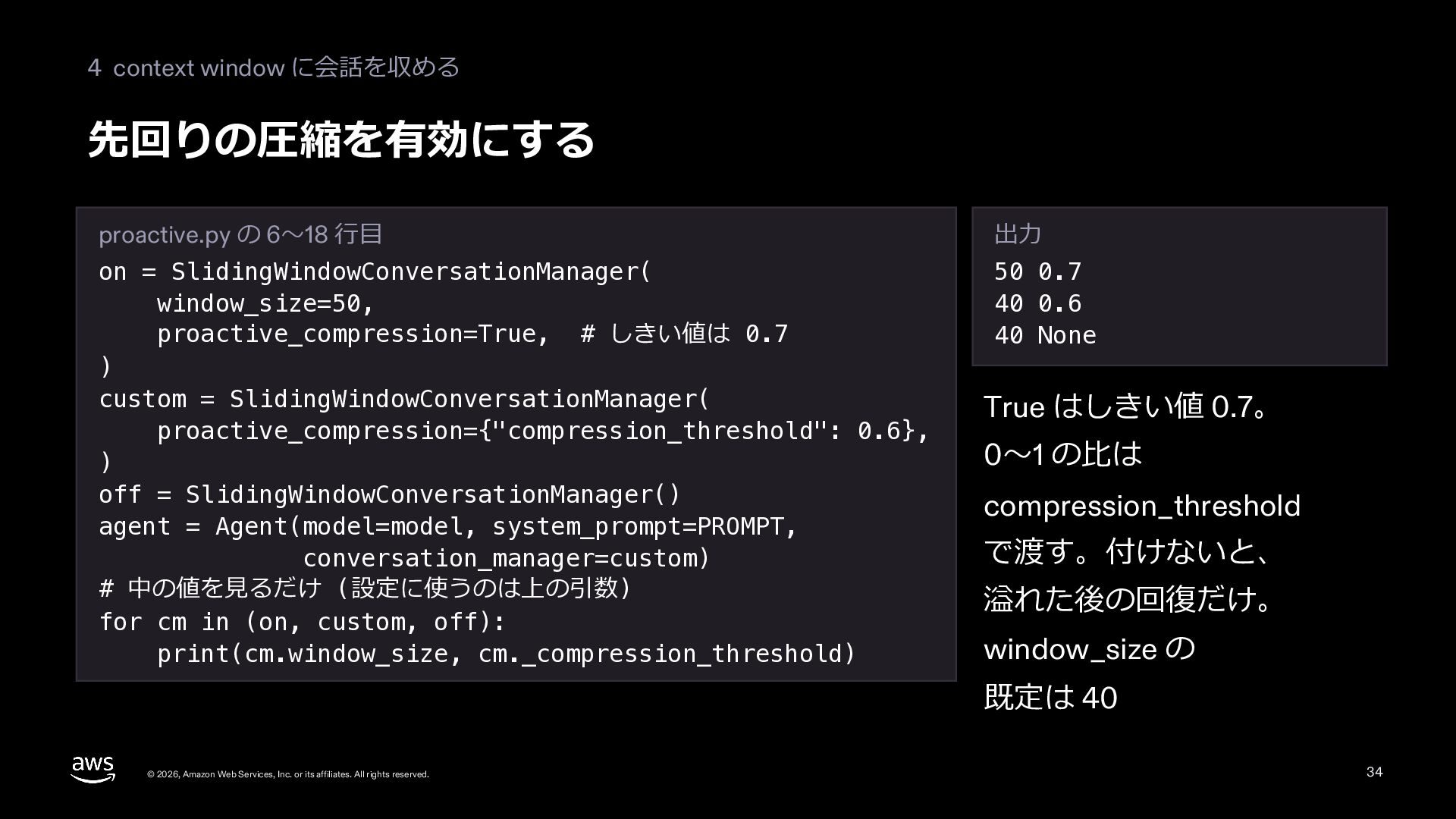
4 context window に会話を収める 先回りの圧縮を有効にする proactive.py の 6〜18 ⾏⽬ 出⼒
on = SlidingWindowConversationManager( window_size=50, proactive_compression=True, # しきい値は 0.7 ) custom = SlidingWindowConversationManager( proactive_compression={"compression_threshold": 0.6}, ) off = SlidingWindowConversationManager() agent = Agent(model=model, system_prompt=PROMPT, conversation_manager=custom) # 中の値を⾒るだけ (設定に使うのは上の引数) for cm in (on, custom, off): print(cm.window_size, cm._compression_threshold) 50 0.7 40 0.6 40 None True はしきい値 0.7。 0〜1 の⽐は compression_threshold で渡す。付けないと、 溢れた後の回復だけ。 window_size の 既定は 40 © 2026, Amazon Web Services, Inc. or its affiliates. All rights reserved. 34 -
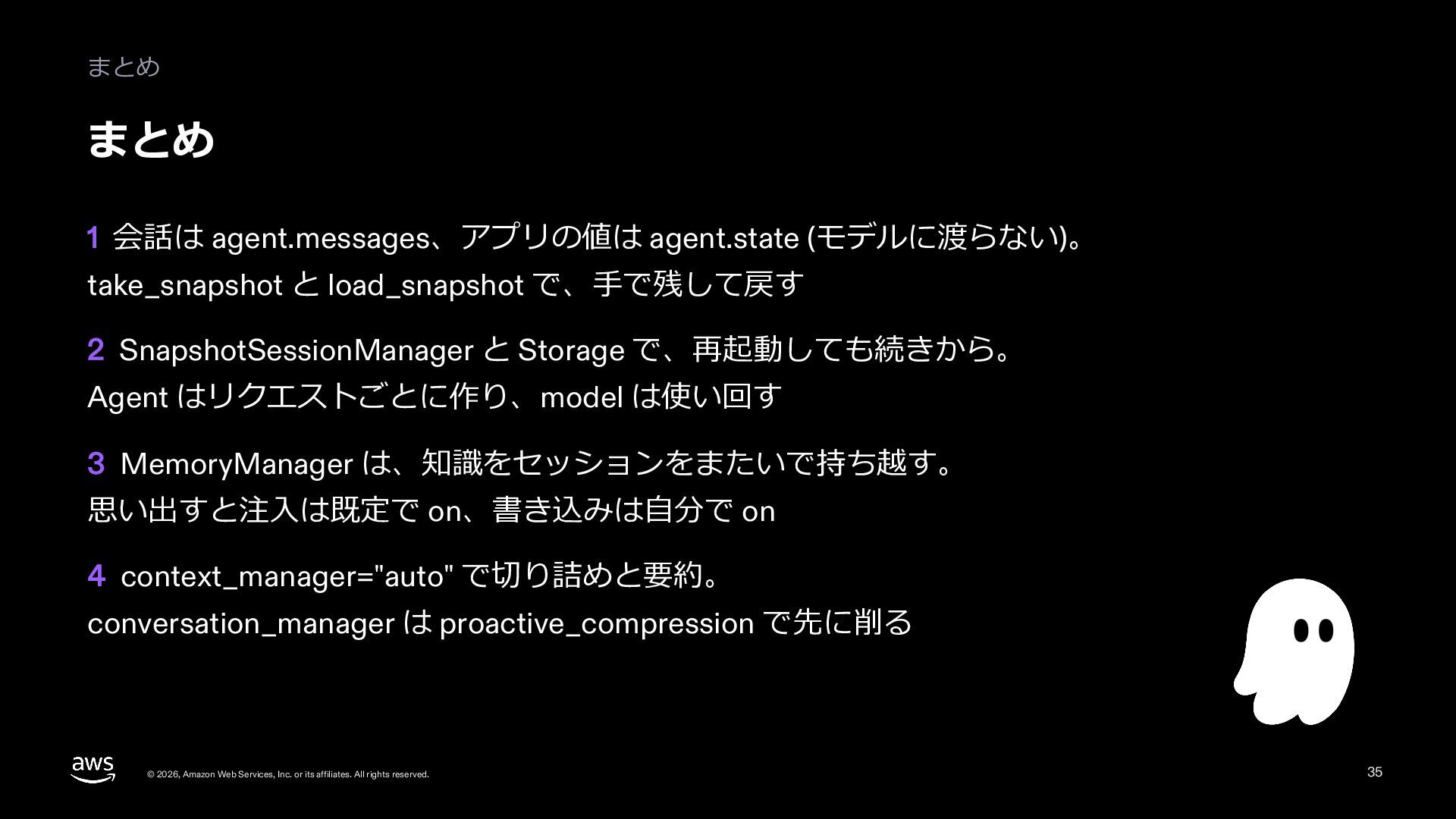
まとめ まとめ 1 会話は agent.messages、アプリの値は agent.state (モデルに渡らない)。 take_snapshot と load_snapshot
で、⼿で残して戻す 2 SnapshotSessionManager と Storage で、再起動しても続きから。 Agent はリクエストごとに作り、model は使い回す 3 MemoryManager は、知識をセッションをまたいで持ち越す。 思い出すと注⼊は既定で on、書き込みは⾃分で on 4 context_manager="auto" で切り詰めと要約。 conversation_manager は proactive_compression で先に削る © 2026, Amazon Web Services, Inc. or its affiliates. All rights reserved. 35 -
まとめ 次に読む資料 06 Structured output と Streaming 型のある答えと、流れる答え © 2026,
Amazon Web Services, Inc. or its affiliates. All rights reserved. 36 -
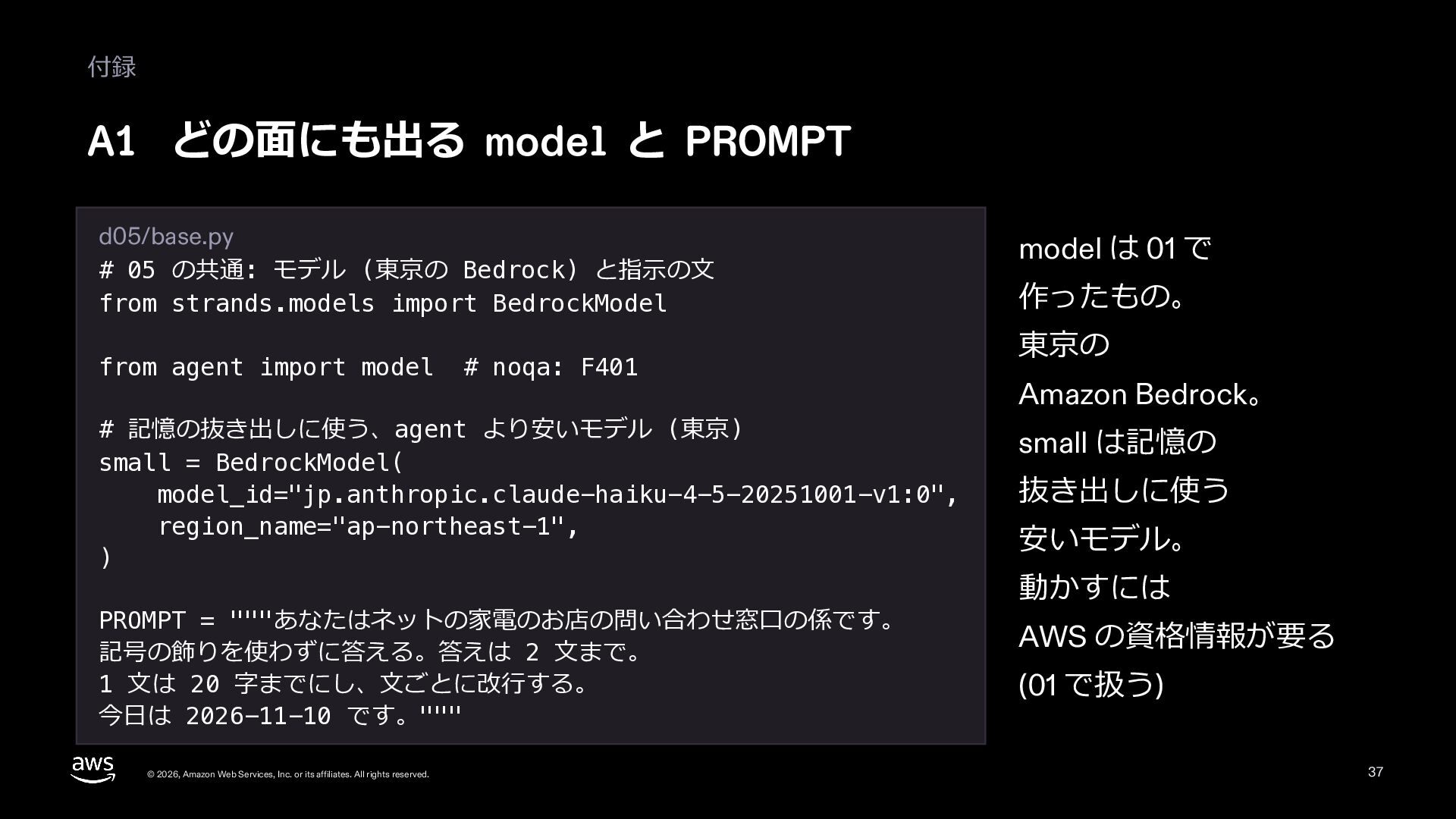
付録 A1 どの⾯にも出る model と PROMPT d05/base.py # 05 の共通:
モデル (東京の Bedrock) と指⽰の⽂ from strands.models import BedrockModel from agent import model # noqa: F401 # 記憶の抜き出しに使う、agent より安いモデル (東京) small = BedrockModel( model_id="jp.anthropic.claude-haiku-4-5-20251001-v1:0", region_name="ap-northeast-1", ) PROMPT = """あなたはネットの家電のお店の問い合わせ窓⼝の係です。 記号の飾りを使わずに答える。答えは 2 ⽂まで。 1 ⽂は 20 字までにし、⽂ごとに改⾏する。 今⽇は 2026-11-10 です。""" © 2026, Amazon Web Services, Inc. or its affiliates. All rights reserved. model は 01 で 作ったもの。 東京の Amazon Bedrock。 small は記憶の 抜き出しに使う 安いモデル。 動かすには AWS の資格情報が要る (01 で扱う) 37 -
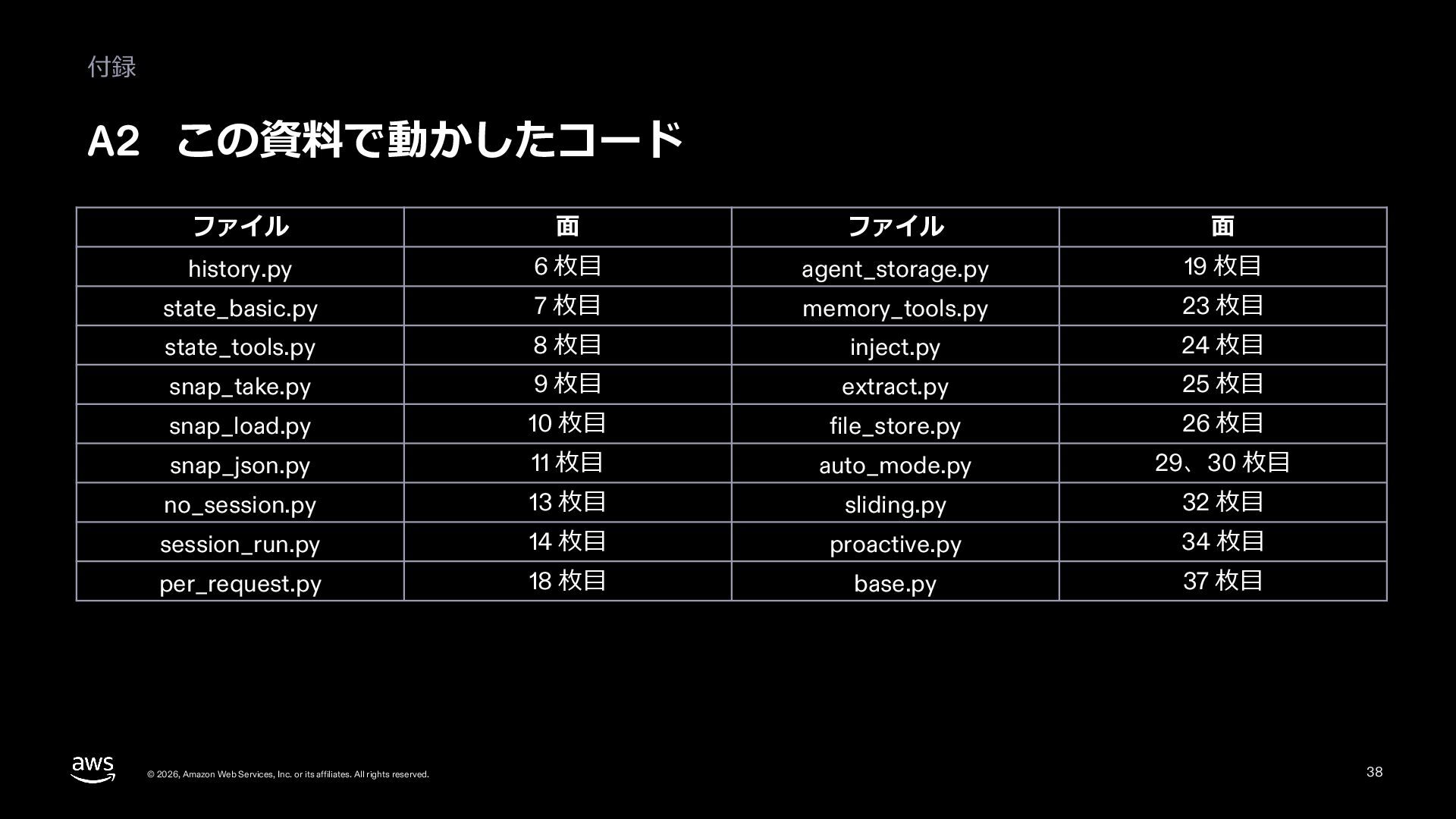
付録 A2 この資料で動かしたコード ファイル ⾯ ファイル ⾯ history.py 6 枚⽬
agent_storage.py 19 枚⽬ state_basic.py 7 枚⽬ memory_tools.py 23 枚⽬ state_tools.py 8 枚⽬ inject.py 24 枚⽬ snap_take.py 9 枚⽬ extract.py 25 枚⽬ snap_load.py 10 枚⽬ file_store.py 26 枚⽬ snap_json.py 11 枚⽬ auto_mode.py 29、30 枚⽬ no_session.py 13 枚⽬ sliding.py 32 枚⽬ session_run.py 14 枚⽬ proactive.py 34 枚⽬ per_request.py 18 枚⽬ base.py 37 枚⽬ © 2026, Amazon Web Services, Inc. or its affiliates. All rights reserved. 38 -
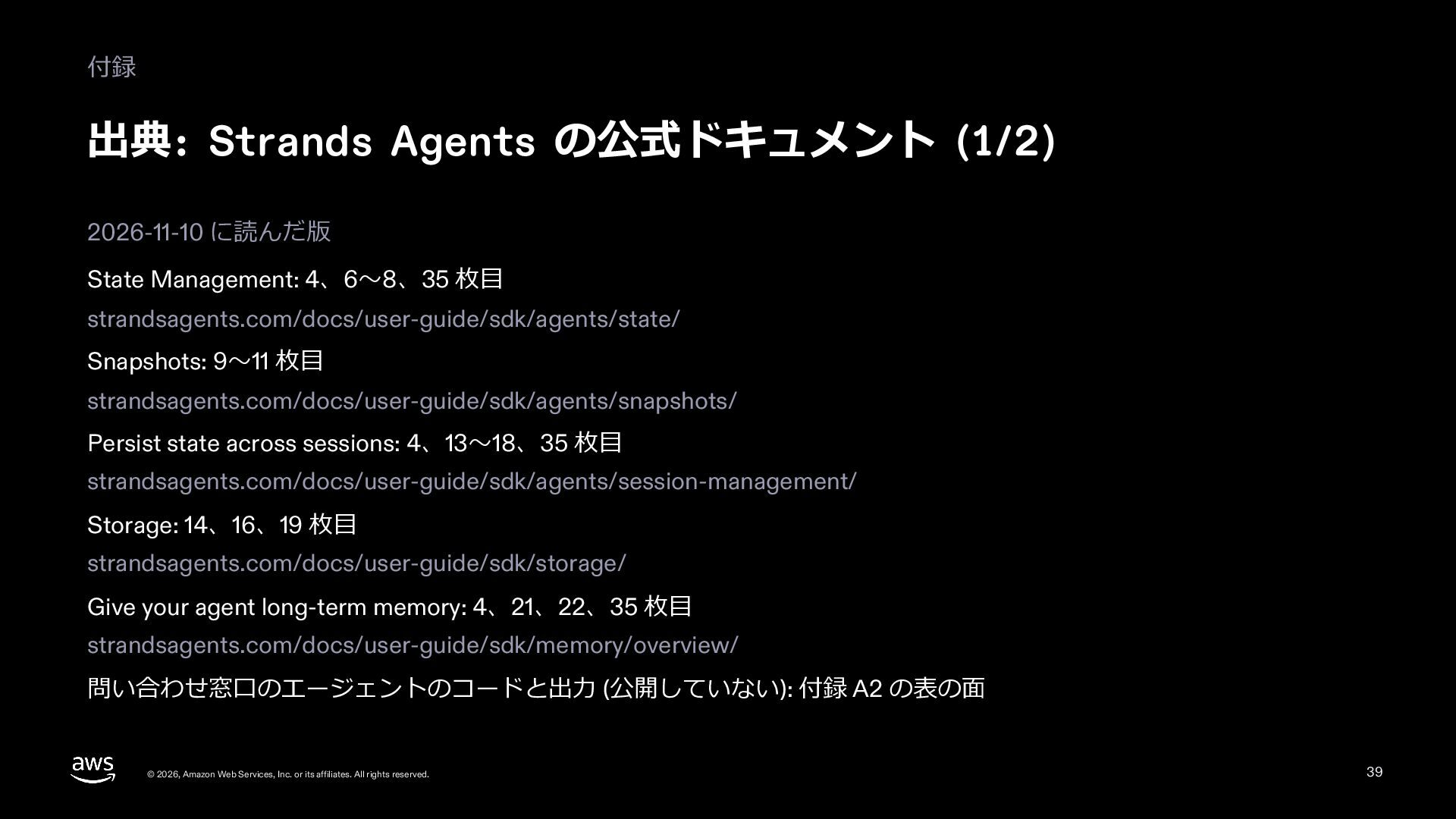
付録 出典: Strands Agents の公式ドキュメント (1/2) 2026-11-10 に読んだ版 State Management:
4、6〜8、35 枚⽬ strandsagents.com/docs/user-guide/sdk/agents/state/ Snapshots: 9〜11 枚⽬ strandsagents.com/docs/user-guide/sdk/agents/snapshots/ Persist state across sessions: 4、13〜18、35 枚⽬ strandsagents.com/docs/user-guide/sdk/agents/session-management/ Storage: 14、16、19 枚⽬ strandsagents.com/docs/user-guide/sdk/storage/ Give your agent long-term memory: 4、21、22、35 枚⽬ strandsagents.com/docs/user-guide/sdk/memory/overview/ 問い合わせ窓⼝のエージェントのコードと出⼒ (公開していない): 付録 A2 の表の⾯ © 2026, Amazon Web Services, Inc. or its affiliates. All rights reserved. 39 -
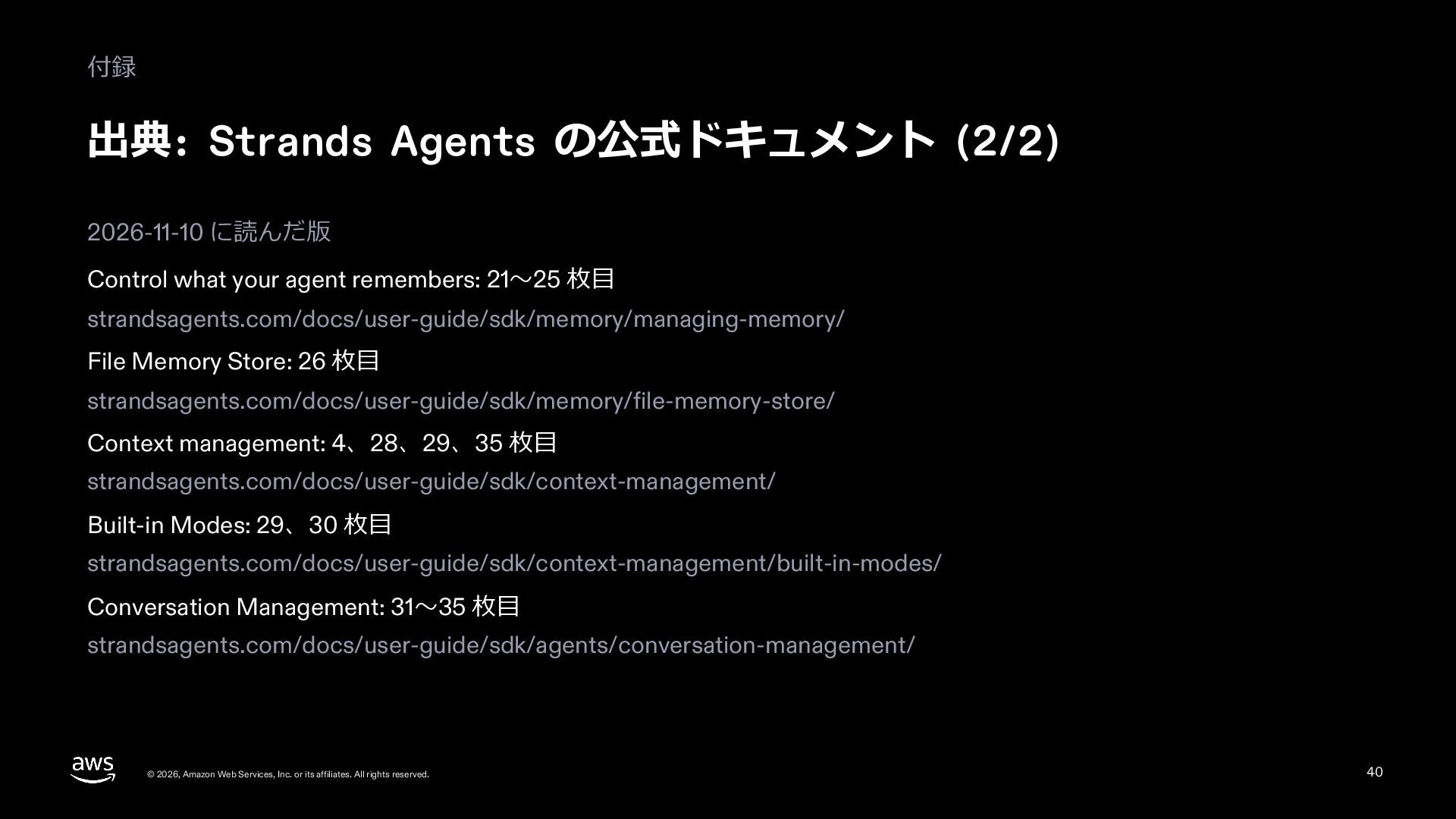
付録 出典: Strands Agents の公式ドキュメント (2/2) 2026-11-10 に読んだ版 Control what
your agent remembers: 21〜25 枚⽬ strandsagents.com/docs/user-guide/sdk/memory/managing-memory/ File Memory Store: 26 枚⽬ strandsagents.com/docs/user-guide/sdk/memory/file-memory-store/ Context management: 4、28、29、35 枚⽬ strandsagents.com/docs/user-guide/sdk/context-management/ Built-in Modes: 29、30 枚⽬ strandsagents.com/docs/user-guide/sdk/context-management/built-in-modes/ Conversation Management: 31〜35 枚⽬ strandsagents.com/docs/user-guide/sdk/agents/conversation-management/ © 2026, Amazon Web Services, Inc. or its affiliates. All rights reserved. 40
 inariku
 shinoisa
 azukiazusa1
 _kotobuki_
 a_suenami
 yoshimura_datam
 uhyo
 ivry_presentationmaterials
 yamakenji24
 lycorptech_jp
 jacopen
 hinalin
 takuyay0ne
 csswizardry
 akihiro_kokubo
 caitiem20
 helenjbeal
 aleyda
 quramy
 palkan
 akosma
 joshbly
 marktimemedia
 danielanewman
 kneath