Share
Embed
Kiro Enterprise Management: Decide in one place, reach every developer's Kiro
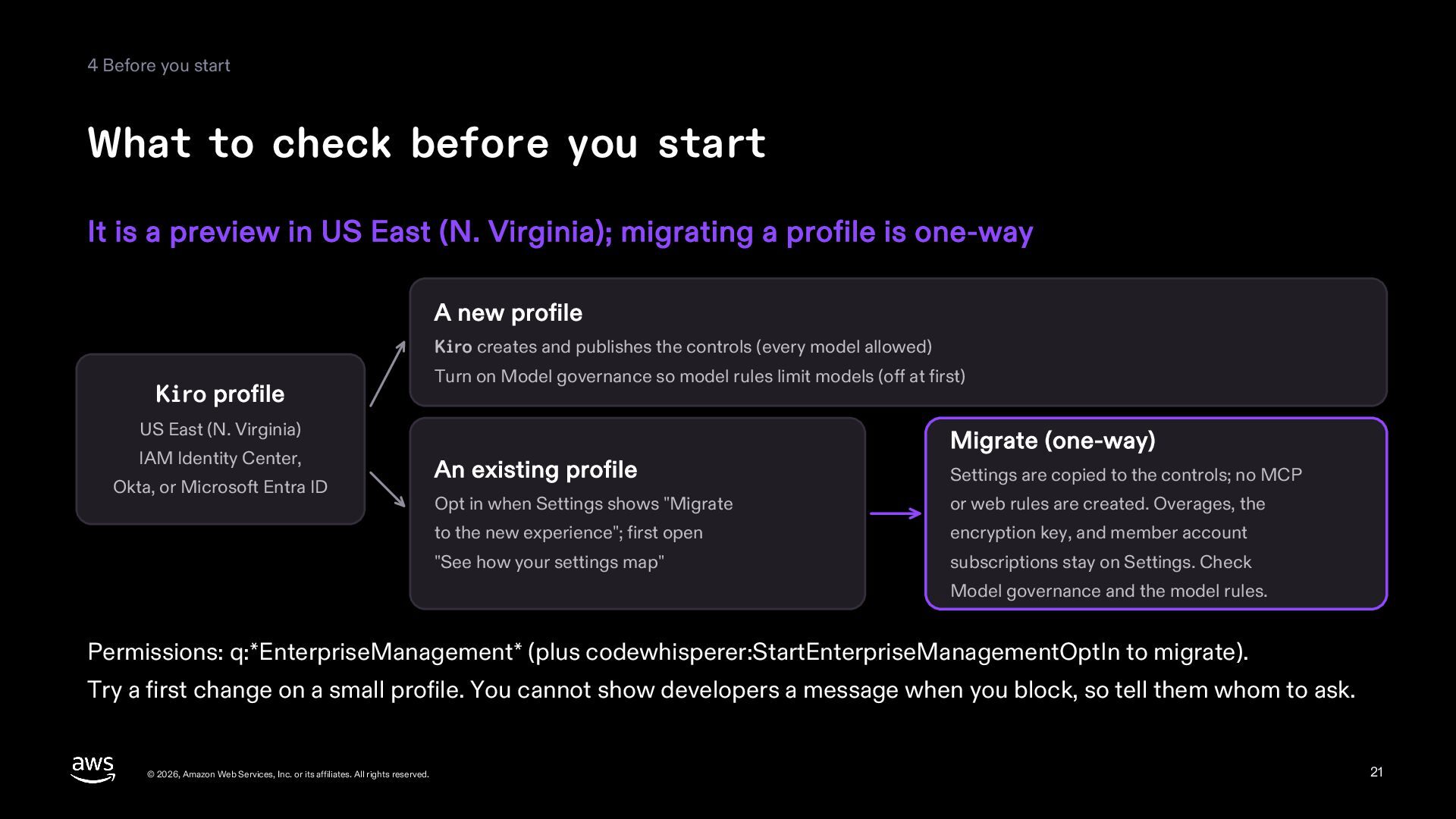
A reference deck on Kiro Enterprise Management (preview): the rules, settings, and files (steering, Skills, Powers) that an administrator decides in Kiro > Controls in the AWS console reach Kiro IDE, Kiro CLI, and Kiro Web for everyone on the profile, shown with a before and after and real console screens. It covers how a rule allows, asks about, or denies one thing Kiro does, why only a published revision reaches developers, the biggest pitfall (a rule for one person also denies everyone's actions that no rule covers), and what to check before you start: it is a preview in US East (N. Virginia), and migrating a profile is one-way. Based on public sources as of November 18, 2026.
Riku INADA PRO
November 21, 2026
Transcript
22 slides
-
Reference Kiro Enterprise Management Decide in one place, reach every
developer's Kiro What you control, how changes arrive, and what to check first November 2026 Amazon Web Services © 2026, Amazon Web Services, Inc. or its affiliates. All rights reserved. 1 -
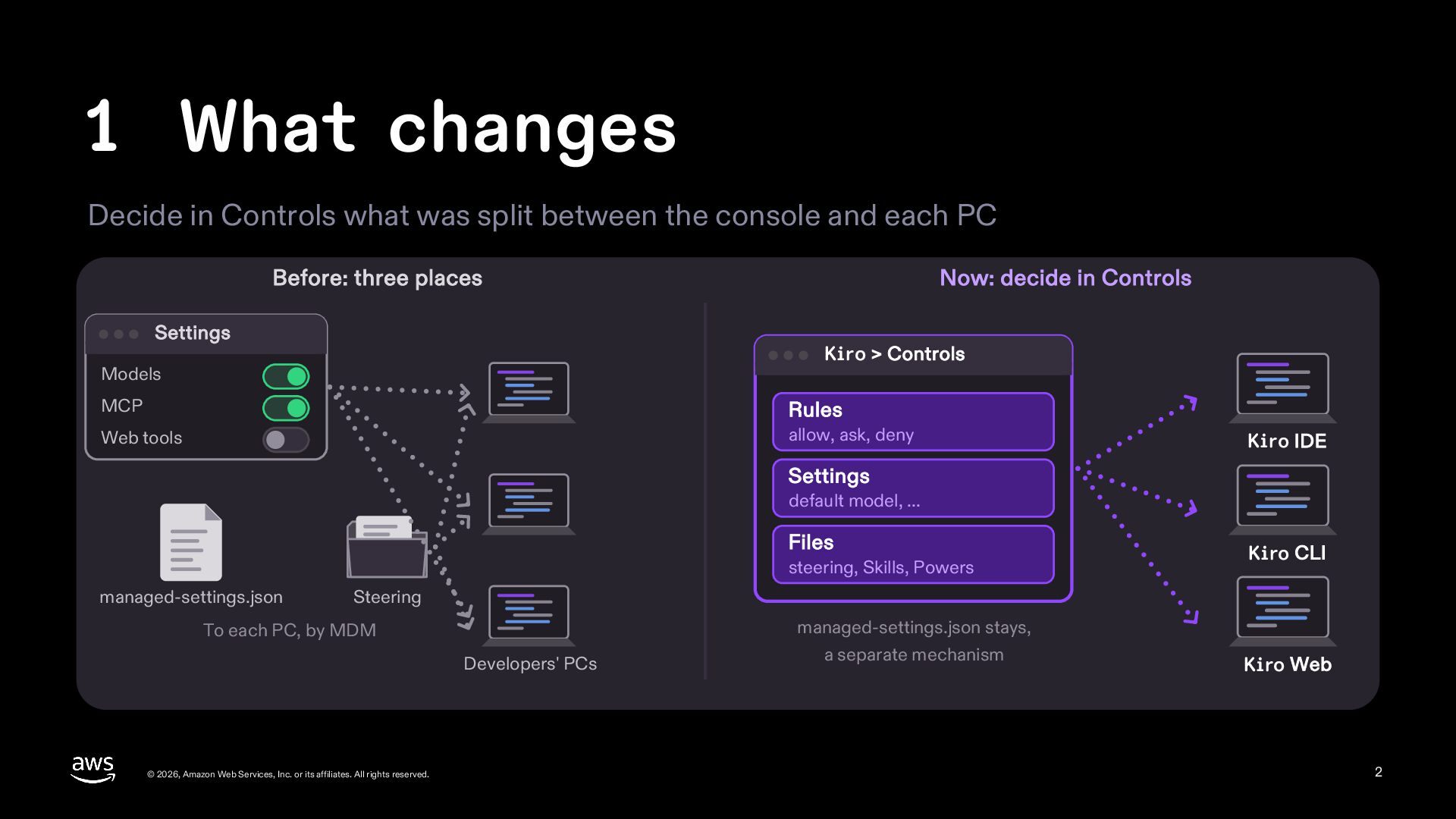
1 What changes Decide in Controls what was split between
the console and each PC Before: three places Settings Now: decide in Controls Kiro > Controls Models MCP Rules Web tools allow, ask, deny Kiro IDE Settings default model, ... Files steering, Skills, Powers managed-settings.json Kiro CLI Steering To each PC, by MDM Developers' PCs © 2026, Amazon Web Services, Inc. or its affiliates. All rights reserved. managed-settings.json stays, a separate mechanism Kiro Web 2 -
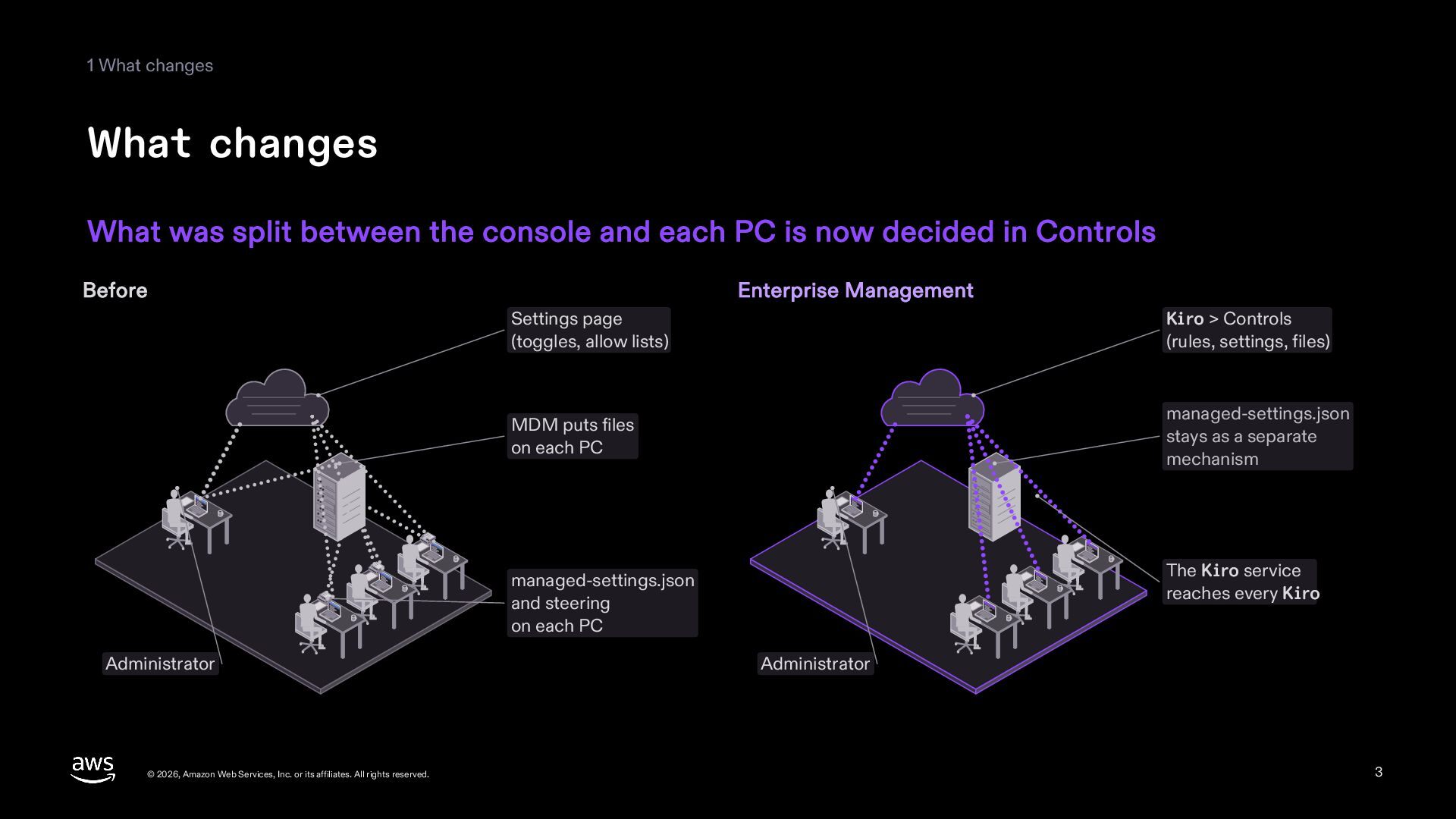
1 What changes What changes What was split between the
console and each PC is now decided in Controls Before Enterprise Management Settings page (toggles, allow lists) Kiro > Controls (rules, settings, files) MDM puts files on each PC managed-settings.json stays as a separate mechanism The Kiro service reaches every Kiro managed-settings.json and steering on each PC Administrator © 2026, Amazon Web Services, Inc. or its affiliates. All rights reserved. Administrator 3 -
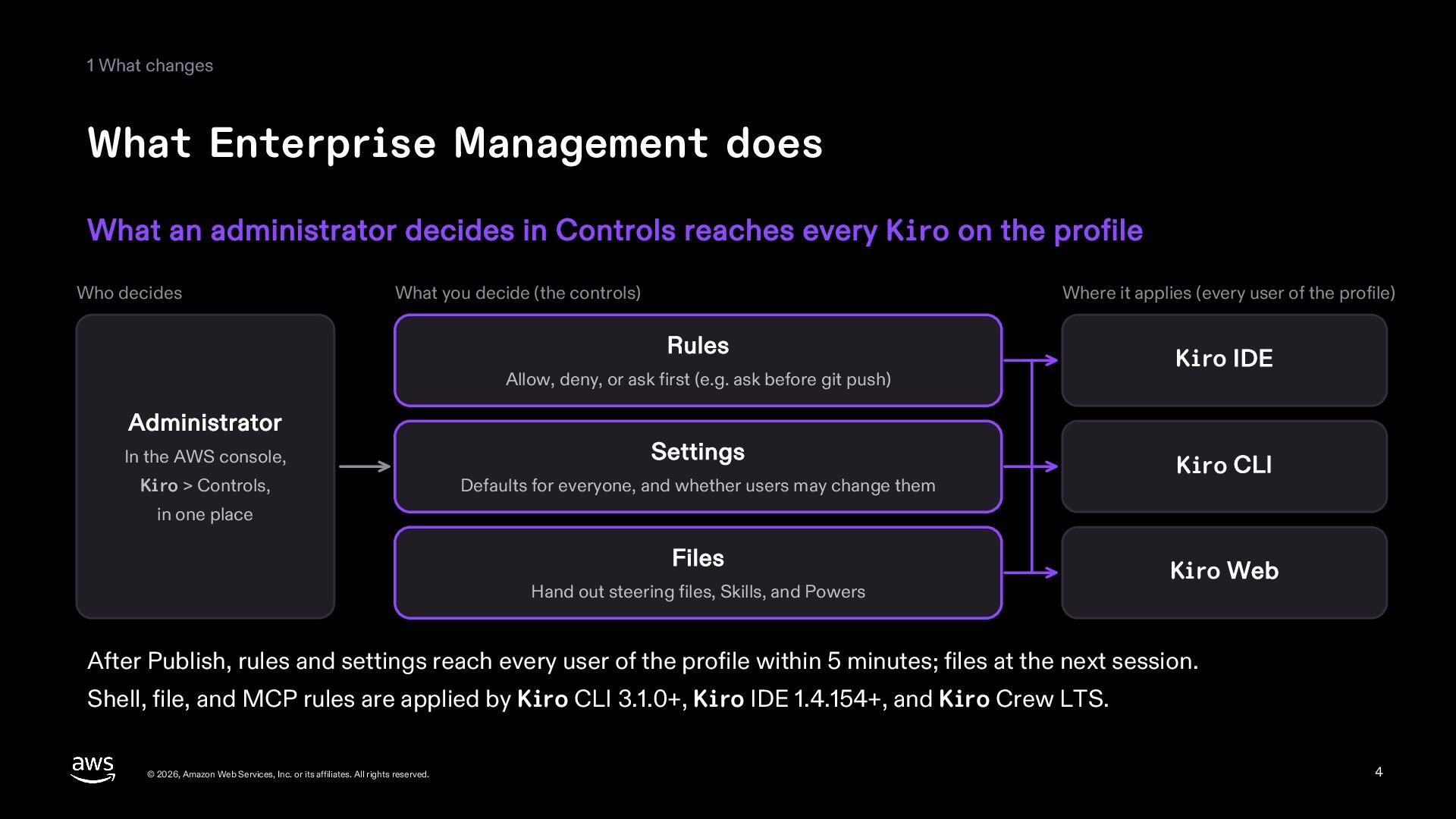
1 What changes What Enterprise Management does What an administrator
decides in Controls reaches every Kiro on the profile Who decides What you decide (the controls) Where it applies (every user of the profile) Rules Allow, deny, or ask first (e.g. ask before git push) Administrator In the AWS console, Settings Kiro > Controls, Defaults for everyone, and whether users may change them Kiro IDE Kiro CLI in one place Files Hand out steering files, Skills, and Powers Kiro Web After Publish, rules and settings reach every user of the profile within 5 minutes; files at the next session. Shell, file, and MCP rules are applied by Kiro CLI 3.1.0+, Kiro IDE 1.4.154+, and Kiro Crew LTS. © 2026, Amazon Web Services, Inc. or its affiliates. All rights reserved. 4 -
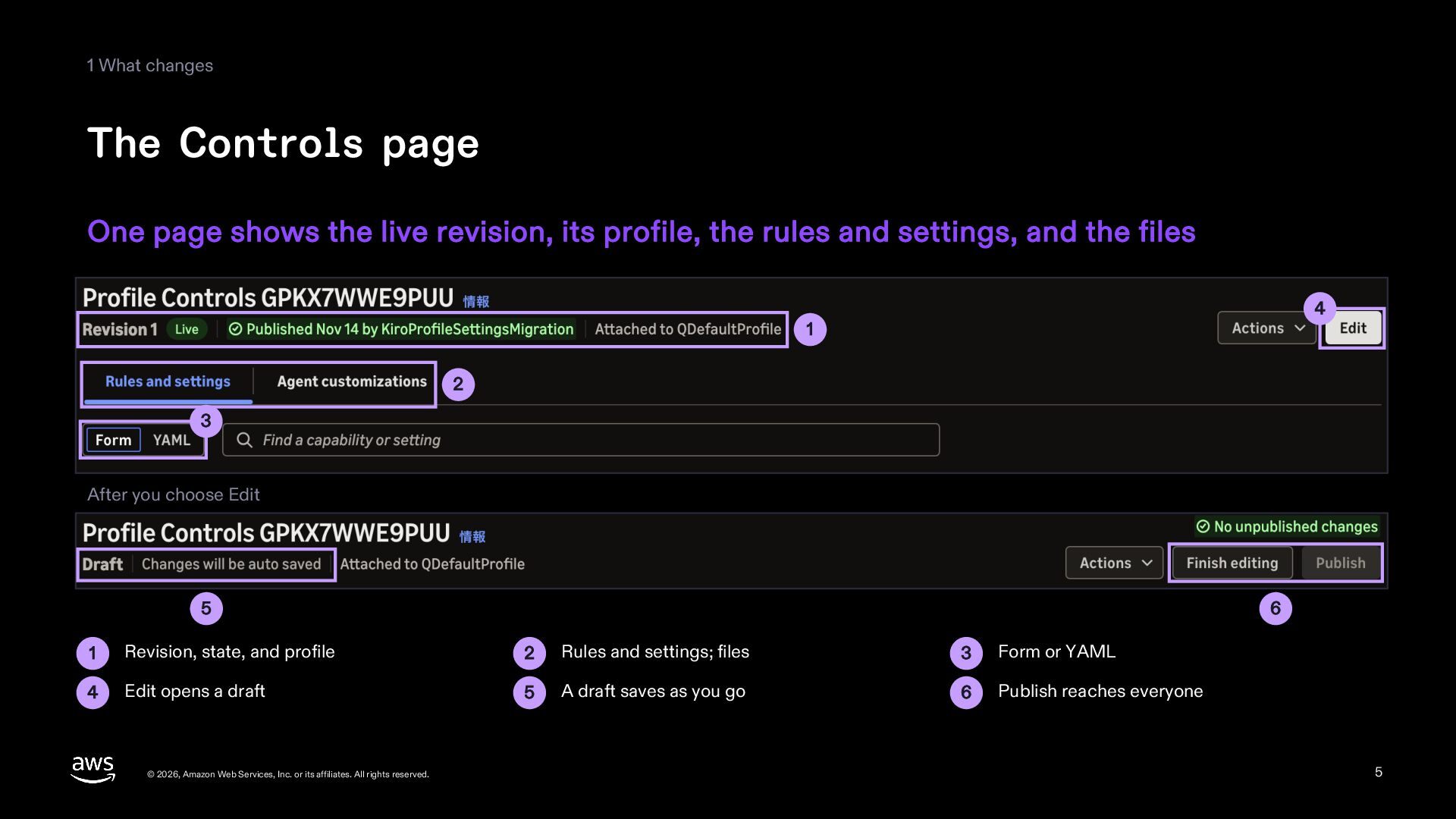
1 What changes The Controls page One page shows the
live revision, its profile, the rules and settings, and the files 4 1 2 3 After you choose Edit 5 6 1 Revision, state, and profile 2 Rules and settings; files 3 Form or YAML 4 Edit opens a draft 5 A draft saves as you go 6 Publish reaches everyone © 2026, Amazon Web Services, Inc. or its affiliates. All rights reserved. 5 -
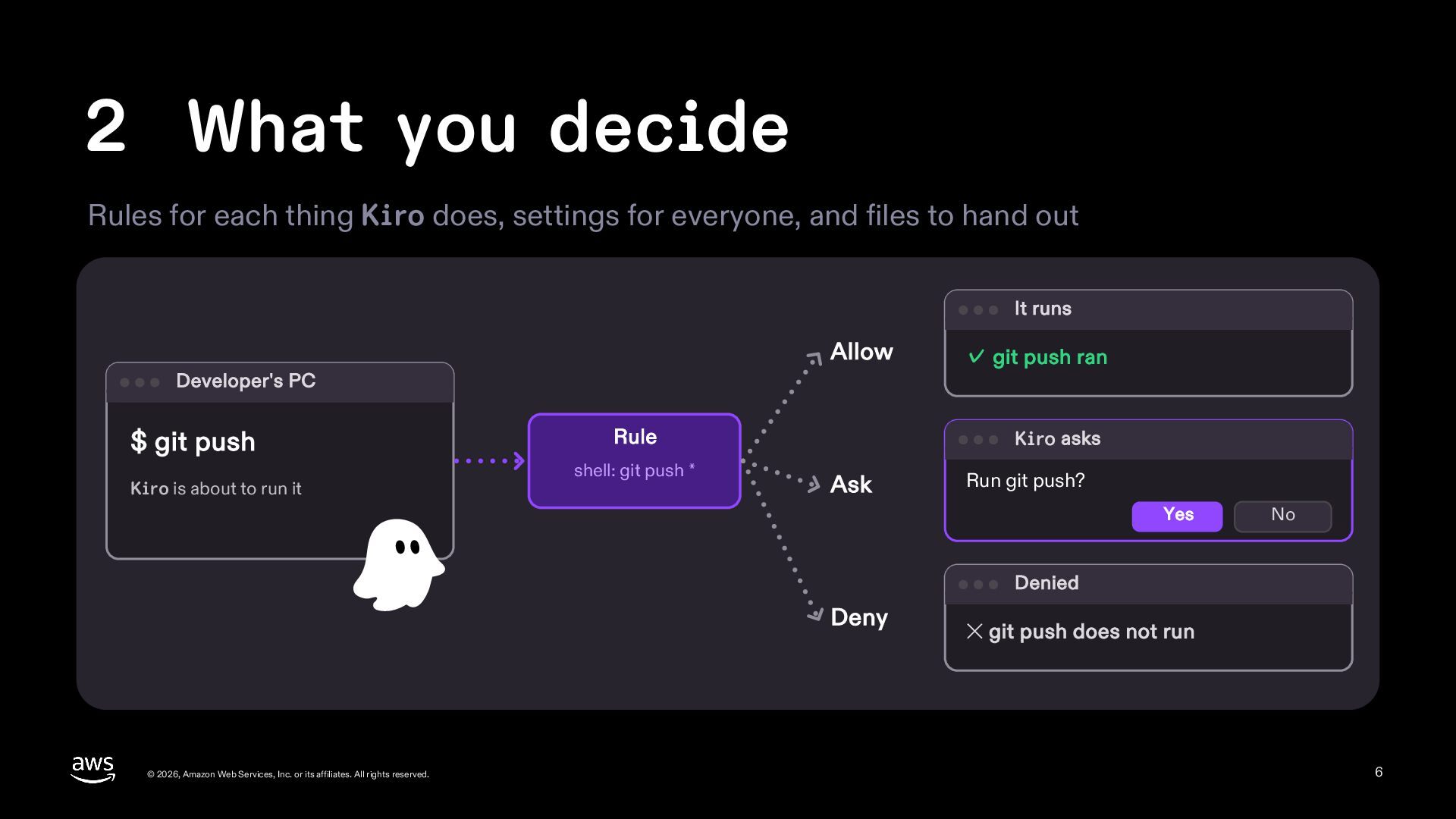
2 What you decide Rules for each thing Kiro does,
settings for everyone, and files to hand out It runs Allow Developer's PC $ git push Kiro is about to run it Rule shell: git push * ✓ git push ran Kiro asks Ask Run git push? Yes No Denied Deny © 2026, Amazon Web Services, Inc. or its affiliates. All rights reserved. ✕ git push does not run 6 -
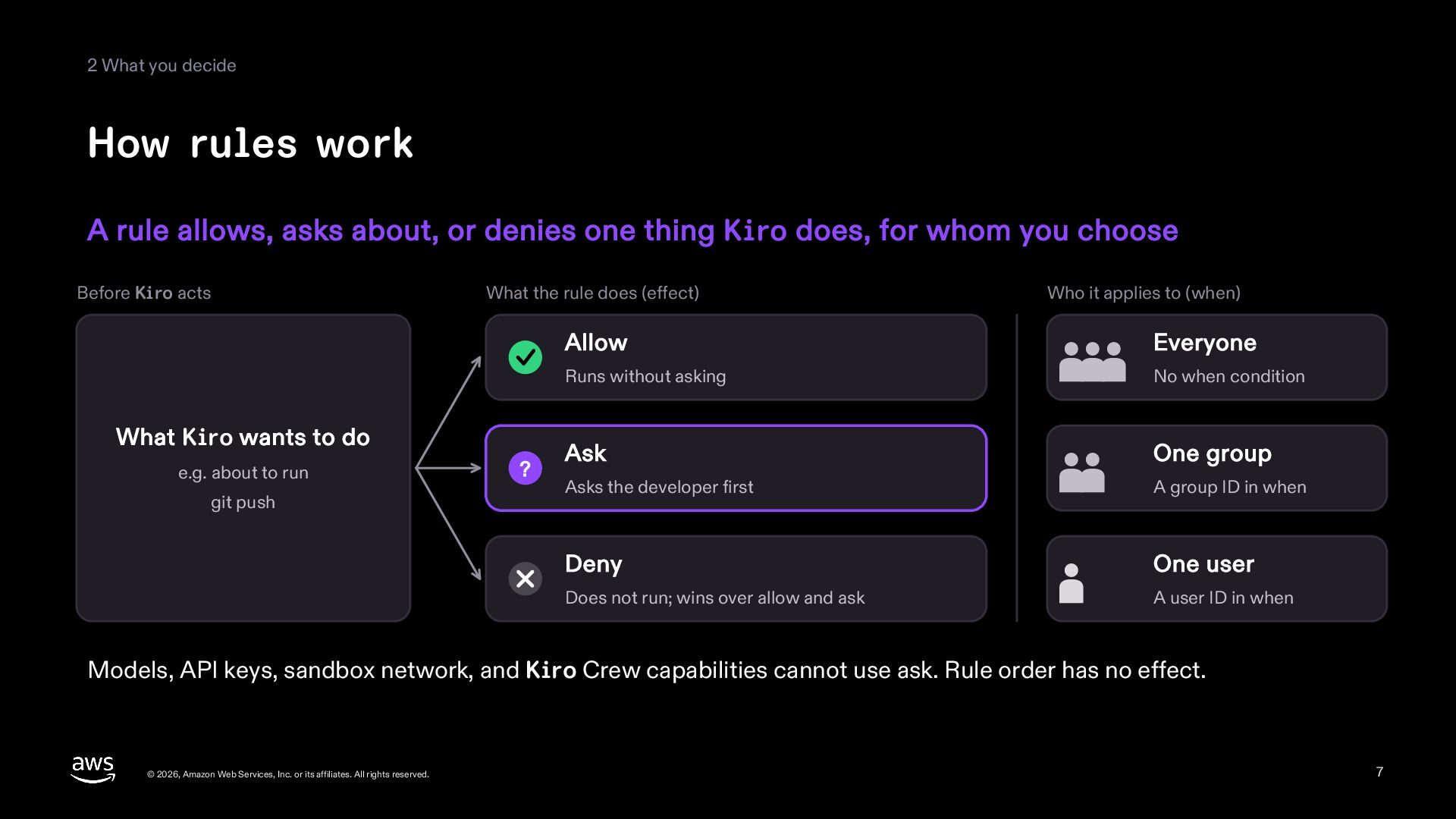
2 What you decide How rules work A rule allows,
asks about, or denies one thing Kiro does, for whom you choose Before Kiro acts What the rule does (effect) What Kiro wants to do e.g. about to run git push ? Who it applies to (when) Allow Everyone Runs without asking No when condition Ask One group Asks the developer first A group ID in when Deny One user Does not run; wins over allow and ask A user ID in when Models, API keys, sandbox network, and Kiro Crew capabilities cannot use ask. Rule order has no effect. © 2026, Amazon Web Services, Inc. or its affiliates. All rights reserved. 7 -
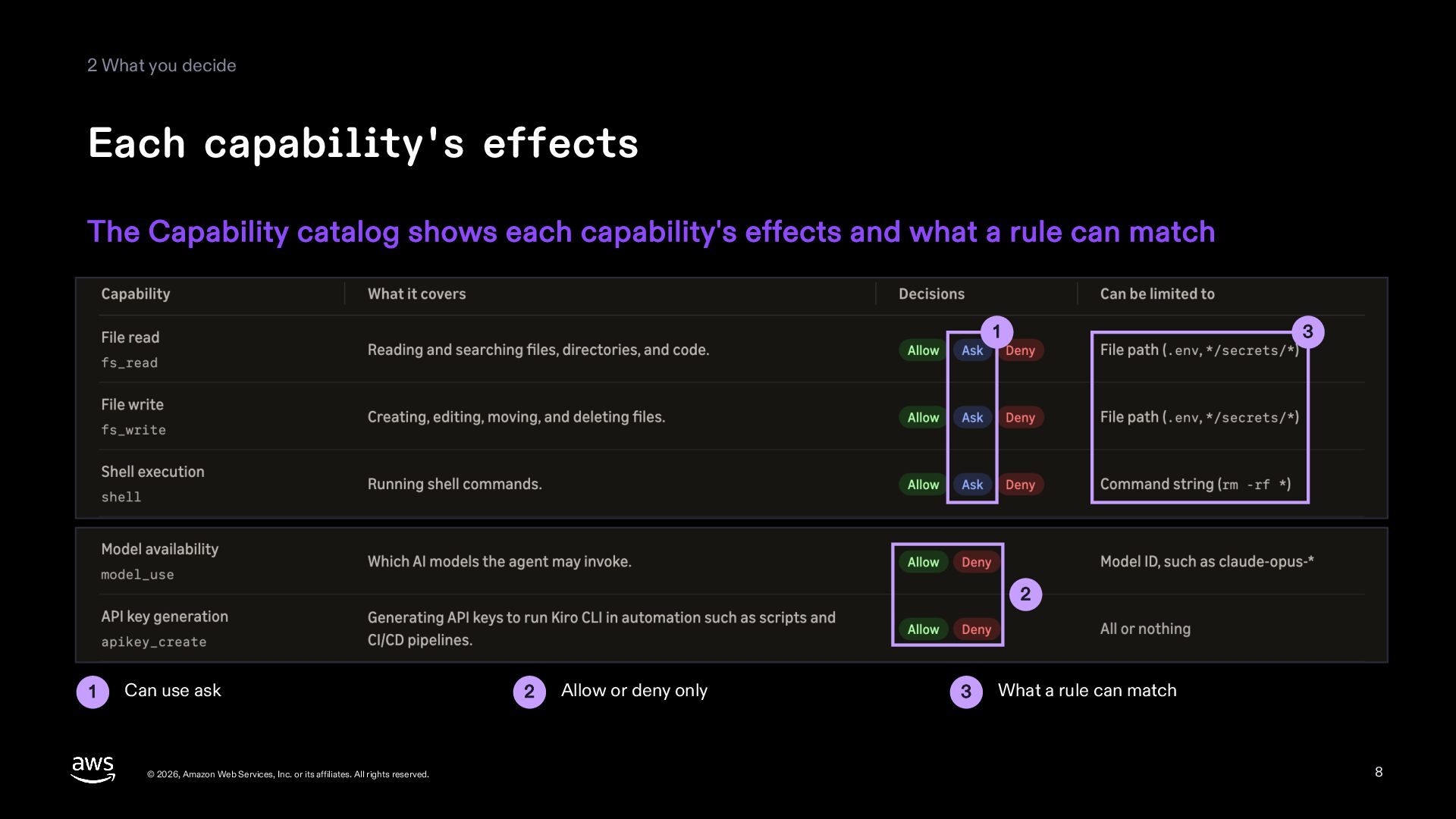
2 What you decide Each capability's effects The Capability catalog
shows each capability's effects and what a rule can match 1 3 2 1 Can use ask © 2026, Amazon Web Services, Inc. or its affiliates. All rights reserved. 2 Allow or deny only 3 What a rule can match 8 -
2 What you decide Settings and files Settings set values
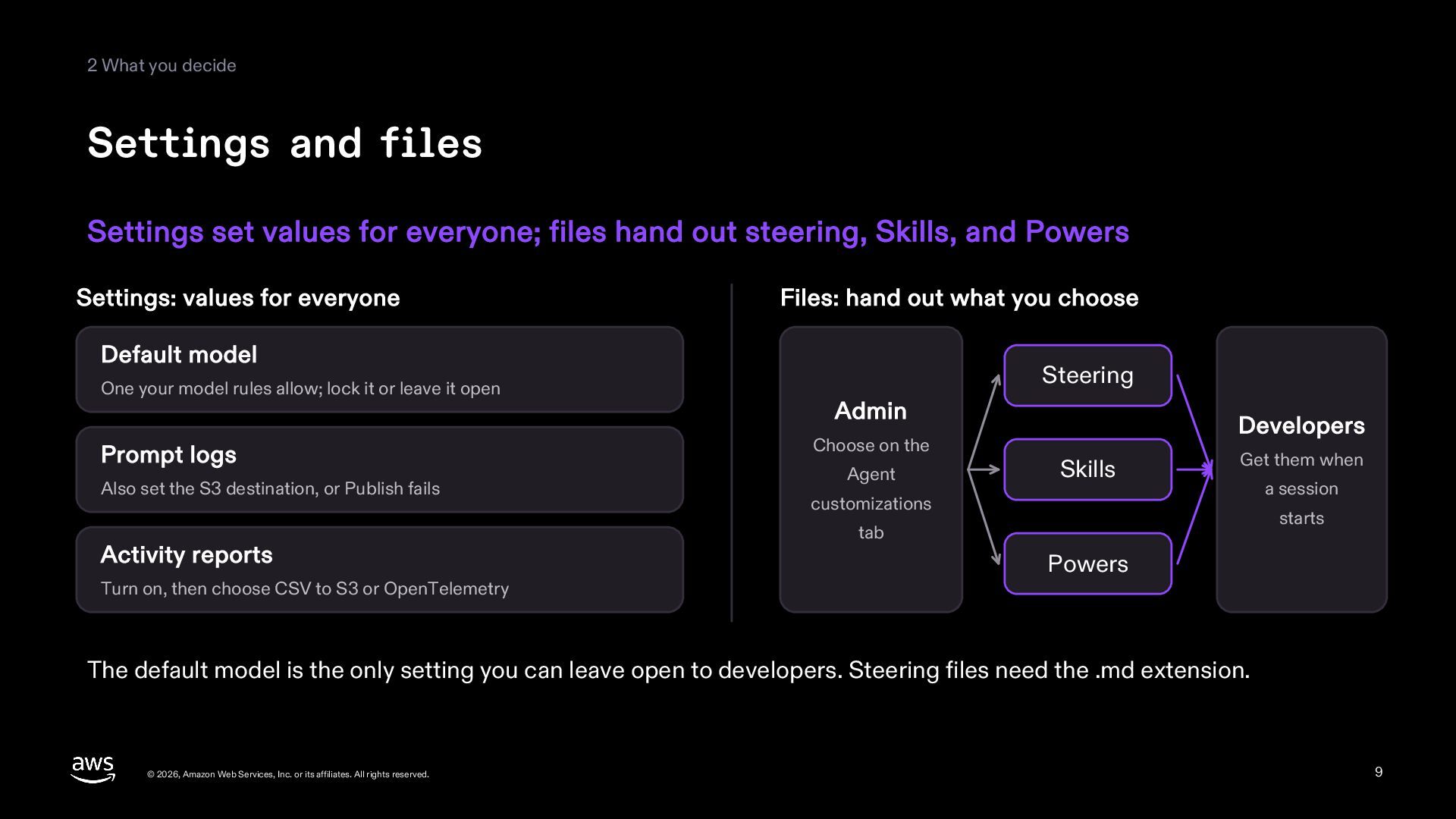
for everyone; files hand out steering, Skills, and Powers Settings: values for everyone Files: hand out what you choose Default model One your model rules allow; lock it or leave it open Prompt logs Also set the S3 destination, or Publish fails Activity reports Turn on, then choose CSV to S3 or OpenTelemetry Steering Admin Choose on the Agent Developers Skills Get them when customizations a session starts tab Powers The default model is the only setting you can leave open to developers. Steering files need the .md extension. © 2026, Amazon Web Services, Inc. or its affiliates. All rights reserved. 9 -
2 What you decide The rules and settings view A
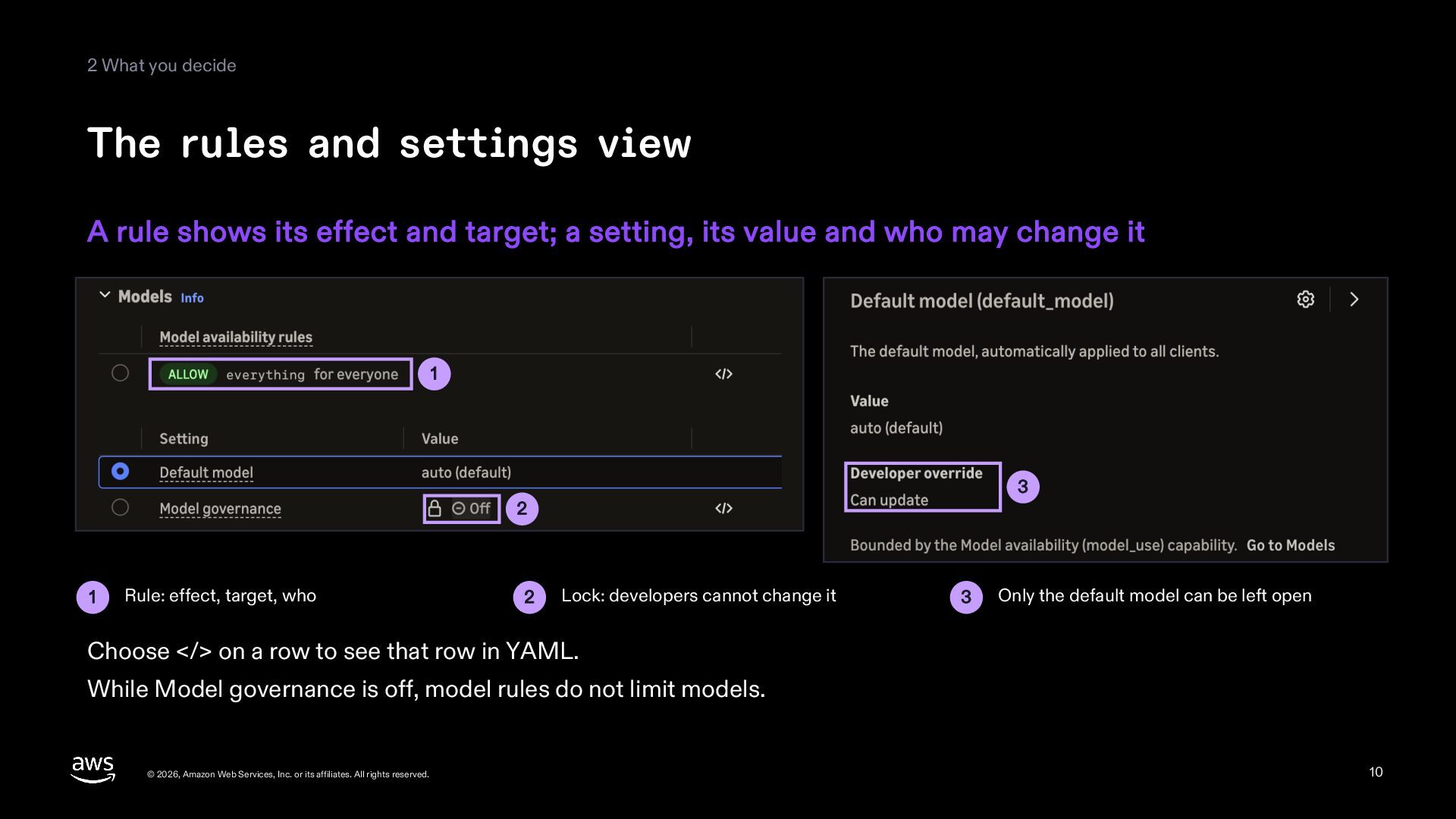
rule shows its effect and target; a setting, its value and who may change it 1 3 2 1 Rule: effect, target, who 2 Lock: developers cannot change it 3 Only the default model can be left open Choose </> on a row to see that row in YAML. While Model governance is off, model rules do not limit models. © 2026, Amazon Web Services, Inc. or its affiliates. All rights reserved. 10 -
2 What you decide Handing out files Add files on
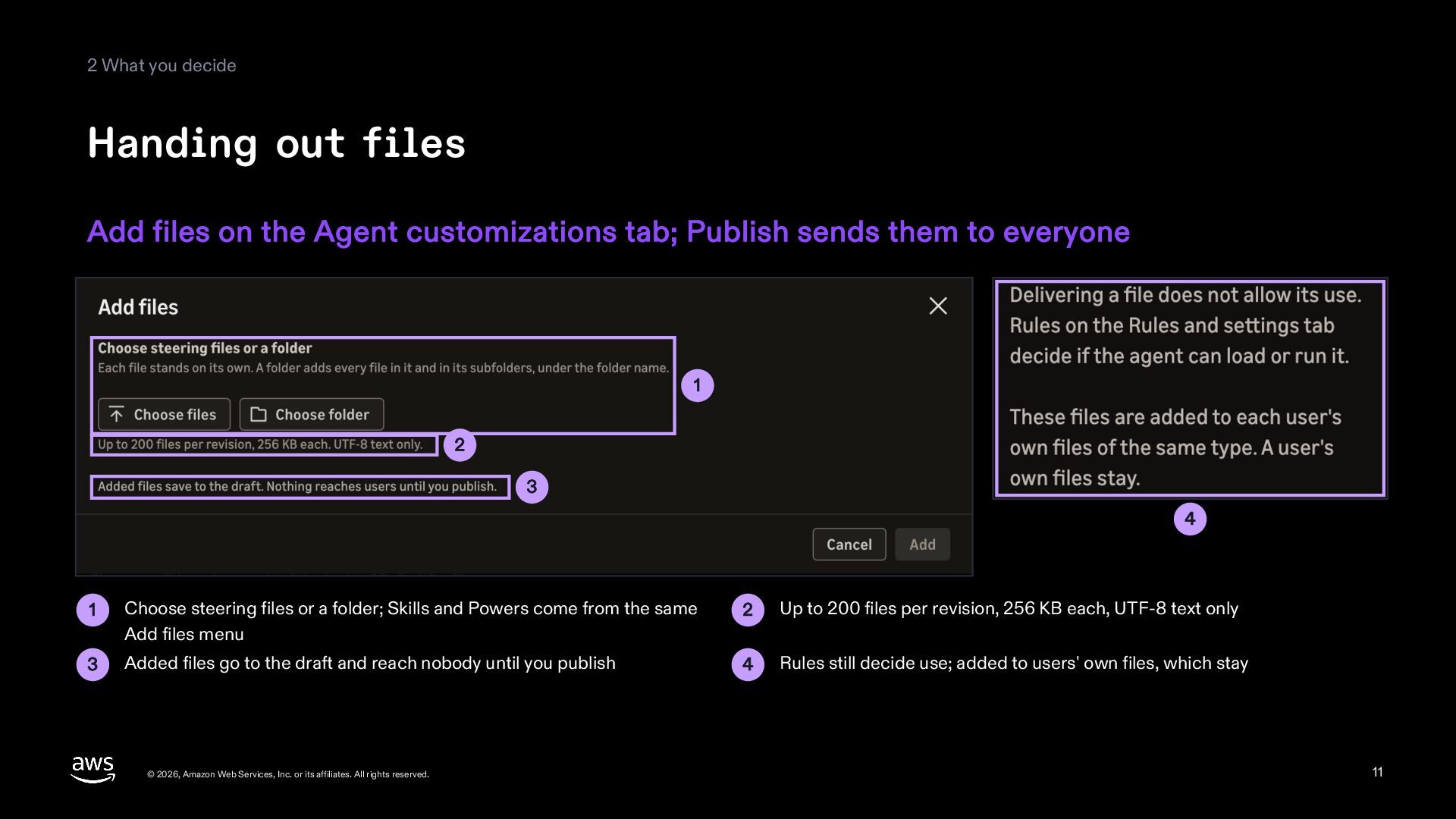
the Agent customizations tab; Publish sends them to everyone 1 2 3 4 1 Choose steering files or a folder; Skills and Powers come from the same Add files menu 2 Up to 200 files per revision, 256 KB each, UTF-8 text only 3 Added files go to the draft and reach nobody until you publish 4 Rules still decide use; added to users' own files, which stay © 2026, Amazon Web Services, Inc. or its affiliates. All rights reserved. 11 -
3 Changing the controls Only published revisions reach everyone; one
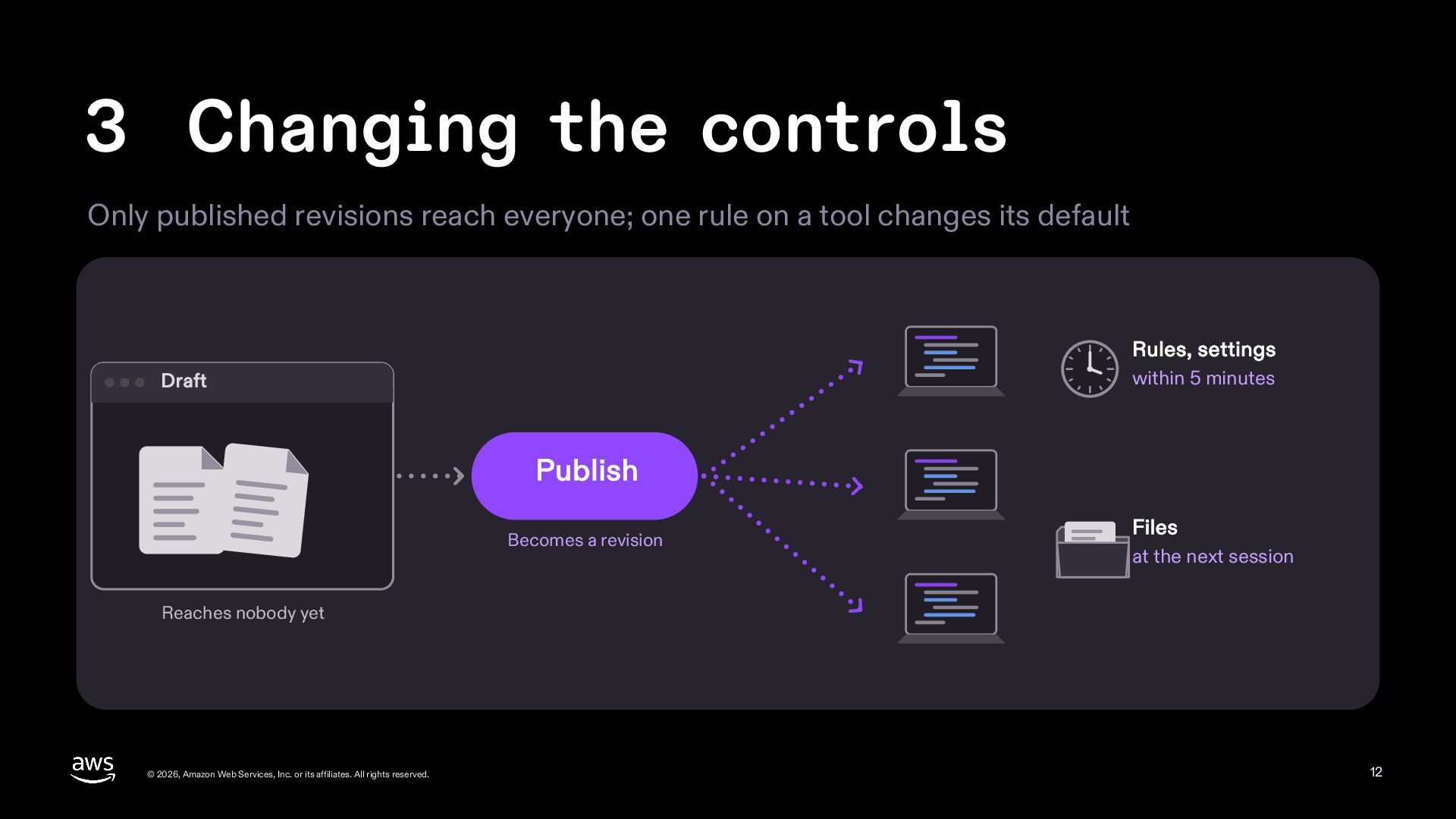
rule on a tool changes its default Rules, settings within 5 minutes Draft Publish Becomes a revision Files at the next session Reaches nobody yet © 2026, Amazon Web Services, Inc. or its affiliates. All rights reserved. 12 -
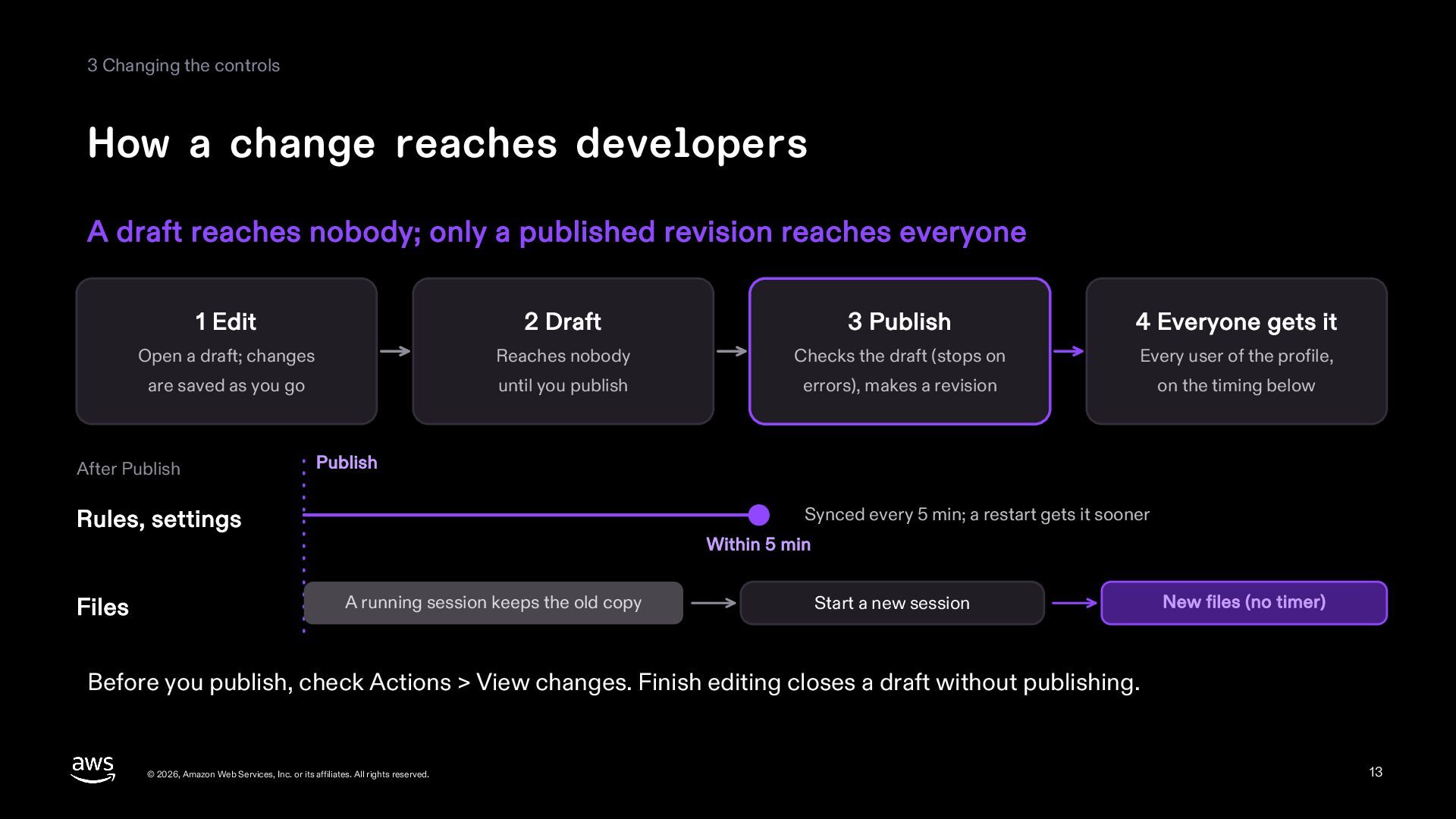
3 Changing the controls How a change reaches developers A
draft reaches nobody; only a published revision reaches everyone 1 Edit 2 Draft 3 Publish 4 Everyone gets it Open a draft; changes Reaches nobody Checks the draft (stops on Every user of the profile, are saved as you go until you publish errors), makes a revision on the timing below After Publish Publish Synced every 5 min; a restart gets it sooner Rules, settings Files Within 5 min A running session keeps the old copy Start a new session New files (no timer) Before you publish, check Actions > View changes. Finish editing closes a draft without publishing. © 2026, Amazon Web Services, Inc. or its affiliates. All rights reserved. 13 -
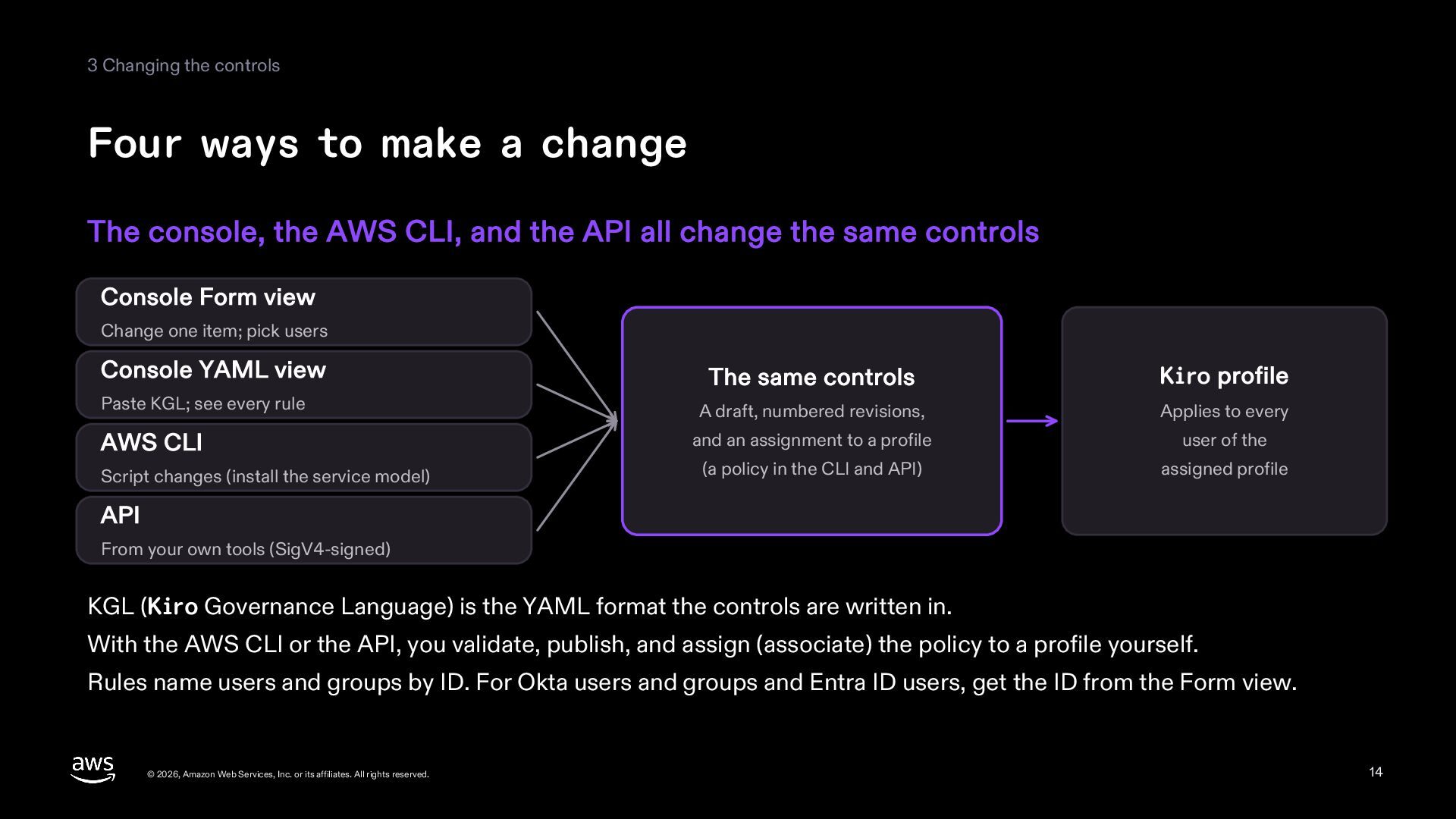
3 Changing the controls Four ways to make a change
The console, the AWS CLI, and the API all change the same controls Console Form view Change one item; pick users Console YAML view The same controls Paste KGL; see every rule Kiro profile A draft, numbered revisions, Applies to every AWS CLI and an assignment to a profile user of the Script changes (install the service model) (a policy in the CLI and API) assigned profile API From your own tools (SigV4-signed) KGL (Kiro Governance Language) is the YAML format the controls are written in. With the AWS CLI or the API, you validate, publish, and assign (associate) the policy to a profile yourself. Rules name users and groups by ID. For Okta users and groups and Entra ID users, get the ID from the Form view. © 2026, Amazon Web Services, Inc. or its affiliates. All rights reserved. 14 -
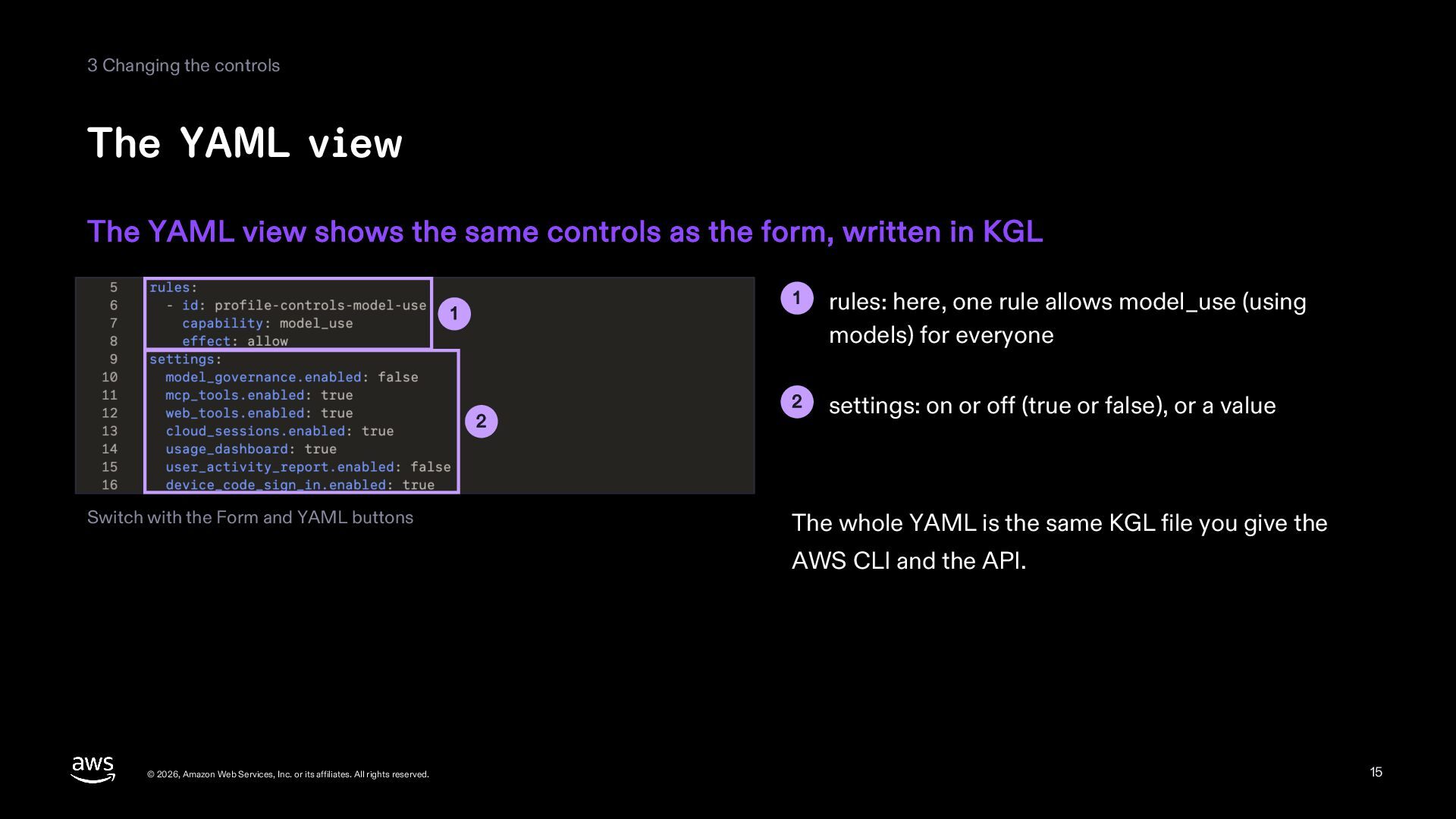
3 Changing the controls The YAML view The YAML view
shows the same controls as the form, written in KGL 1 2 Switch with the Form and YAML buttons 1 rules: here, one rule allows model_use (using models) for everyone 2 settings: on or off (true or false), or a value The whole YAML is the same KGL file you give the AWS CLI and the API. © 2026, Amazon Web Services, Inc. or its affiliates. All rights reserved. 15 -
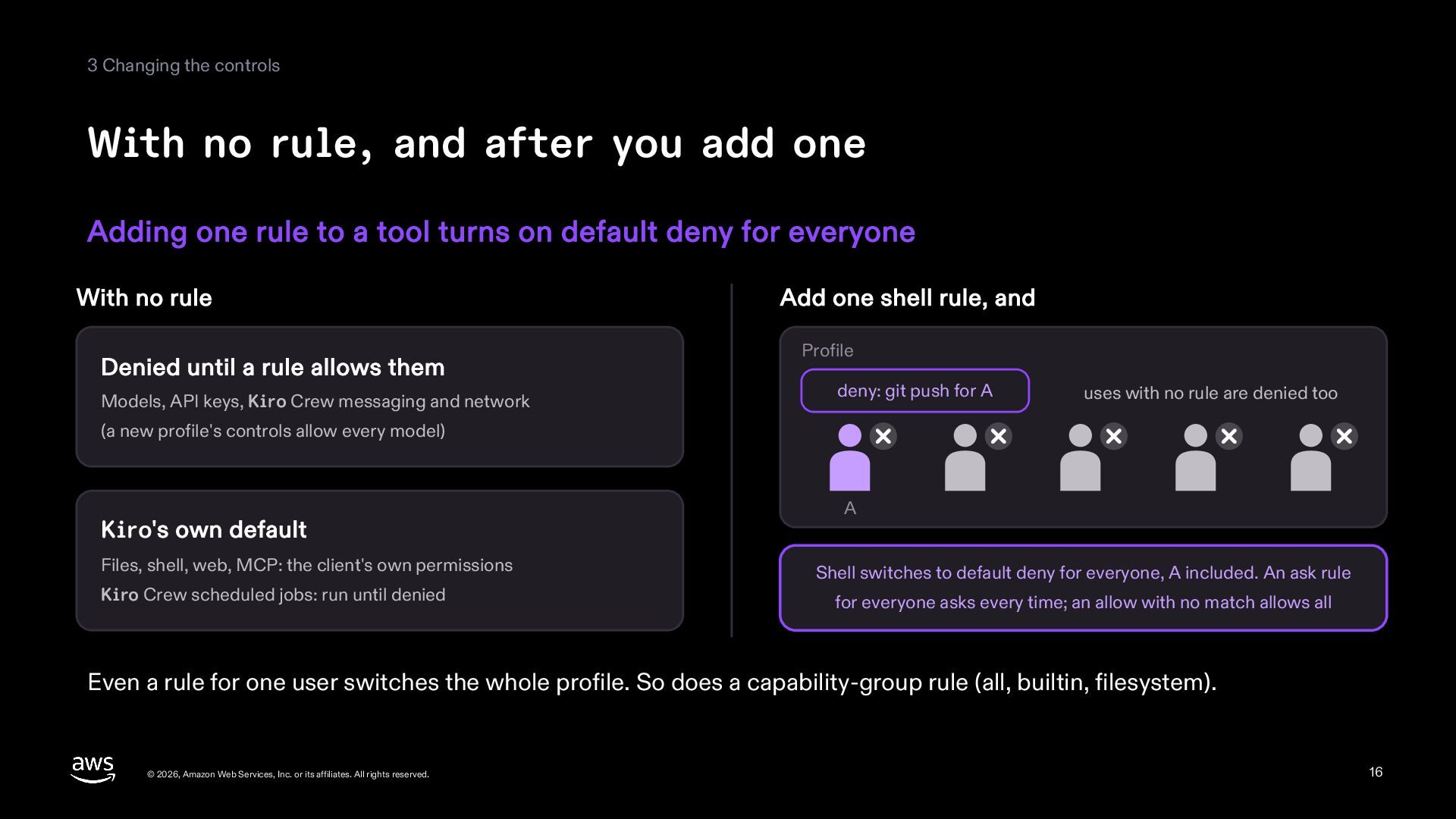
3 Changing the controls With no rule, and after you
add one Adding one rule to a tool turns on default deny for everyone With no rule Denied until a rule allows them Models, API keys, Kiro Crew messaging and network Add one shell rule, and Profile deny: git push for A uses with no rule are denied too (a new profile's controls allow every model) Kiro's own default Files, shell, web, MCP: the client's own permissions Kiro Crew scheduled jobs: run until denied A Shell switches to default deny for everyone, A included. An ask rule for everyone asks every time; an allow with no match allows all Even a rule for one user switches the whole profile. So does a capability-group rule (all, builtin, filesystem). © 2026, Amazon Web Services, Inc. or its affiliates. All rights reserved. 16 -
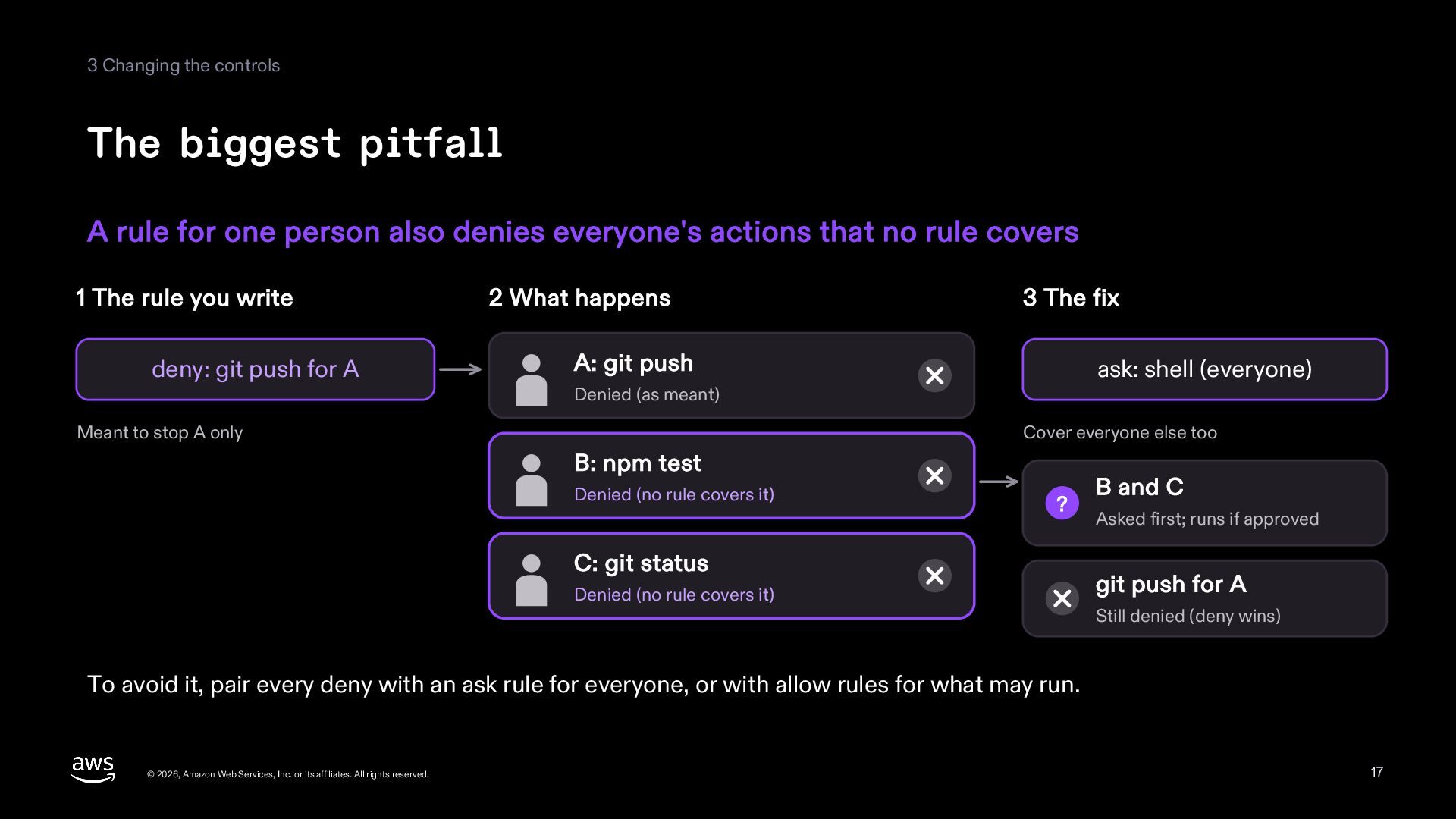
3 Changing the controls The biggest pitfall A rule for
one person also denies everyone's actions that no rule covers 1 The rule you write deny: git push for A 2 What happens 3 The fix A: git push ask: shell (everyone) Denied (as meant) Meant to stop A only Cover everyone else too B: npm test Denied (no rule covers it) ? C: git status Denied (no rule covers it) B and C Asked first; runs if approved git push for A Still denied (deny wins) To avoid it, pair every deny with an ask rule for everyone, or with allow rules for what may run. © 2026, Amazon Web Services, Inc. or its affiliates. All rights reserved. 17 -
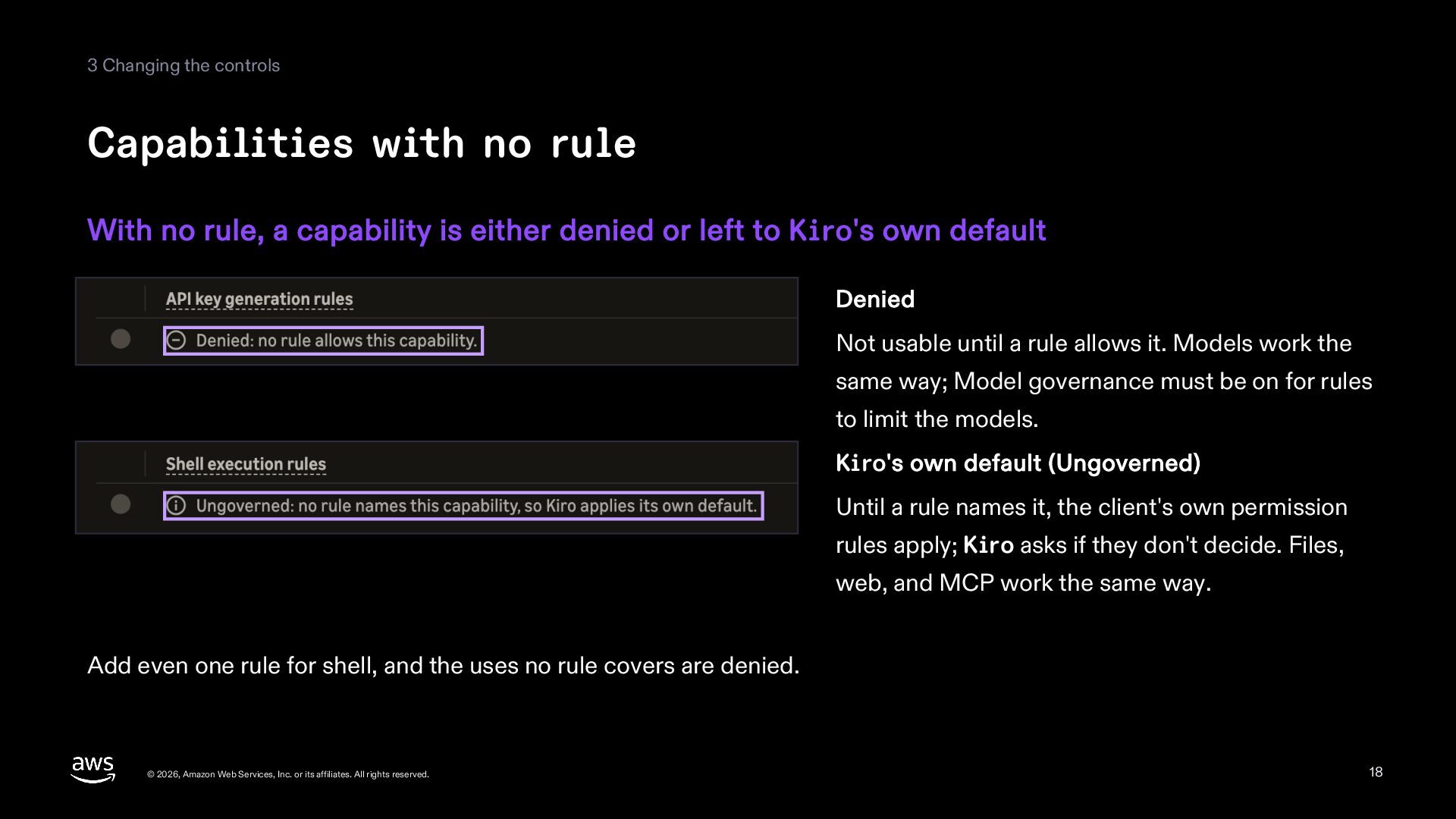
3 Changing the controls Capabilities with no rule With no
rule, a capability is either denied or left to Kiro's own default Denied Not usable until a rule allows it. Models work the same way; Model governance must be on for rules to limit the models. Kiro's own default (Ungoverned) Until a rule names it, the client's own permission rules apply; Kiro asks if they don't decide. Files, web, and MCP work the same way. Add even one rule for shell, and the uses no rule covers are denied. © 2026, Amazon Web Services, Inc. or its affiliates. All rights reserved. 18 -
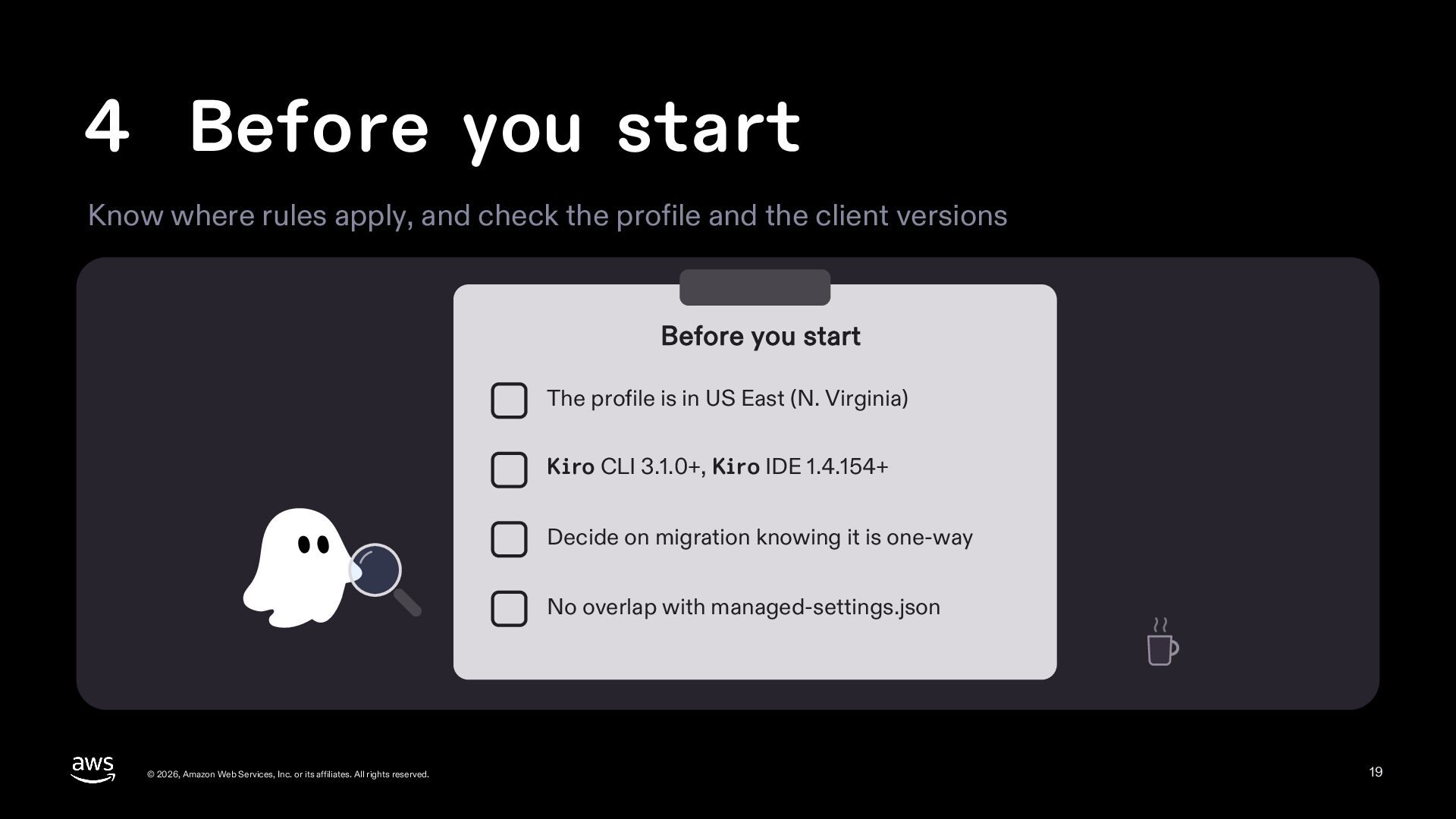
4 Before you start Know where rules apply, and check
the profile and the client versions Before you start The profile is in US East (N. Virginia) Kiro CLI 3.1.0+, Kiro IDE 1.4.154+ Decide on migration knowing it is one-way No overlap with managed-settings.json © 2026, Amazon Web Services, Inc. or its affiliates. All rights reserved. 19 -
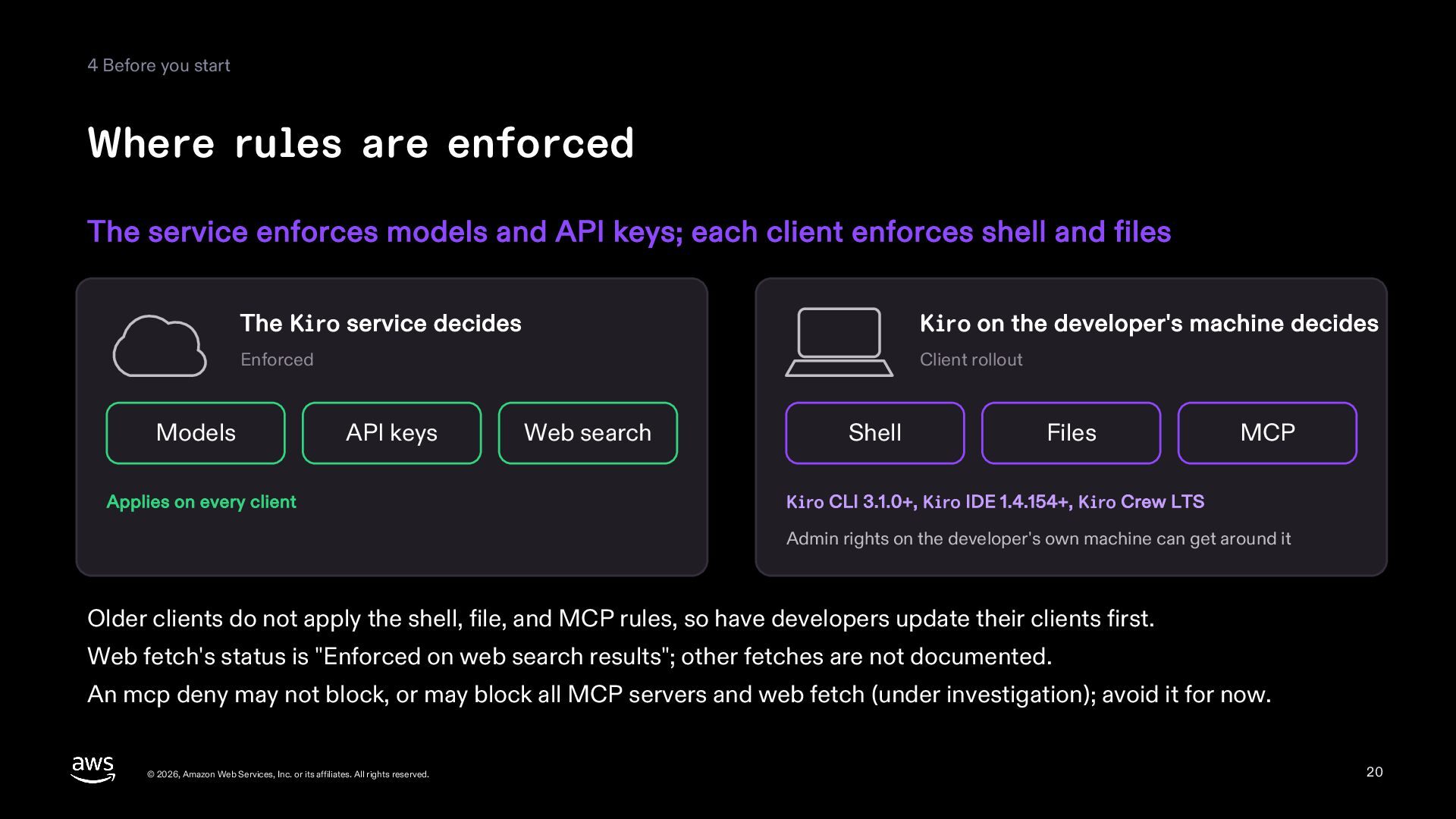
4 Before you start Where rules are enforced The service
enforces models and API keys; each client enforces shell and files The Kiro service decides Kiro on the developer's machine decides Enforced Client rollout Models API keys Applies on every client Web search Shell Files MCP Kiro CLI 3.1.0+, Kiro IDE 1.4.154+, Kiro Crew LTS Admin rights on the developer's own machine can get around it Older clients do not apply the shell, file, and MCP rules, so have developers update their clients first. Web fetch's status is "Enforced on web search results"; other fetches are not documented. An mcp deny may not block, or may block all MCP servers and web fetch (under investigation); avoid it for now. © 2026, Amazon Web Services, Inc. or its affiliates. All rights reserved. 20 -
4 Before you start What to check before you start
It is a preview in US East (N. Virginia); migrating a profile is one-way A new profile Kiro creates and publishes the controls (every model allowed) Kiro profile Turn on Model governance so model rules limit models (off at first) US East (N. Virginia) IAM Identity Center, Okta, or Microsoft Entra ID An existing profile Migrate (one-way) Settings are copied to the controls; no MCP Opt in when Settings shows "Migrate or web rules are created. Overages, the to the new experience"; first open encryption key, and member account "See how your settings map" subscriptions stay on Settings. Check Model governance and the model rules. Permissions: q:*EnterpriseManagement* (plus codewhisperer:StartEnterpriseManagementOptIn to migrate). Try a first change on a small profile. You cannot show developers a message when you block, so tell them whom to ask. © 2026, Amazon Web Services, Inc. or its affiliates. All rights reserved. 21 -
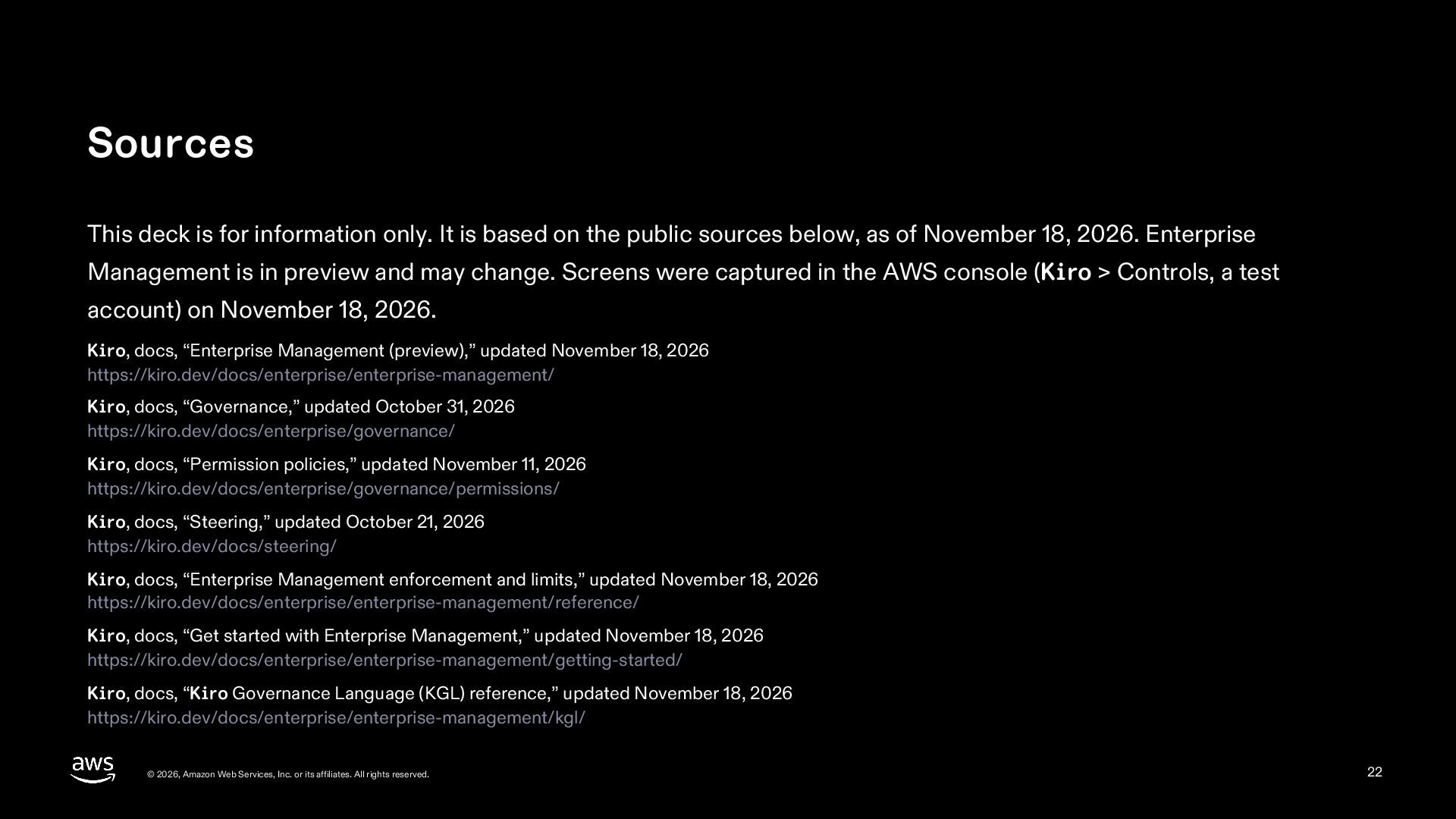
Sources This deck is for information only. It is based
on the public sources below, as of November 18, 2026. Enterprise Management is in preview and may change. Screens were captured in the AWS console (Kiro > Controls, a test account) on November 18, 2026. Kiro, docs, “Enterprise Management (preview),” updated November 18, 2026 https://kiro.dev/docs/enterprise/enterprise-management/ Kiro, docs, “Governance,” updated October 31, 2026 https://kiro.dev/docs/enterprise/governance/ Kiro, docs, “Permission policies,” updated November 11, 2026 https://kiro.dev/docs/enterprise/governance/permissions/ Kiro, docs, “Steering,” updated October 21, 2026 https://kiro.dev/docs/steering/ Kiro, docs, “Enterprise Management enforcement and limits,” updated November 18, 2026 https://kiro.dev/docs/enterprise/enterprise-management/reference/ Kiro, docs, “Get started with Enterprise Management,” updated November 18, 2026 https://kiro.dev/docs/enterprise/enterprise-management/getting-started/ Kiro, docs, “Kiro Governance Language (KGL) reference,” updated November 18, 2026 https://kiro.dev/docs/enterprise/enterprise-management/kgl/ © 2026, Amazon Web Services, Inc. or its affiliates. All rights reserved. 22