Share
Embed
Kiro credit pooling: Working across multiple AWS accounts, and estimating a switch
A reference deck on Kiro credit pooling (Credit sharing in the console) for organizations that use Kiro in more than one AWS account. It explains that a pool belongs to one Kiro profile (at most one per AWS account and Region) and is not shared across AWS accounts or Regions, how to compare today's monthly cost with the pool cost (seats × $20 plus credits beyond the seats × $0.04), one example where the pool is cheaper and one where it costs more, a table for your own numbers, and a pilot with some users for one whole billing month before you expand. Prices and mechanisms are from public sources and kiro.dev list prices as of November 18, 2026, excluding taxes.

Riku INADA PRO
November 21, 2026
Transcript
39 slides
-
Reference Kiro credit pooling Working across multiple AWS accounts, and
estimating a switch For deciding whether to switch, and which profile to pool users in For Kiro customers November 2026 Amazon Web Services © 2026, Amazon Web Services, Inc. or its affiliates. All rights reserved. 1 -
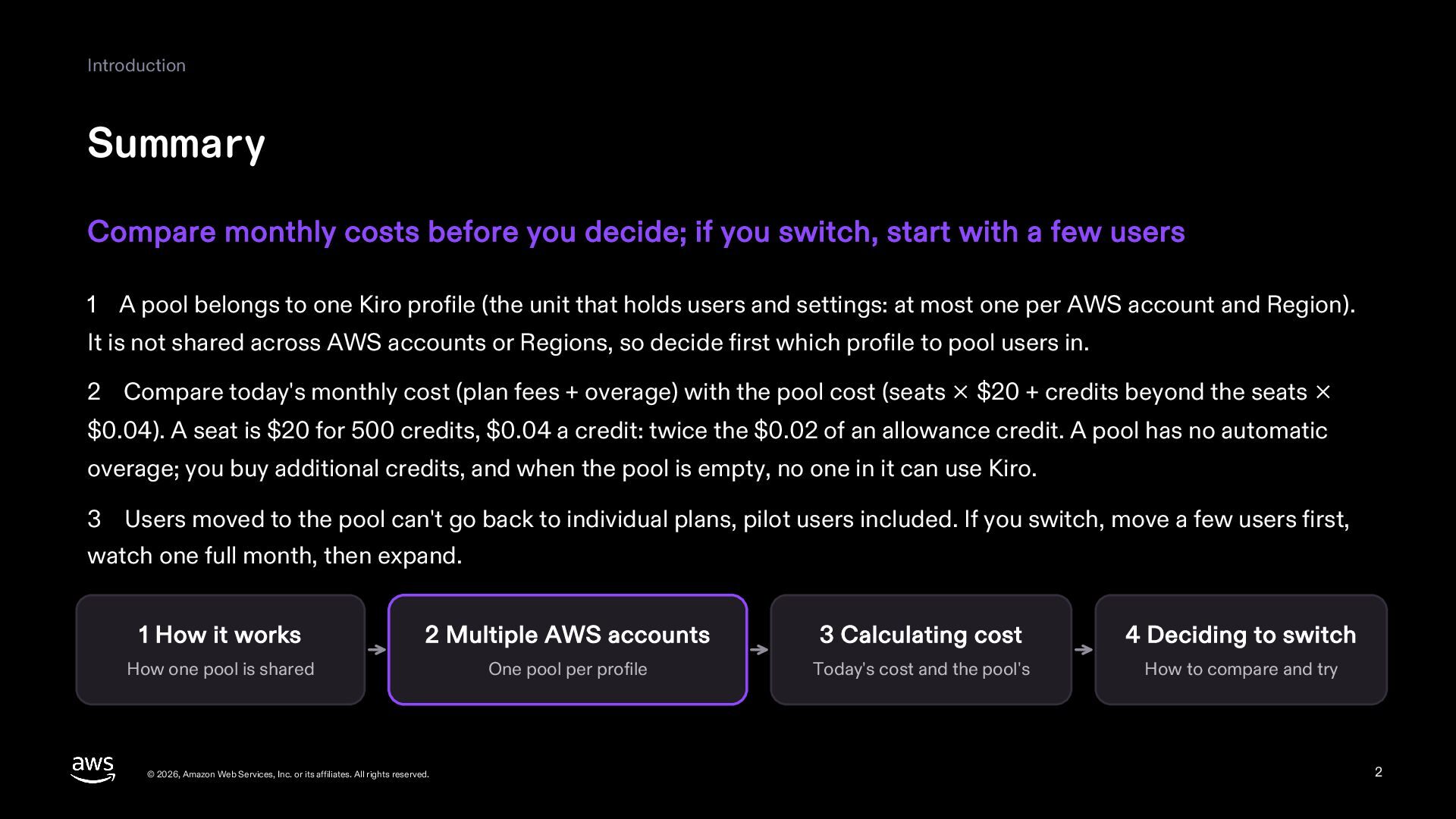
Introduction Summary Compare monthly costs before you decide; if you
switch, start with a few users 1 A pool belongs to one Kiro profile (the unit that holds users and settings: at most one per AWS account and Region). It is not shared across AWS accounts or Regions, so decide first which profile to pool users in. 2 Compare today's monthly cost (plan fees + overage) with the pool cost (seats × $20 + credits beyond the seats × $0.04). A seat is $20 for 500 credits, $0.04 a credit: twice the $0.02 of an allowance credit. A pool has no automatic overage; you buy additional credits, and when the pool is empty, no one in it can use Kiro. 3 Users moved to the pool can't go back to individual plans, pilot users included. If you switch, move a few users first, watch one full month, then expand. 1 How it works 2 Multiple AWS accounts 3 Calculating cost 4 Deciding to switch How one pool is shared One pool per profile Today's cost and the pool's How to compare and try © 2026, Amazon Web Services, Inc. or its affiliates. All rights reserved. 2 -
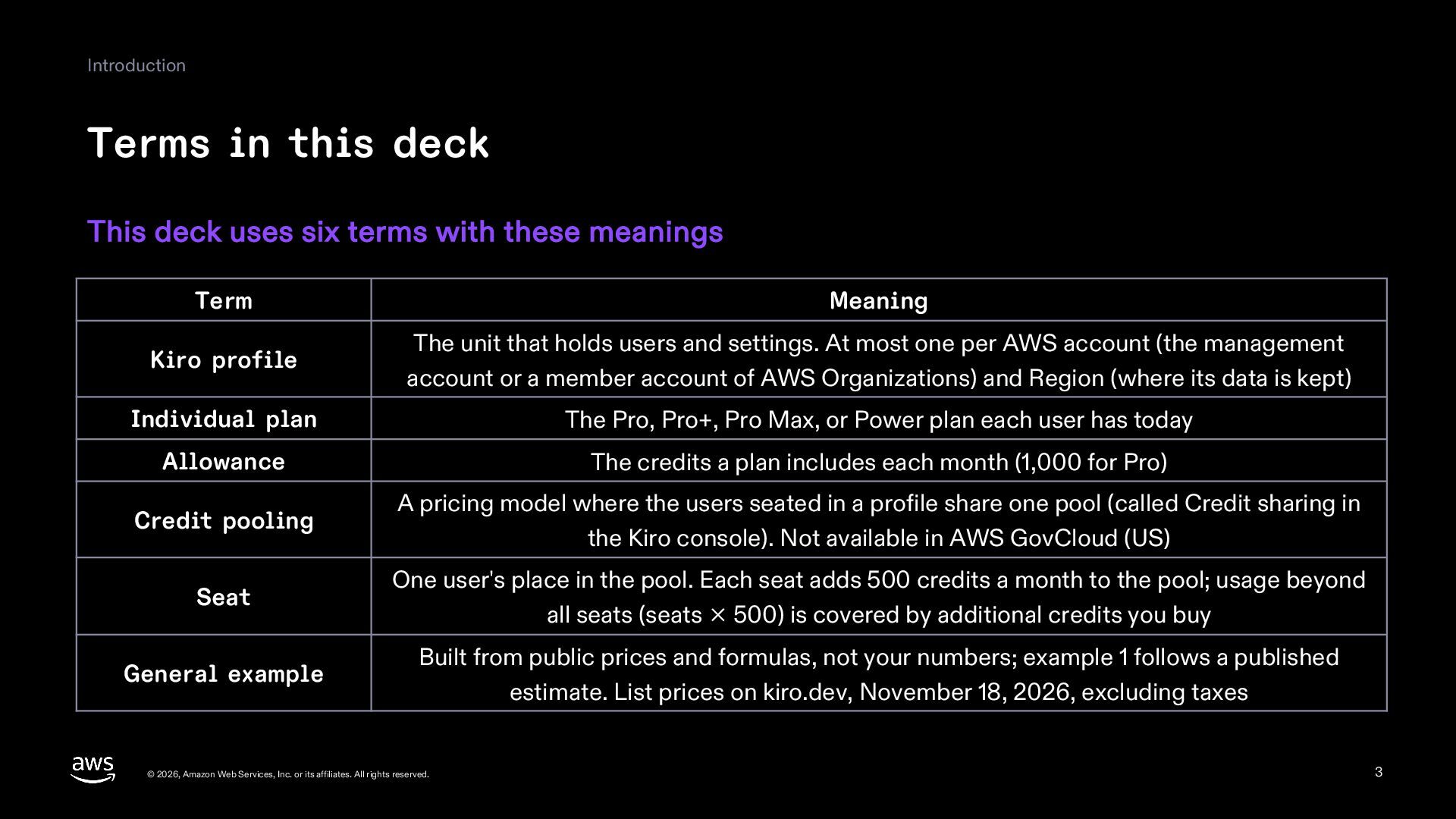
Introduction Terms in this deck This deck uses six terms
with these meanings Term Meaning Kiro profile The unit that holds users and settings. At most one per AWS account (the management account or a member account of AWS Organizations) and Region (where its data is kept) Individual plan The Pro, Pro+, Pro Max, or Power plan each user has today Allowance The credits a plan includes each month (1,000 for Pro) Credit pooling A pricing model where the users seated in a profile share one pool (called Credit sharing in the Kiro console). Not available in AWS GovCloud (US) Seat One user's place in the pool. Each seat adds 500 credits a month to the pool; usage beyond all seats (seats × 500) is covered by additional credits you buy General example Built from public prices and formulas, not your numbers; example 1 follows a published estimate. List prices on kiro.dev, November 18, 2026, excluding taxes © 2026, Amazon Web Services, Inc. or its affiliates. All rights reserved. 3 -
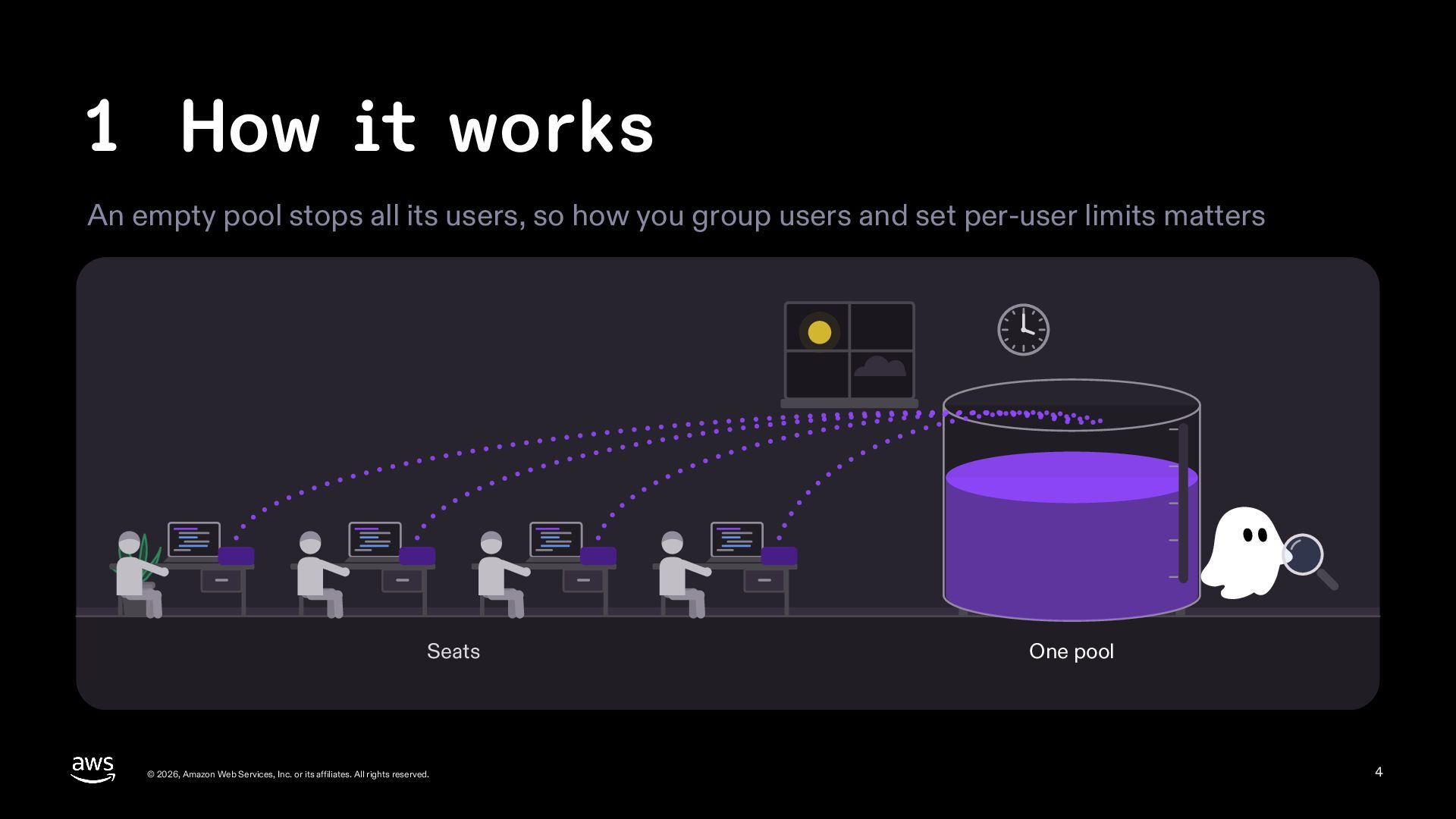
1 How it works An empty pool stops all its
users, so how you group users and set per-user limits matters Seats © 2026, Amazon Web Services, Inc. or its affiliates. All rights reserved. One pool 4 -
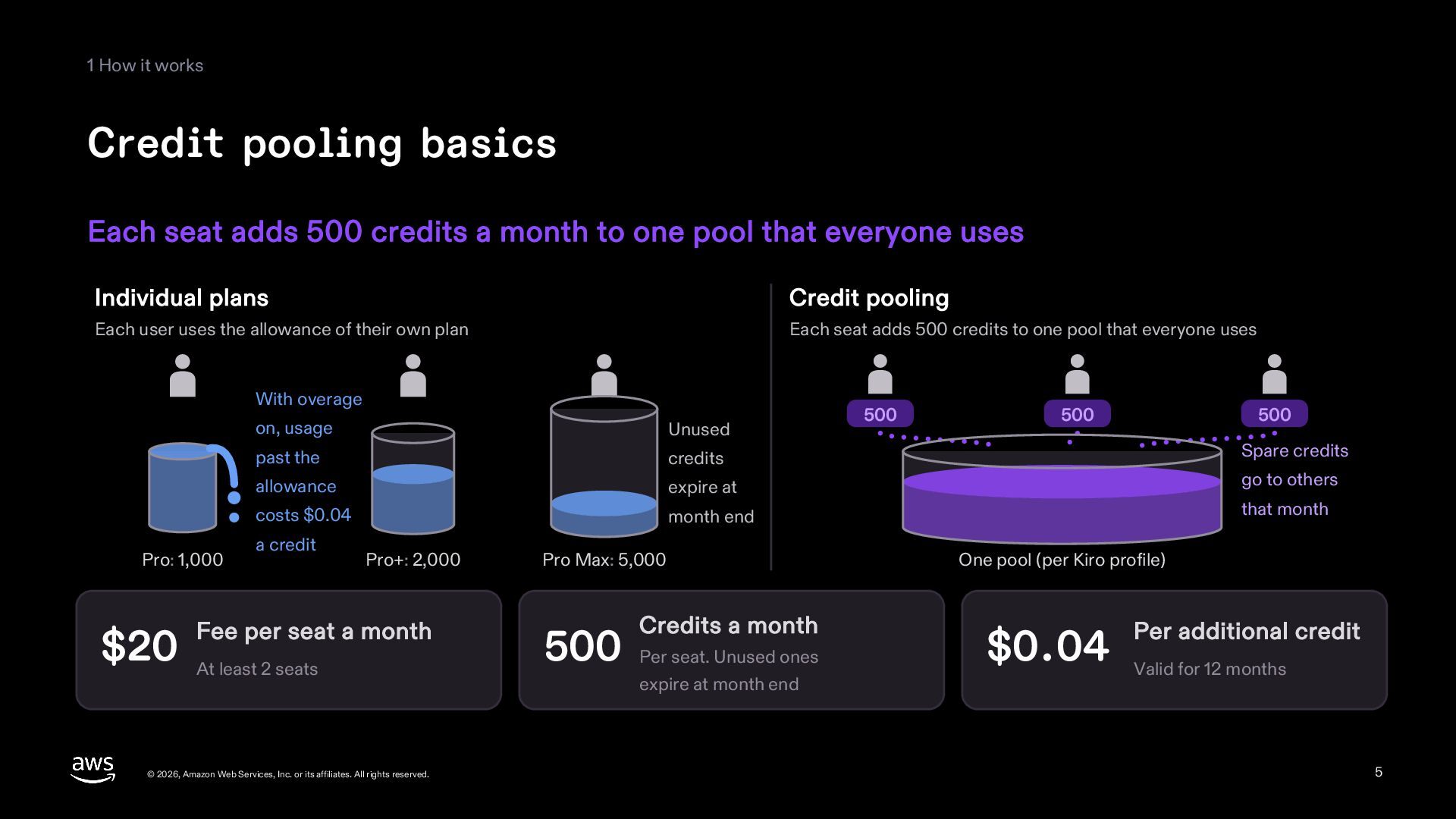
1 How it works Credit pooling basics Each seat adds
500 credits a month to one pool that everyone uses Individual plans Credit pooling Each user uses the allowance of their own plan Each seat adds 500 credits to one pool that everyone uses With overage Pro: 1,000 on, usage Unused past the credits allowance expire at costs $0.04 month end a credit Pro+: 2,000 Fee per seat a month $20 At least 2 seats © 2026, Amazon Web Services, Inc. or its affiliates. All rights reserved. Pro Max: 5,000 Credits a month 500 Per seat. Unused ones expire at month end 500 500 500 Spare credits go to others that month One pool (per Kiro profile) Per additional credit $0.04 Valid for 12 months 5 -
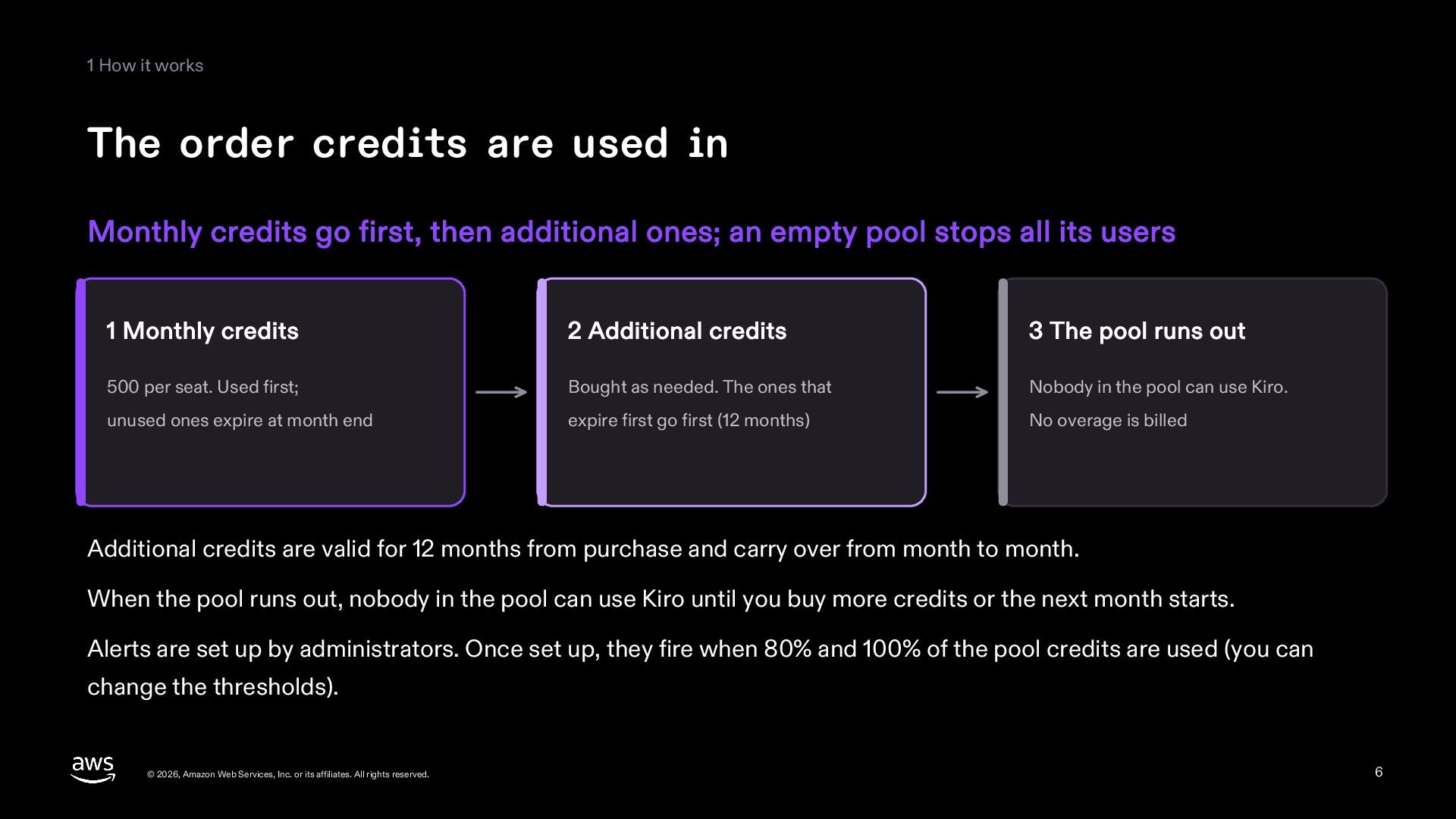
1 How it works The order credits are used in
Monthly credits go first, then additional ones; an empty pool stops all its users 1 Monthly credits 2 Additional credits 3 The pool runs out 500 per seat. Used first; Bought as needed. The ones that Nobody in the pool can use Kiro. unused ones expire at month end expire first go first (12 months) No overage is billed Additional credits are valid for 12 months from purchase and carry over from month to month. When the pool runs out, nobody in the pool can use Kiro until you buy more credits or the next month starts. Alerts are set up by administrators. Once set up, they fire when 80% and 100% of the pool credits are used (you can change the thresholds). © 2026, Amazon Web Services, Inc. or its affiliates. All rights reserved. 6 -
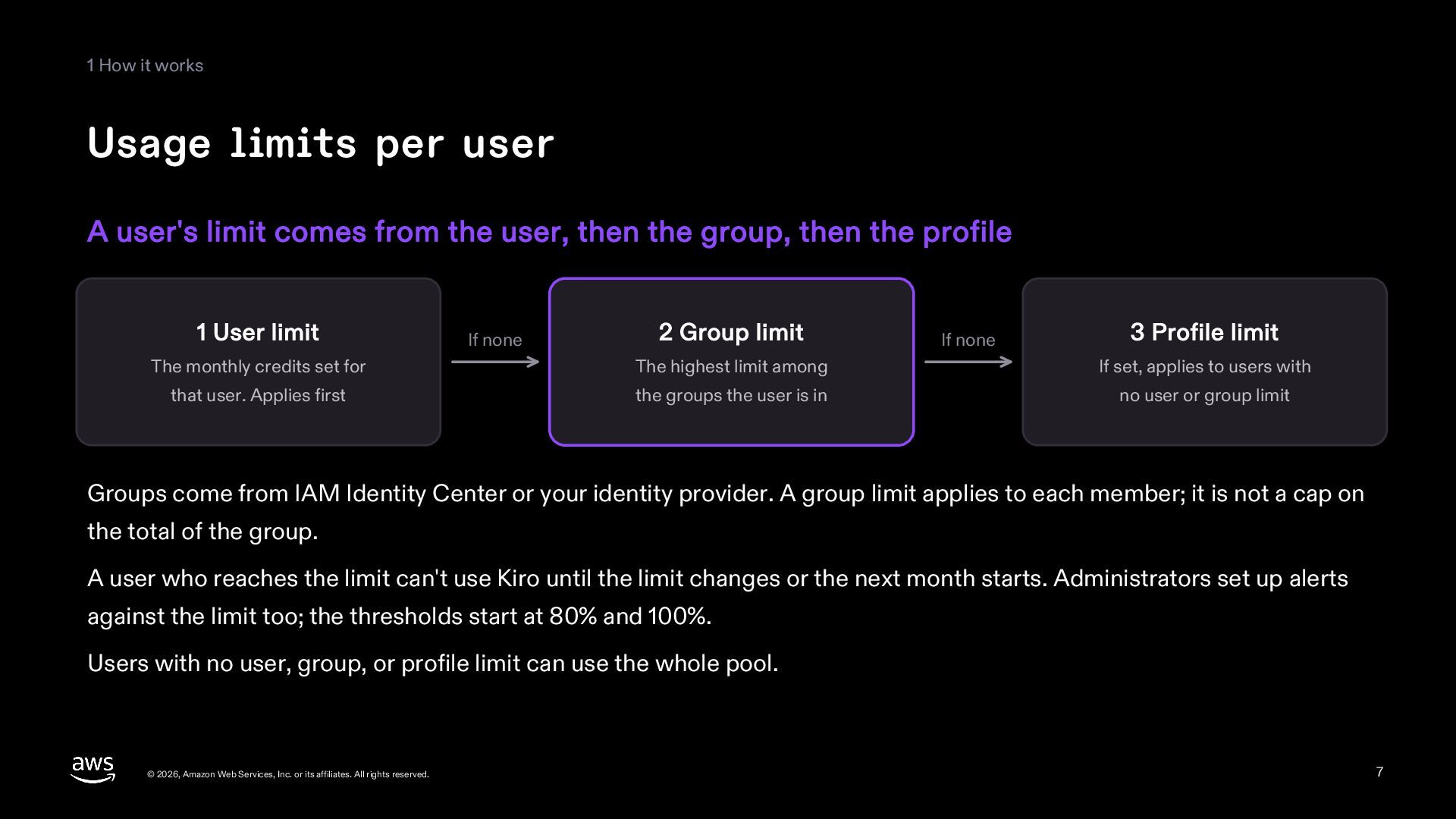
1 How it works Usage limits per user A user's
limit comes from the user, then the group, then the profile 1 User limit If none 2 Group limit If none 3 Profile limit The monthly credits set for The highest limit among If set, applies to users with that user. Applies first the groups the user is in no user or group limit Groups come from IAM Identity Center or your identity provider. A group limit applies to each member; it is not a cap on the total of the group. A user who reaches the limit can't use Kiro until the limit changes or the next month starts. Administrators set up alerts against the limit too; the thresholds start at 80% and 100%. Users with no user, group, or profile limit can use the whole pool. © 2026, Amazon Web Services, Inc. or its affiliates. All rights reserved. 7 -
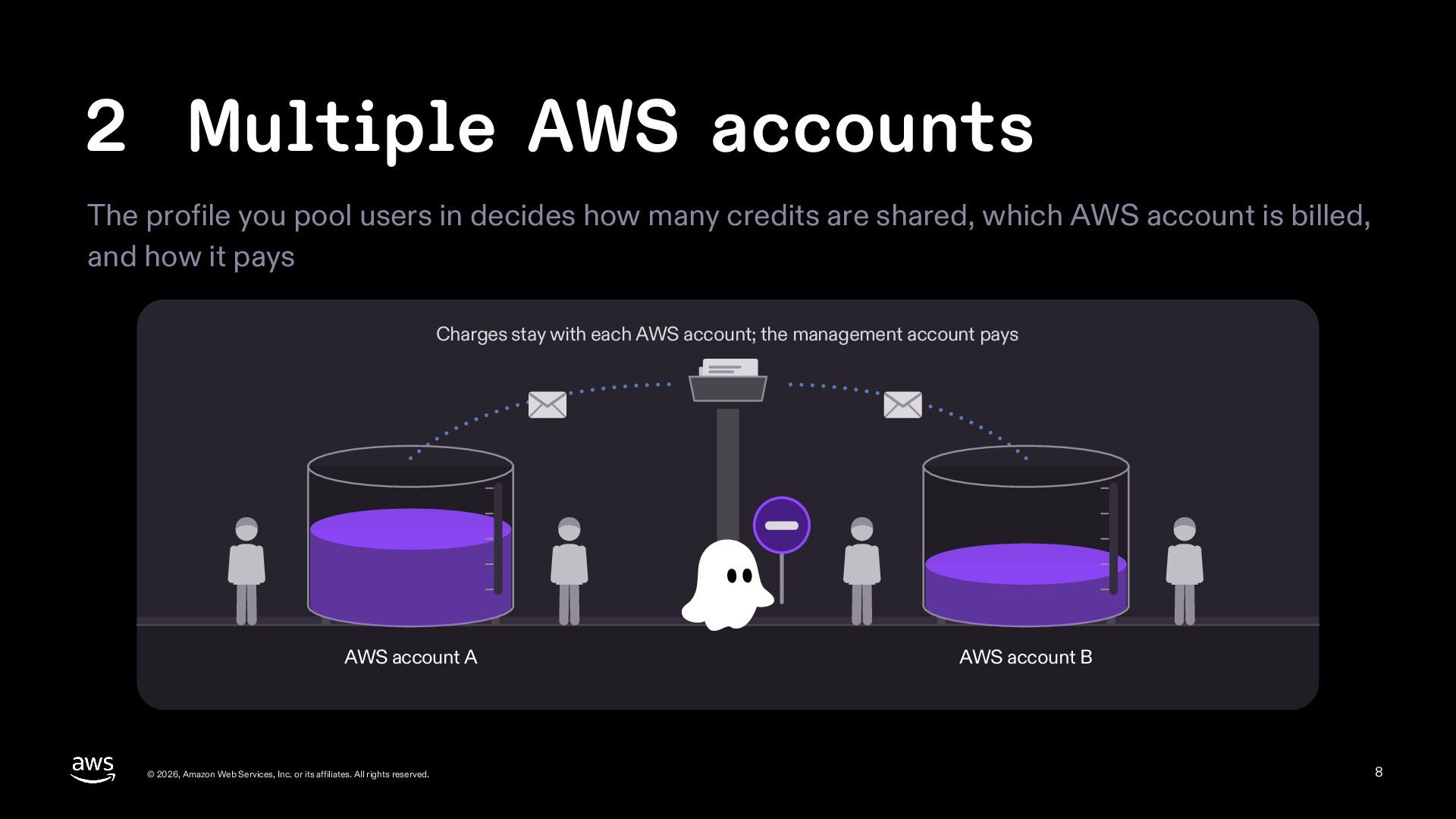
2 Multiple AWS accounts The profile you pool users in
decides how many credits are shared, which AWS account is billed, and how it pays Charges stay with each AWS account; the management account pays AWS account A © 2026, Amazon Web Services, Inc. or its affiliates. All rights reserved. AWS account B 8 -
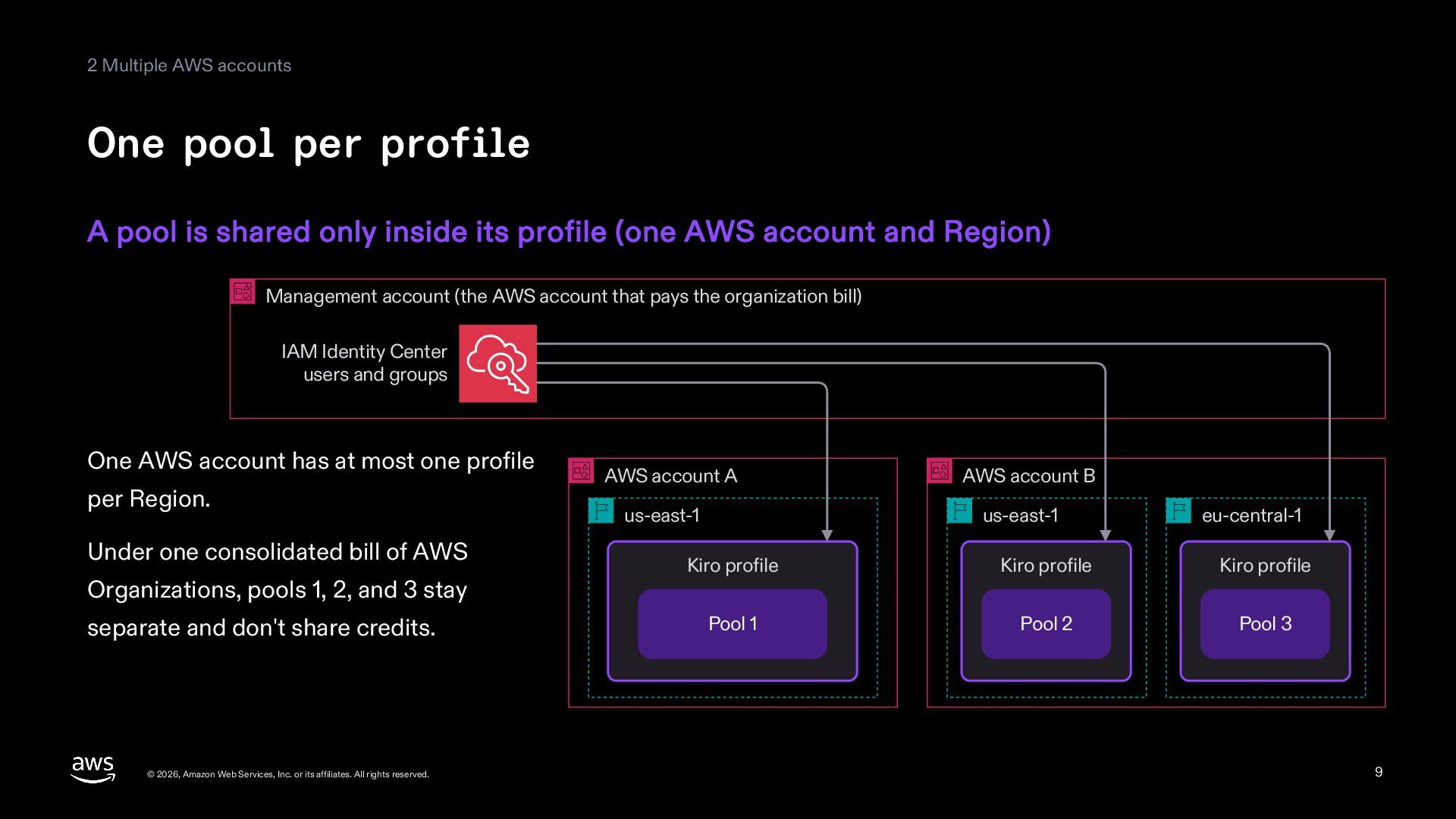
2 Multiple AWS accounts One pool per profile A pool
is shared only inside its profile (one AWS account and Region) Management account (the AWS account that pays the organization bill) IAM Identity Center users and groups One AWS account has at most one profile per Region. Under one consolidated bill of AWS Organizations, pools 1, 2, and 3 stay separate and don't share credits. © 2026, Amazon Web Services, Inc. or its affiliates. All rights reserved. AWS account A AWS account B us-east-1 us-east-1 eu-central-1 Kiro profile Kiro profile Kiro profile Pool 1 Pool 2 Pool 3 9 -
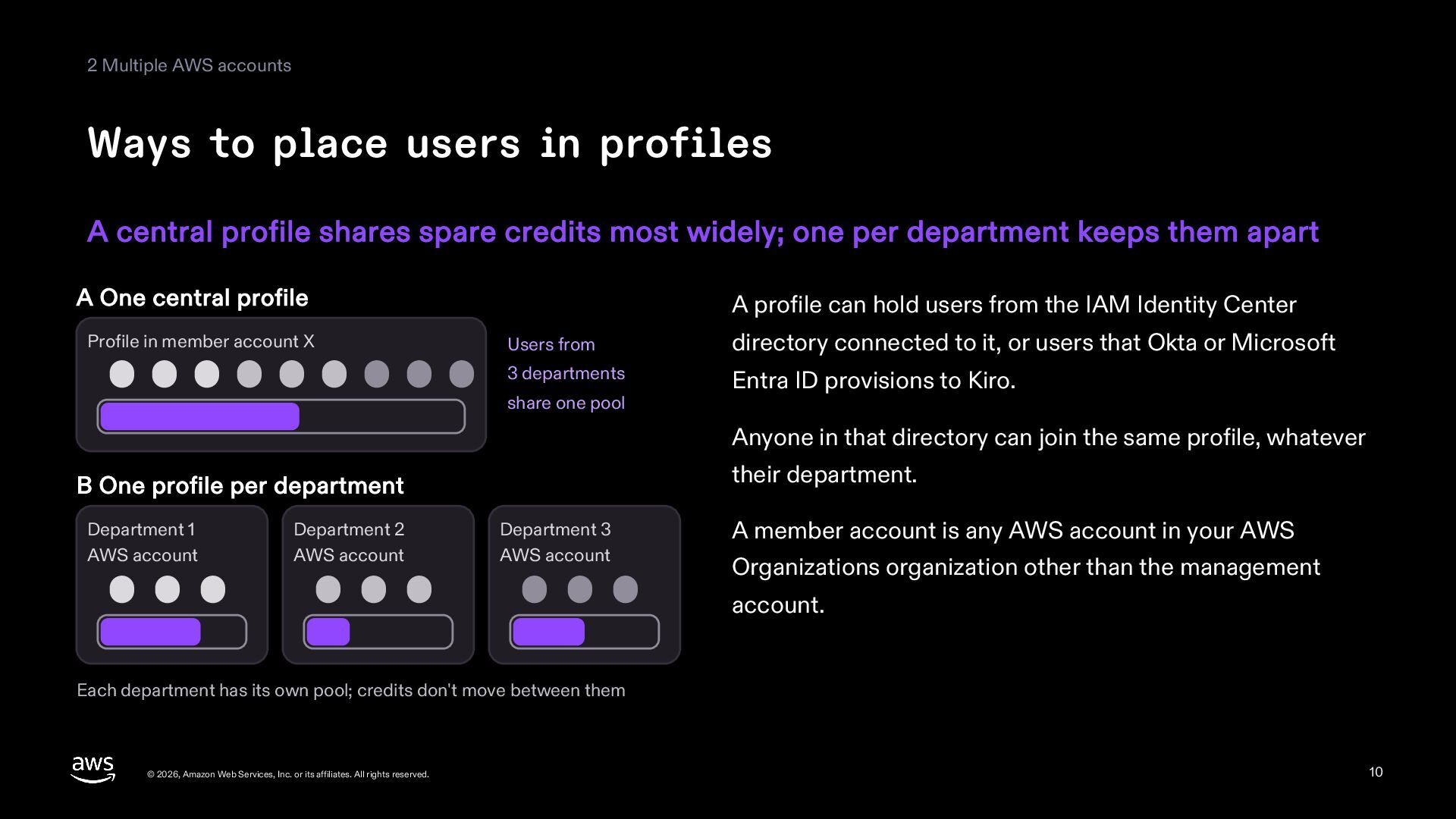
2 Multiple AWS accounts Ways to place users in profiles
A central profile shares spare credits most widely; one per department keeps them apart A One central profile Profile in member account X A profile can hold users from the IAM Identity Center Users from directory connected to it, or users that Okta or Microsoft 3 departments Entra ID provisions to Kiro. share one pool Anyone in that directory can join the same profile, whatever their department. B One profile per department Department 1 AWS account Department 2 AWS account Department 3 AWS account A member account is any AWS account in your AWS Organizations organization other than the management account. Each department has its own pool; credits don't move between them © 2026, Amazon Web Services, Inc. or its affiliates. All rights reserved. 10 -
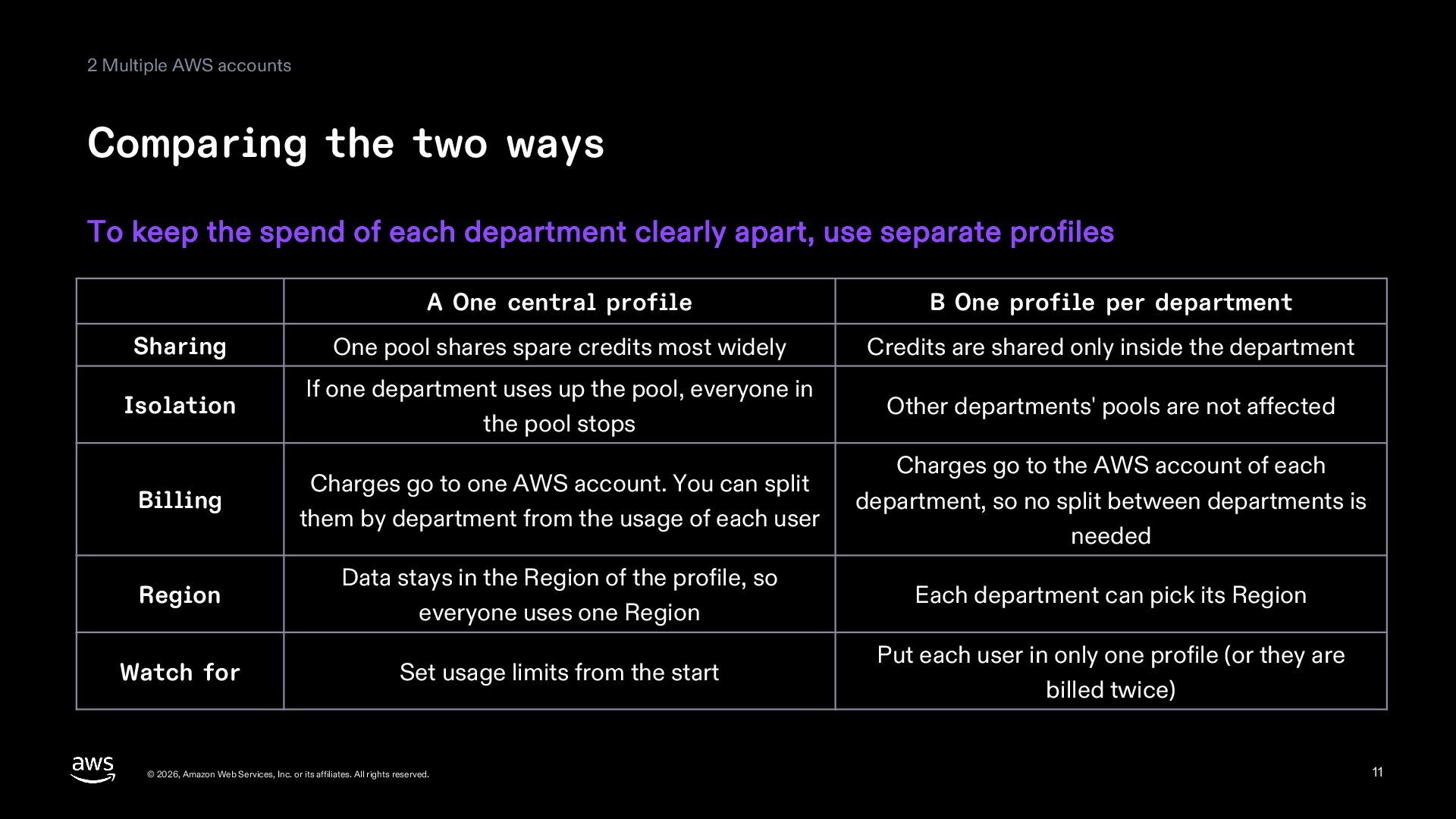
2 Multiple AWS accounts Comparing the two ways To keep
the spend of each department clearly apart, use separate profiles A One central profile B One profile per department Sharing One pool shares spare credits most widely Credits are shared only inside the department Isolation If one department uses up the pool, everyone in the pool stops Other departments' pools are not affected Billing Charges go to one AWS account. You can split them by department from the usage of each user Charges go to the AWS account of each department, so no split between departments is needed Region Data stays in the Region of the profile, so everyone uses one Region Each department can pick its Region Watch for Set usage limits from the start Put each user in only one profile (or they are billed twice) © 2026, Amazon Web Services, Inc. or its affiliates. All rights reserved. 11 -
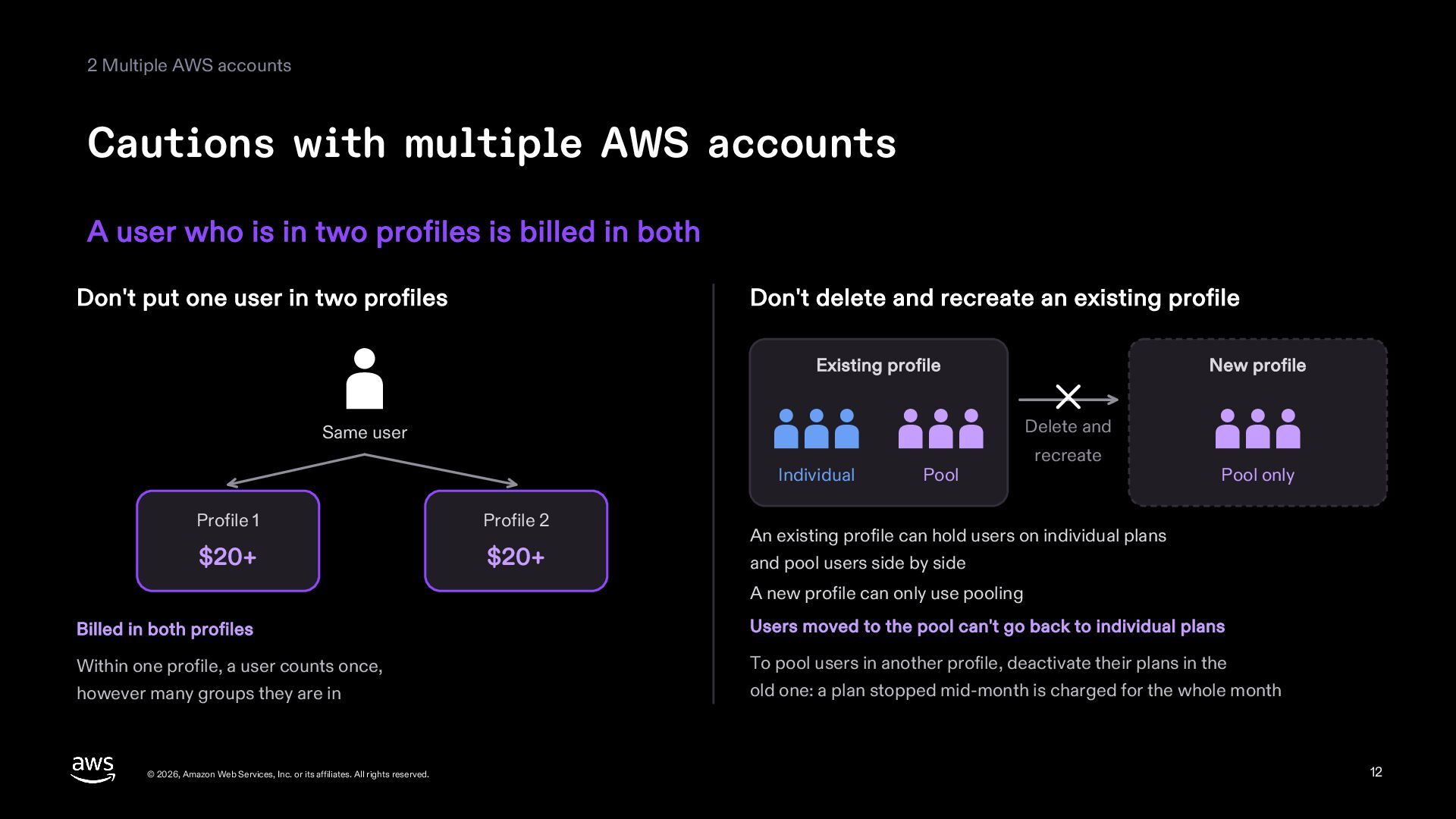
2 Multiple AWS accounts Cautions with multiple AWS accounts A
user who is in two profiles is billed in both Don't put one user in two profiles Don't delete and recreate an existing profile Existing profile New profile Delete and Same user Individual Profile 1 Profile 2 $20+ $20+ Pool recreate Pool only An existing profile can hold users on individual plans and pool users side by side A new profile can only use pooling Billed in both profiles Users moved to the pool can't go back to individual plans Within one profile, a user counts once, however many groups they are in To pool users in another profile, deactivate their plans in the old one: a plan stopped mid-month is charged for the whole month © 2026, Amazon Web Services, Inc. or its affiliates. All rights reserved. 12 -
2 Multiple AWS accounts Cautions with multiple AWS accounts (continued)
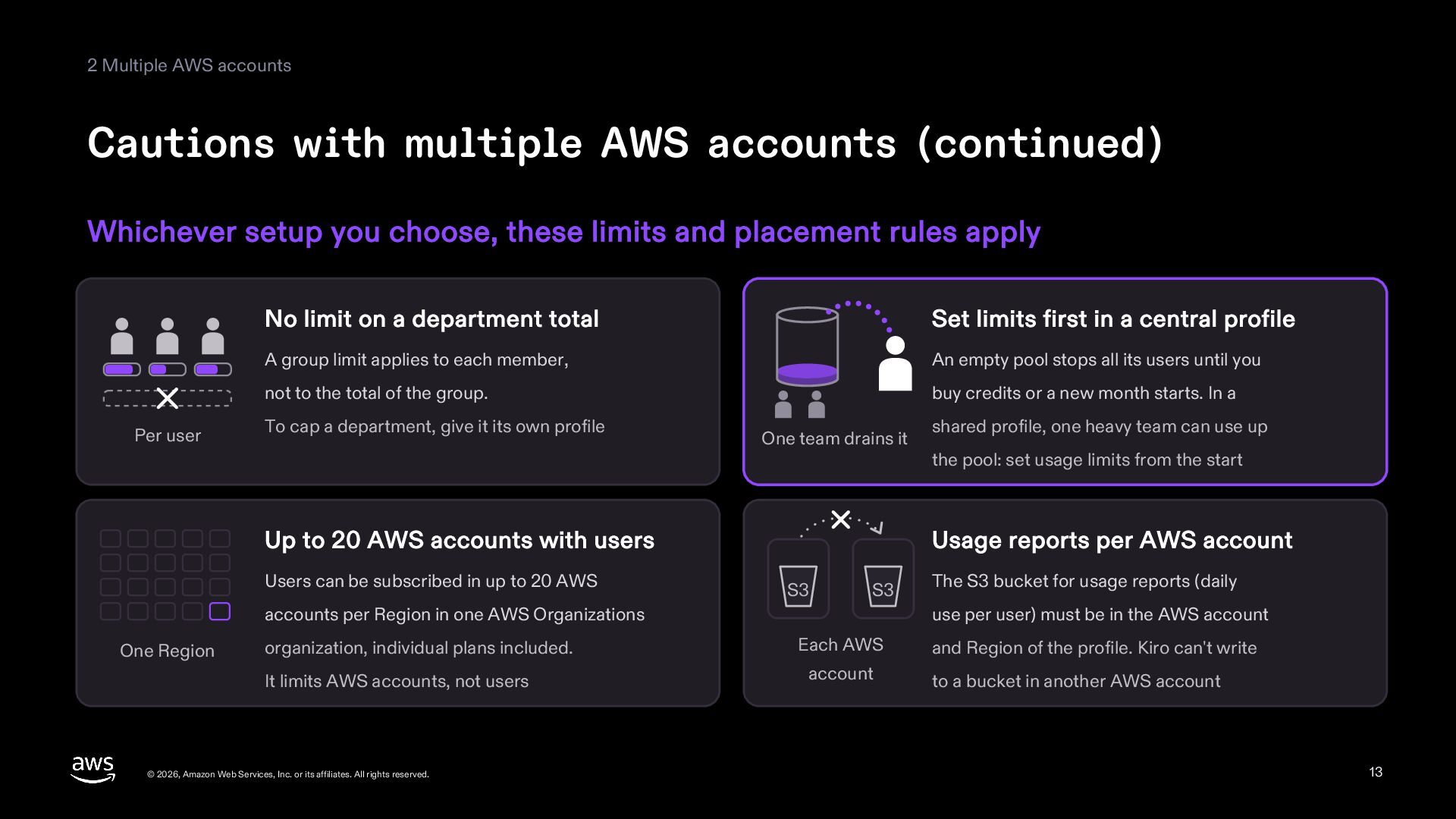
Whichever setup you choose, these limits and placement rules apply Per user No limit on a department total Set limits first in a central profile A group limit applies to each member, An empty pool stops all its users until you not to the total of the group. buy credits or a new month starts. In a To cap a department, give it its own profile One team drains it Up to 20 AWS accounts with users Users can be subscribed in up to 20 AWS the pool: set usage limits from the start Usage reports per AWS account S3 S3 accounts per Region in one AWS Organizations One Region shared profile, one heavy team can use up The S3 bucket for usage reports (daily use per user) must be in the AWS account organization, individual plans included. Each AWS and Region of the profile. Kiro can't write It limits AWS accounts, not users account to a bucket in another AWS account © 2026, Amazon Web Services, Inc. or its affiliates. All rights reserved. 13 -
2 Multiple AWS accounts AWS accounts and pools The 20
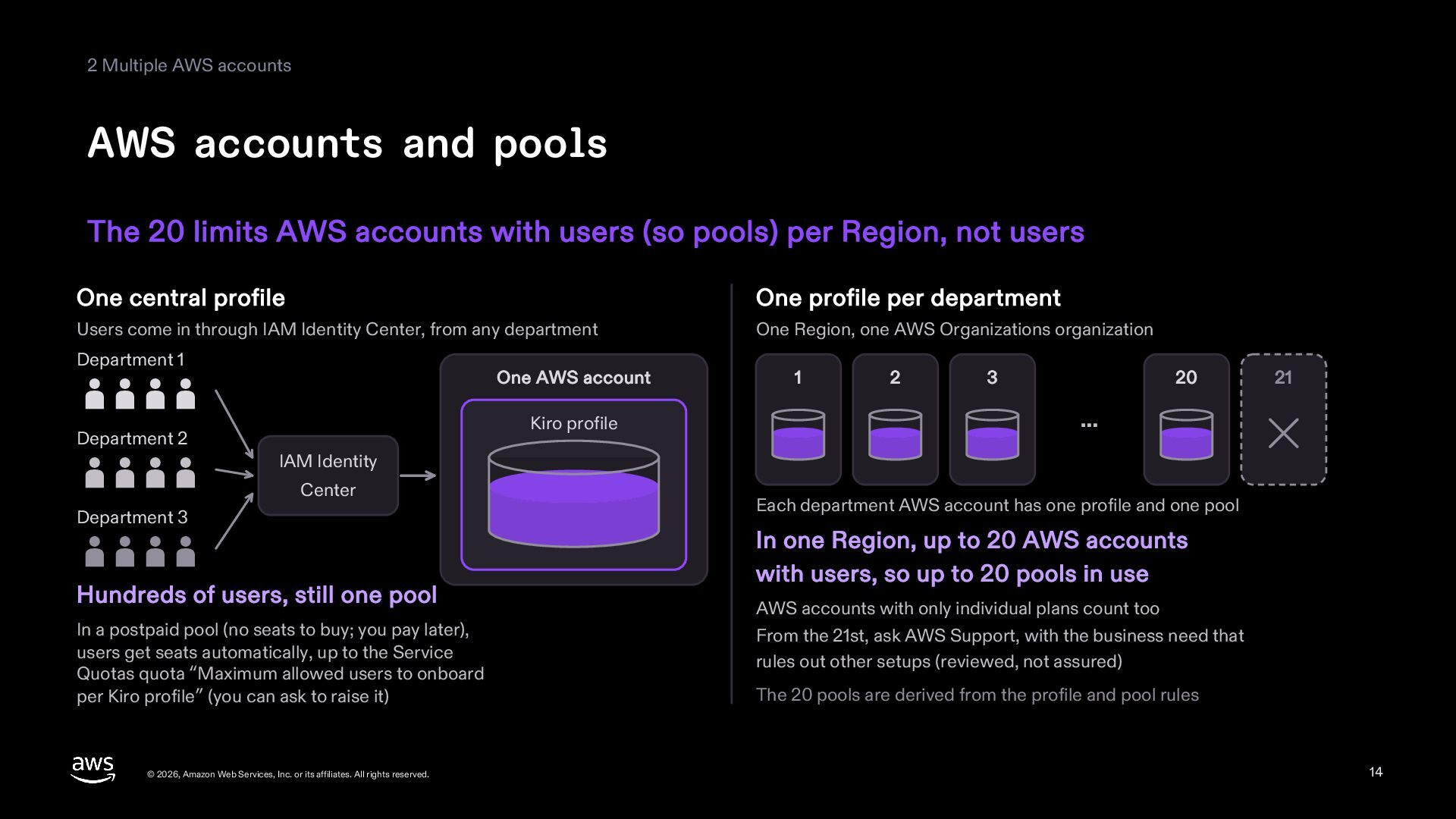
limits AWS accounts with users (so pools) per Region, not users One central profile One profile per department Users come in through IAM Identity Center, from any department One Region, one AWS Organizations organization Department 1 One AWS account Kiro profile Department 2 1 2 3 20 21 … IAM Identity Center Department 3 Hundreds of users, still one pool In a postpaid pool (no seats to buy; you pay later), users get seats automatically, up to the Service Quotas quota “Maximum allowed users to onboard per Kiro profile” (you can ask to raise it) © 2026, Amazon Web Services, Inc. or its affiliates. All rights reserved. Each department AWS account has one profile and one pool In one Region, up to 20 AWS accounts with users, so up to 20 pools in use AWS accounts with only individual plans count too From the 21st, ask AWS Support, with the business need that rules out other setups (reviewed, not assured) The 20 pools are derived from the profile and pool rules 14 -
2 Multiple AWS accounts How the AWS account you pool
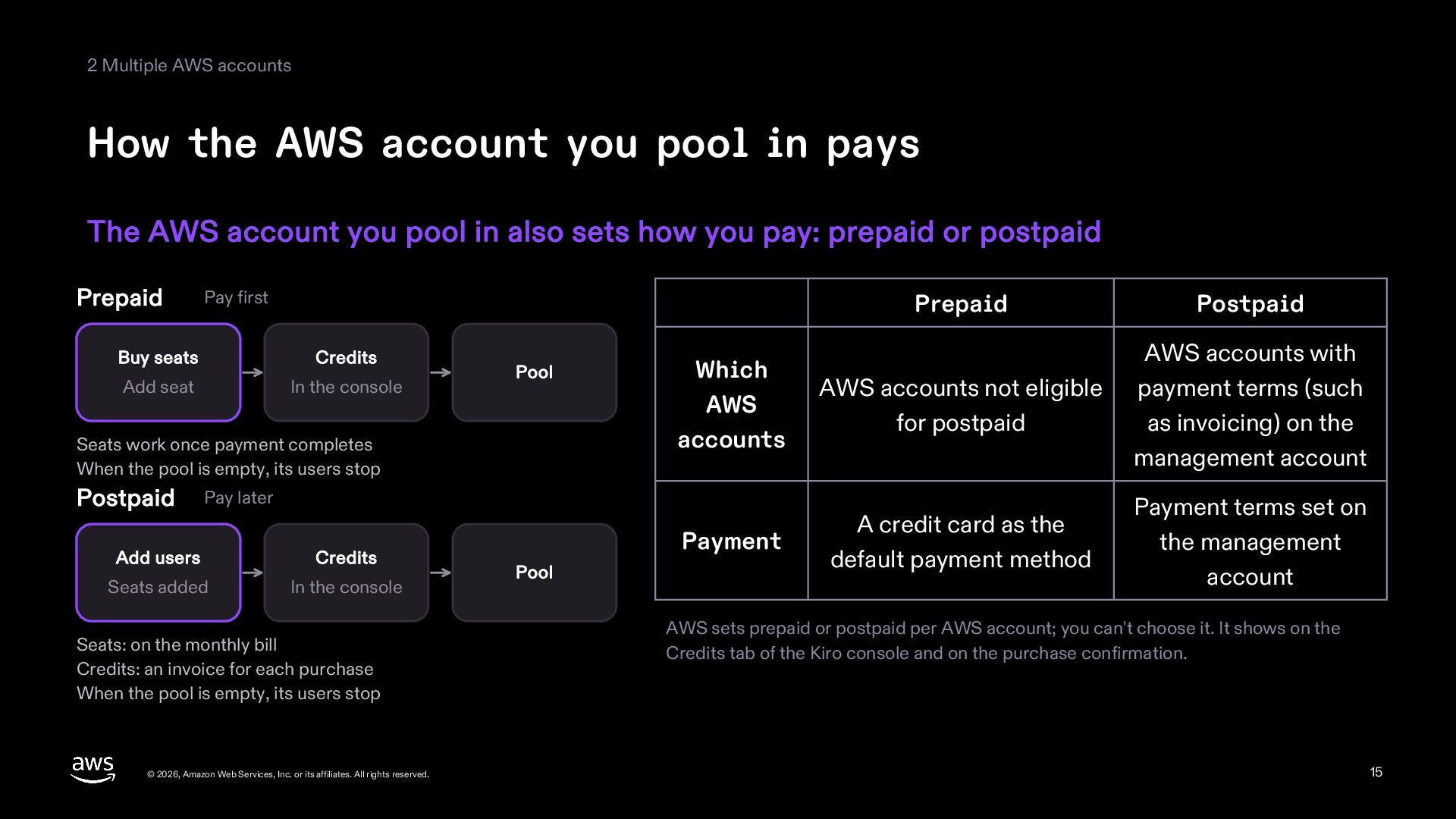
in pays The AWS account you pool in also sets how you pay: prepaid or postpaid Prepaid Pay first Buy seats Credits Add seat In the console Pool Seats work once payment completes When the pool is empty, its users stop Postpaid Prepaid Postpaid Which AWS accounts AWS accounts not eligible for postpaid AWS accounts with payment terms (such as invoicing) on the management account Payment A credit card as the default payment method Payment terms set on the management account Pay later Add users Credits Seats added In the console Seats: on the monthly bill Credits: an invoice for each purchase When the pool is empty, its users stop © 2026, Amazon Web Services, Inc. or its affiliates. All rights reserved. Pool AWS sets prepaid or postpaid per AWS account; you can't choose it. It shows on the Credits tab of the Kiro console and on the purchase confirmation. 15 -
2 Multiple AWS accounts Seats and additional credits Prepaid seats
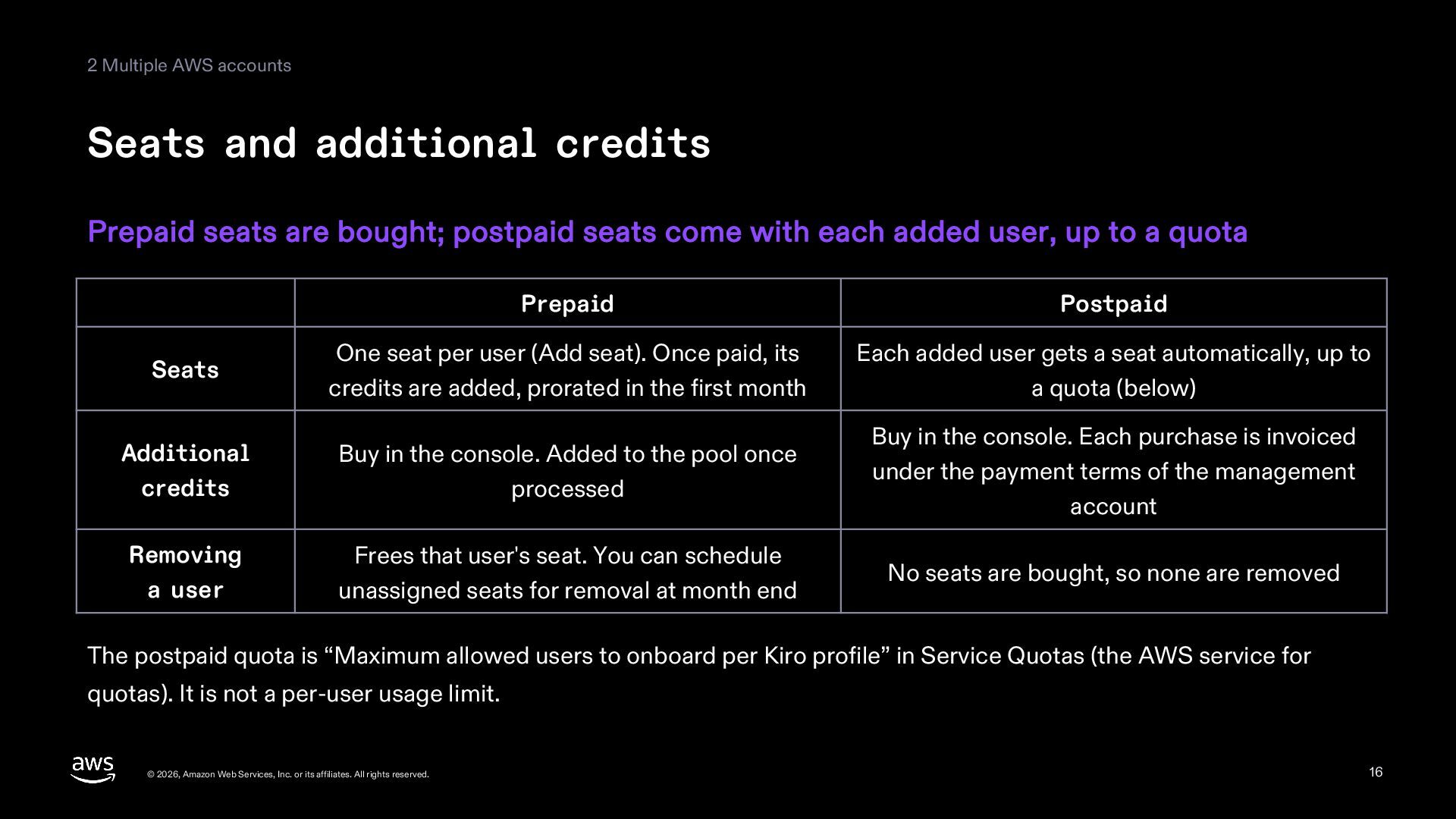
are bought; postpaid seats come with each added user, up to a quota Prepaid Postpaid Seats One seat per user (Add seat). Once paid, its credits are added, prorated in the first month Each added user gets a seat automatically, up to a quota (below) Additional credits Buy in the console. Added to the pool once processed Buy in the console. Each purchase is invoiced under the payment terms of the management account Removing a user Frees that user's seat. You can schedule unassigned seats for removal at month end No seats are bought, so none are removed The postpaid quota is “Maximum allowed users to onboard per Kiro profile” in Service Quotas (the AWS service for quotas). It is not a per-user usage limit. © 2026, Amazon Web Services, Inc. or its affiliates. All rights reserved. 16 -
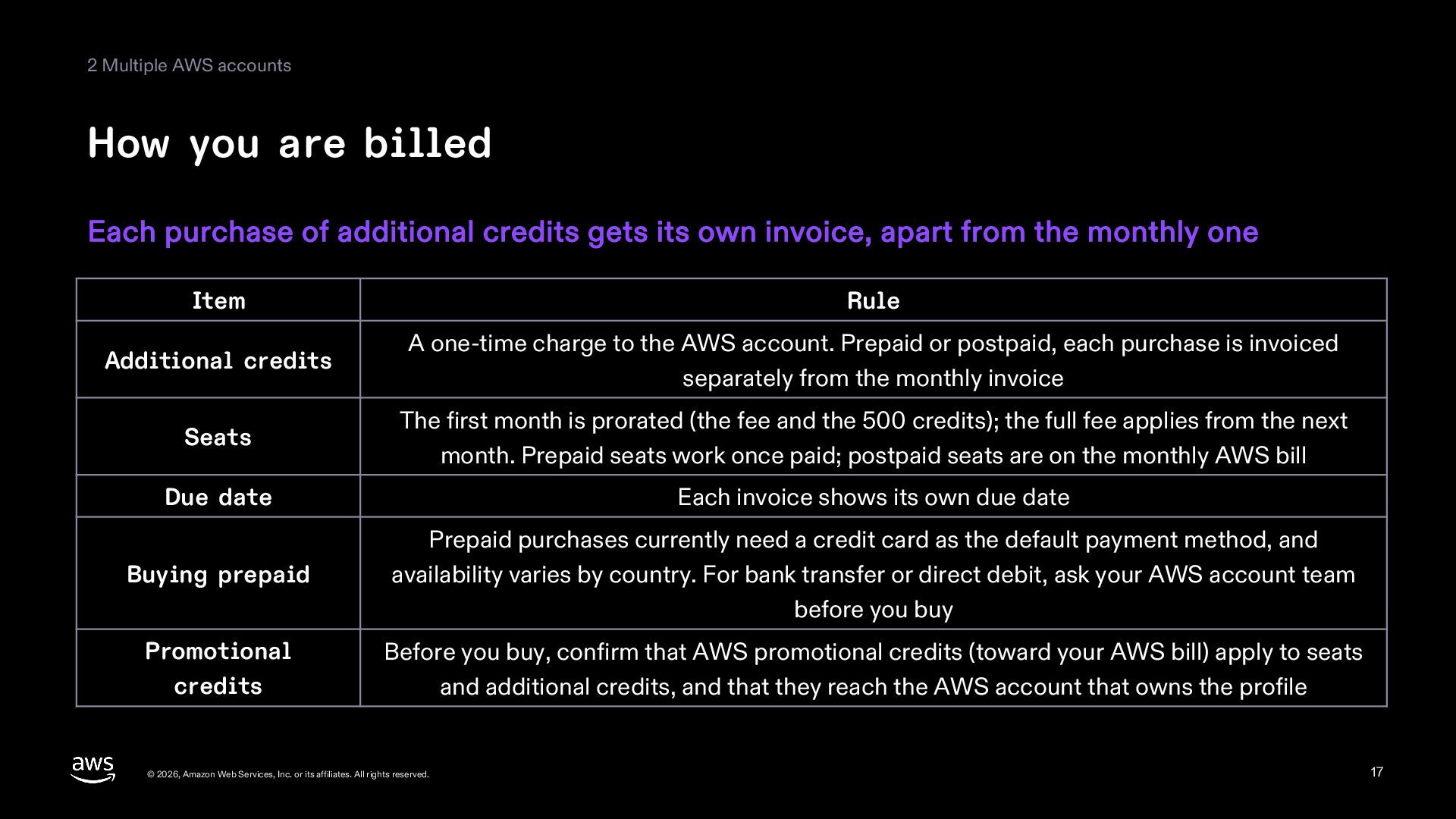
2 Multiple AWS accounts How you are billed Each purchase
of additional credits gets its own invoice, apart from the monthly one Item Rule Additional credits A one-time charge to the AWS account. Prepaid or postpaid, each purchase is invoiced separately from the monthly invoice Seats The first month is prorated (the fee and the 500 credits); the full fee applies from the next month. Prepaid seats work once paid; postpaid seats are on the monthly AWS bill Due date Each invoice shows its own due date Buying prepaid Prepaid purchases currently need a credit card as the default payment method, and availability varies by country. For bank transfer or direct debit, ask your AWS account team before you buy Promotional credits Before you buy, confirm that AWS promotional credits (toward your AWS bill) apply to seats and additional credits, and that they reach the AWS account that owns the profile © 2026, Amazon Web Services, Inc. or its affiliates. All rights reserved. 17 -
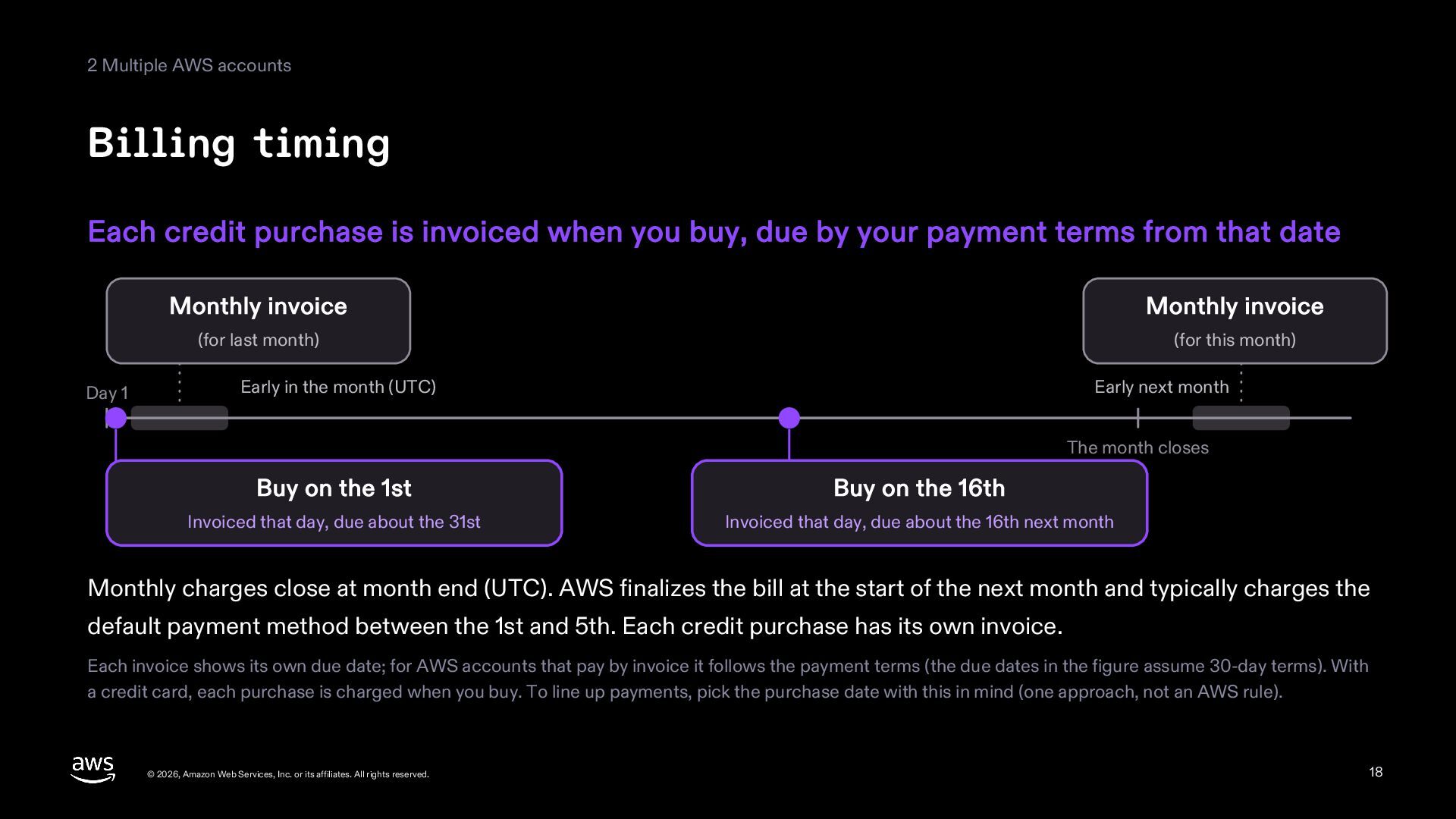
2 Multiple AWS accounts Billing timing Each credit purchase is
invoiced when you buy, due by your payment terms from that date Day 1 Monthly invoice Monthly invoice (for last month) (for this month) Early in the month (UTC) Early next month The month closes Buy on the 1st Buy on the 16th Invoiced that day, due about the 31st Invoiced that day, due about the 16th next month Monthly charges close at month end (UTC). AWS finalizes the bill at the start of the next month and typically charges the default payment method between the 1st and 5th. Each credit purchase has its own invoice. Each invoice shows its own due date; for AWS accounts that pay by invoice it follows the payment terms (the due dates in the figure assume 30-day terms). With a credit card, each purchase is charged when you buy. To line up payments, pick the purchase date with this in mind (one approach, not an AWS rule). © 2026, Amazon Web Services, Inc. or its affiliates. All rights reserved. 18 -
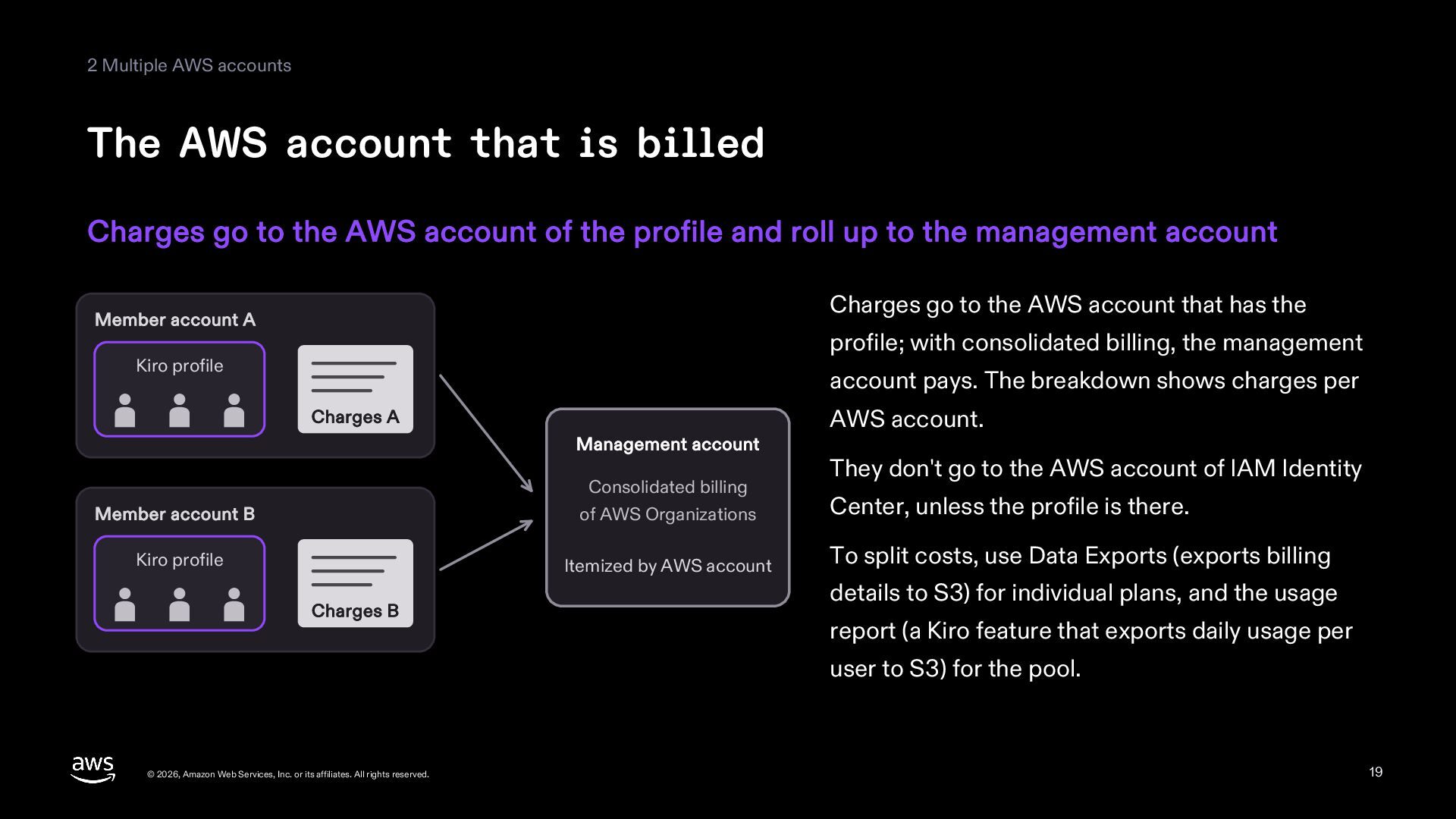
2 Multiple AWS accounts The AWS account that is billed
Charges go to the AWS account of the profile and roll up to the management account Charges go to the AWS account that has the Member account A profile; with consolidated billing, the management Kiro profile account pays. The breakdown shows charges per Charges A Management account Member account B Consolidated billing of AWS Organizations Kiro profile Itemized by AWS account Charges B AWS account. They don't go to the AWS account of IAM Identity Center, unless the profile is there. To split costs, use Data Exports (exports billing details to S3) for individual plans, and the usage report (a Kiro feature that exports daily usage per user to S3) for the pool. © 2026, Amazon Web Services, Inc. or its affiliates. All rights reserved. 19 -
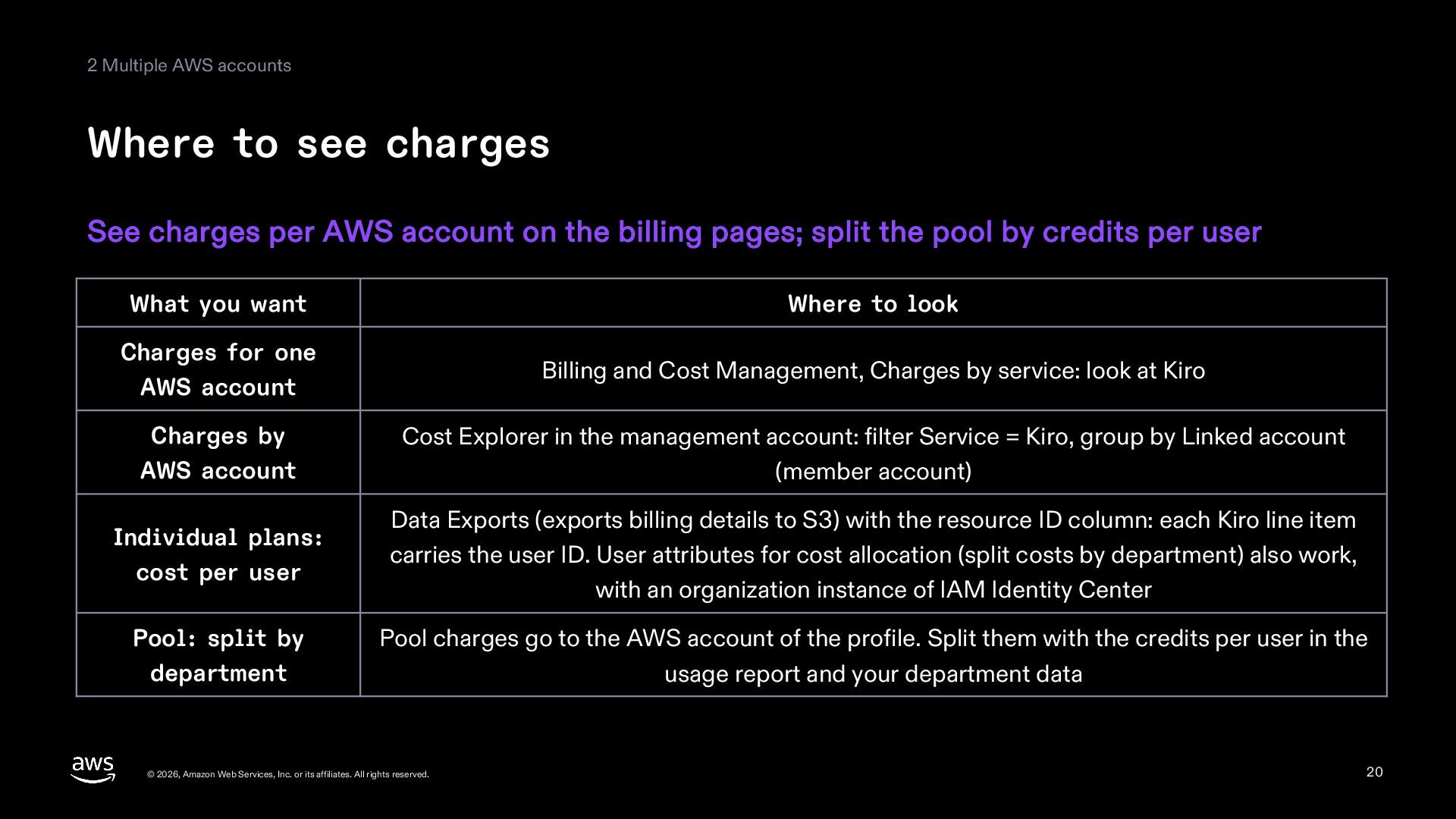
2 Multiple AWS accounts Where to see charges See charges
per AWS account on the billing pages; split the pool by credits per user What you want Where to look Charges for one AWS account Billing and Cost Management, Charges by service: look at Kiro Charges by AWS account Cost Explorer in the management account: filter Service = Kiro, group by Linked account (member account) Individual plans: cost per user Data Exports (exports billing details to S3) with the resource ID column: each Kiro line item carries the user ID. User attributes for cost allocation (split costs by department) also work, with an organization instance of IAM Identity Center Pool: split by department Pool charges go to the AWS account of the profile. Split them with the credits per user in the usage report and your department data © 2026, Amazon Web Services, Inc. or its affiliates. All rights reserved. 20 -
3 Calculating cost Start with the rules behind today's cost,
then compare it with the pool cost at the same usage Today's cost © 2026, Amazon Web Services, Inc. or its affiliates. All rights reserved. Pool cost 21 -
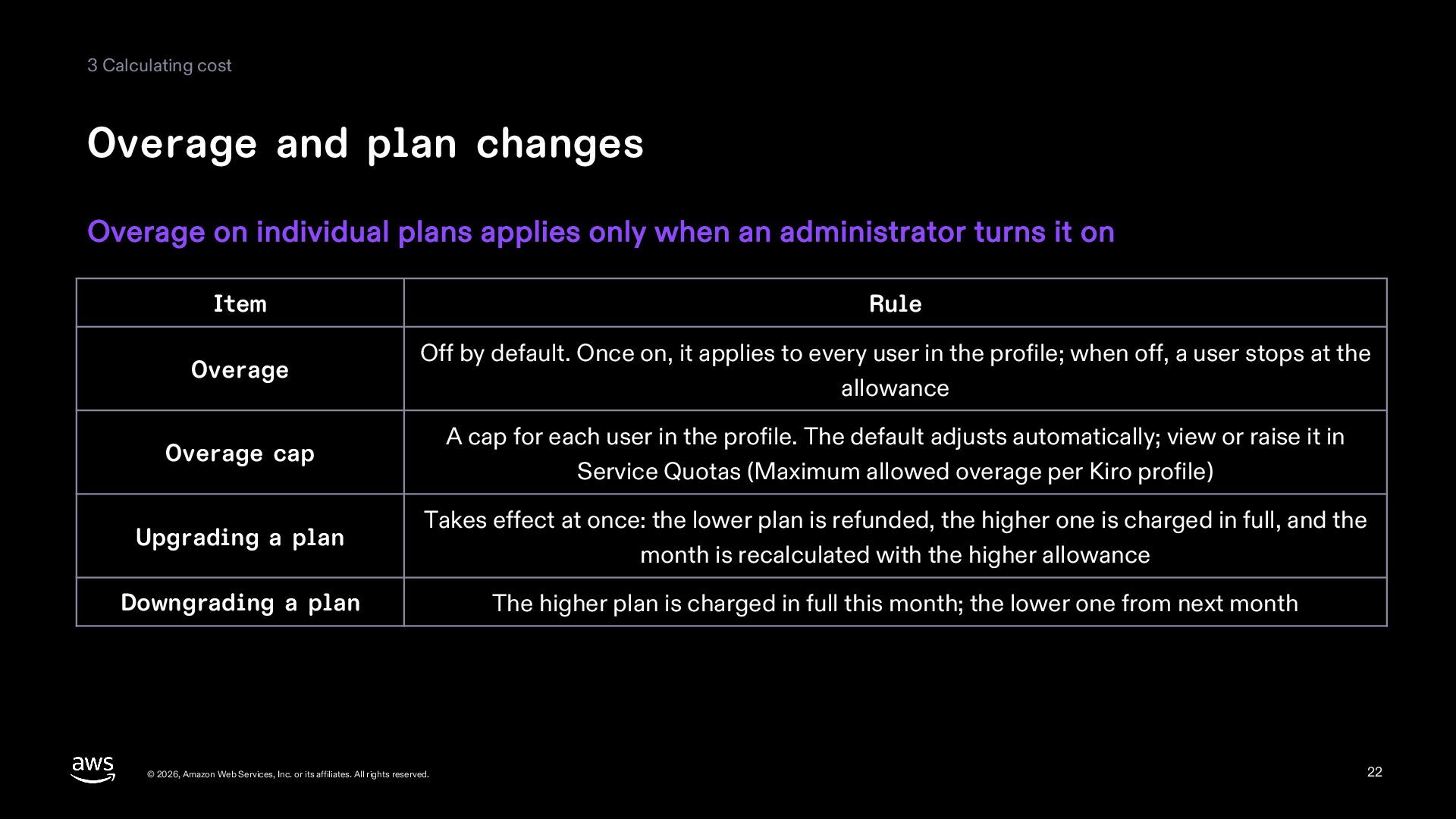
3 Calculating cost Overage and plan changes Overage on individual
plans applies only when an administrator turns it on Item Rule Overage Off by default. Once on, it applies to every user in the profile; when off, a user stops at the allowance Overage cap A cap for each user in the profile. The default adjusts automatically; view or raise it in Service Quotas (Maximum allowed overage per Kiro profile) Upgrading a plan Takes effect at once: the lower plan is refunded, the higher one is charged in full, and the month is recalculated with the higher allowance Downgrading a plan The higher plan is charged in full this month; the lower one from next month © 2026, Amazon Web Services, Inc. or its affiliates. All rights reserved. 22 -
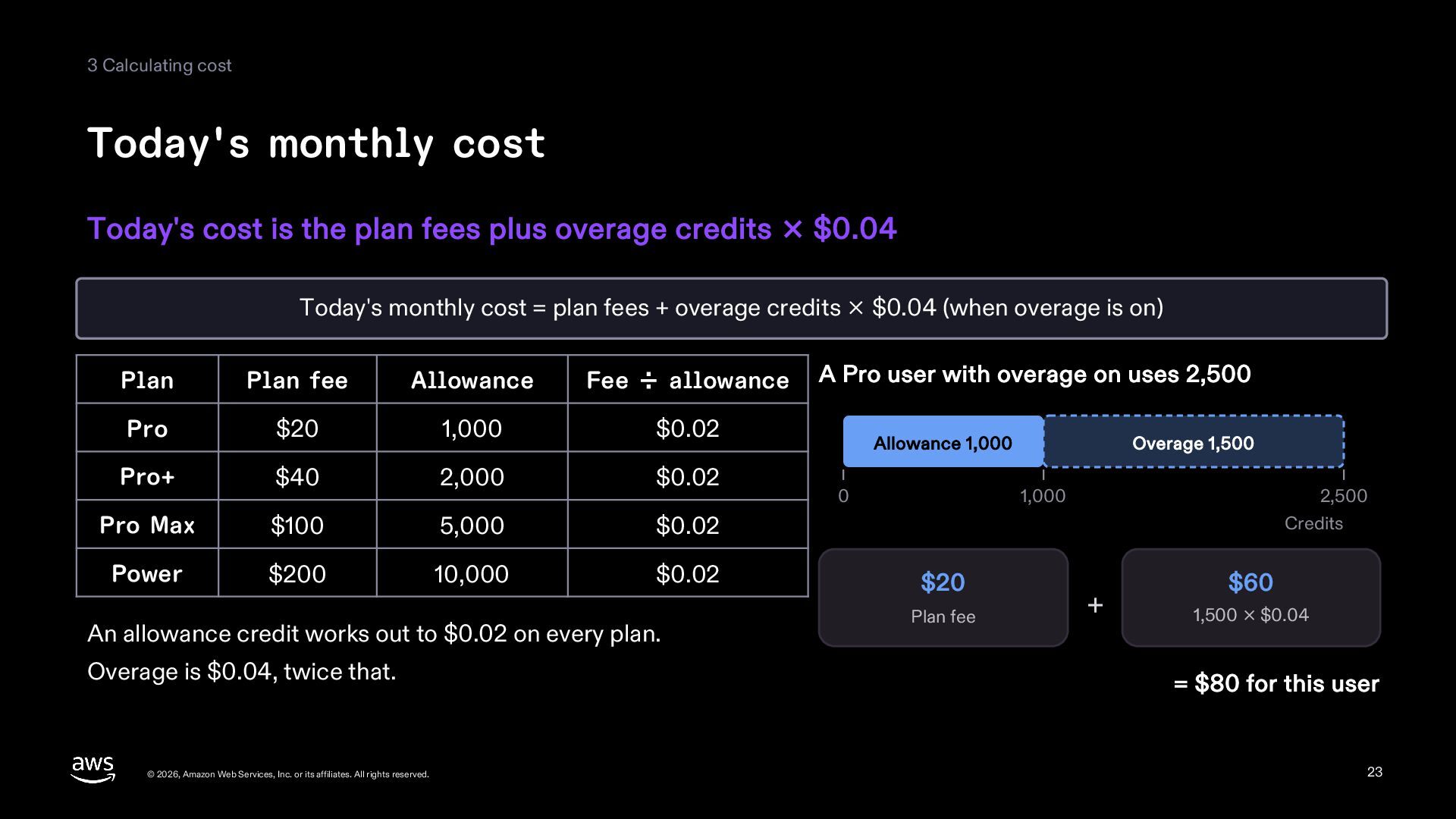
3 Calculating cost Today's monthly cost Today's cost is the
plan fees plus overage credits × $0.04 Today's monthly cost = plan fees + overage credits × $0.04 (when overage is on) Plan Plan fee Allowance Fee ÷ allowance Pro $20 1,000 $0.02 Pro+ $40 2,000 $0.02 Pro Max $100 5,000 $0.02 Power $200 10,000 $0.02 An allowance credit works out to $0.02 on every plan. Overage is $0.04, twice that. © 2026, Amazon Web Services, Inc. or its affiliates. All rights reserved. A Pro user with overage on uses 2,500 Allowance 1,000 0 Overage 1,500 1,000 $20 Plan fee 2,500 Credits + $60 1,500 × $0.04 = $80 for this user 23 -
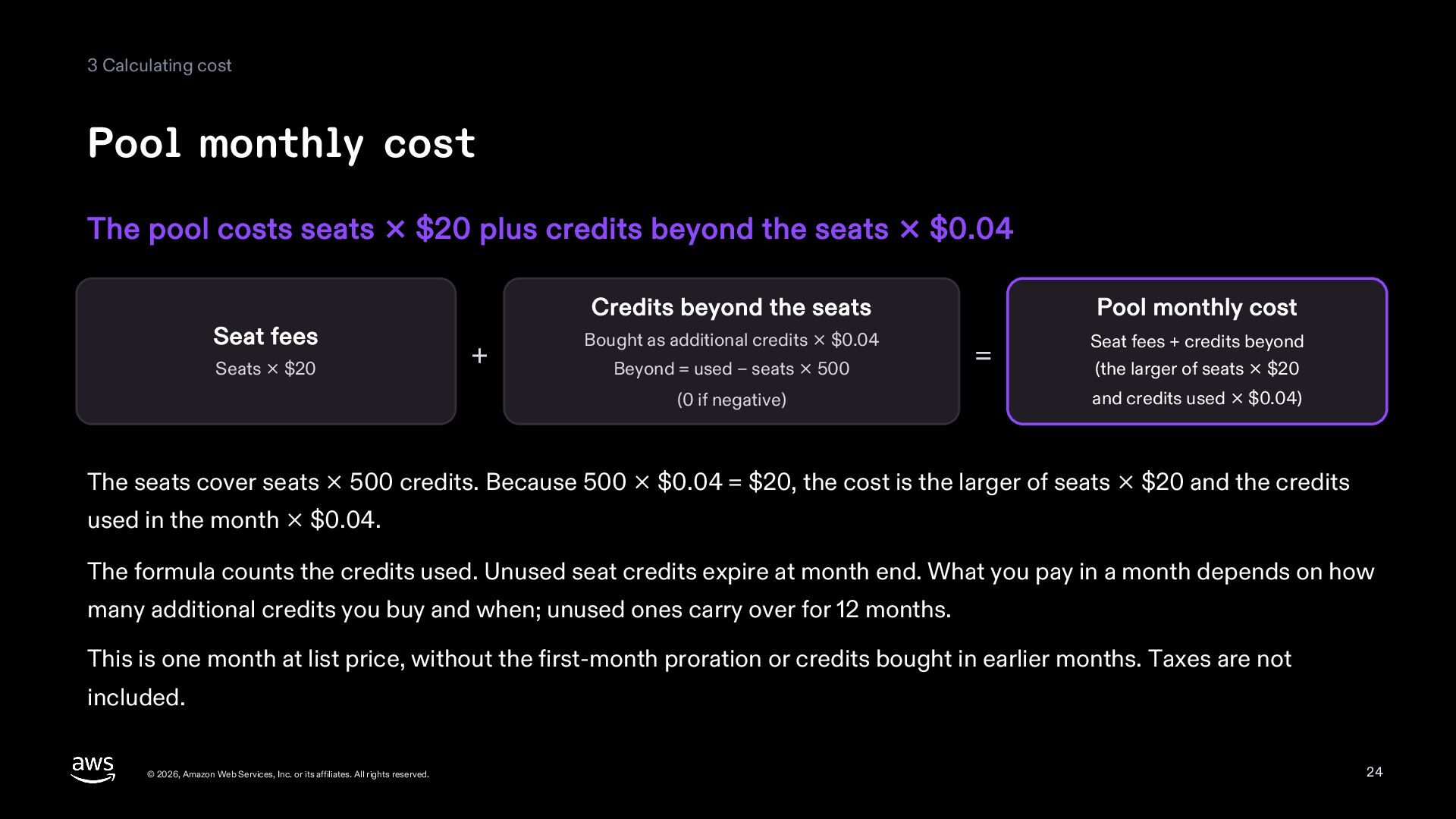
3 Calculating cost Pool monthly cost The pool costs seats
× $20 plus credits beyond the seats × $0.04 Seat fees Seats × $20 Credits beyond the seats + Bought as additional credits × $0.04 Beyond = used − seats × 500 (0 if negative) Pool monthly cost = Seat fees + credits beyond (the larger of seats × $20 and credits used × $0.04) The seats cover seats × 500 credits. Because 500 × $0.04 = $20, the cost is the larger of seats × $20 and the credits used in the month × $0.04. The formula counts the credits used. Unused seat credits expire at month end. What you pay in a month depends on how many additional credits you buy and when; unused ones carry over for 12 months. This is one month at list price, without the first-month proration or credits bought in earlier months. Taxes are not included. © 2026, Amazon Web Services, Inc. or its affiliates. All rights reserved. 24 -
3 Calculating cost How the pool cost changes 10 seats
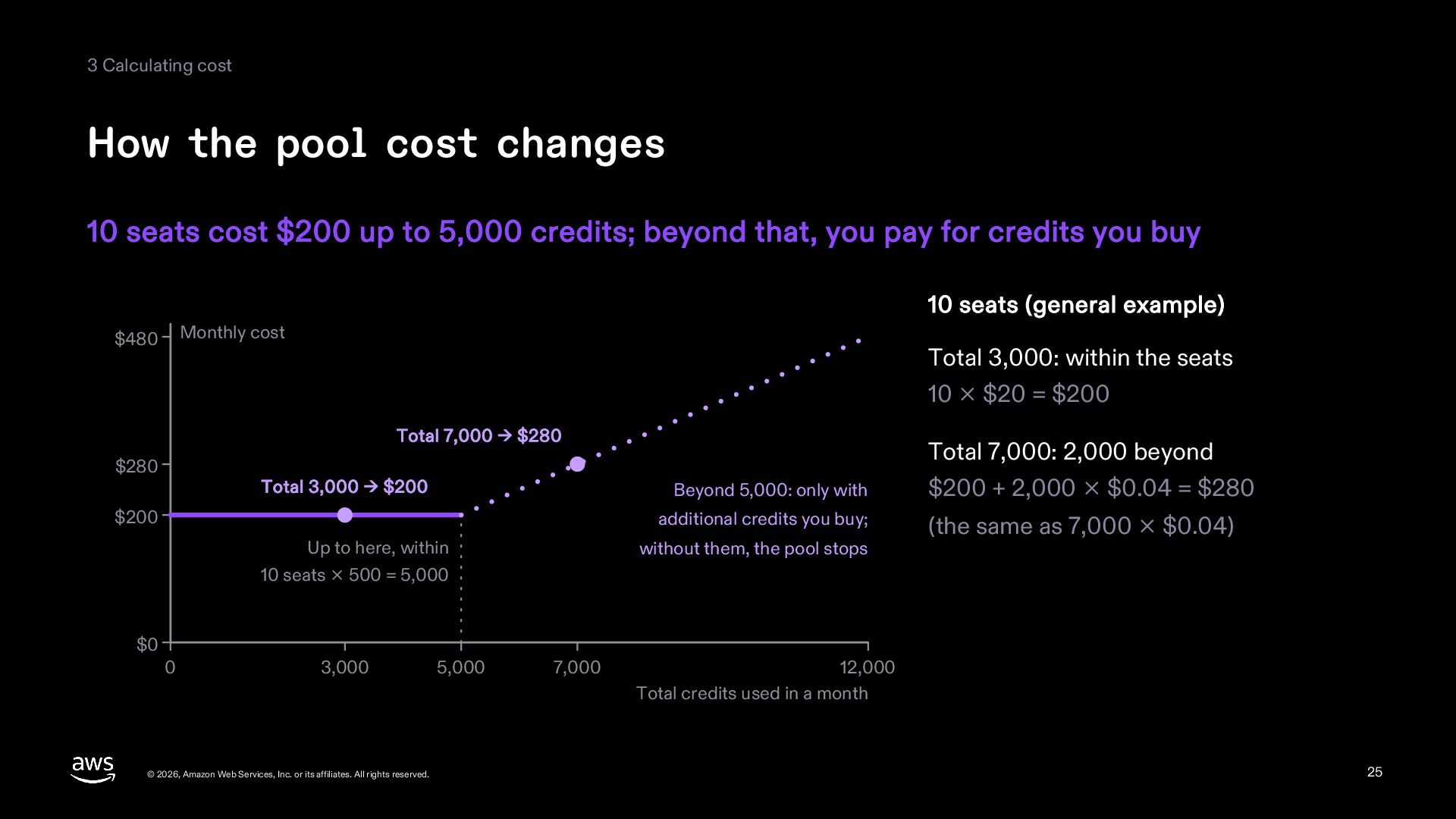
cost $200 up to 5,000 credits; beyond that, you pay for credits you buy 10 seats (general example) Monthly cost $480 Total 3,000: within the seats 10 × $20 = $200 Total 7,000 → $280 $280 Total 3,000 → $200 $200 Up to here, within Total 7,000: 2,000 beyond Beyond 5,000: only with $200 + 2,000 × $0.04 = $280 additional credits you buy; (the same as 7,000 × $0.04) without them, the pool stops 10 seats × 500 = 5,000 $0 0 3,000 © 2026, Amazon Web Services, Inc. or its affiliates. All rights reserved. 5,000 7,000 12,000 Total credits used in a month 25 -
3 Calculating cost Example 1: many light users Spare credits
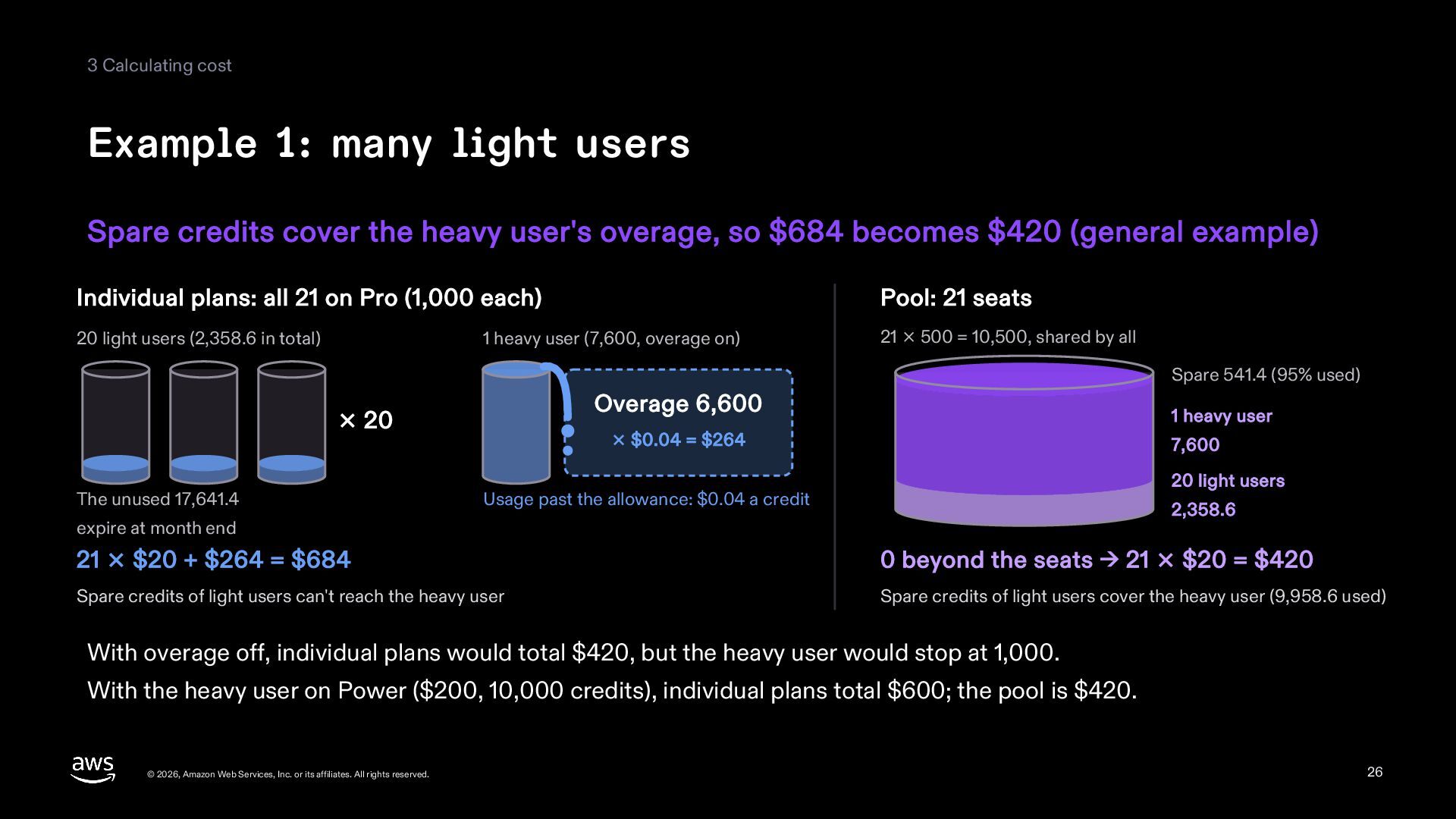
cover the heavy user's overage, so $684 becomes $420 (general example) Individual plans: all 21 on Pro (1,000 each) Pool: 21 seats 20 light users (2,358.6 in total) 21 × 500 = 10,500, shared by all 1 heavy user (7,600, overage on) Spare 541.4 (95% used) Overage 6,600 × 20 The unused 17,641.4 1 heavy user × $0.04 = $264 7,600 20 light users Usage past the allowance: $0.04 a credit 2,358.6 expire at month end 21 × $20 + $264 = $684 0 beyond the seats → 21 × $20 = $420 Spare credits of light users can't reach the heavy user Spare credits of light users cover the heavy user (9,958.6 used) With overage off, individual plans would total $420, but the heavy user would stop at 1,000. With the heavy user on Power ($200, 10,000 credits), individual plans total $600; the pool is $420. © 2026, Amazon Web Services, Inc. or its affiliates. All rights reserved. 26 -
3 Calculating cost Example 2: plans mostly used up On
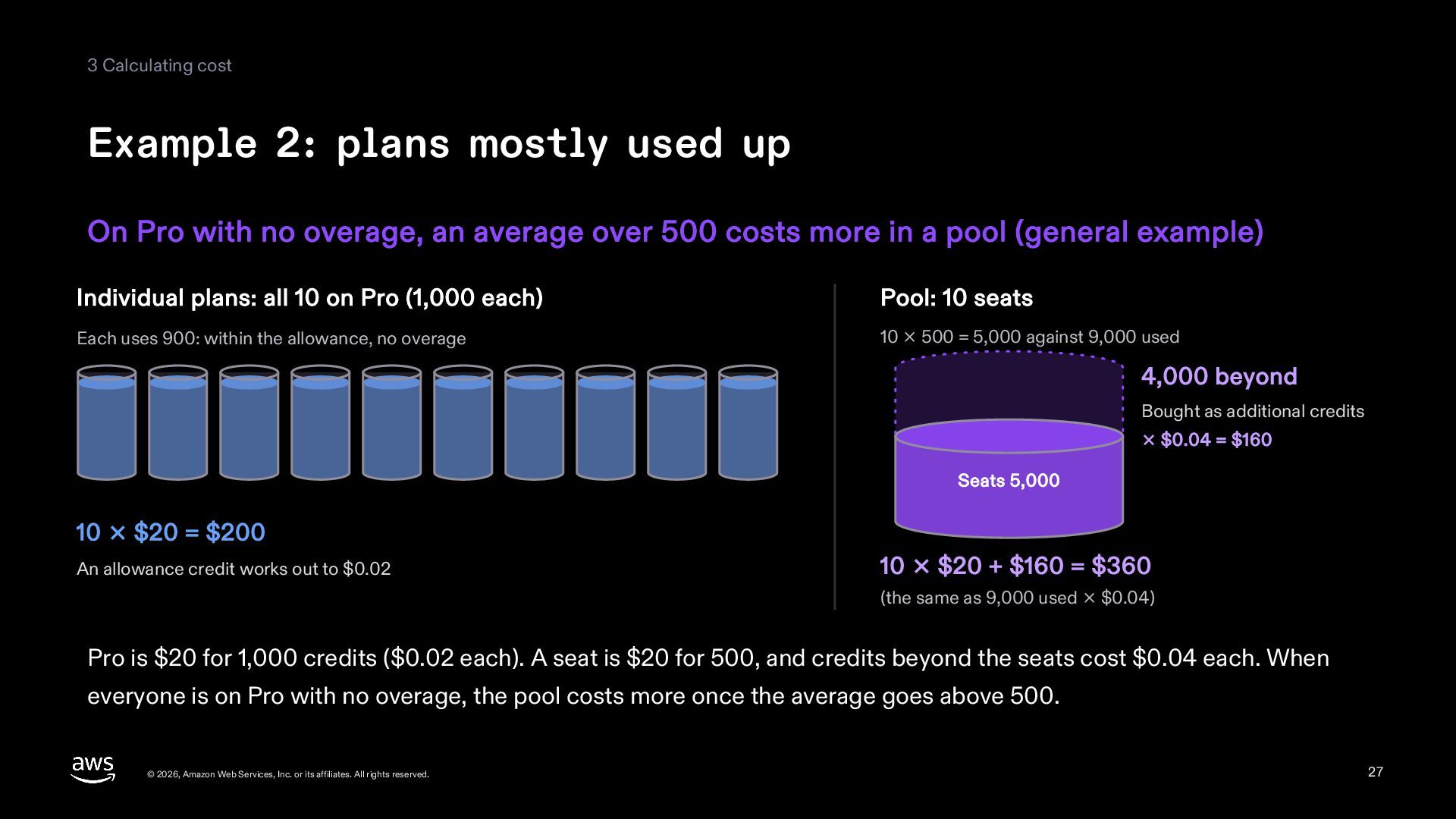
Pro with no overage, an average over 500 costs more in a pool (general example) Individual plans: all 10 on Pro (1,000 each) Pool: 10 seats Each uses 900: within the allowance, no overage 10 × 500 = 5,000 against 9,000 used 4,000 beyond Bought as additional credits × $0.04 = $160 Seats 5,000 10 × $20 = $200 An allowance credit works out to $0.02 10 × $20 + $160 = $360 (the same as 9,000 used × $0.04) Pro is $20 for 1,000 credits ($0.02 each). A seat is $20 for 500, and credits beyond the seats cost $0.04 each. When everyone is on Pro with no overage, the pool costs more once the average goes above 500. © 2026, Amazon Web Services, Inc. or its affiliates. All rights reserved. 27 -
4 Deciding to switch Users moved to the pool can't
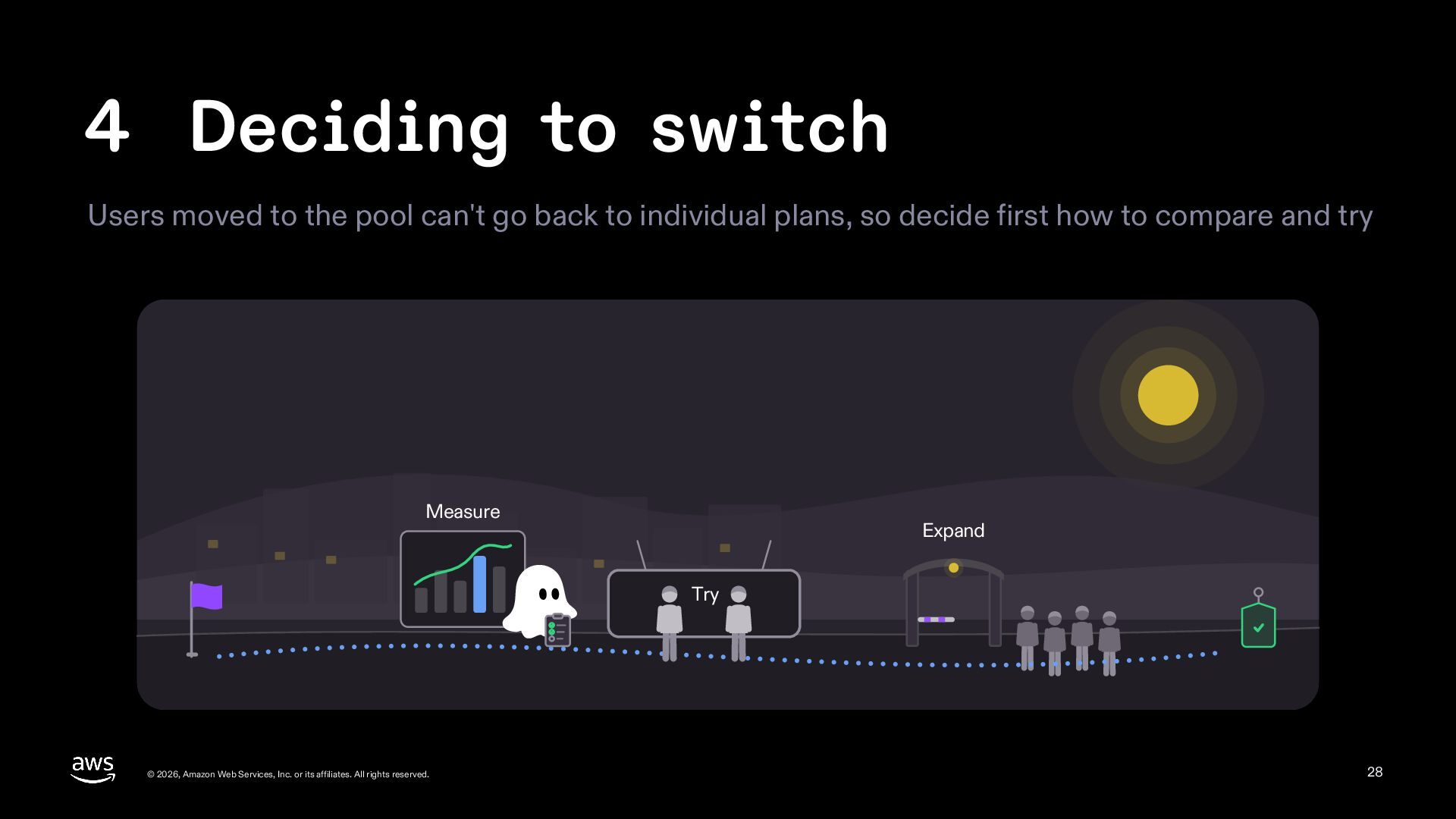
go back to individual plans, so decide first how to compare and try Measure Expand Try © 2026, Amazon Web Services, Inc. or its affiliates. All rights reserved. 28 -
4 Deciding to switch Rule of thumb If users average
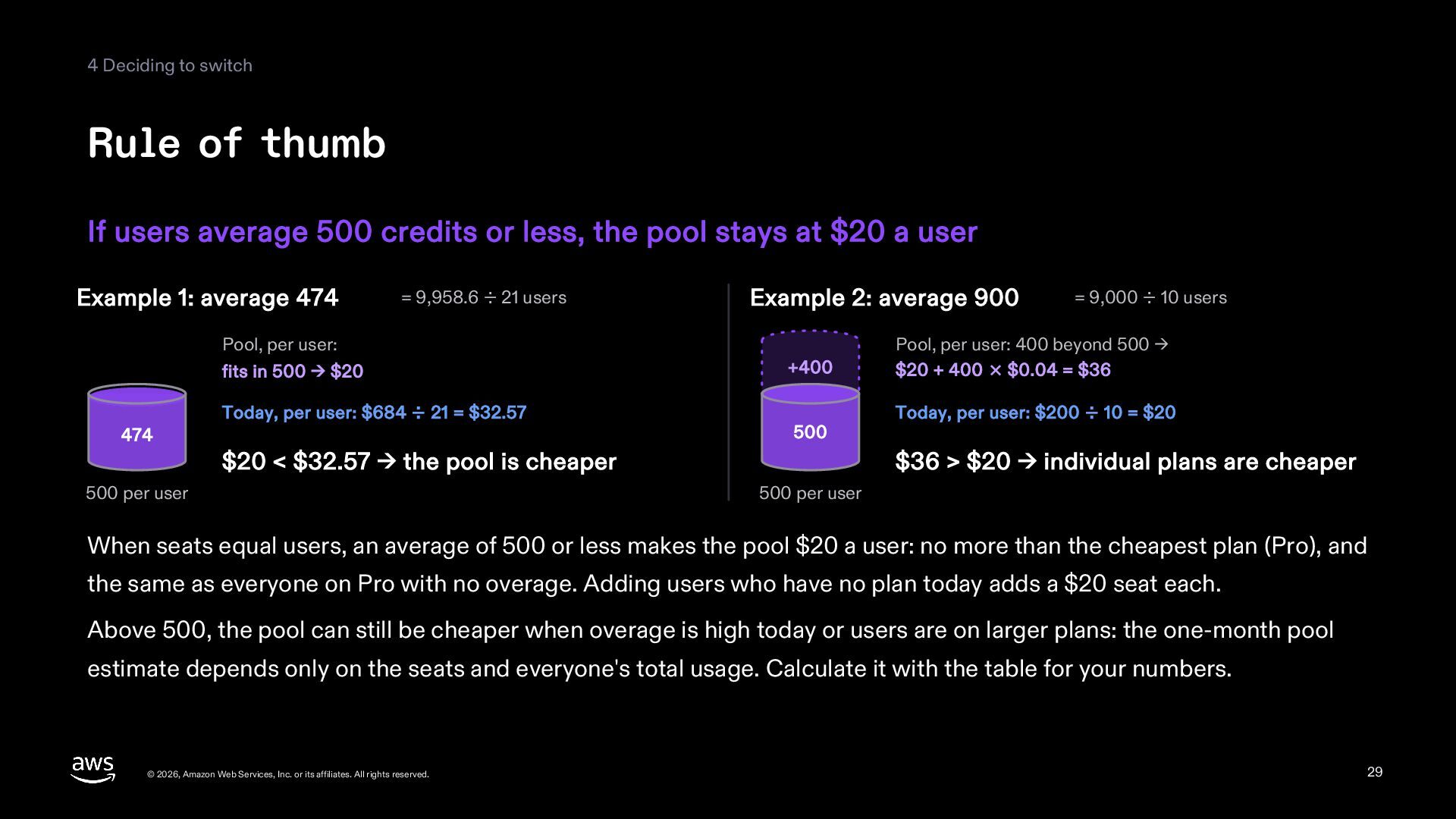
500 credits or less, the pool stays at $20 a user Example 1: average 474 = 9,958.6 ÷ 21 users Pool, per user: fits in 500 → $20 474 Today, per user: $684 ÷ 21 = $32.57 Example 2: average 900 +400 500 $20 < $32.57 → the pool is cheaper 500 per user = 9,000 ÷ 10 users Pool, per user: 400 beyond 500 → $20 + 400 × $0.04 = $36 Today, per user: $200 ÷ 10 = $20 $36 > $20 → individual plans are cheaper 500 per user When seats equal users, an average of 500 or less makes the pool $20 a user: no more than the cheapest plan (Pro), and the same as everyone on Pro with no overage. Adding users who have no plan today adds a $20 seat each. Above 500, the pool can still be cheaper when overage is high today or users are on larger plans: the one-month pool estimate depends only on the seats and everyone's total usage. Calculate it with the table for your numbers. © 2026, Amazon Web Services, Inc. or its affiliates. All rights reserved. 29 -
4 Deciding to switch How to measure usage Turn on
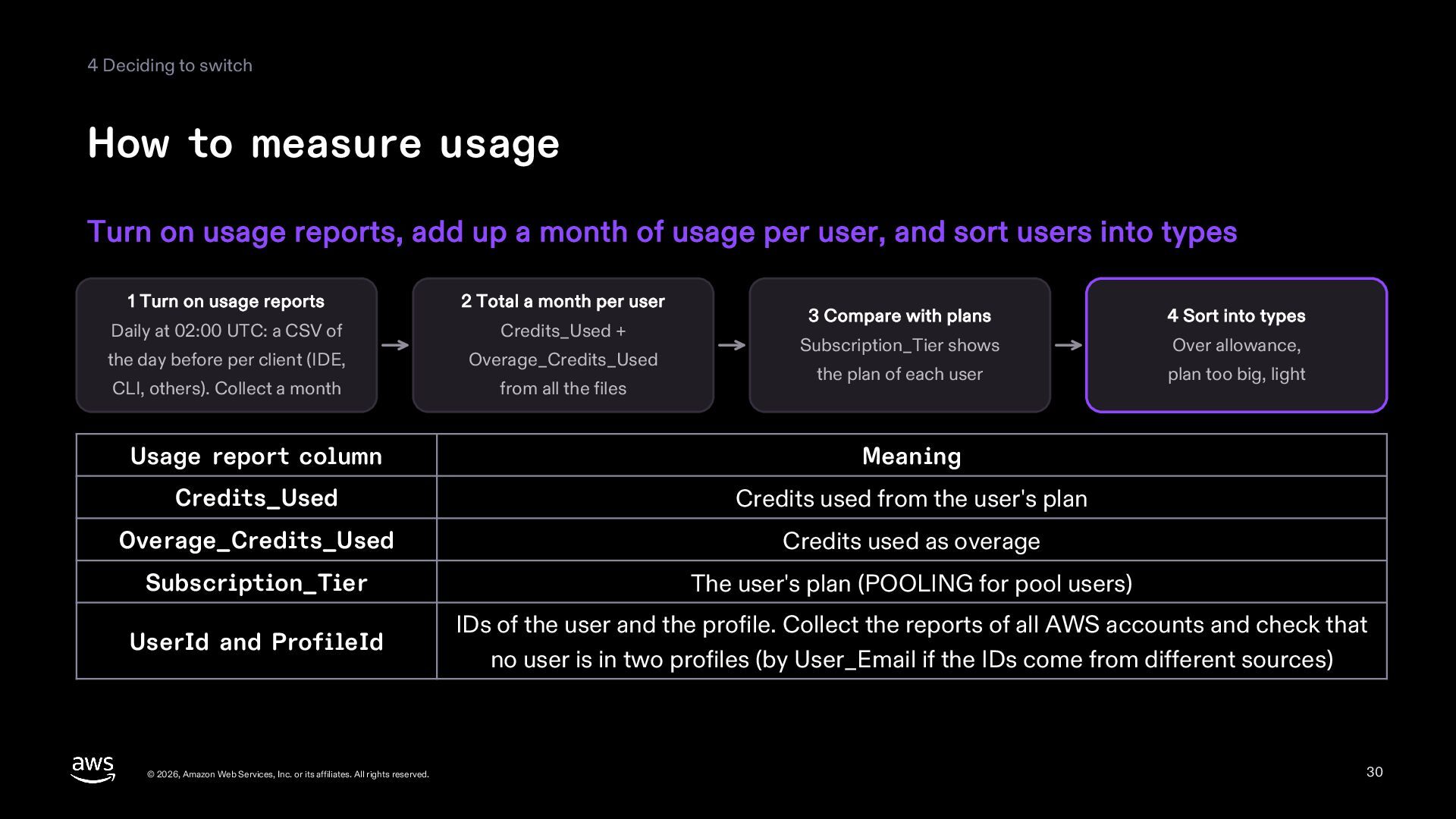
usage reports, add up a month of usage per user, and sort users into types 1 Turn on usage reports 2 Total a month per user Daily at 02:00 UTC: a CSV of Credits_Used + the day before per client (IDE, Overage_Credits_Used CLI, others). Collect a month from all the files 3 Compare with plans 4 Sort into types Subscription_Tier shows Over allowance, the plan of each user plan too big, light Usage report column Meaning Credits_Used Credits used from the user's plan Overage_Credits_Used Credits used as overage Subscription_Tier The user's plan (POOLING for pool users) UserId and ProfileId IDs of the user and the profile. Collect the reports of all AWS accounts and check that no user is in two profiles (by User_Email if the IDs come from different sources) © 2026, Amazon Web Services, Inc. or its affiliates. All rights reserved. 30 -
4 Deciding to switch Three types of users Sort users
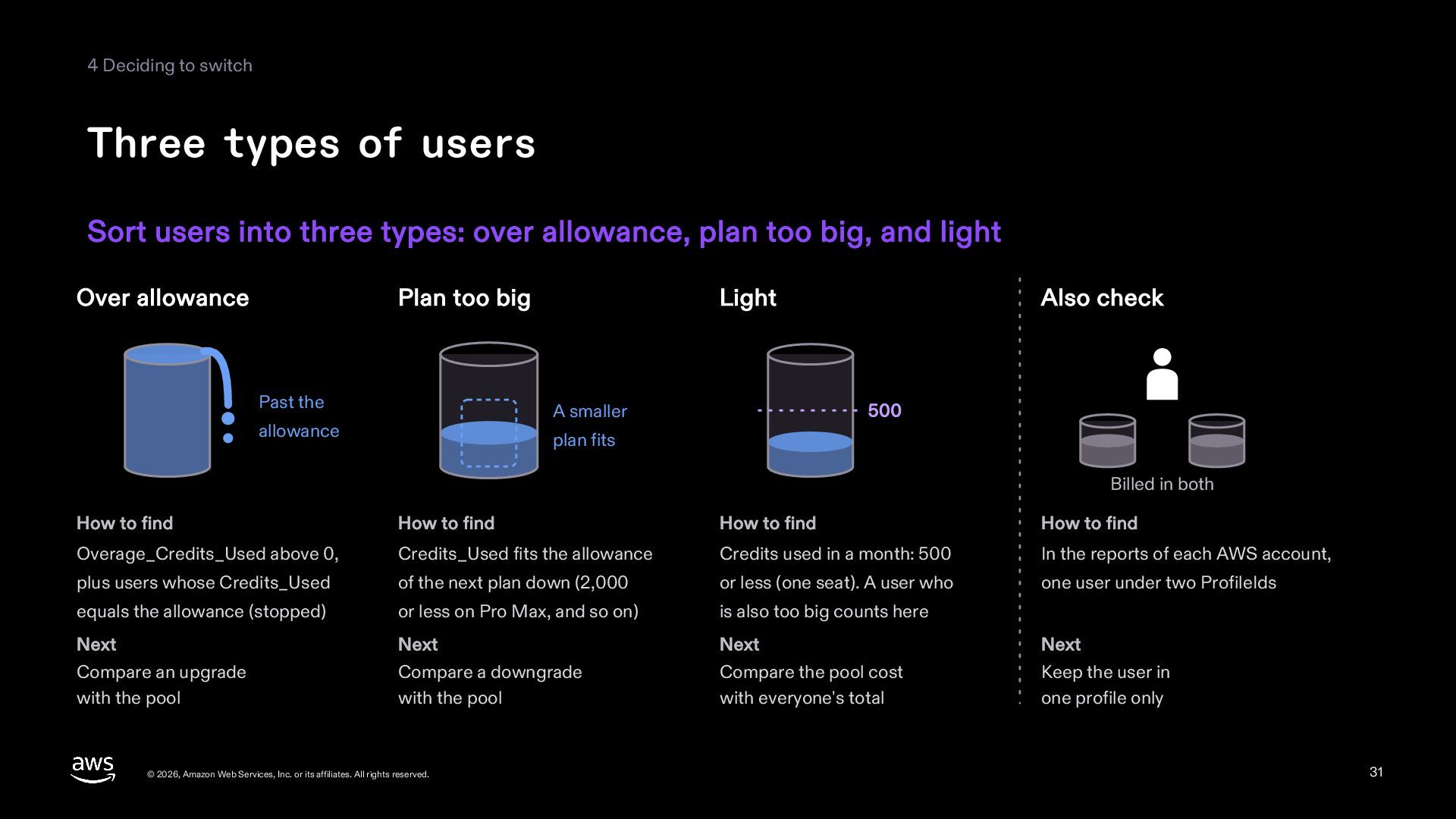
into three types: over allowance, plan too big, and light Over allowance Plan too big Past the Light A smaller allowance Also check 500 plan fits Billed in both How to find How to find How to find How to find Overage_Credits_Used above 0, Credits_Used fits the allowance Credits used in a month: 500 In the reports of each AWS account, plus users whose Credits_Used of the next plan down (2,000 or less (one seat). A user who one user under two ProfileIds equals the allowance (stopped) or less on Pro Max, and so on) is also too big counts here Next Next Next Next Compare an upgrade with the pool Compare a downgrade with the pool Compare the pool cost with everyone's total Keep the user in one profile only © 2026, Amazon Web Services, Inc. or its affiliates. All rights reserved. 31 -
4 Deciding to switch Comparing by type For one user
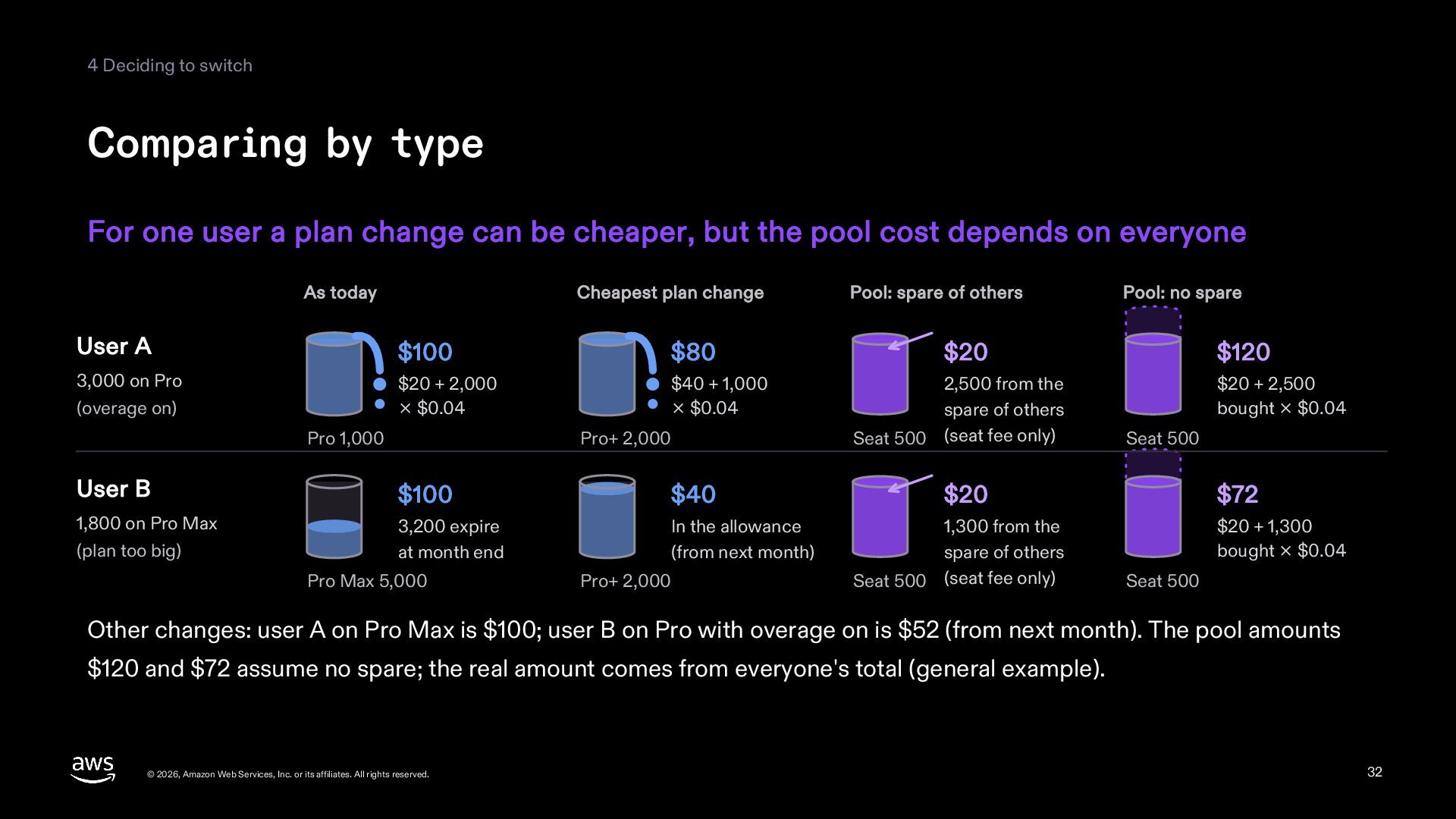
a plan change can be cheaper, but the pool cost depends on everyone As today Cheapest plan change User A $100 $80 3,000 on Pro (overage on) $20 + 2,000 × $0.04 $40 + 1,000 × $0.04 Pro 1,000 Pro+ 2,000 User B $100 $40 1,800 on Pro Max (plan too big) 3,200 expire at month end In the allowance (from next month) Pro Max 5,000 Pro+ 2,000 Pool: spare of others Pool: no spare $20 2,500 from the spare of others Seat 500 (seat fee only) $120 $20 + 2,500 bought × $0.04 Seat 500 $20 1,300 from the spare of others Seat 500 (seat fee only) $72 $20 + 1,300 bought × $0.04 Seat 500 Other changes: user A on Pro Max is $100; user B on Pro with overage on is $52 (from next month). The pool amounts $120 and $72 assume no spare; the real amount comes from everyone's total (general example). © 2026, Amazon Web Services, Inc. or its affiliates. All rights reserved. 32 -
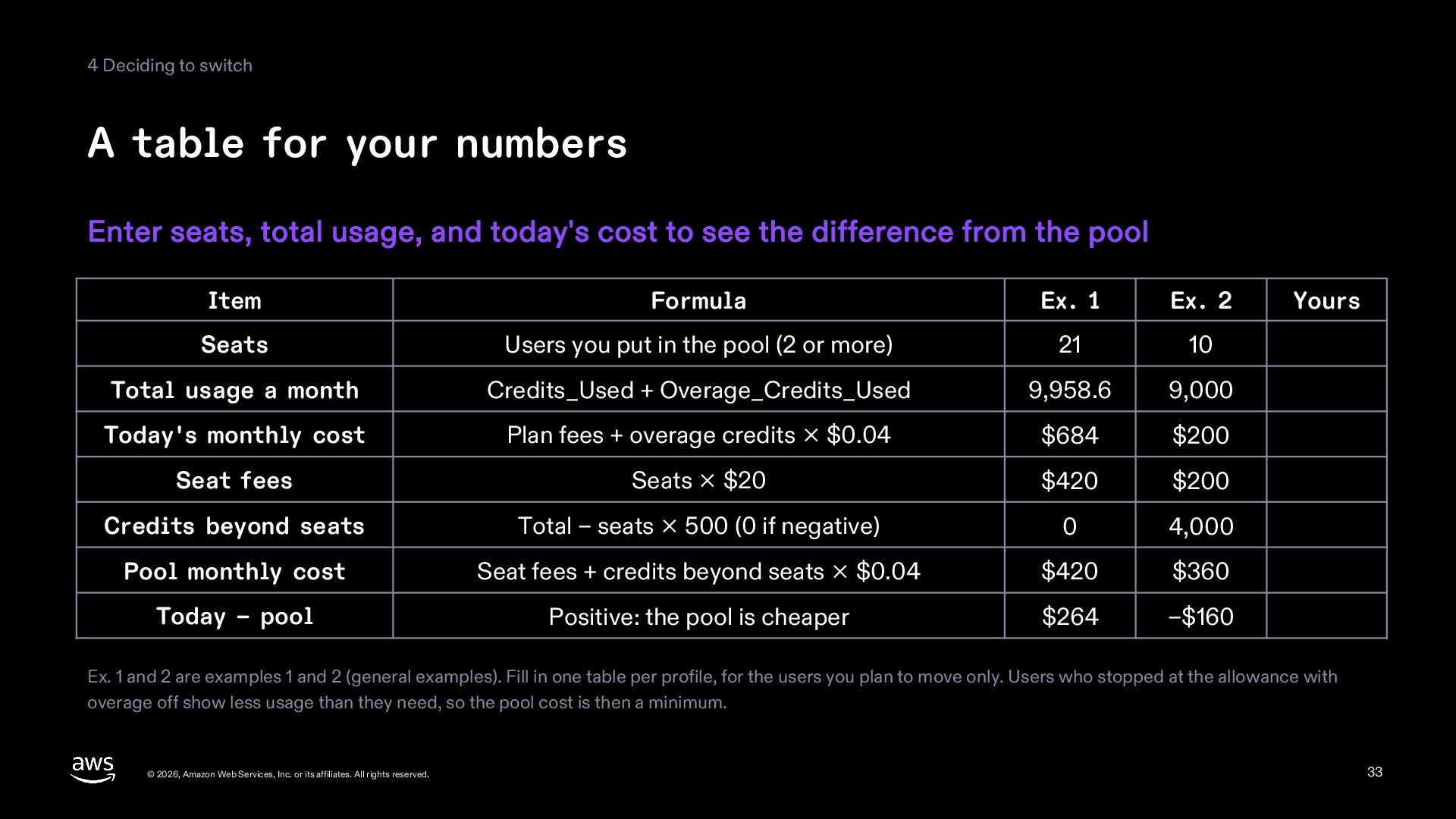
4 Deciding to switch A table for your numbers Enter
seats, total usage, and today's cost to see the difference from the pool Item Formula Ex. 1 Ex. 2 Seats Users you put in the pool (2 or more) 21 10 Total usage a month Credits_Used + Overage_Credits_Used 9,958.6 9,000 Today's monthly cost Plan fees + overage credits × $0.04 $684 $200 Seat fees Seats × $20 $420 $200 Credits beyond seats Total − seats × 500 (0 if negative) 0 4,000 Pool monthly cost Seat fees + credits beyond seats × $0.04 $420 $360 Today − pool Positive: the pool is cheaper $264 −$160 Yours Ex. 1 and 2 are examples 1 and 2 (general examples). Fill in one table per profile, for the users you plan to move only. Users who stopped at the allowance with overage off show less usage than they need, so the pool cost is then a minimum. © 2026, Amazon Web Services, Inc. or its affiliates. All rights reserved. 33 -
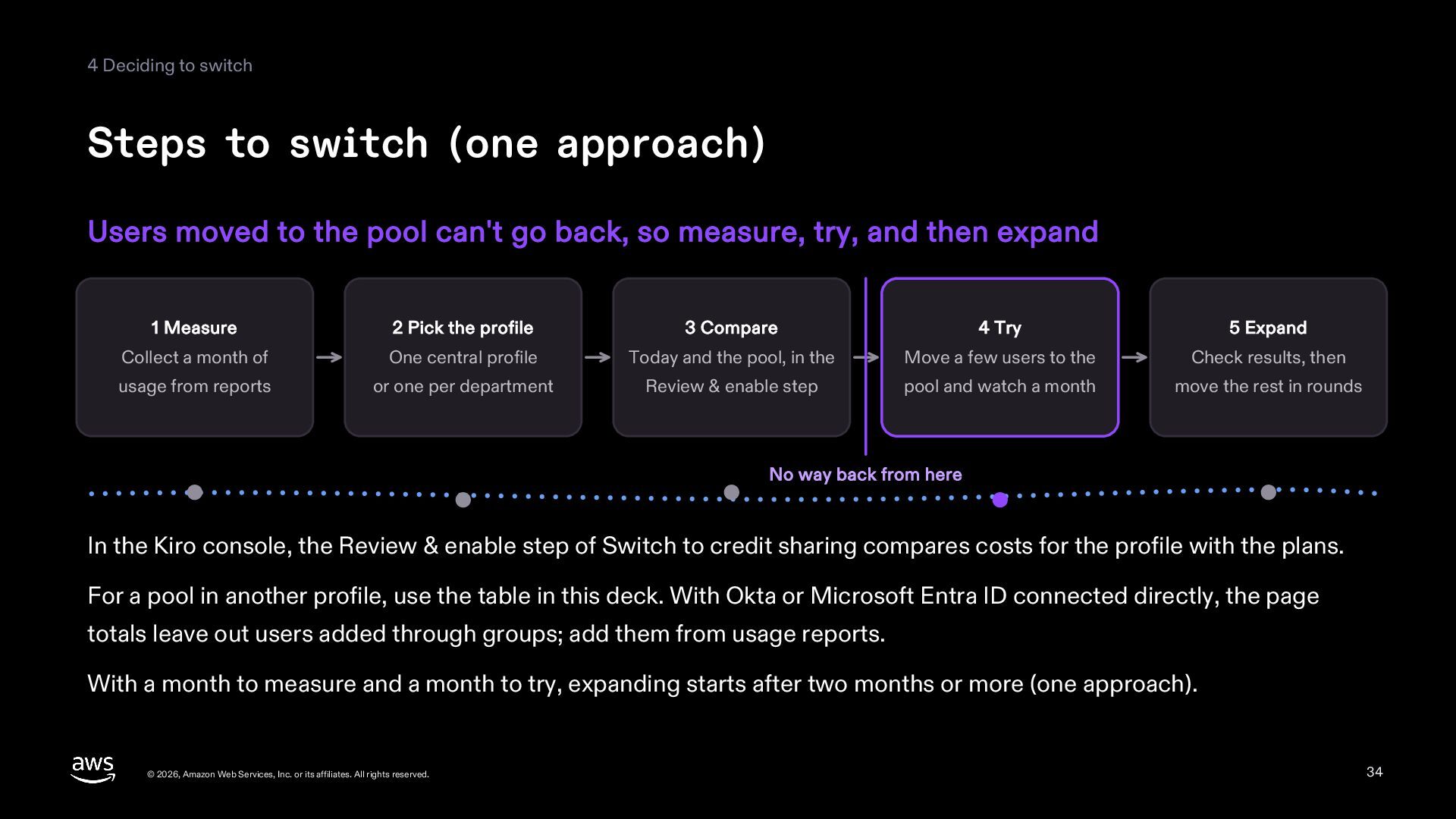
4 Deciding to switch Steps to switch (one approach) Users
moved to the pool can't go back, so measure, try, and then expand 1 Measure 2 Pick the profile 3 Compare 4 Try 5 Expand Collect a month of One central profile Today and the pool, in the Move a few users to the Check results, then usage from reports or one per department Review & enable step pool and watch a month move the rest in rounds No way back from here In the Kiro console, the Review & enable step of Switch to credit sharing compares costs for the profile with the plans. For a pool in another profile, use the table in this deck. With Okta or Microsoft Entra ID connected directly, the page totals leave out users added through groups; add them from usage reports. With a month to measure and a month to try, expanding starts after two months or more (one approach). © 2026, Amazon Web Services, Inc. or its affiliates. All rights reserved. 34 -
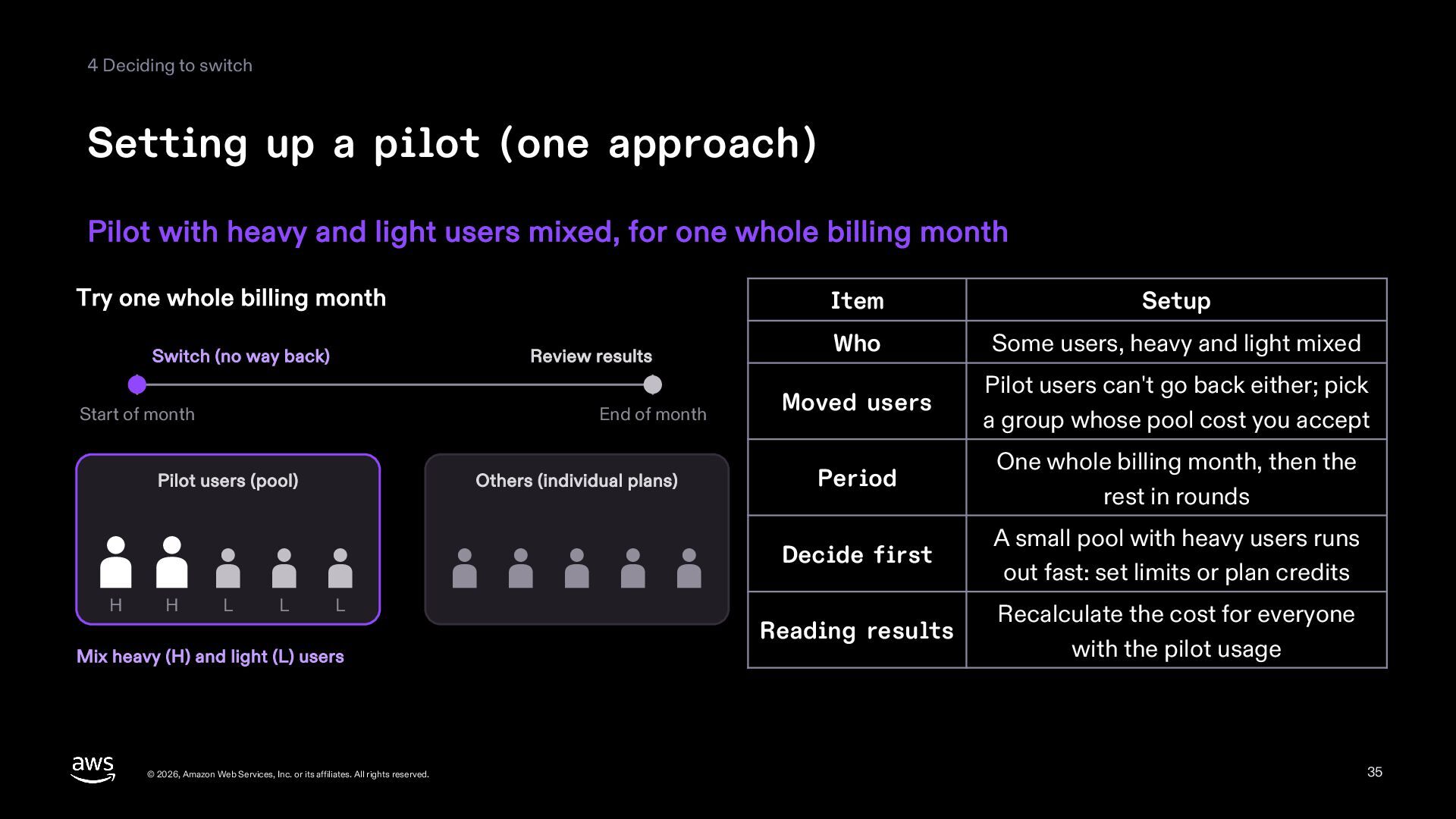
4 Deciding to switch Setting up a pilot (one approach)
Pilot with heavy and light users mixed, for one whole billing month Try one whole billing month Switch (no way back) Review results Start of month End of month Pilot users (pool) H H L L Others (individual plans) L Mix heavy (H) and light (L) users © 2026, Amazon Web Services, Inc. or its affiliates. All rights reserved. Item Setup Who Some users, heavy and light mixed Moved users Pilot users can't go back either; pick a group whose pool cost you accept Period One whole billing month, then the rest in rounds Decide first A small pool with heavy users runs out fast: set limits or plan credits Reading results Recalculate the cost for everyone with the pilot usage 35 -
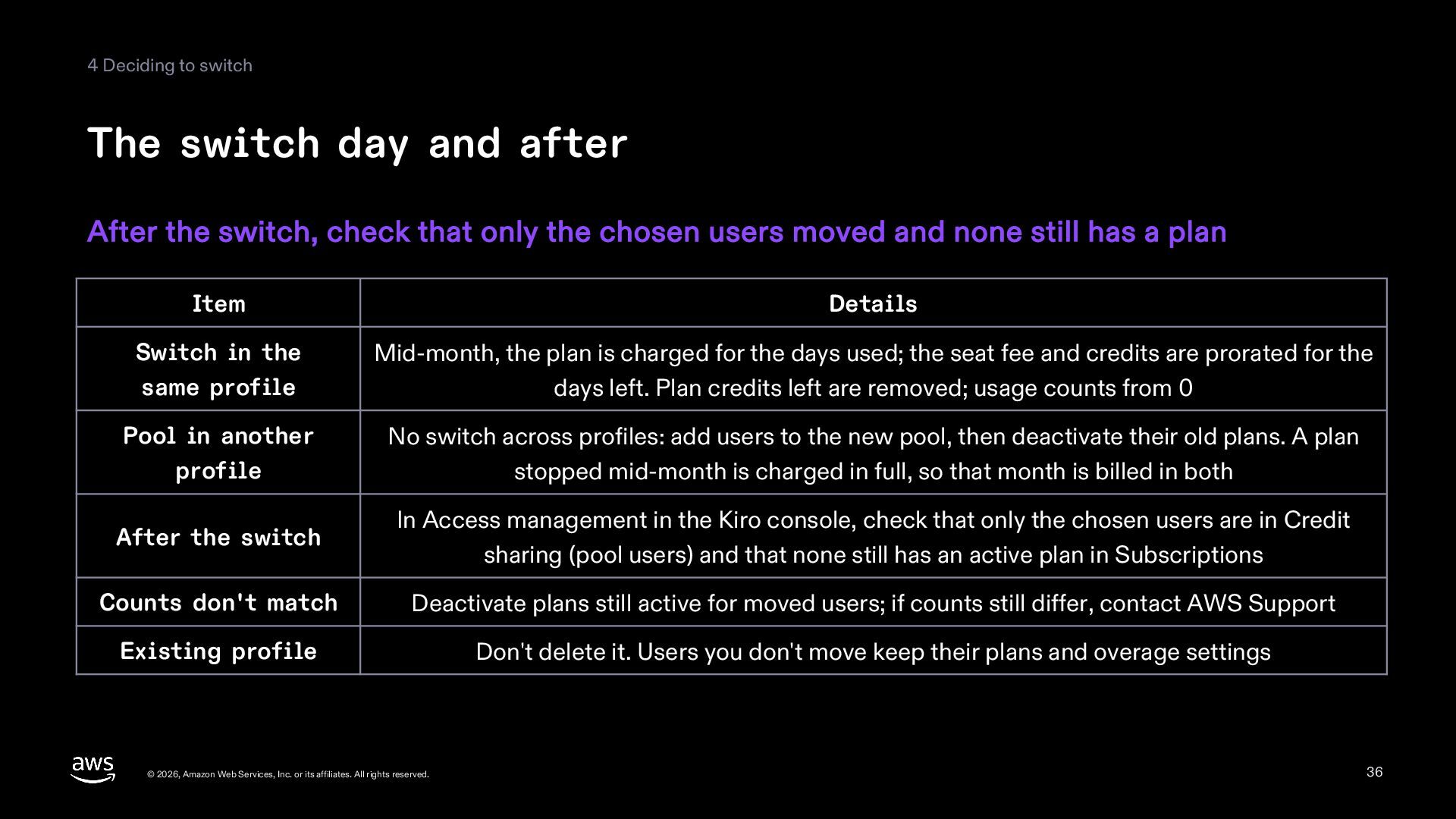
4 Deciding to switch The switch day and after After
the switch, check that only the chosen users moved and none still has a plan Item Details Switch in the same profile Mid-month, the plan is charged for the days used; the seat fee and credits are prorated for the days left. Plan credits left are removed; usage counts from 0 Pool in another profile No switch across profiles: add users to the new pool, then deactivate their old plans. A plan stopped mid-month is charged in full, so that month is billed in both After the switch In Access management in the Kiro console, check that only the chosen users are in Credit sharing (pool users) and that none still has an active plan in Subscriptions Counts don't match Deactivate plans still active for moved users; if counts still differ, contact AWS Support Existing profile Don't delete it. Users you don't move keep their plans and overage settings © 2026, Amazon Web Services, Inc. or its affiliates. All rights reserved. 36 -
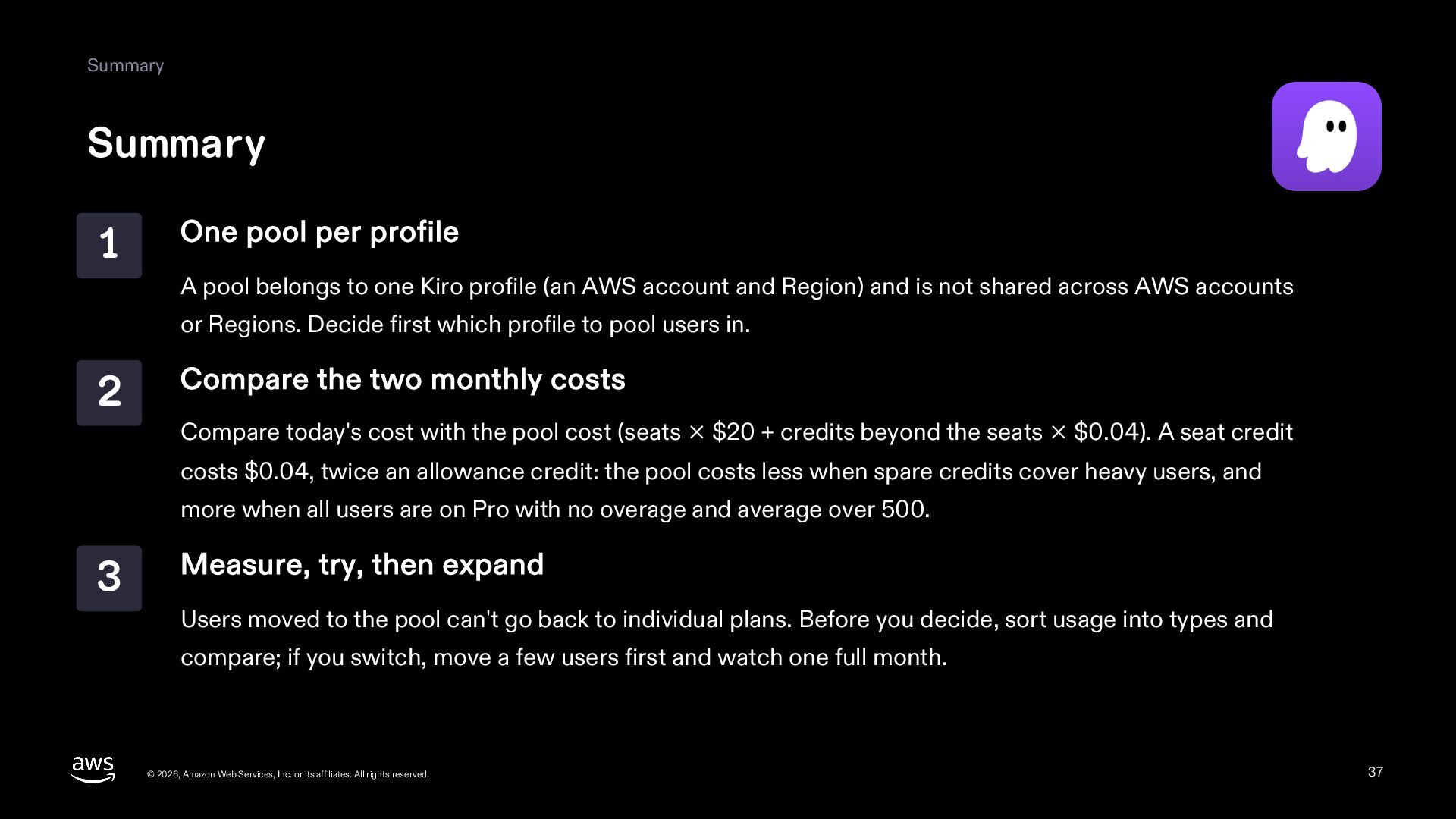
Summary Summary 1 One pool per profile A pool belongs
to one Kiro profile (an AWS account and Region) and is not shared across AWS accounts or Regions. Decide first which profile to pool users in. 2 Compare the two monthly costs Compare today's cost with the pool cost (seats × $20 + credits beyond the seats × $0.04). A seat credit costs $0.04, twice an allowance credit: the pool costs less when spare credits cover heavy users, and more when all users are on Pro with no overage and average over 500. 3 Measure, try, then expand Users moved to the pool can't go back to individual plans. Before you decide, sort usage into types and compare; if you switch, move a few users first and watch one full month. © 2026, Amazon Web Services, Inc. or its affiliates. All rights reserved. 37 -
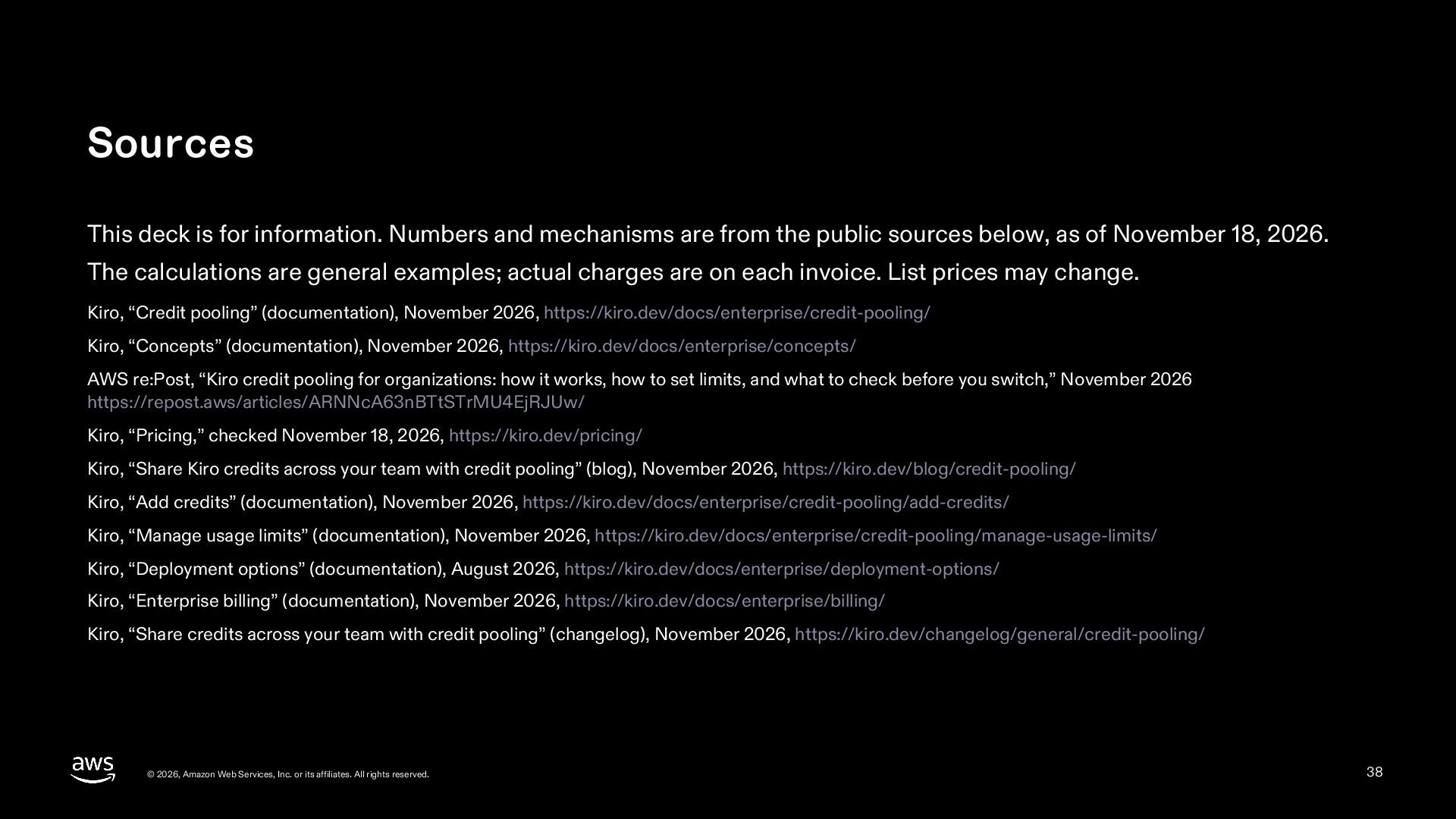
Sources This deck is for information. Numbers and mechanisms are
from the public sources below, as of November 18, 2026. The calculations are general examples; actual charges are on each invoice. List prices may change. Kiro, “Credit pooling” (documentation), November 2026, https://kiro.dev/docs/enterprise/credit-pooling/ Kiro, “Concepts” (documentation), November 2026, https://kiro.dev/docs/enterprise/concepts/ AWS re:Post, “Kiro credit pooling for organizations: how it works, how to set limits, and what to check before you switch,” November 2026 https://repost.aws/articles/ARNNcA63nBTtSTrMU4EjRJUw/ Kiro, “Pricing,” checked November 18, 2026, https://kiro.dev/pricing/ Kiro, “Share Kiro credits across your team with credit pooling” (blog), November 2026, https://kiro.dev/blog/credit-pooling/ Kiro, “Add credits” (documentation), November 2026, https://kiro.dev/docs/enterprise/credit-pooling/add-credits/ Kiro, “Manage usage limits” (documentation), November 2026, https://kiro.dev/docs/enterprise/credit-pooling/manage-usage-limits/ Kiro, “Deployment options” (documentation), August 2026, https://kiro.dev/docs/enterprise/deployment-options/ Kiro, “Enterprise billing” (documentation), November 2026, https://kiro.dev/docs/enterprise/billing/ Kiro, “Share credits across your team with credit pooling” (changelog), November 2026, https://kiro.dev/changelog/general/credit-pooling/ © 2026, Amazon Web Services, Inc. or its affiliates. All rights reserved. 38 -
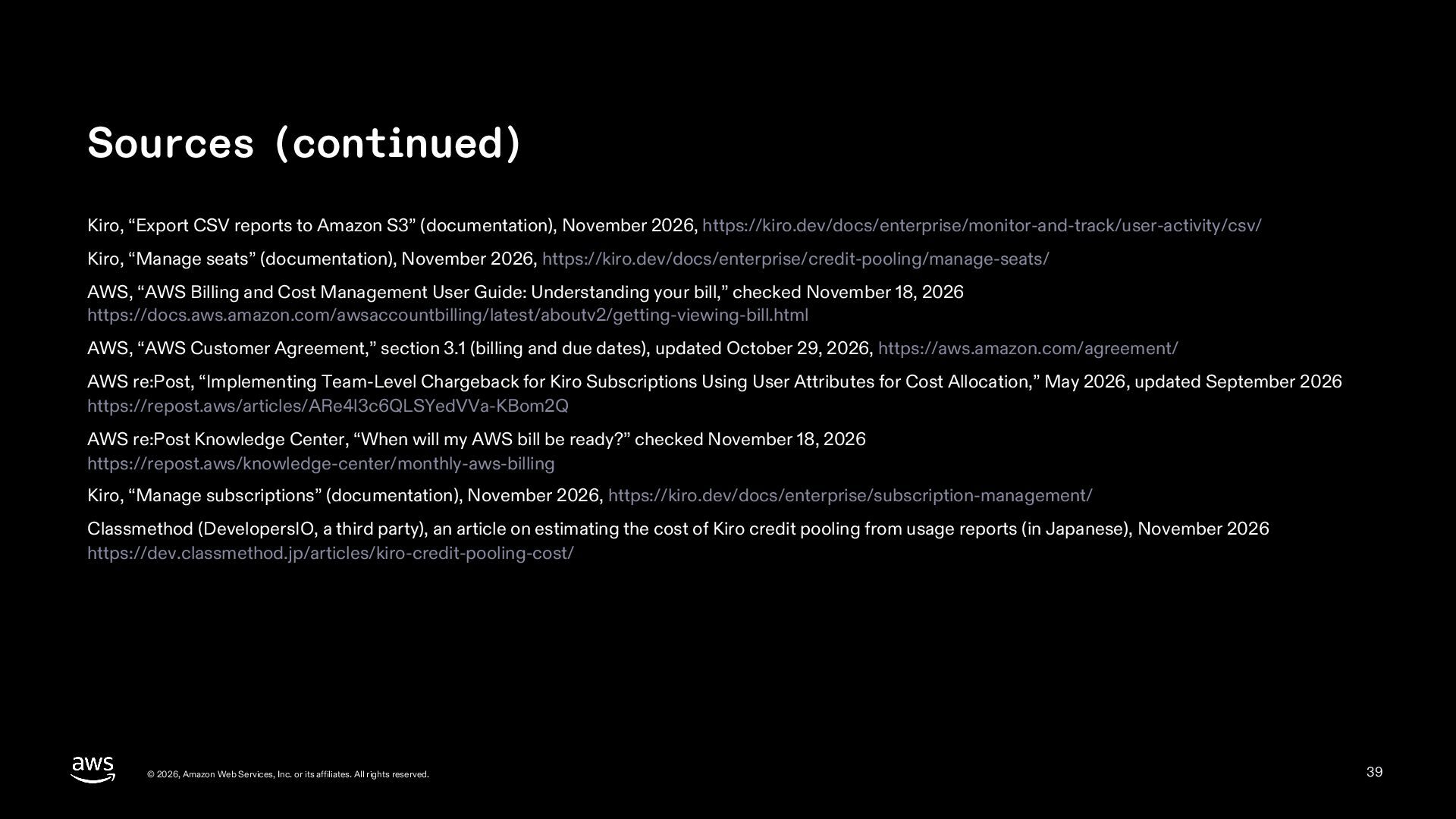
Sources (continued) Kiro, “Export CSV reports to Amazon S3” (documentation),
November 2026, https://kiro.dev/docs/enterprise/monitor-and-track/user-activity/csv/ Kiro, “Manage seats” (documentation), November 2026, https://kiro.dev/docs/enterprise/credit-pooling/manage-seats/ AWS, “AWS Billing and Cost Management User Guide: Understanding your bill,” checked November 18, 2026 https://docs.aws.amazon.com/awsaccountbilling/latest/aboutv2/getting-viewing-bill.html AWS, “AWS Customer Agreement,” section 3.1 (billing and due dates), updated October 29, 2026, https://aws.amazon.com/agreement/ AWS re:Post, “Implementing Team-Level Chargeback for Kiro Subscriptions Using User Attributes for Cost Allocation,” May 2026, updated September 2026 https://repost.aws/articles/ARe4l3c6QLSYedVVa-KBom2Q AWS re:Post Knowledge Center, “When will my AWS bill be ready?” checked November 18, 2026 https://repost.aws/knowledge-center/monthly-aws-billing Kiro, “Manage subscriptions” (documentation), November 2026, https://kiro.dev/docs/enterprise/subscription-management/ Classmethod (DevelopersIO, a third party), an article on estimating the cost of Kiro credit pooling from usage reports (in Japanese), November 2026 https://dev.classmethod.jp/articles/kiro-credit-pooling-cost/ © 2026, Amazon Web Services, Inc. or its affiliates. All rights reserved. 39
 inariku
 tammyeverts
 dkduppf
 harutiro
 nejumi
 riyaamemiya
 hatahata021
 jcabot
 oidfj
 koji_kawamura
 k6s4i53rx
 akihiro0038
 takaha4k
 bluesmoon
 retrage
 codingconduct
 lauravandoore
 ipullrank
 mlcsv
 brettharned
 lcolladotor
 jacobian
 andyhume
 kimpetersen