Upgrade to Pro — share decks privately, control downloads, hide ads and more …

Connect Kiro cloud sessions to a VPC: Connect y...

Connect Kiro cloud sessions to a VPC: Connect your VPC to Kiro once, and new sessions reach private resources

A reference deck, with figures and console screens, on connecting Kiro cloud sessions to your VPC. Once an admin creates a VPC connection, makes it the default in Controls and publishes the change, new sessions reach private resources such as package registries, databases and on-premises systems. The deck shows that traffic other than to Kiro's services goes out through your VPC and that Kiro creates and deletes only network interfaces it has tagged, and covers the prerequisites (Enterprise-plan IAM Identity Center profiles on Controls in us-east-1) and how to create and change a connection. Based on public sources as of November 21, 2026.

Riku INADA PRO

November 21, 2026

Transcript

15 slides
  1. Reference Connect Kiro cloud sessions to a VPC Connect your

    VPC to Kiro once, and new sessions reach private resources After reading, you can decide whether to use a VPC connection, check the prerequisites and create your first connection. As of November 21, 2026 Amazon Web Services Japan © 2026, Amazon Web Services, Inc. or its affiliates. All rights reserved. 1
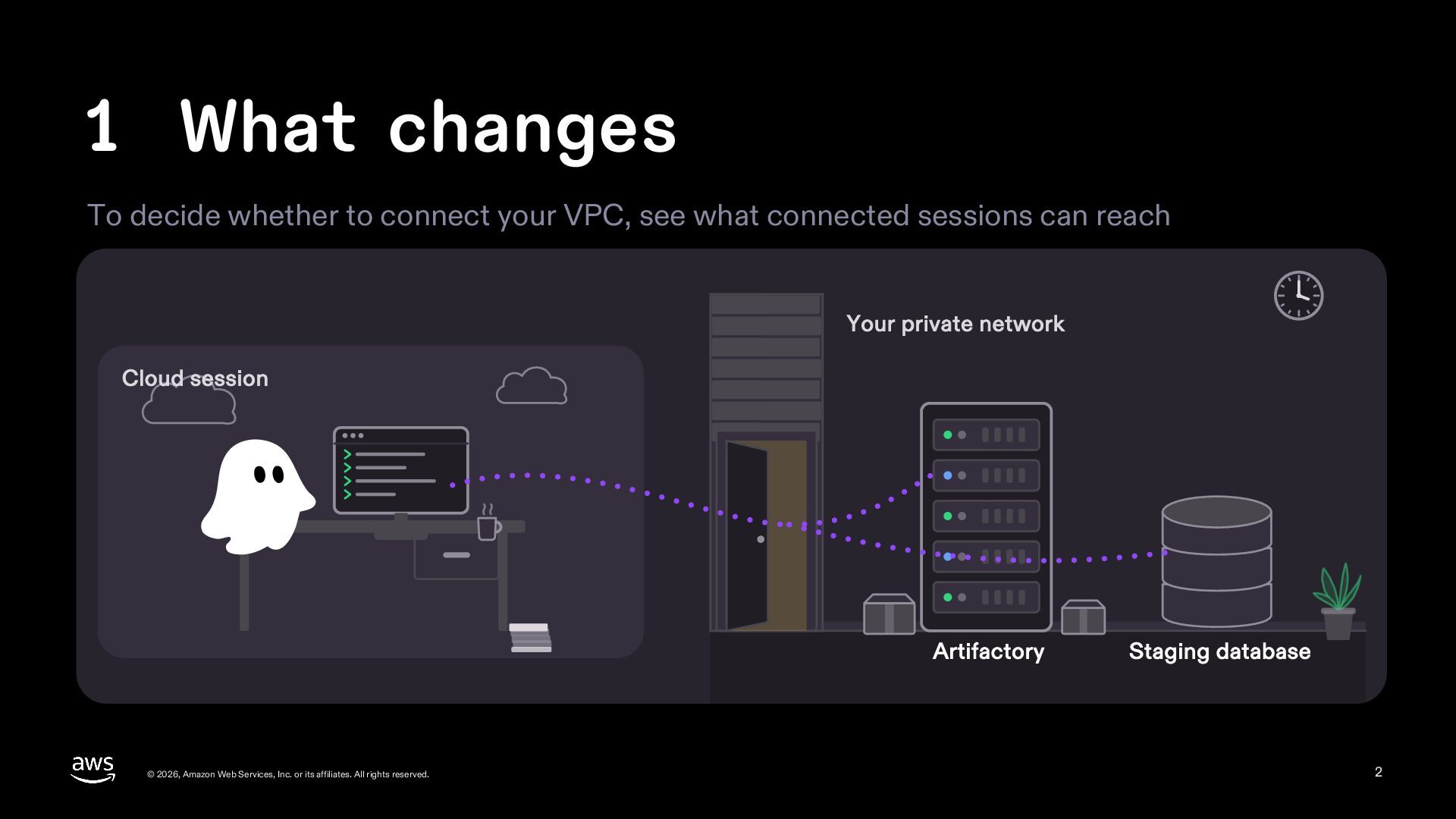
  2. 1 What changes To decide whether to connect your VPC,

    see what connected sessions can reach Your private network Cloud session Artifactory © 2026, Amazon Web Services, Inc. or its affiliates. All rights reserved. Staging database 2
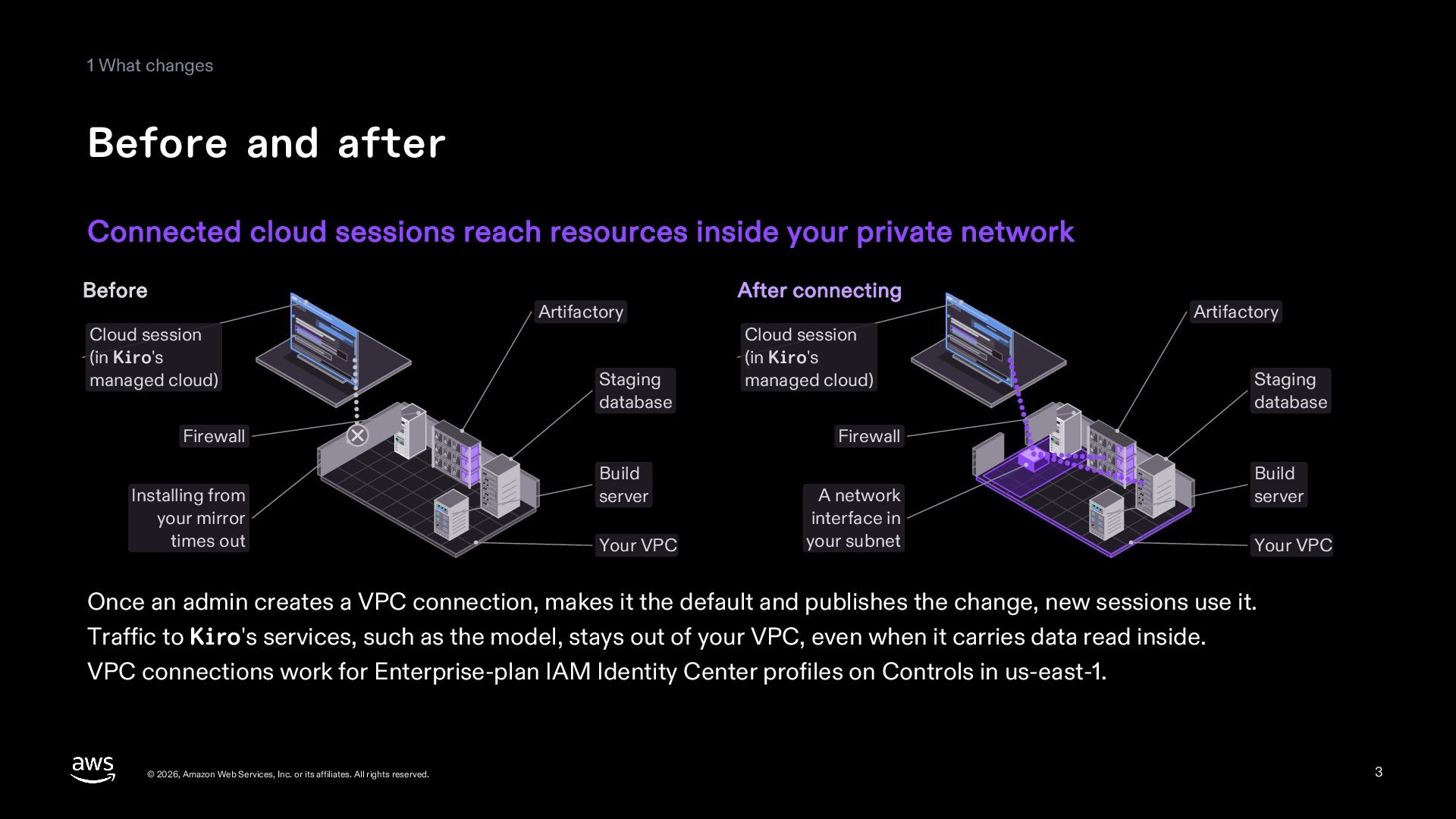
  3. 1 What changes Before and after Connected cloud sessions reach

    resources inside your private network Before Artifactory Cloud session (in Kiro's managed cloud) Staging database Firewall Installing from your mirror times out After connecting Cloud session (in Kiro's managed cloud) Artifactory Staging database Firewall Build server Your VPC A network interface in your subnet Build server Your VPC Once an admin creates a VPC connection, makes it the default and publishes the change, new sessions use it. Traffic to Kiro's services, such as the model, stays out of your VPC, even when it carries data read inside. VPC connections work for Enterprise-plan IAM Identity Center profiles on Controls in us-east-1. © 2026, Amazon Web Services, Inc. or its affiliates. All rights reserved. 3
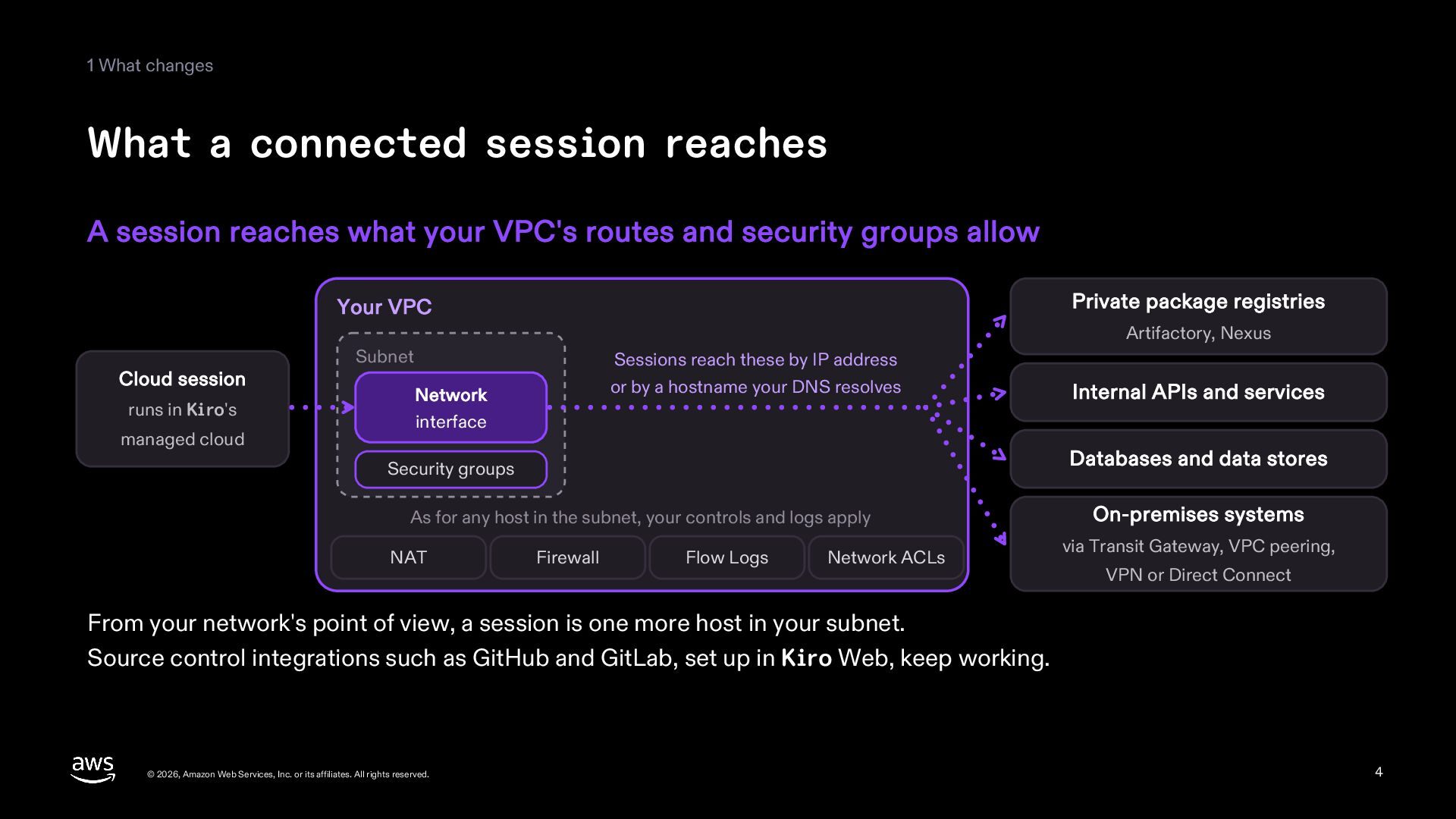
  4. 1 What changes What a connected session reaches A session

    reaches what your VPC's routes and security groups allow Private package registries Your VPC Artifactory, Nexus Cloud session runs in Kiro's managed cloud Subnet Sessions reach these by IP address or by a hostname your DNS resolves Network Internal APIs and services interface Databases and data stores Security groups As for any host in the subnet, your controls and logs apply NAT Firewall Flow Logs Network ACLs On-premises systems via Transit Gateway, VPC peering, VPN or Direct Connect From your network's point of view, a session is one more host in your subnet. Source control integrations such as GitHub and GitLab, set up in Kiro Web, keep working. © 2026, Amazon Web Services, Inc. or its affiliates. All rights reserved. 4
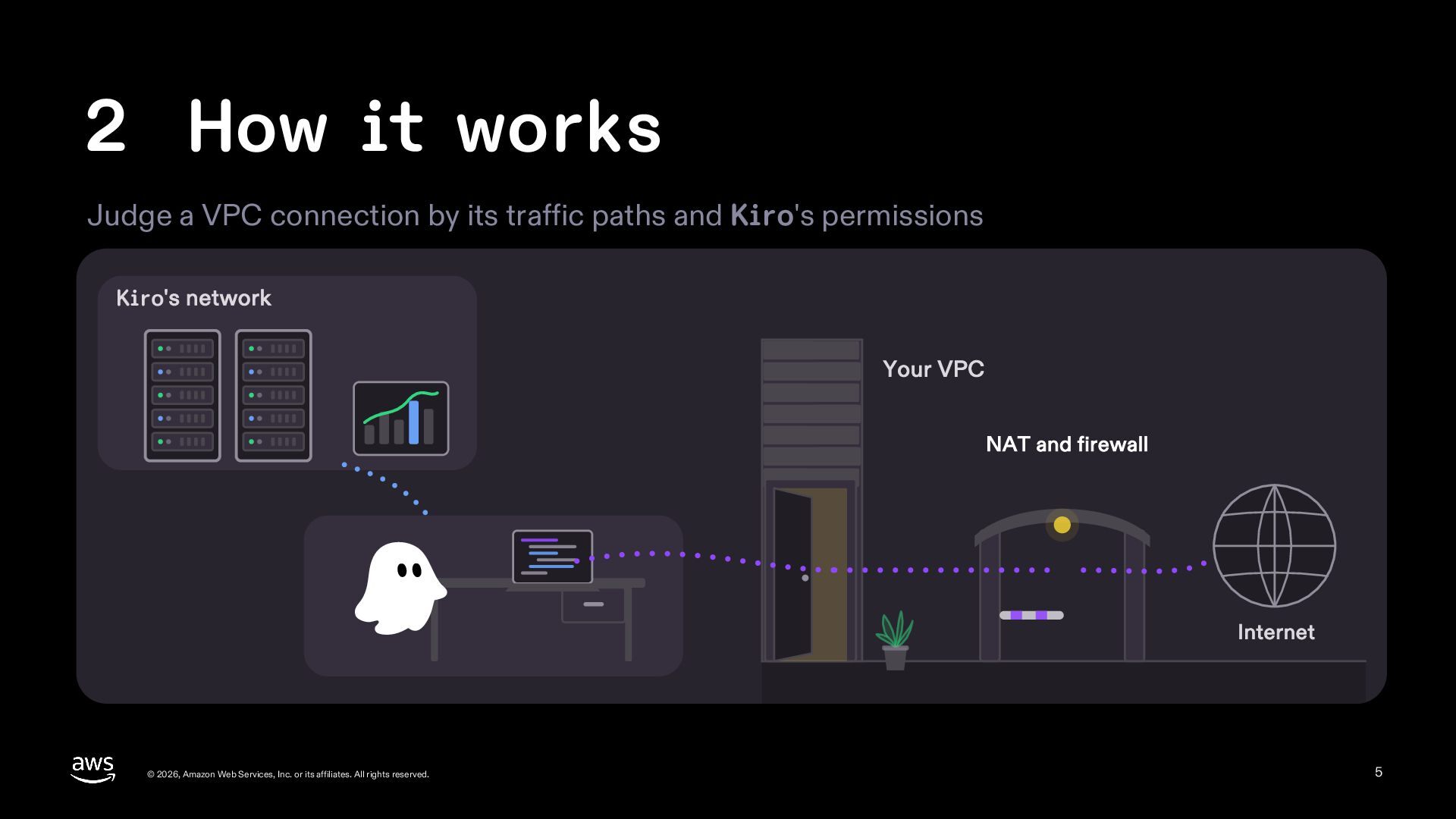
  5. 2 How it works Judge a VPC connection by its

    traffic paths and Kiro's permissions Kiro's network Your VPC NAT and firewall Internet © 2026, Amazon Web Services, Inc. or its affiliates. All rights reserved. 5
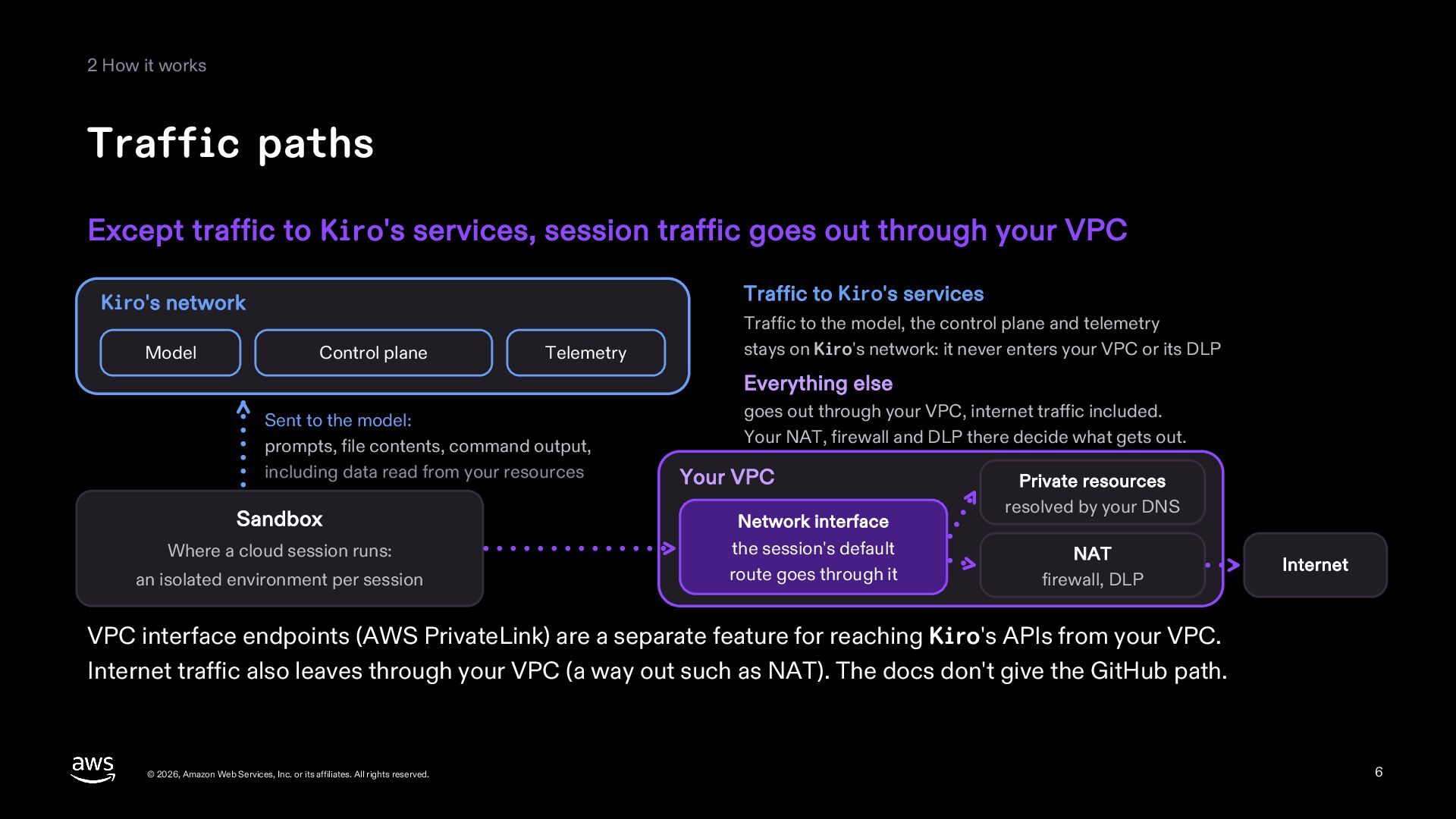
  6. 2 How it works Traffic paths Except traffic to Kiro's

    services, session traffic goes out through your VPC Traffic to Kiro's services Kiro's network Model Control plane Telemetry Traffic to the model, the control plane and telemetry stays on Kiro's network: it never enters your VPC or its DLP Everything else Sent to the model: prompts, file contents, command output, including data read from your resources goes out through your VPC, internet traffic included. Your NAT, firewall and DLP there decide what gets out. Your VPC Sandbox Network interface Where a cloud session runs: the session's default route goes through it an isolated environment per session Private resources resolved by your DNS NAT firewall, DLP Internet VPC interface endpoints (AWS PrivateLink) are a separate feature for reaching Kiro's APIs from your VPC. Internet traffic also leaves through your VPC (a way out such as NAT). The docs don't give the GitHub path. © 2026, Amazon Web Services, Inc. or its affiliates. All rights reserved. 6
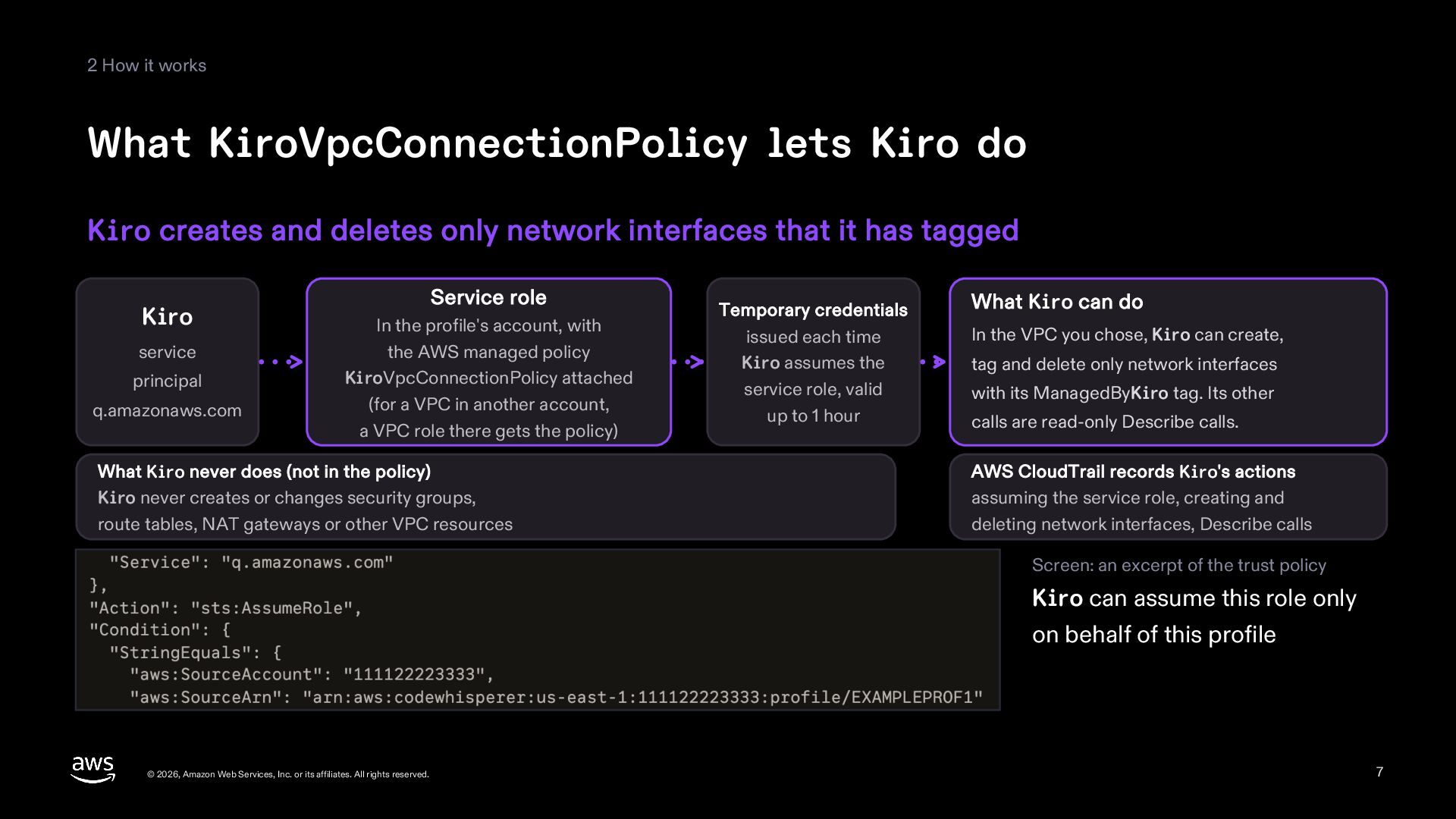
  7. 2 How it works What KiroVpcConnectionPolicy lets Kiro do Kiro

    creates and deletes only network interfaces that it has tagged Kiro service principal q.amazonaws.com Service role In the profile's account, with the AWS managed policy KiroVpcConnectionPolicy attached (for a VPC in another account, a VPC role there gets the policy) What Kiro never does (not in the policy) Kiro never creates or changes security groups, route tables, NAT gateways or other VPC resources Temporary credentials issued each time Kiro assumes the service role, valid up to 1 hour What Kiro can do In the VPC you chose, Kiro can create, tag and delete only network interfaces with its ManagedByKiro tag. Its other calls are read-only Describe calls. AWS CloudTrail records Kiro's actions assuming the service role, creating and deleting network interfaces, Describe calls Screen: an excerpt of the trust policy Kiro can assume this role only on behalf of this profile © 2026, Amazon Web Services, Inc. or its affiliates. All rights reserved. 7
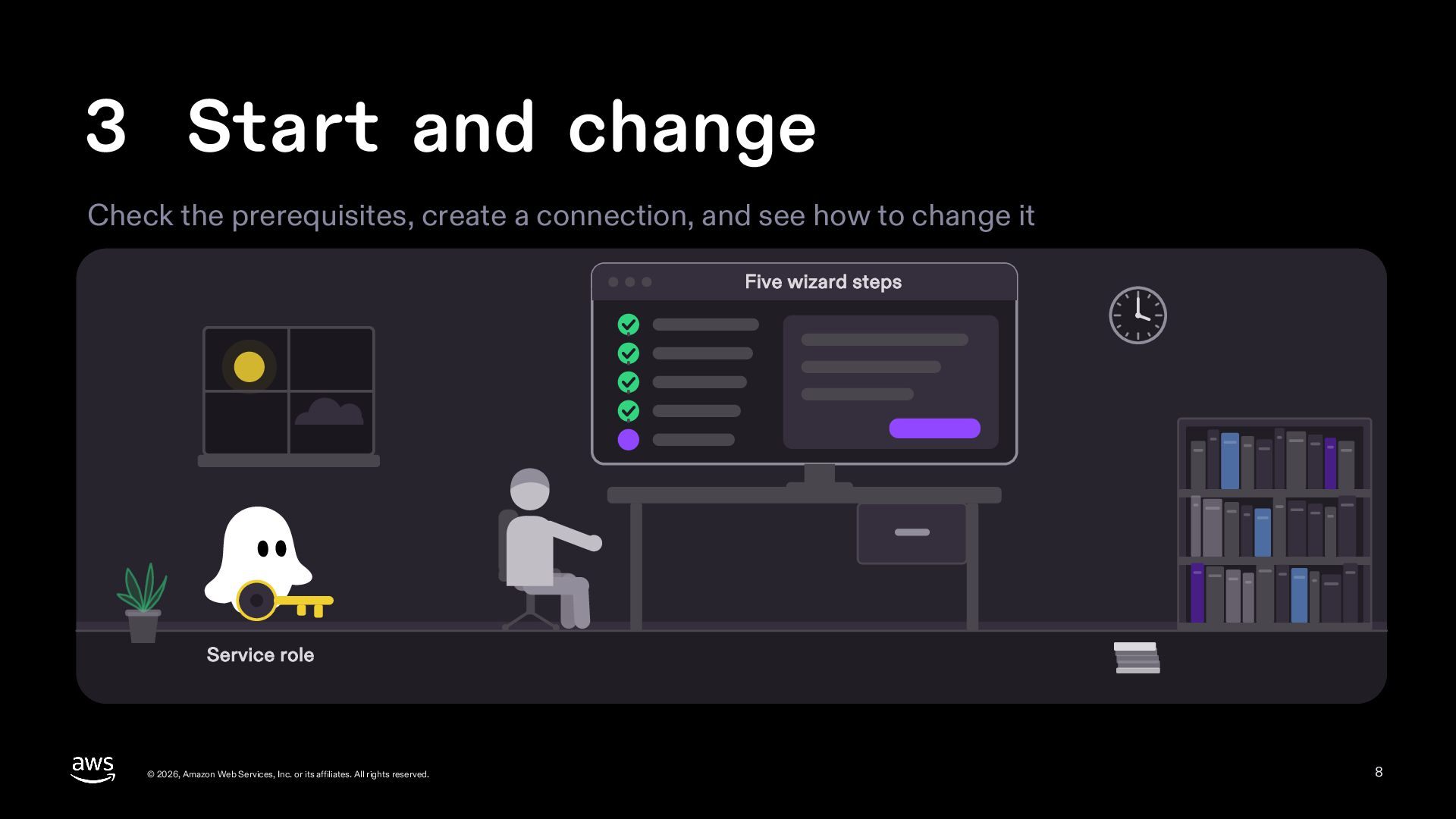
  8. 3 Start and change Check the prerequisites, create a connection,

    and see how to change it Five wizard steps Service role © 2026, Amazon Web Services, Inc. or its affiliates. All rights reserved. 8
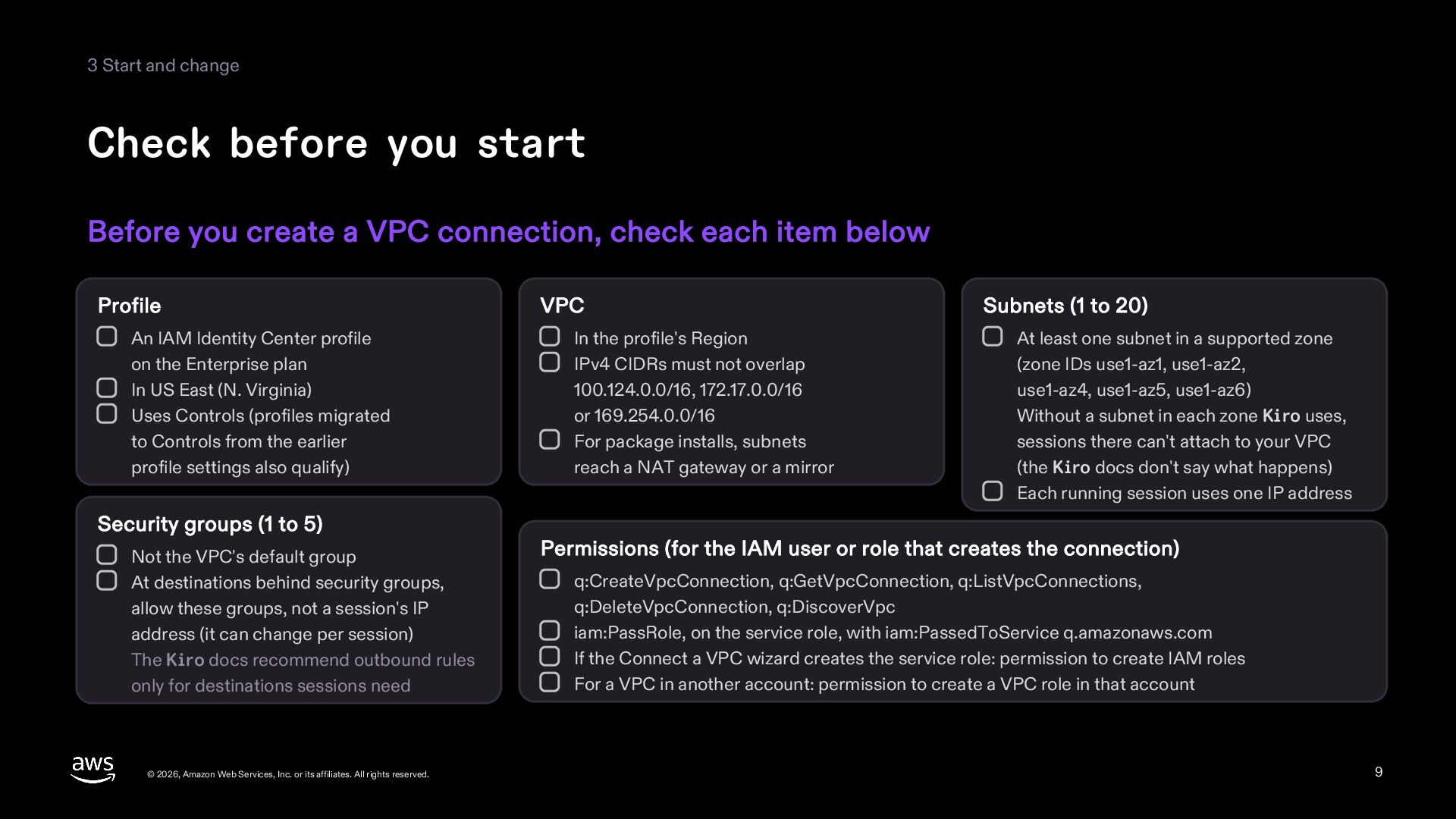
  9. 3 Start and change Check before you start Before you

    create a VPC connection, check each item below Profile An IAM Identity Center profile on the Enterprise plan In US East (N. Virginia) Uses Controls (profiles migrated to Controls from the earlier profile settings also qualify) Security groups (1 to 5) Not the VPC's default group At destinations behind security groups, allow these groups, not a session's IP address (it can change per session) The Kiro docs recommend outbound rules only for destinations sessions need © 2026, Amazon Web Services, Inc. or its affiliates. All rights reserved. VPC In the profile's Region IPv4 CIDRs must not overlap 100.124.0.0/16, 172.17.0.0/16 or 169.254.0.0/16 For package installs, subnets reach a NAT gateway or a mirror Subnets (1 to 20) At least one subnet in a supported zone (zone IDs use1-az1, use1-az2, use1-az4, use1-az5, use1-az6) Without a subnet in each zone Kiro uses, sessions there can't attach to your VPC (the Kiro docs don't say what happens) Each running session uses one IP address Permissions (for the IAM user or role that creates the connection) q:CreateVpcConnection, q:GetVpcConnection, q:ListVpcConnections, q:DeleteVpcConnection, q:DiscoverVpc iam:PassRole, on the service role, with iam:PassedToService q.amazonaws.com If the Connect a VPC wizard creates the service role: permission to create IAM roles For a VPC in another account: permission to create a VPC role in that account 9
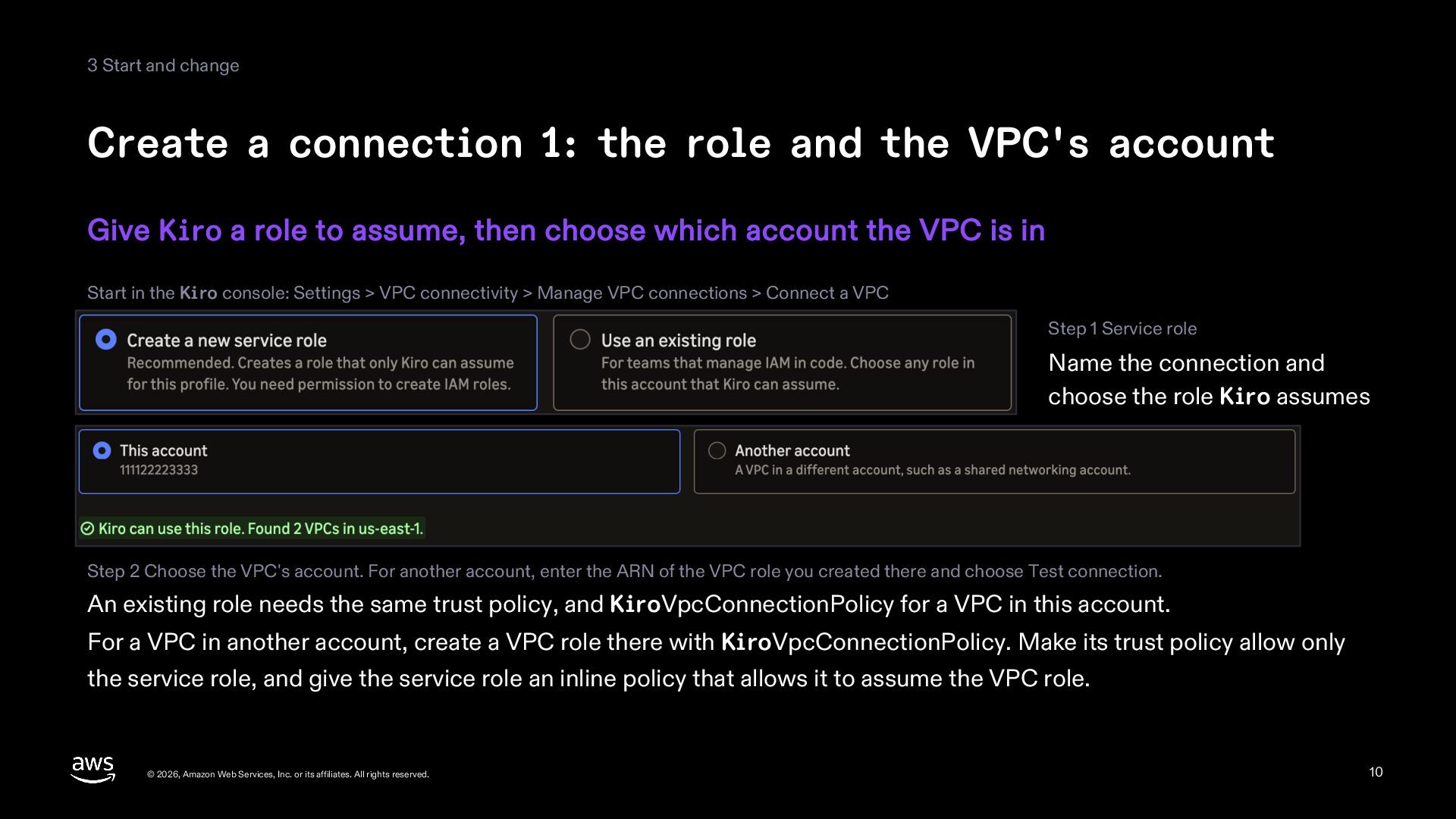
  10. 3 Start and change Create a connection 1: the role

    and the VPC's account Give Kiro a role to assume, then choose which account the VPC is in Start in the Kiro console: Settings > VPC connectivity > Manage VPC connections > Connect a VPC Step 1 Service role Name the connection and choose the role Kiro assumes Step 2 Choose the VPC's account. For another account, enter the ARN of the VPC role you created there and choose Test connection. An existing role needs the same trust policy, and KiroVpcConnectionPolicy for a VPC in this account. For a VPC in another account, create a VPC role there with KiroVpcConnectionPolicy. Make its trust policy allow only the service role, and give the service role an inline policy that allows it to assume the VPC role. © 2026, Amazon Web Services, Inc. or its affiliates. All rights reserved. 10
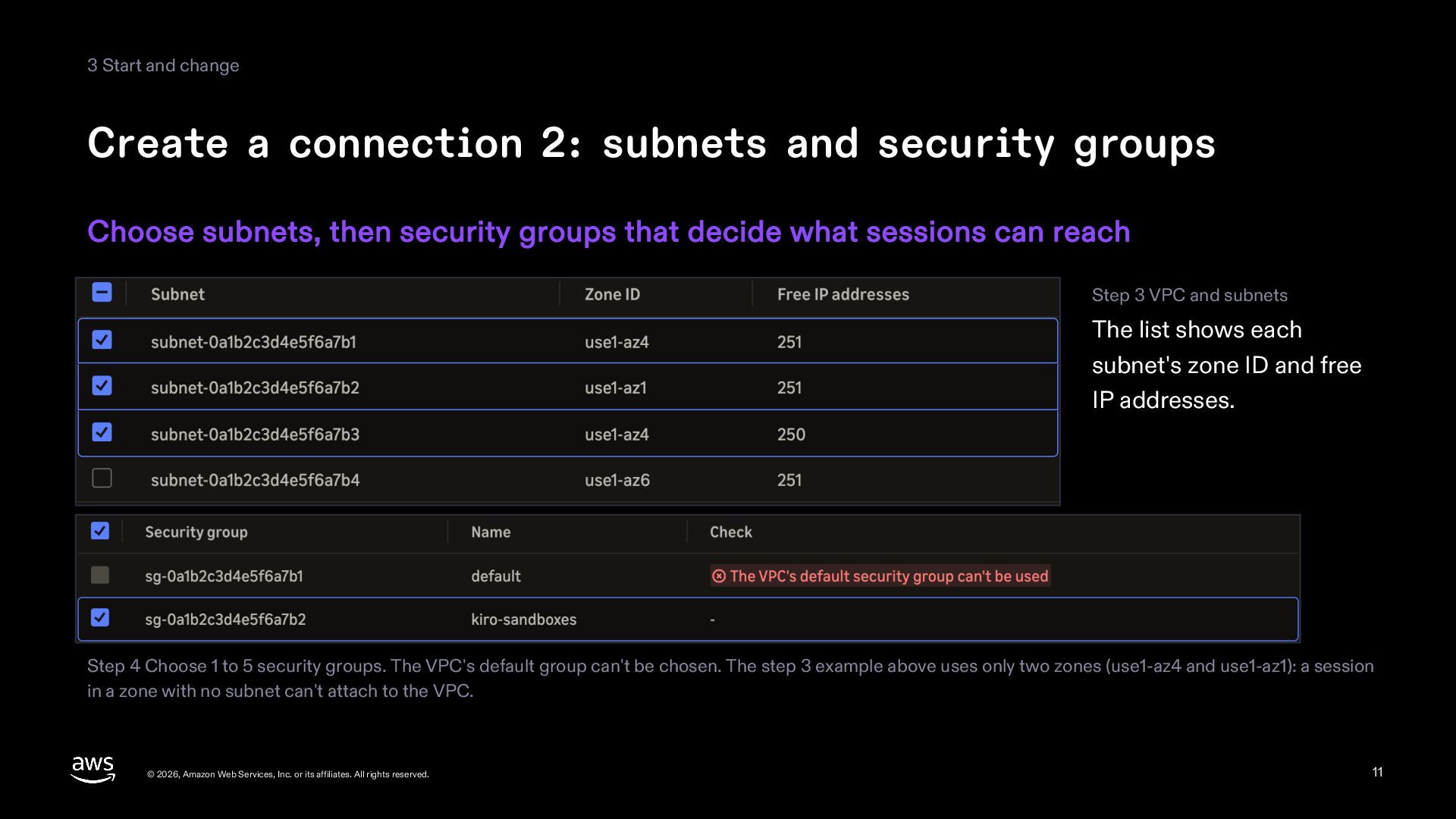
  11. 3 Start and change Create a connection 2: subnets and

    security groups Choose subnets, then security groups that decide what sessions can reach Step 3 VPC and subnets The list shows each subnet's zone ID and free IP addresses. Step 4 Choose 1 to 5 security groups. The VPC's default group can't be chosen. The step 3 example above uses only two zones (use1-az4 and use1-az1): a session in a zone with no subnet can't attach to the VPC. © 2026, Amazon Web Services, Inc. or its affiliates. All rights reserved. 11
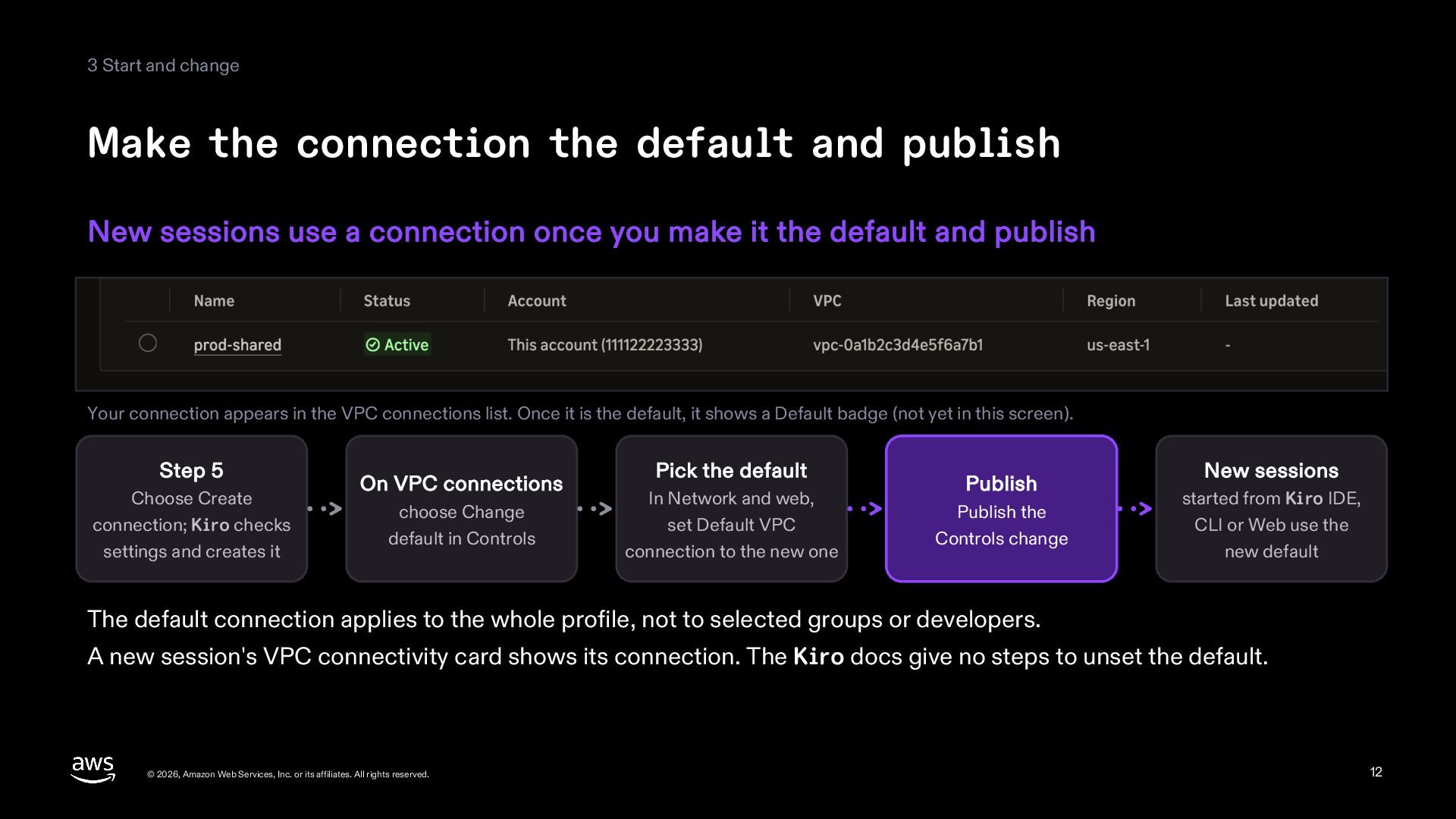
  12. 3 Start and change Make the connection the default and

    publish New sessions use a connection once you make it the default and publish Your connection appears in the VPC connections list. Once it is the default, it shows a Default badge (not yet in this screen). Step 5 Choose Create connection; Kiro checks settings and creates it On VPC connections choose Change default in Controls Pick the default In Network and web, set Default VPC connection to the new one Publish Publish the Controls change New sessions started from Kiro IDE, CLI or Web use the new default The default connection applies to the whole profile, not to selected groups or developers. A new session's VPC connectivity card shows its connection. The Kiro docs give no steps to unset the default. © 2026, Amazon Web Services, Inc. or its affiliates. All rights reserved. 12
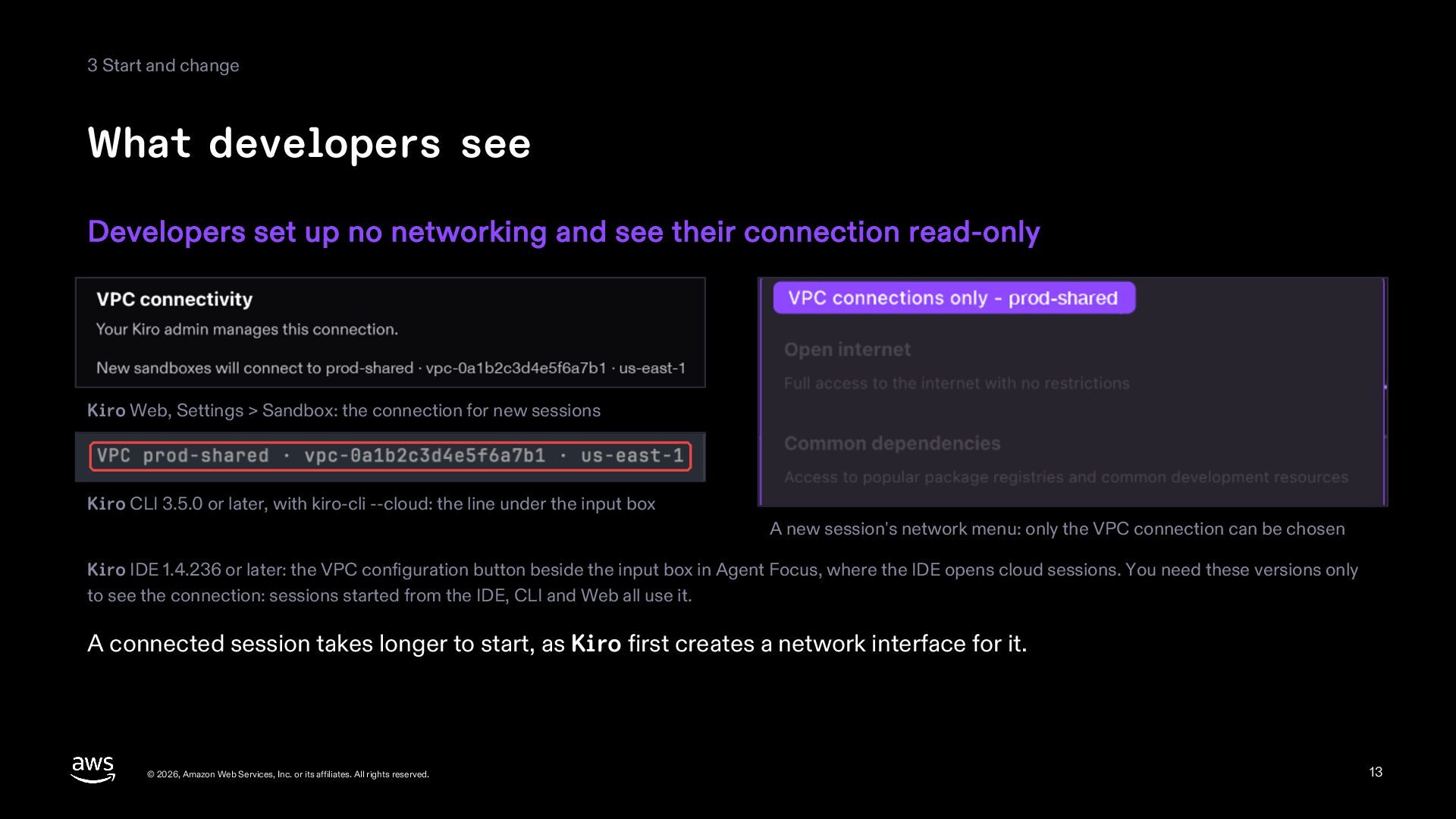
  13. 3 Start and change What developers see Developers set up

    no networking and see their connection read-only Kiro Web, Settings > Sandbox: the connection for new sessions Kiro CLI 3.5.0 or later, with kiro-cli --cloud: the line under the input box A new session's network menu: only the VPC connection can be chosen Kiro IDE 1.4.236 or later: the VPC configuration button beside the input box in Agent Focus, where the IDE opens cloud sessions. You need these versions only to see the connection: sessions started from the IDE, CLI and Web all use it. A connected session takes longer to start, as Kiro first creates a network interface for it. © 2026, Amazon Web Services, Inc. or its affiliates. All rights reserved. 13
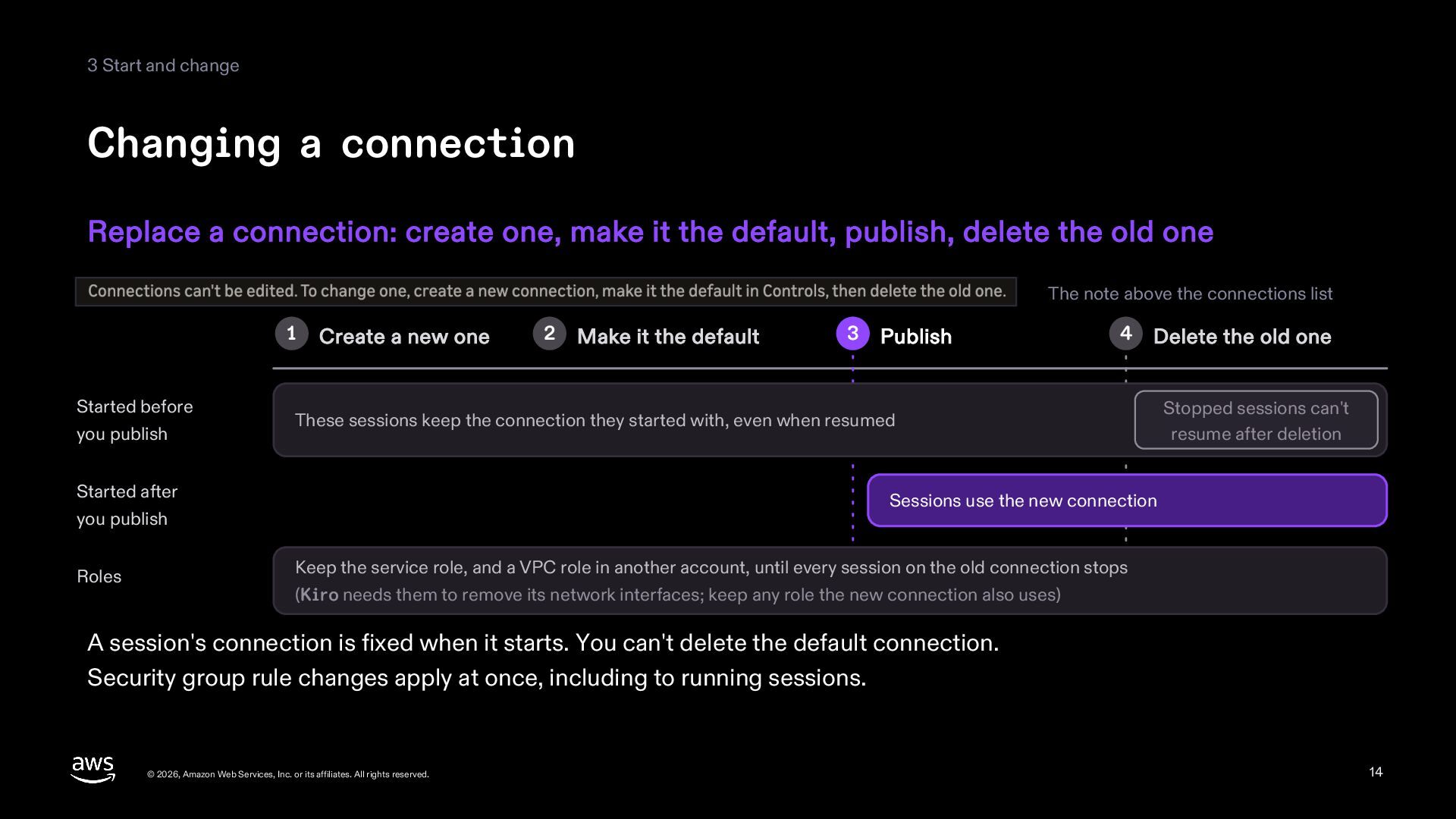
  14. 3 Start and change Changing a connection Replace a connection:

    create one, make it the default, publish, delete the old one The note above the connections list 1 Started before you publish Create a new one Make it the default 3 Publish 4 Delete the old one These sessions keep the connection they started with, even when resumed Started after you publish Roles 2 Stopped sessions can't resume after deletion Sessions use the new connection Keep the service role, and a VPC role in another account, until every session on the old connection stops (Kiro needs them to remove its network interfaces; keep any role the new connection also uses) A session's connection is fixed when it starts. You can't delete the default connection. Security group rule changes apply at once, including to running sessions. © 2026, Amazon Web Services, Inc. or its affiliates. All rights reserved. 14
  15. Sources This deck is for information only and is based

    on the public sources below. The information is current as of November 21, 2026 and may change. The screens are crops of the images in the Kiro blog post “Kiro cloud sessions now reach private networks.” The names and IDs in them are the post's examples. The other pictures and figures were drawn for this deck. Kiro, blog, “Kiro cloud sessions now reach private networks,” November 20, 2026 https://kiro.dev/blog/private-networks/ Kiro, docs, “Connect cloud sessions to your VPC,” updated November 20, 2026 https://kiro.dev/docs/cloud-sessions/vpc/ Kiro, docs, “Kiro and interface endpoints (AWS PrivateLink),” updated August 4, 2026 https://kiro.dev/docs/privacy-and-security/vpc-endpoints/ Kiro, docs, “Cloud sessions,” updated November 20, 2026 https://kiro.dev/docs/cloud-sessions/ © 2026, Amazon Web Services, Inc. or its affiliates. All rights reserved. 15

More Decks by Riku INADA

Other Decks in Technology