Share
Embed
Strands harness (A ready-made agent and the Strands Harness SDK) | Learn Strands Agents with Kiro 10
This Level 200 deck builds a ready-made agent with create_harness() of Strands harness (strands-harness), adds and narrows its tools and instructions, keeps conversations and knowledge with session and memory, and decides where it stops with interventions and a sandbox before you ship it, using the official docs and real output of strands-harness 0.3.4 on Amazon Bedrock in the Tokyo Region. It shows how Strands harness sits on the Strands Harness SDK, as deck 10 (Ship and extend) of the series Learn Strands Agents with Kiro, for developers who write Python and are new to Strands Agents.

Riku INADA PRO
November 11, 2026
Annual Pro sale · Save $30
Have presentations of your own?
Share with private links, password protection, and more control over your work.
Transcript
48 slides
-
Learn Strands Agents with Kiro 10 Ship and extend Strands
harness A ready-made agent and the Strands Harness SDK 10 Level 200 / November 2026 November 2026 Riku Inada Amazon Web Services Japan © 2026, Amazon Web Services, Inc. or its affiliates. All rights reserved. Kiro + Strands Agents 1 -
Introduction About me Riku Inada Amazon Web Services Japan G.K.
Solutions Architect Works mainly with manufacturing customers Recent work Promoting the AI-Driven Development Life Cycle (AI-DLC) Writing and speaking about Kiro and AWS Amplify © 2026, Amazon Web Services, Inc. or its affiliates. All rights reserved. X @inada_riku Speaker Deck speakerdeck.com/inariku Zenn zenn.dev/inariku GitHub github.com/inariku 2 -
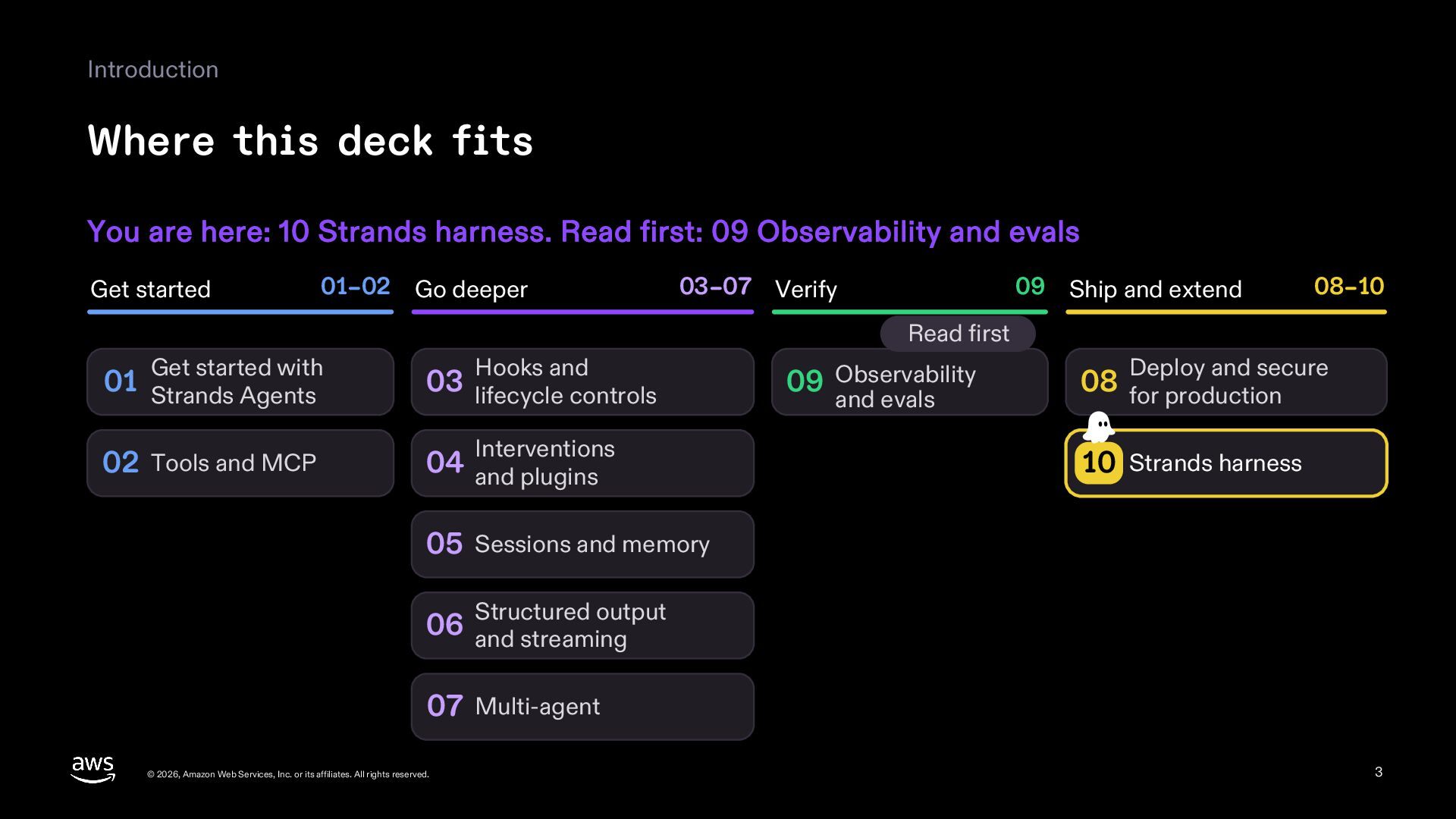
Introduction Where this deck fits You are here: 10 Strands
harness. Read first: 09 Observability and evals Get started 01–02 Go deeper 03–07 Verify 09 Ship and extend 08–10 Read first Get started with Hooks and 01 Strands Agents 03 lifecycle controls 02 Tools and MCP 04 and plugins Interventions 09 Observability and evals Deploy and secure 08 for production 10 Strands harness 05 Sessions and memory output 06 Structured and streaming 07 Multi-agent © 2026, Amazon Web Services, Inc. or its affiliates. All rights reserved. 3 -
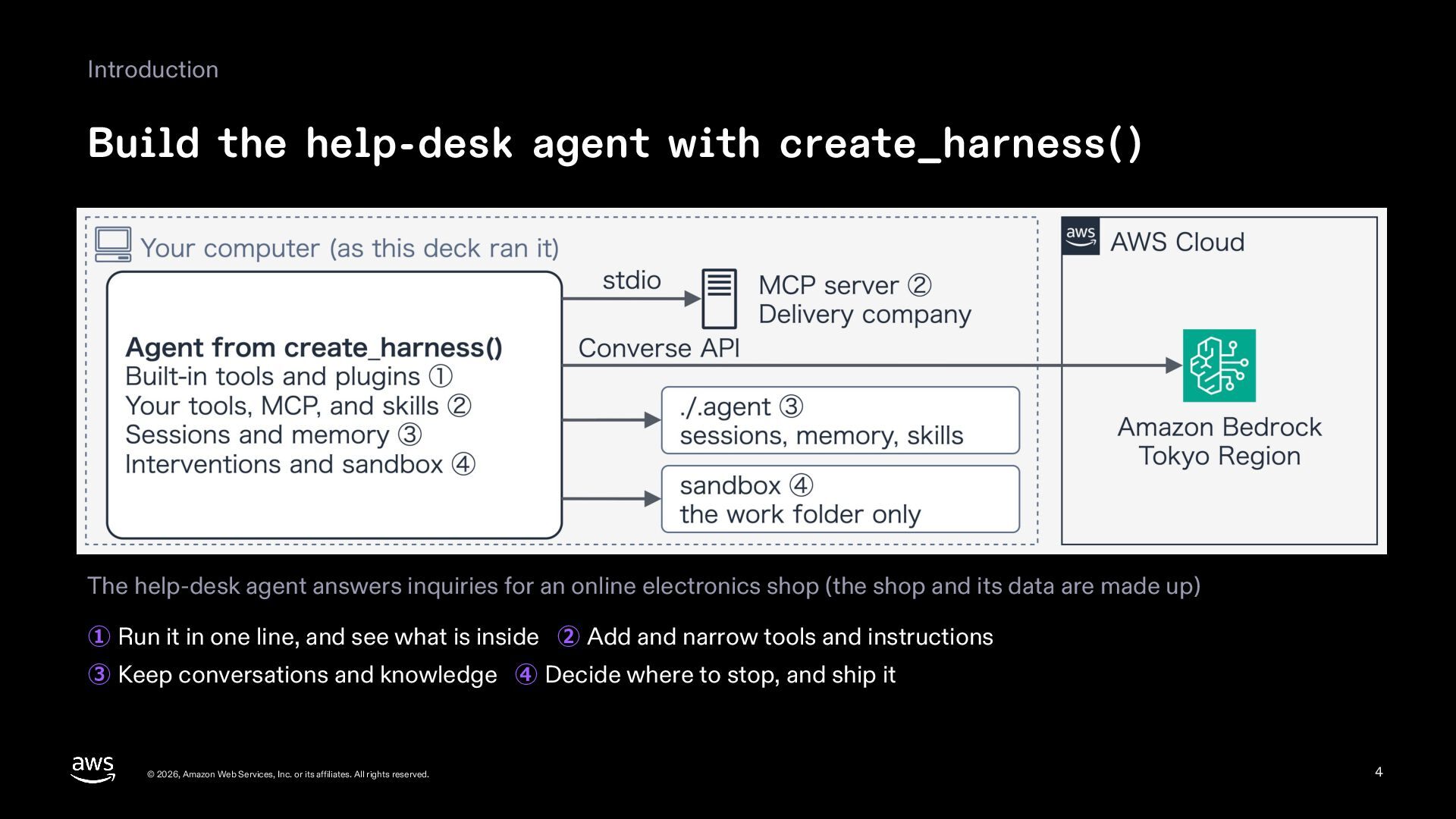
Introduction Build the help-desk agent with create_harness() The help-desk agent
answers inquiries for an online electronics shop (the shop and its data are made up) ① Run it in one line, and see what is inside ② Add and narrow tools and instructions ③ Keep conversations and knowledge ④ Decide where to stop, and ship it © 2026, Amazon Web Services, Inc. or its affiliates. All rights reserved. 4 -
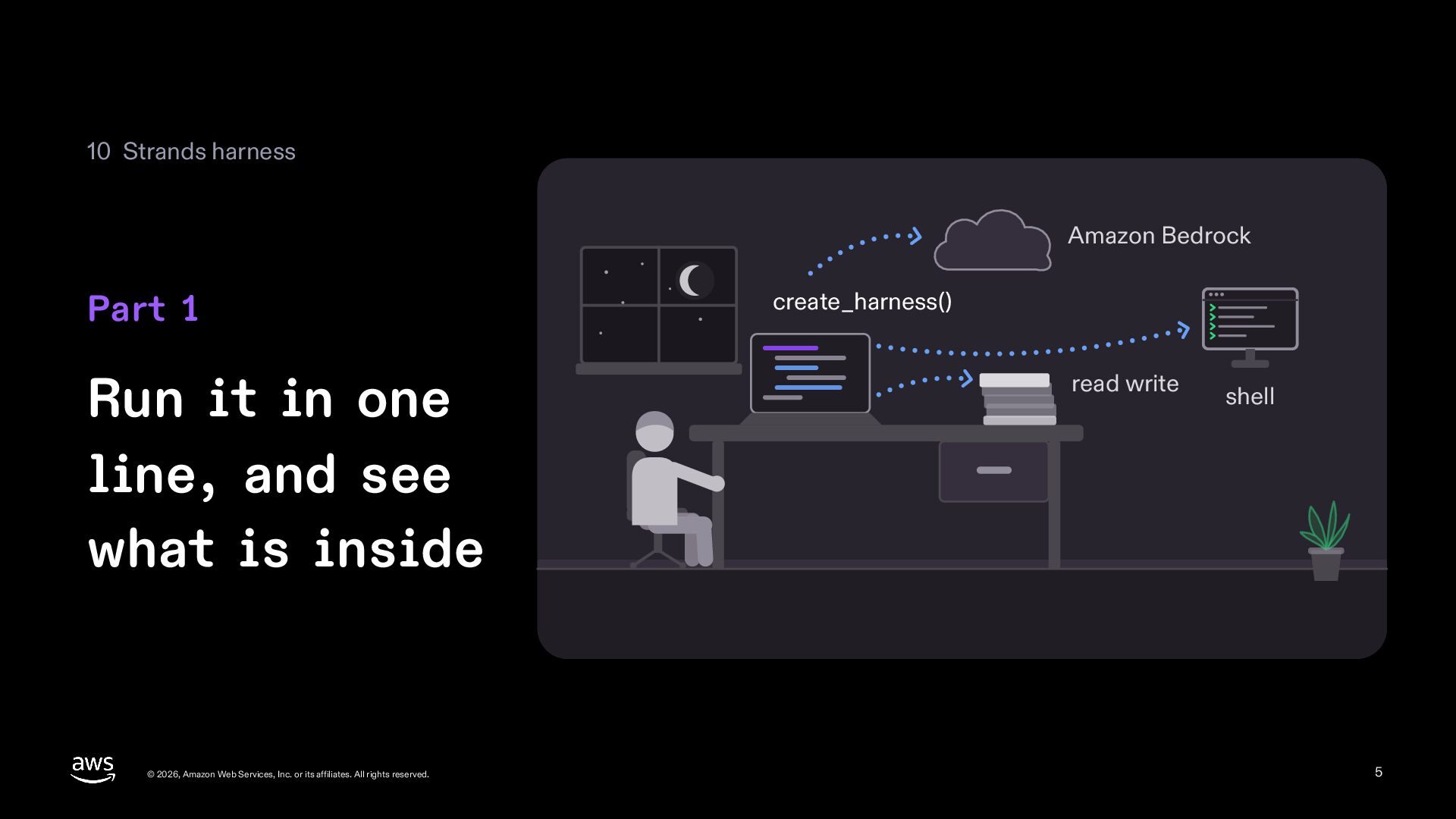
10 Strands harness Amazon Bedrock Part 1 Run it in
one line, and see what is inside © 2026, Amazon Web Services, Inc. or its affiliates. All rights reserved. create_harness() read write shell 5 -
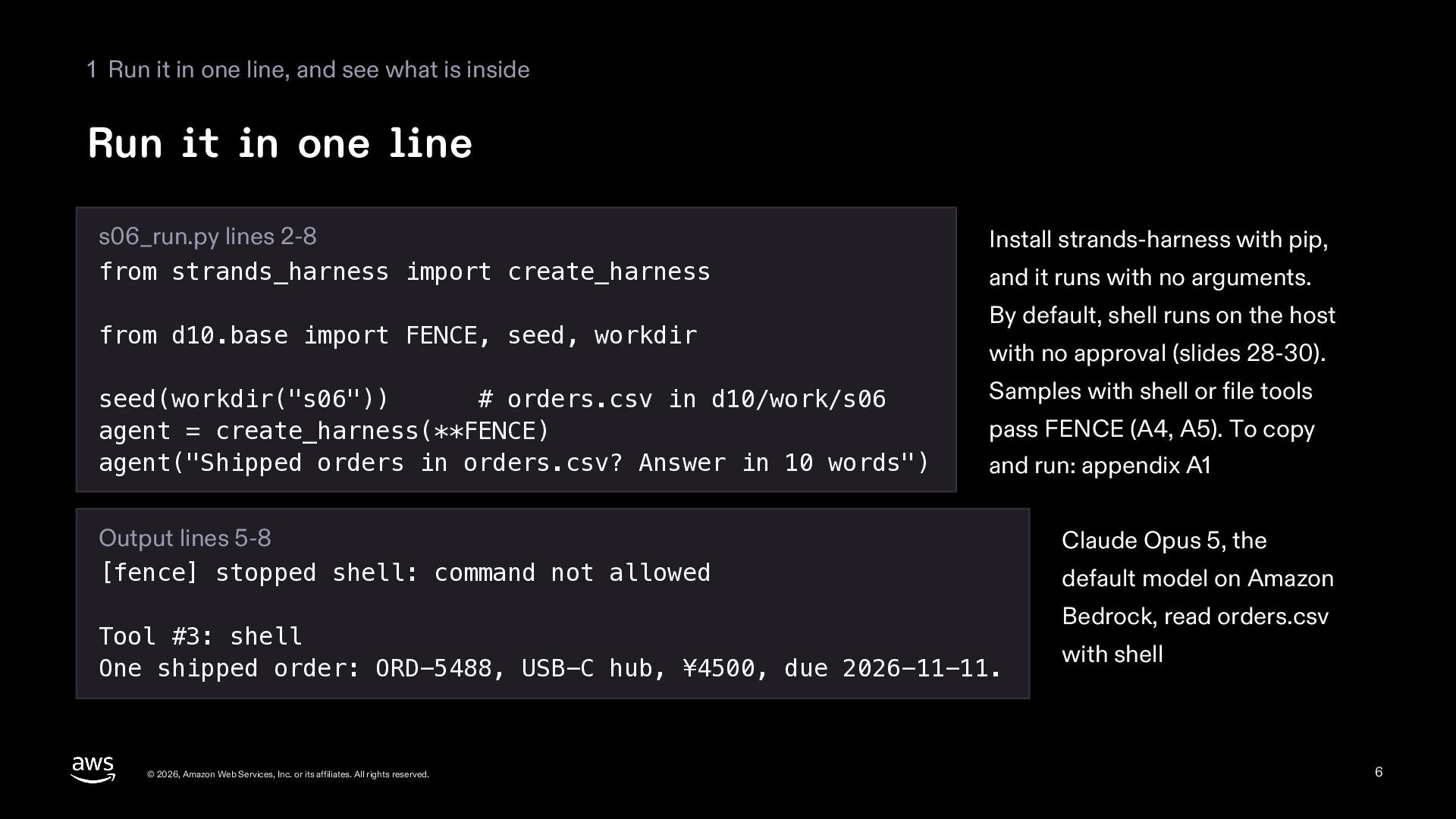
1 Run it in one line, and see what is
inside Run it in one line s06_run.py lines 2-8 from strands_harness import create_harness from d10.base import FENCE, seed, workdir seed(workdir("s06")) # orders.csv in d10/work/s06 agent = create_harness(**FENCE) agent("Shipped orders in orders.csv? Answer in 10 words") Install strands-harness with pip, and it runs with no arguments. By default, shell runs on the host with no approval (slides 28-30). Samples with shell or file tools pass FENCE (A4, A5). To copy and run: appendix A1 Output lines 5-8 [fence] stopped shell: command not allowed Tool #3: shell One shipped order: ORD-5488, USB-C hub, ¥4500, due 2026-11-11. © 2026, Amazon Web Services, Inc. or its affiliates. All rights reserved. Claude Opus 5, the default model on Amazon Bedrock, read orders.csv with shell 6 -
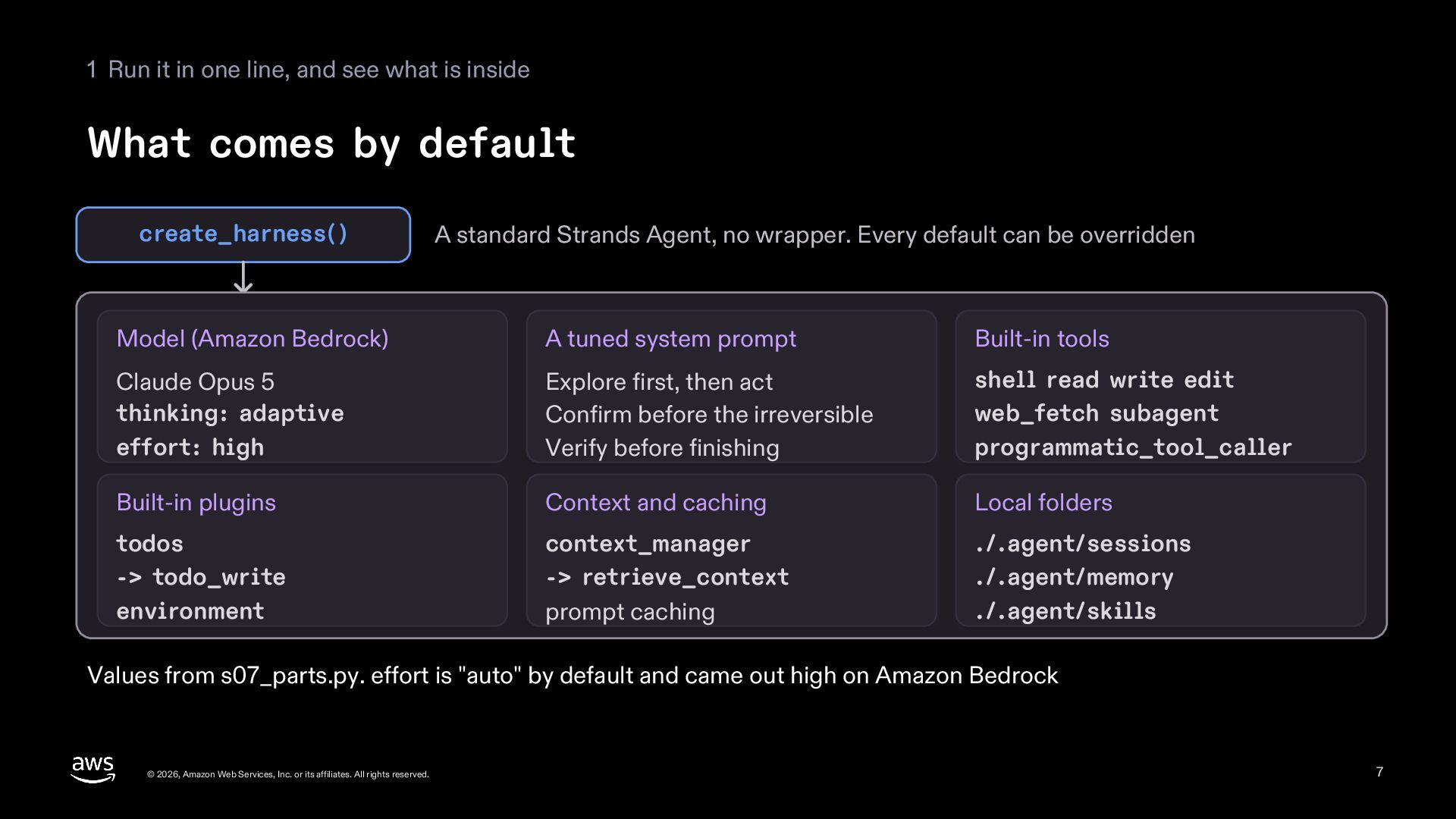
1 Run it in one line, and see what is
inside What comes by default create_harness() A standard Strands Agent, no wrapper. Every default can be overridden Model (Amazon Bedrock) A tuned system prompt Built-in tools Claude Opus 5 thinking: adaptive effort: high Explore first, then act Confirm before the irreversible Verify before finishing shell read write edit web_fetch subagent programmatic_tool_caller Built-in plugins Context and caching Local folders todos -> todo_write environment context_manager -> retrieve_context prompt caching ./.agent/sessions ./.agent/memory ./.agent/skills Values from s07_parts.py. effort is "auto" by default and came out high on Amazon Bedrock © 2026, Amazon Web Services, Inc. or its affiliates. All rights reserved. 7 -
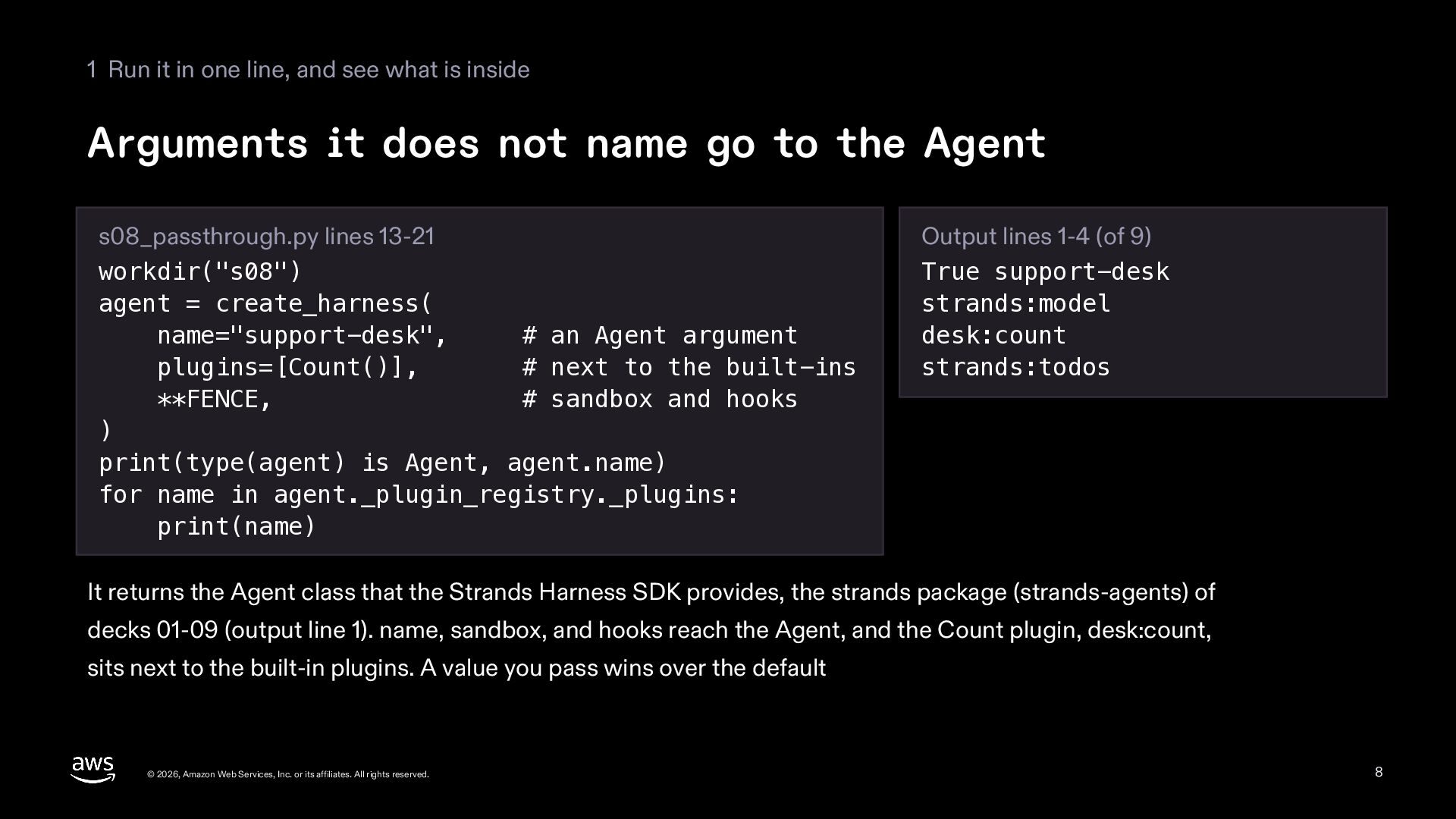
1 Run it in one line, and see what is
inside Arguments it does not name go to the Agent s08_passthrough.py lines 13-21 workdir("s08") agent = create_harness( name="support-desk", # an Agent argument plugins=[Count()], # next to the built-ins **FENCE, # sandbox and hooks ) print(type(agent) is Agent, agent.name) for name in agent._plugin_registry._plugins: print(name) Output lines 1-4 (of 9) True support-desk strands:model desk:count strands:todos It returns the Agent class that the Strands Harness SDK provides, the strands package (strands-agents) of decks 01-09 (output line 1). name, sandbox, and hooks reach the Agent, and the Count plugin, desk:count, sits next to the built-in plugins. A value you pass wins over the default © 2026, Amazon Web Services, Inc. or its affiliates. All rights reserved. 8 -
1 Run it in one line, and see what is
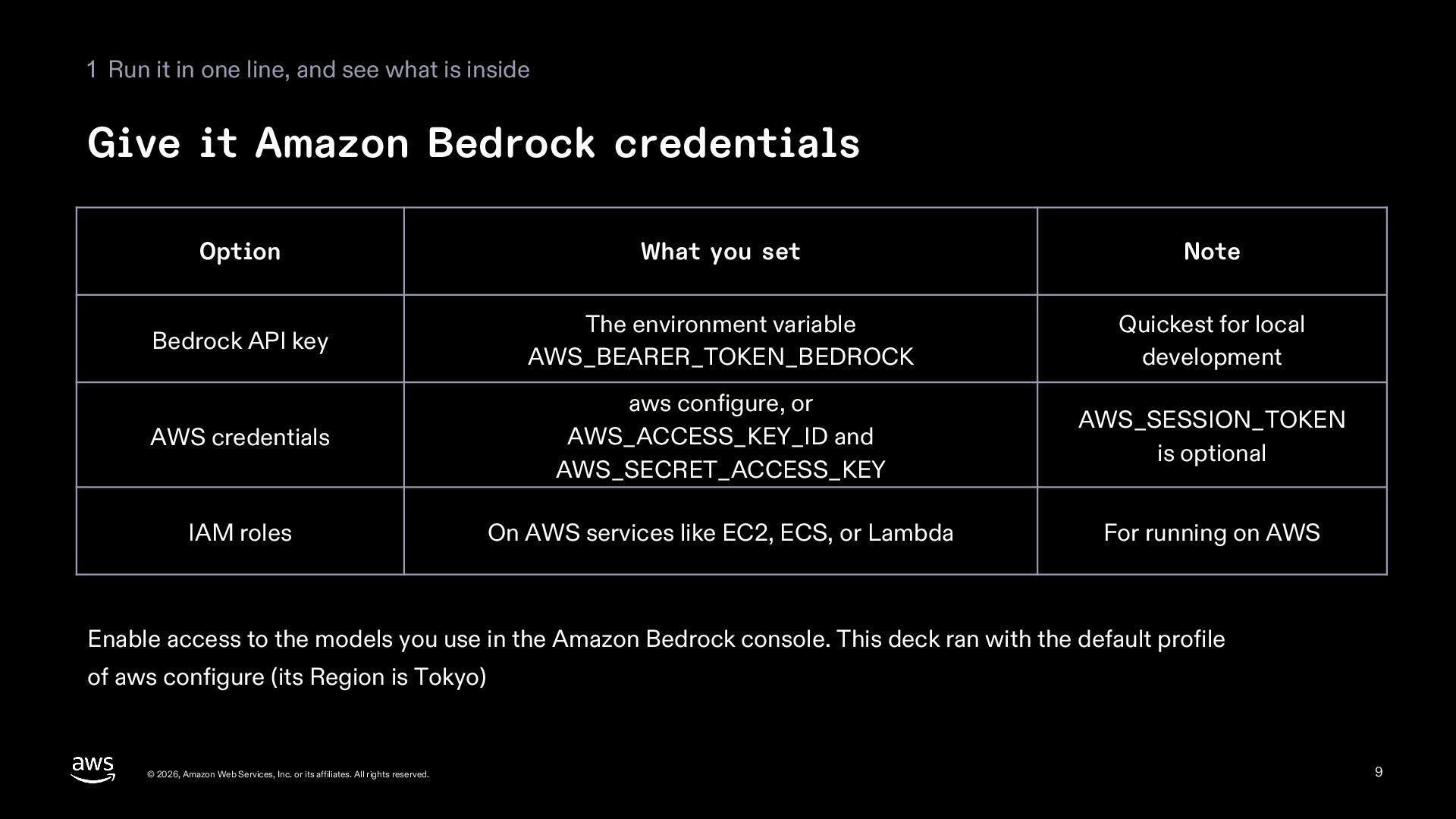
inside Give it Amazon Bedrock credentials Option What you set Note Bedrock API key The environment variable AWS_BEARER_TOKEN_BEDROCK Quickest for local development AWS credentials aws configure, or AWS_ACCESS_KEY_ID and AWS_SECRET_ACCESS_KEY AWS_SESSION_TOKEN is optional IAM roles On AWS services like EC2, ECS, or Lambda For running on AWS Enable access to the models you use in the Amazon Bedrock console. This deck ran with the default profile of aws configure (its Region is Tokyo) © 2026, Amazon Web Services, Inc. or its affiliates. All rights reserved. 9 -
1 Run it in one line, and see what is
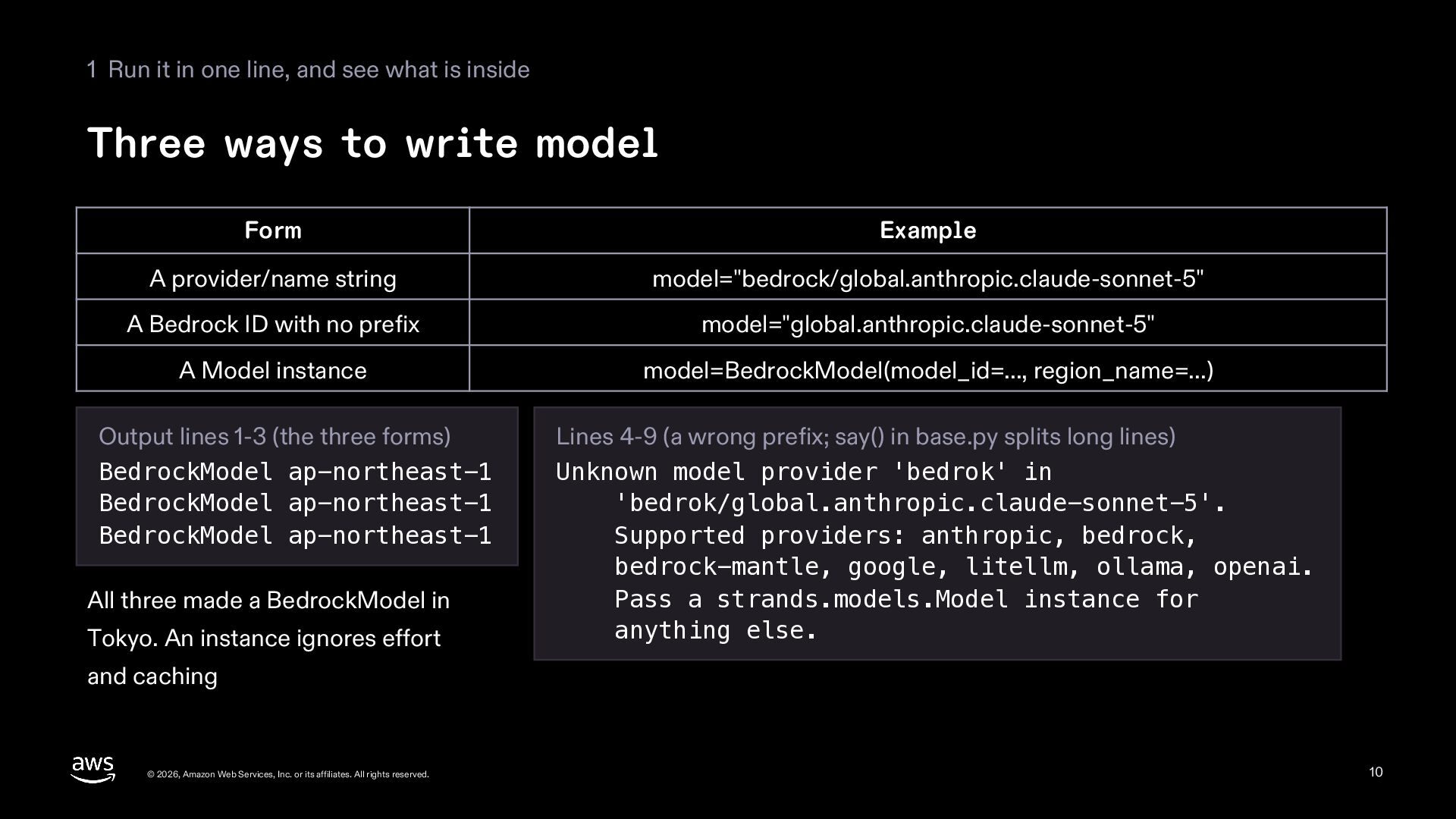
inside Three ways to write model Form Example A provider/name string model="bedrock/global.anthropic.claude-sonnet-5" A Bedrock ID with no prefix model="global.anthropic.claude-sonnet-5" A Model instance model=BedrockModel(model_id=..., region_name=...) Output lines 1-3 (the three forms) BedrockModel ap-northeast-1 BedrockModel ap-northeast-1 BedrockModel ap-northeast-1 All three made a BedrockModel in Tokyo. An instance ignores effort Lines 4-9 (a wrong prefix; say() in base.py splits long lines) Unknown model provider 'bedrok' in 'bedrok/global.anthropic.claude-sonnet-5'. Supported providers: anthropic, bedrock, bedrock-mantle, google, litellm, ollama, openai. Pass a strands.models.Model instance for anything else. and caching © 2026, Amazon Web Services, Inc. or its affiliates. All rights reserved. 10 -
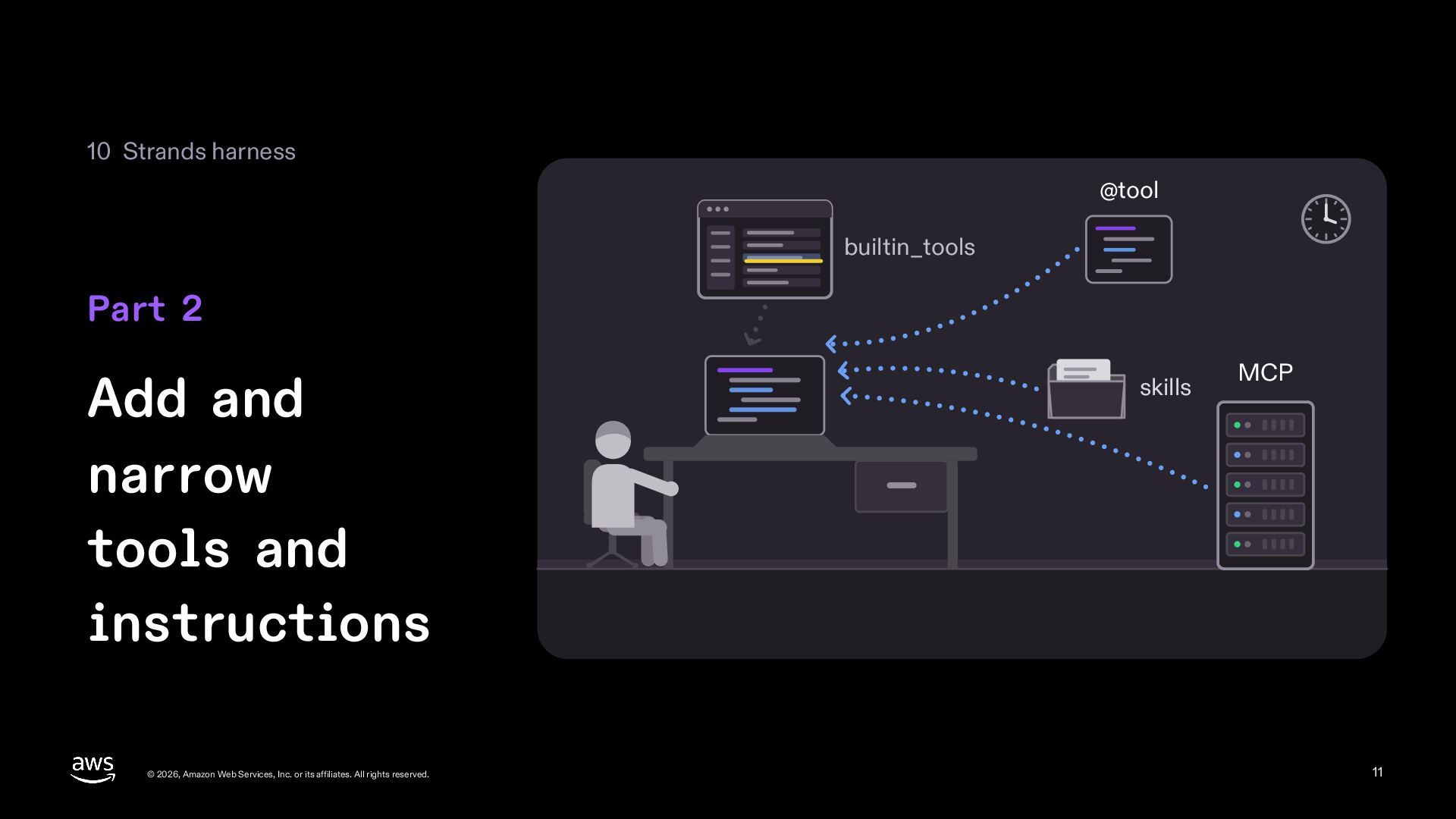
10 Strands harness @tool builtin_tools Part 2 Add and narrow
tools and instructions © 2026, Amazon Web Services, Inc. or its affiliates. All rights reserved. skills MCP 11 -
2 Add and narrow tools and instructions Write the role
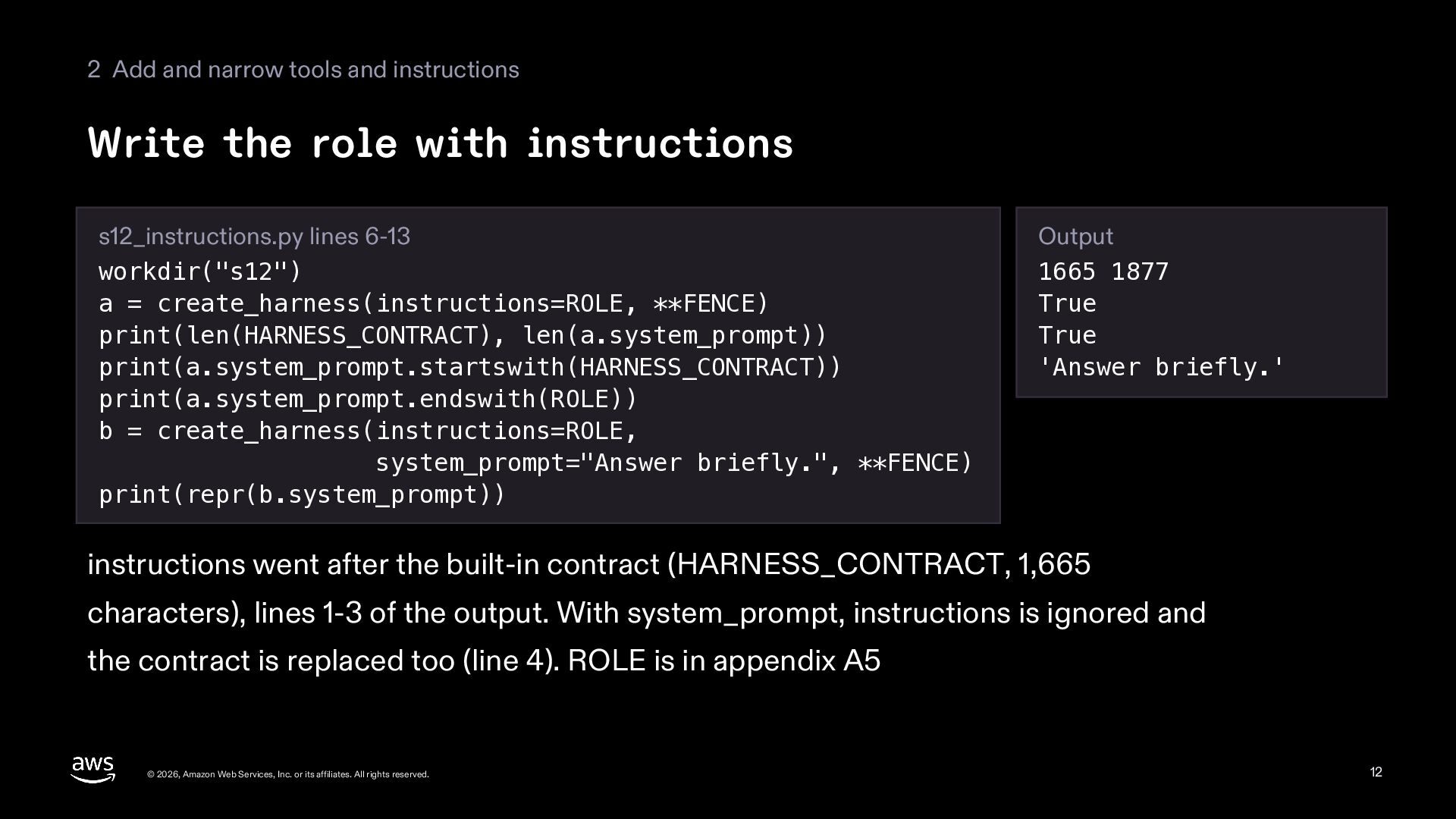
with instructions s12_instructions.py lines 6-13 workdir("s12") a = create_harness(instructions=ROLE, **FENCE) print(len(HARNESS_CONTRACT), len(a.system_prompt)) print(a.system_prompt.startswith(HARNESS_CONTRACT)) print(a.system_prompt.endswith(ROLE)) b = create_harness(instructions=ROLE, system_prompt="Answer briefly.", **FENCE) print(repr(b.system_prompt)) Output 1665 1877 True True 'Answer briefly.' instructions went after the built-in contract (HARNESS_CONTRACT, 1,665 characters), lines 1-3 of the output. With system_prompt, instructions is ignored and the contract is replaced too (line 4). ROLE is in appendix A5 © 2026, Amazon Web Services, Inc. or its affiliates. All rights reserved. 12 -
2 Add and narrow tools and instructions Add your own
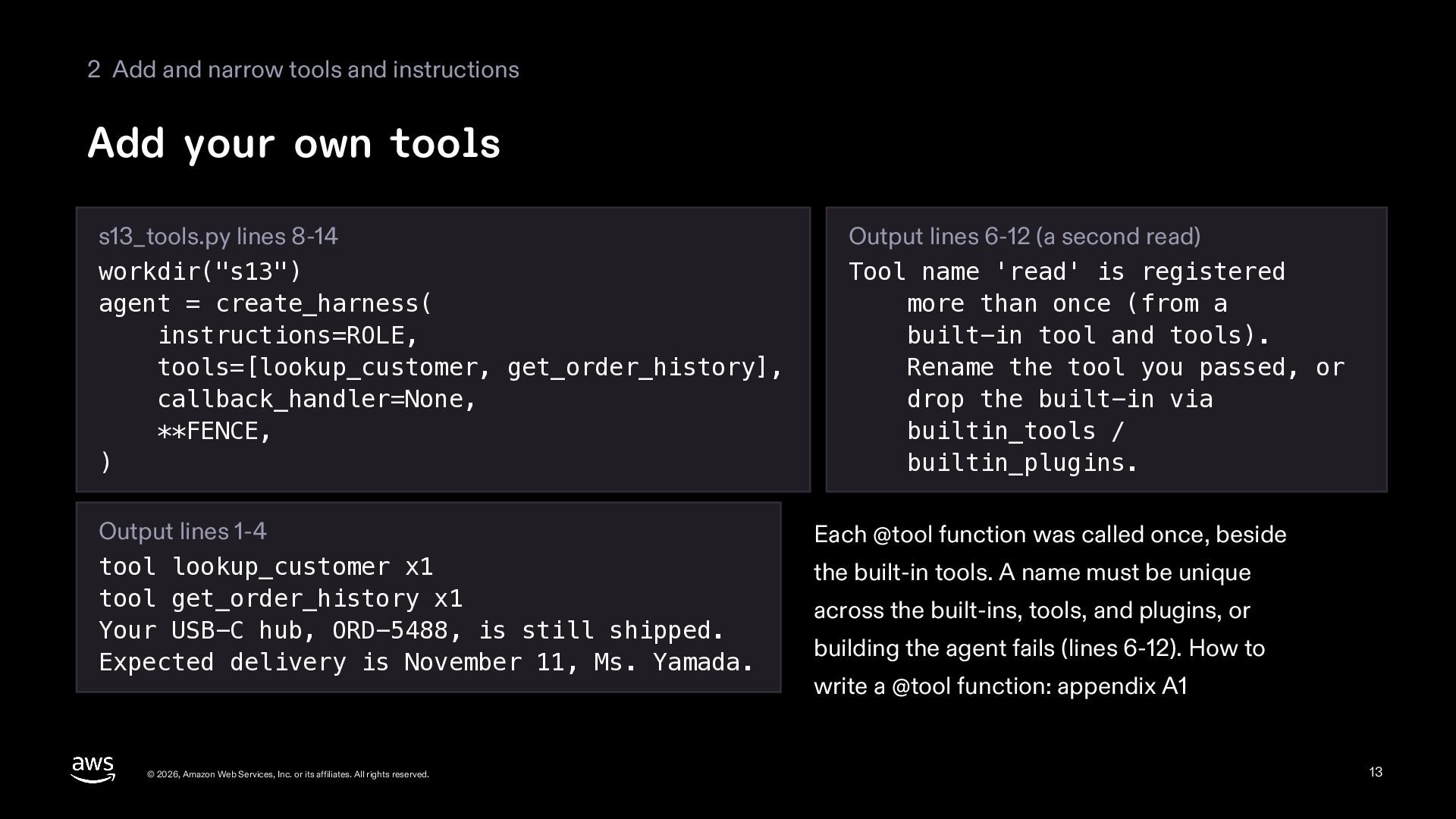
tools s13_tools.py lines 8-14 workdir("s13") agent = create_harness( instructions=ROLE, tools=[lookup_customer, get_order_history], callback_handler=None, **FENCE, ) Output lines 1-4 tool lookup_customer x1 tool get_order_history x1 Your USB-C hub, ORD-5488, is still shipped. Expected delivery is November 11, Ms. Yamada. © 2026, Amazon Web Services, Inc. or its affiliates. All rights reserved. Output lines 6-12 (a second read) Tool name 'read' is registered more than once (from a built-in tool and tools). Rename the tool you passed, or drop the built-in via builtin_tools / builtin_plugins. Each @tool function was called once, beside the built-in tools. A name must be unique across the built-ins, tools, and plugins, or building the agent fails (lines 6-12). How to write a @tool function: appendix A1 13 -
2 Add and narrow tools and instructions Narrow the eight
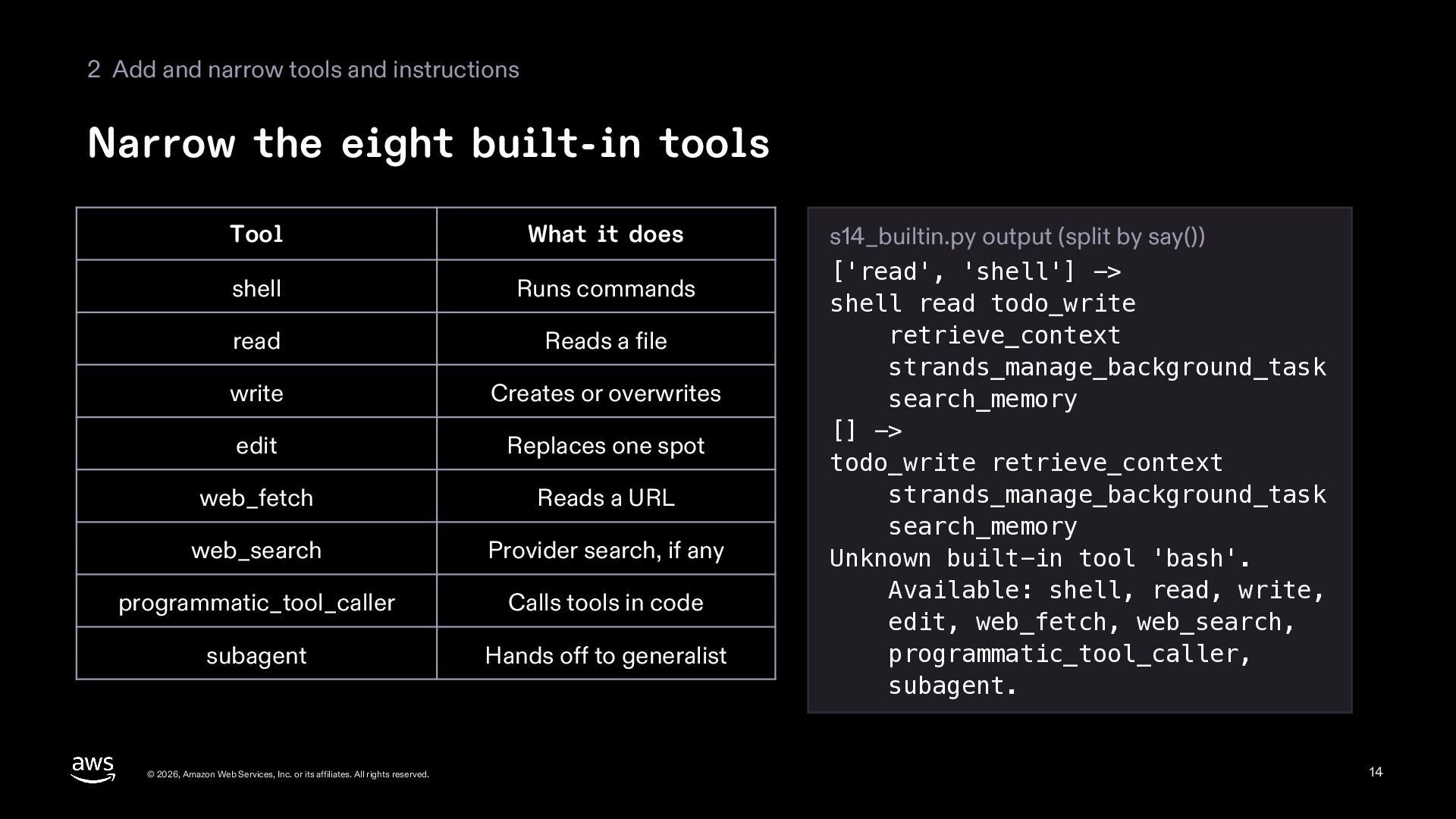
built-in tools Tool What it does shell Runs commands read Reads a file write Creates or overwrites edit Replaces one spot web_fetch Reads a URL web_search Provider search, if any programmatic_tool_caller Calls tools in code subagent Hands off to generalist © 2026, Amazon Web Services, Inc. or its affiliates. All rights reserved. s14_builtin.py output (split by say()) ['read', 'shell'] -> shell read todo_write retrieve_context strands_manage_background_task search_memory [] -> todo_write retrieve_context strands_manage_background_task search_memory Unknown built-in tool 'bash'. Available: shell, read, write, edit, web_fetch, web_search, programmatic_tool_caller, subagent. 14 -
2 Add and narrow tools and instructions Call tools from
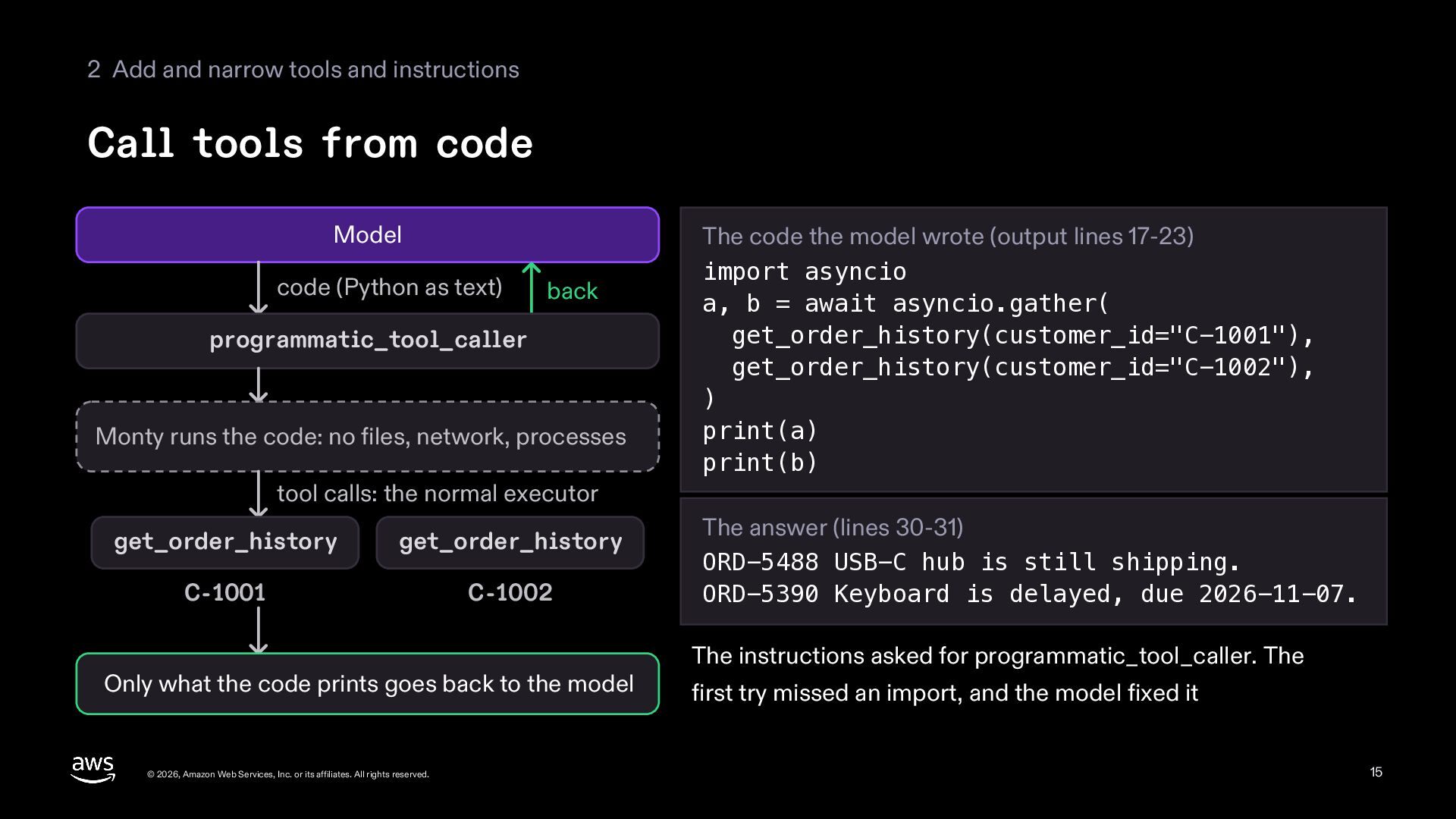
code Model code (Python as text) back programmatic_tool_caller Monty runs the code: no files, network, processes The code the model wrote (output lines 17-23) import asyncio a, b = await asyncio.gather( get_order_history(customer_id="C-1001"), get_order_history(customer_id="C-1002"), ) print(a) print(b) tool calls: the normal executor get_order_history get_order_history C-1001 C-1002 Only what the code prints goes back to the model © 2026, Amazon Web Services, Inc. or its affiliates. All rights reserved. The answer (lines 30-31) ORD-5488 USB-C hub is still shipping. ORD-5390 Keyboard is delayed, due 2026-11-07. The instructions asked for programmatic_tool_caller. The first try missed an import, and the model fixed it 15 -
2 Add and narrow tools and instructions Add a specialist
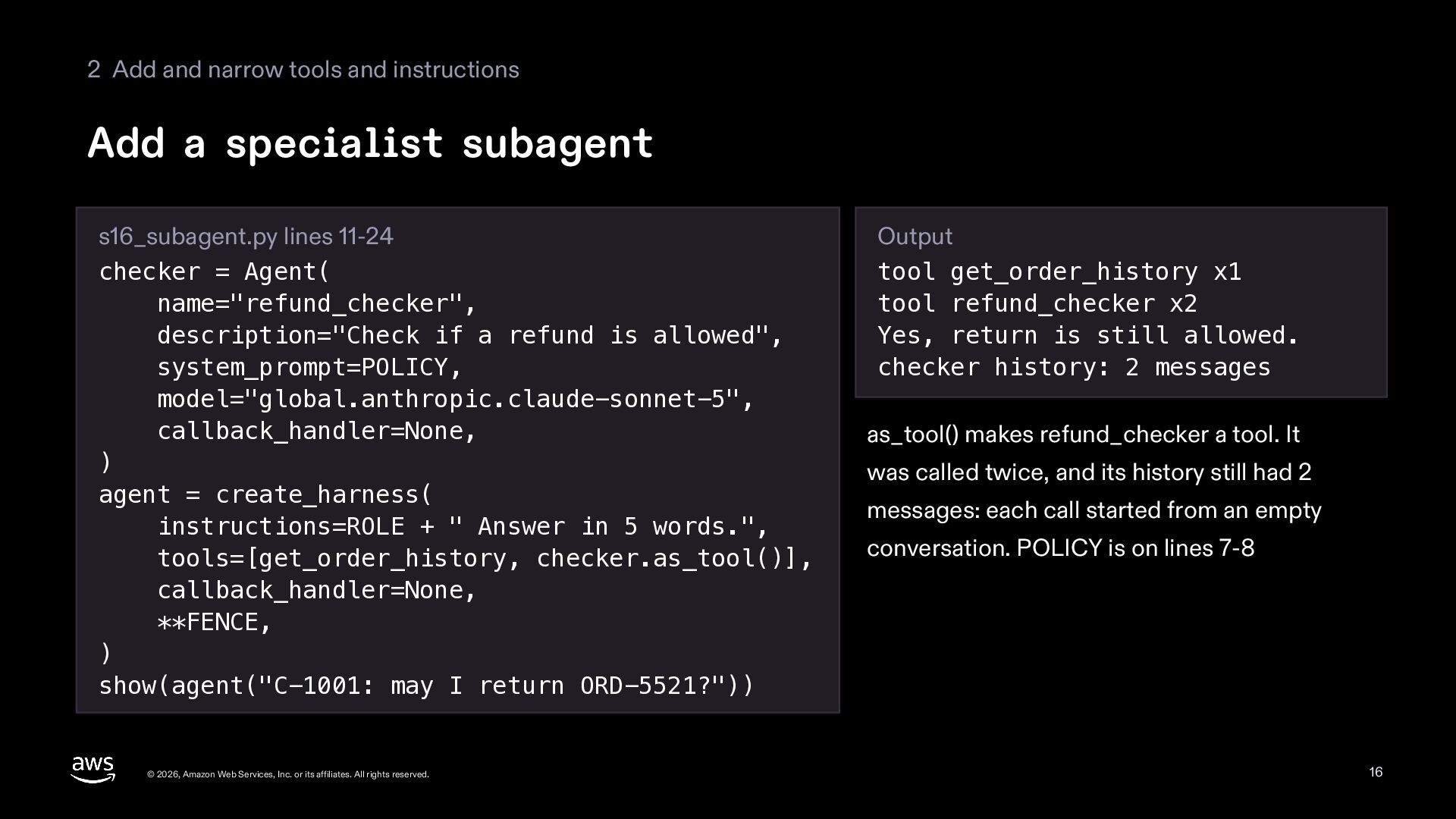
subagent s16_subagent.py lines 11-24 checker = Agent( name="refund_checker", description="Check if a refund is allowed", system_prompt=POLICY, model="global.anthropic.claude-sonnet-5", callback_handler=None, ) agent = create_harness( instructions=ROLE + " Answer in 5 words.", tools=[get_order_history, checker.as_tool()], callback_handler=None, **FENCE, ) show(agent("C-1001: may I return ORD-5521?")) © 2026, Amazon Web Services, Inc. or its affiliates. All rights reserved. Output tool get_order_history x1 tool refund_checker x2 Yes, return is still allowed. checker history: 2 messages as_tool() makes refund_checker a tool. It was called twice, and its history still had 2 messages: each call started from an empty conversation. POLICY is on lines 7-8 16 -
2 Add and narrow tools and instructions Where skills live
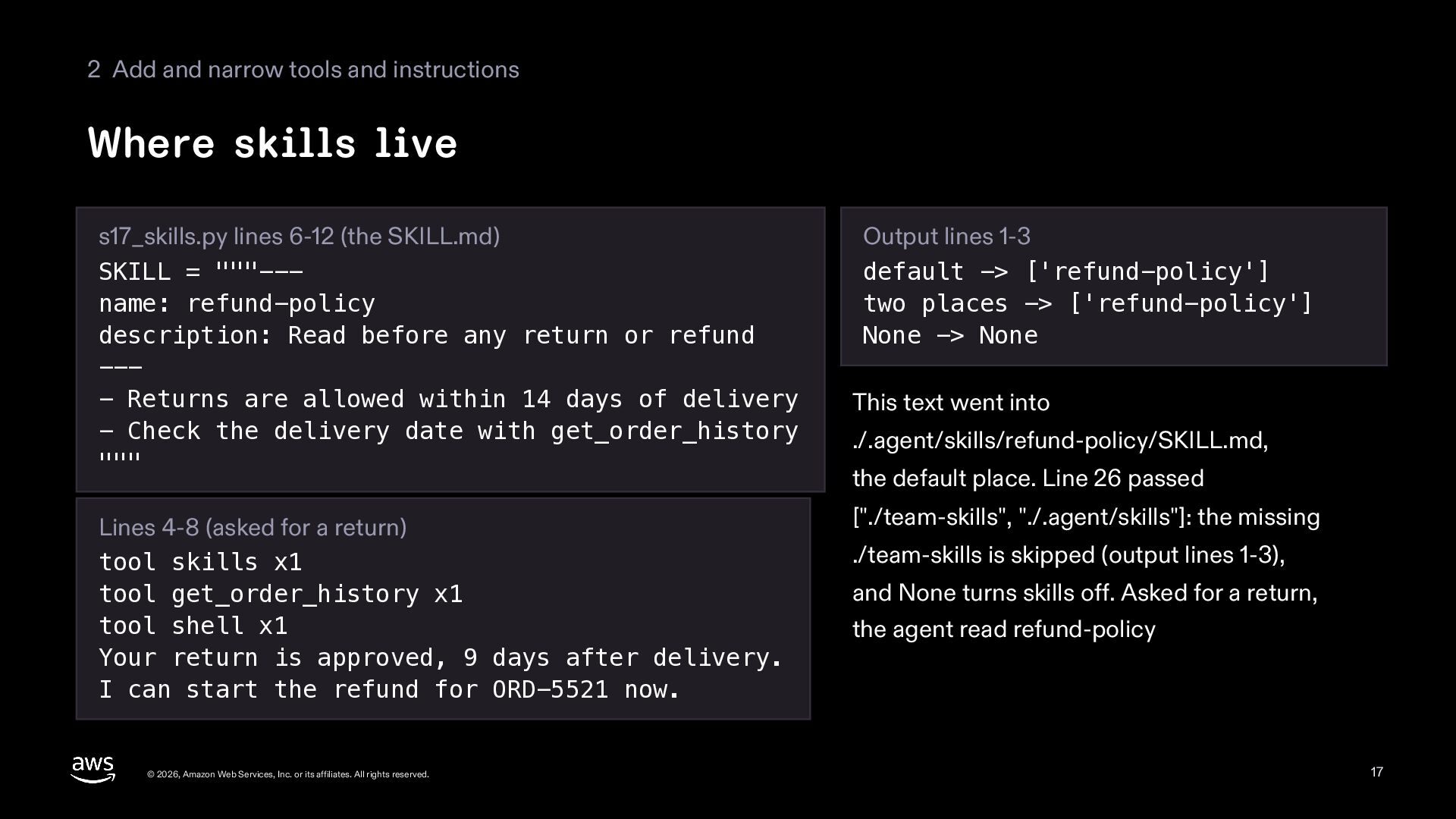
s17_skills.py lines 6-12 (the SKILL.md) SKILL = """--name: refund-policy description: Read before any return or refund --- Returns are allowed within 14 days of delivery - Check the delivery date with get_order_history """ Lines 4-8 (asked for a return) tool skills x1 tool get_order_history x1 tool shell x1 Your return is approved, 9 days after delivery. I can start the refund for ORD-5521 now. © 2026, Amazon Web Services, Inc. or its affiliates. All rights reserved. Output lines 1-3 default -> ['refund-policy'] two places -> ['refund-policy'] None -> None This text went into ./.agent/skills/refund-policy/SKILL.md, the default place. Line 26 passed ["./team-skills", "./.agent/skills"]: the missing ./team-skills is skipped (output lines 1-3), and None turns skills off. Asked for a return, the agent read refund-policy 17 -
2 Add and narrow tools and instructions Connect an MCP
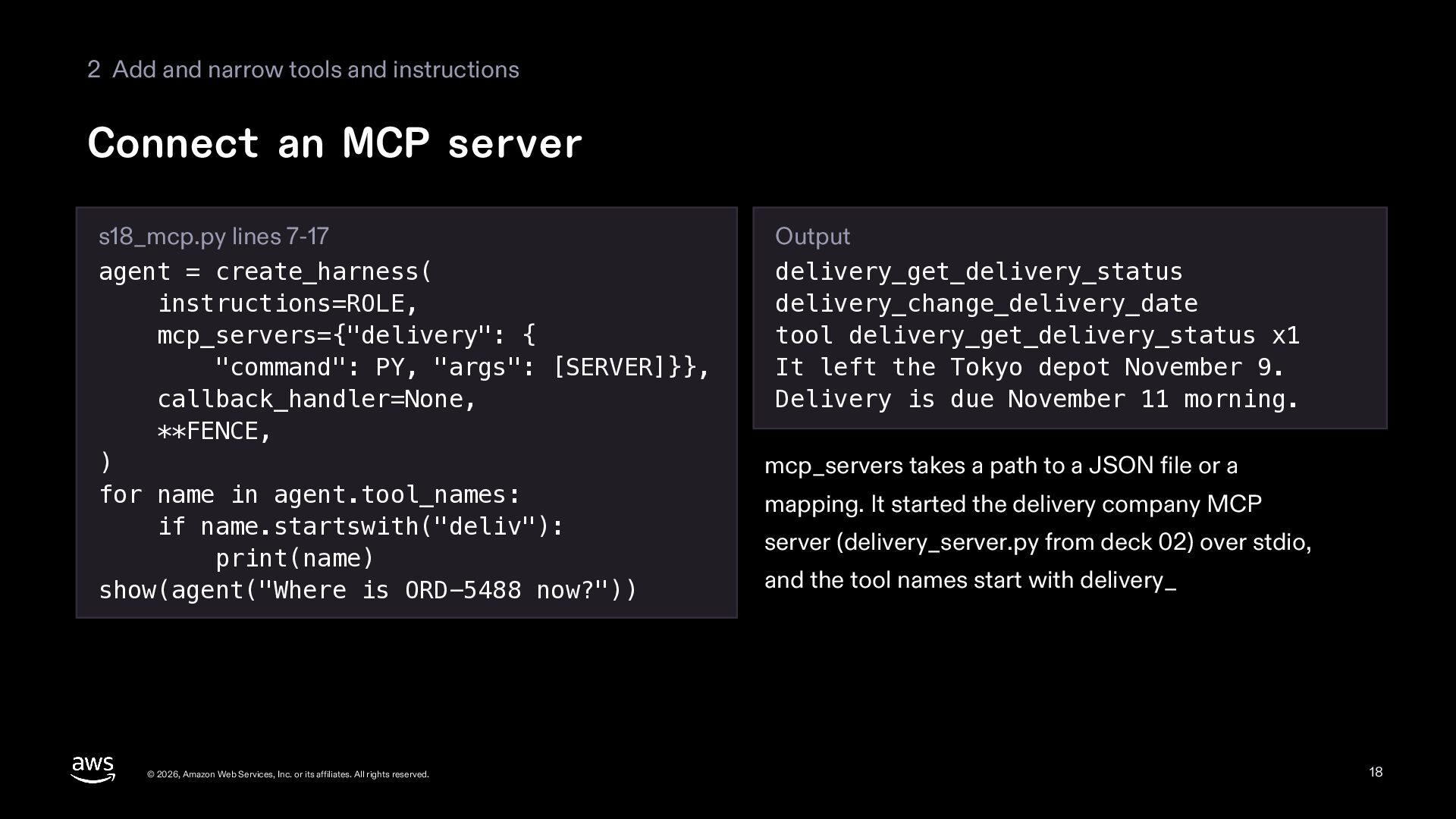
server s18_mcp.py lines 7-17 agent = create_harness( instructions=ROLE, mcp_servers={"delivery": { "command": PY, "args": [SERVER]}}, callback_handler=None, **FENCE, ) for name in agent.tool_names: if name.startswith("deliv"): print(name) show(agent("Where is ORD-5488 now?")) © 2026, Amazon Web Services, Inc. or its affiliates. All rights reserved. Output delivery_get_delivery_status delivery_change_delivery_date tool delivery_get_delivery_status x1 It left the Tokyo depot November 9. Delivery is due November 11 morning. mcp_servers takes a path to a JSON file or a mapping. It started the delivery company MCP server (delivery_server.py from deck 02) over stdio, and the tool names start with delivery_ 18 -
2 Add and narrow tools and instructions Choose the built-in
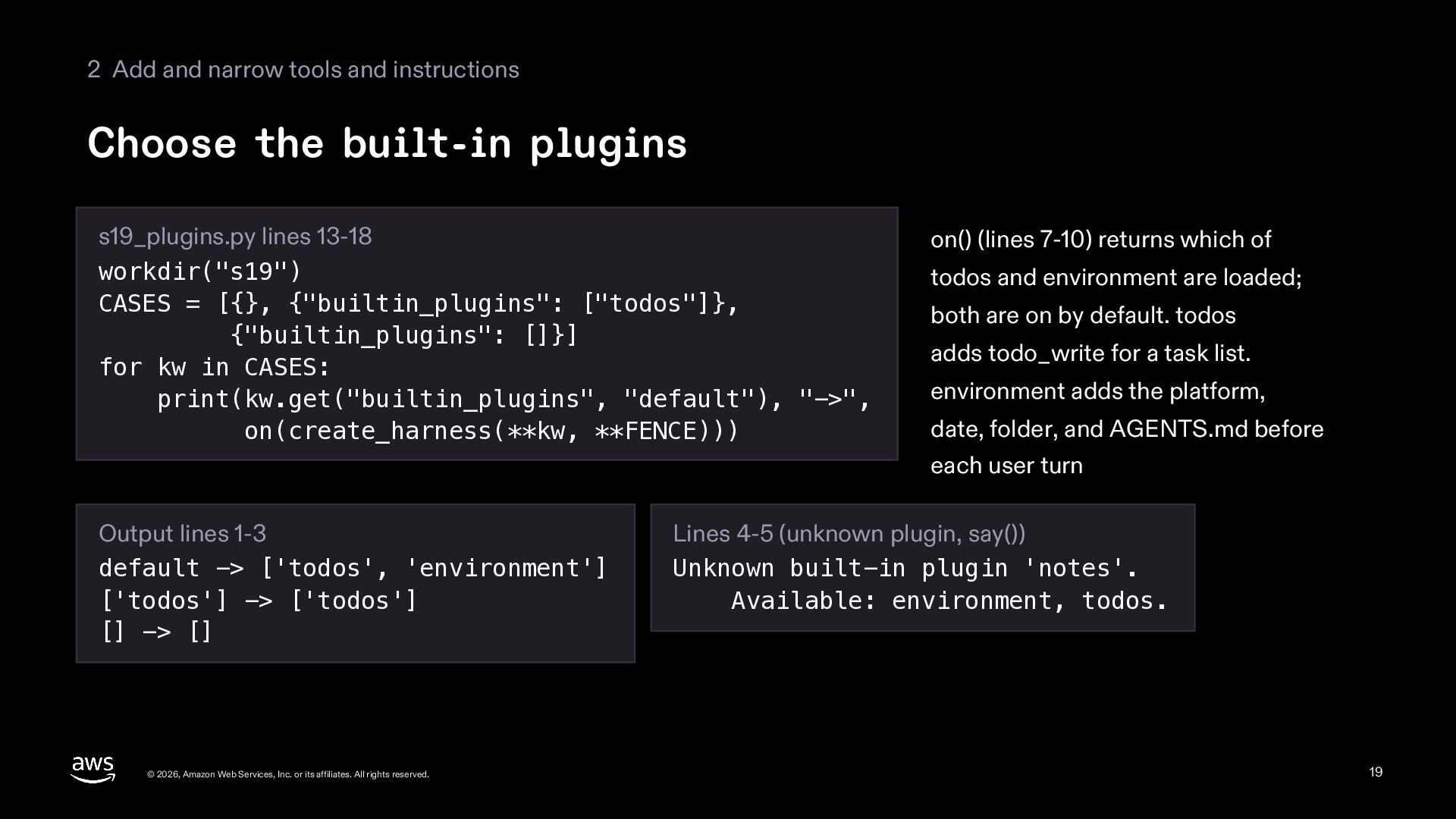
plugins s19_plugins.py lines 13-18 workdir("s19") CASES = [{}, {"builtin_plugins": ["todos"]}, {"builtin_plugins": []}] for kw in CASES: print(kw.get("builtin_plugins", "default"), "->", on(create_harness(**kw, **FENCE))) on() (lines 7-10) returns which of todos and environment are loaded; both are on by default. todos adds todo_write for a task list. environment adds the platform, date, folder, and AGENTS.md before each user turn Output lines 1-3 default -> ['todos', 'environment'] ['todos'] -> ['todos'] [] -> [] © 2026, Amazon Web Services, Inc. or its affiliates. All rights reserved. Lines 4-5 (unknown plugin, say()) Unknown built-in plugin 'notes'. Available: environment, todos. 19 -
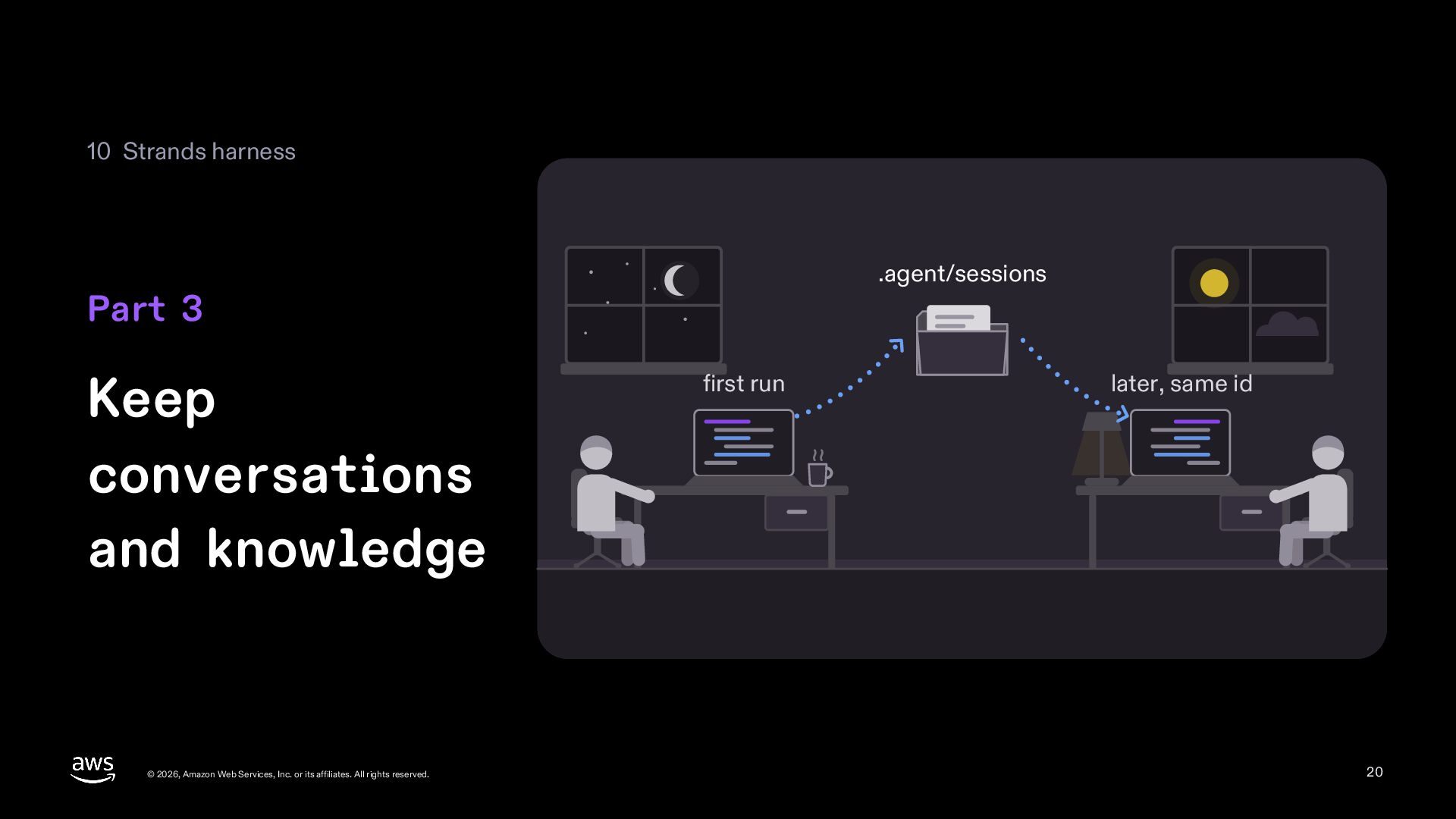
10 Strands harness .agent/sessions Part 3 Keep conversations and knowledge
© 2026, Amazon Web Services, Inc. or its affiliates. All rights reserved. first run later, same id 20 -
3 Keep conversations and knowledge Resume a conversation by session
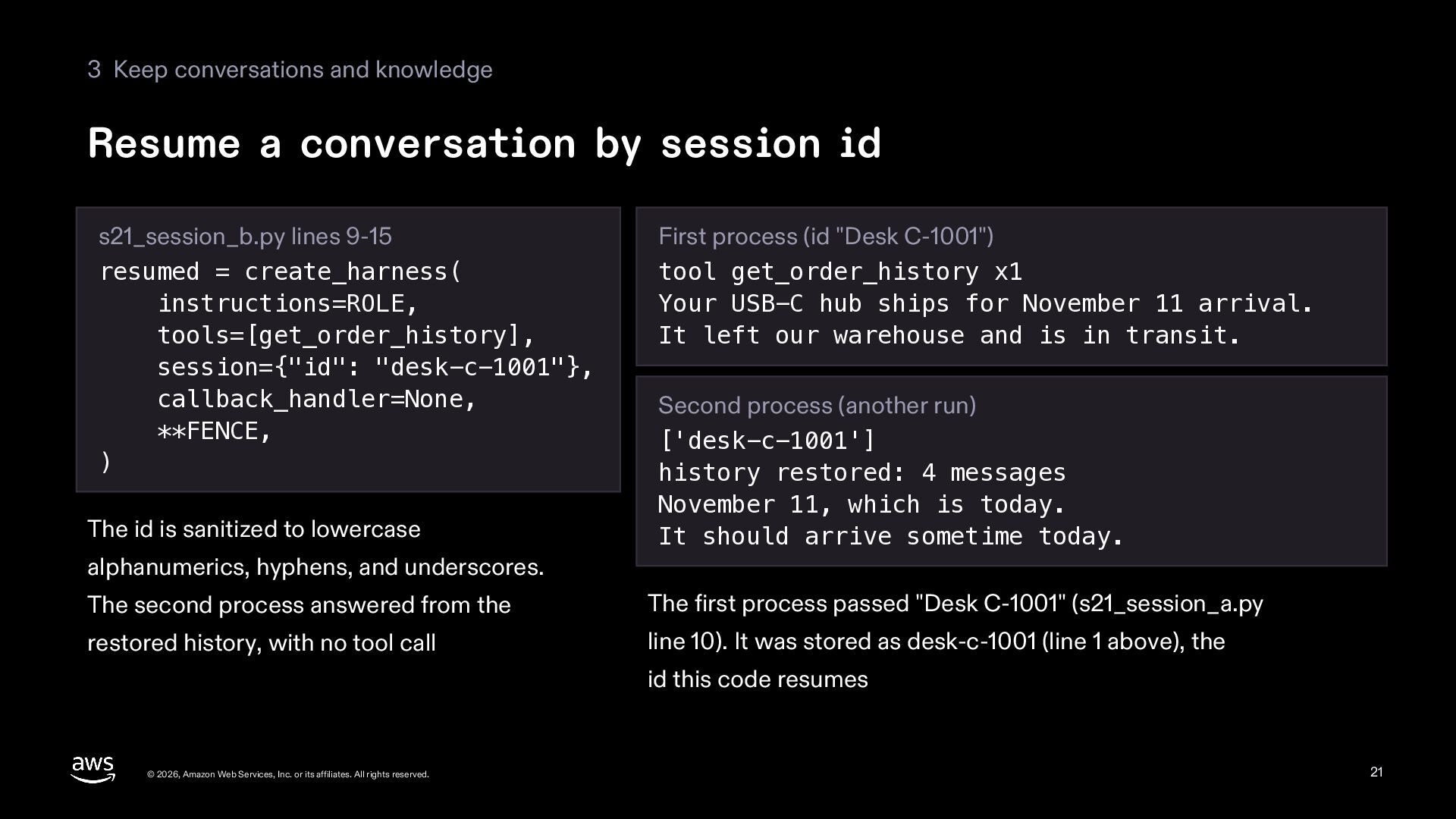
id s21_session_b.py lines 9-15 resumed = create_harness( instructions=ROLE, tools=[get_order_history], session={"id": "desk-c-1001"}, callback_handler=None, **FENCE, ) The id is sanitized to lowercase First process (id "Desk C-1001") tool get_order_history x1 Your USB-C hub ships for November 11 arrival. It left our warehouse and is in transit. Second process (another run) ['desk-c-1001'] history restored: 4 messages November 11, which is today. It should arrive sometime today. alphanumerics, hyphens, and underscores. The second process answered from the The first process passed "Desk C-1001" (s21_session_a.py restored history, with no tool call line 10). It was stored as desk-c-1001 (line 1 above), the id this code resumes © 2026, Amazon Web Services, Inc. or its affiliates. All rights reserved. 21 -
3 Keep conversations and knowledge Choose between session and memory
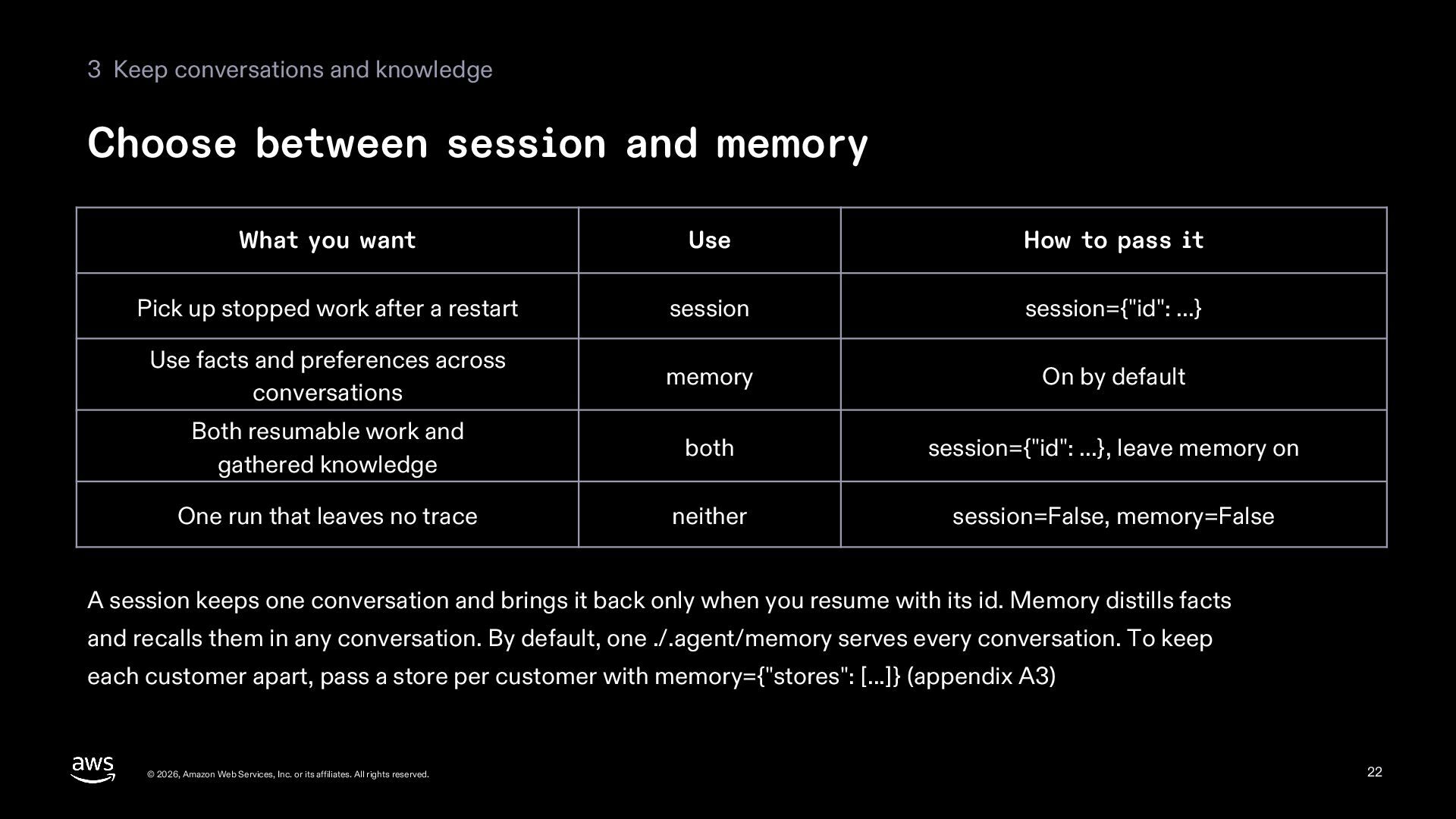
What you want Use How to pass it Pick up stopped work after a restart session session={"id": ...} Use facts and preferences across conversations memory On by default Both resumable work and gathered knowledge both session={"id": ...}, leave memory on One run that leaves no trace neither session=False, memory=False A session keeps one conversation and brings it back only when you resume with its id. Memory distills facts and recalls them in any conversation. By default, one ./.agent/memory serves every conversation. To keep each customer apart, pass a store per customer with memory={"stores": [...]} (appendix A3) © 2026, Amazon Web Services, Inc. or its affiliates. All rights reserved. 22 -
3 Keep conversations and knowledge When memory runs Each user
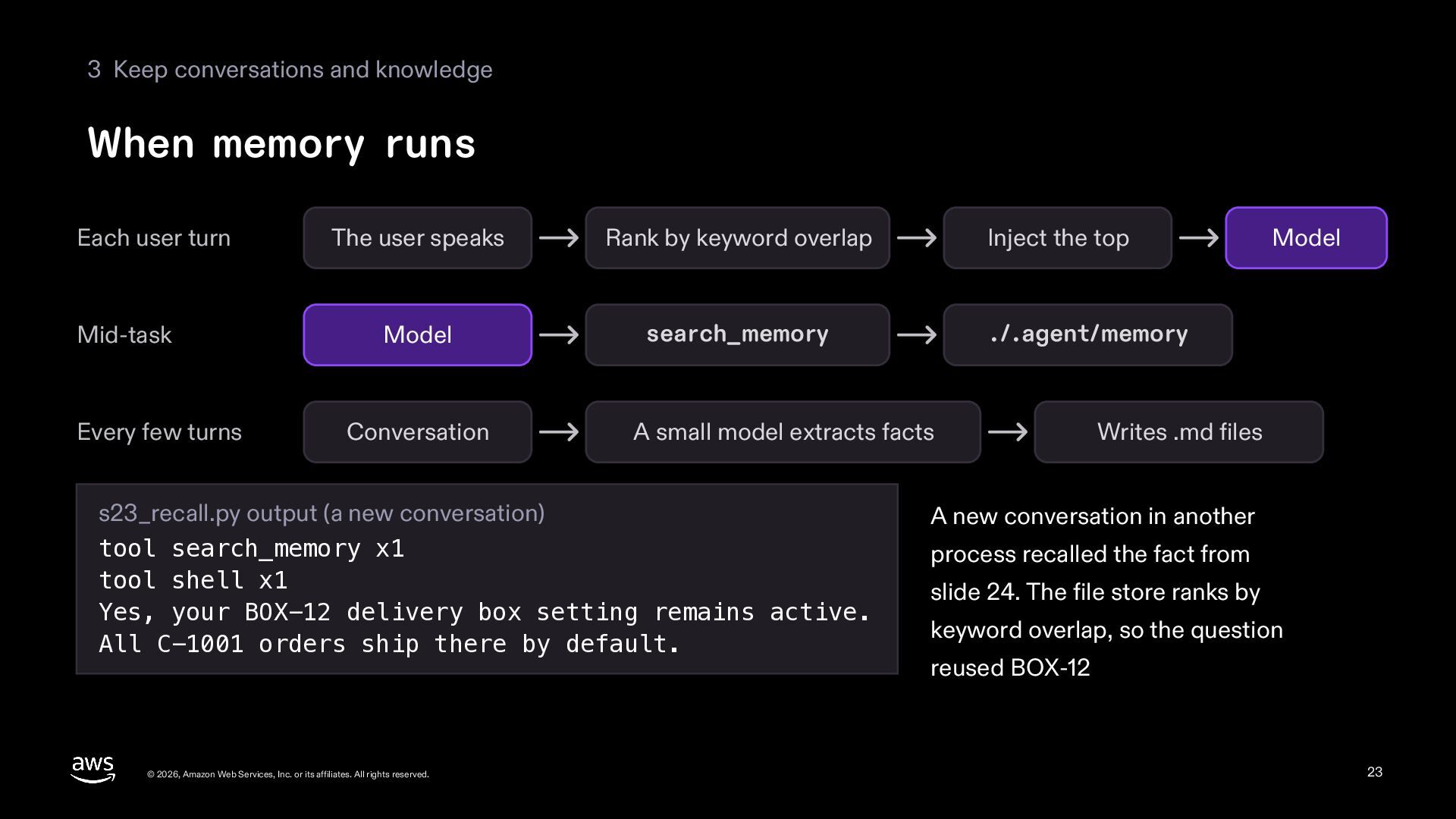
turn Mid-task Every few turns The user speaks Rank by keyword overlap Model search_memory Conversation Model ./.agent/memory A small model extracts facts s23_recall.py output (a new conversation) tool search_memory x1 tool shell x1 Yes, your BOX-12 delivery box setting remains active. All C-1001 orders ship there by default. © 2026, Amazon Web Services, Inc. or its affiliates. All rights reserved. Inject the top Writes .md files A new conversation in another process recalled the fact from slide 24. The file store ranks by keyword overlap, so the question reused BOX-12 23 -
3 Keep conversations and knowledge Write out at the end
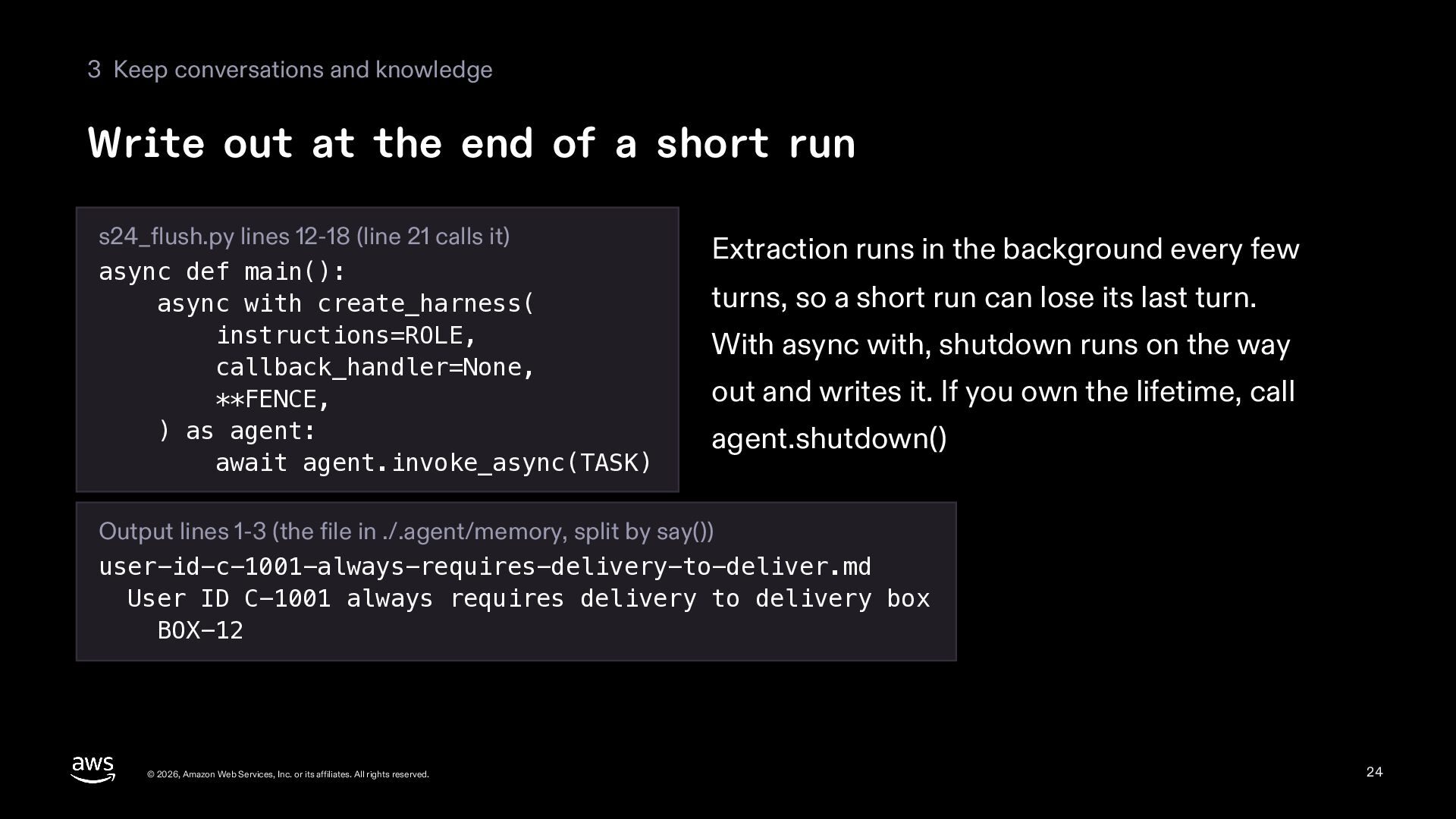
of a short run s24_flush.py lines 12-18 (line 21 calls it) async def main(): async with create_harness( instructions=ROLE, callback_handler=None, **FENCE, ) as agent: await agent.invoke_async(TASK) Extraction runs in the background every few turns, so a short run can lose its last turn. With async with, shutdown runs on the way out and writes it. If you own the lifetime, call agent.shutdown() Output lines 1-3 (the file in ./.agent/memory, split by say()) user-id-c-1001-always-requires-delivery-to-deliver.md User ID C-1001 always requires delivery to delivery box BOX-12 © 2026, Amazon Web Services, Inc. or its affiliates. All rights reserved. 24 -
3 Keep conversations and knowledge Two writers on one id
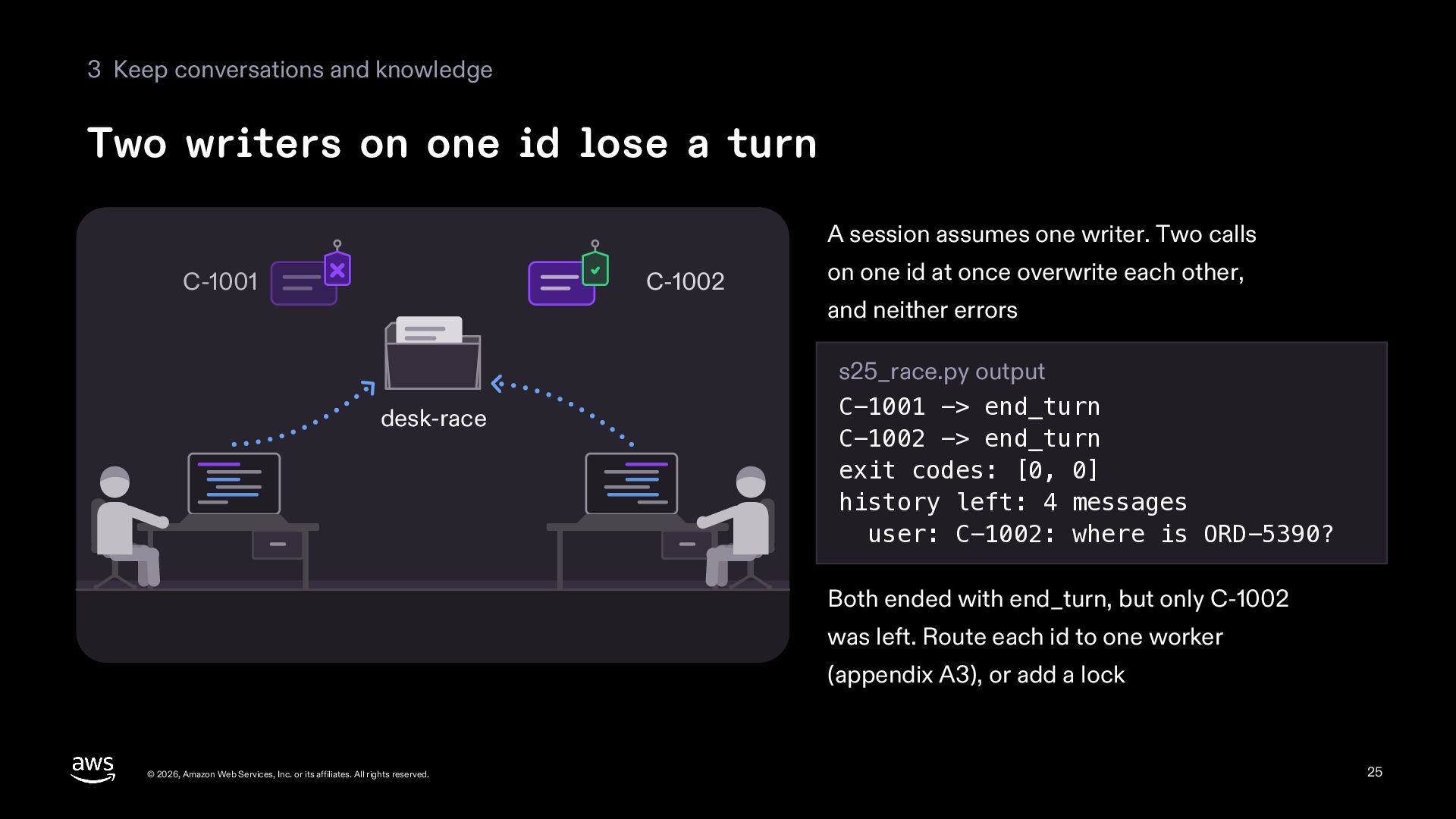
lose a turn A session assumes one writer. Two calls C-1001 C-1002 desk-race on one id at once overwrite each other, and neither errors s25_race.py output C-1001 -> end_turn C-1002 -> end_turn exit codes: [0, 0] history left: 4 messages user: C-1002: where is ORD-5390? Both ended with end_turn, but only C-1002 was left. Route each id to one worker (appendix A3), or add a lock © 2026, Amazon Web Services, Inc. or its affiliates. All rights reserved. 25 -
3 Keep conversations and knowledge Set a bulky tool result
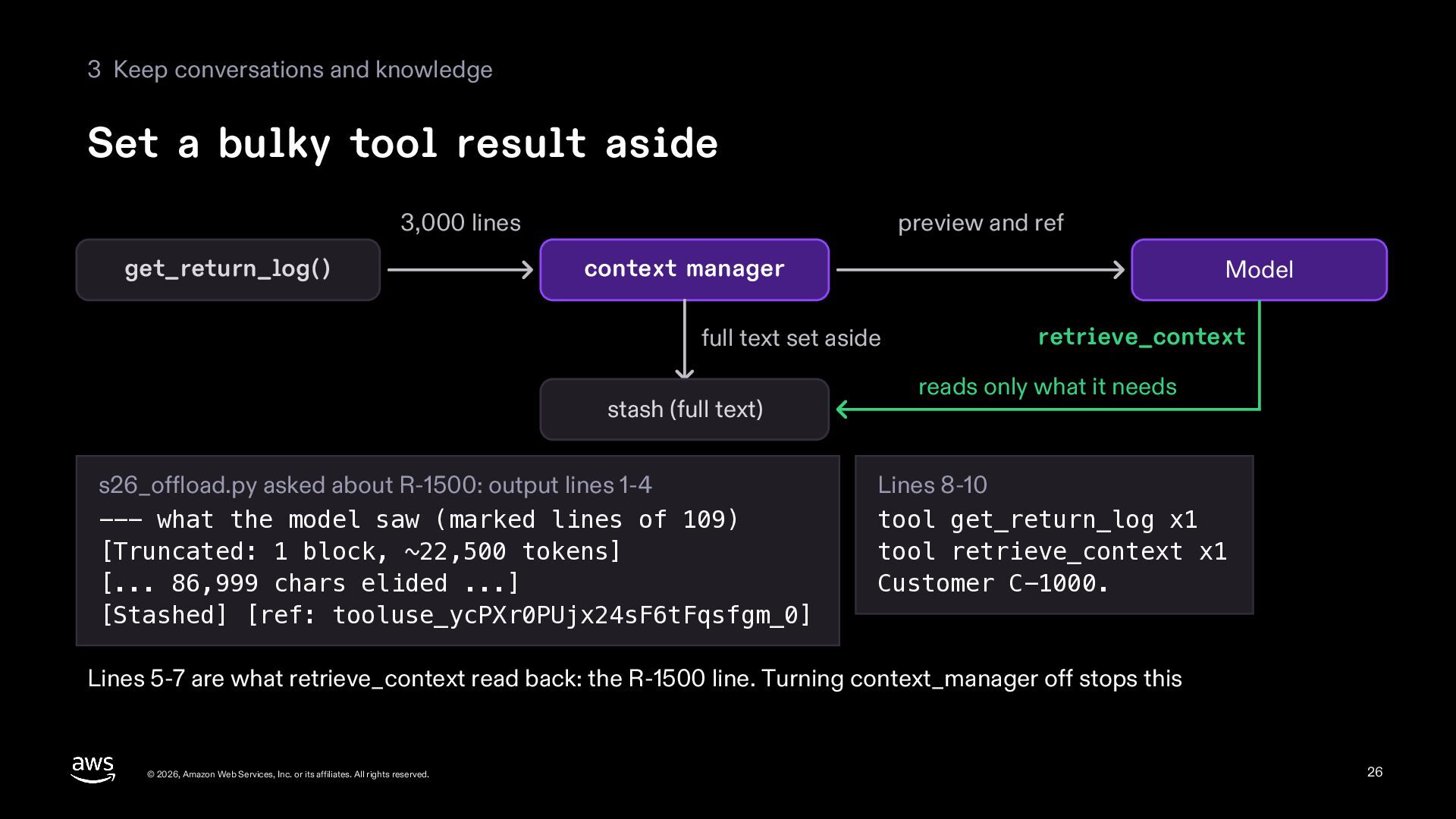
aside 3,000 lines get_return_log() preview and ref context manager Model full text set aside stash (full text) s26_offload.py asked about R-1500: output lines 1-4 --- what the model saw (marked lines of 109) [Truncated: 1 block, ~22,500 tokens] [... 86,999 chars elided ...] [Stashed] [ref: tooluse_ycPXr0PUjx24sF6tFqsfgm_0] retrieve_context reads only what it needs Lines 8-10 tool get_return_log x1 tool retrieve_context x1 Customer C-1000. Lines 5-7 are what retrieve_context read back: the R-1500 line. Turning context_manager off stops this © 2026, Amazon Web Services, Inc. or its affiliates. All rights reserved. 26 -
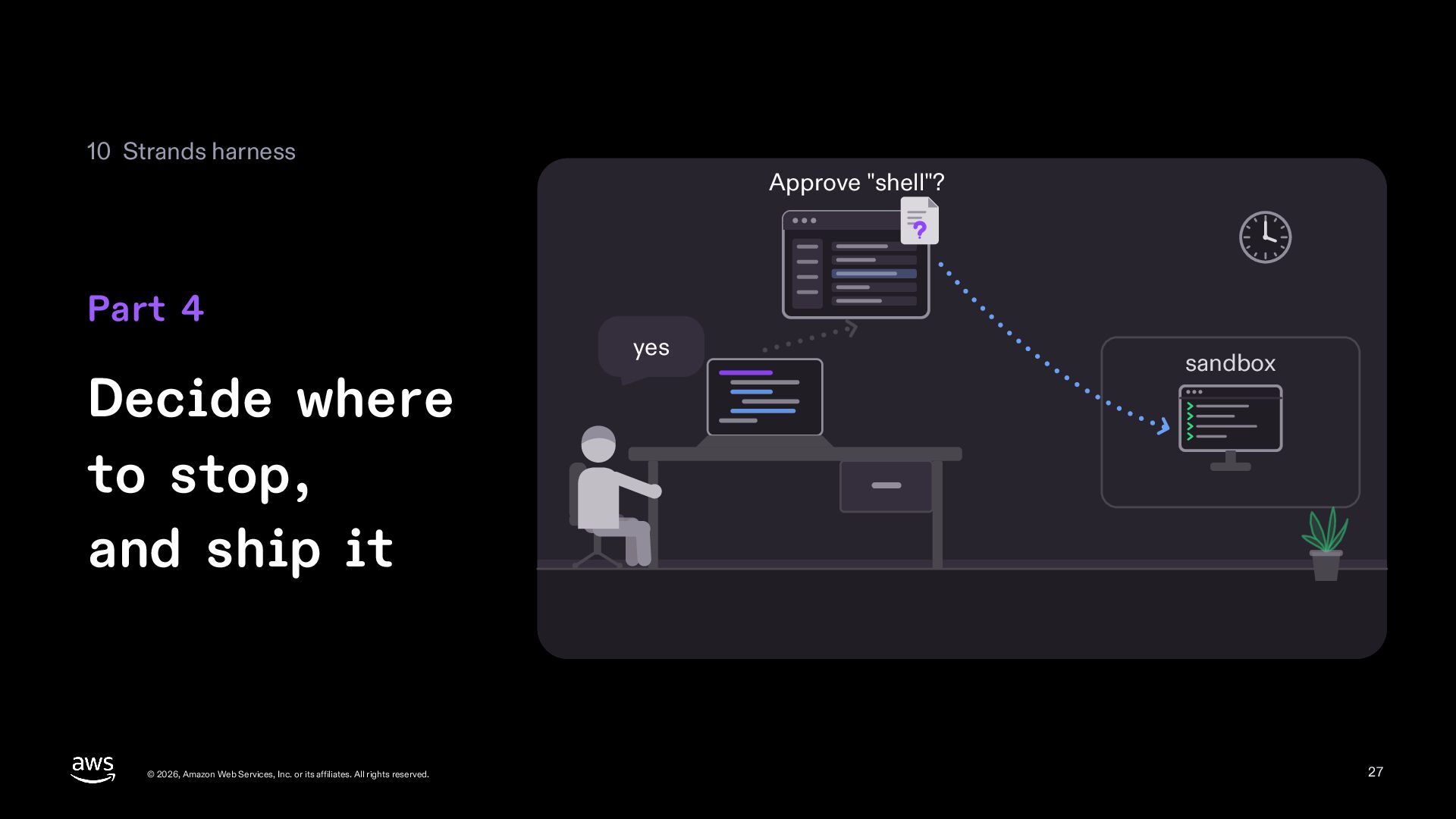
10 Strands harness Approve "shell"? Part 4 Decide where to
stop, and ship it © 2026, Amazon Web Services, Inc. or its affiliates. All rights reserved. yes sandbox 27 -
4 Decide where to stop, and ship it Approve every
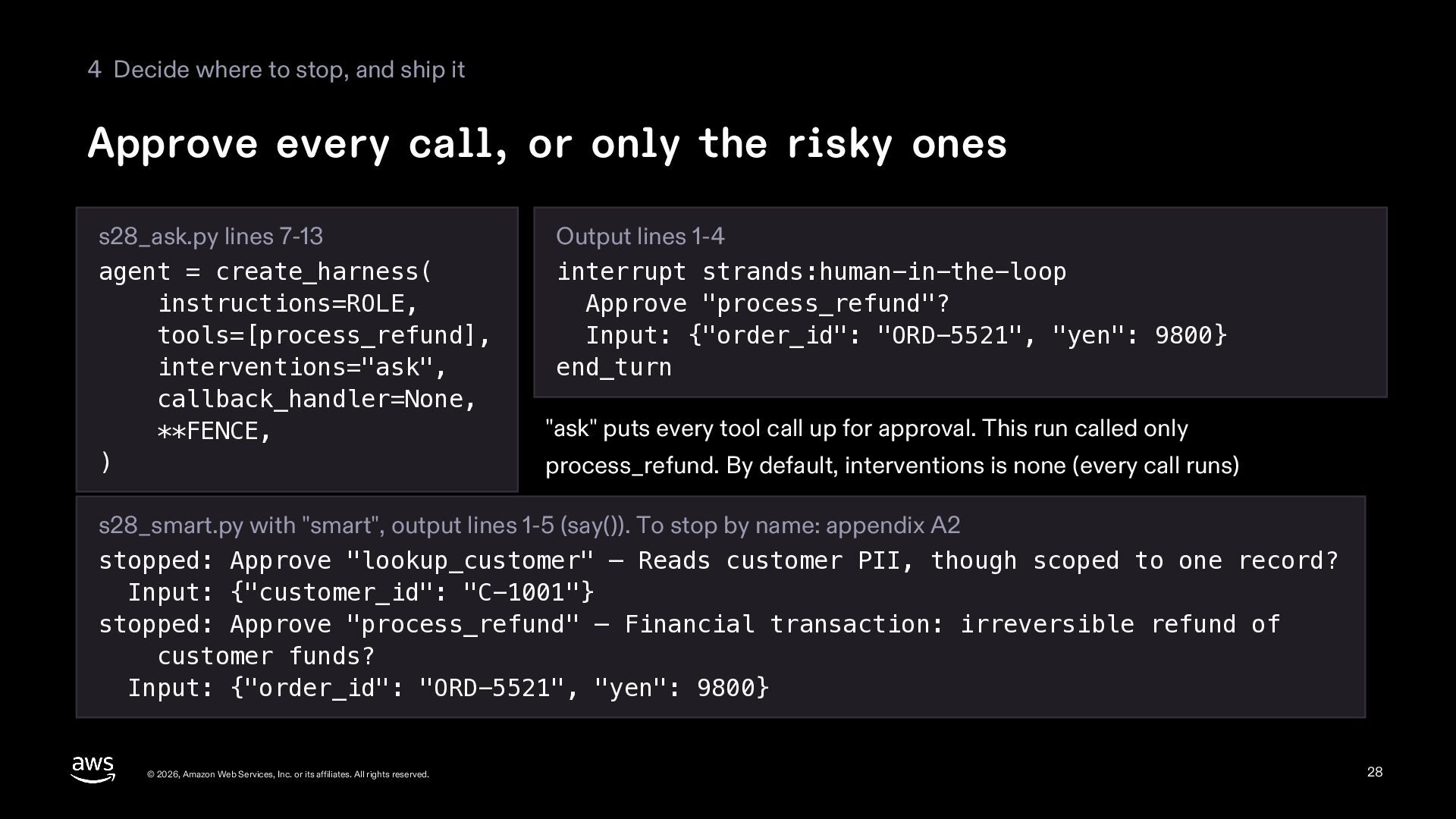
call, or only the risky ones s28_ask.py lines 7-13 agent = create_harness( instructions=ROLE, tools=[process_refund], interventions="ask", callback_handler=None, **FENCE, ) Output lines 1-4 interrupt strands:human-in-the-loop Approve "process_refund"? Input: {"order_id": "ORD-5521", "yen": 9800} end_turn "ask" puts every tool call up for approval. This run called only process_refund. By default, interventions is none (every call runs) s28_smart.py with "smart", output lines 1-5 (say()). To stop by name: appendix A2 stopped: Approve "lookup_customer" — Reads customer PII, though scoped to one record? Input: {"customer_id": "C-1001"} stopped: Approve "process_refund" — Financial transaction: irreversible refund of customer funds? Input: {"order_id": "ORD-5521", "yen": 9800} © 2026, Amazon Web Services, Inc. or its affiliates. All rights reserved. 28 -
4 Decide where to stop, and ship it Resume from
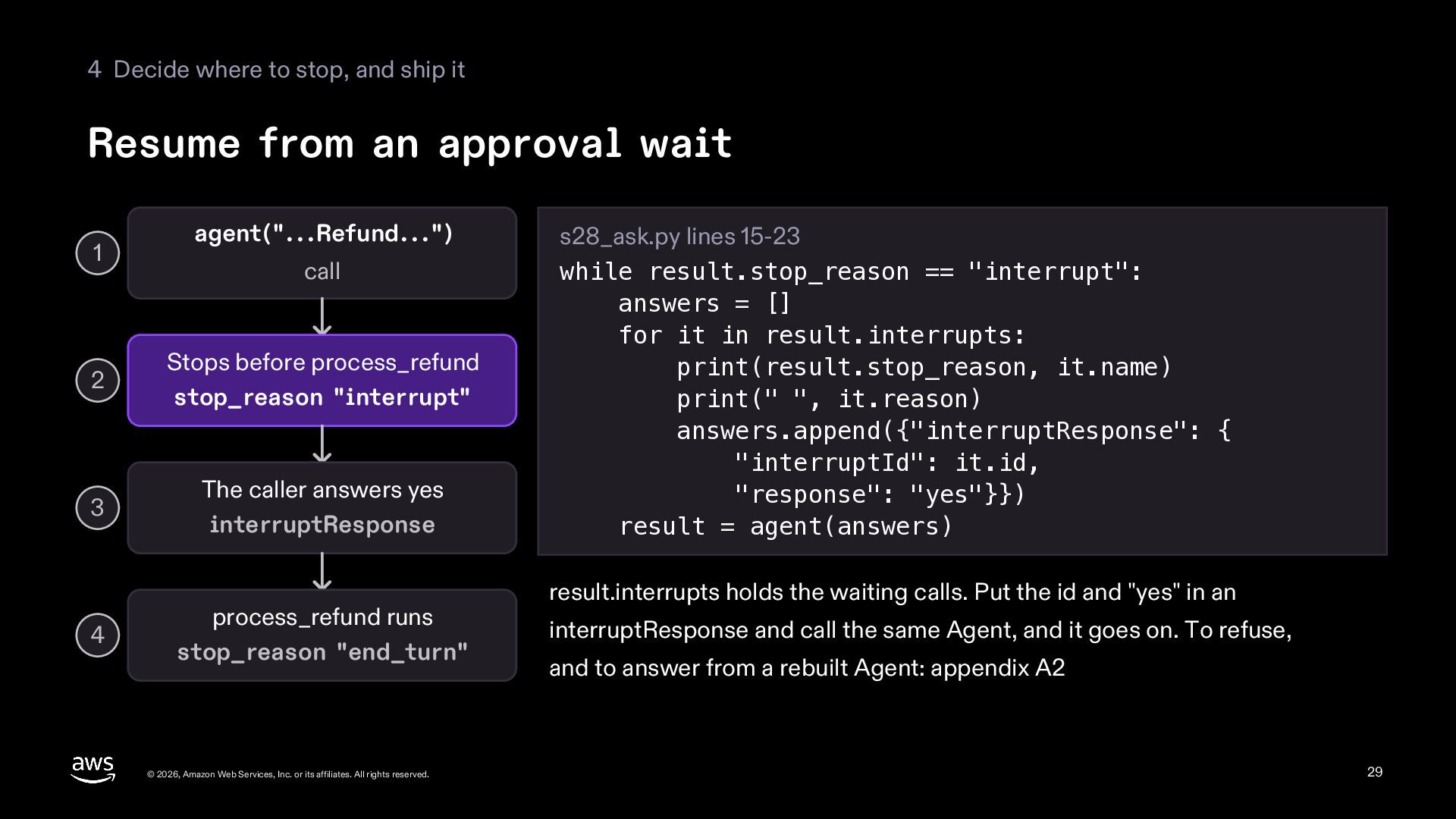
an approval wait 1 agent("...Refund...") call 2 Stops before process_refund stop_reason "interrupt" 3 The caller answers yes interruptResponse 4 process_refund runs stop_reason "end_turn" © 2026, Amazon Web Services, Inc. or its affiliates. All rights reserved. s28_ask.py lines 15-23 while result.stop_reason == "interrupt": answers = [] for it in result.interrupts: print(result.stop_reason, it.name) print(" ", it.reason) answers.append({"interruptResponse": { "interruptId": it.id, "response": "yes"}}) result = agent(answers) result.interrupts holds the waiting calls. Put the id and "yes" in an interruptResponse and call the same Agent, and it goes on. To refuse, and to answer from a rebuilt Agent: appendix A2 29 -
4 Decide where to stop, and ship it Shell and
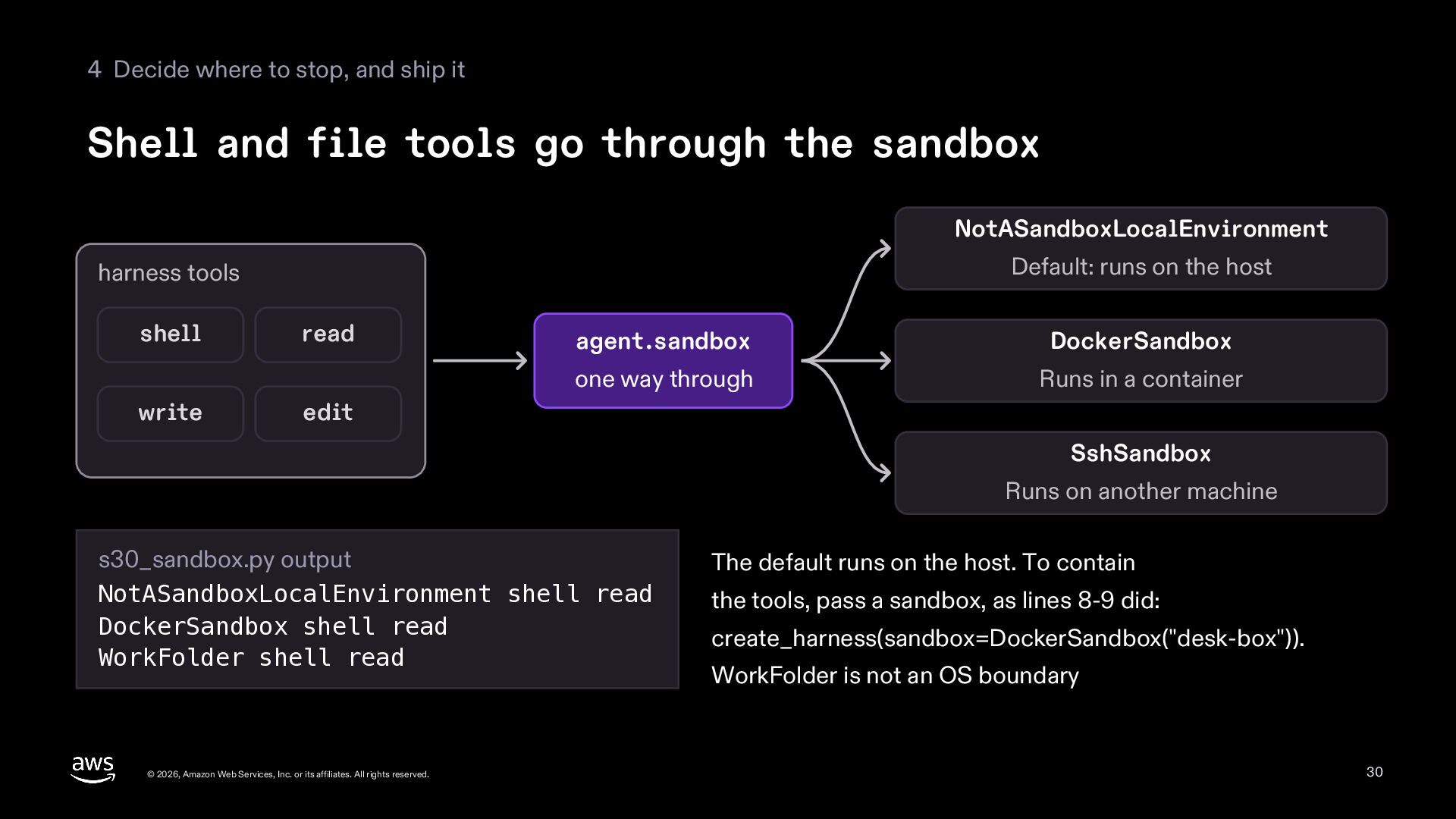
file tools go through the sandbox NotASandboxLocalEnvironment Default: runs on the host harness tools shell write read agent.sandbox DockerSandbox one way through Runs in a container edit SshSandbox Runs on another machine s30_sandbox.py output NotASandboxLocalEnvironment shell read DockerSandbox shell read WorkFolder shell read © 2026, Amazon Web Services, Inc. or its affiliates. All rights reserved. The default runs on the host. To contain the tools, pass a sandbox, as lines 8-9 did: create_harness(sandbox=DockerSandbox("desk-box")). WorkFolder is not an OS boundary 30 -
4 Decide where to stop, and ship it Two things
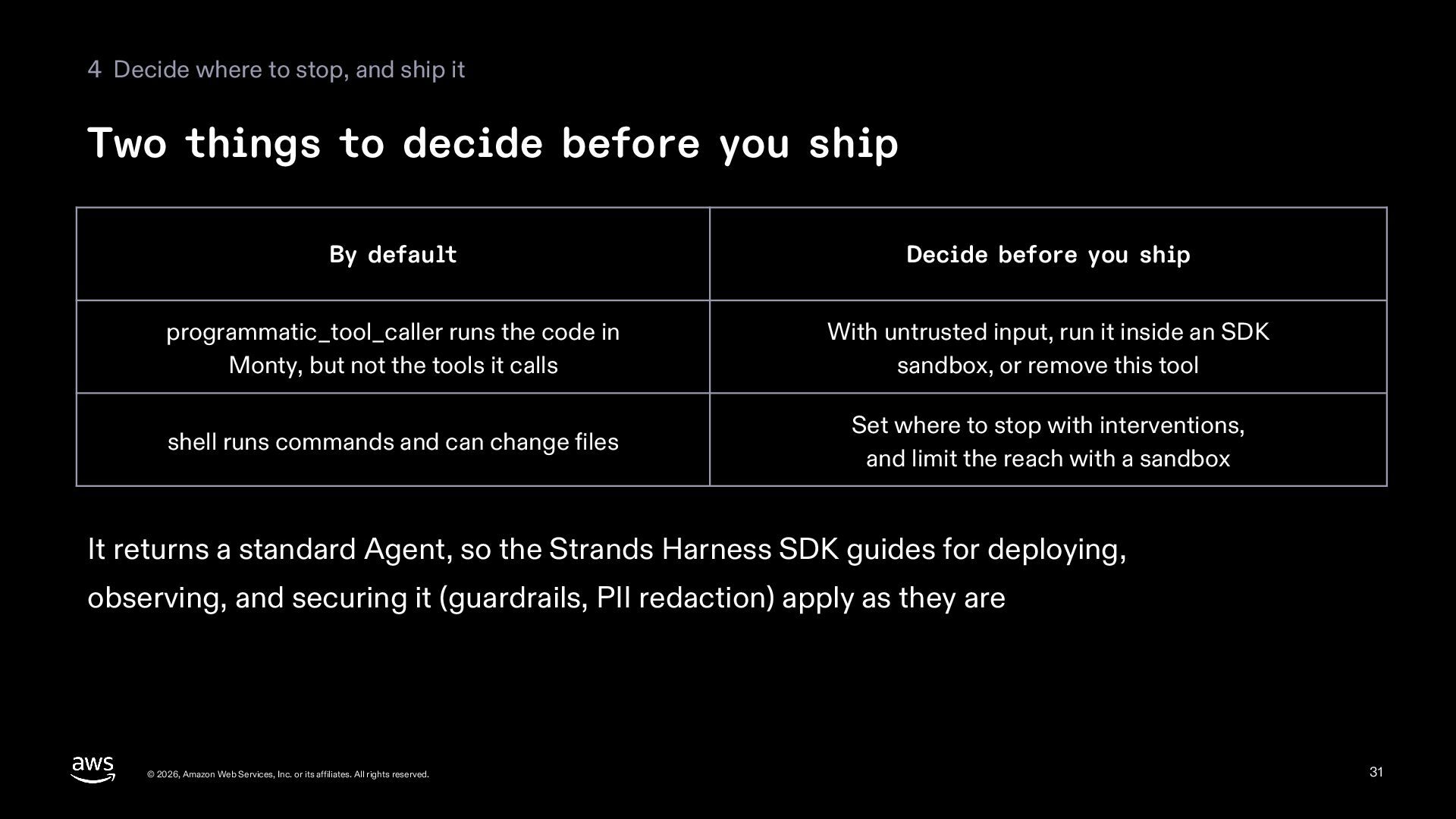
to decide before you ship By default Decide before you ship programmatic_tool_caller runs the code in Monty, but not the tools it calls With untrusted input, run it inside an SDK sandbox, or remove this tool shell runs commands and can change files Set where to stop with interventions, and limit the reach with a sandbox It returns a standard Agent, so the Strands Harness SDK guides for deploying, observing, and securing it (guardrails, PII redaction) apply as they are © 2026, Amazon Web Services, Inc. or its affiliates. All rights reserved. 31 -
4 Decide where to stop, and ship it On a
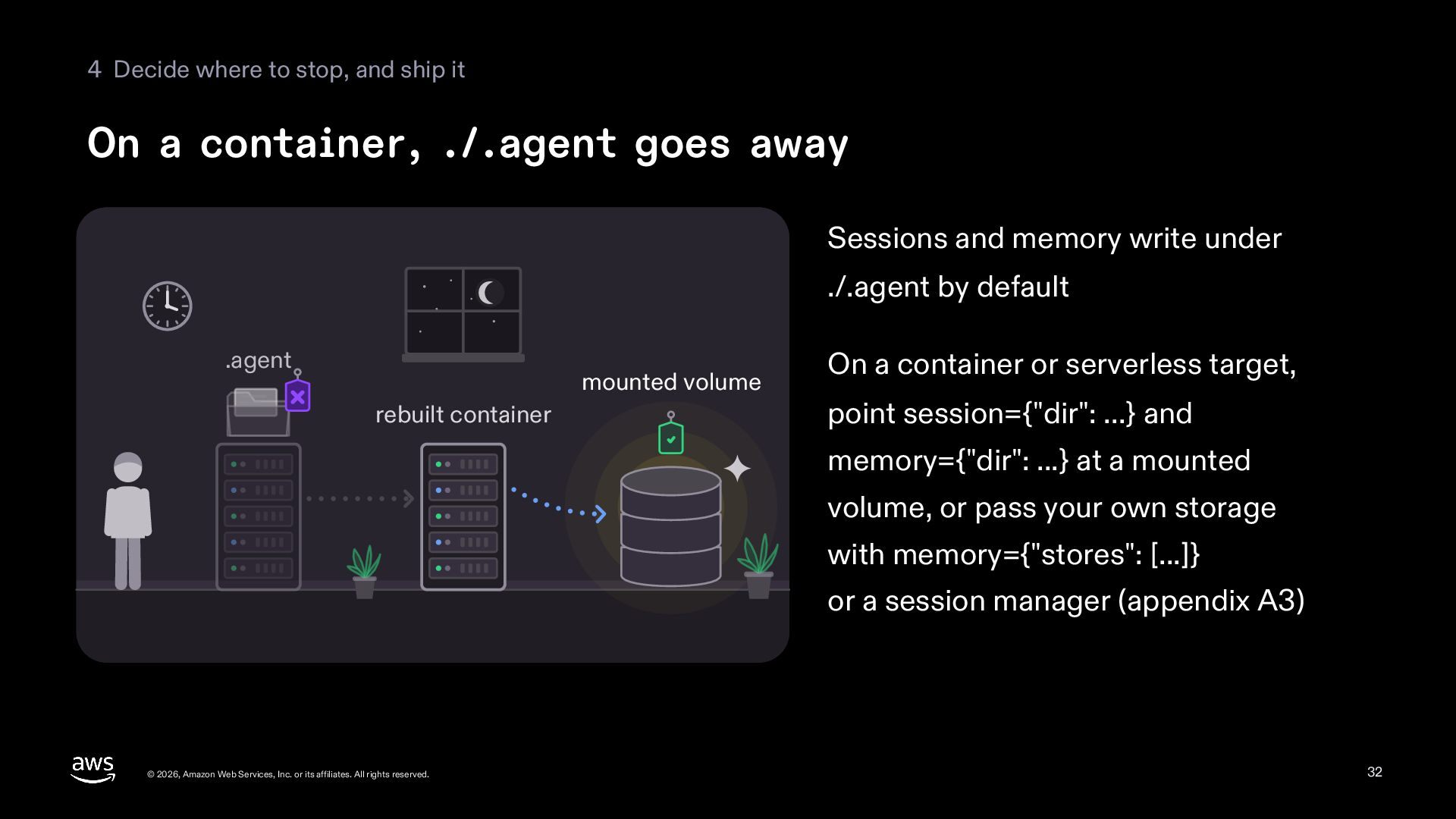
container, ./.agent goes away Sessions and memory write under ./.agent by default .agent mounted volume rebuilt container On a container or serverless target, point session={"dir": ...} and memory={"dir": ...} at a mounted volume, or pass your own storage with memory={"stores": [...]} or a session manager (appendix A3) © 2026, Amazon Web Services, Inc. or its affiliates. All rights reserved. 32 -
4 Decide where to stop, and ship it How 0.x
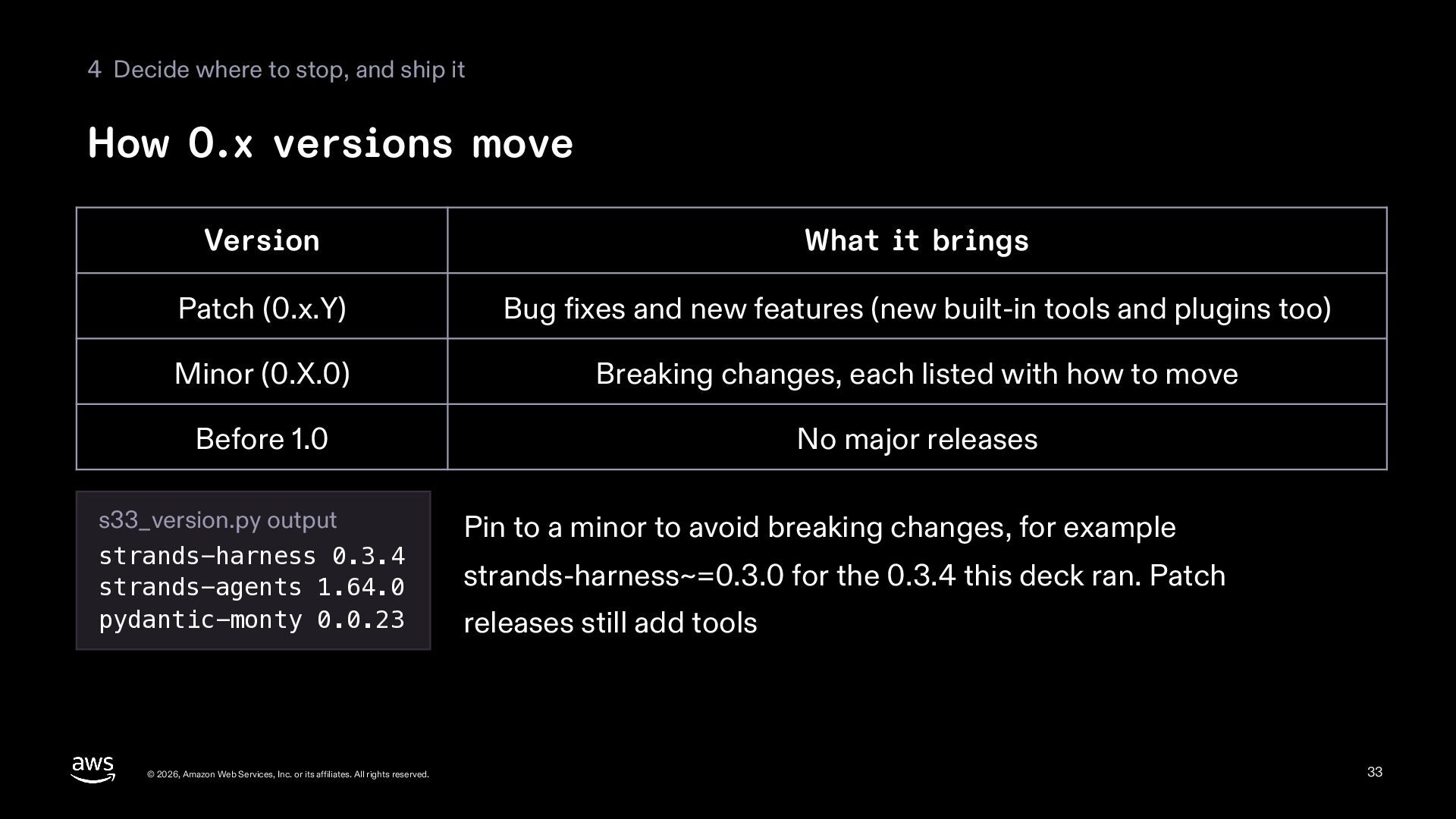
versions move Version What it brings Patch (0.x.Y) Bug fixes and new features (new built-in tools and plugins too) Minor (0.X.0) Breaking changes, each listed with how to move Before 1.0 No major releases s33_version.py output strands-harness 0.3.4 strands-agents 1.64.0 pydantic-monty 0.0.23 © 2026, Amazon Web Services, Inc. or its affiliates. All rights reserved. Pin to a minor to avoid breaking changes, for example strands-harness~=0.3.0 for the 0.3.4 this deck ran. Patch releases still add tools 33 -
Summary Summary 1 create_harness() returns a standard Agent. Arguments it
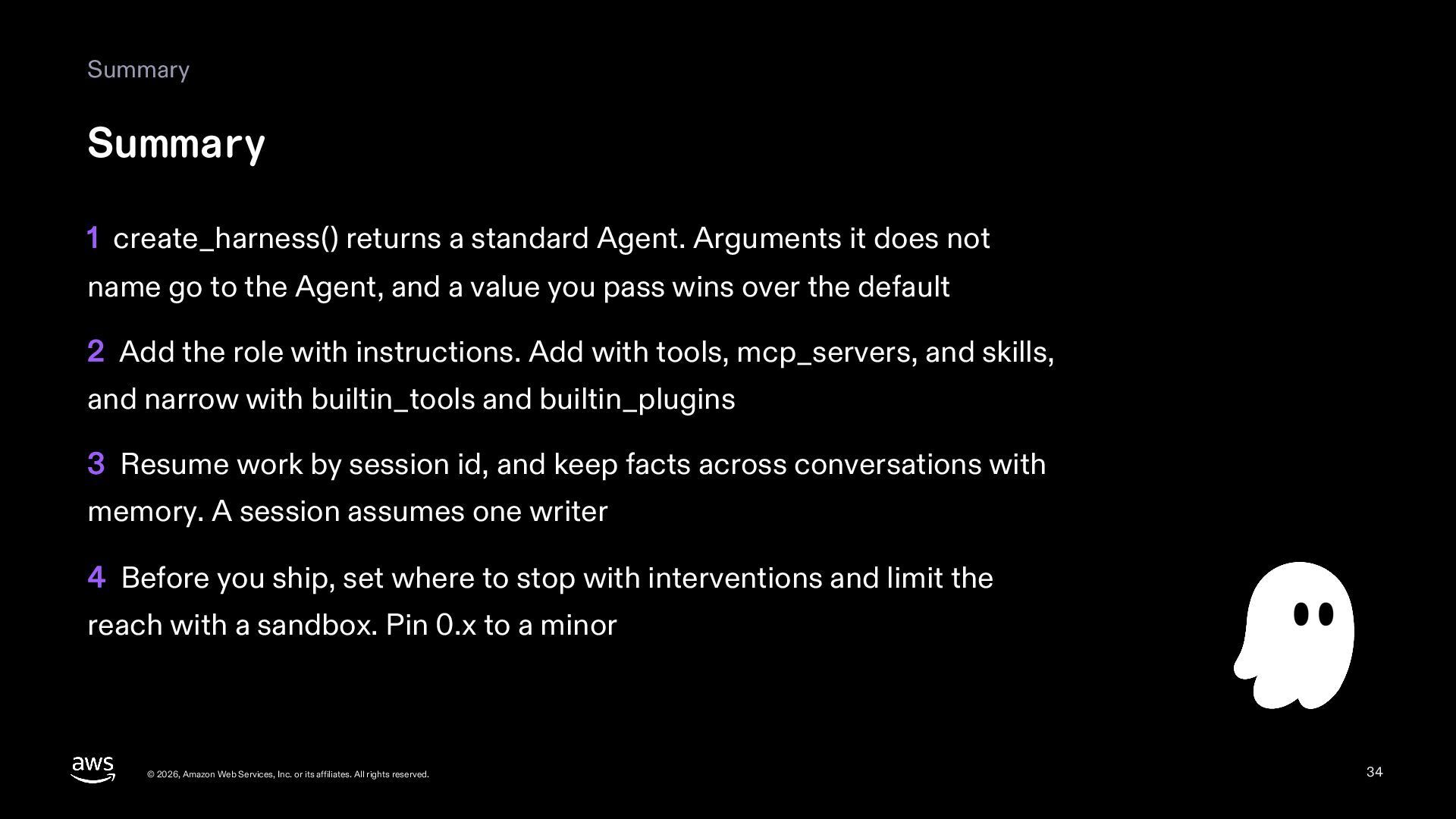
does not name go to the Agent, and a value you pass wins over the default 2 Add the role with instructions. Add with tools, mcp_servers, and skills, and narrow with builtin_tools and builtin_plugins 3 Resume work by session id, and keep facts across conversations with memory. A session assumes one writer 4 Before you ship, set where to stop with interventions and limit the reach with a sandbox. Pin 0.x to a minor © 2026, Amazon Web Services, Inc. or its affiliates. All rights reserved. 34 -
Summary Read next Configuration reference Every create_harness option with its
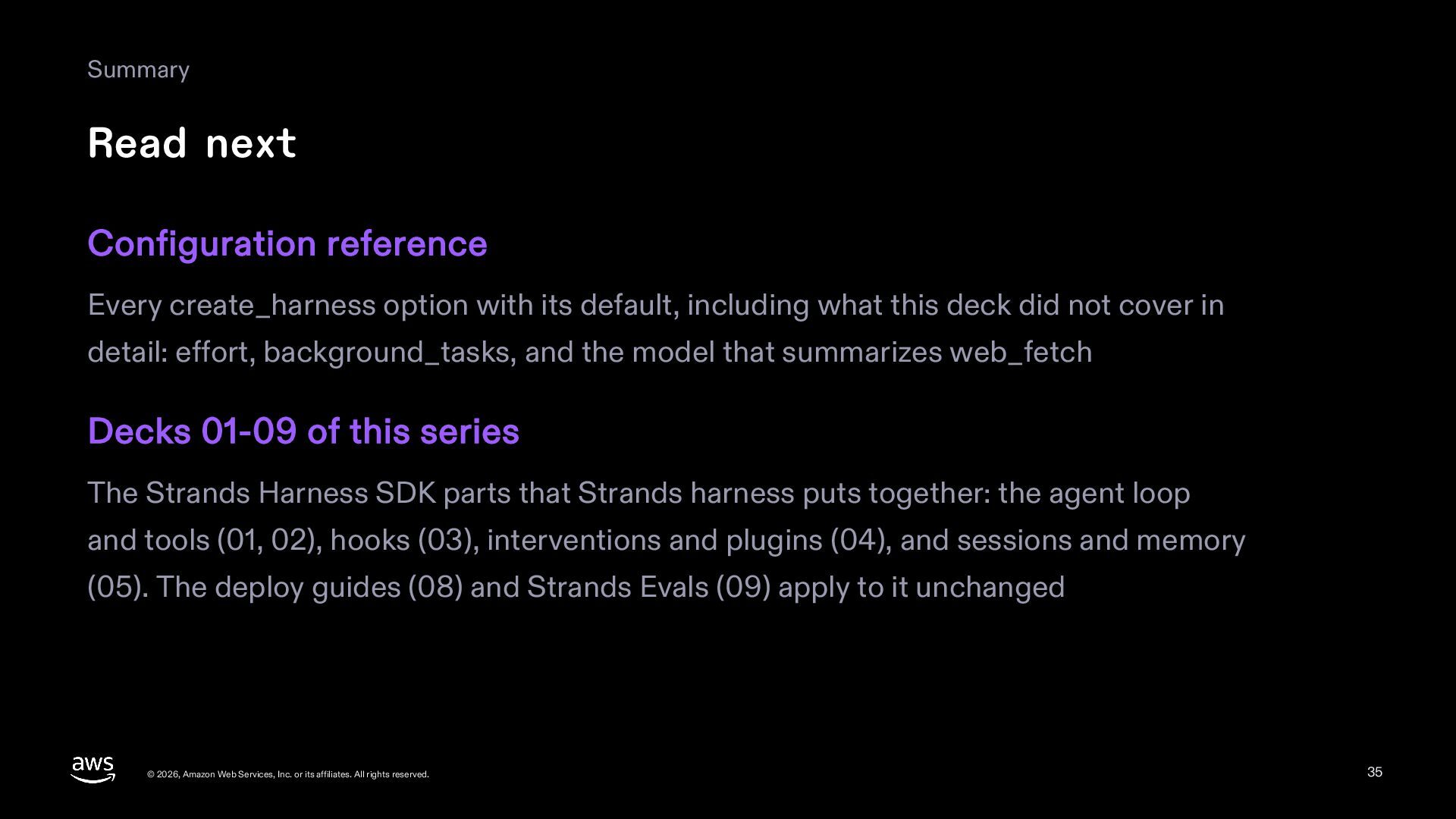
default, including what this deck did not cover in detail: effort, background_tasks, and the model that summarizes web_fetch Decks 01-09 of this series The Strands Harness SDK parts that Strands harness puts together: the agent loop and tools (01, 02), hooks (03), interventions and plugins (04), and sessions and memory (05). The deploy guides (08) and Strands Evals (09) apply to it unchanged © 2026, Amazon Web Services, Inc. or its affiliates. All rights reserved. 35 -
Appendix A1 The smallest full file to copy and run
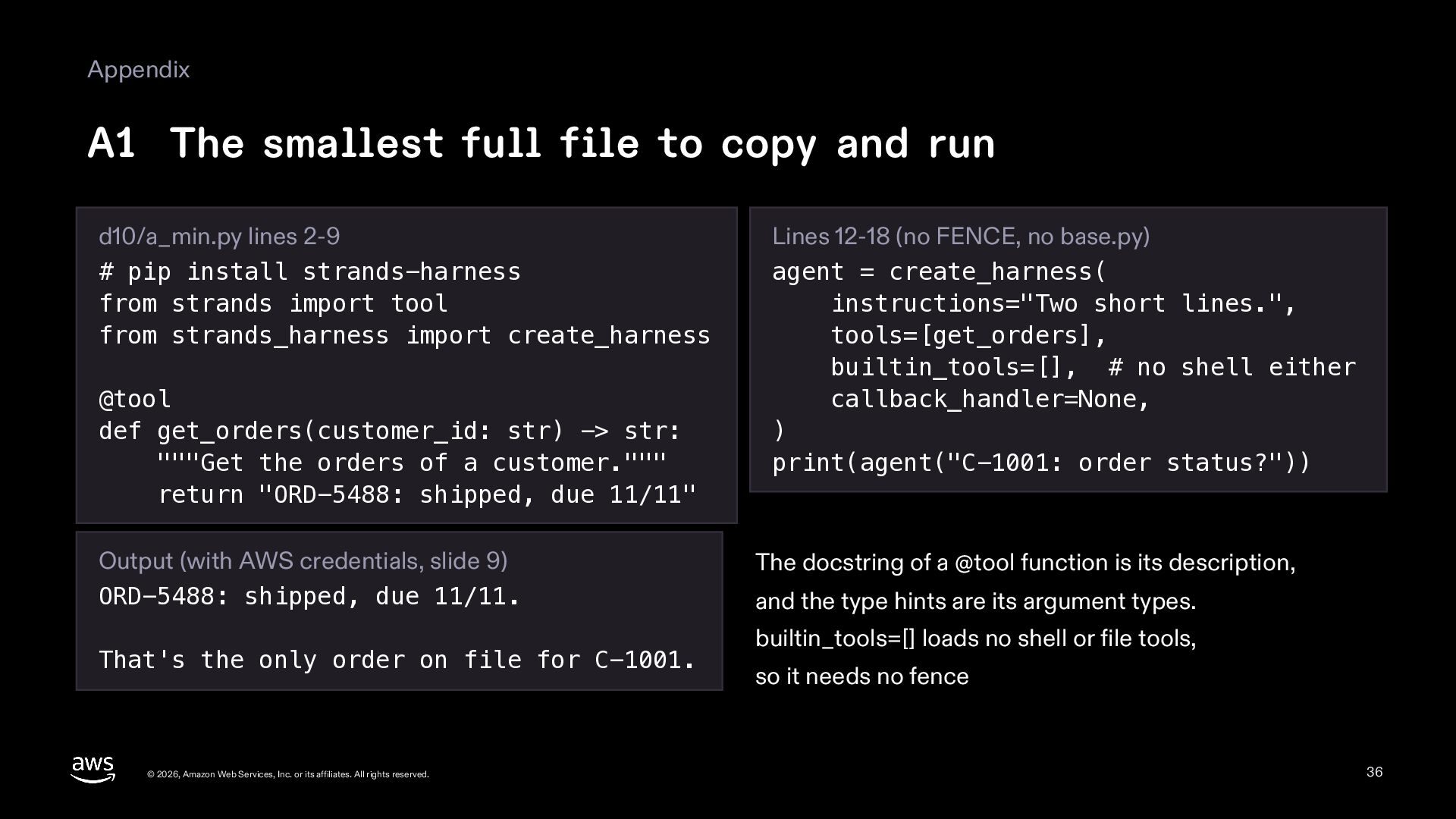
d10/a_min.py lines 2-9 # pip install strands-harness from strands import tool from strands_harness import create_harness @tool def get_orders(customer_id: str) -> str: """Get the orders of a customer.""" return "ORD-5488: shipped, due 11/11" Output (with AWS credentials, slide 9) ORD-5488: shipped, due 11/11. That's the only order on file for C-1001. © 2026, Amazon Web Services, Inc. or its affiliates. All rights reserved. Lines 12-18 (no FENCE, no base.py) agent = create_harness( instructions="Two short lines.", tools=[get_orders], builtin_tools=[], # no shell either callback_handler=None, ) print(agent("C-1001: order status?")) The docstring of a @tool function is its description, and the type hints are its argument types. builtin_tools=[] loads no shell or file tools, so it needs no fence 36 -
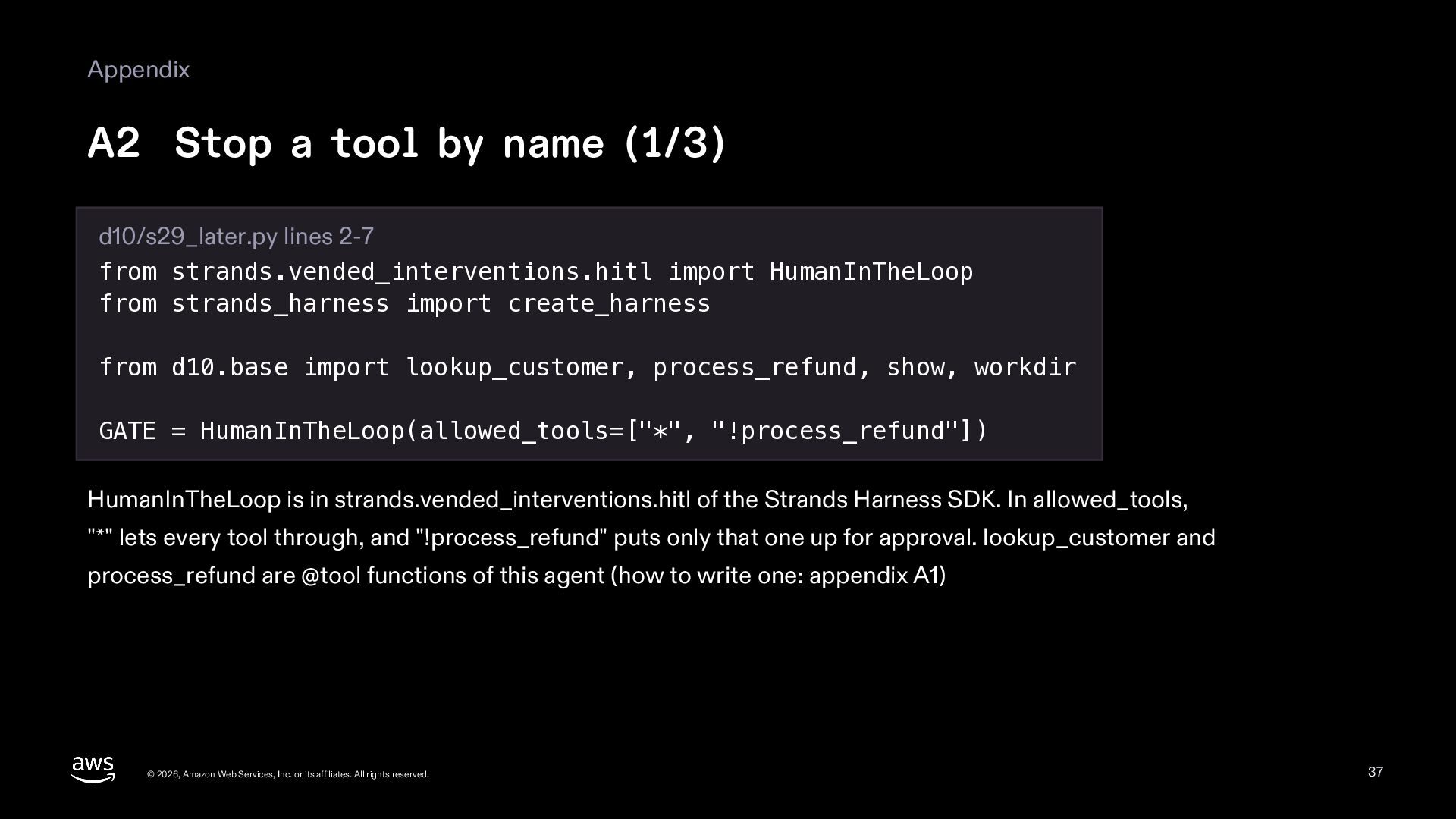
Appendix A2 Stop a tool by name (1/3) d10/s29_later.py lines
2-7 from strands.vended_interventions.hitl import HumanInTheLoop from strands_harness import create_harness from d10.base import lookup_customer, process_refund, show, workdir GATE = HumanInTheLoop(allowed_tools=["*", "!process_refund"]) HumanInTheLoop is in strands.vended_interventions.hitl of the Strands Harness SDK. In allowed_tools, "*" lets every tool through, and "!process_refund" puts only that one up for approval. lookup_customer and process_refund are @tool functions of this agent (how to write one: appendix A1) © 2026, Amazon Web Services, Inc. or its affiliates. All rights reserved. 37 -
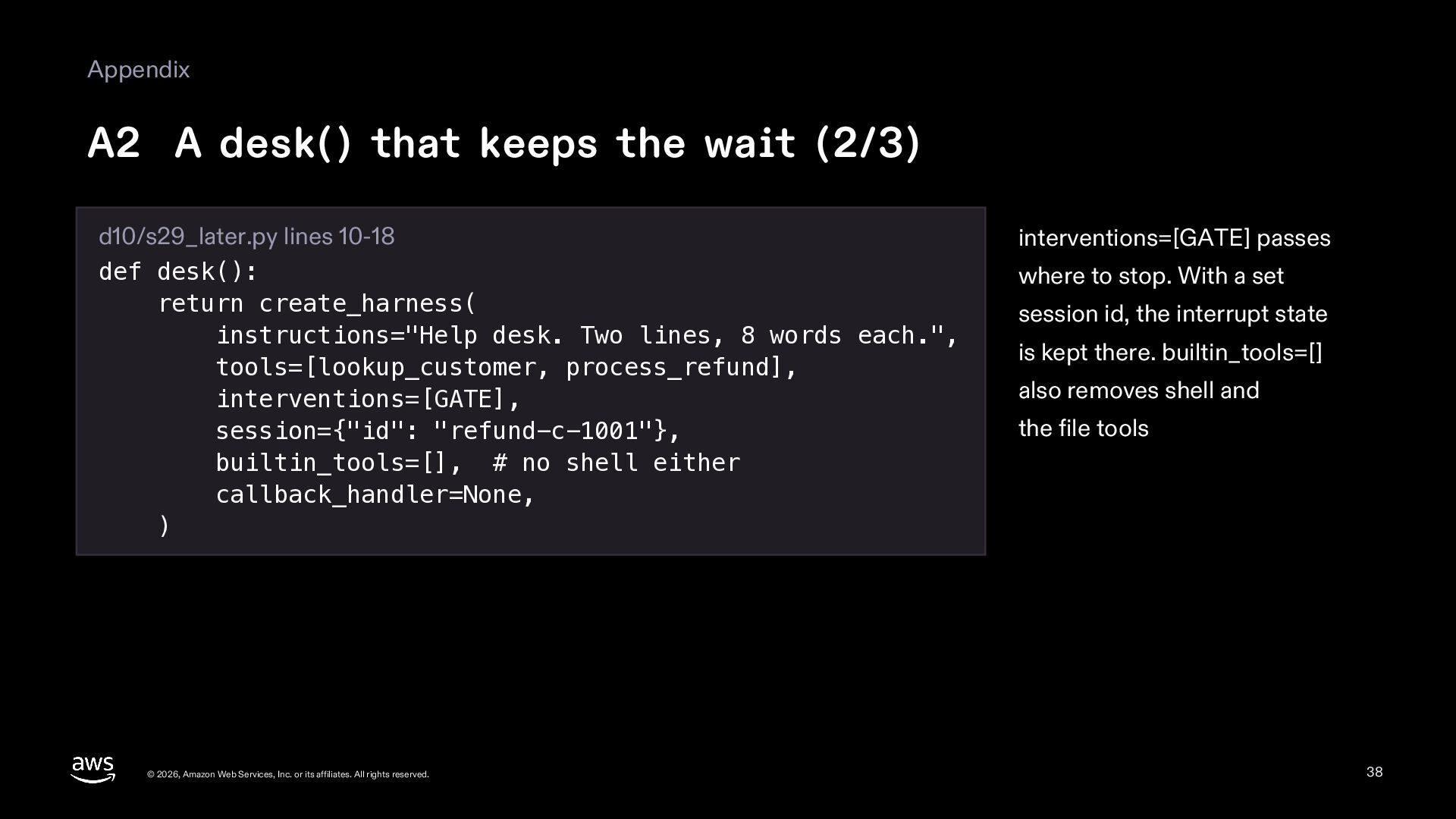
Appendix A2 A desk() that keeps the wait (2/3) d10/s29_later.py
lines 10-18 def desk(): return create_harness( instructions="Help desk. Two lines, 8 words each.", tools=[lookup_customer, process_refund], interventions=[GATE], session={"id": "refund-c-1001"}, builtin_tools=[], # no shell either callback_handler=None, ) © 2026, Amazon Web Services, Inc. or its affiliates. All rights reserved. interventions=[GATE] passes where to stop. With a set session id, the interrupt state is kept there. builtin_tools=[] also removes shell and the file tools 38 -
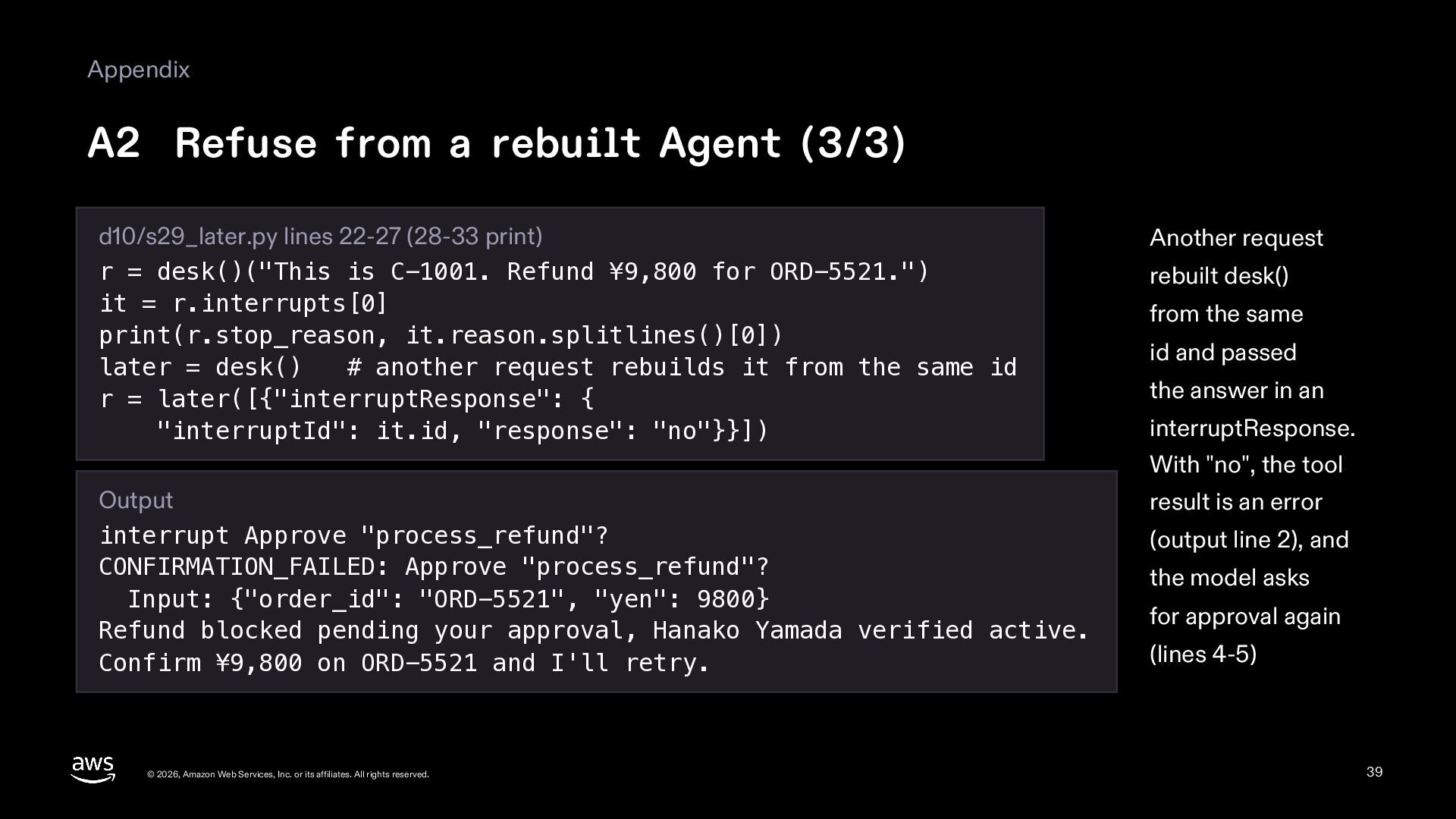
Appendix A2 Refuse from a rebuilt Agent (3/3) d10/s29_later.py lines
22-27 (28-33 print) r = desk()("This is C-1001. Refund ¥9,800 for ORD-5521.") it = r.interrupts[0] print(r.stop_reason, it.reason.splitlines()[0]) later = desk() # another request rebuilds it from the same id r = later([{"interruptResponse": { "interruptId": it.id, "response": "no"}}]) Another request rebuilt desk() from the same id and passed the answer in an interruptResponse. With "no", the tool Output interrupt Approve "process_refund"? CONFIRMATION_FAILED: Approve "process_refund"? Input: {"order_id": "ORD-5521", "yen": 9800} Refund blocked pending your approval, Hanako Yamada verified active. Confirm ¥9,800 on ORD-5521 and I'll retry. © 2026, Amazon Web Services, Inc. or its affiliates. All rights reserved. result is an error (output line 2), and the model asks for approval again (lines 4-5) 39 -
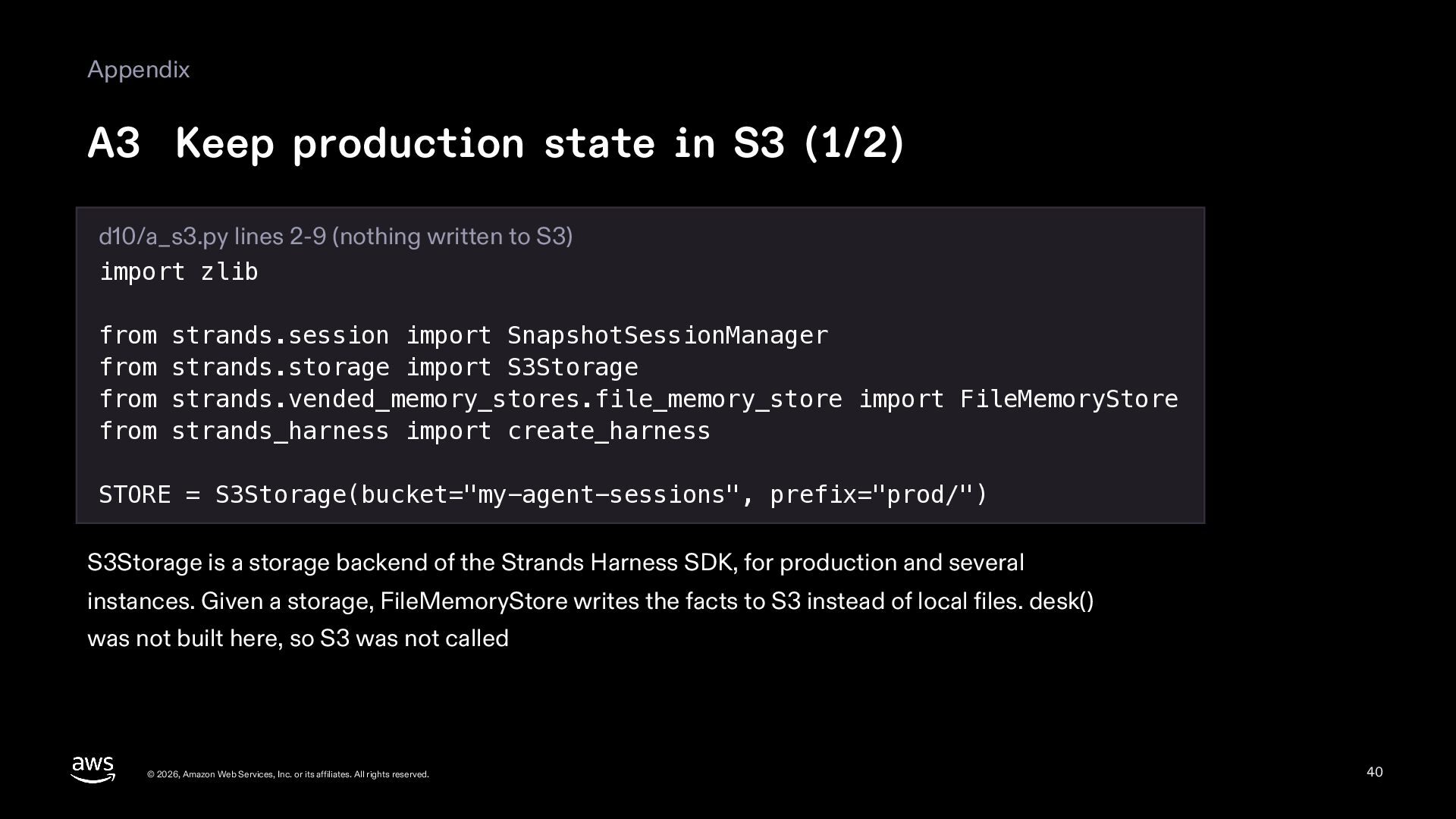
Appendix A3 Keep production state in S3 (1/2) d10/a_s3.py lines
2-9 (nothing written to S3) import zlib from strands.session import SnapshotSessionManager from strands.storage import S3Storage from strands.vended_memory_stores.file_memory_store import FileMemoryStore from strands_harness import create_harness STORE = S3Storage(bucket="my-agent-sessions", prefix="prod/") S3Storage is a storage backend of the Strands Harness SDK, for production and several instances. Given a storage, FileMemoryStore writes the facts to S3 instead of local files. desk() was not built here, so S3 was not called © 2026, Amazon Web Services, Inc. or its affiliates. All rights reserved. 40 -
Appendix A3 A store per customer, one worker per id
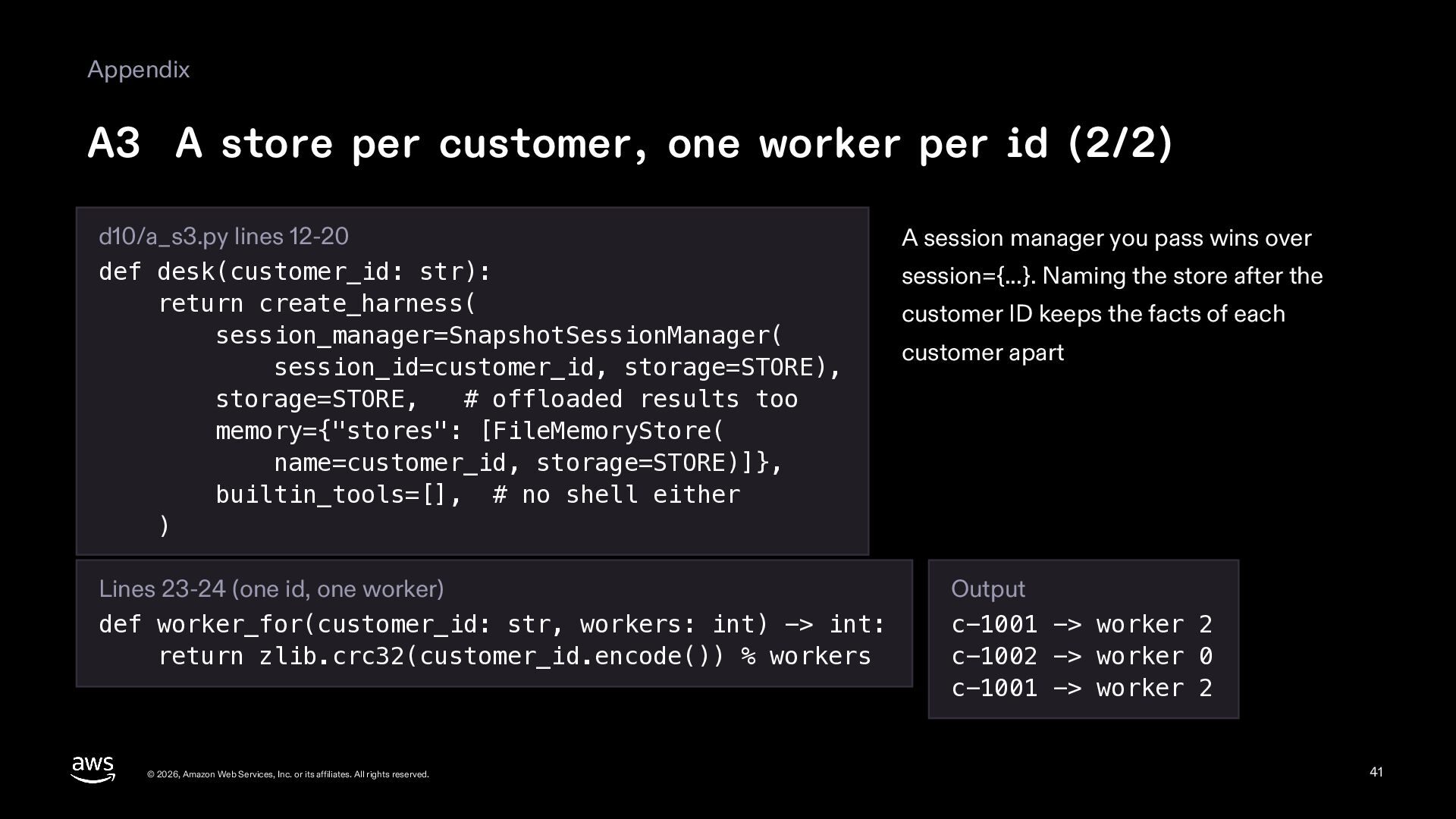
(2/2) d10/a_s3.py lines 12-20 def desk(customer_id: str): return create_harness( session_manager=SnapshotSessionManager( session_id=customer_id, storage=STORE), storage=STORE, # offloaded results too memory={"stores": [FileMemoryStore( name=customer_id, storage=STORE)]}, builtin_tools=[], # no shell either ) Lines 23-24 (one id, one worker) def worker_for(customer_id: str, workers: int) -> int: return zlib.crc32(customer_id.encode()) % workers © 2026, Amazon Web Services, Inc. or its affiliates. All rights reserved. A session manager you pass wins over session={...}. Naming the store after the customer ID keeps the facts of each customer apart Output c-1001 -> worker 2 c-1002 -> worker 0 c-1001 -> worker 2 41 -
Appendix A4 The fence for shell and file tools (FENCE)
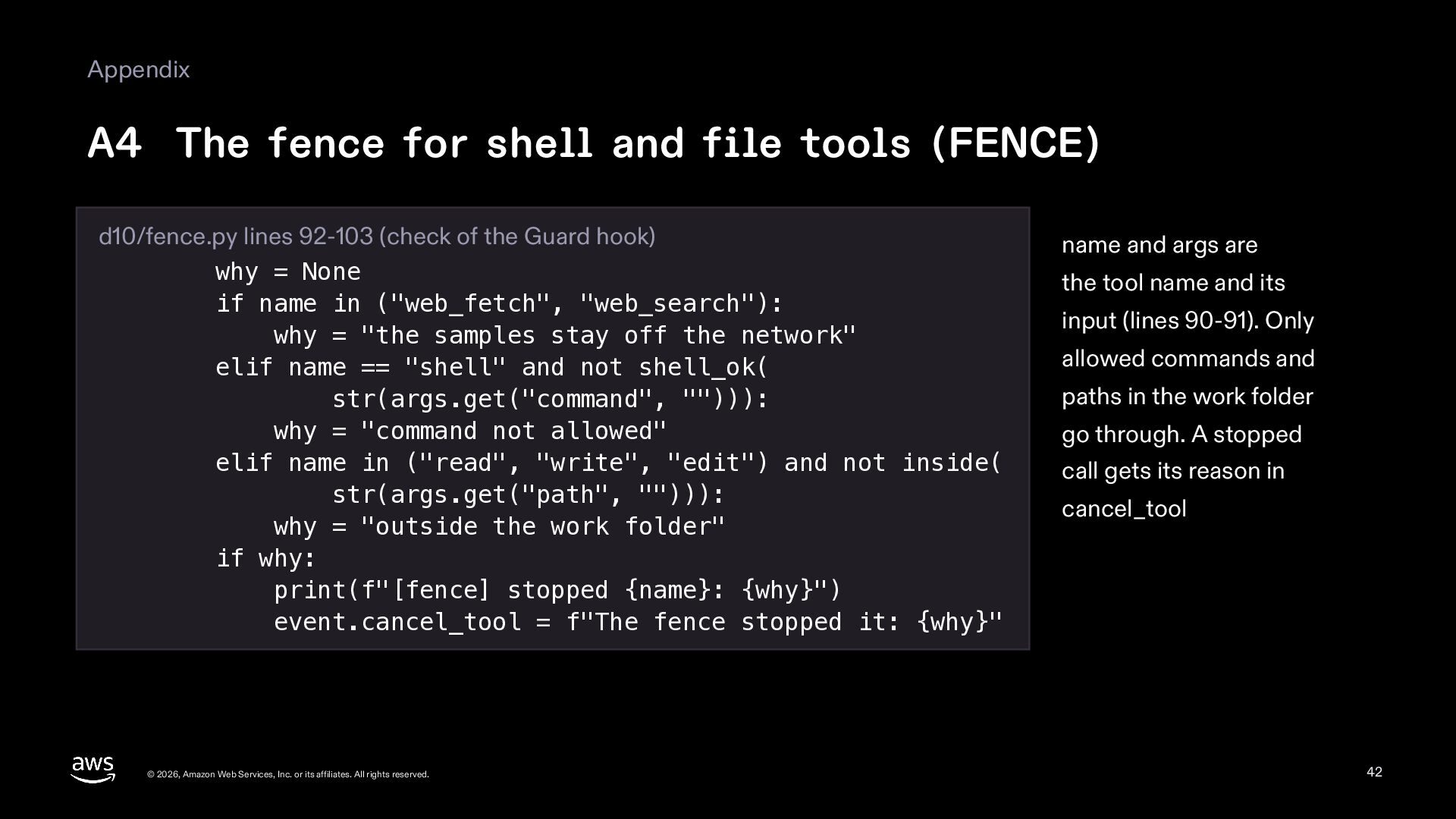
d10/fence.py lines 92-103 (check of the Guard hook) why = None if name in ("web_fetch", "web_search"): why = "the samples stay off the network" elif name == "shell" and not shell_ok( str(args.get("command", ""))): why = "command not allowed" elif name in ("read", "write", "edit") and not inside( str(args.get("path", ""))): why = "outside the work folder" if why: print(f"[fence] stopped {name}: {why}") event.cancel_tool = f"The fence stopped it: {why}" © 2026, Amazon Web Services, Inc. or its affiliates. All rights reserved. name and args are the tool name and its input (lines 90-91). Only allowed commands and paths in the work folder go through. A stopped call gets its reason in cancel_tool 42 -
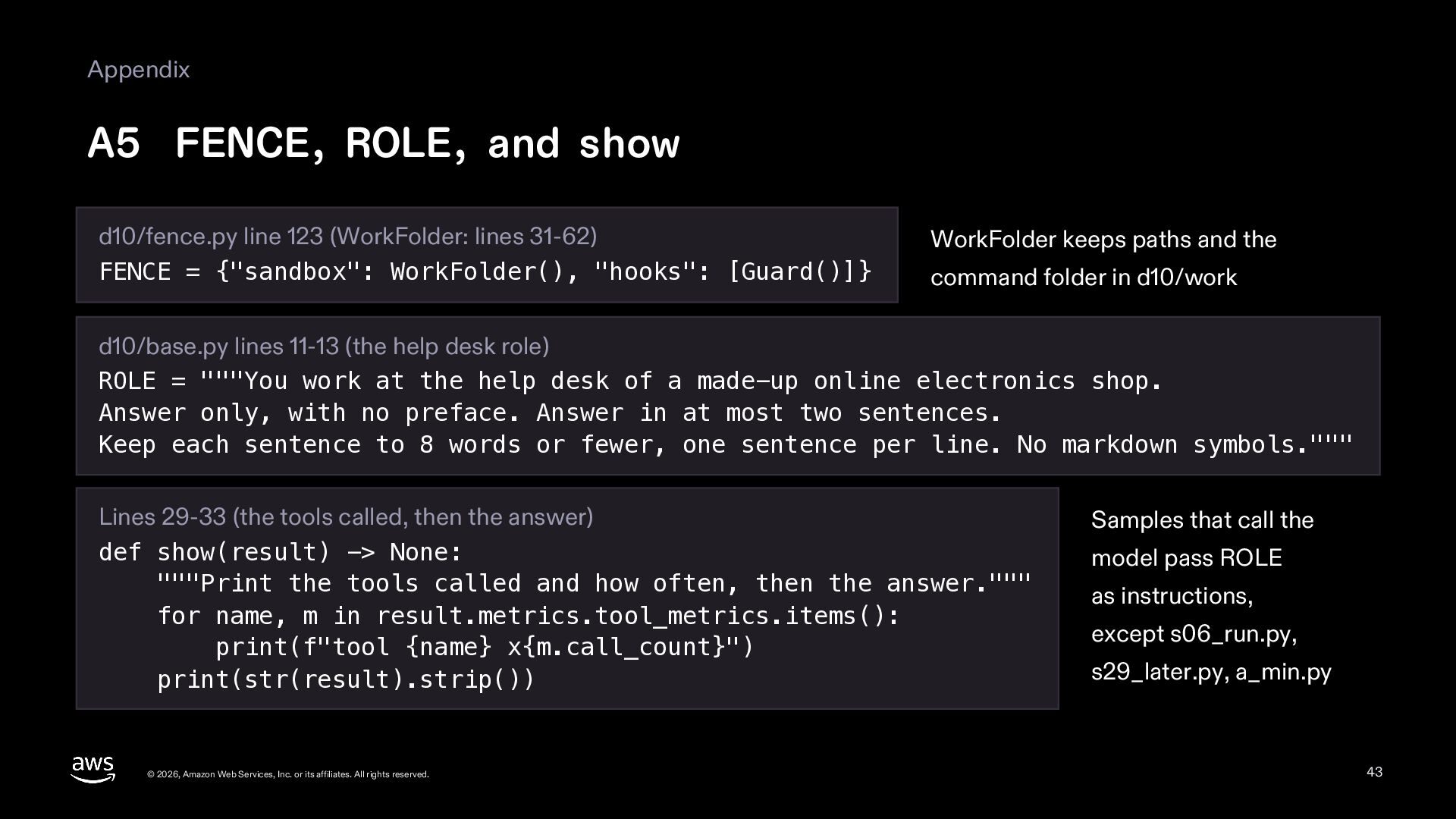
Appendix A5 FENCE, ROLE, and show d10/fence.py line 123 (WorkFolder:
lines 31-62) FENCE = {"sandbox": WorkFolder(), "hooks": [Guard()]} WorkFolder keeps paths and the command folder in d10/work d10/base.py lines 11-13 (the help desk role) ROLE = """You work at the help desk of a made-up online electronics shop. Answer only, with no preface. Answer in at most two sentences. Keep each sentence to 8 words or fewer, one sentence per line. No markdown symbols.""" Lines 29-33 (the tools called, then the answer) def show(result) -> None: """Print the tools called and how often, then the answer.""" for name, m in result.metrics.tool_metrics.items(): print(f"tool {name} x{m.call_count}") print(str(result).strip()) © 2026, Amazon Web Services, Inc. or its affiliates. All rights reserved. Samples that call the model pass ROLE as instructions, except s06_run.py, s29_later.py, a_min.py 43 -
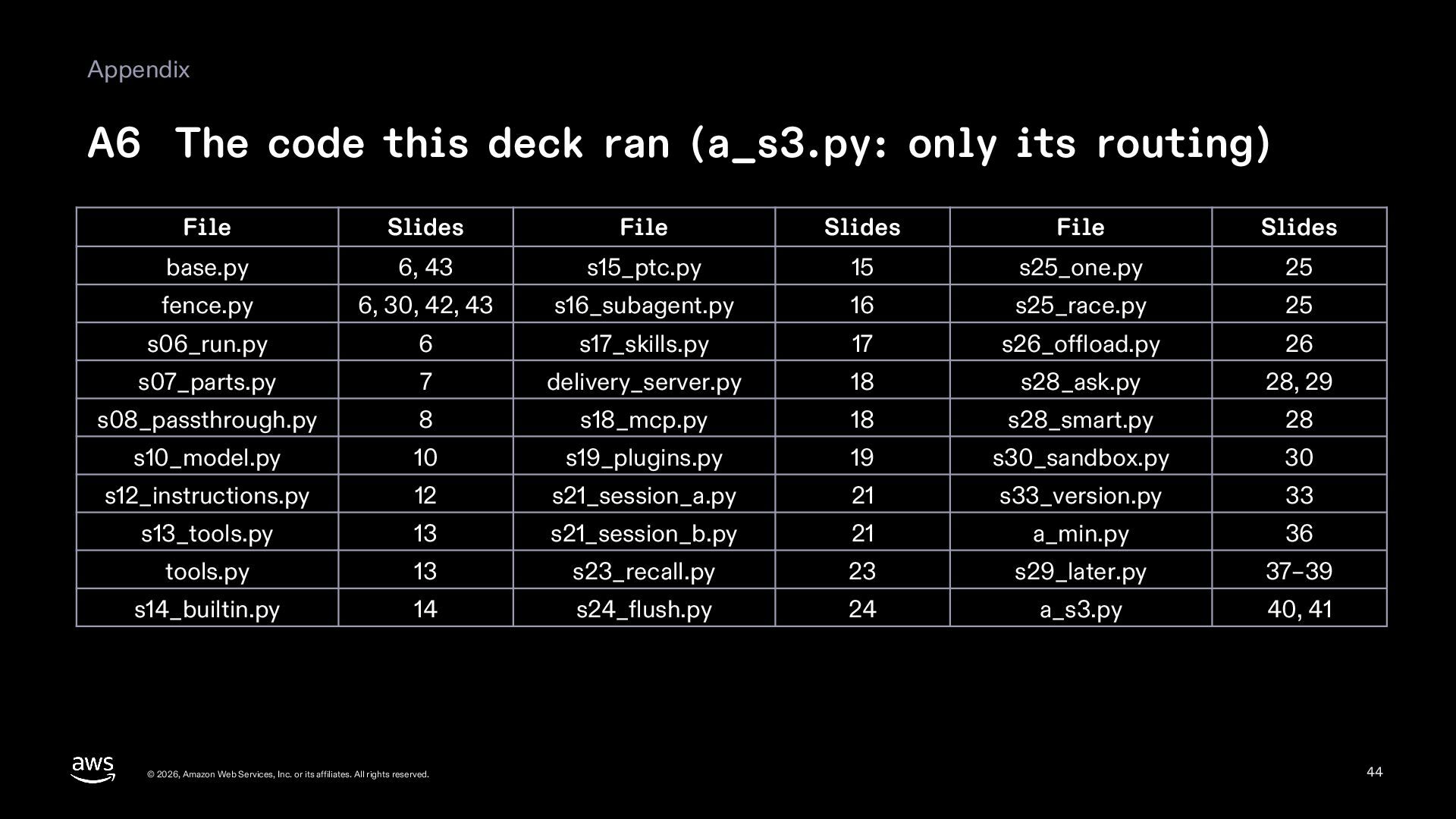
Appendix A6 The code this deck ran (a_s3.py: only its
routing) File Slides File Slides File Slides base.py 6, 43 s15_ptc.py 15 s25_one.py 25 fence.py 6, 30, 42, 43 s16_subagent.py 16 s25_race.py 25 s06_run.py 6 s17_skills.py 17 s26_offload.py 26 s07_parts.py 7 delivery_server.py 18 s28_ask.py 28, 29 s08_passthrough.py 8 s18_mcp.py 18 s28_smart.py 28 s10_model.py 10 s19_plugins.py 19 s30_sandbox.py 30 s12_instructions.py 12 s21_session_a.py 21 s33_version.py 33 s13_tools.py 13 s21_session_b.py 21 a_min.py 36 tools.py 13 s23_recall.py 23 s29_later.py 37–39 s14_builtin.py 14 s24_flush.py 24 a_s3.py 40, 41 © 2026, Amazon Web Services, Inc. or its affiliates. All rights reserved. 44 -
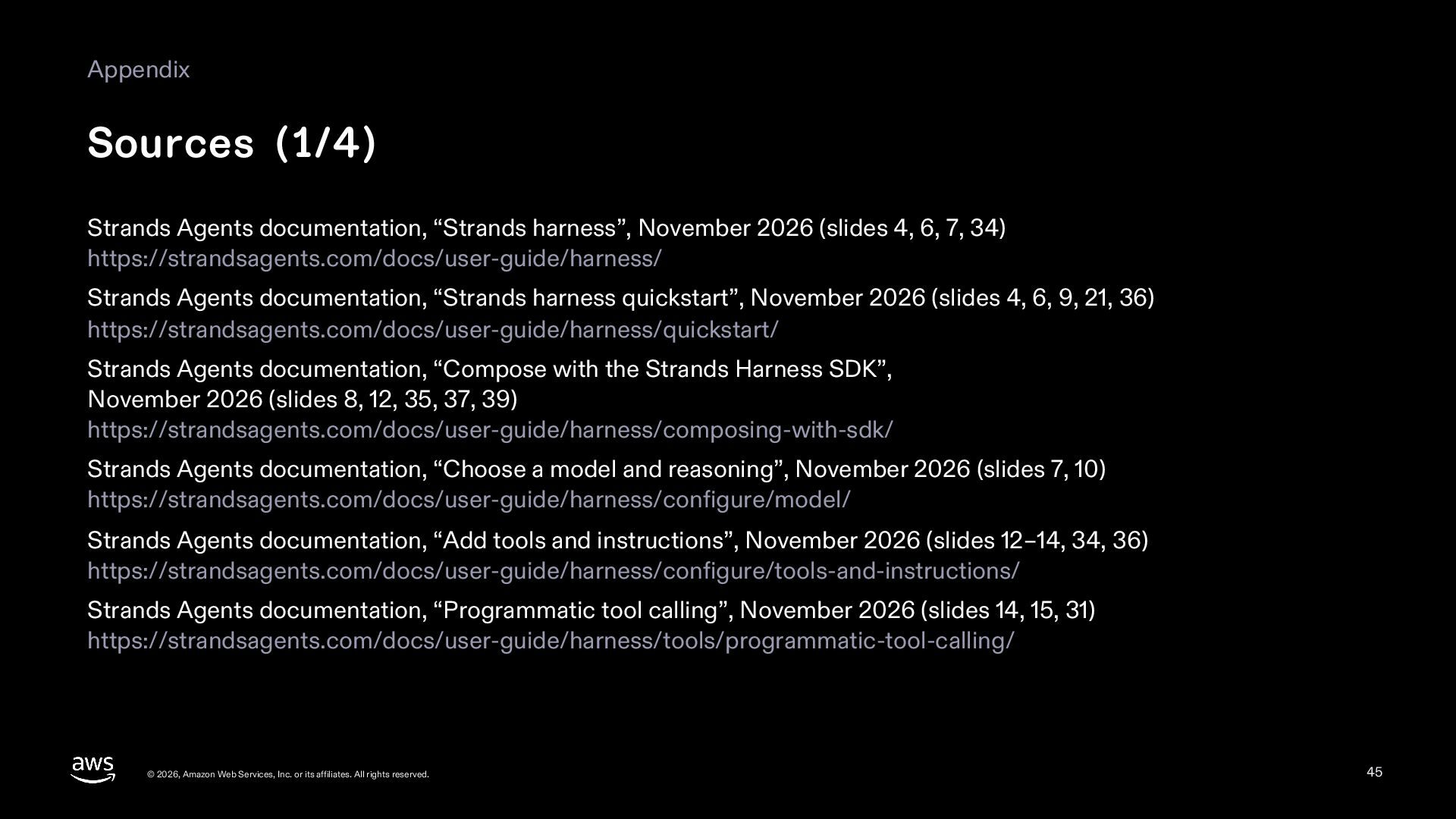
Appendix Sources (1/4) Strands Agents documentation, “Strands harness”, November 2026
(slides 4, 6, 7, 34) https://strandsagents.com/docs/user-guide/harness/ Strands Agents documentation, “Strands harness quickstart”, November 2026 (slides 4, 6, 9, 21, 36) https://strandsagents.com/docs/user-guide/harness/quickstart/ Strands Agents documentation, “Compose with the Strands Harness SDK”, November 2026 (slides 8, 12, 35, 37, 39) https://strandsagents.com/docs/user-guide/harness/composing-with-sdk/ Strands Agents documentation, “Choose a model and reasoning”, November 2026 (slides 7, 10) https://strandsagents.com/docs/user-guide/harness/configure/model/ Strands Agents documentation, “Add tools and instructions”, November 2026 (slides 12–14, 34, 36) https://strandsagents.com/docs/user-guide/harness/configure/tools-and-instructions/ Strands Agents documentation, “Programmatic tool calling”, November 2026 (slides 14, 15, 31) https://strandsagents.com/docs/user-guide/harness/tools/programmatic-tool-calling/ © 2026, Amazon Web Services, Inc. or its affiliates. All rights reserved. 45 -
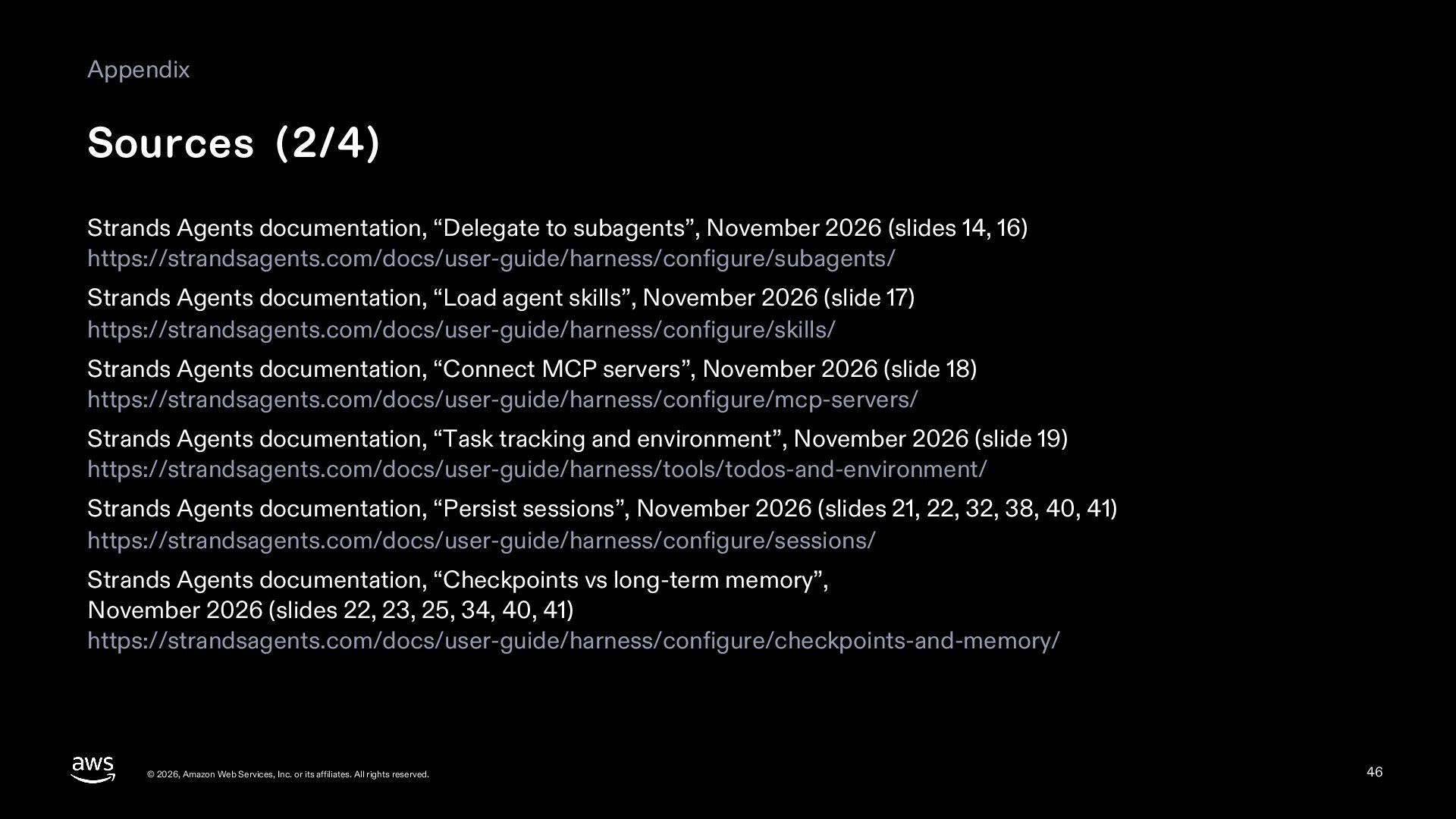
Appendix Sources (2/4) Strands Agents documentation, “Delegate to subagents”, November
2026 (slides 14, 16) https://strandsagents.com/docs/user-guide/harness/configure/subagents/ Strands Agents documentation, “Load agent skills”, November 2026 (slide 17) https://strandsagents.com/docs/user-guide/harness/configure/skills/ Strands Agents documentation, “Connect MCP servers”, November 2026 (slide 18) https://strandsagents.com/docs/user-guide/harness/configure/mcp-servers/ Strands Agents documentation, “Task tracking and environment”, November 2026 (slide 19) https://strandsagents.com/docs/user-guide/harness/tools/todos-and-environment/ Strands Agents documentation, “Persist sessions”, November 2026 (slides 21, 22, 32, 38, 40, 41) https://strandsagents.com/docs/user-guide/harness/configure/sessions/ Strands Agents documentation, “Checkpoints vs long-term memory”, November 2026 (slides 22, 23, 25, 34, 40, 41) https://strandsagents.com/docs/user-guide/harness/configure/checkpoints-and-memory/ © 2026, Amazon Web Services, Inc. or its affiliates. All rights reserved. 46 -
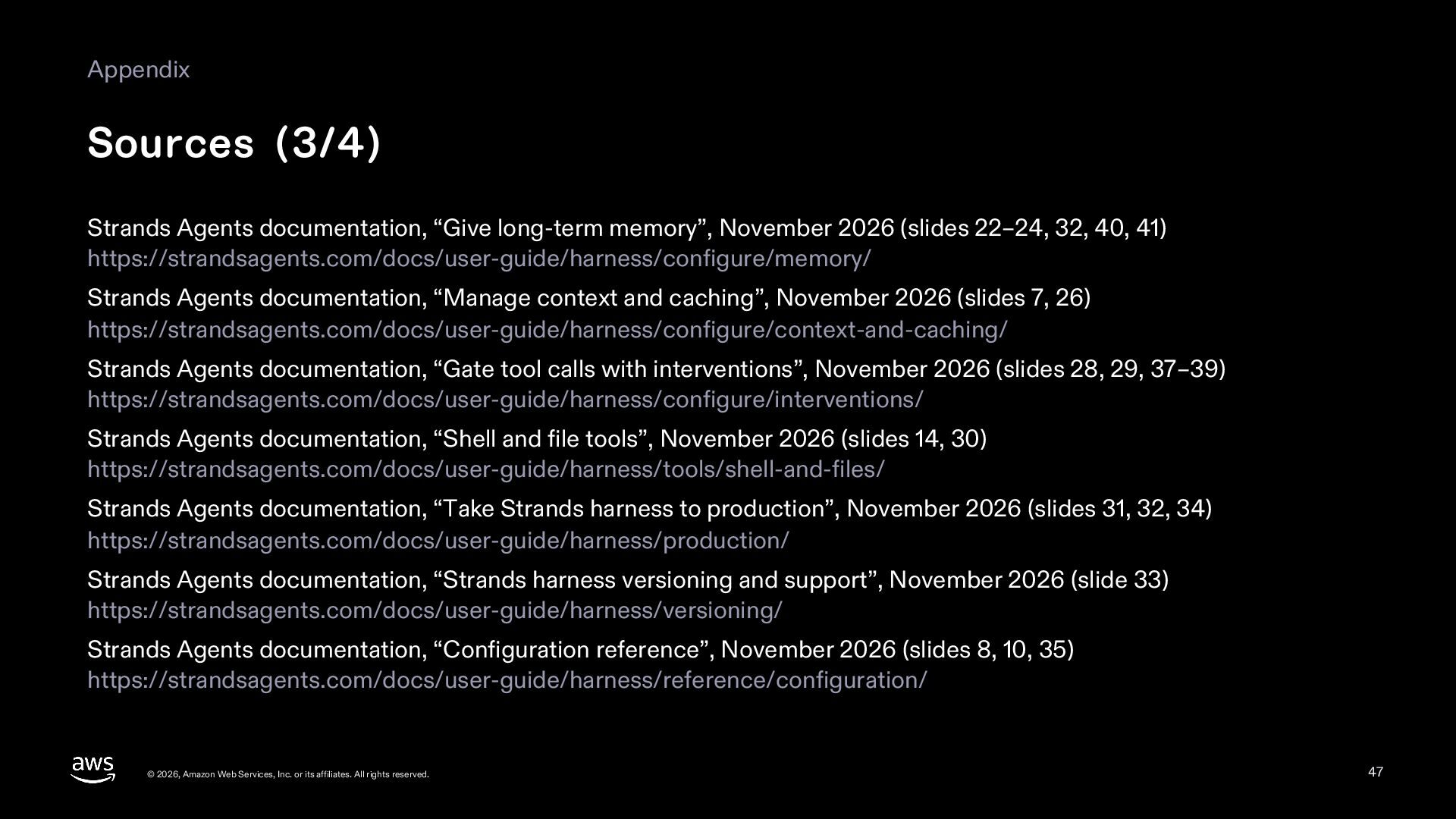
Appendix Sources (3/4) Strands Agents documentation, “Give long-term memory”, November
2026 (slides 22–24, 32, 40, 41) https://strandsagents.com/docs/user-guide/harness/configure/memory/ Strands Agents documentation, “Manage context and caching”, November 2026 (slides 7, 26) https://strandsagents.com/docs/user-guide/harness/configure/context-and-caching/ Strands Agents documentation, “Gate tool calls with interventions”, November 2026 (slides 28, 29, 37–39) https://strandsagents.com/docs/user-guide/harness/configure/interventions/ Strands Agents documentation, “Shell and file tools”, November 2026 (slides 14, 30) https://strandsagents.com/docs/user-guide/harness/tools/shell-and-files/ Strands Agents documentation, “Take Strands harness to production”, November 2026 (slides 31, 32, 34) https://strandsagents.com/docs/user-guide/harness/production/ Strands Agents documentation, “Strands harness versioning and support”, November 2026 (slide 33) https://strandsagents.com/docs/user-guide/harness/versioning/ Strands Agents documentation, “Configuration reference”, November 2026 (slides 8, 10, 35) https://strandsagents.com/docs/user-guide/harness/reference/configuration/ © 2026, Amazon Web Services, Inc. or its affiliates. All rights reserved. 47 -
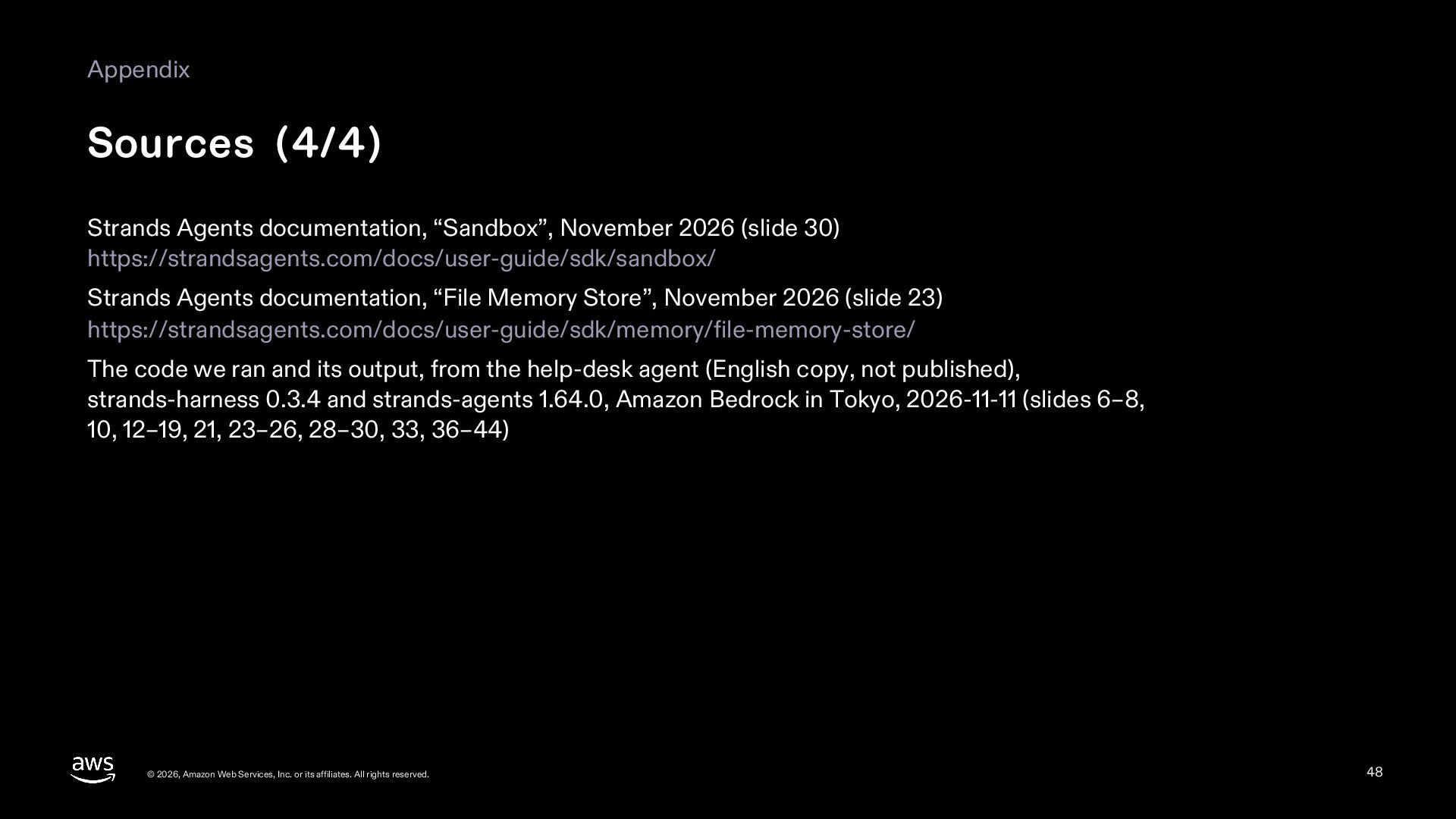
Appendix Sources (4/4) Strands Agents documentation, “Sandbox”, November 2026 (slide
30) https://strandsagents.com/docs/user-guide/sdk/sandbox/ Strands Agents documentation, “File Memory Store”, November 2026 (slide 23) https://strandsagents.com/docs/user-guide/sdk/memory/file-memory-store/ The code we ran and its output, from the help-desk agent (English copy, not published), strands-harness 0.3.4 and strands-agents 1.64.0, Amazon Bedrock in Tokyo, 2026-11-11 (slides 6–8, 10, 12–19, 21, 23–26, 28–30, 33, 36–44) © 2026, Amazon Web Services, Inc. or its affiliates. All rights reserved. 48
 inariku
 sergicalsix
 nkajihara
 genda
 ymotongpoo
 uhyo
 yoshimura_datam
 yuriemori
 ahus1
 masahirokawahara
 zenta
 ren8k
 indxjp
 ryanjones
 sferik
 katarinadahlin
 helenjbeal
 iamctodd
 rabernat
 katiecoart
 emna__ayadi
 427marketing
 auna
 cromwellryan
 michaelherold