Upgrade to Pro — share decks privately, control downloads, hide ads and more …

DurableExecutionを実装検証から理解する.pdf

Avatar for Hiroshi Kato Hiroshi Kato
January 31, 2026
26

 DurableExecutionを実装検証から理解する.pdf

Avatar for Hiroshi Kato

Hiroshi Kato

January 31, 2026
Tweet

More Decks by Hiroshi Kato

Transcript

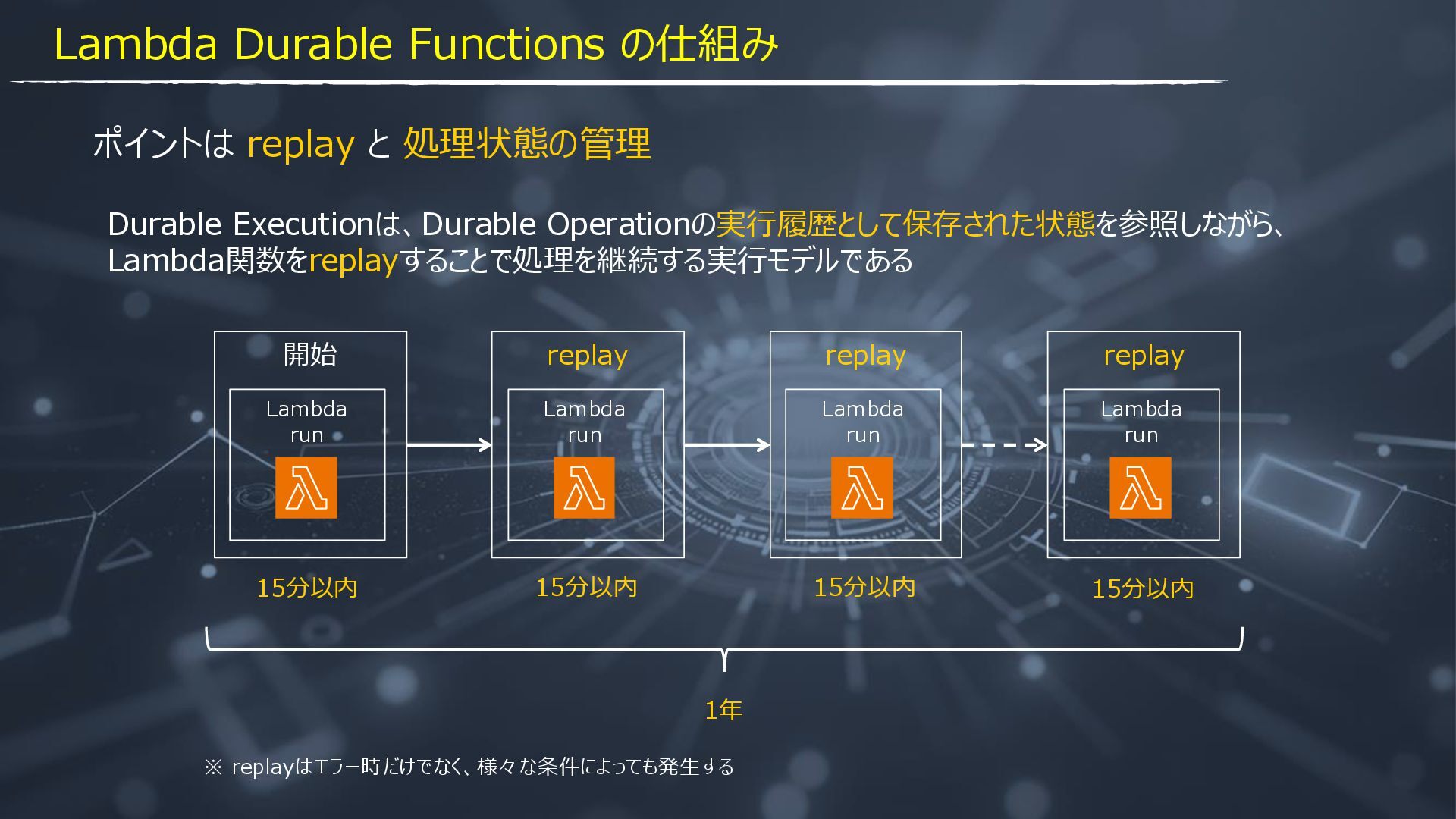
  1. ポイントは replay と 処理状態の管理 15分以内 1年 開始 Lambda run replay

    Lambda run replay Lambda run replay Lambda run 15分以内 15分以内 15分以内 Durable Executionは、Durable Operationの実行履歴として保存された状態を参照しながら、 Lambda関数をreplayすることで処理を継続する実行モデルである ※ replayはエラー時だけでなく、様々な条件によっても発生する Lambda Durable Functions の仕組み
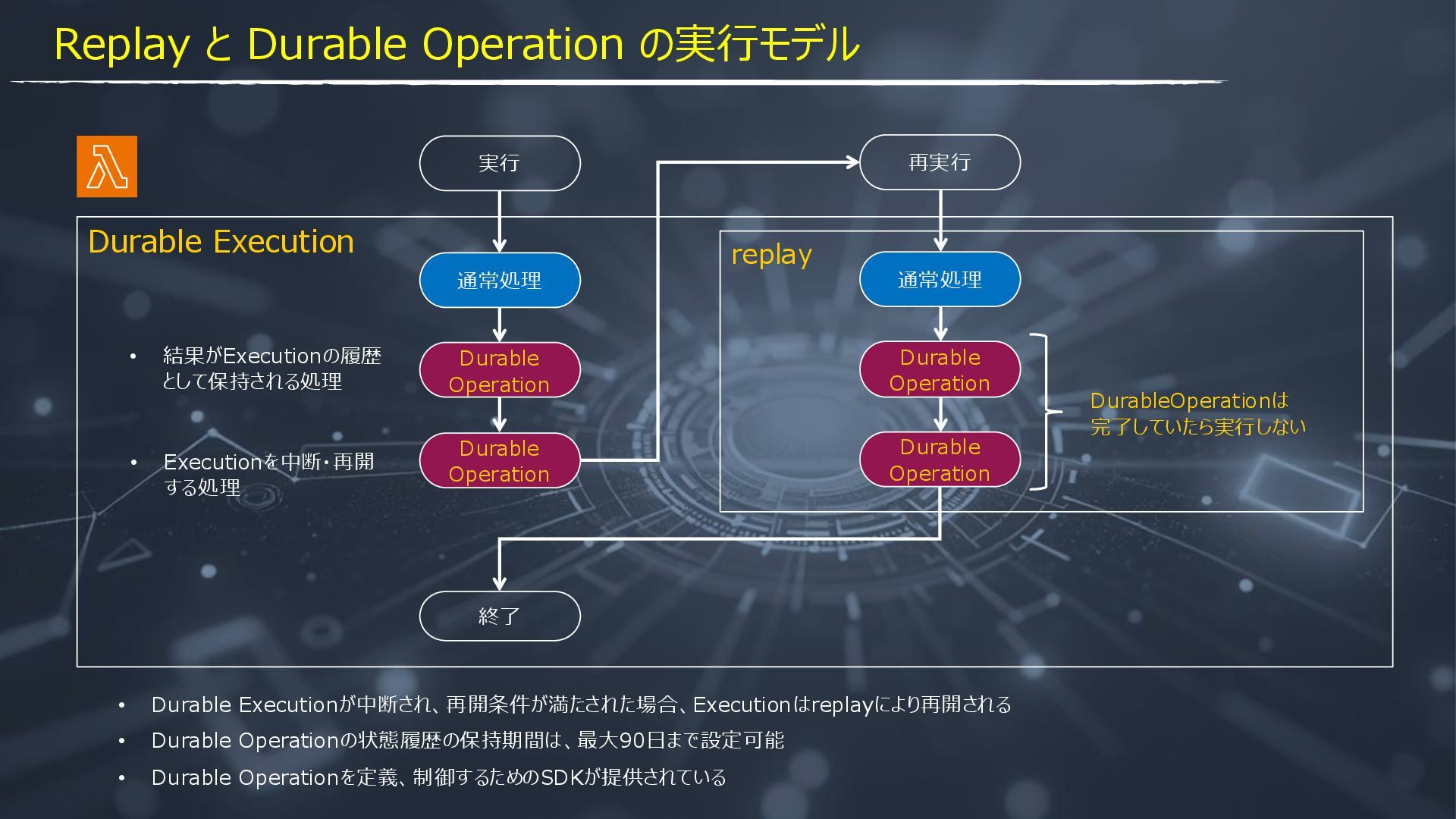
  2. Durable Execution replay Durable Operation Durable Operation 終了 • Durable

    Executionが中断され、再開条件が満たされた場合、Executionはreplayにより再開される • Durable Operationの状態履歴の保持期間は、最大90日まで設定可能 実行 通常処理 再実行 Durable Operation Durable Operation 通常処理 • Durable Operationを定義、制御するためのSDKが提供されている DurableOperationは 完了していたら実行しない Replay と Durable Operation の実行モデル • 結果がExecutionの履歴 として保持される処理 • Executionを中断・再開 する処理
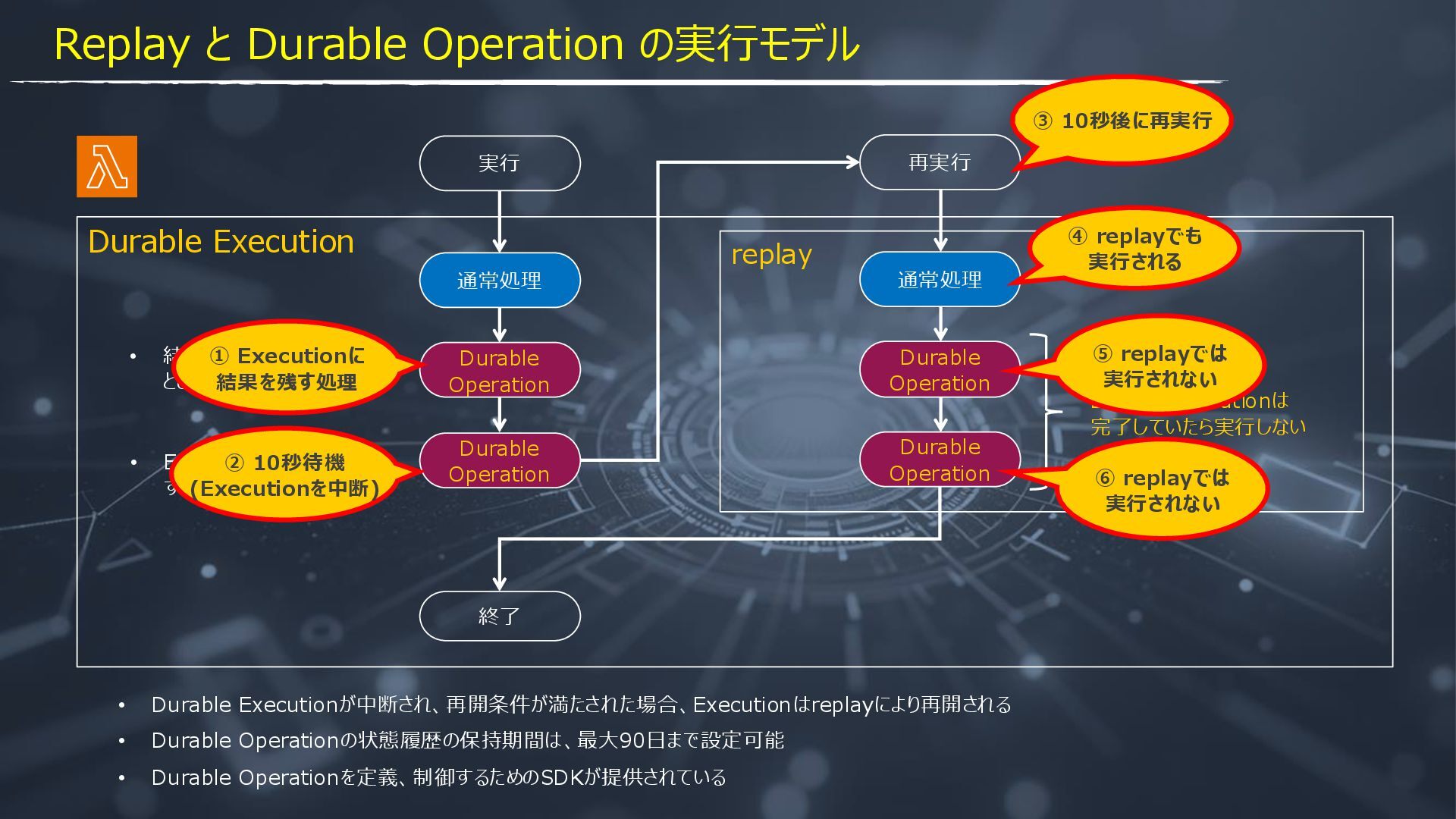
  3. Durable Execution replay Durable Operation Durable Operation 終了 • Durable

    Executionが中断され、再開条件が満たされた場合、Executionはreplayにより再開される • Durable Operationの状態履歴の保持期間は、最大90日まで設定可能 実行 通常処理 再実行 Durable Operation Durable Operation 通常処理 • Durable Operationを定義、制御するためのSDKが提供されている DurableOperationは 完了していたら実行しない Replay と Durable Operation の実行モデル • 結果がExecutionの履歴 として保持される処理 • Executionを中断・再開 する処理 ② 10秒待機 (Executionを中断) ③ 10秒後に再実行 ⑤ replayでは 実行されない ④ replayでも 実行される ⑥ replayでは 実行されない ① Executionに 結果を残す処理
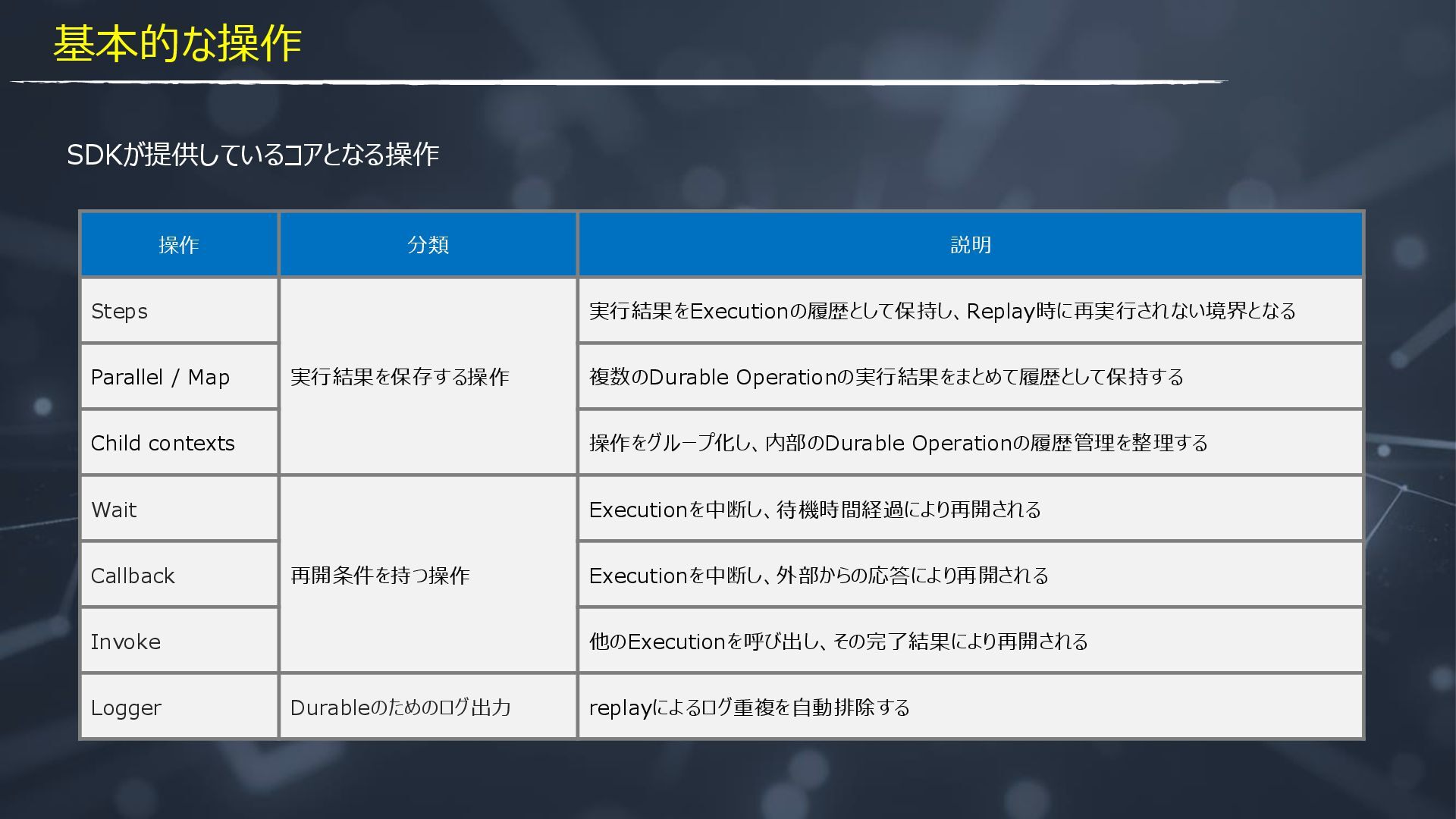
  4. SDKが提供しているコアとなる操作 操作 分類 説明 Steps 実行結果を保存する操作 実行結果をExecutionの履歴として保持し、Replay時に再実行されない境界となる Parallel / Map

    複数のDurable Operationの実行結果をまとめて履歴として保持する Child contexts 操作をグループ化し、内部のDurable Operationの履歴管理を整理する Wait 再開条件を持つ操作 Executionを中断し、待機時間経過により再開される Callback Executionを中断し、外部からの応答により再開される Invoke 他のExecutionを呼び出し、その完了結果により再開される Logger Durableのためのログ出力 replayによるログ重複を自動排除する 基本的な操作
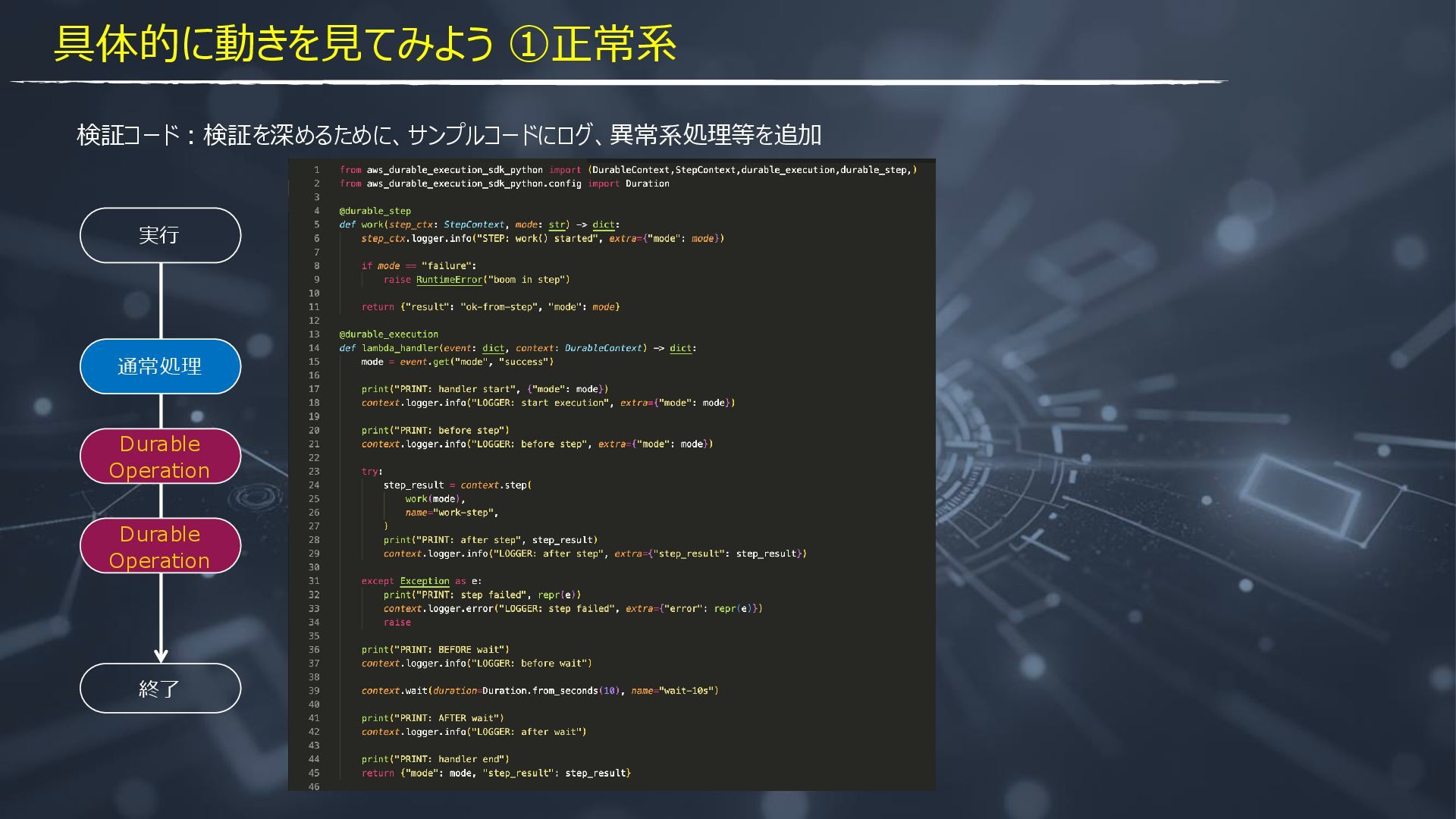
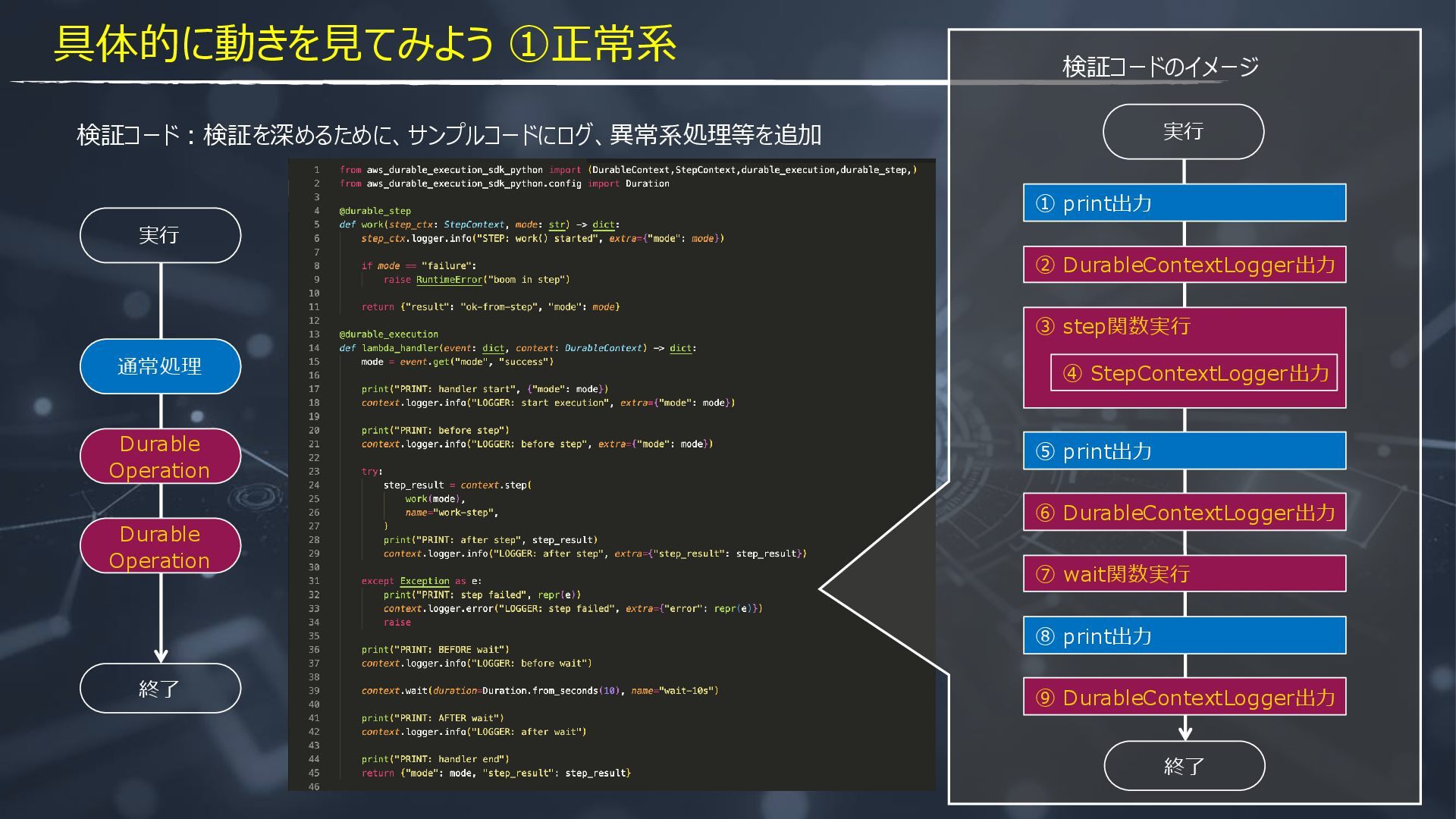
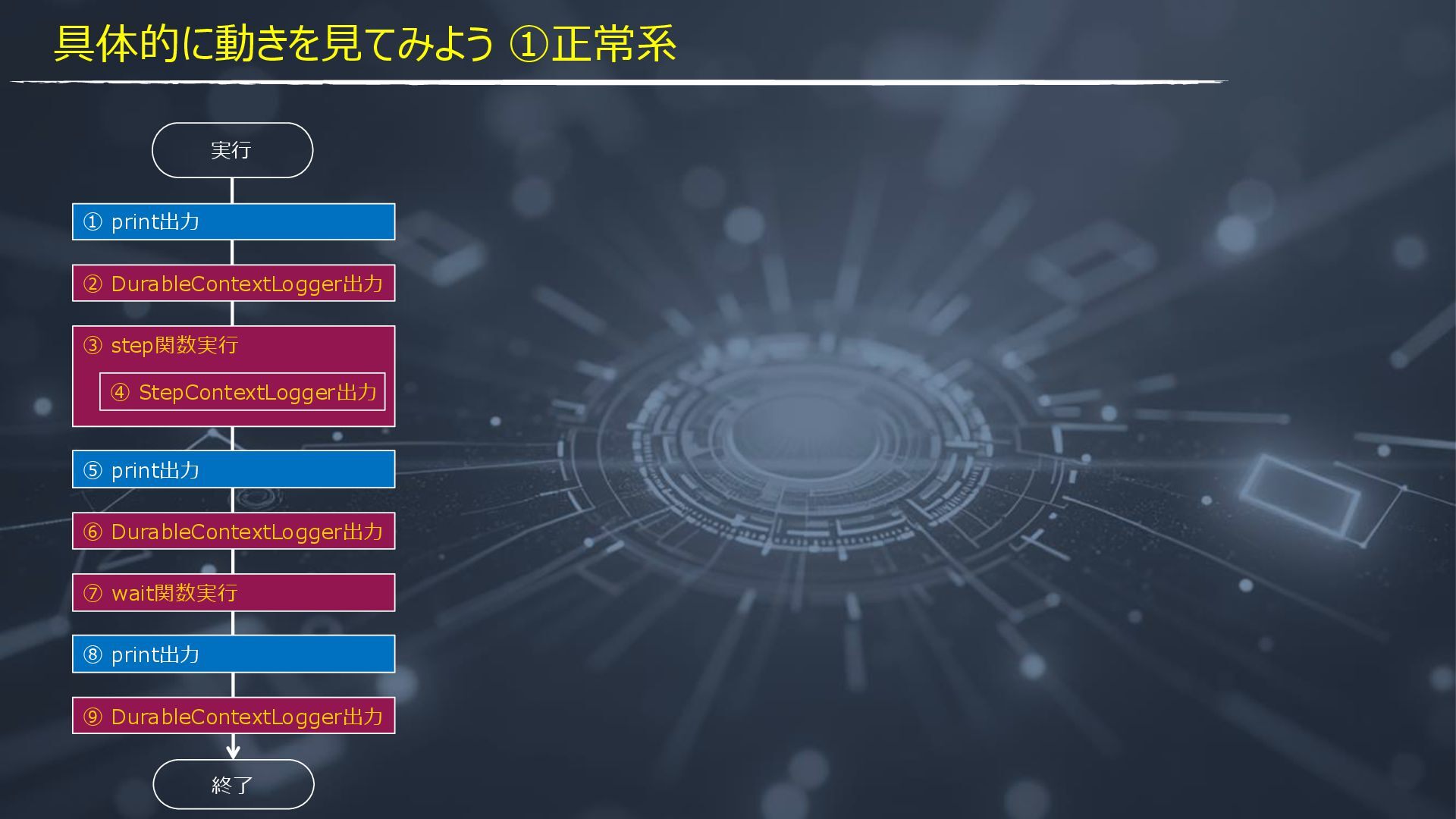
  5. 検証コード:検証を深めるために、サンプルコードにログ、異常系処理等を追加 終了 実行 Durable Operation Durable Operation 通常処理 ② DurableContextLogger出力

    ① print出力 ③ step関数実行 ⑦ wait関数実行 ④ StepContextLogger出力 ⑥ DurableContextLogger出力 ⑤ print出力 ⑨ DurableContextLogger出力 ⑧ print出力 終了 実行 検証コードのイメージ 具体的に動きを見てみよう ①正常系
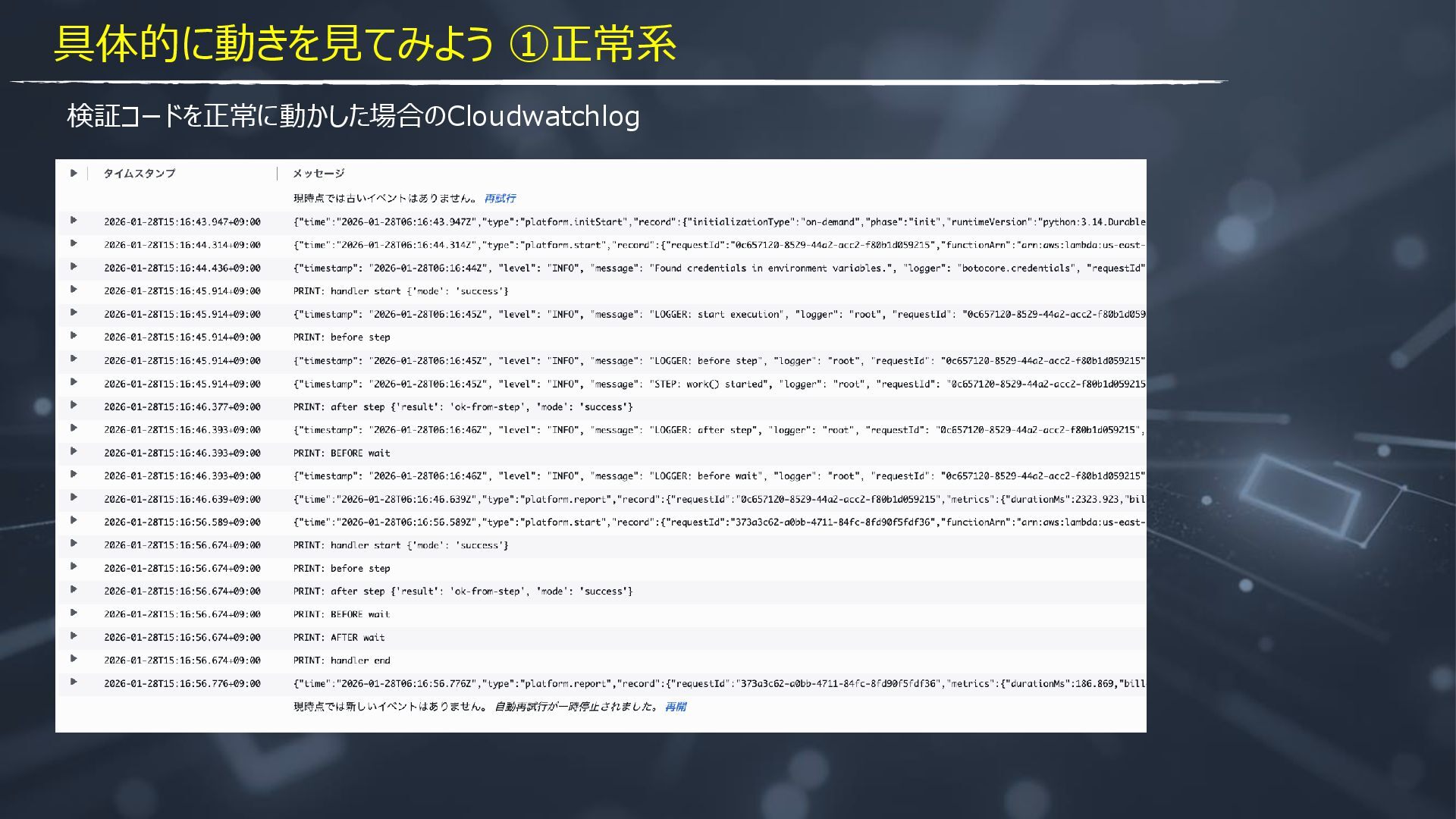
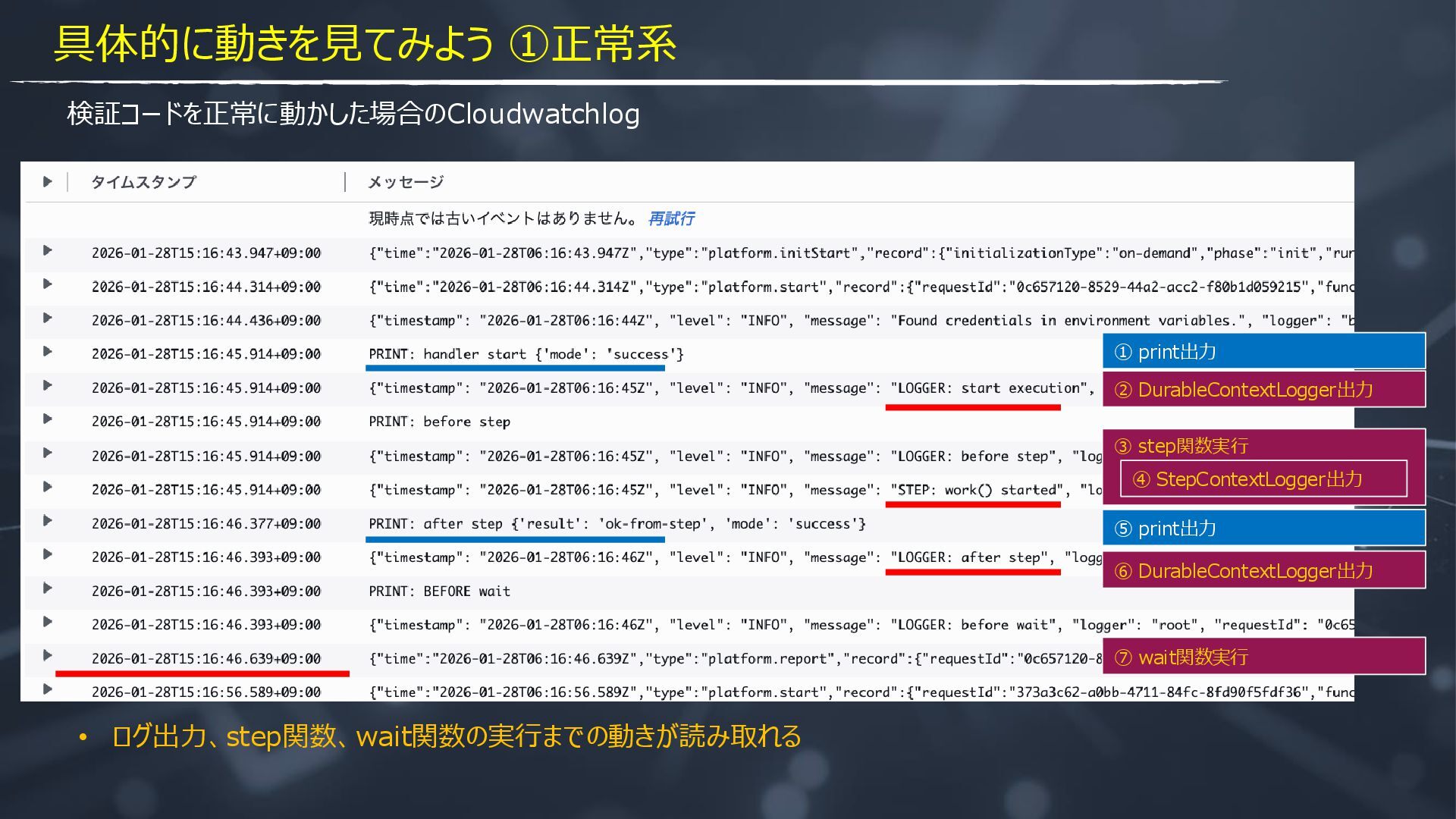
  6. 検証コードを正常に動かした場合のCloudwatchlog ② DurableContextLogger出力 ① print出力 ③ step関数実行 ⑦ wait関数実行 ④

    StepContextLogger出力 ⑥ DurableContextLogger出力 ⑤ print出力 • ログ出力、step関数、wait関数の実行までの動きが読み取れる 具体的に動きを見てみよう ①正常系
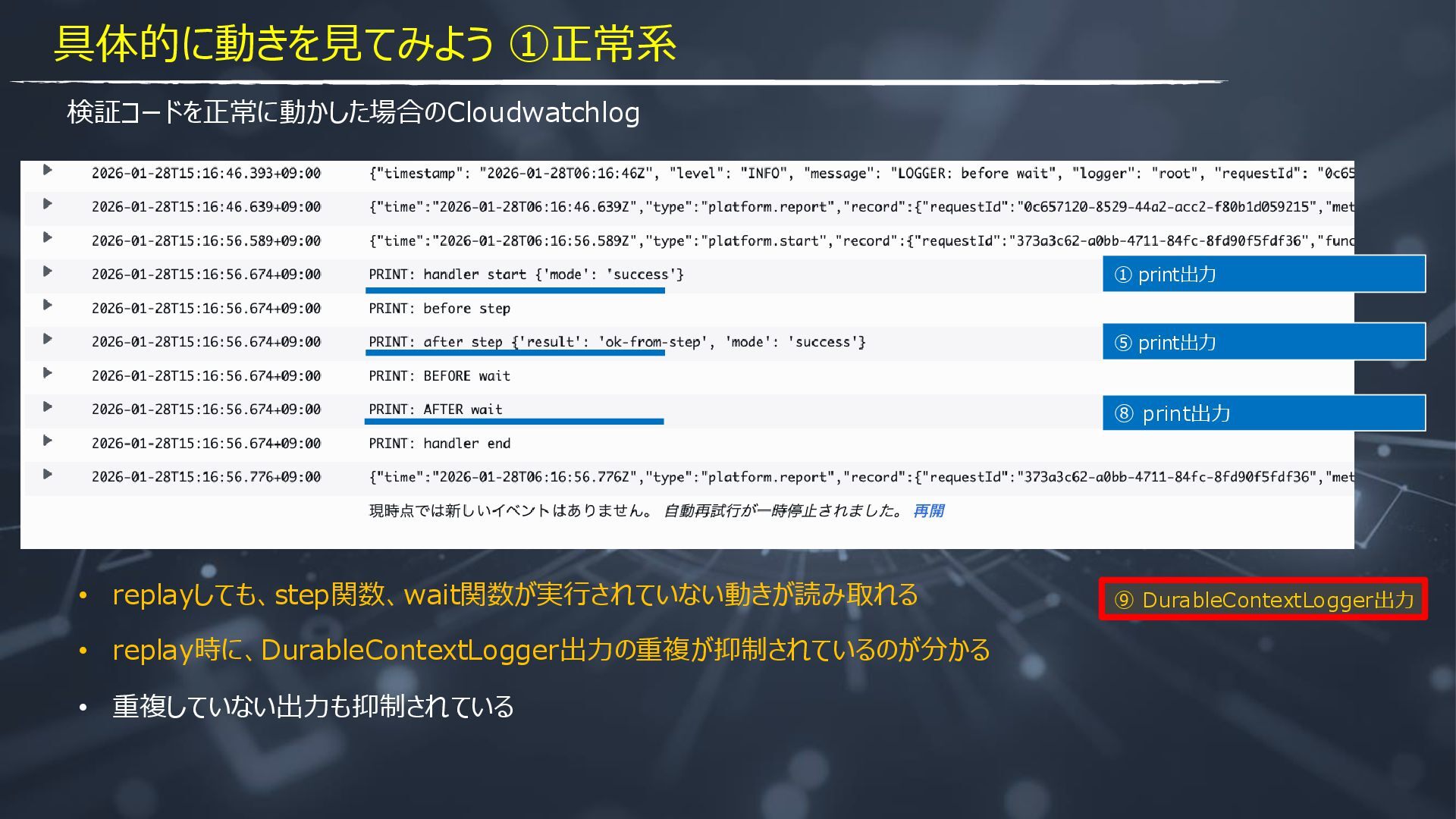
  7. 検証コードを正常に動かした場合のCloudwatchlog ① print出力 ⑤ print出力 ⑧ print出力 ⑨ DurableContextLogger出力 •

    replayしても、step関数、wait関数が実行されていない動きが読み取れる • replay時に、DurableContextLogger出力の重複が抑制されているのが分かる • 重複していない出力も抑制されている 具体的に動きを見てみよう ①正常系
  8. ② DurableContextLogger出力 ① print出力 ③ step関数実行 ⑦ wait関数実行 ④ StepContextLogger出力

    ⑥ DurableContextLogger出力 ⑤ print出力 ⑨ DurableContextLogger出力 ⑧ print出力 終了 実行 具体的に動きを見てみよう ①正常系
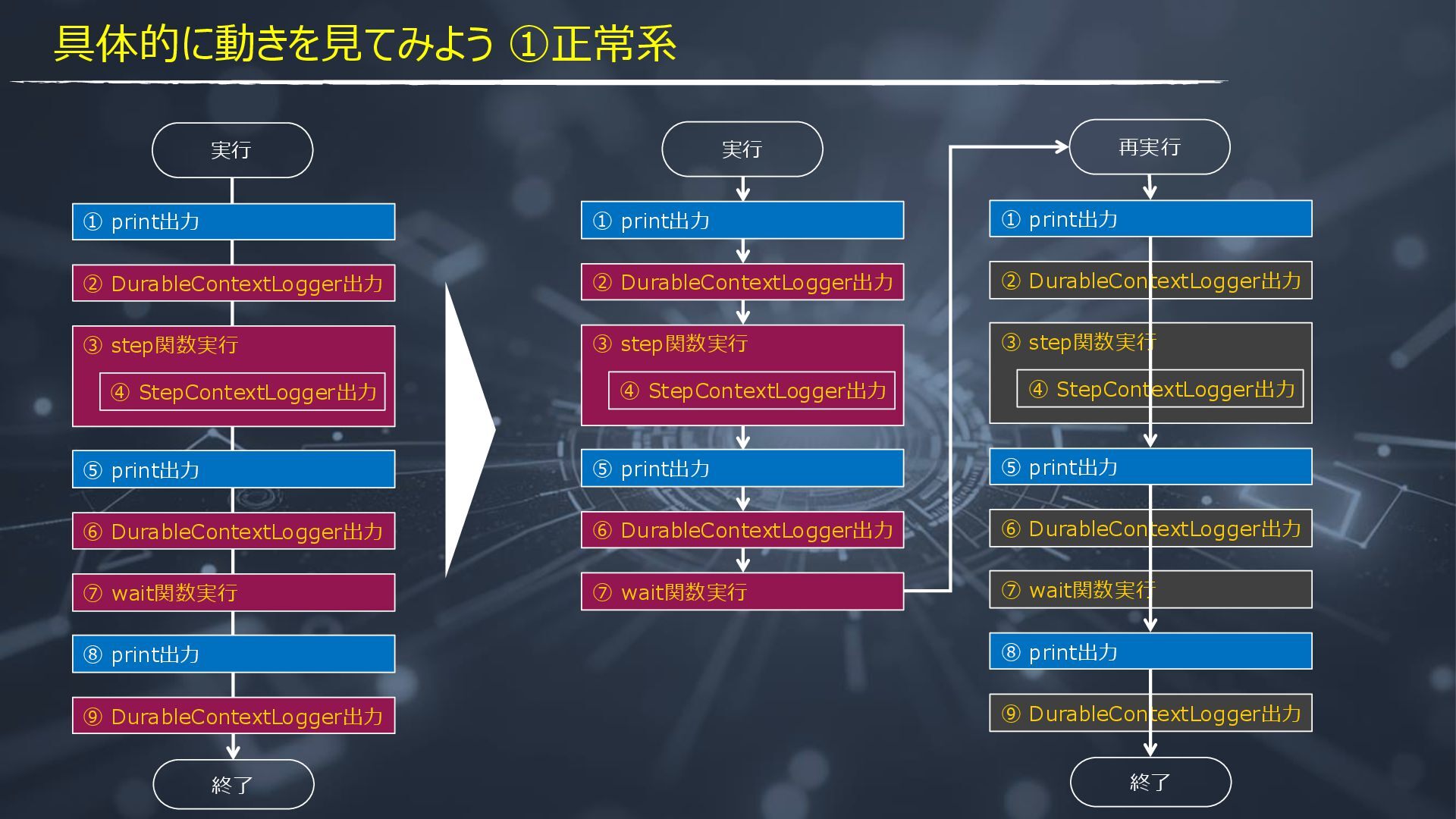
  9. ② DurableContextLogger出力 ① print出力 ③ step関数実行 ⑦ wait関数実行 ④ StepContextLogger出力

    ⑥ DurableContextLogger出力 ⑤ print出力 ⑨ DurableContextLogger出力 ⑧ print出力 終了 実行 ② DurableContextLogger出力 ① print出力 ③ step関数実行 ⑦ wait関数実行 ④ StepContextLogger出力 ⑥ DurableContextLogger出力 ⑤ print出力 実行 ② DurableContextLogger出力 ① print出力 ③ step関数実行 ⑦ wait関数実行 ④ StepContextLogger出力 ⑥ DurableContextLogger出力 ⑤ print出力 ⑨ DurableContextLogger出力 ⑧ print出力 終了 再実行 具体的に動きを見てみよう ①正常系
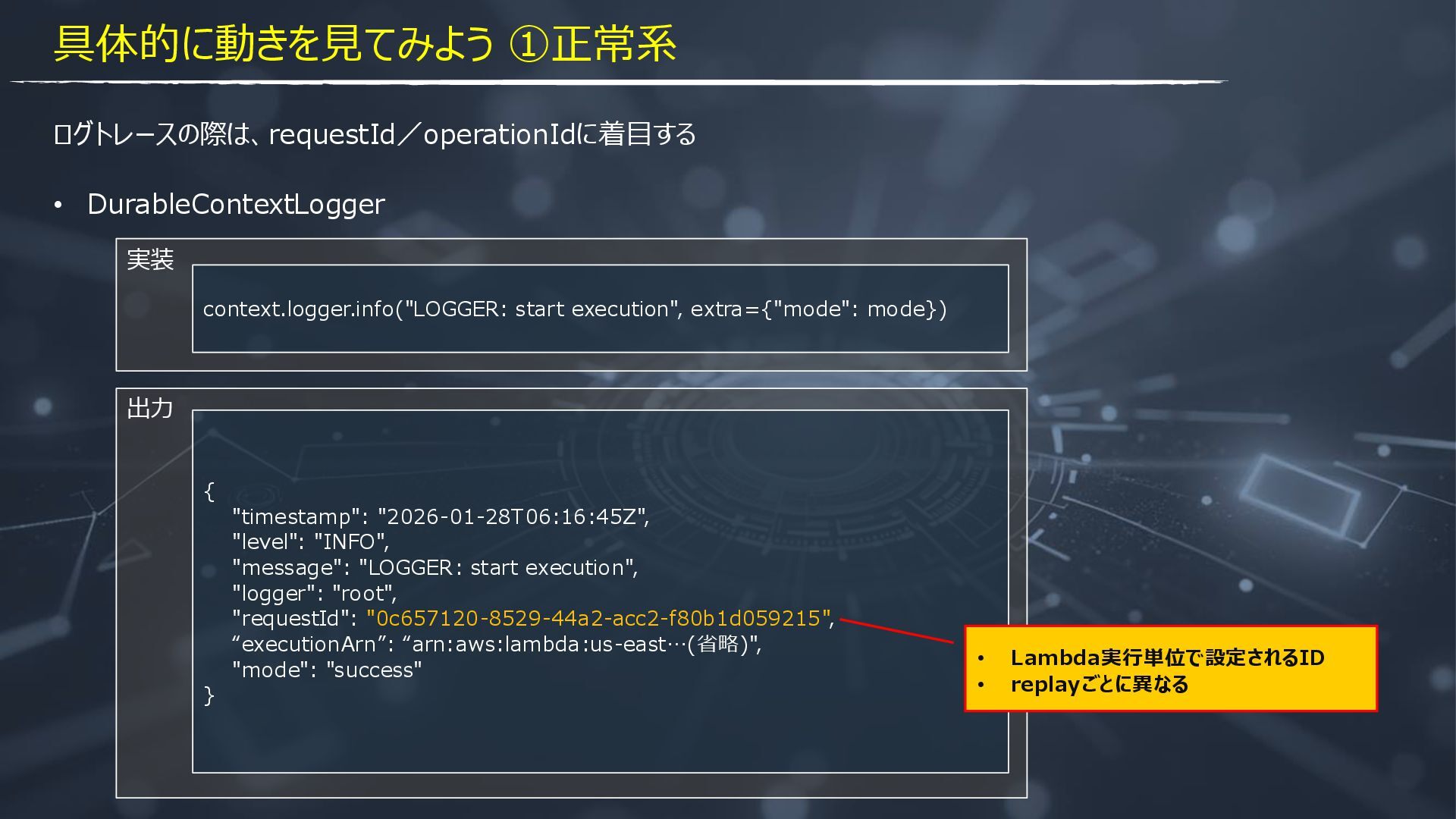
  10. 出力 実装 { "timestamp": "2026-01-28T06:16:45Z", "level": "INFO", "message": "LOGGER: start

    execution", "logger": "root", "requestId": "0c657120-8529-44a2-acc2-f80b1d059215", “executionArn”: “arn:aws:lambda:us-east…(省略)", "mode": "success" } context.logger.info("LOGGER: start execution", extra={"mode": mode}) • Lambda実行単位で設定されるID • replayごとに異なる 具体的に動きを見てみよう ①正常系 ログトレースの際は、requestId/operationIdに着目する • DurableContextLogger
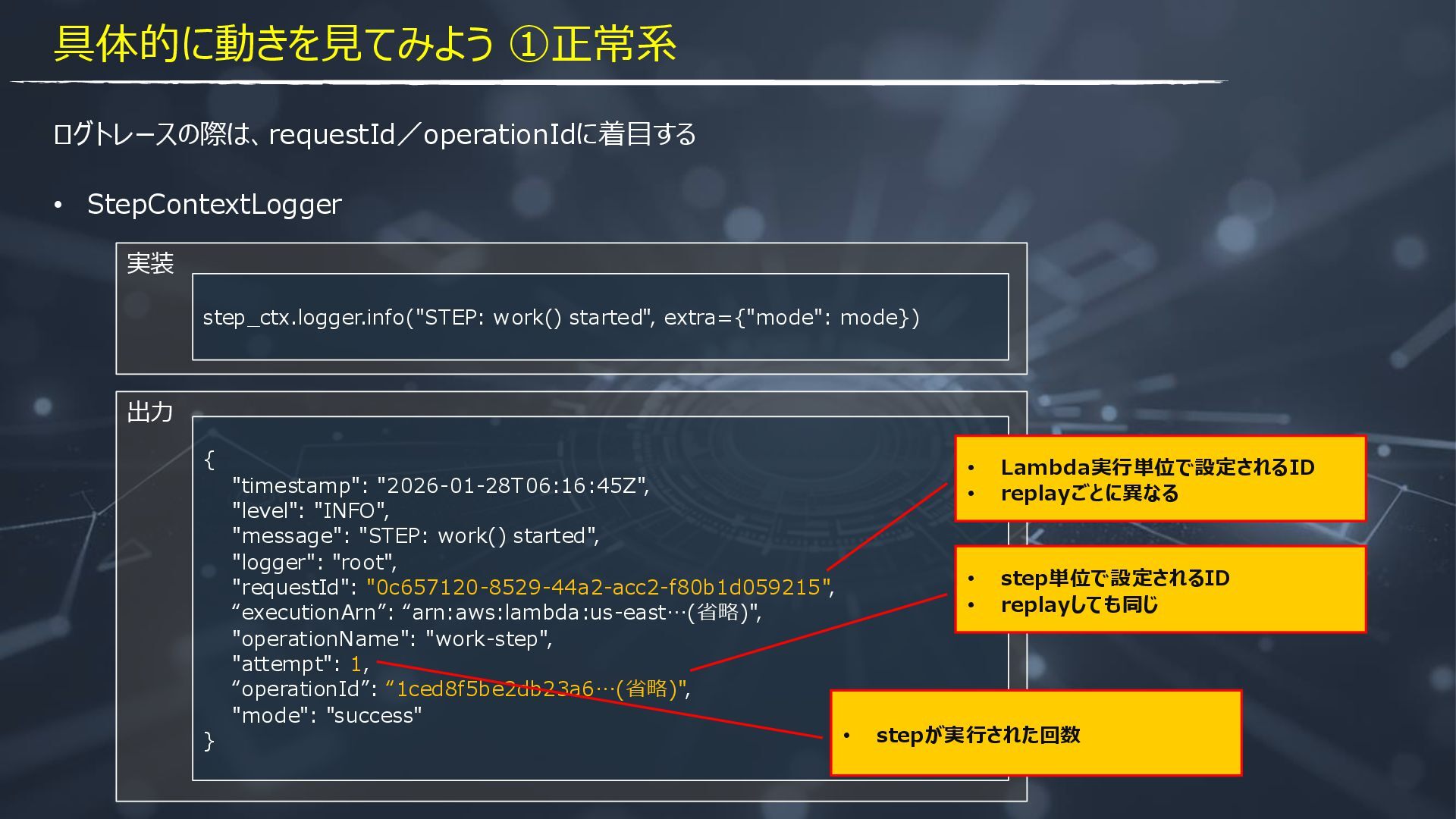
  11. 出力 実装 ログトレースの際は、requestId/operationIdに着目する { "timestamp": "2026-01-28T06:16:45Z", "level": "INFO", "message": "STEP:

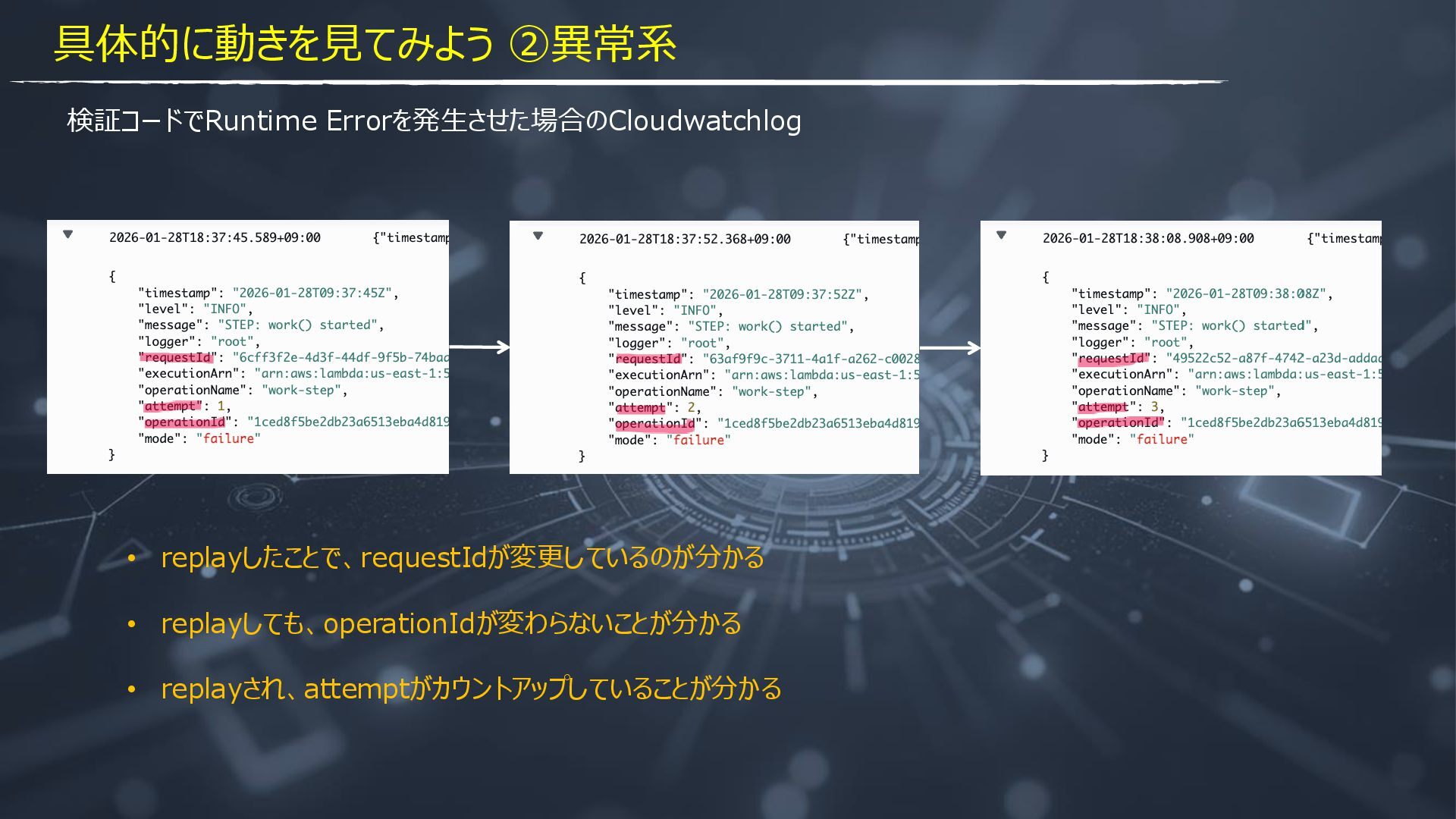
    work() started", "logger": "root", "requestId": "0c657120-8529-44a2-acc2-f80b1d059215", “executionArn”: “arn:aws:lambda:us-east…(省略)", "operationName": "work-step", "attempt": 1, “operationId”: “1ced8f5be2db23a6…(省略)", "mode": "success" } step_ctx.logger.info("STEP: work() started", extra={"mode": mode}) • StepContextLogger • Lambda実行単位で設定されるID • replayごとに異なる • step単位で設定されるID • replayしても同じ • stepが実行された回数 具体的に動きを見てみよう ①正常系
  12. ② DurableContextLogger出力 ① print出力 ③ step関数実行 ⑦ wait関数実行 ④ StepContextLogger出力

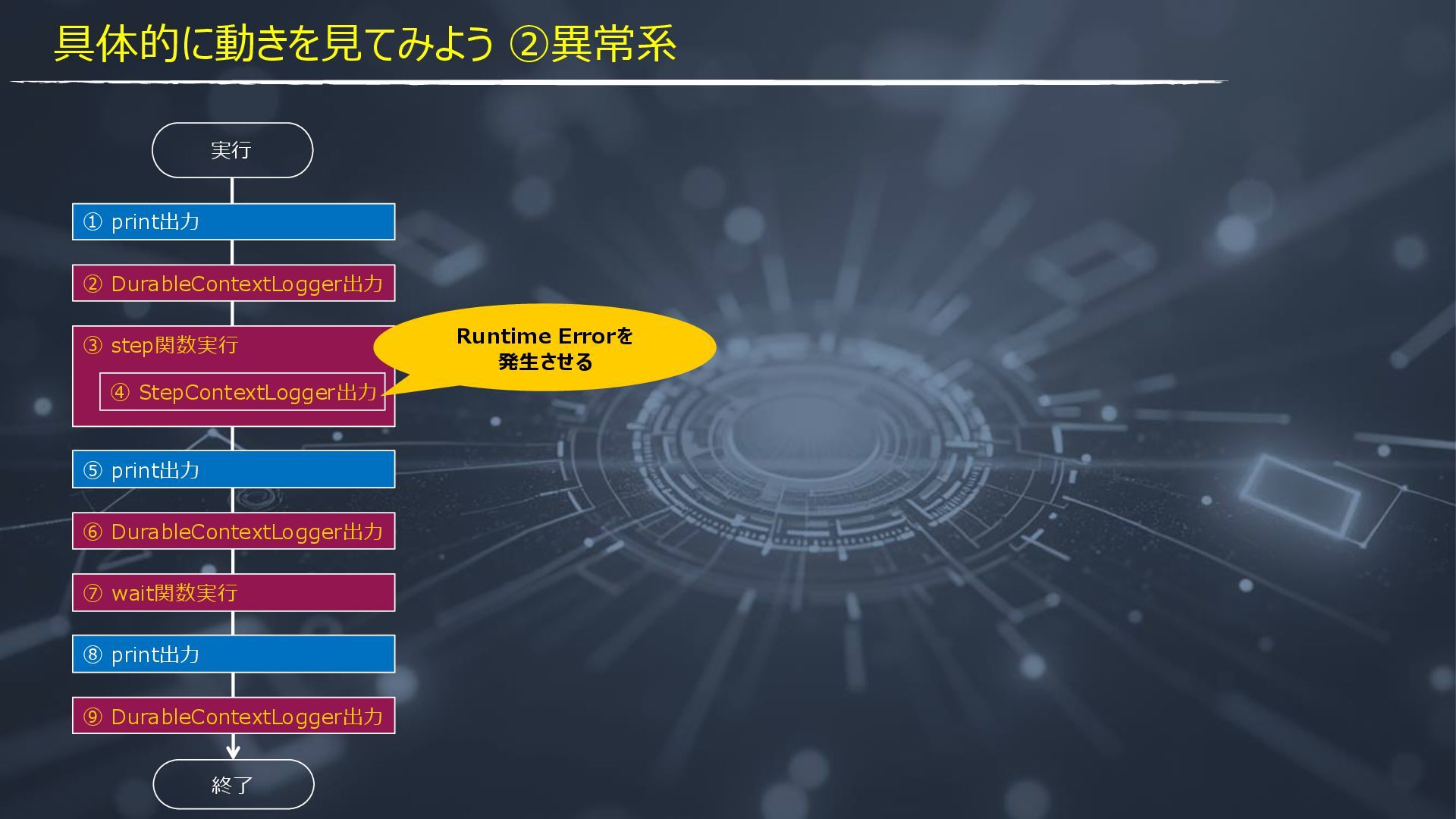
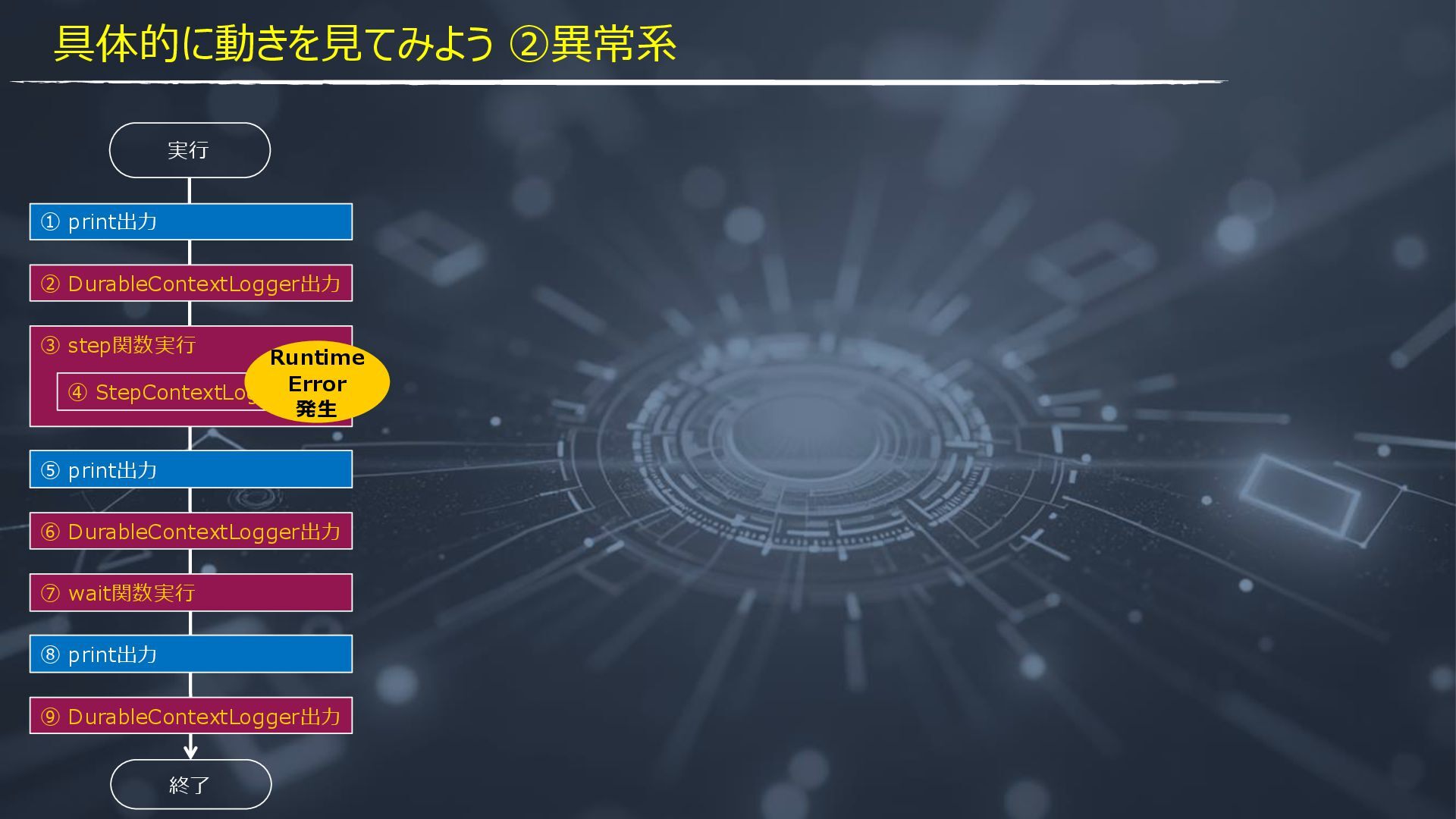
    ⑥ DurableContextLogger出力 ⑤ print出力 ⑨ DurableContextLogger出力 ⑧ print出力 終了 実行 Runtime Errorを 発生させる 具体的に動きを見てみよう ②異常系
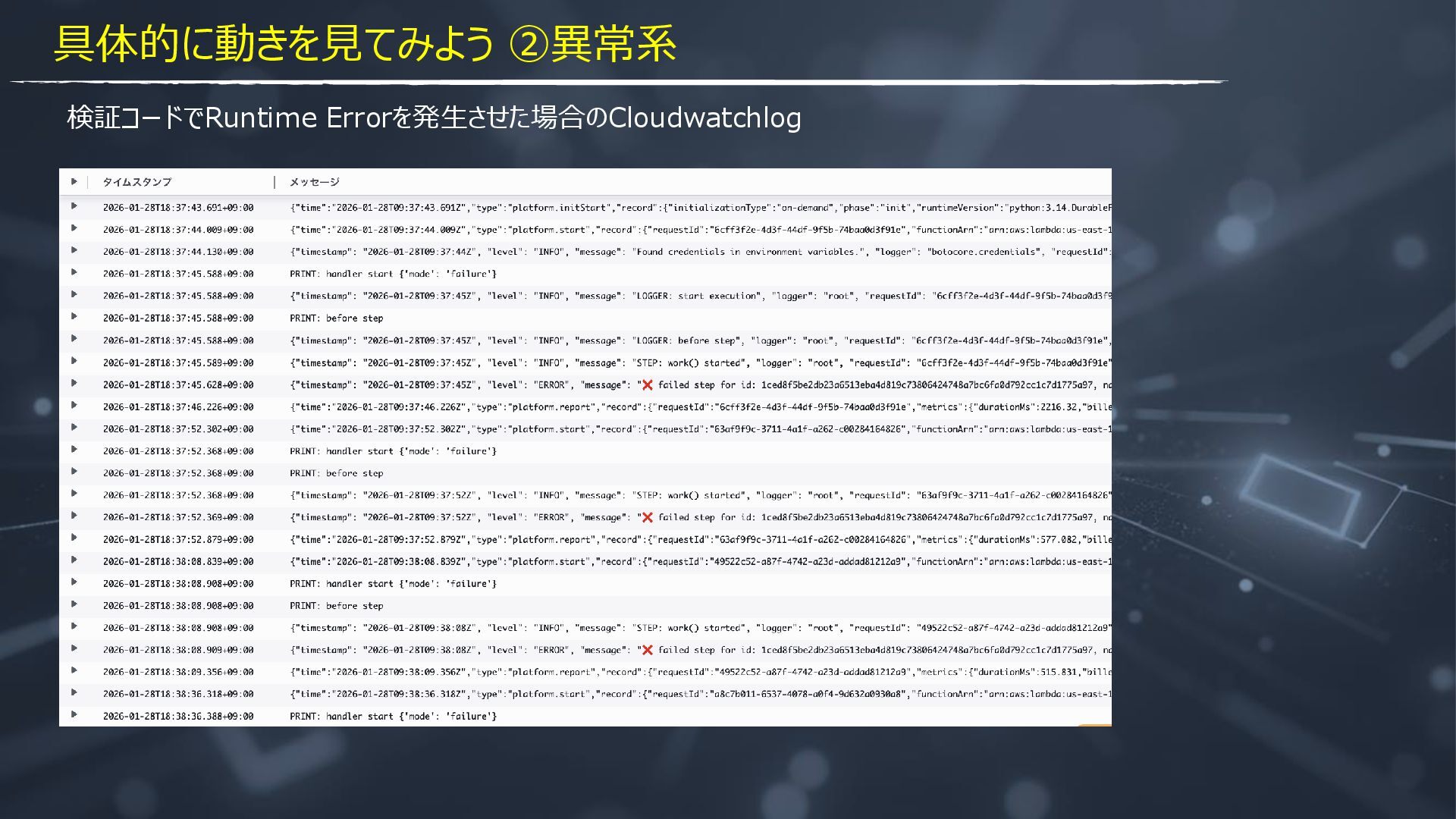
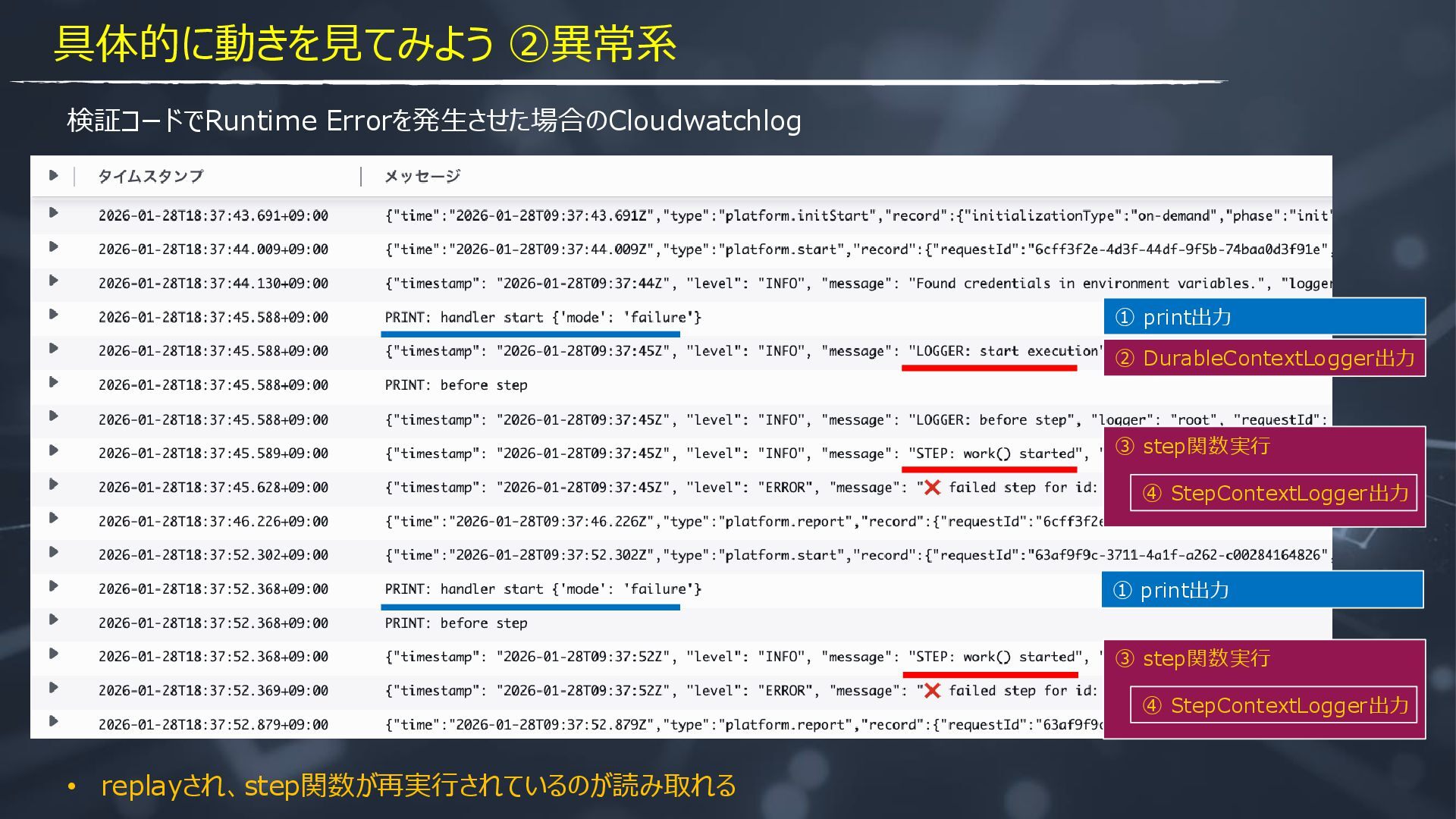
  13. 検証コードでRuntime Errorを発生させた場合のCloudwatchlog ② DurableContextLogger出力 ① print出力 ③ step関数実行 ④ StepContextLogger出力

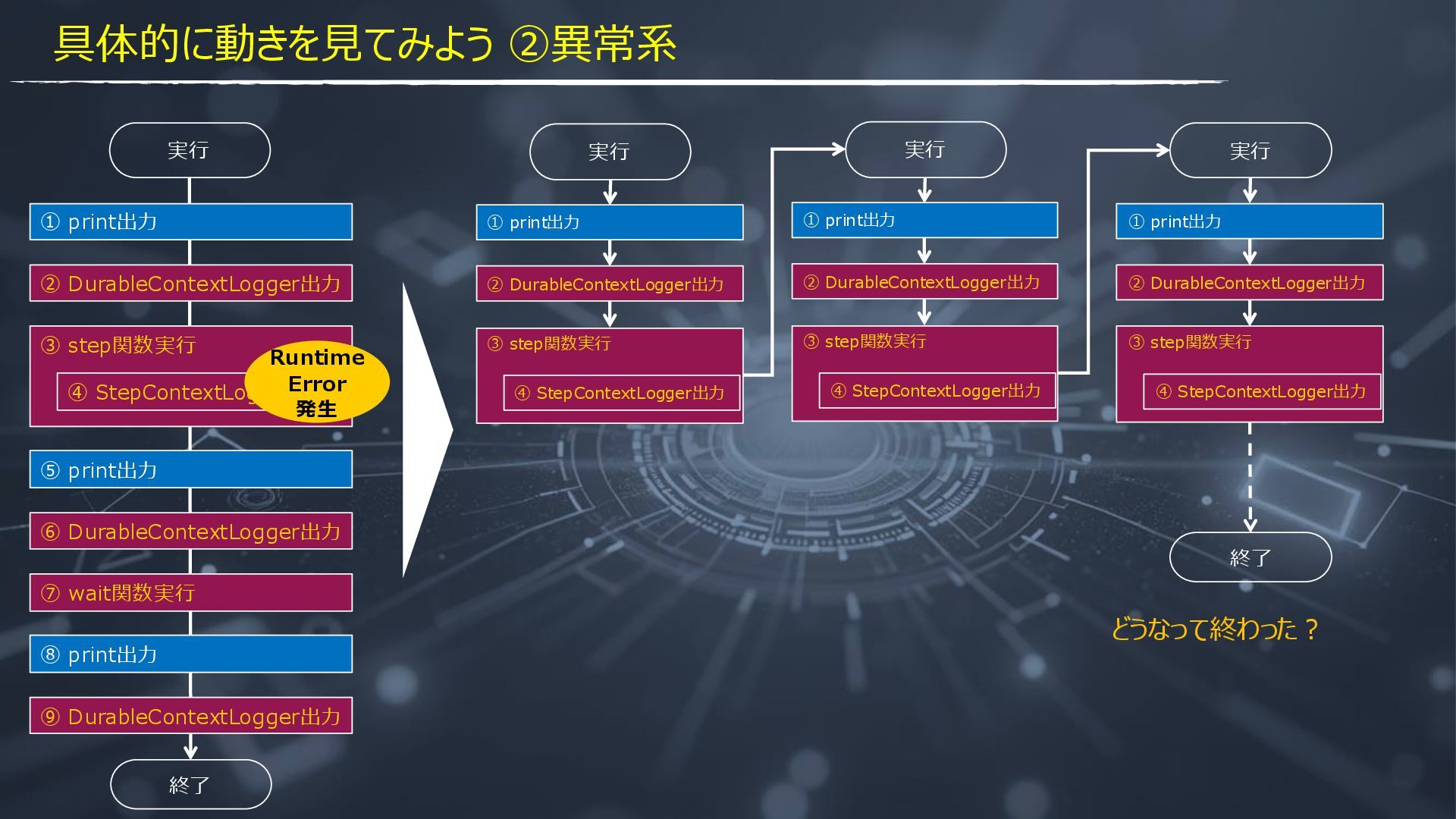
    ③ step関数実行 ④ StepContextLogger出力 ① print出力 具体的に動きを見てみよう ②異常系 • replayされ、step関数が再実行されているのが読み取れる
  14. ② DurableContextLogger出力 ① print出力 ③ step関数実行 ⑦ wait関数実行 ④ StepContextLogger出力

    ⑥ DurableContextLogger出力 ⑤ print出力 ⑨ DurableContextLogger出力 ⑧ print出力 終了 実行 具体的に動きを見てみよう ②異常系 Runtime Error 発生
  15. ② DurableContextLogger出力 ① print出力 ③ step関数実行 ⑦ wait関数実行 ④ StepContextLogger出力

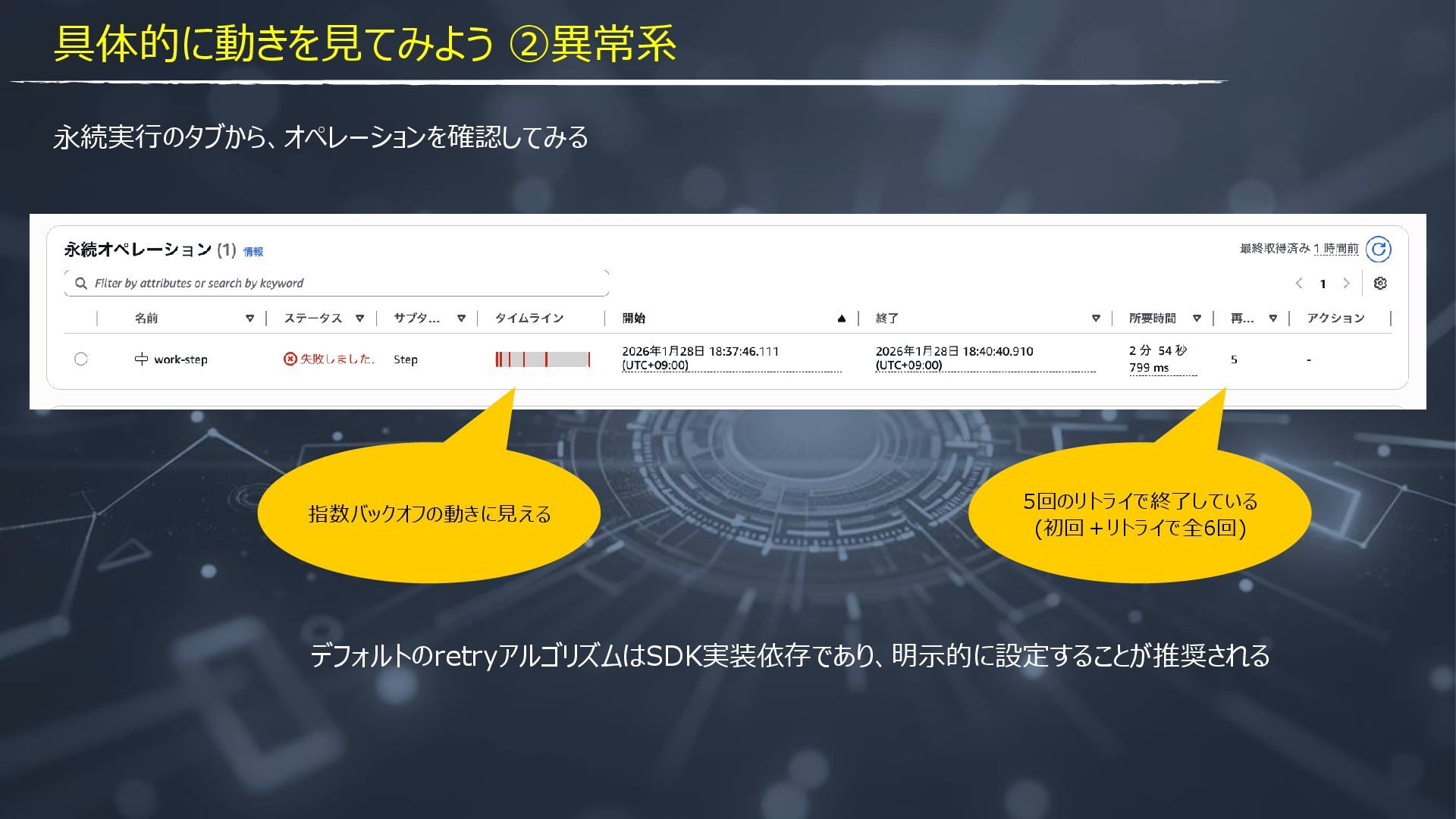
    ⑥ DurableContextLogger出力 ⑤ print出力 ⑨ DurableContextLogger出力 ⑧ print出力 終了 実行 ② DurableContextLogger出力 ① print出力 ③ step関数実行 ④ StepContextLogger出力 実行 終了 具体的に動きを見てみよう ②異常系 Runtime Error 発生 ② DurableContextLogger出力 ① print出力 ③ step関数実行 ④ StepContextLogger出力 実行 ② DurableContextLogger出力 ① print出力 ③ step関数実行 ④ StepContextLogger出力 実行 どうなって終わった?
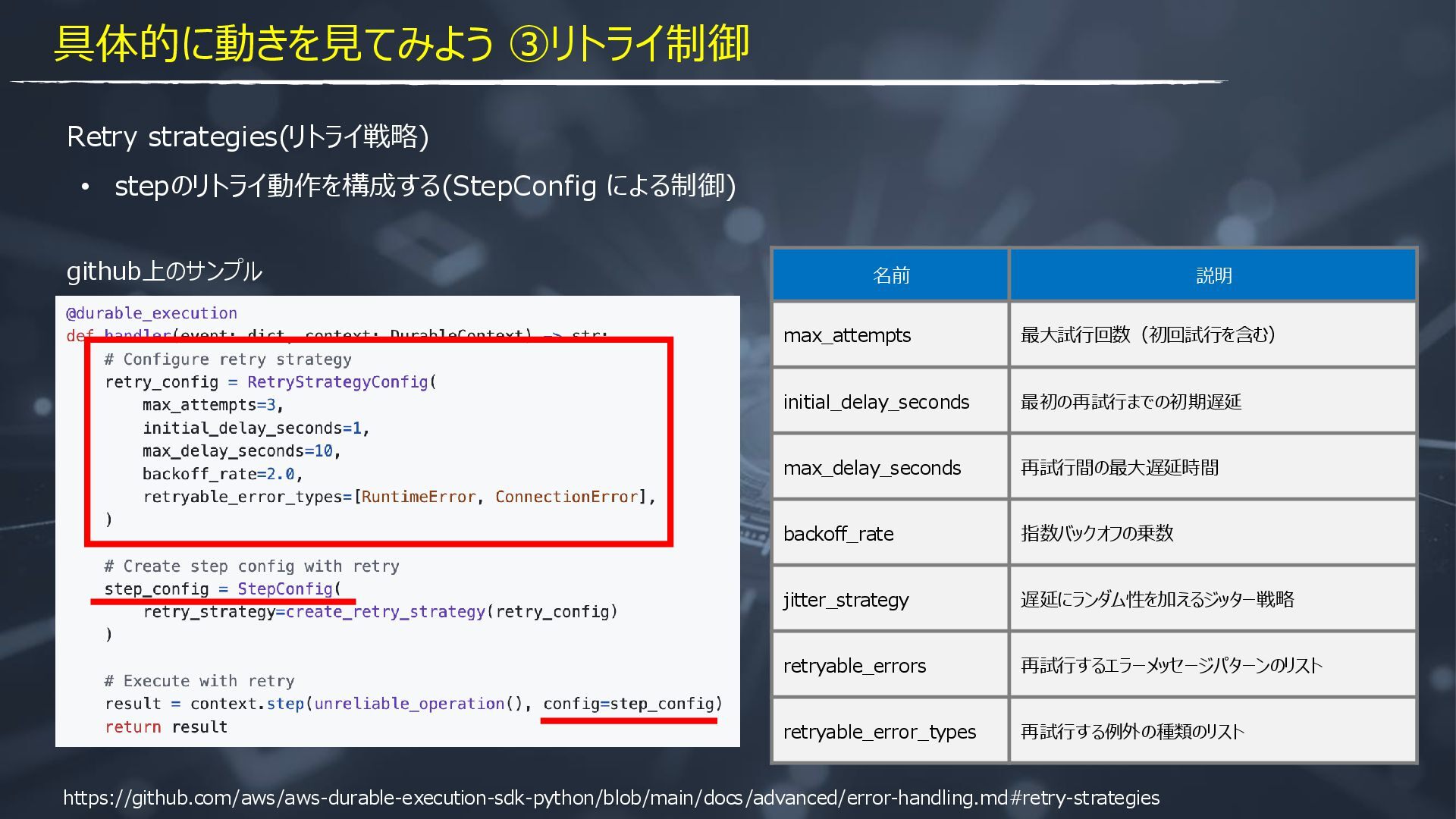
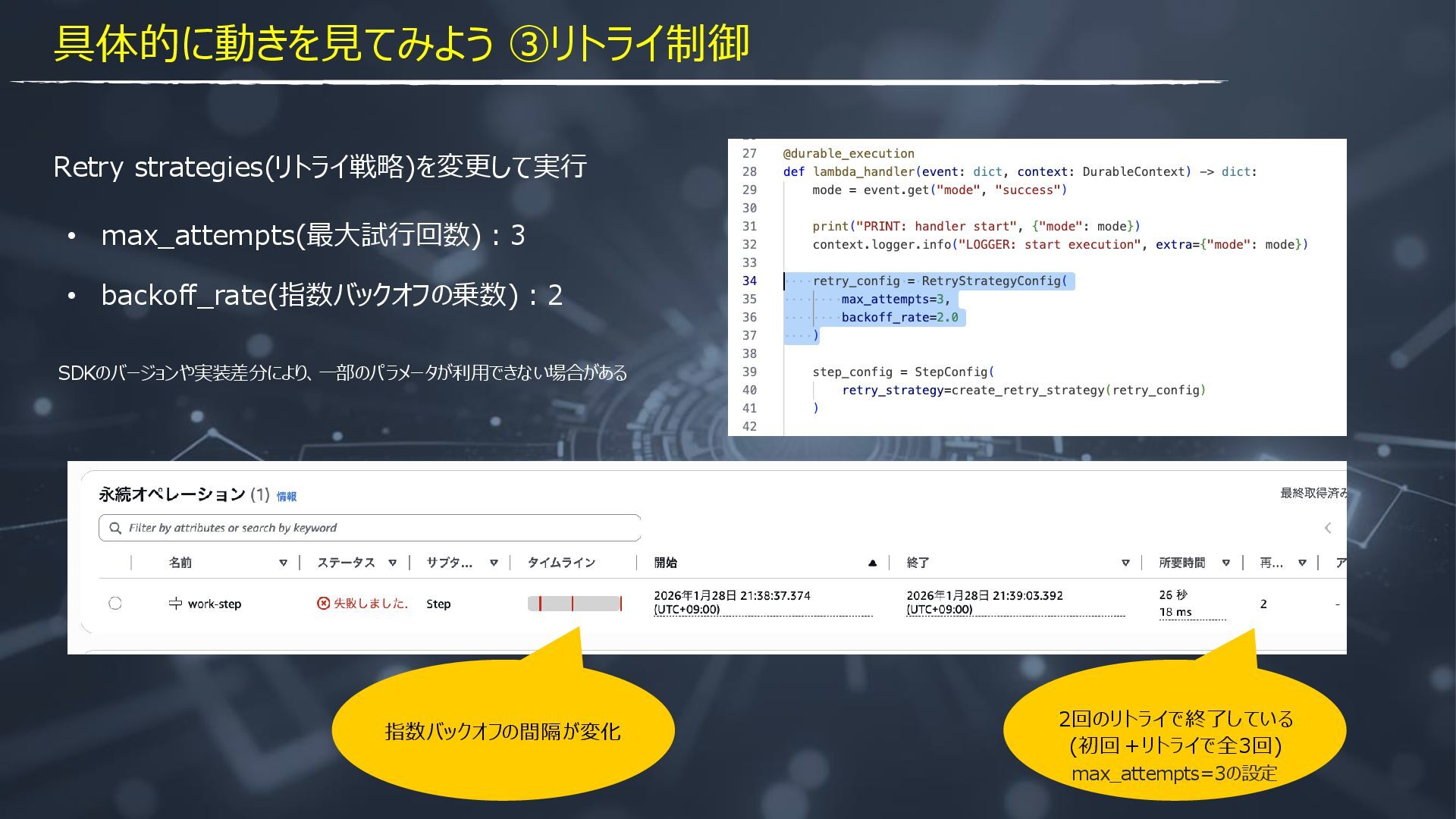
  16. 具体的に動きを見てみよう ③リトライ制御 Retry strategies(リトライ戦略) • stepのリトライ動作を構成する(StepConfig による制御) https://github.com/aws/aws-durable-execution-sdk-python/blob/main/docs/advanced/error-handling.md#retry-strategies github上のサンプル 名前

    説明 max_attempts 最大試行回数(初回試行を含む) initial_delay_seconds 最初の再試行までの初期遅延 max_delay_seconds 再試行間の最大遅延時間 backoff_rate 指数バックオフの乗数 jitter_strategy 遅延にランダム性を加えるジッター戦略 retryable_errors 再試行するエラーメッセージパターンのリスト retryable_error_types 再試行する例外の種類のリスト
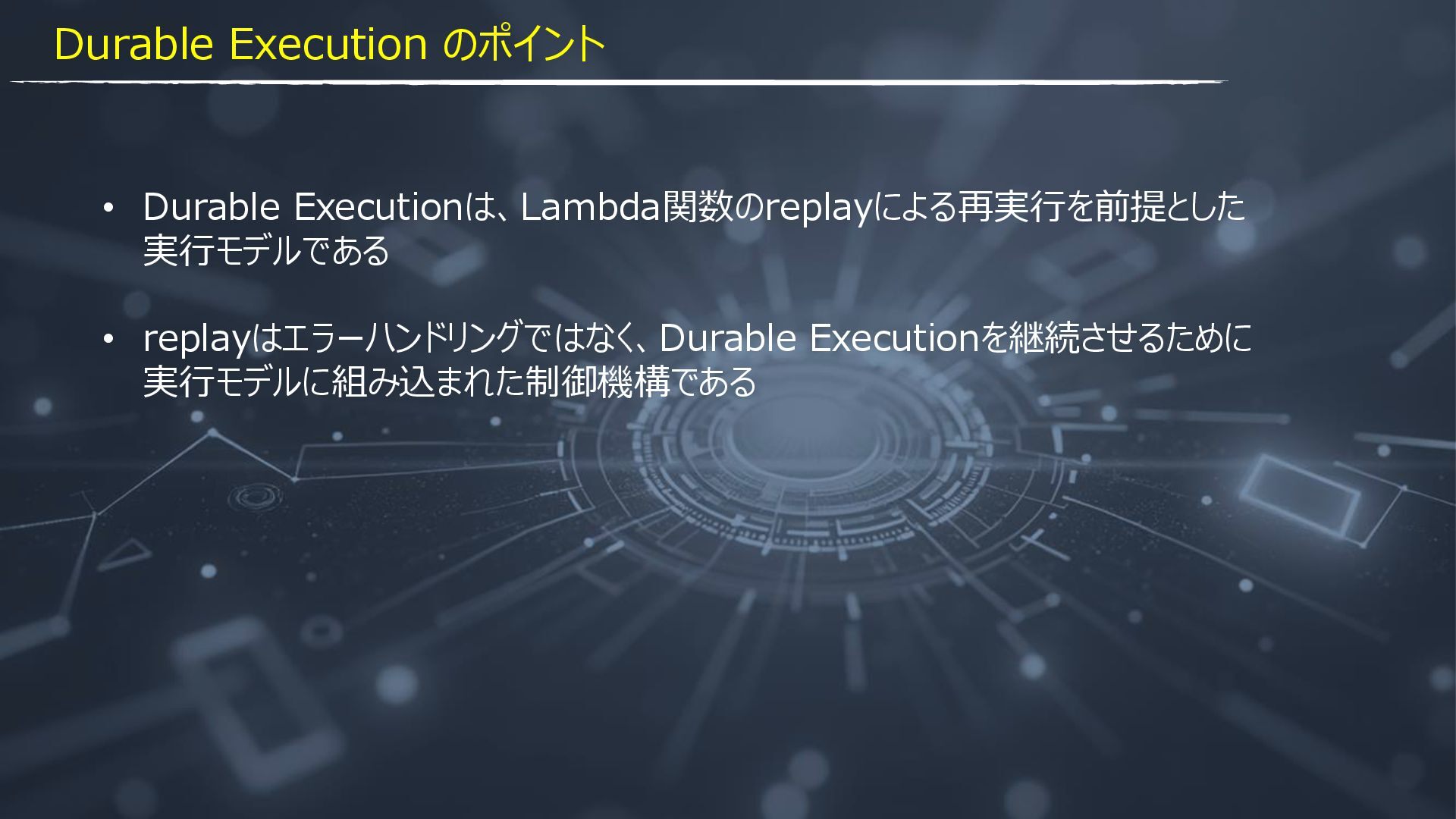
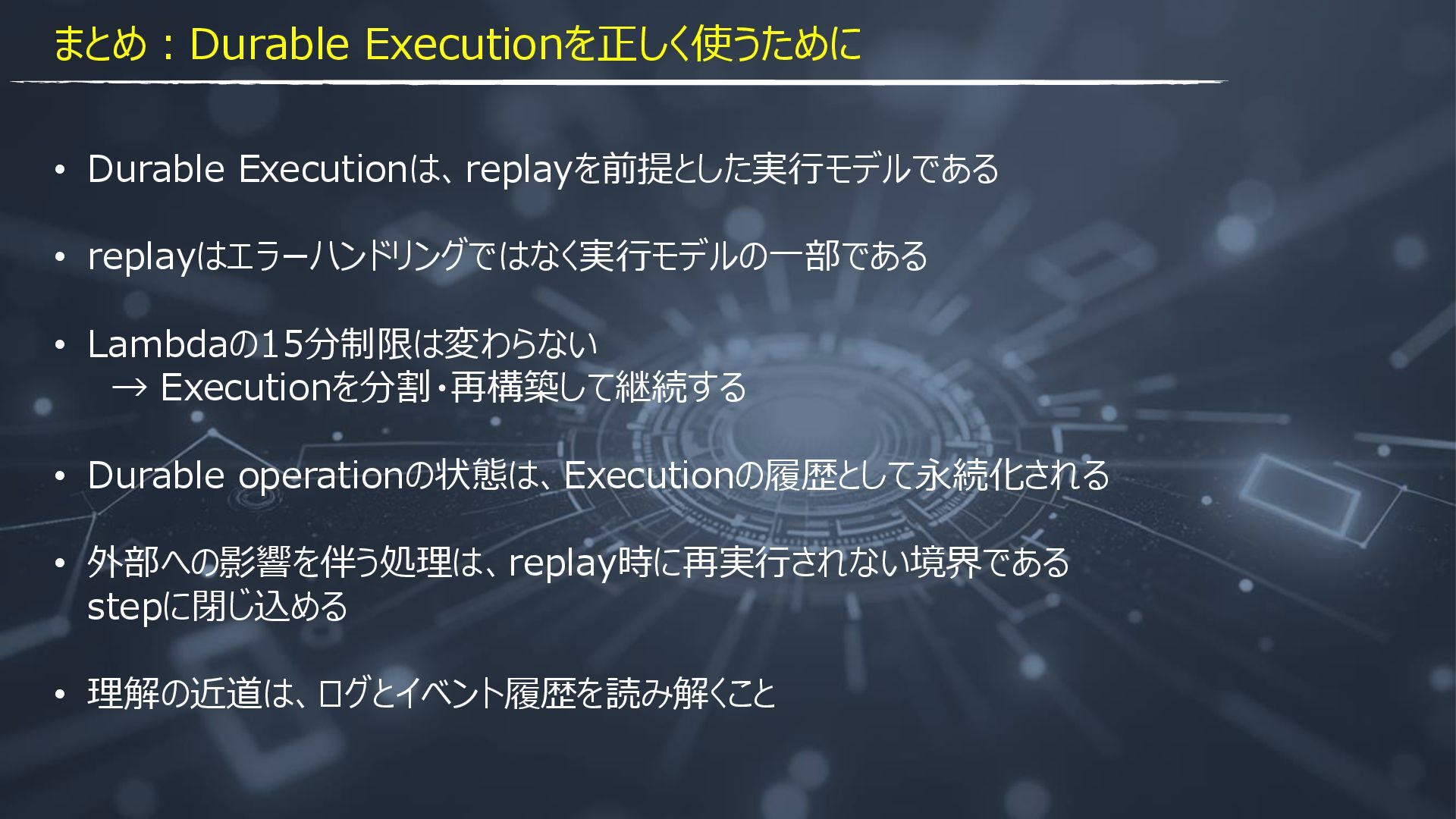
  17. まとめ:Durable Executionを正しく使うために • Durable Executionは、replayを前提とした実行モデルである • replayはエラーハンドリングではなく実行モデルの一部である • Lambdaの15分制限は変わらない →

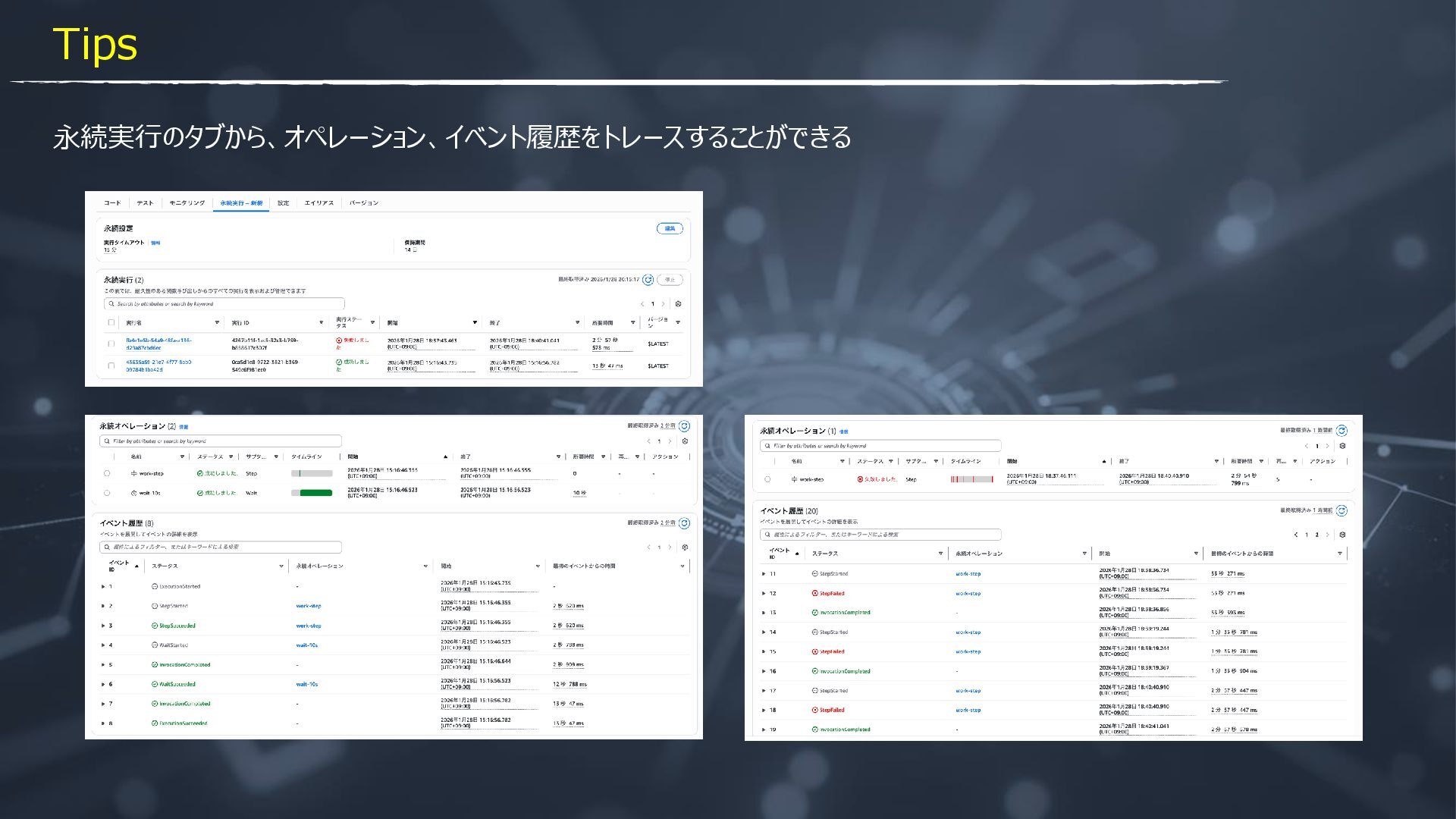
    Executionを分割・再構築して継続する • Durable operationの状態は、Executionの履歴として永続化される • 外部への影響を伴う処理は、replay時に再実行されない境界である stepに閉じ込める • 理解の近道は、ログとイベント履歴を読み解くこと