Upgrade to Pro — share decks privately, control downloads, hide ads and more …

Your Spider Broke Again: Maintaining 100+ Ruby ...

Avatar for Lilith Lilith
September 09, 2026

Your Spider Broke Again: Maintaining 100+ Ruby Scrapers in Production

Maintaining 100+ Ruby scrapers for financial websites — the hardest part isn't writing the spider, it's knowing which one broke today.

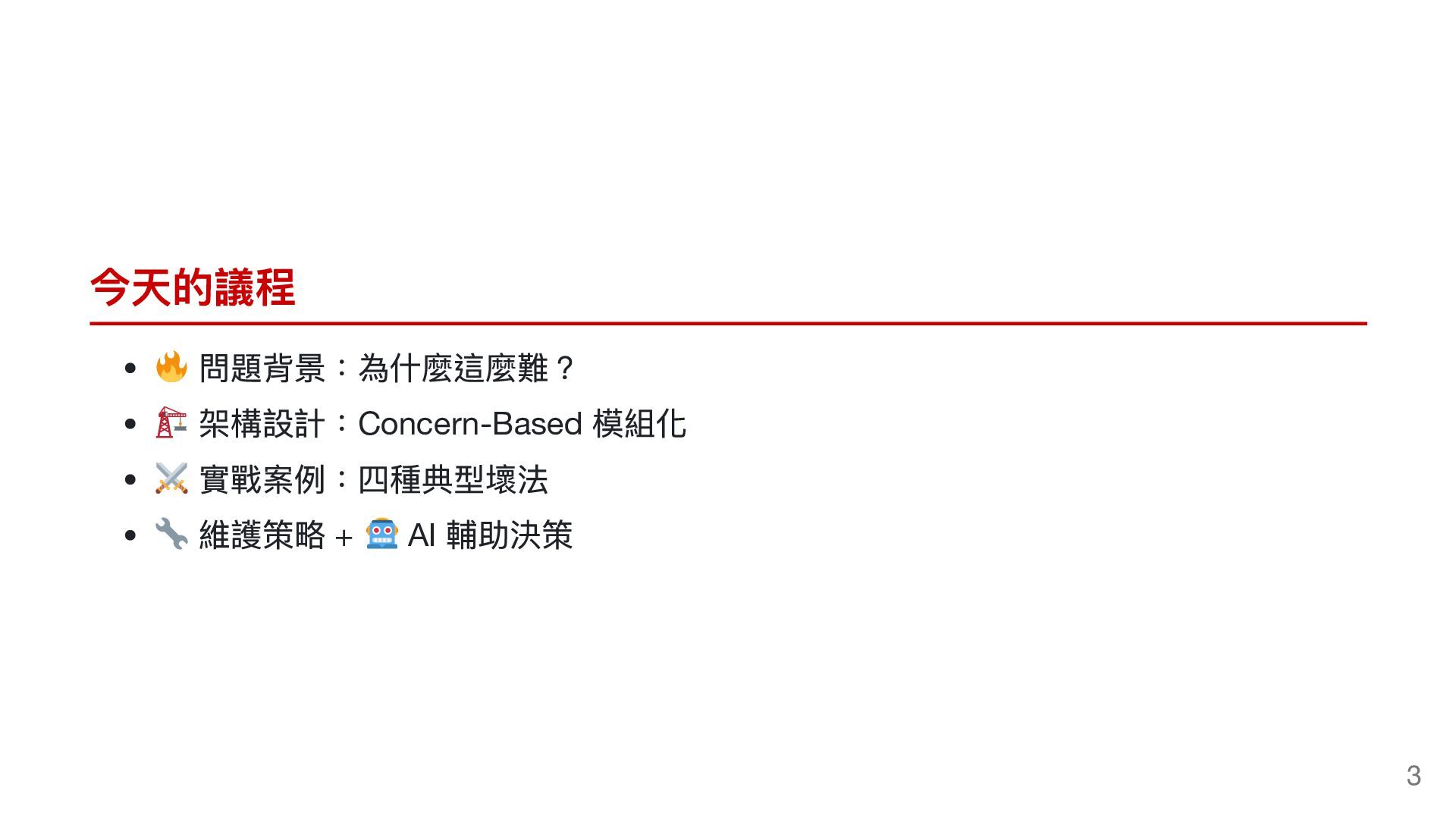
This talk covers real-world lessons from running 101 spiders in production: Concern-based modular architecture, four classic failure patterns (anti-scraping, virtual scrolling, dynamic PDF generation, SPA migration), monitoring with Bugsnag, and using AI to decide whether to fix or delete a broken spider.

Avatar for Lilith

Lilith

September 09, 2026

Other Decks in Programming

Transcript

  1. 網站改版了,然後你的 Spider 就壞了 Ruby 爬蟲維護的現實 Your Spider Broke Again The

    Reality of Maintaining 100+ Financial Website Scrapers in Ruby | Lilith 5xRuby |COSCUP 2026
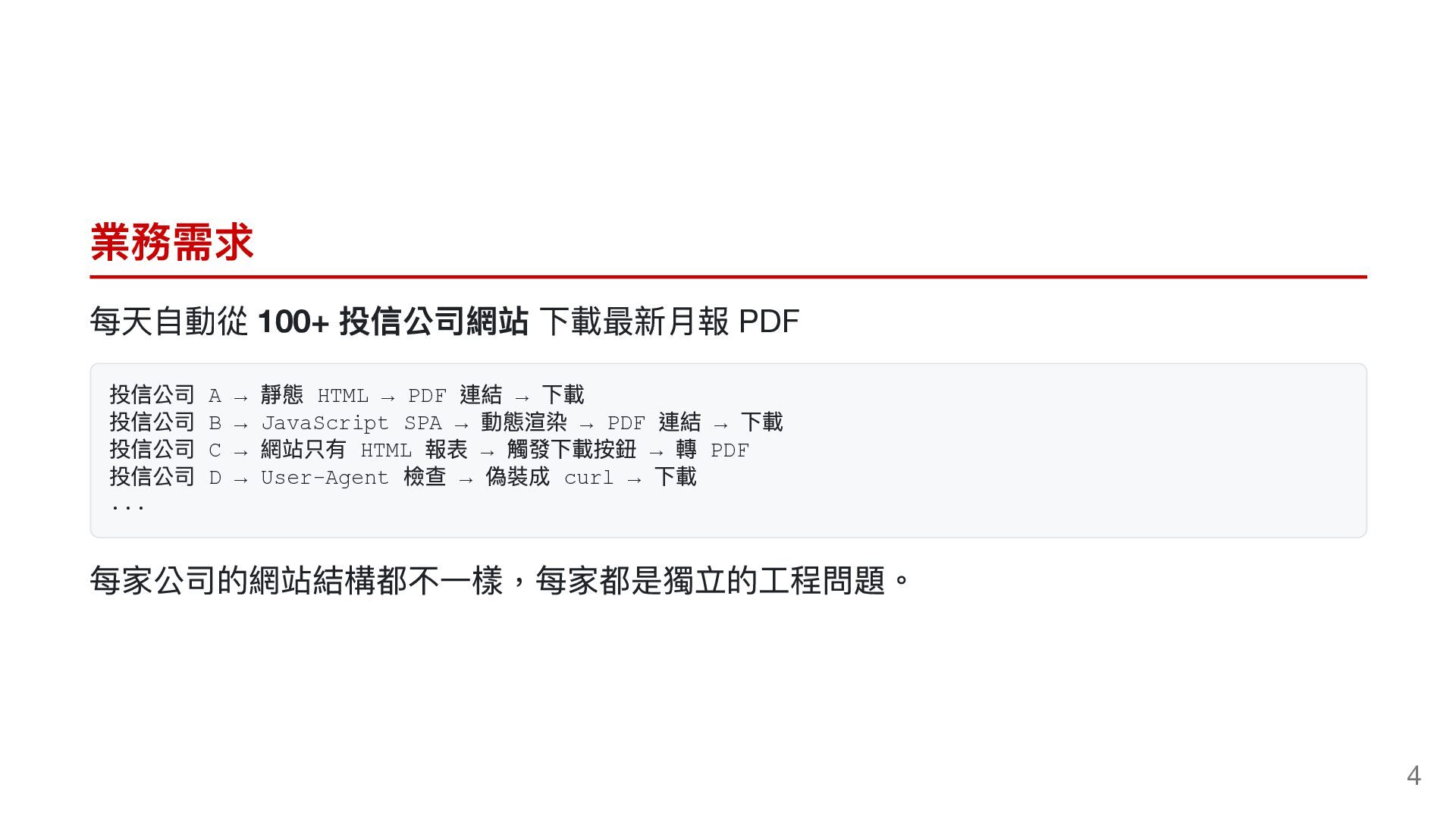
  2. 業務需求 每天自動從 100+ 投信公司網站 下載最新月報 PDF 投信公司 A → 靜態

    HTML → PDF 連結 → 下載 投信公司 B → JavaScript SPA → 動態渲染 → PDF 連結 → 下載 投信公司 C → 網站只有 HTML 報表 → 觸發下載按鈕 → 轉 PDF 投信公司 D → User-Agent 檢查 → 偽裝成 curl → 下載 ... 每家公司的網站結構都不一樣,每家都是獨立的工程問題。 4
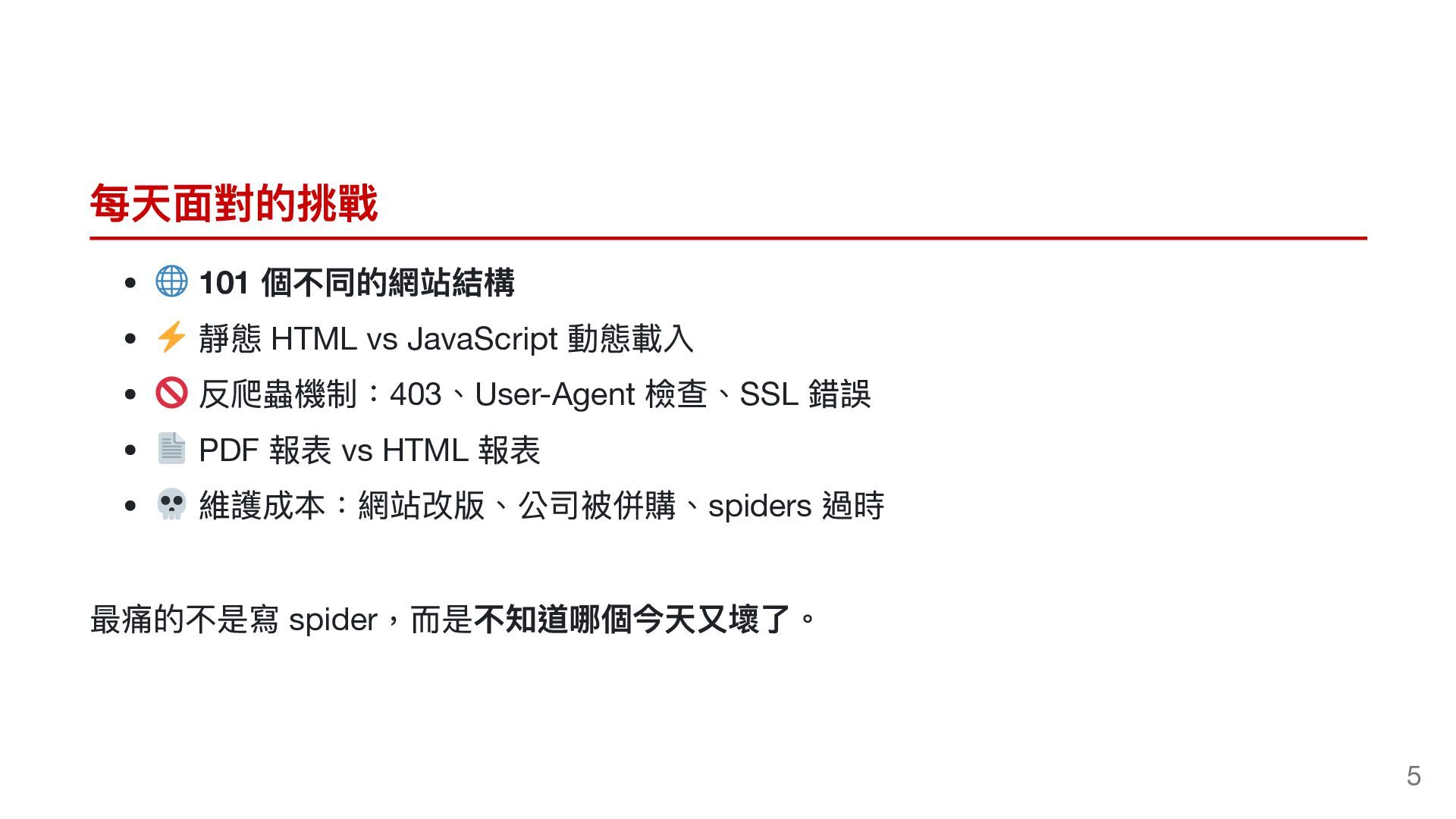
  3. 每天面對的挑戰 個不同的網站結構 靜態 HTML vs JavaScript 動態載入 反爬蟲機制:403、User-Agent 檢查、SSL 錯誤

    PDF 報表 vs HTML 報表 維護成本:網站改版、公司被併購、spiders 過時 101 最痛的不是寫 spider,而是不知道哪個今天又壞了。 5
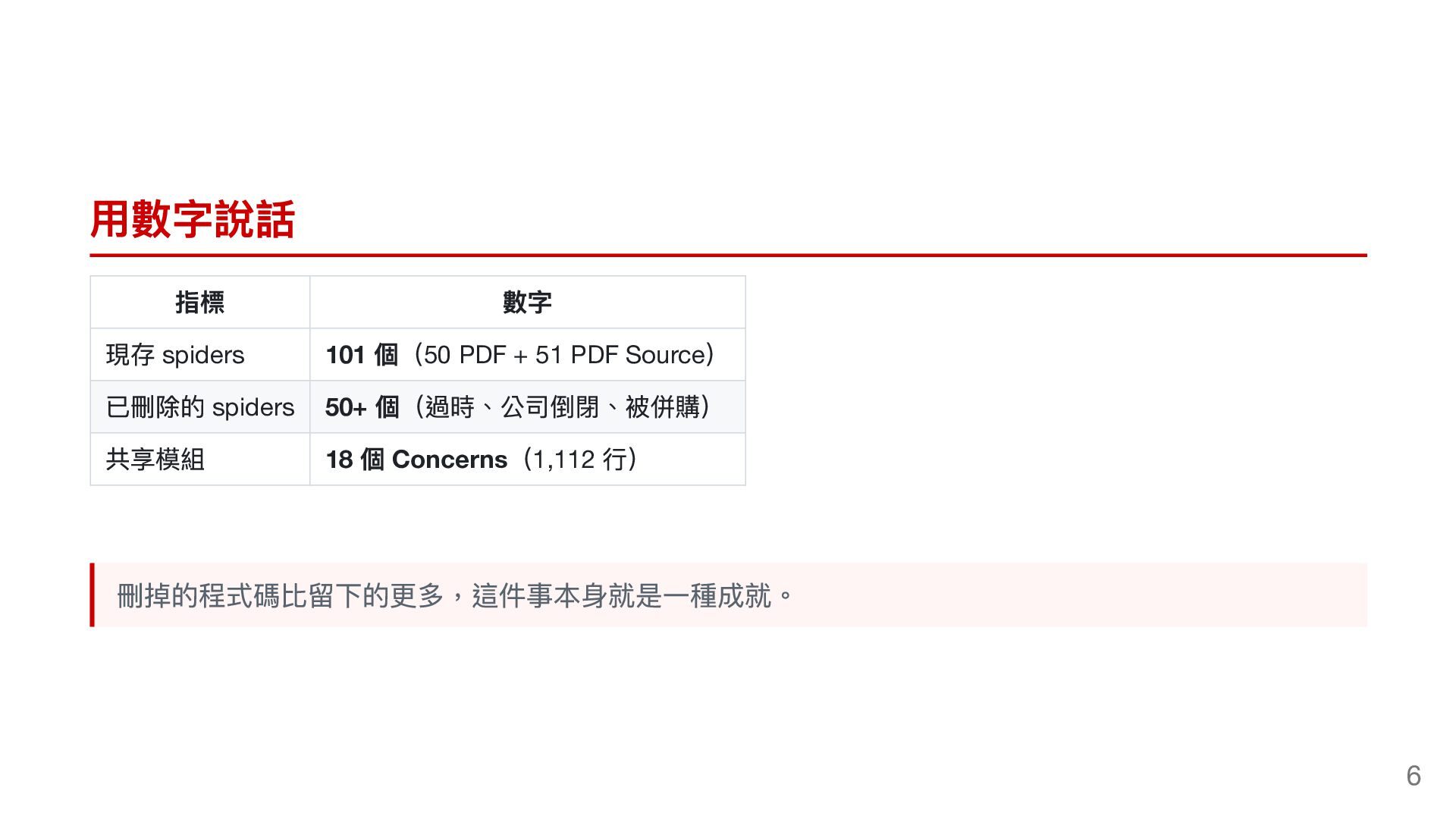
  4. 用數字說話 指標 數字 現存 spiders 101 個(50 PDF + 51

    PDF Source) 已刪除的 spiders 50+ 個(過時、公司倒閉、被併購) 共享模組 18 個 Concerns(1,112 行) 刪掉的程式碼比留下的更多,這件事本身就是一種成就。 6
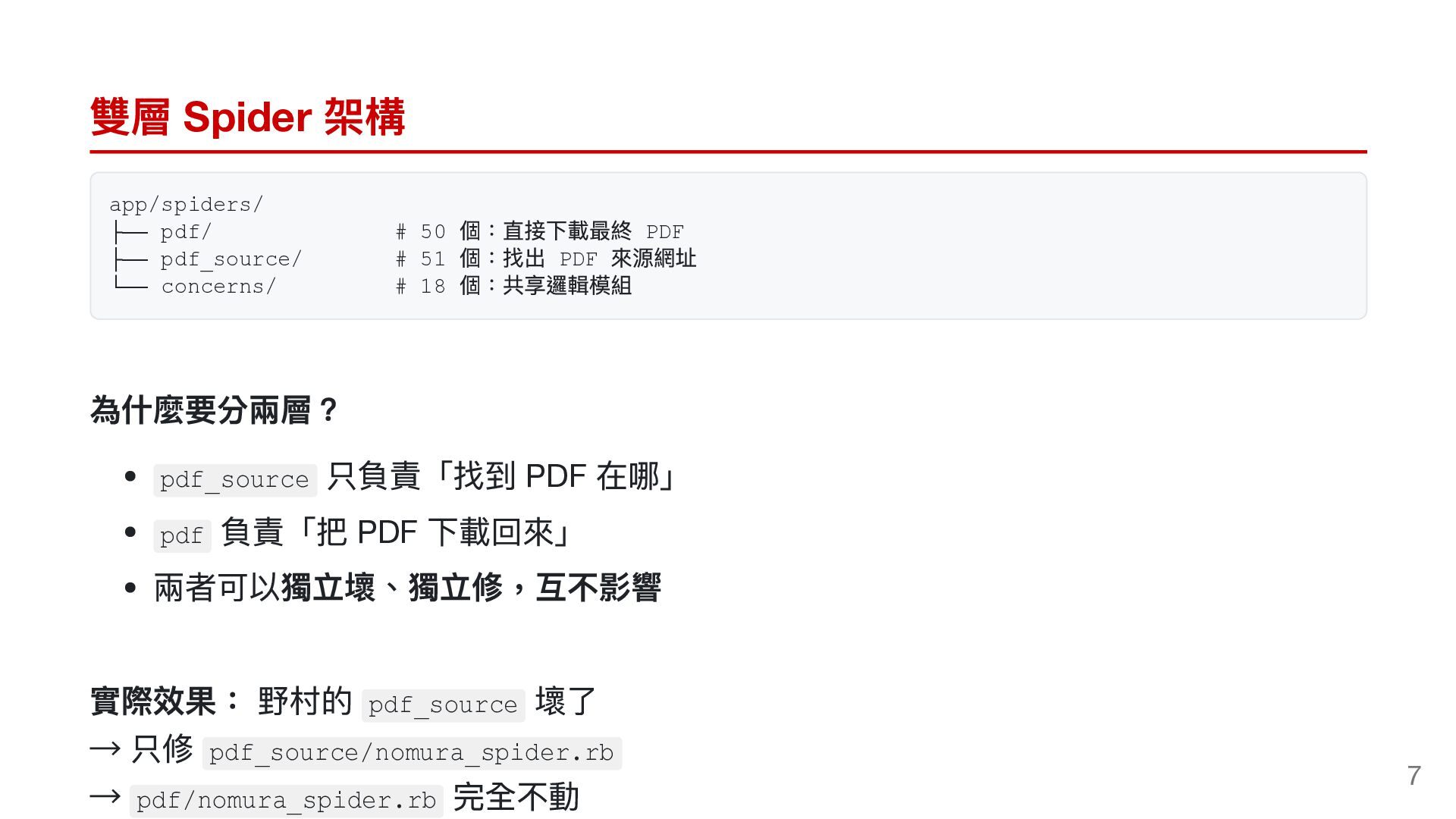
  5. 雙層 Spider 架構 app/spiders/ ├── pdf/ ├── pdf_source/ └── concerns/

    # 50 # 51 # 18 個:直接下載最終 PDF 個:找出 PDF 來源網址 個:共享邏輯模組 為什麼要分兩層? 只負責「找到 PDF 在哪」 負責「把 PDF 下載回來」 兩者可以獨立壞、獨立修,互不影響 pdf_source pdf 實際效果: 野村的 → 只修 → 壞了 完全不動 pdf_source pdf_source/nomura_spider.rb pdf/nomura_spider.rb 7
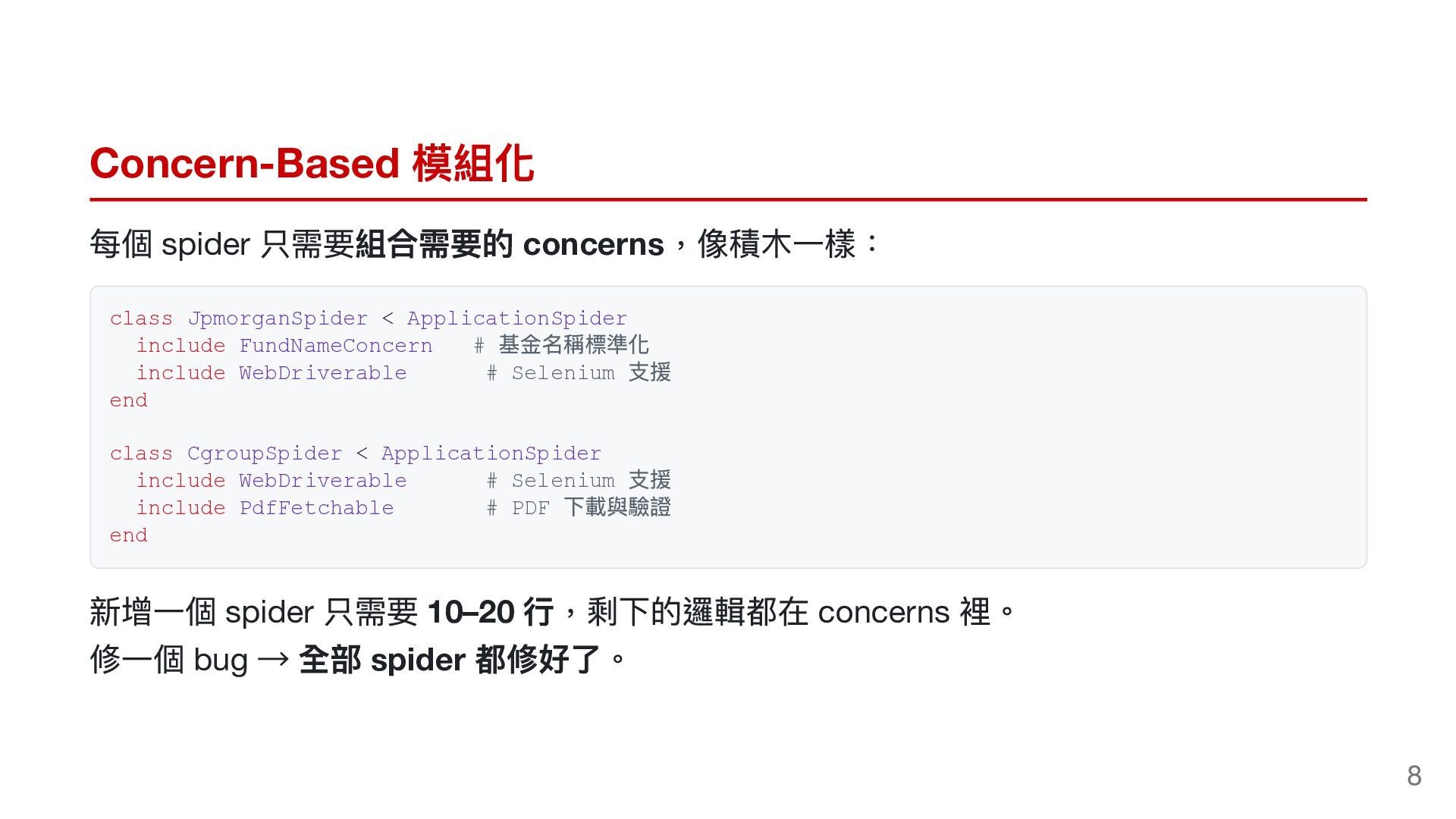
  6. Concern-Based 模組化 每個 spider 只需要組合需要的 concerns,像積木一樣: class JpmorganSpider < ApplicationSpider

    include FundNameConcern # include WebDriverable # Selenium end 基金名稱標準化 支援 class CgroupSpider < ApplicationSpider include WebDriverable # Selenium include PdfFetchable # PDF end 支援 下載與驗證 新增一個 spider 只需要 10–20 行,剩下的邏輯都在 concerns 裡。 修一個 bug → 全部 spider 都修好了。 8
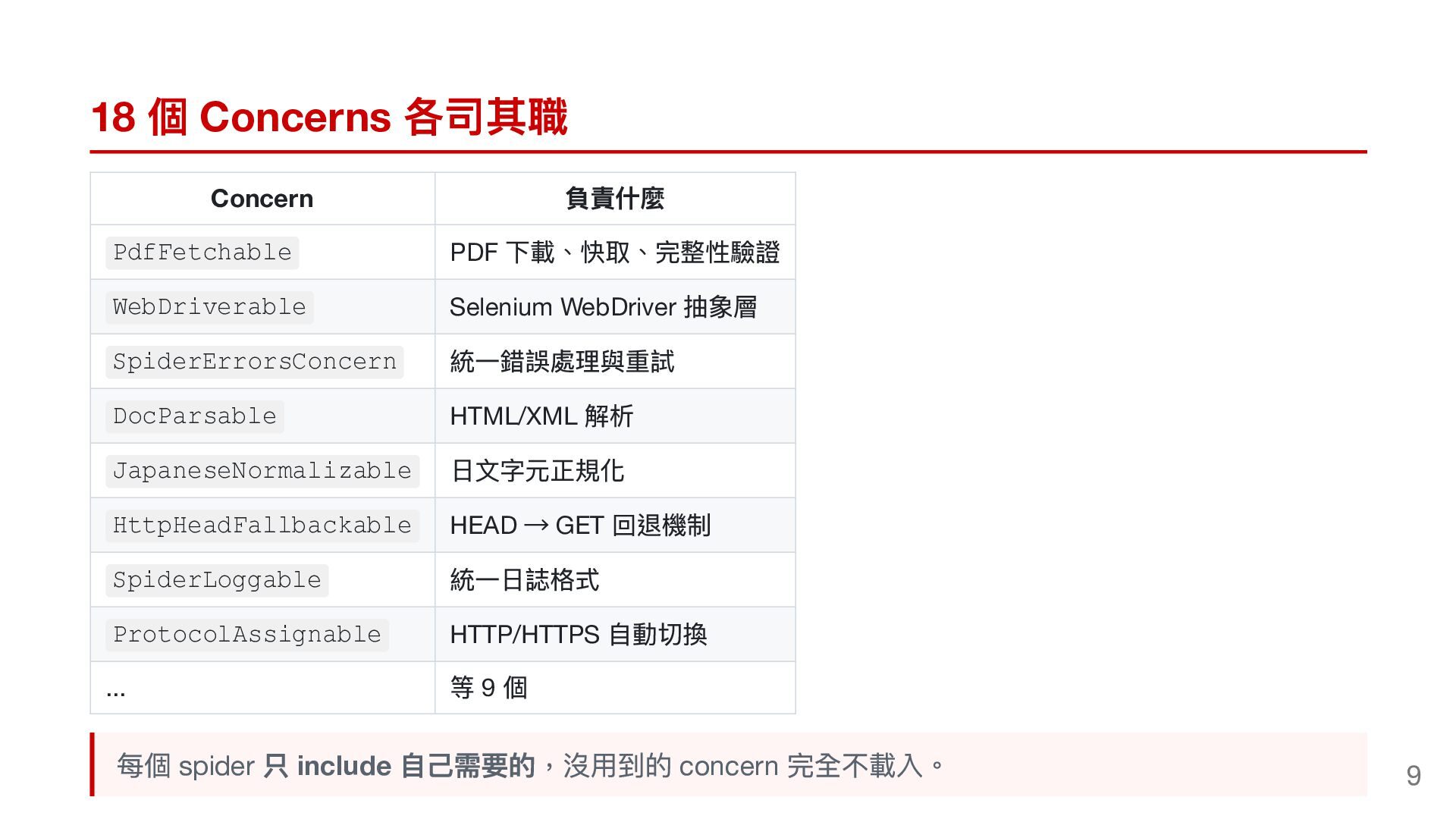
  7. 18 個 Concerns 各司其職 Concern PdfFetchable WebDriverable SpiderErrorsConcern DocParsable JapaneseNormalizable

    HttpHeadFallbackable SpiderLoggable ProtocolAssignable ... 負責什麼 PDF 下載、快取、完整性驗證 Selenium WebDriver 抽象層 統一錯誤處理與重試 HTML/XML 解析 日文字元正規化 HEAD → GET 回退機制 統一日誌格式 HTTP/HTTPS 自動切換 等9個 每個 spider 只 include 自己需要的,沒用到的 concern 完全不載入。 9
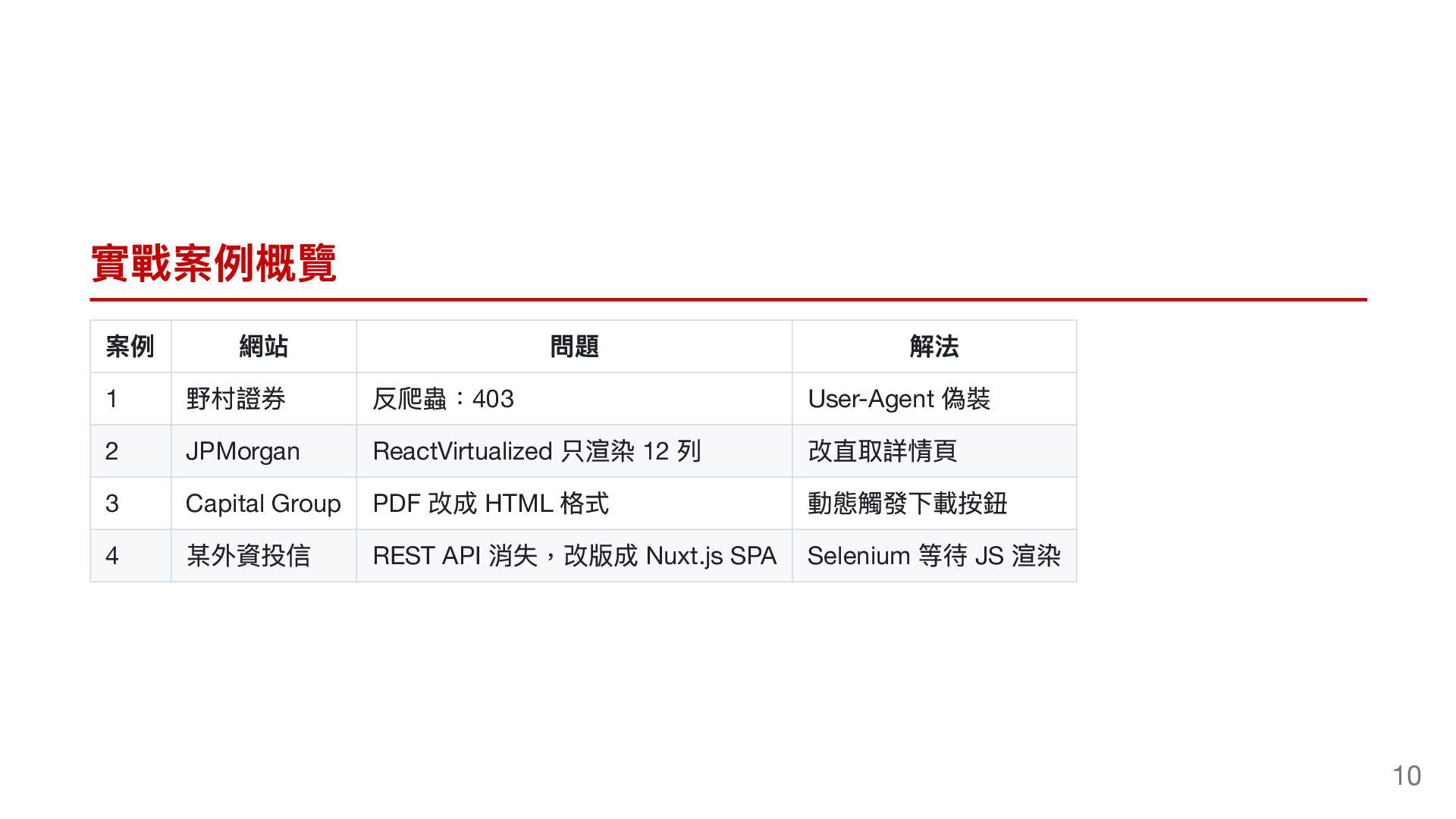
  8. 實戰案例概覽 案例 1 2 3 4 網站 野村證券 問題 解法

    反爬蟲:403 User-Agent 偽裝 JPMorgan ReactVirtualized 只渲染 12 列 改直取詳情頁 Capital Group PDF 改成 HTML 格式 動態觸發下載按鈕 某外資投信 REST API 消失,改版成 Nuxt.js SPA Selenium 等待 JS 渲染 10
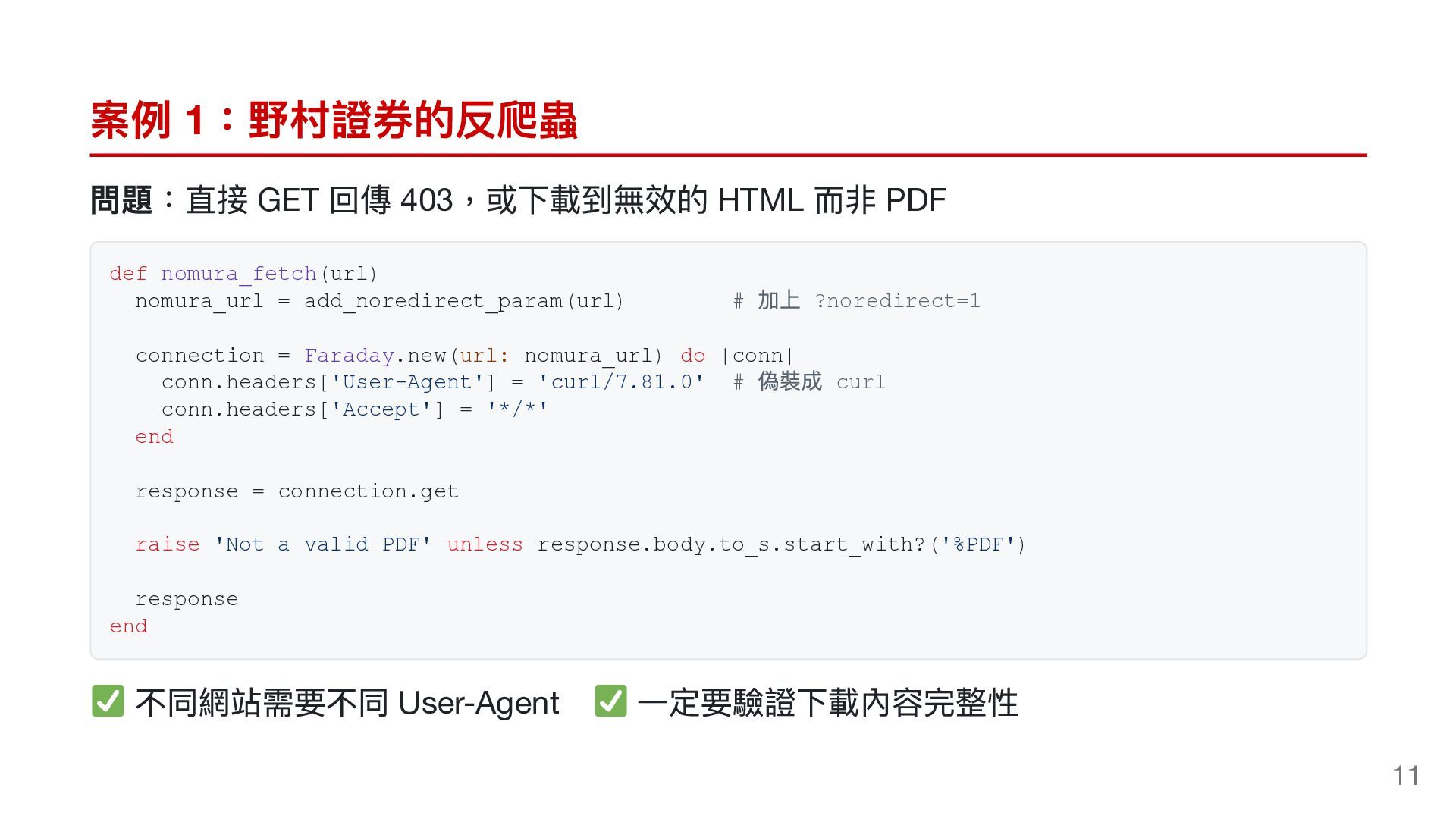
  9. 案例 1:野村證券的反爬蟲 問題:直接 GET 回傳 403,或下載到無效的 HTML 而非 PDF def

    nomura_fetch(url) nomura_url = add_noredirect_param(url) # 加上 ?noredirect=1 connection = Faraday.new(url: nomura_url) do |conn| conn.headers['User-Agent'] = 'curl/7.81.0' # conn.headers['Accept'] = '*/*' end 偽裝成 curl response = connection.get raise 'Not a valid PDF' unless response.body.to_s.start_with?('%PDF') response end 不同網站需要不同 User-Agent 一定要驗證下載內容完整性 11
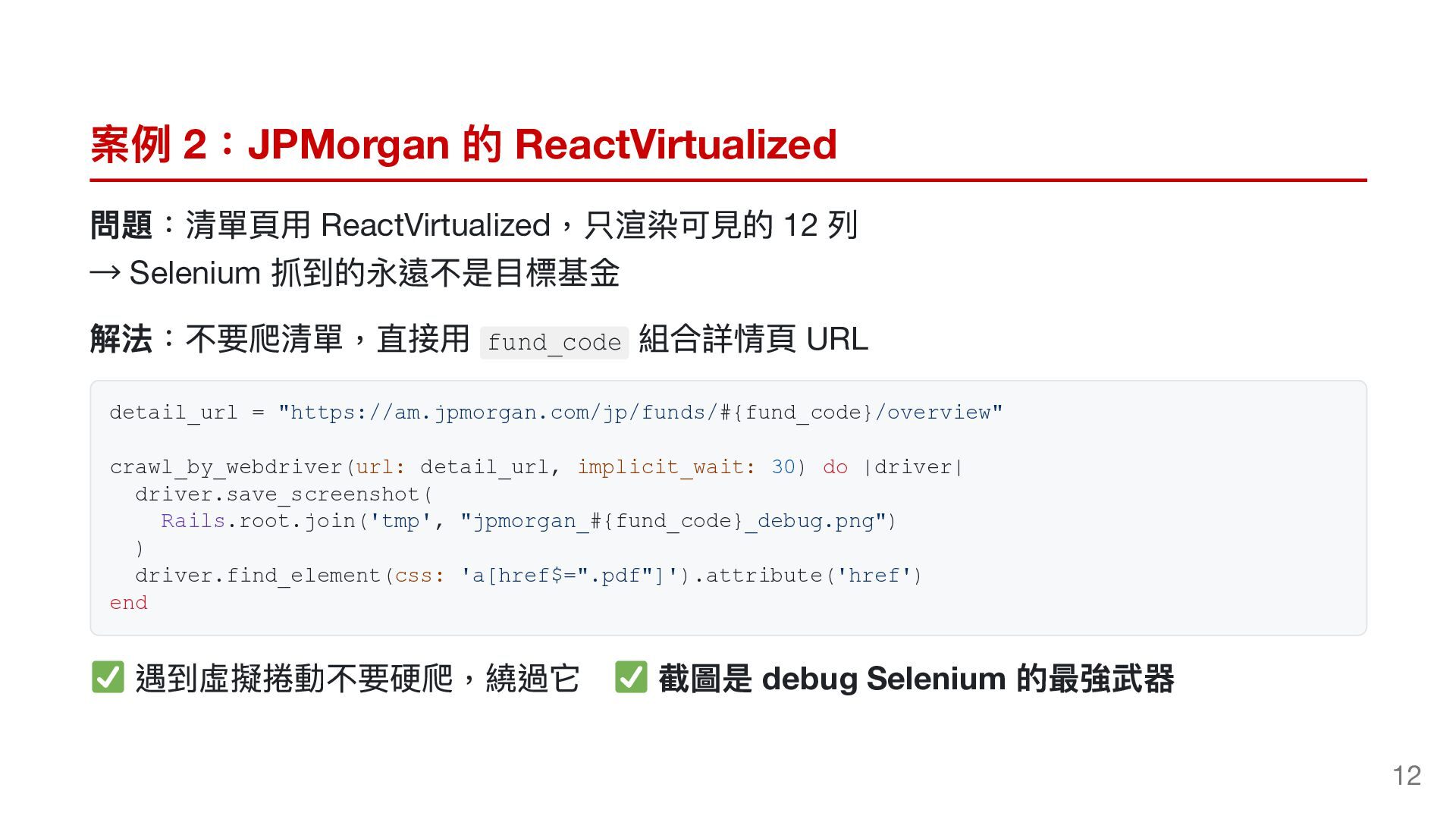
  10. 案例 2:JPMorgan 的 ReactVirtualized 問題:清單頁用 ReactVirtualized,只渲染可見的 12 列 → Selenium

    抓到的永遠不是目標基金 解法:不要爬清單,直接用 組合詳情頁 URL fund_code detail_url = "https://am.jpmorgan.com/jp/funds/#{fund_code}/overview" crawl_by_webdriver(url: detail_url, implicit_wait: 30) do |driver| driver.save_screenshot( Rails.root.join('tmp', "jpmorgan_#{fund_code}_debug.png") ) driver.find_element(css: 'a[href$=".pdf"]').attribute('href') end 遇到虛擬捲動不要硬爬,繞過它 截圖是 debug Selenium 的最強武器 12
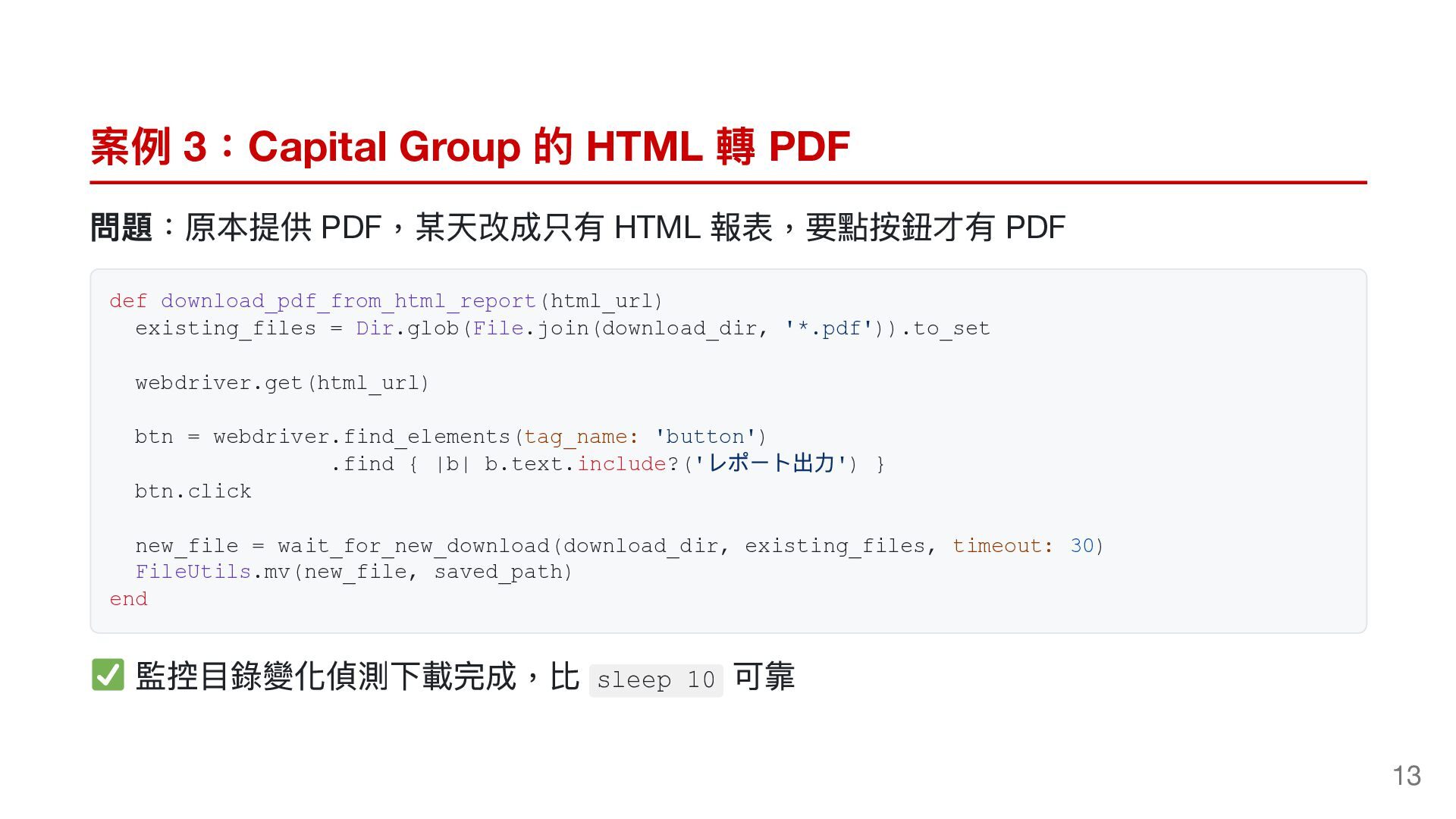
  11. 案例 3:Capital Group 的 HTML 轉 PDF 問題:原本提供 PDF,某天改成只有 HTML

    報表,要點按鈕才有 PDF def download_pdf_from_html_report(html_url) existing_files = Dir.glob(File.join(download_dir, '*.pdf')).to_set webdriver.get(html_url) btn = webdriver.find_elements(tag_name: 'button') .find { |b| b.text.include?(' btn.click レポート出力') } new_file = wait_for_new_download(download_dir, existing_files, timeout: 30) FileUtils.mv(new_file, saved_path) end 監控目錄變化偵測下載完成,比 sleep 10 可靠 13
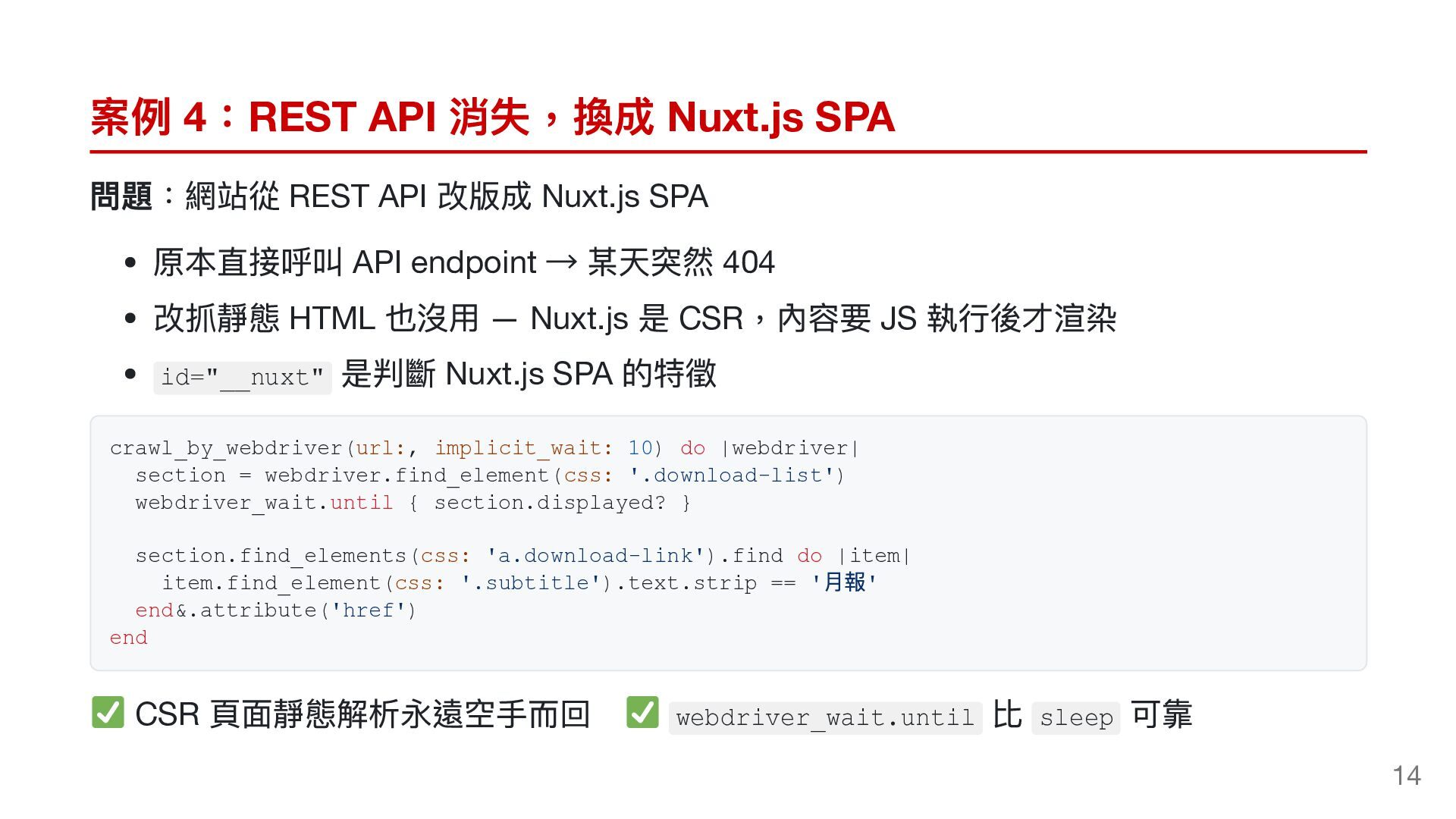
  12. 案例 4:REST API 消失,換成 Nuxt.js SPA 問題:網站從 REST API 改版成

    Nuxt.js SPA 原本直接呼叫 API endpoint → 某天突然 404 改抓靜態 HTML 也沒用 — Nuxt.js 是 CSR,內容要 JS 執行後才渲染 是判斷 Nuxt.js SPA 的特徵 id="__nuxt" crawl_by_webdriver(url:, implicit_wait: 10) do |webdriver| section = webdriver.find_element(css: '.download-list') webdriver_wait.until { section.displayed? } section.find_elements(css: 'a.download-link').find do |item| item.find_element(css: '.subtitle').text.strip == ' ' end&.attribute('href') end 月報 CSR 頁面靜態解析永遠空手而回 webdriver_wait.until 比 sleep 可靠 14
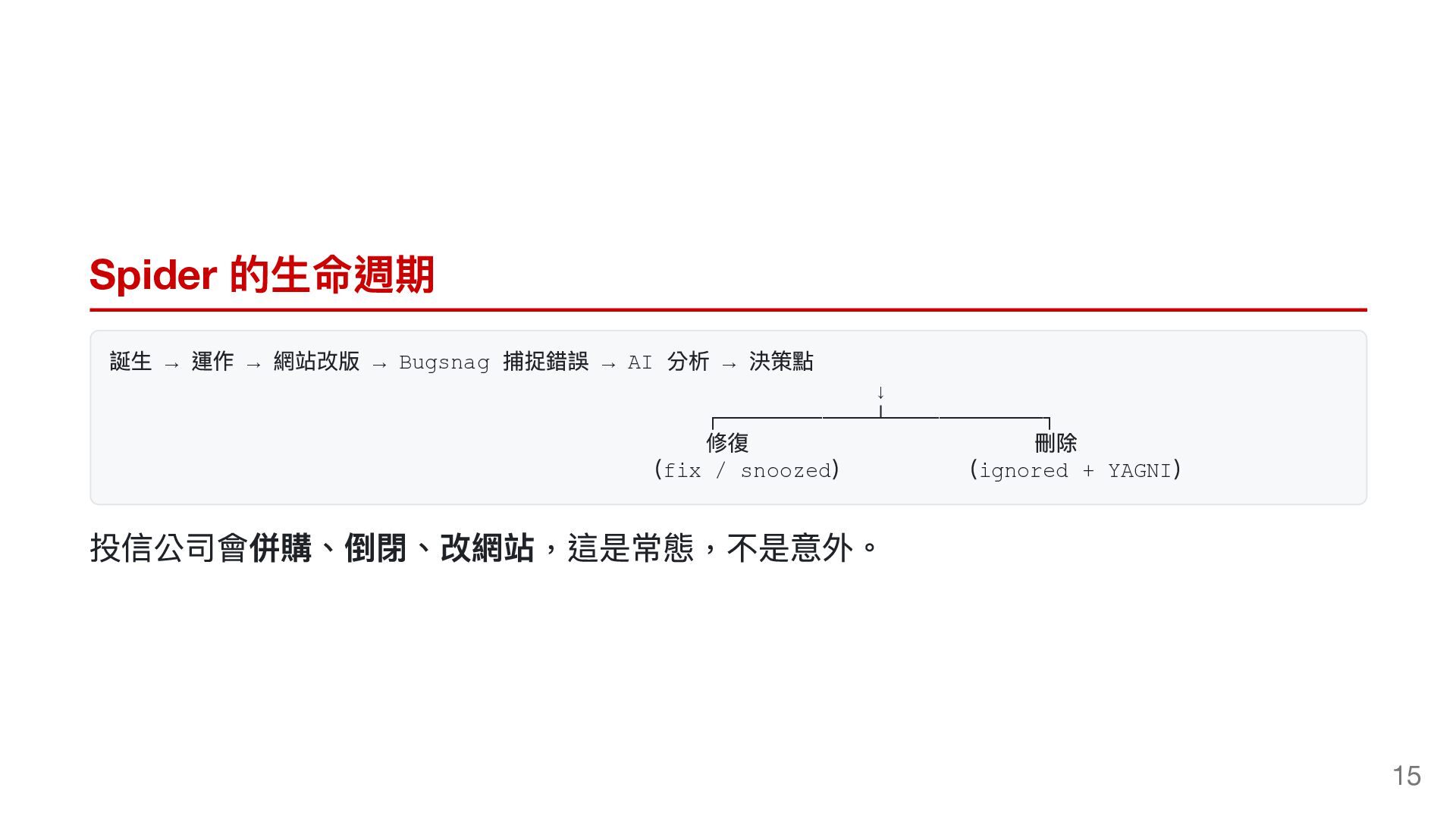
  13. Spider 的生命週期 誕生 → 運作 → 網站改版 → Bugsnag 捕捉錯誤

    → AI 分析 → 決策點 ↓ ┌────────────┴────────────┐ 修復 (fix / snoozed) 刪除 (ignored + YAGNI) 投信公司會併購、倒閉、改網站,這是常態,不是意外。 15
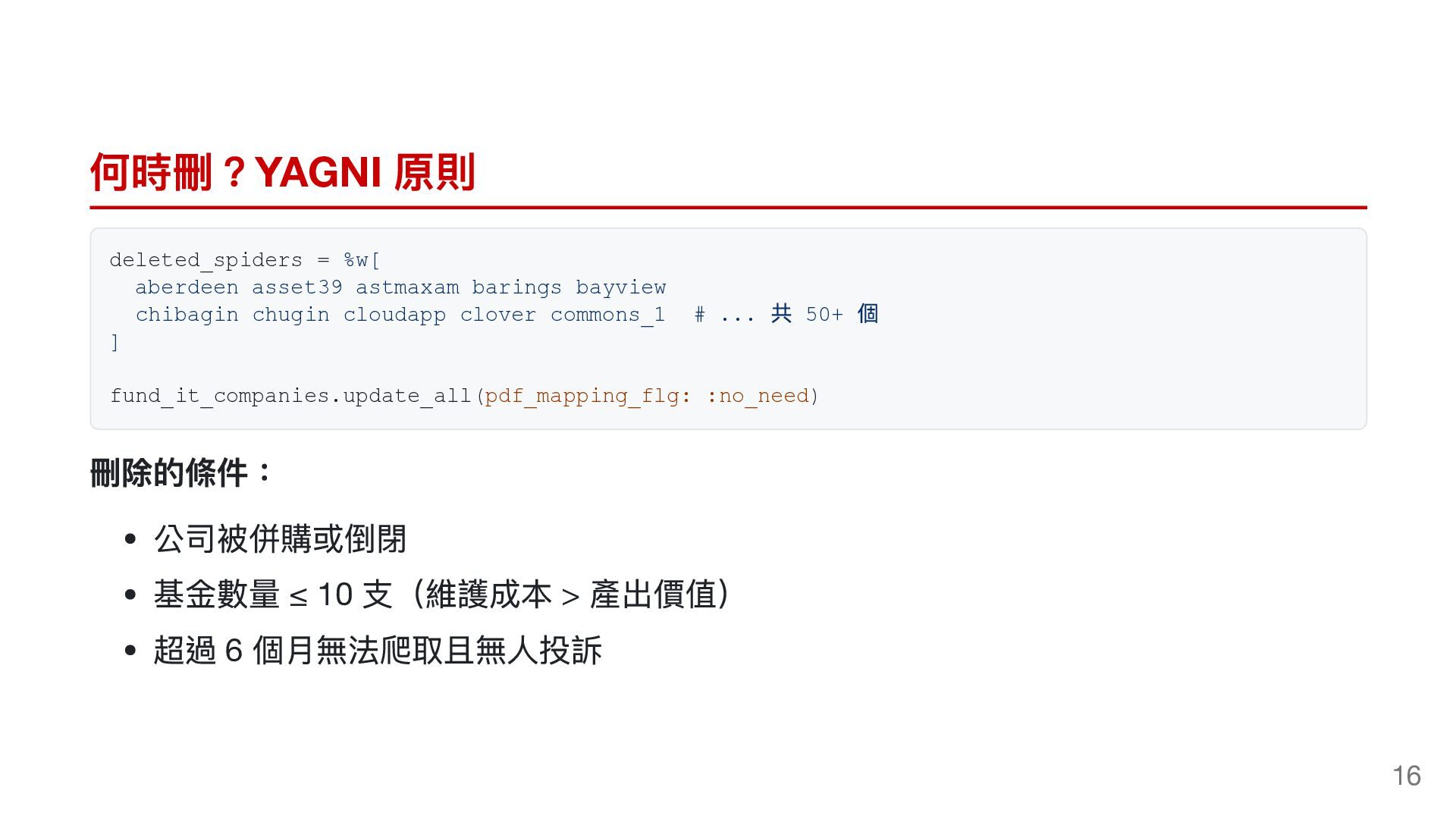
  14. 何時刪?YAGNI 原則 deleted_spiders = %w[ aberdeen asset39 astmaxam barings bayview

    chibagin chugin cloudapp clover commons_1 ] # ... 共 50+ 個 fund_it_companies.update_all(pdf_mapping_flg: :no_need) 刪除的條件: 公司被併購或倒閉 基金數量 ≤ 10 支(維護成本 > 產出價值) 超過 6 個月無法爬取且無人投訴 16
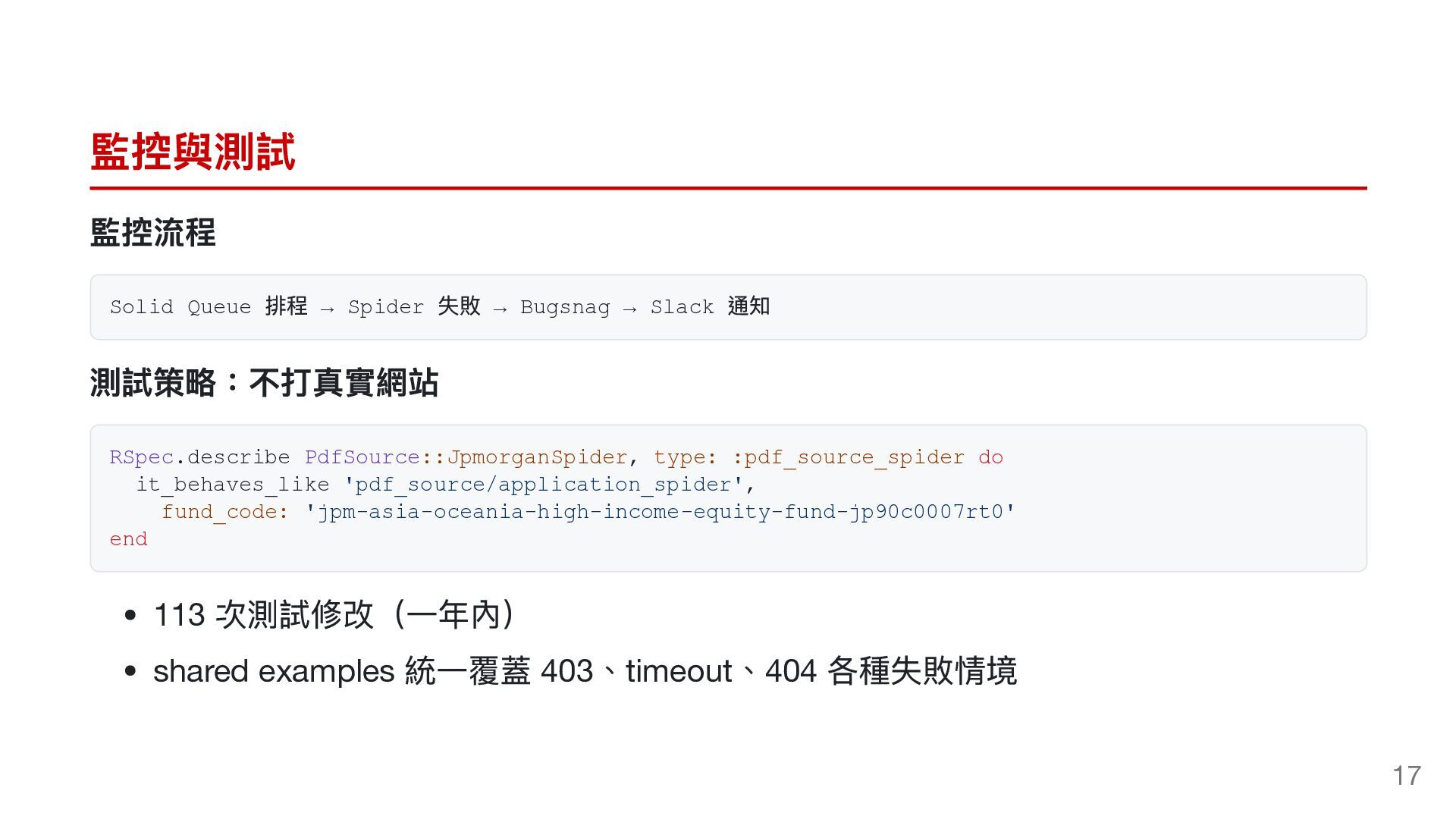
  15. 監控與測試 監控流程 Solid Queue 排程 → Spider 失敗 → Bugsnag

    → Slack 通知 測試策略:不打真實網站 RSpec.describe PdfSource::JpmorganSpider, type: :pdf_source_spider do it_behaves_like 'pdf_source/application_spider', fund_code: 'jpm-asia-oceania-high-income-equity-fund-jp90c0007rt0' end 次測試修改(一年內) shared examples 統一覆蓋 403、timeout、404 各種失敗情境 113 17
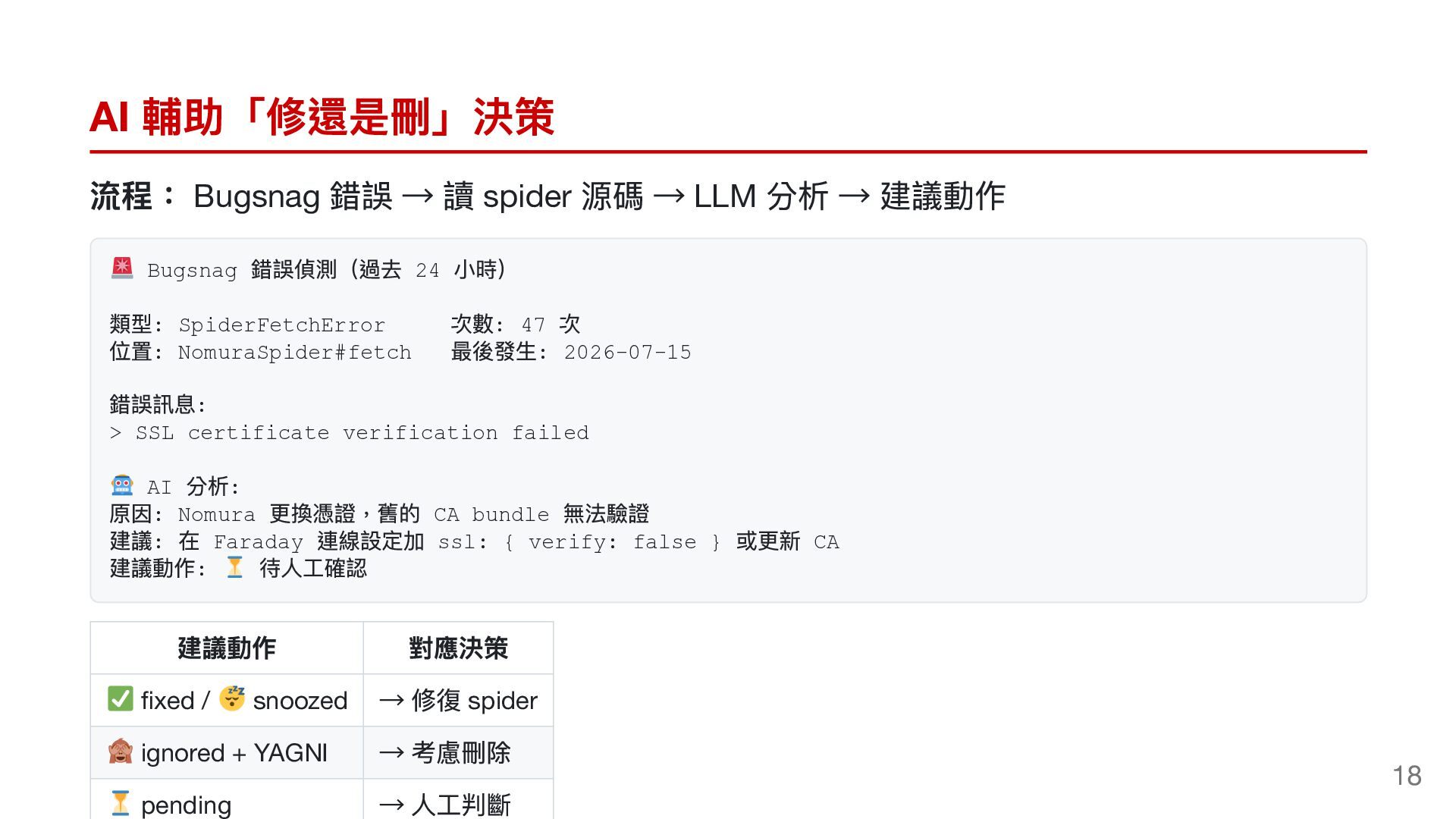
  16. AI 輔助「修還是刪」決策 流程: Bugsnag 錯誤 → 讀 spider 源碼 →

    LLM 分析 → 建議動作 錯誤偵測(過去 24 小時) 類型: SpiderFetchError 次數: 47 次 位置: NomuraSpider#fetch 最後發生: 2026-07-15 錯誤訊息: Bugsnag > SSL certificate verification failed 分析 原因 更換憑證,舊的 CA bundle 無法驗證 建議 在 連線設定加 ssl: { verify: false } 或更新 CA 建議動作 待人工確認 AI : : Nomura : Faraday : 建議動作 對應決策 fixed / snoozed → 修復 spider ignored + YAGNI → 考慮刪除 pending → 人工判斷 18
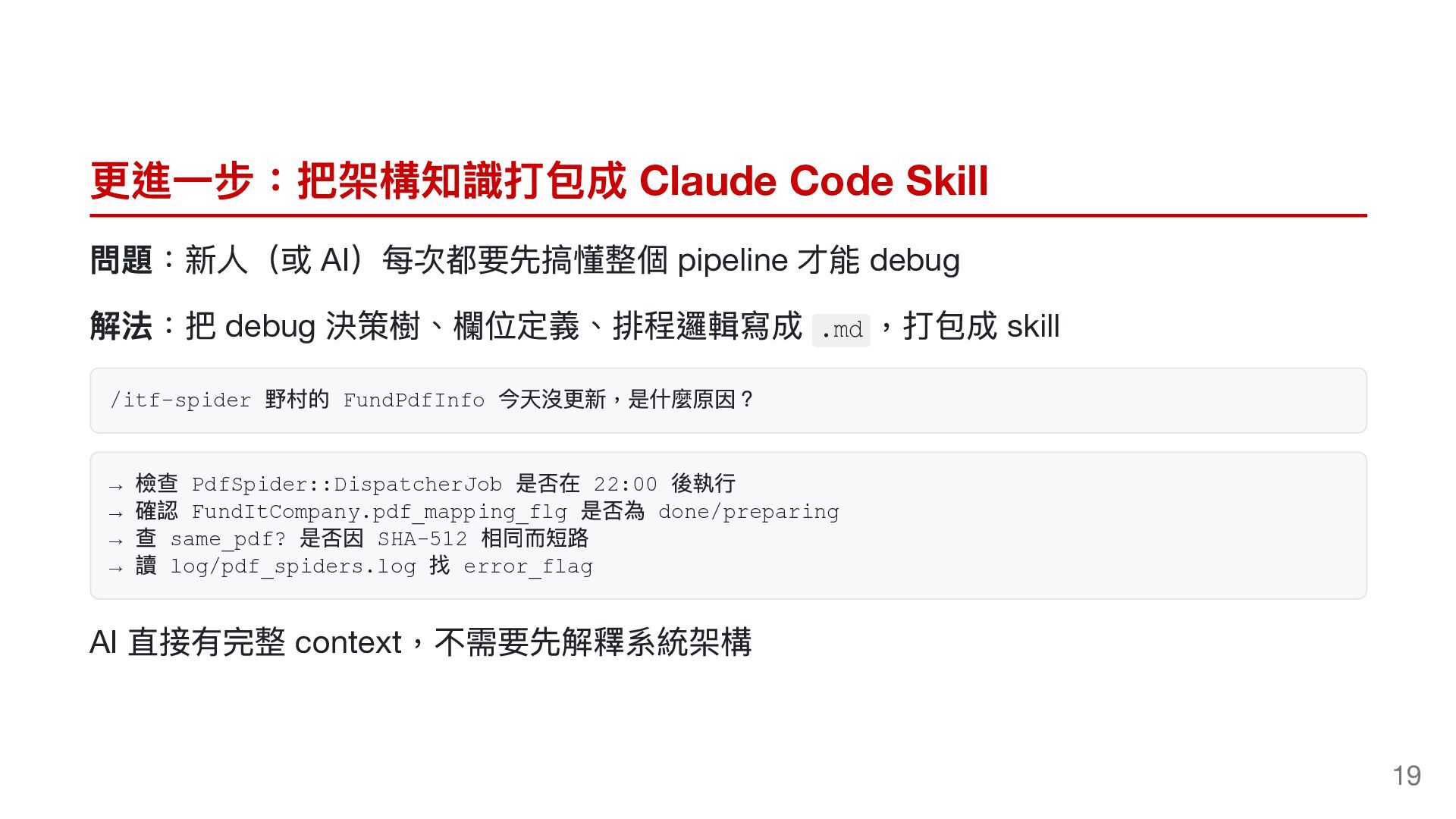
  17. 更進一步:把架構知識打包成 Claude Code Skill 問題:新人(或 AI)每次都要先搞懂整個 pipeline 才能 debug 解法:把

    debug 決策樹、欄位定義、排程邏輯寫成 ,打包成 skill .md /itf-spider → → → → AI 野村的 FundPdfInfo 今天沒更新,是什麼原因? 檢查 PdfSpider::DispatcherJob 是否在 22:00 後執行 確認 FundItCompany.pdf_mapping_flg 是否為 done/preparing 查 same_pdf? 是否因 SHA-512 相同而短路 讀 log/pdf_spiders.log 找 error_flag 直接有完整 context,不需要先解釋系統架構 19
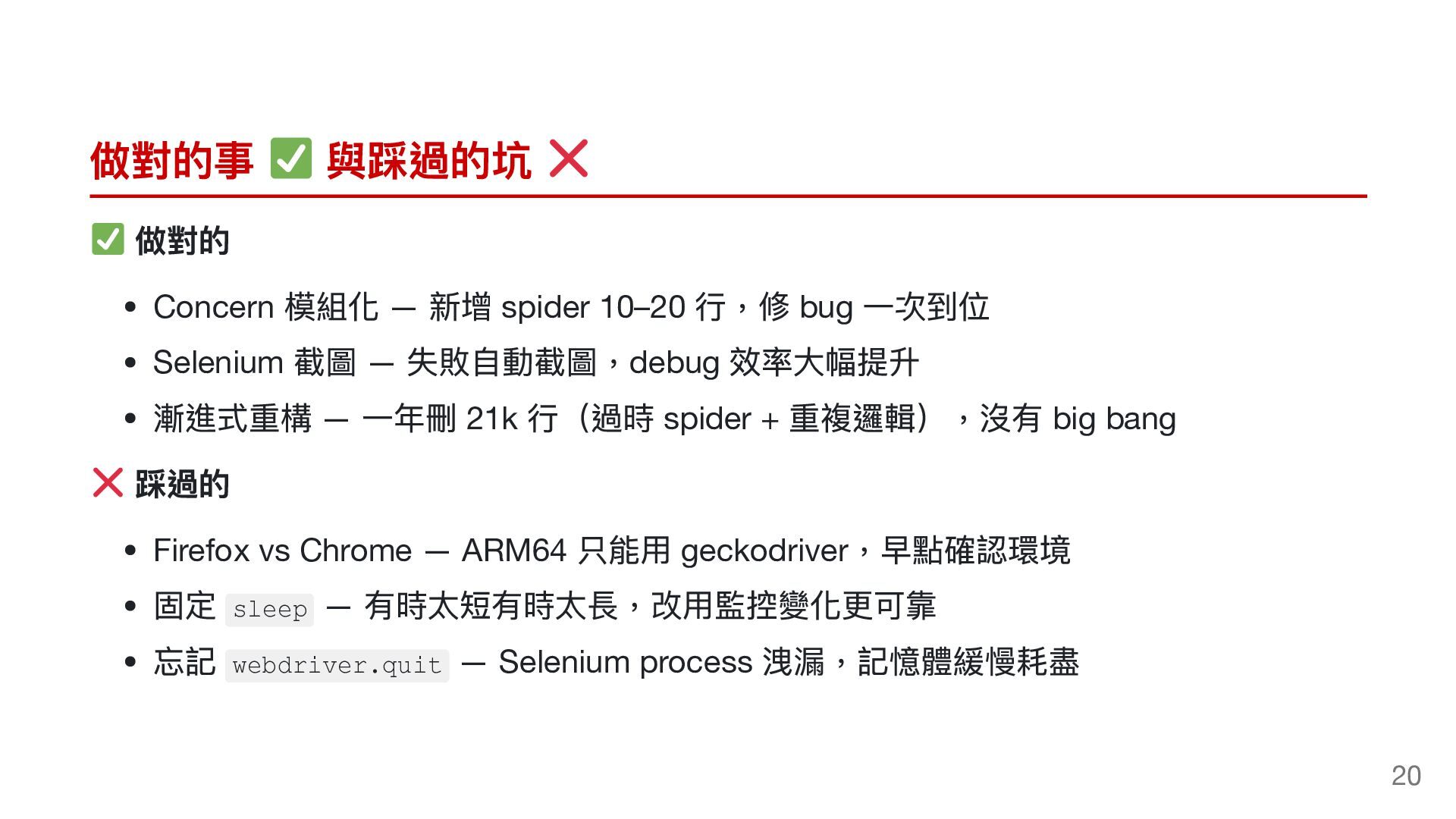
  18. 做對的事 與踩過的坑 做對的 模組化 — 新增 spider 10–20 行,修 bug

    一次到位 Selenium 截圖 — 失敗自動截圖,debug 效率大幅提升 漸進式重構 — 一年刪 21k 行(過時 spider + 重複邏輯),沒有 big bang 踩過的 Firefox vs Chrome — ARM64 只能用 geckodriver,早點確認環境 固定 — 有時太短有時太長,改用監控變化更可靠 忘記 — Selenium process 洩漏,記憶體緩慢耗盡 Concern sleep webdriver.quit 20
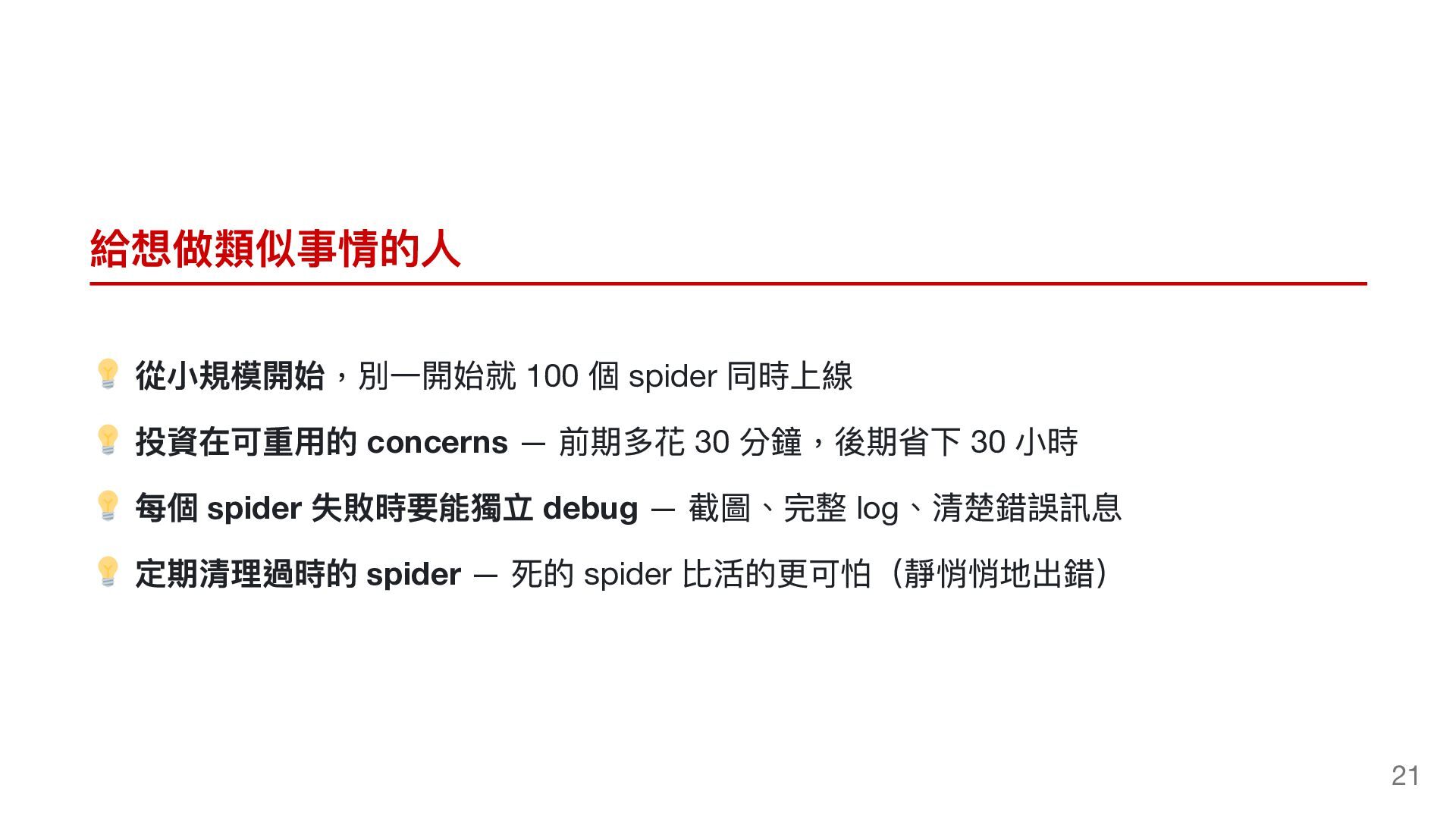
  19. 給想做類似事情的人 從小規模開始,別一開始就 100 個 spider 同時上線 投資在可重用的 concerns — 前期多花

    30 分鐘,後期省下 30 小時 每個 spider 失敗時要能獨立 debug — 截圖、完整 log、清楚錯誤訊息 定期清理過時的 spider — 死的 spider 比活的更可怕(靜悄悄地出錯) 21
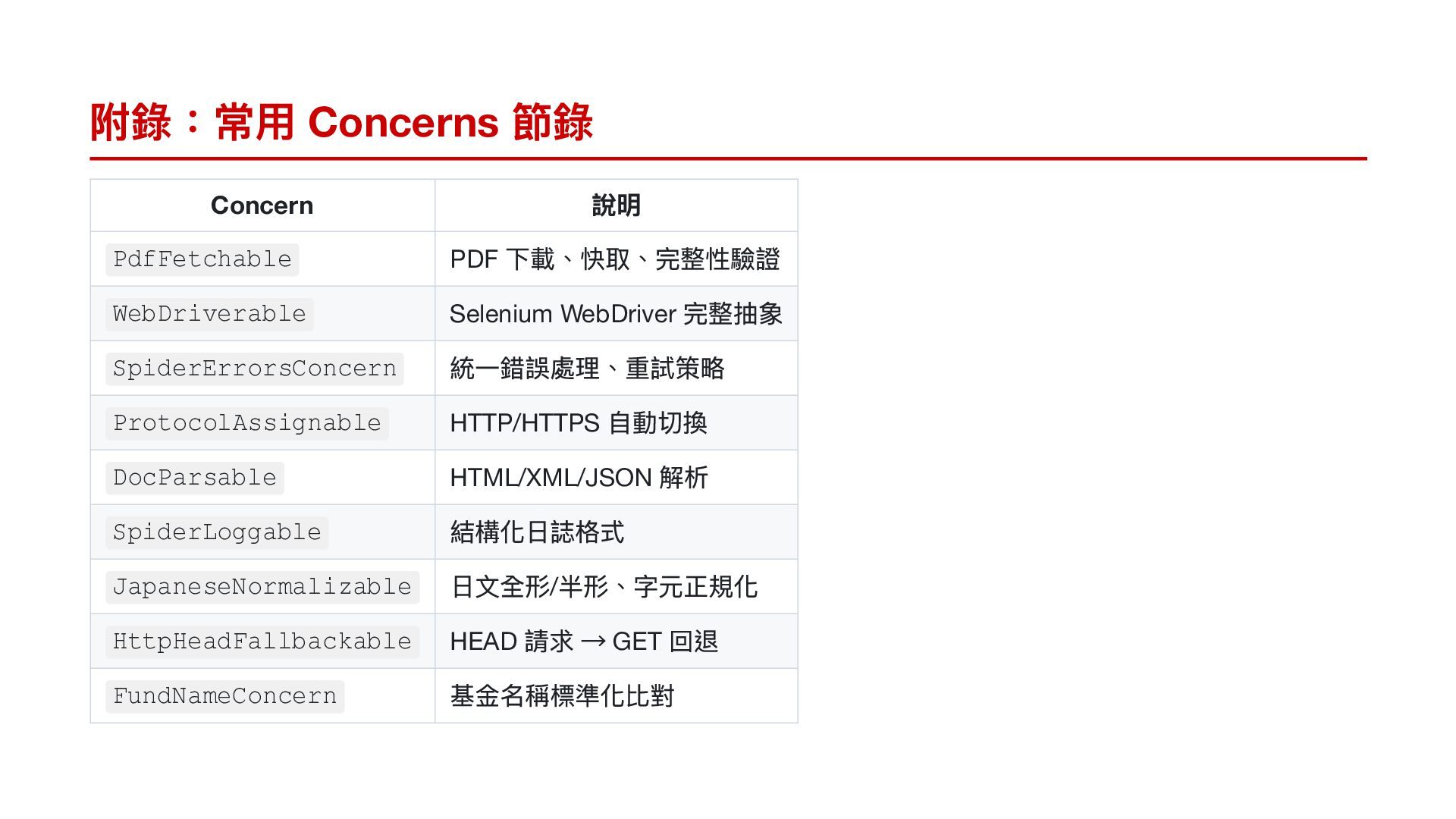
  20. 附錄:常用 Concerns 節錄 Concern PdfFetchable WebDriverable SpiderErrorsConcern ProtocolAssignable DocParsable SpiderLoggable

    JapaneseNormalizable HttpHeadFallbackable FundNameConcern 說明 PDF 下載、快取、完整性驗證 Selenium WebDriver 完整抽象 統一錯誤處理、重試策略 HTTP/HTTPS 自動切換 HTML/XML/JSON 解析 結構化日誌格式 日文全形/半形、字元正規化 HEAD 請求 → GET 回退 基金名稱標準化比對