Share
Embed
The World Beyond MySQL: Tutorial
This was supplemented with a wiki of exercises and a VM with all the tools installed. Slides are probably only useful if you were actually there.
Lorna Mitchell
September 30, 2016
Transcript
48 slides
-
@lornajane THE WORLD BEYOND MYSQL Lorna Mitchell, IBM Cloud Data
Services PHP North West, September 2016 1 -
@lornajane LET'S PLAY WITH DATABASES There's a VM on a
USB stick to import into Virtualbox https://github.com/lornajane/beyond-mysql-tutorial/wiki 2 -
@lornajane BEYOND MYSQL MySQL is great! If you're ready for
something different, how about: PostgreSQL Redis CouchDB 3 -
@lornajane ABOUT POSTGRESQL Homepage: Open source project Powerful, relational database
https://www.postgresql.org/ 5 -
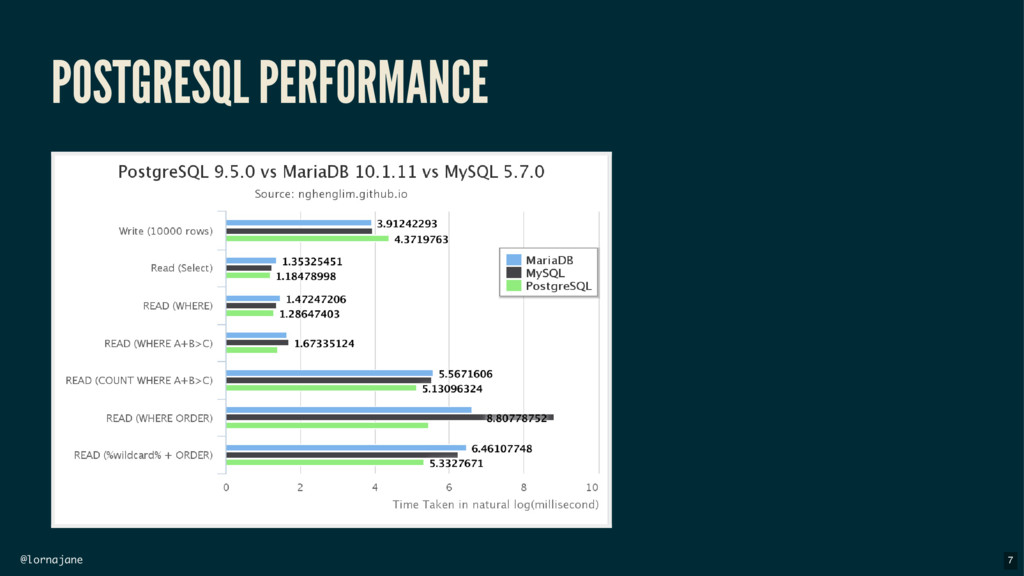
@lornajane POSTGRESQL MYTHS AND SURPRISES Myth 1: Postgres is more
complicated than MySQL Nope, sorry. They are both approachable from both CLI and other web/GUI tools, Postgres has the best CLI help I've ever seen. Myth 2: Postgres is more strict than MySQL True! But standards-compliant is a feature :) Myth 3: Postgres is slower than MySQL for simple things Not true. Postgres has better query planning so is likely to be faster at everything, and also has more features. 6 -
@lornajane ADDITIONAL DATA TYPES: UUID Postgres has a UUID data
type to create unique identifiers We can use it as a primary key: (you may need to create extension "uuid-ossp" first) 1 2 3 4 5 6 7 CREATE TABLE products ( product_id uuid primary key default uuid_generate_v4(), display_name varchar(255) ); INSERT INTO products (display_name) VALUES ('Jumper') RETURNING product_id; 8 -
@lornajane ADDITIONAL DATA TYPES: UUID Look in the table: 1
2 3 product_id | display_name -------------------------------------+-------------- 73089ae3-c0a9-4c0a-8287-e0f6ec41a200 | Jumper 9 -
@lornajane RETURNING KEYWORD Look at that insert statement again The
RETURNING keyword allows us to retrieve a field in one step - removes the need for a last_insert_id() call. 1 2 INSERT INTO products (display_name) VALUES ('Jumper') RETURNING product_id; 10 -
@lornajane ADDITIONAL DATA TYPES: ARRAY AND HSTORE Add some more
interesting columns to the table: (you may need to enable hstore with create extension hstore) ALTER TABLE products ADD COLUMN depts varchar(255)[]; ALTER TABLE products ADD COLUMN attrs hstore; 11 -
@lornajane ADDITIONAL DATA TYPES: ARRAY AND HSTORE Insert some data
into the table 1 2 3 INSERT INTO products (display_name, depts, attrs) VALUES ('T-Shirt', '{"kids"}', 'colour => red, size => L, pockets => 1'); 1 2 3 4 5 display_ | depts | attrs ---------+----------------+---------------------------------------------- Jumper | | T-Shirt | {kids} | "size"=>"L", "colour"=>"red", "pockets"=>"1" Hat | {kids,holiday} | "colour"=>"white" 12 -
@lornajane ADDITIONAL DATA TYPES: ARRAY AND HSTORE We can fetch
data using those fields 1 2 3 4 5 SELECT display_name FROM products WHERE 'kids' = ANY(depts); SELECT display_name FROM products WHERE attrs->'colour' = 'red'; 13 -
@lornajane COMMON TABLE EXPRESSIONS (CTE) Feature enables declaring extra statements
to use later Moves complexity out of subqueries, making more readable and reusable elements to the query Syntax: 1 2 3 WITH meaningfulname AS (subquery goes here joining whatever) SELECT .... FROM meaningfulname ... 14 -
@lornajane COMMON TABLE EXPRESSIONS (CTE) 1 2 3 4 5
6 WITH costs AS (SELECT pc.product_id, pc.amount, cu.code, co.name FROM product_costs pc JOIN currencies cu USING (currency_id) JOIN countries co USING (country_id)) SELECT display_name, amount, code currency, name country FROM products JOIN costs USING (product_id); 1 2 3 4 5 display_name | amount | currency | country --------------+--------+----------+--------- T-Shirt | 25 | GBP | UK T-Shirt | 30 | EUR | Italy T-Shirt | 29 | EUR | France 16 -
@lornajane WINDOW FUNCTIONS Window functions allow us to calculate aggregate
values while still returning the individual rows. e.g. a list of orders, including how many of this product were ordered in total 17 -
@lornajane WINDOW FUNCTIONS 1 2 3 SELECT o.order_id, p.display_name, count(*)
OVER (PARTITION BY product_id) AS prod_orders FROM orders o JOIN products p USING (product_id); 1 2 3 4 5 6 order_id | display_name | prod_orders --------------------------------------+--------------+------------- 74806f66-a753-4e99-aeae-6d491f947f08 | T-Shirt | 6 9ae83b3f-931e-4e6a-a8e3-93dcf10dd9ab | Hat | 3 0030c58a-122c-4fa5-90f4-21ad531d3848 | Hat | 3 3d5a0d76-4c7e-433d-b3cf-288ef473912d | Hat | 3 18 -
@lornajane POSTGRESQL AND PHP PDO Just Works(TM) 1 2 3
4 5 6 7 8 9 10 11 <?php $db = new PDO( 'pgsql:host=localhost;port=5432;dbname=demo', 'postgres', 'password'); $sql = "select * from comments"; $stmt = $db->query($sql); while(false !== $row = $stmt->fetch(PDO::FETCH_ASSOC)) { print_r($row); } 19 -
@lornajane POSTGRESQL TIPS AND RESOURCES PhpMyAdmin equivalent: Best in-shell help
I've ever seen (type \h [something]) JSON features Indexes on expression Choose where nulls go by adding NULLS FIRST|LAST to your ORDER BY Fabulous support for geographic data Get a hosted version from https://www.pgadmin.org/ http://postgis.net/ http://compose.com 20 -
@lornajane ABOUT REDIS Homepage: Stands for: REmote DIctionary Service An
open source, in-memory datastore for key/value storage, and much more http://redis.io/ 22 -
@lornajane USES OF REDIS Usually used in addition to a
primary data store for: caching session data simple queues Anywhere you would use Memcache, use Redis 23 -
@lornajane REDIS FEATURE OVERVIEW stores strings, numbers, arrays, sets, geographical
data ... supports key expiry/lifetime great monitoring tools very simple protocols 24 -
@lornajane TOOLS Install the redis-server package and run it. Be
a spectator: telnet localhost 6379 then type monitor Command line: redis-cli 25 -
@lornajane STORING KEY/VALUE PAIRS Store, expire and fetch values. Shorthand
for set and expire: setex risky_feature 3 on 1 2 3 4 5 6 7 8 > set risky_feature on OK > expire risky_feature 3 (integer) 1 > get risky_feature "on" > get risky_feature (nil) 26 -
@lornajane STORING HASHES Use a hash for related data (h
is for hash, m is for multi) 1 2 3 4 5 6 7 8 > hmset featured:hat name Sunhat colour white OK > hkeys featured:hat 1) "name" 2) "colour" > hvals featured:hat 1) "Sunhat" 2) "white" 27 -
@lornajane FINDING KEYS IN REDIS The SCAN keyword can help
us find things 1 2 3 4 5 6 7 8 9 10 127.0.0.1:6379> hset person:lorna twitter lornajane (integer) 1 127.0.0.1:6379> scan 0 match person:* 1) "0" 2) 1) "person:Lorna" 2) "person:lorna" 127.0.0.1:6379> hscan person:lorna 0 1) "0" 2) 1) "twitter" 2) "lornajane" 28 -
@lornajane WORKING WITH SORTED SETS A set has one key
and multiple values, each with a score Set the value: zadd prod_views 1 hat Increment value: zincrby prod_views 1 shoes Retrieve the set: 1 2 3 4 5 > zrevrange prod_views 0 -1 withscores 1) "shoes" 2) "10" 3) "hat" 4) "3" 29 -
@lornajane CONFIGURABLE DURABILITY This is a tradeoff between risk of
data loss, and speed. by default, redis snapshots (writes to disk) periodically the snapshot frequency is configurable by time and by number of writes use the appendonly log to make redis eventually durable 30 -
@lornajane REDIS AND PHP Extensions are optional, try the composer
package predis 1 2 3 4 5 6 7 8 <?php require "vendor/autoload.php"; $client = new Predis\Client(); if($client->get('risky_feature')) { // do something really risky! } 31 -
@lornajane REDIS: TIPS AND RESOURCES Replication is simple! Clustering needs
external tools but is also fairly easy Transaction support: MULTI [commands] then EXEC or DISCARD Supports pub/sub: SUBSCRIBE comments then PUBLISH comments message Excellent documentation Get a hosted version from http://redis.io/documentation http://compose.com 32 -
@lornajane ABOUT COUCHDB Homepage: A database built from familiar components
HTTP interface Web interface Fauxton JS map/reduce views CouchDB is a Document Database http://couchdb.apache.org/ 34 -
@lornajane SCHEMALESS DATABASE DESIGN We can store data of any
shape and size 35 -
@lornajane DOCUMENTS AND VERSIONS When I create a record, I
supply an id and it gets a rev: (alternatively, POST and CouchDB will generate the id) 1 2 3 4 $ curl -X PUT http://localhost:5984/products/1234 -d '{"type": "t-shirt", "dept": "womens", "size": "L"}' {"ok":true,"id":"1234","rev":"1-bce9d948a37e72729e689145286fd3ee"} 36 -
@lornajane UPDATE DOCUMENT CouchDB has awesome consistency management To update
a document, supply the rev: 1 2 3 4 5 $ curl -X PUT http://localhost:5984/products/1234 -d '{"_rev": "1-bce9d948a37e72729e689145286fd3ee", "type": "t-shirt", "dept": "womens", "size": "XL"}' {"ok":true,"id":"1234","rev":"2-4b8a7e1bde15d4003aca1517e96d6cfa"} 37 -
@lornajane REPLICATION CouchDB has the best database replication options imaginable:
ad-hoc or continuous one directional or bi directional conflicts handled safely (best fault tolerance ever) 38 -
@lornajane COUCHDB VIEWS Querying CouchDB needs forward planning no ad-hoc
queries create views and use them mapreduce in javascript 39 -
@lornajane MAPREDUCE 1. Work through the dataset (filtered if appropriate)
2. From those, output some initial keys and values (this is the map) 3. Records from step 2 with the same keys get grouped into buckets 4. The buckets are each processed by a reduce function to produce the output 40 -
@lornajane COUCHDB VIEWS: EXAMPLE http://localhost:5984/products/_design/products/_view/count? group=true 1 2 3 4
5 6 {"rows":[ {"key":["mens","t-shirt"],"value":1}, {"key":["womens","bag"],"value":3}, {"key":["womens","shoes"],"value":1}, {"key":["womens","t-shirt"],"value":2} ]} 42 -
@lornajane COUCHDB VIEWS: EXAMPLE http://localhost:5984/products/_design/products/_view/count? group_level=1 1 2 3 4
{"rows":[ {"key":["mens"],"value":1}, {"key":["womens"],"value":6} ]} 43 -
@lornajane CHANGES API Get a full list of newest changes
since you last asked Polling/Long polling or continuous change updates are available, and they can be filtered. http://localhost:5984/products/_changes?since=7 1 2 3 4 5 ~ $ curl http://localhost:5984/products/_changes?since=7 {"results":[ {"seq":9,"id":"123", "changes":[{"rev":"2-7d1f78e72d38d6698a917f8834bfb5f8"}]} ], 44 -
@lornajane COUCHDB AND PHP It's an HTTP interface, so use
Guzzle 1 2 3 4 5 6 7 8 9 10 <?php require 'vendor/autoload.php'; $url = "http://localhost:5984"; $client = new GuzzleHttp\Client(["base_uri" => $url]); $response = $client->request("GET", "/"); if($response->getStatusCode() == 200) { echo $response->getBody(); } 45 -
@lornajane COUCHDB TIPS AND RESOURCES CouchDB Definitive Guide New CouchDB
2.0 release! open source, includes Cloudant features has sharding, scalability features Javascript implementation My CouchDB + PHP Tutorial on Get a hosted version from http://guide.couchdb.org https://pouchdb.com/ developer.ibm.com http://cloudant.com 46