Upgrade to Pro
— share decks privately, control downloads, hide ads and more …
Speaker Deck
Sign up for free
Menu
Search
Features
All features
Private URLs
Password Protection
Custom URLS
Scheduled publishing
Remove Branding
Restrict embedding
Deck Collections
Notes
Features
All features
Private URLs
Password Protection
Custom URLS
Scheduled publishing
Remove Branding
Restrict embedding
Deck Collections
Notes
Explore
Featured decks
Featured speakers
Programming
Technology
Storyboards
Explore
Featured decks
Featured speakers
Programming
Technology
Storyboards
Pricing
Search
Sign in
Sign up for free
GitHub ActionsのActionを作る
Search
meil
September 20, 2019
Programming
450
0
Share
Embed
Copy iframe code
Copy JS code
Copy link
Start on current slide
GitHub ActionsのActionを作る
meil
September 20, 2019
More Decks by meil
See All by meil
クラシルの開発で使ってるGitHub Actions
meilcli
0
210
プログラミング言語(?)を自作した話
meilcli
0
920
GitHub Actions入門
meilcli
0
480
Azure Pipelinesのすゝめ
meilcli
0
340
Other Decks in Programming
See All in Programming
自サークルのIdPからログアウトできるようになるまで
taiseiue
1
140
Railsバージョンを4倍にした話
optim
0
300
Starting & Sustaining Code-Based E2E Testing for Non-Coding QA Teams( #jasstniigata )
teyamagu
PRO
1
990
S3 TablesのIcebergデータに、AIエージェントからアクセスしてみた / 20261016developersio2026joetsu-accessing-iceberg-in-s3tables-via-agent
kasacchiful
PRO
0
120
SalesForceを内製化!? ~ HR事業を支える顧客管理基盤のインフラを大公開 ~
oku053
0
170
すこし踏み込む CancellationToken
htkym
2
1.7k
最近”作らせてる” ローカルAIアプリの話
akit37
0
470
全ての永続トークンを、生まれる前に消し去りたい!
sylph01
2
780
月間100万人のサービス刷新で、 技術選定をHonoに振り切った話
yutobara
8
6.6k
HTML-in-Canvasで作る未来のWeb UI表現
clockmaker
5
5k
Everything will be SERVERLESS — 信じて運用した10年の経験値 / Everything Will be Serverless — Lessons Learned from 10 Years of Operational Experience
seike460
PRO
1
1.1k
Event is what happens
moro
2
720
Featured
See All Featured
The SEO Collaboration Effect
kristinabergwall1
1
590
VelocityConf: Rendering Performance Case Studies
addyosmani
331
25k
Templates, Plugins, & Blocks: Oh My! Creating the theme that thinks of everything
marktimemedia
31
2.9k
A better future with KSS
kneath
240
18k
A Guide to Academic Writing Using Generative AI - A Workshop
ks91
PRO
1
520
Why Mistakes Are the Best Teachers: Turning Failure into a Pathway for Growth
auna
0
320
Why Your Marketing Sucks and What You Can Do About It - Sophie Logan
marketingsoph
0
430
Believing is Seeing
oripsolob
1
240
Avoiding the “Bad Training, Faster” Trap in the Age of AI
tmiket
0
270
Tips & Tricks on How to Get Your First Job In Tech
honzajavorek
1
800
Six Lessons from altMBA
skipperchong
29
4.5k
Agile Actions for Facilitating Distributed Teams - ADO2019
mkilby
0
310
Transcript
GitHub ActionsのActionを作る Mobile Act OSAKA #11
自己紹介 • Twitter: @penguin_sharp • GitHub: MeilCli • Blog: https://blog.meilcli.net/
• Skill: C#, Kotlin, Android, Azure Pipelines • Work: Fenrir Inc. ◦ Android Application Engineer ◦ 発言は個人の見解であり所属する組織の公式見解ではありません
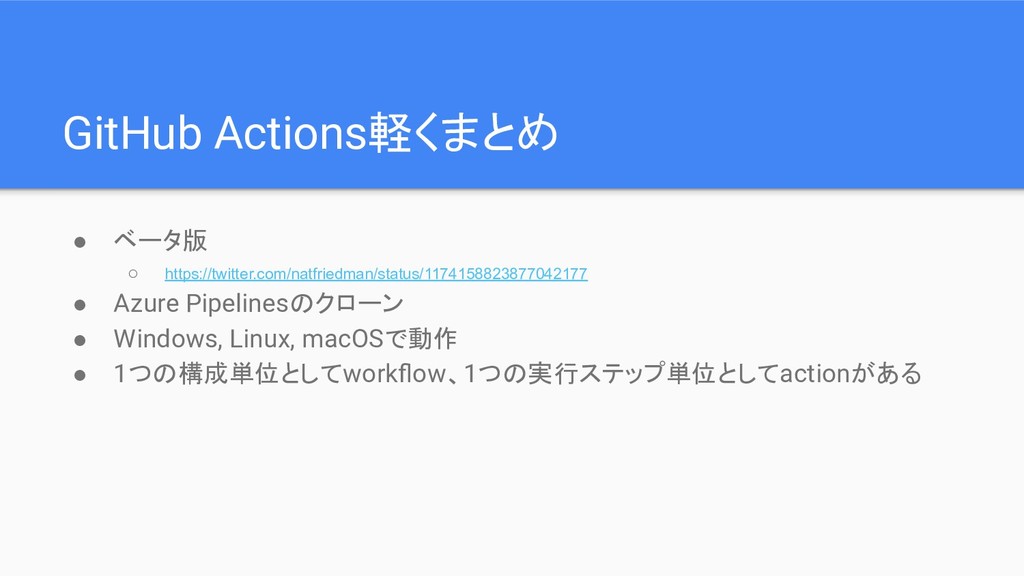
GitHub Actions軽くまとめ • ベータ版 ◦ https://twitter.com/natfriedman/status/1174158823877042177 • Azure Pipelinesのクローン •
Windows, Linux, macOSで動作 • 1つの構成単位としてworkflow、1つの実行ステップ単位としてactionがある
Actionを作るには • 作り方は2種類 ◦ Docker container ◦ JavaScript(Node.js) ← 今回試すのはこっち
• Docker containerはLinuxでのみ対応
注意: 今回作るものはあくまで学習目 的です そして、Dangerのactionを作り ます
そもそもDangerとは • コードレビューを自動化するためのツールみたいなもの ◦ https://github.com/danger/danger • 今回はRuby版を使用
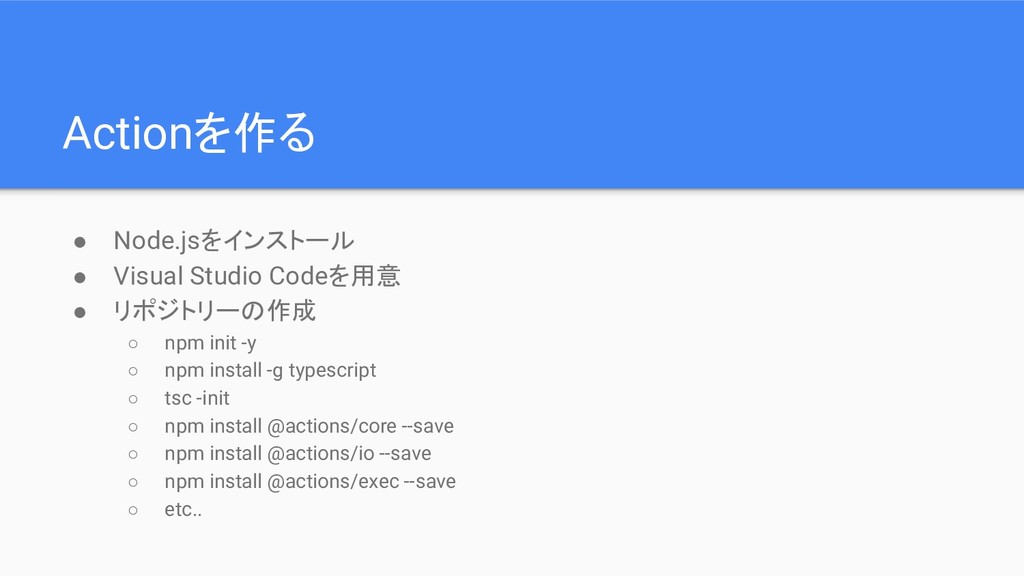
Actionを作る • Node.jsをインストール • Visual Studio Codeを用意 • リポジトリーの作成 ◦
npm init -y ◦ npm install -g typescript ◦ tsc -init ◦ npm install @actions/core --save ◦ npm install @actions/io --save ◦ npm install @actions/exec --save ◦ etc..
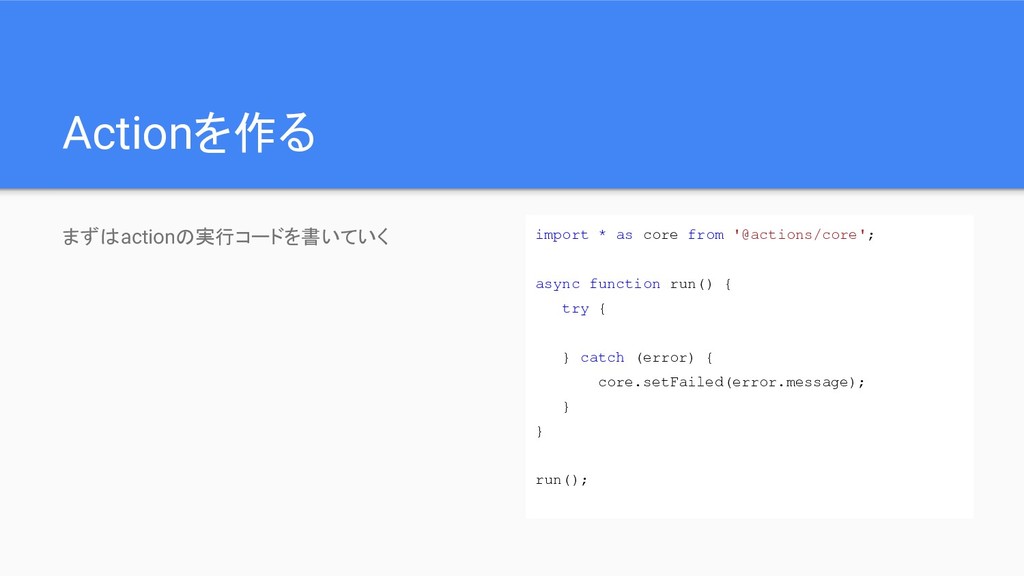
Actionを作る まずはactionの実行コードを書いていく import * as core from '@actions/core'; async function
run() { try { } catch (error) { core.setFailed(error.message); } } run();
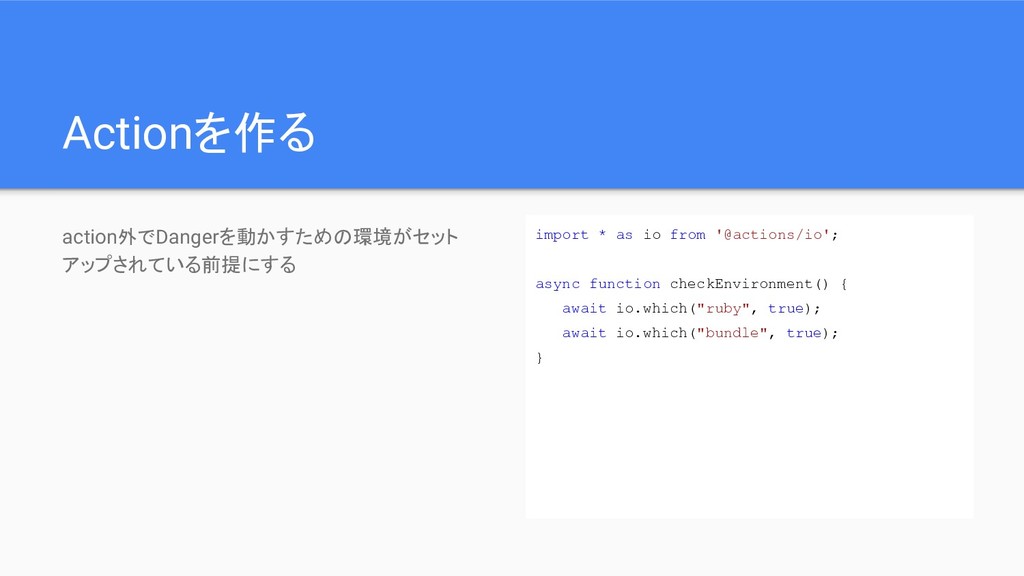
Actionを作る action外でDangerを動かすための環境がセット アップされている前提にする import * as io from '@actions/io'; async
function checkEnvironment() { await io.which("ruby", true); await io.which("bundle", true); }
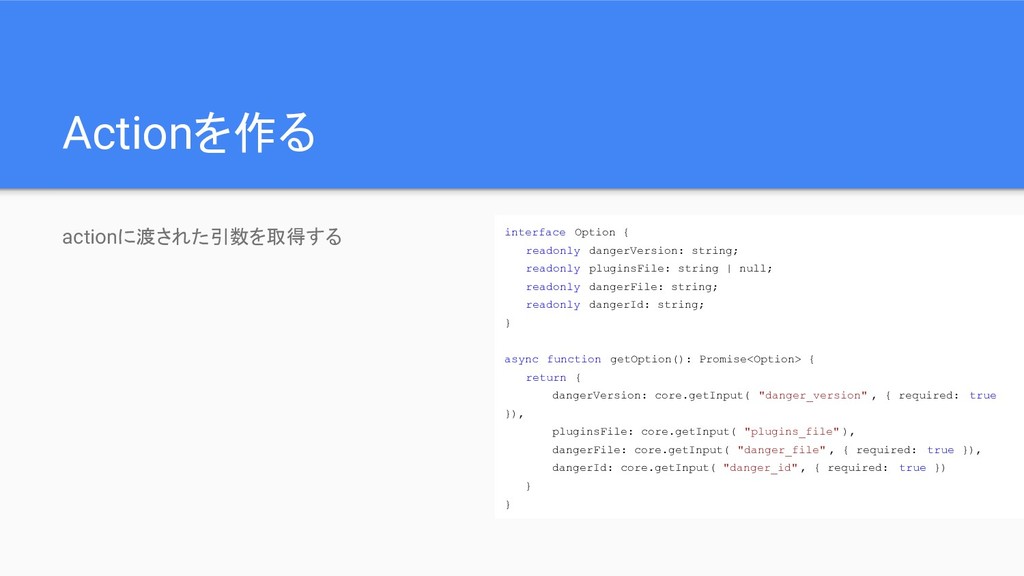
Actionを作る actionに渡された引数を取得する interface Option { readonly dangerVersion: string; readonly pluginsFile:
string | null; readonly dangerFile: string; readonly dangerId: string; } async function getOption(): Promise<Option> { return { dangerVersion: core.getInput( "danger_version" , { required: true }), pluginsFile: core.getInput( "plugins_file" ), dangerFile: core.getInput( "danger_file" , { required: true }), dangerId: core.getInput( "danger_id" , { required: true }) } }
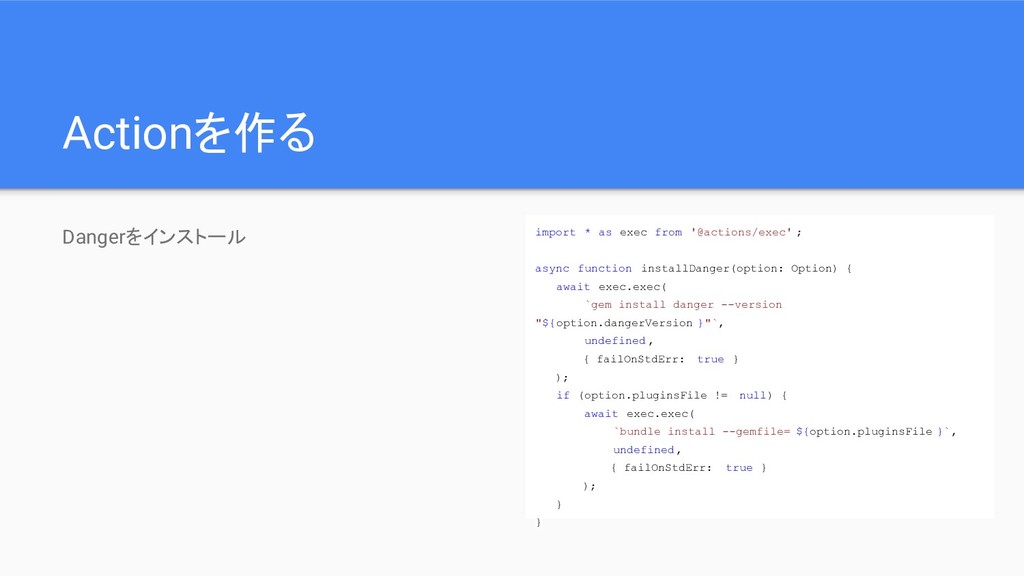
Actionを作る Dangerをインストール import * as exec from '@actions/exec' ; async
function installDanger(option: Option) { await exec.exec( `gem install danger --version "${option.dangerVersion }"`, undefined , { failOnStdErr: true } ); if (option.pluginsFile != null) { await exec.exec( `bundle install --gemfile= ${option.pluginsFile }`, undefined , { failOnStdErr: true } ); } }
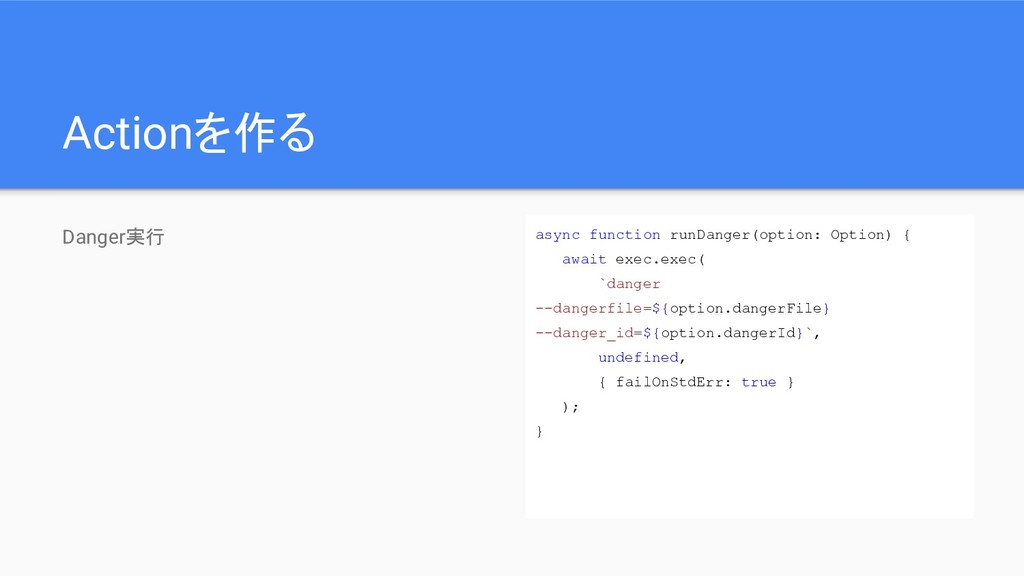
Actionを作る Danger実行 async function runDanger(option: Option) { await exec.exec( `danger
--dangerfile=${option.dangerFile} --danger_id=${option.dangerId}`, undefined, { failOnStdErr: true } ); }
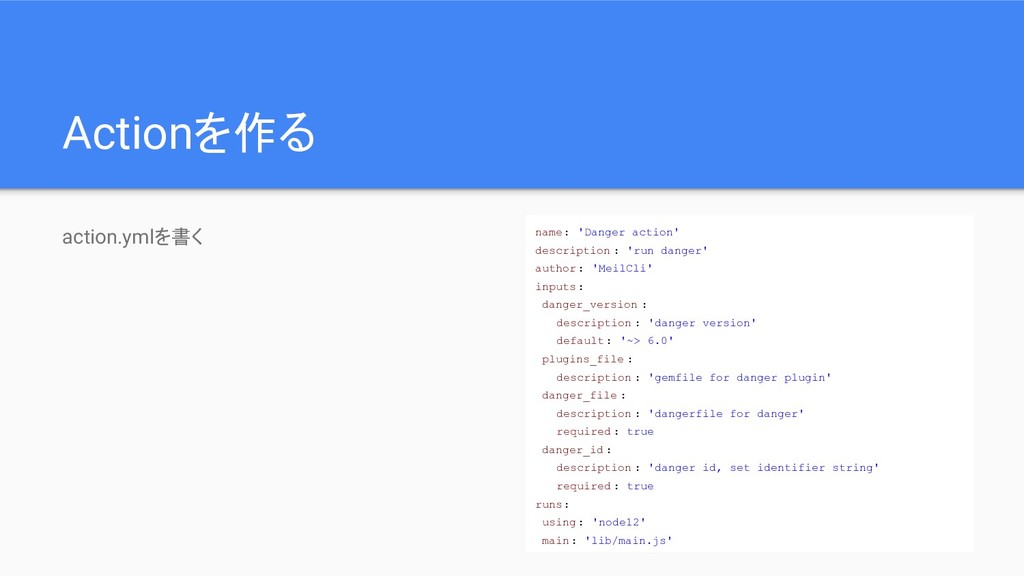
Actionを作る action.ymlを書く name: 'Danger action' description : 'run danger' author:
'MeilCli' inputs: danger_version : description : 'danger version' default: '~> 6.0' plugins_file : description : 'gemfile for danger plugin' danger_file : description : 'dangerfile for danger' required : true danger_id : description : 'danger id, set identifier string' required : true runs: using: 'node12' main: 'lib/main.js'
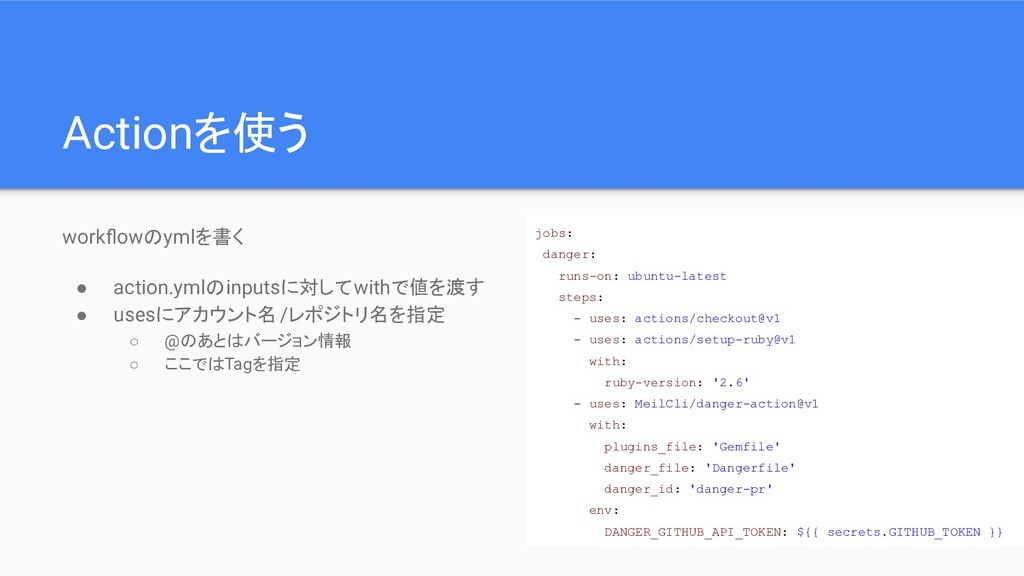
Actionを使う workflowのymlを書く • action.ymlのinputsに対してwithで値を渡す • usesにアカウント名/レポジトリ名を指定 ◦ @のあとはバージョン情報 ◦ ここではTagを指定
jobs: danger: runs-on: ubuntu-latest steps: - uses: actions/checkout@v1 - uses: actions/setup-ruby@v1 with: ruby-version: '2.6' - uses: MeilCli/danger-action@v1 with: plugins_file: 'Gemfile' danger_file: 'Dangerfile' danger_id: 'danger-pr' env: DANGER_GITHUB_API_TOKEN: ${{ secrets.GITHUB_TOKEN }}
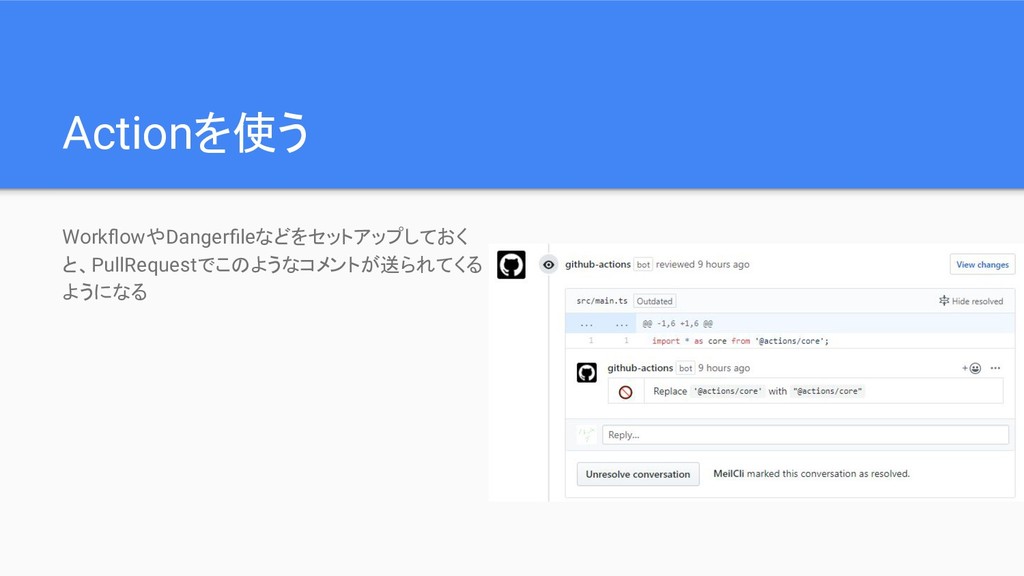
Actionを使う WorkflowやDangerfileなどをセットアップしておく と、PullRequestでこのようなコメントが送られてくる ようになる
Actionを公開する • 基本的にリポジトリーを公開しておくだけでOK ◦ 注意点として.jsファイルとそれが参照する node_modulesも公開しておく必要がある • Marketplaceにも公開できる ◦ https://github.com/marketplace?type=actions
◦ Marketplaceに公開する場合はaction.ymlに必要な情報を記述しておく必要あり ▪ 名前、説明、アイコンなど
おわりに • まとめ ◦ GitHub ActionのactionはTypeScriptで簡単に作ることができる ◦ だからみんなもどんどん作っていってくれ~~ • 今回作ったもの
◦ https://github.com/MeilCli/danger-action ◦ https://github.com/marketplace/actions/danger-action • 解説 ◦ https://blog.meilcli.net/2019/09/15/155447


 meilcli
 taiseiue
 optim
optim
 teyamagu
 kasacchiful
 oku053
 htkym
htkym
 akit37
 sylph01
 yutobara
 clockmaker
 seike460
 moro
moro
 kristinabergwall1
 addyosmani
 marktimemedia
 kneath
 ks91
ks91
 auna
auna
 marketingsoph
 oripsolob
 tmiket
 honzajavorek
 skipperchong
 mkilby