Share
Embed

Transcript
32 slides
-
Entity Framework Core Performance-Optimierung aus der Praxis Example for today
– Products DB Product group Products Prices Sellers Studio -
Entity Framework Core Performance-Optimierung aus der Praxis My usual options
for Entity Framework performance optimization 2nd level cache Hardware upgrade Materialized views Stored procedures Triggers Database Features Server Raw SELECT * FROM … Raw SQL Bulk operations Indices Entity Framework Requests reduction Query restructure Use 3rd party libs if available CPU, Memory, I/O -
Entity Framework Core Performance-Optimierung aus der Praxis Did „the change“
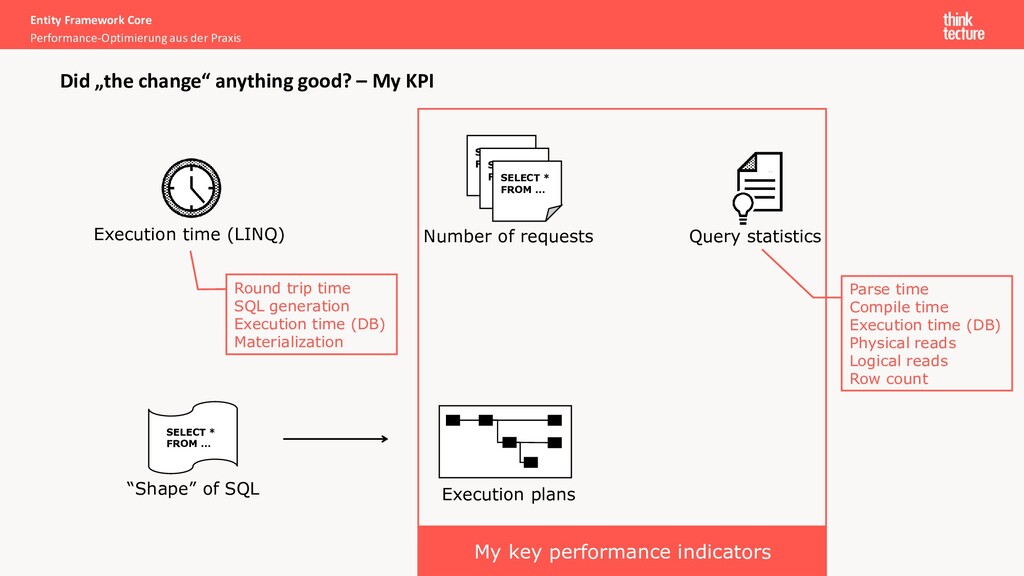
anything good? – My KPI Execution time (LINQ) SELECT * FROM … SELECT * FROM … SELECT * FROM … Number of requests Query statistics SELECT * FROM … “Shape” of SQL Execution plans Parse time Compile time Execution time (DB) Physical reads Logical reads Row count Round trip time SQL generation Execution time (DB) Materialization My key performance indicators -
Entity Framework Core Performance-Optimierung aus der Praxis N+1 queries problem
Execution of hundreds of requests for one use case Caused by: unintentional execution of queries in loops Possible solutions: • Better code structure (software architecture) • Avoid overgeneralization (shared/core projects) • Help each other to improve (review/feedback) • Know the insights of Entity Framework • Lazy loading • Limitations Reducing database requests Demos 1.1 + 1.2 -
Simplified case of indirect execution of database requests in a
loop Library Main Entity Framework Core Performance-Optimierung aus der Praxis Multiple requests in loops Reducing database requests var products = LoadProducts(); var prices = new List<Price>(); foreach (var product in products) { var price = GetPrice(product.Id); prices.Add(price); } public Price GetPrice(Guid productId) { MyDbContext ctx = …; return ctx.Prices.FirstOrDefault(p => p.ProductId == productId); } Executed N times -
Library Main Entity Framework Core Performance-Optimierung aus der Praxis LINQ
queries are loops Reducing database requests var products = LoadProducts(); var prices = products.Select(product => GetPrice(product.Id)) .ToList(); public Price GetPrice(Guid productId) { MyDbContext ctx = …; return ctx.Prices.FirstOrDefault(p => p.ProductId == productId); } -
Library Main Entity Framework Core Performance-Optimierung aus der Praxis Approach
1 – Use-case specific methods Reducing database requests var productsWithPrices = LoadProductsWithPrices(); public List<ProductWithPrices> LoadProductsWithPrices() { return ctx.Products .Include(p => p.Prices) // merely symbolic, fetching prices is usually more complex .ToList(); } Approach 1.1 -
Library Main var products = LoadProducts(); var productIds = products.Select(p
=> p.Id); var prices = GetPrices(productIds); public List<Price> GetPrices(IEnumerable<Guid> productIds) { return ctx.Prices .Where(p => productIds.Contains(p.ProductId)) .ToList(); } Entity Framework Core Performance-Optimierung aus der Praxis Approach 2 – load all required prices at once Reducing database requests Approach 1.2 -
Given: 100 products being in 5 studio Loading of all
products “in one go” leads to 1 + 5 queries Library Main var productsByStudio = ctx.Products .Include(p => p.Studio) .ToLookup(p => p.Studio.Name); Entity Framework Core Performance-Optimierung aus der Praxis Lazy loading Reducing database requests public static ILookup<TKey, TSource> ToLookup<TSource, TKey>( this IEnumerable<TSource> source, Func<TSource, TKey> keySelector) { ... } Use eager loading to prevent unnecessary requests IEnumerable<T> always forces query execution Demo 1.3 -
Entity Framework Core Performance-Optimierung aus der Praxis Finding the problem
area Use profiling tools In case of Microsoft SQL Server: XEvent Profiler in SQL Server Management Studio SQL Server Profiler (deprecated, resource intensive) Azure Data Studio Logs coming from EF with EnableSensitiveDataLogging Reducing database requests Logging DbContextOptionsBuilder builder = ...; builder.UseSqlServer("...") // or any other database .UseLoggerFactory(loggerFactory) .EnableSensitiveDataLogging(); In development only because possible security leak! -
Entity Framework Core Performance-Optimierung aus der Praxis Finding the problem
area Look for repetitive lines and cycles Reducing database requests Repetive lines Cycles Demo: SQL Server Profiler -
Query tags: correlation between LINQ and SQL LINQ SQL Entity
Framework Core Performance-Optimierung aus der Praxis Finding the problem area Reducing database requests var products = ctx.Products .TagWith("My Query") .ToList(); -- My Query SELECT * FROM Products -
Entity Framework Core Performance-Optimierung aus der Praxis Cartesian explosion problem
Fetching a lot of data from multiple tables at once • Increased memory consumption and execution time • High I/O load Caused by: loading of multiple navigational collection-properties Possible solutions: • Reduce Includes (eager loading) • Reduce access to navigational properties in projections (i.e. Select) Reducing query complexity Query splitting Demo 2.1 -
Entity Framework Core Performance-Optimierung aus der Praxis Eager loading via
Include EF 5 loads all data using 1 SQL statement by default (QuerySplittingBehavior.SingleQuery) • Bigger result sets: 100 products with 10 prices each and 2 sellers (incl. Product-Seller-relationship) (100 * 10 * 2) rows > (100 + 1000 + 2 + 200) rows • EF-forced ORDER BY clause produces considerable load Reducing query complexity Product Id Price Id Seller Id 1 1 1 1 1 2 1 2 1 1 2 2 1 3 1 1 3 2 SQL LINQ var products = ctx.Products .Include(p => p.Studio) .Include(p => p.Prices) .Include(p => p.Sellers) .ToList(); SELECT * FROM Products INNER JOIN Studios ... LEFT JOIN Prices ON ... LEFT JOIN Sellers ON ... ... ORDER BY Products.Id, Prices.Id, Sellers.Id Cartesian explosion -
EF 5 allows to change the QuerySplittingBehavior from SingleQuery to
SplitQuery Entity Framework Core Performance-Optimierung aus der Praxis Query splitting Reducing query complexity Approach 2.1 LINQ var products = ctx.Products .AsSplitQuery() .Include(p => p.Studio) .Include(p => p.Prices) .Include(p => p.Sellers) .ToList(); -
Before Entity Framework Core Performance-Optimierung aus der Praxis Using collections
in projections But, SplitQuery is not supported in Select (yet) Statistics: • CPU: 31 • Duration: 75 • Reads: 5299 • Row Count: 12342 Reducing query complexity LINQ var studios = ctx.Studios .Select(s => new MyStudio { Id = s.Id, Name = s.Name, Infinity = s.Products.Where(p => p.Name.StartsWith("Infinity")), Endgame = s.Products.Where(p => p.Name.StartsWith("Endgame")) }) .ToList(); Demo 2.2 -
Before Usually, loading collection separately requires more code but less
resources on database Statistics: • CPU: 31 • Duration: 75 • Reads: 5299 • Row Count: 12342 After LINQ Entity Framework Core Performance-Optimierung aus der Praxis Query splitting Reducing query complexity var studios = ctx.Studios.Select(p => new Studio() { Id = p.Id, Name = p.Name }).ToList(); var infinity = ctx.Products.Where(p => p.Name.StartsWith("Infinity")).ToList(); var endgame = ctx.Products.Where(p => p.Name.StartsWith("Endgame")).ToList(); var infinityLookup = infinity.ToLookup(p => p.StudioId); var endgameLookup = endgame.ToLookup(p => p.StudioId); foreach (var studio in studios) { studio.Infinity = infinityLookup[studio.Id]; sturio.Endgame = endgameLooup[studio.Id]; } Necessary, if change tracking is disabled 16 3 352 2322 Approach 2.2 -
LINQ 2 LINQ 1 Entity Framework Core Performance-Optimierung aus der
Praxis Which one is better? Understanding Queries var groups = ctx.ProductGroups .Select(g => new { g.Products.FirstOrDefault().Id, g.Products.FirstOrDefault().Name }) .ToList(); var groups = ctx.ProductGroups .Select(g => g.Products .Select(p => new { p.Id, p.Name }) .FirstOrDefault()) .ToList(); 2x “FirstOrDefault()” before selecting properties Selection of properties before “FirstOrDefault()” -
SQL 2 SQL 1 Entity Framework Core Performance-Optimierung aus der
Praxis Lets try with SQL … Understanding Queries SELECT ( SELECT TOP(1) p.Id FROM Products p WHERE g.Id = p.ProductGroupId ) AS FirstProductId, ( SELECT TOP(1) p.Name FROM Products p WHERE g.Id = p.ProductGroupId ) AS FirstProductName FROM ProductGroups g SELECT p.Id, p.Name FROM ProductGroups g LEFT JOIN ( SELECT Id, Name, ProductGroupId FROM ( SELECT Id, Name, ProductGroupId, ROW_NUMBER() OVER(PARTITION BY ProductGroupId ORDER BY Id) AS row FROM Products ) p WHERE row <= 1 ) p ON g.Id = p. ProductGroupId 2 sub-selects Window function “ROW_NUMBER” -
Entity Framework Core Performance-Optimierung aus der Praxis Textual representation of
all database operations • Type and the order of operations (JOIN, filter, projection, ...) • Indexes being used • Amount of data flowing between two operations • Costs of an operation and a subtree Some tools have built-in support for displaying execution plans as a graph Execution plans -
Entity Framework Core Performance-Optimierung aus der Praxis Another try …
Execution plans Execution plan 1 SQL 1 SELECT ( SELECT TOP(1) p.Id FROM Products p WHERE g.Id = p.ProductGroupId ) AS FirstProductId, ( SELECT TOP(1) p.Name FROM Products p WHERE g.Id = p.ProductGroupId ) AS FirstProductName FROM ProductGroups g -
Entity Framework Core Performance-Optimierung aus der Praxis Execution plans Execution
plan 2 SQL 2 SELECT p.Id, p.Name FROM ProductGroups g LEFT JOIN ( SELECT Id, Name, ProductGroupId FROM ( SELECT Id, Name, ProductGroupId, ROW_NUMBER() OVER(PARTITION BY ProductGroupId ORDER BY Id) AS row FROM Products ) p WHERE row <= 1 ) p ON g.Id = p.ProductGroupId -
Entity Framework Core Performance-Optimierung aus der Praxis Comparing • Compare
estimated subtree costs • Deviance: estimated vs actual number of rows • Take statistics (like reads) into consideration Execution plans Demo 3.1 Query 1 wins?! -
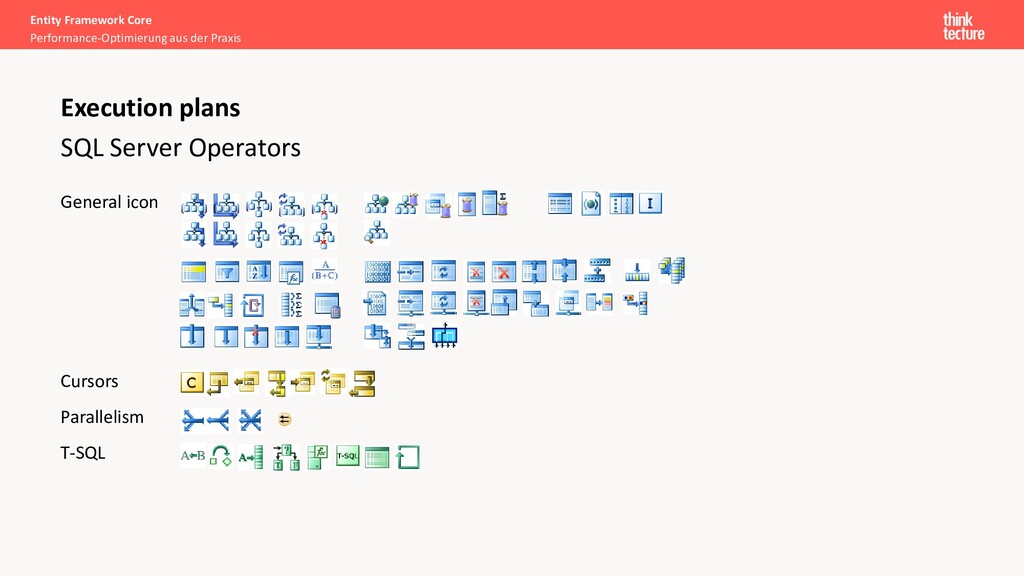
Entity Framework Core Performance-Optimierung aus der Praxis SQL Server Operators
General icon Cursors Parallelism T-SQL Execution plans -
Entity Framework Core Performance-Optimierung aus der Praxis Execution plans Crash
course Table scan Clustered index scan Non-clustered index scan Clustered index seek Non-clustered index seek Scan No clustered index Seek Filter Filtering Filtering Filtering Key lookup Missing (include) columns? RID lookup If no clustered index Sort “Stop & Go” operator! Required? Missing index? Sorting in .NET cheaper? Parallelism Expensive High query complexity Missing index? Fuzzy search? Bad discriminator? -
Entity Framework Core Performance-Optimierung aus der Praxis JOINs Execution plans
DB may perform sort on its own • Resource-saving • Data sets must be ordered • The “default” • Kind-of 2 nested loops • Speed depends on: • Scan of data set A • Seek of data set B • Large and unsorted sets • 2 phases: • Builds hash table for set A • Matches hash values from B Should be looked at Merge join Nested loop join Hash match join -
Entity Framework Core Performance-Optimierung aus der Praxis Learnings • Look
for database requests in “loops” • Split complex queries if necessary • Learn to read execution plans - optimize queries accordingly Resources • Entity Framework Core: https://docs.microsoft.com/en-us/ef/core/ • Execution Plans: https://docs.microsoft.com/en-us/sql/relational-databases/performance/execution-plans • Webinar demos: https://github.com/thinktecture/ef-core-performance-webinar-2021 • My EF playground: https://github.com/PawelGerr/EntityFrameworkCore-Demos Ask me @pawelgerr [email protected]
 pawelgerr
 3saito
 rkaga
 l2hyunwoo
 ivargrimstad
 sakawe_ee
 kasacchiful
 yuuu
 kishida
 omatty198
 youto
 phigasui
 richargh
 inesmontani
 nmsamuel
 tamaranovitovic
 tmiket
 lara
 tessaabrams
 pedronauck
 3n
 addyosmani
 chikuwait
 aleyda
 greggifford