Upgrade to Pro
— share decks privately, control downloads, hide ads and more …
Speaker Deck
Sign up for free
Menu
Search
Features
All features
Private URLs
Password Protection
Custom URLS
Scheduled publishing
Remove Branding
Restrict embedding
Deck Collections
Notes
Features
All features
Private URLs
Password Protection
Custom URLS
Scheduled publishing
Remove Branding
Restrict embedding
Deck Collections
Notes
Explore
Featured decks
Featured speakers
Programming
Technology
Storyboards
Explore
Featured decks
Featured speakers
Programming
Technology
Storyboards
Pricing
Search
Sign in
Sign up for free
iOS・Androidの文字サイズ設定をWebViewに!モバイルUIのアクセシビリティ...
Search
おしん
May 09, 2026
Technology
210
1
Share
Embed
Copy iframe code
Copy JS code
Copy link
Start on current slide
iOS・Androidの文字サイズ設定をWebViewに!モバイルUIのアクセシビリティTips
フロントエンドカンファレンス名古屋 2026 でのLTで使用したスライドです。
おしん
May 09, 2026
More Decks by おしん
See All by おしん
モバイルアプリへのRemoteConfigの恩恵
shincarpediem
1
190
Swift UI デフォルト引数クイズ
shincarpediem
0
180
よりアプリらしさを出すために
shincarpediem
0
180
Concurrency Warningが 沢山出たから聞いてほしい ~Xcode 16.1 Beta 編~
shincarpediem
0
280
iOSのPhoto Libraryアクセス権限を見直してみよう
shincarpediem
0
290
SwiftUI登場前のVIPERアプリでもSwiftUIをスムーズに導入できた話
shincarpediem
2
1.9k
VIPERアプリにSwiftUIを導入してみた
shincarpediem
0
480
Other Decks in Technology
See All in Technology
Refining Active Record
shugo
0
170
FinOps Agentが生んだ技術負債:コスト自動調査の落とし穴と解消までの道のり
oasis1994liveforever
2
160
僕のハーネスを紹介します
watany
3
350
Optunaの最新リリースv5.0について
pfn
PRO
0
120
V8のArray.prototype.flatを最大約20倍速くするまでと、巨大OSSへの大規模コミットの道のり
riyaamemiya
0
310
Benchmarking Disaggregated Serving on vLLM + Dynamo with a Real Coding-Agent Workload
nttcom
1
200
今さら理解するウェブフォントver.2026
takanorip
3
920
AI コーディングと人間の認知スループット / CTO Night & Day 2026 Morning Session / AI Coding and Human Cognitive Throughput
prog893
5
1.3k
宣言型部分更新は何を解決しどこへ向かうのか
shuta13
1
490
SAENM ~Jupyterで残すPoCの試行錯誤、未来の自分と仲間を助ける記録!~
terapyon
0
130
コンテナ運用におけるネットワーク・コンテナコストの削減方法/How to Reduce Network and Container Costs in Container Operations
masakiokuda
2
310
自作バイナリを動かす「入口」8選
puhitaku
2
1.3k
Featured
See All Featured
Navigating the Design Leadership Dip - Product Design Week Design Leaders+ Conference 2024
apolaine
2
480
<Decoding/> the Language of Devs - We Love SEO 2024
nikkihalliwell
1
360
Digital Projects Gone Horribly Wrong (And the UX Pros Who Still Save the Day) - Dean Schuster
uxyall
1
3.4k
From Legacy to Launchpad: Building Startup-Ready Communities
dugsong
0
360
Scaling GitHub
holman
464
140k
What Being in a Rock Band Can Teach Us About Real World SEO
427marketing
0
1.1k
Utilizing Notion as your number one productivity tool
mfonobong
4
620
Conquering PDFs: document understanding beyond plain text
inesmontani
PRO
4
3.2k
A better future with KSS
kneath
240
18k
Producing Creativity
orderedlist
PRO
348
41k
Site-Speed That Sticks
csswizardry
13
1.6k
Embracing the Ebb and Flow
colly
88
5.2k
Transcript
モバイルUIのアクセシビリティTips おしん / @38Punkd iOS ・Android の 文字サイズ設定を WebView に!
・株式会社スタメン ・iOSエンジニア ・アプリネイティブ × WebViewの ハイブリッドアプリ開発に携わってきました おしん / @38Punkd
WebView だけ、文字サイズが固定になっていませんか? アプリネイティブ画面 OS 設定に追従 iOSの Dynamic Type や Androidのフォ
ントスケールに合わせて読みやすくなる WebView 画面 標準サイズのまま ユーザーが選んだ文字サイズが Webコンテンツだけ反映されない (特にiOSで) Web とネイティブの境界にあるため、対応漏れが起きやすい
文字サイズ設定は「特別対応」ではない iOS Android Android 14 以降は 最大200%のフォントスケーリングをサポート (従来は最大130%) OSの標準機能 対応工数に対して、UX
改善のインパクトが大きい領 域 出典: https://medium.com/airbnb-engineering/supporting-dynamic-type-at-airbnb- b47c68b0c998 3 割 文字サイズ調整を有効化している スマホユーザー
iOS ネイティブ:実装のポイント ① Swift: Dynamic Type 変更を検知してフォントサイズを JS で注入 //
通知の登録 NotificationCenter.default.addObserver( self, selector: #selector(dynamicTypeDidChange), name: UIContentSizeCategory.didChangeNotification, object: nil ) @objc private func dynamicTypeDidChange() { applyFontSize() } func webView(_ webView: WKWebView, didFinish navigation: WKNavigation!) { applyFontSize() // ページロード完了時にも適用 } private func applyFontSize() { let size = UIFont.preferredFont(forTextStyle: .body).pointSize webView?.evaluateJavaScript( "document.documentElement.style.fontSize = '\(size)px'", completionHandler: nil ) } 通知を受信したら Swift 側で body サイズを取得し evaluateJavaScript で :root の font-size を書き換える
iOS WebView :実装のポイント ② CSS: font-size はrem 単位で指定 :root {
font-size: 17px; /* フォールバック */ } .title { font-size: 1.143rem; } /* ✅ スケー ルする */ .description { font-size: 0.857rem; } /* ✅ スケー ルする */ .bad-title { font-size: 16px; } /* ❌ スケール しない */ Swift が :root の font-size を書き換えるので rem 指定の要素がすべて連動してスケールする
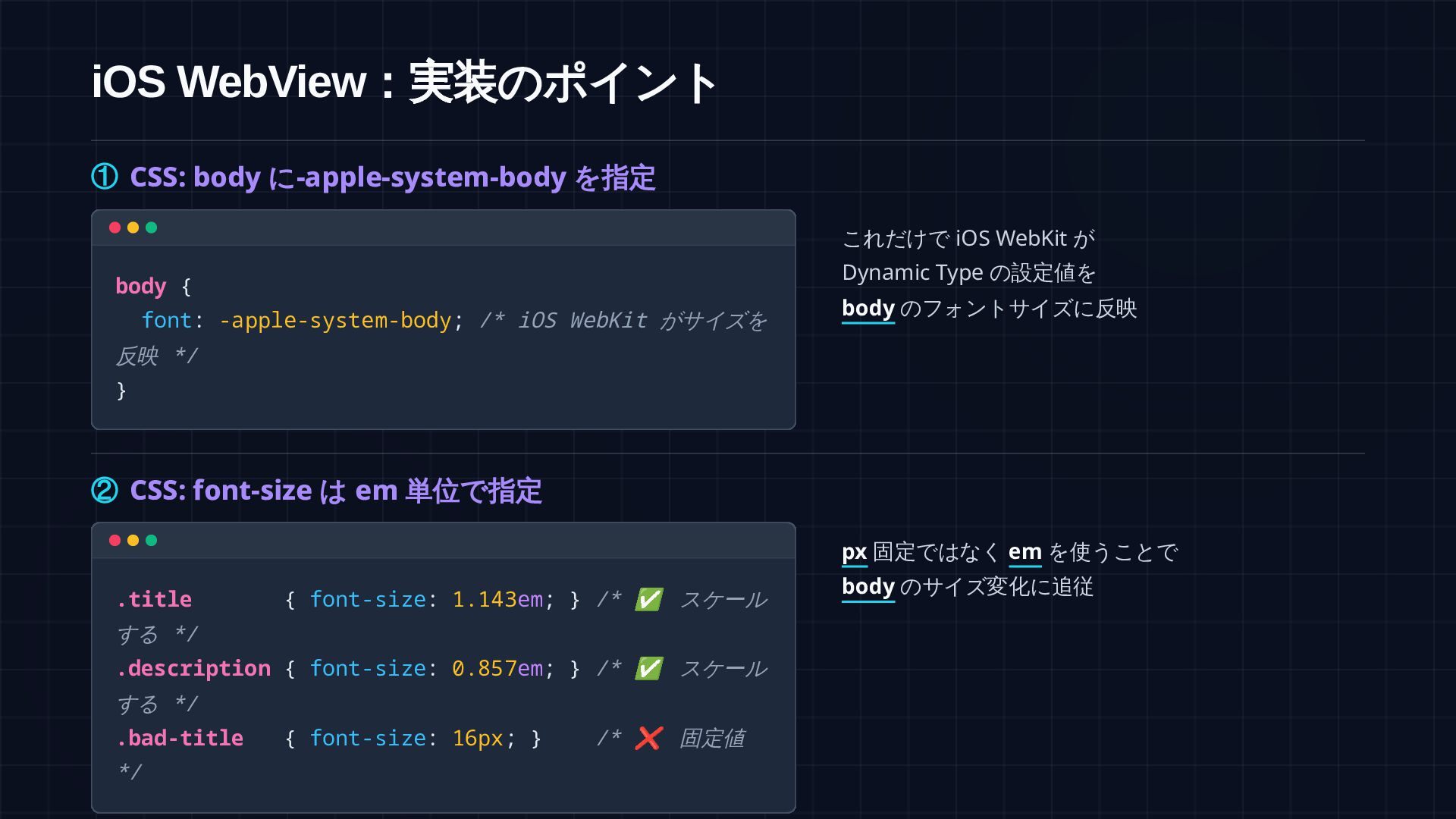
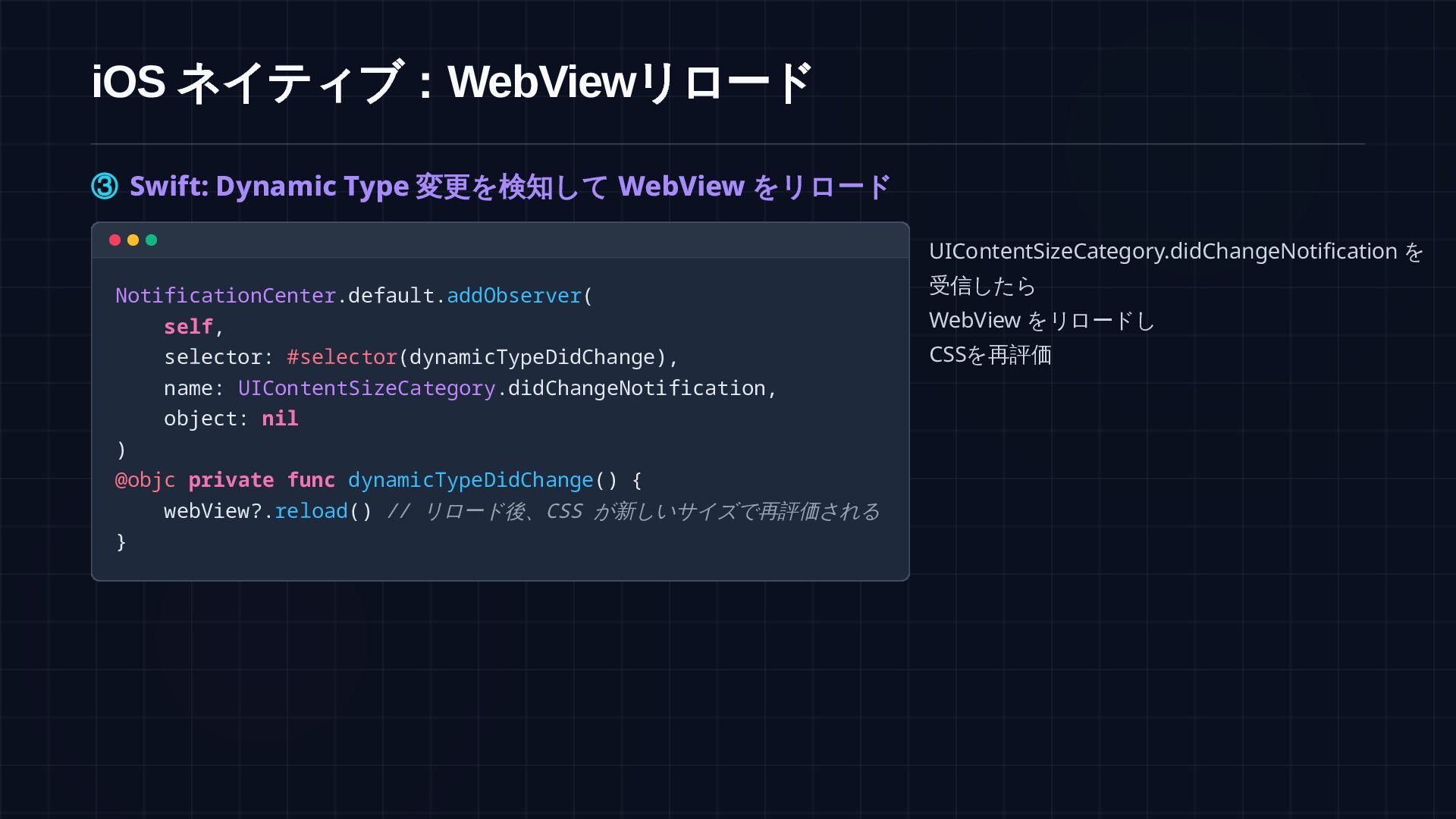
参考:より楽な代替案 -apple-system-body を指定し、通知受信時に webView.reload() を呼ぶだけでも同様の効果が得られます /* CSS: 指定するだけでよい */ :root,
body { font: -apple-system-body; } // Swift: リロードで CSS を再評価 @objc private func dynamicTypeDidChange() { webView?.reload() } 比較 JS 注入(推奨) -apple-system-body (代替案) 反映速度 即時反映(シームレス) リロードが発生する カスタマイズ性 高い(上限キャップ等が可能) Appleのスケールに固定される 実装コスト 小(JS連携が必要) 極小(非常にシンプル)
Android :「対応できている風」に注意 文字が大きく見えても、実態は 文字だけのスケーリングではなく、Activity再生成とWebView全体ズームに 依存している場合があります 見た目 文字サイズ設定に追従しているように見える 実態 Activity 再生成でWebViewが作り直される
副作用 文字だけでなく画像・余白もズームされ得る リスク スクロール位置や入力中の状態が失われる可能性 がある → WebView WebView
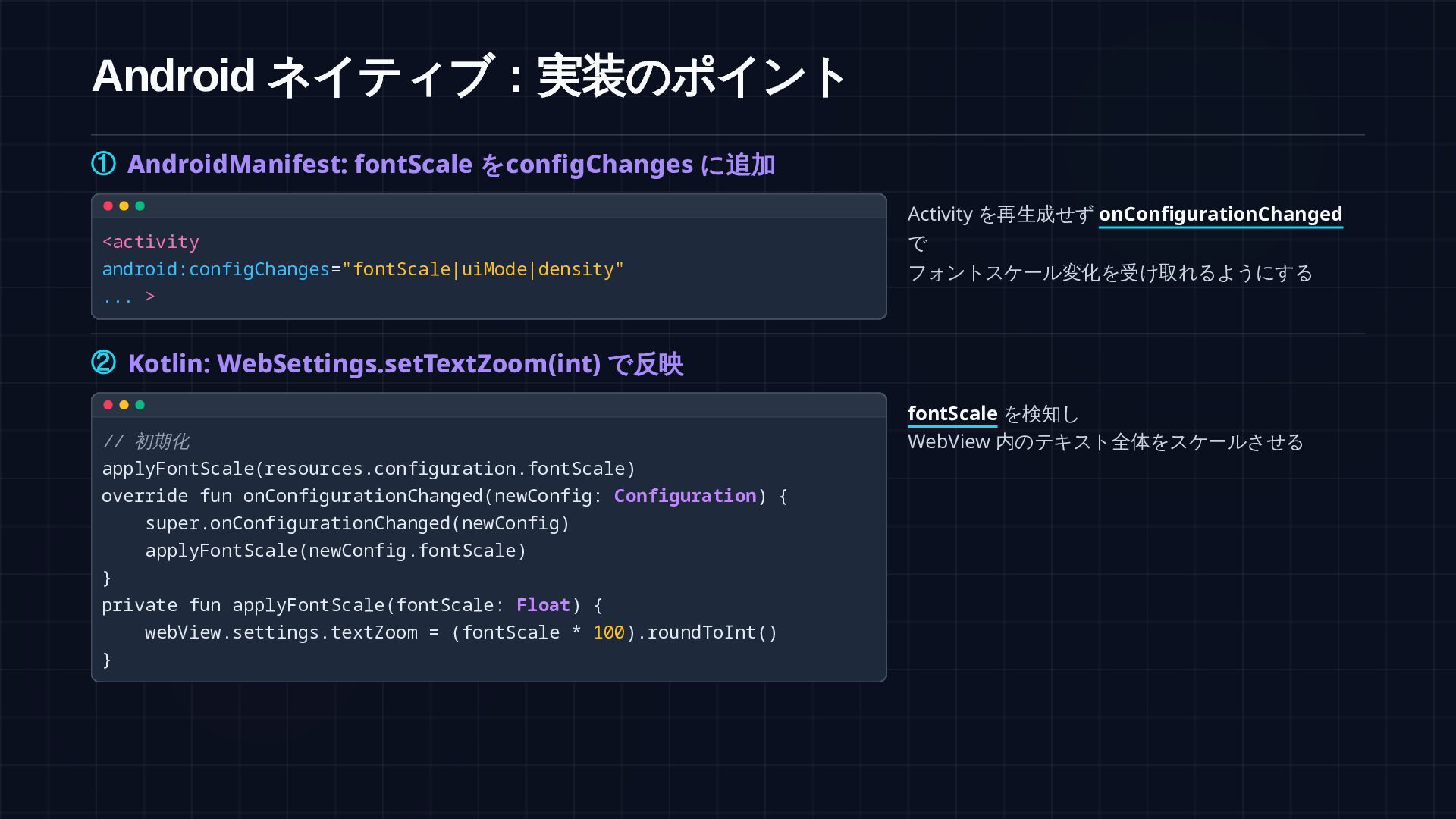
Android ネイティブ:実装のポイント ① AndroidManifest: fontScale をconfigChanges に追加 <activity android:configChanges="fontScale|uiMode|density" ...
> Activity を再生成せず onConfigurationChanged で フォントスケール変化を受け取れるようにする ② Kotlin: WebSettings.setTextZoom(int) で反映 // 初期化 applyFontScale(resources.configuration.fontScale) override fun onConfigurationChanged(newConfig: Configuration) { super.onConfigurationChanged(newConfig) applyFontScale(newConfig.fontScale) } private fun applyFontScale(fontScale: Float) { webView.settings.textZoom = (fontScale * 100).roundToInt() } fontScale を検知し WebView 内のテキスト全体をスケールさせる
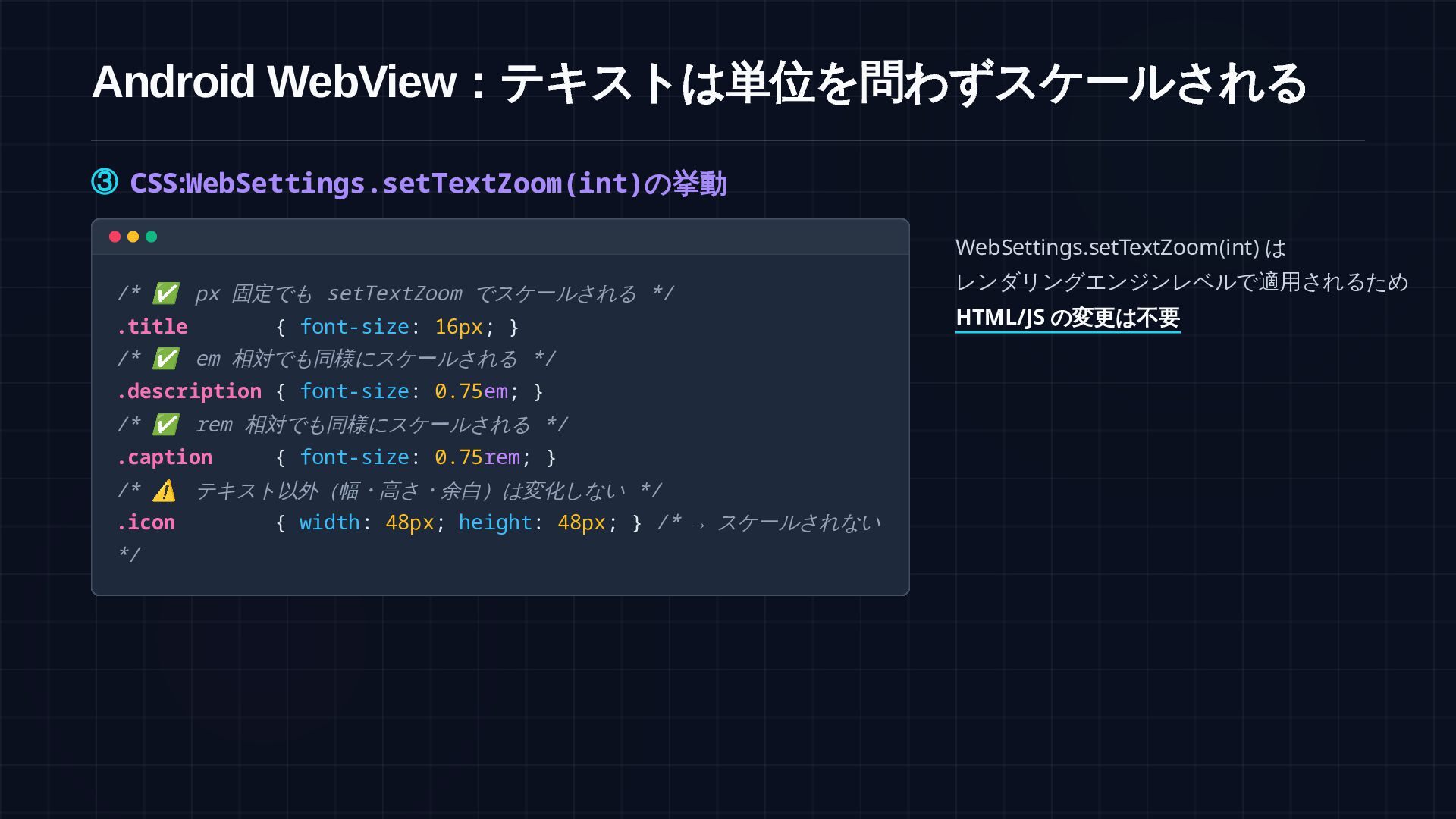
Android WebView :テキストは単位を問わずスケールされる ③ CSS: WebSettings.setTextZoom(int) の挙動 /* ✅ px
固定でも setTextZoom でスケールされる */ .title { font-size: 16px; } /* ✅ em 相対でも同様にスケールされる */ .description { font-size: 0.75em; } /* ✅ rem 相対でも同様にスケールされる */ .caption { font-size: 0.75rem; } /* ⚠ テキスト以外(幅・高さ・余白)は変化しない */ .icon { width: 48px; height: 48px; } /* → スケールされない */ WebSettings.setTextZoom(int) は レンダリングエンジンレベルで適用されるため HTML/JS の変更は不要
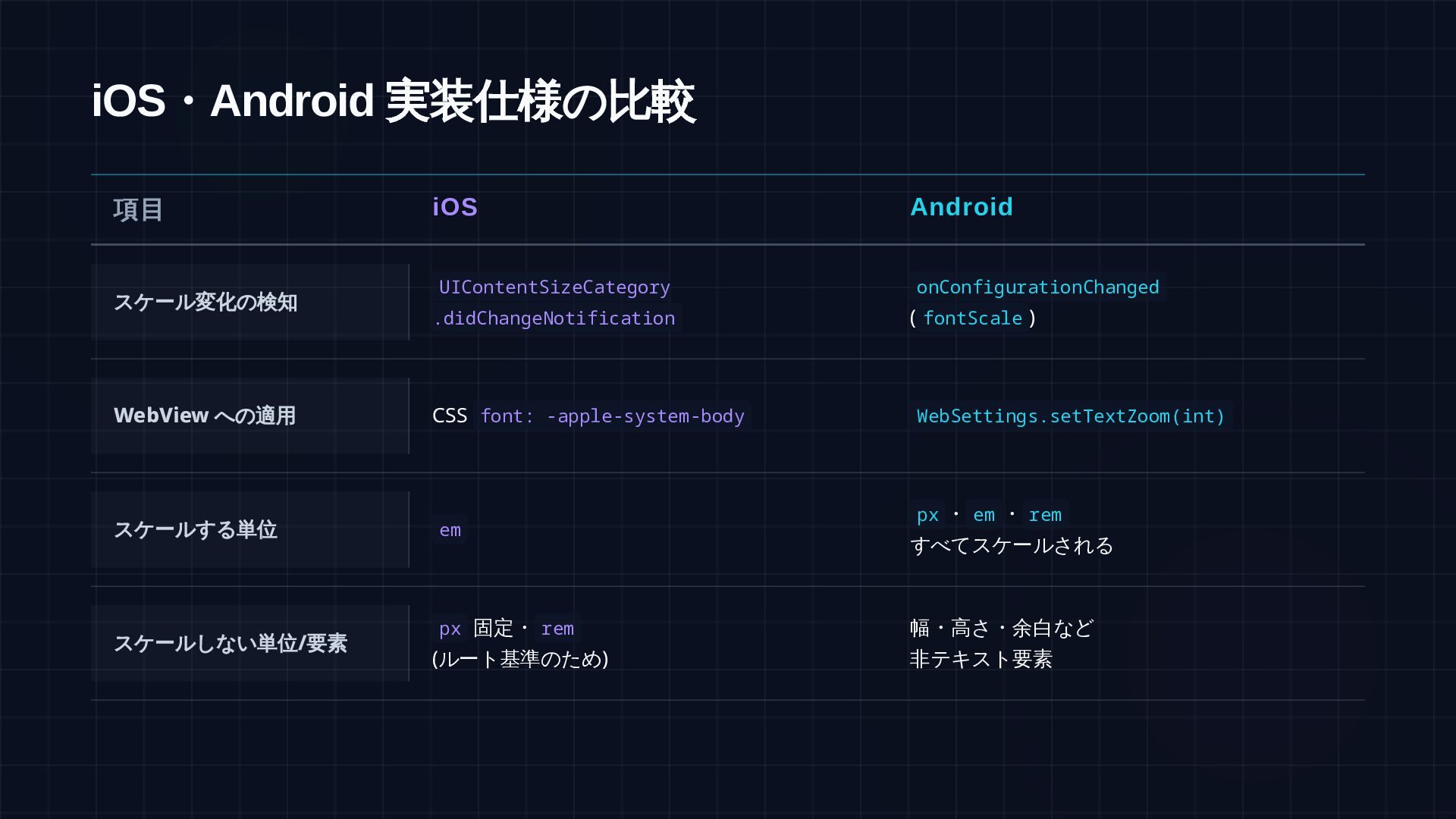
iOS ・Android 実装仕様の比較 項目 iOS Android スケール変化の検知 UIContentSizeCategory .didChangeNotification onConfigurationChanged
(fontScale) WebView への適用 スケールする単位 px・em・rem・% すべてスケールされる スケールしない単位/ 要素 px 幅・高さ・余白など 非テキスト要素 document.documentElement.style.fontSize WebSettings.setTextZoom(int) ・rem・% em
サンプルコード iOS https://github.com/shin- carpediem/DynamicTypeWebViewDemo Android https://github.com/shin- carpediem/AndroidDynamicTypeWebViewDemo


 shincarpediem
 shugo
shugo
 oasis1994liveforever
 watany
 pfn
pfn
 riyaamemiya
 nttcom
 takanorip
 prog893
 shuta13
 terapyon
 masakiokuda
 puhitaku
 apolaine
 nikkihalliwell
 uxyall
 dugsong
 holman
 427marketing
 mfonobong
 inesmontani
 kneath
 orderedlist
 csswizardry
 colly
colly