Share
Embed
Continuous Delivery Workshop with Ansible x GitLab CI (3rd)
# DevOps 人一定要知道的持續交付技巧 - Ansible & GitLab CI 實戰演練 (3rd)
Ansible 是個與 Puppet, Salt, Chef 並列其四的 Infrastructure as Code 組態設定工具,其簡單易用的特性讓人愛不釋手;GitLab 是業界常見的 Git 私有版本控制服務,搭配其 GitLab CI 更能建立屬於自己的發佈流程。
本次凍仁將藉由工作坊的形式,讓國立臺中科技大學資訊與流通學院的領航員們,在實戰過程中,體驗持續交付和自動化的世界!
* 活動網址: Secret
* Wiki: https://gitlab.com/chusiang/continuous-delivery-workshop/wikis/home
#Ansible #GitLab #DevOps #Workshop
Chu-Siang Lai
November 25, 2017
Transcript
149 slides
-
______________________________ / DevOps ⼈人⼀一定要知道的持續交付技巧 \ \ - Ansible & GitLab
CI 實戰演練 (3rd)/ ------------------------------ \ \ ^__^ \ (oo)\_______ (__)\ )\/\ ||----w | || || [ chusiang@nutc ~ ] $ cat .profile # Author: 凍仁翔 / [email protected] # Blog: http://note.drx.tw # Modified: 2017-11-25 11:25 -
關於我 • 凍仁翔 (@chusiang_lai)。 • 「凍仁的筆記」部落落客。 • DevOps Taiwan 志⼯工。
• 5 年年 IT 維運經驗。 3 -
Outline 1. DevOps ⼈人是什什麼? 2. 持續交付是什什麼? 3. GitLab 是什什麼? 4.
怎麼操作 GitLab CI? 5. 怎麼⽤用 Ansible 和 GitLab CI 進⾏行行持續交付? 10 -
Outline 6. Ansible 是什什麼? 7. 怎麼部署 Ansible 環境? 8. 怎麼操作
Ansible? 9. Q & A 12 -
狹義的 DevOps 是什什麼? Infra 15 Dev Ops ITSM ※ 此圖出⾃自
Mark Smalley x 許峰於 DevOpsDays Taipei 2017 的分享 - https://youtu.be/qWbcujKw57c?t=9m39s DevOps -
DevOps ⼈人是什什麼? 不⽤用 20 分 有事 On-call Coding 管機器 沒事讓
code "⾃自⼰己" 管機器 18 -
可以⽤用什什麼 Tools 替代? Ansible Chef, Puppet, Slat Docker AWS, Vagrant
OpenStack GitLab CI, Jenkins CI, Drone CI Git, GitLab GitHub 21 -
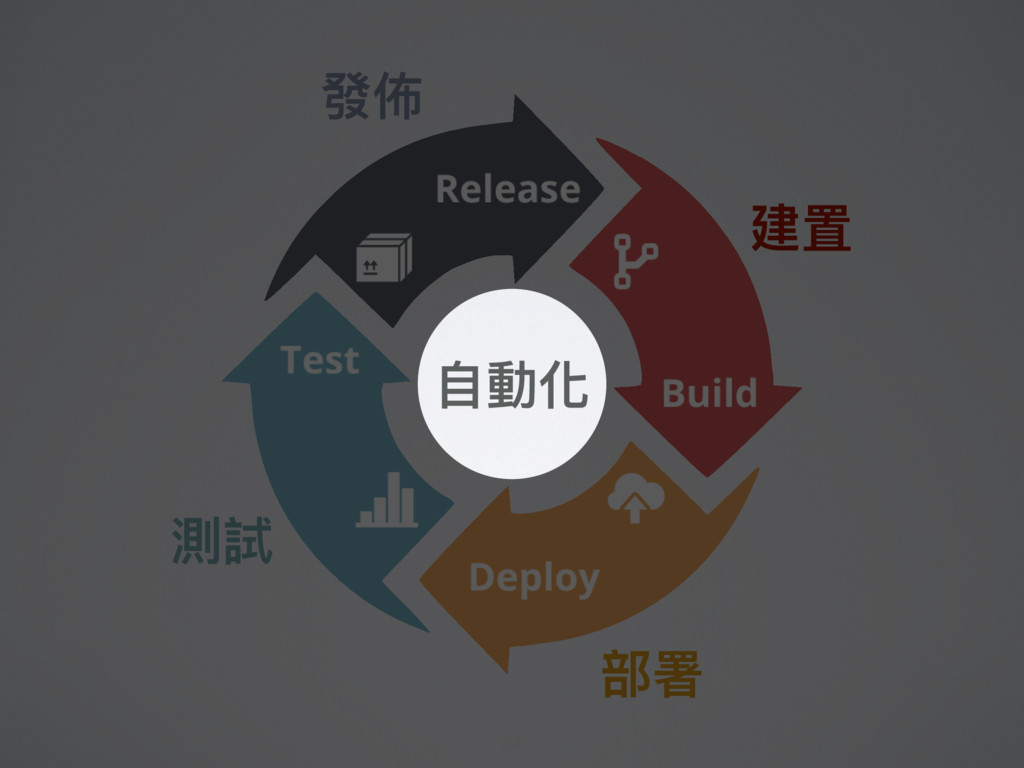
利利⽤用⾃自動化的 建置、測試與部署 ,完美創造出可信賴 的軟體發佈 - Jez Humble & David Farley
《Continuous Delivery 中⽂文版》- https://goo.gl/SK745B 23 -
持續交付和持續部署有什什麼不同? Continuous Delivery Continuous Deployment auto auto manual Build Deploy
Test Release auto auto auto Build Deploy Test Release 30 -
持續交付和持續部署有什什麼不同? 前者需⼿手動 Release ⾄至 Production,⽽而後者則⾃自動化之。 Continuous Delivery Continuous Deployment auto
auto manual Build Deploy Test Release auto auto auto Build Deploy Test Release 31 -
R&D:我程式寫完了了! 我:等 CD 過了了再說。 Code 還在本機? 推上 Git server? 組態設定對了了?
單元測試過了了? 持續交付過了了? 真 實 案 例例 R&D:我程式寫完了了! 我:(哪裡寫完了了?!) 33 -
R&D:我程式寫完了了! 我:等 CD 過了了再說。 Code 還在本機? 推上 Git server? 組態設定對了了?
單元測試過了了? 持續交付過了了? 真 實 案 例例 35 -
Ch 5. 部署流⽔水線解析 Ch 6. 建置與部署的腳本化 Ch 7. 提交階段 Ch
8. ⾃自動化驗測試 Ch 9. 非功能性需求測試 Ch 10. 應⽤用程式的部署與發佈 書中的 Pipeline 是什什麼? 《Continuous Delivery》- https://goo.gl/r9vXFg 44 -
原始 程式碼 應⽤用程式 設置 提交階段 編譯 單元測試 程式碼分析 組裝 binaries
驗收階段 設置環境 部署 binaries 冒煙測試 驗收測試 UAT 階段 設置環境 部署 binaries 冒煙測試 探索性測試 ⽣生產⼒力力測試階段 設置環境 部署 binaries 冒煙測試 執⾏行行⽣生產⼒力力測試 ⽣生產環境 設置環境 部署 binaries 冒煙測試 版本控制 ⾃自動發佈 ⾃自動發佈 ⼀一鍵發佈 ⼀一鍵發佈 Binary 儲存庫 binaries metadata 程式碼 應⽤用程式設置 binaries metadata binaries binaries metadata metadata Adapted from “Continuous Delivery” © Dave Farley and Jez Humble 2010 Translated by Chu-Siang Lai 2017 45 -
原始 程式碼 應⽤用程式 設置 提交階段 編譯 單元測試 程式碼分析 組裝 binaries
驗收階段 設置環境 部署 binaries 冒煙測試 驗收測試 UAT 階段 設置環境 部署 binaries 冒煙測試 探索性測試 ⽣生產⼒力力測試階段 設置環境 部署 binaries 冒煙測試 執⾏行行⽣生產⼒力力測試 ⽣生產環境 設置環境 部署 binaries 冒煙測試 版本控制 ⾃自動發佈 ⾃自動發佈 ⼀一鍵發佈 ⼀一鍵發佈 Binary 儲存庫 binaries metadata 程式碼 應⽤用程式設置 binaries metadata binaries binaries metadata metadata Adapted from “Continuous Delivery” © Dave Farley and Jez Humble 2010 Translated by Chu-Siang Lai 2017 46 -
原始 程式碼 應⽤用程式 設置 提交階段 編譯 單元測試 程式碼分析 組裝 binaries
驗收階段 設置環境 部署 binaries 冒煙測試 驗收測試 UAT 階段 設置環境 部署 binaries 冒煙測試 探索性測試 ⽣生產⼒力力測試階段 設置環境 部署 binaries 冒煙測試 執⾏行行⽣生產⼒力力測試 ⽣生產環境 設置環境 部署 binaries 冒煙測試 版本控制 ⾃自動發佈 ⾃自動發佈 ⼀一鍵發佈 ⼀一鍵發佈 Binary 儲存庫 binaries metadata 程式碼 應⽤用程式設置 binaries metadata binaries binaries metadata metadata Adapted from “Continuous Delivery” © Dave Farley and Jez Humble 2010 Translated by Chu-Siang Lai 2017 47 Build Test Deploy Release Deploy -
• YAML 語法。 • 此例例⼤大致可分為 stage × 1 和 job
× 1。 怎麼寫 .gitlab-ci.yml? $ vim .gitlab-ci.yml 1 stages: 2 - build 3 4 build_binary: 5 image: ubuntu:16.04 6 stage: build 7 script: 8 - chmod 755 penguin-htdocs/DEBIAN 9 - dpkg -b penguin-htdocs 10 tags: 11 - docker 51 -
• YAML 語法。 • 此例例⼤大致可分為 stage × 1 和 job
× 1。 怎麼寫 .gitlab-ci.yml? $ vim .gitlab-ci.yml 1 stages: 2 - build 3 4 build_binary: 5 image: ubuntu:16.04 6 stage: build 7 script: 8 - chmod 755 penguin-htdocs/DEBIAN 9 - dpkg -b penguin-htdocs 10 tags: 11 - docker 52 Stage -
• YAML 語法。 • 此例例⼤大致可分為 stage × 1 和 job
× 1。 怎麼寫 .gitlab-ci.yml? $ vim .gitlab-ci.yml 1 stages: 2 - build 3 4 build_binary: 5 image: ubuntu:16.04 6 stage: build 7 script: 8 - chmod 755 penguin-htdocs/DEBIAN 9 - dpkg -b penguin-htdocs 10 tags: 11 - docker 53 Job -
Ⅴ. 怎麼⽤用 Ansible 和 GitLab CI 進⾏行行持續交付? 在 GitLab CI,⽤用
Ansible (Docker Containers) 跑 Playbooks 即可。 58 -
使⽤用 Control Machine (Alpine 3.6) + Managed node × 2
(Ubuntu 16.04) 進⾏行行實作。 透過 GitLab CI 和 Ansible 操控 Managed node 59 LAB1 GitLab CI -
Customer Git server GitLab CI server Build Deploy Test Release
Engineer 62 Master -
Customer Git server GitLab CI server Build Deploy Test Release
Engineer Coding & Git Commit 68 -
Customer Git server GitLab CI server Build Deploy Test Release
Engineer Git Push Coding & Git Commit 69 -
Customer Git server GitLab CI server Build Deploy Test Release
Engineer .gitlab-ci.yml 70 -
$ vim .gitlab-ci.yml 1 stages: 2 - build 3 -
deploy 4 - test 5 - release 6 7 build_binary: 8 image: ubuntu:16.04 9 stage: build 10 script: 11 # For fix bad permissions of control directory on GitLab CI. 12 - chmod 755 penguin-htdocs/DEBIAN 13 14 # build deb. 15 - dpkg -b penguin-htdocs 16 artifacts: 17 expire_in: 1 week 18 paths: 19 - penguin-htdocs.deb 20 tags: 21 - docker 22 4 Test Deploy Release Build 71 -
22 23 deploy_to_dev: 24 image: chusiang/ansible:alpine-3.6 25 stage: deploy 26
script: 27 - ls 28 - cd ansible-playbooks/ 29 - echo "${VAULT_KEY}" > secret.txt 30 - ansible-playbook deploy.yml 31 - rm -f secret.txt 32 only: 33 - master@chusiang/continuous-delivery-workshop 34 - develop@chusiang/continuous-delivery-workshop 35 - tags@chusiang/continuous-delivery-workshop 36 tags: 37 - docker 38 5 Test Deploy Release Build 72 -
38 39 test_dev: 40 image: chusiang/ansible:alpine-3.6 41 stage: test 42
script: 43 - cd ansible-playbooks/ 44 - echo "${VAULT_KEY}" > secret.txt 45 - ansible-playbook test.yml 46 - rm -f secret.txt 47 only: 48 - master@chusiang/continuous-delivery-workshop 49 - develop@chusiang/continuous-delivery-workshop 50 - tags@chusiang/continuous-delivery-workshop 51 tags: 52 - docker 53 6 Test Deploy Release Build 73 -
53 54 release_to_prd: 55 image: chusiang/ansible:alpine-3.6 56 stage: release 57
script: 58 - cd ansible-playbooks/ 59 - echo "${VAULT_KEY}" > secret.txt 60 - ansible-playbook -i production deploy.yml 61 - rm -f secret.txt 62 only: 63 - master@chusiang/continuous-delivery-workshop 64 - tags@chusiang/continuous-delivery-workshop 65 tags: 66 - docker 67 7 Test Deploy Release Build 74 -
Customer Git server GitLab CI server Build Deploy Test Release
Engineer .gitlab-ci.yml 75 -
Customer Git server GitLab CI server Build Deploy Test Release
Engineer Package deb file 76 -
Customer Git server GitLab CI server Build Deploy Test Release
Engineer Play deploy.yml 77 -
Customer Git server GitLab CI server Build Deploy Test Release
Engineer Play test.yml 78 -
Customer Git server GitLab CI server Build Deploy Test Release
Engineer Play deploy.yml 79 -
Customer Git server GitLab CI server Build Deploy Test Release
Engineer Feedback 80 -
LAB1 ① 登入 https://gitlab.com 並 Fork http://s.drx.tw/cd.lab。 ② 取得專案。 $
git clone [email protected]:<USERNAME>/continuous- delivery-workshop.git ③ 修改 penguin-htdocs/var/www/html/index.html, 並提交到⾃自⼰己的 repo。 ④ 發送 MR ⾄至 chusiang/continuous-delivery-workshop。 ⑤ 觀察 GitLab Pipeline、http://stg.cdws.drx.tw:10080 和 http://cdws.drx.tw 的變化。 82 -
Ansible ⾃自 2013 年年創立, 於 2015 年年被 Red Hat 併購。
iThome - http://goo.gl/yJbWtz 86 -
Ansible Tower 更更獲選 Linuxpilot 2017 Linux & OSS 最佳解決⽅方案 ,擁有最佳系統⾃自動化管理理
⽅方案之名。 Linuxpilot - https://goo.gl/mSxR4E 88 -
我⼼心中的 Ansible 是什什麼? 1. 與 Puppet、SaltStack、Chef 並列列其四。 2. Python like
的組態設定⼯工具 (Infrastructure as Code)。 90 -
我⼼心中的 Ansible 是什什麼? 3. 不需 Agent,有 Python 和 SSH 就可以闖天下!
4. 容易易上⼿手。 5. 社群強⼤大,有商業公司⽀支援。 92 -
真實案例例 每週節省 26 hr 的⼯工時。 (6 x 3) x 2
- (5 x 1) x 2 = 26 hr 93 -
減少例例⾏行行性⼯工作⼈人⼒力力成本 0 350 700 1,050 1,400 Week Month Year 104
hr 26 hr 1,352 hr 94 -
節省企業開⽀支 0 125,000 250,000 375,000 500,000 Week Month Year $35,360
$8,840 $459,680 95 -
使⽤用 Control Machine + Managed node × 2 (Ubuntu 16.04
× 3) 環境進⾏行行練習。 透過 Ansible 和 Jupyter 操控 Managed node 98 LAB2 Jupyer -
怎麼安裝 Ansible? • 只需在 Control Machine (主控端) 安裝 Ansible; Managed
node 則需 Python 2.5+ 和 SSH。 $ sudo apt install ansible # Debian, Ubuntu. $ sudo yum install ansible # RHEL, CentOS. $ sudo pip install ansible # Python (pip). $ brew install ansible # macOS (homebrew). 100 -
怎麼設定 Ansible? • 藉由 ansible.cfg 來來設定 inventory (hostsfile) 檔案路路徑、 Managed
node (被控端) 使⽤用者名稱、SSH ⾦金金鑰 … 等。 $ vim ansible.cfg 1 [defaults] 2 inventory = inventory # 指定 inventory 路路徑。 3 4 remote_user = docker # 遠端登入的使⽤用者名稱。 5 6 #private_key_file = ~/.ssh/id_rsa 7 8 host_key_checking = False # 不檢查 ssh ⾦金金鑰。 102 -
inventory 是什什麼? • 定義 Managed node (被控端) 位址與群組的主機清冊, 通常會⽤用來來設定 ssh
或 winrm 的連線資訊。 $ vim inventory 1 # 此 LAB 為在同⼀一 Host 跑多個 ssh Containers。 2 3 [staging] 4 stg.cdws.drx.tw ansible_ssh_host=cdws.drx.tw ansible_ssh_port=10022 5 6 [production] 7 cdws.drx.tw ansible_ssh_host=cdws.drx.tw ansible_ssh_port=20022 103 -
⼀一般的 command line 是什什麼? • 這裡的 command line 為 Linux
Shell 底下的指令操作, 以下為 ping 和 echo 的操作的結果。 $ ping localhost PING localhost (127.0.0.1): 56 data bytes 64 bytes from 127.0.0.1: icmp_seq=0 ttl=64 time=0.037 ms --- localhost ping statistics --- 1 packets transmitted, 1 packets received, 0.0% packet loss round-trip min/avg/max/stddev = 0.037/0.037/0.037/0.000 ms $ echo Hello World Hello World 106 -
怎麼⽤用 Ad-Hoc commands? ansible <host-pattern> [-m module_name] [-a args] [options]
• host-pattern: all, server1, server1:server2, server_group. $ ansible all -m ping localhost | SUCCESS => { "changed": false, "ping": "pong" } $ ansible all -m command -a "echo Hello World" localhost | SUCCESS | rc=0 >> Hello World # 各個 Module 的詳細說明請參參考官⽅方 All Modules ⽂文件。 107 -
110 Playbooks 是什什麼? • 比 Shell Script 更更結構 化的腳本語⾔言,是⼀一鍵 部署的好物。
• 使⽤用 YAML 格式,簡單 易易讀。 Baby Playbook Onesie - http://goo.gl/GKJvXn -
111 Playbooks 是什什麼? • 通常會有 Play, Task, Module 和 handler
等。 • 整合 Jinja2 的 template 系統,可使⽤用變數、判 斷式、迴圈等表達式。 Baby Playbook Onesie - http://goo.gl/GKJvXn -
112 Playbooks 是什什麼? • ⼀一份 Playbook 可以有多個 Play、多個 Task 和多個
Module。 • 此例例⽤用到了了 Play × 1, Task × 2 和 Module × 2 (command, apt)。 $ vim example.yml 1 --- 2 - name: a sample playbook 3 hosts: all 4 tasks: 5 - name: Hello World 6 command: echo "Hello World" 7 - name: Install Vim 8 become: true 9 apt: 10 name: vim -
113 Playbooks 是什什麼? • 執⾏行行 playbook。 $ ansible-playbook example2.yml PLAY
[a sample playbook.] ******************************************* TASK [setup]********************************************************* ok: [stg.cdws.drx.tw] TASK [Hello World] ************************************************** changed: [stg.cdws.drx.tw] TASK [Install Vim] ************************************************** changed: [stg.cdws.drx.tw] => (item=[u'vim']) PLAY RECAP ********************************************************** stg.cdws.drx.tw : ok=1 changed=2 unreachable=0 failed=0 -
114 • 執⾏行行 playbook。 Playbooks 是什什麼? $ ansible-playbook example2.yml PLAY
[a sample playbook.] ******************************************* TASK [setup]********************************************************* ok: [stg.cdws.drx.tw] TASK [Hello World] ************************************************** changed: [stg.cdws.drx.tw] TASK [Install Vim] ************************************************** changed: [stg.cdws.drx.tw] => (item=[u'vim']) PLAY RECAP ********************************************************** stg.cdws.drx.tw : ok=1 changed=2 unreachable=0 failed=0 TASK [setup]:被執⾏行行的 managed node 有哪些 PLAY RECAP:總結 (ok / changed / failed ) -
115 • 透過動作 (Play) 對特定 Managed node 進⾏行行操控,通常包含 Task 和
Module。 • 此例例⽤用到了了 Play × 1, Task × 2 和 Module × 2 (command, apt)。 Plays 是什什麼? $ vim example.yml 1 --- 2 - name: a sample playbook 3 hosts: all 4 tasks: 5 - name: Hello World 6 command: echo "Hello World" 7 - name: Install Vim 8 become: true 9 apt: 10 name: vim Play -
116 • 藉由各種不同的模組 (Module)、迴圈和判斷式等組合來來完成各種任務 (Task)。 • 此例例⽤用到了了 Play × 1,
Task × 2 和 Module × 2 (command, apt)。 Tasks 是什什麼? $ vim example.yml 1 --- 2 - name: a sample playbook 3 hosts: all 4 tasks: 5 - name: Hello World 6 command: echo "Hello World" 7 - name: Install Vim 8 become: true 9 apt: 10 name: vim Task 1 Task 2 -
117 • 最⼩小的操作⽅方法 (Method),好比 Python 的內建函式。 • 此例例⽤用到了了 Play ×
1, Task × 2 和 Module × 2 (command, apt)。 Modules 是什什麼? $ vim example.yml 1 --- 2 - name: a sample playbook 3 hosts: all 4 tasks: 5 - name: Hello World 6 command: echo "Hello World" 7 - name: Install Vim 8 become: true 9 apt: 10 name: vim Module -
119 apt • 適⽤用於 Debian、Ubuntu 的 apt 套件模組 (Packaging Modules)。
• 類似的 Linux 指令有 apt, apt-get, aptitude 和 dpkg。 # 更更新套件索引 (快取),等同於 apt-get update 指令。 - name: Update repositories cache become: true apt: update_cache: yes # 安裝 vim 套件。 - name: Install the package "vim" become: true apt: name: vim state: present -
120 lineinfile • ⽤用正規表⽰示式對檔案進⾏行行插入或取代⽂文字的檔案模組 (Files Modules)。 • 其類似的 Linux 指令為
sed。 # Before 2.3, option 'dest', 'destfile' or 'name' was used instead of ‘path'. # 關閉 SELinux。 - name: disable selinux lineinfile: path: /etc/selinux/config regexp: '^SELINUX=' line: 'SELINUX=enforcing' # 移除 docker 使⽤用者的 sudo 權限。 - name: remove sudo permission of docker lineinfile: path: /etc/sudoers state: absent regexp: '^docker' -
121 shell • 在遠端⽤用 /bin/sh 執⾏行行 shell 指令的指令模組 (Commands Modules),
⽀支援變數 (variables)、< , > , | , ; 和 & 等運算。 # 藉由 ls 和 wc 檢查檔案數量量。 - name: check files number shell: ls /home/docker/ | wc -l # 列列出所有的 Python ⾏行行程。 - name: show all python process shell: ps aux | grep python # 執⾏行行 shell script,並把結果導向 /tmp/result.log。 - name: execute run.sh shell: ./run.sh > /tmp/result.log -
$ vim setup.yml 1 --- 2 # Provision 3 -
name: import provision playbook 4 import_playbook: provision.yml 5 6 # Deployment 7 - name: import deployment playbook 8 import_playbook: deploy.yml Setup Deploy Setup > Setup : Deploy = 100% : 20% > Provision : Deploy = 80% : 20% 125 -
$ vim provision.yml 1 --- 2 - name: ==> Setup
... 3 hosts: all 4 become: true 5 tasks: 6 # like 'apt update'. 7 - name: update apt repo cache 8 apt: 9 update_cache: yes 10 11 # like 'apt install nginx'. 12 - name: install nginx with apt 13 apt: 14 name: nginx 15 state: present 16 17 # like 'service nginx start'. 18 - name: start nginx 19 service: 20 name: nginx 21 state: started Provision -
$ vim deploy.yml 1 --- 2 - name: ==> Deploying
... 3 hosts: all 4 become: true 5 tasks: 6 # like 'apt remove penguin-htdocs'. 7 - name: uninstall penguin-htdocs 8 apt: 9 name: penguin-htdocs 10 state: absent 11 12 # like 'apt-get install nginx'. 13 - name: copy penguin-htdocs package to managed node 14 copy: 15 src: ../penguin-htdocs.deb 16 dest: /tmp/ 17 18 # like 'apt install /tmp/penguin-htdocs.deb'. 19 - name: install penguin-htdocs 20 apt: 21 deb: /tmp/penguin-htdocs.deb Deploy -
$ vim push_ssh_pub_key.yml 1 --- 2 - name: ==> push
the ssh public key ... 3 hosts: all 4 become: true 5 vars: 6 username: docker 7 tasks: 8 - name: create ssh key directory 9 file: 10 path: '/home/{{ username }}/.ssh/‘ 11 state: directory 12 owner: '{{ username }}' 13 group: '{{ username }}' 14 mode: 0700 15 16 - name: set authorized key took from file 17 authorized_key: 18 user: '{{ username }}’ 19 state: present 20 key: "{{ lookup('file', 'files/id_rsa.pub') }}" Push SSH Key -
More Playbooks .. • Ansible Role: Install Vim and use
vi-mode in everyway - https://github.com/chusiang/vim-and-vi-mode.ansible.role • Ansible Role: PHP 7 (php-fpm) for Nginx on Ubuntu and CentOS - https://github.com/chusiang/php7.ansible.role • Ansible Galaxy - https://galaxy.ansible.com/ • Code samples from 《Ansible: Up and Running》 - https://github.com/ansiblebook/ansiblebook 129 -
使⽤用 Control Machine (Alpine 3.6) + Managed node × 2
(Ubuntu 16.04) 進⾏行行實作。 透過 GitLab CI 和 Ansible 操控 Managed node 131 LAB1 GitLab CI -
使⽤用 Control Machine + Managed node × 2 (Ubuntu 16.04
× 3) 環境進⾏行行練習。 透過 Ansible 和 Jupyter 操控 Managed node 133 LAB2 Jupyer -
LAB2 ① 建立 Control Machine。 $ docker run -Pd chusiang/ansible-jupyter:ubuntu-16.04
② 建立 Managed node × 2。 $ docker run -Pd \ chusiang/ansible-managed-node:ubuntu-16.04 $ docker run -Pd \ chusiang/ansible-managed-node:ubuntu-16.04 ③ 查看 Managed node 的 ssh port。 $ docker ps CONTAINER ID IMAGE ...... STATUS PORTS NAMES 135 -
LAB2 ④ 編輯 inventory。 ⑤ 玩⼆二下 Ad-hoc commands。 ⑥ 玩⼀一下
Playbooks。 136 -
我的 Pipeline 進化史 Unit Test Integration Test Delivery Deployment Build
Syntax Check Unit Test Delivery Deployment Build Syntax Check Unit Test Delivery Deployment Build Syntax Check Delivery Deployment Build Syntax Check Build Syntax Check Build 139 -
• 提到 DevOps 到底在談些什什麼玩意兒? by Chen Cheng-Wei - https://goo.gl/7YTeKD •
Continuous Delivery - 敏捷開發的最後⼀一哩路路 by Miles - https://goo.gl/UhpAfG • Ansible Documentation - http://docs.ansible.com/ansible/intro_installation.html • 《Ansible: Up and Running》- https://www.ansible.com/ansible-book • 現代 IT ⼈人⼀一定要知道的 Ansible ⾃自動化組態技巧 / 3e - https://goo.gl/vHyVDt • 現代 IT ⼈人⼀一定要知道的 Ansible ⾃自動化組態技巧系列列⽂文章 - https://goo.gl/EOjs4I • Getting started with GitLab CI | GitLab Documentation - https://goo.gl/NctsCk • My CD Demo project - http://s.drx.tw/cd.lab 參參考⽂文獻 142 -
圖片來來源 • 《Continuous Delivery》 | Amazon.com - https://www.amazon.com/dp/0321601912 • 《Continuous
Delivery 中⽂文版》 | 天瓏網路路書店 - https://goo.gl/SK745B • DevOps Services & Continuous Delivery - https://goo.gl/jswxch • 《The Phoenix Project》 | Amazon.com - https://goo.gl/visckK • Resenha: Harry Potter e a Pedra Filosofal, de J.K. Rowling | Acrobata das Letras - https://goo.gl/R34tSA • Brown Book Icon | SoftIcons.com - https://goo.gl/U9U2am • Always Agile Consulting · Introducing Continuous Delivery - https://goo.gl/2Nhtcr • 5 CI/CD Strategies for Faster Software Deployments and Better Automation | snap - https://goo.gl/UZPf5e 143