Upgrade to Pro — share decks privately, control downloads, hide ads and more …

FortiGate Operations × GitLab: Use Case Details

FortiGate Operations × GitLab: Use Case Details

14 use cases (6 Premium + 8 Ultimate) for managing FortiGate configuration changes with GitLab merge requests and pipelines. Each slide covers challenges, the To-Be workflow, expected impact and KPIs, GitLab features and tiers, adoption steps, and caveats. Features and tiers verified against docs.gitlab.com as of November 2026.

Avatar for Tsukasa Komatsubara

Tsukasa Komatsubara

November 06, 2026

More Decks by Tsukasa Komatsubara

Other Decks in Technology

Transcript

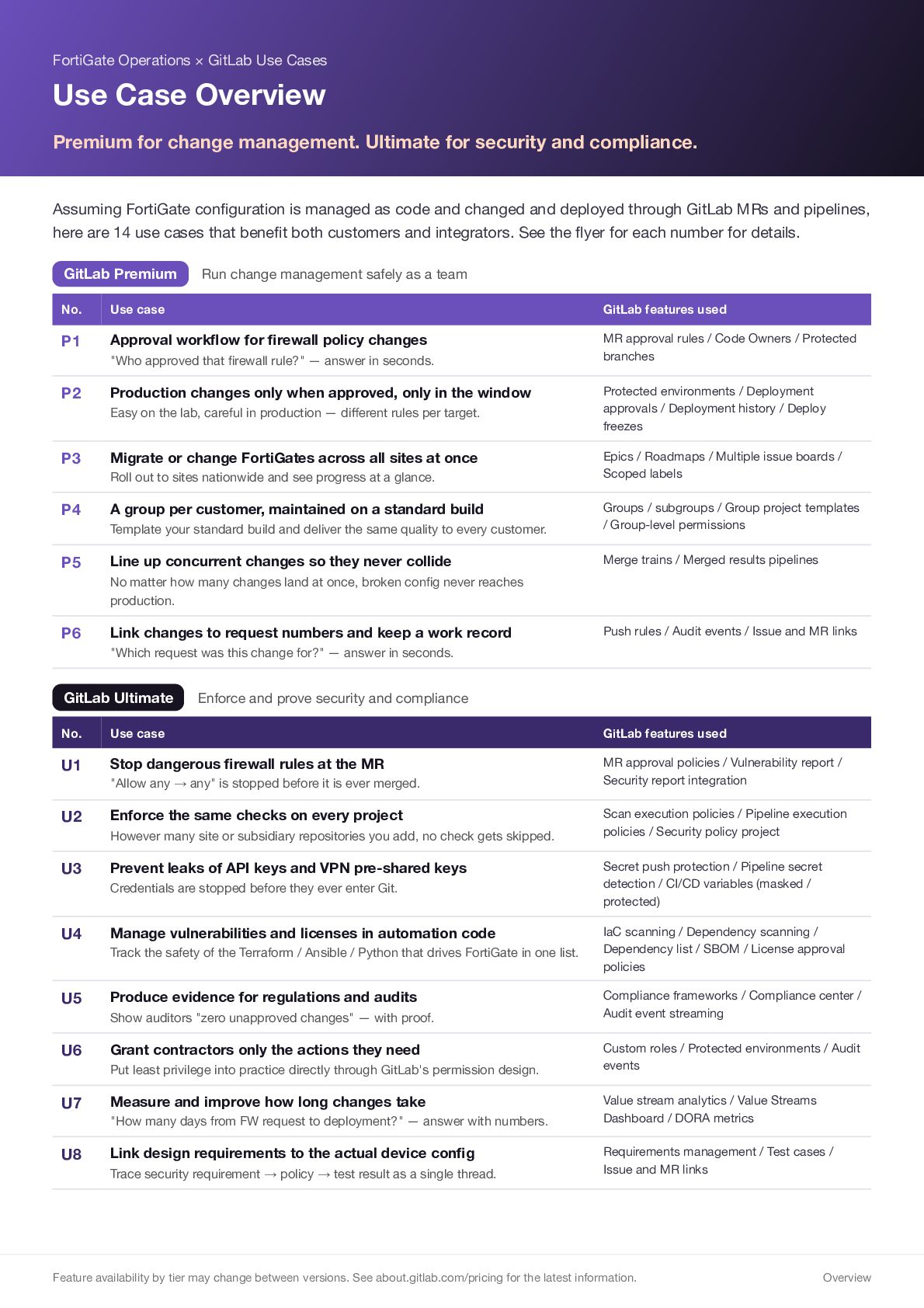
  1. FortiGate Operations × GitLab Use Cases Use Case Overview Premium

    for change management. Ultimate for security and compliance. Assuming FortiGate configuration is managed as code and changed and deployed through GitLab MRs and pipelines, here are 14 use cases that benefit both customers and integrators. See the flyer for each number for details. GitLab Premium Run change management safely as a team No. Use case GitLab features used P1 Approval workflow for firewall policy changes MR approval rules / Code Owners / Protected branches "Who approved that firewall rule?" — answer in seconds. P2 Production changes only when approved, only in the window Easy on the lab, careful in production — different rules per target. P3 Migrate or change FortiGates across all sites at once Roll out to sites nationwide and see progress at a glance. P4 P5 A group per customer, maintained on a standard build Protected environments / Deployment approvals / Deployment history / Deploy freezes Epics / Roadmaps / Multiple issue boards / Scoped labels Template your standard build and deliver the same quality to every customer. Groups / subgroups / Group project templates / Group-level permissions Line up concurrent changes so they never collide Merge trains / Merged results pipelines No matter how many changes land at once, broken config never reaches production. P6 Link changes to request numbers and keep a work record Push rules / Audit events / Issue and MR links "Which request was this change for?" — answer in seconds. GitLab Ultimate Enforce and prove security and compliance No. Use case GitLab features used U1 Stop dangerous firewall rules at the MR MR approval policies / Vulnerability report / Security report integration "Allow any → any" is stopped before it is ever merged. U2 Enforce the same checks on every project However many site or subsidiary repositories you add, no check gets skipped. U3 Prevent leaks of API keys and VPN pre-shared keys Credentials are stopped before they ever enter Git. U4 Manage vulnerabilities and licenses in automation code Track the safety of the Terraform / Ansible / Python that drives FortiGate in one list. U5 Produce evidence for regulations and audits Show auditors "zero unapproved changes" — with proof. U6 Grant contractors only the actions they need Put least privilege into practice directly through GitLab's permission design. U7 Measure and improve how long changes take "How many days from FW request to deployment?" — answer with numbers. U8 Link design requirements to the actual device config Trace security requirement → policy → test result as a single thread. Scan execution policies / Pipeline execution policies / Security policy project Secret push protection / Pipeline secret detection / CI/CD variables (masked / protected) IaC scanning / Dependency scanning / Dependency list / SBOM / License approval policies Compliance frameworks / Compliance center / Audit event streaming Custom roles / Protected environments / Audit events Value stream analytics / Value Streams Dashboard / DORA metrics Requirements management / Test cases / Issue and MR links Feature availability by tier may change between versions. See about.gitlab.com/pricing for the latest information. Overview
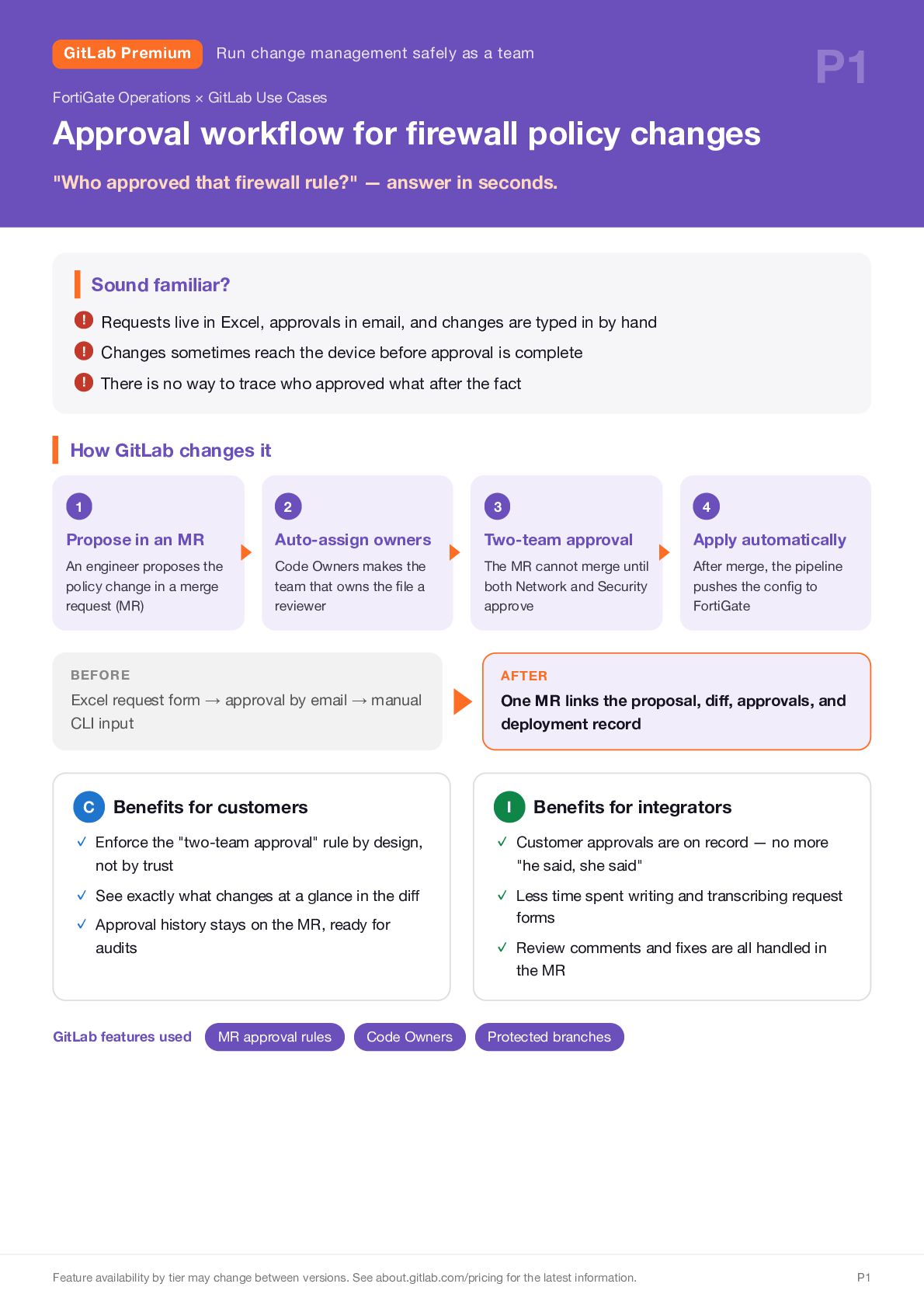
  2. GitLab Premium P1 Run change management safely as a team

    FortiGate Operations × GitLab Use Cases Approval workflow for firewall policy changes "Who approved that firewall rule?" — answer in seconds. Sound familiar? ! Requests live in Excel, approvals in email, and changes are typed in by hand ! Changes sometimes reach the device before approval is complete ! There is no way to trace who approved what after the fact How GitLab changes it 1 2 3 4 Propose in an MR Auto-assign owners Two-team approval Apply automatically An engineer proposes the policy change in a merge request (MR) Code Owners makes the team that owns the file a reviewer The MR cannot merge until both Network and Security approve After merge, the pipeline pushes the config to FortiGate BEFORE Excel request form → approval by email → manual CLI input C ▶ Benefits for customers AFTER One MR links the proposal, diff, approvals, and deployment record I Benefits for integrators ✓ Enforce the "two-team approval" rule by design, ✓ Customer approvals are on record — no more ✓ See exactly what changes at a glance in the diff ✓ Approval history stays on the MR, ready for ✓ Less time spent writing and transcribing request not by trust audits "he said, she said" forms ✓ Review comments and fixes are all handled in the MR GitLab features used MR approval rules Code Owners Protected branches Feature availability by tier may change between versions. See about.gitlab.com/pricing for the latest information. P1
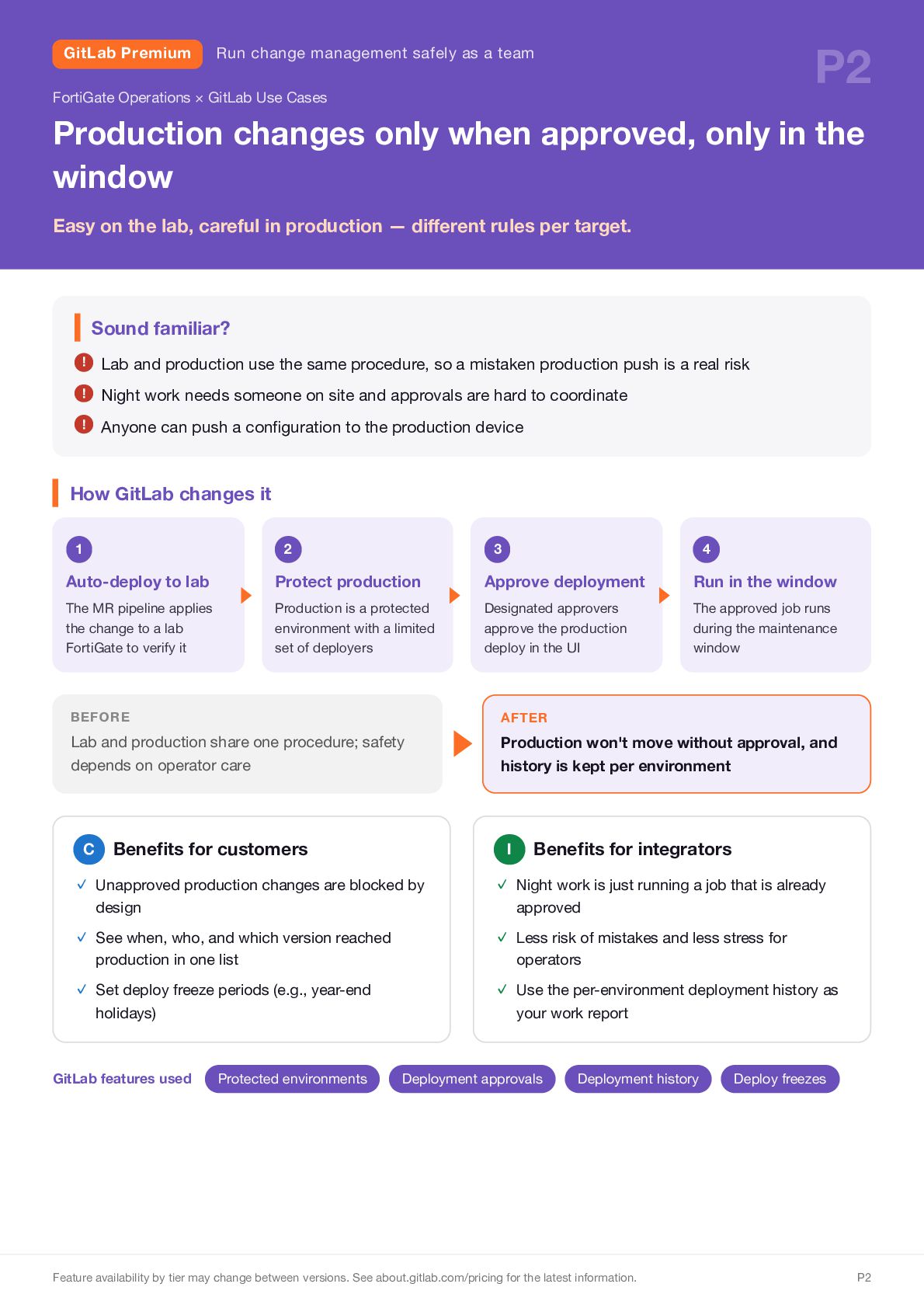
  3. GitLab Premium P2 Run change management safely as a team

    FortiGate Operations × GitLab Use Cases Production changes only when approved, only in the window Easy on the lab, careful in production — different rules per target. Sound familiar? ! Lab and production use the same procedure, so a mistaken production push is a real risk ! Night work needs someone on site and approvals are hard to coordinate ! Anyone can push a configuration to the production device How GitLab changes it 1 2 3 4 Auto-deploy to lab Protect production Approve deployment Run in the window The MR pipeline applies the change to a lab FortiGate to verify it Production is a protected environment with a limited set of deployers Designated approvers approve the production deploy in the UI The approved job runs during the maintenance window BEFORE Lab and production share one procedure; safety depends on operator care C Benefits for customers ▶ AFTER Production won't move without approval, and history is kept per environment I Benefits for integrators ✓ Unapproved production changes are blocked by ✓ Night work is just running a job that is already ✓ See when, who, and which version reached ✓ Less risk of mistakes and less stress for ✓ Set deploy freeze periods (e.g., year-end ✓ Use the per-environment deployment history as design production in one list holidays) GitLab features used Protected environments approved operators your work report Deployment approvals Deployment history Feature availability by tier may change between versions. See about.gitlab.com/pricing for the latest information. Deploy freezes P2
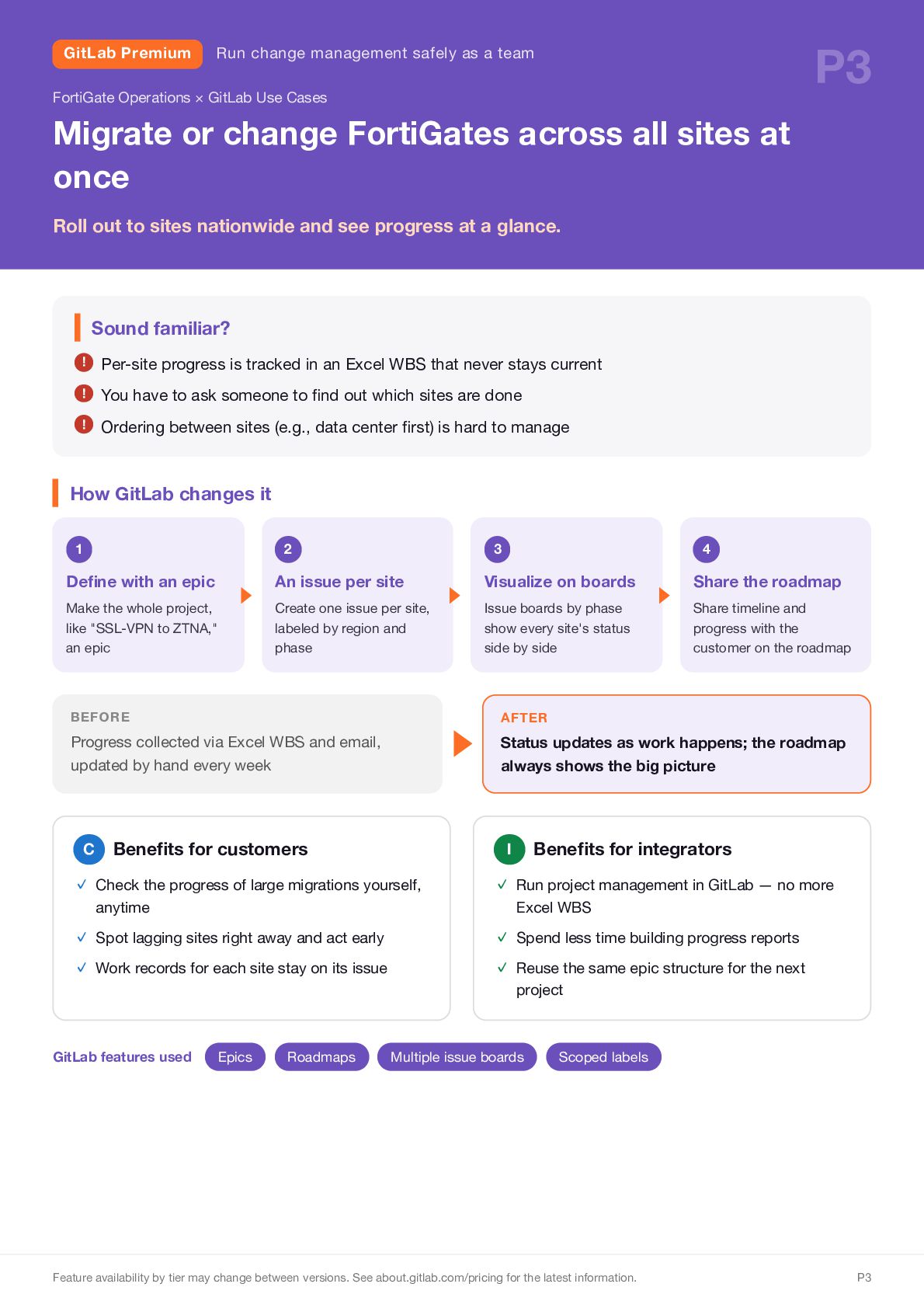
  4. GitLab Premium P3 Run change management safely as a team

    FortiGate Operations × GitLab Use Cases Migrate or change FortiGates across all sites at once Roll out to sites nationwide and see progress at a glance. Sound familiar? ! Per-site progress is tracked in an Excel WBS that never stays current ! You have to ask someone to find out which sites are done ! Ordering between sites (e.g., data center first) is hard to manage How GitLab changes it 1 2 3 4 Define with an epic An issue per site Visualize on boards Share the roadmap Make the whole project, like "SSL-VPN to ZTNA," an epic Create one issue per site, labeled by region and phase Issue boards by phase show every site's status side by side Share timeline and progress with the customer on the roadmap ▶ BEFORE Progress collected via Excel WBS and email, updated by hand every week C Benefits for customers AFTER Status updates as work happens; the roadmap always shows the big picture Benefits for integrators I ✓ Check the progress of large migrations yourself, ✓ Run project management in GitLab — no more ✓ Spot lagging sites right away and act early ✓ Work records for each site stay on its issue ✓ Spend less time building progress reports ✓ Reuse the same epic structure for the next anytime GitLab features used Epics Roadmaps Excel WBS project Multiple issue boards Scoped labels Feature availability by tier may change between versions. See about.gitlab.com/pricing for the latest information. P3
  5. GitLab Premium P4 Run change management safely as a team

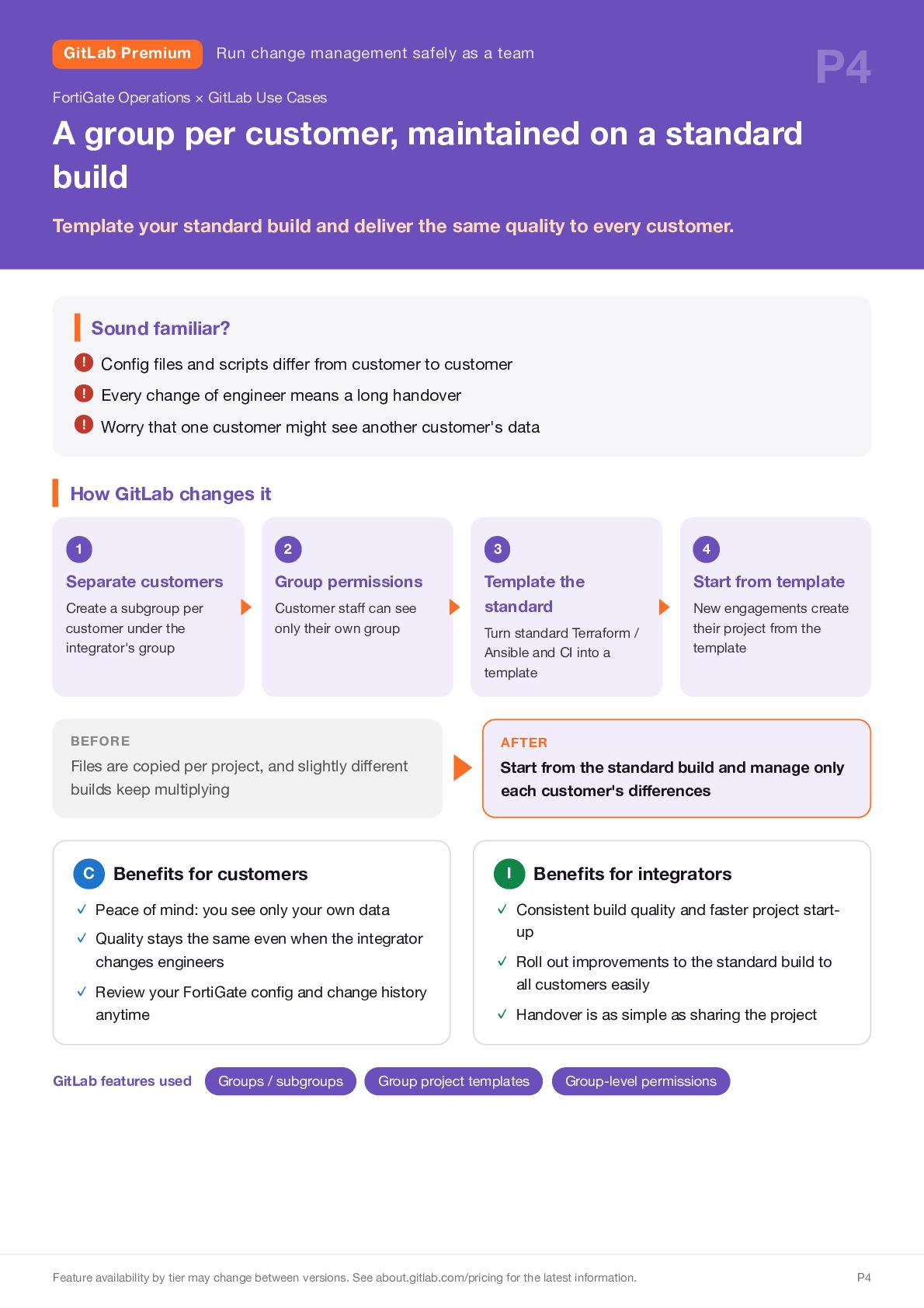
    FortiGate Operations × GitLab Use Cases A group per customer, maintained on a standard build Template your standard build and deliver the same quality to every customer. Sound familiar? ! Config files and scripts differ from customer to customer ! Every change of engineer means a long handover ! Worry that one customer might see another customer's data How GitLab changes it 1 2 3 4 Separate customers Group permissions Start from template Create a subgroup per customer under the integrator's group Customer staff can see only their own group Template the standard BEFORE Files are copied per project, and slightly different builds keep multiplying C Benefits for customers ✓ Review your FortiGate config and change history anytime GitLab features used Groups / subgroups ▶ AFTER Start from the standard build and manage only each customer's differences Benefits for integrators I ✓ Peace of mind: you see only your own data ✓ Quality stays the same even when the integrator changes engineers Turn standard Terraform / Ansible and CI into a template New engagements create their project from the template ✓ Consistent build quality and faster project startup ✓ Roll out improvements to the standard build to all customers easily ✓ Handover is as simple as sharing the project Group project templates Group-level permissions Feature availability by tier may change between versions. See about.gitlab.com/pricing for the latest information. P4
  6. GitLab Premium P5 Run change management safely as a team

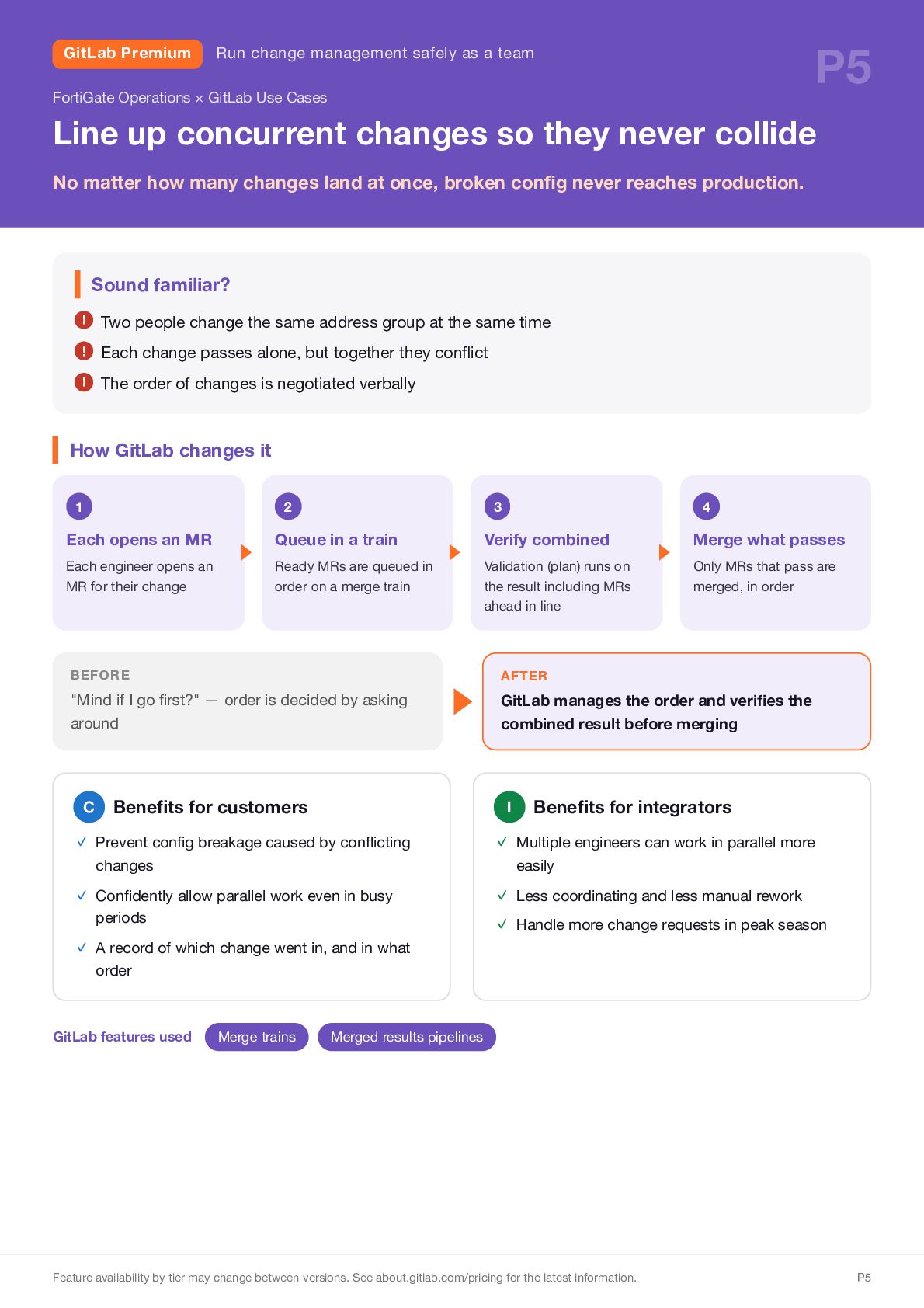
    FortiGate Operations × GitLab Use Cases Line up concurrent changes so they never collide No matter how many changes land at once, broken config never reaches production. Sound familiar? ! Two people change the same address group at the same time ! Each change passes alone, but together they conflict ! The order of changes is negotiated verbally How GitLab changes it 1 2 3 4 Each opens an MR Queue in a train Verify combined Merge what passes Each engineer opens an MR for their change Ready MRs are queued in order on a merge train Validation (plan) runs on the result including MRs ahead in line Only MRs that pass are merged, in order BEFORE "Mind if I go first?" — order is decided by asking around C ▶ Benefits for customers AFTER GitLab manages the order and verifies the combined result before merging I Benefits for integrators ✓ Prevent config breakage caused by conflicting ✓ Multiple engineers can work in parallel more ✓ Confidently allow parallel work even in busy ✓ Less coordinating and less manual rework ✓ Handle more change requests in peak season changes periods ✓ A record of which change went in, and in what easily order GitLab features used Merge trains Merged results pipelines Feature availability by tier may change between versions. See about.gitlab.com/pricing for the latest information. P5
  7. GitLab Premium P6 Run change management safely as a team

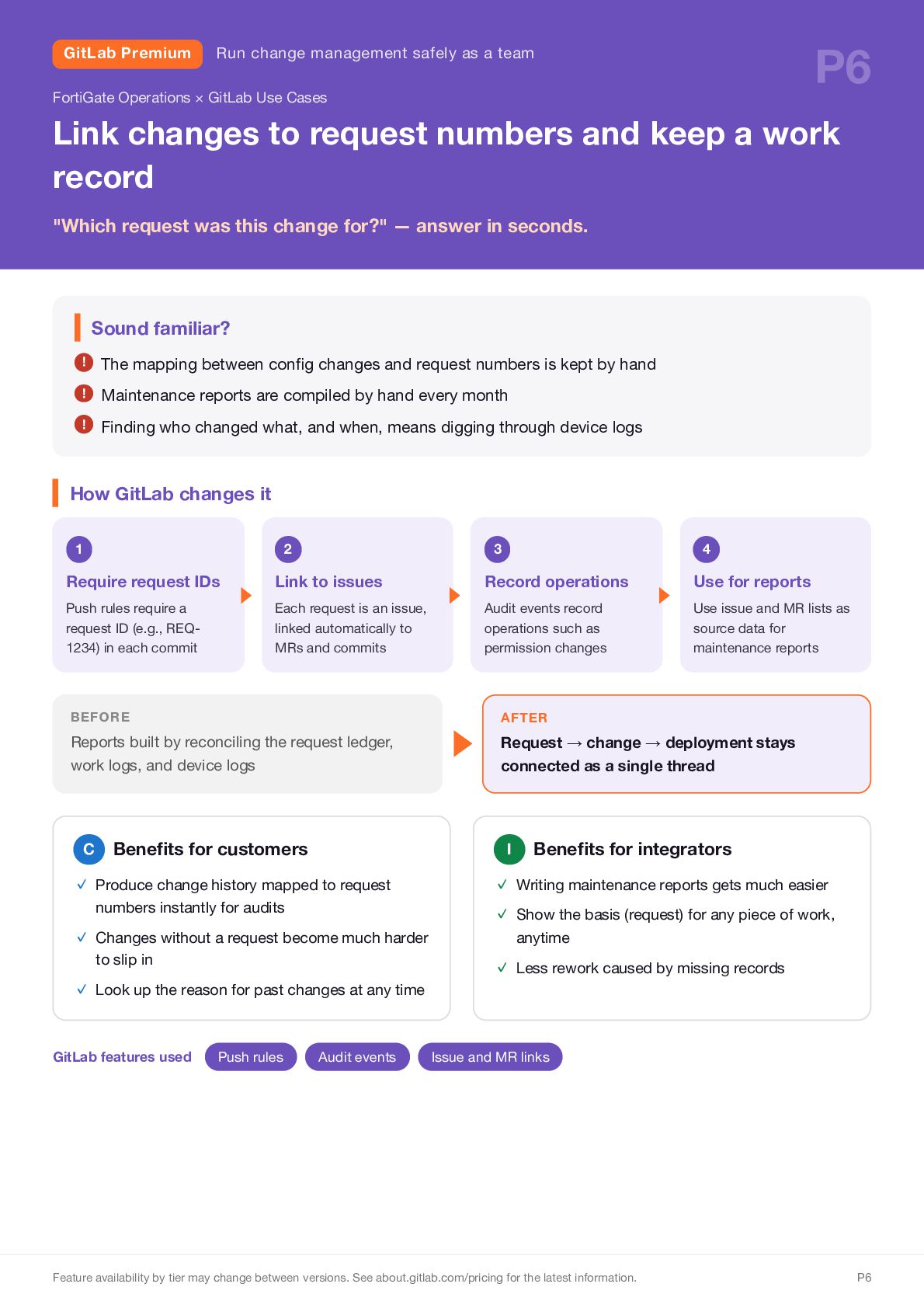
    FortiGate Operations × GitLab Use Cases Link changes to request numbers and keep a work record "Which request was this change for?" — answer in seconds. Sound familiar? ! The mapping between config changes and request numbers is kept by hand ! Maintenance reports are compiled by hand every month ! Finding who changed what, and when, means digging through device logs How GitLab changes it 1 2 3 4 Require request IDs Link to issues Record operations Use for reports Push rules require a request ID (e.g., REQ1234) in each commit Each request is an issue, linked automatically to MRs and commits Audit events record operations such as permission changes Use issue and MR lists as source data for maintenance reports BEFORE Reports built by reconciling the request ledger, work logs, and device logs C Benefits for customers numbers instantly for audits ✓ Changes without a request become much harder to slip in ✓ Look up the reason for past changes at any time Push rules Request → change → deployment stays connected as a single thread I ✓ Produce change history mapped to request GitLab features used ▶ AFTER Audit events Benefits for integrators ✓ Writing maintenance reports gets much easier ✓ Show the basis (request) for any piece of work, anytime ✓ Less rework caused by missing records Issue and MR links Feature availability by tier may change between versions. See about.gitlab.com/pricing for the latest information. P6
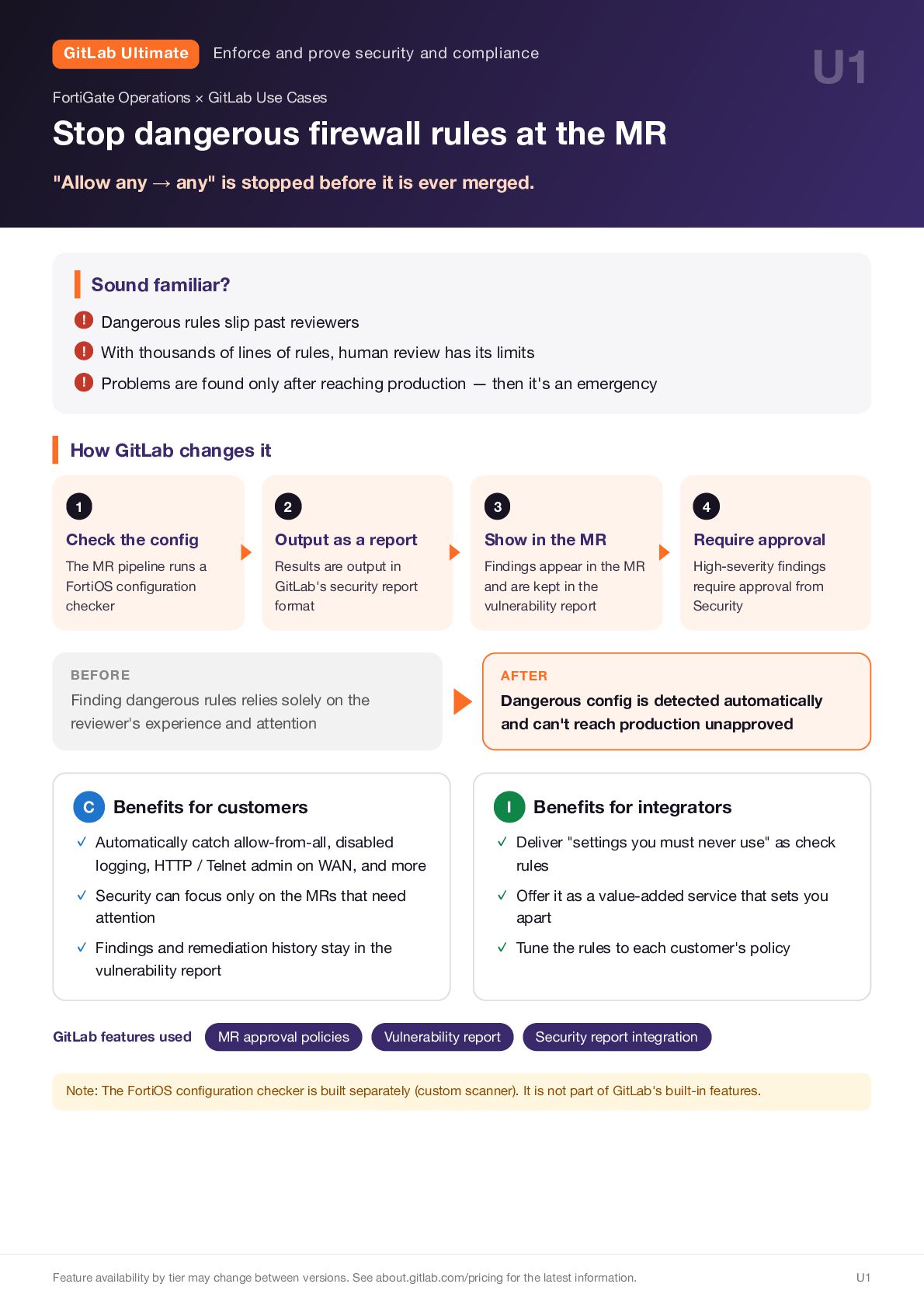
  8. GitLab Ultimate U1 Enforce and prove security and compliance FortiGate

    Operations × GitLab Use Cases Stop dangerous firewall rules at the MR "Allow any → any" is stopped before it is ever merged. Sound familiar? ! Dangerous rules slip past reviewers ! With thousands of lines of rules, human review has its limits ! Problems are found only after reaching production — then it's an emergency How GitLab changes it 1 2 3 4 Check the config Output as a report Show in the MR Require approval The MR pipeline runs a FortiOS configuration checker Results are output in GitLab's security report format Findings appear in the MR and are kept in the vulnerability report High-severity findings require approval from Security ▶ BEFORE Finding dangerous rules relies solely on the reviewer's experience and attention C AFTER Dangerous config is detected automatically and can't reach production unapproved Benefits for customers I Benefits for integrators ✓ Automatically catch allow-from-all, disabled ✓ Deliver "settings you must never use" as check ✓ Security can focus only on the MRs that need ✓ Offer it as a value-added service that sets you ✓ Findings and remediation history stay in the ✓ Tune the rules to each customer's policy logging, HTTP / Telnet admin on WAN, and more attention vulnerability report GitLab features used MR approval policies rules Vulnerability report apart Security report integration Note: The FortiOS configuration checker is built separately (custom scanner). It is not part of GitLab's built-in features. Feature availability by tier may change between versions. See about.gitlab.com/pricing for the latest information. U1
  9. GitLab Ultimate U2 Enforce and prove security and compliance FortiGate

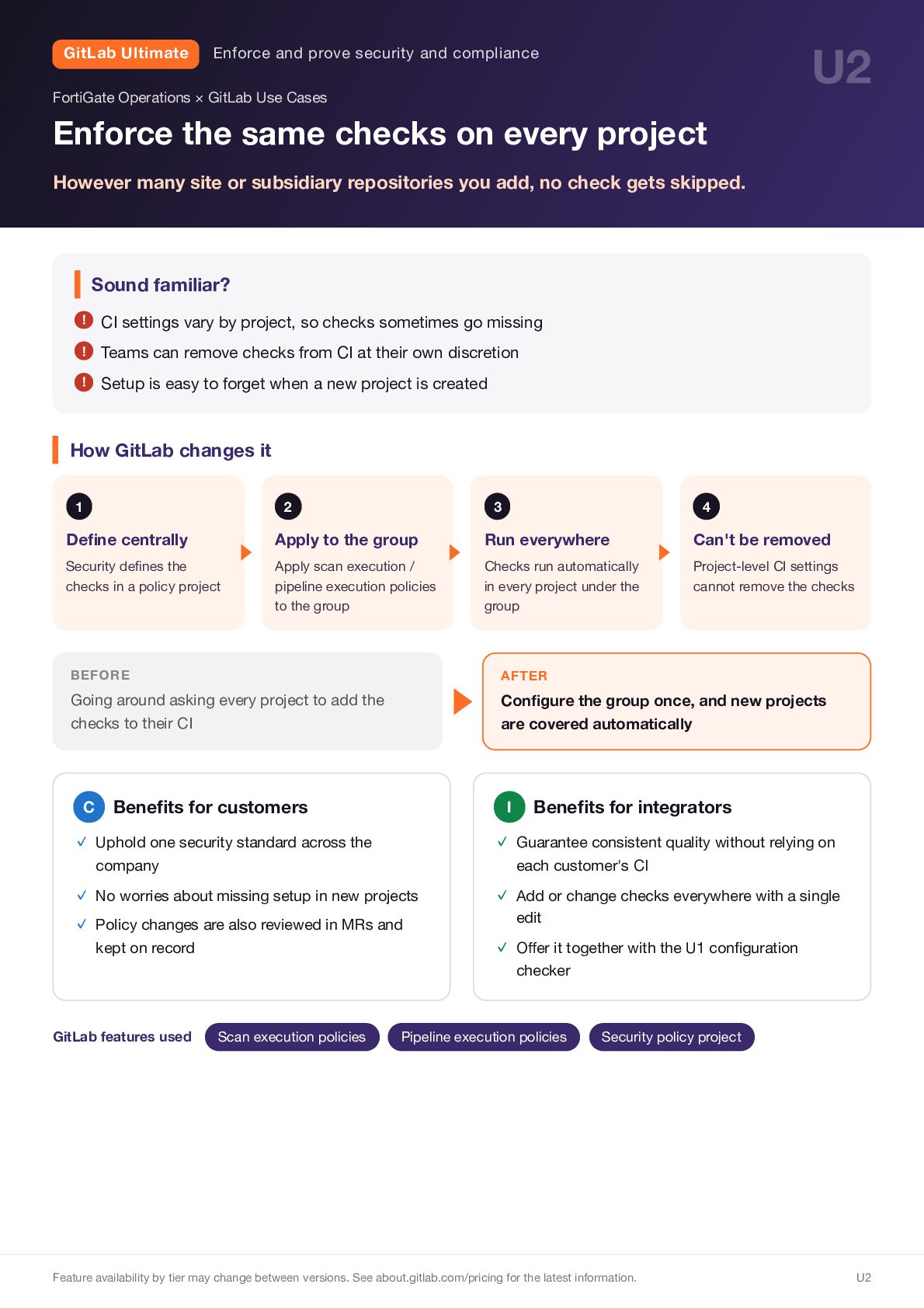
    Operations × GitLab Use Cases Enforce the same checks on every project However many site or subsidiary repositories you add, no check gets skipped. Sound familiar? ! CI settings vary by project, so checks sometimes go missing ! Teams can remove checks from CI at their own discretion ! Setup is easy to forget when a new project is created How GitLab changes it 1 2 3 4 Define centrally Apply to the group Run everywhere Can't be removed Security defines the checks in a policy project Apply scan execution / pipeline execution policies to the group Checks run automatically in every project under the group Project-level CI settings cannot remove the checks ▶ BEFORE Going around asking every project to add the checks to their CI C Benefits for customers AFTER Configure the group once, and new projects are covered automatically I Benefits for integrators ✓ Uphold one security standard across the ✓ Guarantee consistent quality without relying on ✓ No worries about missing setup in new projects ✓ Policy changes are also reviewed in MRs and ✓ Add or change checks everywhere with a single company kept on record each customer's CI edit ✓ Offer it together with the U1 configuration checker GitLab features used Scan execution policies Pipeline execution policies Security policy project Feature availability by tier may change between versions. See about.gitlab.com/pricing for the latest information. U2
  10. GitLab Ultimate U3 Enforce and prove security and compliance FortiGate

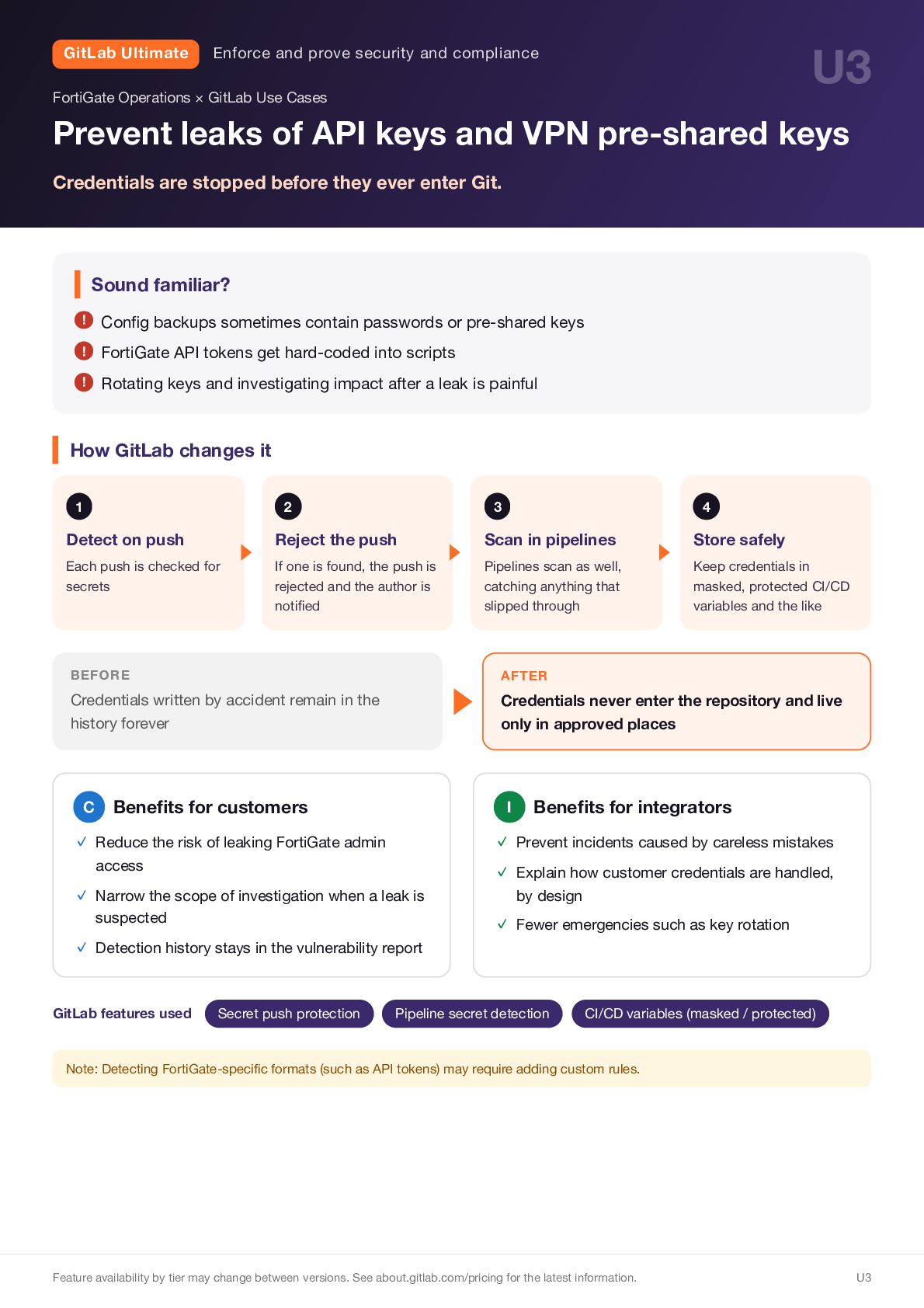
    Operations × GitLab Use Cases Prevent leaks of API keys and VPN pre-shared keys Credentials are stopped before they ever enter Git. Sound familiar? ! Config backups sometimes contain passwords or pre-shared keys ! FortiGate API tokens get hard-coded into scripts ! Rotating keys and investigating impact after a leak is painful How GitLab changes it 1 2 3 4 Detect on push Reject the push Scan in pipelines Store safely Each push is checked for secrets If one is found, the push is rejected and the author is notified Pipelines scan as well, catching anything that slipped through Keep credentials in masked, protected CI/CD variables and the like ▶ BEFORE Credentials written by accident remain in the history forever C Benefits for customers access ✓ Narrow the scope of investigation when a leak is ✓ Detection history stays in the vulnerability report GitLab features used Secret push protection Credentials never enter the repository and live only in approved places I ✓ Reduce the risk of leaking FortiGate admin suspected AFTER Benefits for integrators ✓ Prevent incidents caused by careless mistakes ✓ Explain how customer credentials are handled, by design ✓ Fewer emergencies such as key rotation Pipeline secret detection CI/CD variables (masked / protected) Note: Detecting FortiGate-specific formats (such as API tokens) may require adding custom rules. Feature availability by tier may change between versions. See about.gitlab.com/pricing for the latest information. U3
  11. GitLab Ultimate U4 Enforce and prove security and compliance FortiGate

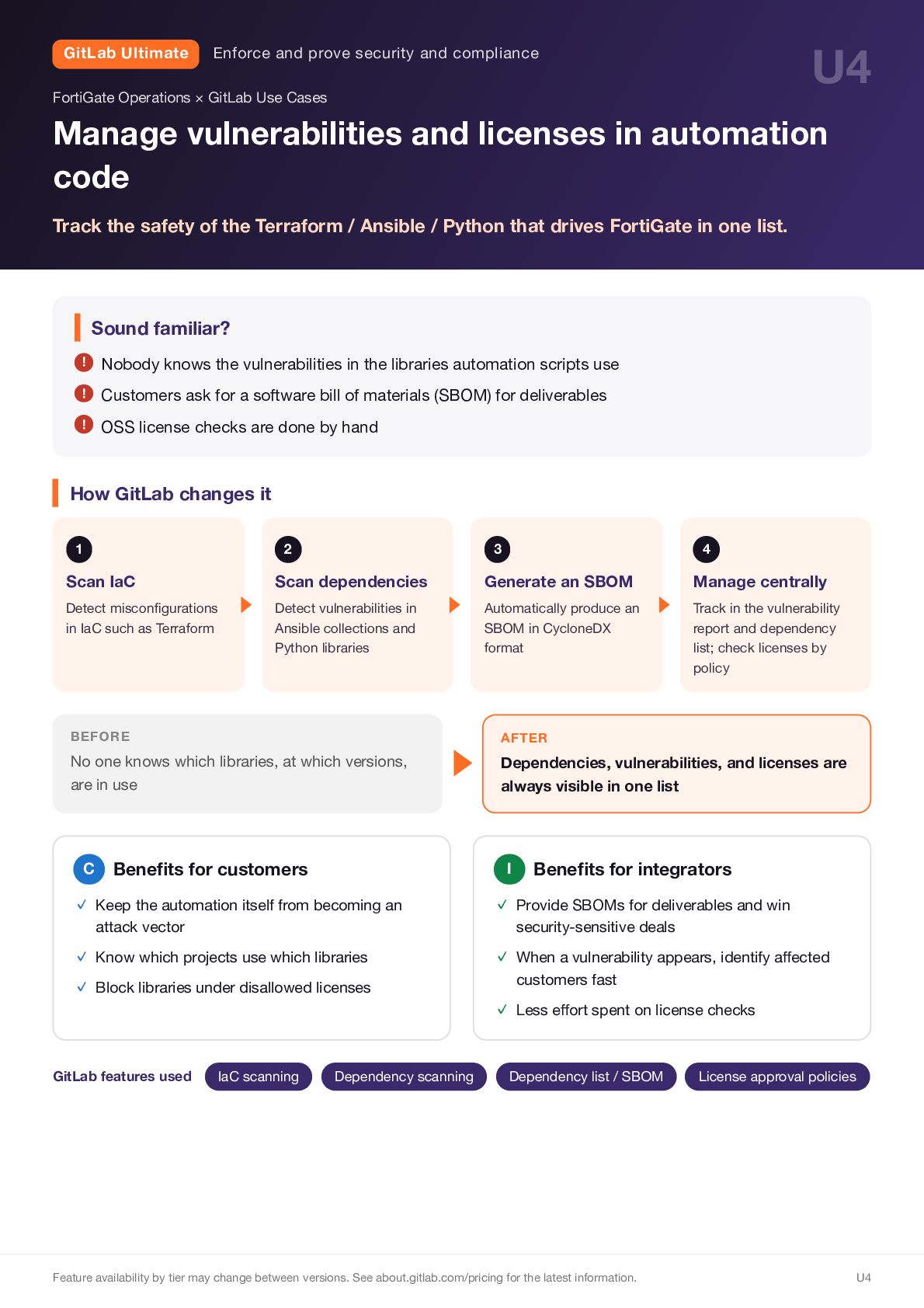
    Operations × GitLab Use Cases Manage vulnerabilities and licenses in automation code Track the safety of the Terraform / Ansible / Python that drives FortiGate in one list. Sound familiar? ! Nobody knows the vulnerabilities in the libraries automation scripts use ! Customers ask for a software bill of materials (SBOM) for deliverables ! OSS license checks are done by hand How GitLab changes it 1 2 3 4 Scan IaC Scan dependencies Generate an SBOM Manage centrally Detect misconfigurations in IaC such as Terraform Detect vulnerabilities in Ansible collections and Python libraries Automatically produce an SBOM in CycloneDX format Track in the vulnerability report and dependency list; check licenses by policy BEFORE No one knows which libraries, at which versions, are in use C ▶ Benefits for customers AFTER Dependencies, vulnerabilities, and licenses are always visible in one list I Benefits for integrators ✓ Keep the automation itself from becoming an ✓ Provide SBOMs for deliverables and win ✓ Know which projects use which libraries ✓ Block libraries under disallowed licenses ✓ When a vulnerability appears, identify affected attack vector GitLab features used IaC scanning Dependency scanning security-sensitive deals customers fast ✓ Less effort spent on license checks Dependency list / SBOM Feature availability by tier may change between versions. See about.gitlab.com/pricing for the latest information. License approval policies U4
  12. GitLab Ultimate U5 Enforce and prove security and compliance FortiGate

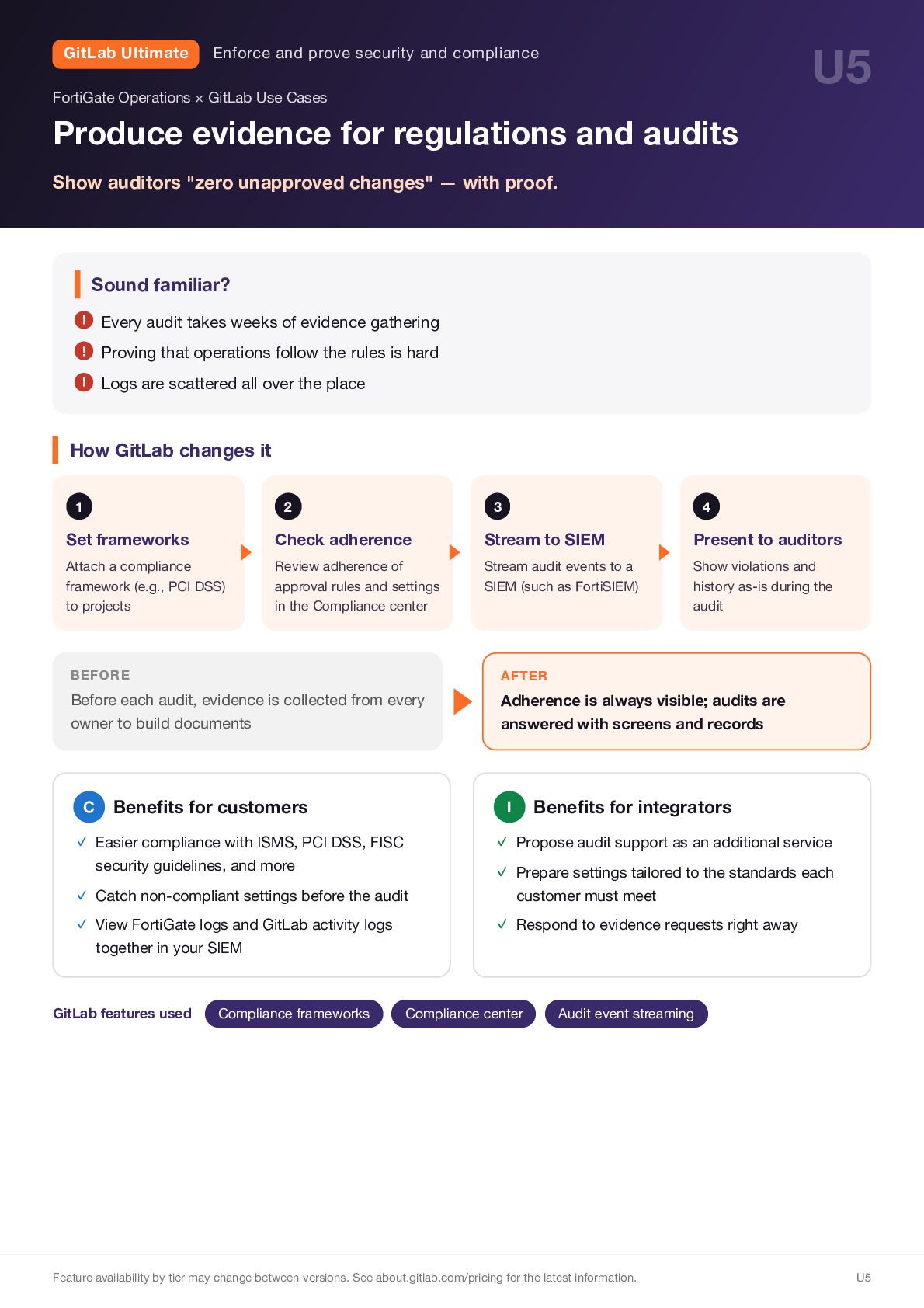
    Operations × GitLab Use Cases Produce evidence for regulations and audits Show auditors "zero unapproved changes" — with proof. Sound familiar? ! Every audit takes weeks of evidence gathering ! Proving that operations follow the rules is hard ! Logs are scattered all over the place How GitLab changes it 1 2 3 4 Set frameworks Check adherence Stream to SIEM Present to auditors Attach a compliance framework (e.g., PCI DSS) to projects Review adherence of approval rules and settings in the Compliance center Stream audit events to a SIEM (such as FortiSIEM) Show violations and history as-is during the audit BEFORE Before each audit, evidence is collected from every owner to build documents C Benefits for customers ✓ Catch non-compliant settings before the audit ✓ View FortiGate logs and GitLab activity logs together in your SIEM GitLab features used Compliance frameworks Adherence is always visible; audits are answered with screens and records Benefits for integrators I ✓ Easier compliance with ISMS, PCI DSS, FISC security guidelines, and more ▶ AFTER ✓ Propose audit support as an additional service ✓ Prepare settings tailored to the standards each customer must meet ✓ Respond to evidence requests right away Compliance center Audit event streaming Feature availability by tier may change between versions. See about.gitlab.com/pricing for the latest information. U5
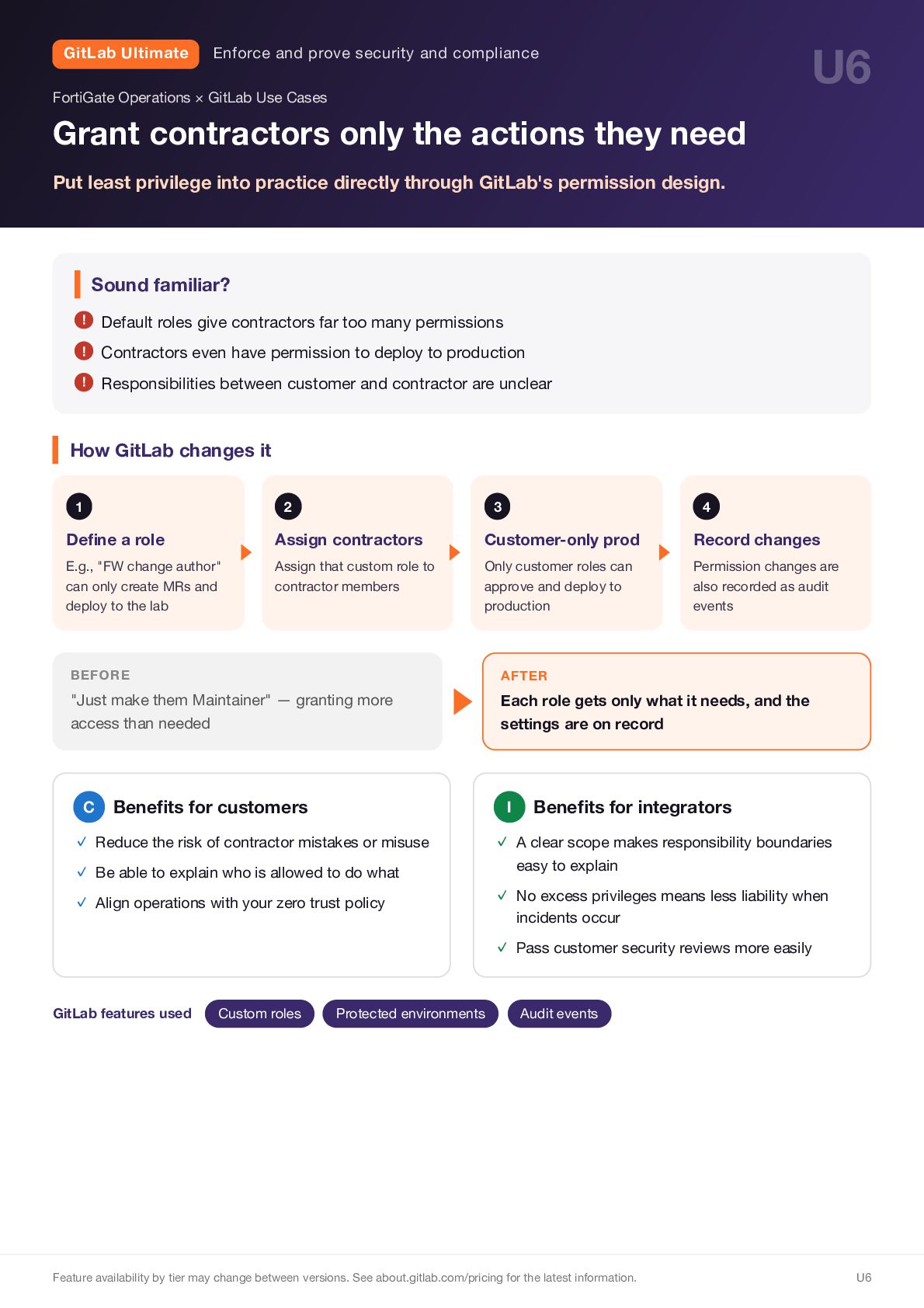
  13. GitLab Ultimate U6 Enforce and prove security and compliance FortiGate

    Operations × GitLab Use Cases Grant contractors only the actions they need Put least privilege into practice directly through GitLab's permission design. Sound familiar? ! Default roles give contractors far too many permissions ! Contractors even have permission to deploy to production ! Responsibilities between customer and contractor are unclear How GitLab changes it 1 2 3 4 Define a role Assign contractors Customer-only prod Record changes E.g., "FW change author" can only create MRs and deploy to the lab Assign that custom role to contractor members Only customer roles can approve and deploy to production Permission changes are also recorded as audit events BEFORE "Just make them Maintainer" — granting more access than needed C ▶ Benefits for customers AFTER Each role gets only what it needs, and the settings are on record I ✓ Reduce the risk of contractor mistakes or misuse ✓ Be able to explain who is allowed to do what ✓ Align operations with your zero trust policy Benefits for integrators ✓ A clear scope makes responsibility boundaries easy to explain ✓ No excess privileges means less liability when incidents occur ✓ Pass customer security reviews more easily GitLab features used Custom roles Protected environments Audit events Feature availability by tier may change between versions. See about.gitlab.com/pricing for the latest information. U6
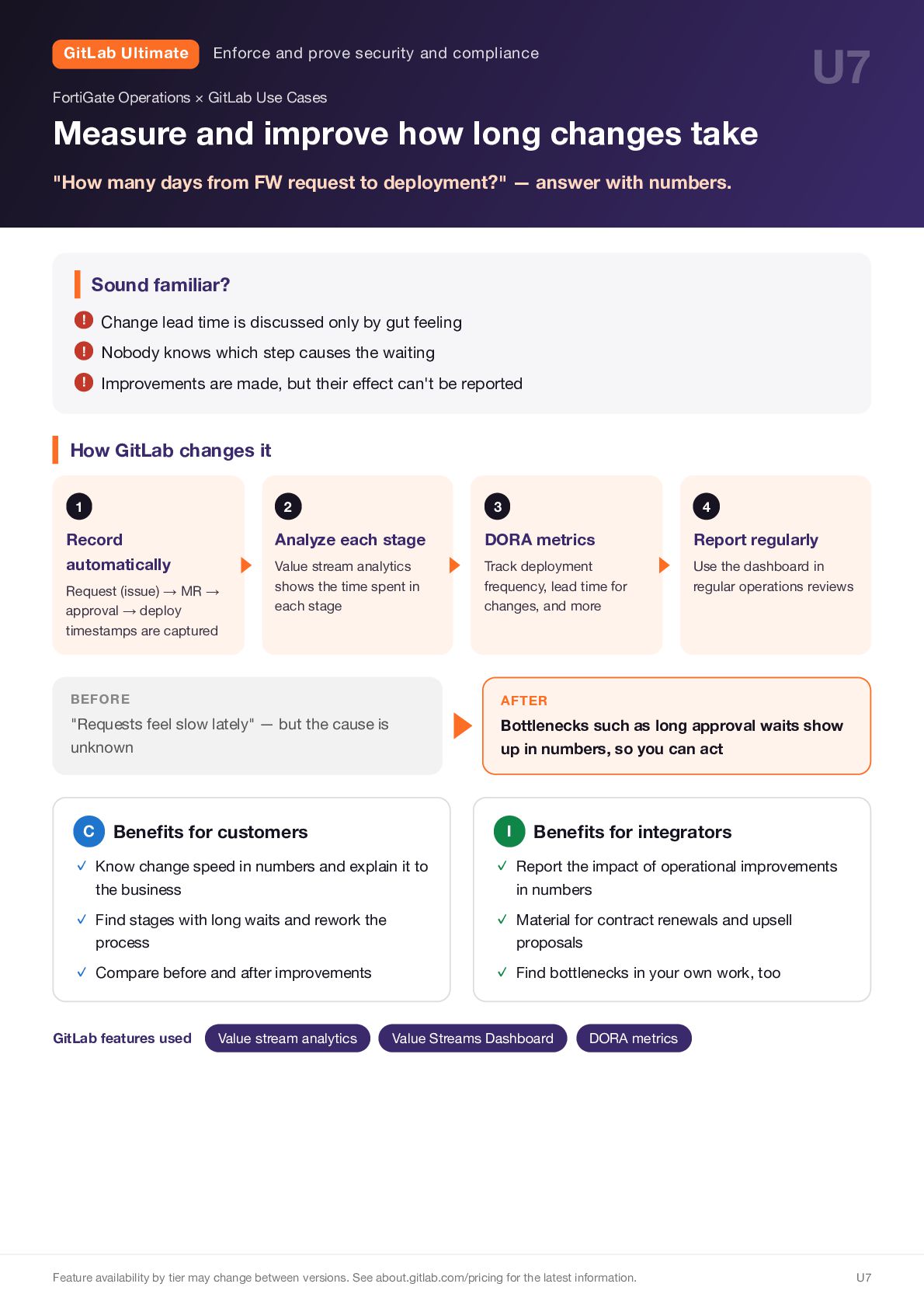
  14. GitLab Ultimate U7 Enforce and prove security and compliance FortiGate

    Operations × GitLab Use Cases Measure and improve how long changes take "How many days from FW request to deployment?" — answer with numbers. Sound familiar? ! Change lead time is discussed only by gut feeling ! Nobody knows which step causes the waiting ! Improvements are made, but their effect can't be reported How GitLab changes it 1 2 3 4 Record automatically Analyze each stage DORA metrics Report regularly Value stream analytics shows the time spent in each stage Track deployment frequency, lead time for changes, and more Use the dashboard in regular operations reviews Request (issue) → MR → approval → deploy timestamps are captured ▶ BEFORE "Requests feel slow lately" — but the cause is unknown C Benefits for customers AFTER Bottlenecks such as long approval waits show up in numbers, so you can act I Benefits for integrators ✓ Know change speed in numbers and explain it to ✓ Report the impact of operational improvements ✓ Find stages with long waits and rework the ✓ Material for contract renewals and upsell ✓ Compare before and after improvements ✓ Find bottlenecks in your own work, too the business process GitLab features used Value stream analytics in numbers proposals Value Streams Dashboard DORA metrics Feature availability by tier may change between versions. See about.gitlab.com/pricing for the latest information. U7
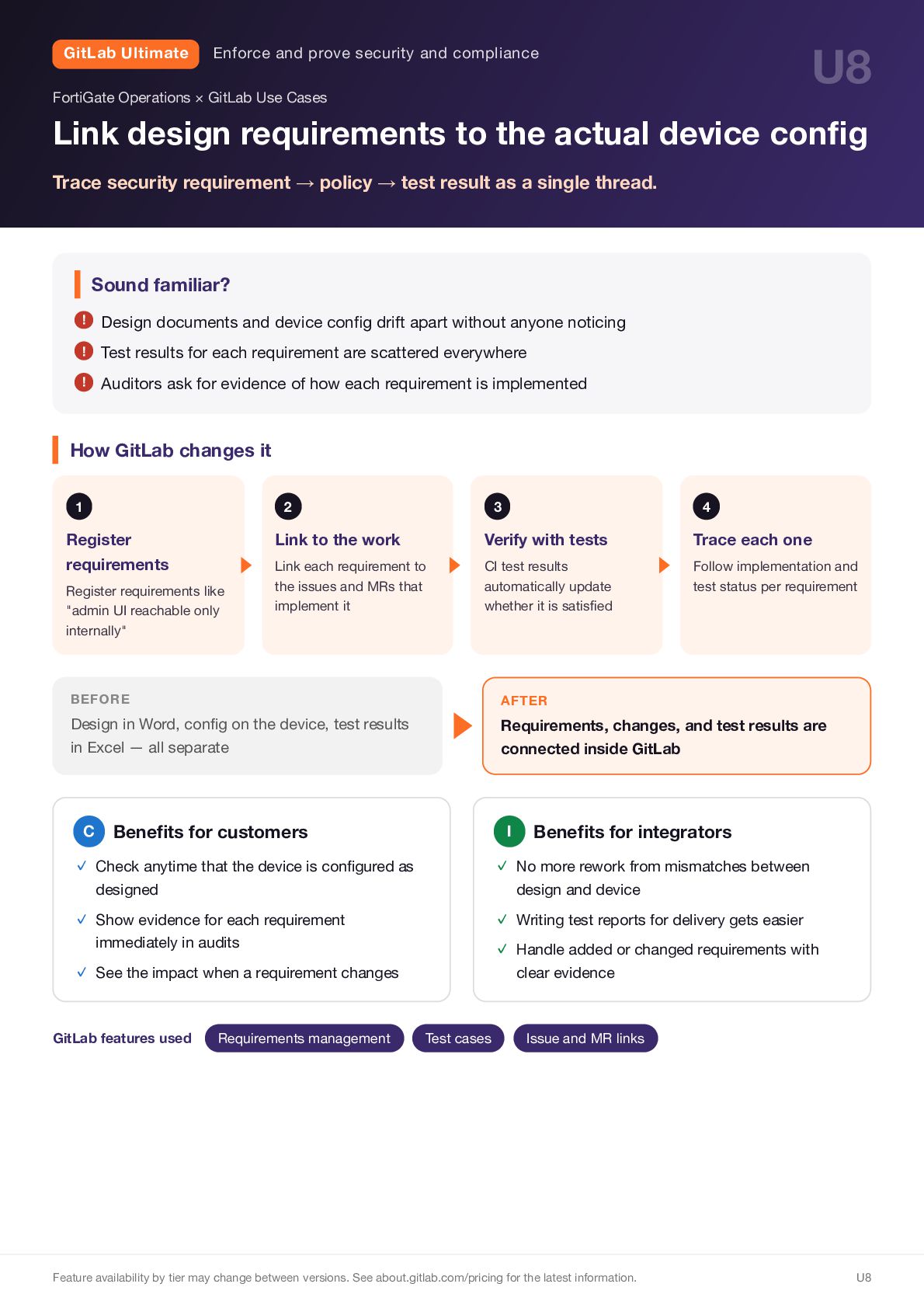
  15. GitLab Ultimate U8 Enforce and prove security and compliance FortiGate

    Operations × GitLab Use Cases Link design requirements to the actual device config Trace security requirement → policy → test result as a single thread. Sound familiar? ! Design documents and device config drift apart without anyone noticing ! Test results for each requirement are scattered everywhere ! Auditors ask for evidence of how each requirement is implemented How GitLab changes it 1 2 3 4 Register requirements Link to the work Verify with tests Trace each one Link each requirement to the issues and MRs that implement it CI test results automatically update whether it is satisfied Follow implementation and test status per requirement Register requirements like "admin UI reachable only internally" BEFORE Design in Word, config on the device, test results in Excel — all separate C ▶ Benefits for customers AFTER Requirements, changes, and test results are connected inside GitLab I Benefits for integrators ✓ Check anytime that the device is configured as ✓ No more rework from mismatches between ✓ Show evidence for each requirement ✓ Writing test reports for delivery gets easier ✓ Handle added or changed requirements with designed design and device immediately in audits ✓ See the impact when a requirement changes GitLab features used Requirements management clear evidence Test cases Issue and MR links Feature availability by tier may change between versions. See about.gitlab.com/pricing for the latest information. U8