Upgrade to Pro — share decks privately, control downloads, hide ads and more …

Stop tool calls with rules (Policy in AgentCore...

Stop tool calls with rules (Policy in AgentCore and Cedar) | Learn Amazon Bedrock AgentCore with Kiro 11

This Level 300 deck shows how to stop the tool calls of a help desk agent on Amazon Bedrock AgentCore with rules, using Policy in AgentCore and Cedar. A system prompt covers only the inquiries that go through the agent, so it does not stop a signed-in customer who calls the AgentCore Gateway directly with the same token. Figures with the official AWS icons explain where the policy engine sits on the Gateway, how one MCP tools/call becomes a Cedar request (principal, action, resource and context.input), deny by default and forbid wins, and the schema made from the tool definitions. With real terminal lines from an English copy of the help desk from deck 10 (Amazon Cognito JWT inbound auth), it writes a permit for the 3 shop tools and a forbid on refunds over 30,000 yen unless a store manager asks, makes the same forbid from one English sentence, shows the ALLOW_ALL finding on a rule that allows everyone, and explains why adding both rules in one deploy rolled back. It then attaches the engine in LOG_ONLY (a 54,800 yen refund passed and was counted as a deny in Amazon CloudWatch), switches to ENFORCE (only the customer 54,800 yen refund stopped, both directly and through the help desk), and shows tools/list listing only the tools a caller may call. It also covers temporal policies, Amazon Bedrock Guardrails score conditions, the other places to stop calls (interceptors, rate limits, AWS WAF, Strands Agents Hooks), closing the ways around the rules (IAM rights such as UpdateGateway), and the clean-up. Deck 11 (Govern and share) of the series Learn Amazon Bedrock AgentCore with Kiro.

Avatar for Riku INADA

Riku INADA PRO

November 11, 2026

More Decks by Riku INADA

Other Decks in Technology

Transcript

  1. Learn Amazon Bedrock AgentCore with Kiro 11 Govern and share

    Level 300 Stop tool calls with rules Policy in AgentCore and Cedar As of November 2026 (AgentCore CLI 1.0.2) November 2026 Riku Inada Amazon Web Services Japan © 2026, Amazon Web Services, Inc. or its affiliates. All rights reserved. 11 Kiro + AgentCore 1
  2. Introduction About me Riku Inada Amazon Web Services Japan G.K.

    Solutions Architect Works mainly with manufacturing customers Recent work Promoting the AI-Driven Development Life Cycle (AI-DLC) Writing and speaking about Kiro and AWS Amplify © 2026, Amazon Web Services, Inc. or its affiliates. All rights reserved. X @inada_riku Speaker Deck speakerdeck.com/inariku Zenn zenn.dev/inariku GitHub github.com/inariku 2
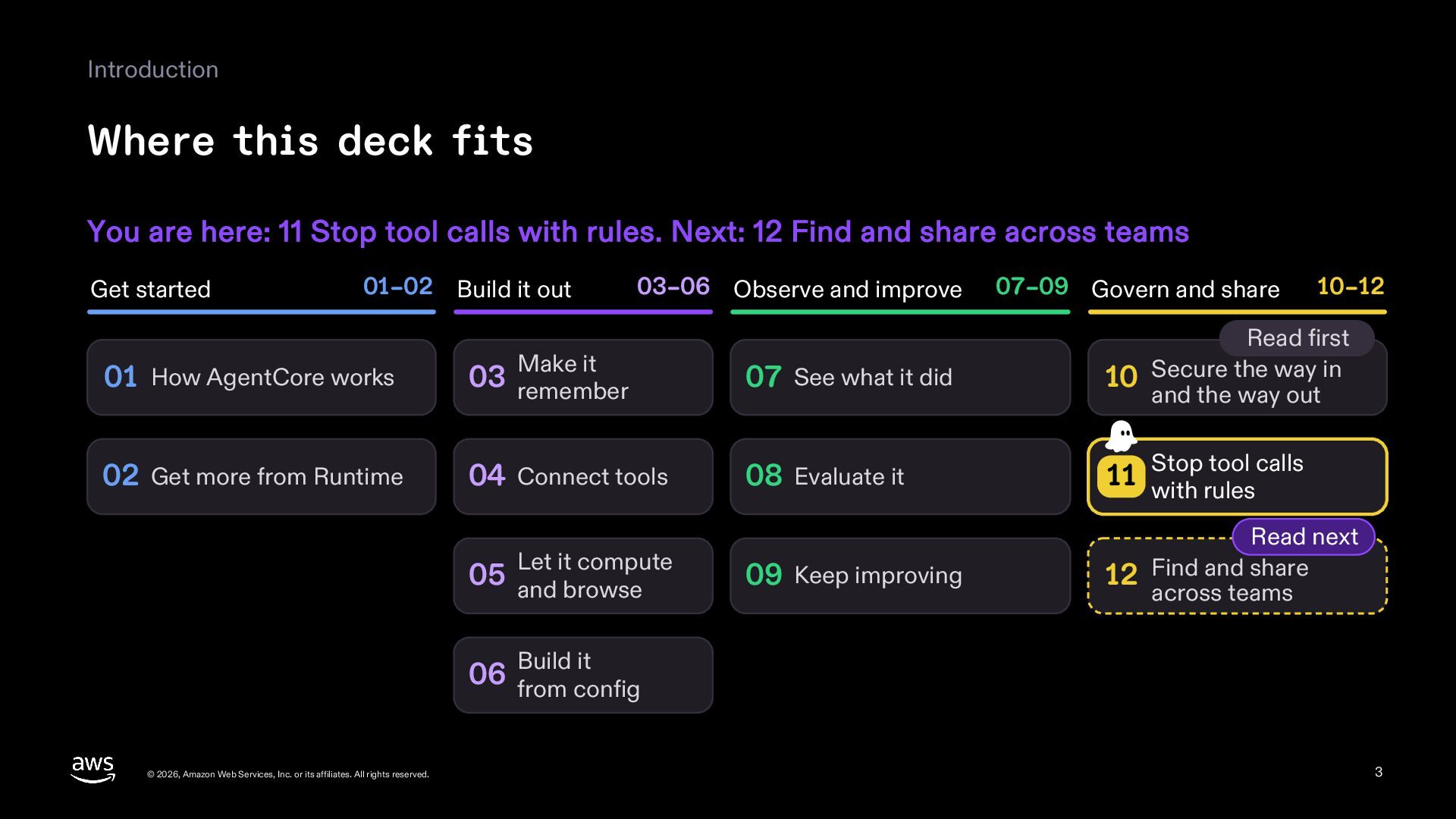
  3. Introduction Where this deck fits You are here: 11 Stop

    tool calls with rules. Next: 12 Find and share across teams Get started 01–02 Build it out 03–06 Observe and improve 07–09 Govern and share 10–12 01 How AgentCore works 03 remember 07 See what it did Read first 10 Secure the way in and the way out 02 Get more from Runtime 04 Connect tools 08 Evaluate it tool calls 11 Stop with rules 09 Keep improving Read next 12 Find and share across teams Make it Let it compute 05 and browse Build it 06 from config © 2026, Amazon Web Services, Inc. or its affiliates. All rights reserved. 3
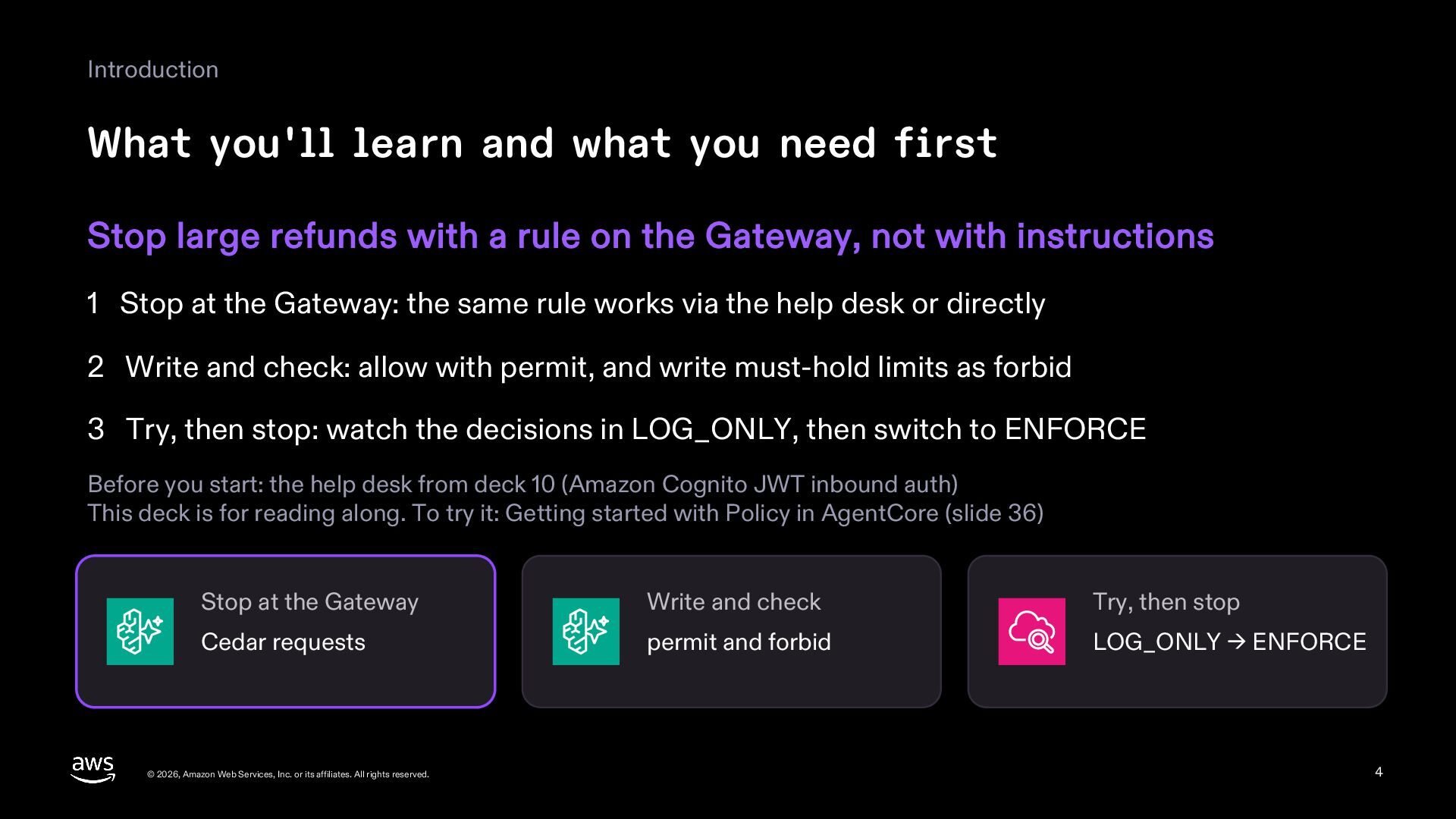
  4. Introduction What you'll learn and what you need first Stop

    large refunds with a rule on the Gateway, not with instructions 1 Stop at the Gateway: the same rule works via the help desk or directly 2 Write and check: allow with permit, and write must-hold limits as forbid 3 Try, then stop: watch the decisions in LOG_ONLY, then switch to ENFORCE Before you start: the help desk from deck 10 (Amazon Cognito JWT inbound auth) This deck is for reading along. To try it: Getting started with Policy in AgentCore (slide 36) Stop at the Gateway Write and check Try, then stop Cedar requests permit and forbid LOG_ONLY → ENFORCE © 2026, Amazon Web Services, Inc. or its affiliates. All rights reserved. 4
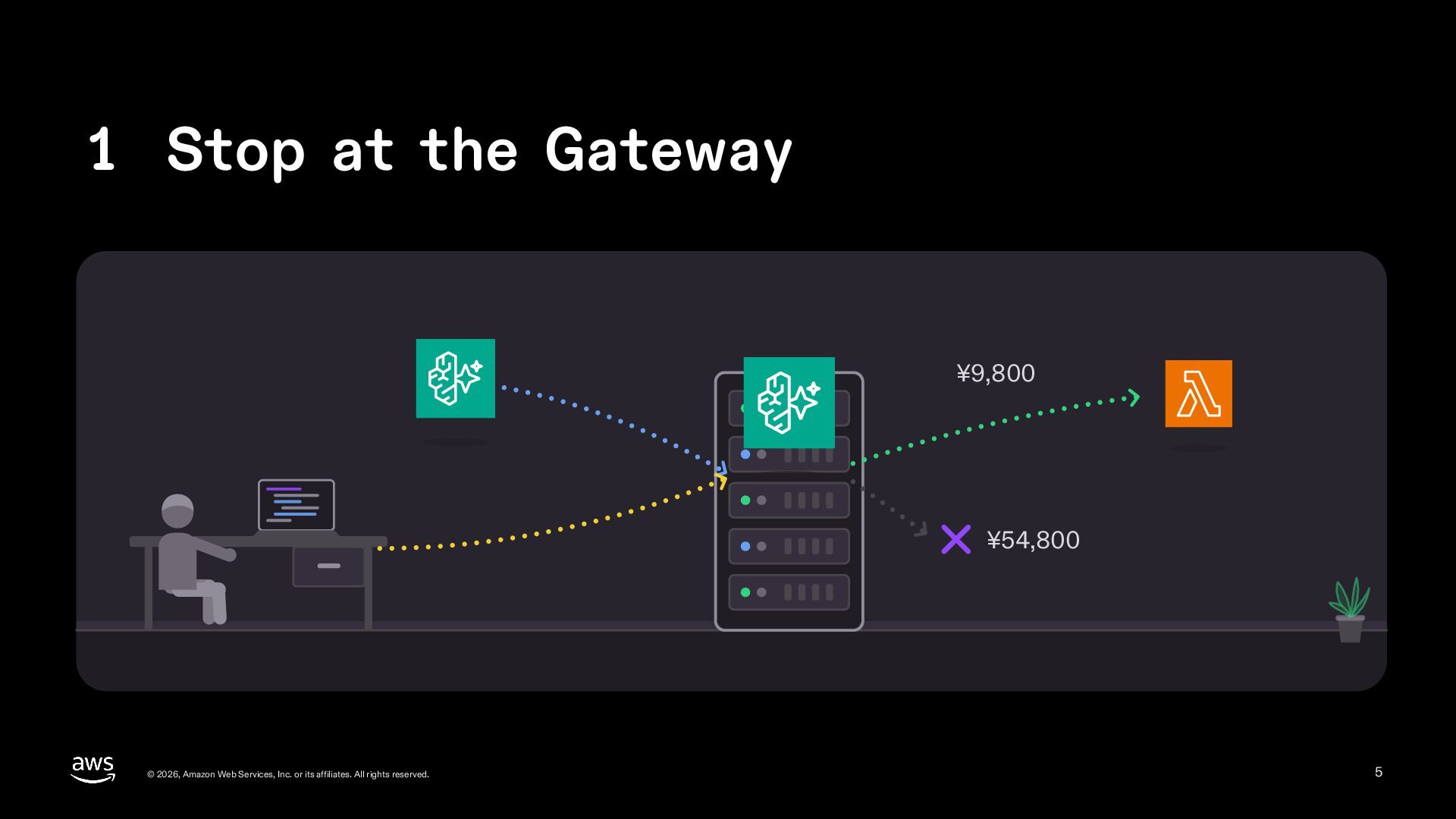
  5. 1 Stop at the Gateway ¥9,800 ¥54,800 © 2026, Amazon

    Web Services, Inc. or its affiliates. All rights reserved. 5
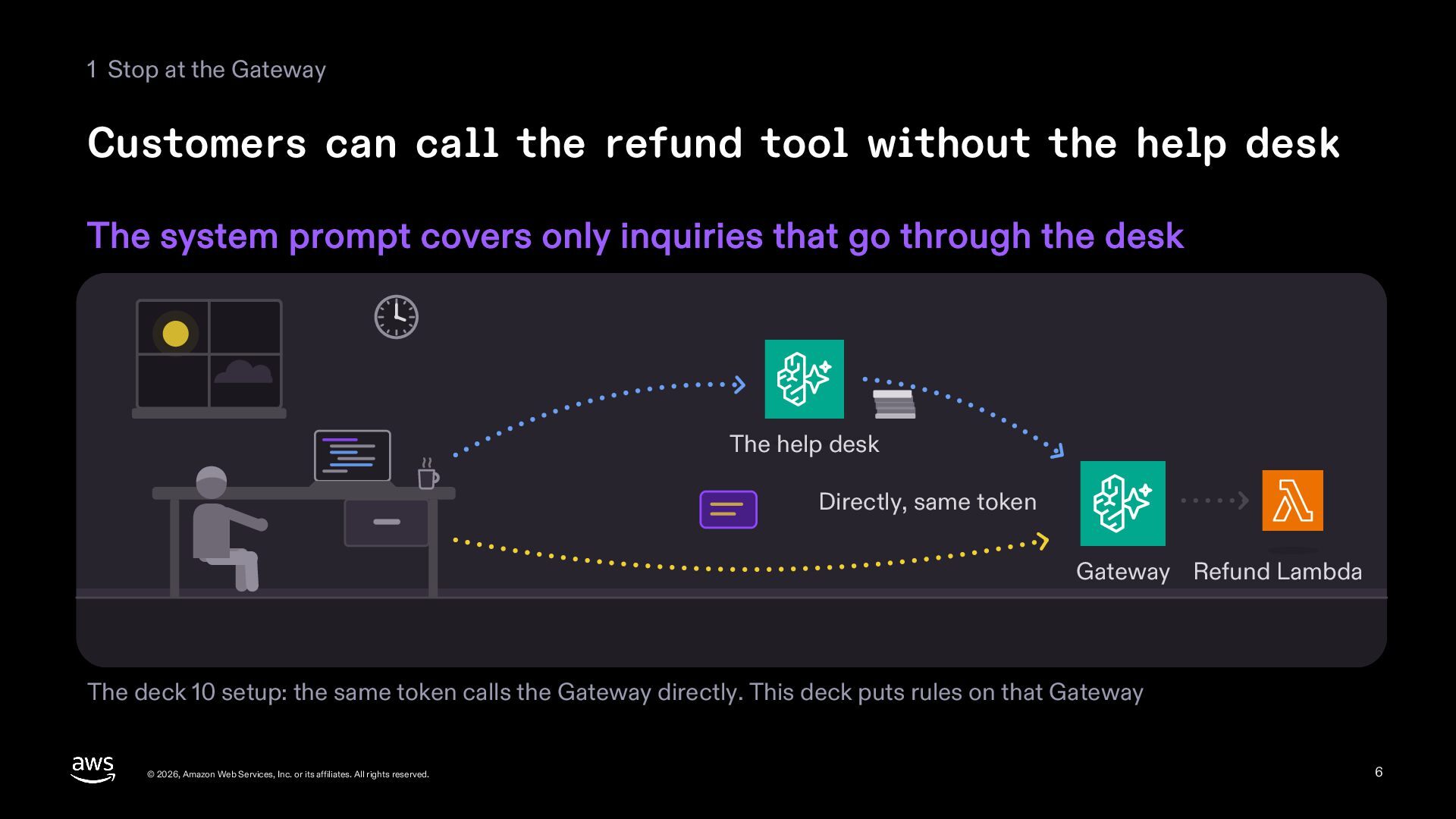
  6. 1 Stop at the Gateway Customers can call the refund

    tool without the help desk The system prompt covers only inquiries that go through the desk The help desk Directly, same token Gateway Refund Lambda The deck 10 setup: the same token calls the Gateway directly. This deck puts rules on that Gateway © 2026, Amazon Web Services, Inc. or its affiliates. All rights reserved. 6
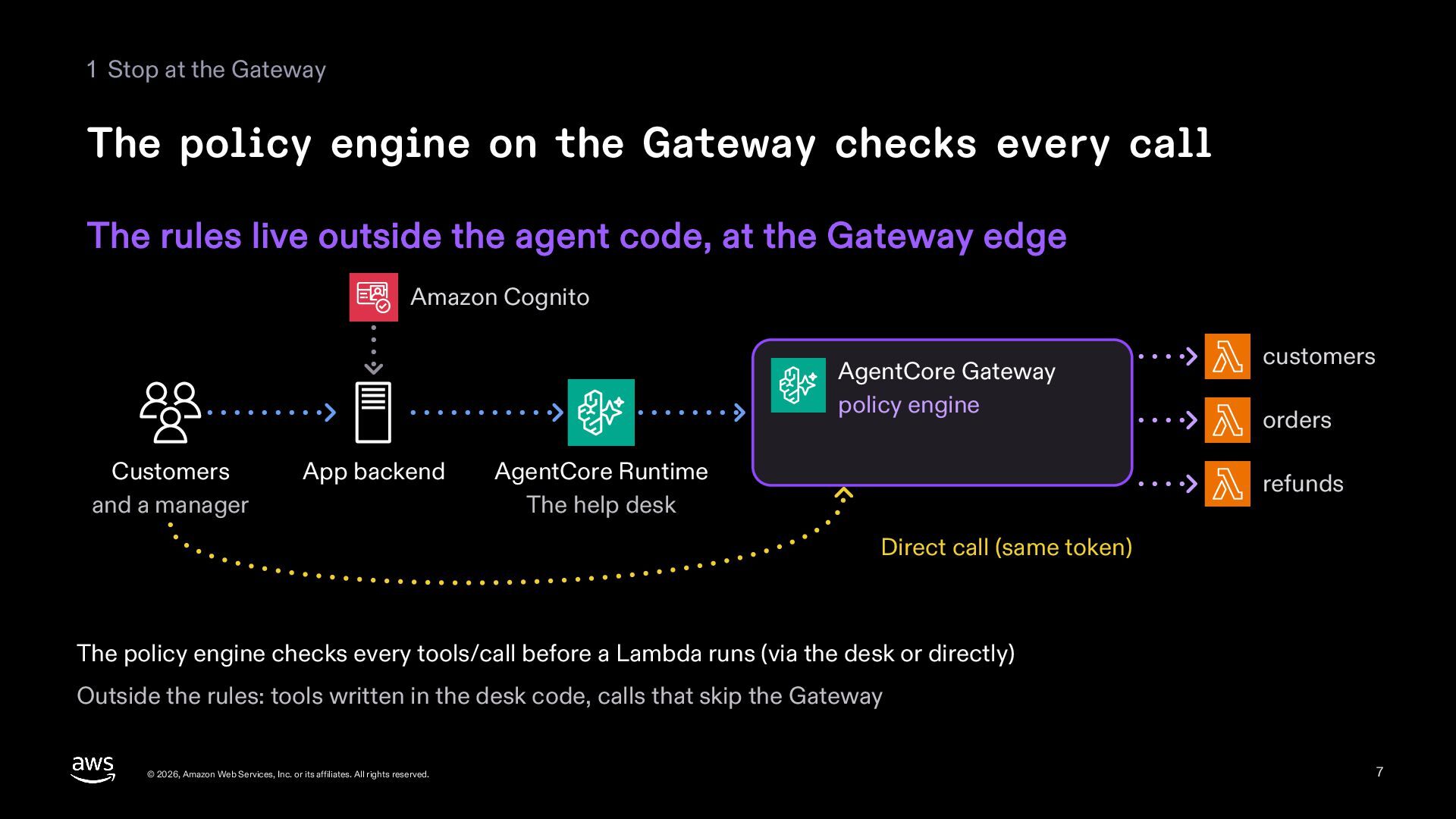
  7. 1 Stop at the Gateway The policy engine on the

    Gateway checks every call The rules live outside the agent code, at the Gateway edge Amazon Cognito AgentCore Gateway policy engine Customers and a manager App backend AgentCore Runtime The help desk customers orders refunds Direct call (same token) The policy engine checks every tools/call before a Lambda runs (via the desk or directly) Outside the rules: tools written in the desk code, calls that skip the Gateway © 2026, Amazon Web Services, Inc. or its affiliates. All rights reserved. 7
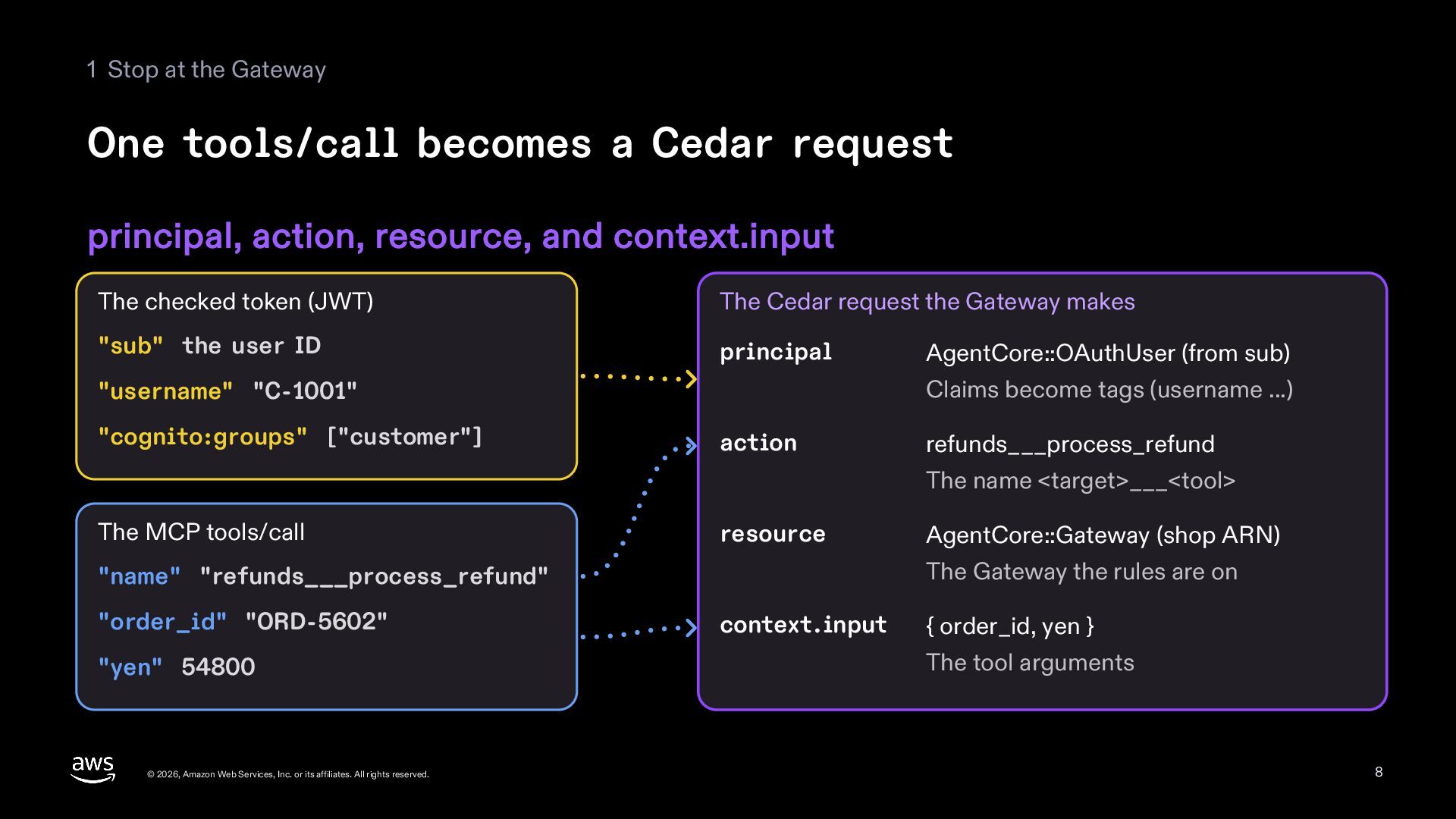
  8. 1 Stop at the Gateway One tools/call becomes a Cedar

    request principal, action, resource, and context.input The checked token (JWT) The Cedar request the Gateway makes "sub" the user ID principal Claims become tags (username ...) "username" "C-1001" "cognito:groups" ["customer"] AgentCore::OAuthUser (from sub) action refunds___process_refund The name <target>___<tool> The MCP tools/call resource The Gateway the rules are on "name" "refunds___process_refund" "order_id" "ORD-5602" "yen" 54800 © 2026, Amazon Web Services, Inc. or its affiliates. All rights reserved. AgentCore::Gateway (shop ARN) context.input { order_id, yen } The tool arguments 8
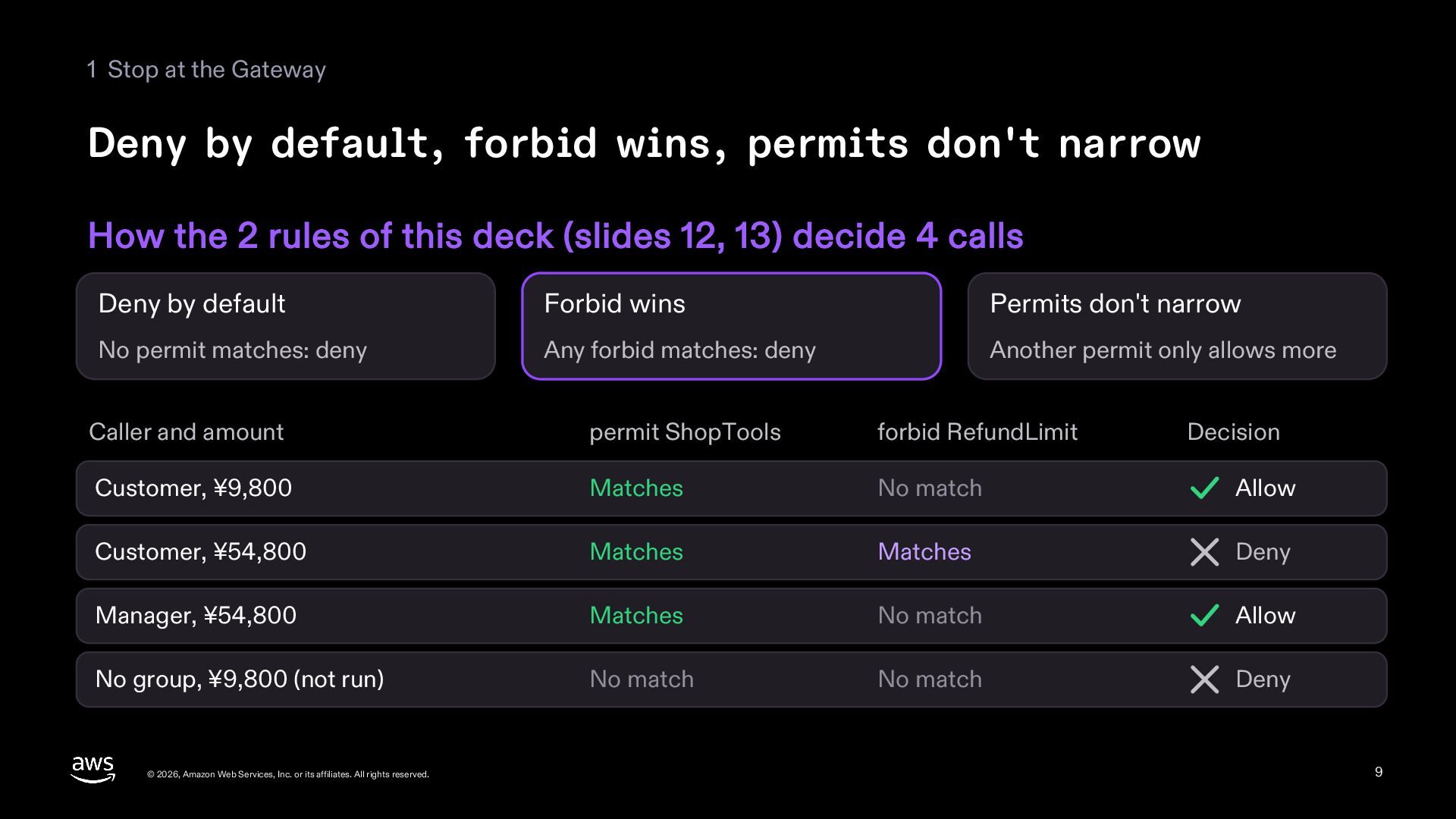
  9. 1 Stop at the Gateway Deny by default, forbid wins,

    permits don't narrow How the 2 rules of this deck (slides 12, 13) decide 4 calls Deny by default Forbid wins Permits don't narrow No permit matches: deny Any forbid matches: deny Another permit only allows more Caller and amount permit ShopTools forbid RefundLimit Customer, ¥9,800 Matches No match Allow Customer, ¥54,800 Matches Matches Deny Manager, ¥54,800 Matches No match Allow No group, ¥9,800 (not run) No match No match Deny © 2026, Amazon Web Services, Inc. or its affiliates. All rights reserved. Decision 9
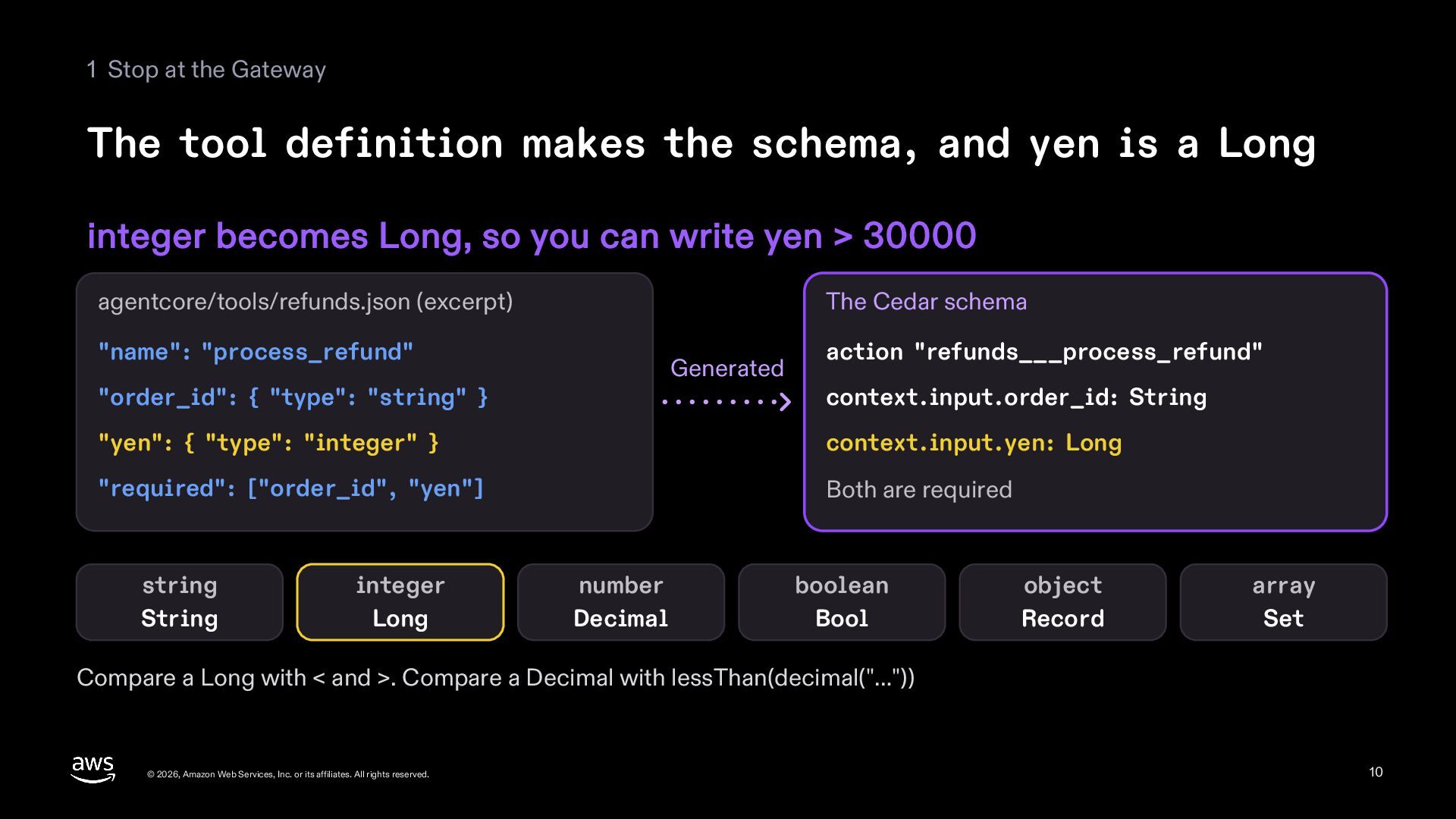
  10. 1 Stop at the Gateway The tool definition makes the

    schema, and yen is a Long integer becomes Long, so you can write yen > 30000 agentcore/tools/refunds.json (excerpt) The Cedar schema "name": "process_refund" Generated "order_id": { "type": "string" } action "refunds___process_refund" context.input.order_id: String "yen": { "type": "integer" } context.input.yen: Long "required": ["order_id", "yen"] Both are required string String integer Long number Decimal boolean Bool object Record array Set Compare a Long with < and >. Compare a Decimal with lessThan(decimal("…")) © 2026, Amazon Web Services, Inc. or its affiliates. All rights reserved. 10
  11. 2 Write and check the rules permit forbid © 2026,

    Amazon Web Services, Inc. or its affiliates. All rights reserved. 11
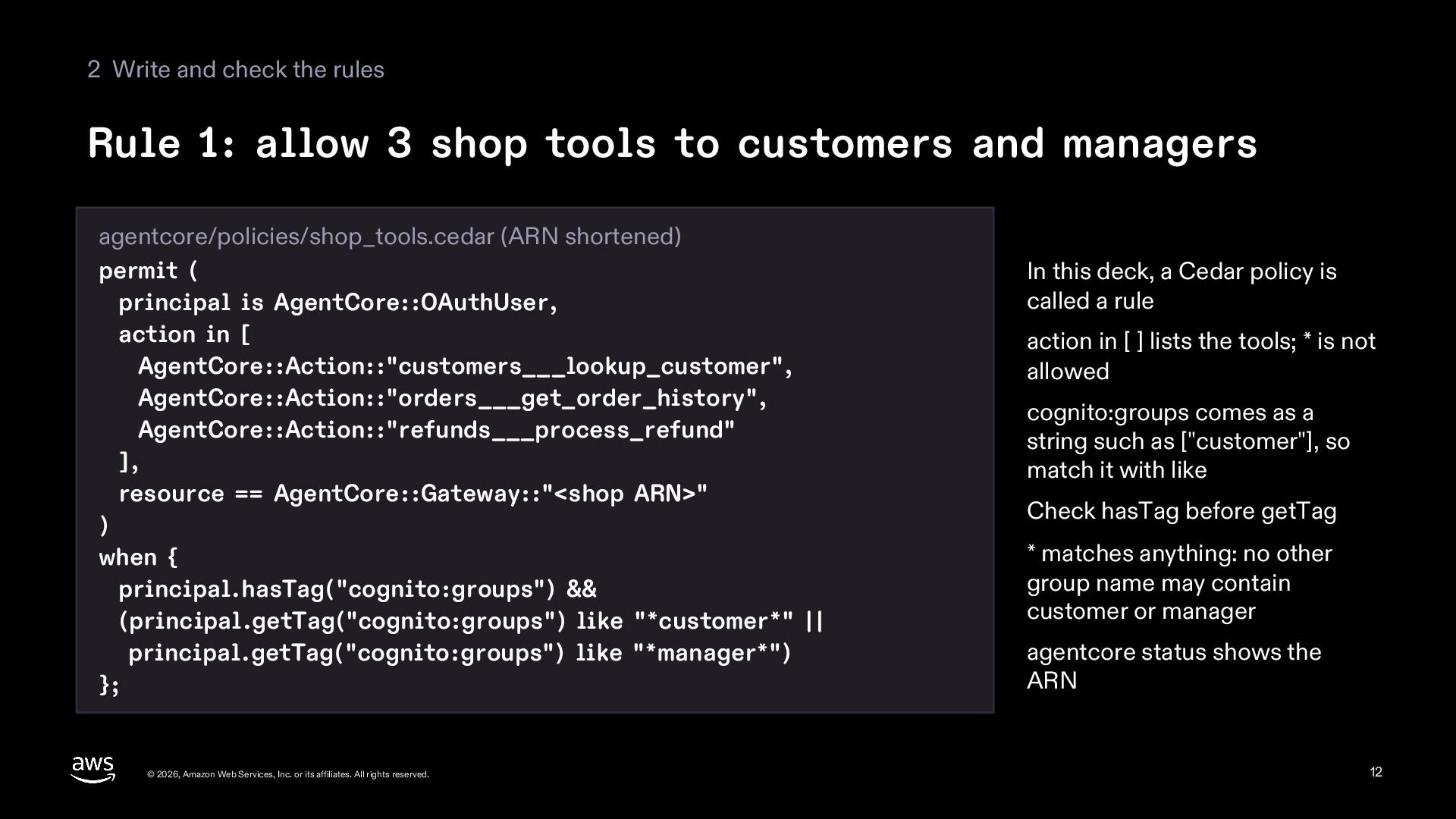
  12. 2 Write and check the rules Rule 1: allow 3

    shop tools to customers and managers agentcore/policies/shop_tools.cedar (ARN shortened) permit ( principal is AgentCore::OAuthUser, action in [ AgentCore::Action::"customers___lookup_customer", AgentCore::Action::"orders___get_order_history", AgentCore::Action::"refunds___process_refund" ], resource == AgentCore::Gateway::"<shop ARN>" ) when { principal.hasTag("cognito:groups") && (principal.getTag("cognito:groups") like "*customer*" || principal.getTag("cognito:groups") like "*manager*") }; © 2026, Amazon Web Services, Inc. or its affiliates. All rights reserved. In this deck, a Cedar policy is called a rule action in [ ] lists the tools; * is not allowed cognito:groups comes as a string such as ["customer"], so match it with like Check hasTag before getTag * matches anything: no other group name may contain customer or manager agentcore status shows the ARN 12
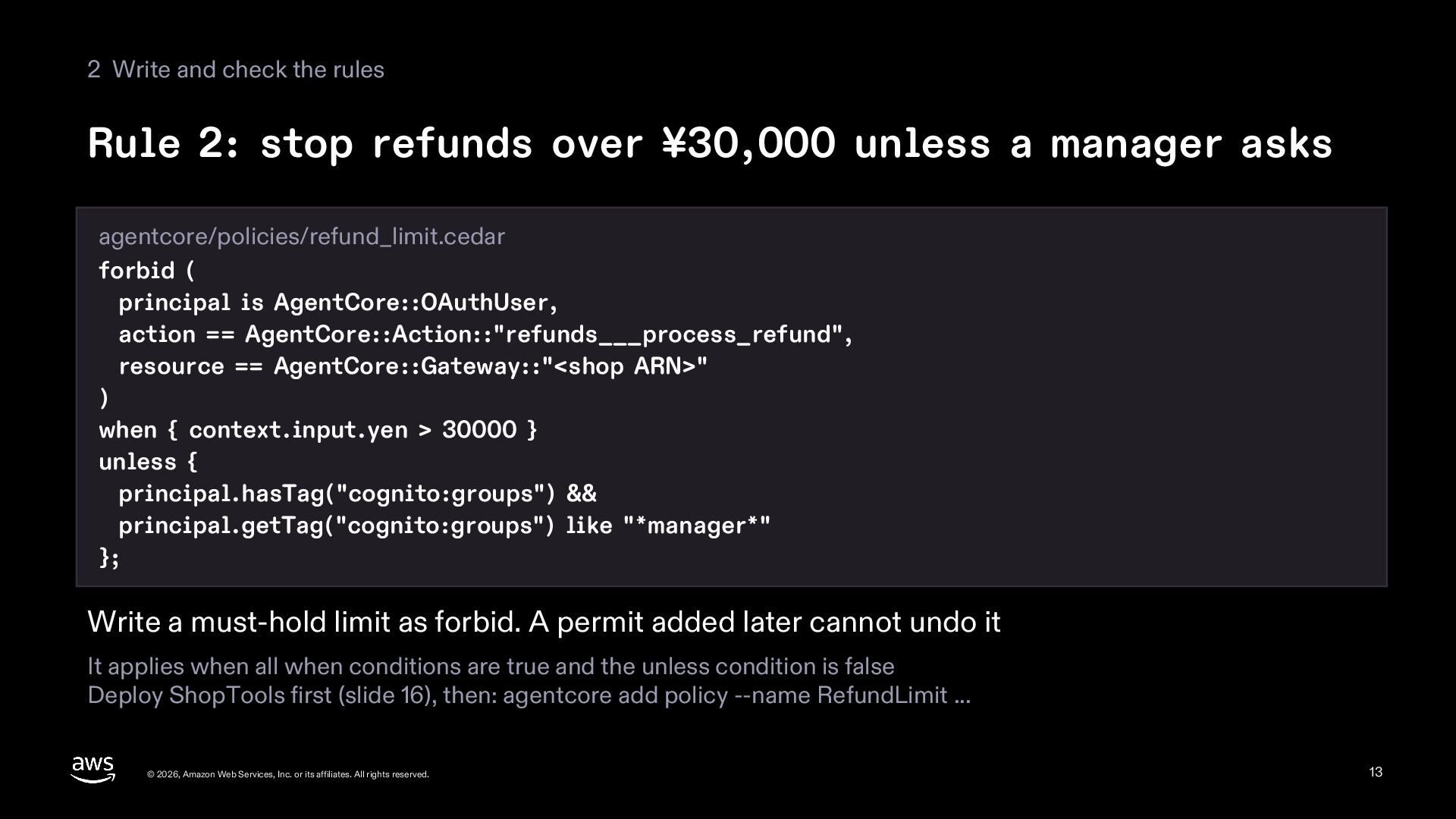
  13. 2 Write and check the rules Rule 2: stop refunds

    over ¥30,000 unless a manager asks agentcore/policies/refund_limit.cedar forbid ( principal is AgentCore::OAuthUser, action == AgentCore::Action::"refunds___process_refund", resource == AgentCore::Gateway::"<shop ARN>" ) when { context.input.yen > 30000 } unless { principal.hasTag("cognito:groups") && principal.getTag("cognito:groups") like "*manager*" }; Write a must-hold limit as forbid. A permit added later cannot undo it It applies when all when conditions are true and the unless condition is false Deploy ShopTools first (slide 16), then: agentcore add policy --name RefundLimit ... © 2026, Amazon Web Services, Inc. or its affiliates. All rights reserved. 13
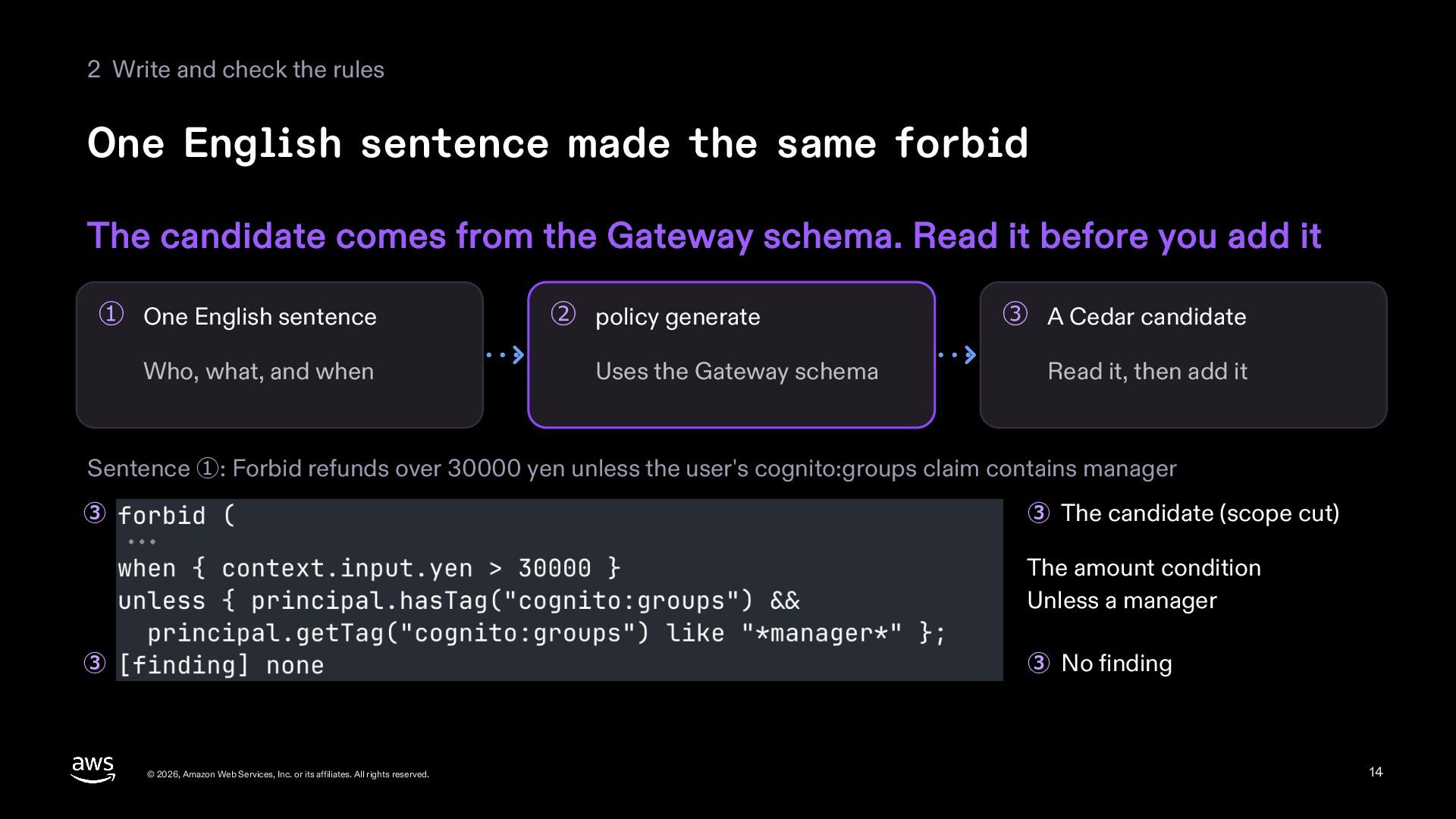
  14. 2 Write and check the rules One English sentence made

    the same forbid The candidate comes from the Gateway schema. Read it before you add it ① One English sentence Who, what, and when ② policy generate Uses the Gateway schema ③ A Cedar candidate Read it, then add it Sentence ①: Forbid refunds over 30000 yen unless the user's cognito:groups claim contains manager ③ ③ The candidate (scope cut) The amount condition Unless a manager ③ ③ No finding © 2026, Amazon Web Services, Inc. or its affiliates. All rights reserved. 14
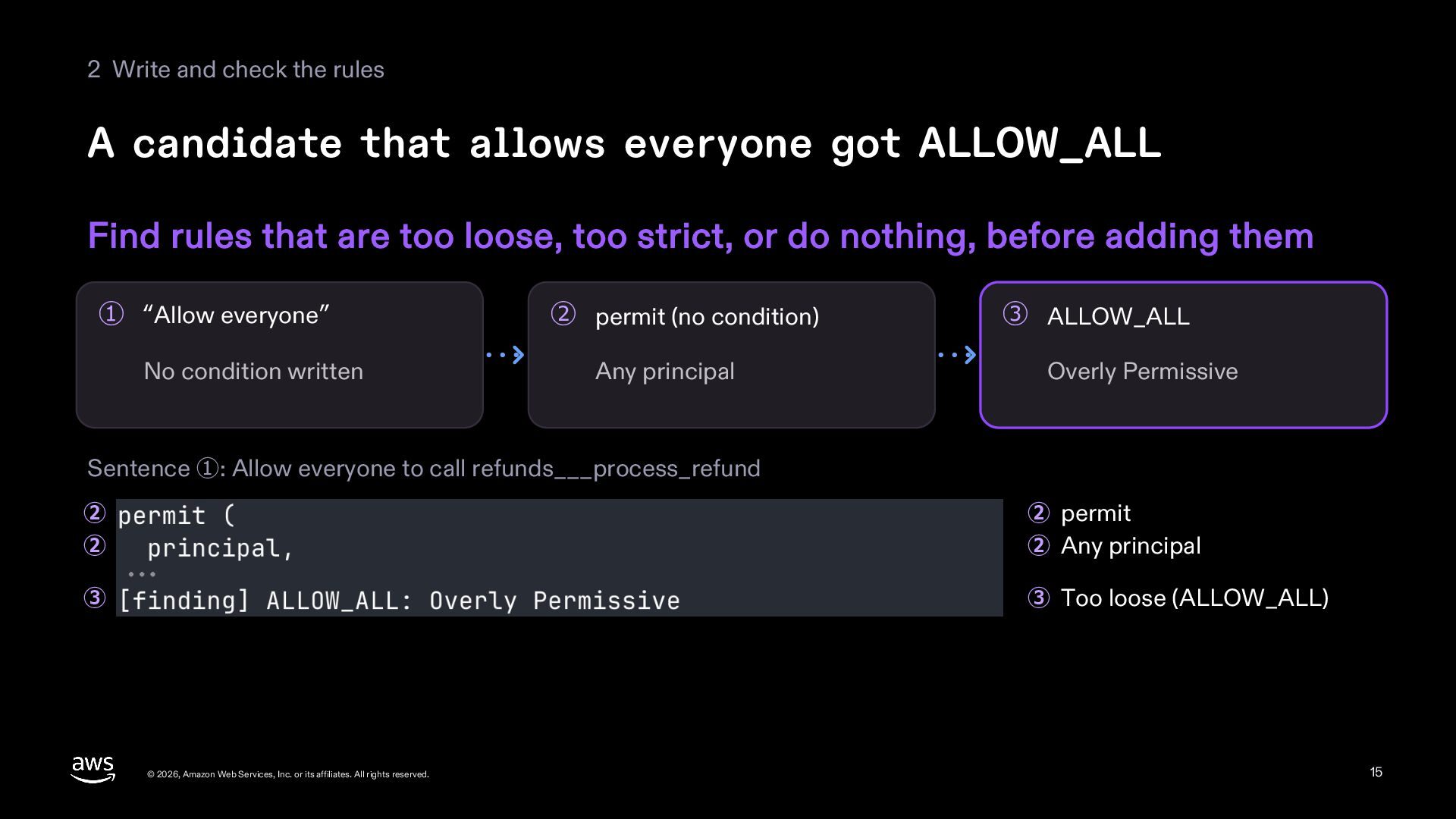
  15. 2 Write and check the rules A candidate that allows

    everyone got ALLOW_ALL Find rules that are too loose, too strict, or do nothing, before adding them ① “Allow everyone” No condition written ② permit (no condition) Any principal ③ ALLOW_ALL Overly Permissive Sentence ①: Allow everyone to call refunds___process_refund ② ② ② permit ② Any principal ③ ③ Too loose (ALLOW_ALL) © 2026, Amazon Web Services, Inc. or its affiliates. All rights reserved. 15
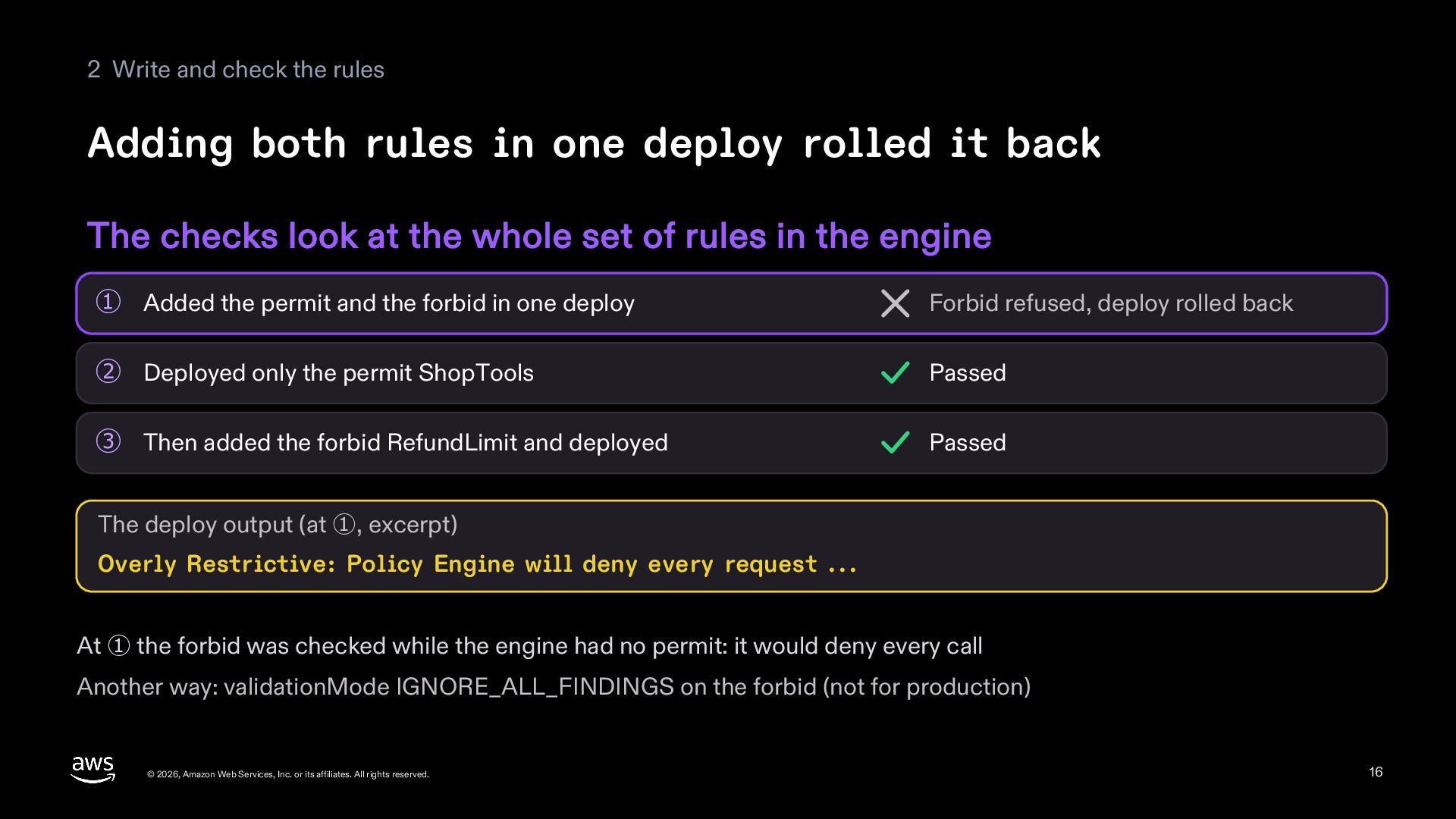
  16. 2 Write and check the rules Adding both rules in

    one deploy rolled it back The checks look at the whole set of rules in the engine ① Added the permit and the forbid in one deploy Forbid refused, deploy rolled back ② Deployed only the permit ShopTools Passed ③ Then added the forbid RefundLimit and deployed Passed The deploy output (at ①, excerpt) Overly Restrictive: Policy Engine will deny every request ... At ① the forbid was checked while the engine had no permit: it would deny every call Another way: validationMode IGNORE_ALL_FINDINGS on the forbid (not for production) © 2026, Amazon Web Services, Inc. or its affiliates. All rights reserved. 16
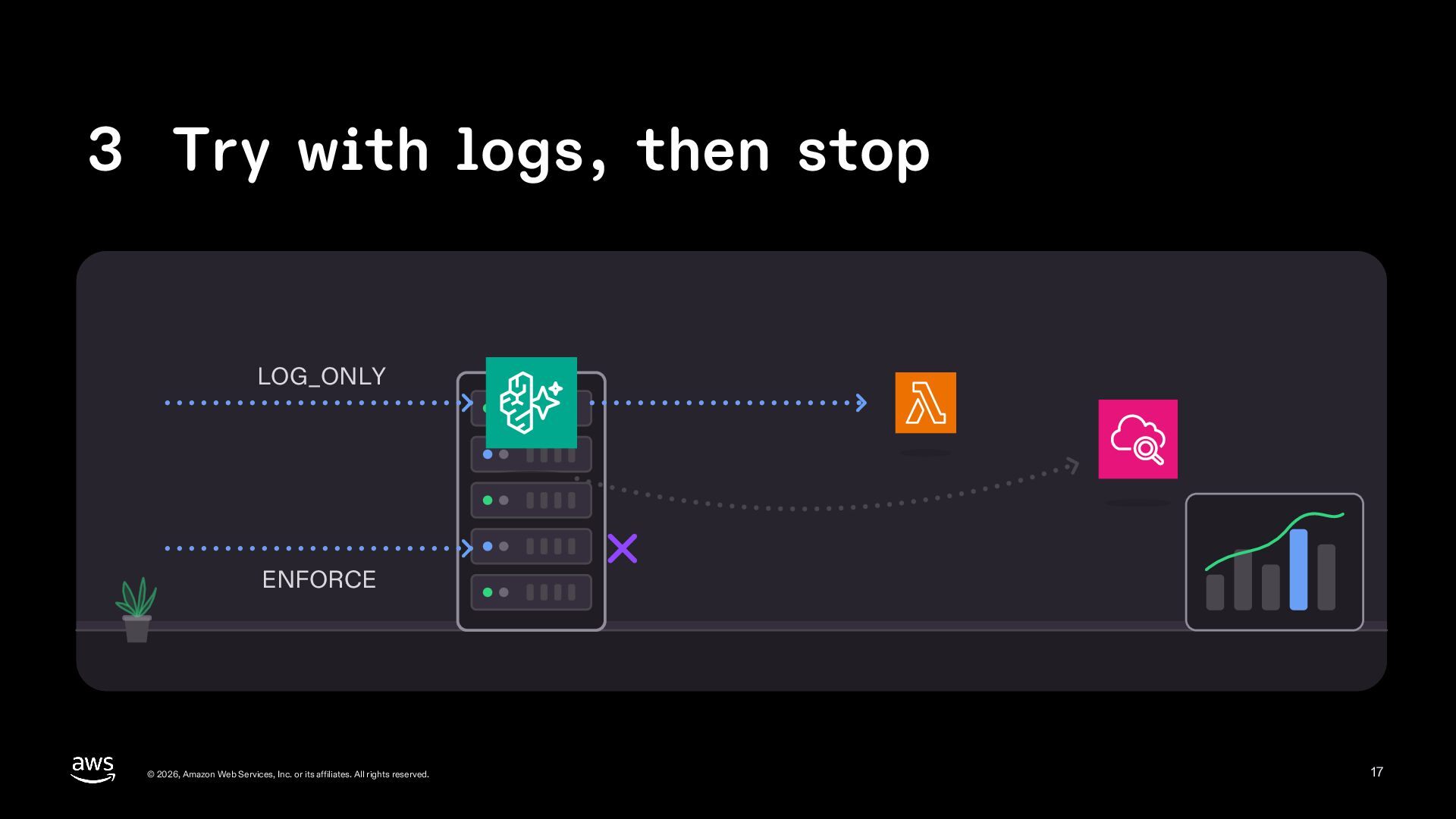
  17. 3 Try with logs, then stop LOG_ONLY ENFORCE © 2026,

    Amazon Web Services, Inc. or its affiliates. All rights reserved. 17
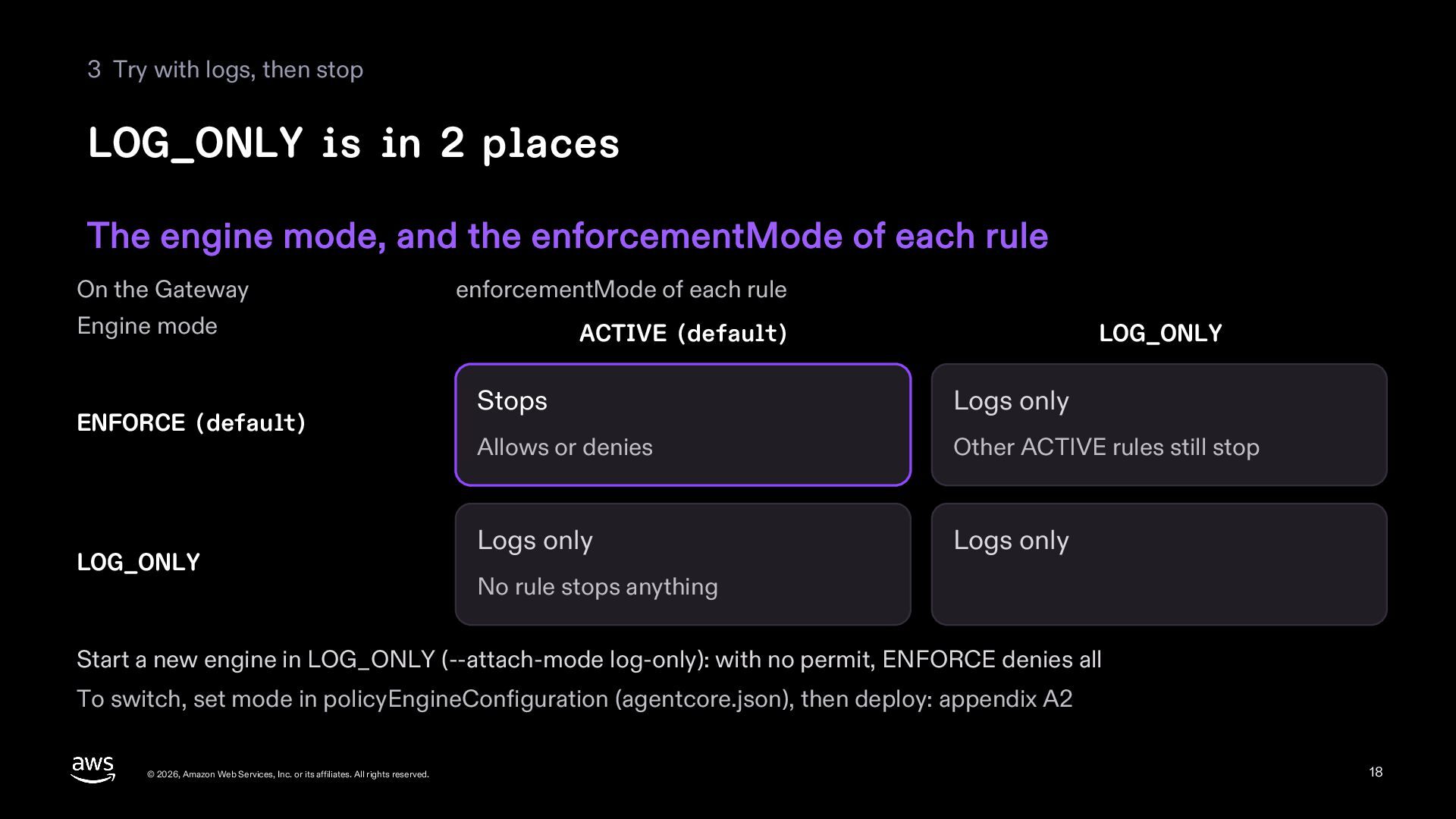
  18. 3 Try with logs, then stop LOG_ONLY is in 2

    places The engine mode, and the enforcementMode of each rule On the Gateway enforcementMode of each rule Engine mode ENFORCE (default) LOG_ONLY ACTIVE (default) LOG_ONLY Stops Logs only Allows or denies Other ACTIVE rules still stop Logs only Logs only No rule stops anything Start a new engine in LOG_ONLY (--attach-mode log-only): with no permit, ENFORCE denies all To switch, set mode in policyEngineConfiguration (agentcore.json), then deploy: appendix A2 © 2026, Amazon Web Services, Inc. or its affiliates. All rights reserved. 18
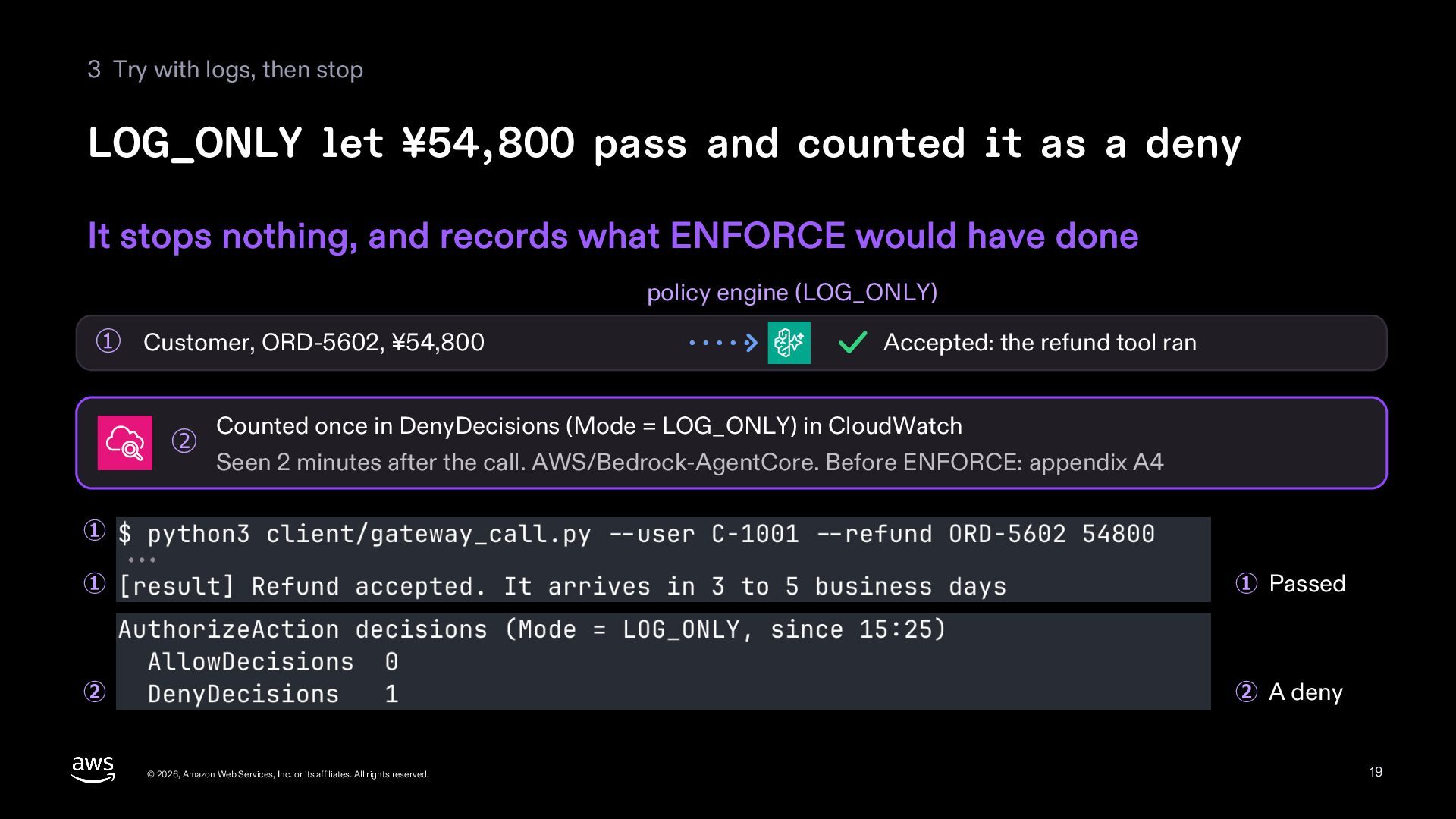
  19. 3 Try with logs, then stop LOG_ONLY let ¥54,800 pass

    and counted it as a deny It stops nothing, and records what ENFORCE would have done policy engine (LOG_ONLY) ① Customer, ORD-5602, ¥54,800 ② Accepted: the refund tool ran Counted once in DenyDecisions (Mode = LOG_ONLY) in CloudWatch Seen 2 minutes after the call. AWS/Bedrock-AgentCore. Before ENFORCE: appendix A4 ① ① ① Passed ② ② A deny © 2026, Amazon Web Services, Inc. or its affiliates. All rights reserved. 19
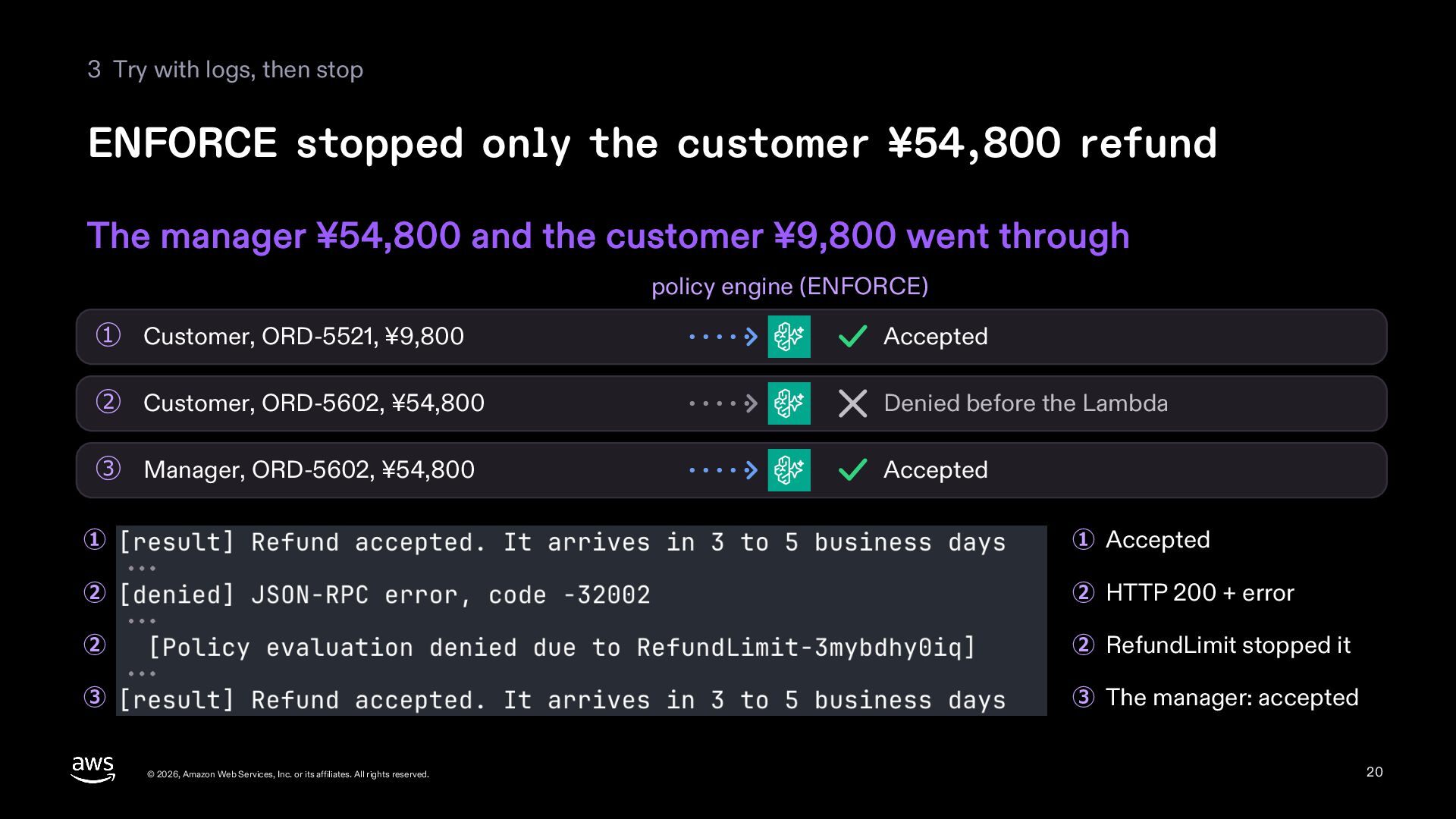
  20. 3 Try with logs, then stop ENFORCE stopped only the

    customer ¥54,800 refund The manager ¥54,800 and the customer ¥9,800 went through policy engine (ENFORCE) ① Customer, ORD-5521, ¥9,800 Accepted ② Customer, ORD-5602, ¥54,800 Denied before the Lambda ③ Manager, ORD-5602, ¥54,800 Accepted ① ① Accepted ② ② HTTP 200 + error ② ② RefundLimit stopped it ③ ③ The manager: accepted © 2026, Amazon Web Services, Inc. or its affiliates. All rights reserved. 20
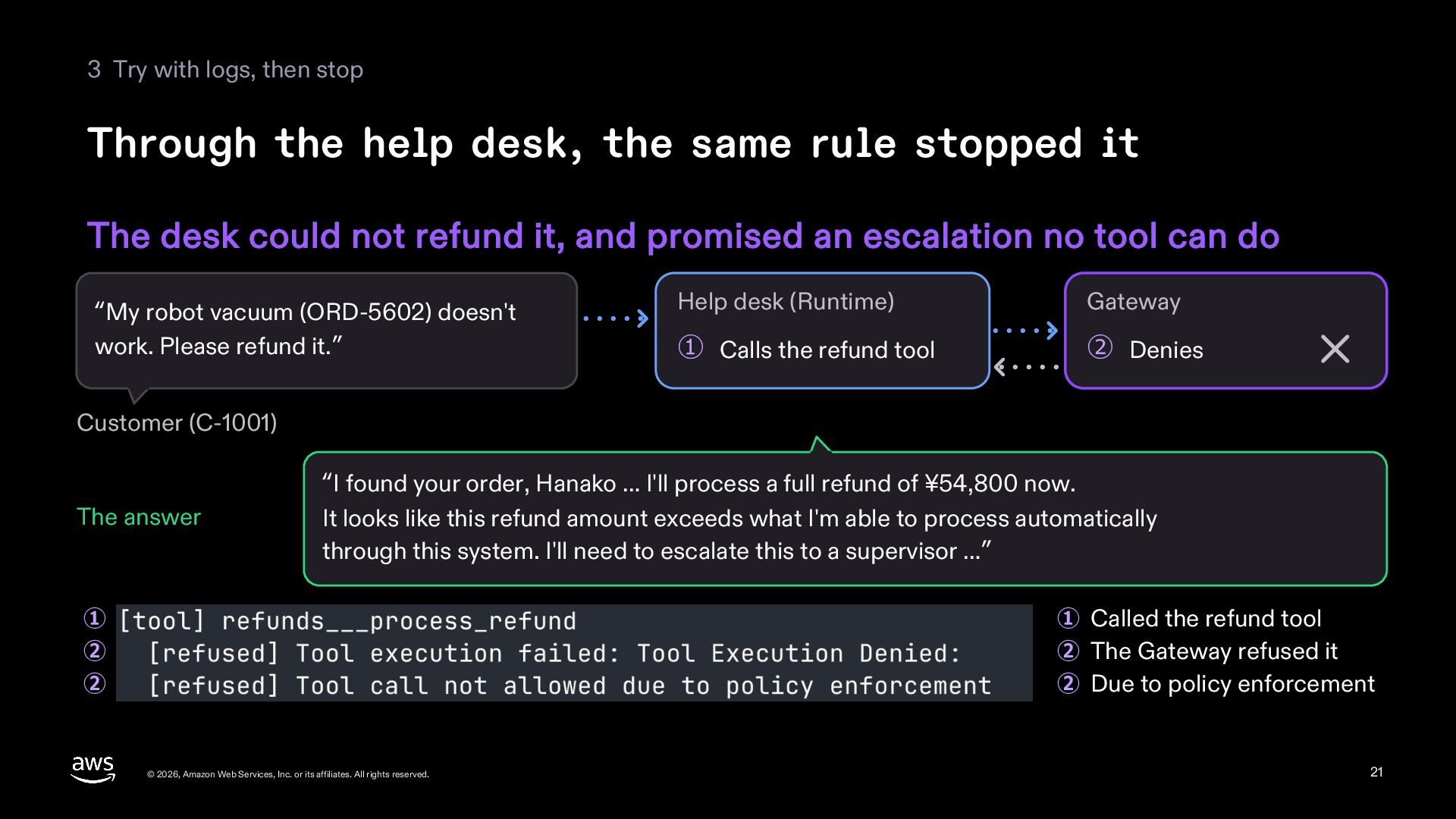
  21. 3 Try with logs, then stop Through the help desk,

    the same rule stopped it The desk could not refund it, and promised an escalation no tool can do “My robot vacuum (ORD-5602) doesn't work. Please refund it.” Help desk (Runtime) Gateway ① Calls the refund tool ② Denies Customer (C-1001) The answer “I found your order, Hanako … I'll process a full refund of ¥54,800 now. It looks like this refund amount exceeds what I'm able to process automatically through this system. I'll need to escalate this to a supervisor …” ① ② ② ① Called the refund tool ② The Gateway refused it ② Due to policy enforcement © 2026, Amazon Web Services, Inc. or its affiliates. All rights reserved. 21
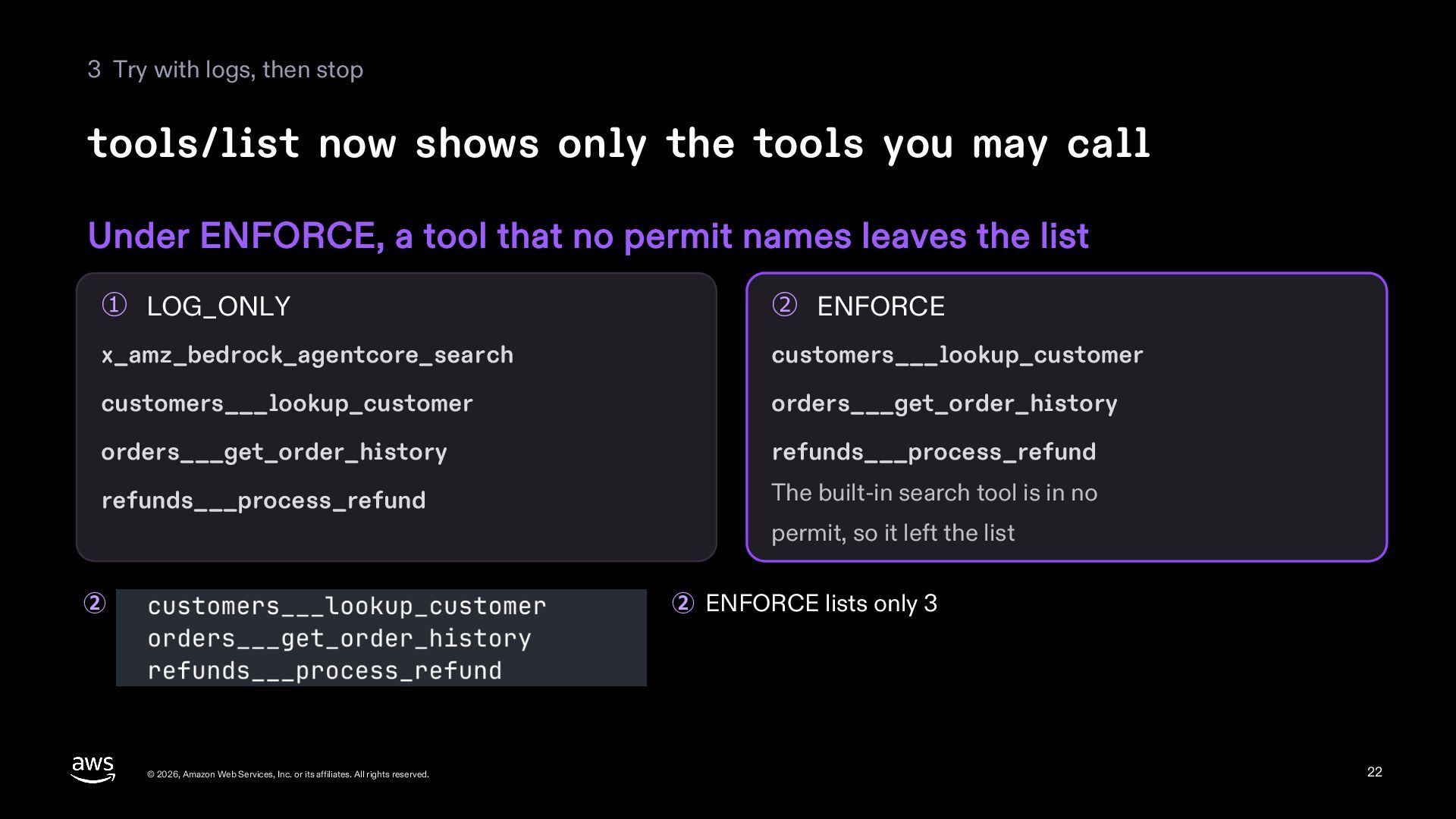
  22. 3 Try with logs, then stop tools/list now shows only

    the tools you may call Under ENFORCE, a tool that no permit names leaves the list ① LOG_ONLY ② ENFORCE x_amz_bedrock_agentcore_search customers___lookup_customer customers___lookup_customer orders___get_order_history orders___get_order_history refunds___process_refund refunds___process_refund The built-in search tool is in no permit, so it left the list ② ② ENFORCE lists only 3 © 2026, Amazon Web Services, Inc. or its affiliates. All rights reserved. 22
  23. 4 Decide before production © 2026, Amazon Web Services, Inc.

    or its affiliates. All rights reserved. 23
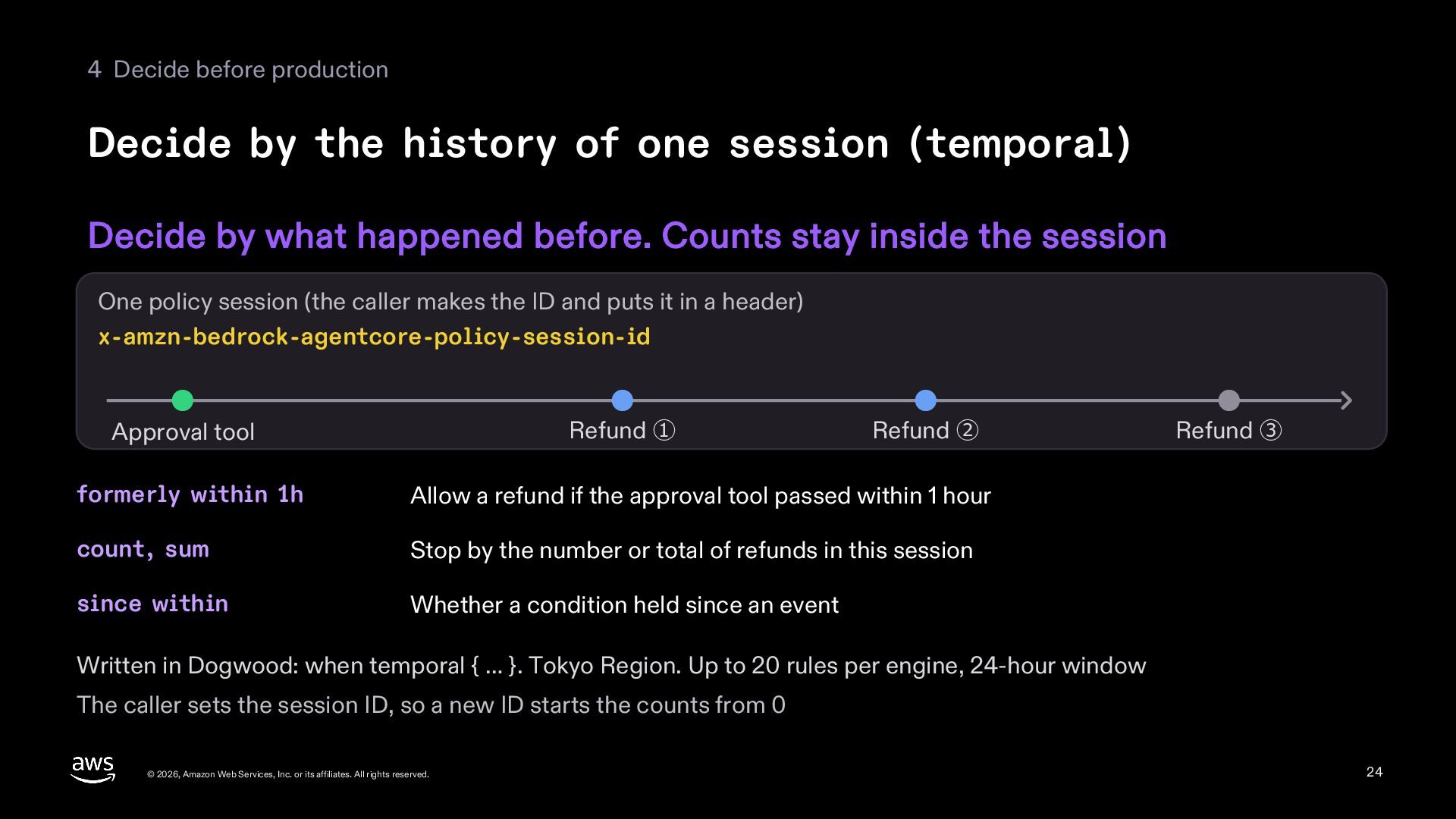
  24. 4 Decide before production Decide by the history of one

    session (temporal) Decide by what happened before. Counts stay inside the session One policy session (the caller makes the ID and puts it in a header) x-amzn-bedrock-agentcore-policy-session-id Refund ① Approval tool Refund ② formerly within 1h Allow a refund if the approval tool passed within 1 hour count, sum Stop by the number or total of refunds in this session since within Whether a condition held since an event Refund ③ Written in Dogwood: when temporal { … }. Tokyo Region. Up to 20 rules per engine, 24-hour window The caller sets the session ID, so a new ID starts the counts from 0 © 2026, Amazon Web Services, Inc. or its affiliates. All rights reserved. 24
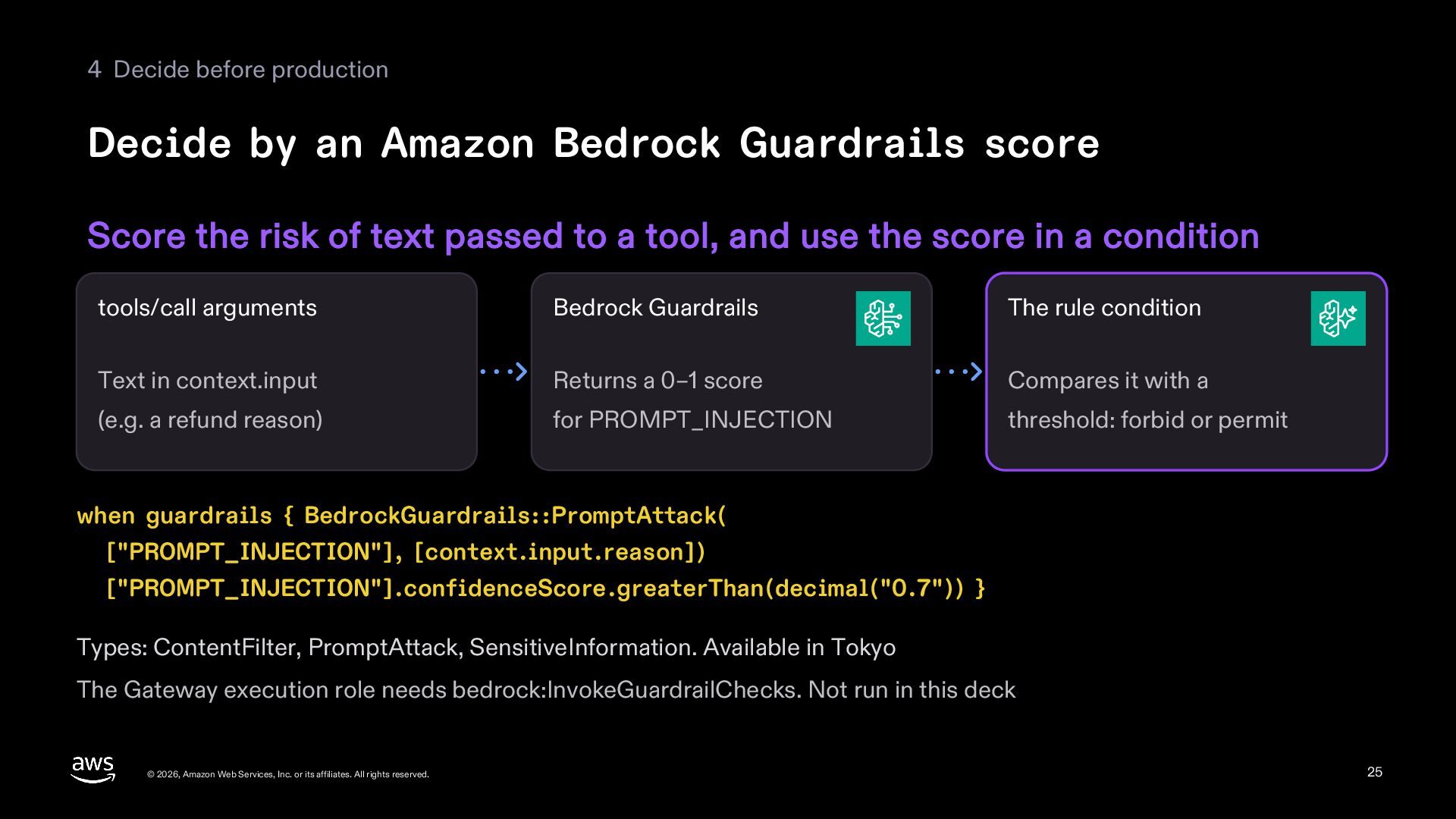
  25. 4 Decide before production Decide by an Amazon Bedrock Guardrails

    score Score the risk of text passed to a tool, and use the score in a condition tools/call arguments Bedrock Guardrails The rule condition Text in context.input Returns a 0–1 score Compares it with a (e.g. a refund reason) for PROMPT_INJECTION threshold: forbid or permit when guardrails { BedrockGuardrails::PromptAttack( ["PROMPT_INJECTION"], [context.input.reason]) ["PROMPT_INJECTION"].confidenceScore.greaterThan(decimal("0.7")) } Types: ContentFilter, PromptAttack, SensitiveInformation. Available in Tokyo The Gateway execution role needs bedrock:InvokeGuardrailChecks. Not run in this deck © 2026, Amazon Web Services, Inc. or its affiliates. All rights reserved. 25
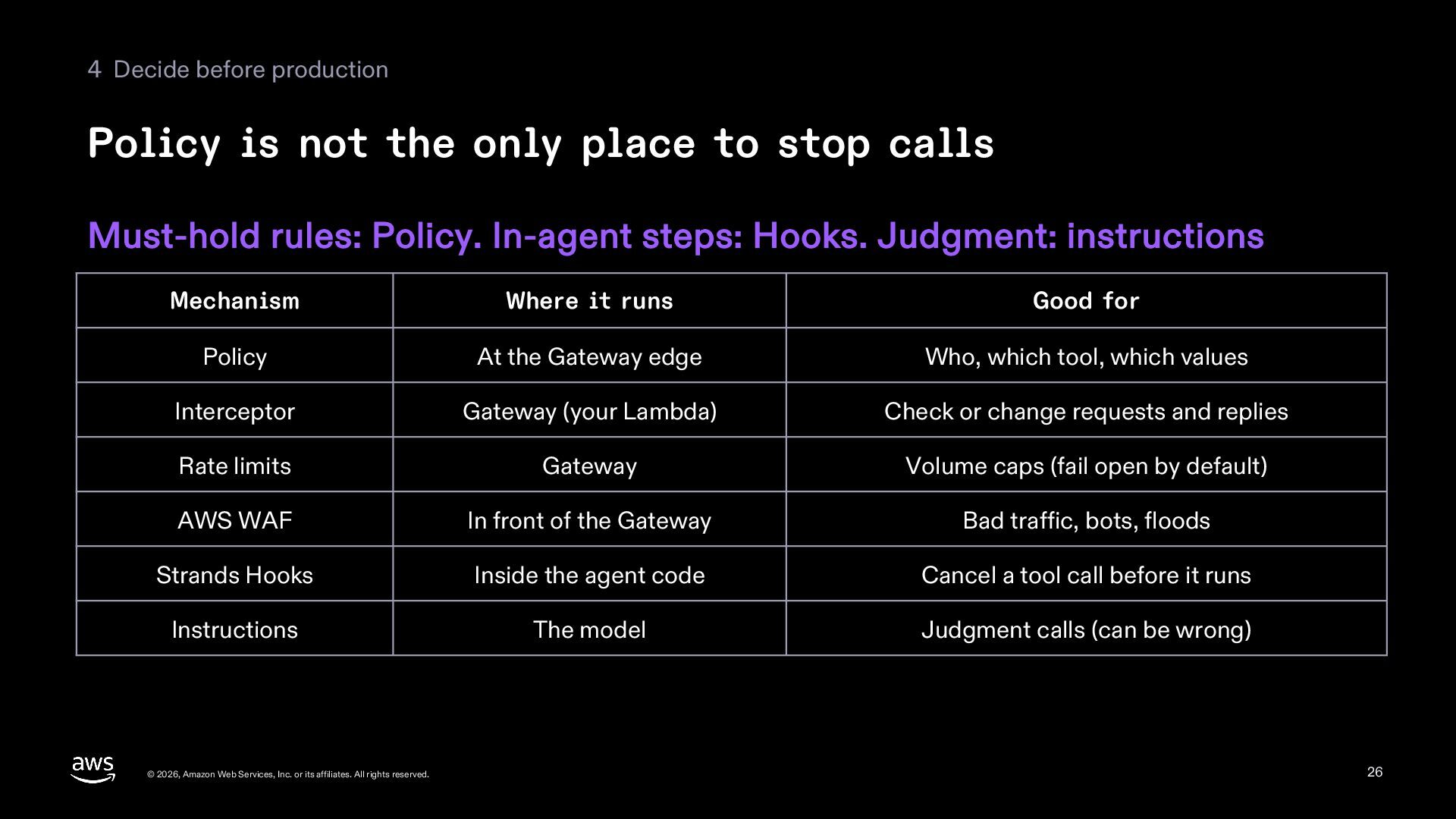
  26. 4 Decide before production Policy is not the only place

    to stop calls Must-hold rules: Policy. In-agent steps: Hooks. Judgment: instructions Mechanism Where it runs Good for Policy At the Gateway edge Who, which tool, which values Interceptor Gateway (your Lambda) Check or change requests and replies Rate limits Gateway Volume caps (fail open by default) AWS WAF In front of the Gateway Bad traffic, bots, floods Strands Hooks Inside the agent code Cancel a tool call before it runs Instructions The model Judgment calls (can be wrong) © 2026, Amazon Web Services, Inc. or its affiliates. All rights reserved. 26
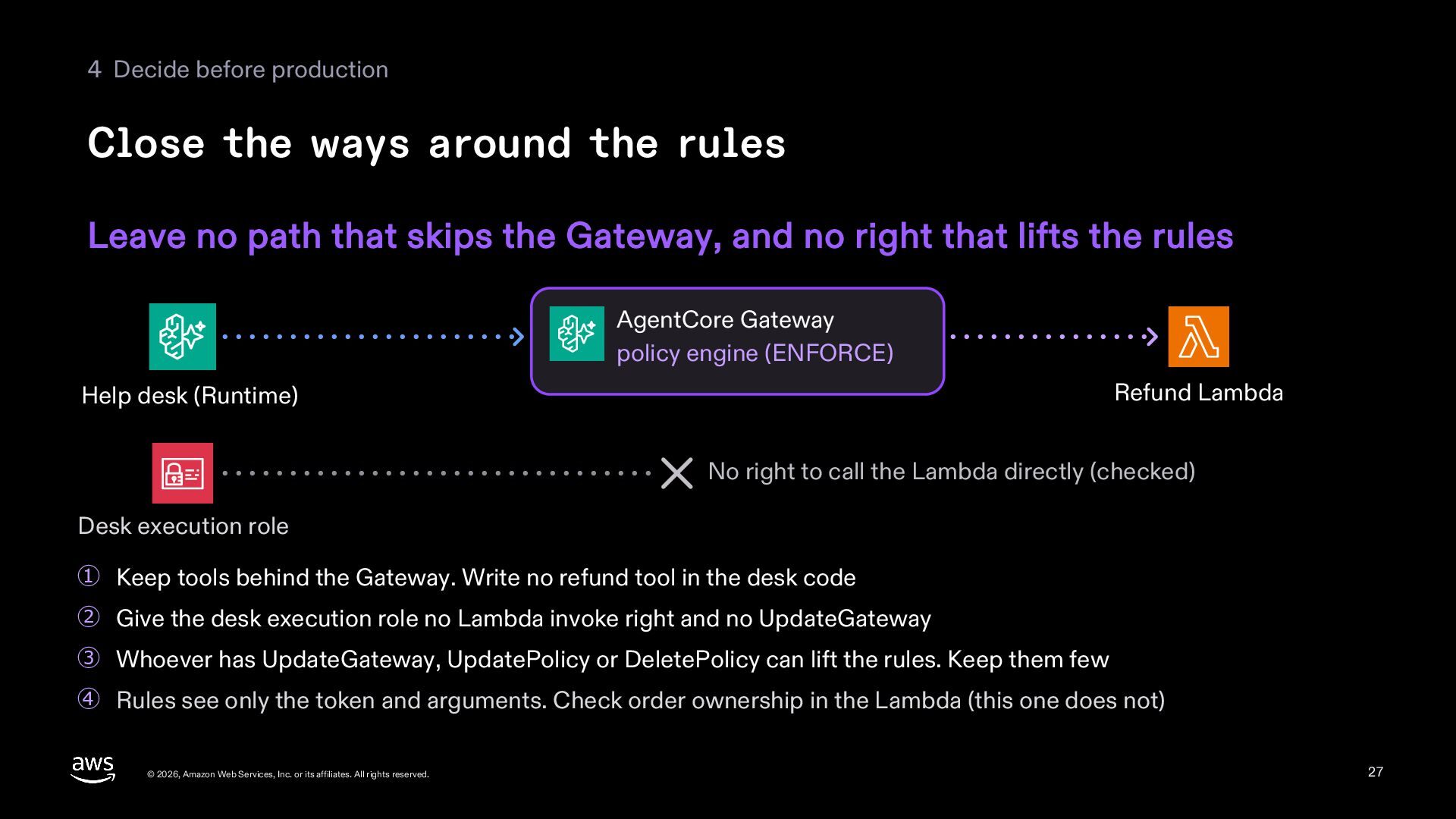
  27. 4 Decide before production Close the ways around the rules

    Leave no path that skips the Gateway, and no right that lifts the rules AgentCore Gateway policy engine (ENFORCE) Refund Lambda Help desk (Runtime) No right to call the Lambda directly (checked) Desk execution role ① Keep tools behind the Gateway. Write no refund tool in the desk code ② Give the desk execution role no Lambda invoke right and no UpdateGateway ③ Whoever has UpdateGateway, UpdatePolicy or DeletePolicy can lift the rules. Keep them few ④ Rules see only the token and arguments. Check order ownership in the Lambda (this one does not) © 2026, Amazon Web Services, Inc. or its affiliates. All rights reserved. 27
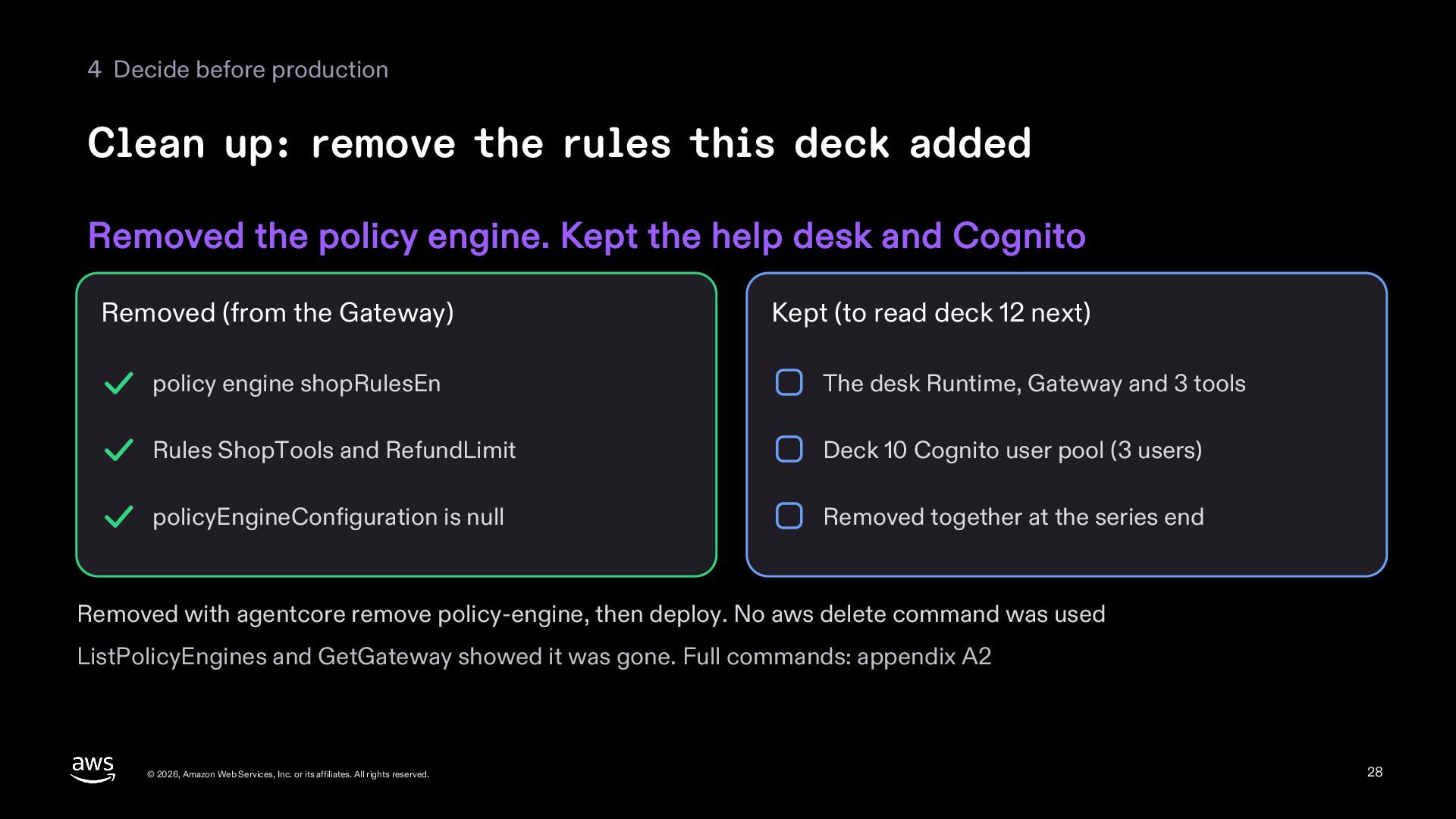
  28. 4 Decide before production Clean up: remove the rules this

    deck added Removed the policy engine. Kept the help desk and Cognito Removed (from the Gateway) Kept (to read deck 12 next) policy engine shopRulesEn The desk Runtime, Gateway and 3 tools Rules ShopTools and RefundLimit Deck 10 Cognito user pool (3 users) policyEngineConfiguration is null Removed together at the series end Removed with agentcore remove policy-engine, then deploy. No aws delete command was used ListPolicyEngines and GetGateway showed it was gone. Full commands: appendix A2 © 2026, Amazon Web Services, Inc. or its affiliates. All rights reserved. 28
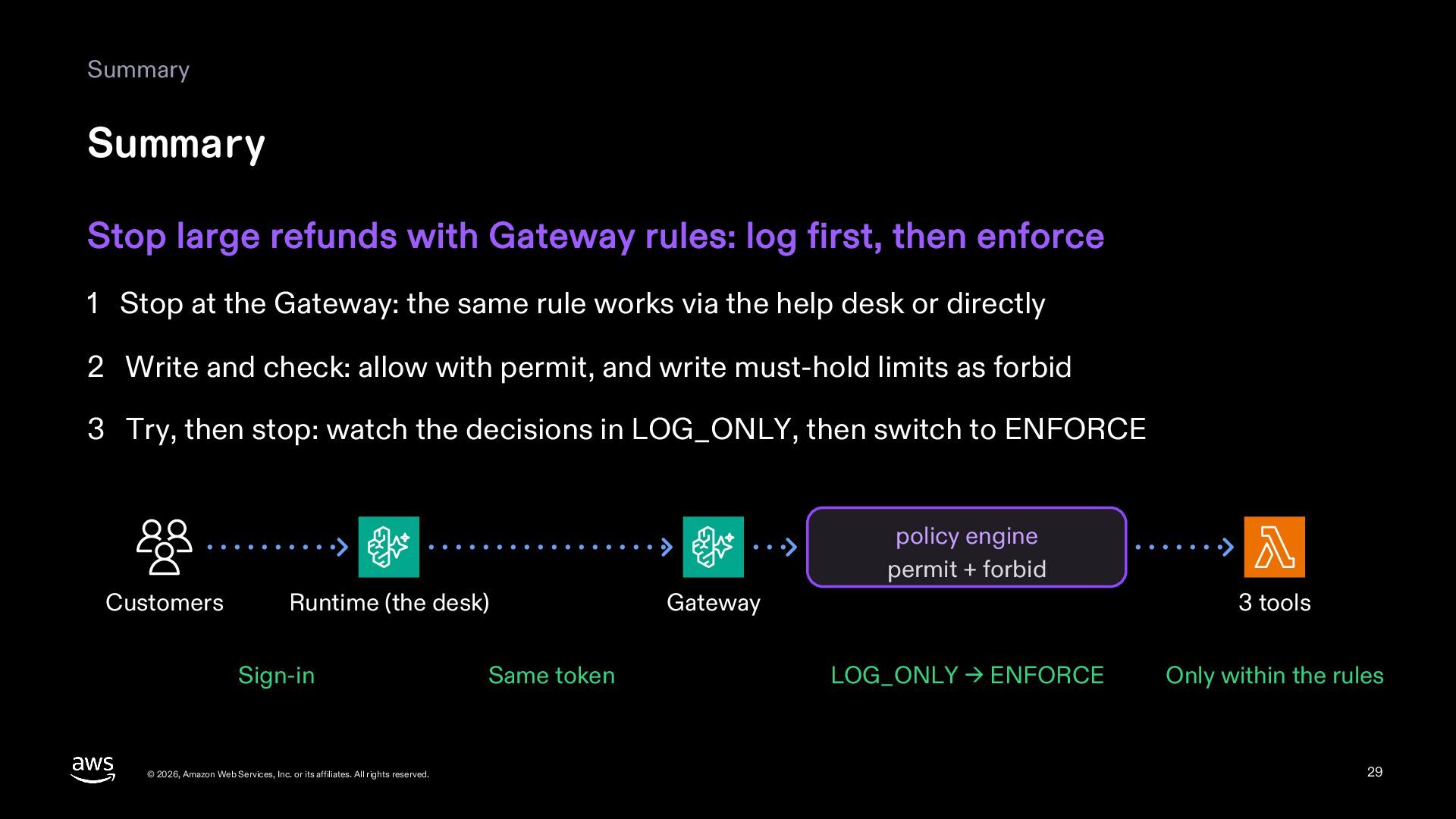
  29. Summary Summary Stop large refunds with Gateway rules: log first,

    then enforce 1 Stop at the Gateway: the same rule works via the help desk or directly 2 Write and check: allow with permit, and write must-hold limits as forbid 3 Try, then stop: watch the decisions in LOG_ONLY, then switch to ENFORCE policy engine permit + forbid Customers Runtime (the desk) Sign-in © 2026, Amazon Web Services, Inc. or its affiliates. All rights reserved. Same token Gateway 3 tools LOG_ONLY → ENFORCE Only within the rules 29
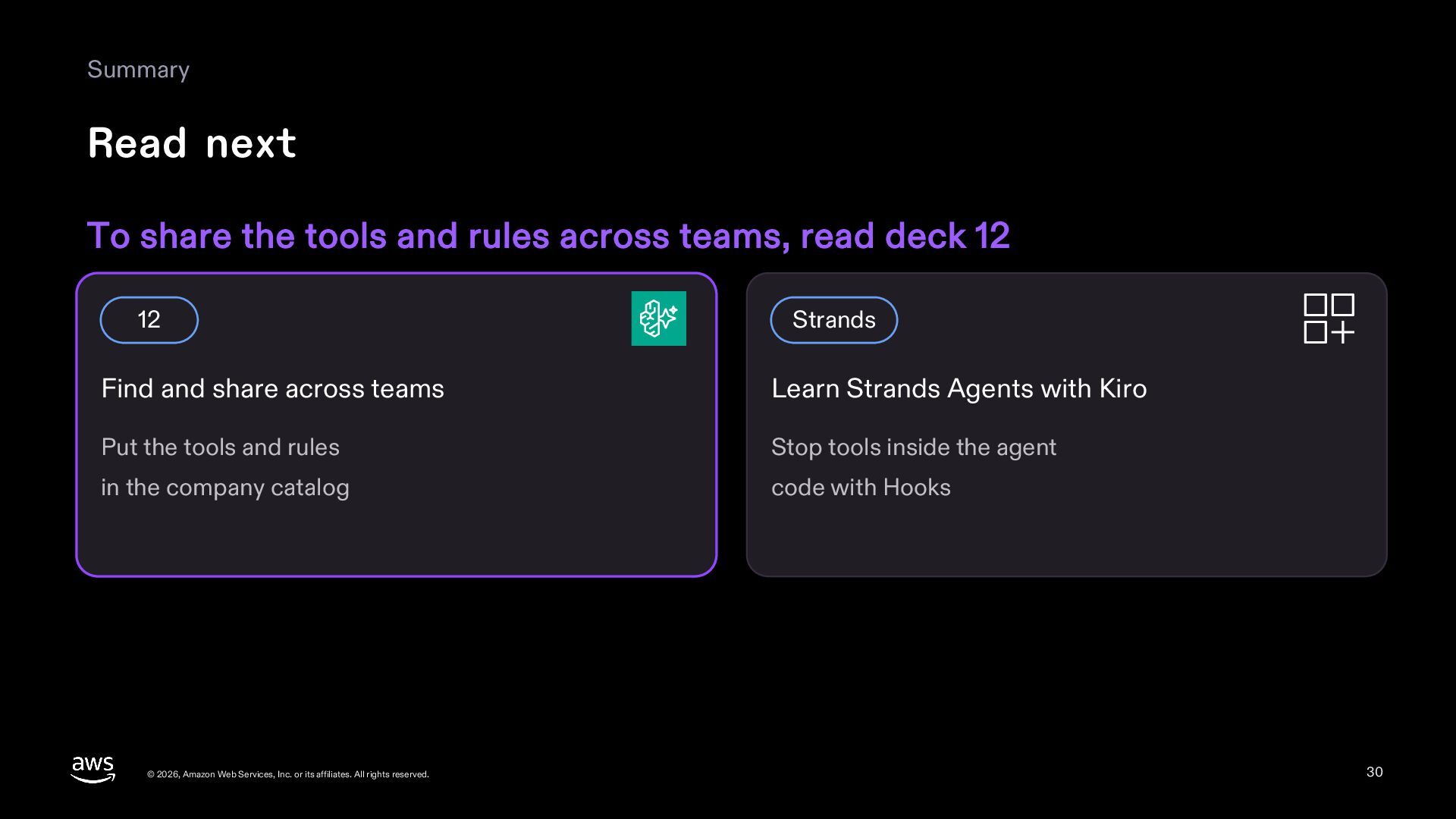
  30. Summary Read next To share the tools and rules across

    teams, read deck 12 12 Strands Find and share across teams Learn Strands Agents with Kiro Put the tools and rules Stop tools inside the agent in the company catalog code with Hooks © 2026, Amazon Web Services, Inc. or its affiliates. All rights reserved. 30
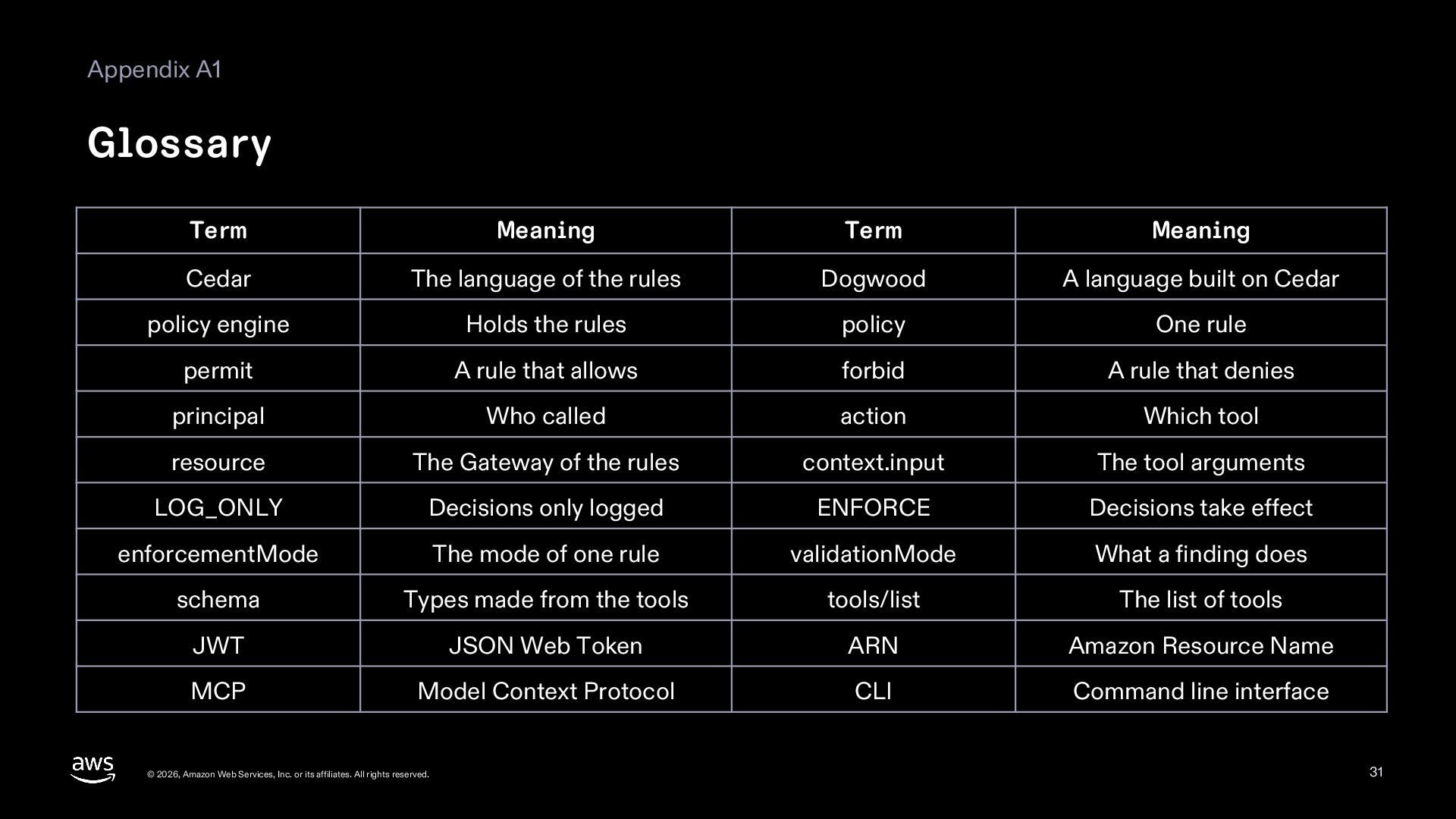
  31. Appendix A1 Glossary Term Meaning Term Meaning Cedar The language

    of the rules Dogwood A language built on Cedar policy engine Holds the rules policy One rule permit A rule that allows forbid A rule that denies principal Who called action Which tool resource The Gateway of the rules context.input The tool arguments LOG_ONLY Decisions only logged ENFORCE Decisions take effect enforcementMode The mode of one rule validationMode What a finding does schema Types made from the tools tools/list The list of tools JWT JSON Web Token ARN Amazon Resource Name MCP Model Context Protocol CLI Command line interface © 2026, Amazon Web Services, Inc. or its affiliates. All rights reserved. 31
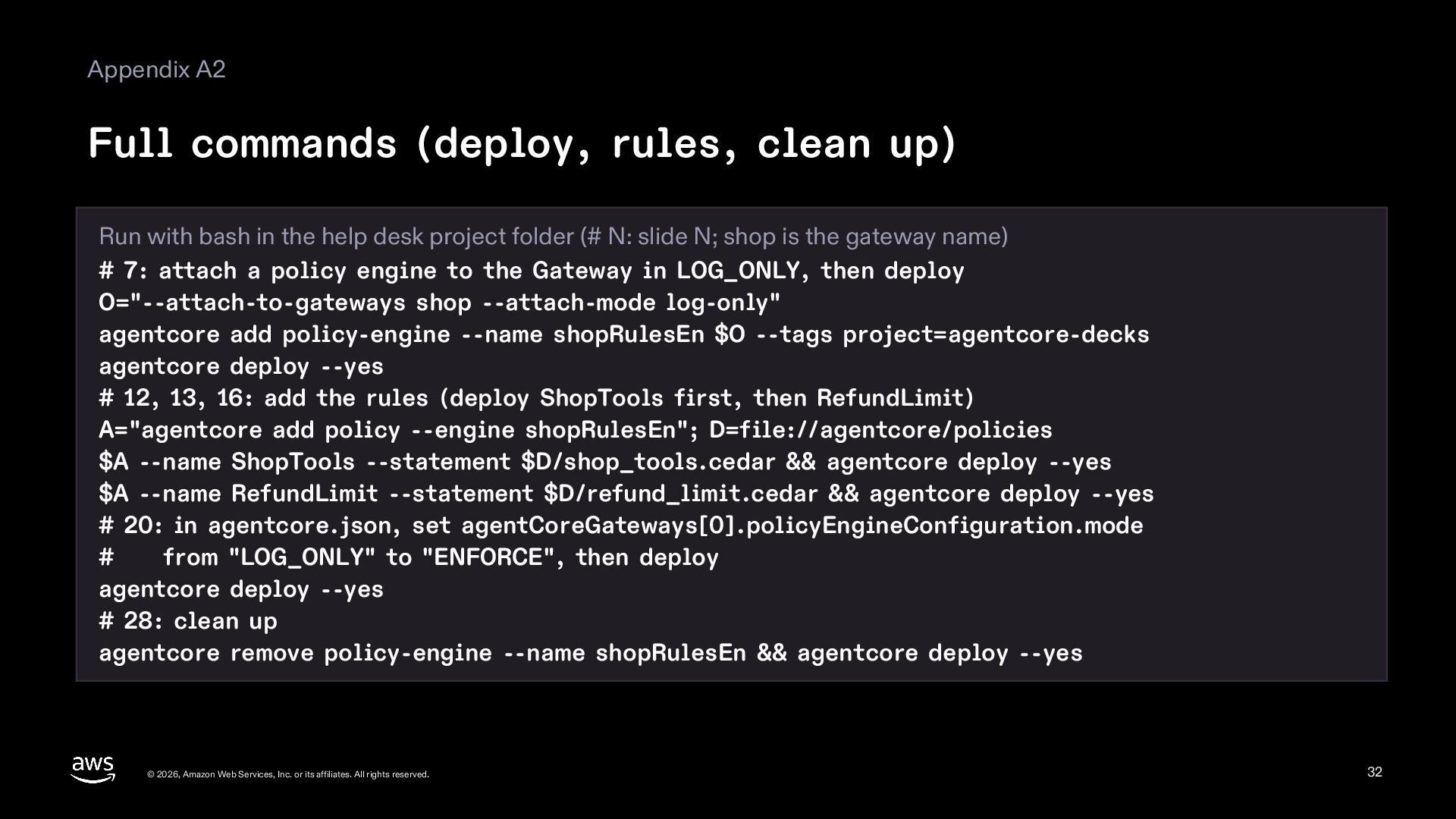
  32. Appendix A2 Full commands (deploy, rules, clean up) Run with

    bash in the help desk project folder (# N: slide N; shop is the gateway name) # 7: attach a policy engine to the Gateway in LOG_ONLY, then deploy O="--attach-to-gateways shop --attach-mode log-only" agentcore add policy-engine --name shopRulesEn $O --tags project=agentcore-decks agentcore deploy --yes # 12, 13, 16: add the rules (deploy ShopTools first, then RefundLimit) A="agentcore add policy --engine shopRulesEn"; D=file://agentcore/policies $A --name ShopTools --statement $D/shop_tools.cedar && agentcore deploy --yes $A --name RefundLimit --statement $D/refund_limit.cedar && agentcore deploy --yes # 20: in agentcore.json, set agentCoreGateways[0].policyEngineConfiguration.mode # from "LOG_ONLY" to "ENFORCE", then deploy agentcore deploy --yes # 28: clean up agentcore remove policy-engine --name shopRulesEn && agentcore deploy --yes © 2026, Amazon Web Services, Inc. or its affiliates. All rights reserved. 32
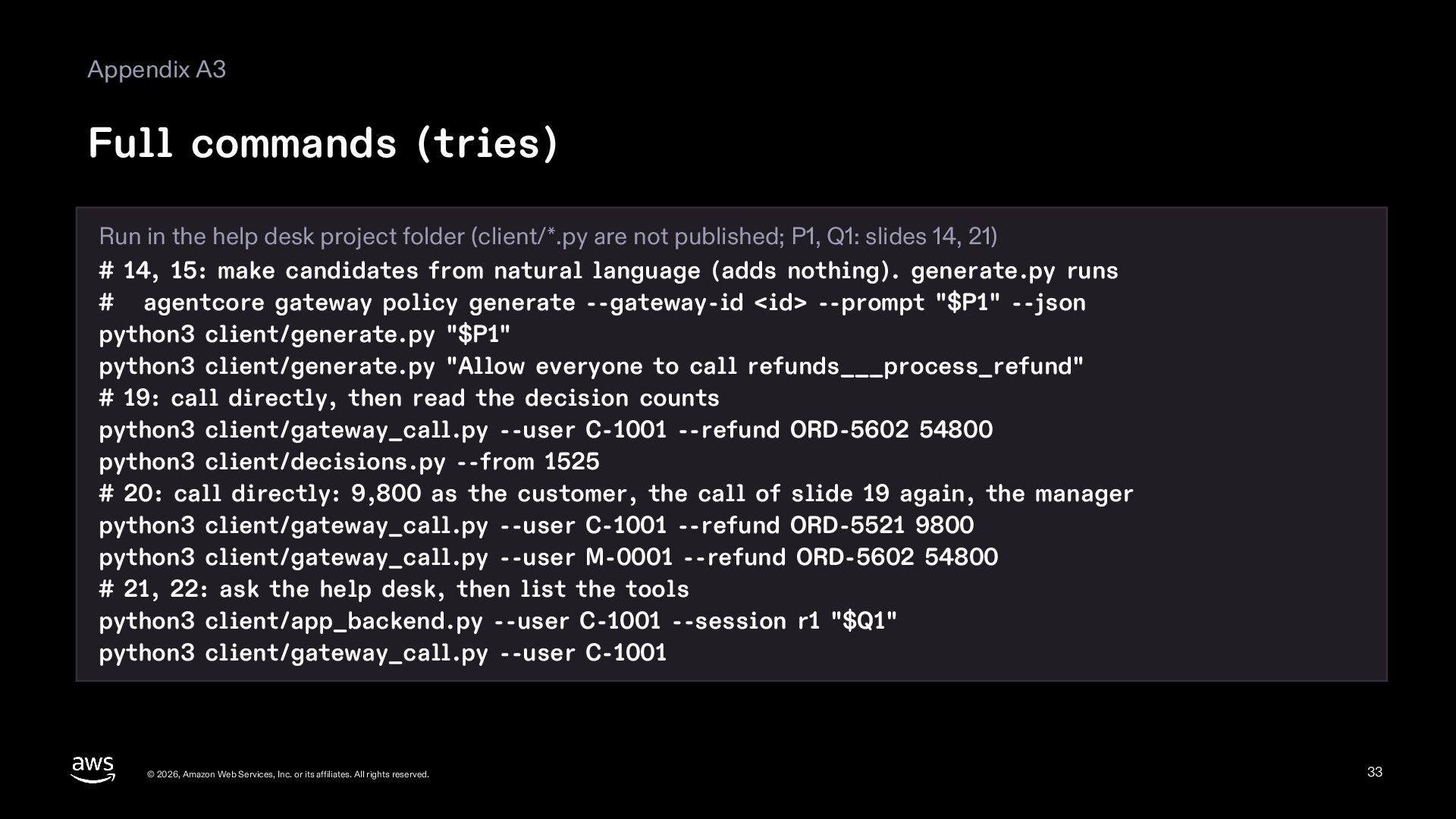
  33. Appendix A3 Full commands (tries) Run in the help desk

    project folder (client/*.py are not published; P1, Q1: slides 14, 21) # 14, 15: make candidates from natural language (adds nothing). generate.py runs # agentcore gateway policy generate --gateway-id <id> --prompt "$P1" --json python3 client/generate.py "$P1" python3 client/generate.py "Allow everyone to call refunds___process_refund" # 19: call directly, then read the decision counts python3 client/gateway_call.py --user C-1001 --refund ORD-5602 54800 python3 client/decisions.py --from 1525 # 20: call directly: 9,800 as the customer, the call of slide 19 again, the manager python3 client/gateway_call.py --user C-1001 --refund ORD-5521 9800 python3 client/gateway_call.py --user M-0001 --refund ORD-5602 54800 # 21, 22: ask the help desk, then list the tools python3 client/app_backend.py --user C-1001 --session r1 "$Q1" python3 client/gateway_call.py --user C-1001 © 2026, Amazon Web Services, Inc. or its affiliates. All rights reserved. 33
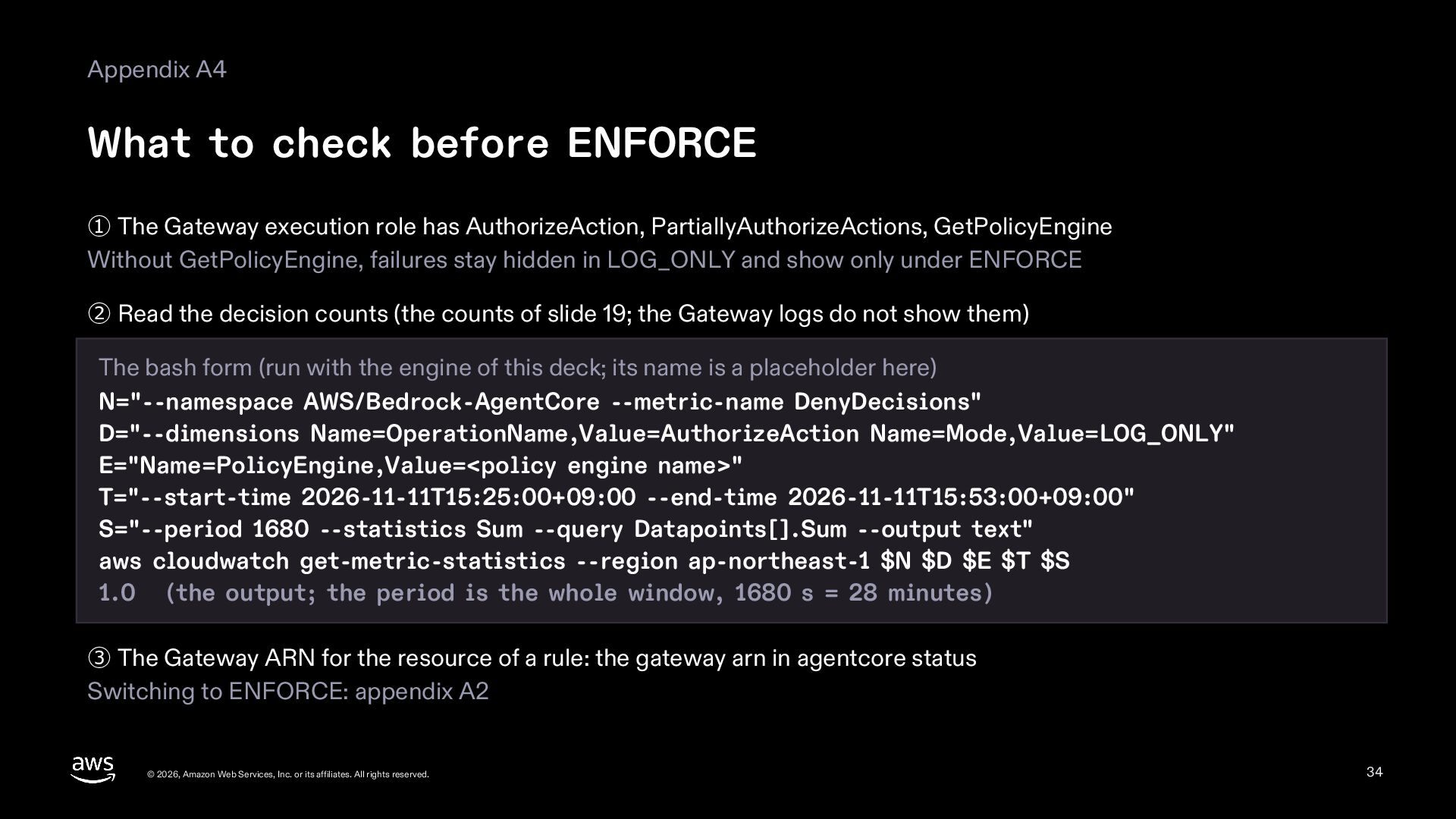
  34. Appendix A4 What to check before ENFORCE ① The Gateway

    execution role has AuthorizeAction, PartiallyAuthorizeActions, GetPolicyEngine Without GetPolicyEngine, failures stay hidden in LOG_ONLY and show only under ENFORCE ② Read the decision counts (the counts of slide 19; the Gateway logs do not show them) The bash form (run with the engine of this deck; its name is a placeholder here) N="--namespace AWS/Bedrock-AgentCore --metric-name DenyDecisions" D="--dimensions Name=OperationName,Value=AuthorizeAction Name=Mode,Value=LOG_ONLY" E="Name=PolicyEngine,Value=<policy engine name>" T="--start-time 2026-11-11T15:25:00+09:00 --end-time 2026-11-11T15:53:00+09:00" S="--period 1680 --statistics Sum --query Datapoints[].Sum --output text" aws cloudwatch get-metric-statistics --region ap-northeast-1 $N $D $E $T $S 1.0 (the output; the period is the whole window, 1680 s = 28 minutes) ③ The Gateway ARN for the resource of a rule: the gateway arn in agentcore status Switching to ENFORCE: appendix A2 © 2026, Amazon Web Services, Inc. or its affiliates. All rights reserved. 34
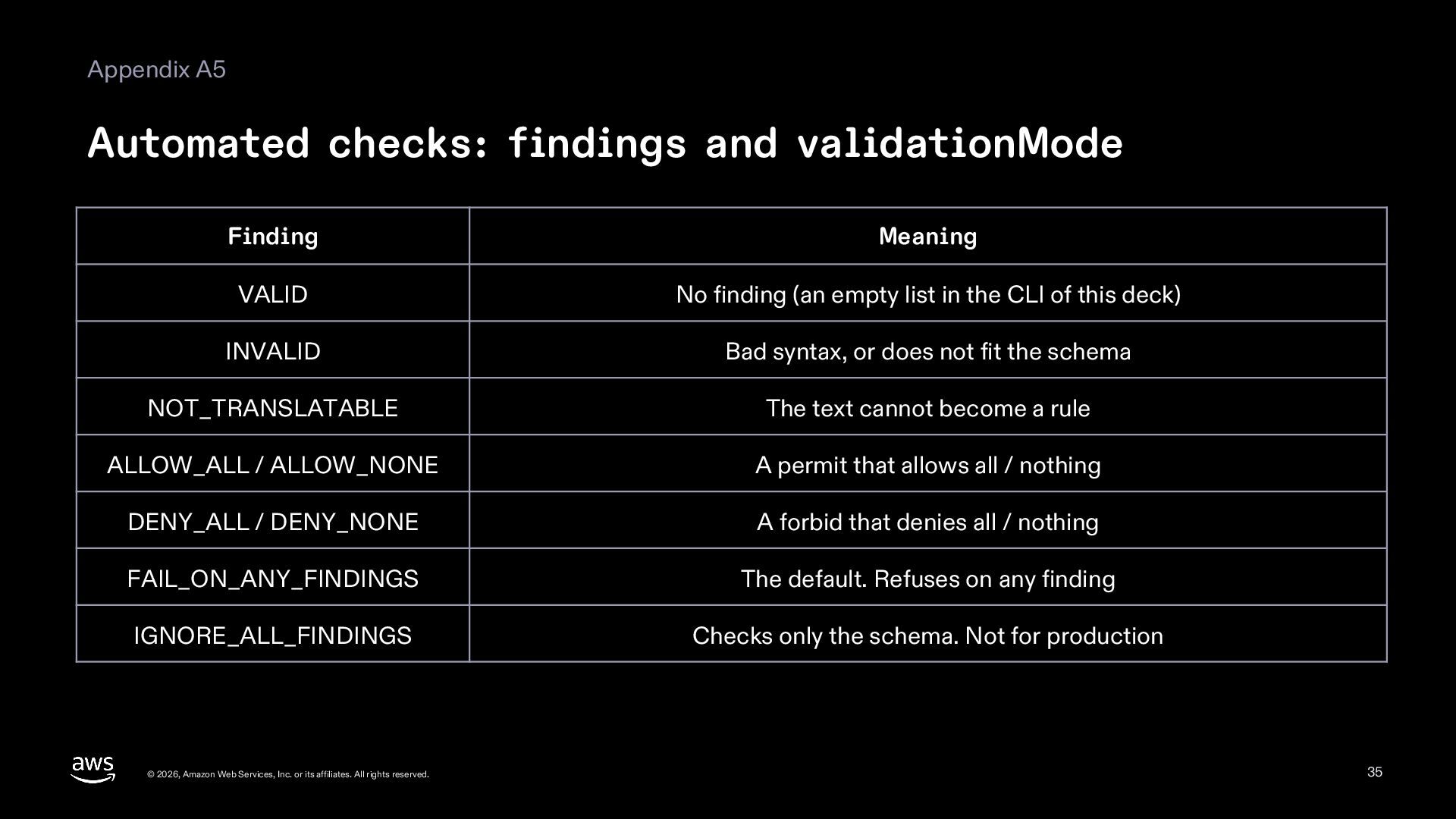
  35. Appendix A5 Automated checks: findings and validationMode Finding Meaning VALID

    No finding (an empty list in the CLI of this deck) INVALID Bad syntax, or does not fit the schema NOT_TRANSLATABLE The text cannot become a rule ALLOW_ALL / ALLOW_NONE A permit that allows all / nothing DENY_ALL / DENY_NONE A forbid that denies all / nothing FAIL_ON_ANY_FINDINGS The default. Refuses on any finding IGNORE_ALL_FINDINGS Checks only the schema. Not for production © 2026, Amazon Web Services, Inc. or its affiliates. All rights reserved. 35
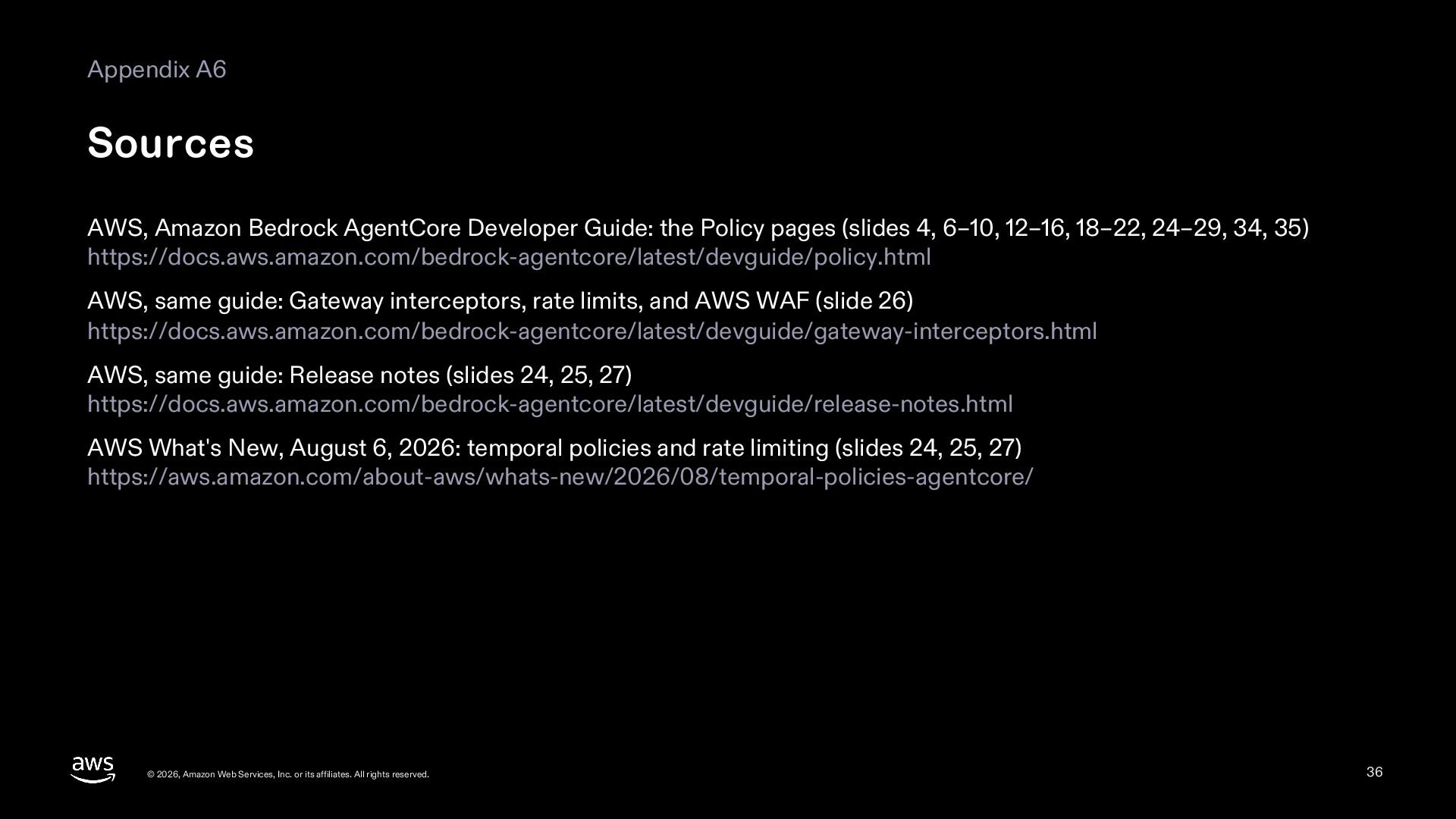
  36. Appendix A6 Sources AWS, Amazon Bedrock AgentCore Developer Guide: the

    Policy pages (slides 4, 6–10, 12–16, 18–22, 24–29, 34, 35) https://docs.aws.amazon.com/bedrock-agentcore/latest/devguide/policy.html AWS, same guide: Gateway interceptors, rate limits, and AWS WAF (slide 26) https://docs.aws.amazon.com/bedrock-agentcore/latest/devguide/gateway-interceptors.html AWS, same guide: Release notes (slides 24, 25, 27) https://docs.aws.amazon.com/bedrock-agentcore/latest/devguide/release-notes.html AWS What's New, August 6, 2026: temporal policies and rate limiting (slides 24, 25, 27) https://aws.amazon.com/about-aws/whats-new/2026/08/temporal-policies-agentcore/ © 2026, Amazon Web Services, Inc. or its affiliates. All rights reserved. 36
  37. Appendix A7 Sources (continued) Cedar project: Cedar Policy Language Reference

    Guide (slides 8, 9, 13) https://docs.cedarpolicy.com/auth/authorization.html Dogwood project: The Dogwood Guide (slide 24) https://dogwood-policy.github.io/dogwood/index.html Strands Agents documentation: Hooks (slide 26) https://strandsagents.com/latest/documentation/docs/user-guide/concepts/agents/hooks/ Where the help desk code comes from (MIT-0, Module 1) (slides 4, 12) https://github.com/aws-samples/sample-strands-agents-hands-on-workshop © 2026, Amazon Web Services, Inc. or its affiliates. All rights reserved. 37