Hooks と Lifecycle controls | Kiro と学ぶ Strands A...
Sponsored
·
 SiteGround - Reliable hosting with speed, security, and support you can count on.
→
SiteGround - Reliable hosting with speed, security, and support you can count on.
→

Share
Embed
Hooks と Lifecycle controls | Kiro と学ぶ Strands Agents 03
Level 300。Strands Agents の Agent の呼び出しに、上限 (limits)、外からの取り消し (cancel_signal)、Hooks、Middleware、やり直しの戦略を付ける方法を、Strands Agents のドキュメント (Production lifecycle controls、Hook events、Hooks、Middleware、Retry strategies) を元に、構成図、流れの図、イメージ図と、strands-agents 1.64.0 で東京のリージョンの Amazon Bedrock を呼んで動かしたコードと出力で説明します。Python で Strands Agents の Agent を作って @tool のツールを渡したことがある開発者向けの資料です。例には、架空のネットの家電のお店の問い合わせ窓口のエージェントを使います。シリーズ「Kiro と学ぶ Strands Agents」の 03 (作り込む) です。

Riku INADA PRO
November 09, 2026
Transcript
42 slides
-
Kiro と学ぶ Strands Agents 03 作り込む Hooks と Lifecycle controls
イベント、上限、取り消し Level 300 / 2026-11 時点 2026 年 11 ⽉ 稲⽥ ⼤陸 アマゾン ウェブ サービス ジャパン © 2026, Amazon Web Services, Inc. or its affiliates. All rights reserved. 03 Kiro + Strands Agents 1 -
はじめに ⾃⼰紹介 稲⽥ ⼤陸 いなだ りく (いなりく) アマゾン ウェブ サービス
ジャパン合同会社 ソリューションアーキテクト 製造業のお客様を中⼼に⽀援 最近の取り組み AI 駆動開発ライフサイクルの推進 Kiro と AWS Amplify の情報発信 © 2026, Amazon Web Services, Inc. or its affiliates. All rights reserved. X @inada_riku Speaker Deck speakerdeck.com/inariku Zenn zenn.dev/inariku GitHub github.com/inariku 2 -
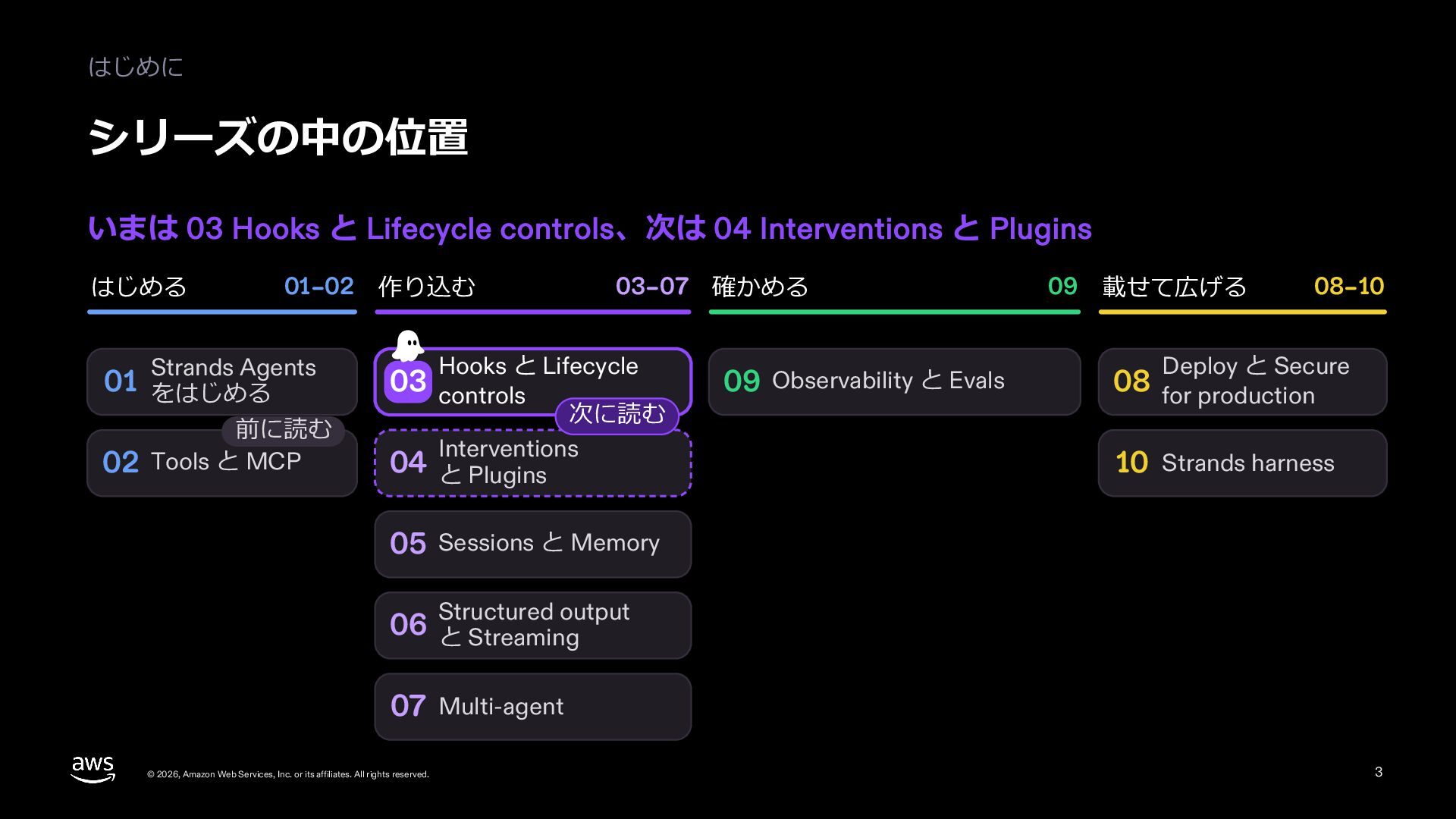
はじめに シリーズの中の位置 いまは 03 Hooks と Lifecycle controls、次は 04 Interventions
と Plugins はじめる 01–02 作り込む Strands Agents 01 をはじめる 前に読む 02 Tools と MCP 03–07 確かめる Hooks と Lifecycle 03 controls 次に読む Interventions 04 と Plugins 09 Observability と Evals 09 載せて広げる 08–10 Deploy と Secure 08 for production 10 Strands harness 05 Sessions と Memory output 06 Structured と Streaming 07 Multi-agent © 2026, Amazon Web Services, Inc. or its affiliates. All rights reserved. 3 -
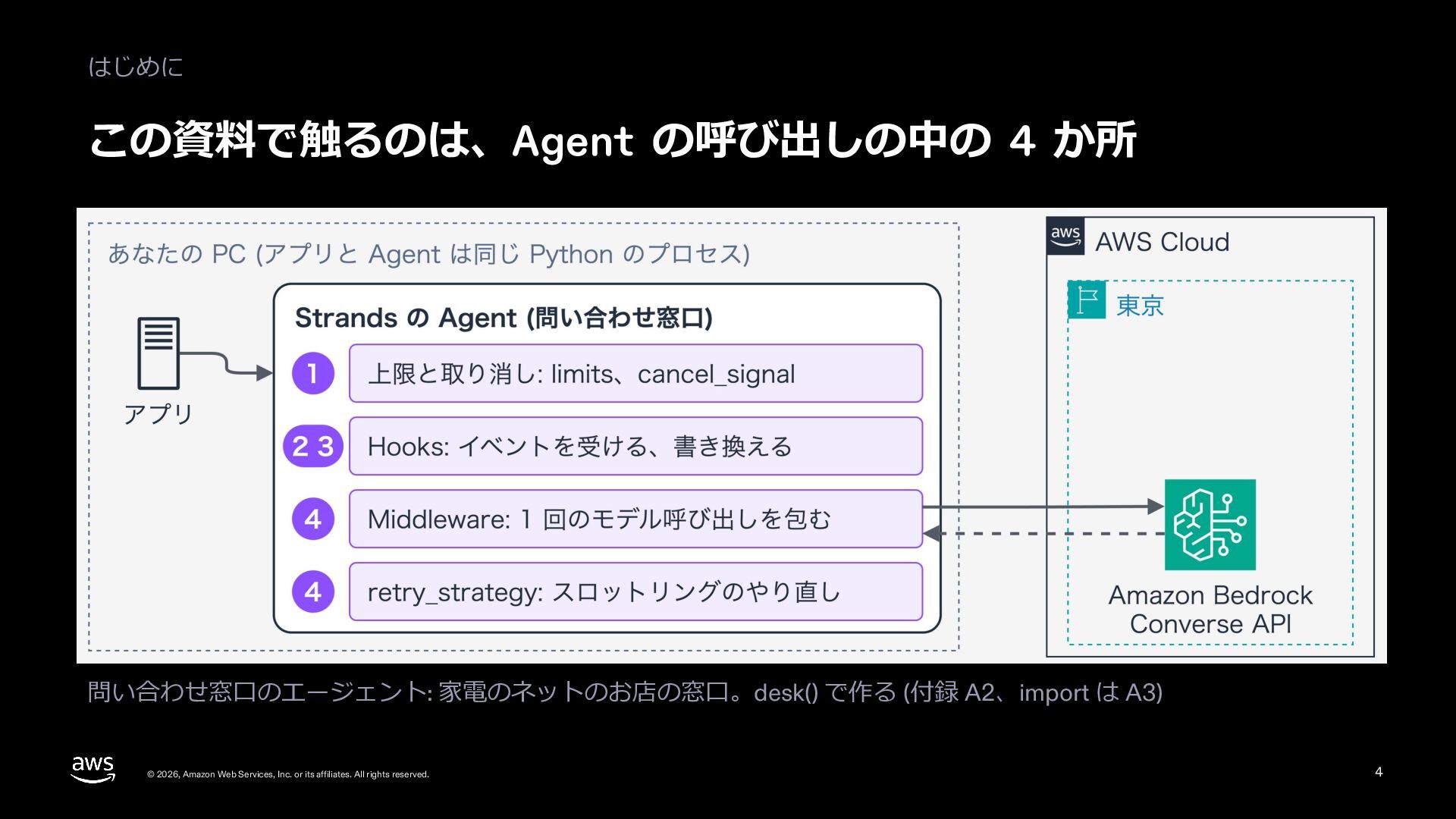
はじめに この資料で触るのは、Agent の呼び出しの中の 4 か所 問い合わせ窓⼝のエージェント: 家電のネットのお店の窓⼝。desk() で作る (付録 A2、import
は A3) © 2026, Amazon Web Services, Inc. or its affiliates. All rights reserved. 4 -
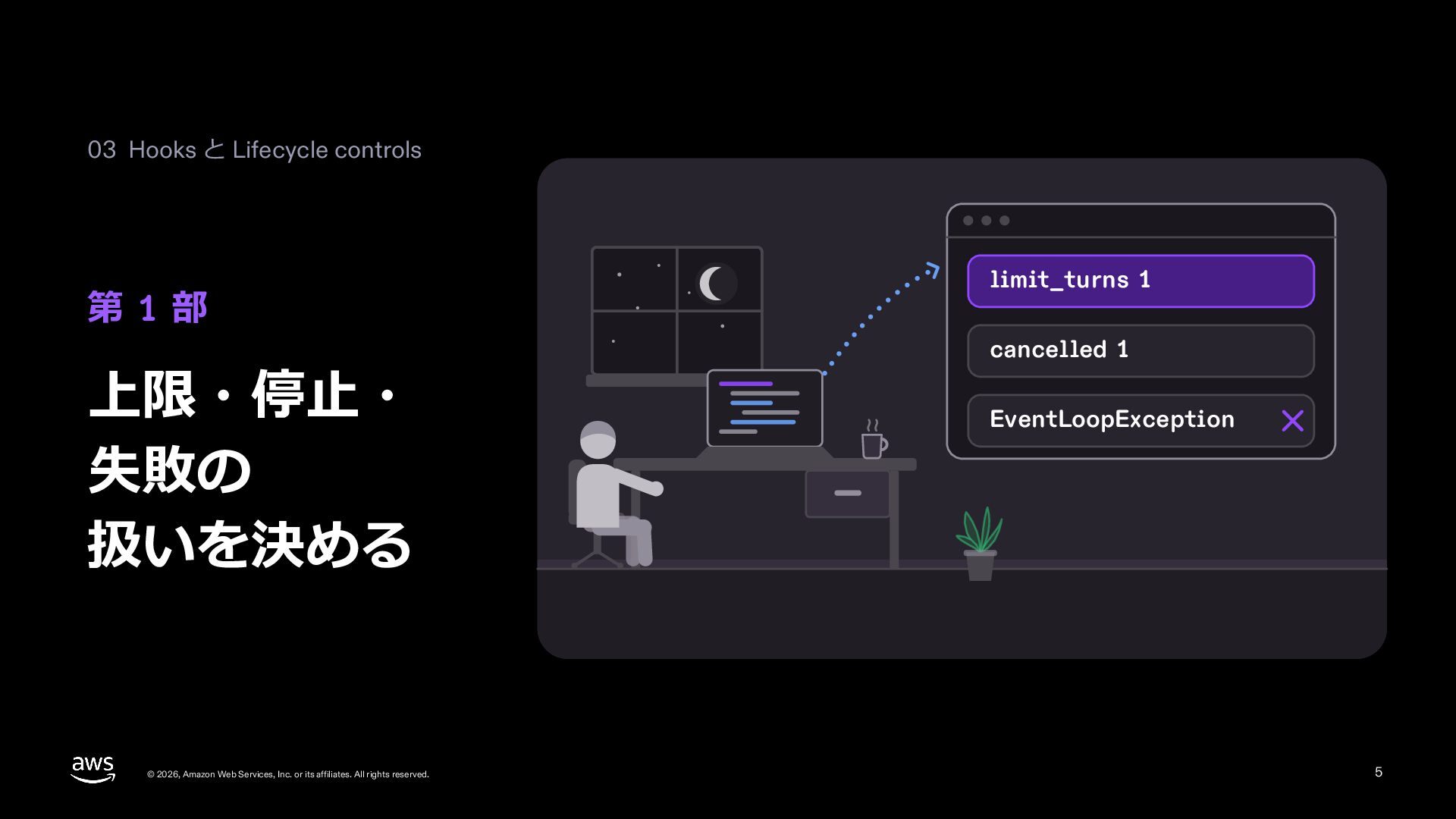
03 Hooks と Lifecycle controls 第 1 部 上限・停⽌・ 失敗の
扱いを決める © 2026, Amazon Web Services, Inc. or its affiliates. All rights reserved. limit_turns 1 cancelled 1 EventLoopException 5 -
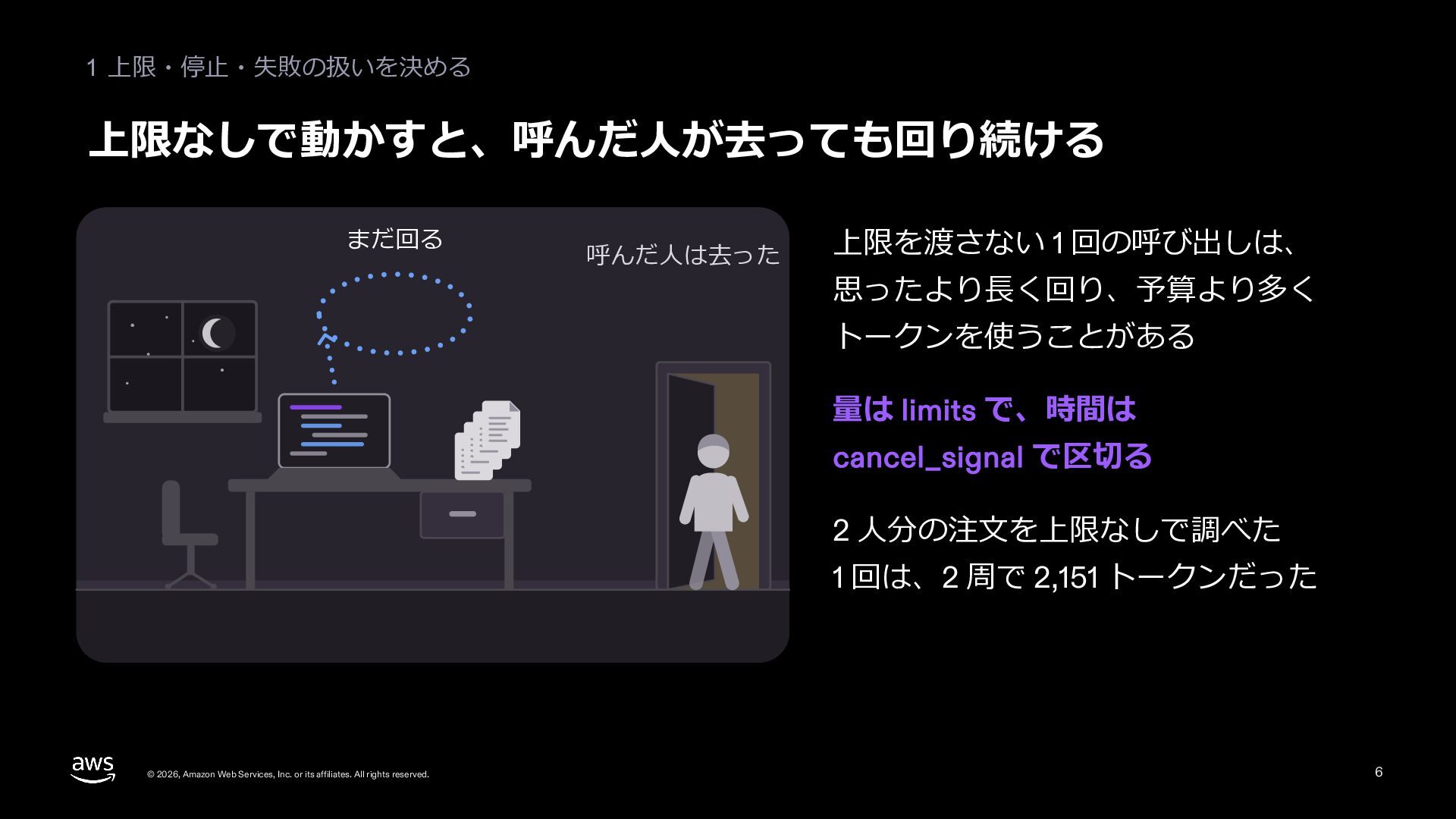
1 上限・停⽌・失敗の扱いを決める 上限なしで動かすと、呼んだ⼈が去っても回り続ける まだ回る 呼んだ⼈は去った 上限を渡さない 1 回の呼び出しは、 思ったより⻑く回り、予算より多く トークンを使うことがある
量は limits で、時間は cancel_signal で区切る 2 ⼈分の注⽂を上限なしで調べた 1 回は、2 周で 2,151 トークンだった © 2026, Amazon Web Services, Inc. or its affiliates. All rights reserved. 6 -
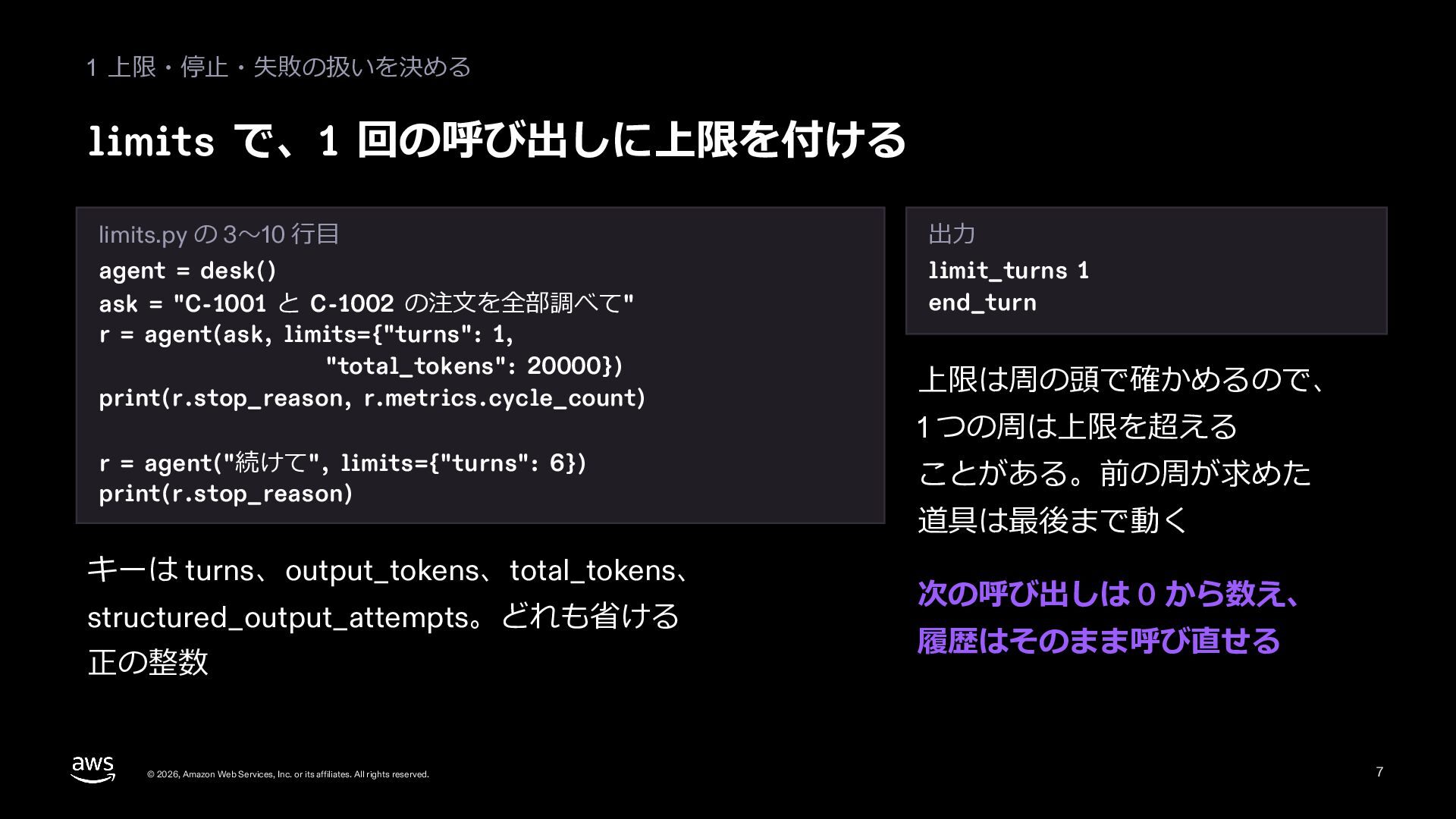
1 上限・停⽌・失敗の扱いを決める limits で、1 回の呼び出しに上限を付ける limits.py の 3〜10 ⾏⽬ agent
= desk() ask = "C-1001 と C-1002 の注⽂を全部調べて" r = agent(ask, limits={"turns": 1, "total_tokens": 20000}) print(r.stop_reason, r.metrics.cycle_count) 上限は周の頭で確かめるので、 r = agent("続けて", limits={"turns": 6}) print(r.stop_reason) ことがある。前の周が求めた キーは turns、output_tokens、total_tokens、 structured_output_attempts。どれも省ける 正の整数 © 2026, Amazon Web Services, Inc. or its affiliates. All rights reserved. 出⼒ limit_turns 1 end_turn 1 つの周は上限を超える 道具は最後まで動く 次の呼び出しは 0 から数え、 履歴はそのまま呼び直せる 7 -
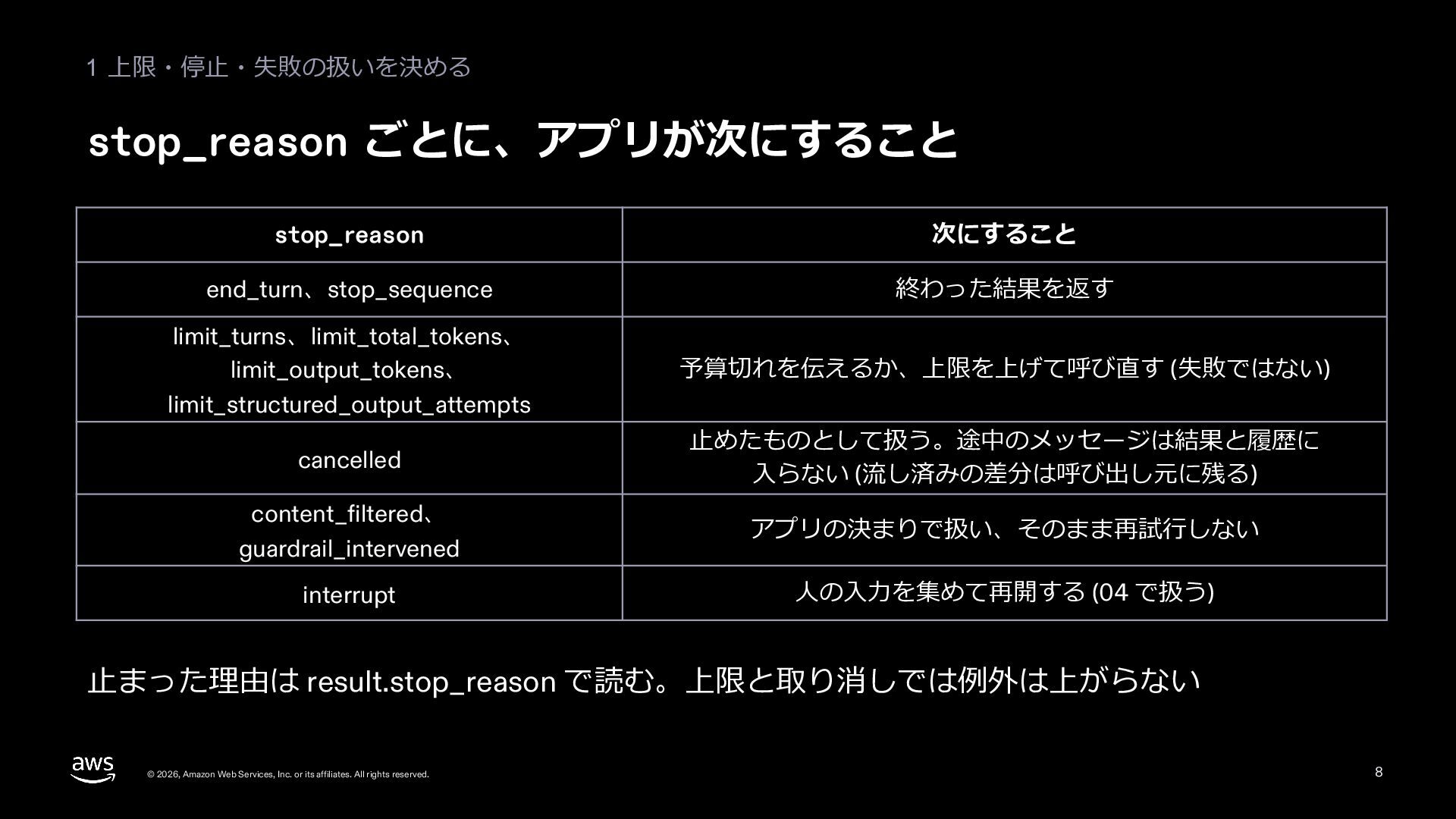
1 上限・停⽌・失敗の扱いを決める stop_reason ごとに、アプリが次にすること stop_reason 次にすること end_turn、stop_sequence 終わった結果を返す limit_turns、limit_total_tokens、 limit_output_tokens、
limit_structured_output_attempts 予算切れを伝えるか、上限を上げて呼び直す (失敗ではない) cancelled ⽌めたものとして扱う。途中のメッセージは結果と履歴に ⼊らない (流し済みの差分は呼び出し元に残る) content_filtered、 guardrail_intervened アプリの決まりで扱い、そのまま再試⾏しない interrupt ⼈の⼊⼒を集めて再開する (04 で扱う) ⽌まった理由は result.stop_reason で読む。上限と取り消しでは例外は上がらない © 2026, Amazon Web Services, Inc. or its affiliates. All rights reserved. 8 -
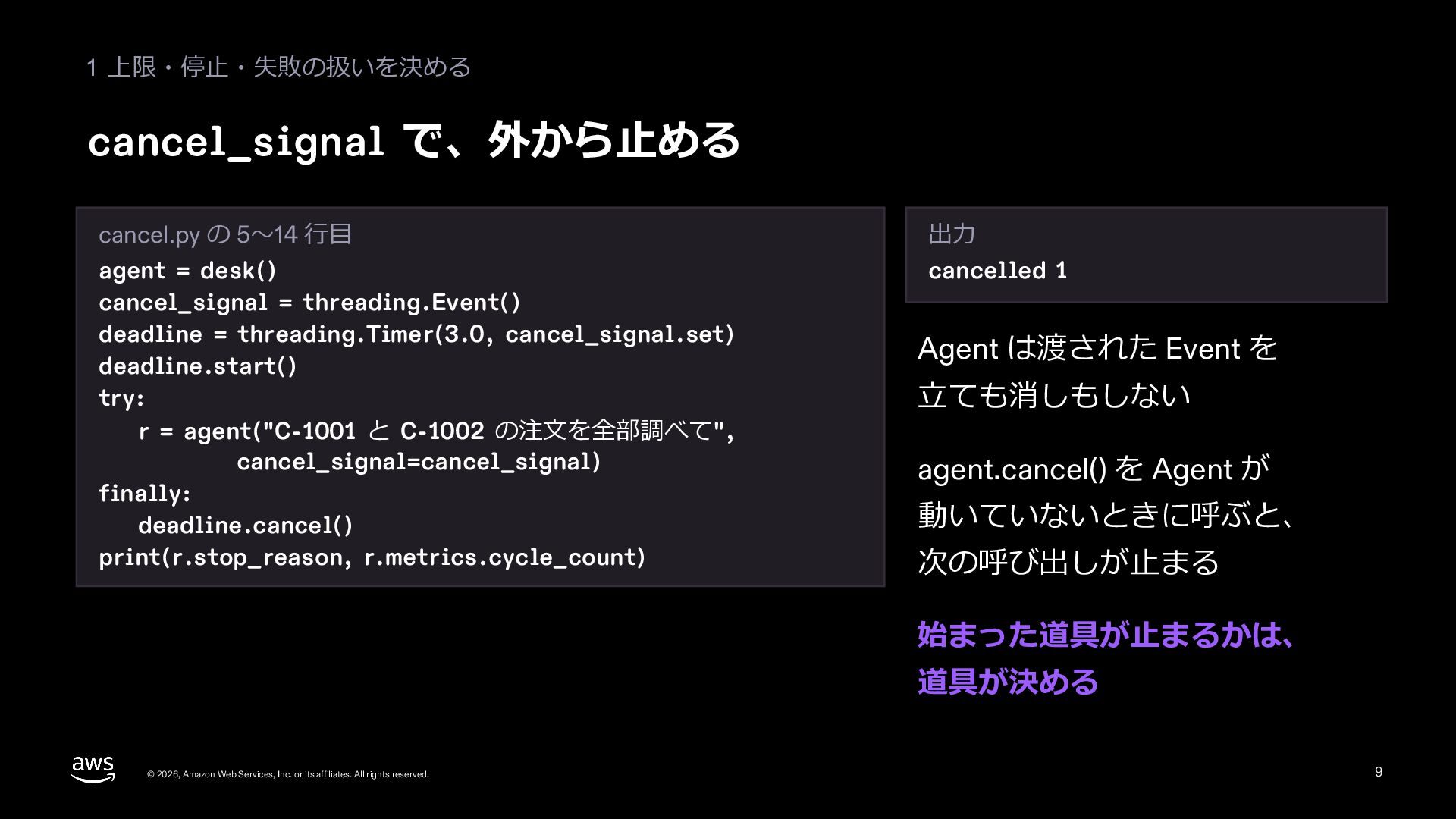
1 上限・停⽌・失敗の扱いを決める cancel_signal で、外から⽌める cancel.py の 5〜14 ⾏⽬ agent =
desk() cancel_signal = threading.Event() deadline = threading.Timer(3.0, cancel_signal.set) deadline.start() try: r = agent("C-1001 と C-1002 の注⽂を全部調べて", cancel_signal=cancel_signal) finally: deadline.cancel() print(r.stop_reason, r.metrics.cycle_count) 出⼒ cancelled 1 Agent は渡された Event を ⽴ても消しもしない agent.cancel() を Agent が 動いていないときに呼ぶと、 次の呼び出しが⽌まる 始まった道具が⽌まるかは、 道具が決める © 2026, Amazon Web Services, Inc. or its affiliates. All rights reserved. 9 -
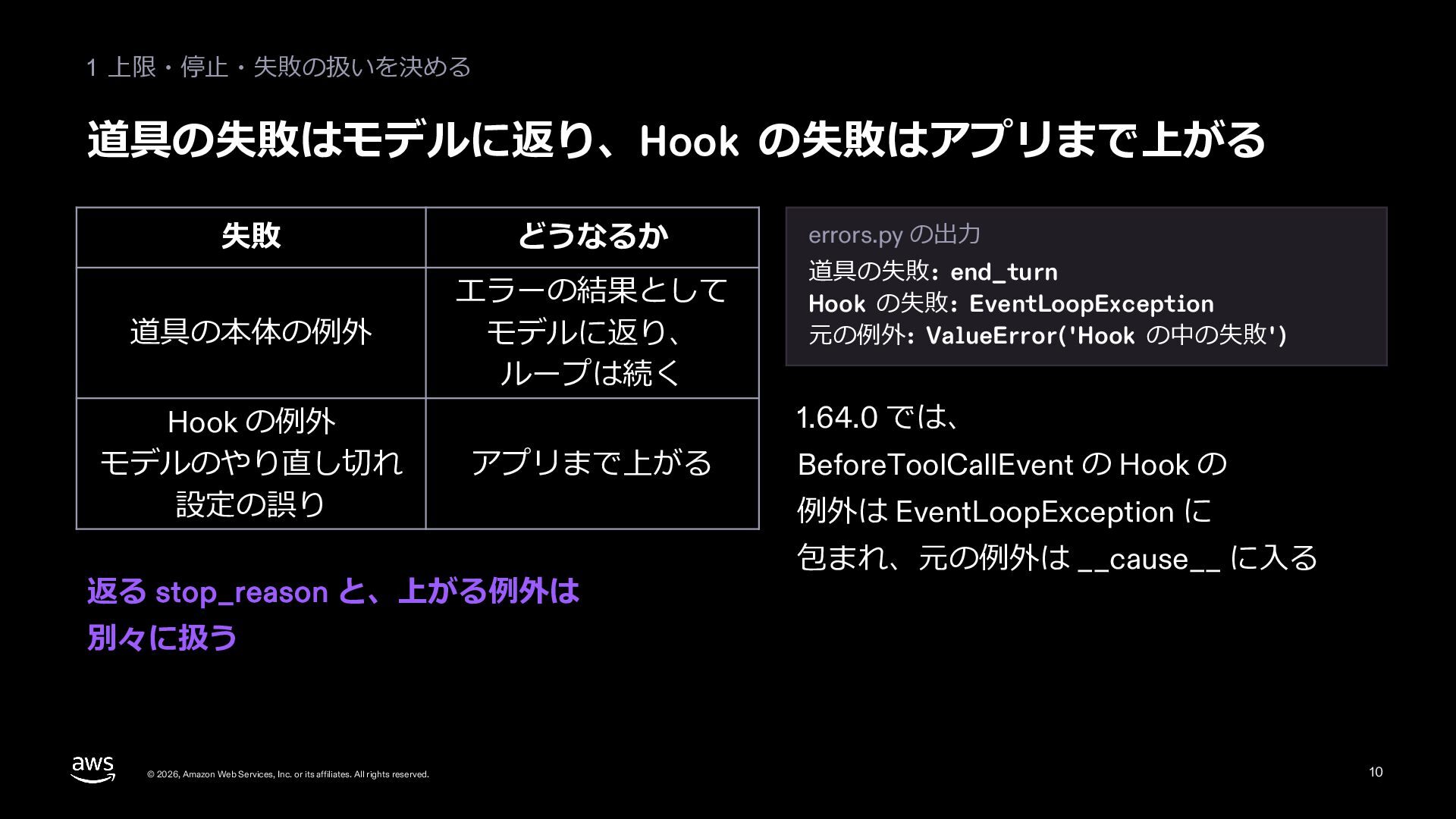
1 上限・停⽌・失敗の扱いを決める 道具の失敗はモデルに返り、Hook の失敗はアプリまで上がる 失敗 どうなるか 道具の本体の例外 エラーの結果として モデルに返り、 ループは続く
Hook の例外 モデルのやり直し切れ 設定の誤り アプリまで上がる 返る stop_reason と、上がる例外は errors.py の出⼒ 道具の失敗: end_turn Hook の失敗: EventLoopException 元の例外: ValueError('Hook の中の失敗') 1.64.0 では、 BeforeToolCallEvent の Hook の 例外は EventLoopException に 包まれ、元の例外は __cause__ に⼊る 別々に扱う © 2026, Amazon Web Services, Inc. or its affiliates. All rights reserved. 10 -
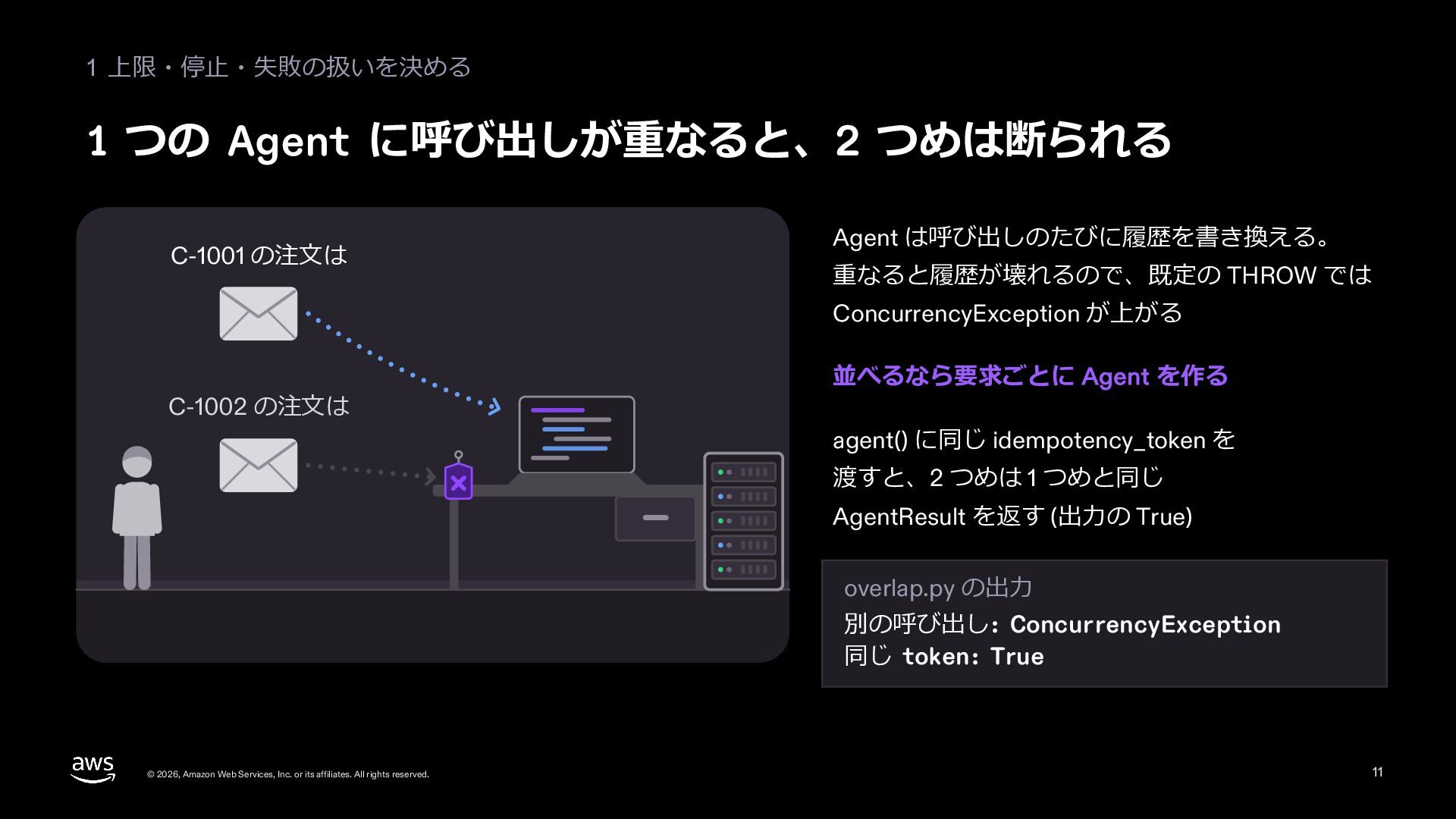
1 上限・停⽌・失敗の扱いを決める 1 つの Agent に呼び出しが重なると、2 つめは断られる C-1001 の注⽂は Agent
は呼び出しのたびに履歴を書き換える。 重なると履歴が壊れるので、既定の THROW では ConcurrencyException が上がる C-1002 の注⽂は 並べるなら要求ごとに Agent を作る agent() に同じ idempotency_token を 渡すと、2 つめは 1 つめと同じ AgentResult を返す (出⼒の True) overlap.py の出⼒ 別の呼び出し: ConcurrencyException 同じ token: True © 2026, Amazon Web Services, Inc. or its affiliates. All rights reserved. 11 -
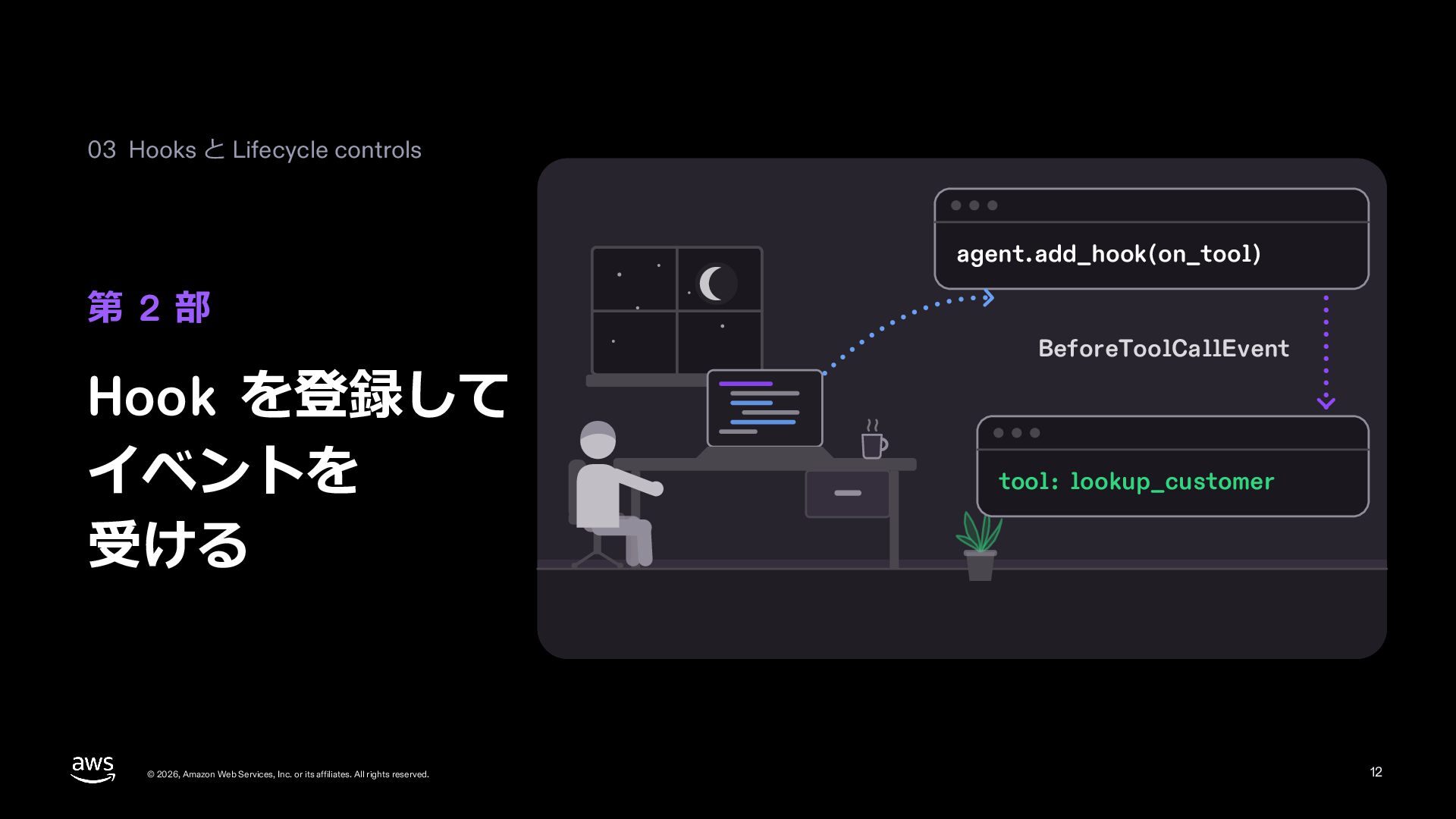
03 Hooks と Lifecycle controls agent.add_hook(on_tool) 第 2 部 Hook
を登録して イベントを 受ける © 2026, Amazon Web Services, Inc. or its affiliates. All rights reserved. BeforeToolCallEvent tool: lookup_customer 12 -
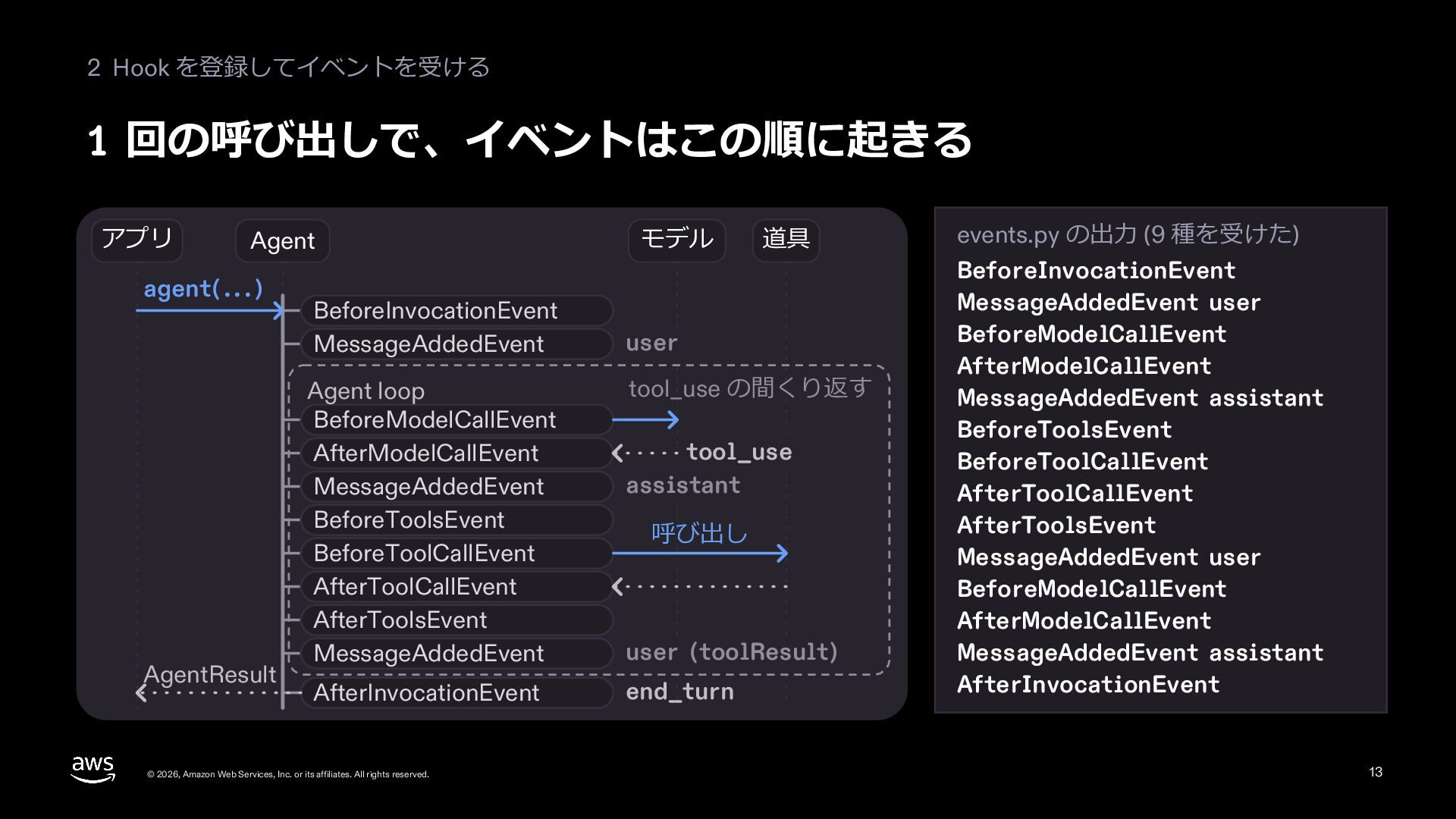
2 Hook を登録してイベントを受ける 1 回の呼び出しで、イベントはこの順に起きる アプリ Agent agent(...) AgentResult BeforeInvocationEvent
MessageAddedEvent Agent loop BeforeModelCallEvent AfterModelCallEvent MessageAddedEvent BeforeToolsEvent BeforeToolCallEvent AfterToolCallEvent AfterToolsEvent MessageAddedEvent AfterInvocationEvent © 2026, Amazon Web Services, Inc. or its affiliates. All rights reserved. モデル 道具 user tool_use の間くり返す tool_use assistant 呼び出し user (toolResult) end_turn events.py の出⼒ (9 種を受けた) BeforeInvocationEvent MessageAddedEvent user BeforeModelCallEvent AfterModelCallEvent MessageAddedEvent assistant BeforeToolsEvent BeforeToolCallEvent AfterToolCallEvent AfterToolsEvent MessageAddedEvent user BeforeModelCallEvent AfterModelCallEvent MessageAddedEvent assistant AfterInvocationEvent 13 -
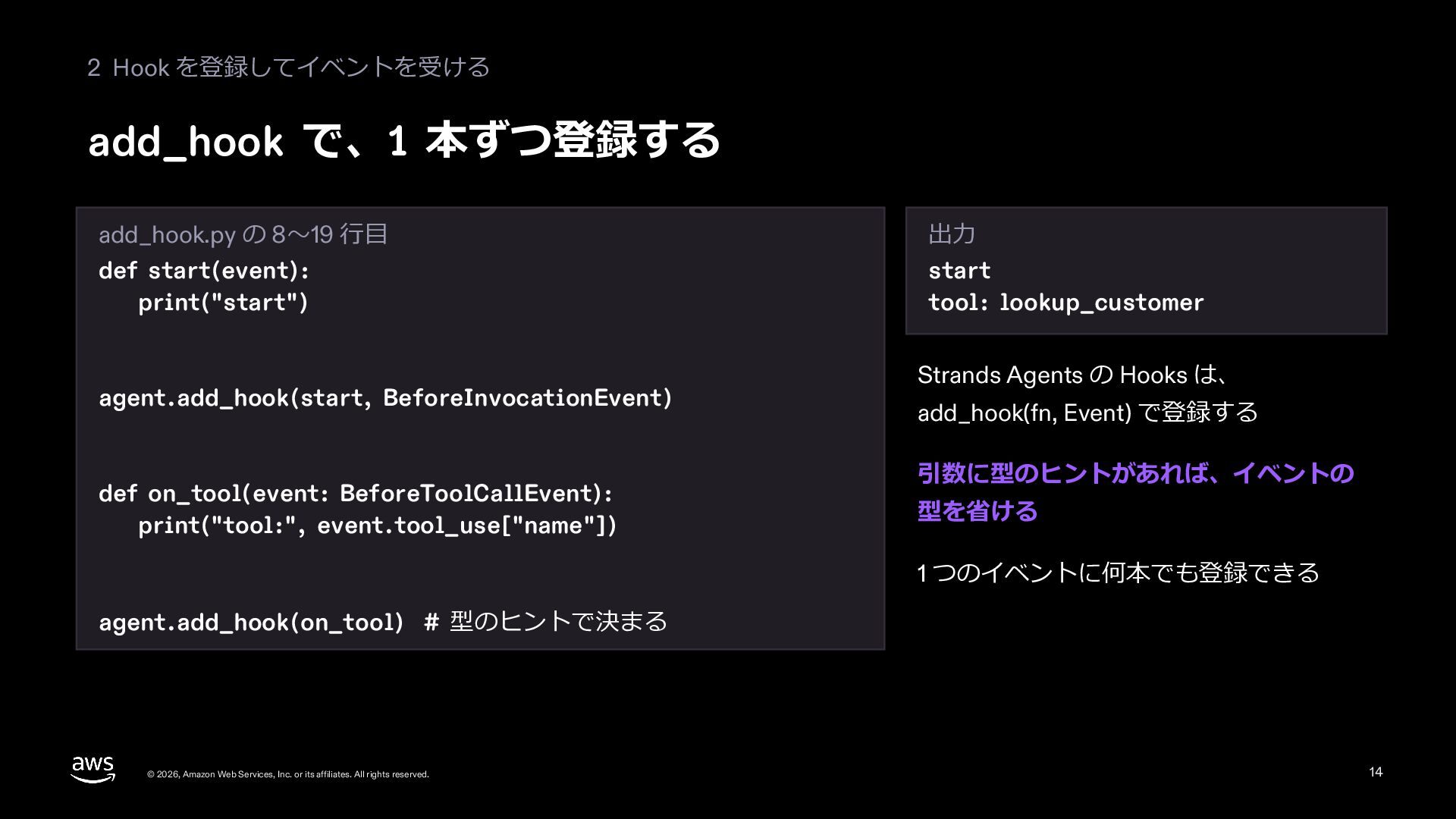
2 Hook を登録してイベントを受ける add_hook で、1 本ずつ登録する add_hook.py の 8〜19 ⾏⽬
def start(event): print("start") agent.add_hook(start, BeforeInvocationEvent) def on_tool(event: BeforeToolCallEvent): print("tool:", event.tool_use["name"]) 出⼒ start tool: lookup_customer Strands Agents の Hooks は、 add_hook(fn, Event) で登録する 引数に型のヒントがあれば、イベントの 型を省ける 1 つのイベントに何本でも登録できる agent.add_hook(on_tool) # 型のヒントで決まる © 2026, Amazon Web Services, Inc. or its affiliates. All rights reserved. 14 -
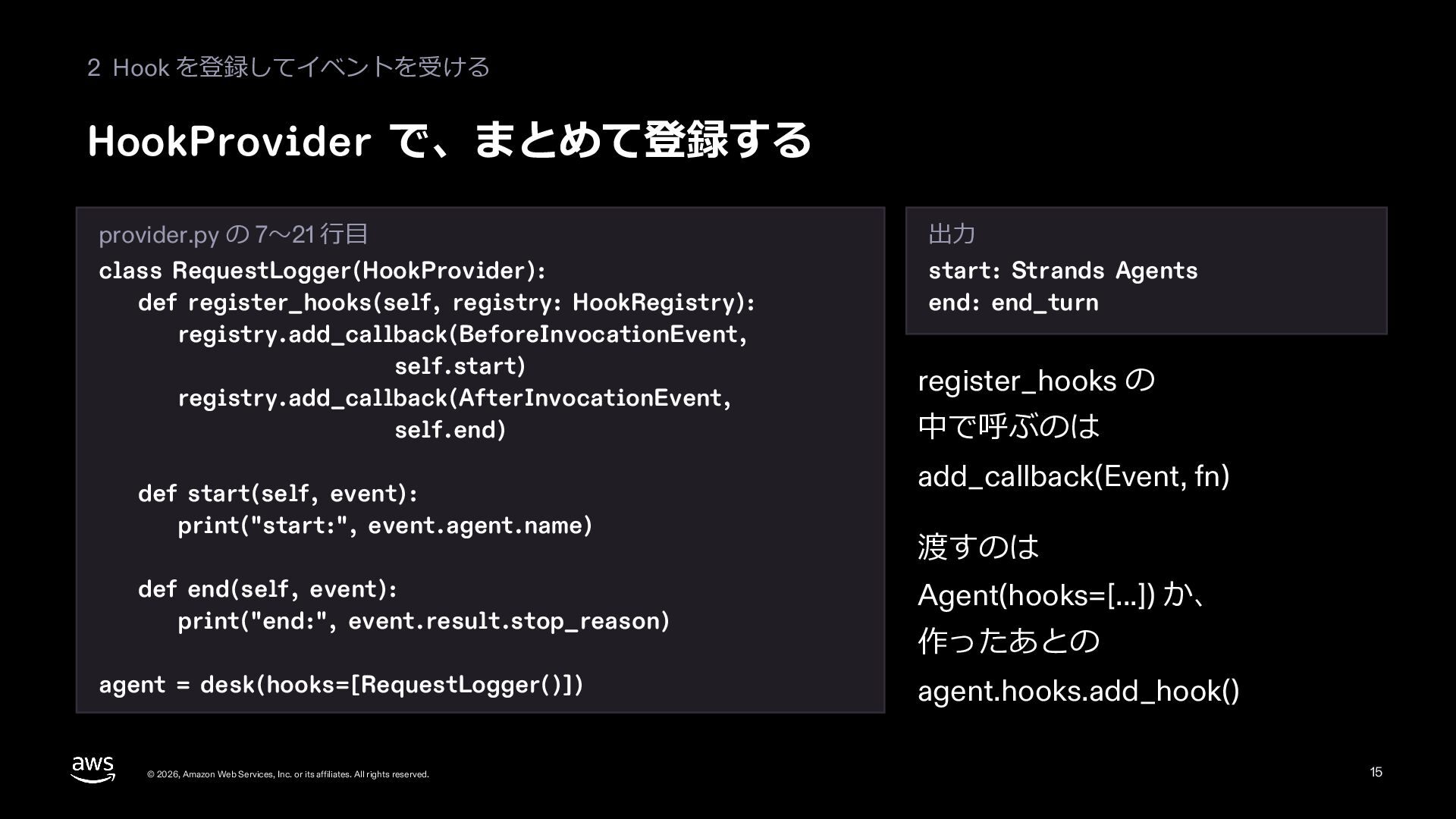
2 Hook を登録してイベントを受ける HookProvider で、まとめて登録する provider.py の 7〜21 ⾏⽬ class
RequestLogger(HookProvider): def register_hooks(self, registry: HookRegistry): registry.add_callback(BeforeInvocationEvent, self.start) registry.add_callback(AfterInvocationEvent, self.end) def start(self, event): print("start:", event.agent.name) def end(self, event): print("end:", event.result.stop_reason) agent = desk(hooks=[RequestLogger()]) © 2026, Amazon Web Services, Inc. or its affiliates. All rights reserved. 出⼒ start: Strands Agents end: end_turn register_hooks の 中で呼ぶのは add_callback(Event, fn) 渡すのは Agent(hooks=[...]) か、 作ったあとの agent.hooks.add_hook() 15 -
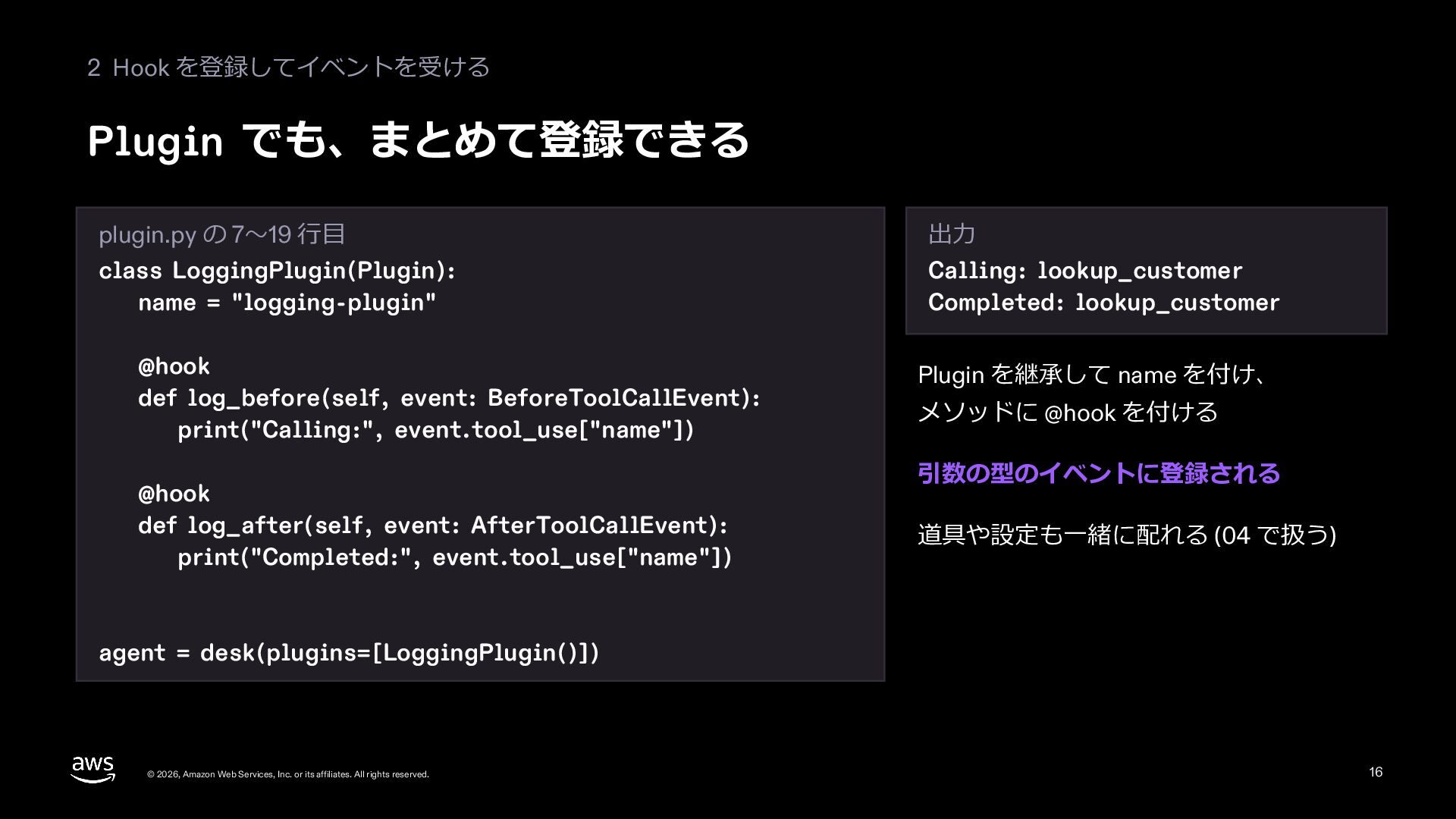
2 Hook を登録してイベントを受ける Plugin でも、まとめて登録できる plugin.py の 7〜19 ⾏⽬ class
LoggingPlugin(Plugin): name = "logging-plugin" @hook def log_before(self, event: BeforeToolCallEvent): print("Calling:", event.tool_use["name"]) @hook def log_after(self, event: AfterToolCallEvent): print("Completed:", event.tool_use["name"]) 出⼒ Calling: lookup_customer Completed: lookup_customer Plugin を継承して name を付け、 メソッドに @hook を付ける 引数の型のイベントに登録される 道具や設定も⼀緒に配れる (04 で扱う) agent = desk(plugins=[LoggingPlugin()]) © 2026, Amazon Web Services, Inc. or its affiliates. All rights reserved. 16 -
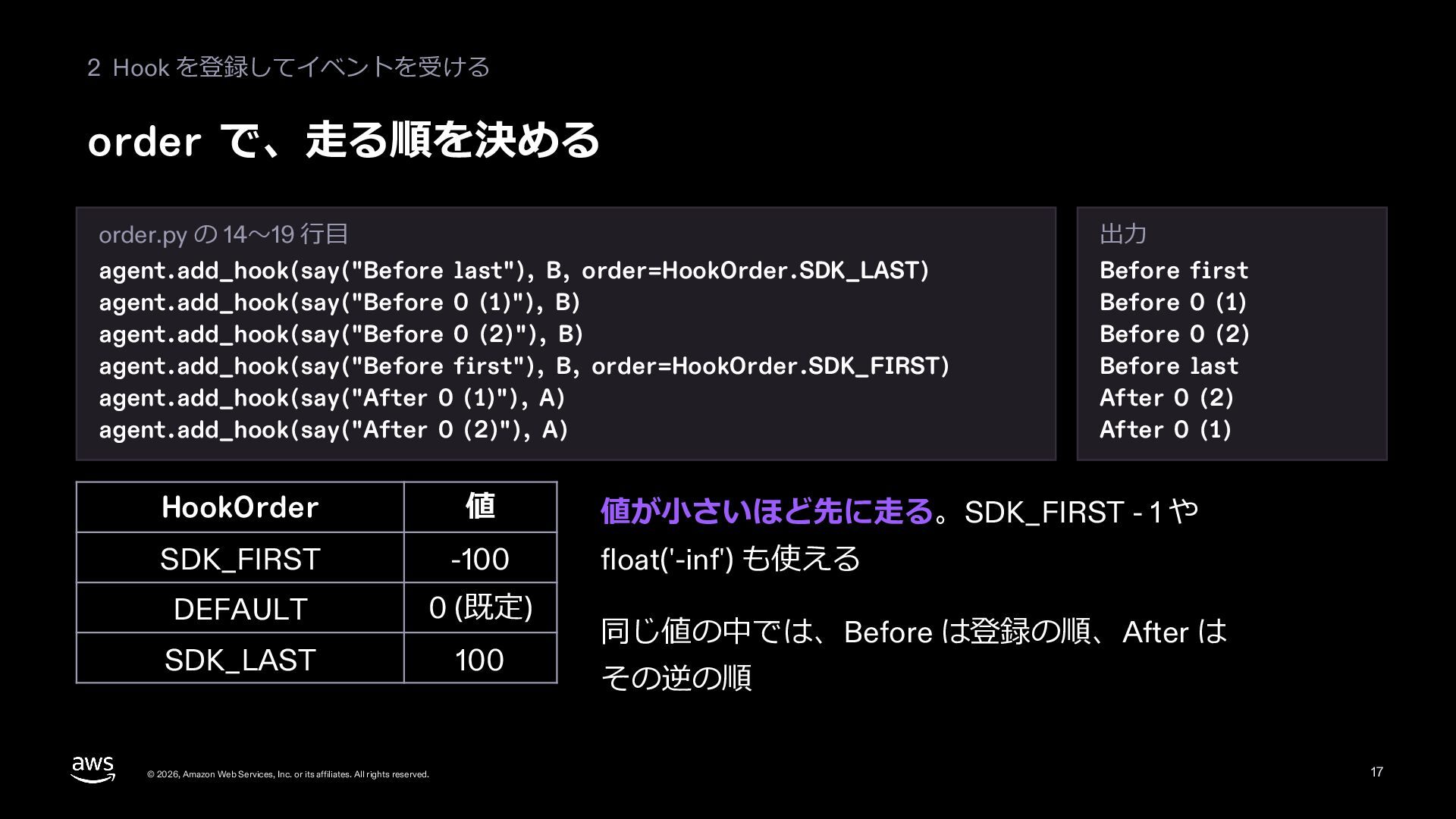
2 Hook を登録してイベントを受ける order で、⾛る順を決める order.py の 14〜19 ⾏⽬ agent.add_hook(say("Before
last"), B, order=HookOrder.SDK_LAST) agent.add_hook(say("Before 0 (1)"), B) agent.add_hook(say("Before 0 (2)"), B) agent.add_hook(say("Before first"), B, order=HookOrder.SDK_FIRST) agent.add_hook(say("After 0 (1)"), A) agent.add_hook(say("After 0 (2)"), A) 出⼒ Before first Before 0 (1) Before 0 (2) Before last After 0 (2) After 0 (1) HookOrder 値 値が⼩さいほど先に⾛る。SDK_FIRST - 1 や SDK_FIRST -100 float('-inf') も使える DEFAULT 0 (既定) SDK_LAST 100 © 2026, Amazon Web Services, Inc. or its affiliates. All rights reserved. 同じ値の中では、Before は登録の順、After は その逆の順 17 -
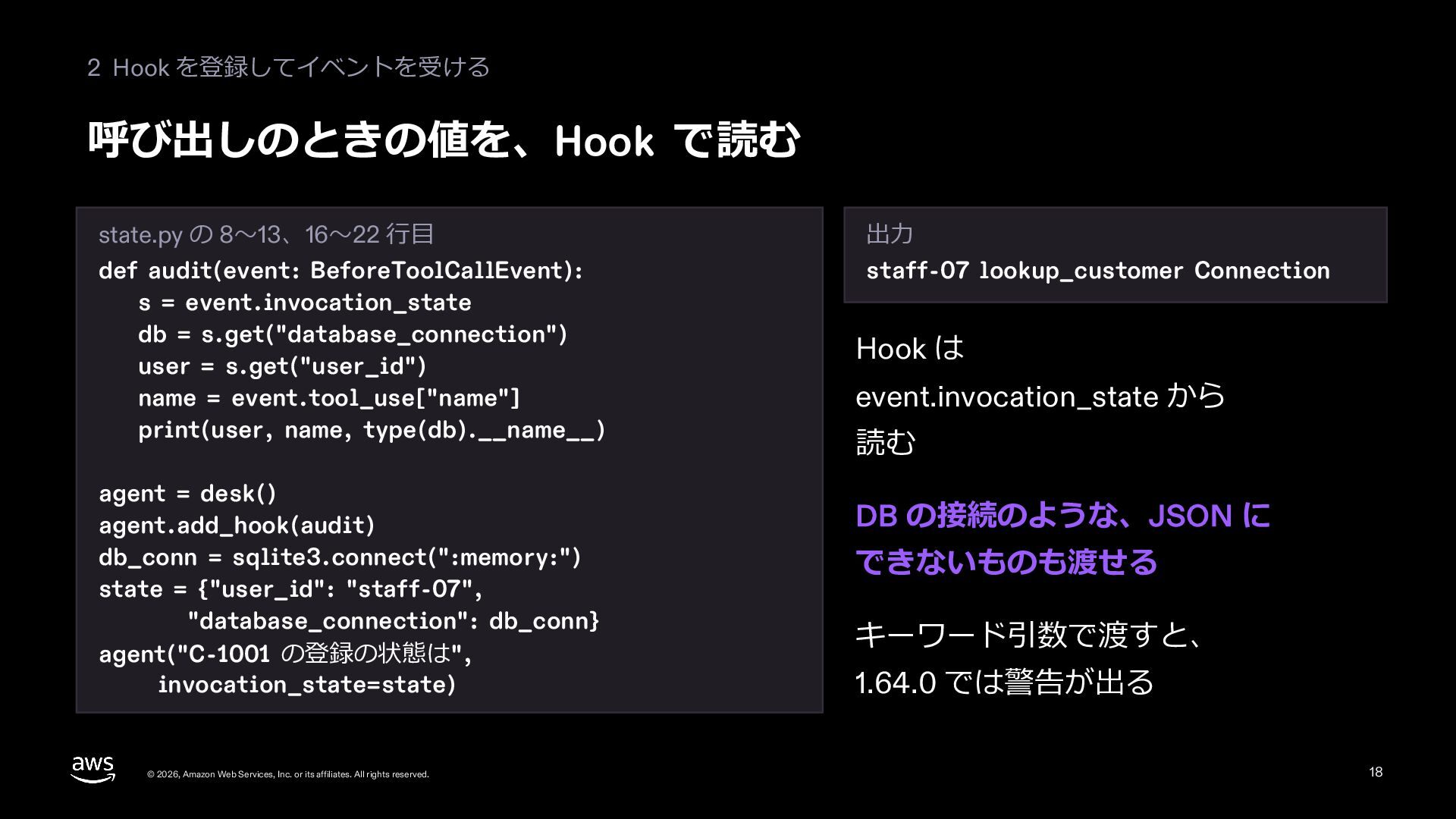
2 Hook を登録してイベントを受ける 呼び出しのときの値を、Hook で読む state.py の 8〜13、16〜22 ⾏⽬ def
audit(event: BeforeToolCallEvent): s = event.invocation_state db = s.get("database_connection") user = s.get("user_id") name = event.tool_use["name"] print(user, name, type(db).__name__) agent = desk() agent.add_hook(audit) db_conn = sqlite3.connect(":memory:") state = {"user_id": "staff-07", "database_connection": db_conn} agent("C-1001 の登録の状態は", invocation_state=state) © 2026, Amazon Web Services, Inc. or its affiliates. All rights reserved. 出⼒ staff-07 lookup_customer Connection Hook は event.invocation_state から 読む DB の接続のような、JSON に できないものも渡せる キーワード引数で渡すと、 1.64.0 では警告が出る 18 -
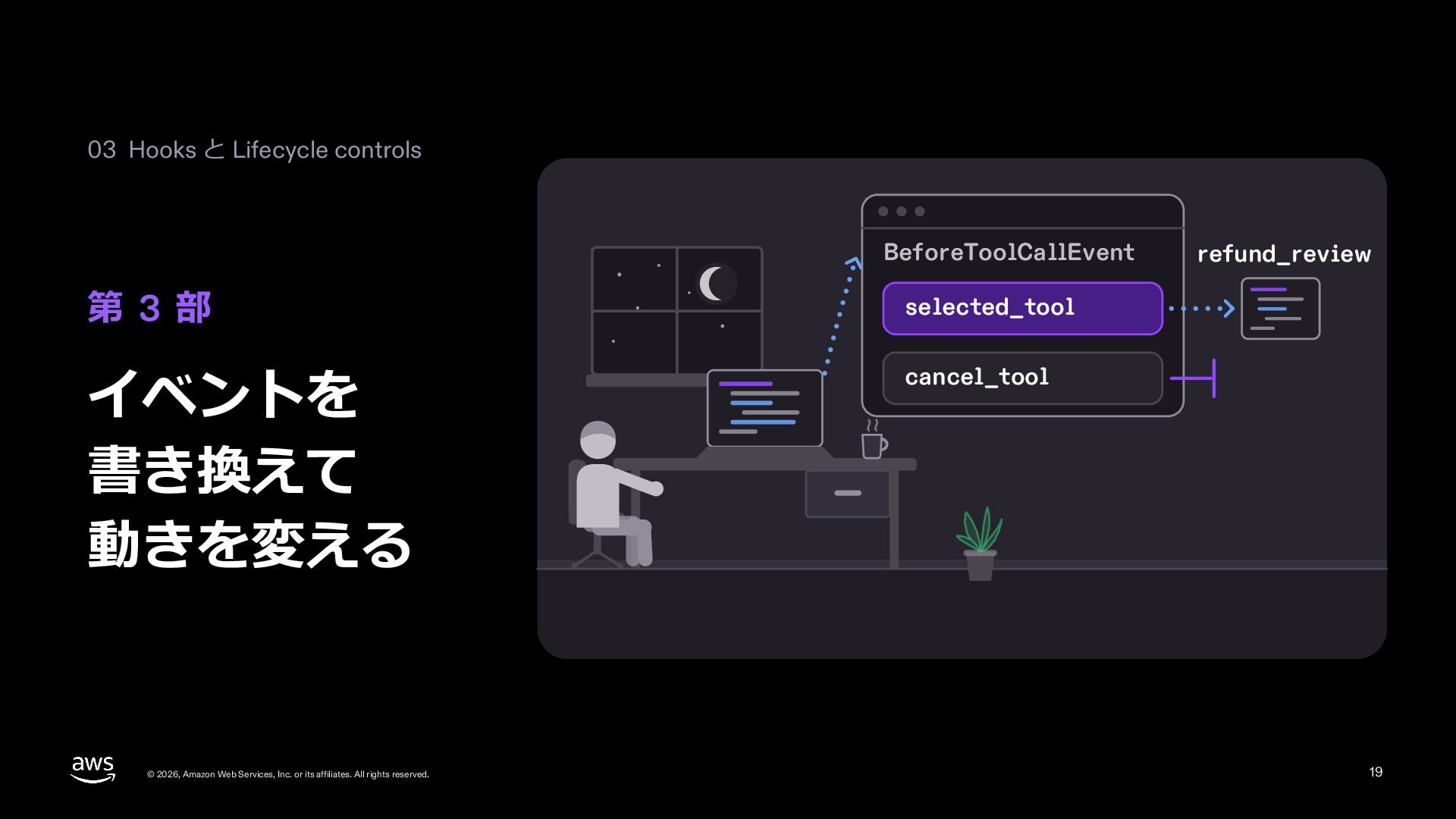
03 Hooks と Lifecycle controls BeforeToolCallEvent 第 3 部 selected_tool
イベントを 書き換えて 動きを変える cancel_tool © 2026, Amazon Web Services, Inc. or its affiliates. All rights reserved. refund_review 19 -
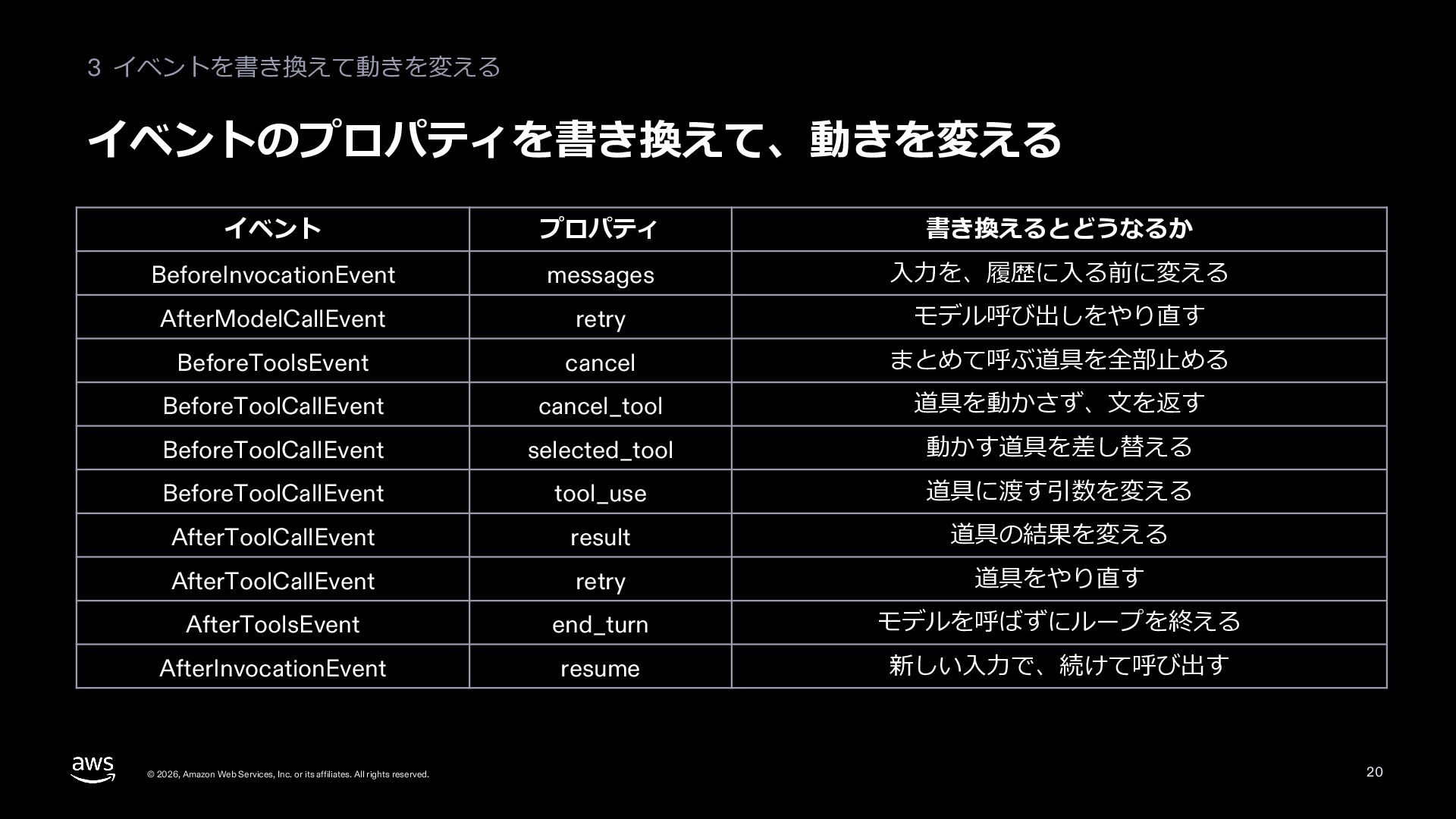
3 イベントを書き換えて動きを変える イベントのプロパティを書き換えて、動きを変える イベント プロパティ 書き換えるとどうなるか BeforeInvocationEvent messages ⼊⼒を、履歴に⼊る前に変える AfterModelCallEvent
retry モデル呼び出しをやり直す BeforeToolsEvent cancel まとめて呼ぶ道具を全部⽌める BeforeToolCallEvent cancel_tool 道具を動かさず、⽂を返す BeforeToolCallEvent selected_tool 動かす道具を差し替える BeforeToolCallEvent tool_use 道具に渡す引数を変える AfterToolCallEvent result 道具の結果を変える AfterToolCallEvent retry 道具をやり直す AfterToolsEvent end_turn モデルを呼ばずにループを終える AfterInvocationEvent resume 新しい⼊⼒で、続けて呼び出す © 2026, Amazon Web Services, Inc. or its affiliates. All rights reserved. 20 -
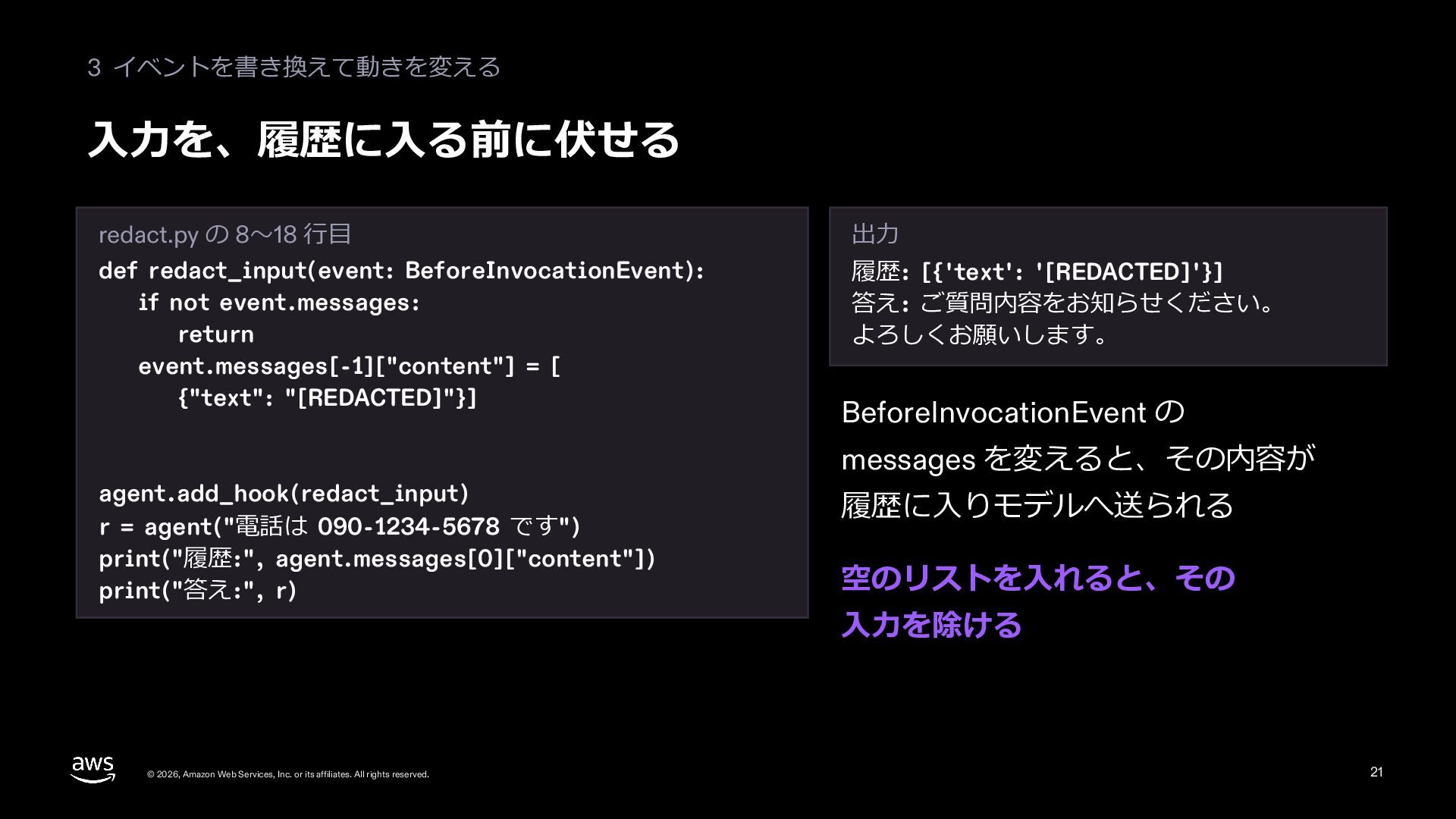
3 イベントを書き換えて動きを変える ⼊⼒を、履歴に⼊る前に伏せる redact.py の 8〜18 ⾏⽬ def redact_input(event: BeforeInvocationEvent):
if not event.messages: return event.messages[-1]["content"] = [ {"text": "[REDACTED]"}] agent.add_hook(redact_input) r = agent("電話は 090-1234-5678 です") print("履歴:", agent.messages[0]["content"]) print("答え:", r) © 2026, Amazon Web Services, Inc. or its affiliates. All rights reserved. 出⼒ 履歴: [{'text': '[REDACTED]'}] 答え: ご質問内容をお知らせください。 よろしくお願いします。 BeforeInvocationEvent の messages を変えると、その内容が 履歴に⼊りモデルへ送られる 空のリストを⼊れると、その ⼊⼒を除ける 21 -
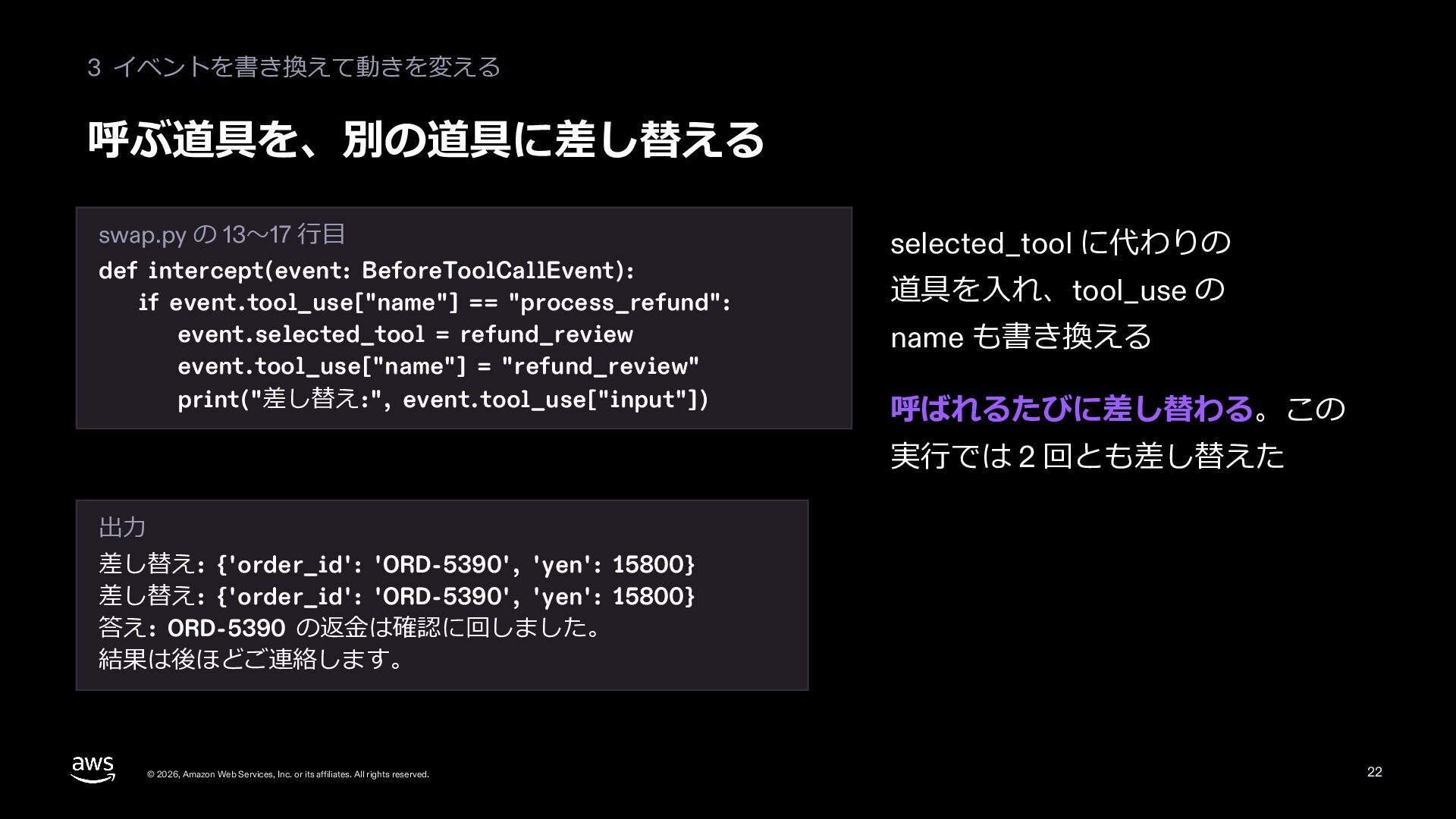
3 イベントを書き換えて動きを変える 呼ぶ道具を、別の道具に差し替える swap.py の 13〜17 ⾏⽬ def intercept(event: BeforeToolCallEvent):
if event.tool_use["name"] == "process_refund": event.selected_tool = refund_review event.tool_use["name"] = "refund_review" print("差し替え:", event.tool_use["input"]) selected_tool に代わりの 道具を⼊れ、tool_use の name も書き換える 呼ばれるたびに差し替わる。この 実⾏では 2 回とも差し替えた 出⼒ 差し替え: {'order_id': 'ORD-5390', 'yen': 15800} 差し替え: {'order_id': 'ORD-5390', 'yen': 15800} 答え: ORD-5390 の返⾦は確認に回しました。 結果は後ほどご連絡します。 © 2026, Amazon Web Services, Inc. or its affiliates. All rights reserved. 22 -
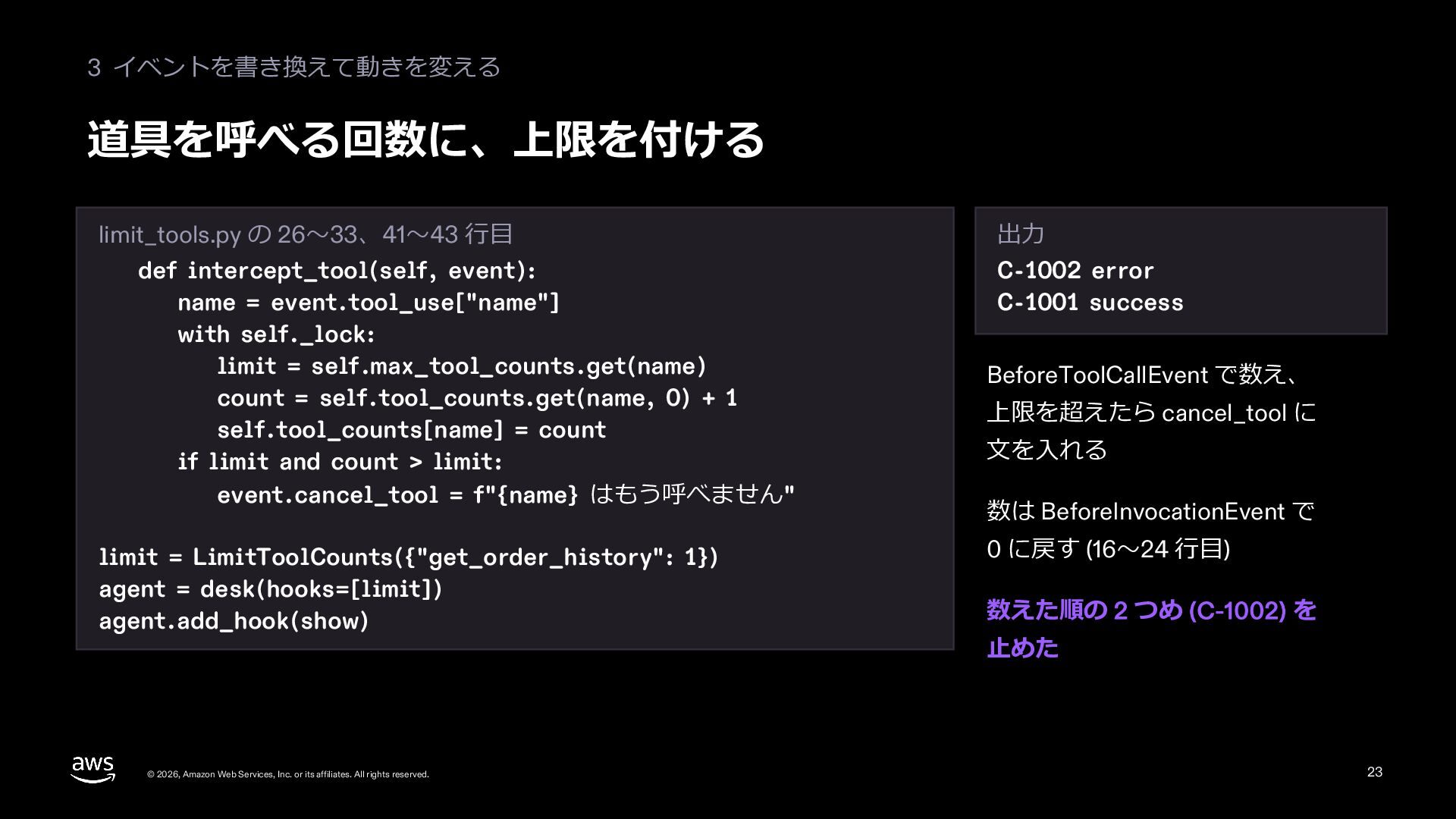
3 イベントを書き換えて動きを変える 道具を呼べる回数に、上限を付ける limit_tools.py の 26〜33、41〜43 ⾏⽬ def intercept_tool(self, event):
name = event.tool_use["name"] with self._lock: limit = self.max_tool_counts.get(name) count = self.tool_counts.get(name, 0) + 1 self.tool_counts[name] = count if limit and count > limit: event.cancel_tool = f"{name} はもう呼べません" limit = LimitToolCounts({"get_order_history": 1}) agent = desk(hooks=[limit]) agent.add_hook(show) © 2026, Amazon Web Services, Inc. or its affiliates. All rights reserved. 出⼒ C-1002 error C-1001 success BeforeToolCallEvent で数え、 上限を超えたら cancel_tool に ⽂を⼊れる 数は BeforeInvocationEvent で 0 に戻す (16〜24 ⾏⽬) 数えた順の 2 つめ (C-1002) を ⽌めた 23 -
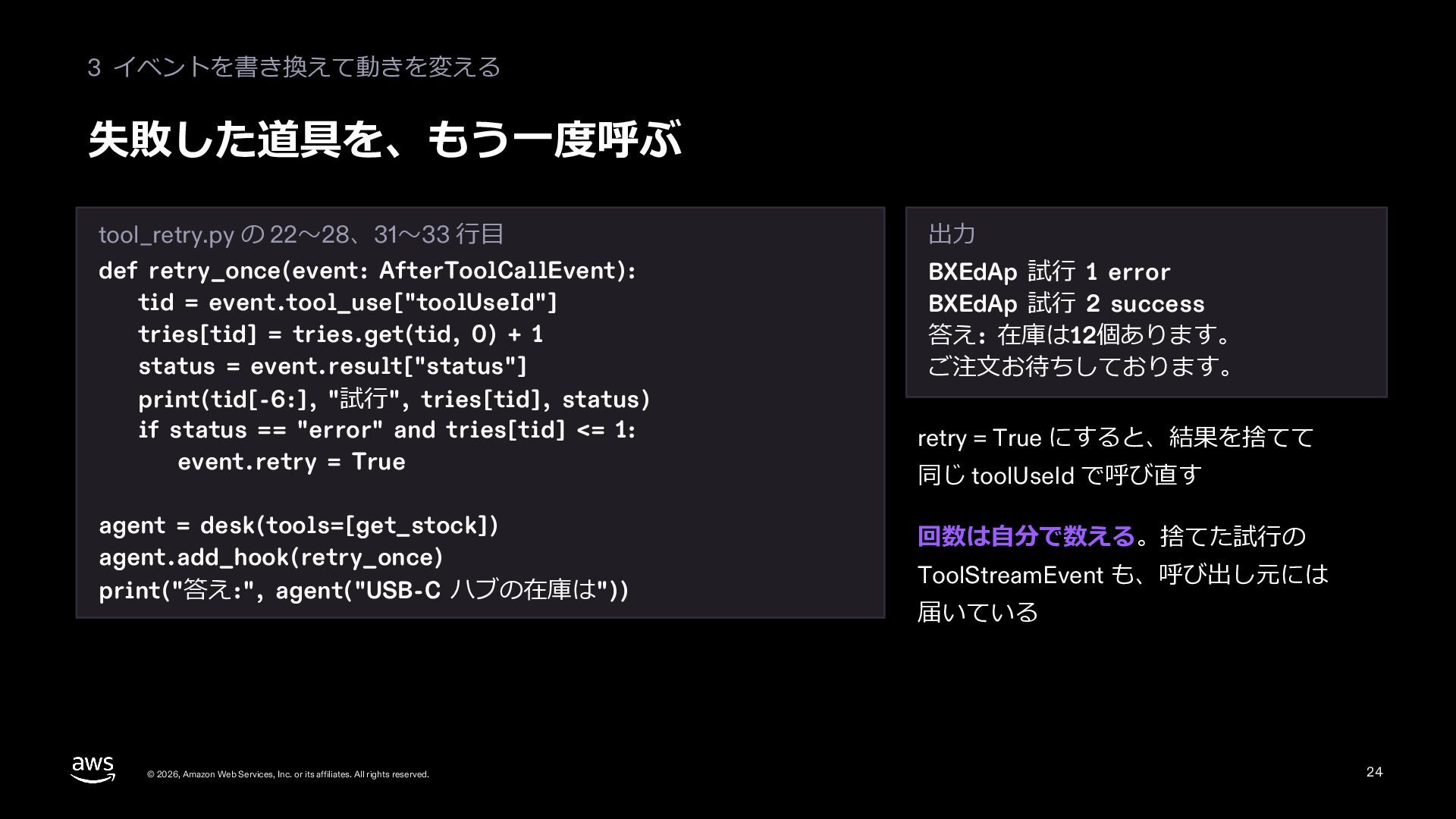
3 イベントを書き換えて動きを変える 失敗した道具を、もう⼀度呼ぶ tool_retry.py の 22〜28、31〜33 ⾏⽬ def retry_once(event: AfterToolCallEvent):
tid = event.tool_use["toolUseId"] tries[tid] = tries.get(tid, 0) + 1 status = event.result["status"] print(tid[-6:], "試⾏", tries[tid], status) if status == "error" and tries[tid] <= 1: event.retry = True agent = desk(tools=[get_stock]) agent.add_hook(retry_once) print("答え:", agent("USB-C ハブの在庫は")) © 2026, Amazon Web Services, Inc. or its affiliates. All rights reserved. 出⼒ BXEdAp 試⾏ 1 error BXEdAp 試⾏ 2 success 答え: 在庫は12個あります。 ご注⽂お待ちしております。 retry = True にすると、結果を捨てて 同じ toolUseId で呼び直す 回数は⾃分で数える。捨てた試⾏の ToolStreamEvent も、呼び出し元には 届いている 24 -
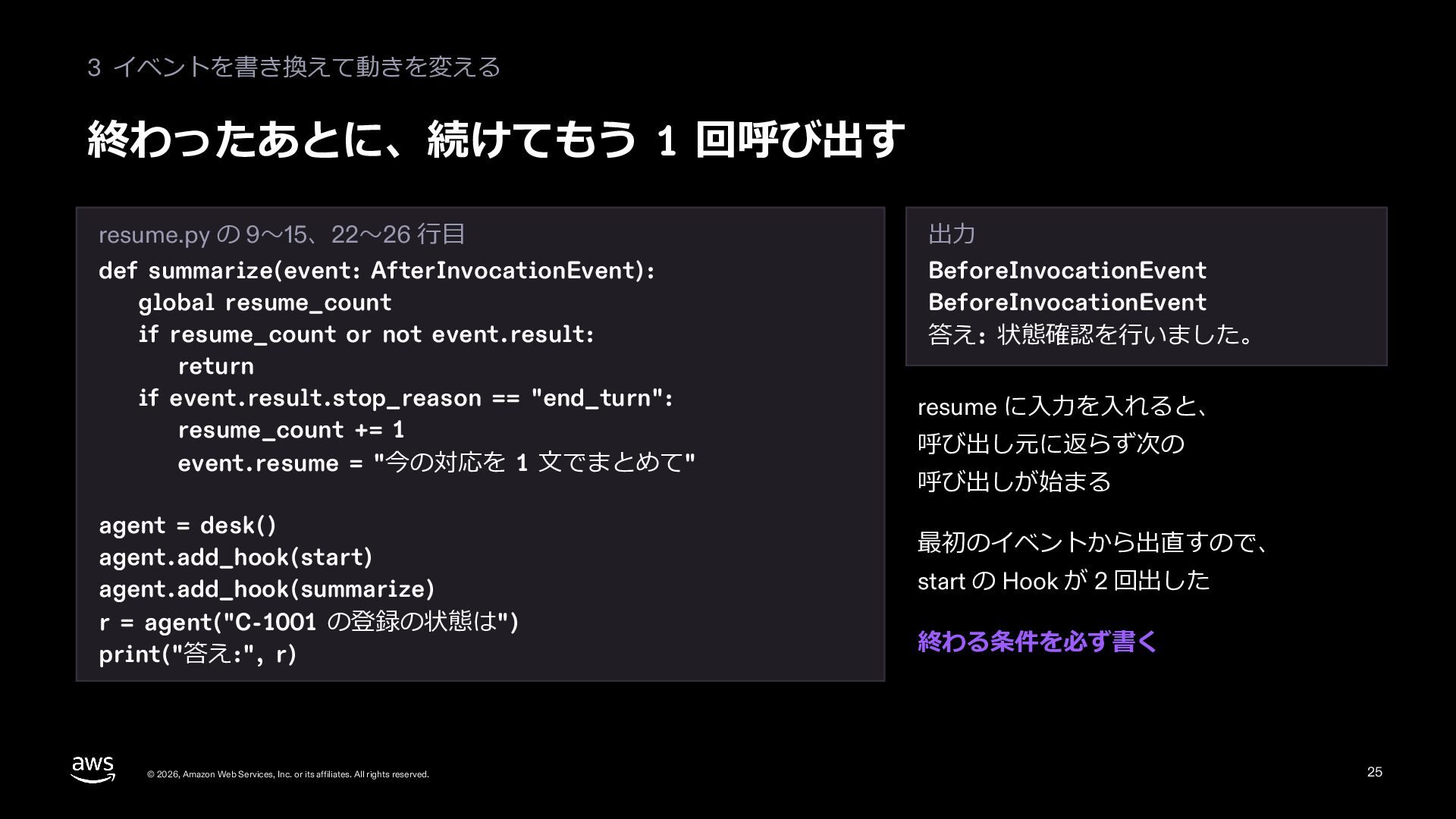
3 イベントを書き換えて動きを変える 終わったあとに、続けてもう 1 回呼び出す resume.py の 9〜15、22〜26 ⾏⽬ def
summarize(event: AfterInvocationEvent): global resume_count if resume_count or not event.result: return if event.result.stop_reason == "end_turn": resume_count += 1 event.resume = "今の対応を 1 ⽂でまとめて" agent = desk() agent.add_hook(start) agent.add_hook(summarize) r = agent("C-1001 の登録の状態は") print("答え:", r) © 2026, Amazon Web Services, Inc. or its affiliates. All rights reserved. 出⼒ BeforeInvocationEvent BeforeInvocationEvent 答え: 状態確認を⾏いました。 resume に⼊⼒を⼊れると、 呼び出し元に返らず次の 呼び出しが始まる 最初のイベントから出直すので、 start の Hook が 2 回出した 終わる条件を必ず書く 25 -
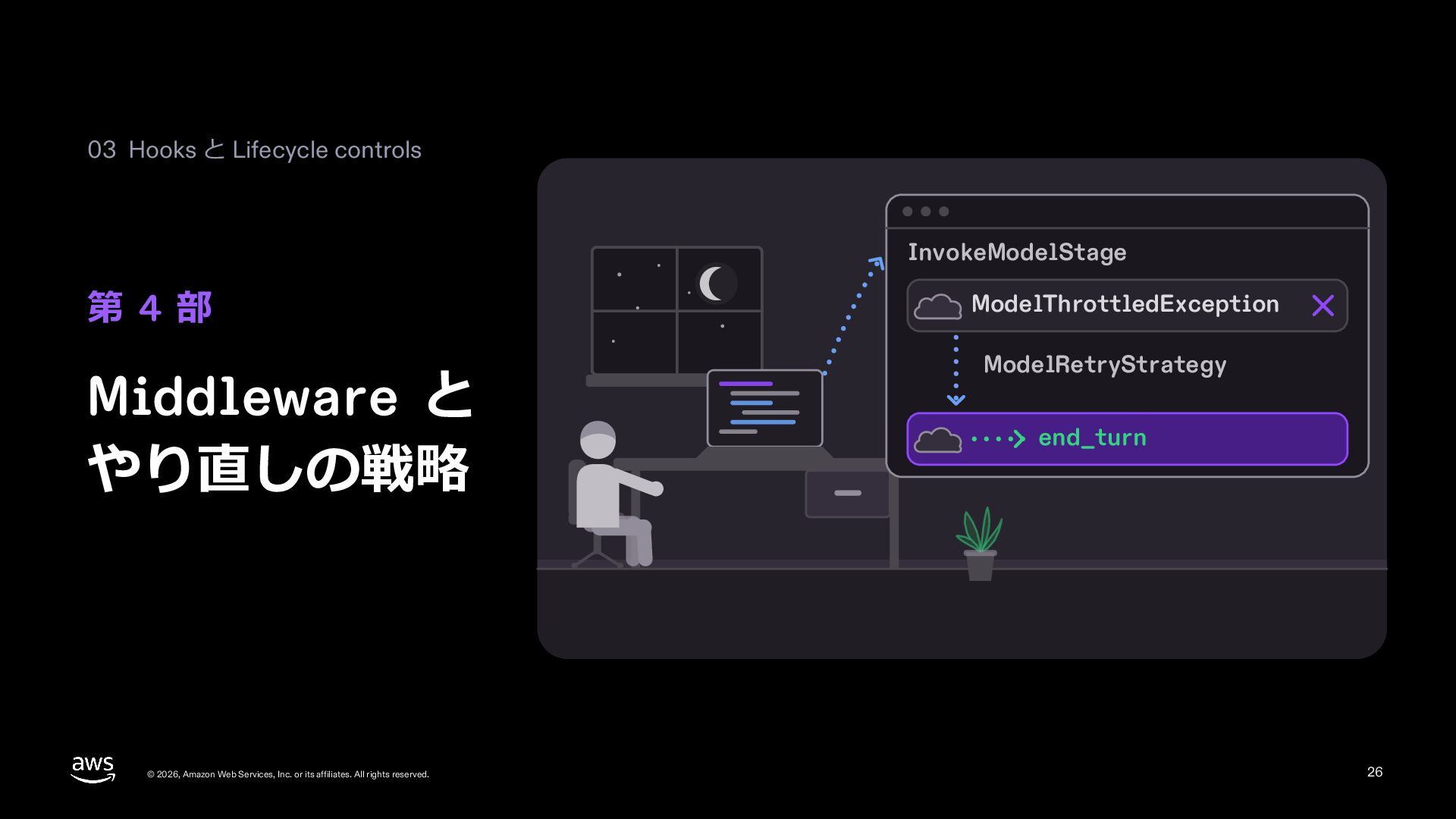
03 Hooks と Lifecycle controls InvokeModelStage 第 4 部 ModelThrottledException
Middleware と やり直しの戦略 ModelRetryStrategy © 2026, Amazon Web Services, Inc. or its affiliates. All rights reserved. end_turn 26 -
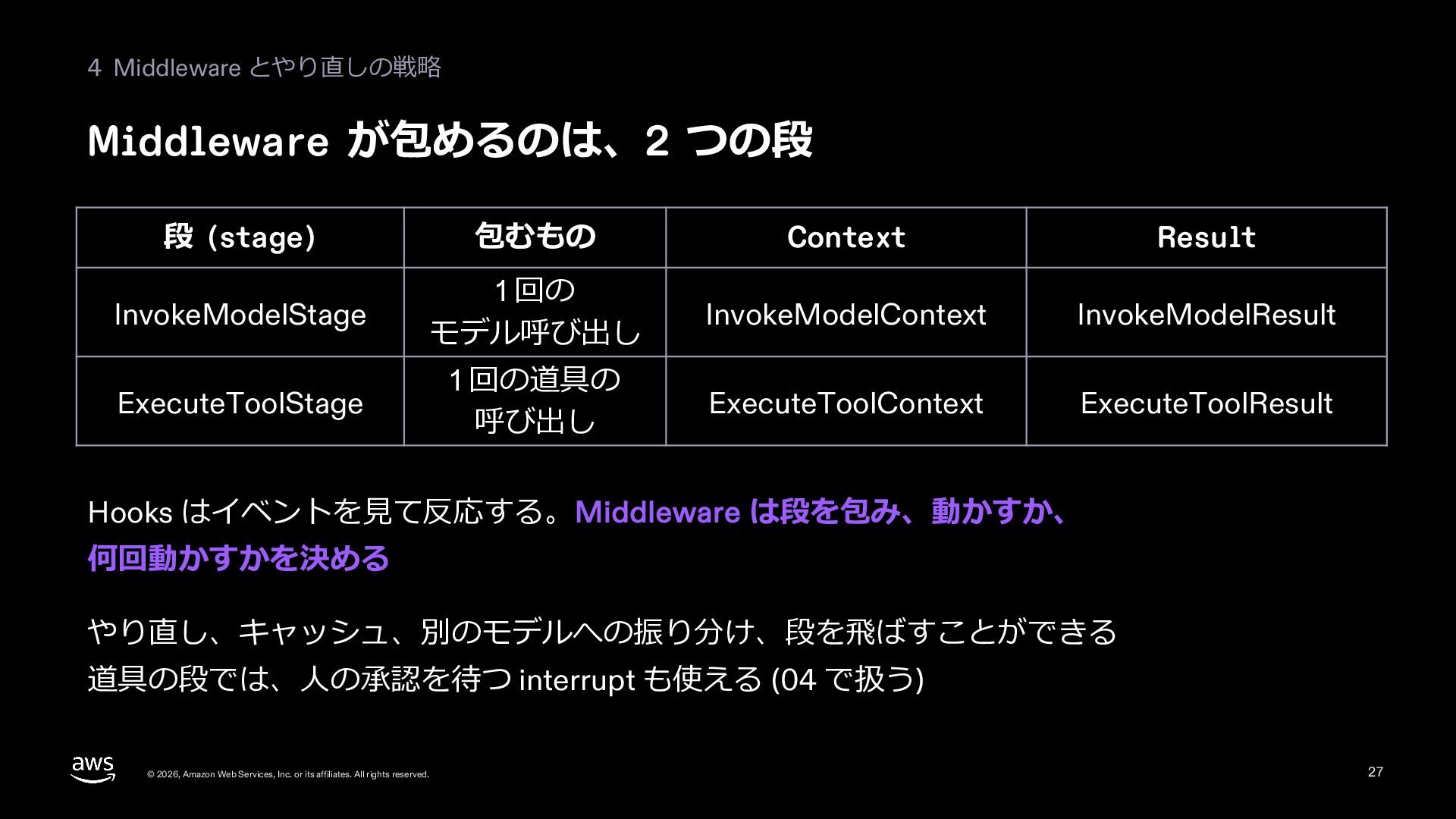
4 Middleware とやり直しの戦略 Middleware が包めるのは、2 つの段 段 (stage) 包むもの Context
Result InvokeModelStage 1 回の モデル呼び出し InvokeModelContext InvokeModelResult ExecuteToolStage 1 回の道具の 呼び出し ExecuteToolContext ExecuteToolResult Hooks はイベントを⾒て反応する。Middleware は段を包み、動かすか、 何回動かすかを決める やり直し、キャッシュ、別のモデルへの振り分け、段を⾶ばすことができる 道具の段では、⼈の承認を待つ interrupt も使える (04 で扱う) © 2026, Amazon Web Services, Inc. or its affiliates. All rights reserved. 27 -
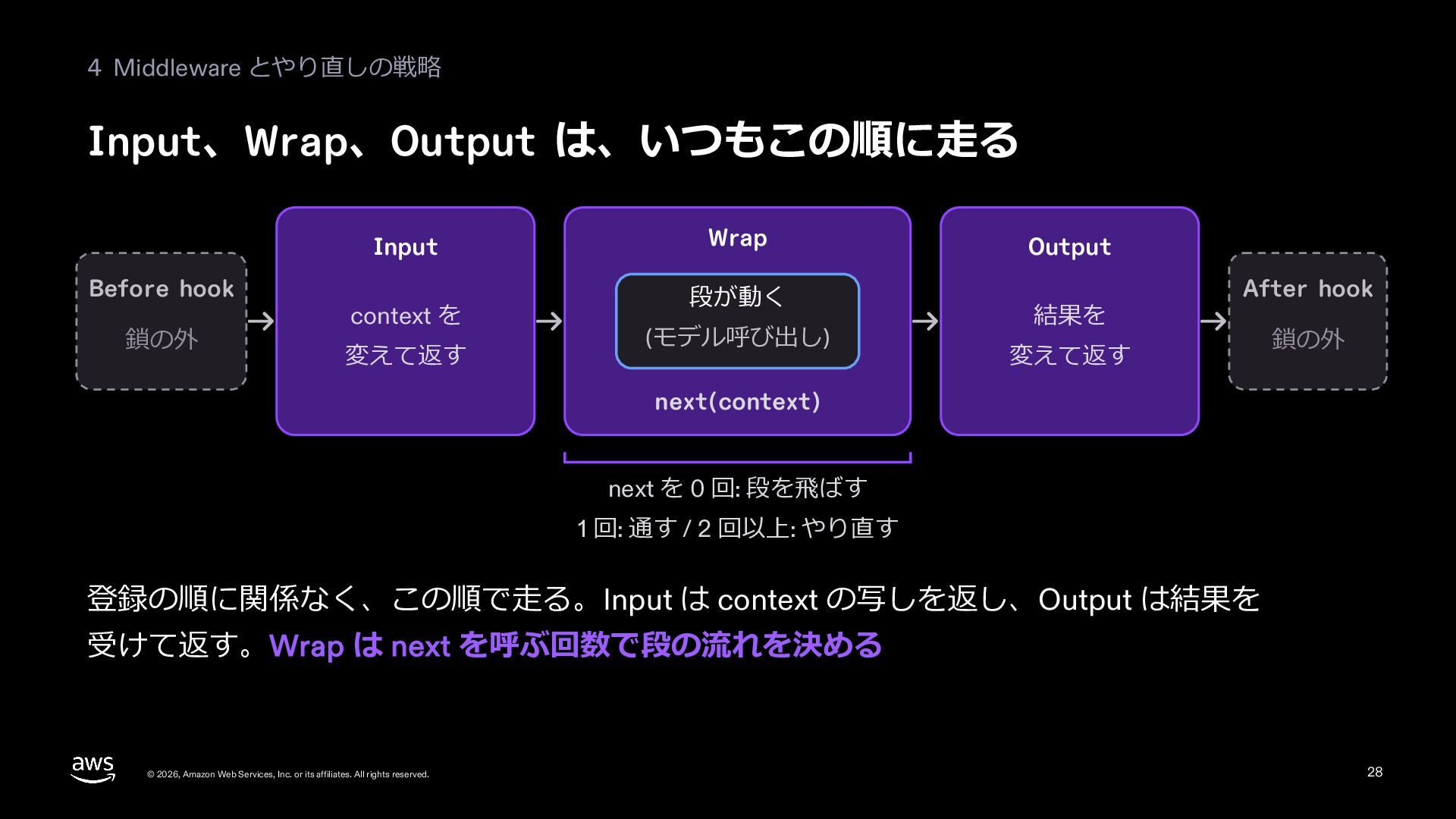
4 Middleware とやり直しの戦略 Input、Wrap、Output は、いつもこの順に⾛る Input Before hook 鎖の外 context
を 変えて返す Wrap 段が動く (モデル呼び出し) Output 結果を After hook 変えて返す 鎖の外 next(context) next を 0 回: 段を⾶ばす 1 回: 通す / 2 回以上: やり直す 登録の順に関係なく、この順で⾛る。Input は context の写しを返し、Output は結果を 受けて返す。Wrap は next を呼ぶ回数で段の流れを決める © 2026, Amazon Web Services, Inc. or its affiliates. All rights reserved. 28 -
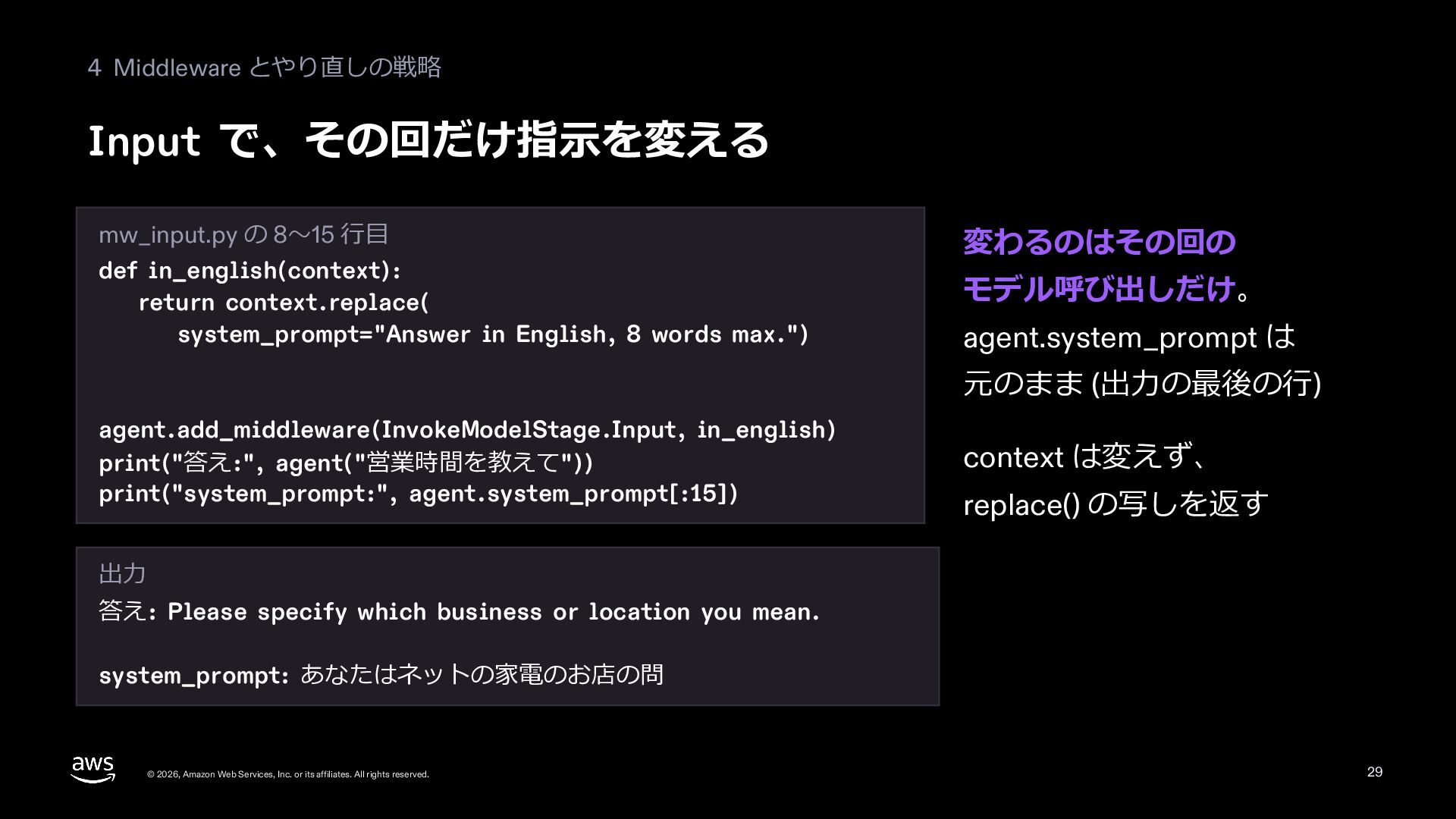
4 Middleware とやり直しの戦略 Input で、その回だけ指⽰を変える mw_input.py の 8〜15 ⾏⽬ def
in_english(context): return context.replace( system_prompt="Answer in English, 8 words max.") 変わるのはその回の モデル呼び出しだけ。 agent.system_prompt は 元のまま (出⼒の最後の⾏) agent.add_middleware(InvokeModelStage.Input, in_english) print("答え:", agent("営業時間を教えて")) print("system_prompt:", agent.system_prompt[:15]) context は変えず、 replace() の写しを返す 出⼒ 答え: Please specify which business or location you mean. system_prompt: あなたはネットの家電のお店の問 © 2026, Amazon Web Services, Inc. or its affiliates. All rights reserved. 29 -
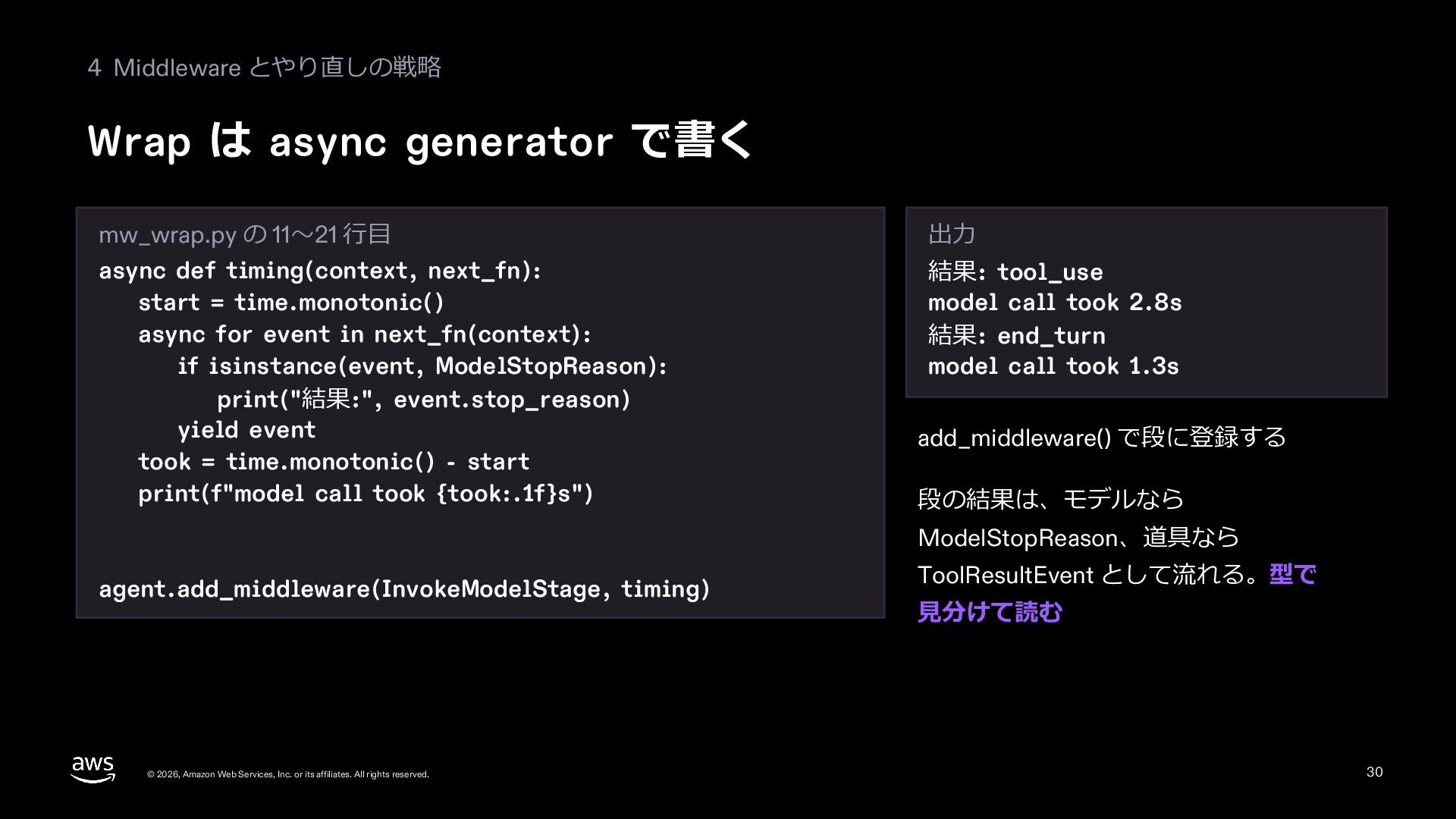
4 Middleware とやり直しの戦略 Wrap は async generator で書く mw_wrap.py の
11〜21 ⾏⽬ async def timing(context, next_fn): start = time.monotonic() async for event in next_fn(context): if isinstance(event, ModelStopReason): print("結果:", event.stop_reason) yield event took = time.monotonic() - start print(f"model call took {took:.1f}s") 出⼒ 結果: tool_use model call took 2.8s 結果: end_turn model call took 1.3s add_middleware() で段に登録する 段の結果は、モデルなら ModelStopReason、道具なら agent.add_middleware(InvokeModelStage, timing) © 2026, Amazon Web Services, Inc. or its affiliates. All rights reserved. ToolResultEvent として流れる。型で ⾒分けて読む 30 -
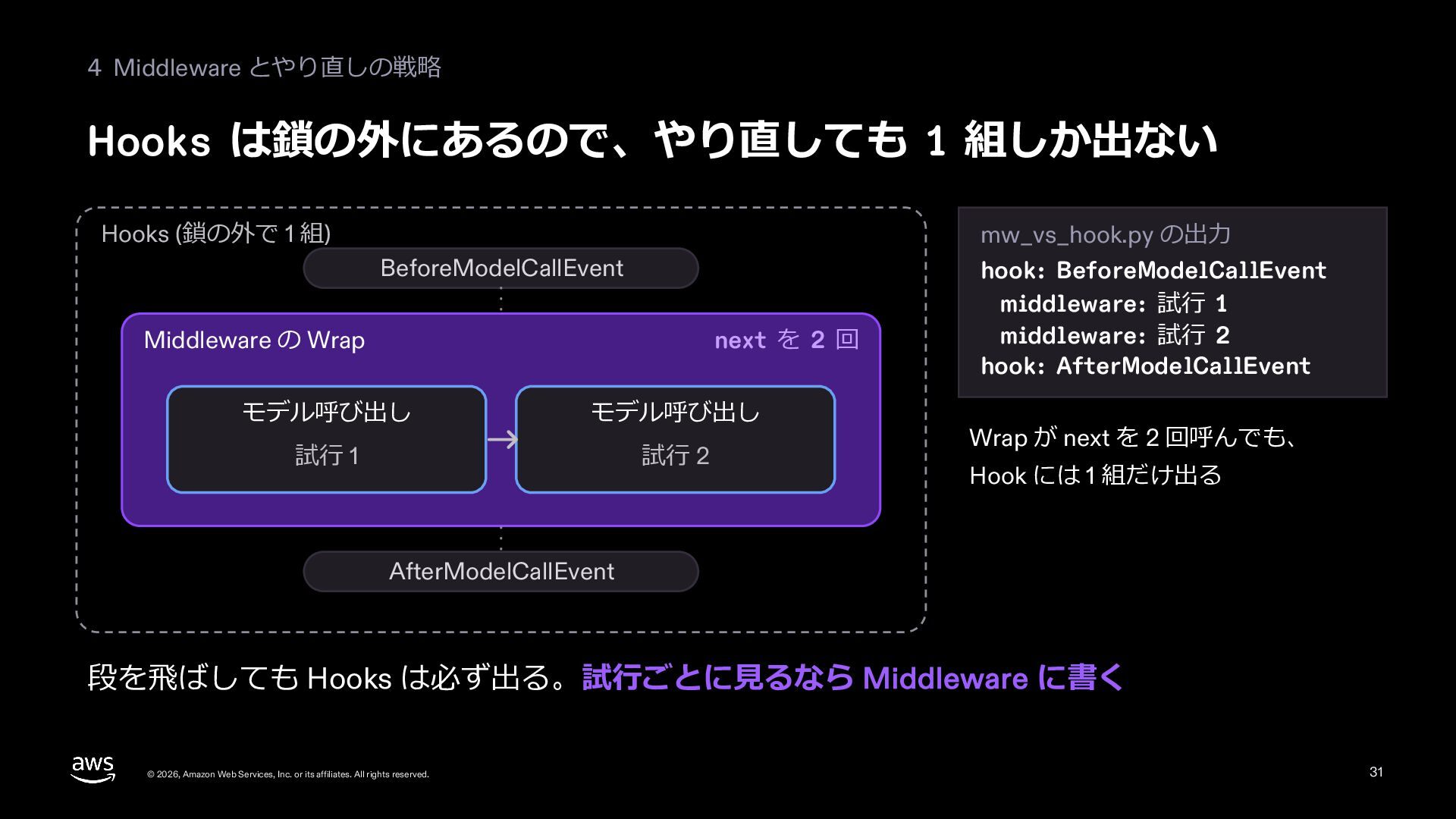
4 Middleware とやり直しの戦略 Hooks は鎖の外にあるので、やり直しても 1 組しか出ない Hooks (鎖の外で 1
組) BeforeModelCallEvent Middleware の Wrap next を 2 回 モデル呼び出し モデル呼び出し 試⾏ 1 試⾏ 2 mw_vs_hook.py の出⼒ hook: BeforeModelCallEvent middleware: 試⾏ 1 middleware: 試⾏ 2 hook: AfterModelCallEvent Wrap が next を 2 回呼んでも、 Hook には 1 組だけ出る AfterModelCallEvent 段を⾶ばしても Hooks は必ず出る。試⾏ごとに⾒るなら Middleware に書く © 2026, Amazon Web Services, Inc. or its affiliates. All rights reserved. 31 -
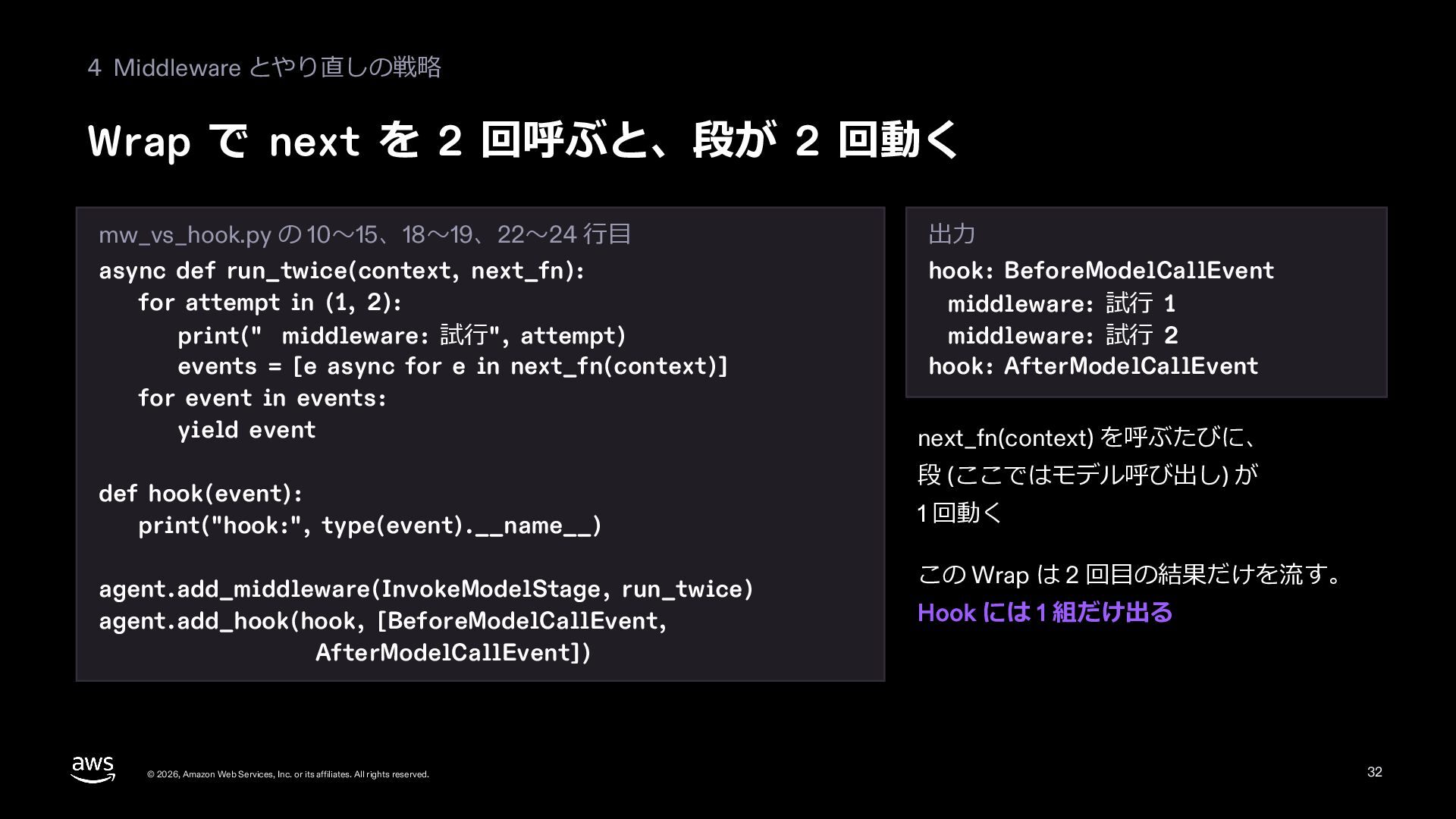
4 Middleware とやり直しの戦略 Wrap で next を 2 回呼ぶと、段が 2
回動く mw_vs_hook.py の 10〜15、18〜19、22〜24 ⾏⽬ async def run_twice(context, next_fn): for attempt in (1, 2): print(" middleware: 試⾏", attempt) events = [e async for e in next_fn(context)] for event in events: yield event def hook(event): print("hook:", type(event).__name__) agent.add_middleware(InvokeModelStage, run_twice) agent.add_hook(hook, [BeforeModelCallEvent, AfterModelCallEvent]) © 2026, Amazon Web Services, Inc. or its affiliates. All rights reserved. 出⼒ hook: BeforeModelCallEvent middleware: 試⾏ 1 middleware: 試⾏ 2 hook: AfterModelCallEvent next_fn(context) を呼ぶたびに、 段 (ここではモデル呼び出し) が 1 回動く この Wrap は 2 回⽬の結果だけを流す。 Hook には 1 組だけ出る 32 -
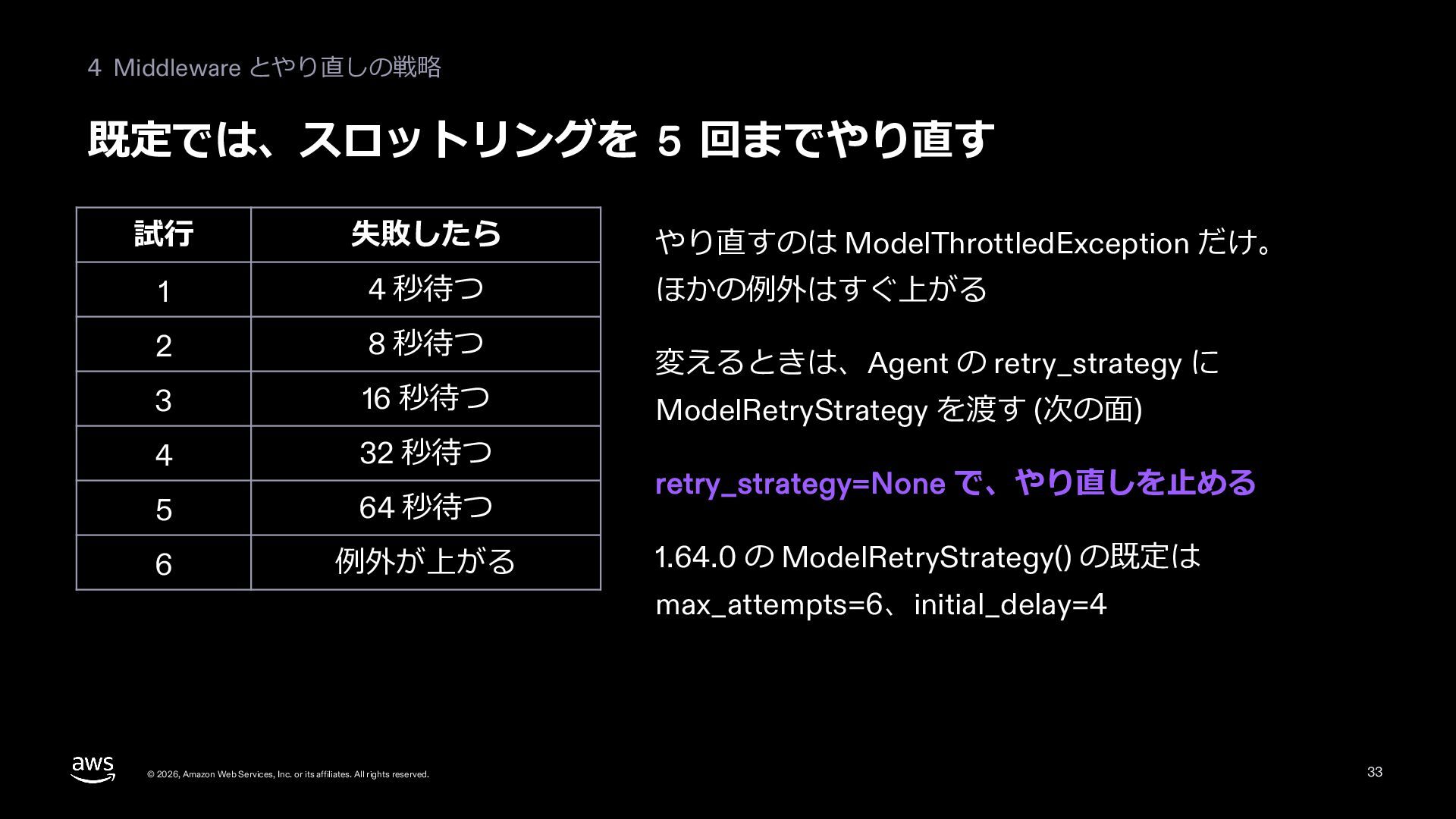
4 Middleware とやり直しの戦略 既定では、スロットリングを 5 回までやり直す 試⾏ 失敗したら やり直すのは ModelThrottledException
だけ。 1 4 秒待つ ほかの例外はすぐ上がる 2 8 秒待つ 3 16 秒待つ 4 32 秒待つ 5 64 秒待つ 6 例外が上がる © 2026, Amazon Web Services, Inc. or its affiliates. All rights reserved. 変えるときは、Agent の retry_strategy に ModelRetryStrategy を渡す (次の⾯) retry_strategy=None で、やり直しを⽌める 1.64.0 の ModelRetryStrategy() の既定は max_attempts=6、initial_delay=4 33 -
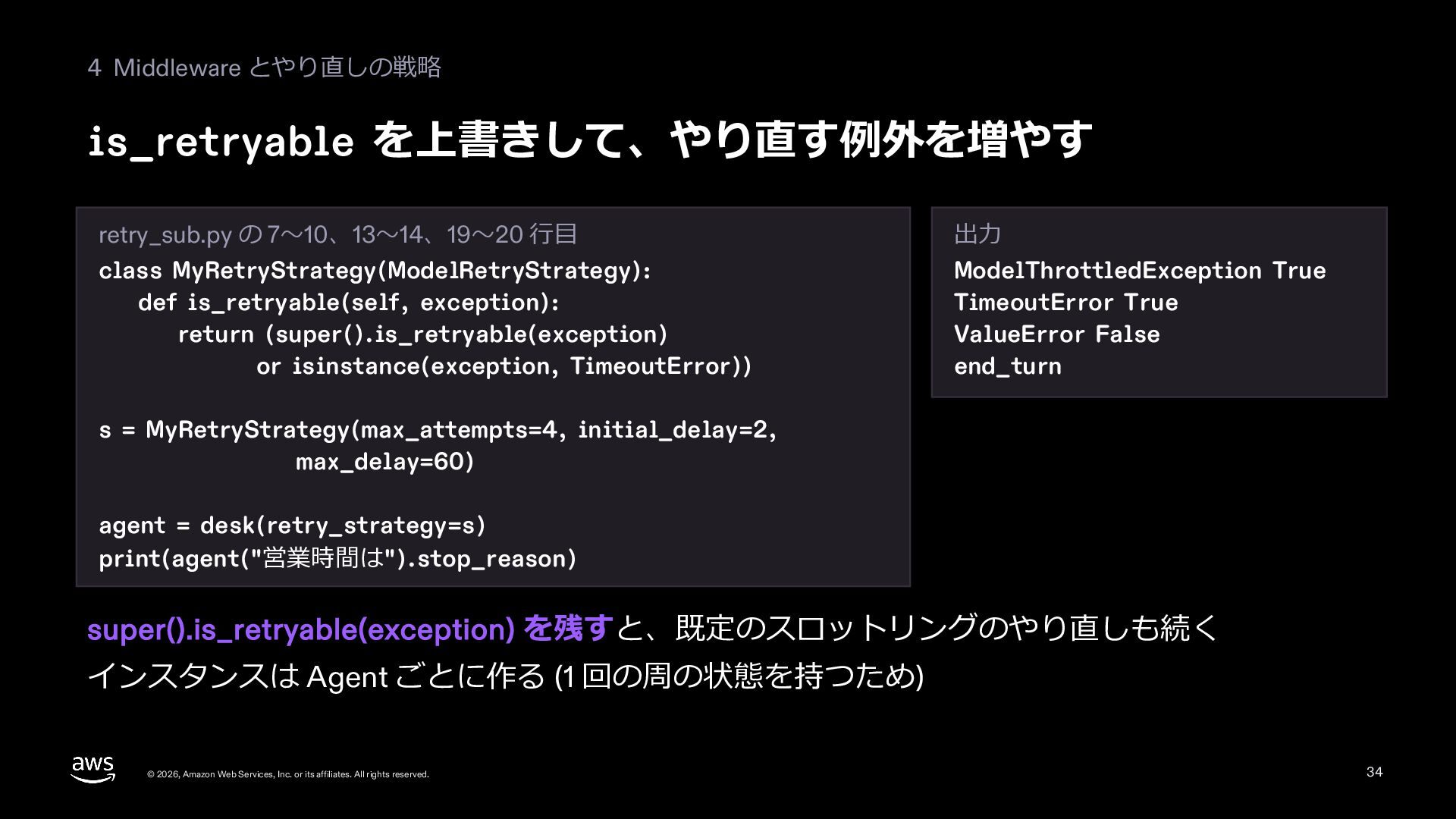
4 Middleware とやり直しの戦略 is_retryable を上書きして、やり直す例外を増やす retry_sub.py の 7〜10、13〜14、19〜20 ⾏⽬ class
MyRetryStrategy(ModelRetryStrategy): def is_retryable(self, exception): return (super().is_retryable(exception) or isinstance(exception, TimeoutError)) 出⼒ ModelThrottledException True TimeoutError True ValueError False end_turn s = MyRetryStrategy(max_attempts=4, initial_delay=2, max_delay=60) agent = desk(retry_strategy=s) print(agent("営業時間は").stop_reason) super().is_retryable(exception) を残すと、既定のスロットリングのやり直しも続く インスタンスは Agent ごとに作る (1 回の周の状態を持つため) © 2026, Amazon Web Services, Inc. or its affiliates. All rights reserved. 34 -
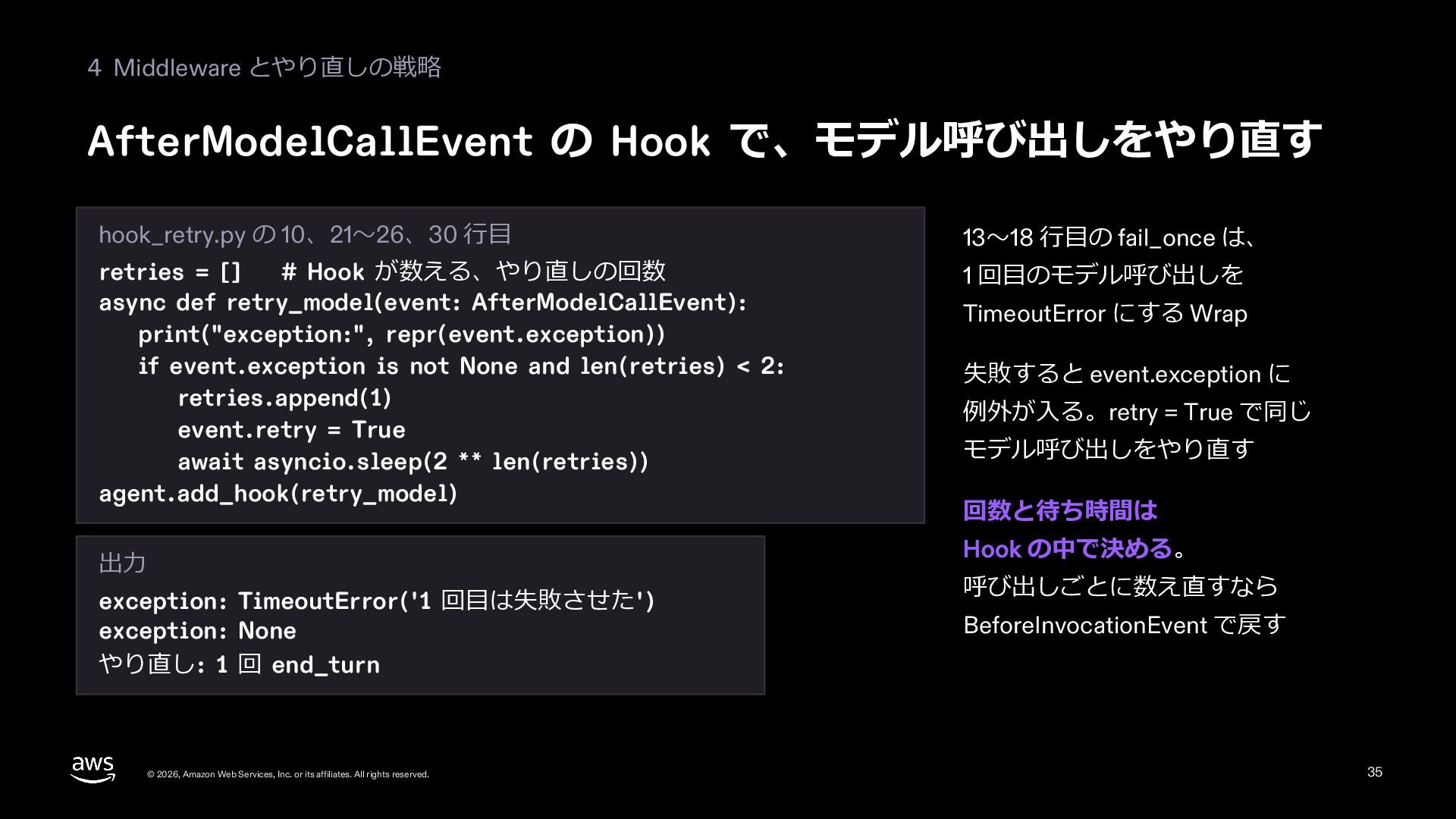
4 Middleware とやり直しの戦略 AfterModelCallEvent の Hook で、モデル呼び出しをやり直す hook_retry.py の 10、21〜26、30
⾏⽬ retries = [] # Hook が数える、やり直しの回数 async def retry_model(event: AfterModelCallEvent): print("exception:", repr(event.exception)) if event.exception is not None and len(retries) < 2: retries.append(1) event.retry = True await asyncio.sleep(2 ** len(retries)) agent.add_hook(retry_model) 13〜18 ⾏⽬の fail_once は、 1 回⽬のモデル呼び出しを TimeoutError にする Wrap 失敗すると event.exception に 例外が⼊る。retry = True で同じ モデル呼び出しをやり直す 回数と待ち時間は Hook の中で決める。 出⼒ exception: TimeoutError('1 回⽬は失敗させた') exception: None やり直し: 1 回 end_turn © 2026, Amazon Web Services, Inc. or its affiliates. All rights reserved. 呼び出しごとに数え直すなら BeforeInvocationEvent で戻す 35 -
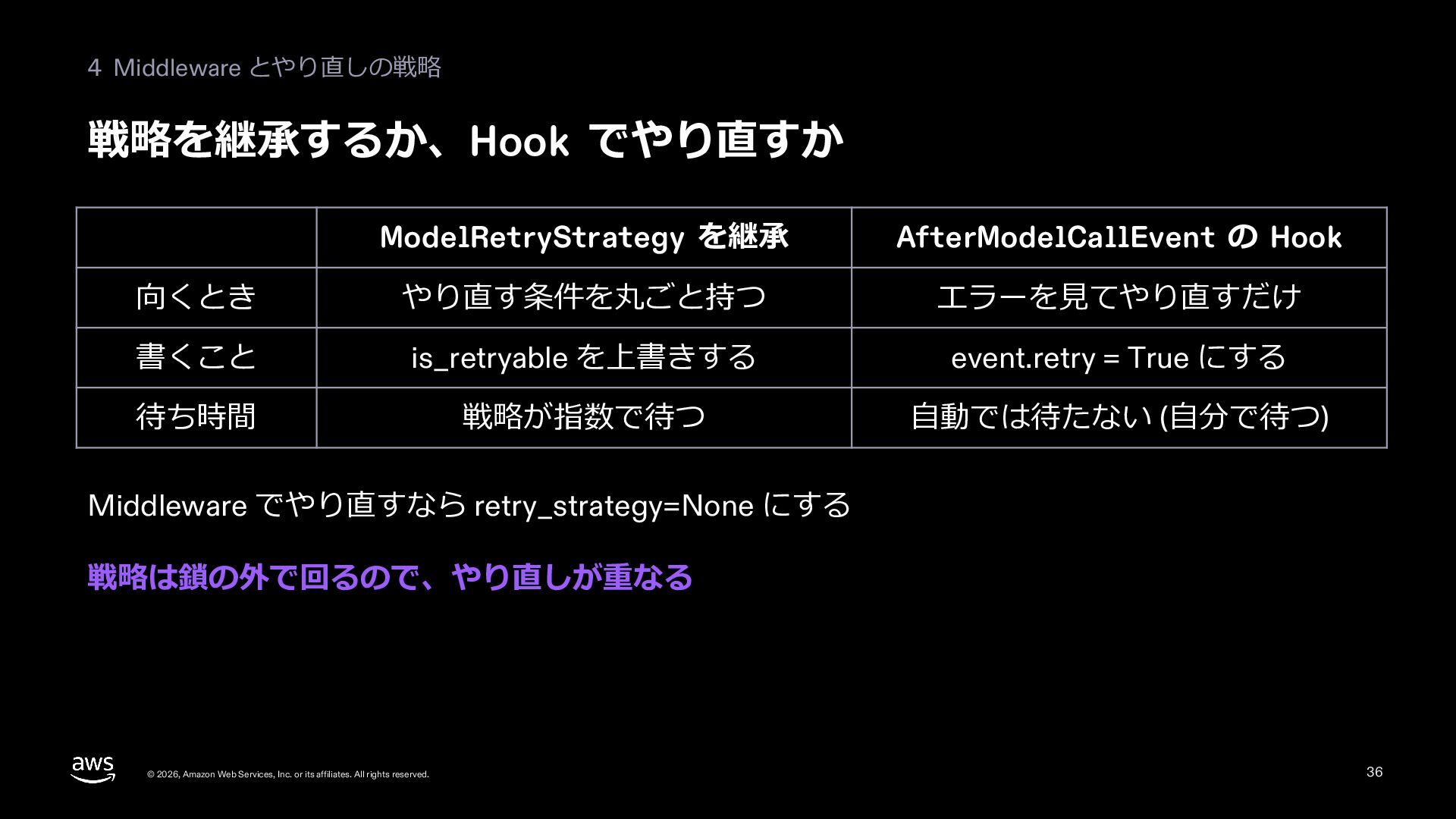
4 Middleware とやり直しの戦略 戦略を継承するか、Hook でやり直すか ModelRetryStrategy を継承 AfterModelCallEvent の Hook
向くとき やり直す条件を丸ごと持つ エラーを⾒てやり直すだけ 書くこと is_retryable を上書きする event.retry = True にする 待ち時間 戦略が指数で待つ ⾃動では待たない (⾃分で待つ) Middleware でやり直すなら retry_strategy=None にする 戦略は鎖の外で回るので、やり直しが重なる © 2026, Amazon Web Services, Inc. or its affiliates. All rights reserved. 36 -
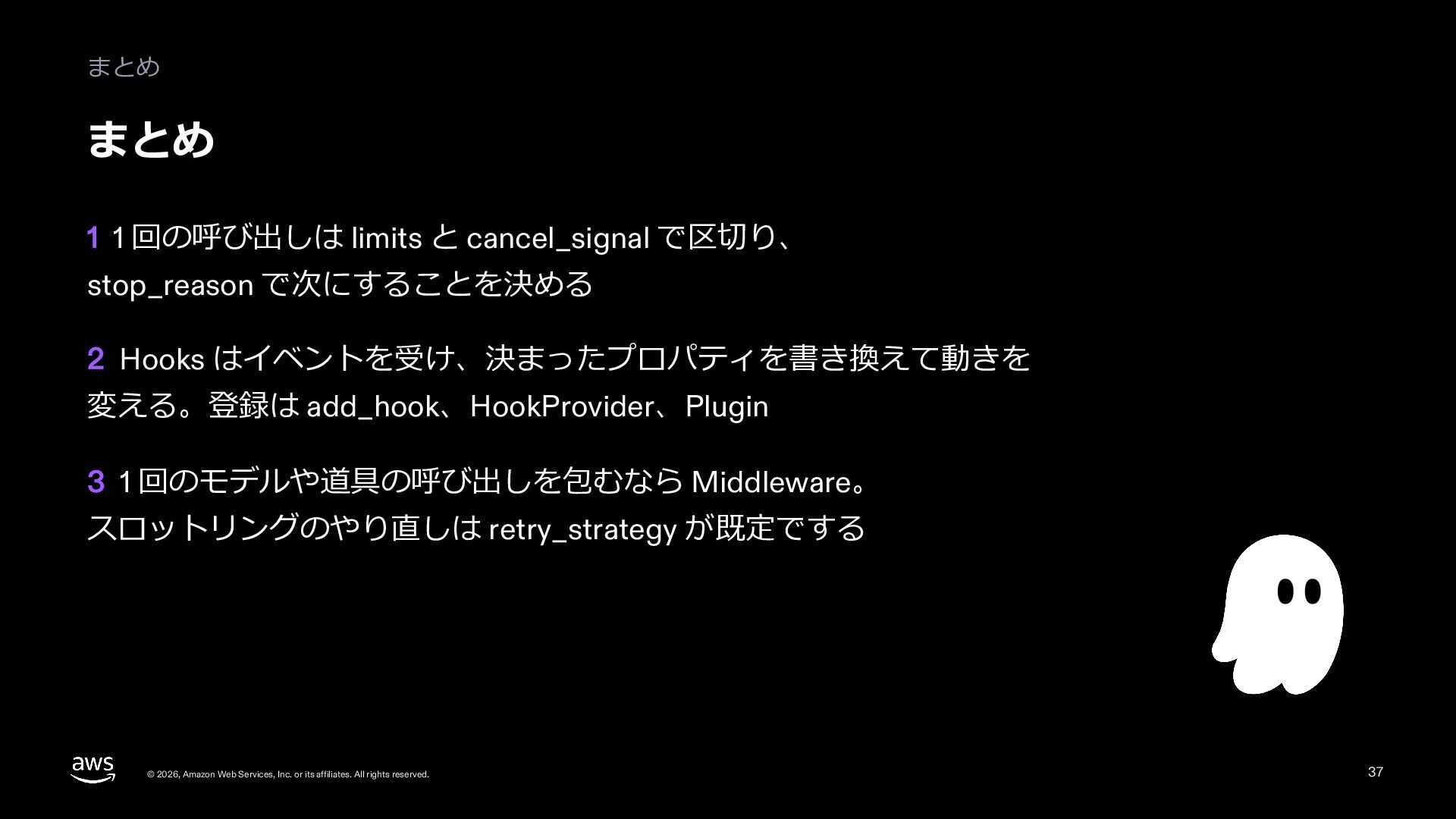
まとめ まとめ 1 1 回の呼び出しは limits と cancel_signal で区切り、 stop_reason
で次にすることを決める 2 Hooks はイベントを受け、決まったプロパティを書き換えて動きを 変える。登録は add_hook、HookProvider、Plugin 3 1 回のモデルや道具の呼び出しを包むなら Middleware。 スロットリングのやり直しは retry_strategy が既定でする © 2026, Amazon Web Services, Inc. or its affiliates. All rights reserved. 37 -
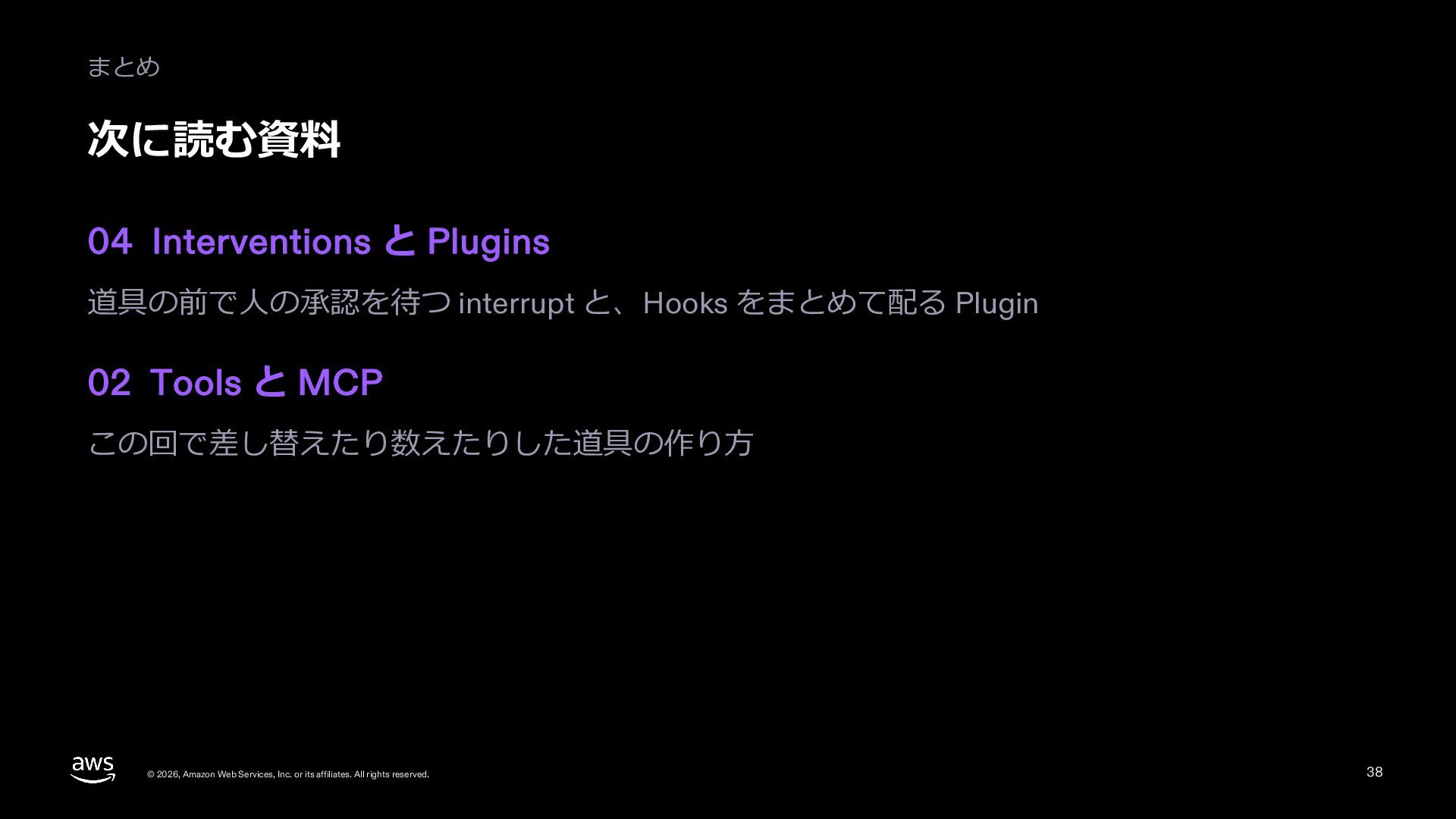
まとめ 次に読む資料 04 Interventions と Plugins 道具の前で⼈の承認を待つ interrupt と、Hooks をまとめて配る
Plugin 02 Tools と MCP この回で差し替えたり数えたりした道具の作り⽅ © 2026, Amazon Web Services, Inc. or its affiliates. All rights reserved. 38 -
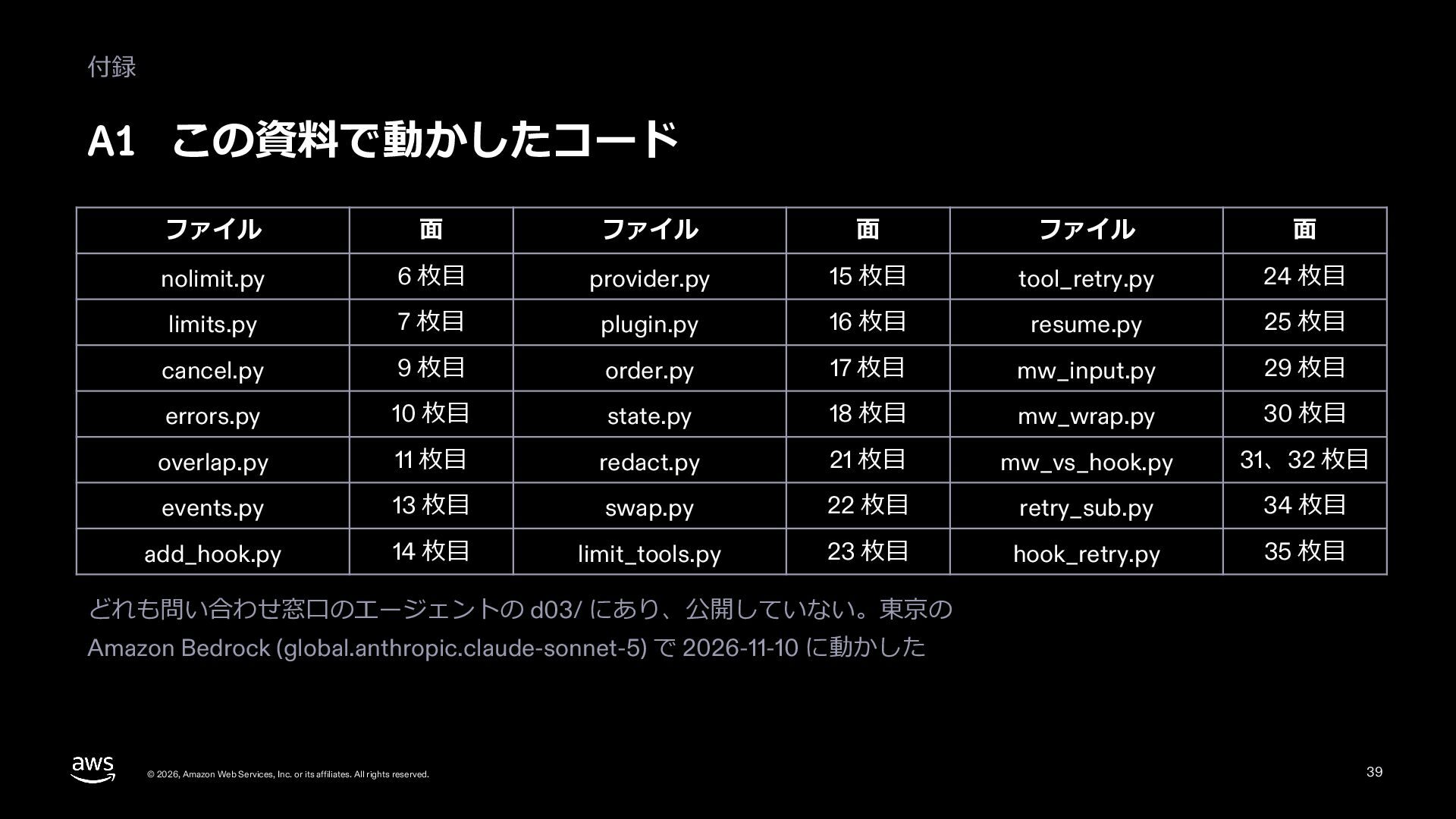
付録 A1 この資料で動かしたコード ファイル ⾯ ファイル ⾯ ファイル ⾯ nolimit.py
6 枚⽬ provider.py 15 枚⽬ tool_retry.py 24 枚⽬ limits.py 7 枚⽬ plugin.py 16 枚⽬ resume.py 25 枚⽬ cancel.py 9 枚⽬ order.py 17 枚⽬ mw_input.py 29 枚⽬ errors.py 10 枚⽬ state.py 18 枚⽬ mw_wrap.py 30 枚⽬ overlap.py 11 枚⽬ redact.py 21 枚⽬ mw_vs_hook.py 31、32 枚⽬ events.py 13 枚⽬ swap.py 22 枚⽬ retry_sub.py 34 枚⽬ add_hook.py 14 枚⽬ limit_tools.py 23 枚⽬ hook_retry.py 35 枚⽬ どれも問い合わせ窓⼝のエージェントの d03/ にあり、公開していない。東京の Amazon Bedrock (global.anthropic.claude-sonnet-5) で 2026-11-10 に動かした © 2026, Amazon Web Services, Inc. or its affiliates. All rights reserved. 39 -
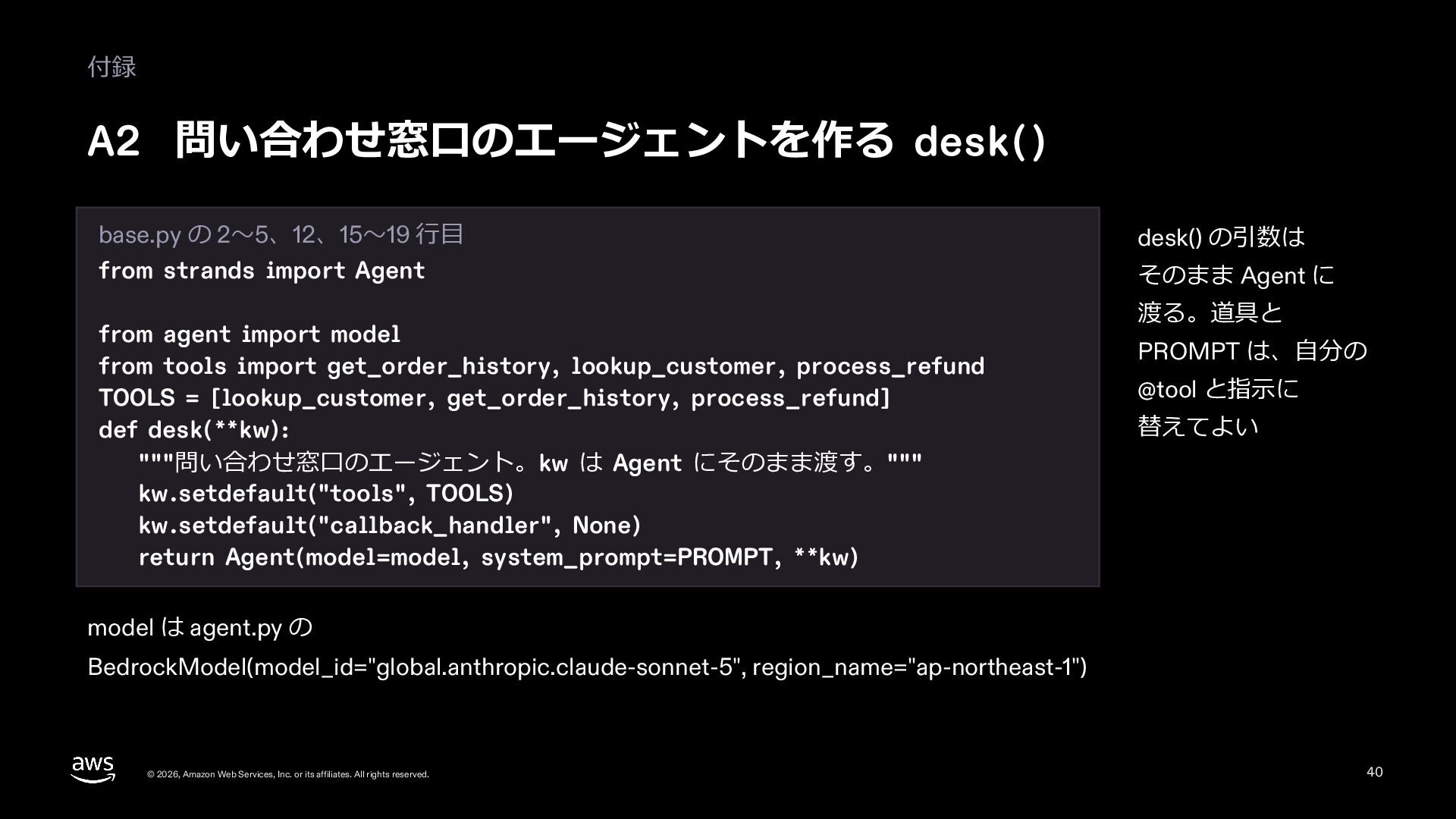
付録 A2 問い合わせ窓⼝のエージェントを作る desk() base.py の 2〜5、12、15〜19 ⾏⽬ from strands
import Agent from agent import model from tools import get_order_history, lookup_customer, process_refund TOOLS = [lookup_customer, get_order_history, process_refund] def desk(**kw): """問い合わせ窓⼝のエージェント。kw は Agent にそのまま渡す。""" kw.setdefault("tools", TOOLS) kw.setdefault("callback_handler", None) return Agent(model=model, system_prompt=PROMPT, **kw) desk() の引数は そのまま Agent に 渡る。道具と PROMPT は、⾃分の @tool と指⽰に 替えてよい model は agent.py の BedrockModel(model_id="global.anthropic.claude-sonnet-5", region_name="ap-northeast-1") © 2026, Amazon Web Services, Inc. or its affiliates. All rights reserved. 40 -
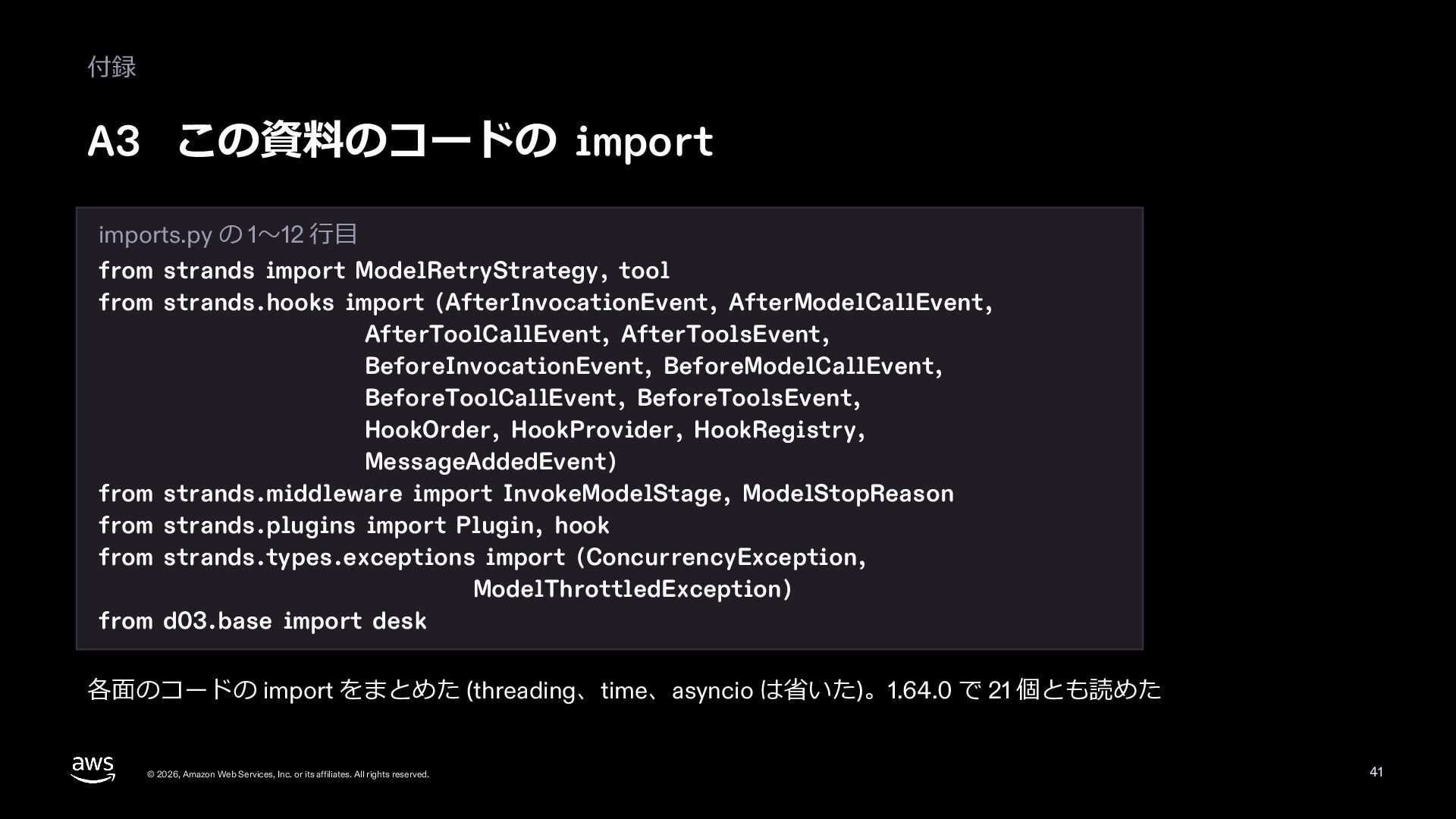
付録 A3 この資料のコードの import imports.py の 1〜12 ⾏⽬ from strands
import ModelRetryStrategy, tool from strands.hooks import (AfterInvocationEvent, AfterModelCallEvent, AfterToolCallEvent, AfterToolsEvent, BeforeInvocationEvent, BeforeModelCallEvent, BeforeToolCallEvent, BeforeToolsEvent, HookOrder, HookProvider, HookRegistry, MessageAddedEvent) from strands.middleware import InvokeModelStage, ModelStopReason from strands.plugins import Plugin, hook from strands.types.exceptions import (ConcurrencyException, ModelThrottledException) from d03.base import desk 各⾯のコードの import をまとめた (threading、time、asyncio は省いた)。1.64.0 で 21 個とも読めた © 2026, Amazon Web Services, Inc. or its affiliates. All rights reserved. 41 -
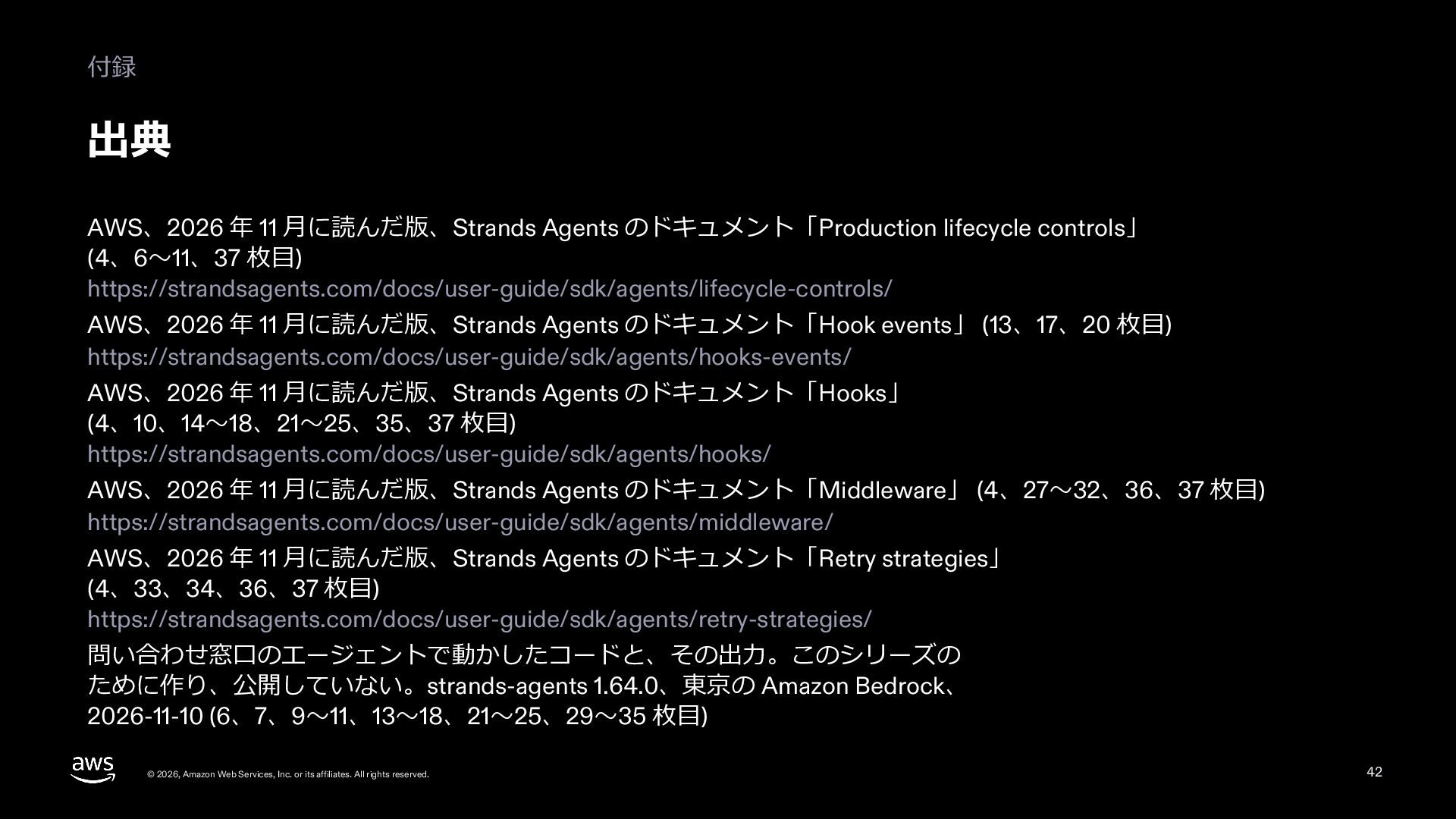
付録 出典 AWS、2026 年 11 ⽉に読んだ版、Strands Agents のドキュメント「Production lifecycle controls」
(4、6〜11、37 枚⽬) https://strandsagents.com/docs/user-guide/sdk/agents/lifecycle-controls/ AWS、2026 年 11 ⽉に読んだ版、Strands Agents のドキュメント「Hook events」 (13、17、20 枚⽬) https://strandsagents.com/docs/user-guide/sdk/agents/hooks-events/ AWS、2026 年 11 ⽉に読んだ版、Strands Agents のドキュメント「Hooks」 (4、10、14〜18、21〜25、35、37 枚⽬) https://strandsagents.com/docs/user-guide/sdk/agents/hooks/ AWS、2026 年 11 ⽉に読んだ版、Strands Agents のドキュメント「Middleware」 (4、27〜32、36、37 枚⽬) https://strandsagents.com/docs/user-guide/sdk/agents/middleware/ AWS、2026 年 11 ⽉に読んだ版、Strands Agents のドキュメント「Retry strategies」 (4、33、34、36、37 枚⽬) https://strandsagents.com/docs/user-guide/sdk/agents/retry-strategies/ 問い合わせ窓⼝のエージェントで動かしたコードと、その出⼒。このシリーズの ために作り、公開していない。strands-agents 1.64.0、東京の Amazon Bedrock、 2026-11-10 (6、7、9〜11、13〜18、21〜25、29〜35 枚⽬) © 2026, Amazon Web Services, Inc. or its affiliates. All rights reserved. 42
 inariku
 knwoop
 _awache
 yusuke427
 junjikoide
 jacopen
 yoshimura_datam
 sue445
 kaminashi
 biwashi
 tascript
 ginjihayashi
 chmikata
 trallard
 danielanewman
 ianozsvald
 yeseniaperezcruz
 cassininazir
 varn
 coloredviolet
 mongodb
 mojombo
 mclloyd
 addyosmani
 3n