Share
Embed
Confident Web Development with React
Talk given at DjangoCon US 2015 in Austin, TX on September 9th 2015.
Julien Phalip
September 09, 2015
Transcript
71 slides
-
~ Julien Phalip Confident Web Development With React September, 9th,
2015 DJANGOCON 2015 - AUSTIN, TX -
CONNECTED PERSONAL OBJECTS 5/2012 About me... ‣ Worked with Django
since 2007 (v 0.96). ‣ Django core committer since 2011. ‣ @julienphalip -
CONNECTED PERSONAL OBJECTS 5/2012 About this talk… ‣ Basic principles
of Flux & React. ‣ Examples of how Django & React may work together. -
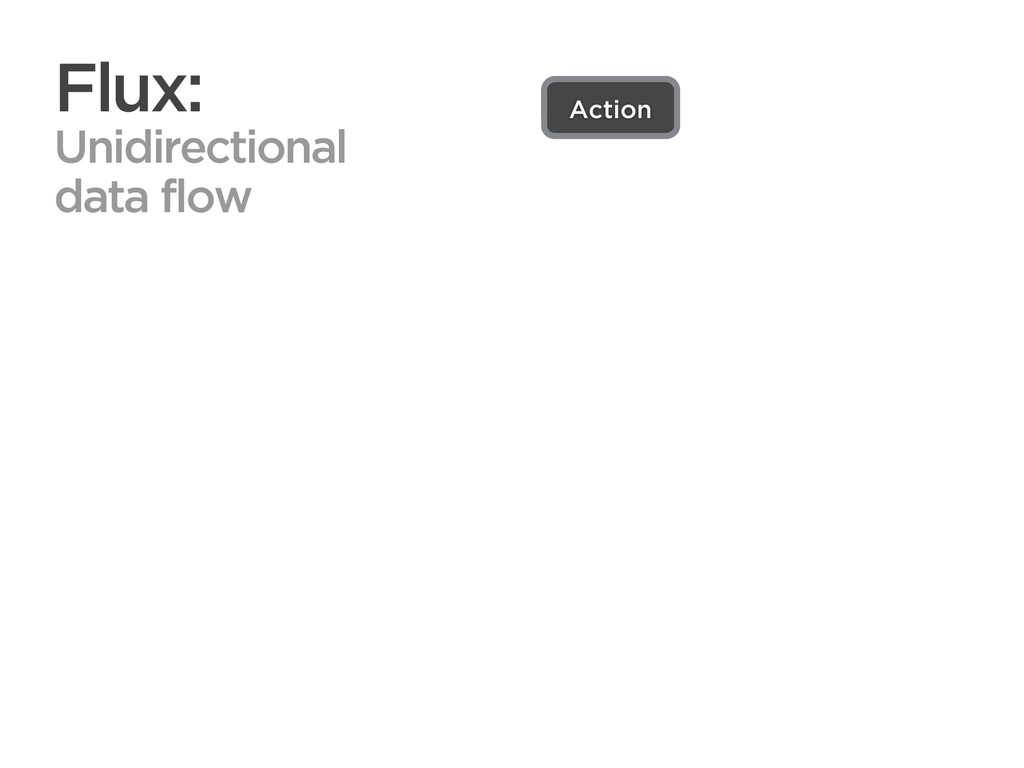
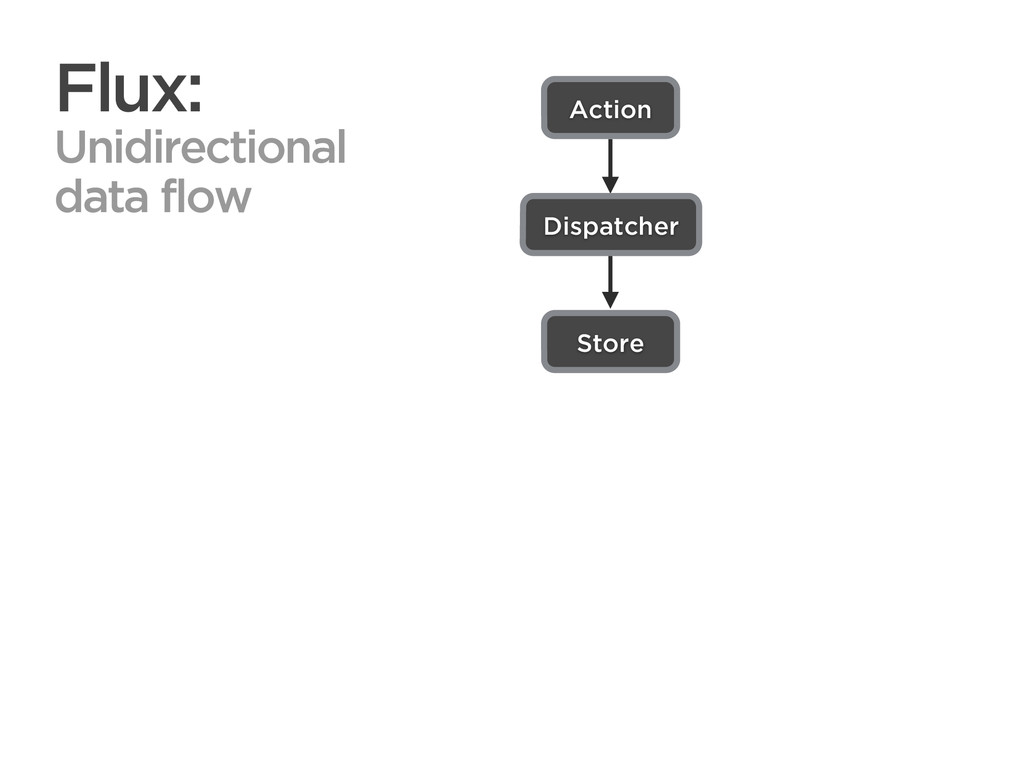
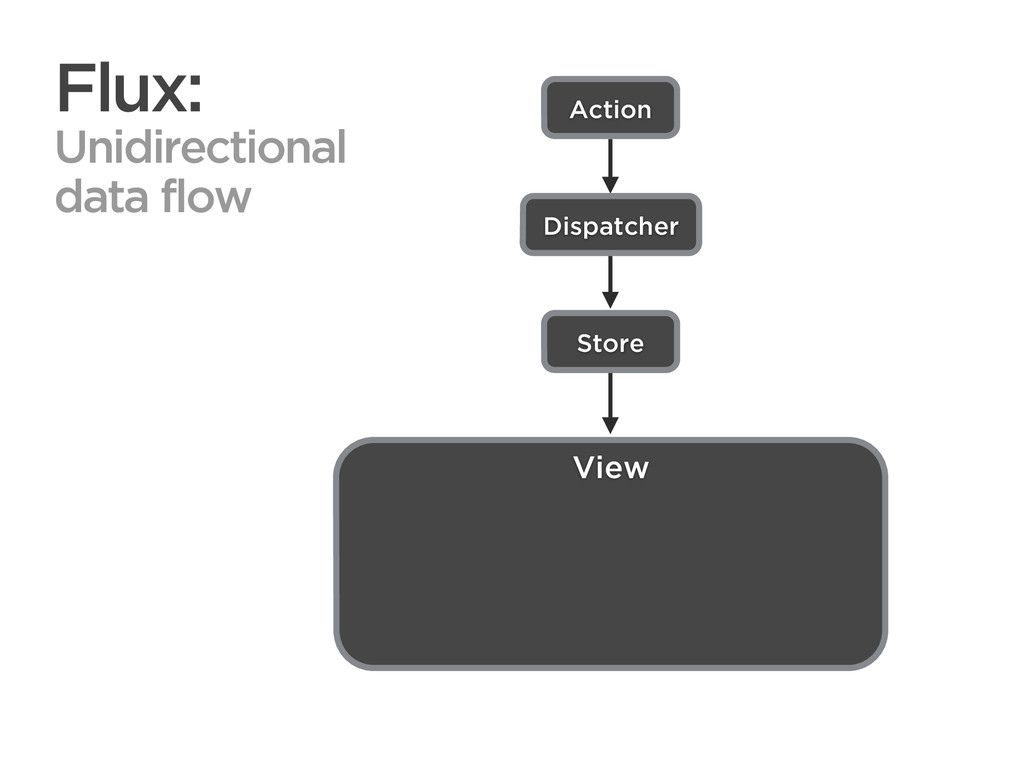
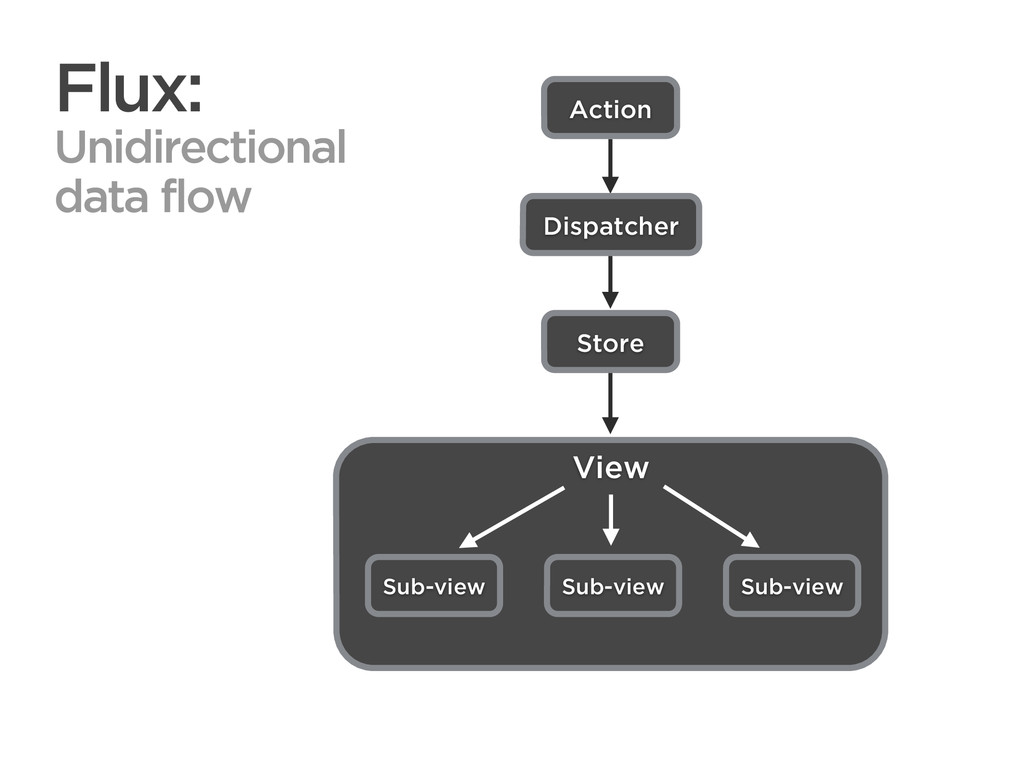
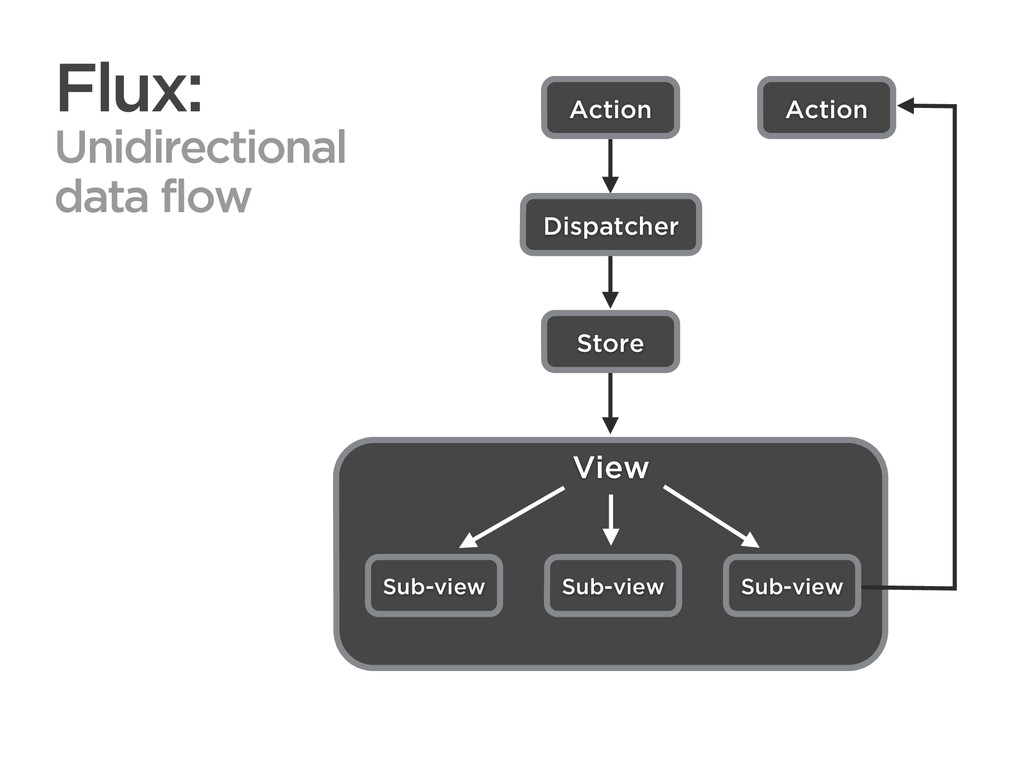
CONNECTED PERSONAL OBJECTS 5/2012 View Flux: Unidirectional data flow Action
Sub-view Sub-view Sub-view Dispatcher Store -
CONNECTED PERSONAL OBJECTS 5/2012 View Flux: Unidirectional data flow Action
Sub-view Sub-view Action Sub-view Dispatcher Store -
CONNECTED PERSONAL OBJECTS 5/2012 View Flux: Unidirectional data flow Action
Sub-view Sub-view Action Sub-view Dispatcher Store -
CONNECTED PERSONAL OBJECTS 5/2012 View Flux: Unidirectional data flow Action
Sub-view Sub-view Action Sub-view Dispatcher Store -
CONNECTED PERSONAL OBJECTS 5/2012 View Flux: Unidirectional data flow React
Action Sub-view Sub-view Action Sub-view Dispatcher Store -
CONNECTED PERSONAL OBJECTS 5/2012 Advantages of Flux ‣ Streamlined rendering
process. ‣ Reduced cognitive load. -
CONNECTED PERSONAL OBJECTS 5/2012 Advantages of Flux ‣ Streamlined rendering
process. ‣ Reduced cognitive load. ‣ Simpler codebase. -
CONNECTED PERSONAL OBJECTS 5/2012 Advantages of Flux ‣ Streamlined rendering
process. ‣ Reduced cognitive load. ‣ Simpler codebase. ‣ Consistent, predictable behaviors. -
CONNECTED PERSONAL OBJECTS 5/2012 Advantages of React ‣ Abstracts the
DOM with components. -
CONNECTED PERSONAL OBJECTS 5/2012 Advantages of React ‣ Abstracts the
DOM with components. ‣ Handles DOM mutations automatically. -
CONNECTED PERSONAL OBJECTS 5/2012 Advantages of React ‣ Abstracts the
DOM with components. ‣ Handles DOM mutations automatically. ‣ Agnostic about the rest of the stack. -
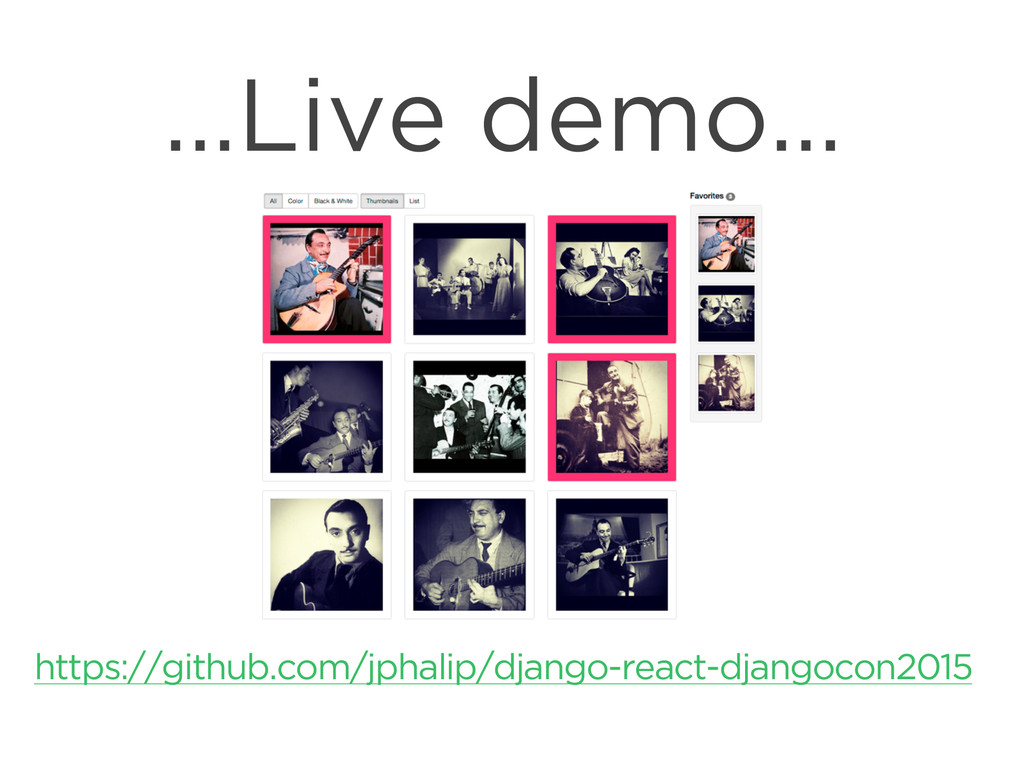
CONNECTED PERSONAL OBJECTS 5/2012 Simple demo app ‣ Display list
of photos ‣ User can select their favorite photos -
CONNECTED PERSONAL OBJECTS 5/2012 A simple React-Django integration ‣ Django
provides a REST API that serves as a gateway for accessing & manipulating data. -
CONNECTED PERSONAL OBJECTS 5/2012 A simple React-Django integration ‣ Django
provides a REST API that serves as a gateway for accessing & manipulating data. ‣ React renders the UI client-side and handles user interactions. -
CONNECTED PERSONAL OBJECTS 5/2012 Client-server interaction Client User clicks a
photo React renders the page -
CONNECTED PERSONAL OBJECTS 5/2012 Client-server interaction Client Server (Django) User
clicks a photo React renders the page POST request -
CONNECTED PERSONAL OBJECTS 5/2012 Client-server interaction Client Server (Django) User
clicks a photo Updates the database React renders the page POST request -
CONNECTED PERSONAL OBJECTS 5/2012 Client-server interaction Client Server (Django) User
clicks a photo Updates the database Serializes current data React renders the page POST request -
CONNECTED PERSONAL OBJECTS 5/2012 Client-server interaction Client Server (Django) User
clicks a photo Updates the database Serializes current data React renders the page POST request Current data -
CONNECTED PERSONAL OBJECTS 5/2012 Client-server interaction Client Server (Django) User
clicks a photo Updates the database Serializes current data React renders the page POST request Current data React (re-)renders the page -
CONNECTED PERSONAL OBJECTS 5/2012 Client-server interaction Client Server (Django) User
clicks a photo Updates the database Serializes current data React renders the page POST request Current data React (re-)renders the page -
CONNECTED PERSONAL OBJECTS 5/2012 Initial client-side store hydration ‣ Conventional
method: Client fetches data via Ajax after initial page load. -
CONNECTED PERSONAL OBJECTS 5/2012 Initial client-side store hydration ‣ Conventional
method: Client fetches data via Ajax after initial page load. ‣ Less conventional method: Server serializes data as global Javascript variable in the initial HTML payload (see Instagram). -
CONNECTED PERSONAL OBJECTS 5/2012 Server-side rendering ‣ Advantages: ‣ SEO-friendly
‣ Less resource intensive for the client -
CONNECTED PERSONAL OBJECTS 5/2012 Server-side rendering ‣ Advantages: ‣ SEO-friendly
‣ Less resource intensive for the client ‣ First page is immediately consumable -
CONNECTED PERSONAL OBJECTS 5/2012 Server-side rendering ‣ Advantages: ‣ SEO-friendly
‣ Less resource intensive for the client ‣ First page is immediately consumable ‣ Single codebase (“Universal JS”) -
CONNECTED PERSONAL OBJECTS 5/2012 Server-side rendering ‣ Advantages: ‣ SEO-friendly
‣ Less resource intensive for the client ‣ First page is immediately consumable ‣ Single codebase (“Universal JS”) ‣ Easy to implement with python-react and a simple Node HTTP server. -
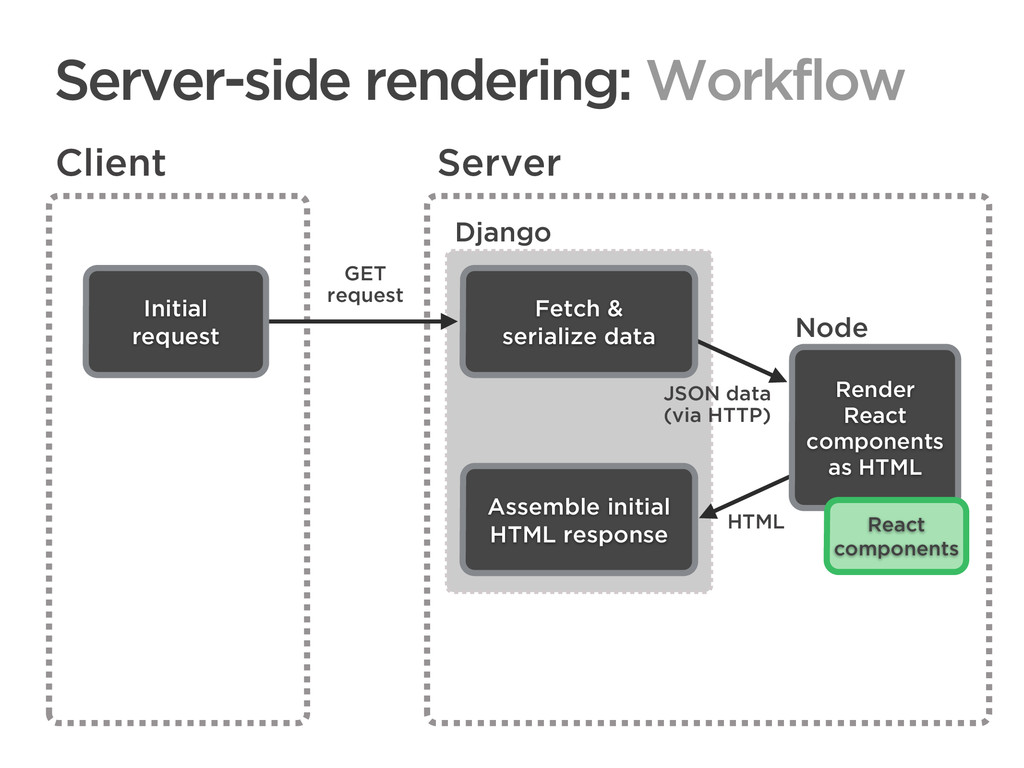
CONNECTED PERSONAL OBJECTS 5/2012 Client Server Initial request Fetch &
serialize data GET request Server-side rendering: Workflow Django -
CONNECTED PERSONAL OBJECTS 5/2012 Client Server Initial request Fetch &
serialize data Render React components as HTML GET request Server-side rendering: Workflow Django Node JSON data (via HTTP) React components -
CONNECTED PERSONAL OBJECTS 5/2012 Client Server Initial request Fetch &
serialize data Render React components as HTML GET request Server-side rendering: Workflow Django Node Assemble initial HTML response JSON data (via HTTP) React components HTML -
CONNECTED PERSONAL OBJECTS 5/2012 Client Server Initial request Fetch &
serialize data Render React components as HTML GET request HTML response Server-side rendering: Workflow Django Node Assemble initial HTML response JSON data (via HTTP) React components HTML -
CONNECTED PERSONAL OBJECTS 5/2012 Client Server Initial request Fetch &
serialize data Render React components as HTML GET request HTML response Server-side rendering: Workflow Django Node Assemble initial HTML response Subsequently re-render client-side JSON data (via HTTP) React components React components HTML -
CONNECTED PERSONAL OBJECTS 5/2012 Django view from django.shortcuts import render
from react.render import render_component from myapp.models import MyModel from myapp.api import MySerializer def myview(request): items = MySerializer(MyModel.objects.all()) rendered_html = render_component( 'path/to/my/component.js', props = {'items': items.data}) return render( request, 'template.html', {'rendered_html': rendered_html}) -
CONNECTED PERSONAL OBJECTS 5/2012 Django template {% extends "base.html" %}
{% block content %} <div>{{ rendered_html|safe }}</div> {% endblock %} -
CONNECTED PERSONAL OBJECTS 5/2012 Simple ExpressJS server var http =
require('http'); var express = require('express'); var bodyParser = require('body-parser'); var reactRender = require('react-render'); require('babel/register'); var app = express(); var server = http.Server(app); app.use(bodyParser.json()); app.post('/', function(request, response) { reactRender(request.body, function(error, html){ response.json({ error: error, markup: html }); }); }); server.listen(9009, '127.0.0.1'); -
CONNECTED PERSONAL OBJECTS 5/2012 Asset pipelines ‣ Webpack or Gulp+Browserify
for JS bundling. ‣ Babel for JSX transpiling. -
CONNECTED PERSONAL OBJECTS 5/2012 Asset pipelines ‣ Webpack or Gulp+Browserify
for JS bundling. ‣ Babel for JSX transpiling. ‣ Cache busting in production with ManifestStaticFilesStorage. -
CONNECTED PERSONAL OBJECTS 5/2012 Testing ‣ Unit testing: Jasmine, Mocha,
Jest, QUnit… ‣ Functional testing: Selenium with LiveServerTestCase. -
CONNECTED PERSONAL OBJECTS 5/2012 Testing ‣ Unit testing: Jasmine, Mocha,
Jest, QUnit… ‣ Functional testing: Selenium with LiveServerTestCase. ‣ Hybrid unit/integration testing: Test individual rendered React components with python-react, ExpressJS, PyQuery & assertHTMLEqual(). -
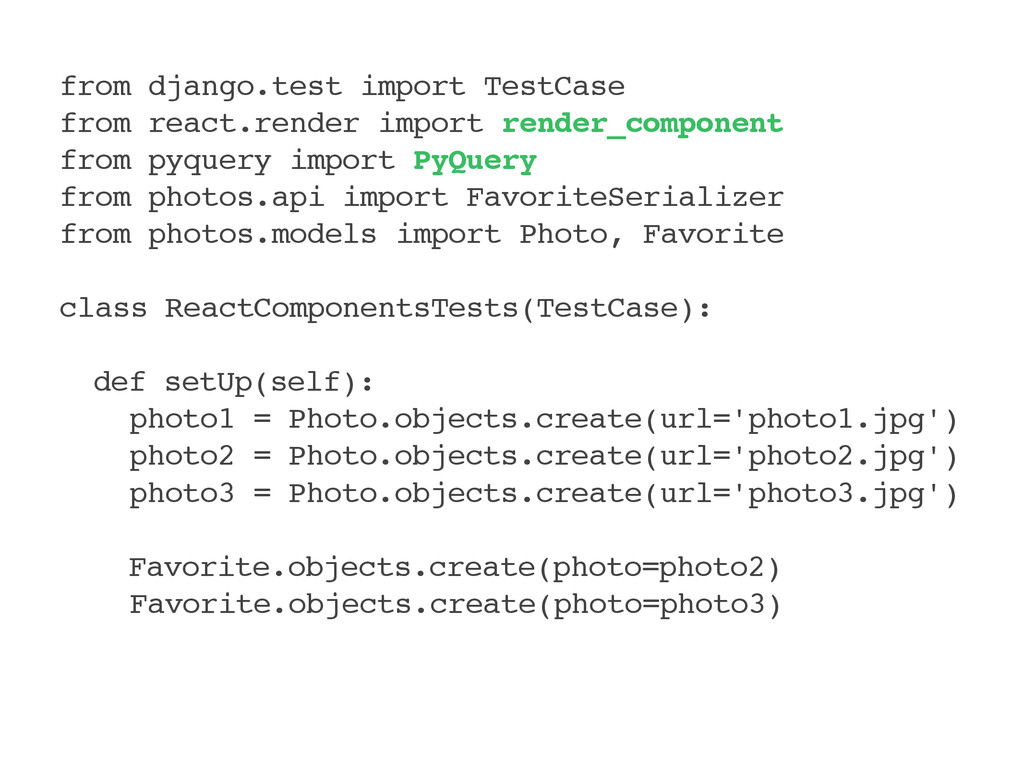
CONNECTED PERSONAL OBJECTS 5/2012 from django.test import TestCase from react.render
import render_component from pyquery import PyQuery from photos.api import FavoriteSerializer from photos.models import Photo, Favorite class ReactComponentsTests(TestCase): def setUp(self): photo1 = Photo.objects.create(url='photo1.jpg') photo2 = Photo.objects.create(url='photo2.jpg') photo3 = Photo.objects.create(url='photo3.jpg') Favorite.objects.create(photo=photo2) Favorite.objects.create(photo=photo3) -
CONNECTED PERSONAL OBJECTS 5/2012 def test_favorite_panel(self): favorites = FavoriteSerializer(
Favorite.objects.all(), many=True) html = str(render_component( 'js/components/favorite-panel.js', to_static_markup=True, props = { 'favorites': favorites.data, })) self.assertFalse('photo1.jpg' in html) self.assertTrue('photo2.jpg' in html) self.assertTrue('photo3.jpg' in html) -
CONNECTED PERSONAL OBJECTS 5/2012 def test_favorite_panel(self): … pq = PyQuery(html)
self.assertEqual( pq('.badge').text(), '2') self.assertHTMLEqual( pq('h4').outerHtml(), '<h4>Favorites <span class="badge">' '2</span></h4>' )