Upgrade to Pro
— share decks privately, control downloads, hide ads and more …
Speaker Deck
Sign up for free
Menu
Search
Features
All features
Private URLs
Password Protection
Custom URLS
Scheduled publishing
Remove Branding
Restrict embedding
Deck Collections
Notes
Features
All features
Private URLs
Password Protection
Custom URLS
Scheduled publishing
Remove Branding
Restrict embedding
Deck Collections
Notes
Explore
Featured decks
Featured speakers
Programming
Technology
Storyboards
Explore
Featured decks
Featured speakers
Programming
Technology
Storyboards
Pricing
Search
Sign in
Sign up for free
課題2 1A118132 平野海斗
Search
kaitohirano
June 12, 2018
Design
70
0
Share
Embed
Copy iframe code
Copy JS code
Copy link
Start on current slide
課題2 1A118132 平野海斗
kaitohirano
June 12, 2018
More Decks by kaitohirano
See All by kaitohirano
1A118132 平野海斗
kaitohirano
0
95
Other Decks in Design
See All in Design
From Desktop to Spatial Interfaces UX Design Implications of Evolving Interaction Paradigms
hcrane
0
120
デザイナーの判断をAIにつなぐ ── 審美眼をハーネスする試み
kotasaito_cnt
0
1.3k
MUUUUU.ORG 協賛バナーのご案内
quoitworks999
0
460
染み出し好きの、 染み出しコントロール論
mukai_takeru
0
500
デザインハーネスをつくるハーネス|誰でも自社らしいデザインをつくれるようにする仕組み
katakai
0
1.4k
人工知能のための哲学塾 ニューロフィロソフィ篇 第参夜「河合隼雄と中空構造」
miyayou
0
110
Where Imagination Ends AI Begins
r5ni4
0
470
デザイナーがいない部署にハーネスを設計する
kenichiota0711
5
5.5k
個人理念(自分の言葉)の言語化ワークショップ
kakukoki
1
420
エンジニア経験0のデザイナーが アプリを0からリリースまで 作ってみる
abokadotyann
2
410
凡庸を落とすハーネス
hiromimaeo
2
990
StartDesignEngineering
uchiyama886
1
150
Featured
See All Featured
Cheating the UX When There Is Nothing More to Optimize - PixelPioneers
stephaniewalter
287
14k
Connecting the Dots Between Site Speed, User Experience & Your Business [WebExpo 2025]
tammyeverts
11
1.1k
Getting science done with accelerated Python computing platforms
jacobtomlinson
2
540
How to make the Groovebox
asonas
2
2.5k
The Art of Delivering Value - GDevCon NA Keynote
reverentgeek
16
2.2k
The Spectacular Lies of Maps
axbom
PRO
1
1.1k
Exploring the Power of Turbo Streams & Action Cable | RailsConf2023
kevinliebholz
37
6.6k
Navigating the Design Leadership Dip - Product Design Week Design Leaders+ Conference 2024
apolaine
2
480
The Limits of Empathy - UXLibs8
cassininazir
2
720
Practical Orchestrator
shlominoach
192
12k
30 Presentation Tips
portentint
PRO
1
430
Automating Front-end Workflow
addyosmani
1369
210k
Transcript
Tasking Managerの使い方 地球社会共生学部 1年1A118132 平野海斗
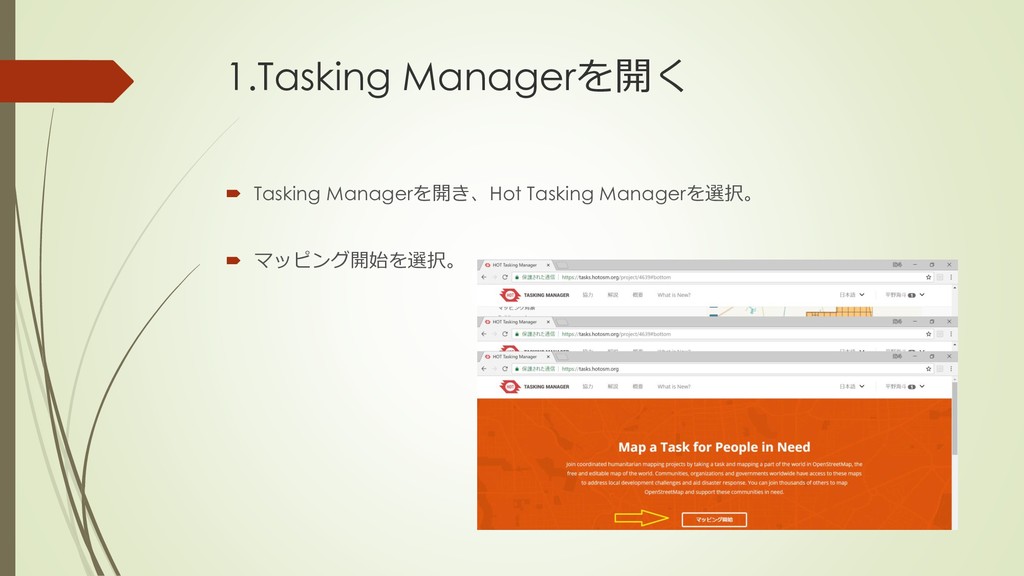
1.Tasking Managerを開く Tasking Managerを開き、Hot Tasking Managerを選択。 マッピング開始を選択。
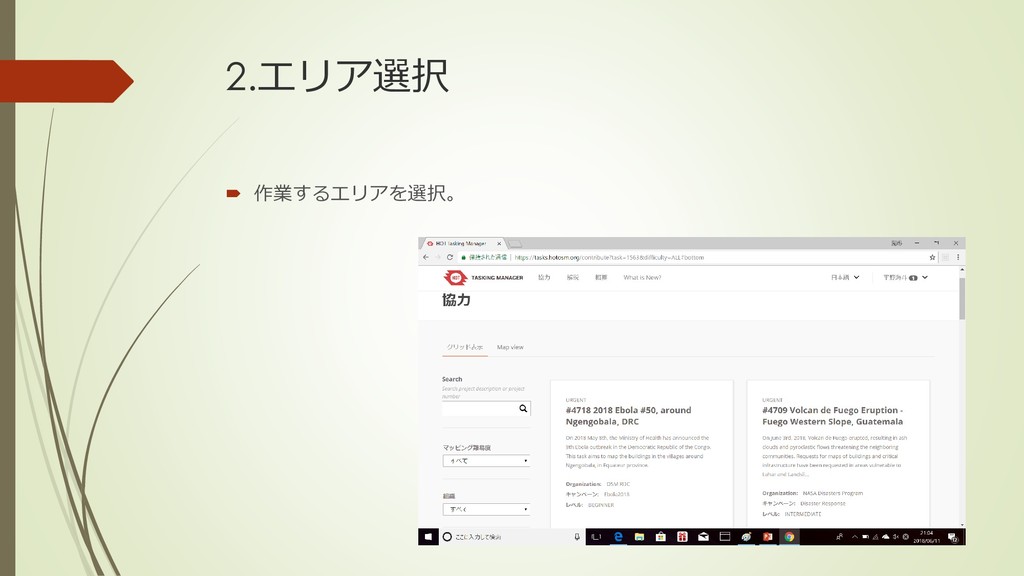
2.エリア選択 作業するエリアを選択。
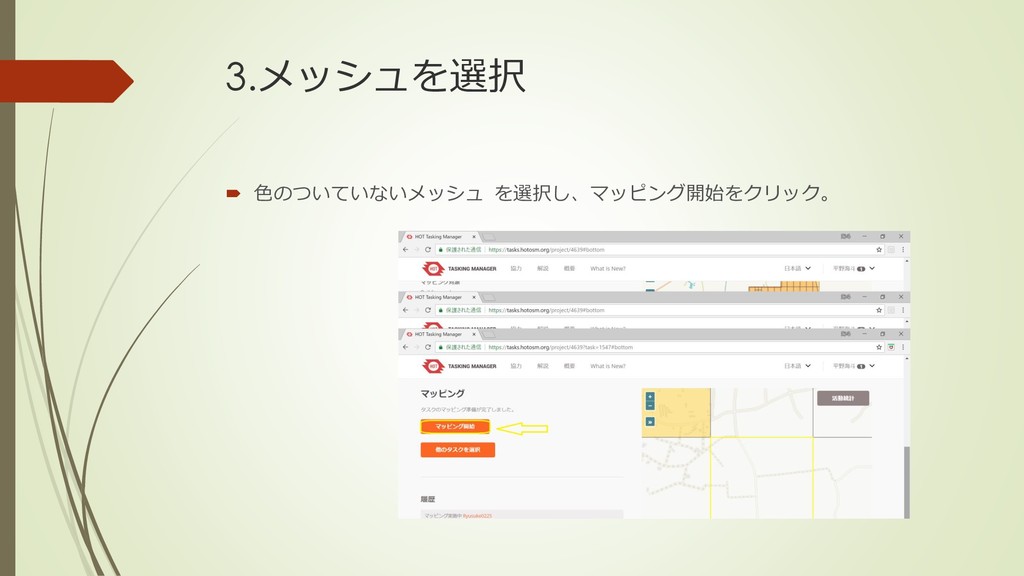
3.メッシュを選択 色のついていないメッシュ を選択し、マッピング開始をクリック。
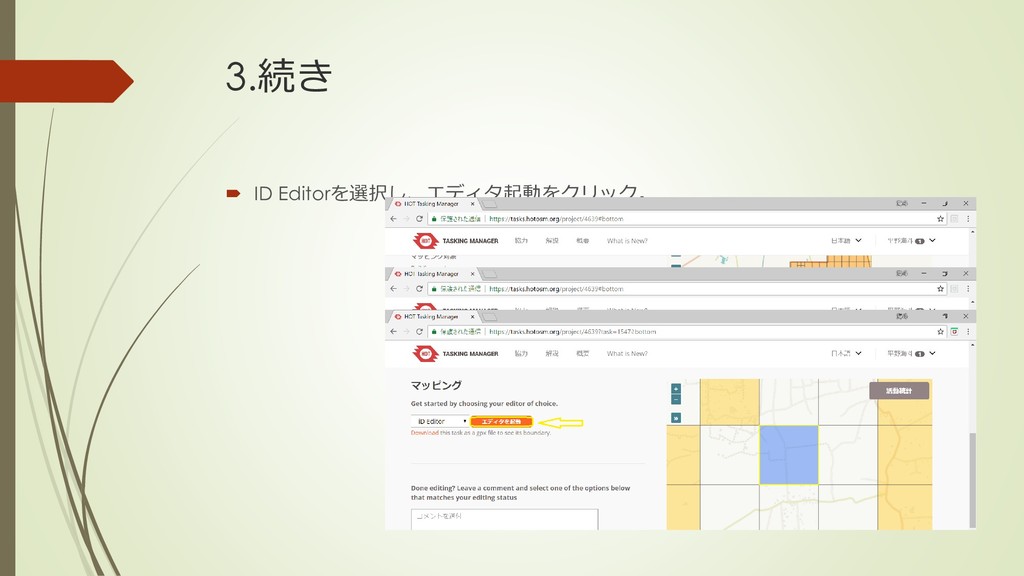
3.続き ID Editorを選択し、エディタ起動をクリック。
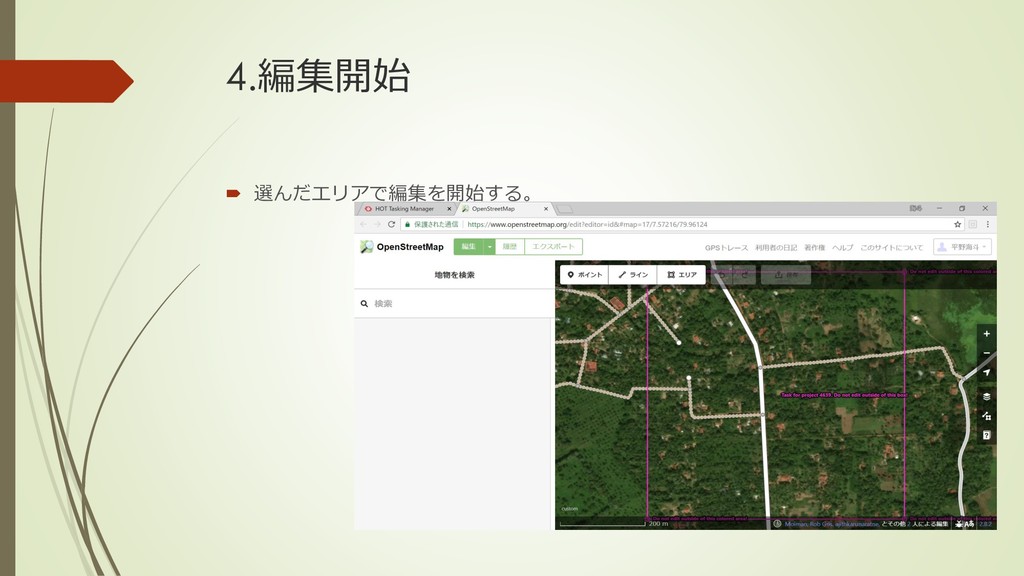
4.編集開始 選んだエリアで編集を開始する。
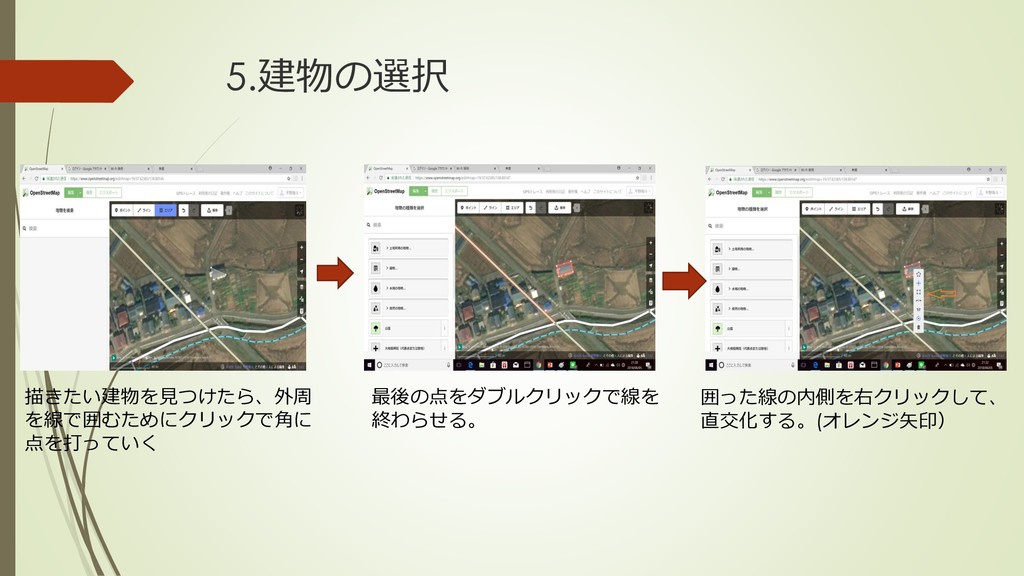
5.建物の選択 描きたい建物を見つけたら、外周 を線で囲むためにクリックで角に 点を打っていく 最後の点をダブルクリックで線を 終わらせる。 囲った線の内側を右クリックして、 直交化する。(オレンジ矢印)
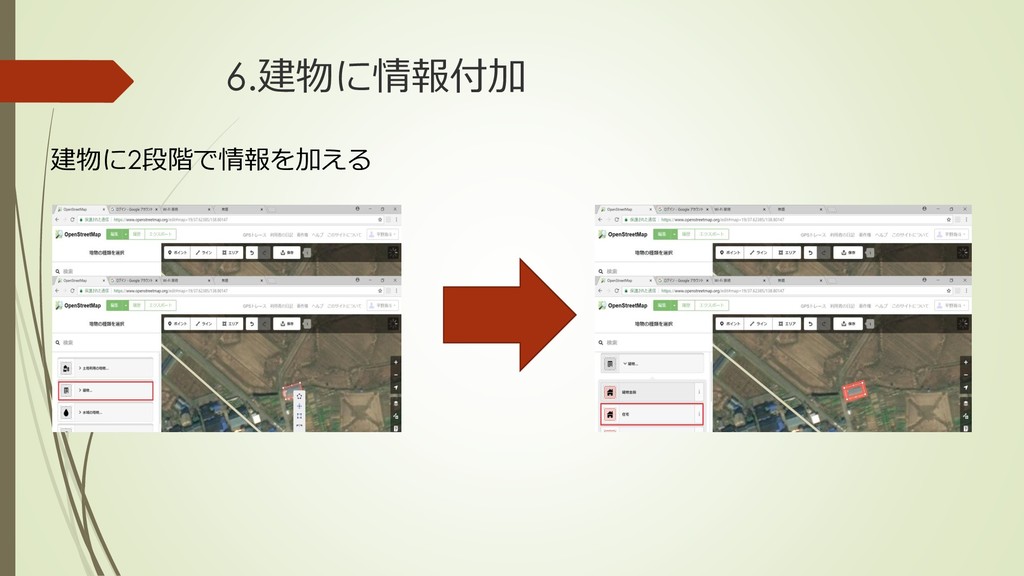
6.建物に情報付加 建物に2段階で情報を加える
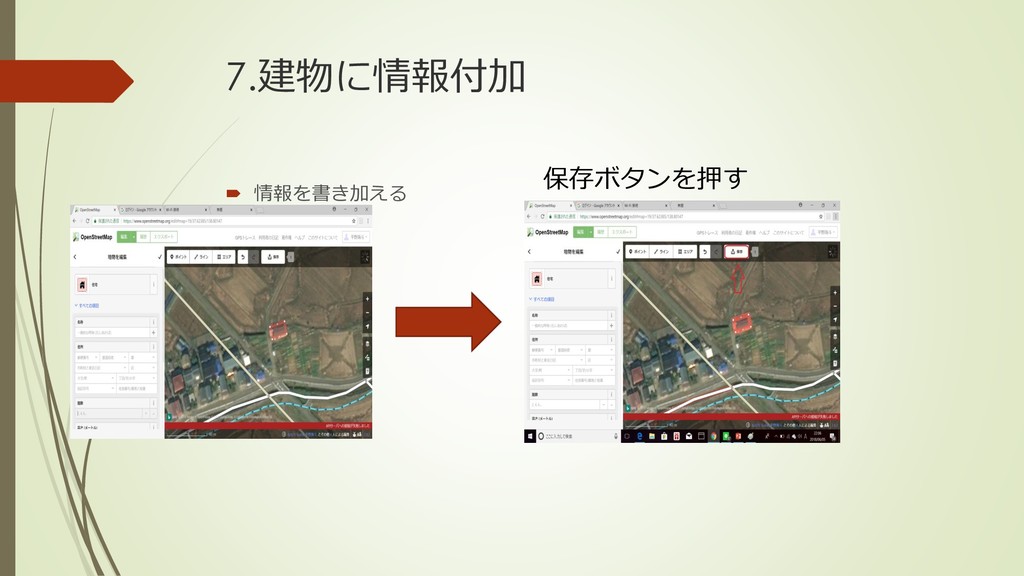
7.建物に情報付加 情報を書き加える 保存ボタンを押す
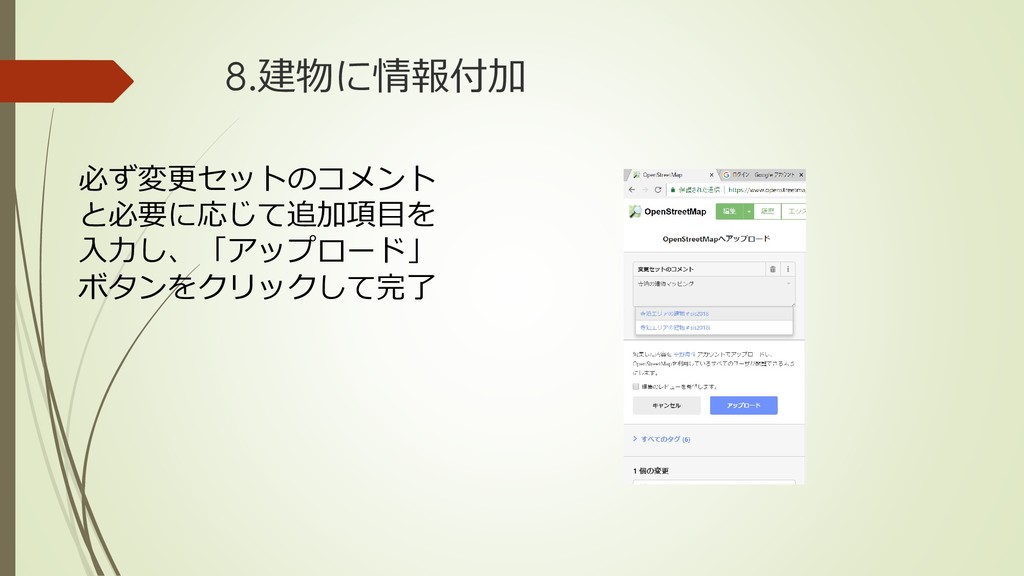
8.建物に情報付加 必ず変更セットのコメント と必要に応じて追加項目を 入力し、「アップロード」 ボタンをクリックして完了
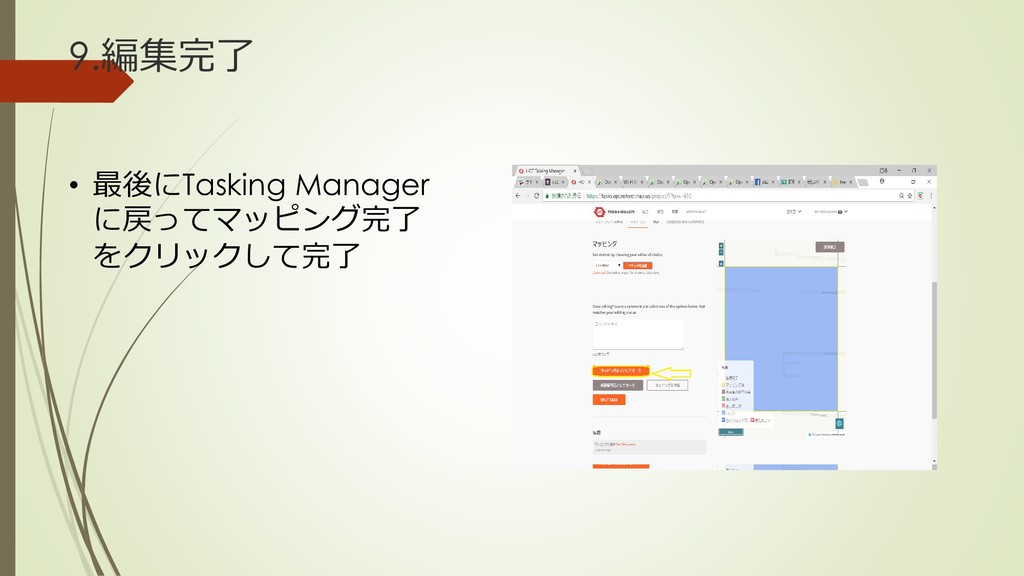
9.編集完了 • 最後にTasking Manager に戻ってマッピング完了 をクリックして完了


 kaitohirano
 hcrane
 kotasaito_cnt
 quoitworks999
 mukai_takeru
 katakai
 miyayou
 r5ni4
r5ni4
 kenichiota0711
 kakukoki
 abokadotyann
 hiromimaeo
 uchiyama886
 stephaniewalter
 tammyeverts
 jacobtomlinson
 asonas
 reverentgeek
 axbom
axbom
 kevinliebholz
 apolaine
 cassininazir
 shlominoach
 portentint
 addyosmani