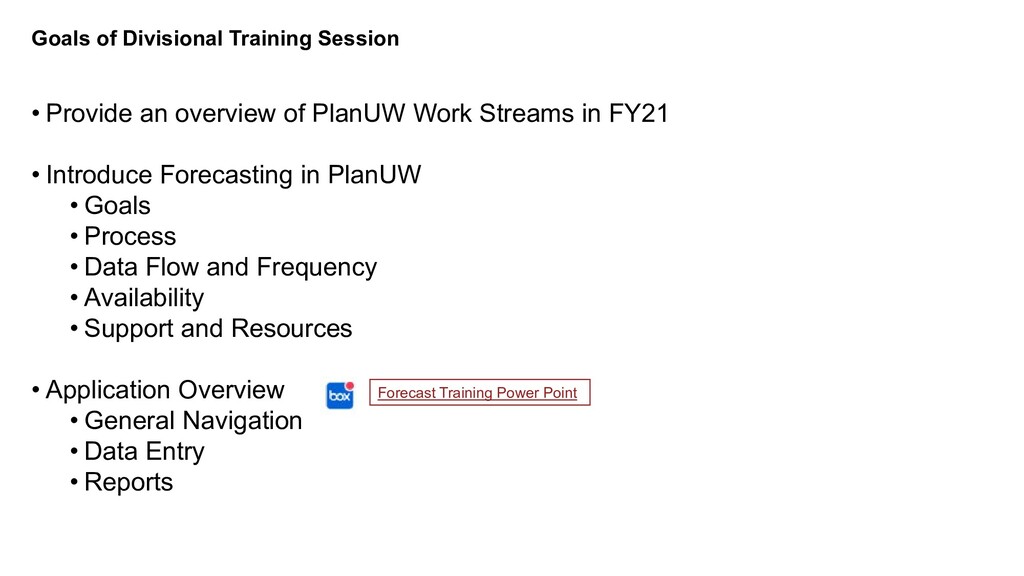
PlanUW Work Streams in FY21 • Introduce Forecasting in PlanUW • Goals • Process • Data Flow and Frequency • Availability • Support and Resources • Application Overview • General Navigation • Data Entry • Reports Forecast Training Power Point
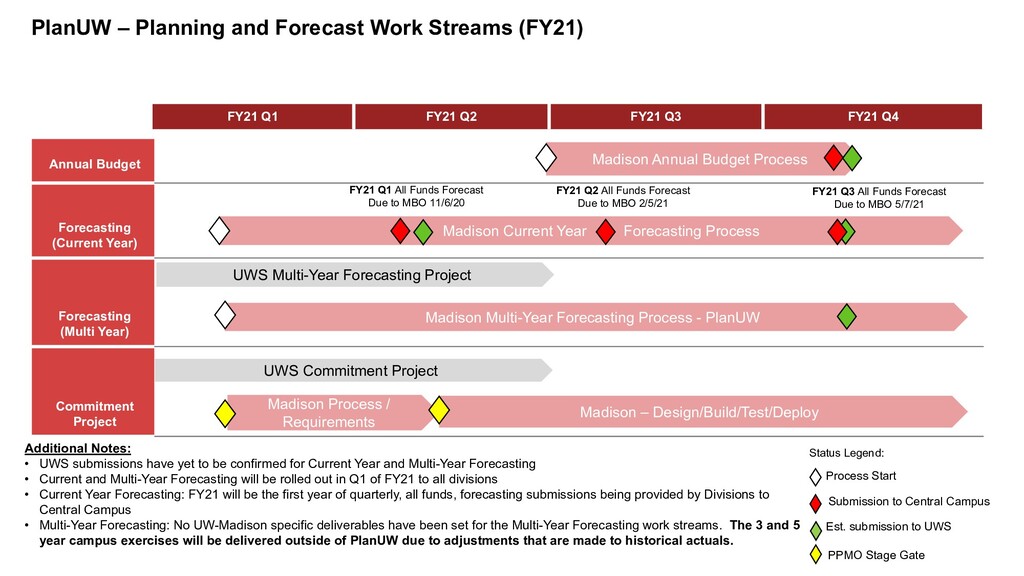
for Current Year and Multi-Year Forecasting • Current and Multi-Year Forecasting will be rolled out in Q1 of FY21 to all divisions • Current Year Forecasting: FY21 will be the first year of quarterly, all funds, forecasting submissions being provided by Divisions to Central Campus • Multi-Year Forecasting: No UW-Madison specific deliverables have been set for the Multi-Year Forecasting work streams. The 3 and 5 year campus exercises will be delivered outside of PlanUW due to adjustments that are made to historical actuals. Annual Budget Forecasting (Current Year) Forecasting (Multi Year) Commitment Project FY21 Q1 FY21 Q2 FY21 Q3 FY21 Q4 UWS Multi-Year Forecasting Project Madison Current Year Forecasting Process PlanUW – Planning and Forecast Work Streams (FY21) Status Legend: Est. submission to UWS Submission to Central Campus Process Start FY21 Q1 All Funds Forecast Due to MBO 11/6/20 FY21 Q2 All Funds Forecast Due to MBO 2/5/21 FY21 Q3 All Funds Forecast Due to MBO 5/7/21 Madison Multi-Year Forecasting Process - PlanUW Madison – Design/Build/Test/Deploy Madison Annual Budget Process PPMO Stage Gate UWS Commitment Project Madison Process / Requirements
lot of unknowns at this time We will be providing general assumptions to use (as available) in early October along with updates to the submission process
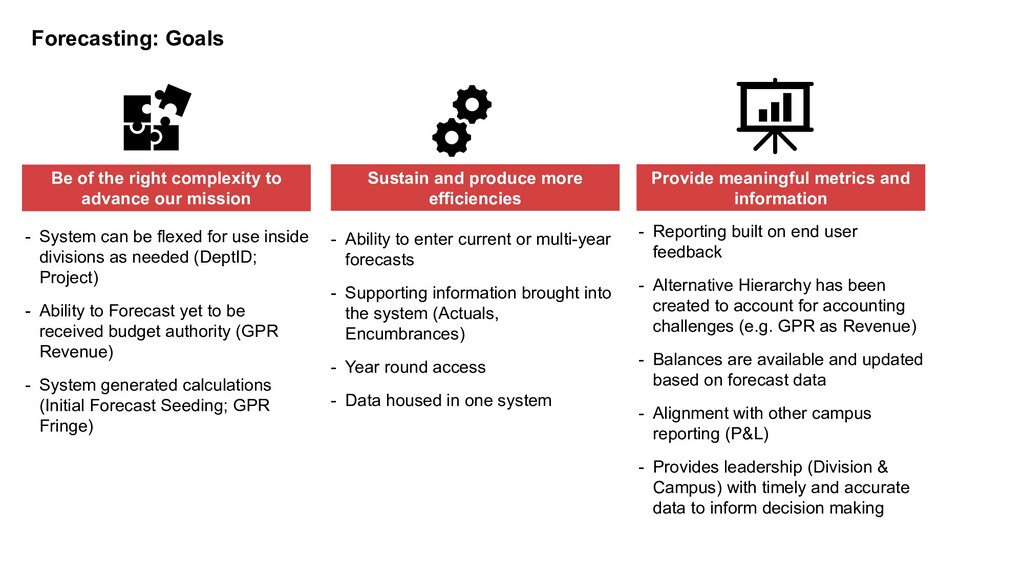
divisions as needed (DeptID; Project) - Ability to Forecast yet to be received budget authority (GPR Revenue) - System generated calculations (Initial Forecast Seeding; GPR Fringe) - Ability to enter current or multi-year forecasts - Supporting information brought into the system (Actuals, Encumbrances) - Year round access - Data housed in one system - Reporting built on end user feedback - Alternative Hierarchy has been created to account for accounting challenges (e.g. GPR as Revenue) - Balances are available and updated based on forecast data - Alignment with other campus reporting (P&L) - Provides leadership (Division & Campus) with timely and accurate data to inform decision making Provide meaningful metrics and information Be of the right complexity to advance our mission Sustain and produce more efficiencies
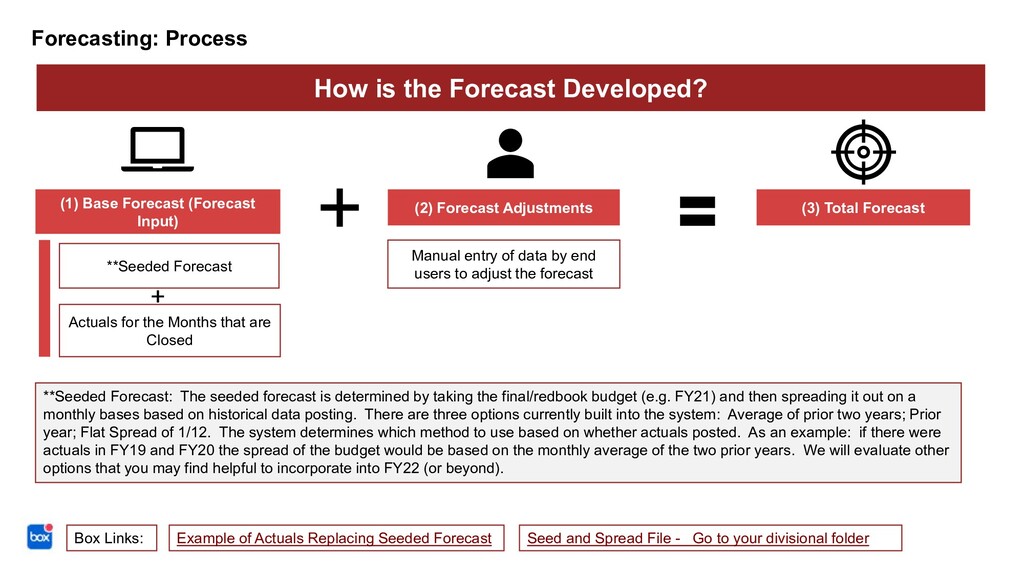
for the Months that are Closed (2) Forecast Adjustments Manual entry of data by end users to adjust the forecast (3) Total Forecast How is the Forecast Developed? **Seeded Forecast: The seeded forecast is determined by taking the final/redbook budget (e.g. FY21) and then spreading it out on a monthly bases based on historical data posting. There are three options currently built into the system: Average of prior two years; Prior year; Flat Spread of 1/12. The system determines which method to use based on whether actuals posted. As an example: if there were actuals in FY19 and FY20 the spread of the budget would be based on the monthly average of the two prior years. We will evaluate other options that you may find helpful to incorporate into FY22 (or beyond). Box Links: Seed and Spread File - Go to your divisional folder Example of Actuals Replacing Seeded Forecast
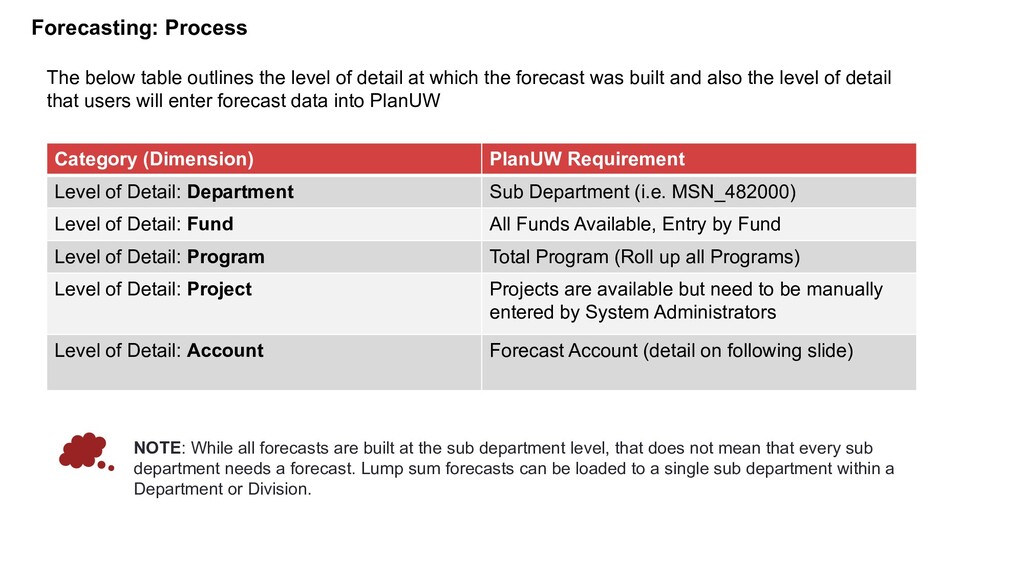
Sub Department (i.e. MSN_482000) Level of Detail: Fund All Funds Available, Entry by Fund Level of Detail: Program Total Program (Roll up all Programs) Level of Detail: Project Projects are available but need to be manually entered by System Administrators Level of Detail: Account Forecast Account (detail on following slide) The below table outlines the level of detail at which the forecast was built and also the level of detail that users will enter forecast data into PlanUW NOTE: While all forecasts are built at the sub department level, that does not mean that every sub department needs a forecast. Lump sum forecasts can be loaded to a single sub department within a Department or Division.
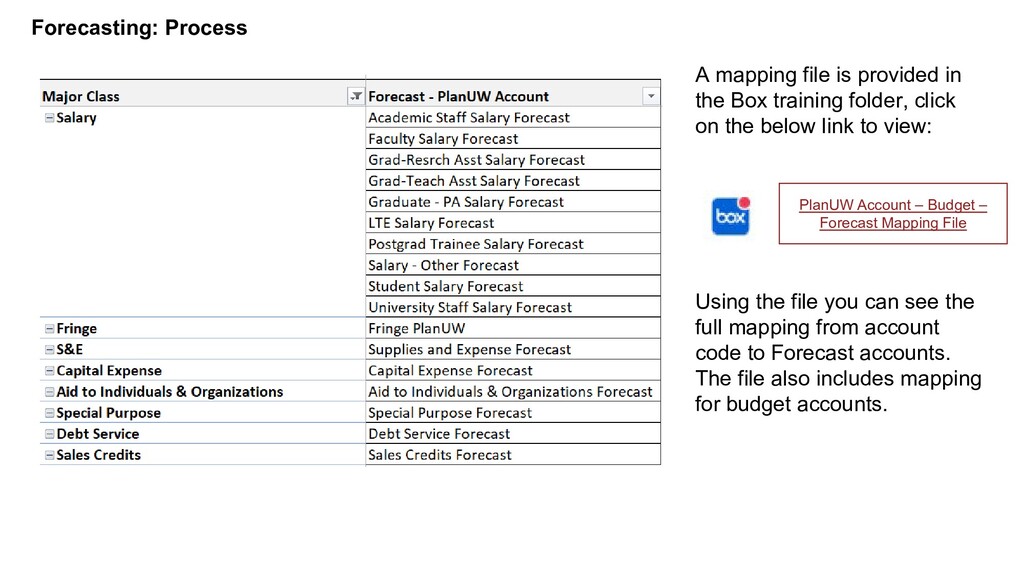
training folder, click on the below link to view: Using the file you can see the full mapping from account code to Forecast accounts. The file also includes mapping for budget accounts. PlanUW Account – Budget – Forecast Mapping File
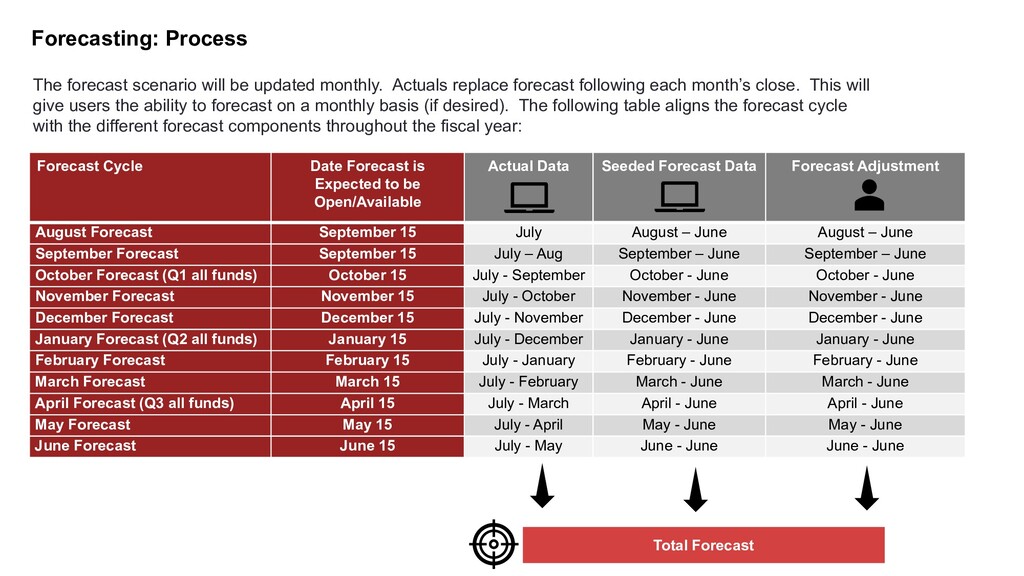
Open/Available Actual Data Seeded Forecast Data Forecast Adjustment August Forecast September 15 July August – June August – June September Forecast September 15 July – Aug September – June September – June October Forecast (Q1 all funds) October 15 July - September October - June October - June November Forecast November 15 July - October November - June November - June December Forecast December 15 July - November December - June December - June January Forecast (Q2 all funds) January 15 July - December January - June January - June February Forecast February 15 July - January February - June February - June March Forecast March 15 July - February March - June March - June April Forecast (Q3 all funds) April 15 July - March April - June April - June May Forecast May 15 July - April May - June May - June June Forecast June 15 July - May June - June June - June The forecast scenario will be updated monthly. Actuals replace forecast following each month’s close. This will give users the ability to forecast on a monthly basis (if desired). The following table aligns the forecast cycle with the different forecast components throughout the fiscal year: Total Forecast
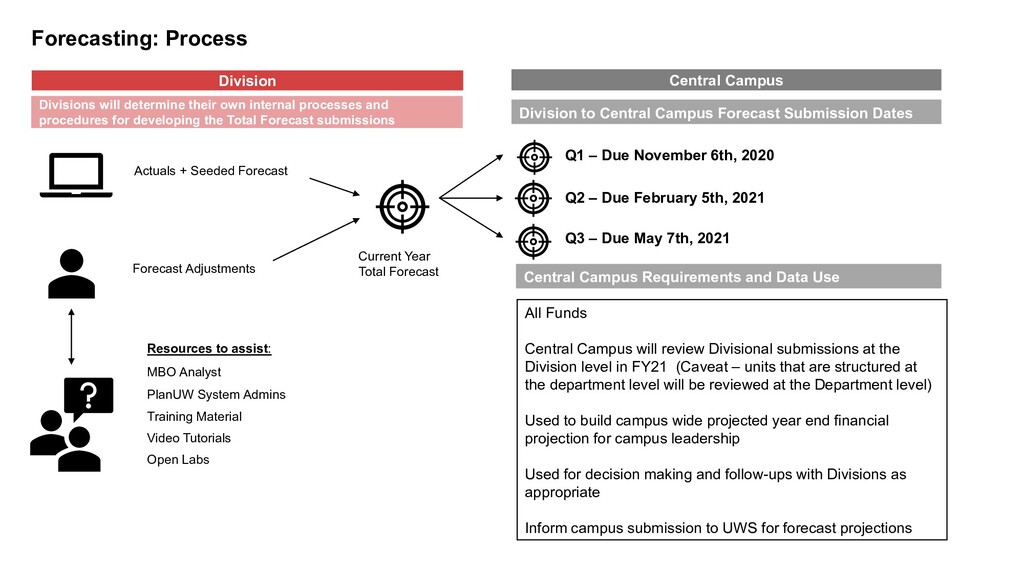
Due February 5th, 2021 Q3 – Due May 7th, 2021 Central Campus Division Actuals + Seeded Forecast Forecast Adjustments MBO Analyst PlanUW System Admins Training Material Video Tutorials Open Labs Current Year Total Forecast Resources to assist: Central Campus Requirements and Data Use All Funds Central Campus will review Divisional submissions at the Division level in FY21 (Caveat – units that are structured at the department level will be reviewed at the Department level) Used to build campus wide projected year end financial projection for campus leadership Used for decision making and follow-ups with Divisions as appropriate Inform campus submission to UWS for forecast projections Divisions will determine their own internal processes and procedures for developing the Total Forecast submissions Division to Central Campus Forecast Submission Dates
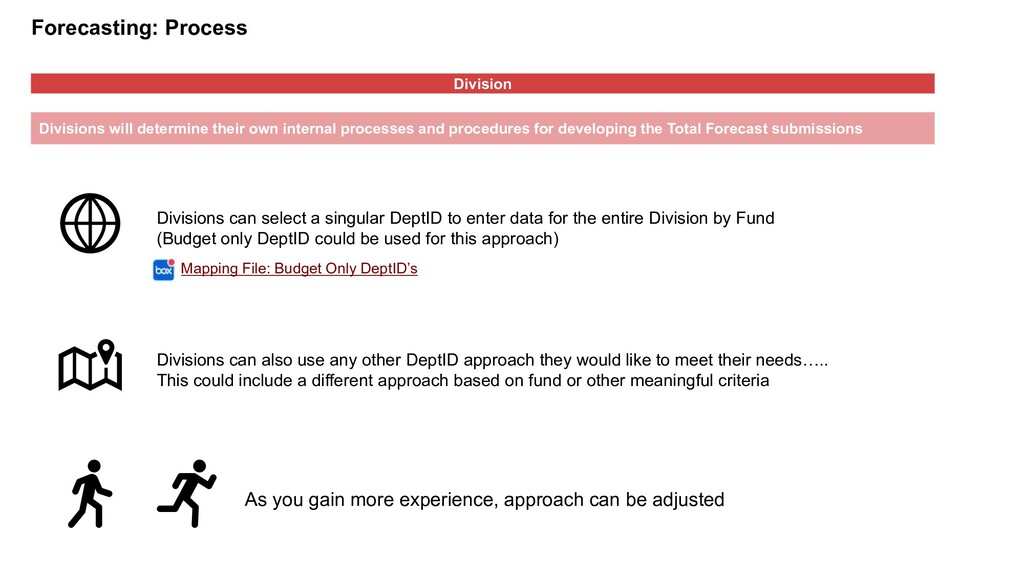
and procedures for developing the Total Forecast submissions Divisions can select a singular DeptID to enter data for the entire Division by Fund (Budget only DeptID could be used for this approach) Divisions can also use any other DeptID approach they would like to meet their needs….. This could include a different approach based on fund or other meaningful criteria As you gain more experience, approach can be adjusted Mapping File: Budget Only DeptID’s
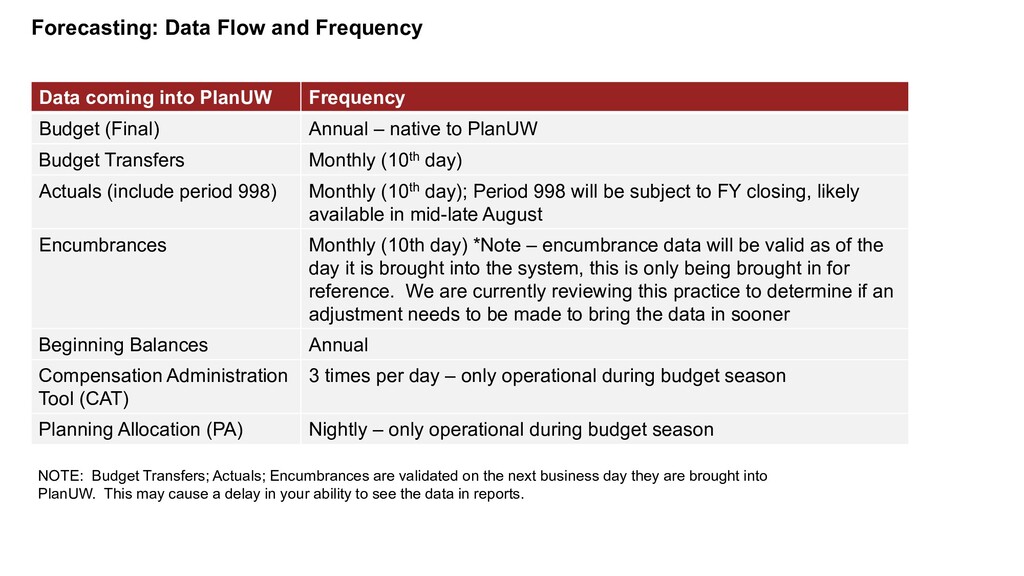
Budget (Final) Annual – native to PlanUW Budget Transfers Monthly (10th day) Actuals (include period 998) Monthly (10th day); Period 998 will be subject to FY closing, likely available in mid-late August Encumbrances Monthly (10th day) *Note – encumbrance data will be valid as of the day it is brought into the system, this is only being brought in for reference. We are currently reviewing this practice to determine if an adjustment needs to be made to bring the data in sooner Beginning Balances Annual Compensation Administration Tool (CAT) 3 times per day – only operational during budget season Planning Allocation (PA) Nightly – only operational during budget season NOTE: Budget Transfers; Actuals; Encumbrances are validated on the next business day they are brought into PlanUW. This may cause a delay in your ability to see the data in reports.
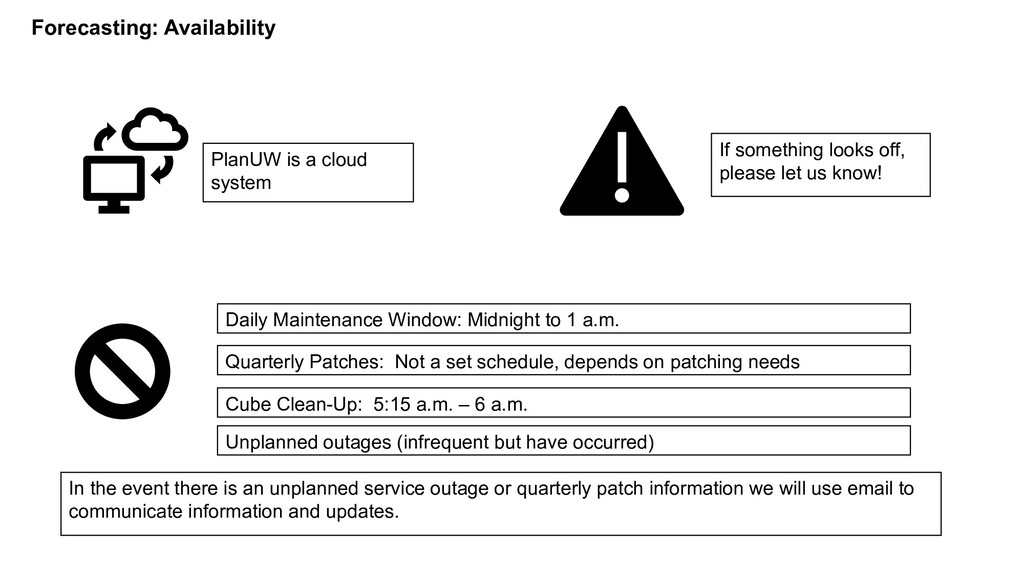
Midnight to 1 a.m. Quarterly Patches: Not a set schedule, depends on patching needs Cube Clean-Up: 5:15 a.m. – 6 a.m. In the event there is an unplanned service outage or quarterly patch information we will use email to communicate information and updates. If something looks off, please let us know! Unplanned outages (infrequent but have occurred)
issues: PlanUW System Administrators – email: [email protected] Training Material – Box (click here) Video Vignettes – Box (click here) Office Hours – Every Tues and Thurs from 11 – 12:30 from 9/29 – 11/5 (5 weeks)
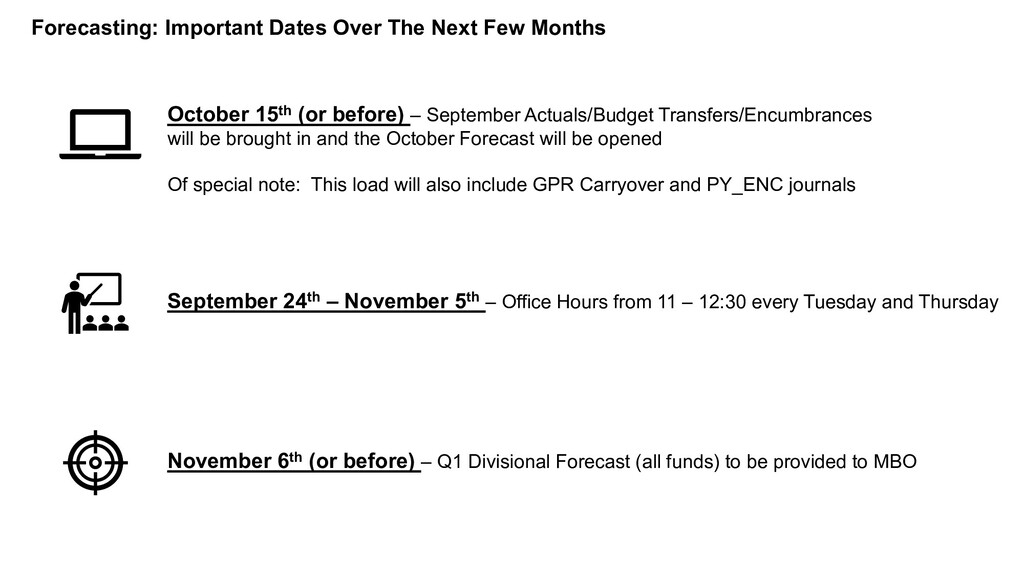
(or before) – September Actuals/Budget Transfers/Encumbrances will be brought in and the October Forecast will be opened Of special note: This load will also include GPR Carryover and PY_ENC journals November 6th (or before) – Q1 Divisional Forecast (all funds) to be provided to MBO September 24th – November 5th – Office Hours from 11 – 12:30 every Tuesday and Thursday


 mahchoo
 bvr7352
 ainischool
 robintux
 hiola
hiola
 soudai
 akiraasano
 mariooc
 arnoknobbe
 matleenalaakso
 pawan_pharm
 cassininazir
 axbom
axbom
 bethany
 katiecoart
 kastner
 rocio
rocio
 destraynor
 techseoconnect
 akademiya2063
 lcolladotor
 jlugia
 vanstee