Upgrade to Pro
— share decks privately, control downloads, hide ads and more …
Speaker Deck
Sign up for free
Menu
Search
Features
All features
Private URLs
Password Protection
Custom URLS
Scheduled publishing
Remove Branding
Restrict embedding
Deck Collections
Notes
Features
All features
Private URLs
Password Protection
Custom URLS
Scheduled publishing
Remove Branding
Restrict embedding
Deck Collections
Notes
Explore
Featured decks
Featured speakers
Programming
Technology
Storyboards
Explore
Featured decks
Featured speakers
Programming
Technology
Storyboards
Pricing
Search
Sign in
Sign up for free
2026-03-28 Slack × GitHub × Claude で作る Chat Bot...
Search
Naka Masato
March 27, 2026
Technology
180
0
Share
Embed
Copy iframe code
Copy JS code
Copy link
Start on current slide
2026-03-28 Slack × GitHub × Claude で作る Chat Bot Agent 改善サイクル@AI実装勉強会第57回
Naka Masato
March 27, 2026
More Decks by Naka Masato
See All by Naka Masato
2026-09-26 AI Coding Agentを束ねる Agent Orchestrator入門@AI社会実装勉強会第63回
nakamasato
0
59
2026-07-25 OpenClaw schdulerをマスターする @ AI社会実装勉強会
nakamasato
0
100
2026-05-30 OpenClaw で目標管理を自動化する @ AI実装勉強会
nakamasato
0
91
2025-12-27 Claude CodeでPRレビュー対応を効率化する@機械学習社会実装勉強会第54回
nakamasato
4
1.9k
2025-10-25 AIコーディングで開発した業務報告書自動生成アプリ
nakamasato
0
150
2025-07-27 Dev Containerで安全に Claude Codeを使う
nakamasato
0
1.5k
2025-01-26 Platform EngineeringがあればSREはいらない!? 新時代のSREに求められる役割とは@SREKaigi 2025
nakamasato
0
110
2025-01-25 Devin.aiを使ってみた使用感@機械学習社会実装勉強会第43回
nakamasato
0
590
2024-07-11 Mercari Hallo 立ち上げ時のSRE
nakamasato
2
680
Other Decks in Technology
See All in Technology
スキマバイトという雇用形態は存在しないので、雇用期間1日のアルバイト契約を事業者とワーカーが結ぶ手続きを支えるのがタイミーなんです
akitoshiga
0
210
USB PDを使ってスマホを労わりたい
raspython3
0
180
AI導入は済んだ。次は統制を作り替える番だ_AI×開発組織 Summit 2026
techtekt
PRO
0
380
オントロジーって 結局なにもの? AI エージェントに「意味」を渡す知識設計の話
greenmidori
0
240
JAWS-UGグッズ職人仕事の流儀
kentapapa
0
120
Benchmarking Disaggregated Serving on vLLM + Dynamo with a Real Coding-Agent Workload
nttcom
1
200
夫婦で子育てするための育児標準化
codmoninc
PRO
0
460
Post AI時代のリファクタリング実践記 / Refactoring in the post AI era
kaminashi
1
300
AI × アーキテクト 第1・2章|生成AIの課題とアーキテクトの素養
daidaidai
0
190
専門領域のAIをどう評価するか
bengo4com
2
310
スプシの手作業からの解脱 ~更新はClaude Codeに、見せ方と使い方はGASアプリに任せる~
kentarofujii
0
160
Tofu-Controller lightning talk @ Containerday 2026
gionn
0
120
Featured
See All Featured
Visualizing Your Data: Incorporating Mongo into Loggly Infrastructure
mongodb
50
10k
Typedesign – Prime Four
hannesfritz
42
3.2k
Product Roadmaps are Hard
iamctodd
55
13k
個人開発の失敗を避けるイケてる考え方 / tips for indie hackers
panda_program
123
22k
Claude Code どこまでも/ Claude Code Everywhere
nwiizo
68
59k
The Curious Case for Waylosing
cassininazir
1
570
Designing for humans not robots
tammielis
254
26k
Skip the Path - Find Your Career Trail
mkilby
1
260
Automating Front-end Workflow
addyosmani
1369
210k
Information Architects: The Missing Link in Design Systems
soysaucechin
1
1.2k
Lessons Learnt from Crawling 1000+ Websites
charlesmeaden
PRO
1
1.6k
The Pragmatic Product Professional
lauravandoore
37
7.5k
Transcript
Slack × GitHub × Claude Chat Bot Agent 改善サイクル ユーザーフィードバックから改善までを自動化する
2026/03/28
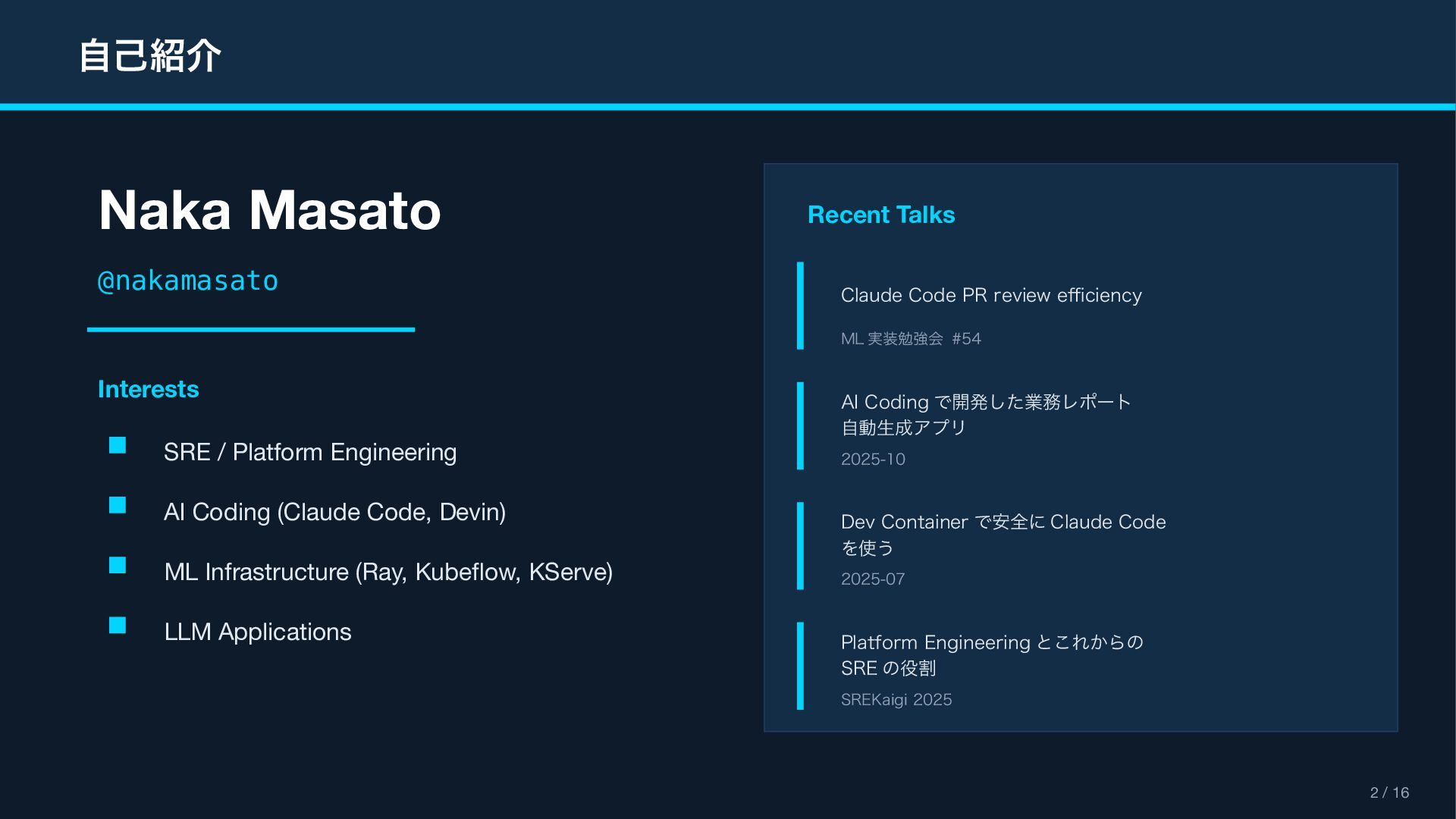
自己紹介 2 / 16 Naka Masato @nakamasato Interests SRE /
Platform Engineering AI Coding (Claude Code, Devin) ML Infrastructure (Ray, Kubeflow, KServe) LLM Applications Recent Talks Claude Code PR review efficiency ML 実装勉強会 #54 AI Coding で開発した業務レポート 自動生成アプリ 2025-10 Dev Container で安全に Claude Code を使う 2025-07 Platform Engineering とこれからの SRE の役割 SREKaigi 2025
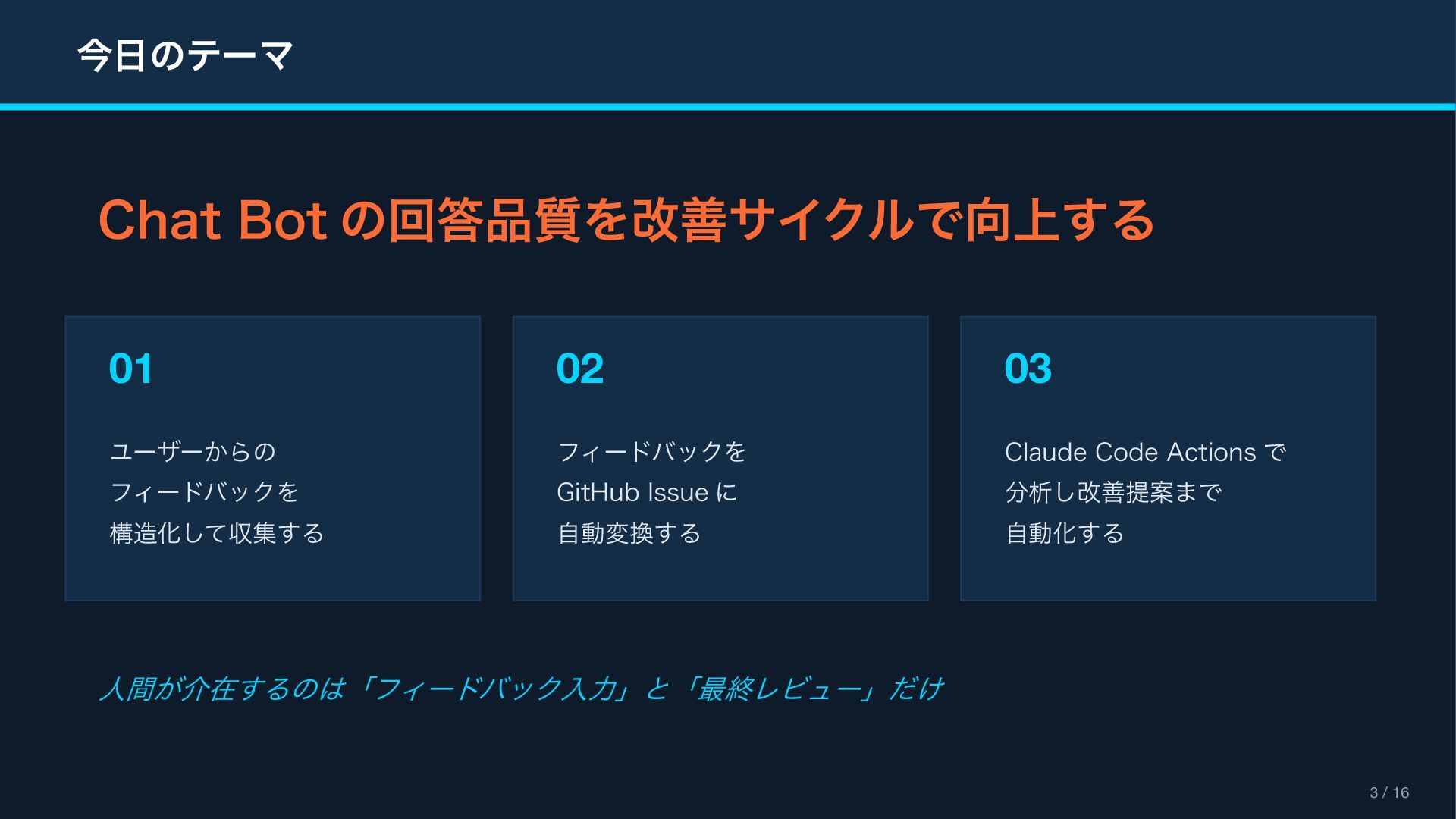
今日のテーマ 3 / 16 Chat Bot の回答品質を改善サイクルで向上する 01 ユーザーからの フィードバックを
構造化して収集する 02 フィードバックを GitHub Issue に 自動変換する 03 Claude Code Actions で 分析し改善提案まで 自動化する 人間が介在するのは「フィードバック入力」と「最終レビュー」だけ
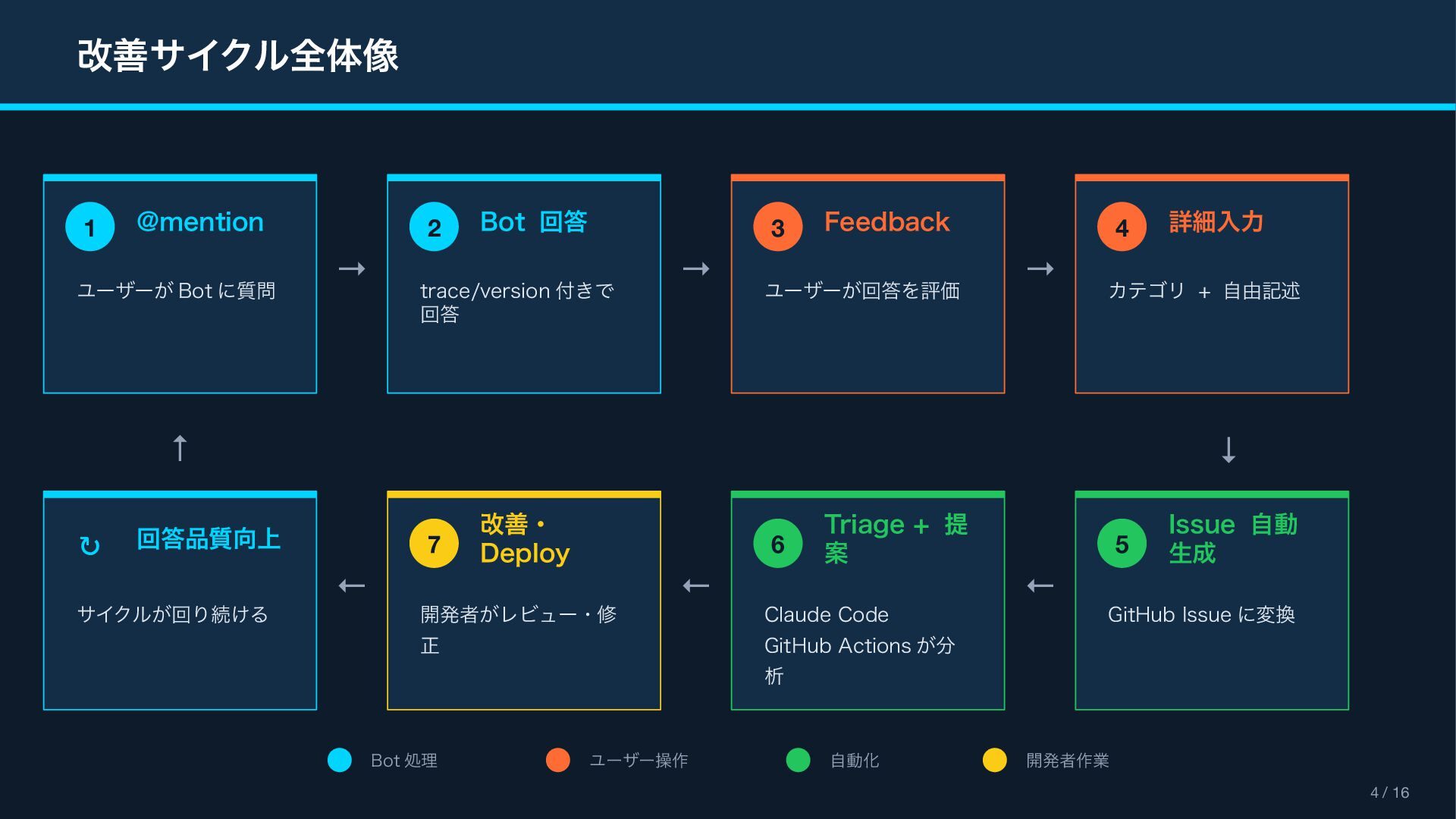
改善サイクル全体像 4 / 16 1 @mention ユーザーが Bot に質問 2
Bot 回答 trace/version 付きで 回答 3 Feedback ユーザーが回答を評価 4 詳細入力 カテゴリ + 自由記述 → → → ↓ 5 Issue 自動 生成 GitHub Issue に変換 6 Triage + 提 案 Claude Code GitHub Actions が分 析 7 改善・ Deploy 開発者がレビュー・修 正 ↻ 回答品質向上 サイクルが回り続ける ← ← ← ↑ Bot 処理 ユーザー操作 自動化 開発者作業
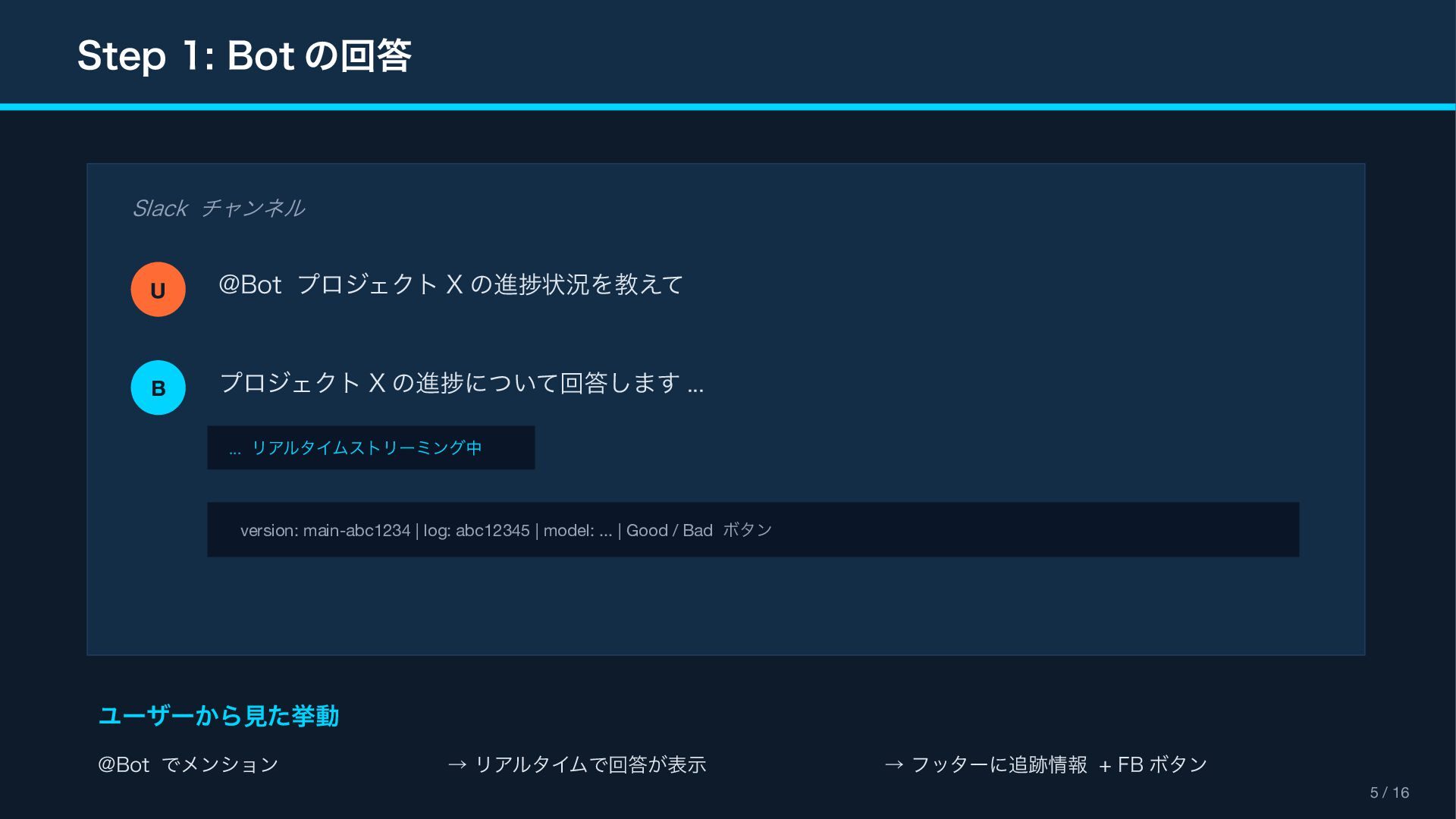
Step 1: Bot の回答 5 / 16 Slack チャンネル U
@Bot プロジェクト X の進捗状況を教えて B プロジェクト X の進捗について回答します ... ... リアルタイムストリーミング中 version: main-abc1234 | log: abc12345 | model: ... | Good / Bad ボタン ユーザーから見た挙動 @Bot でメンション → リアルタイムで回答が表示 → フッターに追跡情報 + FB ボタン
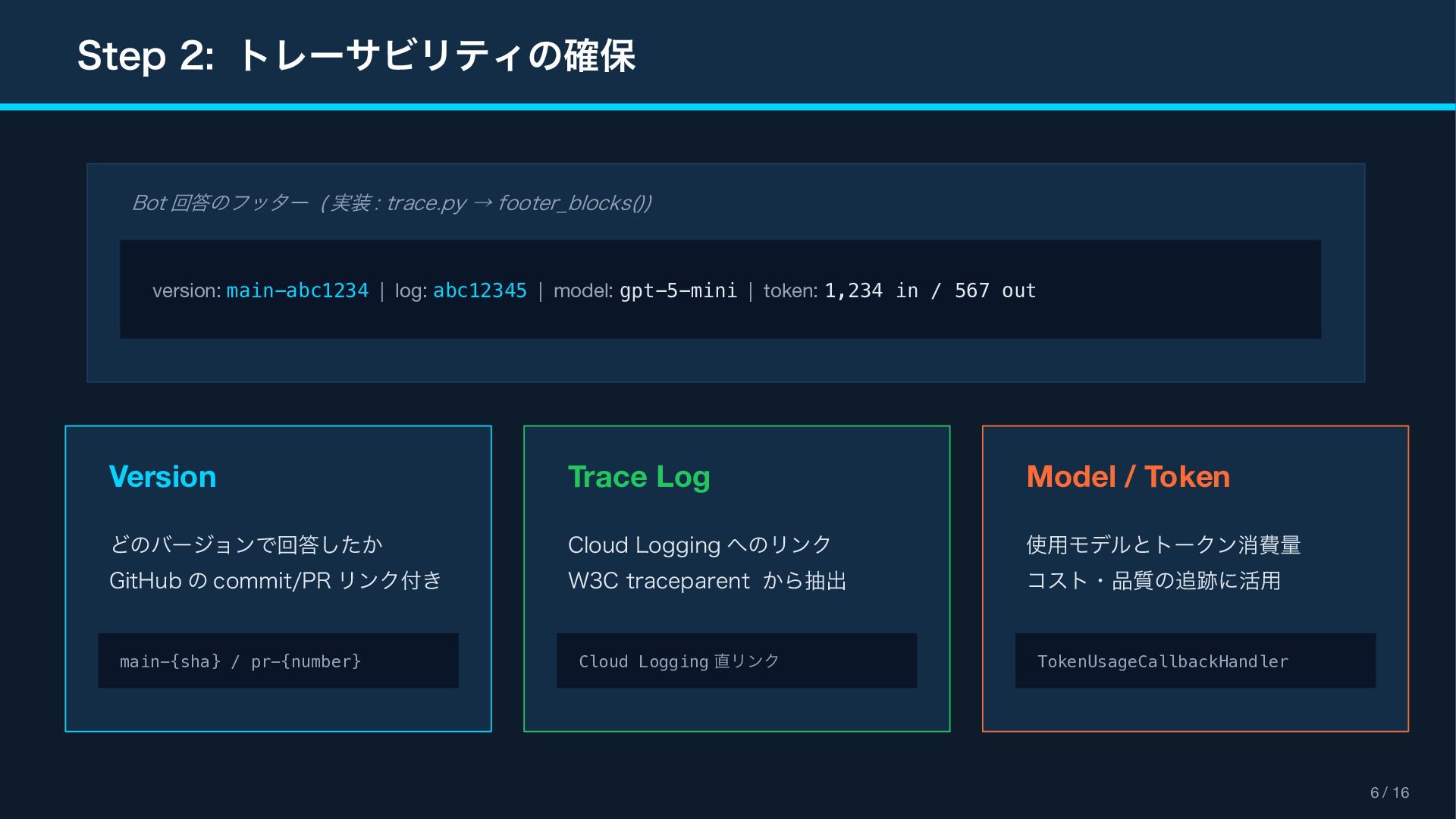
Step 2: トレーサビリティの確保 6 / 16 Bot 回答のフッター ( 実装
: trace.py → footer_blocks()) version: main-abc1234 | log: abc12345 | model: gpt-5-mini | token: 1,234 in / 567 out Version どのバージョンで回答したか GitHub の commit/PR リンク付き main-{sha} / pr-{number} Trace Log Cloud Logging へのリンク W3C traceparent から抽出 Cloud Logging 直リンク Model / Token 使用モデルとトークン消費量 コスト・品質の追跡に活用 TokenUsageCallbackHandler
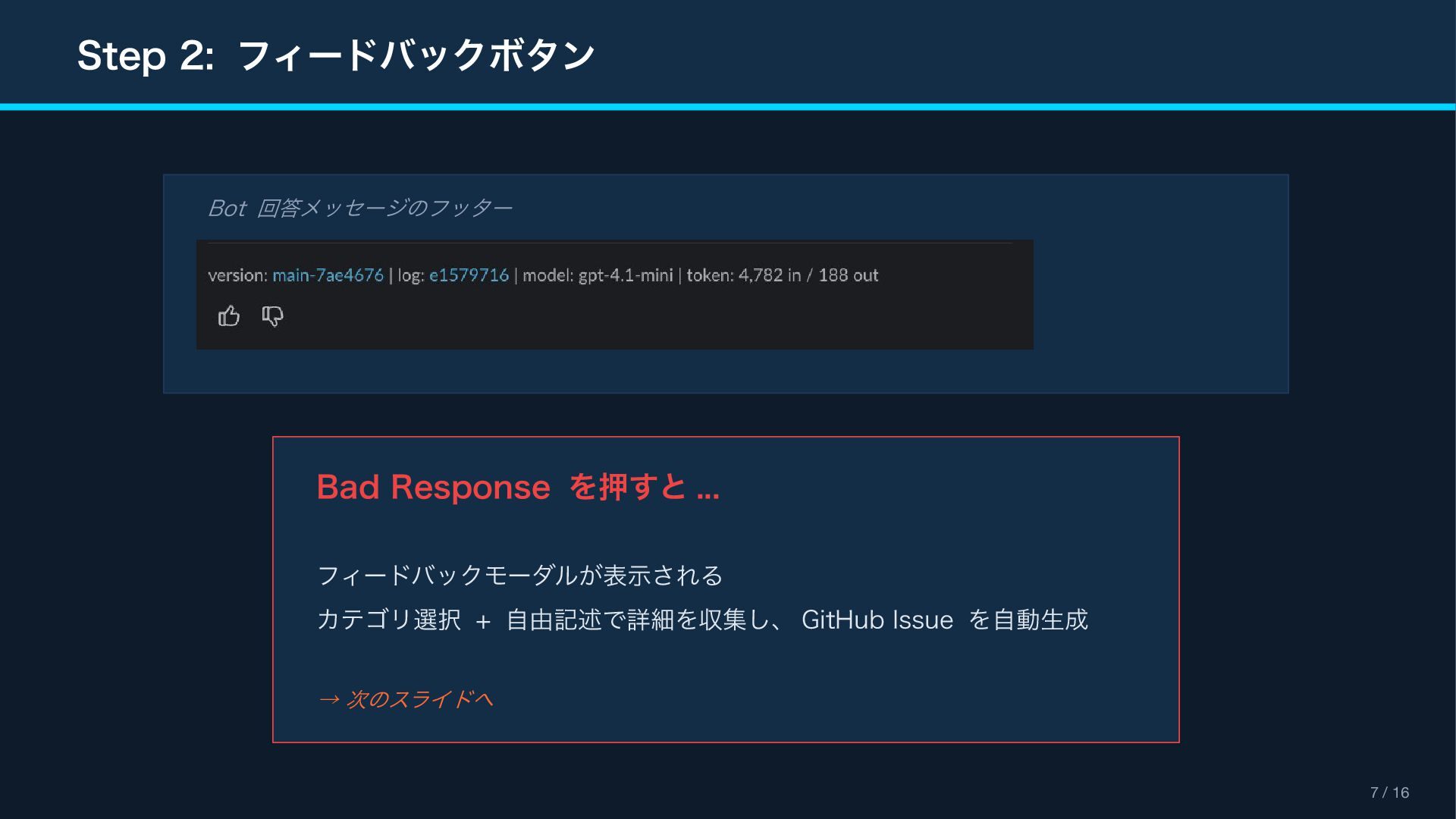
Step 2: フィードバックボタン 7 / 16 Bot 回答メッセージのフッター Bad Response
を押すと ... フィードバックモーダルが表示される カテゴリ選択 + 自由記述で詳細を収集し、 GitHub Issue を自動生成 → 次のスライドへ
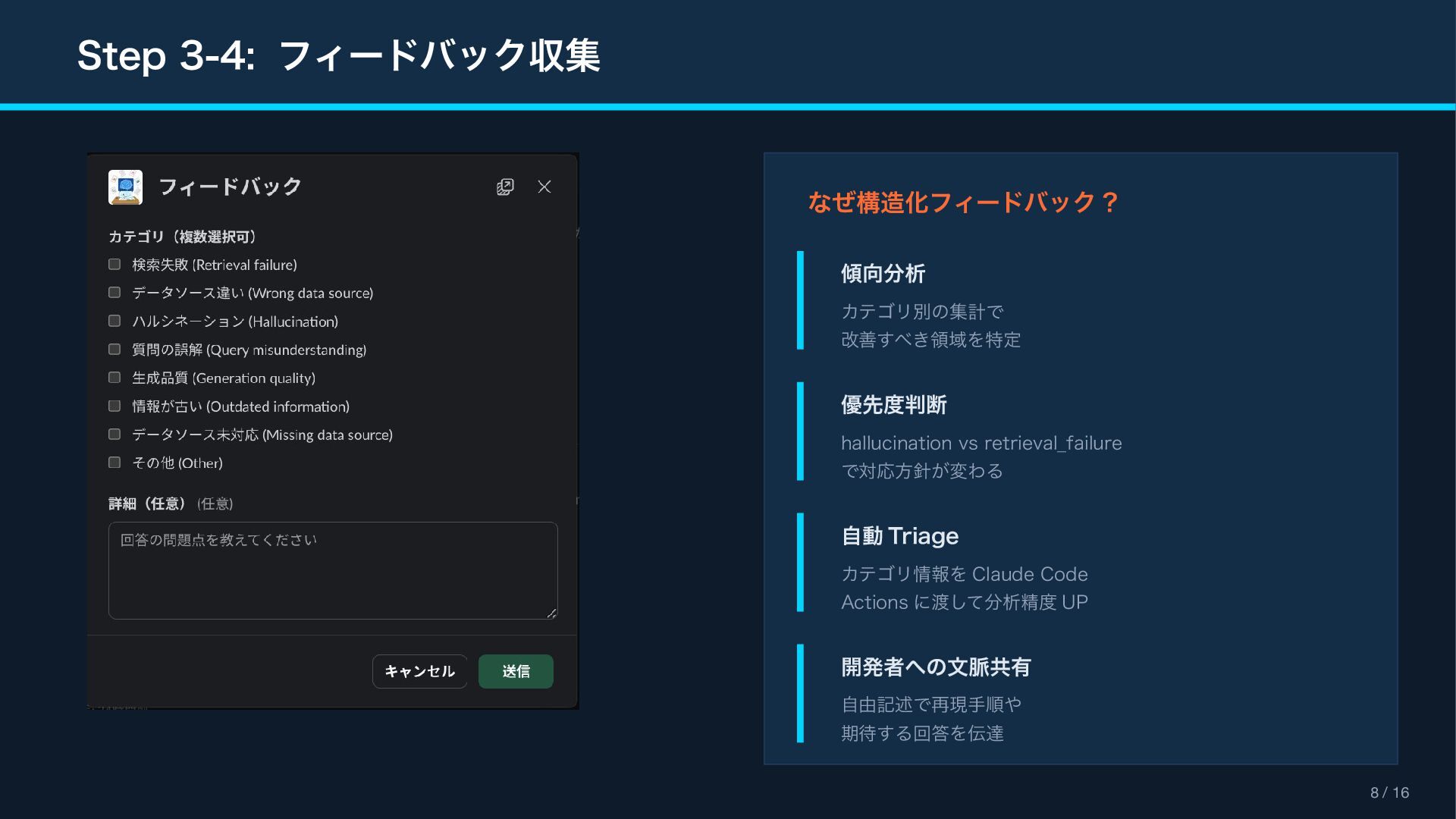
Step 3-4: フィードバック収集 8 / 16 なぜ構造化フィードバック ? 傾向分析 カテゴリ別の集計で
改善すべき領域を特定 優先度判断 hallucination vs retrieval_failure で対応方針が変わる 自動 Triage カテゴリ情報を Claude Code Actions に渡して分析精度 UP 開発者への文脈共有 自由記述で再現手順や 期待する回答を伝達
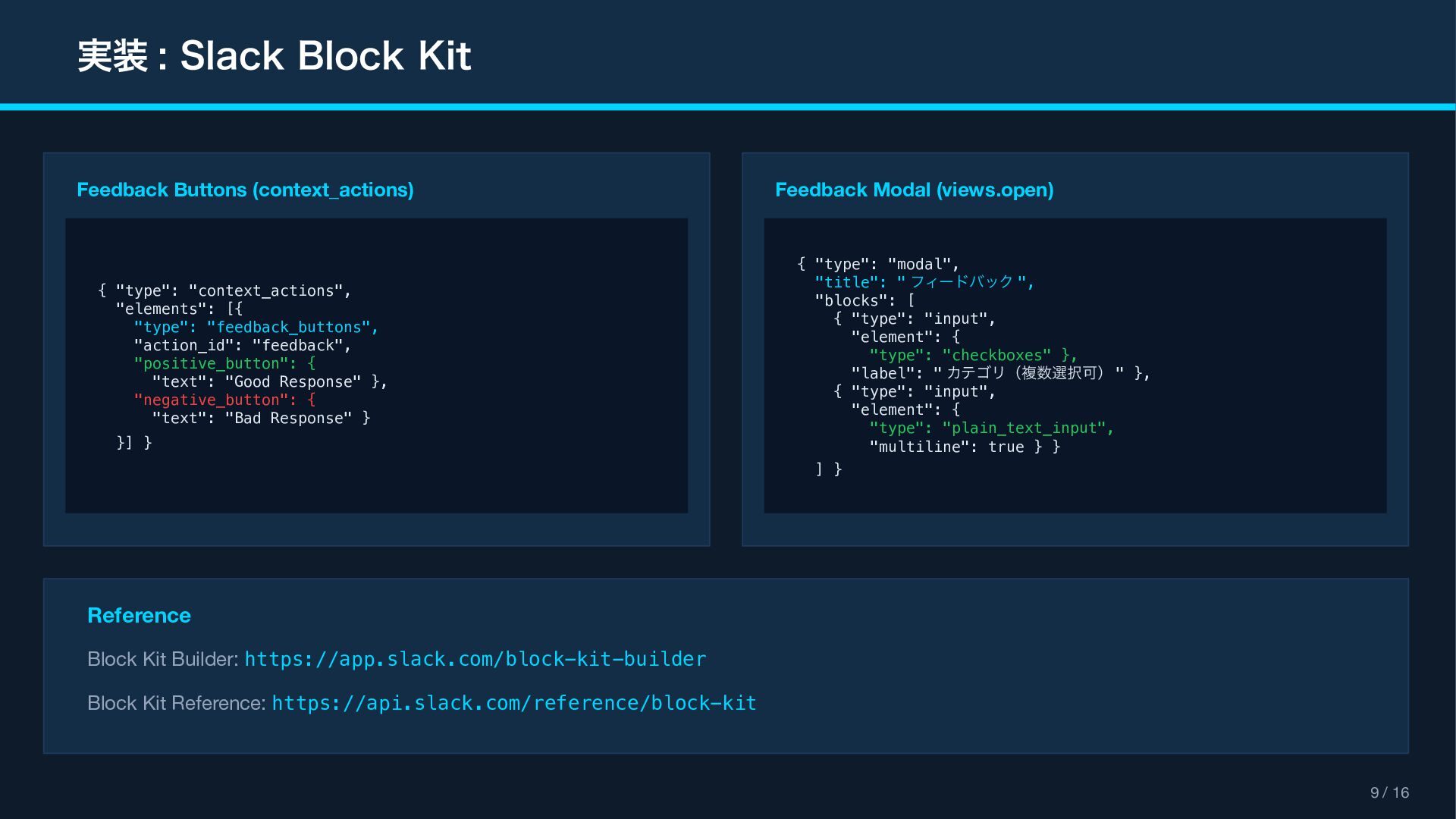
実装 : Slack Block Kit 9 / 16 Feedback Buttons
(context_actions) { "type": "context_actions", "elements": [{ "type": "feedback_buttons", "action_id": "feedback", "positive_button": { "text": "Good Response" }, "negative_button": { "text": "Bad Response" } }] } Feedback Modal (views.open) { "type": "modal", "title": " フィードバック ", "blocks": [ { "type": "input", "element": { "type": "checkboxes" }, "label": " カテゴリ(複数選択可) " }, { "type": "input", "element": { "type": "plain_text_input", "multiline": true } } ] } Reference Block Kit Builder: https://app.slack.com/block-kit-builder Block Kit Reference: https://api.slack.com/reference/block-kit
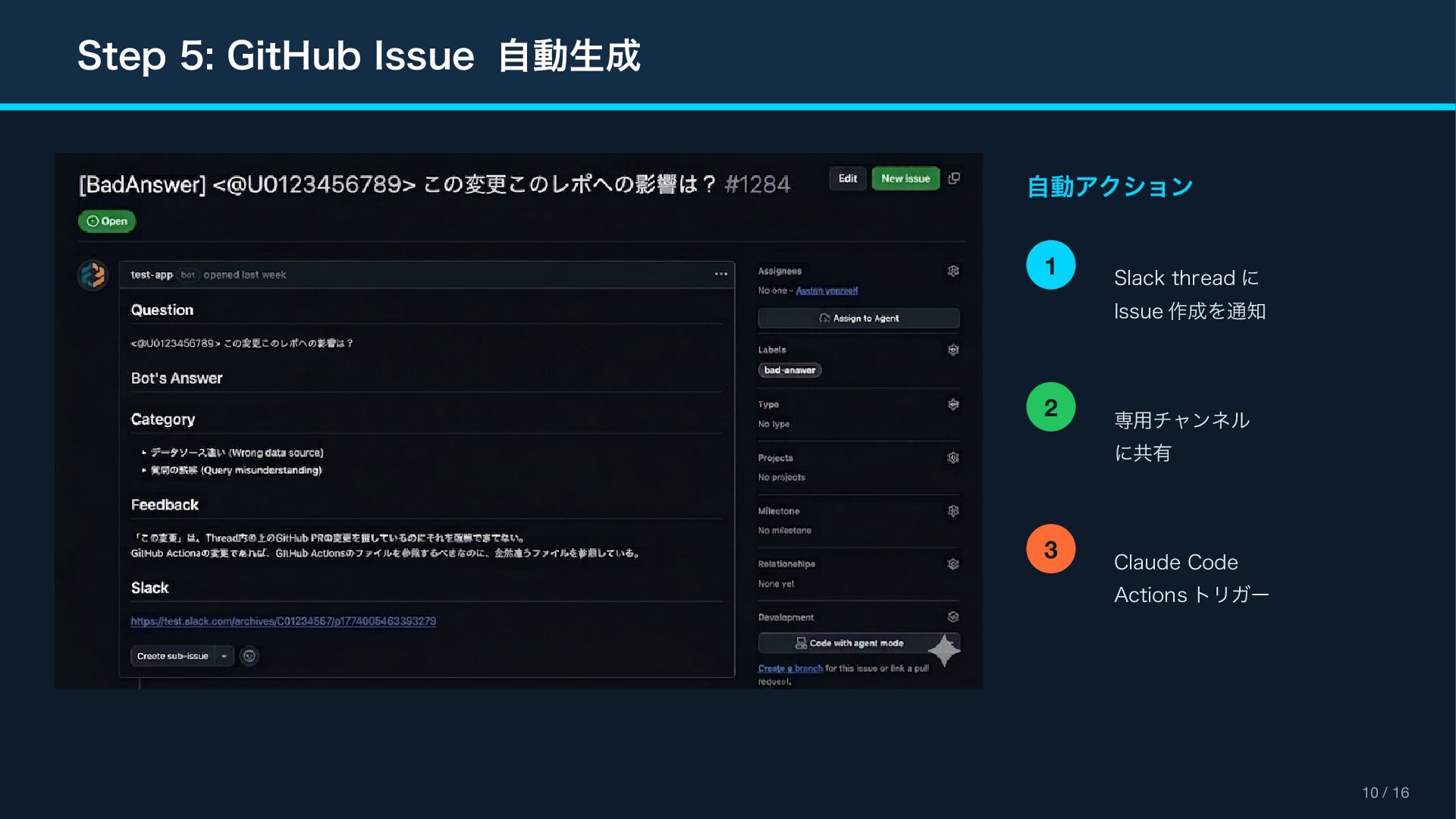
Step 5: GitHub Issue 自動生成 10 / 16 自動アクション 1
Slack thread に Issue 作成を通知 2 専用チャンネル に共有 3 Claude Code Actions トリガー
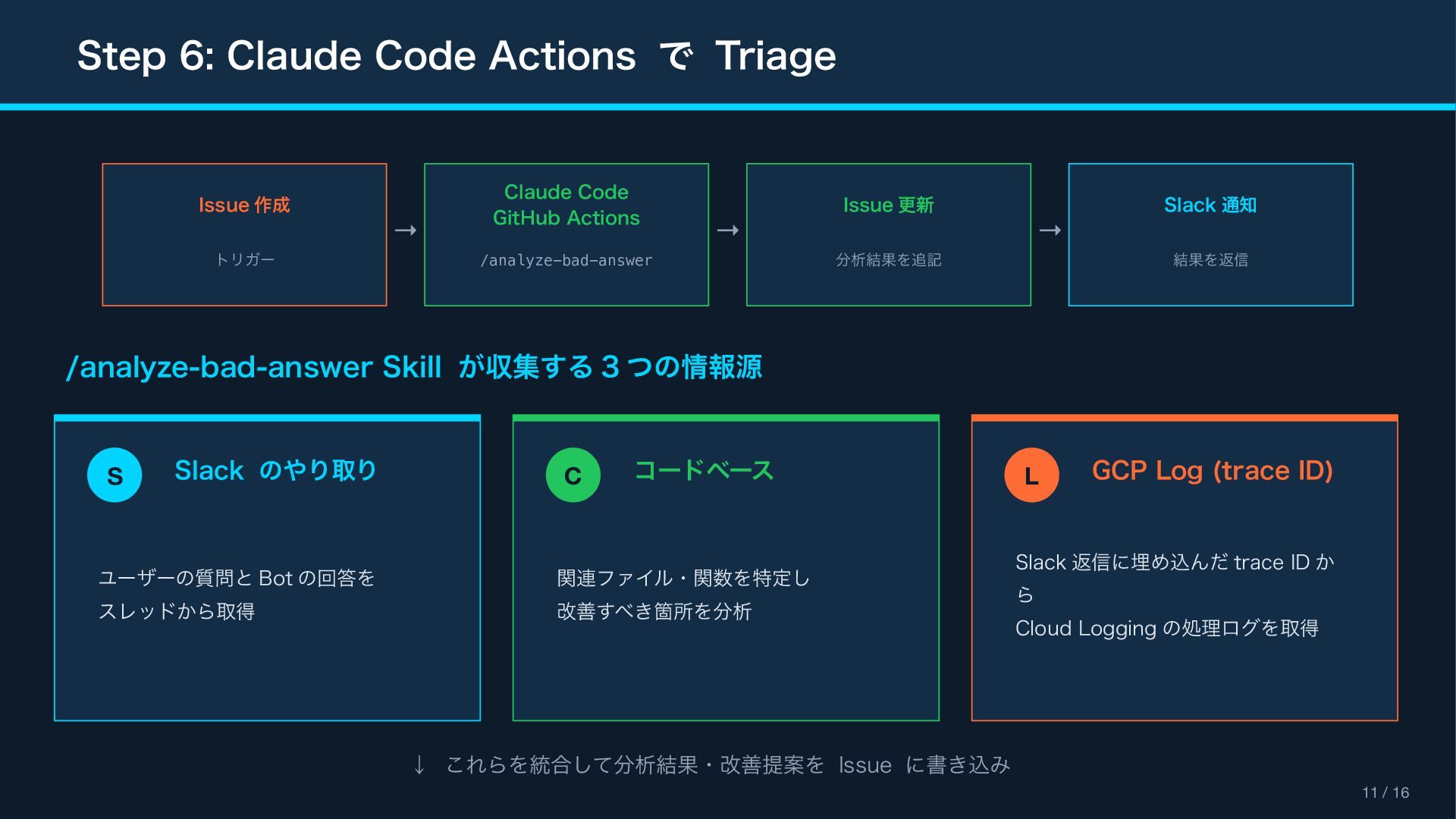
Step 6: Claude Code Actions で Triage 11 / 16
Issue 作成 トリガー Claude Code GitHub Actions /analyze-bad-answer Issue 更新 分析結果を追記 Slack 通知 結果を返信 → → → /analyze-bad-answer Skill が収集する 3 つの情報源 S Slack のやり取り ユーザーの質問と Bot の回答を スレッドから取得 C コードベース 関連ファイル・関数を特定し 改善すべき箇所を分析 L GCP Log (trace ID) Slack 返信に埋め込んだ trace ID か ら Cloud Logging の処理ログを取得 ↓ これらを統合して分析結果・改善提案を Issue に書き込み
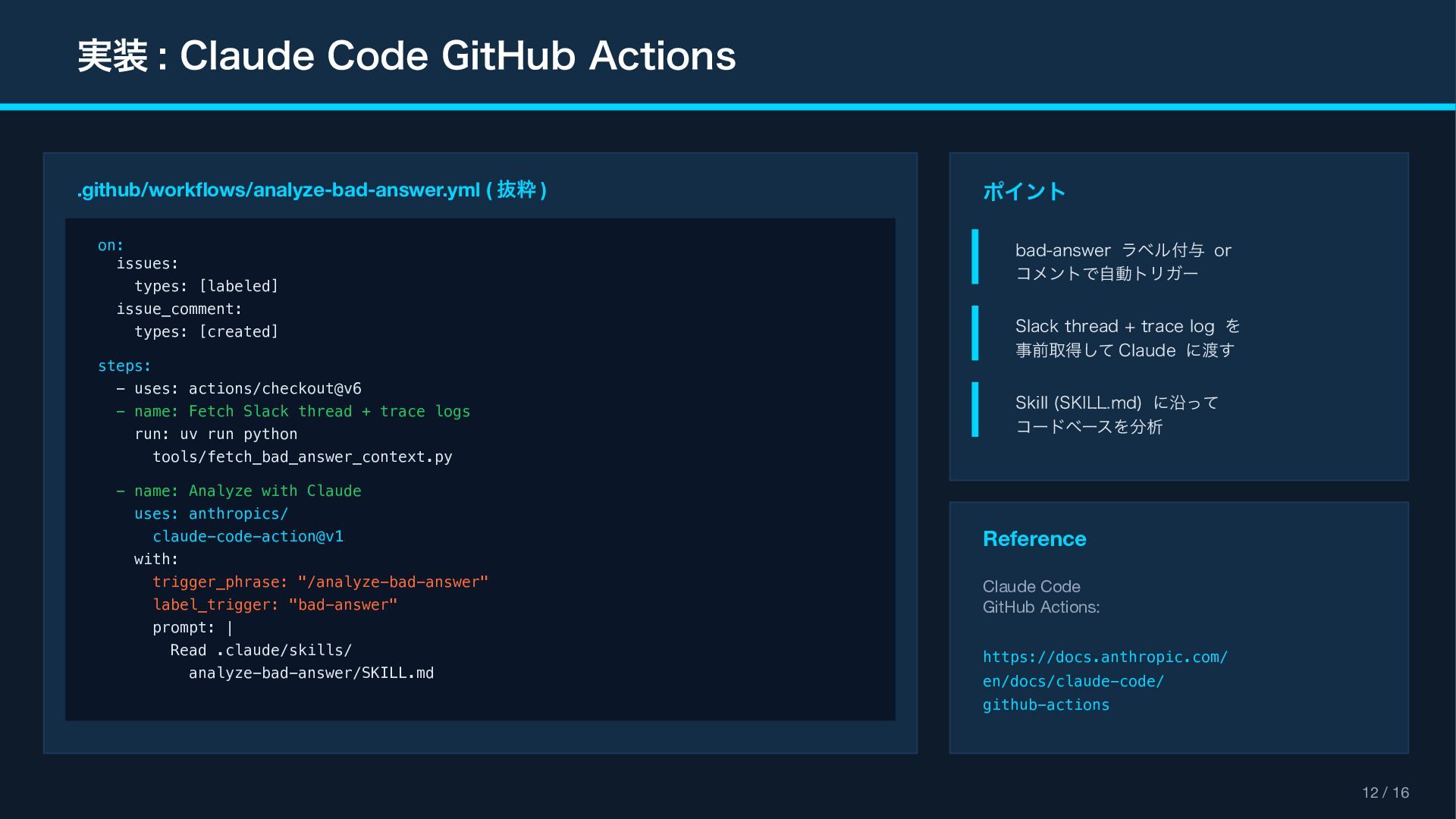
実装 : Claude Code GitHub Actions 12 / 16 .github/workflows/analyze-bad-answer.yml
( 抜粋 ) on: issues: types: [labeled] issue_comment: types: [created] steps: - uses: actions/checkout@v6 - name: Fetch Slack thread + trace logs run: uv run python tools/fetch_bad_answer_context.py - name: Analyze with Claude uses: anthropics/ claude-code-action@v1 with: trigger_phrase: "/analyze-bad-answer" label_trigger: "bad-answer" prompt: | Read .claude/skills/ analyze-bad-answer/SKILL.md ポイント bad-answer ラベル付与 or コメントで自動トリガー Slack thread + trace log を 事前取得して Claude に渡す Skill (SKILL.md) に沿って コードベースを分析 Reference Claude Code GitHub Actions: https://docs.anthropic.com/ en/docs/claude-code/ github-actions
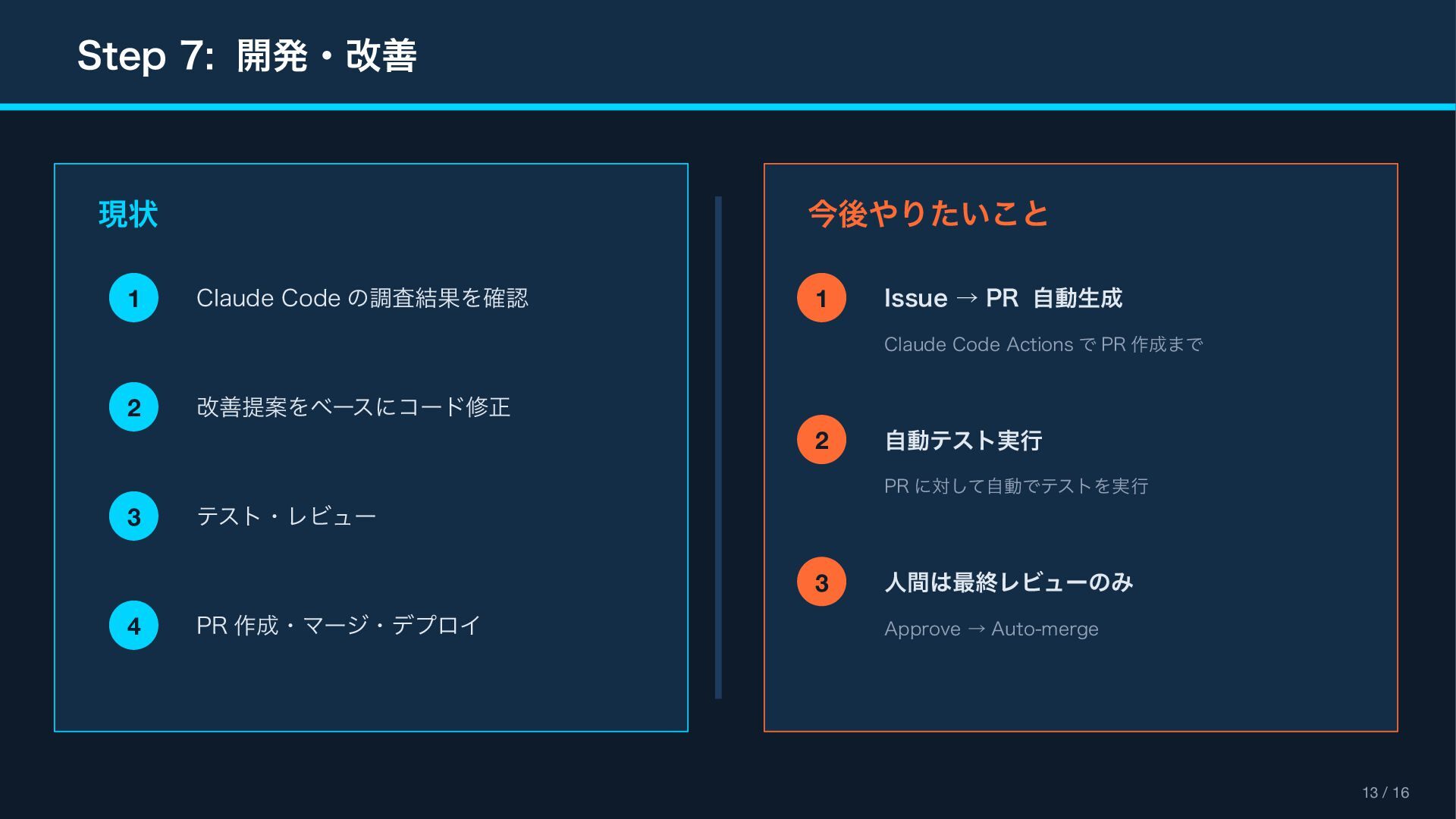
Step 7: 開発・改善 13 / 16 現状 1 Claude Code
の調査結果を確認 2 改善提案をベースにコード修正 3 テスト・レビュー 4 PR 作成・マージ・デプロイ 今後やりたいこと 1 Issue → PR 自動生成 Claude Code Actions で PR 作成まで 2 自動テスト実行 PR に対して自動でテストを実行 3 人間は最終レビューのみ Approve → Auto-merge
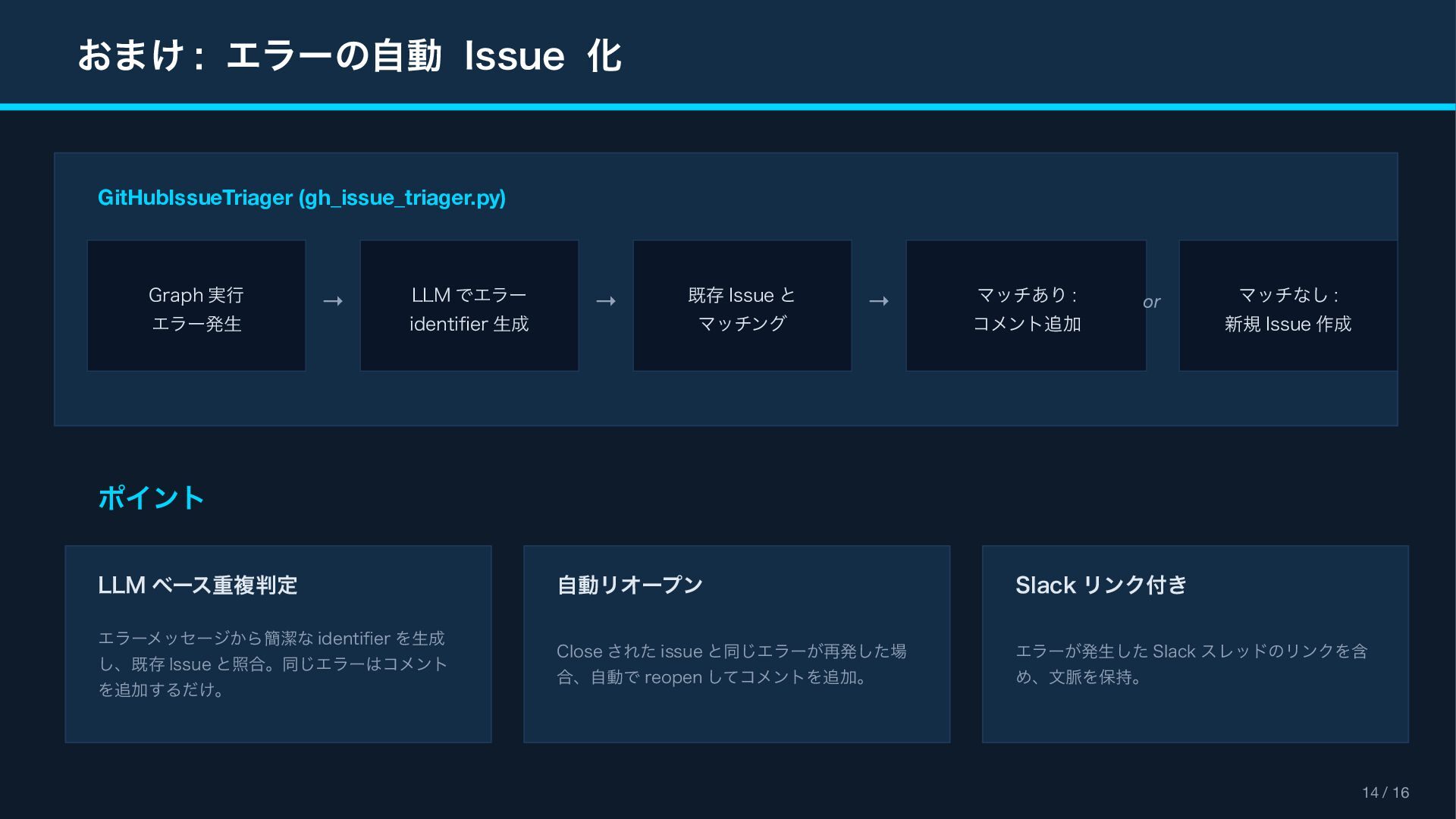
おまけ : エラーの自動 Issue 化 14 / 16 GitHubIssueTriager (gh_issue_triager.py)
Graph 実行 エラー発生 → LLM でエラー identifier 生成 → 既存 Issue と マッチング → マッチあり : コメント追加 マッチなし : 新規 Issue 作成 or ポイント LLM ベース重複判定 エラーメッセージから簡潔な identifier を生成 し、既存 Issue と照合。同じエラーはコメント を追加するだけ。 自動リオープン Close された issue と同じエラーが再発した場 合、自動で reopen してコメントを追加。 Slack リンク付き エラーが発生した Slack スレッドのリンクを含 め、文脈を保持。
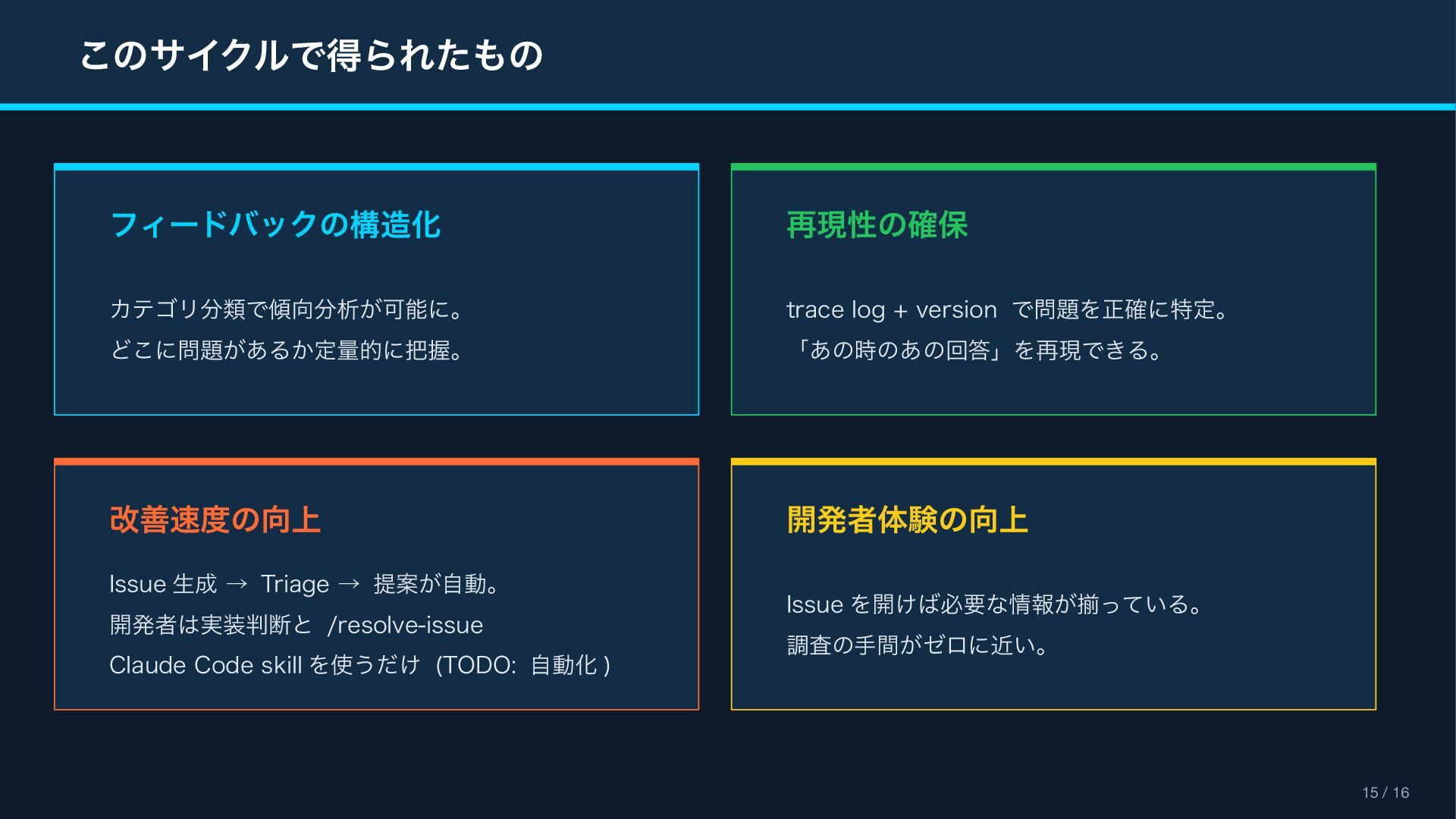
このサイクルで得られたもの 15 / 16 フィードバックの構造化 カテゴリ分類で傾向分析が可能に。 どこに問題があるか定量的に把握。 再現性の確保 trace log
+ version で問題を正確に特定。 「あの時のあの回答」を再現できる。 改善速度の向上 Issue 生成 → Triage → 提案が自動。 開発者は実装判断と /resolve-issue Claude Code skill を使うだけ (TODO: 自動化 ) 開発者体験の向上 Issue を開けば必要な情報が揃っている。 調査の手間がゼロに近い。
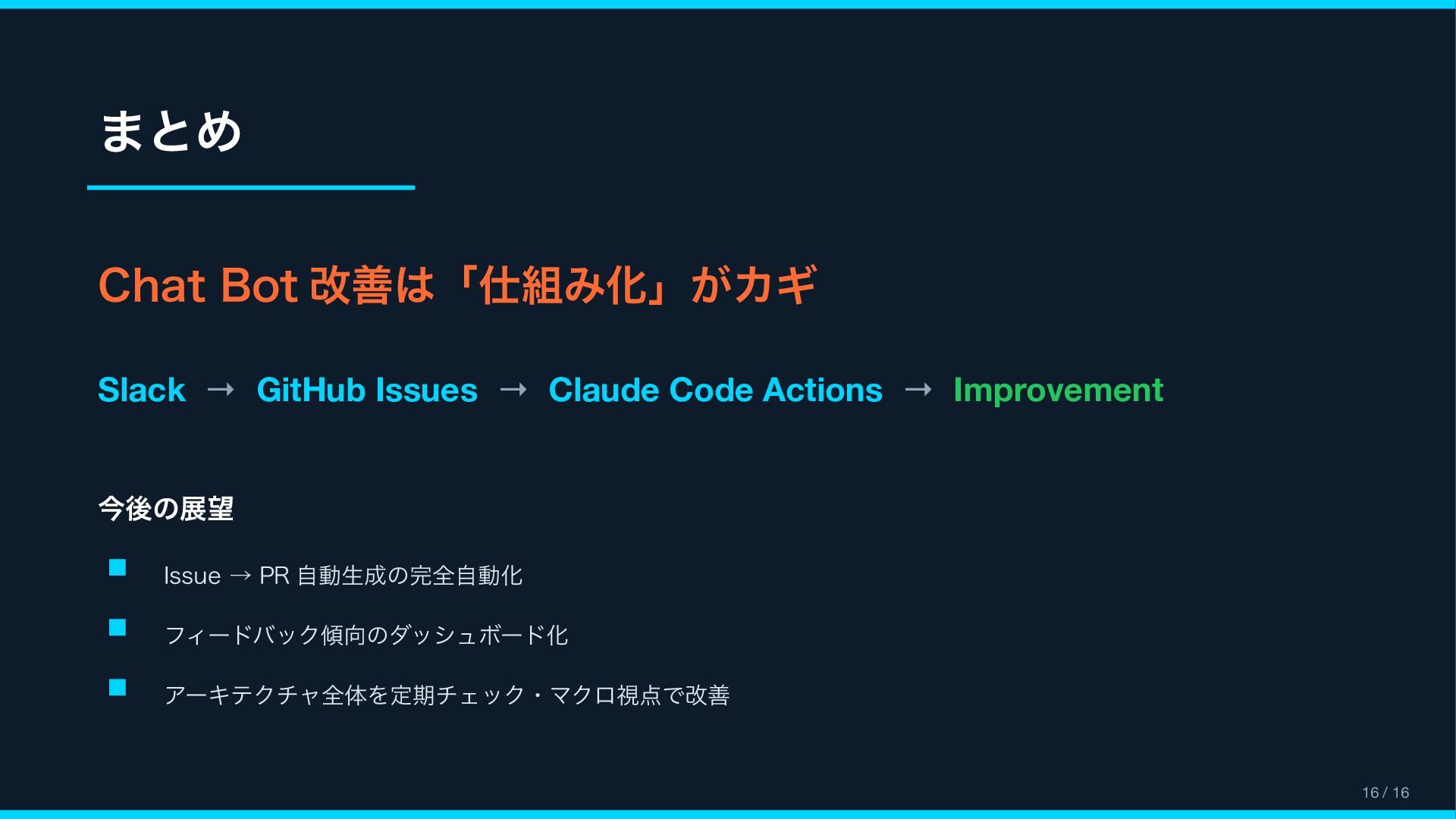
まとめ Chat Bot 改善は「仕組み化」がカギ Slack → GitHub Issues → Claude
Code Actions → Improvement 今後の展望 Issue → PR 自動生成の完全自動化 フィードバック傾向のダッシュボード化 アーキテクチャ全体を定期チェック・マクロ視点で改善 16 / 16


 nakamasato
 akitoshiga
 raspython3
 techtekt
 greenmidori
 kentapapa
 nttcom
 codmoninc
 kaminashi
 daidaidai
 bengo4com
 kentarofujii
 gionn
gionn
 mongodb
 hannesfritz
 iamctodd
 panda_program
 nwiizo
 cassininazir
 tammielis
 mkilby
 addyosmani
 soysaucechin
 charlesmeaden
 lauravandoore