Share
Embed
Transcript
48 slides
-
www.medando.de Messaging for the Internet of Things Andreas Schreiber <[email protected]>
EuroPython 2013, Florence, July 3, 2013 -
Slide 2 www.medando.de EuroPython 2013, Florence, 03.07.2013 Me Scientist, Head
of department Founder, CEO Python user since 1992 -
Slide 3 www.medando.de EuroPython 2013, Florence, 03.07.2013 Why? What is
my motivation for messaging and the Internet of Things? Quantified Self – tracking myself • With sensors • With smartphone apps -
Slide 10 www.medando.de EuroPython 2013, Florence, 03.07.2013 Many Devices, Sensors,
and Apps Data Exchange -
Slide 11 www.medando.de EuroPython 2013, Florence, 03.07.2013 Internet of Things
Billions of devices, sensors, and chips • Connected physical objects (or their virtual representation) • Connected via the internet • Uniquely identified • They interact -
Slide 12 www.medando.de EuroPython 2013, Florence, 03.07.2013 Devices The “Things”
are • Embedded controllers • Sensors • Actuators -
Slide 13 www.medando.de EuroPython 2013, Florence, 03.07.2013 Growth Number of
devices connected to the internet grow every day 50.000.000.000 “Things” by 2020 -
Slide 14 www.medando.de EuroPython 2013, Florence, 03.07.2013 Communication Internet of
Things Communication infrastructure -
Slide 15 www.medando.de EuroPython 2013, Florence, 03.07.2013 MQTT MQ Telemetry
Transport • Machine-to-machine (M2M) connectivity protocol • Publish/subscribe messaging • Expect unreliable networks with low bandwidth and high latency • Expect clients with limited processing resources • Provides Quality of Service, if network/environment allows • Easy to implement -
Slide 16 www.medando.de EuroPython 2013, Florence, 03.07.2013 Broker MQTT broker
MQTT broker Client Client Client Client publish subscribe topic/subtopic (optional) bridge Client -
Slide 17 www.medando.de EuroPython 2013, Florence, 03.07.2013 MQTT Protocol •
One-to-many message distribution over TCP/IP • Notifies if clients disconnect abnormally • Message format • Fixed 2-byte header • Variable header for some message type • Payload (e.g., the topic or small pieces of data) -
Slide 18 www.medando.de EuroPython 2013, Florence, 03.07.2013 Topics • Messages
in MQTT are published on topics • No need to configure, just publish on it • Topics are hierarchical, with “/” as separator my/home/temperature/kitchen my/home/temperature/livingroom my/server/temperature -
Slide 19 www.medando.de EuroPython 2013, Florence, 03.07.2013 MQTT Implementations Servers/Brokers
• IBM Websphere MQ • RSMB • Mosquitto • Eclispe Paho • MQTT.js • Apache ActiveMQ • RabittMQ • HiveMQ Libraries for • C/C++ • Java • Python • Perl • PHP • Ruby • … http://mqtt.org/wiki/software -
Slide 20 www.medando.de EuroPython 2013, Florence, 03.07.2013 Mosquitto Open Source
MQTT Broker • http://mosquitto.org • Implemented in C • Source code on bitbucket • Many binary packages -
Slide 21 www.medando.de EuroPython 2013, Florence, 03.07.2013 Starting a Broker
• Install it • apt-get install mosquitto • Just start with config file • mosquitto –c mosquitto.conf -
Slide 22 www.medando.de EuroPython 2013, Florence, 03.07.2013 Broker Status Mosquitto
broker publishes status messages $SYS/broker/messages/sent $SYS/broker/subscriptions/count $SYS/broker/uptime . . . -
Slide 23 www.medando.de EuroPython 2013, Florence, 03.07.2013 test.mosquitto.org Publicly available
Mosquitto MQTT server/broker -
Slide 24 www.medando.de EuroPython 2013, Florence, 03.07.2013 Mosquitto with Python
Python client module • Single file, pure Python implementation • Publishing and receiving messages • Callbacks • Connect • Disconnect • Publish • Message • Subscribe -
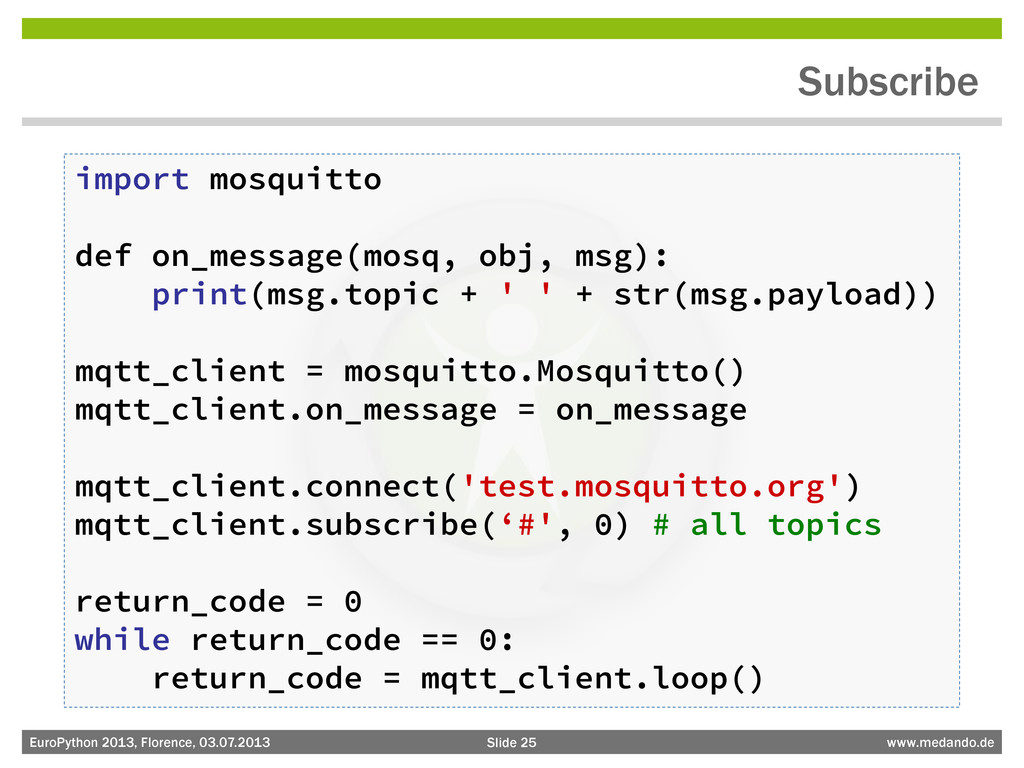
Slide 25 www.medando.de EuroPython 2013, Florence, 03.07.2013 Subscribe import mosquitto
def on_message(mosq, obj, msg): print(msg.topic + ' ' + str(msg.payload)) mqtt_client = mosquitto.Mosquitto() mqtt_client.on_message = on_message mqtt_client.connect('test.mosquitto.org') mqtt_client.subscribe(‘#', 0) # all topics return_code = 0 while return_code == 0: return_code = mqtt_client.loop() -
Slide 26 www.medando.de EuroPython 2013, Florence, 03.07.2013 Publish import mosquitto
mqtt_client = mosquitto.Mosquitto() mqtt_client.connect('test.mosquitto.org') mqtt_client.publish('europython/demo', 'hello world', 1) -
Slide 27 www.medando.de EuroPython 2013, Florence, 03.07.2013 Tools Tools for
publishing and subscribing MQTT topics • mqtt.io (Web) • Eclipse Paho (Java library and Eclipse View) • MQTT.app (Mac OS X) • . . . See http://mqtt.org/wiki/software -
Slide 30 www.medando.de EuroPython 2013, Florence, 03.07.2013 Mosquitto on Android
• The Python module works with python-for-android • Easy to use in Kivy clients kivy.org -
Slide 31 www.medando.de EuroPython 2013, Florence, 03.07.2013 Xively – Public
Cloud for the Internet of Things -
Slide 32 www.medando.de EuroPython 2013, Florence, 03.07.2013 MQTT Usage Examples
• Home automation with Raspberry Pi • Android Push Notification -
Slide 33 www.medando.de EuroPython 2013, Florence, 03.07.2013 Home automation with
Raspberry Pi Getting sensor data with sensors connected via 1-Wire • 1-Wire: Single line bus system, low-speed • Sensors for temperature, voltage, light, humidity, … • Connected via 1-Wire-USB adapter -
Slide 36 www.medando.de EuroPython 2013, Florence, 03.07.2013 Mosquitto on Raspberry
Pi Mosquitto works nicely on Raspberry Pi • Just install • apt-get install mosquitto • You can start the broker or clients -
Slide 37 www.medando.de EuroPython 2013, Florence, 03.07.2013 Getting Temperature Getting
measurements from 1-Wire devices on Linux • Two solutions that work with Python • OWFS: One Wire File System (http://owfs.org) • DigiTemp and DigitemPy (http://www.digitemp.com) -
Slide 38 www.medando.de EuroPython 2013, Florence, 03.07.2013 Publishing Temperature with
OWFS import time import os import mosquitto file_name = os.path.join('/', 'mnt', '1wire', '10.67C6697351FF', 'temperature') mqtt_client = mosquitto.Mosquitto('home-temperature') mqtt_client.connect('test.mosquitto.org') while 1: file_object = open(file_name, 'r') temperature = '%sC' % file_object.read() mqtt_client.publish('home/demo/temperature', temperature, 1) mqtt_client.loop() time.sleep(5) file_object.close() -
Slide 39 www.medando.de EuroPython 2013, Florence, 03.07.2013 Android Push Notifications
Getting data from Quantified Self gadgets to Android • The Gadget sends data to “somewhere” in the Cloud • Withings, Fitbit, and Nike provide APIs to access the data • Register for callbacks to get notifications • We use a Django app that registers as callback listener and send MQTT messages on updates • MQTT Java client on Android receives notifications -
Slide 40 www.medando.de EuroPython 2013, Florence, 03.07.2013 MQTT Push Notification
Architecture Django App MQTT broker Gadget Vendor (API) Gadget Android phone publish notification measure- ments register phone register callback receives callbacks send messages -
Slide 41 www.medando.de EuroPython 2013, Florence, 03.07.2013 Implementation & Deployment
• Implementation includes OAuth stuff • Most complex part was the Java code on Android (error handling etc.) • Deployment on Amazon Web Services Django/Mosquitt o EC2 instance User/Device registry Apps Withings Elastic IP Amazon CloudWatch Alarm SNS developer@med ando.de -
Slide 42 www.medando.de EuroPython 2013, Florence, 03.07.2013 Callback Implementation (Withings)
def callback(request): """ Callback function for Withings notifications. """ . . . # request parameter handling devices = RegisteredWithingsUser.objects.filter(user_id=user_id) mqtt_client = MosquittoHandler(len(devices)) for device in devices: device_id = device.device_id mqtt_topic = 'medando/weightcompanion/weights/%s/%s' % (user_id, device_id) payload = simplejson.dumps({'startdate': startdate, 'enddate': enddate}) mqtt_client.publish(mqtt_topic, payload, 2, True) mqtt_client.wait() -
Slide 43 www.medando.de EuroPython 2013, Florence, 03.07.2013 MQTT Messages medando/weightcompanion/weights/1883073/34bae8cbe8dd92f3
0 {"startdate": "1371856646", "enddate": "1371856647"} medando/weightcompanion/weights/1791607/898efc38ac5d4211 0 {"startdate": "1372742400", "enddate": "1372742401"} medando/weightcompanion/weights/1527601/2ebcf034b8585668 0 {"startdate": "1368851117", "enddate": "1368851118"} medando/weightcompanion/weights/16121/f2a8ca66fd067954 0 {"startdate": "1372750563", "enddate": "1372750564"} medando/weightcompanion/weights/449599/4d701e076912648f 0 {"startdate": "1372751111", "enddate": "1372751112"} medando/weightcompanion/weights/642578/b33356881163a389 0 {"startdate": "1370585275", "enddate": "1370585276"} medando/weightcompanion/weights/2019258/33b1d416aeaec9ef 0 {"startdate": "1371377131", "enddate": "1371377132"} medando/weightcompanion/weights/2019258/61bdf242b37d8a29 0 {"startdate": "1371377131", "enddate": "1371377132"} medando/weightcompanion/weights/2019258/61bdf242b37d8a29 0 {"startdate": "1371377131", "enddate": "1371377132"} -
Slide 47 www.medando.de EuroPython 2013, Florence, 03.07.2013 Conclusions • There
are other message broker • There are other push notification services • MQTT is very lightweight • Mosquitto is easy to use from Python