Share
Embed
Transcript
21 slides
-
{ Fabric introduction "ʺevent"ʺ: "ʺpybcn – DevOps
session"ʺ "ʺauthor"ʺ: "ʺPablo Enfedaque"ʺ "ʺtwi3er"ʺ: "ʺ@pablitoev56"ʺ -
{ "ʺevent"ʺ: "ʺpybcn"ʺ, "ʺauthor"ʺ: "ʺPablo Enfedaque"ʺ, "ʺtwi3er"ʺ: "ʺ@pablitoev56"ʺ} Fabric is
a Python (2.5-‐‑2.7) library and command-‐‑line tool for streamlining the use of SSH for application deployment or systems administration tasks. From fabfile.org -
{ "ʺevent"ʺ: "ʺpybcn"ʺ, "ʺauthor"ʺ: "ʺPablo Enfedaque"ʺ, "ʺtwi3er"ʺ: "ʺ@pablitoev56"ʺ} Fabric provides
a basic suite of operations for executing local or remote shell commands (normally or via sudo) and uploading/ downloading files, as well as auxiliary functionality such as prompting the running user for input, or aborting execution. From fabfile.org -
{ "ʺevent"ʺ: "ʺpybcn"ʺ, "ʺauthor"ʺ: "ʺPablo Enfedaque"ʺ, "ʺtwi3er"ʺ: "ʺ@pablitoev56"ʺ} > Fabric
is a tool+library to automate tasks execution and ease and speed up their implementation > Local or remote tasks (SSH) > Normal or super user tasks > Single or several hosts or hosts roles > Deploy and fill configuration files From myself -
{ "ʺevent"ʺ: "ʺpybcn"ʺ, "ʺauthor"ʺ: "ʺPablo Enfedaque"ʺ, "ʺtwi3er"ʺ: "ʺ@pablitoev56"ʺ} > Fabric
is not > A packaging tool > A deployment tool > A DevOps or SysAdmin tool > A set of rich commands such as "ʺpack as RPM, deploy code, restart httpd service"ʺ > But your fabfile could be all of these tools and more From myself -
{ "ʺevent"ʺ: "ʺpybcn"ʺ, "ʺauthor"ʺ: "ʺPablo Enfedaque"ʺ, "ʺtwi3er"ʺ: "ʺ@pablitoev56"ʺ} An example
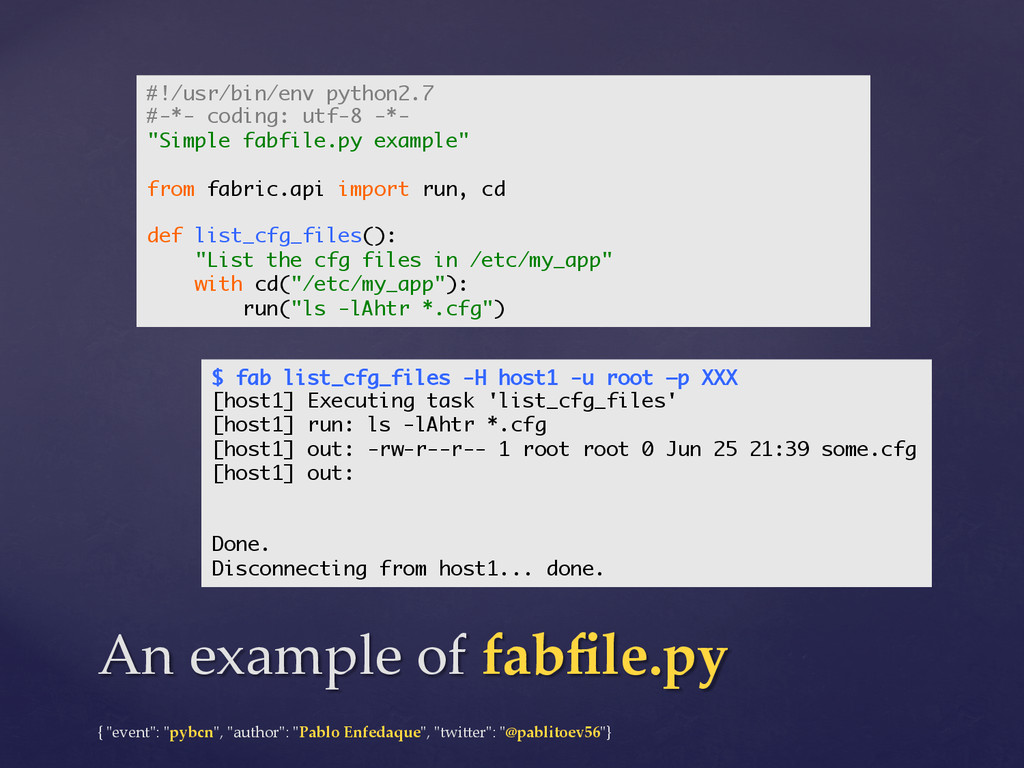
of fabfile.py #!/usr/bin/env python2.7 #-*- coding: utf-8 -*- "Simple fabfile.py example" from fabric.api import run, cd def list_cfg_files(): "List the cfg files in /etc/my_app" with cd("/etc/my_app"): run("ls -lAhtr *.cfg") $ fab list_cfg_files -H host1 -u root –p XXX [host1] Executing task 'list_cfg_files' [host1] run: ls -lAhtr *.cfg [host1] out: -rw-r--r-- 1 root root 0 Jun 25 21:39 some.cfg [host1] out: Done. Disconnecting from host1... done. -
{ "ʺevent"ʺ: "ʺpybcn"ʺ, "ʺauthor"ʺ: "ʺPablo Enfedaque"ʺ, "ʺtwi3er"ʺ: "ʺ@pablitoev56"ʺ} fab command-‐‑line
tool $ fab list_cfg_files -H root@host1 –p XXX --abort-on-prompts [host1] Executing task 'list_cfg_files' ... Disconnecting from host1... done. $ fab list_cfg_files -H root@host1 -i ~/private_rsa_key [host1] Executing task 'list_cfg_files' ... Disconnecting from host1... done. $ fab list_cfg_files -H root@host1 [root@host1] Executing task 'list_cfg_files' [root@host1] run: ls -lAhtr *.cfg [root@host1] Login password for 'root': ... Disconnecting from host1... done. $ fab -f simple_fabfile.py –l Available commands: list_cfg_files List the cfg files in /etc/my_app -
{ "ʺevent"ʺ: "ʺpybcn"ʺ, "ʺauthor"ʺ: "ʺPablo Enfedaque"ʺ, "ʺtwi3er"ʺ: "ʺ@pablitoev56"ʺ} An example
of fabfile.py #!/usr/bin/env python2.7 #-*- coding: utf-8 -*- from fabric.api import run, sudo, cd, env, task, lcd, put from fabric.contrib.files import upload_template env.use_ssh_config = True env.abort_on_prompts = True env.roledefs = {"web": ["host1", "host2"], "backend": ["host3", "host4"]} @task def list_cfg_files(): "List and print the files in /etc/my_app" with cd("/etc/my_app"): run("ls -lAhtr *.cfg") run("cat *.cfg") def this_is_not_a_task(): "This is not a task" # Do something here @task def push_config_files(port=1234): "Push config files, setting the provided port" with lcd("conf"), cd("/etc/my_app"): for filename in "general.cfg", "static.cfg", "logging.cfg": put(filename, filename) upload_template("web.cfg", ".", context={"PORT": port}, backup=True) sudo("service my_app restart") -
{ "ʺevent"ʺ: "ʺpybcn"ʺ, "ʺauthor"ʺ: "ʺPablo Enfedaque"ʺ, "ʺtwi3er"ʺ: "ʺ@pablitoev56"ʺ} > run
-‐‑ execute a command in remote hosts > sudo -‐‑ idem but using sudo to get superuser privileges > local -‐‑ idem but in localhost > execute -‐‑ run a task from another task > put / get -‐‑ upload / download files to / from remote host > upload_template -‐‑ render and upload template files > cd / lcd -‐‑ change current remote / local working dir > prompt -‐‑ interact with the user through command line > abort -‐‑ halt Fabric execution > require, reboot, open_shell... Fabric commands -
{ "ʺevent"ʺ: "ʺpybcn"ʺ, "ʺauthor"ʺ: "ʺPablo Enfedaque"ʺ, "ʺtwi3er"ʺ: "ʺ@pablitoev56"ʺ} > env
-‐‑ "ʺa Python dictionary subclass which is used as a combination se3ings registry and shared inter-‐‑ task data namespace"ʺ > environment variables dictionary / object > singleton > thread-‐‑safe > predefined values (hosts, user, roledefs...) > you can add your custom a3ributes > seNings -‐‑ context manager to temporarily change environment variables Environment variables & se3ings -
{ "ʺevent"ʺ: "ʺpybcn"ʺ, "ʺauthor"ʺ: "ʺPablo Enfedaque"ʺ, "ʺtwi3er"ʺ: "ʺ@pablitoev56"ʺ} > @hosts
-‐‑ to specify in which host must be executed a task. Useful for tasks to be run once in local @hosts('localhost') > @task -‐‑ to specify which function is a Fabric task. The rest of functions can not be lauched! > @parallel / @serial -‐‑ to specify how a tasks may be run @parallel(pool_size=5) > @with_seNings -‐‑ change environment variables only during the task execution @with_settings(warn_only=True) Environment variables & se3ings -
{ "ʺevent"ʺ: "ʺpybcn"ʺ, "ʺauthor"ʺ: "ʺPablo Enfedaque"ʺ, "ʺtwi3er"ʺ: "ʺ@pablitoev56"ʺ} > Fabric
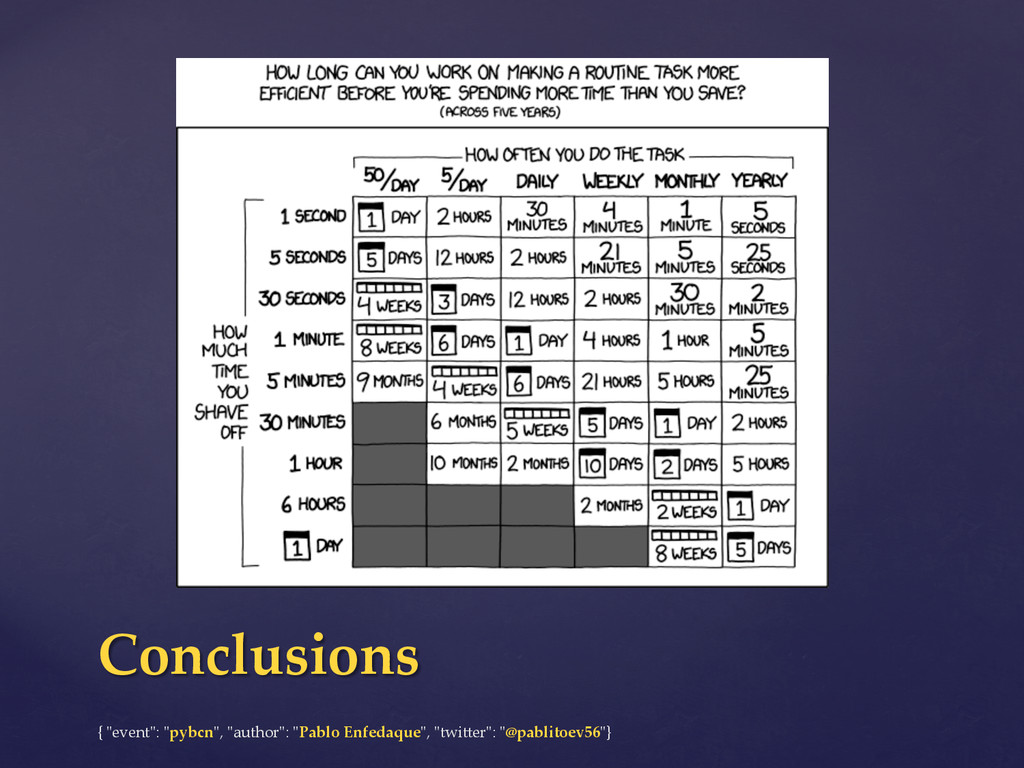
makes tasks (commands) automation easier > Fabric is pre3y simple and powerful > Sometimes too simple > Do not abuse of Fabric! > Use native Python / Bash code instead of lots of complex commands when possible (modularity, testability...) > Use the right tool for the job, combine Fabric with > Puppet, Chef, Ansible, Cuisine, Bash & Python scripts... Conclusions -
{ "ʺevent"ʺ: "ʺpybcn"ʺ, "ʺauthor"ʺ: "ʺPablo Enfedaque"ʺ, "ʺtwi3er"ʺ: "ʺ@pablitoev56"ʺ} At least
with Fabric it'ʹs less time -
{ "ʺevent"ʺ: "ʺpybcn"ʺ, "ʺauthor"ʺ: "ʺPablo Enfedaque"ʺ, "ʺtwi3er"ʺ: "ʺ@pablitoev56"ʺ} Q&A Thanks
for coming! Slides: h3ps://speakerdeck.com/pablito56/fabric-‐‑ introduction