Share
Embed
IntelligentCloud - Kubernetes: the next step after embracing Docker containers
Slides of my session at IntelligentCloud.dk on 30 May 2018
Pascal Naber
May 30, 2018
Transcript
53 slides
-
Think ahead. Act now. Kubernetes: the next step after embracing
Docker containers Pascal Naber @pascalnaber -
Container orchestrators Cluster High Availability Hyper-Scale Hybrid Operations High Density
Rolling Upgrades Stateful services Low Latency Fast startup & shutdown Container Orchestration & lifecycle management Replication & Failover Load balancing Self-healing Automated Rollback Health Monitoring Placement Constraints Microservices Service Fabric -
History of Kubernetes June 2014 First commit September 2014 July
2015 March 2018 Announced Kubernetes v1 CNCF 1st Graduate -
Kubernetes K8s OOS Extensible Facilitates declarative configuration and automation Large,
rapidly growing ecosystem Κυβερνήτης -- Greek: meaning helmsman or pilot 1 2 3 4 5 6 7 8 -
Hosting of Kubernetes Local Minikube Docker for Windows (Edge) Docker
for Mac (Edge) Raspberry Pi Private datacenter Public Cloud GKE Announced ACS AKS -
Think ahead. Act now. Templates to create container clusters Streamlined
provisioning of Docker Swarm and DCOS Linux and Windows Server containers Azure and Azure Stack IaaS Azure Container Service (ACS) Azure DC/OS Swarm Kubernetes -
Think ahead. Act now. Partly managed Kubernetes Only pay for
worker nodes Upgrades managed by Azure Workers are Managed IaaS Azure Kubernetes Service (AKS) Azure Kubernetes -
Install AKS using CLI ## Create resourcegroup az group create
--name clouddemo --location eastus ## Create Kubernetes cluster az aks create -g clouddemo -n gamingcluster --generate-ssh-keys ## Create Kubernetes cluster az aks create --resource-group clouddemo --name gamingcluster --kubernetes-version 1.9.6 --node-vm-size Standard_DS2_v2 --node-count 3 --ssh-key-value "C:\repos\pascal\ssh\public.pub" --service-principal d6e55af7-17fc-4cf5-b140-8b37729da10e --client-secret 94bCIHcSuniCvjq9 -
Kubernetes architecture Master API Server Scheduler Controller Manager Node (Minion)
etcd kubelet Kube- Proxy cAdvisor Pod Pod Pod Kubectl (CLI) Dashboard (UI) REST client (Code) -
Deployment flow Create Docker Images Apply K8s deployments Push Docker
Images to registry 1 2 3 -
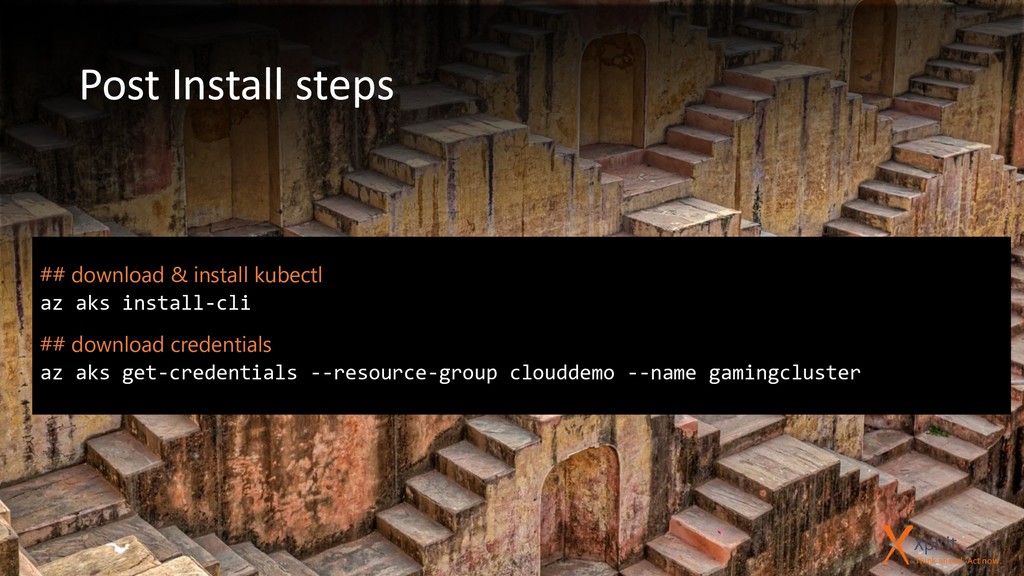
Think ahead. Act now. ## download & install kubectl az
aks install-cli ## download credentials az aks get-credentials --resource-group clouddemo --name gamingcluster Post Install steps -
Pod Group of 1 or more containers Shared Storage Shared
Network Same IP-address and port Pod 10.0.0.1 Storage Pod 10.0.0.2 Storage Port 80 Port 8080 Port 80 -
leaderboard-api.yaml Pod Pod Pod Replica Set Deployment Label: backend Selector
Label: backend Label: backend Label: backend Label: backend Selector Label: backend C:> kubectl apply –f leaderboard-api.yaml -
C:> kubectl apply –f update.yaml Zero-downtime deployment Can be rolled
back Rolling updates -
Think ahead. Act now. C:> kubectl apply –f secret.yaml ##
Create Secret to access Azure Container Registry kubectl create secret docker-registry clouddemoimages --docker-server=https://clouddemo.azurecr.io --docker-username=clouddemo --docker-password=kD98ddl$= [email protected] Secrets: Base64 encoded values Environment variables & Secrets -
Health checks livenessProbe Indicates whether the Container is running Restart
in case of failure Container: https://www.app-metrics.io/ HealthChecks library https://github.com/dotnet-architecture/HealthChecks readinessProbe Indicates whether the Container is ready to service requests No traffic is routed to the Pod C:> kubectl apply –f leaderboard-api.yaml -
Resource Management requests: Minimum required resources limits: Capped resource usage
100m = 0.1 cpu 500m = 0.5 cpu 64Mi = 64 MB memory 128Mi = 128 MB memory C:> kubectl apply –f leaderboard-api.yaml -
Horizontal Pod Autoscaler Required: Resource requests & limit Heapster Scaling
based on 1 or multiple items CPU Memory Custom Metrics C:> kubectl apply –f leaderboard-api.yaml -
Horizontal Pod Autoscaler Required: Resource requests & limit Heapster C:\kubectl
get hpa NAME REFERENCE TARGETS MINPODS MAXPODS REPLICAS AGE autoscaler leaderboard-api 0% / 50% 1 10 1 9m C:\kubectl get hpa NAME REFERENCE TARGETS MINPODS MAXPODS REPLICAS AGE autoscaler leaderboard-api 218% / 50% 1 10 1 10m C:\kubectl get hpa NAME REFERENCE TARGETS MINPODS MAXPODS REPLICAS AGE autoscaler leaderboard-api 218% / 50% 1 10 4 10m C:\kubectl get hpa NAME REFERENCE TARGETS MINPODS MAXPODS REPLICAS AGE autoscaler leaderboard-api 44% / 50% 1 10 7 13m C:\kubectl get hpa NAME REFERENCE TARGETS MINPODS MAXPODS REPLICAS AGE autoscaler leaderboard-api 51% / 50% 1 10 6 21m -
Think ahead. Act now. Node 1 Pod Label: backend 10.0.0.2
Pod Label: backend 10.0.0.3 Node 0 Pod Label: backend 10.0.0.1 Node 2 Pod Label: backend 10.0.0.4 Pod Label: backend 10.0.0.5 Pods are mortal -
Service Service Type: ClusterIP Selector Label: backend Node 1 Pod
Label: backend 10.0.0.2 Node 0 Pod Label: backend 10.0.0.1 Node 2 Pod Label: backend 10.0.0.4 Pod Label: backend 10.0.0.5 192.168.0.1 -
Service Service Type: LoadBalancer Selector Label: backend Node 1 Pod
Label: backend 10.0.0.2 Node 0 Pod Label: backend 10.0.0.1 Node 2 Pod Label: backend 10.0.0.4 Pod Label: backend 10.0.0.5 Public ip address: 192.168.0.1 192.168.0.2 -
Frontend Backend Pod Pod Pod Pod Pod Pod Pod Pod
Service Type: ClusterIP Service Type: LoadBalancer Public ip address: 192.168.0.1 C:> kubectl apply –f leaderboard-service.yaml C:> kubectl apply –f gamingwebapp.yaml 192.168.0.2 192.168.0.1 -
Too many ip-addresses. Now what? Or: I want to access
all my services through the same ip-address -
Ingress Pod 10.0.0.1 Pod 10.0.0.2 Pod 10.0.0.3 Service Type: ClusterIP
Pod 10.0.0.4 Pod 10.0.0.5 Pod 10.0.0.6 Service Type: ClusterIP Pod 10.0.0.7 Pod 10.0.0.8 Pod 10.0.0.9 Service Type: ClusterIP Service Type: LoadBalancer Public ip address: 192.168.0.1 Pod quay.io/kubernetes-ingress-controller/ nginx-ingress-controller:0.15.0 Selector Label: ingresscontroller Label: ingresscontroller Ingress host: gaming.intelligentcloud.cf serviceName: gamingwebapp Ingress host: erp. intelligentcloud.cf serviceName: erpsvc Ingress host: www.intelligentcloud.cf/crm serviceName: crmsvc nginx.conf gaming.mydomain.com 10.0.0.1 10.0.0.2 10.0.0.3 erp.mydomain.com 10.0.0.4 10.0.0.5 10.0.0.6 /crm 10.0.0.7 10.0.0.8 10.0.0.9 Automatically generated Label: erp Label: frontend Label: crm -
Helm Helm is a tool for managing packages of pre-configured
Kubernetes resources https://github.com/kubernetes/helm Linkerd Logstash Magento Mariadb Mongodb Mssql-linux Mysql Neo4j Newrelic Openvpn Postgresql Presto Prometheus Rabbitmq Redis Selenium Sonarqube Spinnaker Sysdig Tensorflow Traefik Wordpress Artifactory Cert-manager Consul Cassandra Couchdb Datadog Docker-registry Drupal Elasticsearch Ethereum fluentd Gitlab Grafana Hadoop Heapster Jenkins Joomla Kafka Kibana Kong Kubeless Lamp -
Helm # Download Helm https://github.com/kubernetes/helm/releases # To install Tiller on
the cluster run helm init # Get latest version of the stable charts helm repo update # Install a chart helm install --name monitor stable/Prometheus helm install --name dashboard stable/grafana -f "C:\Demos\monitoring\values.yaml" -
Think ahead. Act now. Starts in seconds No VM Management
Billed per second Linux and Windows containers Azure Container Instances (ACI) Azure Azure Container Instances (ACI) Pod Pod Pod Pod Pod Pod Pod Pod Pod Pod Pod Pod Pod Pod Pod Pod Pod Pod Pod Pod Pod Pod Pod Pod -
Kubernetes on Azure Kubernetes cluster Master Azure Container Instances (ACI)
Pod Pod Pod Pod Pod Pod Pod Pod Pod Pod Pod Pod Pod Pod Pod Pod Pod Pod Pod Pod Pod Pod Pod Pod Pod Pod Pod Pod Pod Pod Pod Pod Pod Pod Pod Pod Pod Pod Pod Pod Pod Pod -
Deployment Replica set Pod Label Rolling update Health check Environment
variables Secret Resource management Horizontal Pod Autoscaler Namespace Service Ingress Annotation Affinity Persistent Volume Cron Job Deamon Set Job Stateful Set Config Map -
Wrap up Docker Delivery of production images instead of code
ready to ship Environment agnostic Development Azure Kubernetes Services Managed Master + Managed IaaS for workers Provides scaling, rolling updates, fault tolerant -
Think ahead. Act now. P4l Naber Coding Azure Architect Xpirit
Netherlands @pascalnaber http://pascalnaber.wordpress.com https://pages.xpirit.com/magazine2018 https://github.com/pascalnaber/intelligentcloud2018