Share
Embed
Transcript
34 slides
-
• What is Test-Driven Development? • What benefits does it
bring aka What’s in it for me? • Can TDD be really used for Infrastructure as Code practice? • Can I re-use existing skills or learn a ton of new stuff? • Who’s this guy speaking? Questions -
• cloud architect @ Devoteam M Cloud • ex ’blue
badge’ • meetups, conferences, ACP, communities (ALZ, Azure Arc, Bicep, Terraform in Azure) • sports & outdoor enthusiast • GitHub | LinkedIn | Sessionize | SpeakerDeck | X : pazdedav handle • Blog: https://pazdedav.blog About me -
• DevOps engineer in an organization, responsible for Bicep configuration
for a project. • Current technology stack and tooling: • Goal: improve infra code quality using TDD practice and introduce new tools • Preferences: ◦ cross-platform ◦ free or freemium Scenario -
Software development process relying on software requirements being converted to
test cases before software is fully developed and tracking all software development by repeatedly testing the software against all test cases. This is as opposed to software being developed first and test cases created later. Test-driven development (TDD) Add a test Run all tests (should fail) Write the simplest code to pass tests All tests should pass Refactor code as needed Re-run tests -
be valid (syntax and coding standards) follow security best practices
be compliant with target environment’s policies follow cloud provider’s best practices like WAF provision required resources (functional requirements) We want our infra code to … -
Overview of tools Tool Need to write own tests? Built-in
rules Custom rules Bicep linter No Yes No Bicep testing framework Yes No Yes Pester Yes No Yes PSRule for Azure No Yes Yes ARM-TTK No Yes No KICS, Snyk No Yes No PSRule for Azure + EPAC Generate rule collection from existing Azure Policies BenchPress Yes No Yes -
Local dev environment Remote dev environment All tools installed locally
+ All tools in a Dev Container GitHub Codespaces Microsoft DevBox Coding environment -
Bicep linter VS Code extension code --install-extension ms-azuretools.vscode-bicep Local installation
brew install azure-cli az bicep upgrade Local execution bicep build demo.bicep Configuration bicepconfig.json GH Action run: az bicep build -
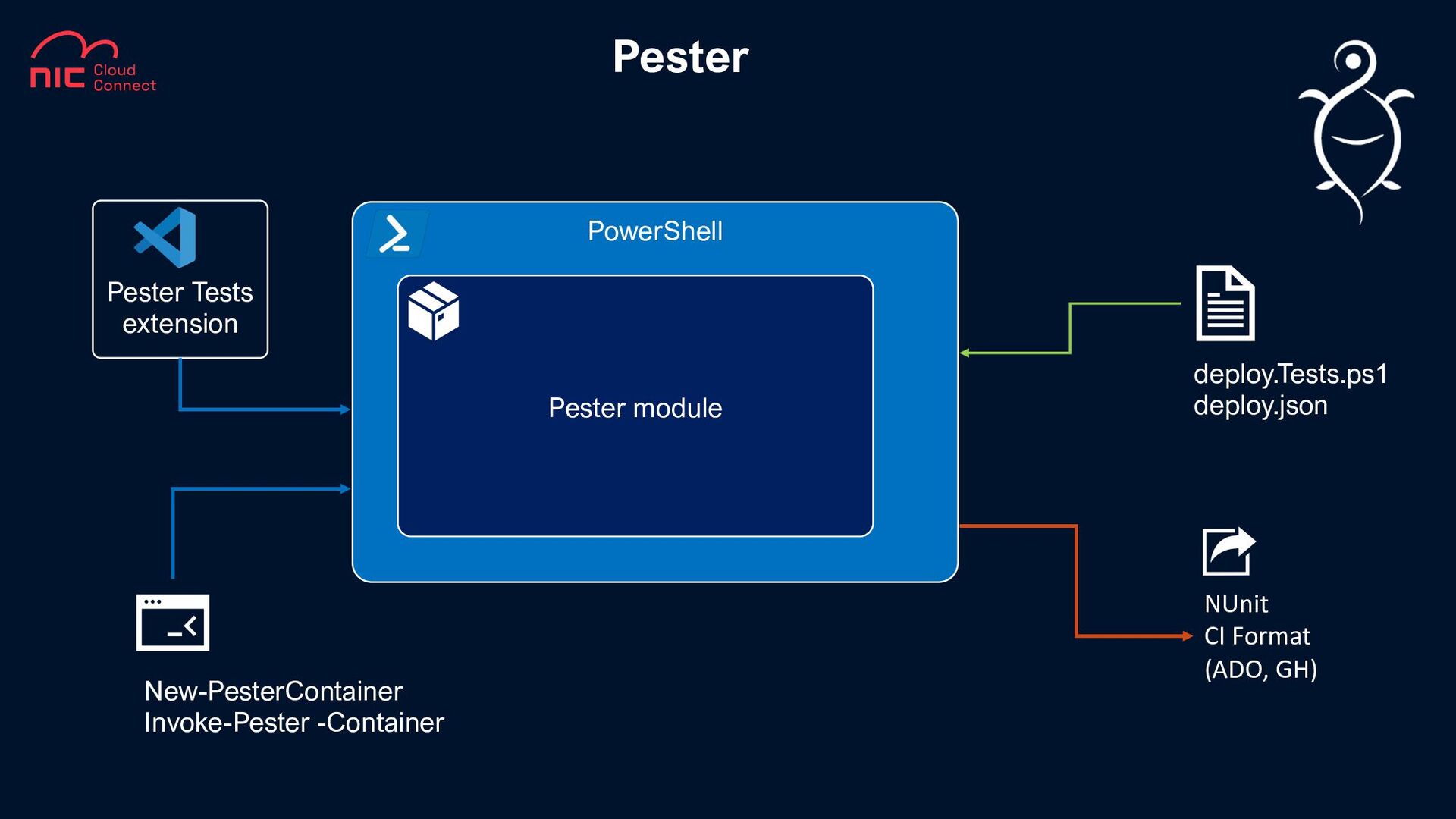
Pester PowerShell Pester module New-PesterContainer Invoke-Pester -Container Pester Tests extension
NUnit CI Format (ADO, GH) deploy.Tests.ps1 deploy.json -
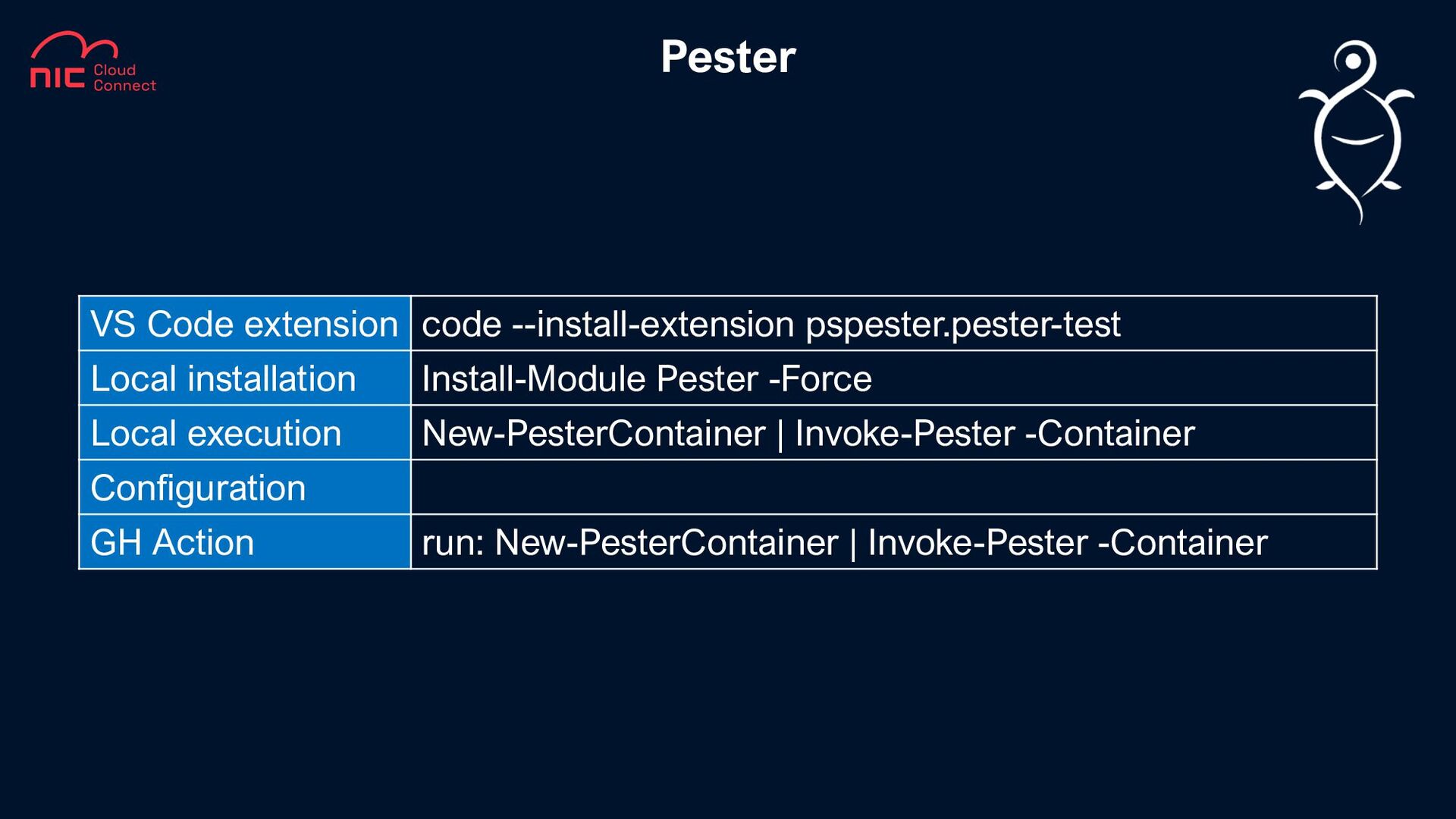
Pester VS Code extension code --install-extension pspester.pester-test Local installation Install-Module
Pester -Force Local execution New-PesterContainer | Invoke-Pester -Container Configuration GH Action run: New-PesterContainer | Invoke-Pester -Container -
PSRule for Azure PowerShell PSRule module PSRule.Rules.Azure module 400+ pre-defined
rules (tests) write your own tests (ps1, yaml, json) Assert-PSRule -InputPath . –Module ‘PSRule.Rules.Azure’ NUnit3 JSON, Yaml Markdown SARIF CSV Azure Monitor workspace deploy.bicep PSRule extension -
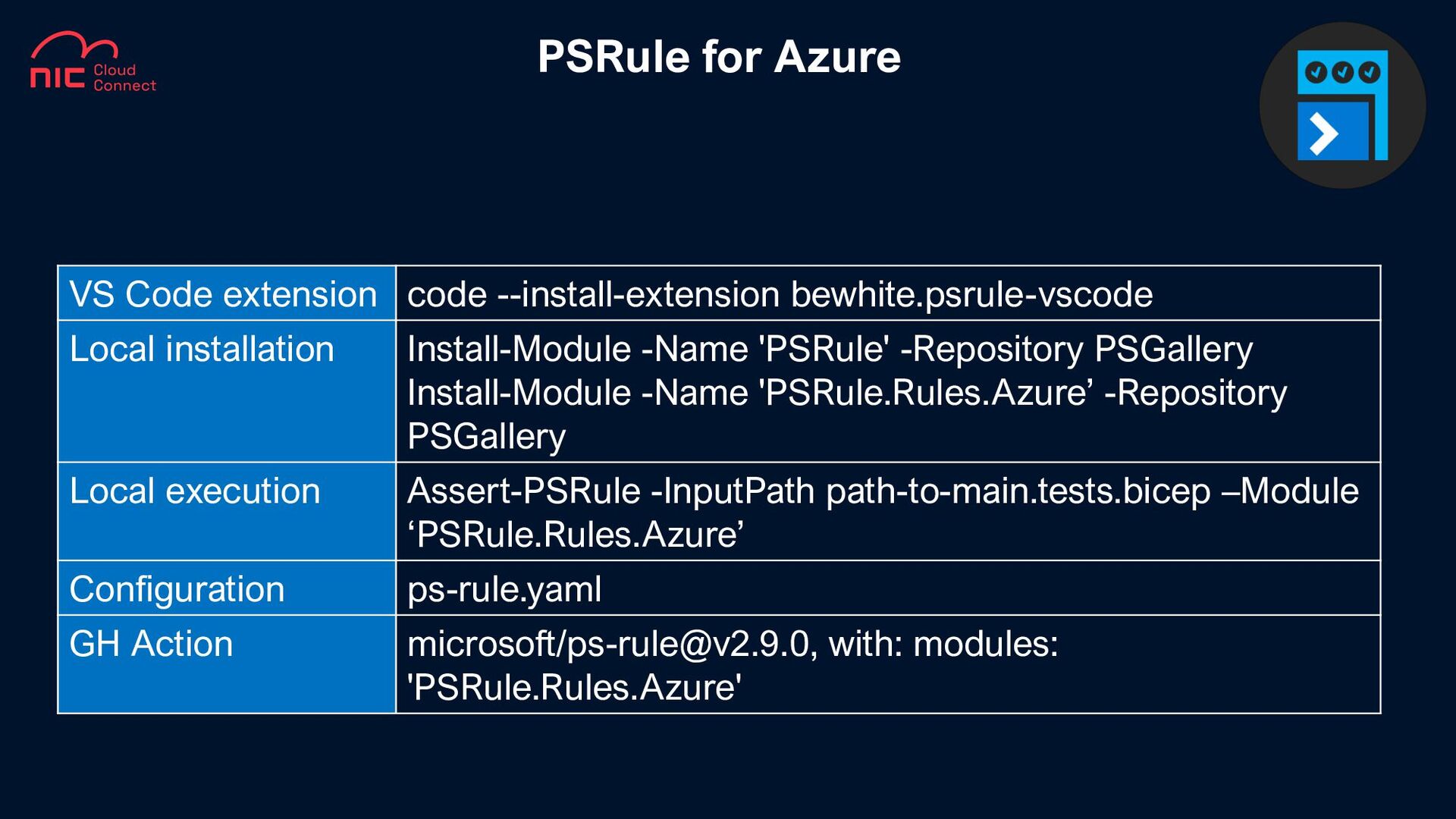
PSRule for Azure VS Code extension code --install-extension bewhite.psrule-vscode Local
installation Install-Module -Name 'PSRule' -Repository PSGallery Install-Module -Name 'PSRule.Rules.Azure’ -Repository PSGallery Local execution Assert-PSRule -InputPath path-to-main.tests.bicep –Module ‘PSRule.Rules.Azure’ Configuration ps-rule.yaml GH Action microsoft/[email protected], with: modules: 'PSRule.Rules.Azure' -
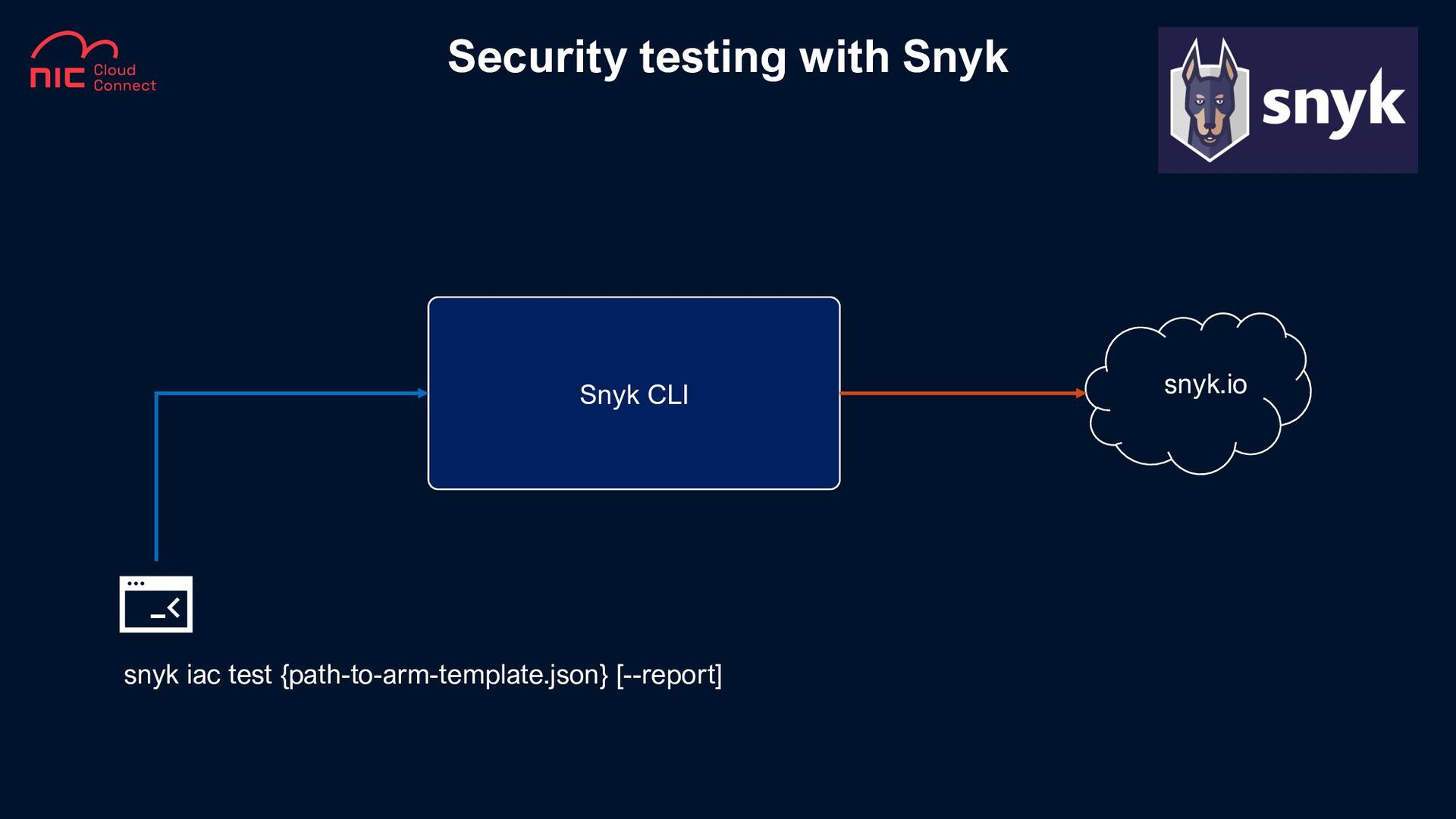
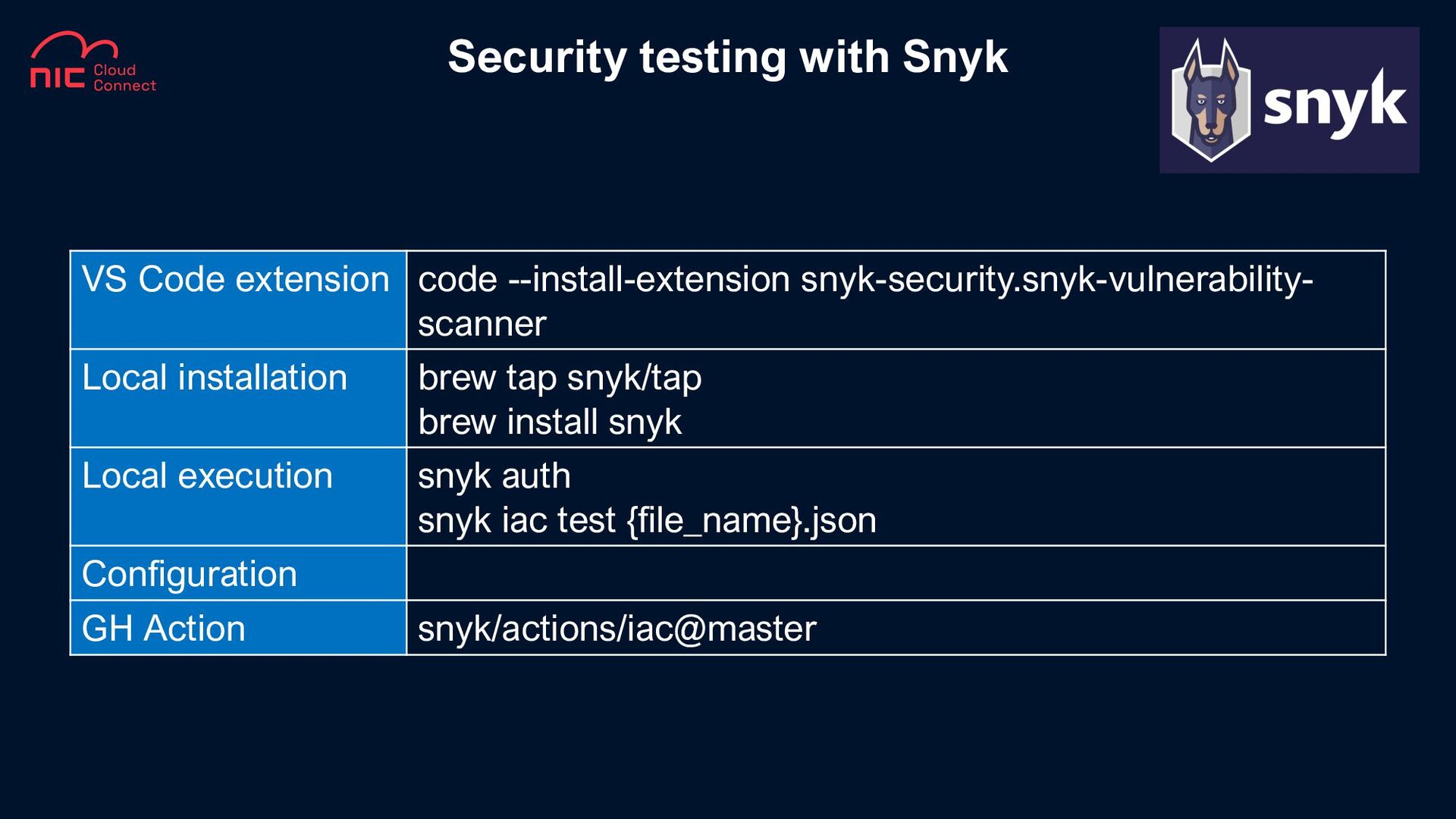
Security testing with Snyk VS Code extension code --install-extension snyk-security.snyk-vulnerability-
scanner Local installation brew tap snyk/tap brew install snyk Local execution snyk auth snyk iac test {file_name}.json Configuration GH Action snyk/actions/iac@master -
Security testing with KICS VS Code extension code --install-extension checkmarx.ast-results
Local installation Docker Local execution docker run -t -v {path_to_host_folder_to_scan}:/path checkmarx/kics:latest scan -p /path -o "/path/" Configuration GH Action Checkmarx/[email protected] -
Compliance with PSRule + EPAC PowerShell PSRule module PSRule.Rules.Azure module
EPAC module ps-rule.yaml global-settings.json Export-AzPolicyResources -DefinitionsRootFolder .\ -Mode psrule -OutputFolder .\ psrule.assignment.json Assert-PSRule –InputPath .\ -Module “PSRule.Rules.Azure” –Format File Export-AzPolicyAssignmentRuleData –AssignmentFile .\psrule.assignment.json –OutputPath .\ definitions-export- {guid}.Rule.jsonc -
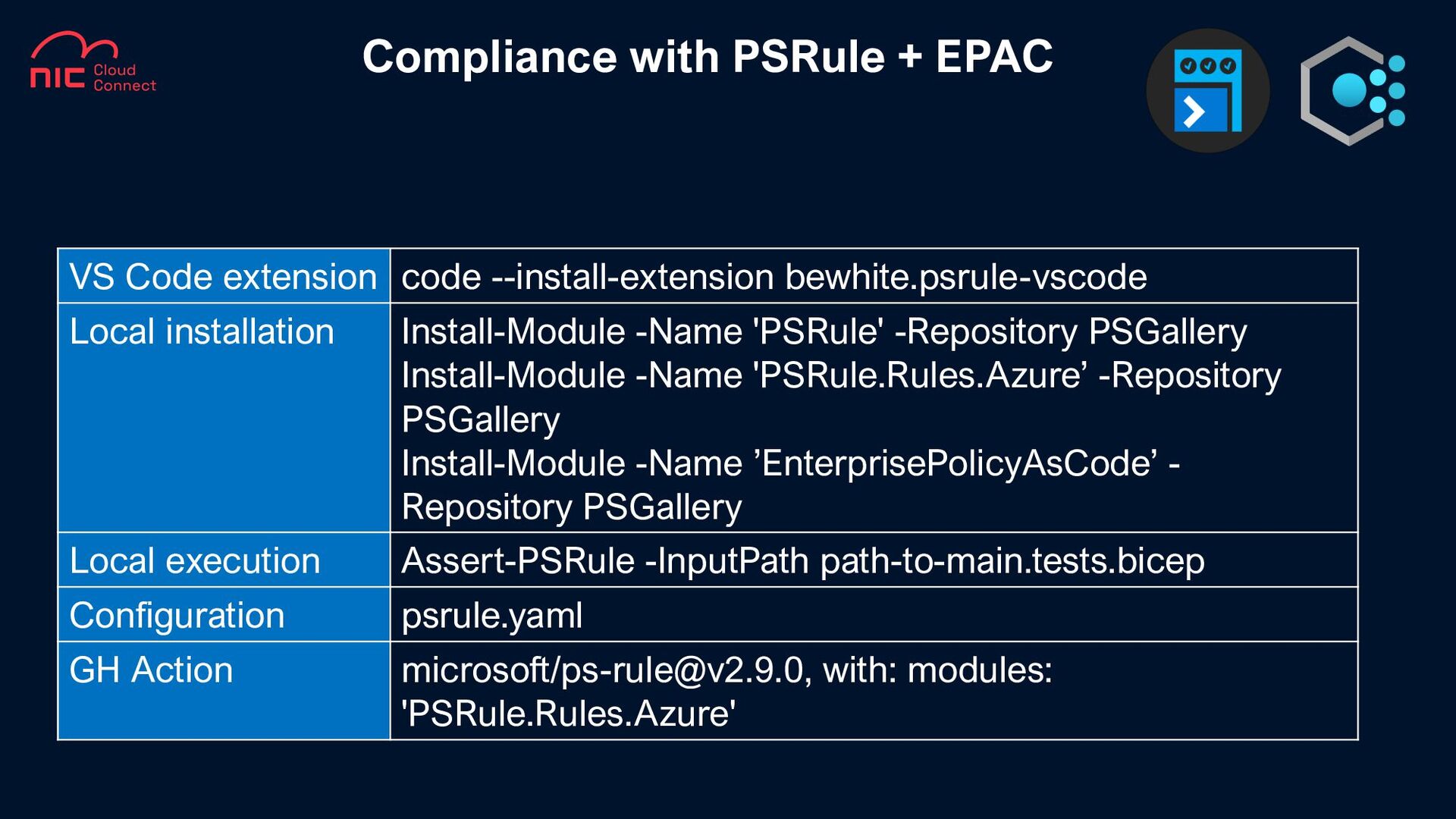
Compliance with PSRule + EPAC VS Code extension code --install-extension
bewhite.psrule-vscode Local installation Install-Module -Name 'PSRule' -Repository PSGallery Install-Module -Name 'PSRule.Rules.Azure’ -Repository PSGallery Install-Module -Name ’EnterprisePolicyAsCode’ - Repository PSGallery Local execution Assert-PSRule -InputPath path-to-main.tests.bicep Configuration psrule.yaml GH Action microsoft/[email protected], with: modules: 'PSRule.Rules.Azure' -
PowerShell Pester module Invoke-Pester –Configuration $config NUnit CI Format (ADO,
GH) Pester Tests extension BenchPress BenchPress.Azure module Az module $Env variables Deploy.Tests.ps1 -
BenchPress VS Code extension code --install-extension pspester.pester-test Local installation Install-Module
Pester -Force Install-Module Az -Force Install-Module -Name ‘BenchPress.Azure' -Repository PSGallery Local execution Invoke-Pester -Path .\File.Tests.ps1 Configuration Pester Configuration object GH Action azure/powershell@v1 -
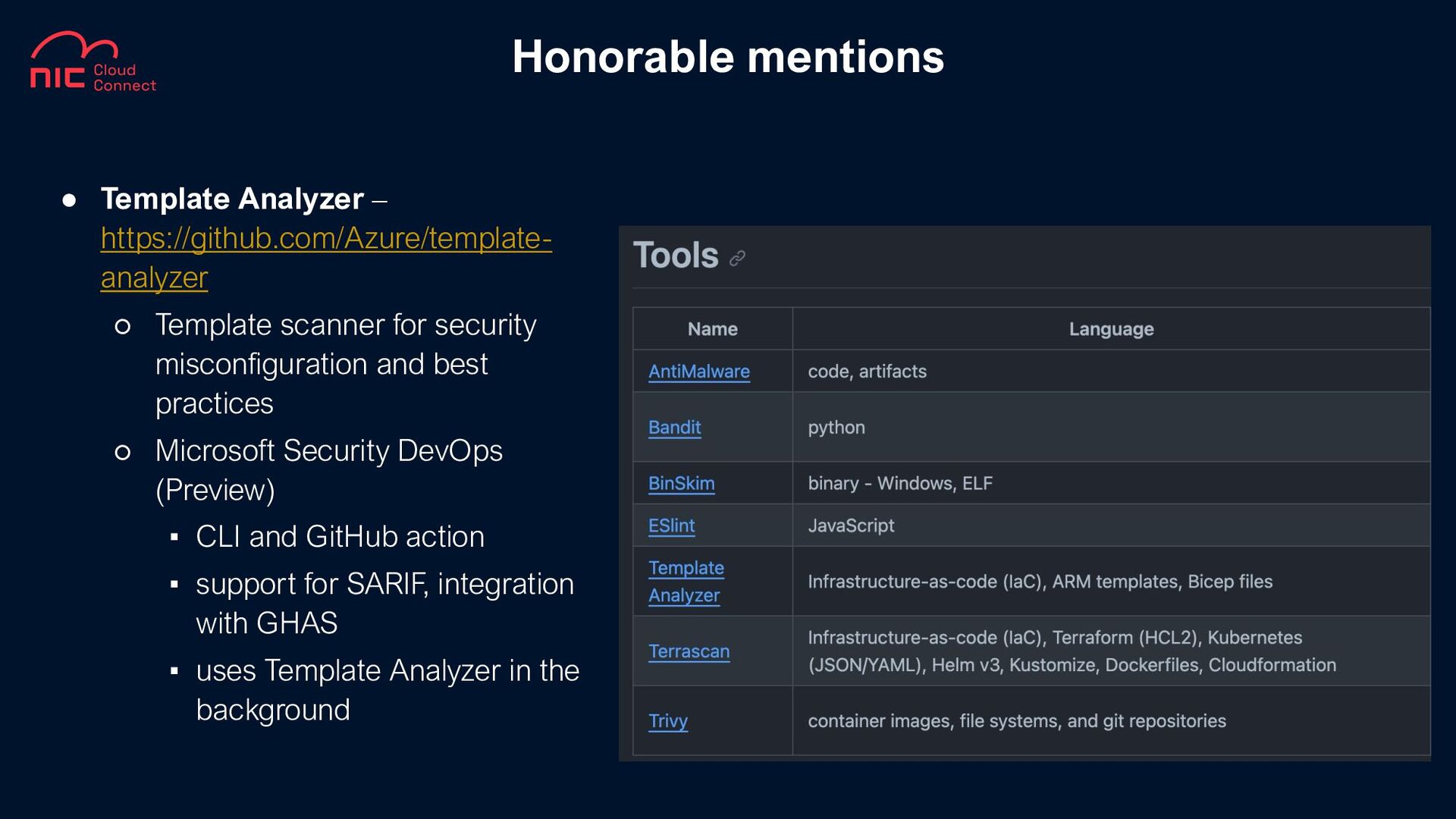
• Template Analyzer – https://github.com/Azure/template- analyzer ◦ Template scanner for
security misconfiguration and best practices ◦ Microsoft Security DevOps (Preview) ▪ CLI and GitHub action ▪ support for SARIF, integration with GHAS ▪ uses Template Analyzer in the background Honorable mentions -
What is Test-Driven Development? What benefits does it bring aka
What’s in it for me? Can TDD be really used for Infrastructure as Code practice? Can I re-use existing skills or learn a ton of new stuff? Who’s this guy speaking? Questions