professional development with PHP • They offer a philosophy and organized structures to easily maintain projects wri?ng less code and making work more fun
discipline 2. PHP is interpreted (not compiled) 3. Every ?me a script is loaded, should be interpreted by PHP 4. If a bytecode cache (like APC) isn’t used, syntax checking is performed every ?me
and func?ons are read at every request made. Disk reading is expensive in terms of performance 2. Modern frameworks use lazy loading technique (autoload) for load and execute only code needed 3. Con?nuous loading/interpre?ng could be expensive and impact your applica?on performance 4. When you use a framework most of the code remain the same across development. Why load and interpret it every ?me?
loaded together with PHP one time, on the web server dispatch process 2. Classes and functions provided by the extension are ready to use for any application 3. The code isn’t interpreted because it is compiled to a specific platform and processor
use the components you want without depending on a full stack 2. Low-‐level op?miza?ons provide the lowest overhead for MVC-‐based applica?ons 3. Interact with databases with maximum performance by using a C-‐language ORM for PHP 4. Phalcon is directly engaged with PHP, so it can directly access internal structures op?mizing execu?on as well
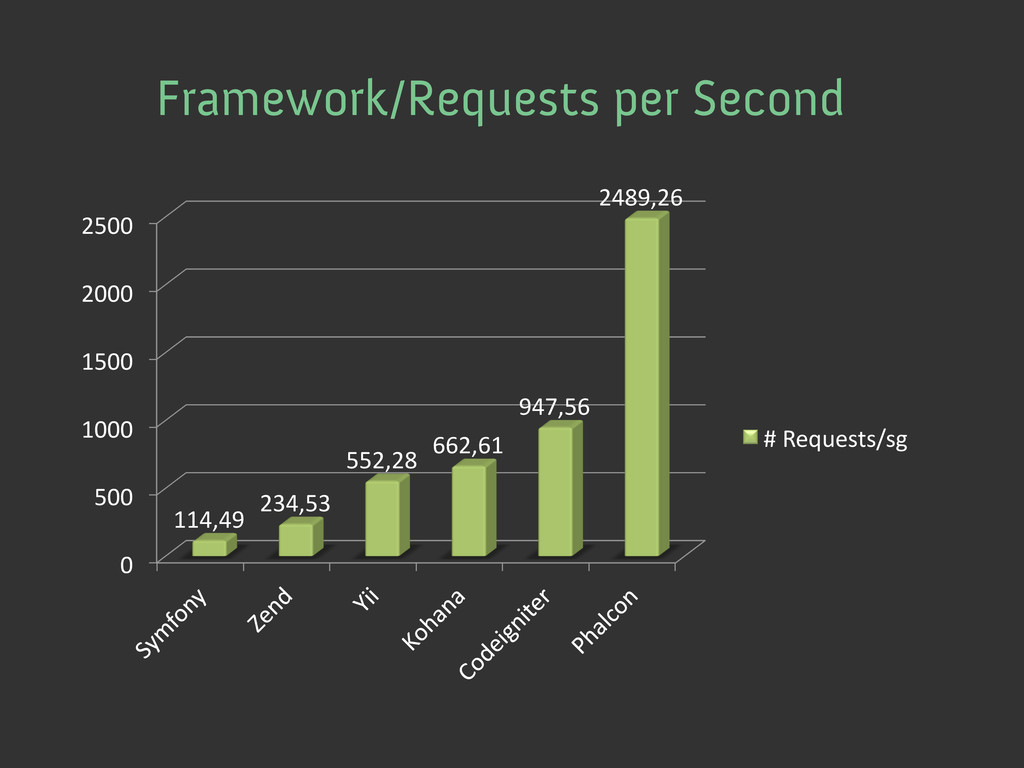
lines on each request Yes No Load dozens of files in each request Yes No Checking the existence of functions, methods, classes, constants at each request Yes No Low-level optimizations gaining microseconds for each request No Yes Compare how Phalcon is faster than other frameworks


 phalcon
 timakin
 ren8k
 carta_engineering
 nealle
 junjikoide
 hatahata021
 kasada
 keitah
 yosukeyoshida
 ryutakondo
 manabuseki
 takano0131
 garrettdimon
 jeffersonlam
 hannesfritz
 aleyda
 chriscoyier
 chikuwait
 cassininazir
 honzajavorek
 addyosmani
 quramy
 cargoodrich
 geshan