Upgrade to Pro
— share decks privately, control downloads, hide ads and more …
Speaker Deck
Sign up for free
Menu
Search
Features
All features
Private URLs
Password Protection
Custom URLS
Scheduled publishing
Remove Branding
Restrict embedding
Deck Collections
Notes
Features
All features
Private URLs
Password Protection
Custom URLS
Scheduled publishing
Remove Branding
Restrict embedding
Deck Collections
Notes
Explore
Featured decks
Featured speakers
Programming
Technology
Storyboards
Explore
Featured decks
Featured speakers
Programming
Technology
Storyboards
Pricing
Search
Sign in
Sign up for free
Tasing Managerによるマッピング方法
Search
Sponsored
·
Your Podcast. Everywhere. Effortlessly.
Share. Educate. Inspire. Entertain. You do you. We'll handle the rest.
→
Rikako
July 05, 2017
Education
92
0
Share
Embed
Copy iframe code
Copy JS code
Copy link
Start on current slide
Tasing Managerによるマッピング方法
Tasking Managerによるマッピング方法
Rikako
July 05, 2017
More Decks by Rikako
See All by Rikako
野末提出物
rikakonozue
0
40
Rikako Nozue
rikakonozue
0
90
Other Decks in Education
See All in Education
HTML5 and the Open Web Platform - Lecture 3 - Web Technologies (1019888BNR)
signer
PRO
3
3.6k
日本における応用言語学・言語教育学 これまでとこれから
terasawat
0
170
El Clima de España. Tema 2 (PPT)
juanmartin2026
0
19k
セキュリティ担当がいない中小医療機関を院外のRISSはどう支えるべきか / How External RISS Can Help Small Medical Institutions
eller86
1
230
GENERAL PHARMACOLOGY
pawan_pharm
0
210
新入社員を「あの子」と呼ばない運動 -PBL その前に- / Stop Calling New Hires "Kids"
aokiplayer
2
930
General Introduction, Composition, Chemistry & Chemical Classes, Biosources, Therapeutic uses and Commercial Application of Secondary Metabolites.
drpoonamkc
0
170
1人 × AI、1か月でここまで作れる ー 数年前の外注換算3.8〜7.4億円・241〜379人月分の作業を、AI費用 約10万円・31日で
frievea
0
580
Réunion des directrices et directeurs des écoles de la circonscription de Jonzac - 31 août 2026
fmarot
0
160
Merger Process
bvr7352
0
170
Introduction to M&A
bvr7352
0
240
INTRODUCTION TO THE CELL
pawan_pharm
0
330
Featured
See All Featured
Self-Hosted WebAssembly Runtime for Runtime-Neutral Checkpoint/Restore in Edge–Cloud Continuum
chikuwait
0
890
The Mindset for Success: Future Career Progression
greggifford
PRO
0
540
How to Ace a Technical Interview
jacobian
280
24k
Leo the Paperboy
mayatellez
10
2.4k
ラッコキーワード サービス紹介資料
rakko
1
5.4M
Dealing with People You Can't Stand - Big Design 2015
cassininazir
367
27k
HU Berlin: Industrial-Strength Natural Language Processing with spaCy and Prodigy
inesmontani
PRO
0
750
<Decoding/> the Language of Devs - We Love SEO 2024
nikkihalliwell
1
360
Fight the Zombie Pattern Library - RWD Summit 2016
marcelosomers
234
18k
Intergalactic Javascript Robots from Outer Space
tanoku
273
28k
[SF Ruby Conf 2025] Rails X
palkan
3
1.5k
Thoughts on Productivity
jonyablonski
76
5.4k
Transcript
Tasking Manager マニュアル 1A117123 野末 梨香子
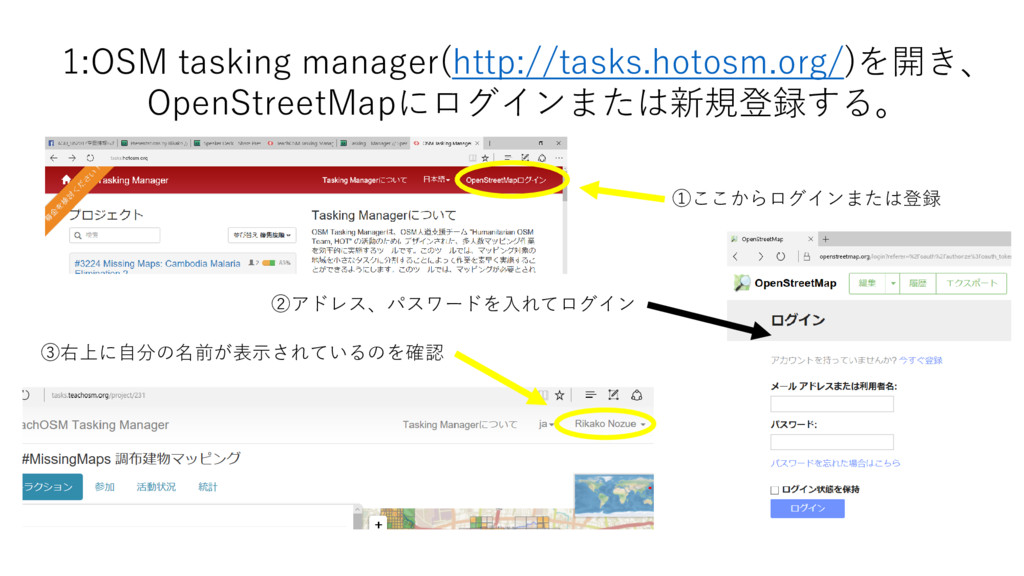
1:OSM tasking manager(http://tasks.hotosm.org/)を開き、 OpenStreetMapにログインまたは新規登録する。 ①ここからログインまたは登録 ②アドレス、パスワードを入れてログイン ③右上に自分の名前が表示されているのを確認
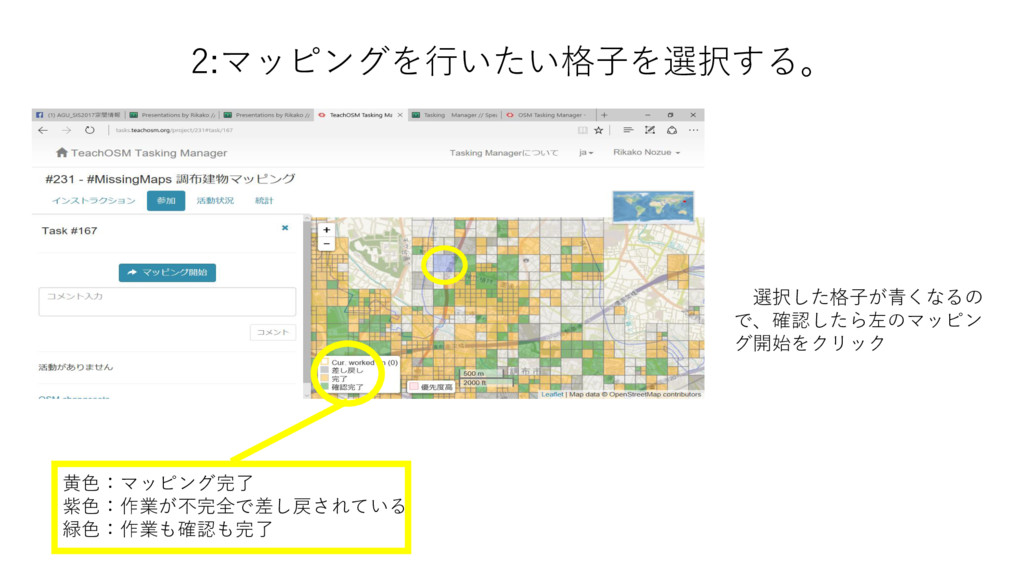
2:マッピングを行いたい格子を選択する。 黄色:マッピング完了 紫色:作業が不完全で差し戻されている 緑色:作業も確認も完了 選択した格子が青くなるの で、確認したら左のマッピン グ開始をクリック
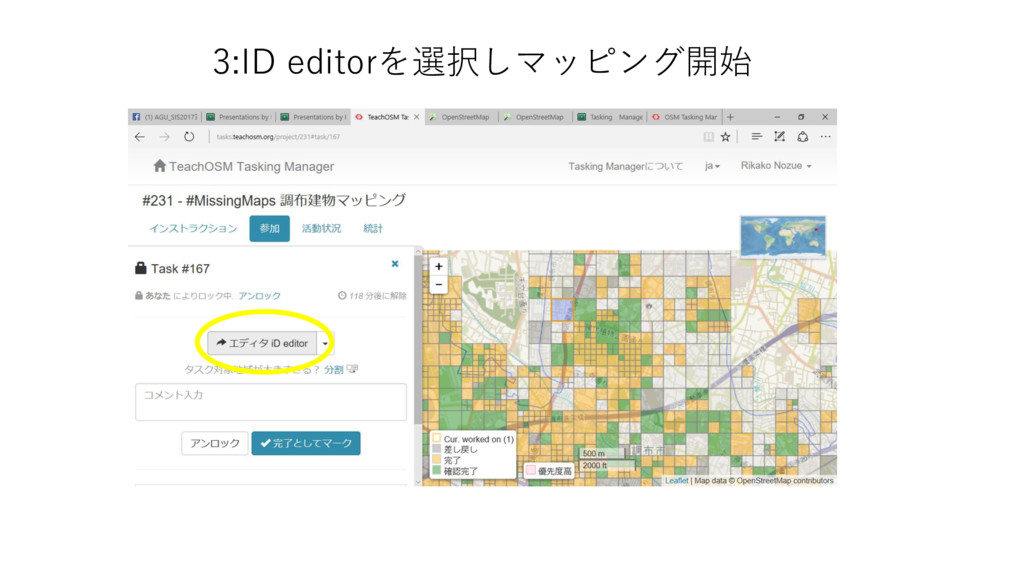
3:ID editorを選択しマッピング開始
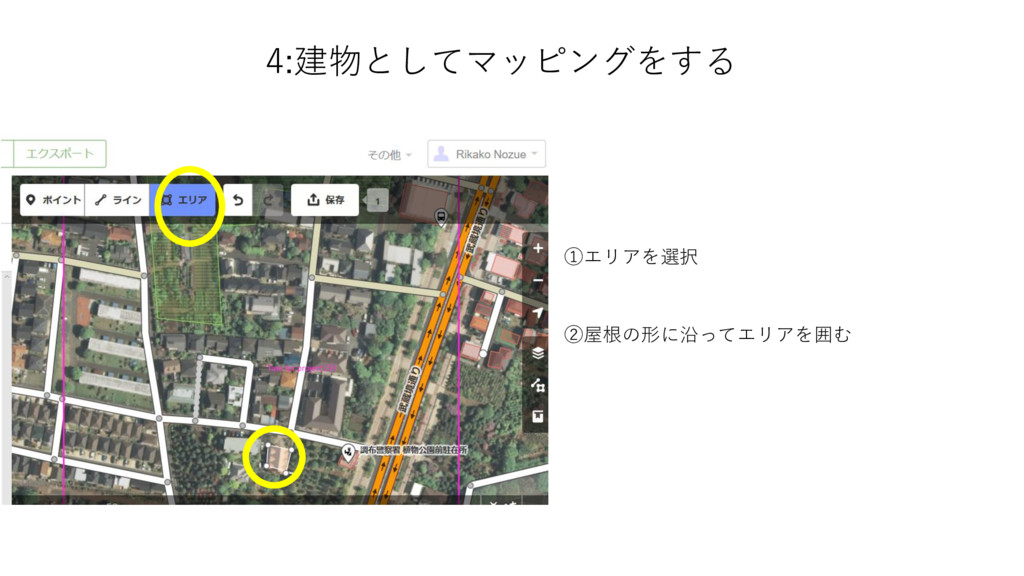
4:建物としてマッピングをする ①エリアを選択 ②屋根の形に沿ってエリアを囲む
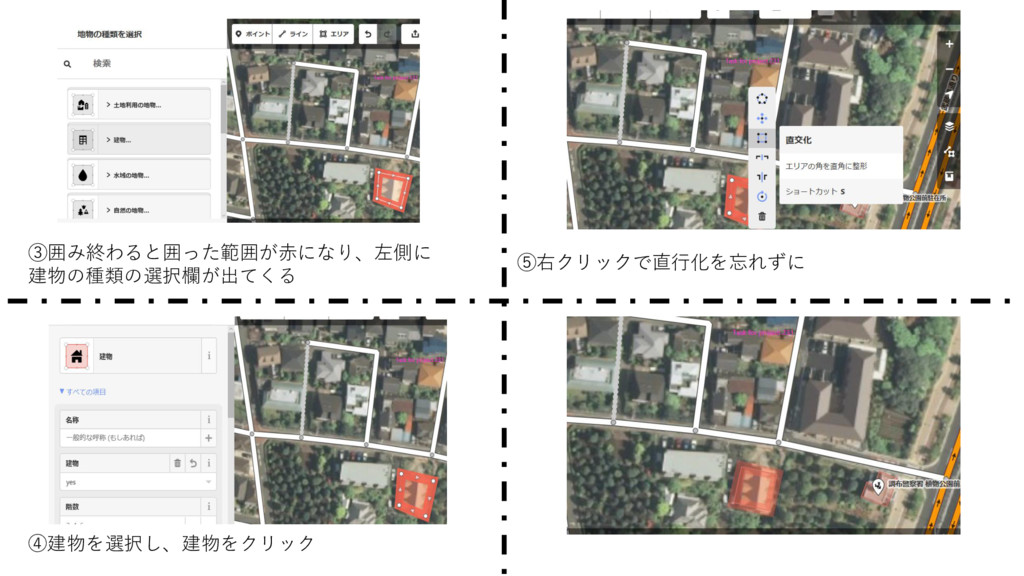
③囲み終わると囲った範囲が赤になり、左側に 建物の種類の選択欄が出てくる ④建物を選択し、建物をクリック ⑤右クリックで直行化を忘れずに
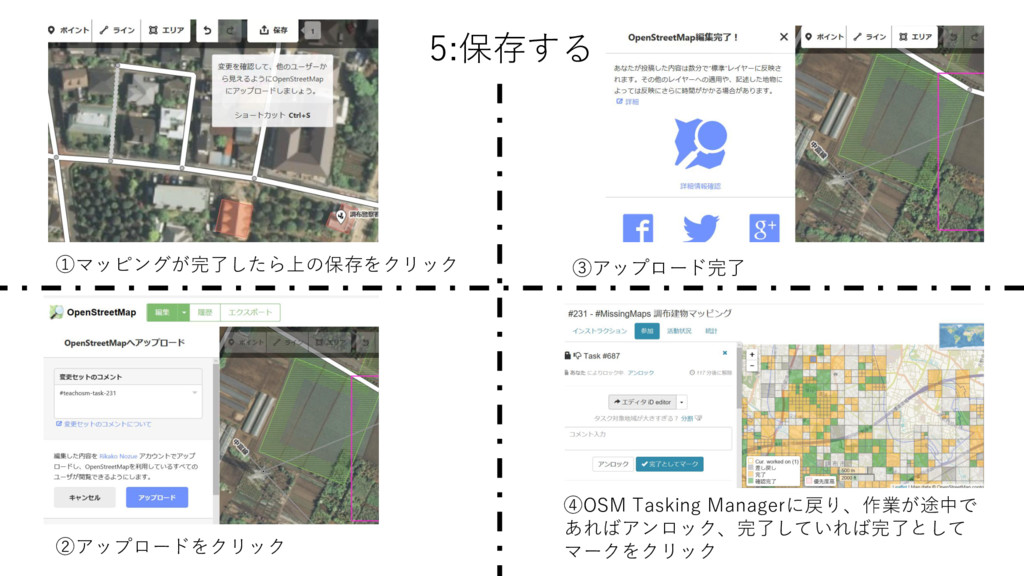
5:保存する ①マッピングが完了したら上の保存をクリック ②アップロードをクリック ③アップロード完了 ④OSM Tasking Managerに戻り、作業が途中で あればアンロック、完了していれば完了として マークをクリック
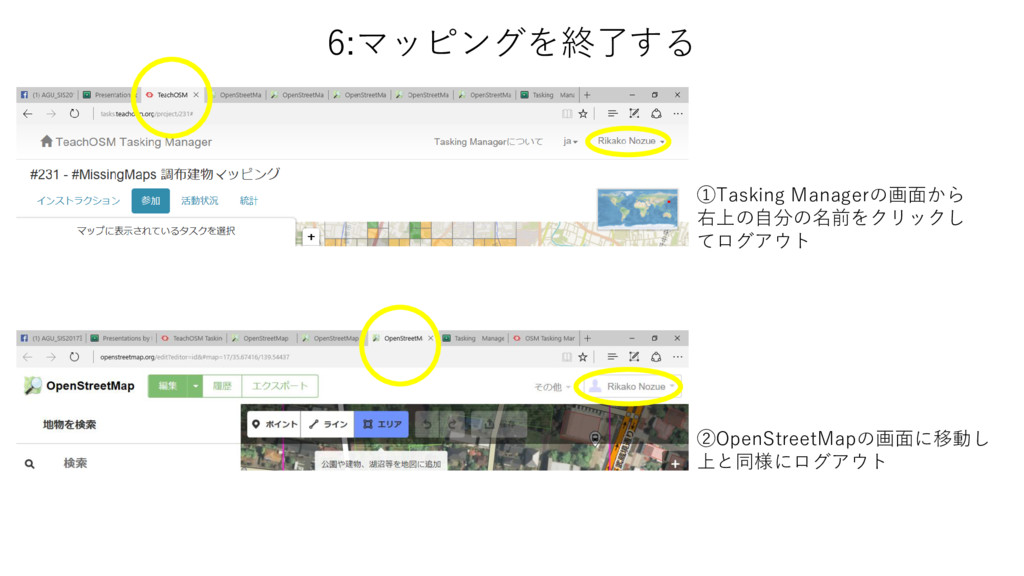
6:マッピングを終了する ①Tasking Managerの画面から 右上の自分の名前をクリックし てログアウト ②OpenStreetMapの画面に移動し 上と同様にログアウト

 Your Podcast. Everywhere. Effortlessly.


 rikakonozue
 signer
 terasawat
 juanmartin2026
 eller86
 pawan_pharm
 aokiplayer
 drpoonamkc
 frievea
 fmarot
 bvr7352
 chikuwait
 greggifford
 jacobian
 mayatellez
 rakko
rakko
 cassininazir
 inesmontani
 nikkihalliwell
 marcelosomers
 tanoku
 palkan
 jonyablonski