Upgrade to Pro — share decks privately, control downloads, hide ads and more …

5. ScalarDB Cluster Development - CRUD Application

Sponsored · SiteGround - Reliable hosting with speed, security, and support you can count on.

5. ScalarDB Cluster Development - CRUD Application

本資料は、ScalarDB Clusterを用いたJava APIによるCRUDアプリケーションの開発手順と具体的な動作確認方法について解説するトレーニング資料です。

GitHubで公開されているサンプルコードをベースに、開発環境のセットアップから基本的なデータ操作、さらには複数テーブルをまたぐ分散トランザクション処理までをステップバイステップで説明します。

【主な内容】
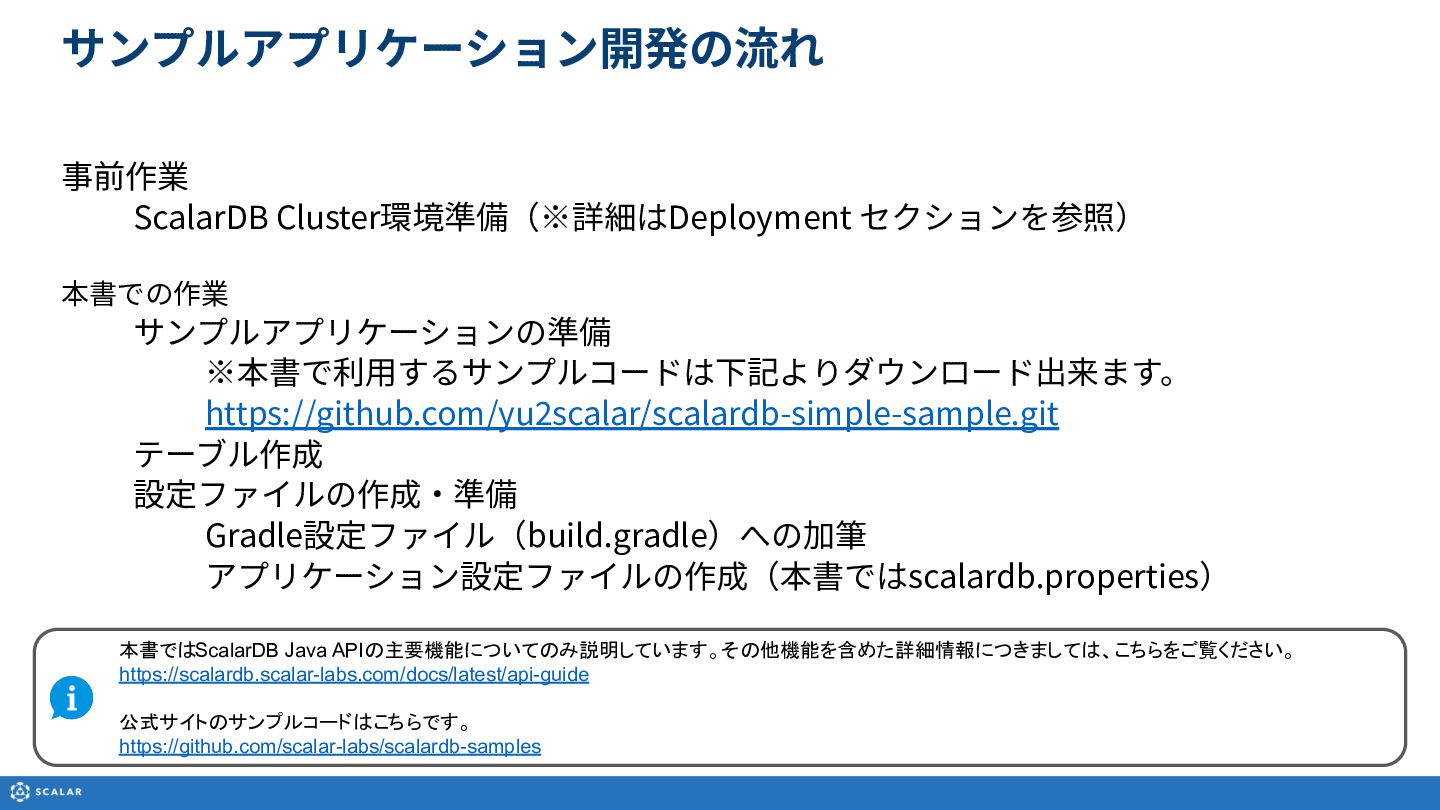
・サンプルアプリケーション開発の流れ
・Java開発環境の準備(build.gradleおよびscalardb.propertiesの設定)
・サンプルアプリケーション用テーブルの作成(Schema Loaderの利用およびAdministrative APIでの作成例)
・ScalarDB Java APIを使ったCRUDアプリケーションの実装フロー
・各操作のサンプルコード解説(Insert、Get、Scan、Update、Delete、Upsert)
・複数テーブル間のトランザクション処理の実装例

【関連リンク】
公式ドキュメント:
https://scalardb.scalar-labs.com/docs/latest/

本資料で使用するサンプルコード:
https://github.com/yu2scalar/scalardb-simple-sample.git

公式のサンプルコード:
https://github.com/scalar-labs/scalardb-samples

※本資料はバージョン 3.15.1 をベースに作成されています。

Avatar for Scalar, Inc.

Scalar, Inc. PRO

May 18, 2026

More Decks by Scalar, Inc.

Other Decks in Technology

Transcript

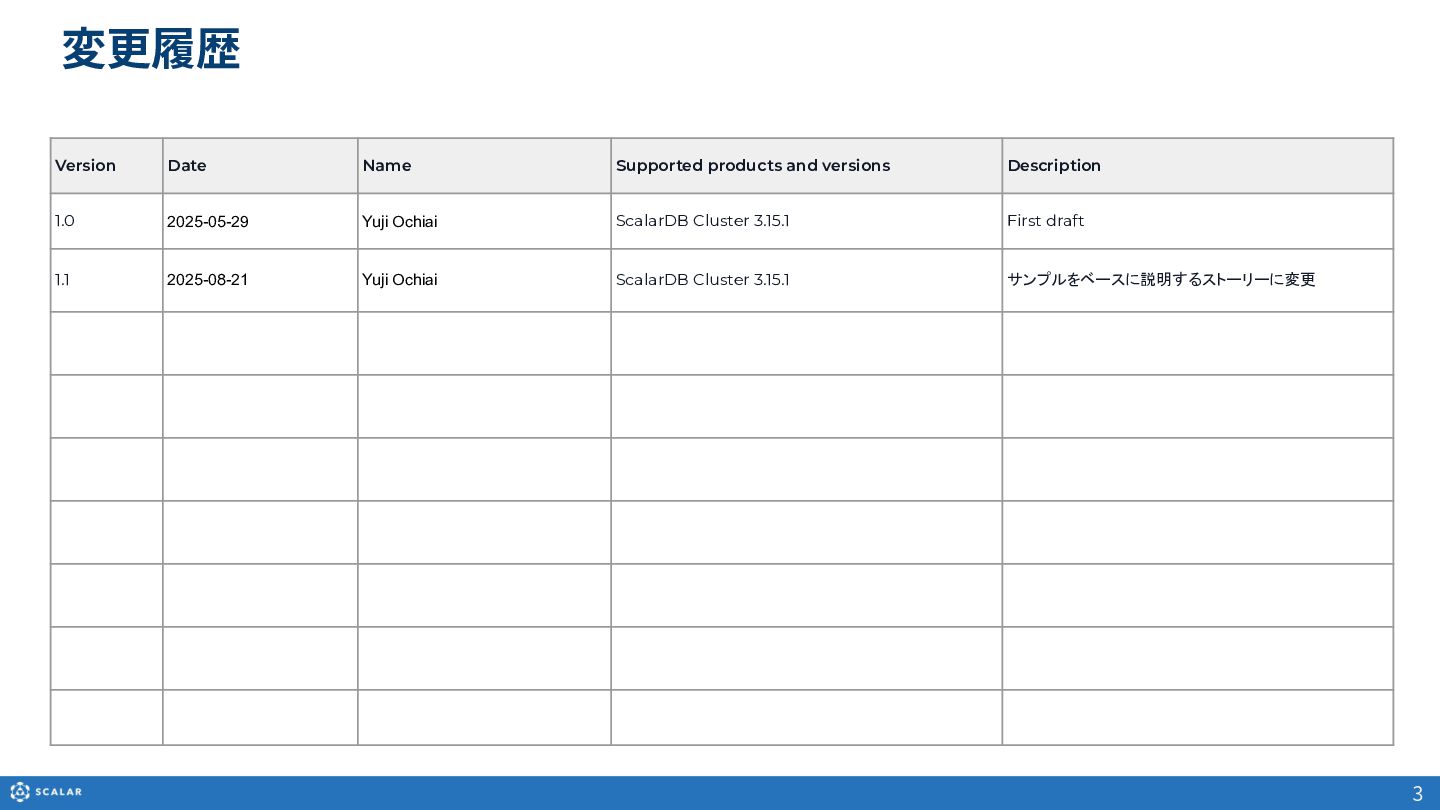
  1. 3 変更履歴 Version Date Name Supported products and versions Description

    1.0 2025-05-29 Yuji Ochiai ScalarDB Cluster 3.15.1 First draft 1.1 2025-08-21 Yuji Ochiai ScalarDB Cluster 3.15.1 サンプルをベースに説明するストーリーに変更
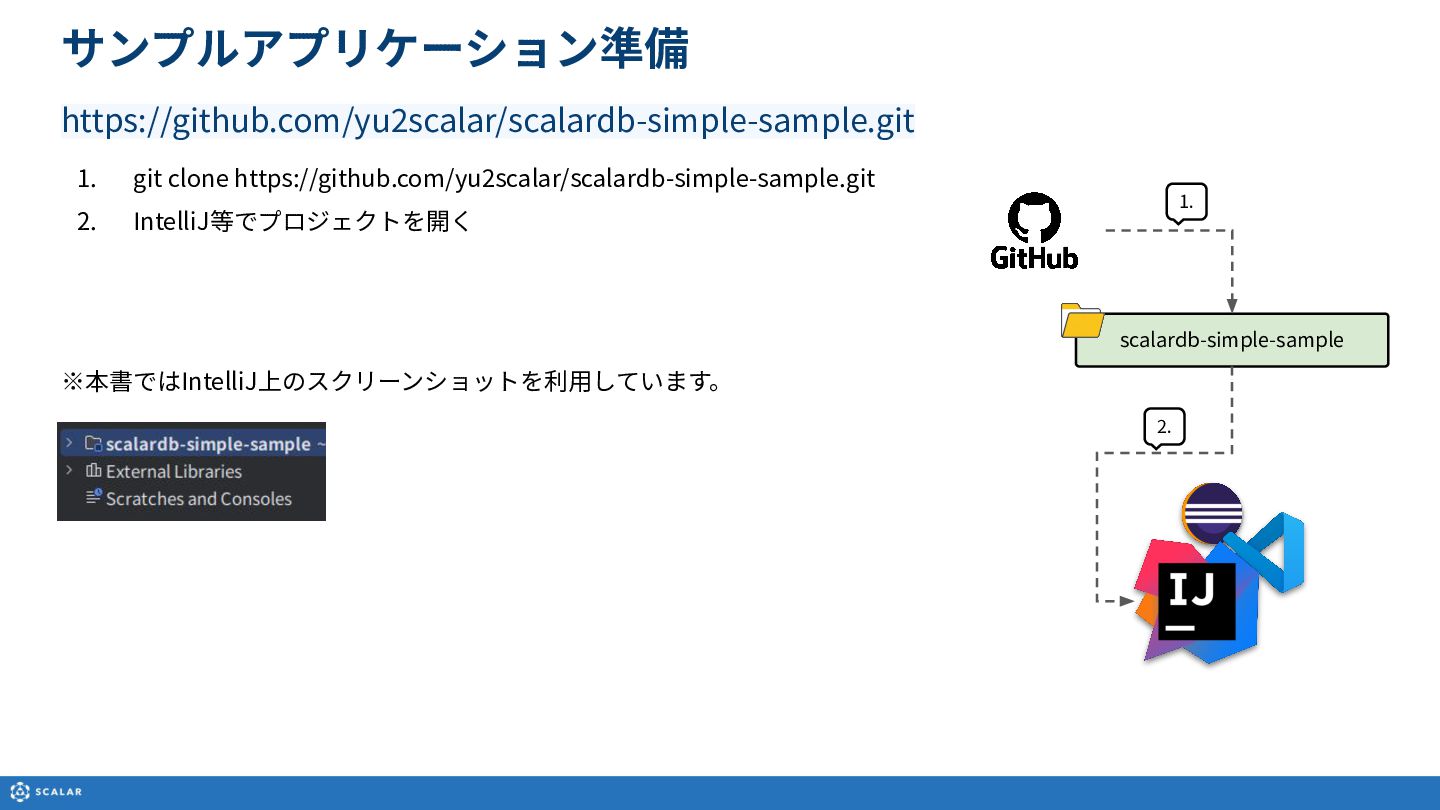
  2. サンプルアプリケーション開発の流れ 事前作業 ScalarDB Cluster環境準備(※詳細はDeployment セクションを参照) 本書での作業 サンプルアプリケーションの準備 ※本書で利⽤するサンプルコードは下記よりダウンロード出来ます。 https://github.com/yu2scalar/scalardb-simple-sample.git テーブル作成

    設定ファイルの作成‧準備 Gradle設定ファイル(build.gradle)への加筆 アプリケーション設定ファイルの作成(本書ではscalardb.properties) 本書ではScalarDB Java APIの主要機能についてのみ説明しています。その他機能を含めた詳細情報につきましては、こちらをご覧ください。 https://scalardb.scalar-labs.com/docs/latest/api-guide 公式サイトのサンプルコードはこちらです。 https://github.com/scalar-labs/scalardb-samples
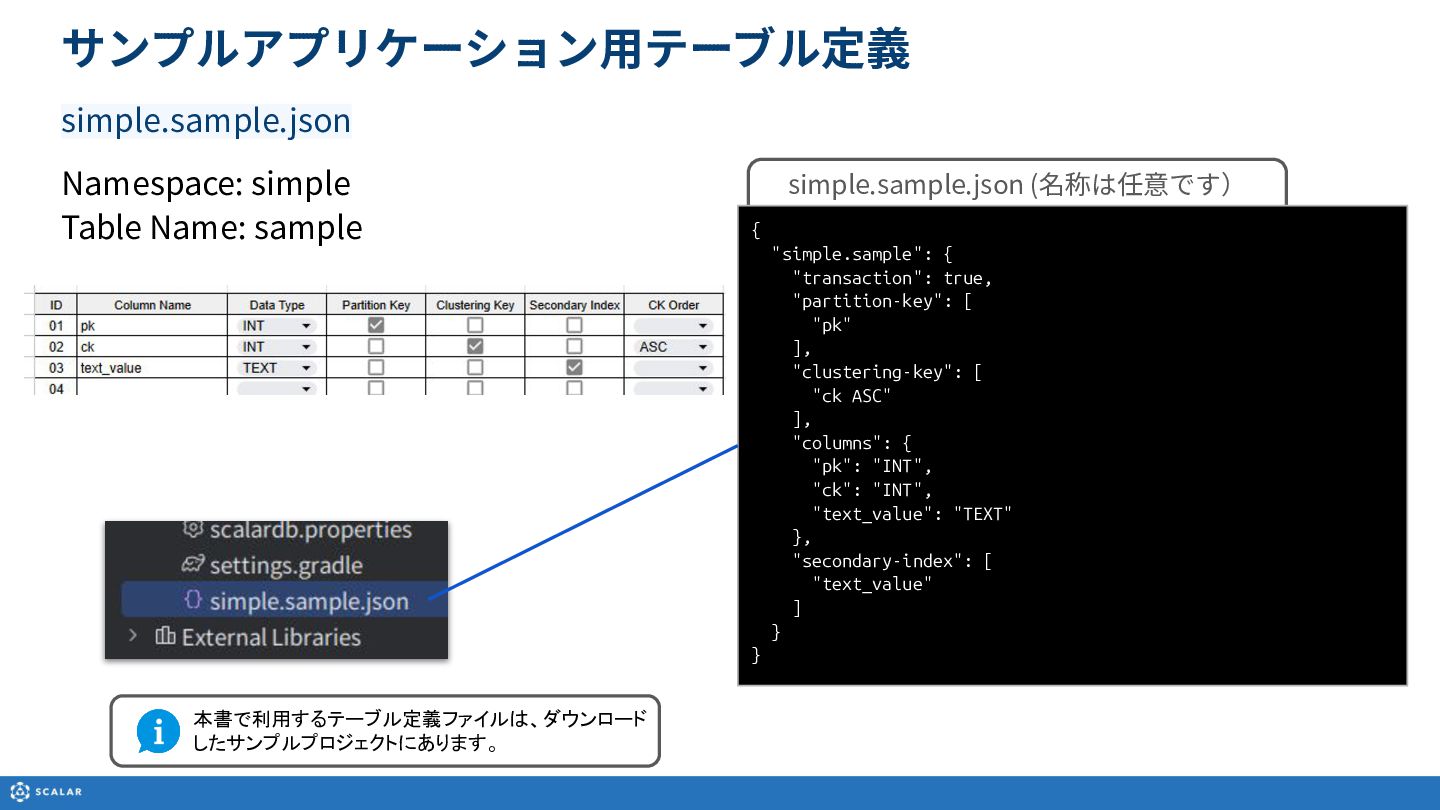
  3. サンプルアプリケーション⽤テーブル定義 simple.sample.json Namespace: simple Table Name: sample simple.sample.json (名称は任意です) {

    "simple.sample": { "transaction": true, "partition-key": [ "pk" ], "clustering-key": [ "ck ASC" ], "columns": { "pk": "INT", "ck": "INT", "text_value": "TEXT" }, "secondary-index": [ "text_value" ] } } 本書で利用するテーブル定義ファイルは、ダウンロード したサンプルプロジェクトにあります。
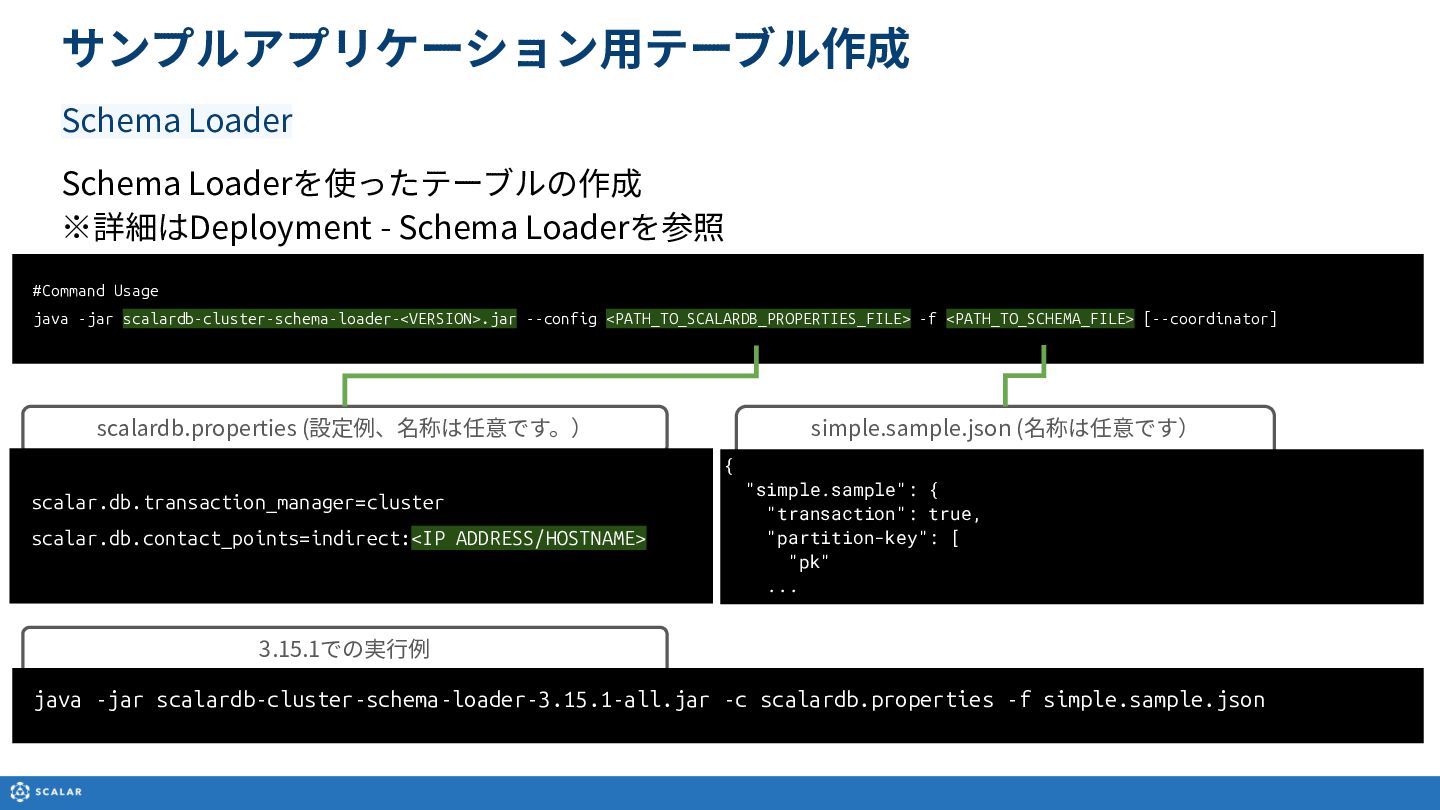
  4. simple.sample.json (名称は任意です) サンプルアプリケーション⽤テーブル作成 Schema Loader #Command Usage java -jar scalardb-cluster-schema-loader-<VERSION>.jar

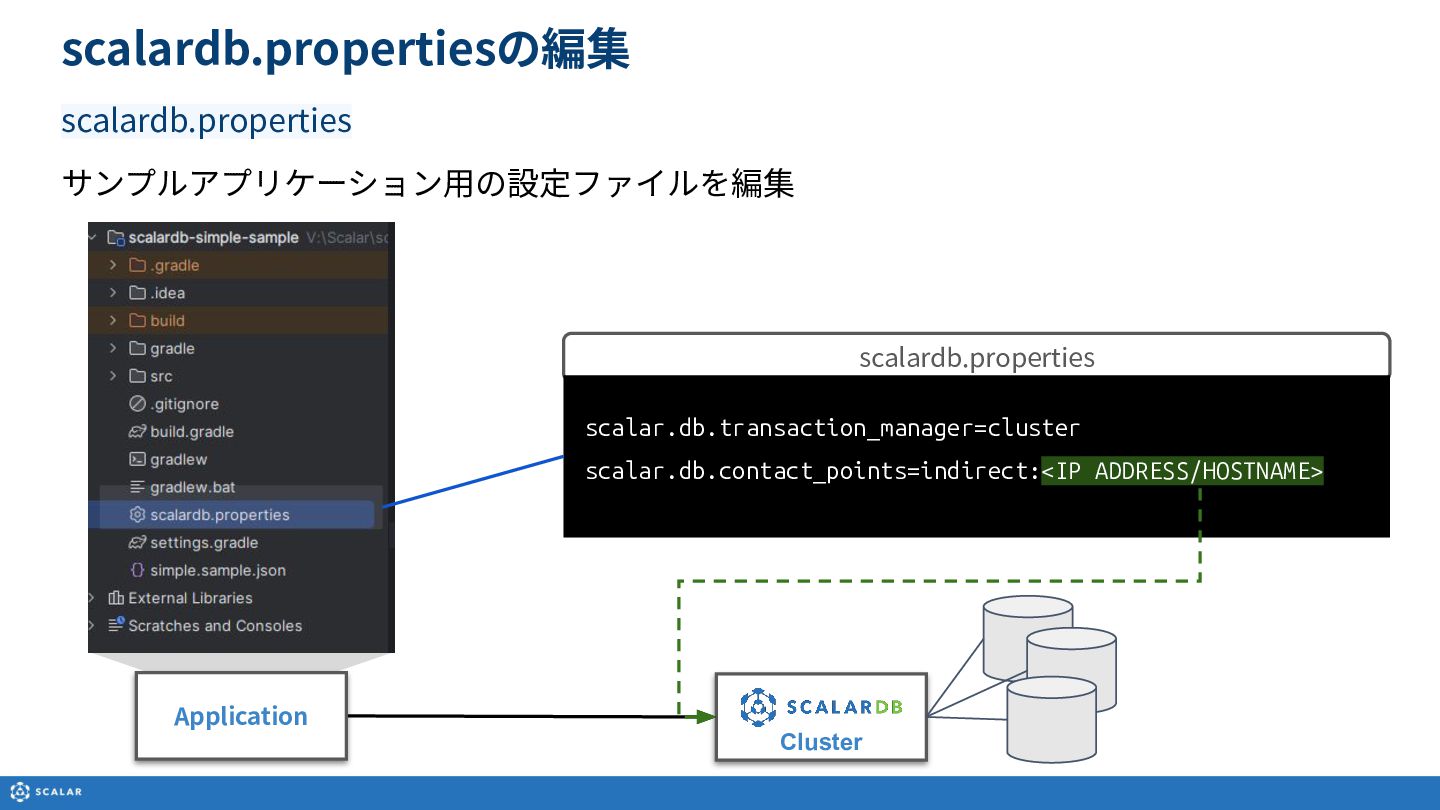
    --config <PATH_TO_SCALARDB_PROPERTIES_FILE> -f <PATH_TO_SCHEMA_FILE> [--coordinator] scalardb.properties (設定例、名称は任意です。) scalar.db.transaction_manager=cluster scalar.db.contact_points=indirect:<IP ADDRESS/HOSTNAME> { "simple.sample": { "transaction": true, "partition-key": [ "pk" ... Schema Loaderを使ったテーブルの作成 ※詳細はDeployment - Schema Loaderを参照 3.15.1での実⾏例 java -jar scalardb-cluster-schema-loader-3.15.1-all.jar -c scalardb.properties -f simple.sample.json
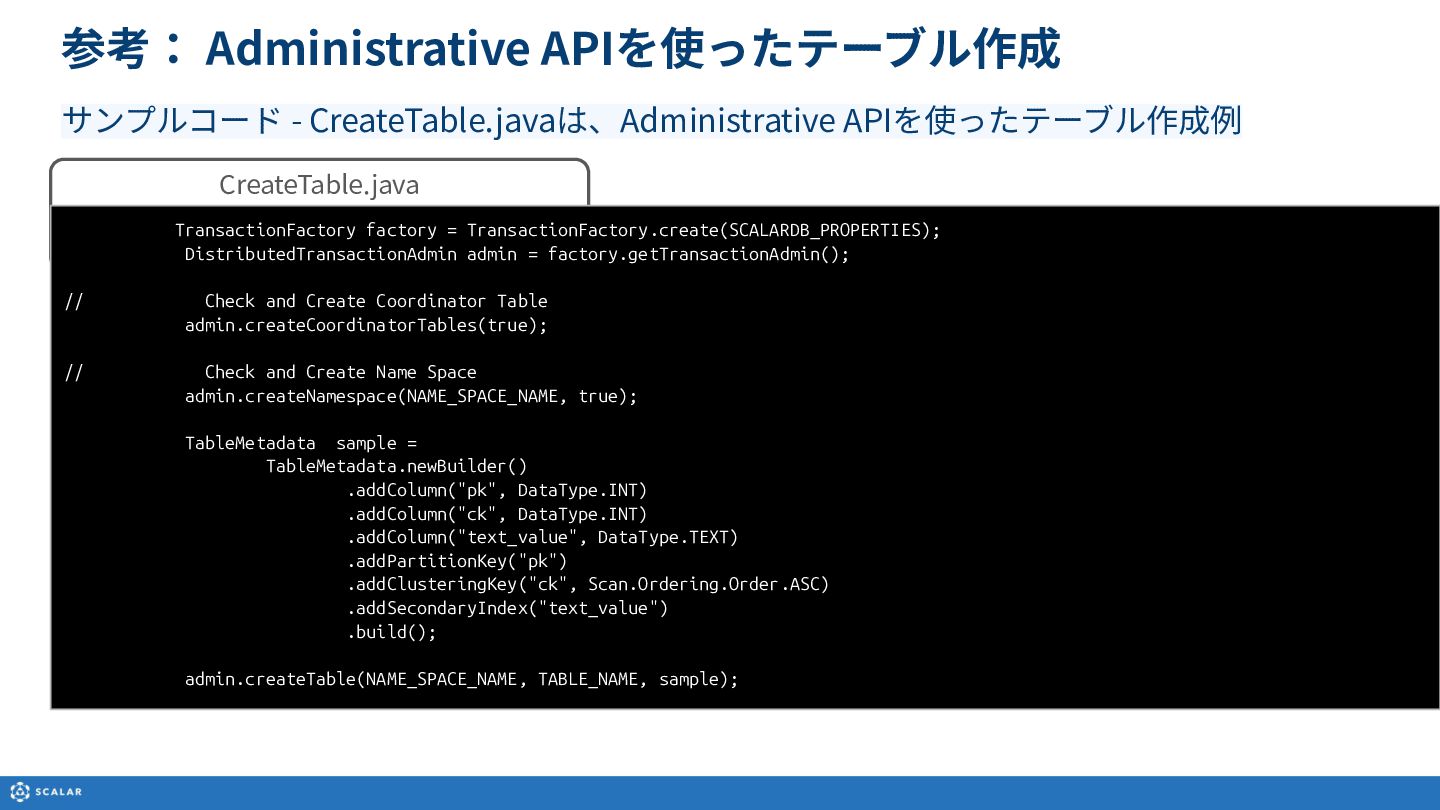
  5. 参考: Administrative APIを使ったテーブル作成 サンプルコード - CreateTable.javaは、Administrative APIを使ったテーブル作成例 CreateTable.java TransactionFactory factory

    = TransactionFactory.create(SCALARDB_PROPERTIES); DistributedTransactionAdmin admin = factory.getTransactionAdmin(); // Check and Create Coordinator Table admin.createCoordinatorTables(true); // Check and Create Name Space admin.createNamespace(NAME_SPACE_NAME, true); TableMetadata sample = TableMetadata.newBuilder() .addColumn("pk", DataType.INT) .addColumn("ck", DataType.INT) .addColumn("text_value", DataType.TEXT) .addPartitionKey("pk") .addClusteringKey("ck", Scan.Ordering.Order.ASC) .addSecondaryIndex("text_value") .build(); admin.createTable(NAME_SPACE_NAME, TABLE_NAME, sample);
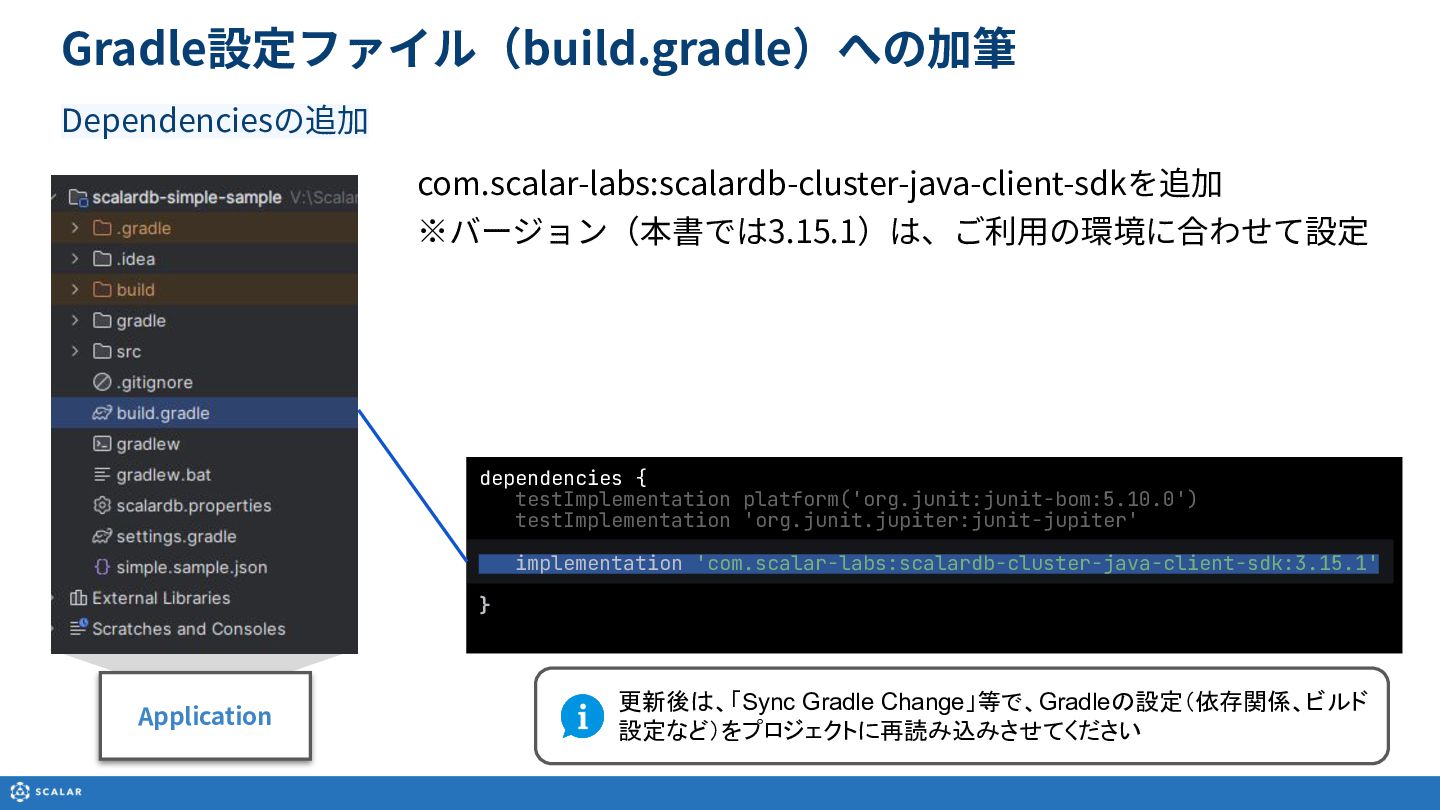
  6. com.scalar-labs:scalardb-cluster-java-client-sdkを追加 ※バージョン(本書では3.15.1)は、ご利⽤の環境に合わせて設定 Gradle設定ファイル(build.gradle)への加筆 Dependenciesの追加 dependencies { testImplementation platform('org.junit:junit-bom:5.10.0') testImplementation 'org.junit.jupiter:junit-jupiter'

    implementation 'com.scalar-labs:scalardb-cluster-java-client-sdk:3.15.1' } 更新後は、「Sync Gradle Change」等で、Gradleの設定(依存関係、ビルド 設定など)をプロジェクトに再読み込みさせてください Application
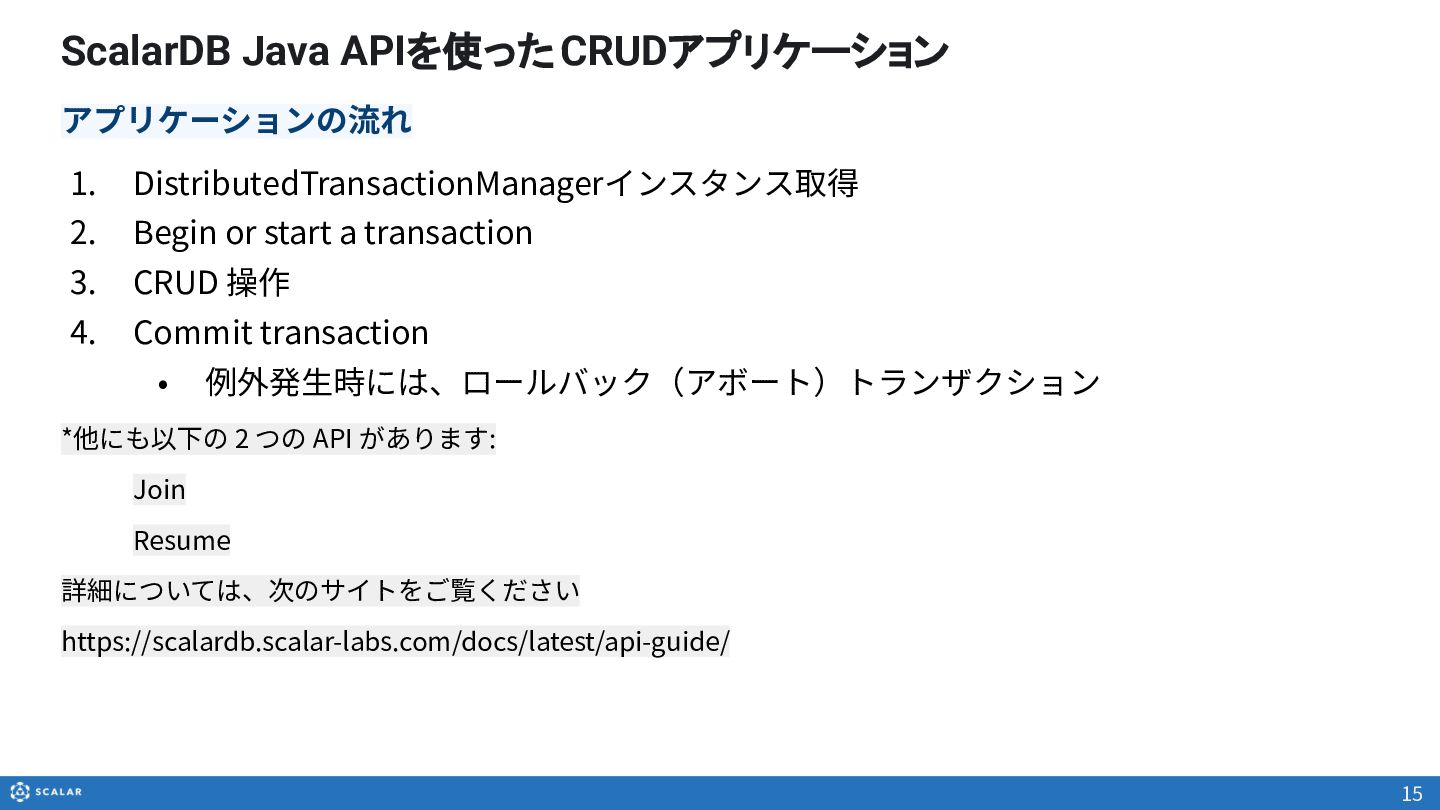
  7. ScalarDB Java APIを使ったCRUDアプリケーション 1. DistributedTransactionManagerインスタンス取得 2. Begin or start a

    transaction 3. CRUD 操作 4. Commit transaction • 例外発⽣時には、ロールバック(アボート)トランザクション *他にも以下の 2 つの API があります: Join Resume 詳細については、次のサイトをご覧ください https://scalardb.scalar-labs.com/docs/latest/api-guide/ 15 アプリケーションの流れ
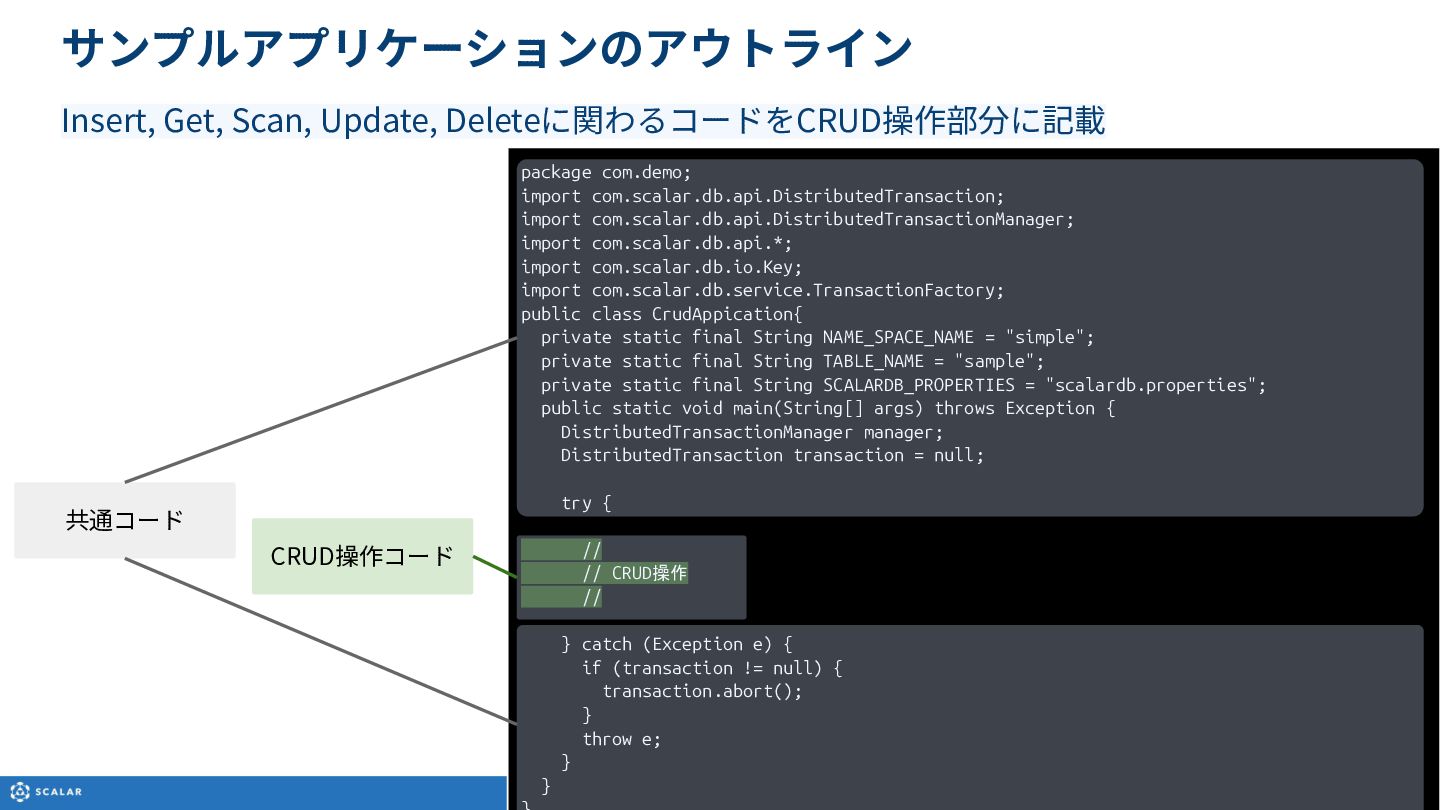
  8. CRUD操作コード サンプルアプリケーションのアウトライン Insert, Get, Scan, Update, Deleteに関わるコードをCRUD操作部分に記載 package com.demo; import

    com.scalar.db.api.DistributedTransaction; import com.scalar.db.api.DistributedTransactionManager; import com.scalar.db.api.*; import com.scalar.db.io.Key; import com.scalar.db.service.TransactionFactory; public class CrudAppication{ private static final String NAME_SPACE_NAME = "simple"; private static final String TABLE_NAME = "sample"; private static final String SCALARDB_PROPERTIES = "scalardb.properties"; public static void main(String[] args) throws Exception { DistributedTransactionManager manager; DistributedTransaction transaction = null; try { // // CRUD操作 // } catch (Exception e) { if (transaction != null) { transaction.abort(); } throw e; } } 共通コード
  9. public static void main(String[] args) throws Exception { DistributedTransactionManager manager;

    DistributedTransaction transaction = null; try { Integer pk = 1; Integer ck = 2; String textValue = "insert" + "-" + pk.toString() + "-" + ck.toString(); TransactionFactory factory = TransactionFactory.create(SCALARDB_PROPERTIES); manager = factory.getTransactionManager(); transaction = manager.start(); transaction.insert( Insert.newBuilder() .namespace(NAME_SPACE_NAME) .table(TABLE_NAME) .partitionKey(Key.ofInt("pk", pk)) .clusteringKey(Key.ofInt("ck", ck)) .textValue("text_value", textValue).build()); transaction.commit(); System.out.println("Records were inserted"); } catch ... Sampleアプリケーション InsertRecord.java start Insert commit DistributedTransactionManager
  10. public static void main(String[] args) throws Exception { DistributedTransactionManager manager;

    DistributedTransaction transaction = null; try { Integer pk = 1; Integer ck = 2; TransactionFactory factory = TransactionFactory.create(SCALARDB_PROPERTIES); manager = factory.getTransactionManager(); transaction = manager.start(); Optional<Result> result = transaction.get( Get.newBuilder() .namespace(NAME_SPACE_NAME) .table(TABLE_NAME) .partitionKey(Key.ofInt("pk", pk)) .clusteringKey(Key.ofInt("ck", ck)) .projections("pk", "ck", "text_value") .build()); transaction.commit(); if (result.isEmpty()) { System.out.println("No record was found."); } else { System.out.println("pk:" + String.valueOf(result.get().getInt("pk"))); System.out.println("ck:" + String.valueOf(result.get().getInt("ck"))); System.out.println("text_value:" + String.valueOf(result.get().getText("text_value"))); } } catch ... Sampleアプリケーション 単⼀レコードの取得:GetRecord.java start Get commit DistributedTransactionManager
  11. public static void main(String[] args) throws Exception { DistributedTransactionManager manager;

    DistributedTransaction transaction = null; try { Integer pk = 1; TransactionFactory factory = TransactionFactory.create(SCALARDB_PROPER manager = factory.getTransactionManager(); transaction = manager.start(); List<Result> results = transaction.scan( Scan.newBuilder() .namespace(NAME_SPACE_NAME) .table(TABLE_NAME) .partitionKey(Key.ofInt("pk", pk)) .projections("pk", "ck", "text_value") .limit(10) .build()); transaction.commit(); if (results.isEmpty()) { System.out.println("No record was found."); } else { for (Result result : results) { System.out.println("-------------------------------------------"); System.out.println("pk:" + String.valueOf(result.getInt("pk"))); System.out.println("ck:" + String.valueOf(result.getInt("ck"))); System.out.println("text_value:" + String.valueOf(result.getText("text_value"))); } } Sampleアプリケーション 複数レコードの取得:ScanRecord.java start Scan commit DistributedTransactionManager
  12. public static void main(String[] args) throws Exception { DistributedTransactionManager manager;

    DistributedTransaction transaction = null; try { Integer pk = 1; Integer ck = 2; String textValue = "update" + "-" + pk.toString() + "-" + ck.toString(); TransactionFactory factory = TransactionFactory.create(SCALARDB_PROPERTIES); manager = factory.getTransactionManager(); transaction = manager.start(); transaction.update( Update.newBuilder() .namespace(NAME_SPACE_NAME) .table(TABLE_NAME) .partitionKey(Key.ofInt("pk", pk)) .clusteringKey(Key.ofInt("ck", ck)) .textValue("text_value", textValue).build()); transaction.commit(); System.out.println("Records were updated"); } catch ... Sampleアプリケーション レコードの更新:UpdateRecord.java start Update commit DistributedTransactionManager
  13. public static void main(String[] args) throws Exception { DistributedTransactionManager manager;

    DistributedTransaction transaction = null; Integer pk = 1; Integer ck = 2; try { TransactionFactory factory = TransactionFactory.create(SCALARDB_PROPERTIES); manager = factory.getTransactionManager(); transaction = manager.start(); transaction.delete( Delete.newBuilder() .namespace(NAME_SPACE_NAME) .table(TABLE_NAME) .partitionKey(Key.ofInt("pk", pk)) .clusteringKey(Key.ofInt("ck", ck)) .build()); transaction.commit(); System.out.println("Record was deleted"); } catch (Exception e) { if (transaction != null) { transaction.abort(); } throw e; } Sampleアプリケーション レコードの削除:DeleteRecord.java start Delete commit DistributedTransactionManager
  14. public static void main(String[] args) throws Exception { DistributedTransactionManager manager;

    DistributedTransaction transaction = null; try { Integer pk = 1; Integer ck = 2; String textValue = "upsert" + "-" + pk.toString() + "-" + ck.toString(); TransactionFactory factory = TransactionFactory.create(SCALARDB_PROPERTIES); manager = factory.getTransactionManager(); transaction = manager.start(); transaction.upsert( Upsert.newBuilder() .namespace(NAME_SPACE_NAME) .table(TABLE_NAME) .partitionKey(Key.ofInt("pk", pk)) .clusteringKey(Key.ofInt("ck", ck)) .textValue("text_value", textValue).build()); transaction.commit(); System.out.println("Records were inserted"); } catch (Exception e) { if (transaction != null) { transaction.abort(); } Sampleアプリケーション レコードの更新/追加:UpsertRecord.java start Upsert commit DistributedTransactionManager
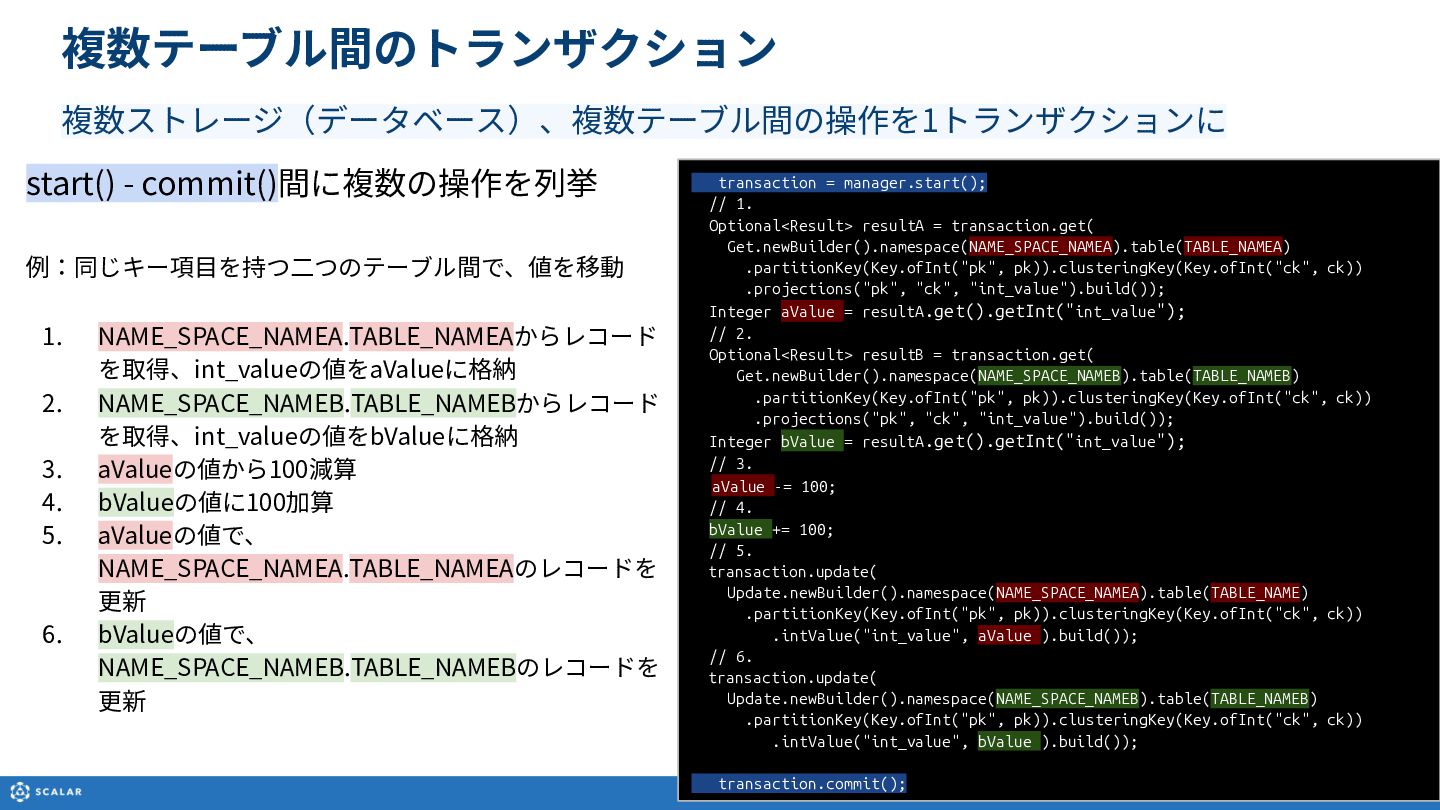
  15. 複数テーブル間のトランザクション 複数ストレージ(データベース)、複数テーブル間の操作を1トランザクションに transaction = manager.start(); // 1. Optional<Result> resultA =

    transaction.get( Get.newBuilder().namespace(NAME_SPACE_NAMEA).table(TABLE_NAMEA) .partitionKey(Key.ofInt("pk", pk)).clusteringKey(Key.ofInt("ck", ck)) .projections("pk", "ck", "int_value").build()); Integer aValue = resultA.get().getInt("int_value"); // 2. Optional<Result> resultB = transaction.get( Get.newBuilder().namespace(NAME_SPACE_NAMEB).table(TABLE_NAMEB) .partitionKey(Key.ofInt("pk", pk)).clusteringKey(Key.ofInt("ck", ck)) .projections("pk", "ck", "int_value").build()); Integer bValue = resultA.get().getInt("int_value"); // 3. aValue -= 100; // 4. bValue += 100; // 5.  transaction.update( Update.newBuilder().namespace(NAME_SPACE_NAMEA).table(TABLE_NAME) .partitionKey(Key.ofInt("pk", pk)).clusteringKey(Key.ofInt("ck", ck)) .intValue("int_value", aValue ).build()); // 6.  transaction.update( Update.newBuilder().namespace(NAME_SPACE_NAMEB).table(TABLE_NAMEB) .partitionKey(Key.ofInt("pk", pk)).clusteringKey(Key.ofInt("ck", ck)) .intValue("int_value", bValue ).build()); transaction.commit(); start() - commit()間に複数の操作を列挙 例:同じキー項⽬を持つ⼆つのテーブル間で、値を移動 1. NAME_SPACE_NAMEA.TABLE_NAMEAからレコード を取得、int_valueの値をaValueに格納 2. NAME_SPACE_NAMEB.TABLE_NAMEBからレコード を取得、int_valueの値をbValueに格納 3. aValueの値から100減算 4. bValueの値に100加算 5. aValueの値で、 NAME_SPACE_NAMEA.TABLE_NAMEAのレコードを 更新 6. bValueの値で、 NAME_SPACE_NAMEB.TABLE_NAMEBのレコードを 更新