Upgrade to Pro — share decks privately, control downloads, hide ads and more …

4. ScalarDB Cluster Deployment - Configuration ...

4. ScalarDB Cluster Deployment - Configuration overview

本資料では、Kubernetes環境にScalarDB Clusterをデプロイする際の基本機能を利用するための設定手順について説明します。
Helmを用いてデプロイを行う際に必要となる「custom_values.yaml」ファイルの具体的な記述方法について、各コンポーネントごとに解説しています。

【主な内容】
・custom_values.yamlのブロック構成
・Envoyの設定:レプリカ数、公開ポート、サービスタイプ(ClusterIP/LoadBalancer)などの設定
・ScalarDB Cluster Podの設定:レプリカ数、コンテナのリソース制限(CPU/Memory)、ログレベルの設定
・ライセンス情報の設定:custom_values.yamlへの直接記載方法と、Kubernetes Secretを利用した設定例
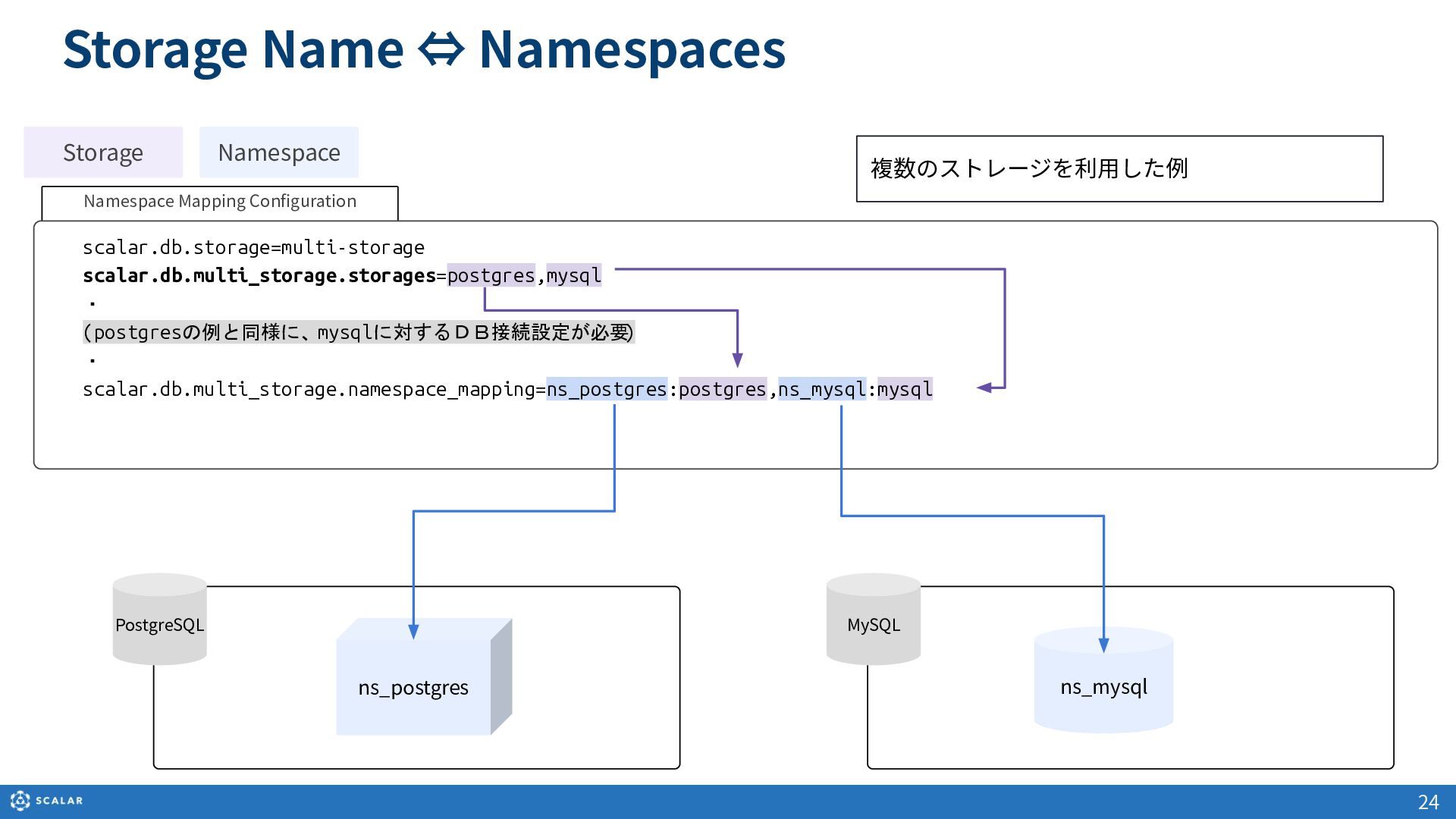
・バックエンドストレージの設定:マルチストレージ機能を利用した、PostgreSQLやMySQLへの接続設定およびネームスペースのマッピング方法
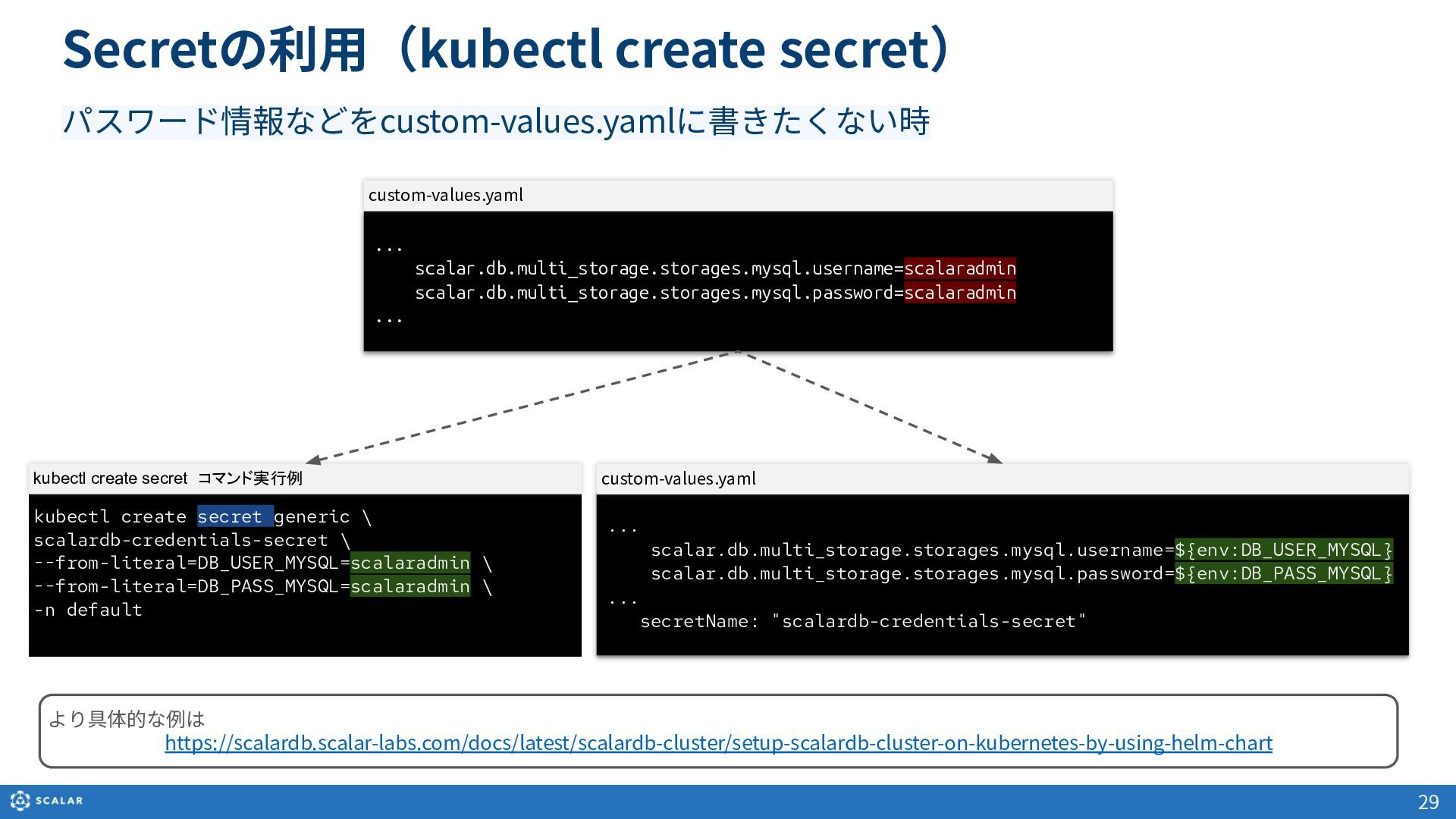
・機密情報の管理:データベースのパスワードなどを直書きせず、kubectl create secretを利用して設定する方法

Avatar for Scalar, Inc.

Scalar, Inc. PRO

May 14, 2026

More Decks by Scalar, Inc.

Other Decks in Technology

Transcript

  1. 3 変更履歴 Version Date Name Supported products and versions Description

    1.0 2025-02-21 Satoshi Hikida ScalarDB Cluster 3.15.1 First draft 1.1 2025-05-16 Yuji Ochiai ScalarDB Cluster 3.15.1 Re-edited
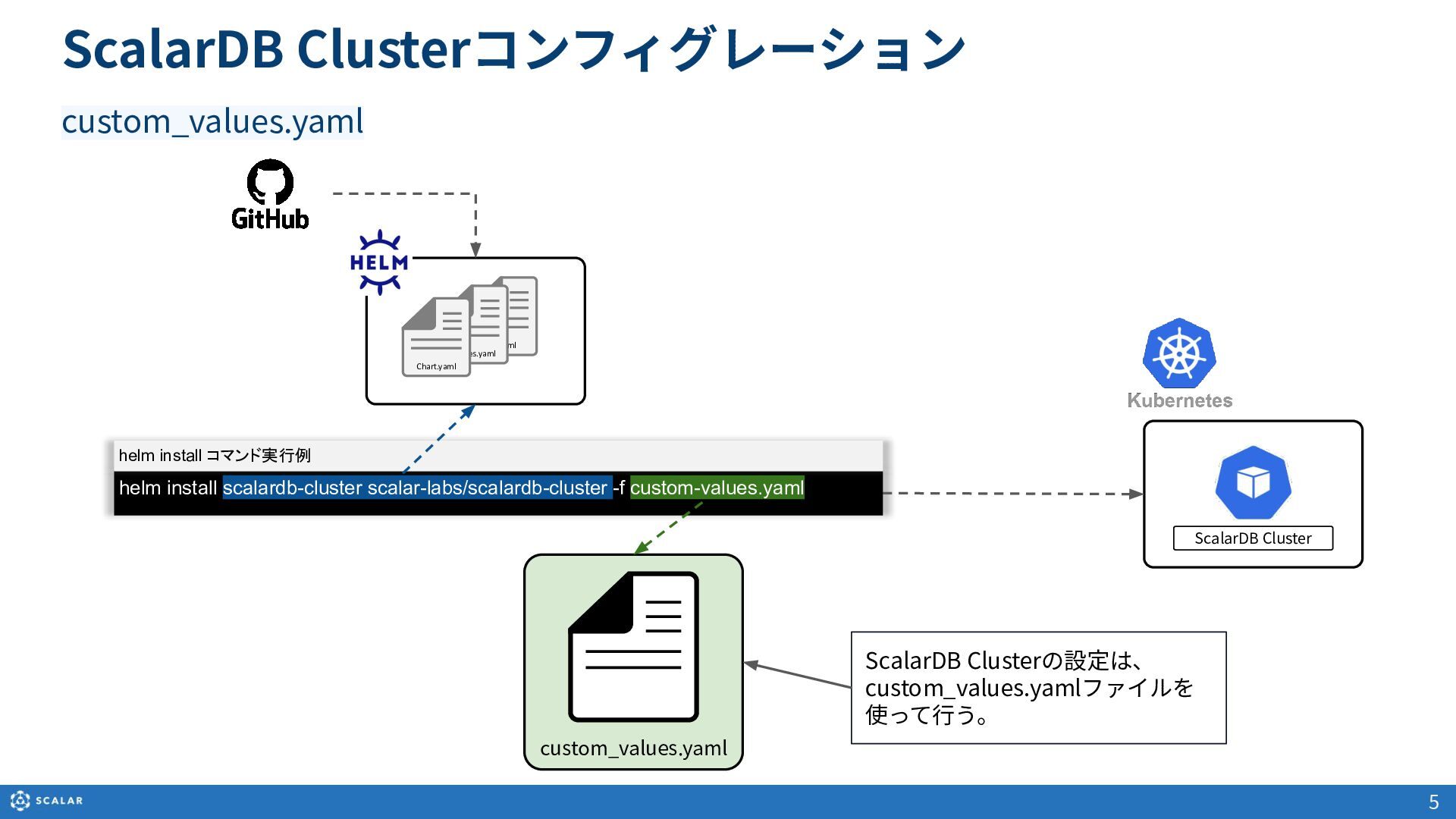
  2. custom_values.yaml ScalarDB Clusterコンフィグレーション 5 custom_values.yaml ....yaml Values.yaml Chart.yaml ScalarDB Cluster

    ScalarDB Clusterの設定は、 custom_values.yamlファイルを 使って⾏う。 helm install scalardb-cluster scalar-labs/scalardb-cluster -f custom-values.yaml helm install コマンド実行例
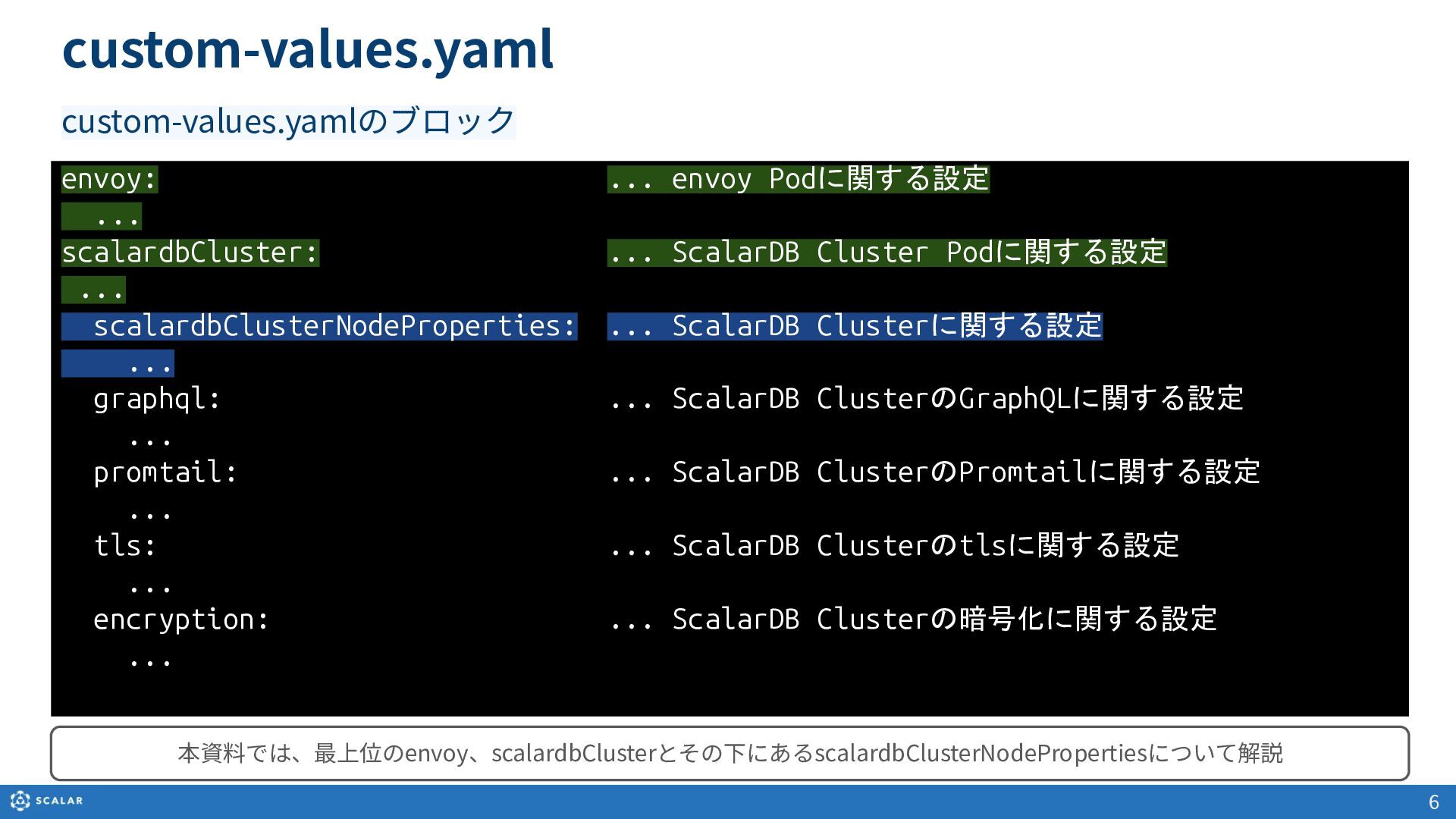
  3. custom-values.yaml 6 envoy: ... envoy Podに関する設定 ... scalardbCluster: ... ScalarDB

    Cluster Podに関する設定 ... scalardbClusterNodeProperties: ... ScalarDB Clusterに関する設定 ... graphql: ... ScalarDB ClusterのGraphQLに関する設定 ... promtail: ... ScalarDB ClusterのPromtailに関する設定 ... tls: ... ScalarDB Clusterのtlsに関する設定 ... encryption: ... ScalarDB Clusterの暗号化に関する設定 ... custom-values.yamlのブロック 本資料では、最上位のenvoy、scalardbClusterとその下にあるscalardbClusterNodePropertiesについて解説
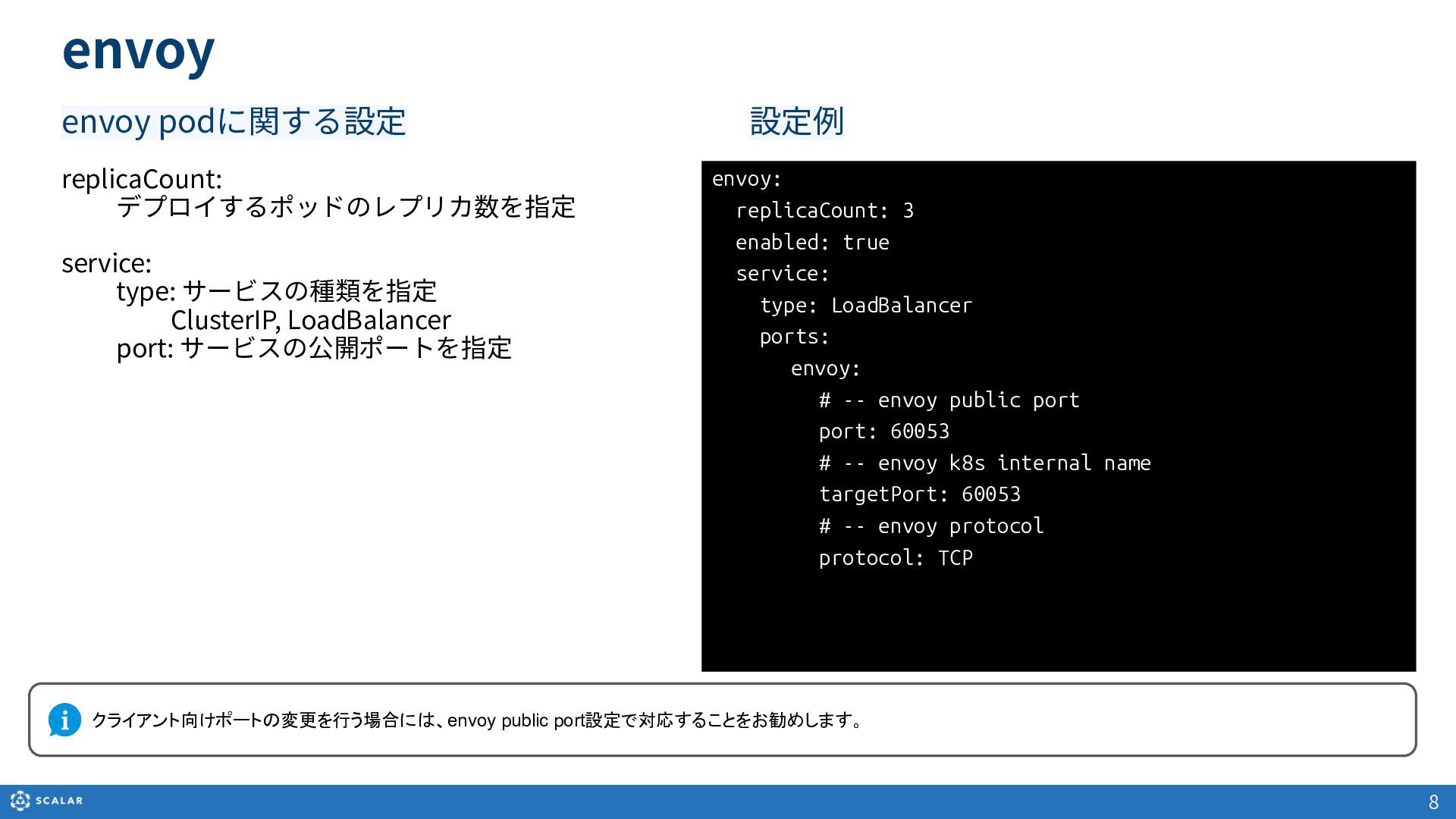
  4. envoy envoy podに関する設定 8 replicaCount: デプロイするポッドのレプリカ数を指定 service: type: サービスの種類を指定 ClusterIP,

    LoadBalancer port: サービスの公開ポートを指定 envoy: replicaCount: 3 enabled: true service: type: LoadBalancer ports:    envoy: # -- envoy public port port: 60053 # -- envoy k8s internal name targetPort: 60053 # -- envoy protocol protocol: TCP 設定例 クライアント向けポートの変更を行う場合には、envoy public port設定で対応することをお勧めします。
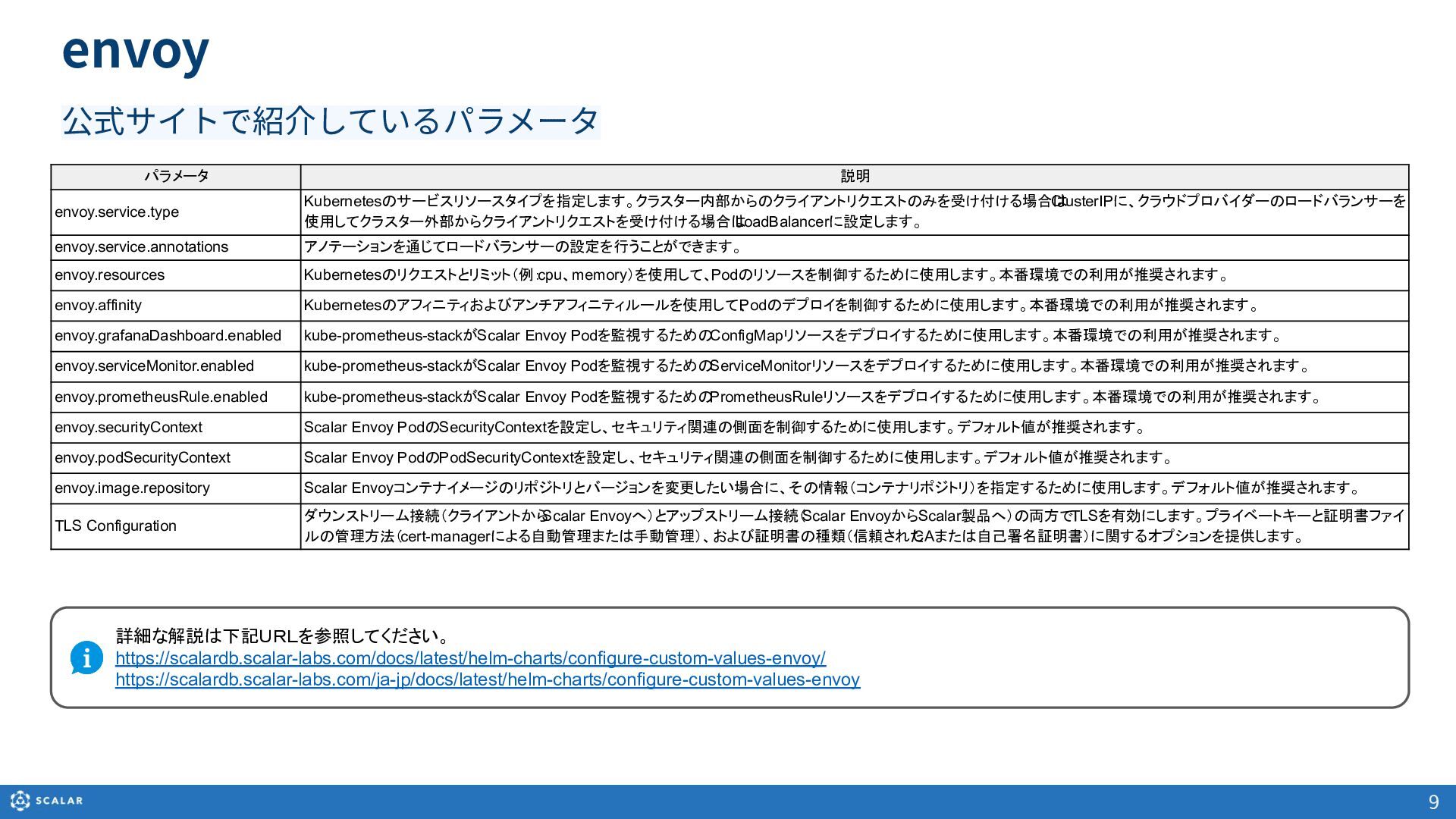
  5. 9 envoy 公式サイトで紹介しているパラメータ パラメータ 説明 envoy.service.type Kubernetesのサービスリソースタイプを指定します。クラスター内部からのクライアントリクエストのみを受け付ける場合は ClusterIPに、クラウドプロバイダーのロードバランサーを 使用してクラスター外部からクライアントリクエストを受け付ける場合は LoadBalancerに設定します。

    envoy.service.annotations アノテーションを通じてロードバランサーの設定を行うことができます。 envoy.resources Kubernetesのリクエストとリミット(例: cpu、memory)を使用して、Podのリソースを制御するために使用します。本番環境での利用が推奨されます。 envoy.affinity Kubernetesのアフィニティおよびアンチアフィニティルールを使用して、 Podのデプロイを制御するために使用します。本番環境での利用が推奨されます。 envoy.grafanaDashboard.enabled kube-prometheus-stackがScalar Envoy Podを監視するためのConfigMapリソースをデプロイするために使用します。本番環境での利用が推奨されます。 envoy.serviceMonitor.enabled kube-prometheus-stackがScalar Envoy Podを監視するためのServiceMonitorリソースをデプロイするために使用します。本番環境での利用が推奨されます。 envoy.prometheusRule.enabled kube-prometheus-stackがScalar Envoy Podを監視するためのPrometheusRuleリソースをデプロイするために使用します。本番環境での利用が推奨されます。 envoy.securityContext Scalar Envoy PodのSecurityContextを設定し、セキュリティ関連の側面を制御するために使用します。デフォルト値が推奨されます。 envoy.podSecurityContext Scalar Envoy PodのPodSecurityContextを設定し、セキュリティ関連の側面を制御するために使用します。デフォルト値が推奨されます。 envoy.image.repository Scalar Envoyコンテナイメージのリポジトリとバージョンを変更したい場合に、その情報(コンテナリポジトリ)を指定するために使用します。デフォルト値が推奨されます。 TLS Configuration ダウンストリーム接続(クライアントから Scalar Envoyへ)とアップストリーム接続( Scalar EnvoyからScalar製品へ)の両方でTLSを有効にします。プライベートキーと証明書ファイ ルの管理方法(cert-managerによる自動管理または手動管理)、および証明書の種類(信頼された CAまたは自己署名証明書)に関するオプションを提供します。 詳細な解説は下記URLを参照してください。 https://scalardb.scalar-labs.com/docs/latest/helm-charts/configure-custom-values-envoy/ https://scalardb.scalar-labs.com/ja-jp/docs/latest/helm-charts/configure-custom-values-envoy
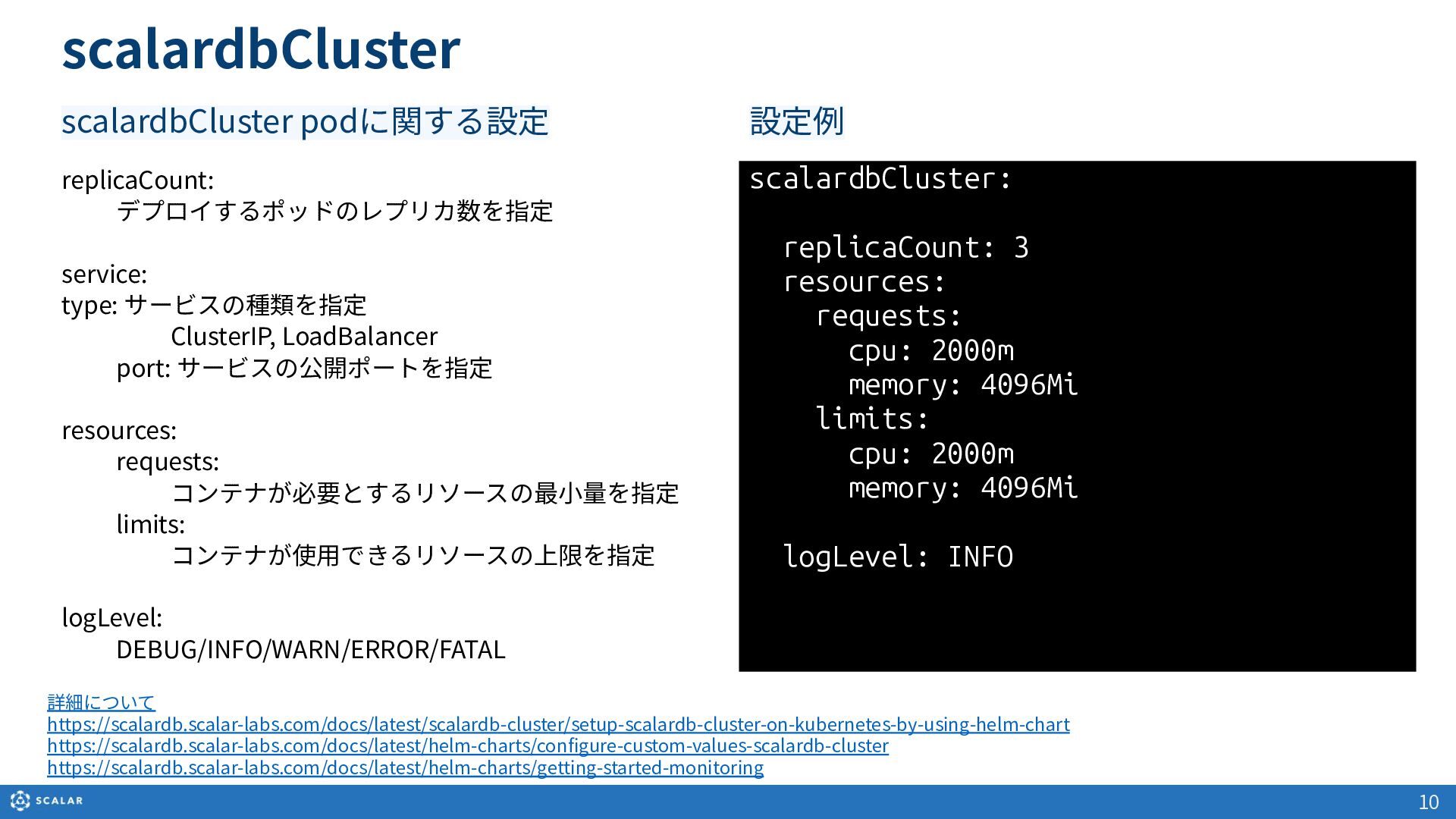
  6. scalardbCluster scalardbCluster podに関する設定 10 replicaCount: デプロイするポッドのレプリカ数を指定 service: type: サービスの種類を指定 ClusterIP,

    LoadBalancer port: サービスの公開ポートを指定 resources: requests: コンテナが必要とするリソースの最⼩量を指定 limits: コンテナが使⽤できるリソースの上限を指定 logLevel: DEBUG/INFO/WARN/ERROR/FATAL scalardbCluster: replicaCount: 3 resources: requests: cpu: 2000m memory: 4096Mi limits: cpu: 2000m memory: 4096Mi logLevel: INFO 設定例 詳細について https://scalardb.scalar-labs.com/docs/latest/scalardb-cluster/setup-scalardb-cluster-on-kubernetes-by-using-helm-chart https://scalardb.scalar-labs.com/docs/latest/helm-charts/configure-custom-values-scalardb-cluster https://scalardb.scalar-labs.com/docs/latest/helm-charts/getting-started-monitoring
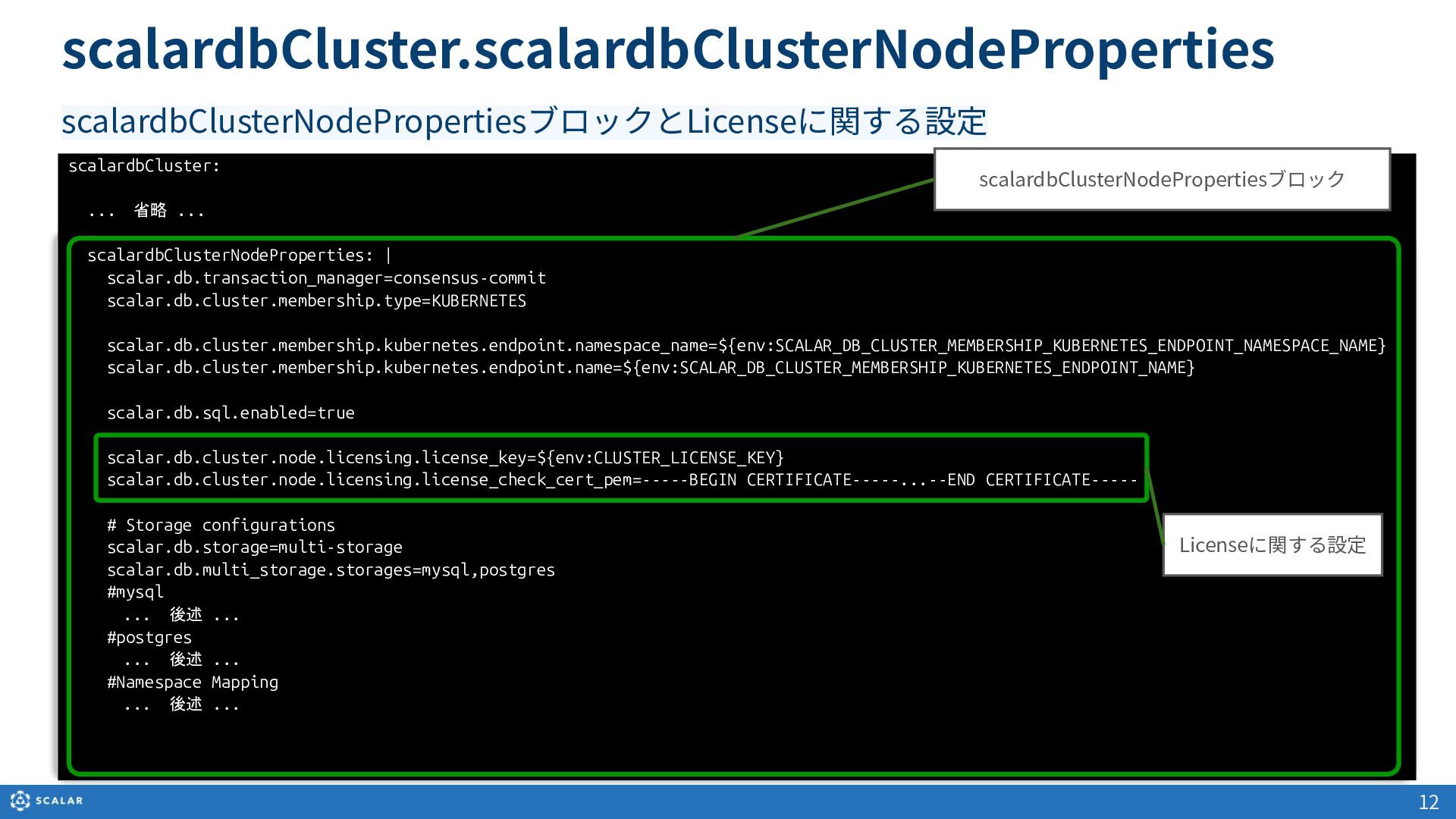
  7. scalardbCluster: ... 省略 ... scalardbClusterNodeProperties: | scalar.db.transaction_manager=consensus-commit scalar.db.cluster.membership.type=KUBERNETES scalar.db.cluster.membership.kubernetes.endpoint.namespace_name=${env:SCALAR_DB_CLUSTER_MEMBERSHIP_KUBERNETES_ENDPOINT_NAMESPACE_NAME} scalar.db.cluster.membership.kubernetes.endpoint.name=${env:SCALAR_DB_CLUSTER_MEMBERSHIP_KUBERNETES_ENDPOINT_NAME} scalar.db.sql.enabled=true

    scalar.db.cluster.node.licensing.license_key=${env:CLUSTER_LICENSE_KEY} scalar.db.cluster.node.licensing.license_check_cert_pem=-----BEGIN CERTIFICATE-----...--END CERTIFICATE----- # Storage configurations scalar.db.storage=multi-storage scalar.db.multi_storage.storages=mysql,postgres #mysql ... 後述 ... #postgres ... 後述 ... #Namespace Mapping ... 後述 ... 12 scalardbCluster.scalardbClusterNodeProperties scalardbClusterNodePropertiesブロックとLicenseに関する設定 Licenseに関する設定 scalardbClusterNodePropertiesブロック
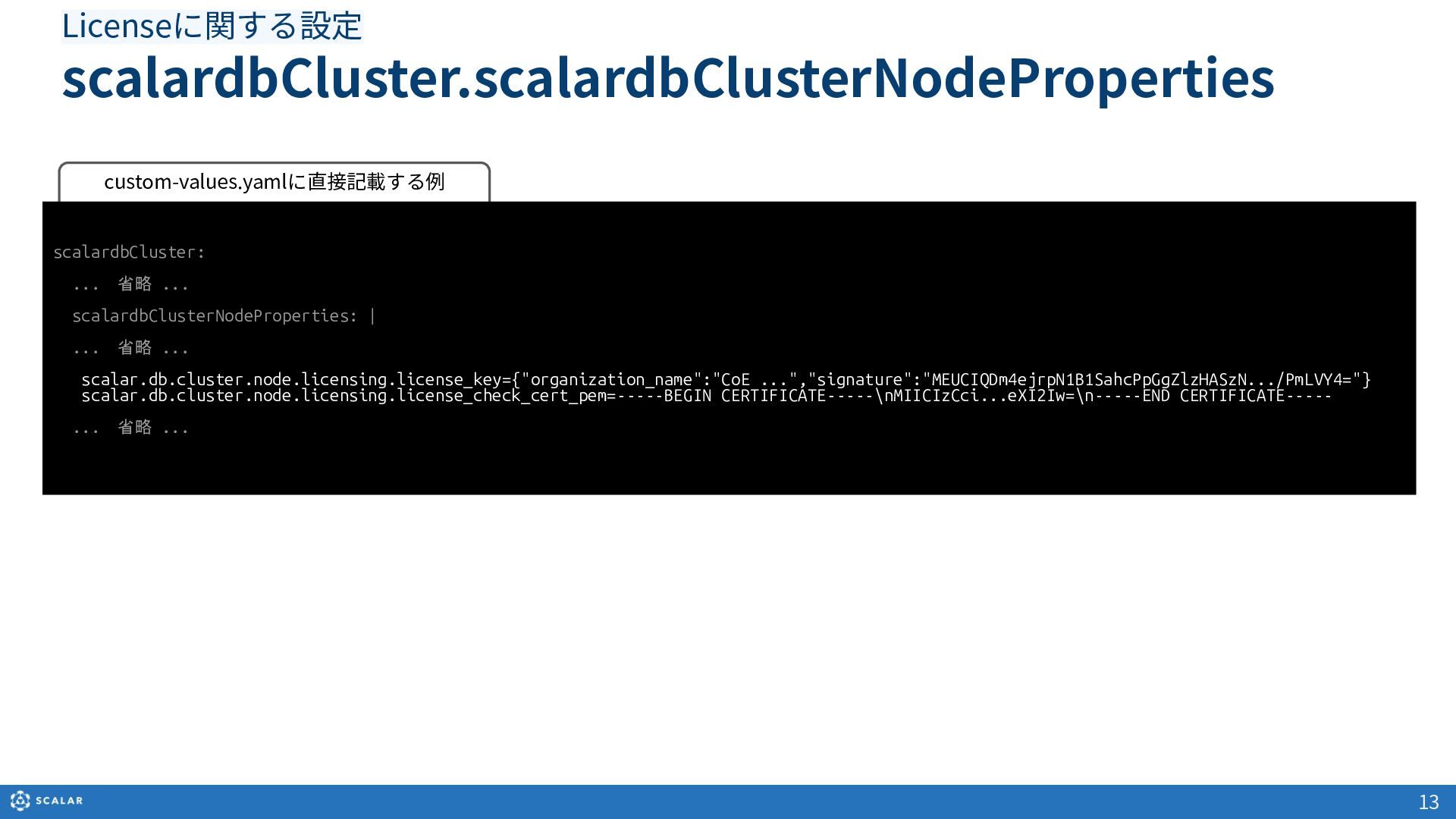
  8. custom-values.yamlに直接記載する例 scalardbCluster: ... 省略 ... scalardbClusterNodeProperties: | ... 省略 ... scalar.db.cluster.node.licensing.license_key={"organization_name":"CoE ...","signature":"MEUCIQDm4ejrpN1B1SahcPpGgZlzHASzN.../PmLVY4="}

    scalar.db.cluster.node.licensing.license_check_cert_pem=-----BEGIN CERTIFICATE-----\nMIICIzCci...eXI2Iw=\n-----END CERTIFICATE----- ... 省略 ... 13 scalardbCluster.scalardbClusterNodeProperties Licenseに関する設定
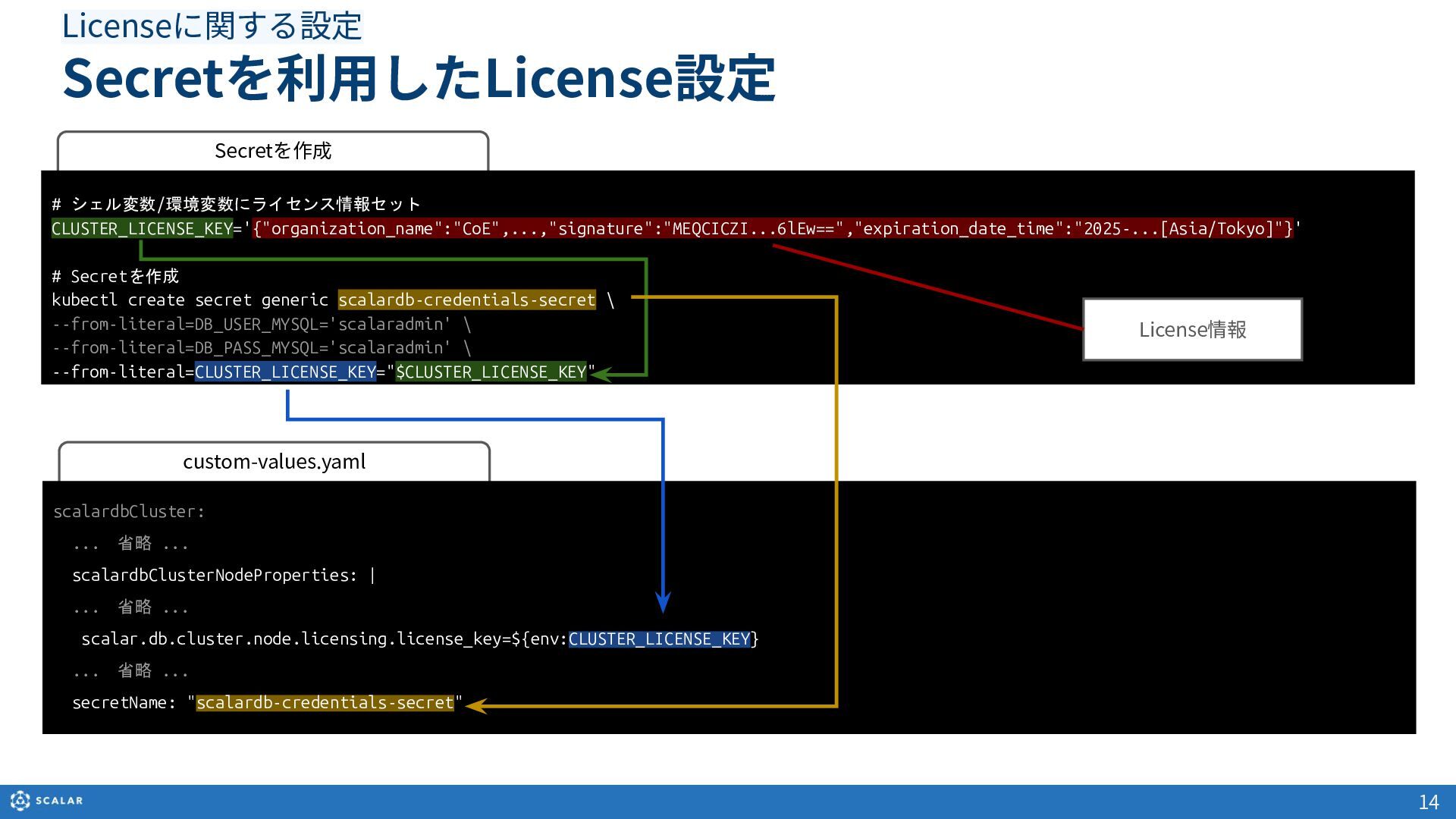
  9. custom-values.yaml scalardbCluster: ... 省略 ... scalardbClusterNodeProperties: | ... 省略 ... scalar.db.cluster.node.licensing.license_key=${env:CLUSTER_LICENSE_KEY} ... 省略

    ... secretName: "scalardb-credentials-secret" 14 Secretを利⽤したLicense設定 Licenseに関する設定 Secretを作成 # シェル変数/環境変数にライセンス情報セット CLUSTER_LICENSE_KEY='{"organization_name":"CoE",...,"signature":"MEQCICZI...6lEw==","expiration_date_time":"2025-...[Asia/Tokyo]"}' # Secretを作成 kubectl create secret generic scalardb-credentials-secret \ --from-literal=DB_USER_MYSQL='scalaradmin' \ --from-literal=DB_PASS_MYSQL='scalaradmin' \ --from-literal=CLUSTER_LICENSE_KEY="$CLUSTER_LICENSE_KEY" License情報
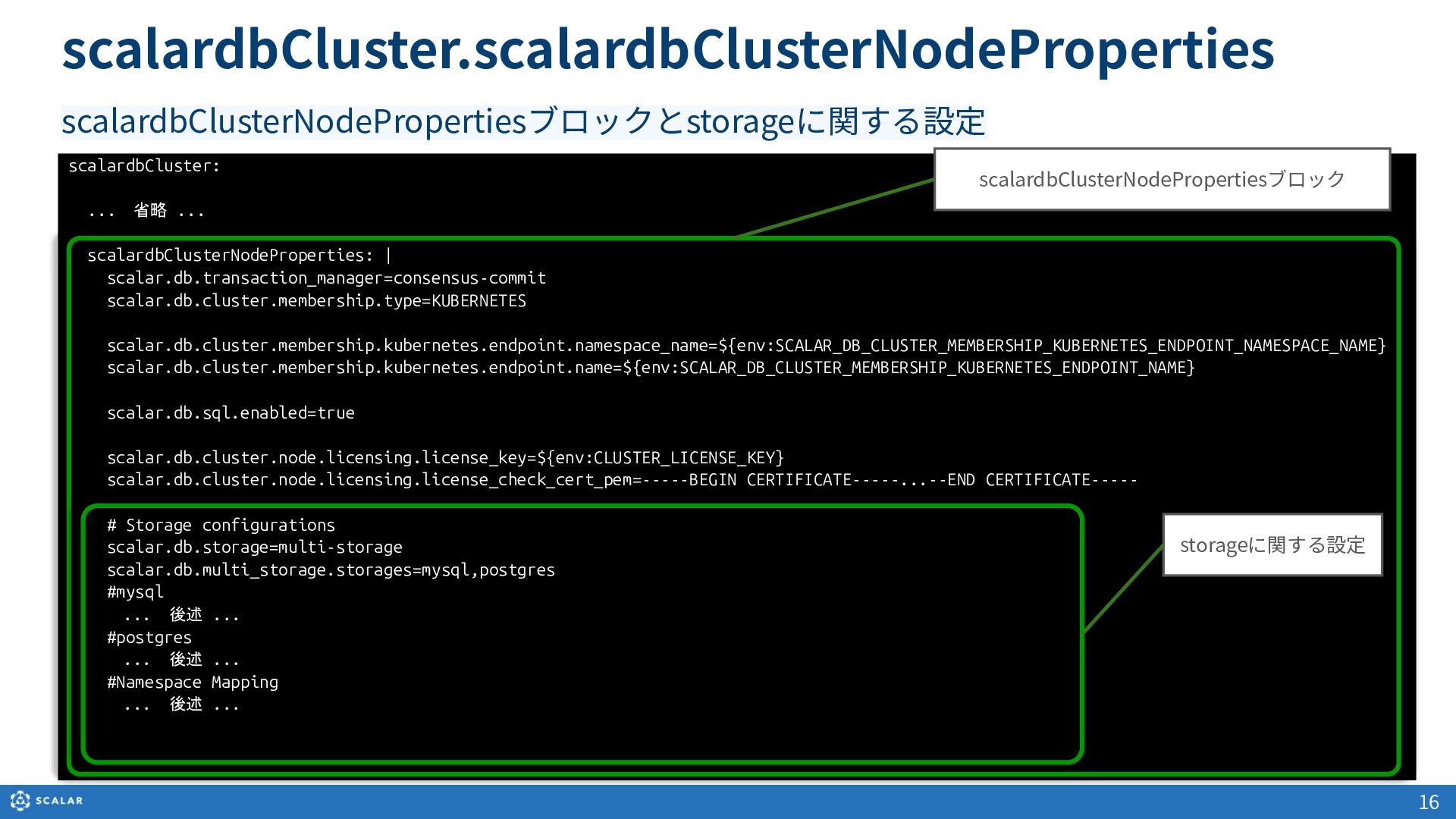
  10. scalardbCluster: ... 省略 ... scalardbClusterNodeProperties: | scalar.db.transaction_manager=consensus-commit scalar.db.cluster.membership.type=KUBERNETES scalar.db.cluster.membership.kubernetes.endpoint.namespace_name=${env:SCALAR_DB_CLUSTER_MEMBERSHIP_KUBERNETES_ENDPOINT_NAMESPACE_NAME} scalar.db.cluster.membership.kubernetes.endpoint.name=${env:SCALAR_DB_CLUSTER_MEMBERSHIP_KUBERNETES_ENDPOINT_NAME} scalar.db.sql.enabled=true

    scalar.db.cluster.node.licensing.license_key=${env:CLUSTER_LICENSE_KEY} scalar.db.cluster.node.licensing.license_check_cert_pem=-----BEGIN CERTIFICATE-----...--END CERTIFICATE----- # Storage configurations scalar.db.storage=multi-storage scalar.db.multi_storage.storages=mysql,postgres #mysql ... 後述 ... #postgres ... 後述 ... #Namespace Mapping ... 後述 ... 16 scalardbCluster.scalardbClusterNodeProperties scalardbClusterNodePropertiesブロックとstorageに関する設定 storageに関する設定 scalardbClusterNodePropertiesブロック
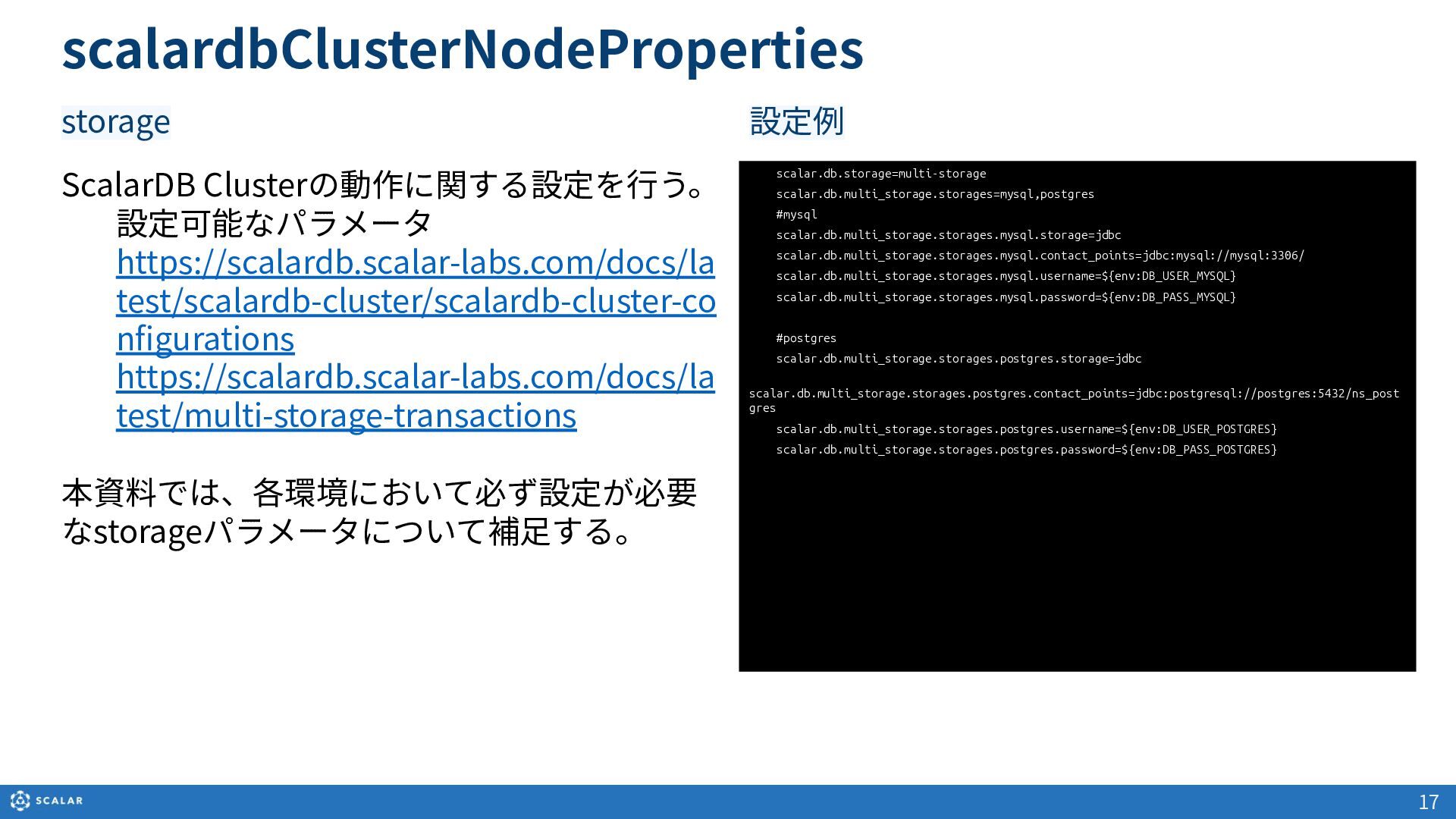
  11. 17 ScalarDB Clusterの動作に関する設定を⾏う。 設定可能なパラメータ https://scalardb.scalar-labs.com/docs/la test/scalardb-cluster/scalardb-cluster-co nfigurations https://scalardb.scalar-labs.com/docs/la test/multi-storage-transactions 本資料では、各環境において必ず設定が必要

    なstorageパラメータについて補⾜する。 scalar.db.storage=multi-storage scalar.db.multi_storage.storages=mysql,postgres #mysql scalar.db.multi_storage.storages.mysql.storage=jdbc scalar.db.multi_storage.storages.mysql.contact_points=jdbc:mysql://mysql:3306/ scalar.db.multi_storage.storages.mysql.username=${env:DB_USER_MYSQL} scalar.db.multi_storage.storages.mysql.password=${env:DB_PASS_MYSQL} #postgres scalar.db.multi_storage.storages.postgres.storage=jdbc scalar.db.multi_storage.storages.postgres.contact_points=jdbc:postgresql://postgres:5432/ns_post gres scalar.db.multi_storage.storages.postgres.username=${env:DB_USER_POSTGRES} scalar.db.multi_storage.storages.postgres.password=${env:DB_PASS_POSTGRES} 設定例 scalardbClusterNodeProperties storage
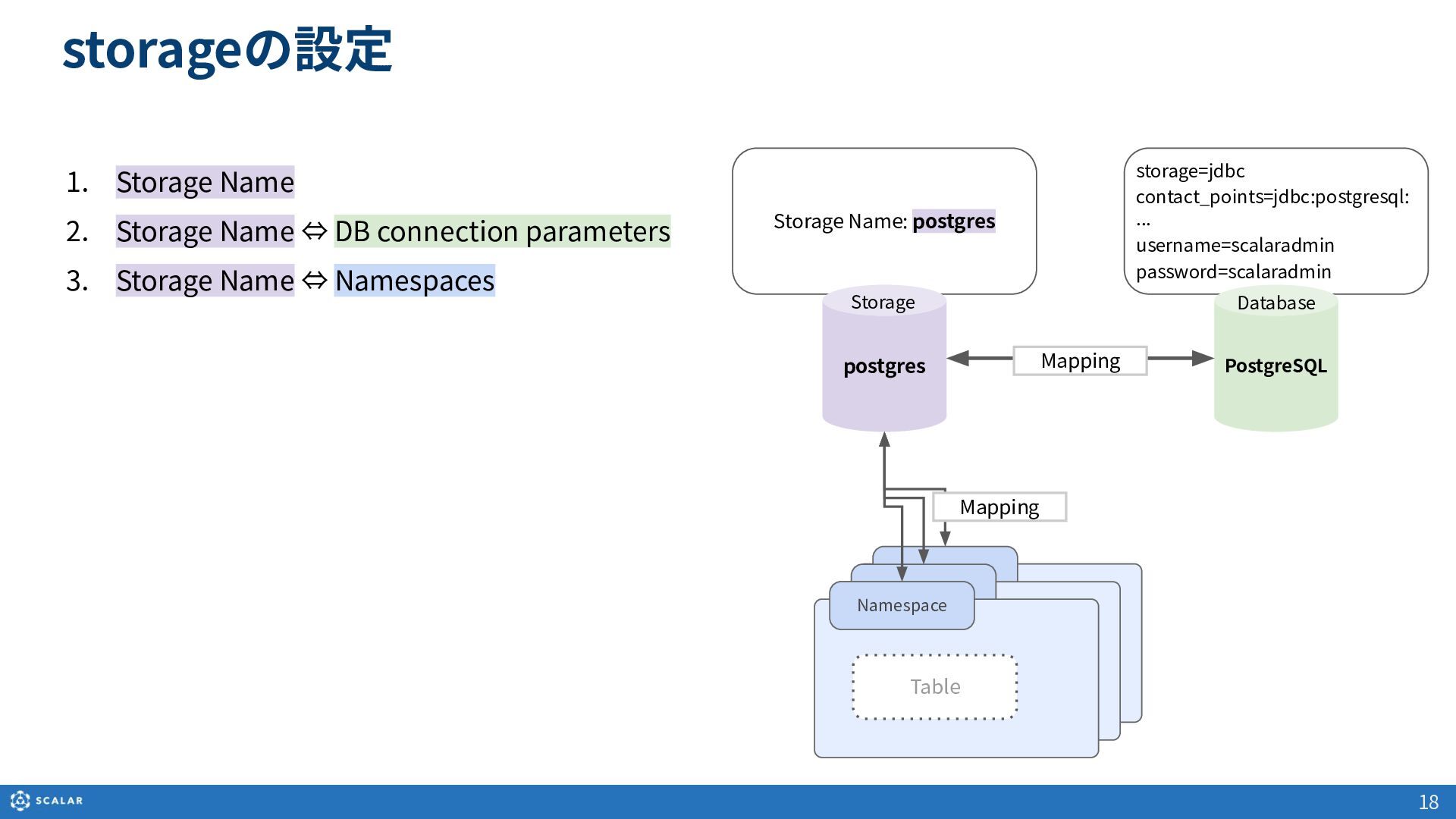
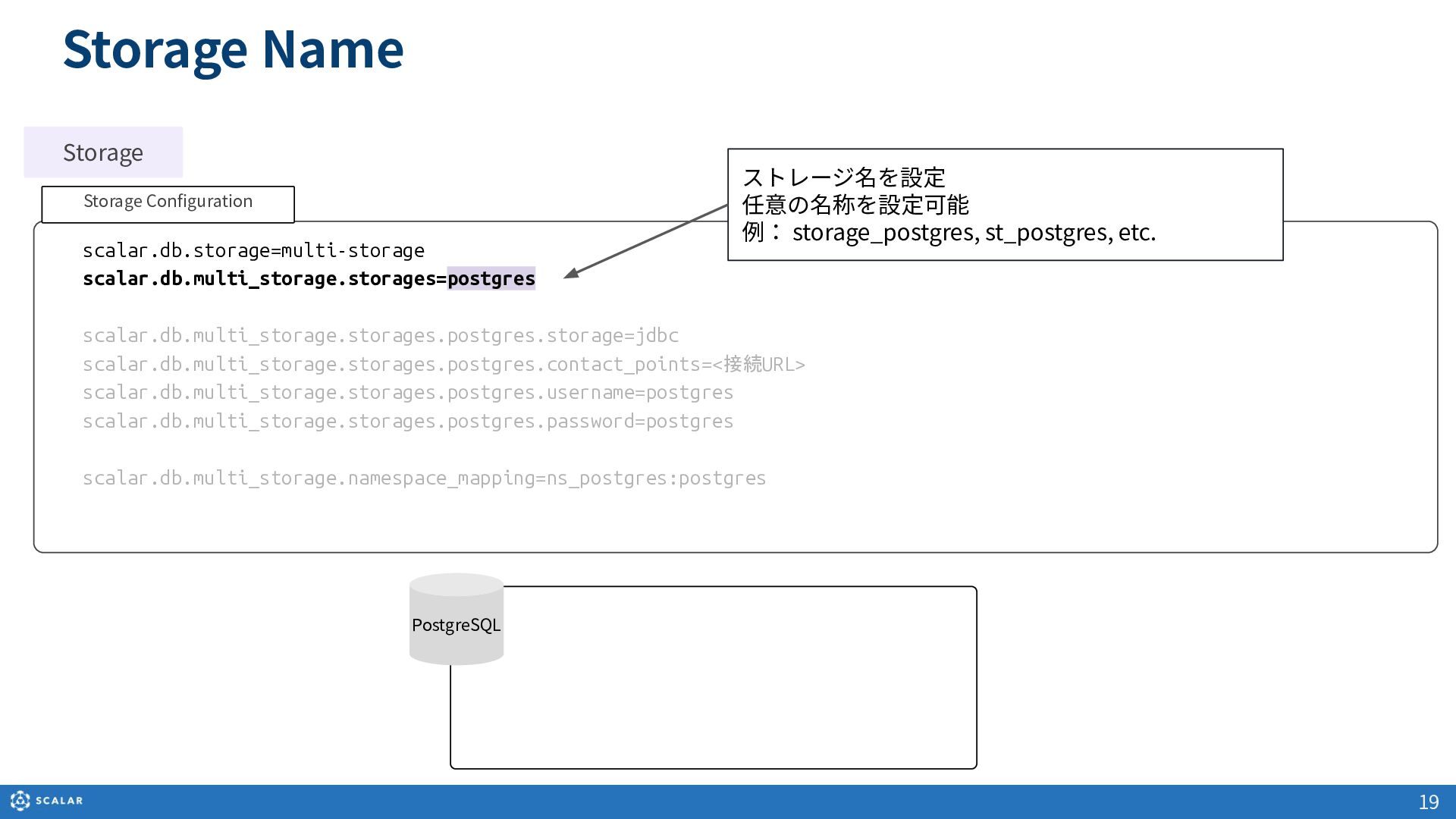
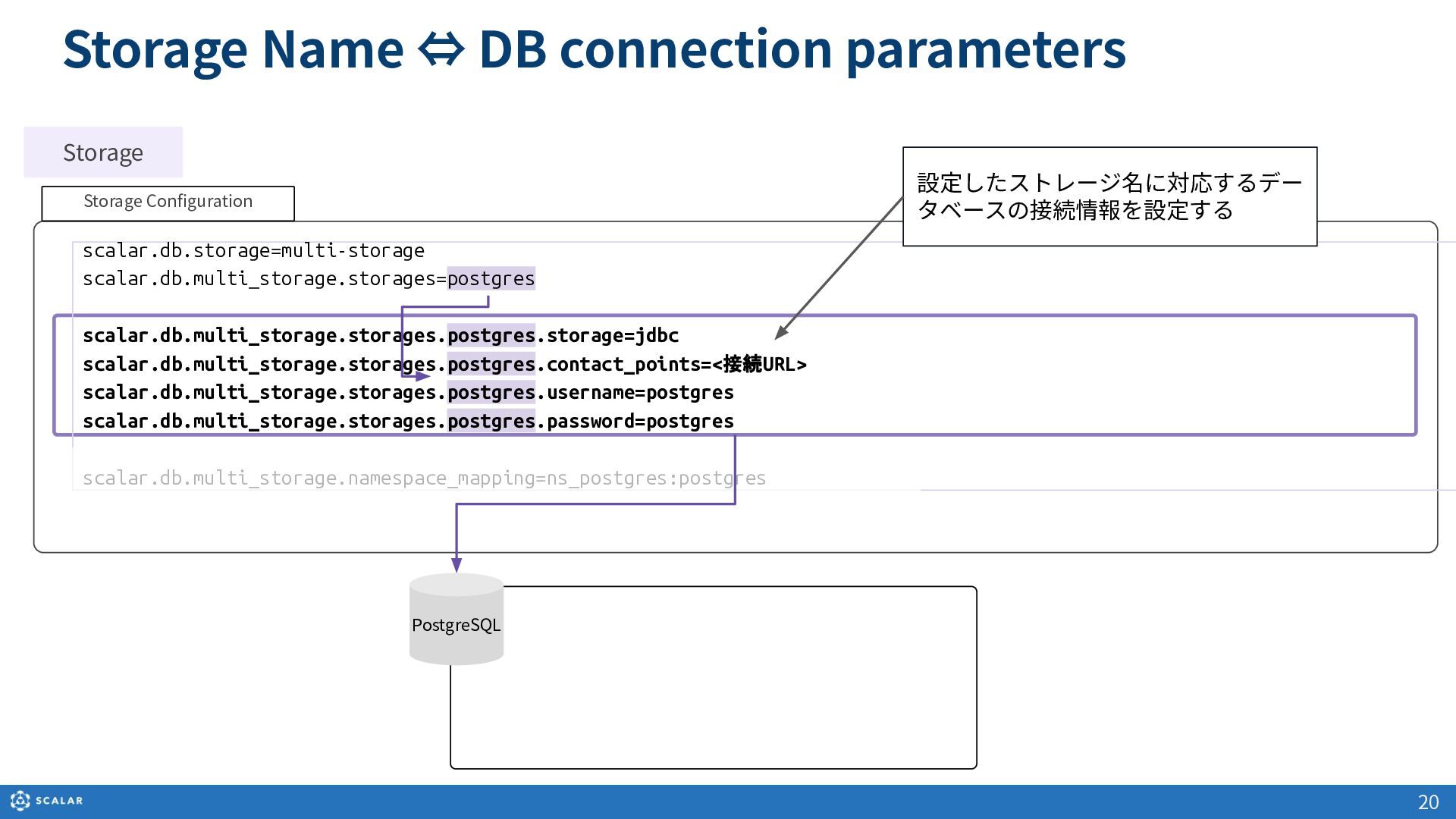
  12. Storage Name: postgres storage=jdbc contact_points=jdbc:postgresql: ... username=scalaradmin password=scalaradmin storageの設定 Namespace

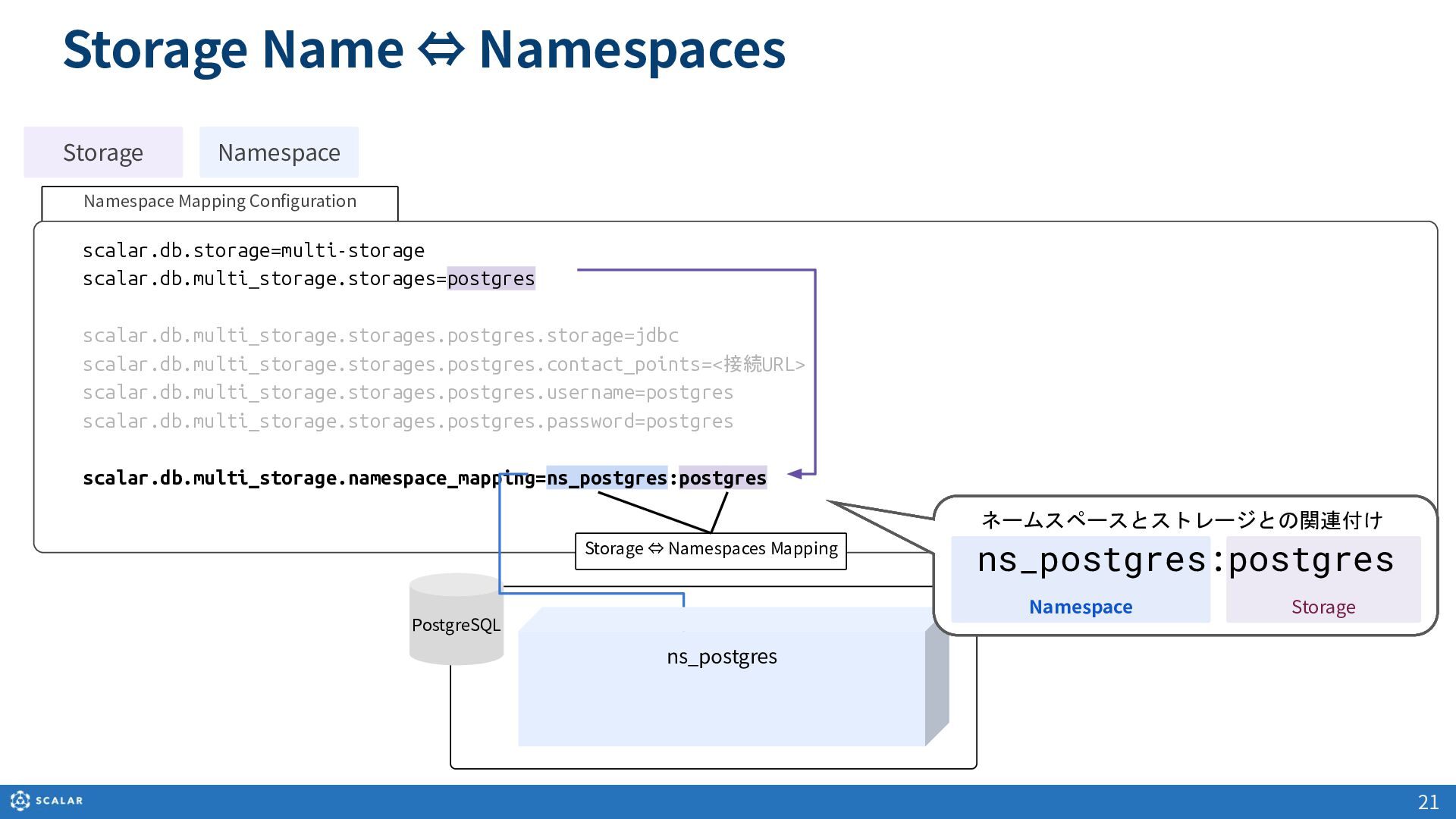
    PostgreSQL postgres Storage Database Mapping Table 18 1. Storage Name 2. Storage Name ⇔ DB connection parameters 3. Storage Name ⇔ Namespaces Namespace Table Namespace Table Mapping
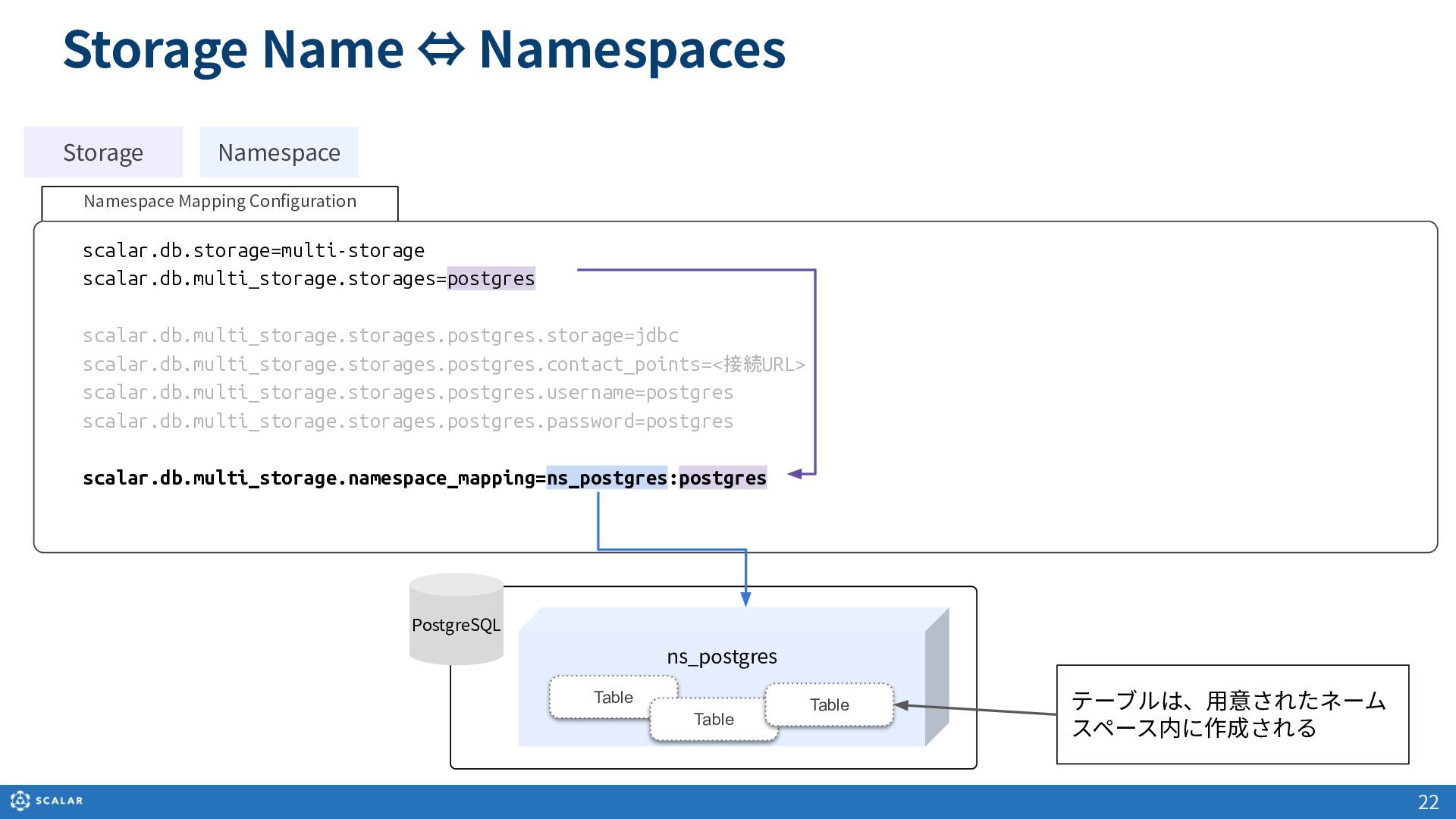
  13. ns_postgres Storage Name ⇔ Namespaces Table Table Table テーブルは、⽤意されたネーム スペース内に作成される

    22 PostgreSQL Storage Namespace Namespace Mapping Configuration scalar.db.storage=multi-storage scalar.db.multi_storage.storages=postgres scalar.db.multi_storage.storages.postgres.storage=jdbc scalar.db.multi_storage.storages.postgres.contact_points=<接続URL> scalar.db.multi_storage.storages.postgres.username=postgres scalar.db.multi_storage.storages.postgres.password=postgres scalar.db.multi_storage.namespace_mapping=ns_postgres:postgres
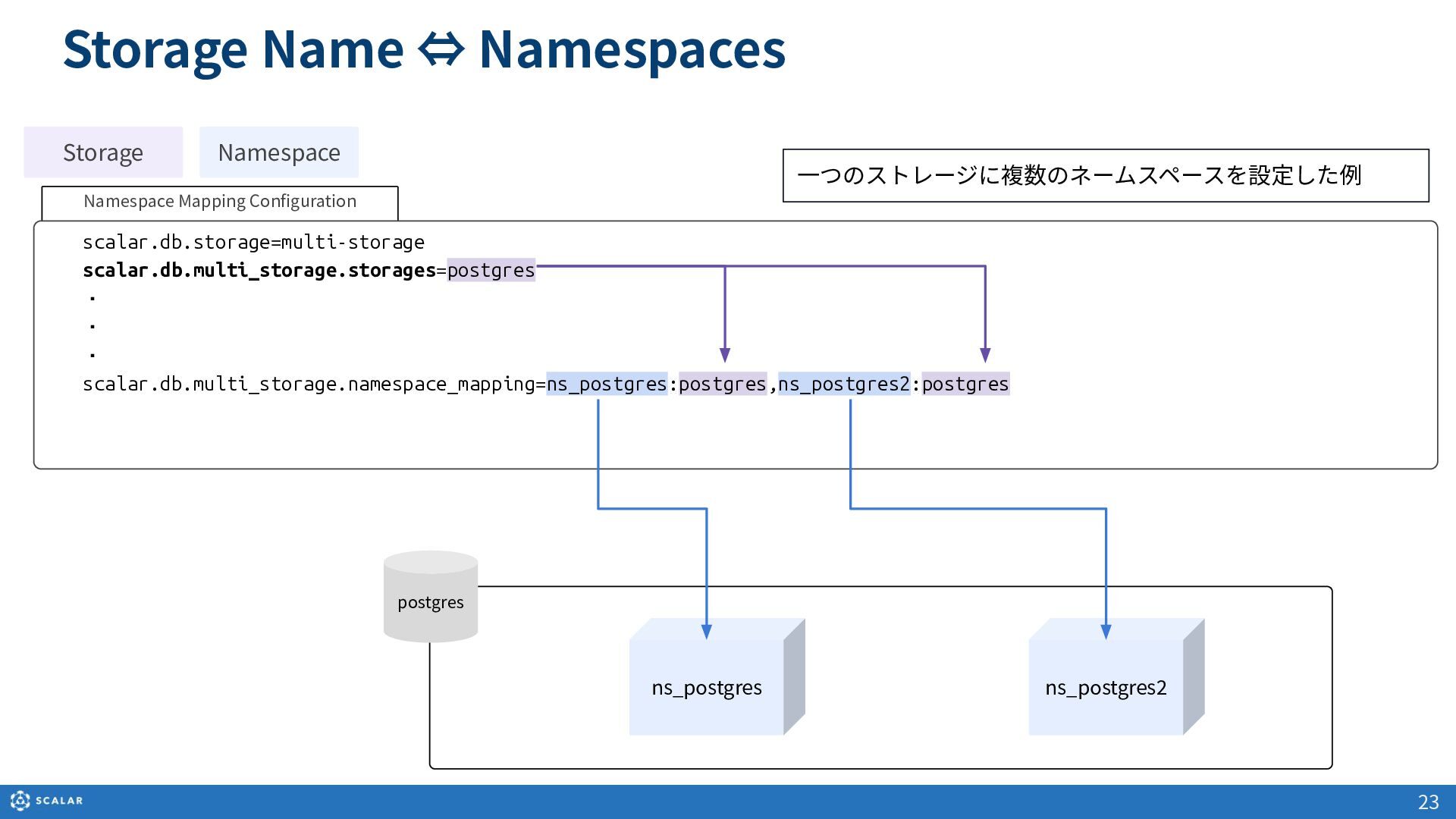
  14. Namespace Mapping Configuration scalar.db.storage=multi-storage scalar.db.multi_storage.storages=postgres ・ ・ ・ scalar.db.multi_storage.namespace_mapping=ns_postgres:postgres,ns_postgres2:postgres Storage

    Name ⇔ Namespaces Storage Namespace postgres ns_postgres ns_postgres2 ⼀つのストレージに複数のネームスペースを設定した例 23
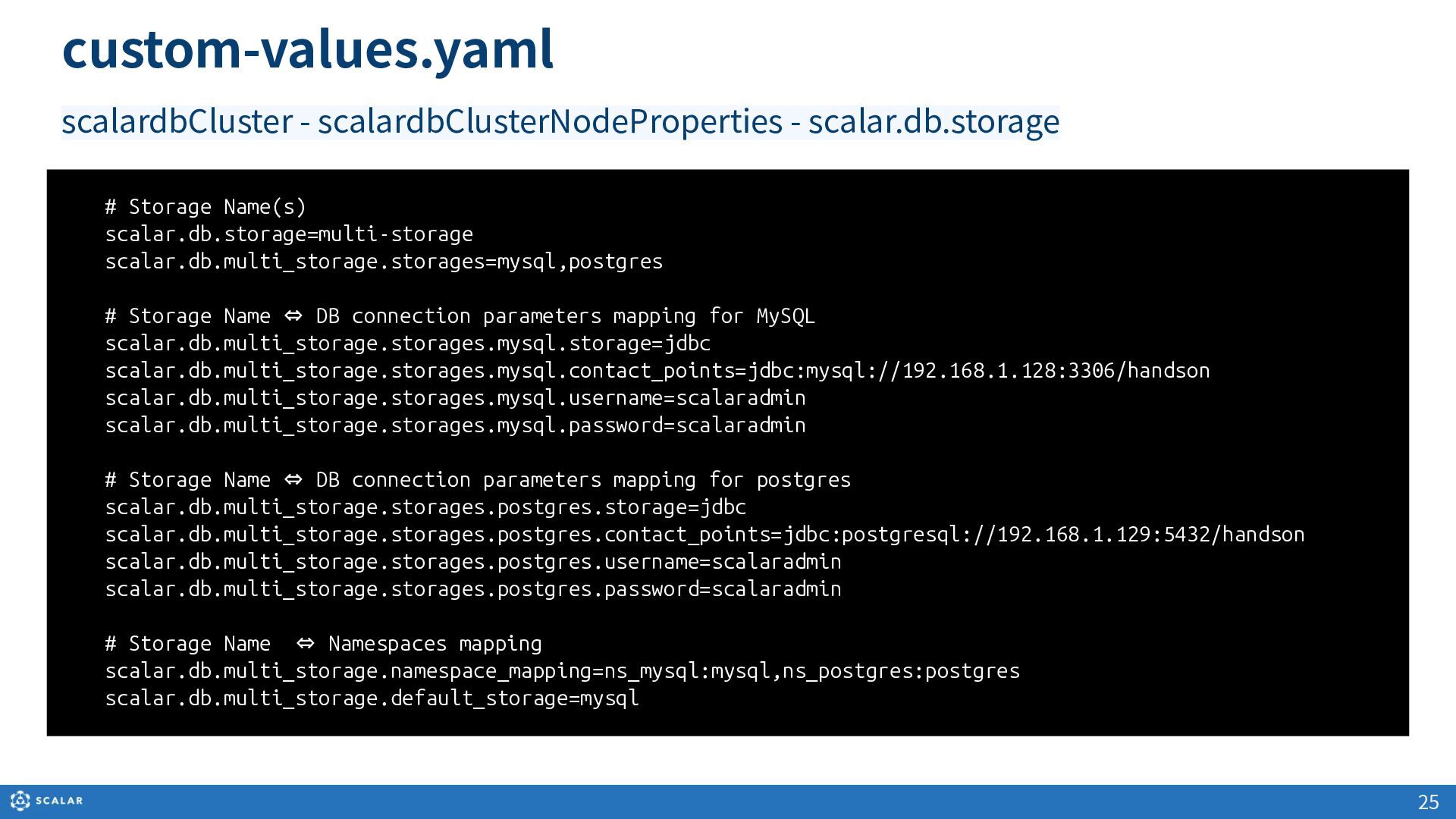
  15. custom-values.yaml # Storage Name(s) scalar.db.storage=multi-storage scalar.db.multi_storage.storages=mysql,postgres # Storage Name ⇔

    DB connection parameters mapping for MySQL scalar.db.multi_storage.storages.mysql.storage=jdbc scalar.db.multi_storage.storages.mysql.contact_points=jdbc:mysql://192.168.1.128:3306/handson scalar.db.multi_storage.storages.mysql.username=scalaradmin scalar.db.multi_storage.storages.mysql.password=scalaradmin # Storage Name ⇔ DB connection parameters mapping for postgres scalar.db.multi_storage.storages.postgres.storage=jdbc scalar.db.multi_storage.storages.postgres.contact_points=jdbc:postgresql://192.168.1.129:5432/handson scalar.db.multi_storage.storages.postgres.username=scalaradmin scalar.db.multi_storage.storages.postgres.password=scalaradmin # Storage Name ⇔ Namespaces mapping scalar.db.multi_storage.namespace_mapping=ns_mysql:mysql,ns_postgres:postgres scalar.db.multi_storage.default_storage=mysql 25 scalardbCluster - scalardbClusterNodeProperties - scalar.db.storage
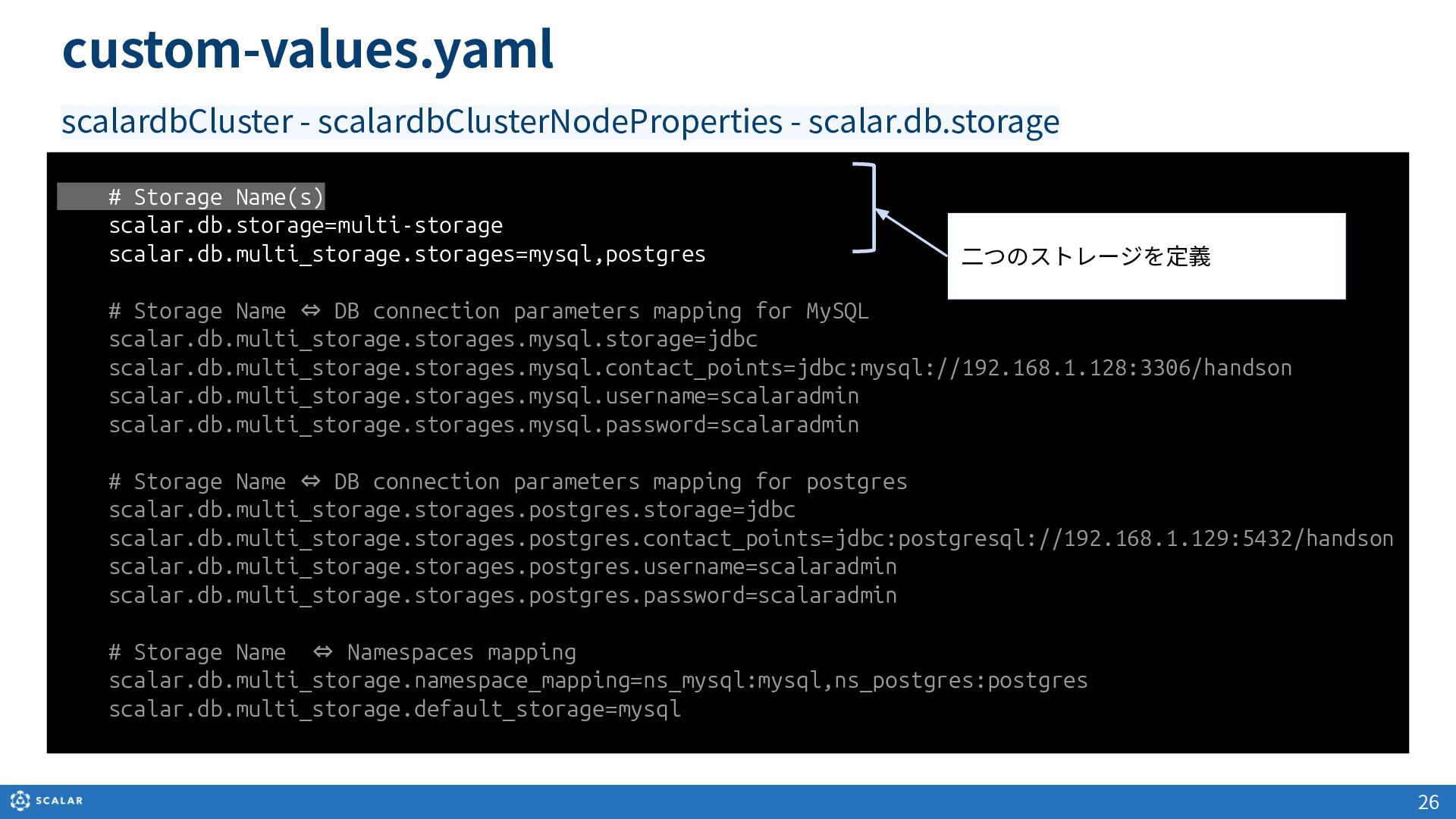
  16. # Storage Name(s) scalar.db.storage=multi-storage scalar.db.multi_storage.storages=mysql,postgres # Storage Name ⇔ DB

    connection parameters mapping for MySQL scalar.db.multi_storage.storages.mysql.storage=jdbc scalar.db.multi_storage.storages.mysql.contact_points=jdbc:mysql://192.168.1.128:3306/handson scalar.db.multi_storage.storages.mysql.username=scalaradmin scalar.db.multi_storage.storages.mysql.password=scalaradmin # Storage Name ⇔ DB connection parameters mapping for postgres scalar.db.multi_storage.storages.postgres.storage=jdbc scalar.db.multi_storage.storages.postgres.contact_points=jdbc:postgresql://192.168.1.129:5432/handson scalar.db.multi_storage.storages.postgres.username=scalaradmin scalar.db.multi_storage.storages.postgres.password=scalaradmin # Storage Name ⇔ Namespaces mapping scalar.db.multi_storage.namespace_mapping=ns_mysql:mysql,ns_postgres:postgres scalar.db.multi_storage.default_storage=mysql ⼆つのストレージを定義 26 custom-values.yaml scalardbCluster - scalardbClusterNodeProperties - scalar.db.storage
  17. # Storage Name(s) scalar.db.storage=multi-storage scalar.db.multi_storage.storages=mysql,postgres #Storage Name ⇔ DB connection

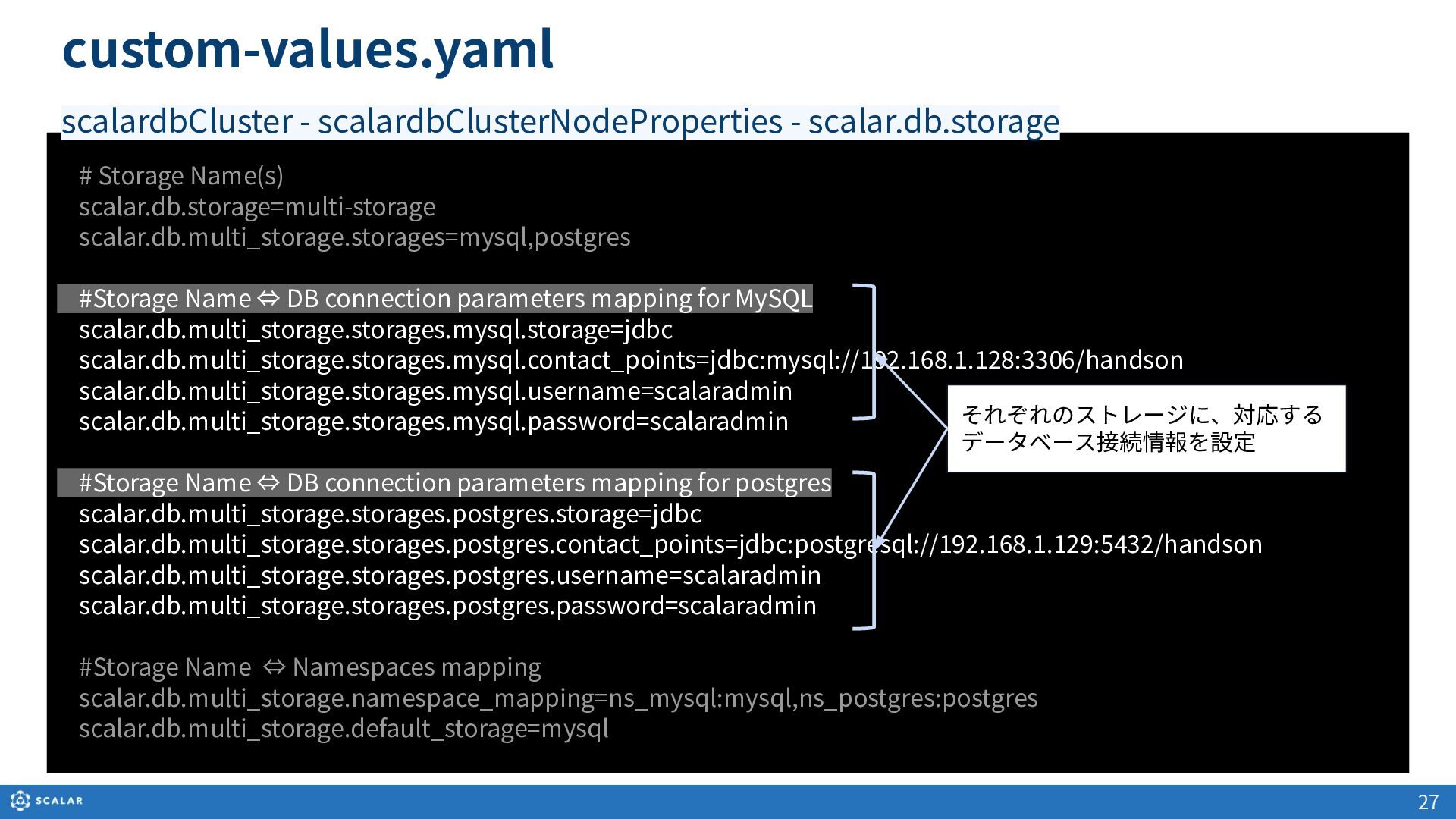
    parameters mapping for MySQL scalar.db.multi_storage.storages.mysql.storage=jdbc scalar.db.multi_storage.storages.mysql.contact_points=jdbc:mysql://192.168.1.128:3306/handson scalar.db.multi_storage.storages.mysql.username=scalaradmin scalar.db.multi_storage.storages.mysql.password=scalaradmin #Storage Name ⇔ DB connection parameters mapping for postgres scalar.db.multi_storage.storages.postgres.storage=jdbc scalar.db.multi_storage.storages.postgres.contact_points=jdbc:postgresql://192.168.1.129:5432/handson scalar.db.multi_storage.storages.postgres.username=scalaradmin scalar.db.multi_storage.storages.postgres.password=scalaradmin #Storage Name ⇔ Namespaces mapping scalar.db.multi_storage.namespace_mapping=ns_mysql:mysql,ns_postgres:postgres scalar.db.multi_storage.default_storage=mysql それぞれのストレージに、対応する データベース接続情報を設定 27 custom-values.yaml scalardbCluster - scalardbClusterNodeProperties - scalar.db.storage
  18. # Storage Name(s) scalar.db.storage=multi-storage scalar.db.multi_storage.storages=mysql,postgres #Storage Name ⇔ DB connection

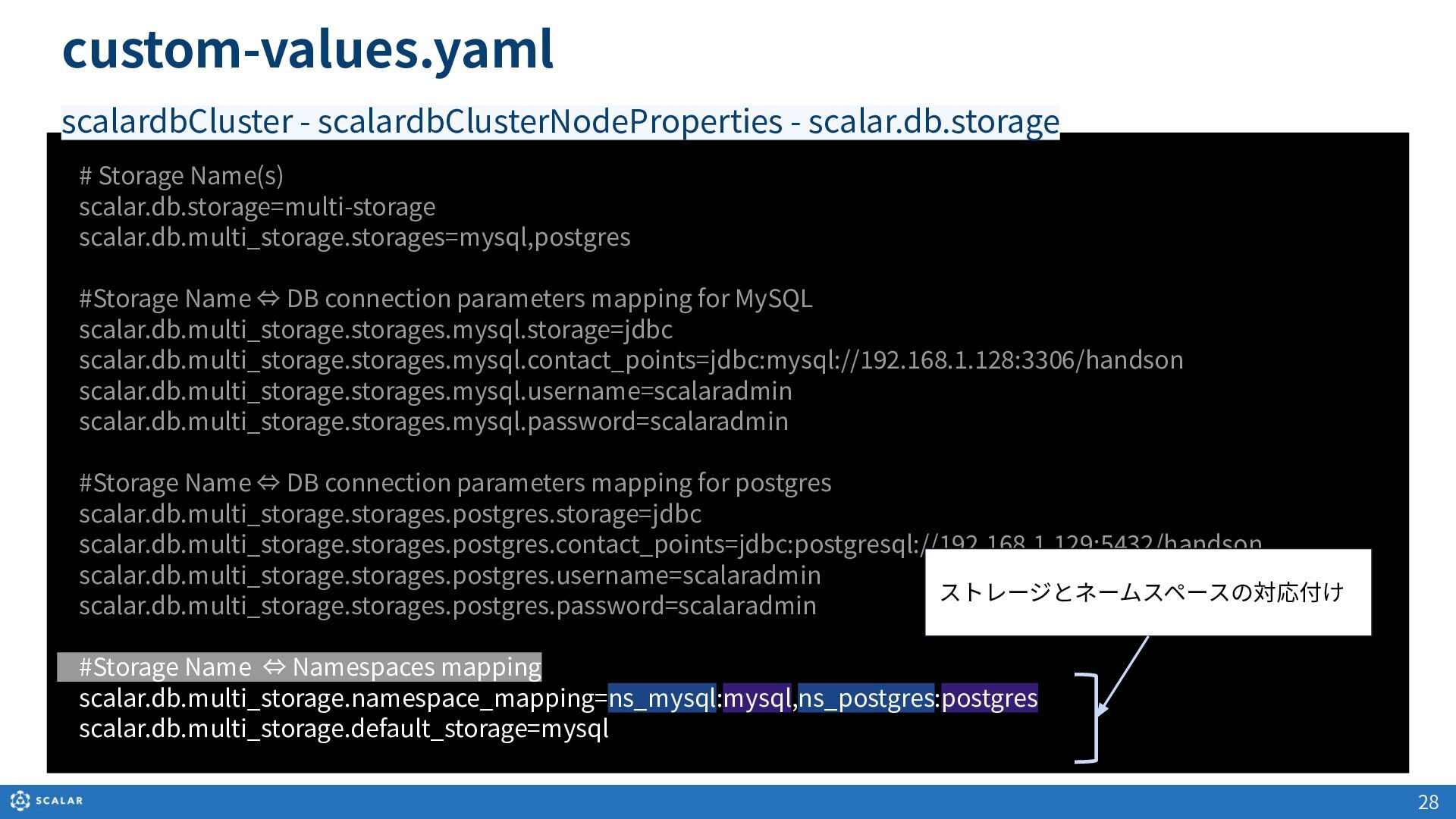
    parameters mapping for MySQL scalar.db.multi_storage.storages.mysql.storage=jdbc scalar.db.multi_storage.storages.mysql.contact_points=jdbc:mysql://192.168.1.128:3306/handson scalar.db.multi_storage.storages.mysql.username=scalaradmin scalar.db.multi_storage.storages.mysql.password=scalaradmin #Storage Name ⇔ DB connection parameters mapping for postgres scalar.db.multi_storage.storages.postgres.storage=jdbc scalar.db.multi_storage.storages.postgres.contact_points=jdbc:postgresql://192.168.1.129:5432/handson scalar.db.multi_storage.storages.postgres.username=scalaradmin scalar.db.multi_storage.storages.postgres.password=scalaradmin #Storage Name ⇔ Namespaces mapping scalar.db.multi_storage.namespace_mapping=ns_mysql:mysql,ns_postgres:postgres scalar.db.multi_storage.default_storage=mysql ストレージとネームスペースの対応付け 28 custom-values.yaml scalardbCluster - scalardbClusterNodeProperties - scalar.db.storage
  19. 29 Secretの利⽤(kubectl create secret) パスワード情報などをcustom-values.yamlに書きたくない時 ... scalar.db.multi_storage.storages.mysql.username=scalaradmin scalar.db.multi_storage.storages.mysql.password=scalaradmin ... kubectl

    create secret generic \ scalardb-credentials-secret \ from-literal=DB_USER_MYSQL=scalaradmin \ from-literal=DB_PASS_MYSQL=scalaradmin \ -n default kubectl create secret コマンド実行例 ... scalar.db.multi_storage.storages.mysql.username=${env:DB_USER_MYSQL} scalar.db.multi_storage.storages.mysql.password=${env:DB_PASS_MYSQL} ... secretName: "scalardb-credentials-secret" custom-values.yaml custom-values.yaml より具体的な例は https://scalardb.scalar-labs.com/docs/latest/scalardb-cluster/setup-scalardb-cluster-on-kubernetes-by-using-helm-chart