Upgrade to Pro — share decks privately, control downloads, hide ads and more …

Profile Backlinks Not Indexed: The 8-Step Fix C...

Profile Backlinks Not Indexed: The 8-Step Fix Checklist

Why are my profile backlinks not indexed, and how do I fix them?
This checklist answers that in eight checks.
Profile backlinks not indexed rarely fail inside Google — they fail on the profile page: robots.txt rules that disallow member directories, noindex hidden in an X-Robots-Tag header, a canonical that points to a members list, a ""website"" field shown only to logged-in users, or a blank template profile Google crawls once and drops.

The document walks through the 8-step fix workflow with pass conditions and failure cases, a Fix / Push / Drop verdict matrix, and a platform scorecard rule for deciding where to keep building profile links.
It also covers what the checklist never fixes — robots.txt and noindex are the host's call — and why no service can promise 100% indexing.

If you're asking why profile backlinks are not indexing, or how to index profile backlinks once they pass every check, start here — then verify your links with the guide on checking backlink indexation:

https://en.speedyindex.com/how-to-check-backlink-indexation/

Avatar for Linda Bjorkvin

Linda Bjorkvin PRO

September 19, 2026

More Decks by Linda Bjorkvin

Other Decks in Marketing & SEO

Transcript

  1. SPEEDYINDEX · AUGUST 2026 Profile Backlinks Not Indexed: The 8-Step

    Fix Checklist Most profile links die on the profile page, not in Google. Run these eight checks before you build, submit, or pay for one more. 8 checks 5 gates 1 verdict matrix 2 decision tools Data basis. SpeedyIndex's 2025 study of 1,000,000+ URLs; Google Search Central documentation on crawling, indexing, robots.txt, canonicalization and outbound-link attributes; the 2025 BlackHatWorld indexer test (orphan pages, ten domains). Every figure in this document is sourced or labeled as an estimate. A diagnostic checklist for link builders and SEO teams · Read time about 10 minutes Linda Bjorkvin · Project Manager, SpeedyIndex · en.speedyindex.com PDF document · A4 · Page 1 of 7
  2. Profile backlinks not indexed · The 8-Step Fix Checklist SPEEDYINDEX

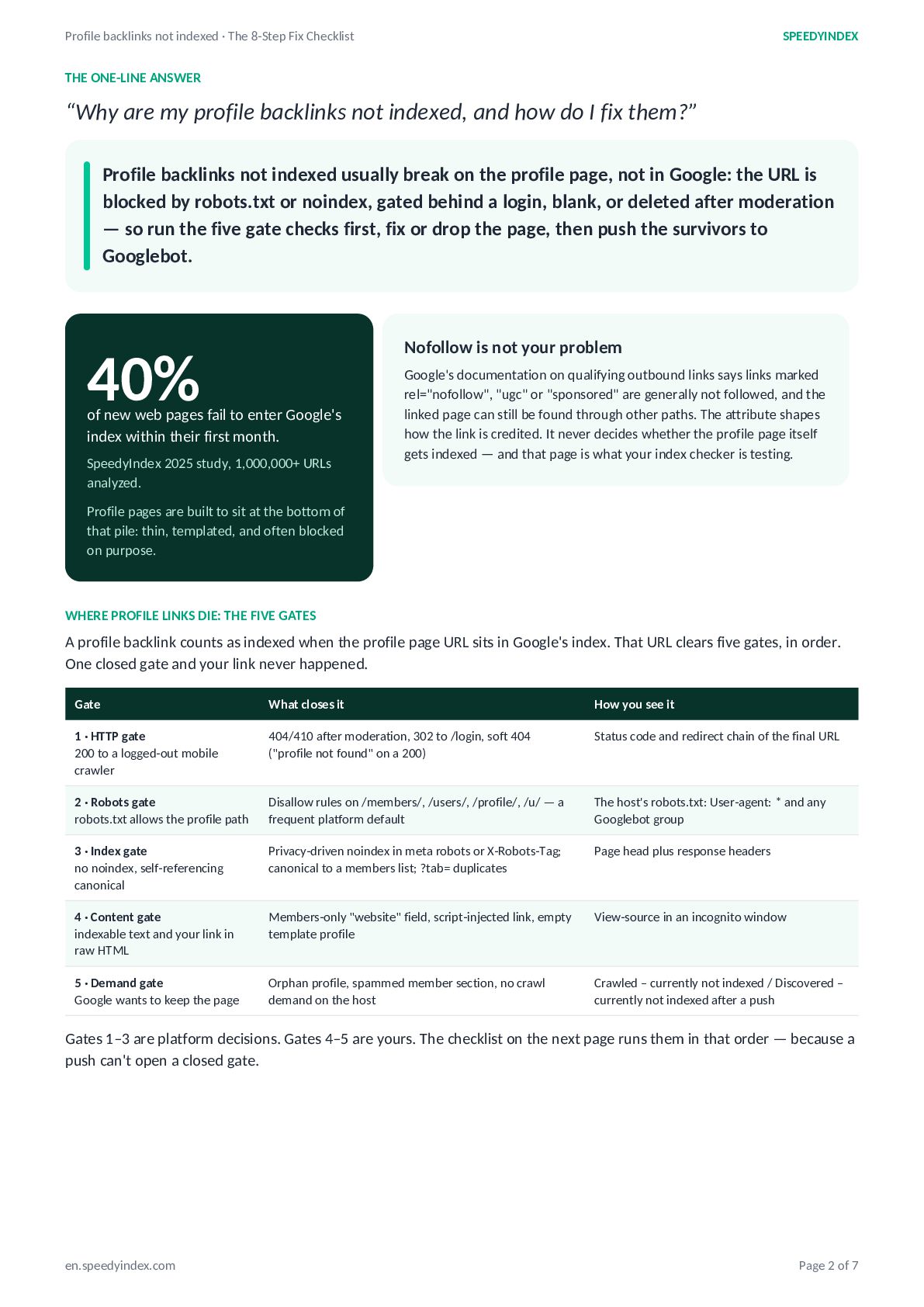
    THE ONE-LINE ANSWER “Why are my profile backlinks not indexed, and how do I fix them?” Profile backlinks not indexed usually break on the profile page, not in Google: the URL is blocked by robots.txt or noindex, gated behind a login, blank, or deleted after moderation — so run the five gate checks first, fix or drop the page, then push the survivors to Googlebot. Nofollow is not your problem 40% of new web pages fail to enter Google's index within their first month. SpeedyIndex 2025 study, 1,000,000+ URLs analyzed. Google's documentation on qualifying outbound links says links marked rel="nofollow", "ugc" or "sponsored" are generally not followed, and the linked page can still be found through other paths. The attribute shapes how the link is credited. It never decides whether the profile page itself gets indexed — and that page is what your index checker is testing. Profile pages are built to sit at the bottom of that pile: thin, templated, and often blocked on purpose. WHERE PROFILE LINKS DIE: THE FIVE GATES A profile backlink counts as indexed when the profile page URL sits in Google's index. That URL clears five gates, in order. One closed gate and your link never happened. Gate What closes it How you see it 1 · HTTP gate 200 to a logged-out mobile crawler 404/410 after moderation, 302 to /login, soft 404 ("profile not found" on a 200) Status code and redirect chain of the final URL 2 · Robots gate robots.txt allows the profile path Disallow rules on /members/, /users/, /profile/, /u/ — a frequent platform default The host's robots.txt: User-agent: * and any Googlebot group 3 · Index gate no noindex, self-referencing canonical Privacy-driven noindex in meta robots or X-Robots-Tag; canonical to a members list; ?tab= duplicates Page head plus response headers 4 · Content gate indexable text and your link in raw HTML Members-only "website" field, script-injected link, empty template profile View-source in an incognito window 5 · Demand gate Google wants to keep the page Orphan profile, spammed member section, no crawl demand on the host Crawled – currently not indexed / Discovered – currently not indexed after a push Gates 1–3 are platform decisions. Gates 4–5 are yours. The checklist on the next page runs them in that order — because a push can't open a closed gate. en.speedyindex.com Page 2 of 7
  3. Profile backlinks not indexed · The 8-Step Fix Checklist SPEEDYINDEX

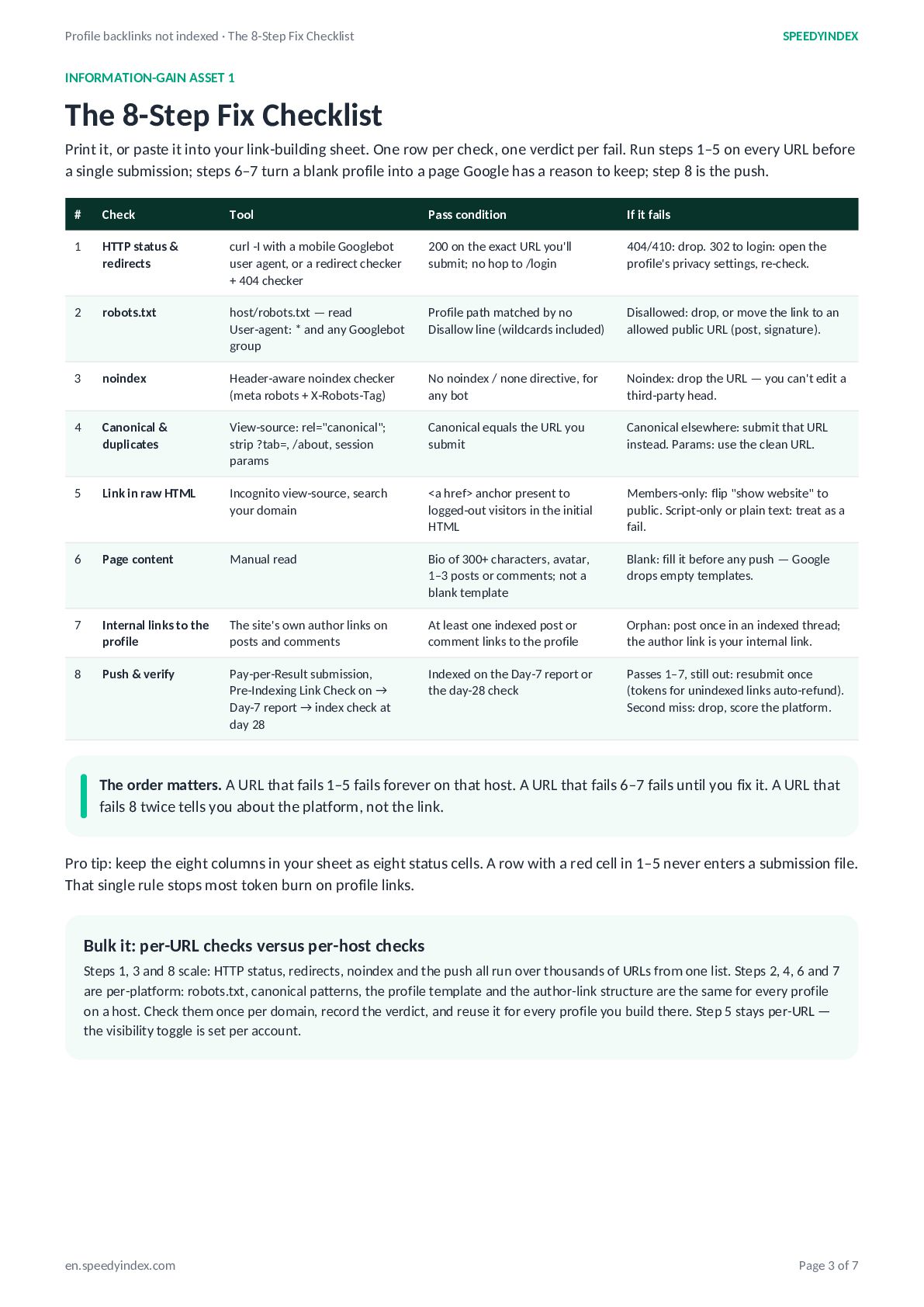
    INFORMATION-GAIN ASSET 1 The 8-Step Fix Checklist Print it, or paste it into your link-building sheet. One row per check, one verdict per fail. Run steps 1–5 on every URL before a single submission; steps 6–7 turn a blank profile into a page Google has a reason to keep; step 8 is the push. # Check Tool Pass condition If it fails 1 HTTP status & redirects curl -I with a mobile Googlebot user agent, or a redirect checker + 404 checker 200 on the exact URL you'll submit; no hop to /login 404/410: drop. 302 to login: open the profile's privacy settings, re-check. 2 robots.txt host/robots.txt — read User-agent: * and any Googlebot group Profile path matched by no Disallow line (wildcards included) Disallowed: drop, or move the link to an allowed public URL (post, signature). 3 noindex Header-aware noindex checker (meta robots + X-Robots-Tag) No noindex / none directive, for any bot Noindex: drop the URL — you can't edit a third-party head. 4 Canonical & duplicates View-source: rel="canonical"; strip ?tab=, /about, session params Canonical equals the URL you submit Canonical elsewhere: submit that URL instead. Params: use the clean URL. 5 Link in raw HTML Incognito view-source, search your domain <a href> anchor present to logged-out visitors in the initial HTML Members-only: flip "show website" to public. Script-only or plain text: treat as a fail. 6 Page content Manual read Bio of 300+ characters, avatar, 1–3 posts or comments; not a blank template Blank: fill it before any push — Google drops empty templates. 7 Internal links to the profile The site's own author links on posts and comments At least one indexed post or comment links to the profile Orphan: post once in an indexed thread; the author link is your internal link. 8 Push & verify Pay-per-Result submission, Pre-Indexing Link Check on → Day-7 report → index check at day 28 Indexed on the Day-7 report or the day-28 check Passes 1–7, still out: resubmit once (tokens for unindexed links auto-refund). Second miss: drop, score the platform. The order matters. A URL that fails 1–5 fails forever on that host. A URL that fails 6–7 fails until you fix it. A URL that fails 8 twice tells you about the platform, not the link. Pro tip: keep the eight columns in your sheet as eight status cells. A row with a red cell in 1–5 never enters a submission file. That single rule stops most token burn on profile links. Bulk it: per-URL checks versus per-host checks Steps 1, 3 and 8 scale: HTTP status, redirects, noindex and the push all run over thousands of URLs from one list. Steps 2, 4, 6 and 7 are per-platform: robots.txt, canonical patterns, the profile template and the author-link structure are the same for every profile on a host. Check them once per domain, record the verdict, and reuse it for every profile you build there. Step 5 stays per-URL — the visibility toggle is set per account. en.speedyindex.com Page 3 of 7
  4. Profile backlinks not indexed · The 8-Step Fix Checklist SPEEDYINDEX

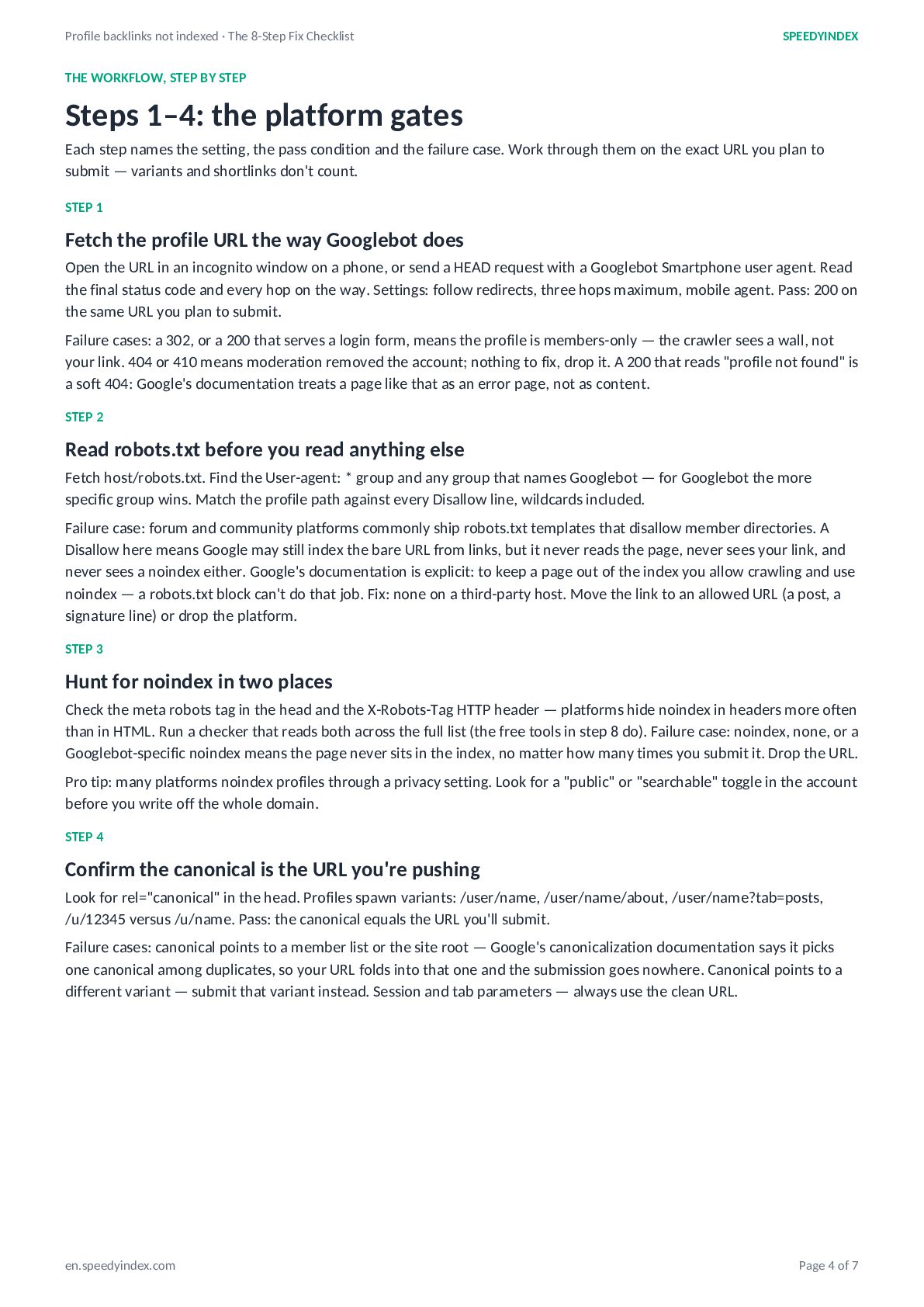
    THE WORKFLOW, STEP BY STEP Steps 1–4: the platform gates Each step names the setting, the pass condition and the failure case. Work through them on the exact URL you plan to submit — variants and shortlinks don't count. STEP 1 Fetch the profile URL the way Googlebot does Open the URL in an incognito window on a phone, or send a HEAD request with a Googlebot Smartphone user agent. Read the final status code and every hop on the way. Settings: follow redirects, three hops maximum, mobile agent. Pass: 200 on the same URL you plan to submit. Failure cases: a 302, or a 200 that serves a login form, means the profile is members-only — the crawler sees a wall, not your link. 404 or 410 means moderation removed the account; nothing to fix, drop it. A 200 that reads "profile not found" is a soft 404: Google's documentation treats a page like that as an error page, not as content. STEP 2 Read robots.txt before you read anything else Fetch host/robots.txt. Find the User-agent: * group and any group that names Googlebot — for Googlebot the more specific group wins. Match the profile path against every Disallow line, wildcards included. Failure case: forum and community platforms commonly ship robots.txt templates that disallow member directories. A Disallow here means Google may still index the bare URL from links, but it never reads the page, never sees your link, and never sees a noindex either. Google's documentation is explicit: to keep a page out of the index you allow crawling and use noindex — a robots.txt block can't do that job. Fix: none on a third-party host. Move the link to an allowed URL (a post, a signature line) or drop the platform. STEP 3 Hunt for noindex in two places Check the meta robots tag in the head and the X-Robots-Tag HTTP header — platforms hide noindex in headers more often than in HTML. Run a checker that reads both across the full list (the free tools in step 8 do). Failure case: noindex, none, or a Googlebot-specific noindex means the page never sits in the index, no matter how many times you submit it. Drop the URL. Pro tip: many platforms noindex profiles through a privacy setting. Look for a "public" or "searchable" toggle in the account before you write off the whole domain. STEP 4 Confirm the canonical is the URL you're pushing Look for rel="canonical" in the head. Profiles spawn variants: /user/name, /user/name/about, /user/name?tab=posts, /u/12345 versus /u/name. Pass: the canonical equals the URL you'll submit. Failure cases: canonical points to a member list or the site root — Google's canonicalization documentation says it picks one canonical among duplicates, so your URL folds into that one and the submission goes nowhere. Canonical points to a different variant — submit that variant instead. Session and tab parameters — always use the clean URL. en.speedyindex.com Page 4 of 7
  5. Profile backlinks not indexed · The 8-Step Fix Checklist SPEEDYINDEX

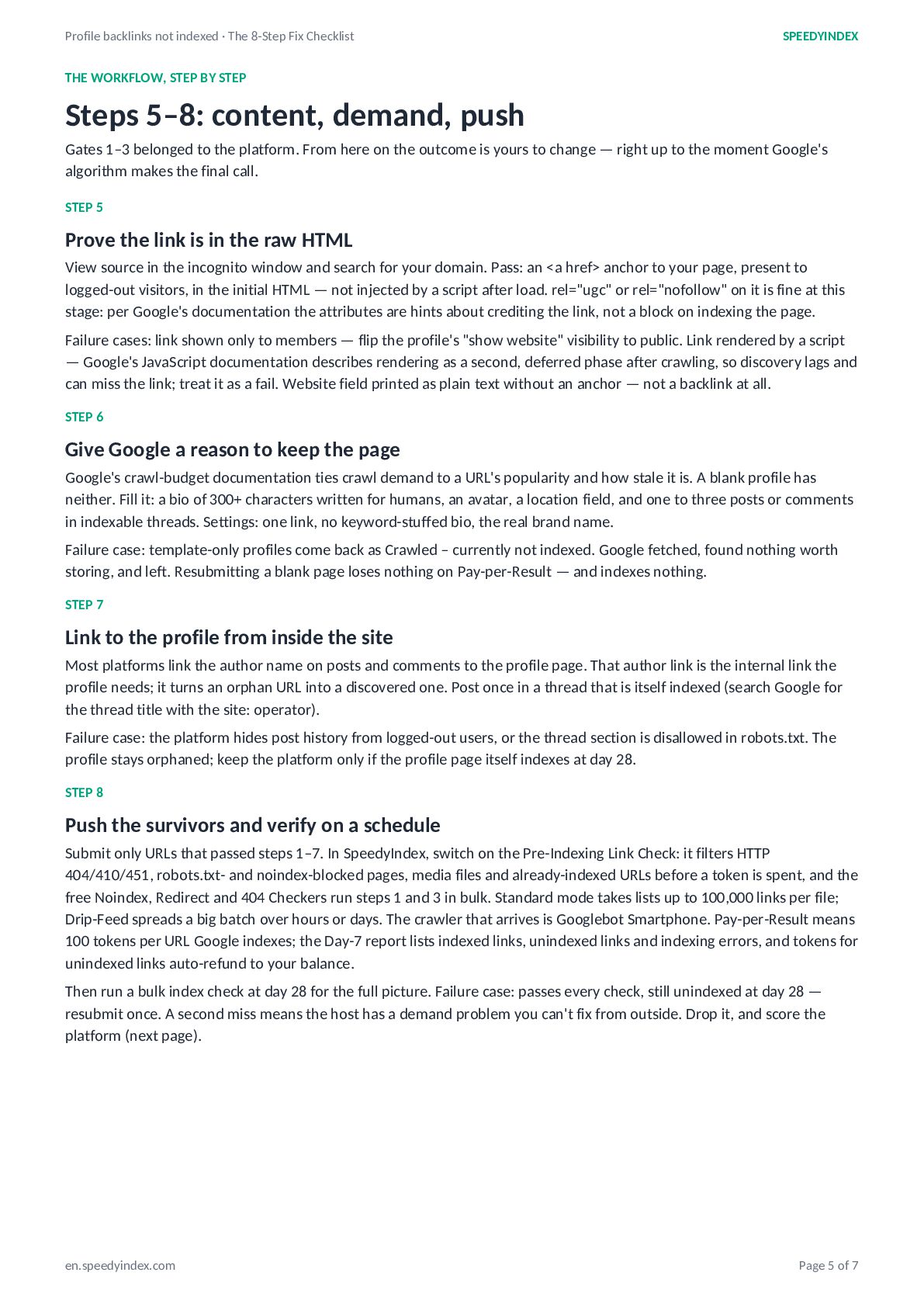
    THE WORKFLOW, STEP BY STEP Steps 5–8: content, demand, push Gates 1–3 belonged to the platform. From here on the outcome is yours to change — right up to the moment Google's algorithm makes the final call. STEP 5 Prove the link is in the raw HTML View source in the incognito window and search for your domain. Pass: an <a href> anchor to your page, present to logged-out visitors, in the initial HTML — not injected by a script after load. rel="ugc" or rel="nofollow" on it is fine at this stage: per Google's documentation the attributes are hints about crediting the link, not a block on indexing the page. Failure cases: link shown only to members — flip the profile's "show website" visibility to public. Link rendered by a script — Google's JavaScript documentation describes rendering as a second, deferred phase after crawling, so discovery lags and can miss the link; treat it as a fail. Website field printed as plain text without an anchor — not a backlink at all. STEP 6 Give Google a reason to keep the page Google's crawl-budget documentation ties crawl demand to a URL's popularity and how stale it is. A blank profile has neither. Fill it: a bio of 300+ characters written for humans, an avatar, a location field, and one to three posts or comments in indexable threads. Settings: one link, no keyword-stuffed bio, the real brand name. Failure case: template-only profiles come back as Crawled – currently not indexed. Google fetched, found nothing worth storing, and left. Resubmitting a blank page loses nothing on Pay-per-Result — and indexes nothing. STEP 7 Link to the profile from inside the site Most platforms link the author name on posts and comments to the profile page. That author link is the internal link the profile needs; it turns an orphan URL into a discovered one. Post once in a thread that is itself indexed (search Google for the thread title with the site: operator). Failure case: the platform hides post history from logged-out users, or the thread section is disallowed in robots.txt. The profile stays orphaned; keep the platform only if the profile page itself indexes at day 28. STEP 8 Push the survivors and verify on a schedule Submit only URLs that passed steps 1–7. In SpeedyIndex, switch on the Pre-Indexing Link Check: it filters HTTP 404/410/451, robots.txt- and noindex-blocked pages, media files and already-indexed URLs before a token is spent, and the free Noindex, Redirect and 404 Checkers run steps 1 and 3 in bulk. Standard mode takes lists up to 100,000 links per file; Drip-Feed spreads a big batch over hours or days. The crawler that arrives is Googlebot Smartphone. Pay-per-Result means 100 tokens per URL Google indexes; the Day-7 report lists indexed links, unindexed links and indexing errors, and tokens for unindexed links auto-refund to your balance. Then run a bulk index check at day 28 for the full picture. Failure case: passes every check, still unindexed at day 28 — resubmit once. A second miss means the host has a demand problem you can't fix from outside. Drop it, and score the platform (next page). en.speedyindex.com Page 5 of 7
  6. Profile backlinks not indexed · The 8-Step Fix Checklist SPEEDYINDEX

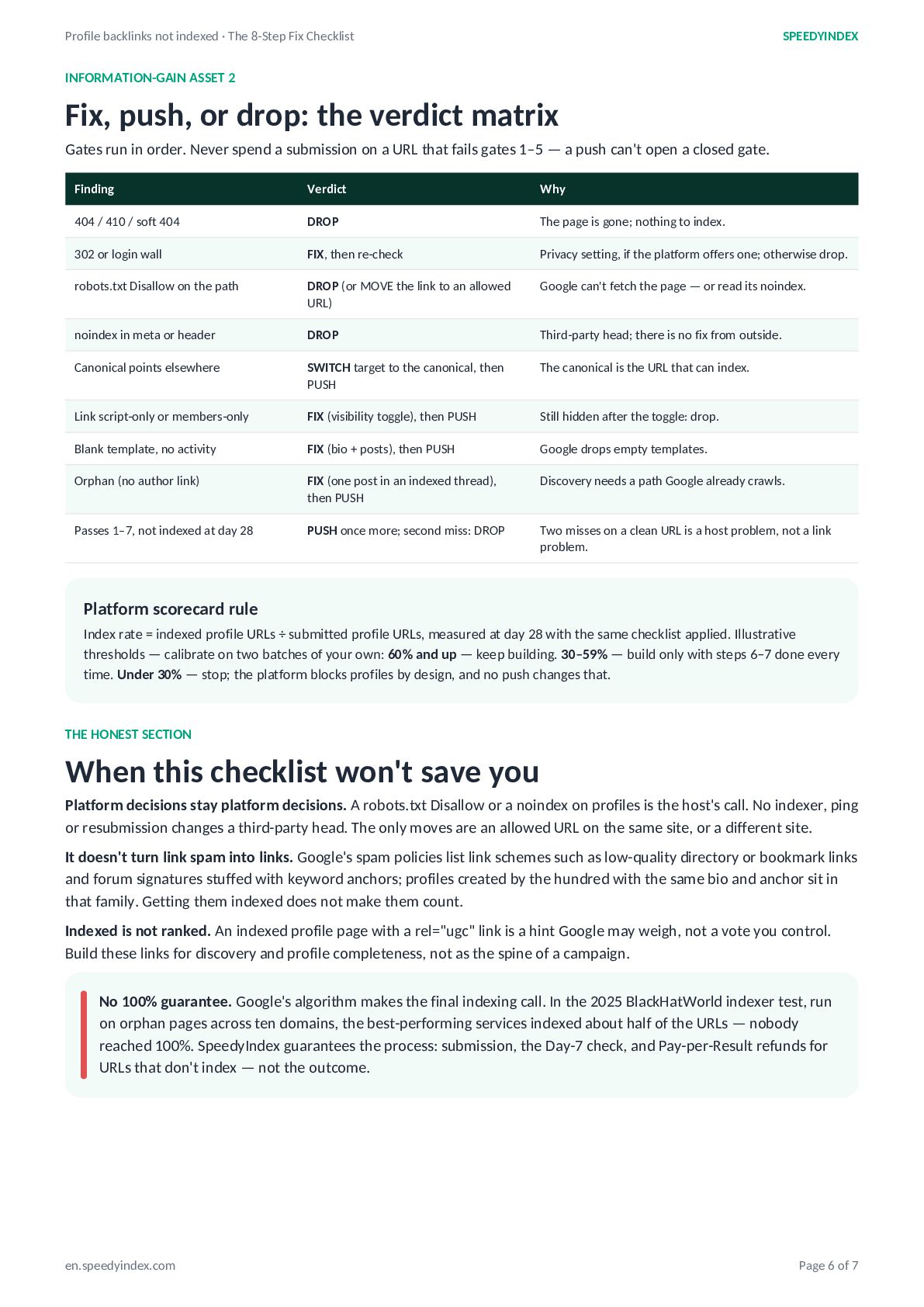
    INFORMATION-GAIN ASSET 2 Fix, push, or drop: the verdict matrix Gates run in order. Never spend a submission on a URL that fails gates 1–5 — a push can't open a closed gate. Finding Verdict Why 404 / 410 / soft 404 DROP The page is gone; nothing to index. 302 or login wall FIX, then re-check Privacy setting, if the platform offers one; otherwise drop. robots.txt Disallow on the path DROP (or MOVE the link to an allowed URL) Google can't fetch the page — or read its noindex. noindex in meta or header DROP Third-party head; there is no fix from outside. Canonical points elsewhere SWITCH target to the canonical, then PUSH The canonical is the URL that can index. Link script-only or members-only FIX (visibility toggle), then PUSH Still hidden after the toggle: drop. Blank template, no activity FIX (bio + posts), then PUSH Google drops empty templates. Orphan (no author link) FIX (one post in an indexed thread), then PUSH Discovery needs a path Google already crawls. Passes 1–7, not indexed at day 28 PUSH once more; second miss: DROP Two misses on a clean URL is a host problem, not a link problem. Platform scorecard rule Index rate = indexed profile URLs ÷ submitted profile URLs, measured at day 28 with the same checklist applied. Illustrative thresholds — calibrate on two batches of your own: 60% and up — keep building. 30–59% — build only with steps 6–7 done every time. Under 30% — stop; the platform blocks profiles by design, and no push changes that. THE HONEST SECTION When this checklist won't save you Platform decisions stay platform decisions. A robots.txt Disallow or a noindex on profiles is the host's call. No indexer, ping or resubmission changes a third-party head. The only moves are an allowed URL on the same site, or a different site. It doesn't turn link spam into links. Google's spam policies list link schemes such as low-quality directory or bookmark links and forum signatures stuffed with keyword anchors; profiles created by the hundred with the same bio and anchor sit in that family. Getting them indexed does not make them count. Indexed is not ranked. An indexed profile page with a rel="ugc" link is a hint Google may weigh, not a vote you control. Build these links for discovery and profile completeness, not as the spine of a campaign. No 100% guarantee. Google's algorithm makes the final indexing call. In the 2025 BlackHatWorld indexer test, run on orphan pages across ten domains, the best-performing services indexed about half of the URLs — nobody reached 100%. SpeedyIndex guarantees the process: submission, the Day-7 check, and Pay-per-Result refunds for URLs that don't index — not the outcome. en.speedyindex.com Page 6 of 7
  7. SPEEDYINDEX · NEXT STEP Push the profile links that pass.

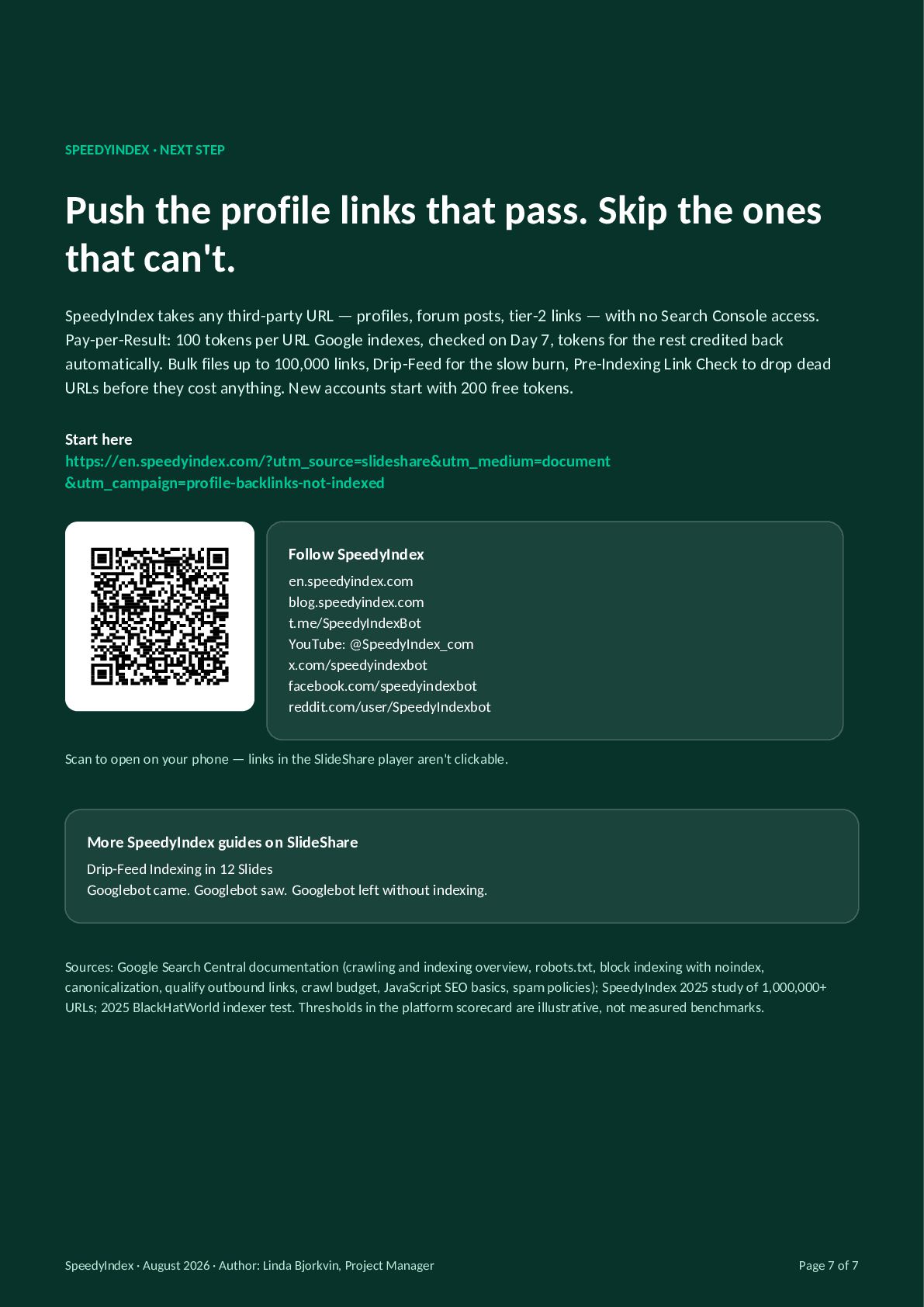
    Skip the ones that can't. SpeedyIndex takes any third-party URL — profiles, forum posts, tier-2 links — with no Search Console access. Pay-per-Result: 100 tokens per URL Google indexes, checked on Day 7, tokens for the rest credited back automatically. Bulk files up to 100,000 links, Drip-Feed for the slow burn, Pre-Indexing Link Check to drop dead URLs before they cost anything. New accounts start with 200 free tokens. Start here https://en.speedyindex.com/?utm_source=slideshare&utm_medium=document &utm_campaign=profile-backlinks-not-indexed Follow SpeedyIndex en.speedyindex.com blog.speedyindex.com t.me/SpeedyIndexBot YouTube: @SpeedyIndex_com x.com/speedyindexbot facebook.com/speedyindexbot reddit.com/user/SpeedyIndexbot Scan to open on your phone — links in the SlideShare player aren't clickable. More SpeedyIndex guides on SlideShare Drip-Feed Indexing in 12 Slides Googlebot came. Googlebot saw. Googlebot left without indexing. Sources: Google Search Central documentation (crawling and indexing overview, robots.txt, block indexing with noindex, canonicalization, qualify outbound links, crawl budget, JavaScript SEO basics, spam policies); SpeedyIndex 2025 study of 1,000,000+ URLs; 2025 BlackHatWorld indexer test. Thresholds in the platform scorecard are illustrative, not measured benchmarks. SpeedyIndex · August 2026 · Author: Linda Bjorkvin, Project Manager Page 7 of 7