Upgrade to Pro — share decks privately, control downloads, hide ads and more …

MCP for SEO: Claude, Cursor & VS Code Guide wit...

MCP for SEO: Claude, Cursor & VS Code Guide with 20 Prompts for Indexing and Rank Tracking

A practical 12-page MCP for SEO guide: connect Claude, Claude Code, Cursor or VS Code to SpeedyIndex and use 20 copy-ready prompts to check Google, Yandex and Bing index status, submit URLs to Google indexing with automatic refunds for URLs that don’t get indexed, verify backlinks, and read Google positions and AI Overview citations. Paid tools ask before running unless set to Always allow. Setup, troubleshooting and security details are on the companion page: https://en.speedyindex.com/mcp/

Avatar for Linda Bjorkvin

Linda Bjorkvin PRO

November 12, 2026

More Decks by Linda Bjorkvin

Other Decks in Marketing & SEO

Transcript

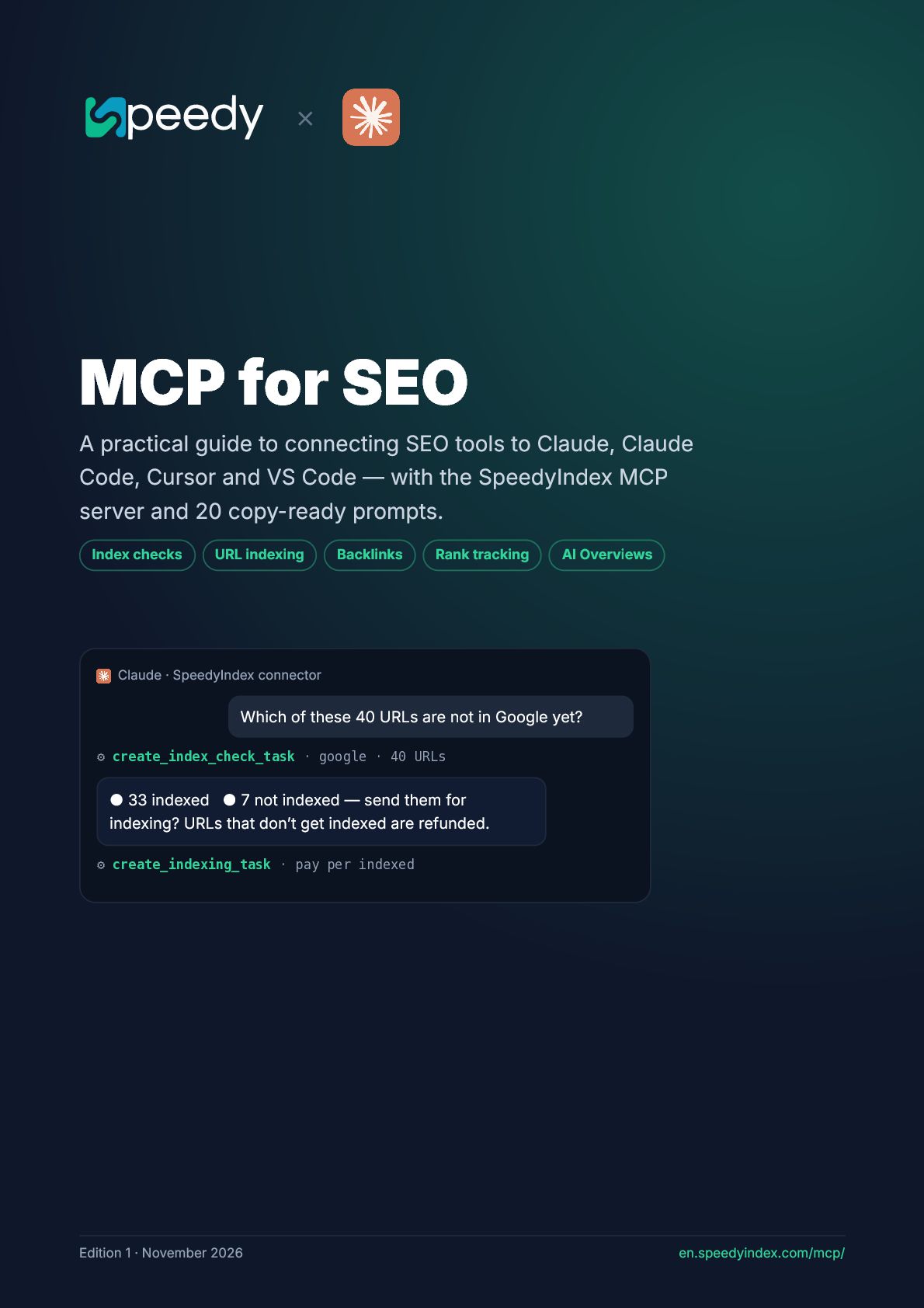
  1. × MCP for SEO A practical guide to connecting SEO

    tools to Claude, Claude Code, Cursor and VS Code — with the SpeedyIndex MCP server and 20 copy-ready prompts. Index checks URL indexing Backlinks Rank tracking AI Overviews Claude · SpeedyIndex connector Which of these 40 URLs are not in Google yet? ⚙ create_index_check_task · google · 40 URLs • 33 indexed • 7 not indexed — send them for indexing? URLs that don’t get indexed are refunded. ⚙ create_indexing_task · pay per indexed Edition 1 · November 2026 en.speedyindex.com/mcp/
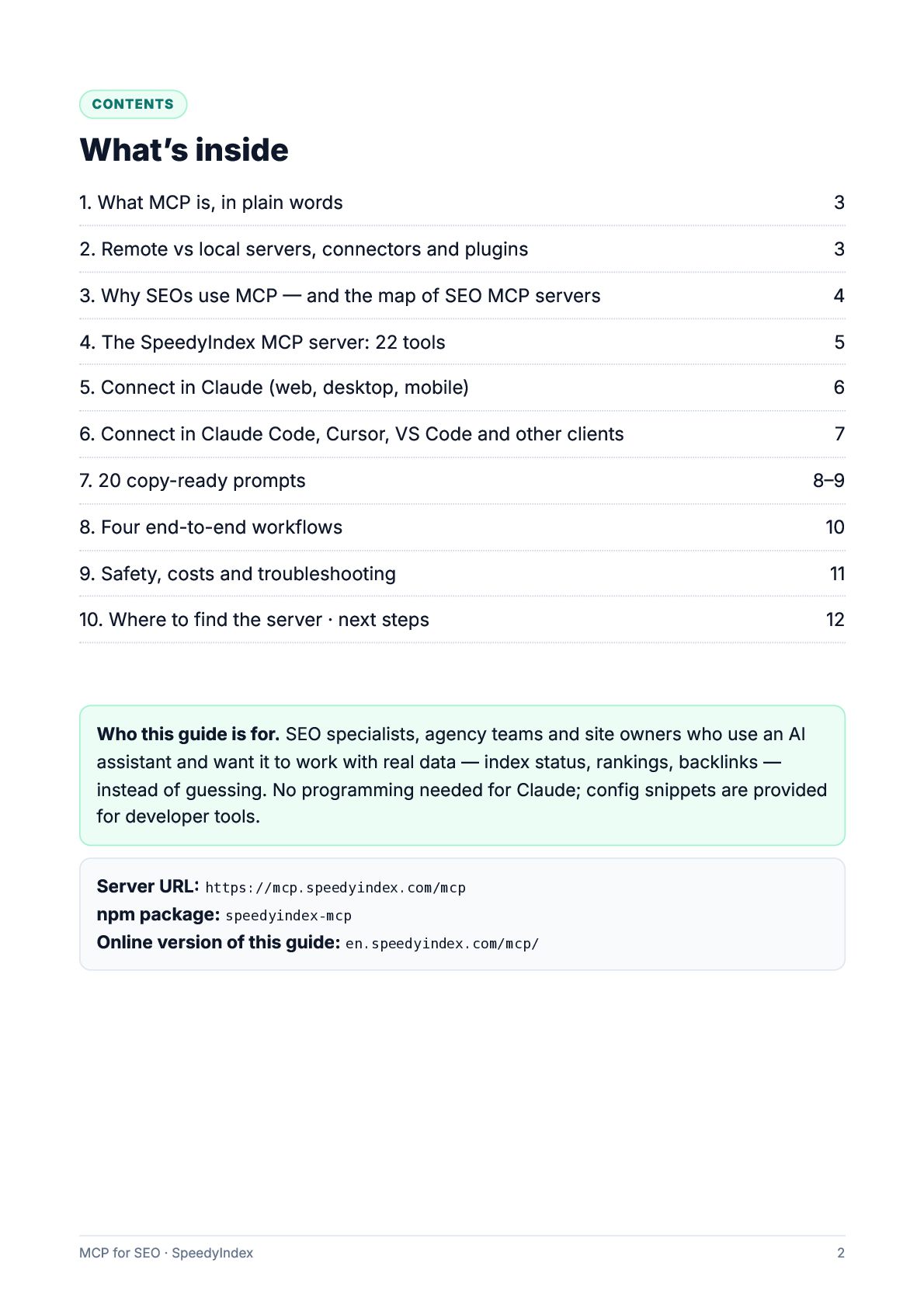
  2. CONTENTS What’s inside 1. What MCP is, in plain words

    3 2. Remote vs local servers, connectors and plugins 3 3. Why SEOs use MCP — and the map of SEO MCP servers 4 4. The SpeedyIndex MCP server: 22 tools 5 5. Connect in Claude (web, desktop, mobile) 6 6. Connect in Claude Code, Cursor, VS Code and other clients 7 7. 20 copy-ready prompts 8–9 8. Four end-to-end workflows 10 9. Safety, costs and troubleshooting 11 10. Where to find the server · next steps 12 Who this guide is for. SEO specialists, agency teams and site owners who use an AI assistant and want it to work with real data — index status, rankings, backlinks — instead of guessing. No programming needed for Claude; config snippets are provided for developer tools. Server URL: https://mcp.speedyindex.com/mcp npm package: speedyindex-mcp Online version of this guide: en.speedyindex.com/mcp/ MCP for SEO · SpeedyIndex 2
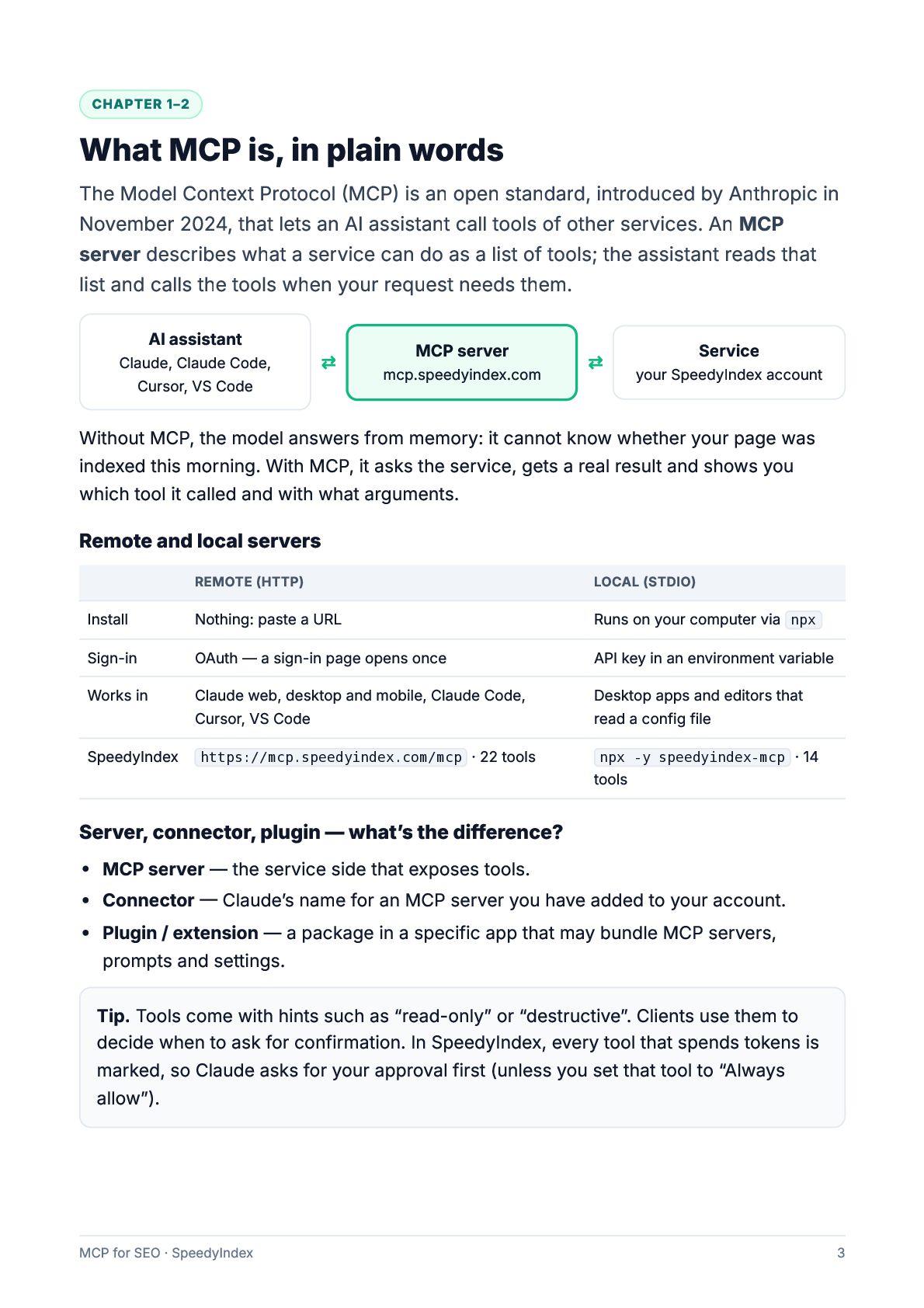
  3. CHAPTER 1–2 What MCP is, in plain words The Model

    Context Protocol (MCP) is an open standard, introduced by Anthropic in November 2024, that lets an AI assistant call tools of other services. An MCP server describes what a service can do as a list of tools; the assistant reads that list and calls the tools when your request needs them. AI assistant Claude, Claude Code, Cursor, VS Code ⇄ MCP server mcp.speedyindex.com ⇄ Service your SpeedyIndex account Without MCP, the model answers from memory: it cannot know whether your page was indexed this morning. With MCP, it asks the service, gets a real result and shows you which tool it called and with what arguments. Remote and local servers REMOTE (HTTP) LOCAL (STDIO) Install Nothing: paste a URL Runs on your computer via npx Sign-in OAuth — a sign-in page opens once API key in an environment variable Works in Claude web, desktop and mobile, Claude Code, Cursor, VS Code Desktop apps and editors that read a config file SpeedyIndex https://mcp.speedyindex.com/mcp · 22 tools npx -y speedyindex-mcp tools · 14 Server, connector, plugin — what’s the difference? MCP server — the service side that exposes tools. Connector — Claude’s name for an MCP server you have added to your account. Plugin / extension — a package in a specific app that may bundle MCP servers, prompts and settings. Tip. Tools come with hints such as “read-only” or “destructive”. Clients use them to decide when to ask for confirmation. In SpeedyIndex, every tool that spends tokens is marked, so Claude asks for your approval first (unless you set that tool to “Always allow”). MCP for SEO · SpeedyIndex 3
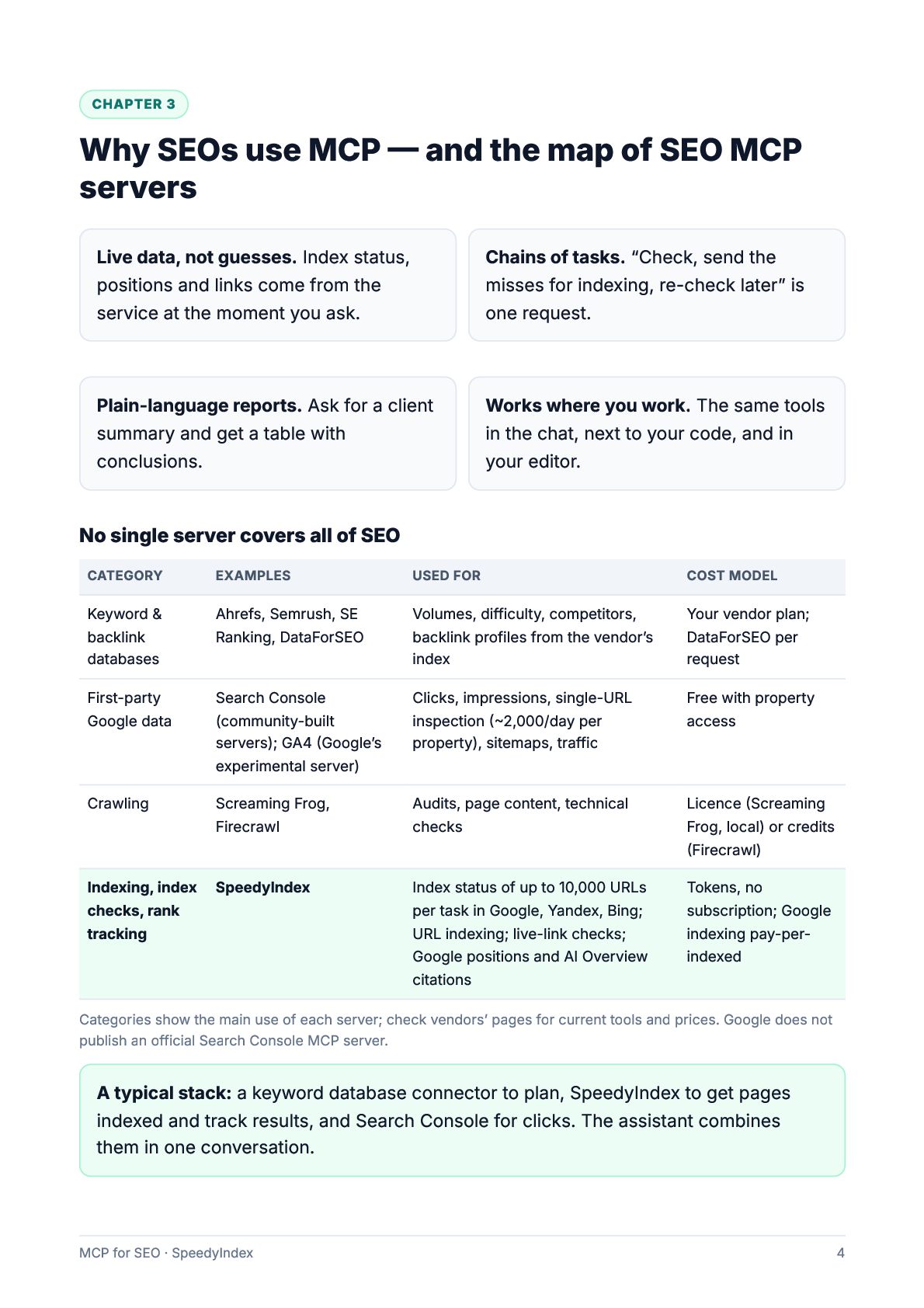
  4. CHAPTER 3 Why SEOs use MCP — and the map

    of SEO MCP servers Live data, not guesses. Index status, positions and links come from the service at the moment you ask. Chains of tasks. “Check, send the misses for indexing, re-check later” is one request. Plain-language reports. Ask for a client summary and get a table with conclusions. Works where you work. The same tools in the chat, next to your code, and in your editor. No single server covers all of SEO CATEGORY EXAMPLES USED FOR COST MODEL Keyword & backlink databases Ahrefs, Semrush, SE Ranking, DataForSEO Volumes, difficulty, competitors, backlink profiles from the vendor’s index Your vendor plan; DataForSEO per request First-party Google data Search Console (community-built servers); GA4 (Google’s experimental server) Clicks, impressions, single-URL inspection (~2,000/day per property), sitemaps, traffic Free with property access Crawling Screaming Frog, Firecrawl Audits, page content, technical checks Licence (Screaming Frog, local) or credits (Firecrawl) Index status of up to 10,000 URLs per task in Google, Yandex, Bing; URL indexing; live-link checks; Google positions and AI Overview citations Tokens, no subscription; Google indexing pay-perindexed Indexing, index SpeedyIndex checks, rank tracking Categories show the main use of each server; check vendors’ pages for current tools and prices. Google does not publish an official Search Console MCP server. A typical stack: a keyword database connector to plan, SpeedyIndex to get pages indexed and track results, and Search Console for clicks. The assistant combines them in one conversation. MCP for SEO · SpeedyIndex 4
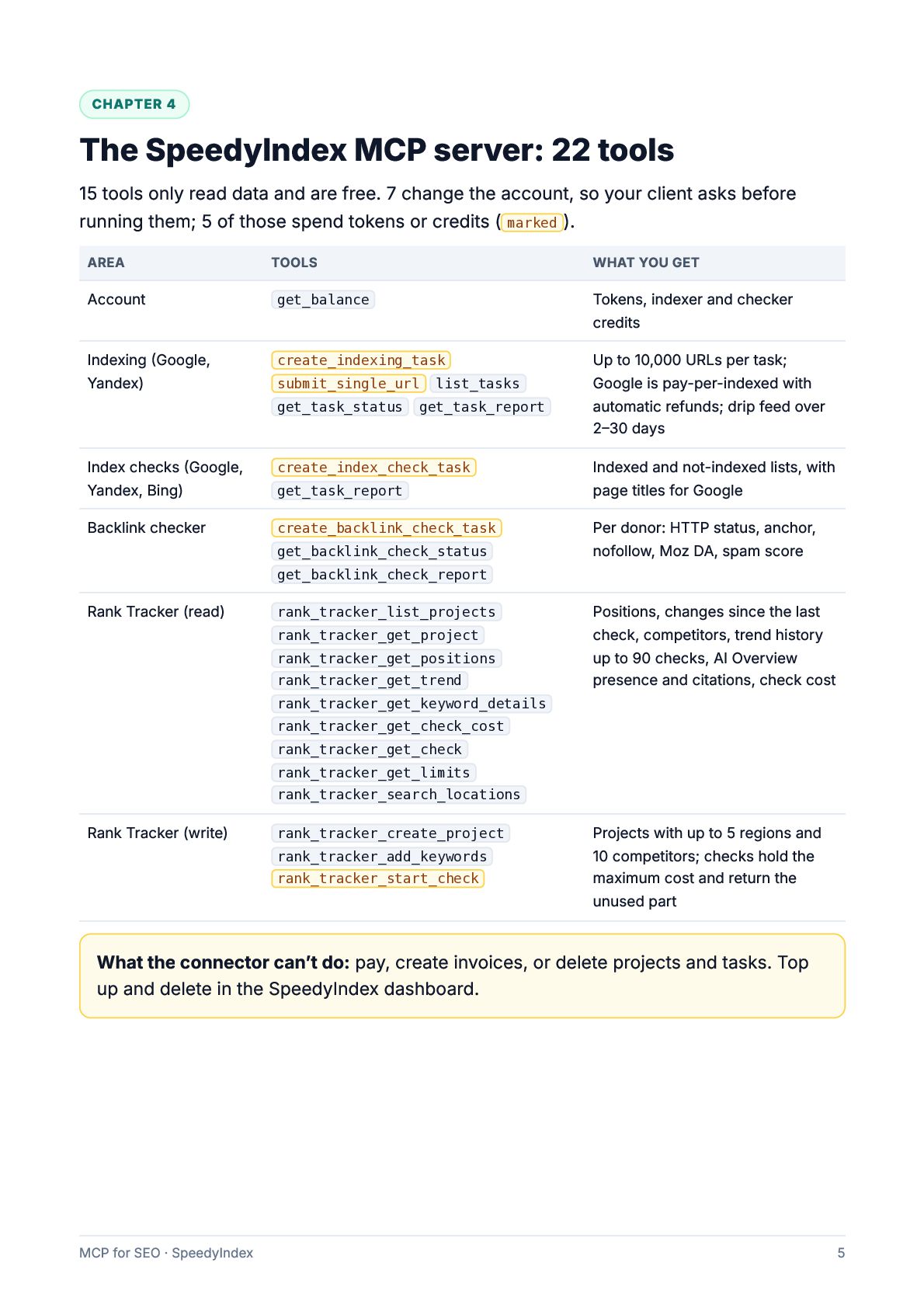
  5. CHAPTER 4 The SpeedyIndex MCP server: 22 tools 15 tools

    only read data and are free. 7 change the account, so your client asks before running them; 5 of those spend tokens or credits ( marked ). AREA TOOLS WHAT YOU GET Account get_balance Tokens, indexer and checker credits Indexing (Google, Yandex) create_indexing_task Up to 10,000 URLs per task; Google is pay-per-indexed with automatic refunds; drip feed over 2–30 days submit_single_url get_task_status list_tasks get_task_report Index checks (Google, Yandex, Bing) create_index_check_task Backlink checker create_backlink_check_task get_task_report get_backlink_check_status Indexed and not-indexed lists, with page titles for Google Per donor: HTTP status, anchor, nofollow, Moz DA, spam score get_backlink_check_report Rank Tracker (read) rank_tracker_list_projects rank_tracker_get_project rank_tracker_get_positions rank_tracker_get_trend Positions, changes since the last check, competitors, trend history up to 90 checks, AI Overview presence and citations, check cost rank_tracker_get_keyword_details rank_tracker_get_check_cost rank_tracker_get_check rank_tracker_get_limits rank_tracker_search_locations Rank Tracker (write) rank_tracker_create_project rank_tracker_add_keywords rank_tracker_start_check Projects with up to 5 regions and 10 competitors; checks hold the maximum cost and return the unused part What the connector can’t do: pay, create invoices, or delete projects and tasks. Top up and delete in the SpeedyIndex dashboard. MCP for SEO · SpeedyIndex 5
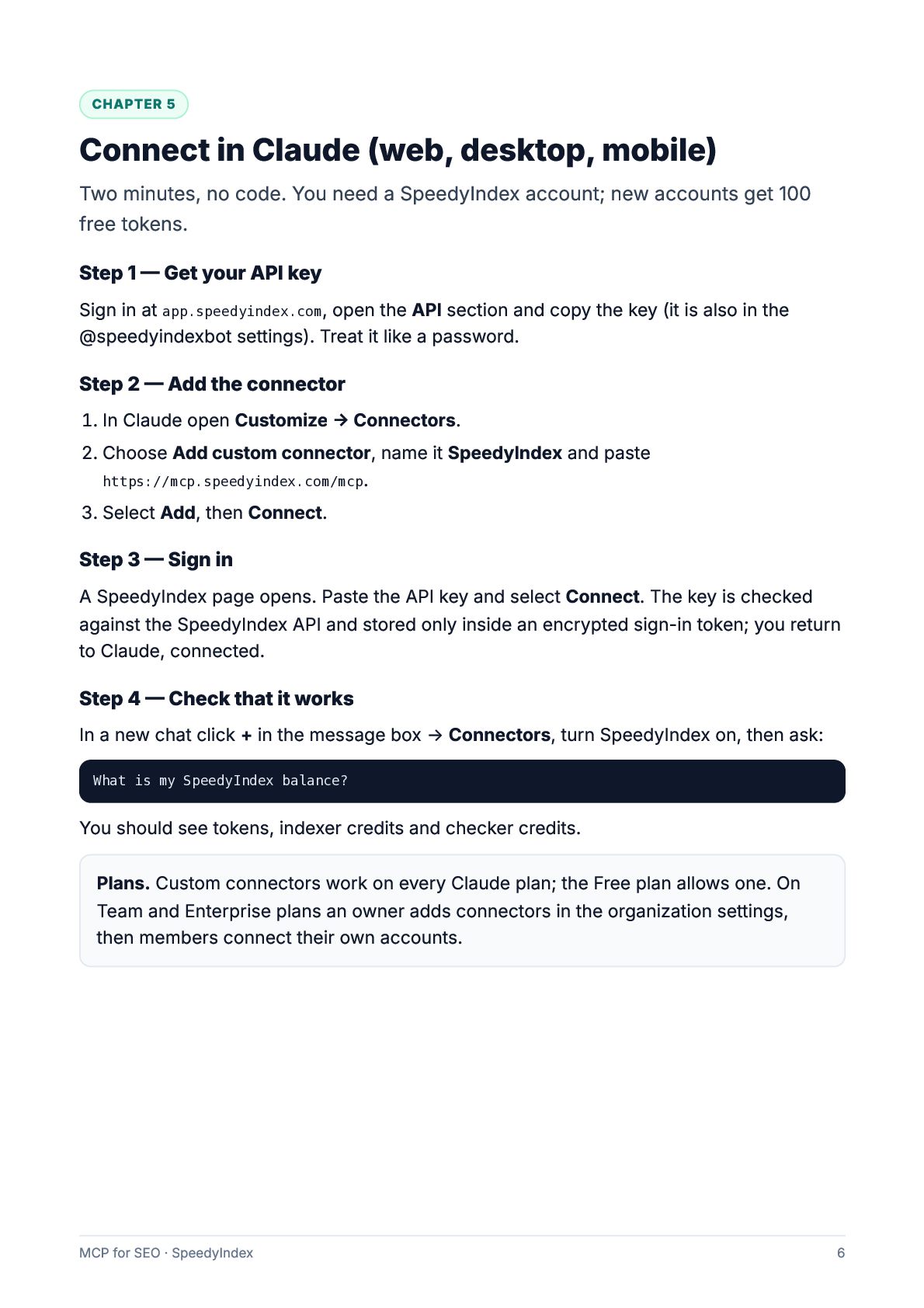
  6. CHAPTER 5 Connect in Claude (web, desktop, mobile) Two minutes,

    no code. You need a SpeedyIndex account; new accounts get 100 free tokens. Step 1 — Get your API key Sign in at app.speedyindex.com, open the API section and copy the key (it is also in the @speedyindexbot settings). Treat it like a password. Step 2 — Add the connector 1. In Claude open Customize → Connectors. 2. Choose Add custom connector, name it SpeedyIndex and paste https://mcp.speedyindex.com/mcp. 3. Select Add, then Connect. Step 3 — Sign in A SpeedyIndex page opens. Paste the API key and select Connect. The key is checked against the SpeedyIndex API and stored only inside an encrypted sign-in token; you return to Claude, connected. Step 4 — Check that it works In a new chat click + in the message box → Connectors, turn SpeedyIndex on, then ask: What is my SpeedyIndex balance? You should see tokens, indexer credits and checker credits. Plans. Custom connectors work on every Claude plan; the Free plan allows one. On Team and Enterprise plans an owner adds connectors in the organization settings, then members connect their own accounts. MCP for SEO · SpeedyIndex 6
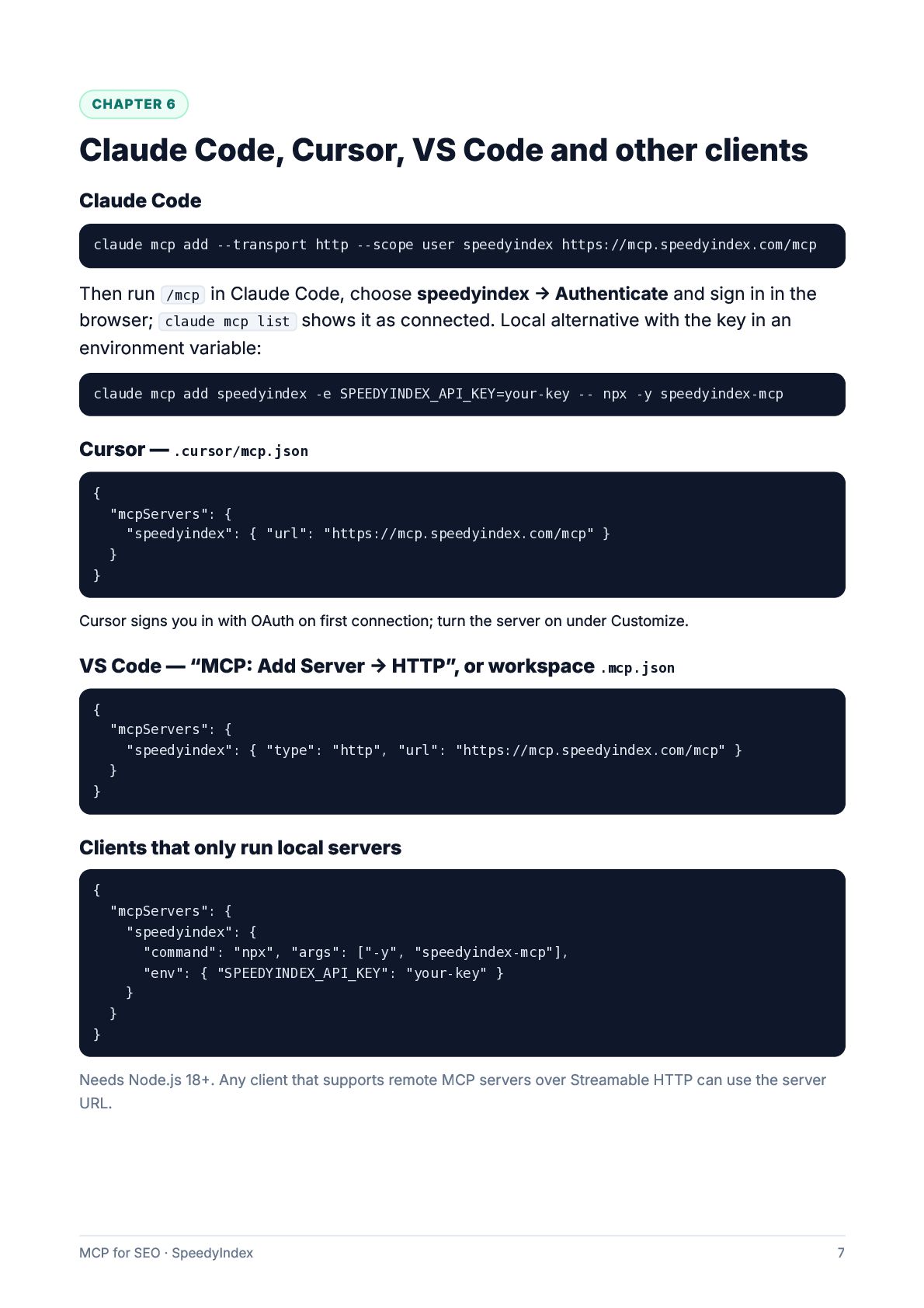
  7. CHAPTER 6 Claude Code, Cursor, VS Code and other clients

    Claude Code claude mcp add --transport http --scope user speedyindex https://mcp.speedyindex.com/mcp Then run /mcp in Claude Code, choose speedyindex → Authenticate and sign in in the browser; claude mcp list shows it as connected. Local alternative with the key in an environment variable: claude mcp add speedyindex -e SPEEDYINDEX_API_KEY=your-key -- npx -y speedyindex-mcp Cursor — .cursor/mcp.json { "mcpServers": { "speedyindex": { "url": "https://mcp.speedyindex.com/mcp" } } } Cursor signs you in with OAuth on first connection; turn the server on under Customize. VS Code — “MCP: Add Server → HTTP”, or workspace .mcp.json { "mcpServers": { "speedyindex": { "type": "http", "url": "https://mcp.speedyindex.com/mcp" } } } Clients that only run local servers { "mcpServers": { "speedyindex": { "command": "npx", "args": ["-y", "speedyindex-mcp"], "env": { "SPEEDYINDEX_API_KEY": "your-key" } } } } Needs Node.js 18+. Any client that supports remote MCP servers over Streamable HTTP can use the server URL. MCP for SEO · SpeedyIndex 7
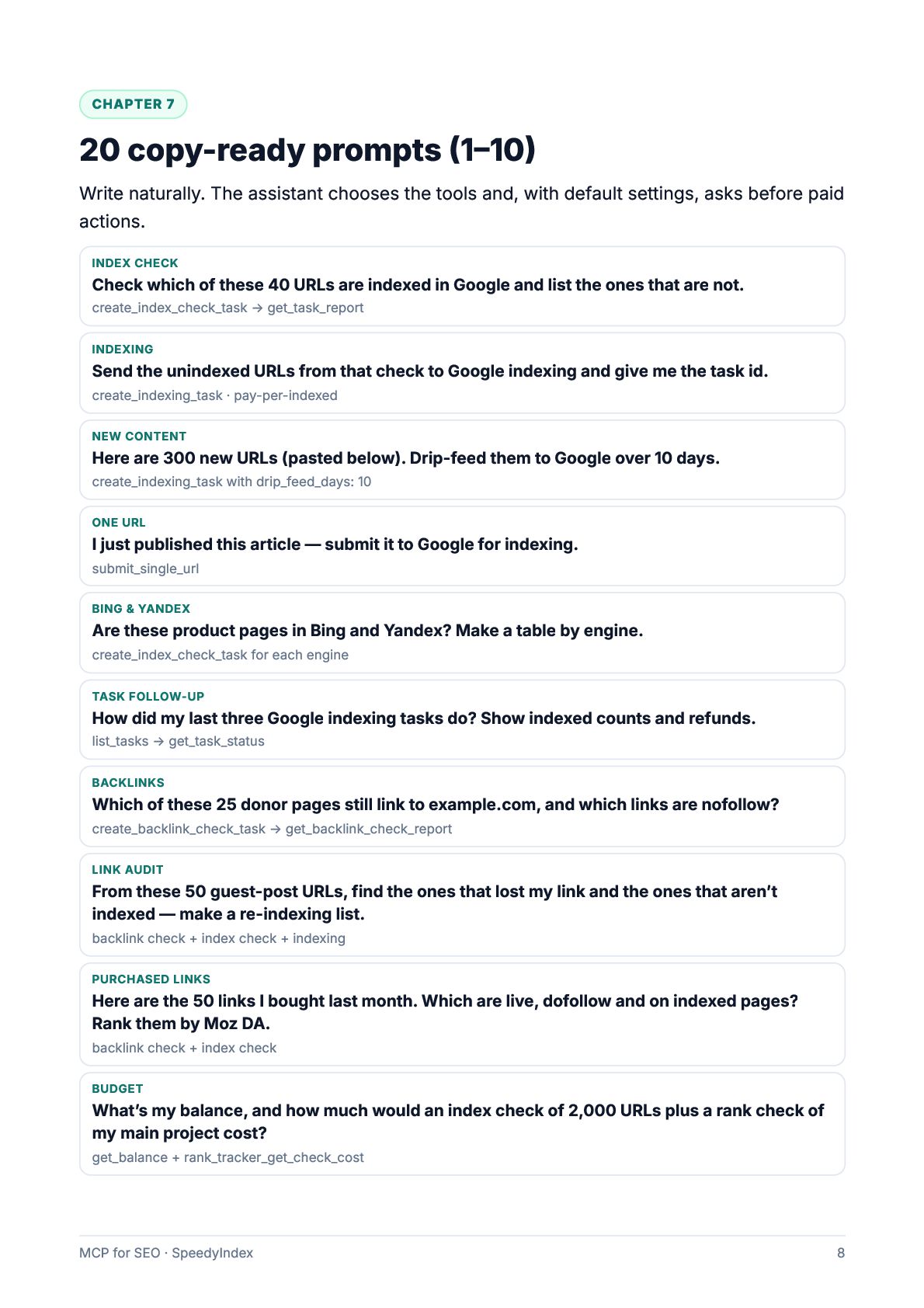
  8. CHAPTER 7 20 copy-ready prompts (1–10) Write naturally. The assistant

    chooses the tools and, with default settings, asks before paid actions. INDEX CHECK Check which of these 40 URLs are indexed in Google and list the ones that are not. create_index_check_task → get_task_report INDEXING Send the unindexed URLs from that check to Google indexing and give me the task id. create_indexing_task · pay-per-indexed NEW CONTENT Here are 300 new URLs (pasted below). Drip-feed them to Google over 10 days. create_indexing_task with drip_feed_days: 10 ONE URL I just published this article — submit it to Google for indexing. submit_single_url BING & YANDEX Are these product pages in Bing and Yandex? Make a table by engine. create_index_check_task for each engine TASK FOLLOW-UP How did my last three Google indexing tasks do? Show indexed counts and refunds. list_tasks → get_task_status BACKLINKS Which of these 25 donor pages still link to example.com, and which links are nofollow? create_backlink_check_task → get_backlink_check_report LINK AUDIT From these 50 guest-post URLs, find the ones that lost my link and the ones that aren’t indexed — make a re-indexing list. backlink check + index check + indexing PURCHASED LINKS Here are the 50 links I bought last month. Which are live, dofollow and on indexed pages? Rank them by Moz DA. backlink check + index check BUDGET What’s my balance, and how much would an index check of 2,000 URLs plus a rank check of my main project cost? get_balance + rank_tracker_get_check_cost MCP for SEO · SpeedyIndex 8
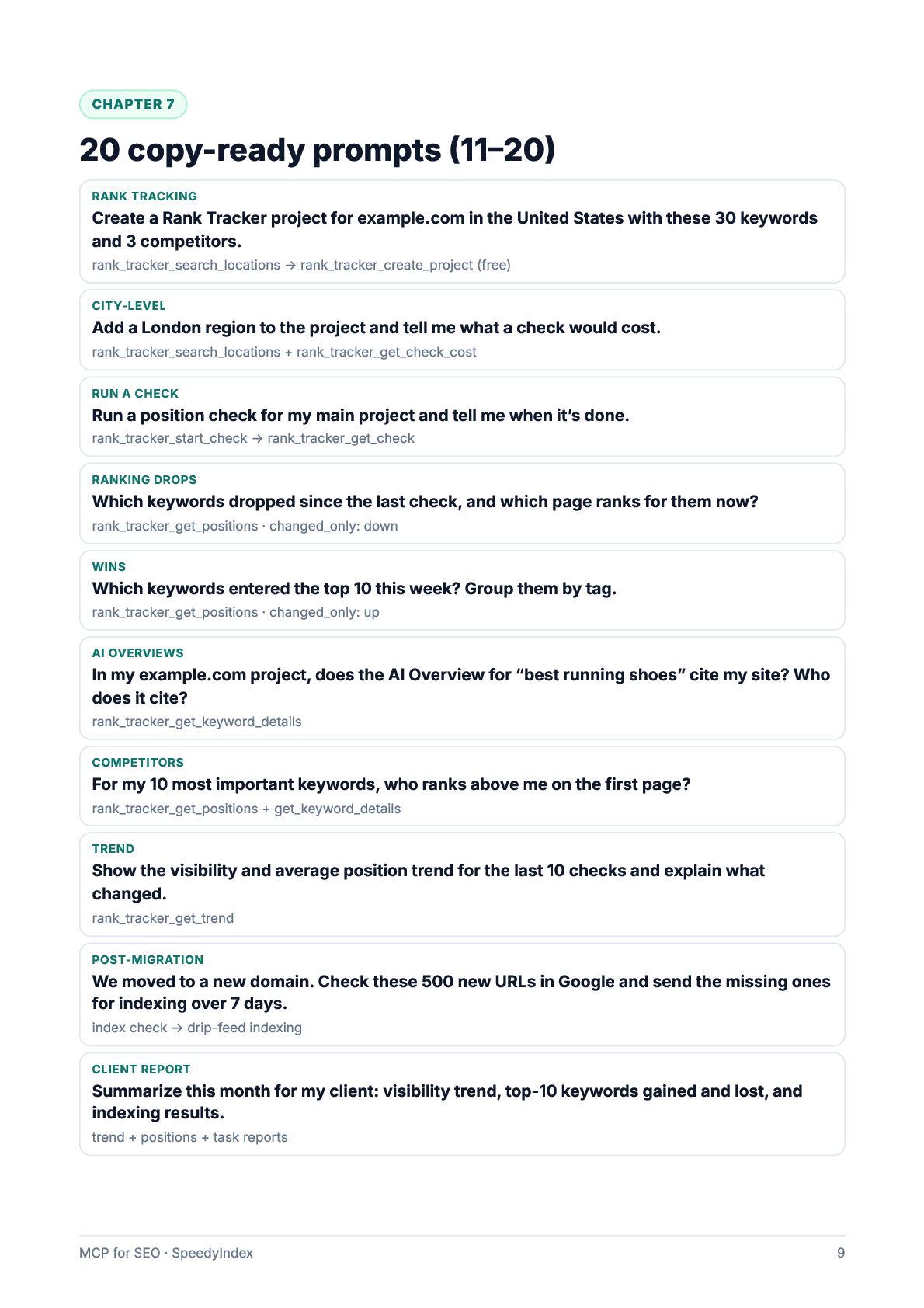
  9. CHAPTER 7 20 copy-ready prompts (11–20) RANK TRACKING Create a

    Rank Tracker project for example.com in the United States with these 30 keywords and 3 competitors. rank_tracker_search_locations → rank_tracker_create_project (free) CITY-LEVEL Add a London region to the project and tell me what a check would cost. rank_tracker_search_locations + rank_tracker_get_check_cost RUN A CHECK Run a position check for my main project and tell me when it’s done. rank_tracker_start_check → rank_tracker_get_check RANKING DROPS Which keywords dropped since the last check, and which page ranks for them now? rank_tracker_get_positions · changed_only: down WINS Which keywords entered the top 10 this week? Group them by tag. rank_tracker_get_positions · changed_only: up AI OVERVIEWS In my example.com project, does the AI Overview for “best running shoes” cite my site? Who does it cite? rank_tracker_get_keyword_details COMPETITORS For my 10 most important keywords, who ranks above me on the first page? rank_tracker_get_positions + get_keyword_details TREND Show the visibility and average position trend for the last 10 checks and explain what changed. rank_tracker_get_trend POST-MIGRATION We moved to a new domain. Check these 500 new URLs in Google and send the missing ones for indexing over 7 days. index check → drip-feed indexing CLIENT REPORT Summarize this month for my client: visibility trend, top-10 keywords gained and lost, and indexing results. trend + positions + task reports MCP for SEO · SpeedyIndex 9
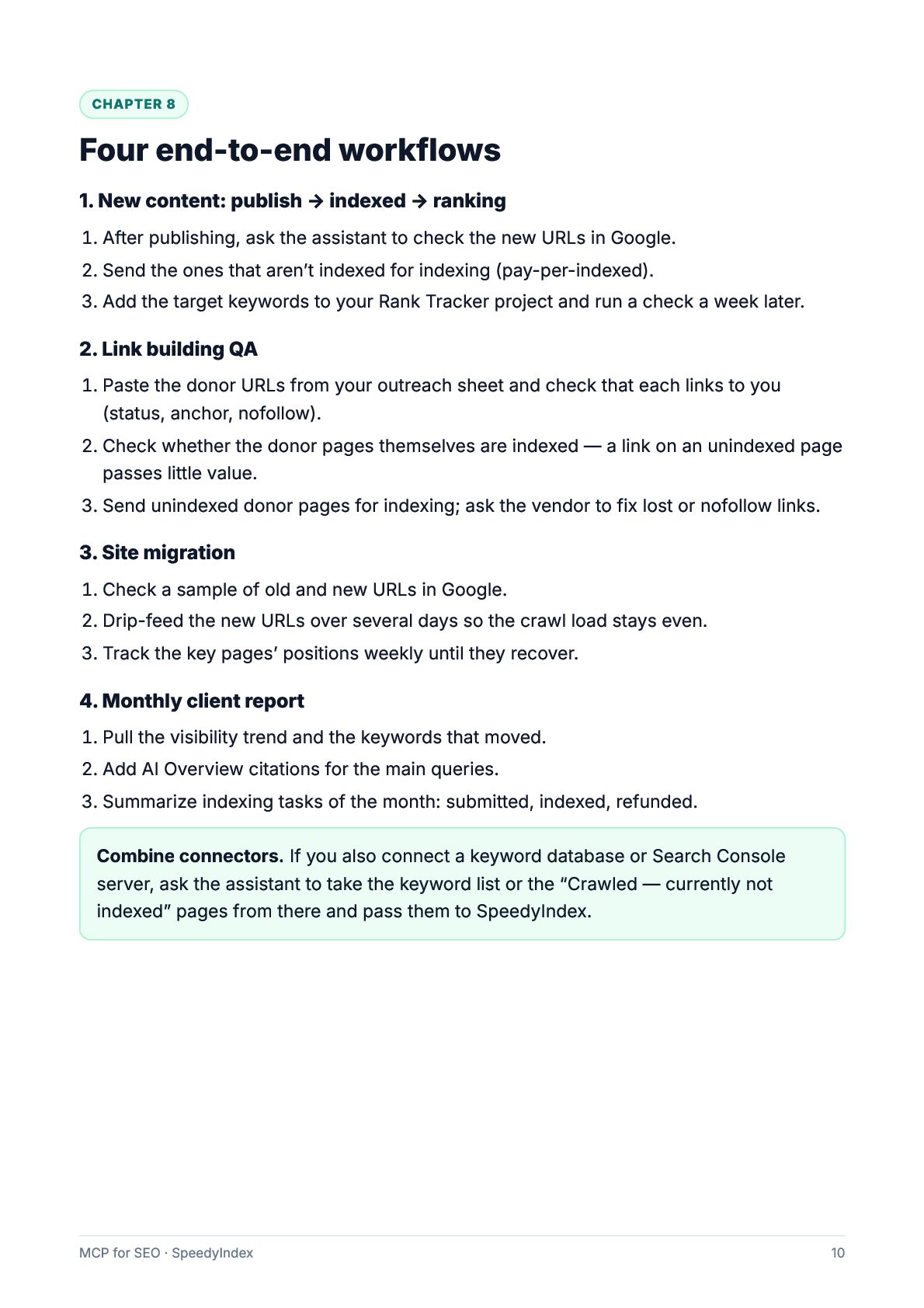
  10. CHAPTER 8 Four end-to-end workflows 1. New content: publish →

    indexed → ranking 1. After publishing, ask the assistant to check the new URLs in Google. 2. Send the ones that aren’t indexed for indexing (pay-per-indexed). 3. Add the target keywords to your Rank Tracker project and run a check a week later. 2. Link building QA 1. Paste the donor URLs from your outreach sheet and check that each links to you (status, anchor, nofollow). 2. Check whether the donor pages themselves are indexed — a link on an unindexed page passes little value. 3. Send unindexed donor pages for indexing; ask the vendor to fix lost or nofollow links. 3. Site migration 1. Check a sample of old and new URLs in Google. 2. Drip-feed the new URLs over several days so the crawl load stays even. 3. Track the key pages’ positions weekly until they recover. 4. Monthly client report 1. Pull the visibility trend and the keywords that moved. 2. Add AI Overview citations for the main queries. 3. Summarize indexing tasks of the month: submitted, indexed, refunded. Combine connectors. If you also connect a keyword database or Search Console server, ask the assistant to take the keyword list or the “Crawled — currently not indexed” pages from there and pass them to SpeedyIndex. MCP for SEO · SpeedyIndex 10
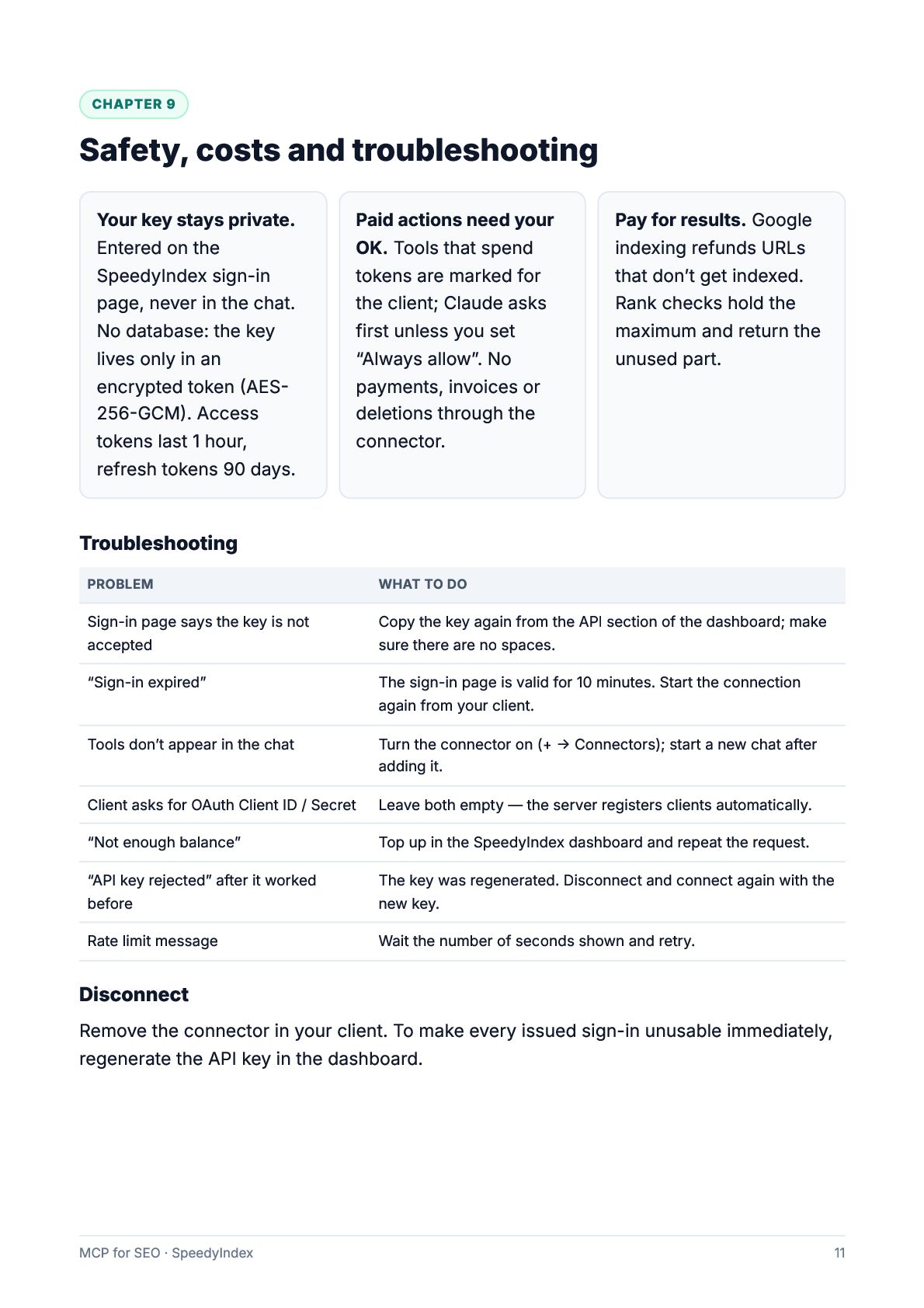
  11. CHAPTER 9 Safety, costs and troubleshooting Your key stays private.

    Entered on the SpeedyIndex sign-in page, never in the chat. No database: the key lives only in an encrypted token (AES256-GCM). Access tokens last 1 hour, refresh tokens 90 days. Paid actions need your OK. Tools that spend tokens are marked for the client; Claude asks first unless you set “Always allow”. No payments, invoices or deletions through the connector. Pay for results. Google indexing refunds URLs that don’t get indexed. Rank checks hold the maximum and return the unused part. Troubleshooting PROBLEM WHAT TO DO Sign-in page says the key is not accepted Copy the key again from the API section of the dashboard; make sure there are no spaces. “Sign-in expired” The sign-in page is valid for 10 minutes. Start the connection again from your client. Tools don’t appear in the chat Turn the connector on (+ → Connectors); start a new chat after adding it. Client asks for OAuth Client ID / Secret Leave both empty — the server registers clients automatically. “Not enough balance” Top up in the SpeedyIndex dashboard and repeat the request. “API key rejected” after it worked before The key was regenerated. Disconnect and connect again with the new key. Rate limit message Wait the number of seconds shown and retry. Disconnect Remove the connector in your client. To make every issued sign-in unusable immediately, regenerate the API key in the dashboard. MCP for SEO · SpeedyIndex 11
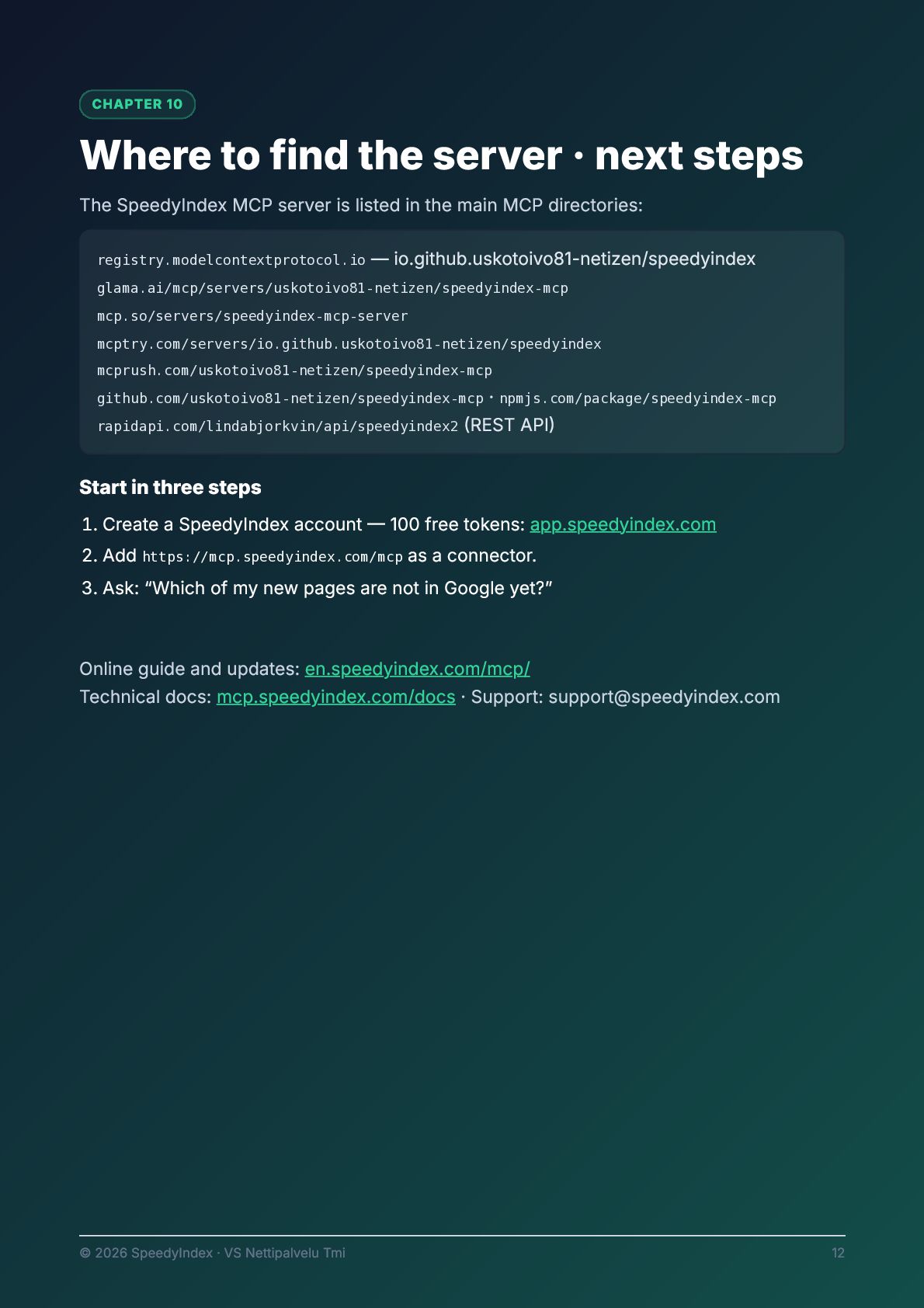
  12. CHAPTER 10 Where to find the server · next steps

    The SpeedyIndex MCP server is listed in the main MCP directories: registry.modelcontextprotocol.io — io.github.uskotoivo81-netizen/speedyindex glama.ai/mcp/servers/uskotoivo81-netizen/speedyindex-mcp mcp.so/servers/speedyindex-mcp-server mcptry.com/servers/io.github.uskotoivo81-netizen/speedyindex mcprush.com/uskotoivo81-netizen/speedyindex-mcp · npmjs.com/package/speedyindex-mcp rapidapi.com/lindabjorkvin/api/speedyindex2 (REST API) github.com/uskotoivo81-netizen/speedyindex-mcp Start in three steps 1. Create a SpeedyIndex account — 100 free tokens: app.speedyindex.com 2. Add https://mcp.speedyindex.com/mcp as a connector. 3. Ask: “Which of my new pages are not in Google yet?” Online guide and updates: en.speedyindex.com/mcp/ Technical docs: mcp.speedyindex.com/docs · Support: [email protected] © 2026 SpeedyIndex · VS Nettipalvelu Tmi 12