Upgrade to Pro — share decks privately, control downloads, hide ads and more …

llamadart on-device agent

Avatar for 권태뽕 권태뽕
November 06, 2026

llamadart on-device agent

Flutter Korea 2026 행사에서 발표한 "llamadart로 시작하는 온디바이스 에이전트(feat: tool call parser)" 자료입니다.

Avatar for 권태뽕

권태뽕

November 06, 2026

More Decks by 권태뽕

Other Decks in Programming

Transcript

  1. Flutter Korea 2026 llamadart로 시작하는 온디바이스 에이전트 만들기 feat: tool

    call parser 권태형 · 고려대학교 / Flutter Seoul 1 / 43
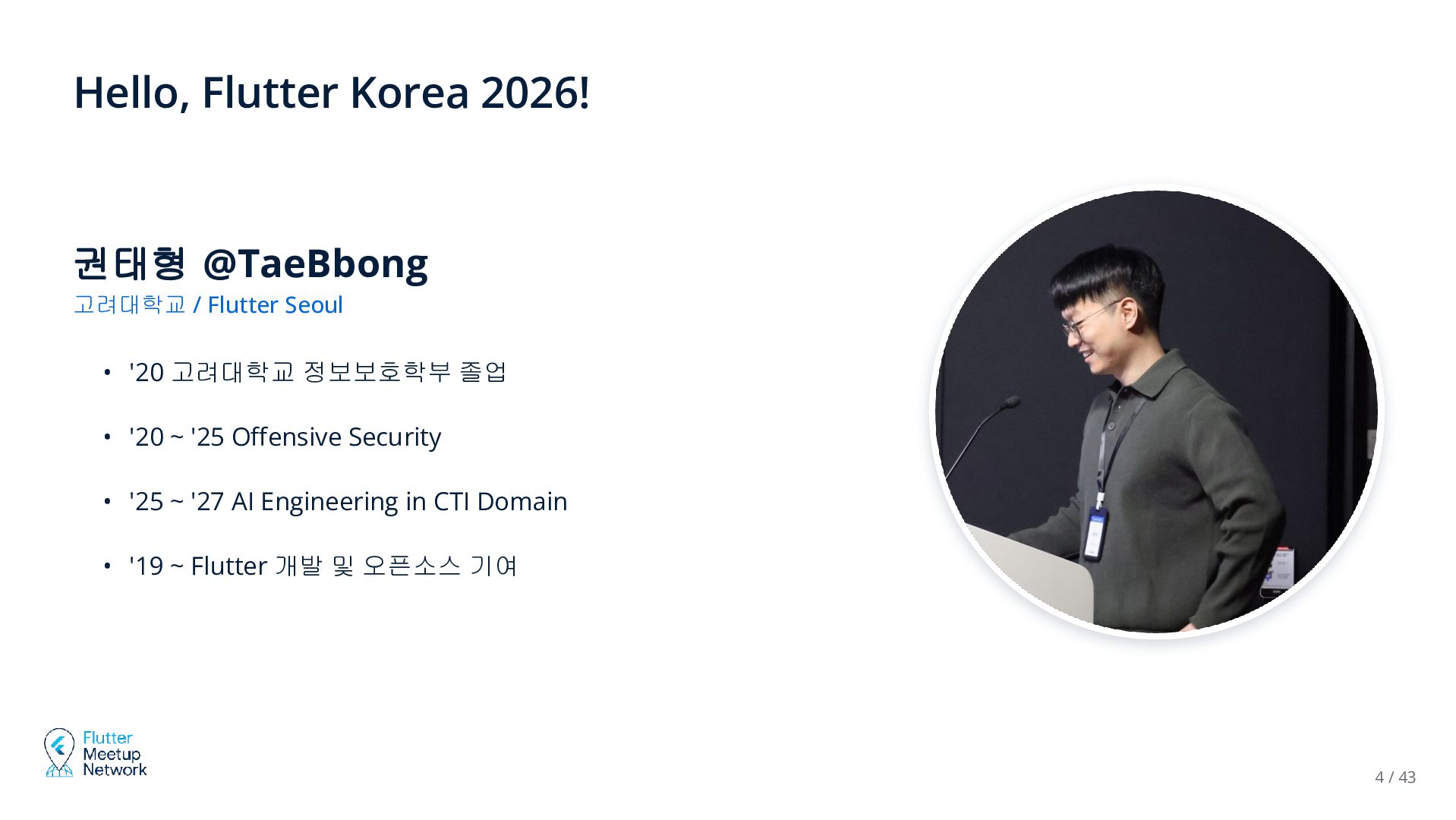
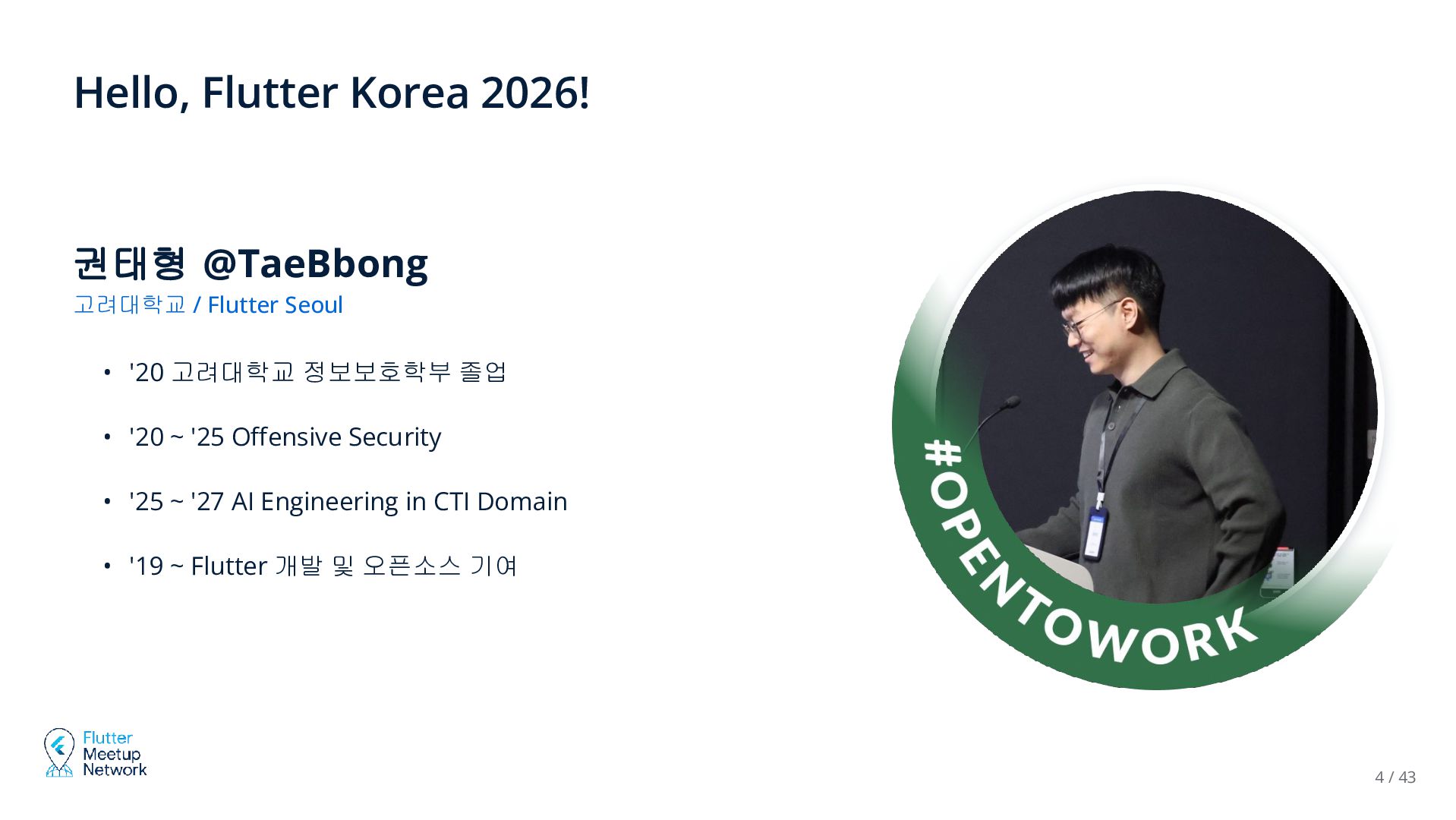
  2. Hello, Flutter Korea 2026! 권태형 @TaeBbong 고려대학교 / Flutter Seoul

    • '20 고려대학교 정보보호학부 졸업 • '20 ~ '25 Offensive Security • '25 ~ '27 AI Engineering in CTI Domain • '19 ~ Flutter 개발 및 오픈소스 기여 4 / 43
  3. Hello, Flutter Korea 2026! 권태형 @TaeBbong 고려대학교 / Flutter Seoul

    • '20 고려대학교 정보보호학부 졸업 • '20 ~ '25 Offensive Security • '25 ~ '27 AI Engineering in CTI Domain • '19 ~ Flutter 개발 및 오픈소스 기여 4 / 43
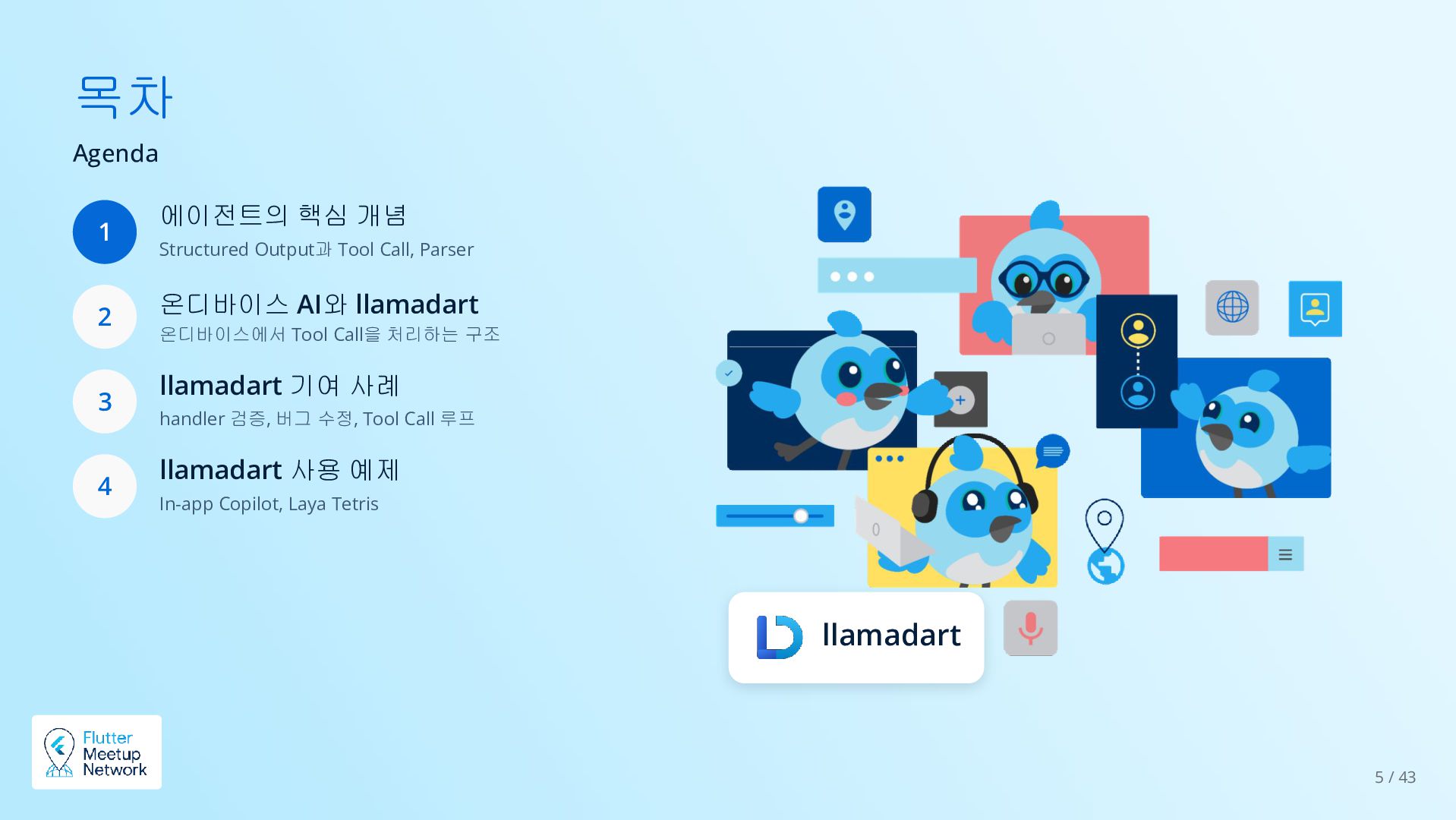
  4. 목차 Agenda 1 2 3 4 에이전트의 핵심 개념 Structured

    Output과 Tool Call, Parser 온디바이스 AI와 llamadart 온디바이스에서 Tool Call을 처리하는 구조 llamadart 기여 사례 handler 검증, 버그 수정, Tool Call 루프 llamadart 사용 예제 In-app Copilot, Laya Tetris llamadart 5 / 43
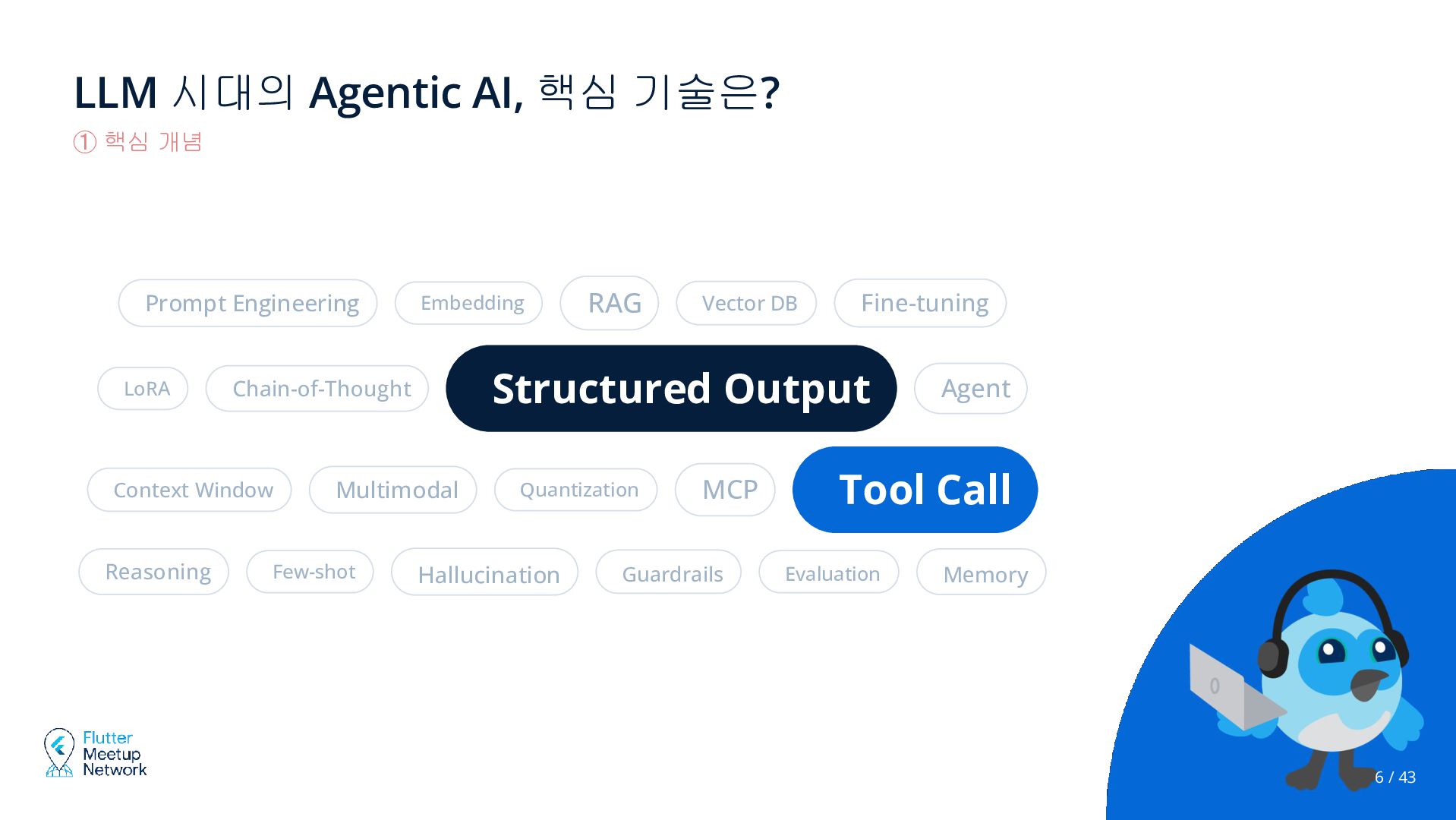
  5. LLM 시대의 Agentic AI, 핵심 기술은? ① 핵심 개념 Prompt

    Engineering LoRA Multimodal Few-shot RAG Vector DB Fine-tuning Structured Output Chain-of-Thought Context Window Reasoning Embedding Quantization Hallucination MCP Guardrails Agent Tool Call Evaluation Memory 6 / 43
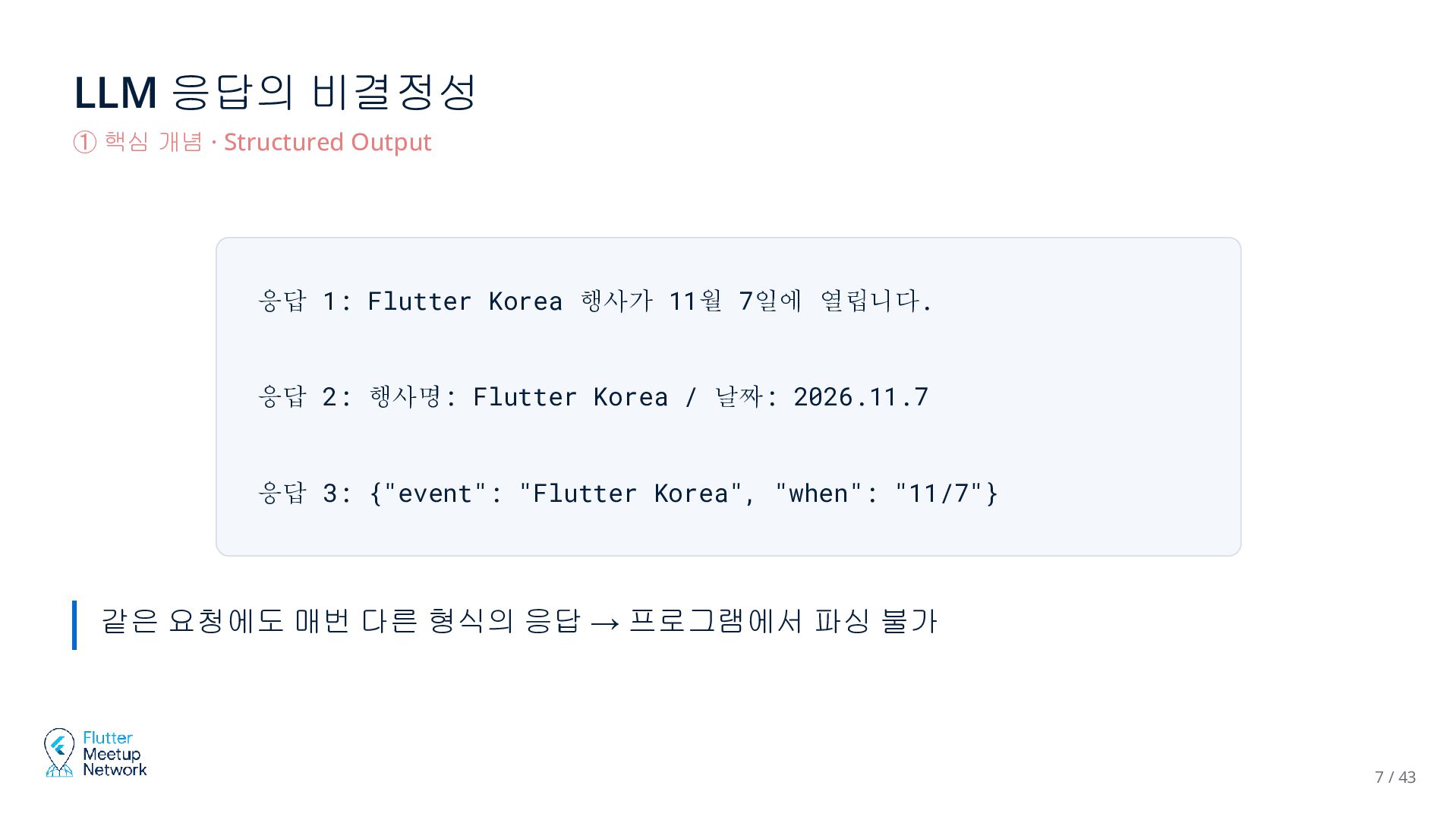
  6. LLM 응답의 비결정성 ① 핵심 개념 · Structured Output 응답

    1: Flutter Korea 행사가 11월 7일에 열립니다. 응답 2: 행사명: Flutter Korea / 날짜: 2026.11.7 응답 3: {"event": "Flutter Korea", "when": "11/7"} 같은 요청에도 매번 다른 형식의 응답 → 프로그램에서 파싱 불가 7 / 43
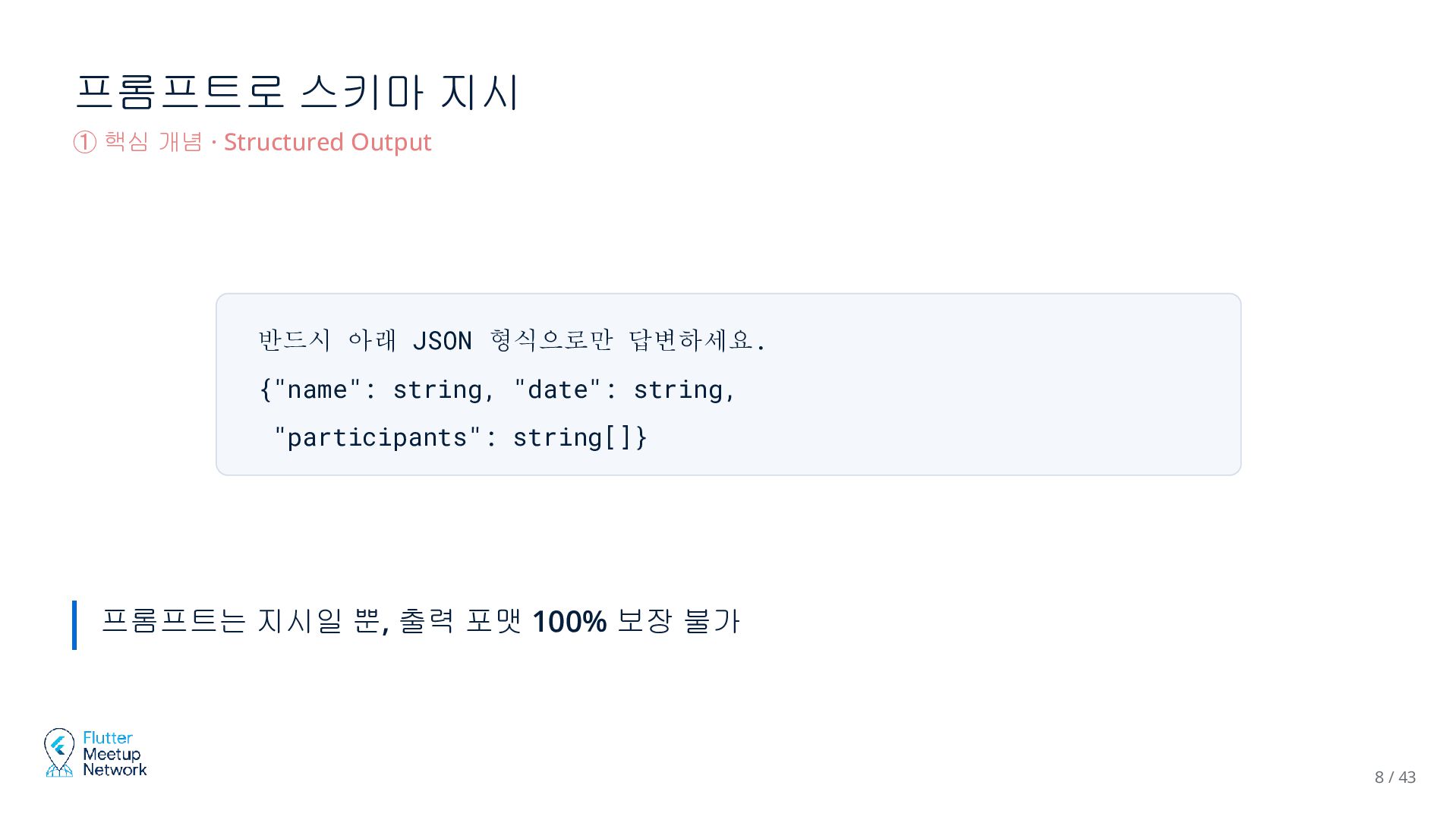
  7. 프롬프트로 스키마 지시 ① 핵심 개념 · Structured Output 반드시

    아래 JSON 형식으로만 답변하세요. {"name": string, "date": string, "participants": string[]} 프롬프트는 지시일 뿐, 출력 포맷 100% 보장 불가 8 / 43
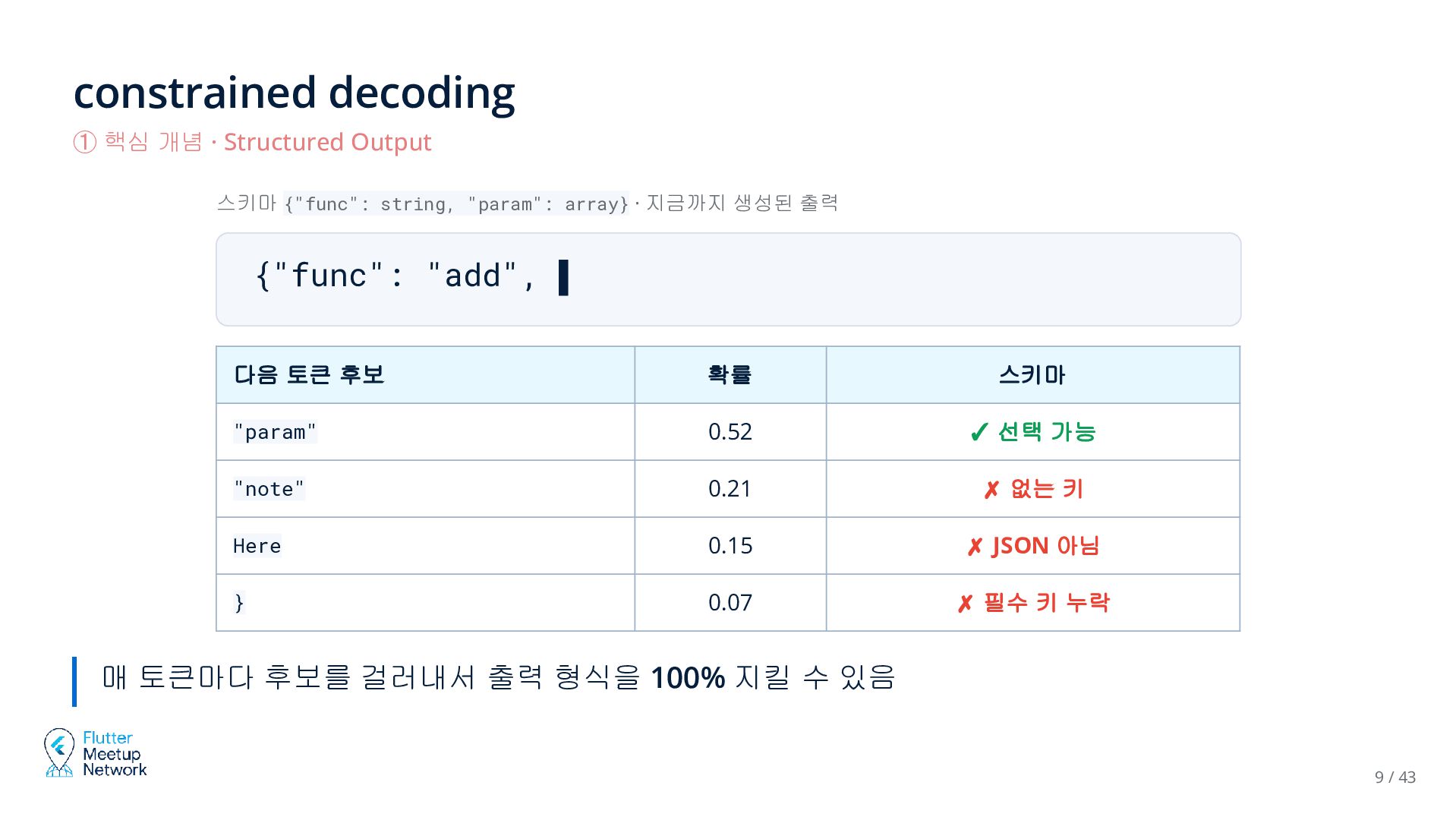
  8. constrained decoding ① 핵심 개념 · Structured Output 스키마 {"func":

    string, "param": array} · 지금까지 생성된 출력 {"func": "add", ▌ 다음 토큰 후보 확률 스키마 "param" 0.52 ✓ 선택 가능 "note" 0.21 ✗ 없는 키 Here 0.15 ✗ JSON 아님 } 0.07 ✗ 필수 키 누락 매 토큰마다 후보를 걸러내서 출력 형식을 100% 지킬 수 있음 9 / 43
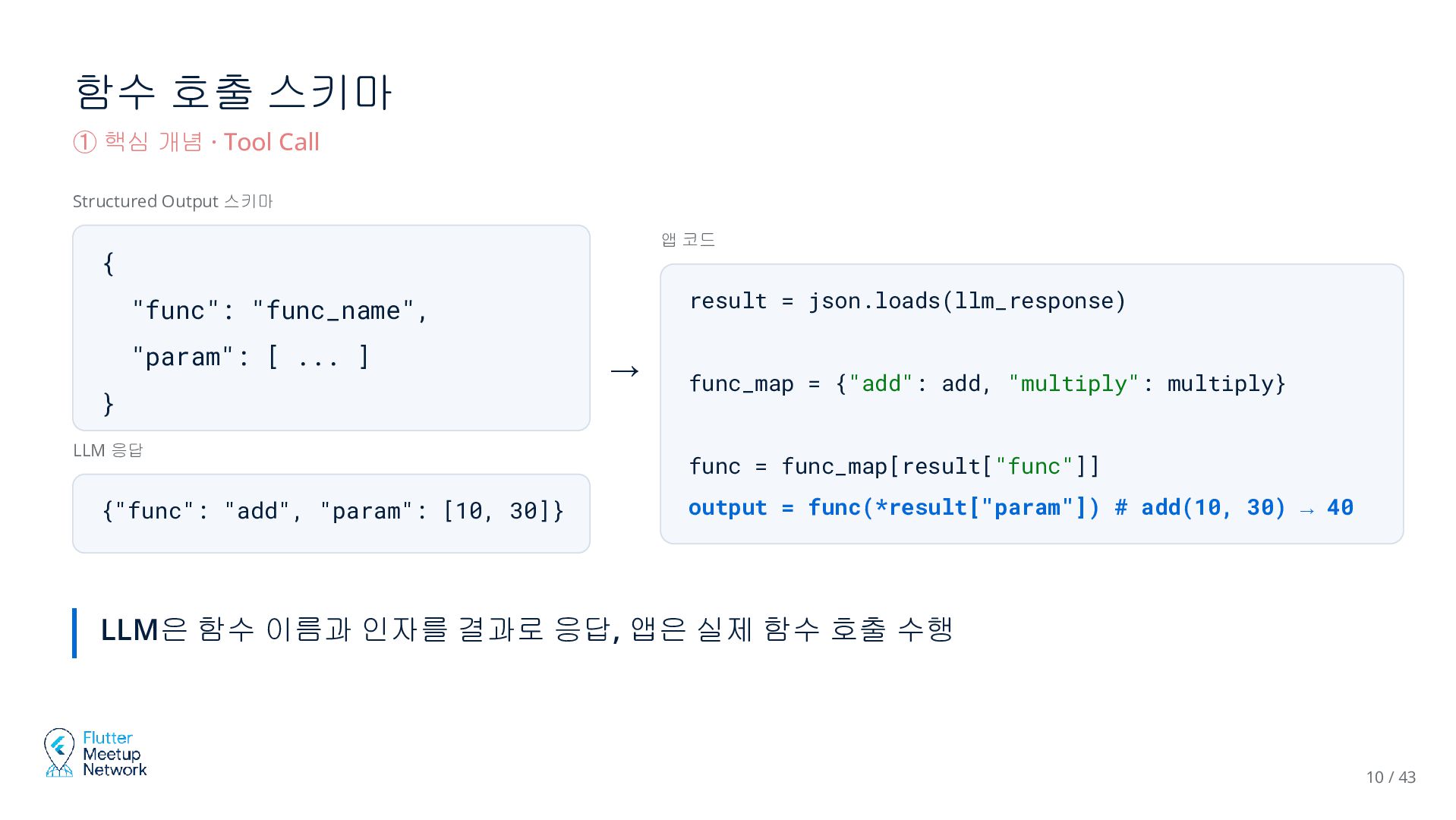
  9. 함수 호출 스키마 ① 핵심 개념 · Tool Call Structured

    Output 스키마 앱 코드 { result = json.loads(llm_response) "func": "func_name", "param": [ ... ] } LLM 응답 {"func": "add", "param": [10, 30]} → func_map = {"add": add, "multiply": multiply} func = func_map[result["func"]] output = func(*result["param"]) # add(10, 30) → 40 LLM은 함수 이름과 인자를 결과로 응답, 앱은 실제 함수 호출 수행 10 / 43
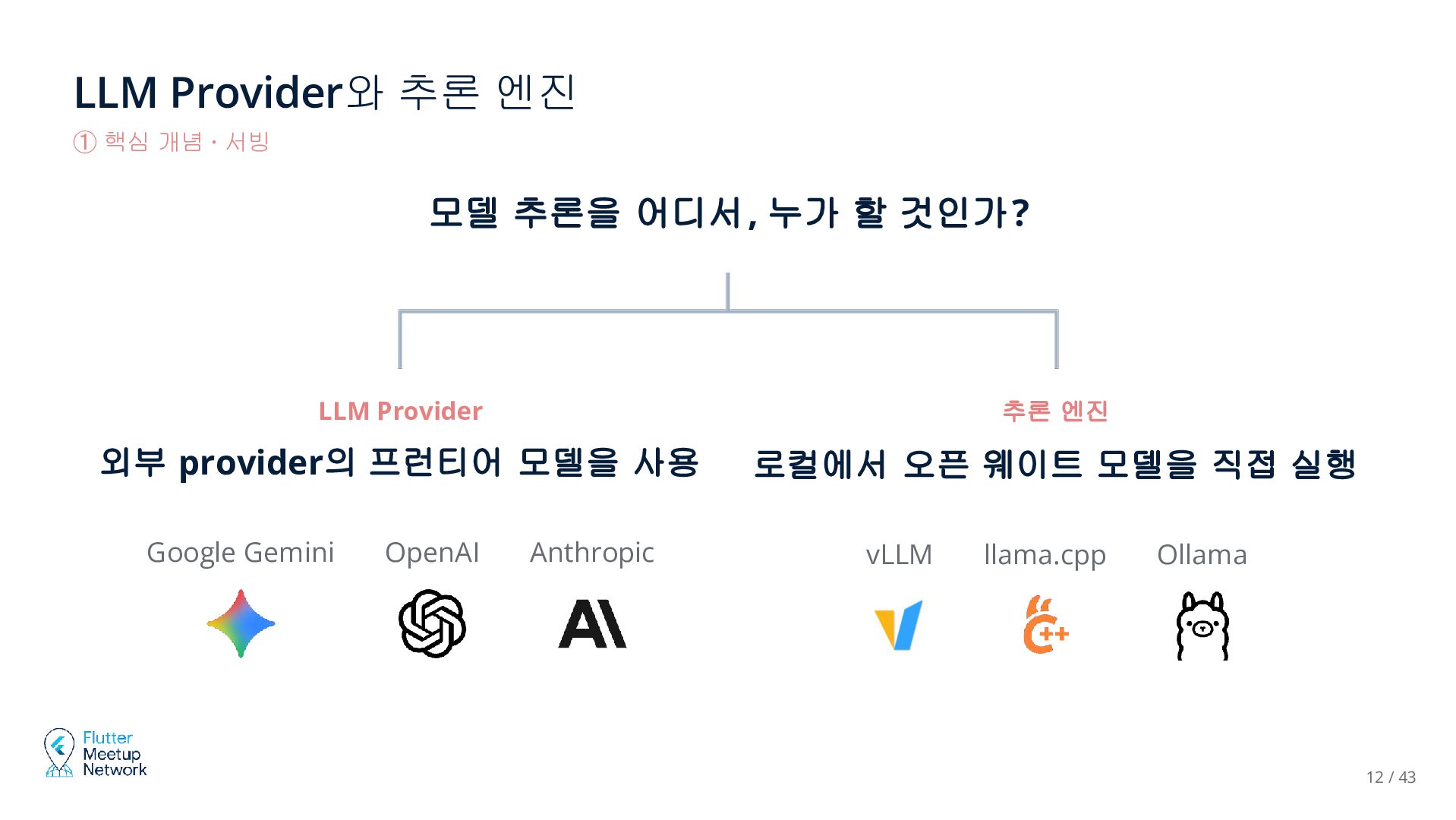
  10. LLM Provider와 추론 엔진 ① 핵심 개념 · 서빙 모델

    추론을 어디서, 누가 할 것인가? LLM Provider 추론 엔진 외부 provider의 프런티어 모델을 사용 로컬에서 오픈 웨이트 모델을 직접 실행 Google Gemini OpenAI Anthropic vLLM llama.cpp Ollama 12 / 43
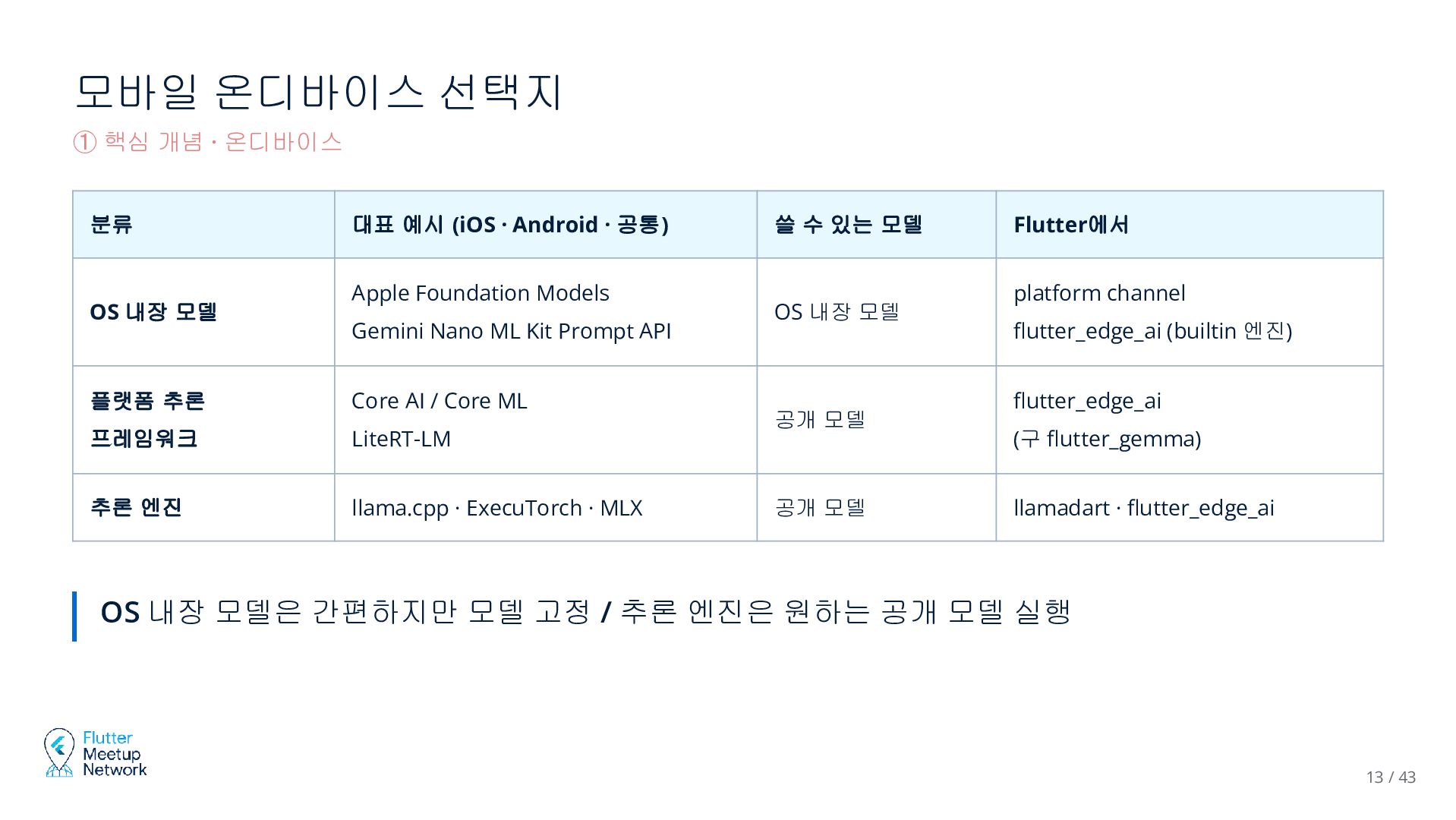
  11. 모바일 온디바이스 선택지 ① 핵심 개념 · 온디바이스 분류 OS

    내장 모델 대표 예시 (iOS · Android · 공통) Apple Foundation Models Gemini Nano ML Kit Prompt API 플랫폼 추론 Core AI / Core ML 프레임워크 LiteRT-LM 추론 엔진 llama.cpp · ExecuTorch · MLX 쓸 수 있는 모델 OS 내장 모델 공개 모델 공개 모델 Flutter에서 platform channel flutter_edge_ai (builtin 엔진) flutter_edge_ai (구 flutter_gemma) llamadart · flutter_edge_ai OS 내장 모델은 간편하지만 모델 고정 / 추론 엔진은 원하는 공개 모델 실행 13 / 43
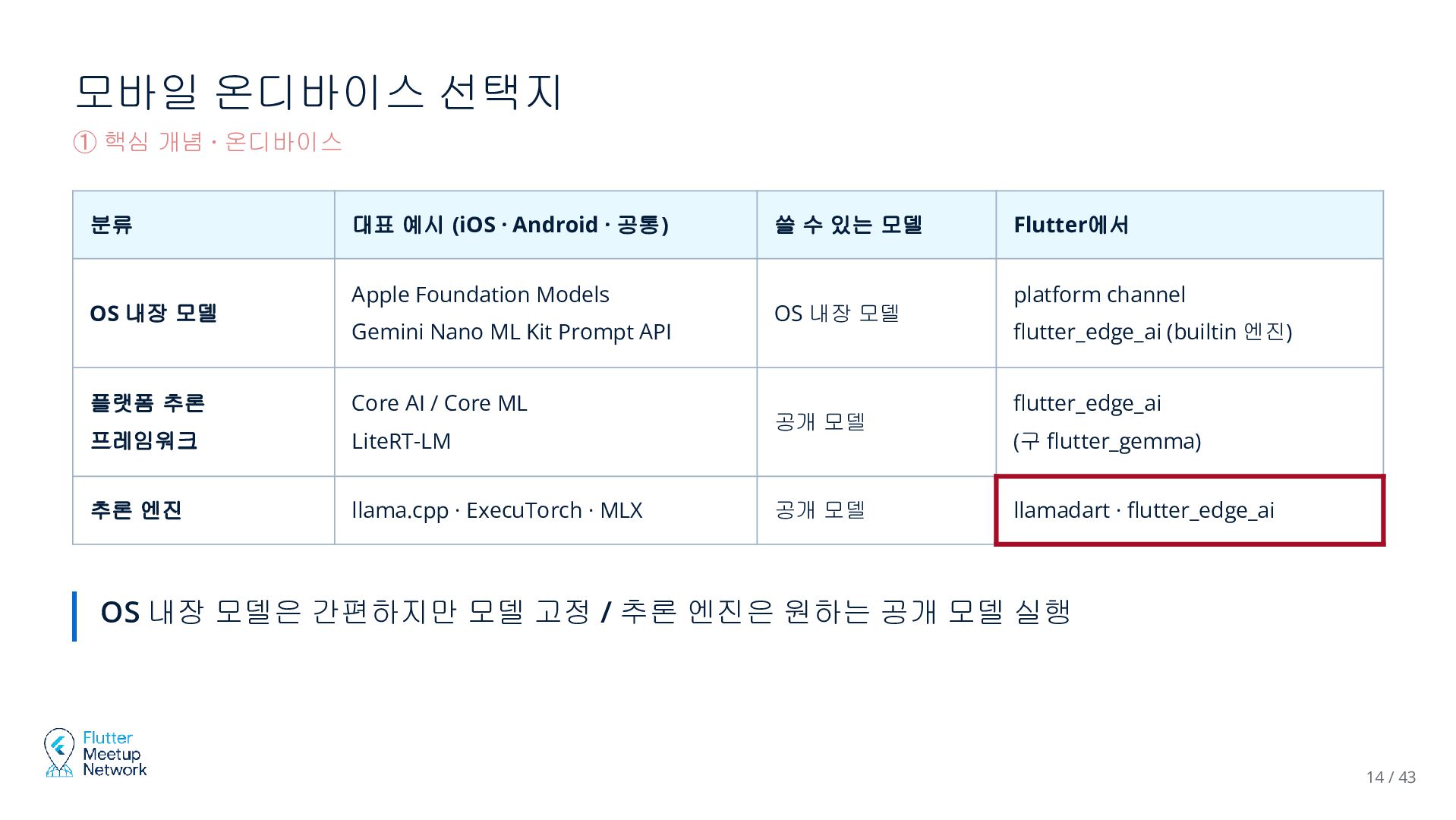
  12. 모바일 온디바이스 선택지 ① 핵심 개념 · 온디바이스 분류 OS

    내장 모델 대표 예시 (iOS · Android · 공통) Apple Foundation Models Gemini Nano ML Kit Prompt API 플랫폼 추론 Core AI / Core ML 프레임워크 LiteRT-LM 추론 엔진 llama.cpp · ExecuTorch · MLX 쓸 수 있는 모델 OS 내장 모델 공개 모델 공개 모델 Flutter에서 platform channel flutter_edge_ai (builtin 엔진) flutter_edge_ai (구 flutter_gemma) llamadart · flutter_edge_ai OS 내장 모델은 간편하지만 모델 고정 / 추론 엔진은 원하는 공개 모델 실행 14 / 43
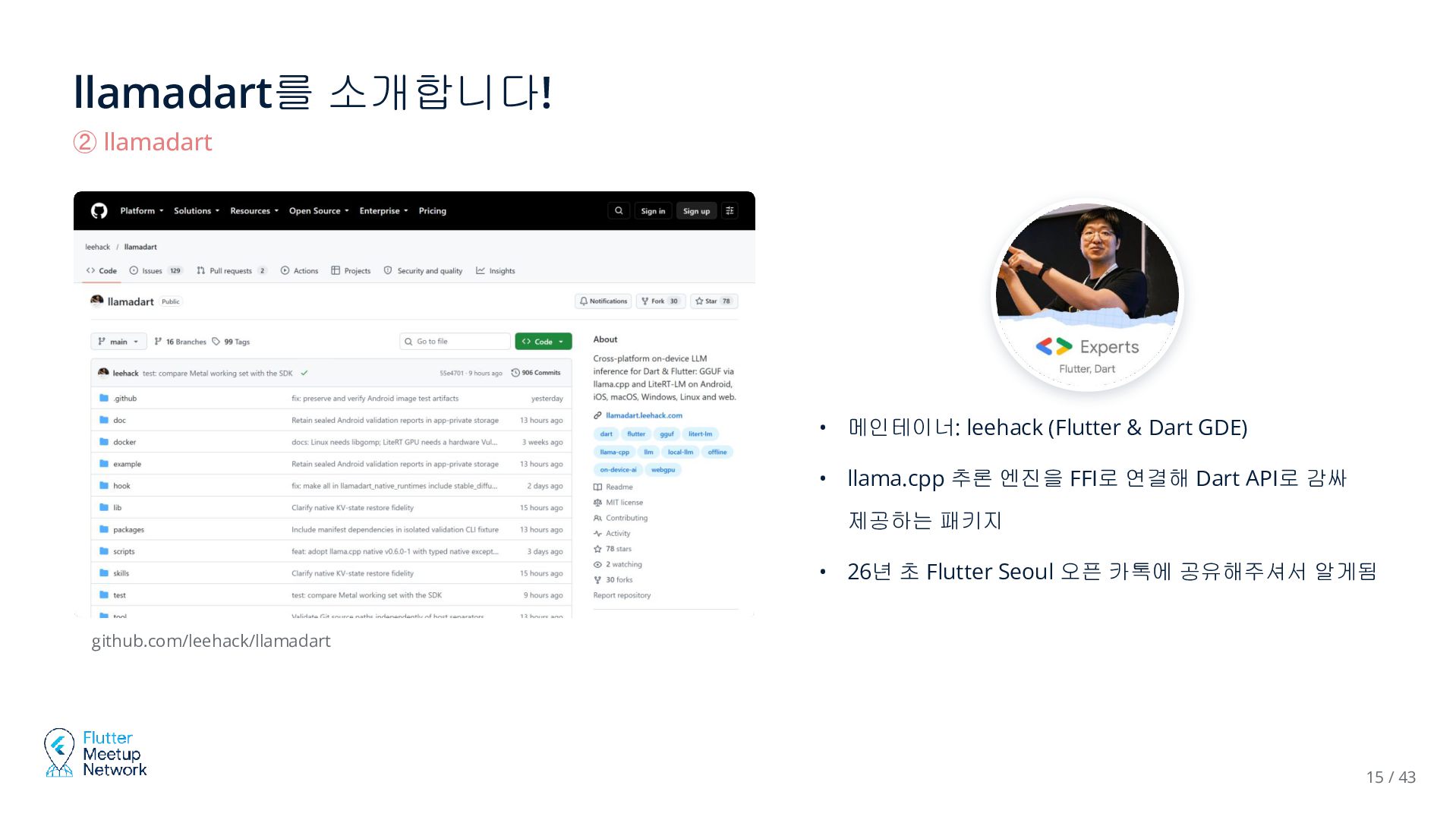
  13. llamadart를 소개합니다! ② llamadart • 메인테이너: leehack (Flutter & Dart

    GDE) • llama.cpp 추론 엔진을 FFI로 연결해 Dart API로 감싸 제공하는 패키지 • 26년 초 Flutter Seoul 오픈 카톡에 공유해주셔서 알게됨 github.com/leehack/llamadart 15 / 43
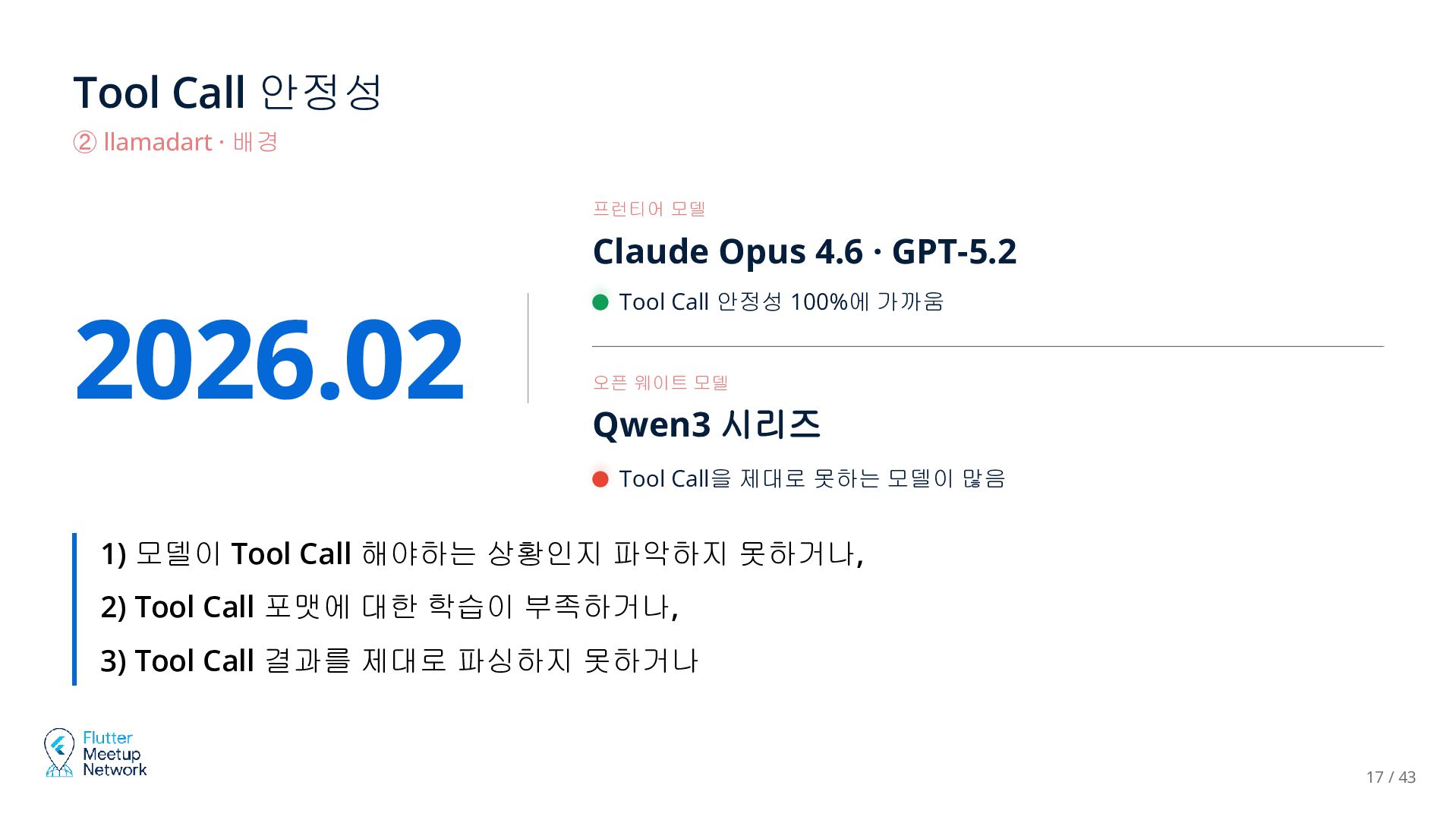
  14. Tool Call 안정성 ② llamadart · 배경 프런티어 모델 Claude

    Opus 4.6 · GPT-5.2 2026.02 Tool Call 안정성 100%에 가까움 오픈 웨이트 모델 Qwen3 시리즈 Tool Call을 제대로 못하는 모델이 많음 1) 모델이 Tool Call 해야하는 상황인지 파악하지 못하거나, 2) Tool Call 포맷에 대한 학습이 부족하거나, 3) Tool Call 결과를 제대로 파싱하지 못하거나 17 / 43
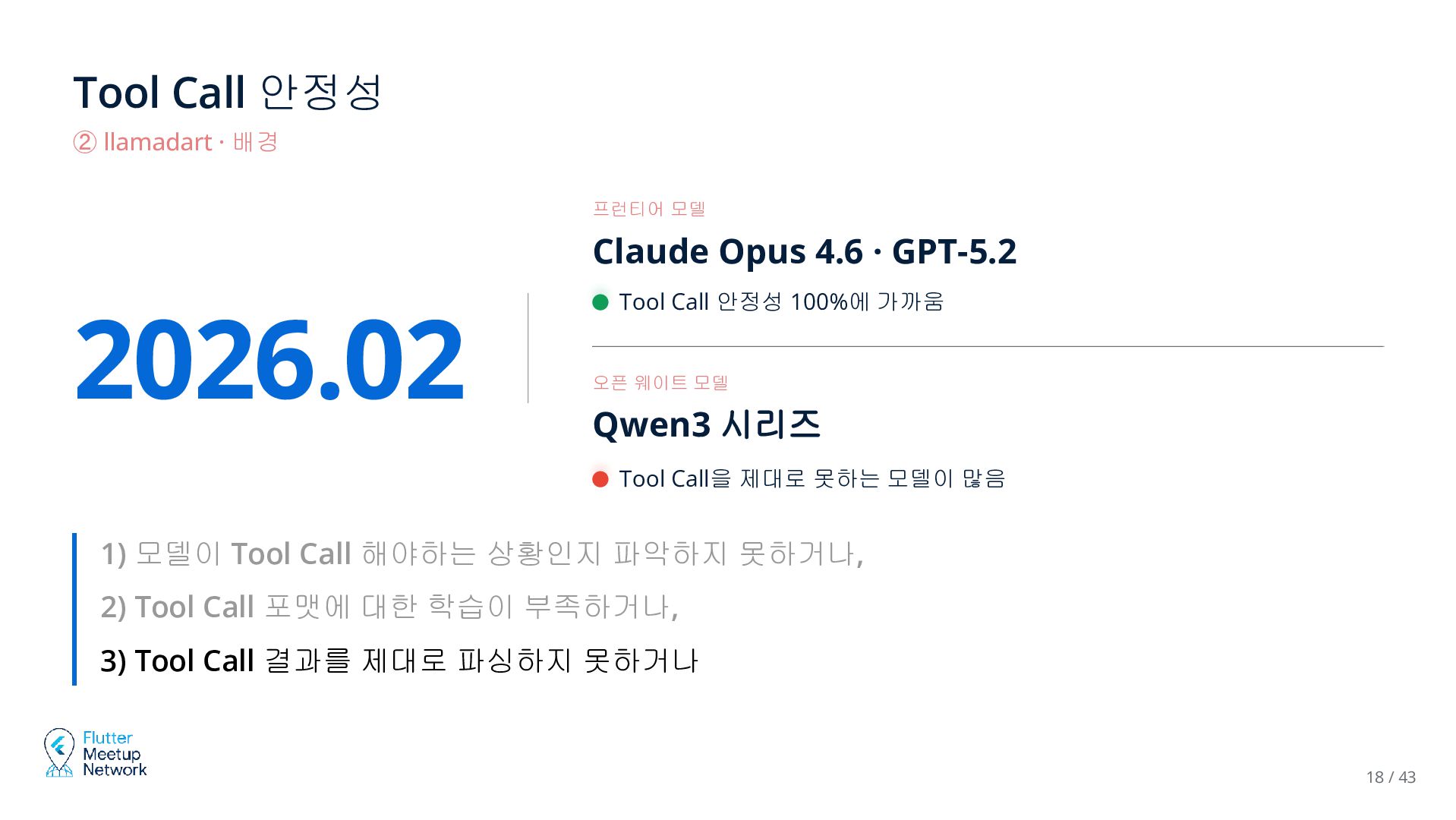
  15. Tool Call 안정성 ② llamadart · 배경 프런티어 모델 Claude

    Opus 4.6 · GPT-5.2 2026.02 Tool Call 안정성 100%에 가까움 오픈 웨이트 모델 Qwen3 시리즈 Tool Call을 제대로 못하는 모델이 많음 1) 모델이 Tool Call 해야하는 상황인지 파악하지 못하거나, 2) Tool Call 포맷에 대한 학습이 부족하거나, 3) Tool Call 결과를 제대로 파싱하지 못하거나 18 / 43
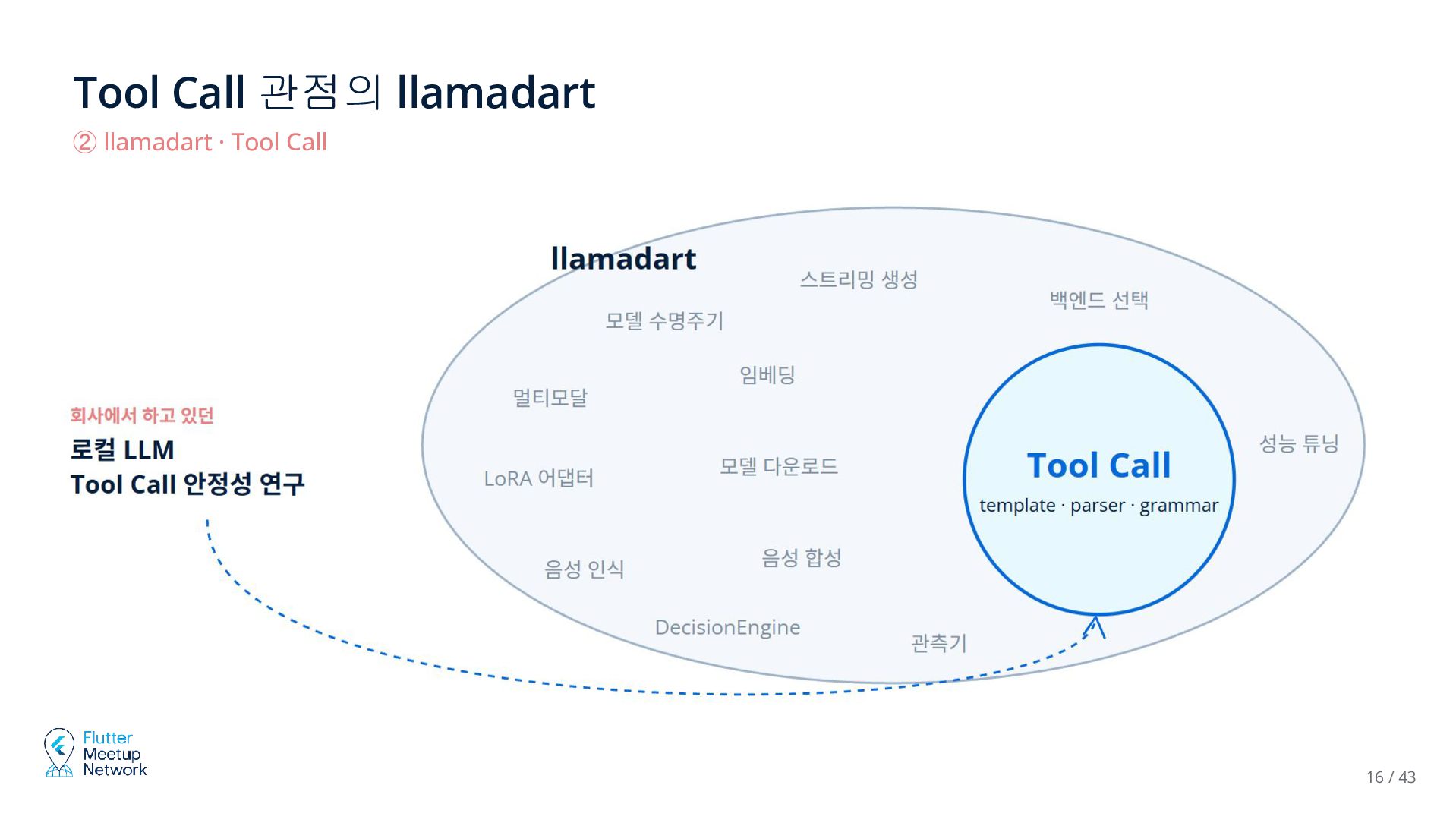
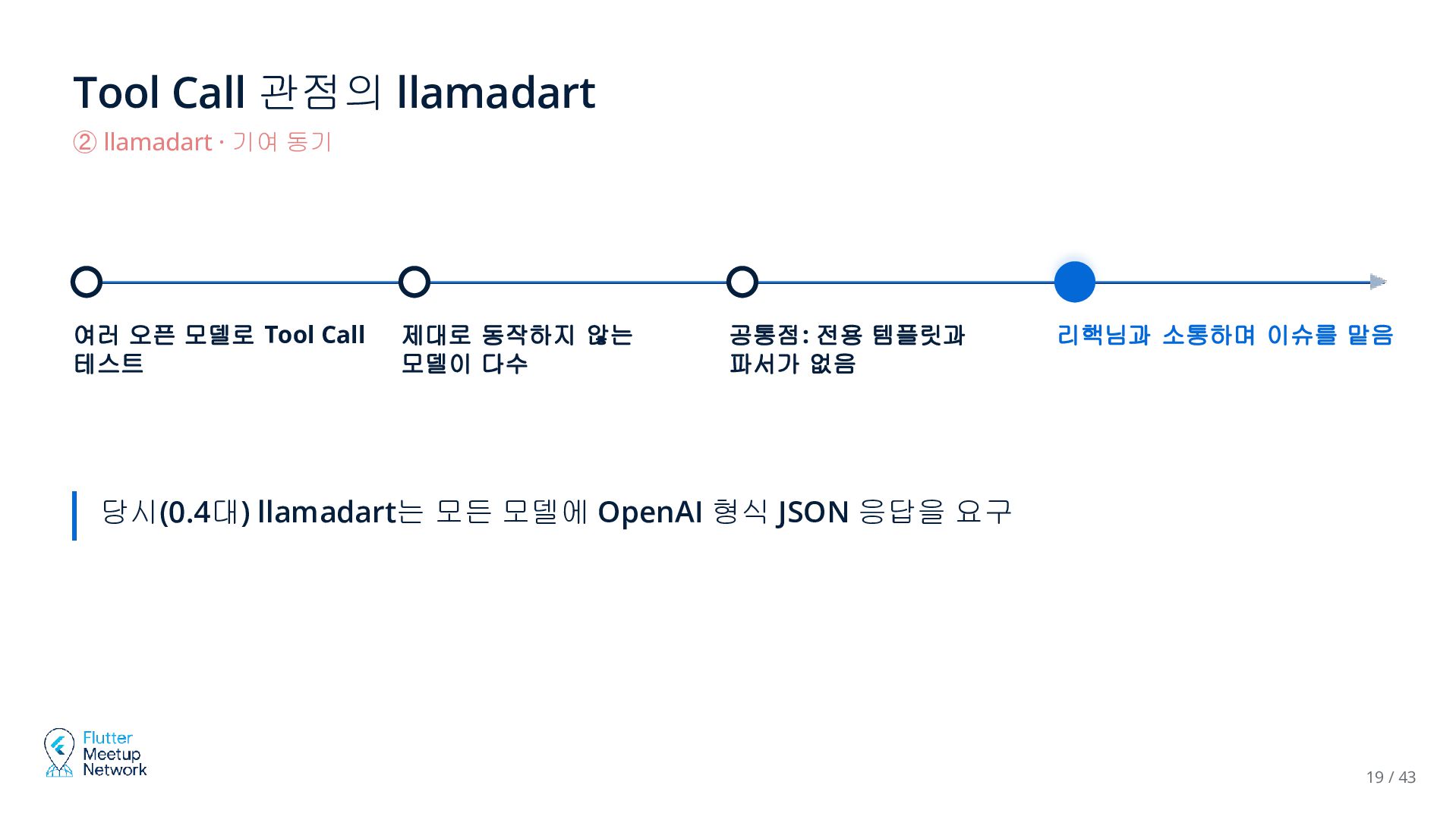
  16. Tool Call 관점의 llamadart ② llamadart · 기여 동기 여러

    오픈 모델로 Tool Call 테스트 제대로 동작하지 않는 모델이 다수 공통점: 전용 템플릿과 파서가 없음 리핵님과 소통하며 이슈를 맡음 당시(0.4대) llamadart는 모든 모델에 OpenAI 형식 JSON 응답을 요구 19 / 43
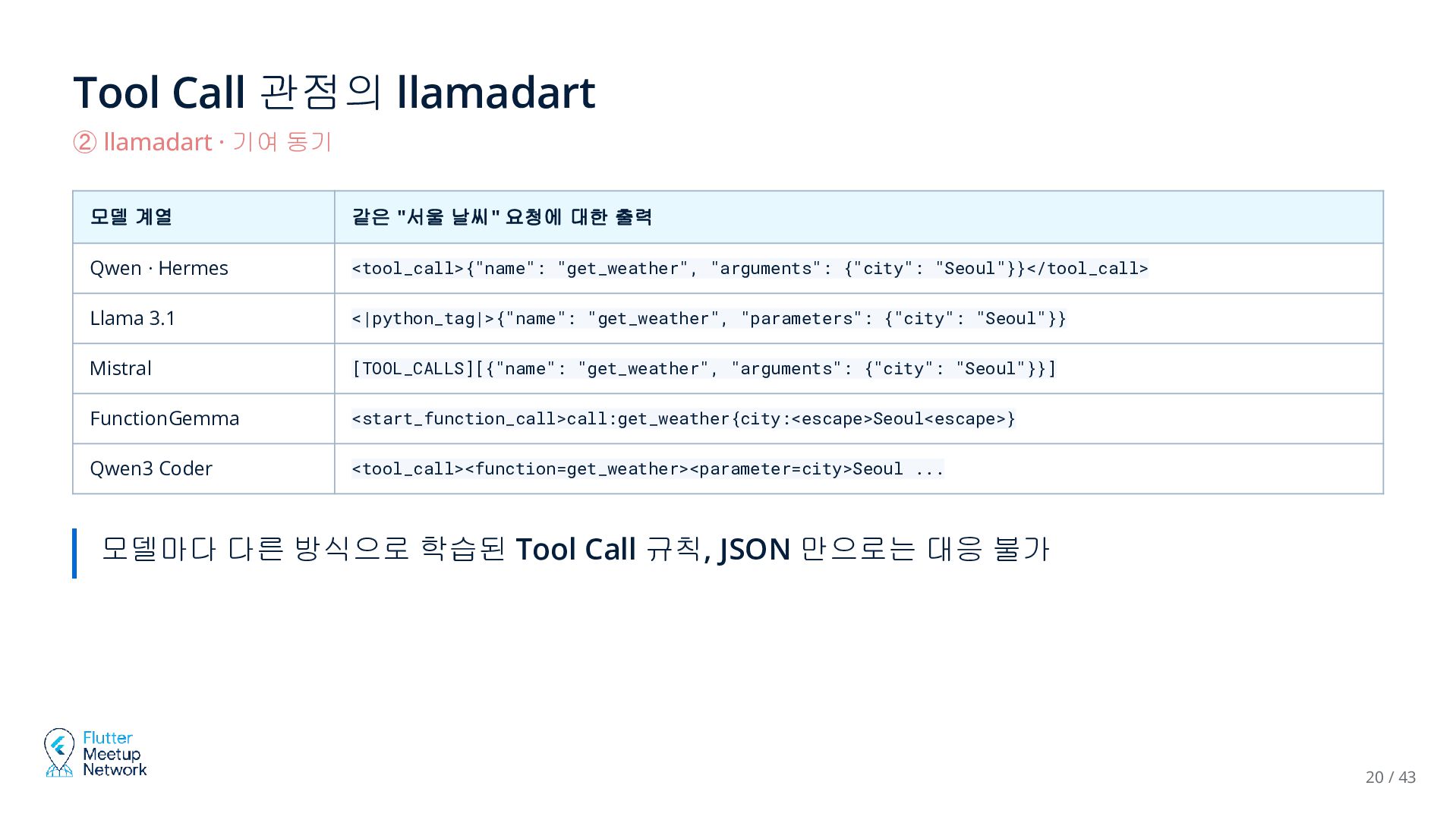
  17. Tool Call 관점의 llamadart ② llamadart · 기여 동기 모델

    계열 같은 "서울 날씨" 요청에 대한 출력 Qwen · Hermes <tool_call>{"name": "get_weather", "arguments": {"city": "Seoul"}}</tool_call> Llama 3.1 <|python_tag|>{"name": "get_weather", "parameters": {"city": "Seoul"}} Mistral [TOOL_CALLS][{"name": "get_weather", "arguments": {"city": "Seoul"}}] FunctionGemma <start_function_call>call:get_weather{city:<escape>Seoul<escape>} Qwen3 Coder <tool_call><function=get_weather><parameter=city>Seoul ... 모델마다 다른 방식으로 학습된 Tool Call 규칙, JSON 만으로는 대응 불가 20 / 43
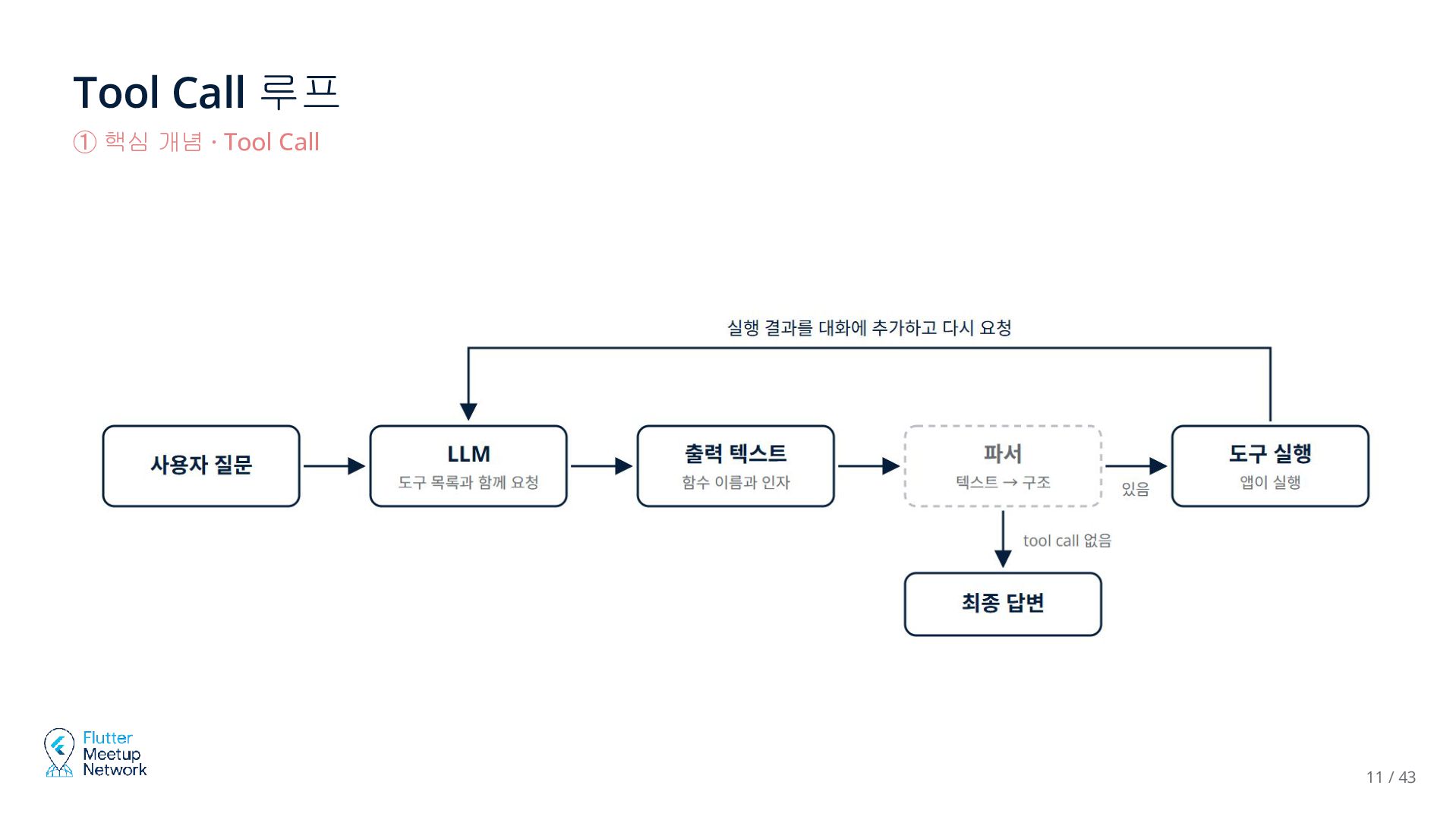
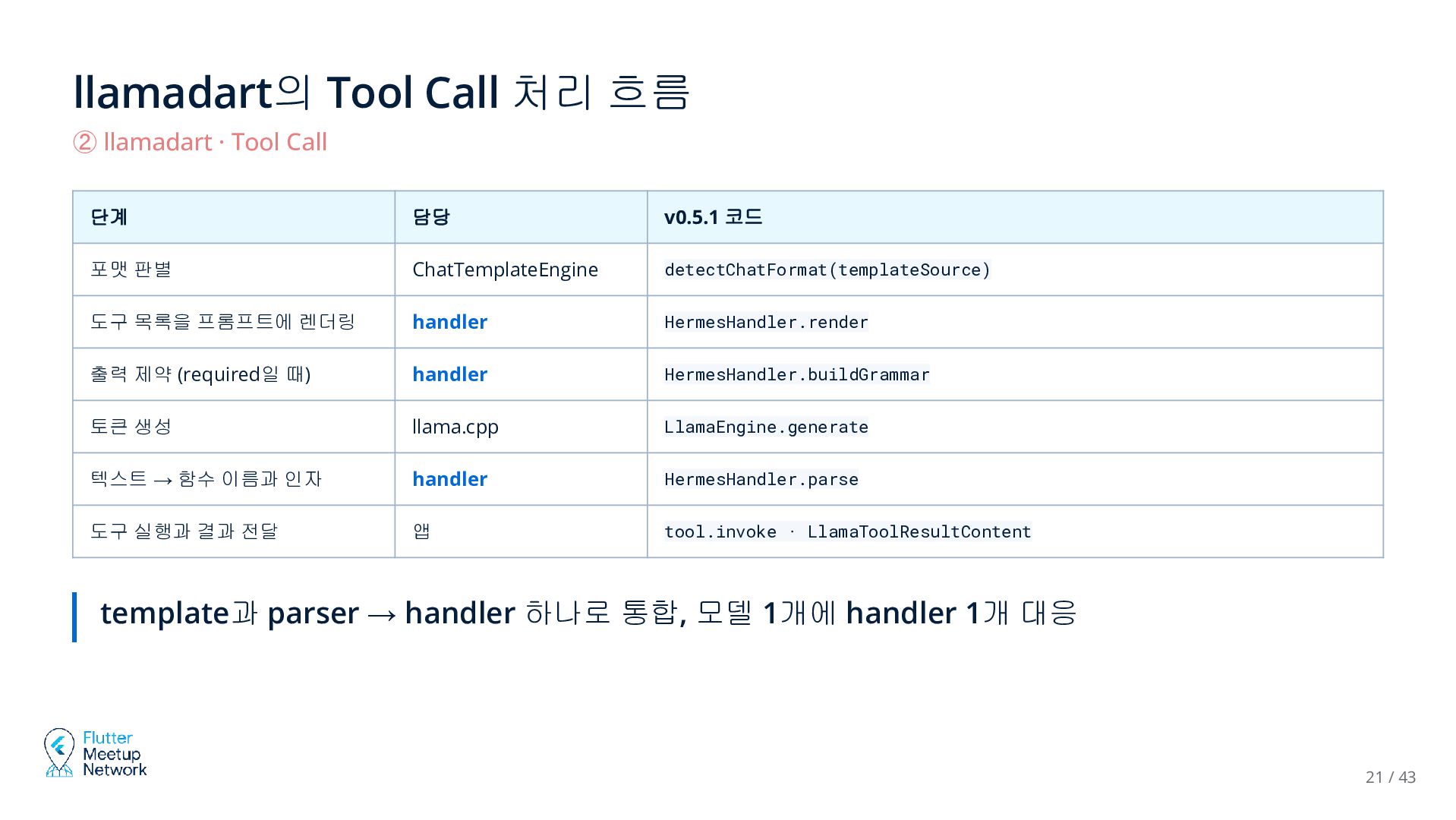
  18. llamadart의 Tool Call 처리 흐름 ② llamadart · Tool Call

    단계 담당 v0.5.1 코드 포맷 판별 ChatTemplateEngine detectChatFormat(templateSource) 도구 목록을 프롬프트에 렌더링 handler HermesHandler.render 출력 제약 (required일 때) handler HermesHandler.buildGrammar 토큰 생성 llama.cpp LlamaEngine.generate 텍스트 → 함수 이름과 인자 handler HermesHandler.parse 도구 실행과 결과 전달 앱 tool.invoke · LlamaToolResultContent template과 parser → handler 하나로 통합, 모델 1개에 handler 1개 대응 21 / 43
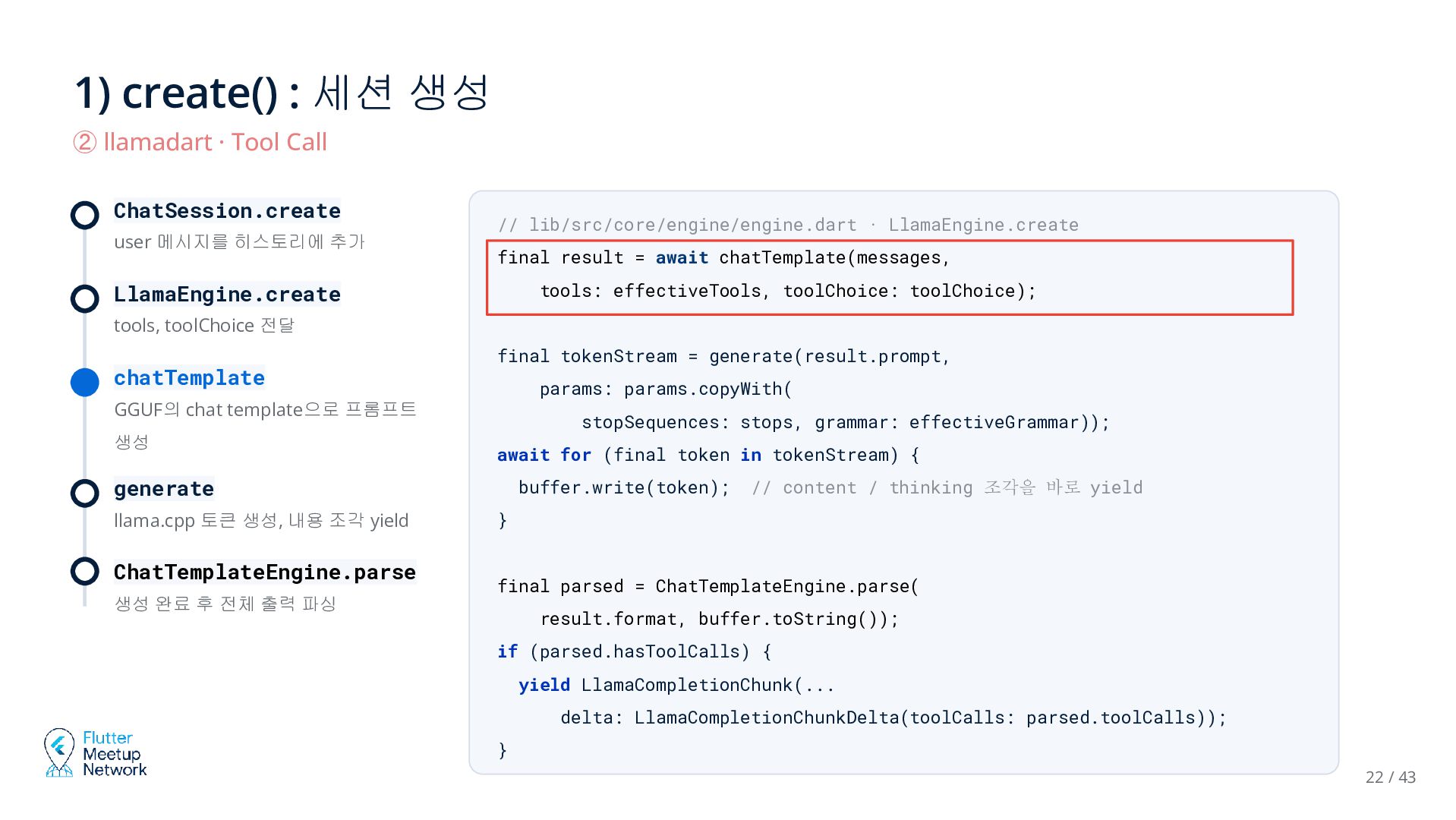
  19. 1) create() : 세션 생성 ② llamadart · Tool Call

    ChatSession.create user 메시지를 히스토리에 추가 // lib/src/core/engine/engine.dart · LlamaEngine.create final result = await chatTemplate(messages, tools: effectiveTools, toolChoice: toolChoice); LlamaEngine.create tools, toolChoice 전달 chatTemplate final tokenStream = generate(result.prompt, params: params.copyWith( GGUF의 chat template으로 프롬프트 생성 stopSequences: stops, grammar: effectiveGrammar)); await for (final token in tokenStream) { generate llama.cpp 토큰 생성, 내용 조각 yield ChatTemplateEngine.parse 생성 완료 후 전체 출력 파싱 buffer.write(token); // content / thinking 조각을 바로 yield } final parsed = ChatTemplateEngine.parse( result.format, buffer.toString()); if (parsed.hasToolCalls) { yield LlamaCompletionChunk(... delta: LlamaCompletionChunkDelta(toolCalls: parsed.toolCalls)); } 22 / 43
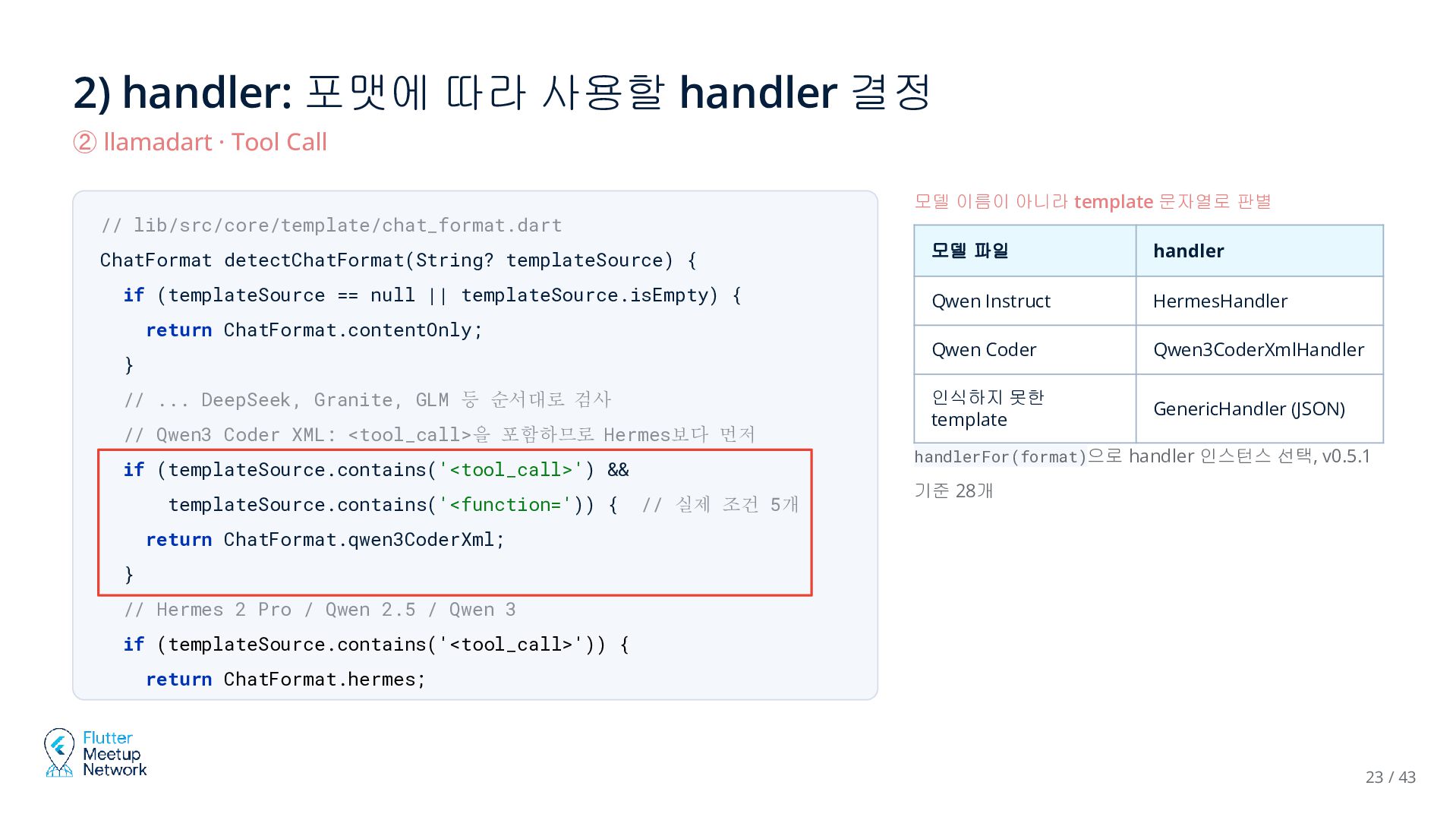
  20. 2) handler: 포맷에 따라 사용할 handler 결정 ② llamadart ·

    Tool Call 모델 이름이 아니라 template 문자열로 판별 // lib/src/core/template/chat_format.dart ChatFormat detectChatFormat(String? templateSource) { if (templateSource == null || templateSource.isEmpty) { return ChatFormat.contentOnly; } // ... DeepSeek, Granite, GLM 등 순서대로 검사 // Qwen3 Coder XML: <tool_call>을 포함하므로 Hermes보다 먼저 if (templateSource.contains('<tool_call>') && templateSource.contains('<function=')) { // 실제 조건 5개 모델 파일 handler Qwen Instruct HermesHandler Qwen Coder Qwen3CoderXmlHandler 인식하지 못한 template GenericHandler (JSON) handlerFor(format)으로 handler 인스턴스 선택, v0.5.1 기준 28개 return ChatFormat.qwen3CoderXml; } // Hermes 2 Pro / Qwen 2.5 / Qwen 3 if (templateSource.contains('<tool_call>')) { return ChatFormat.hermes; 23 / 43
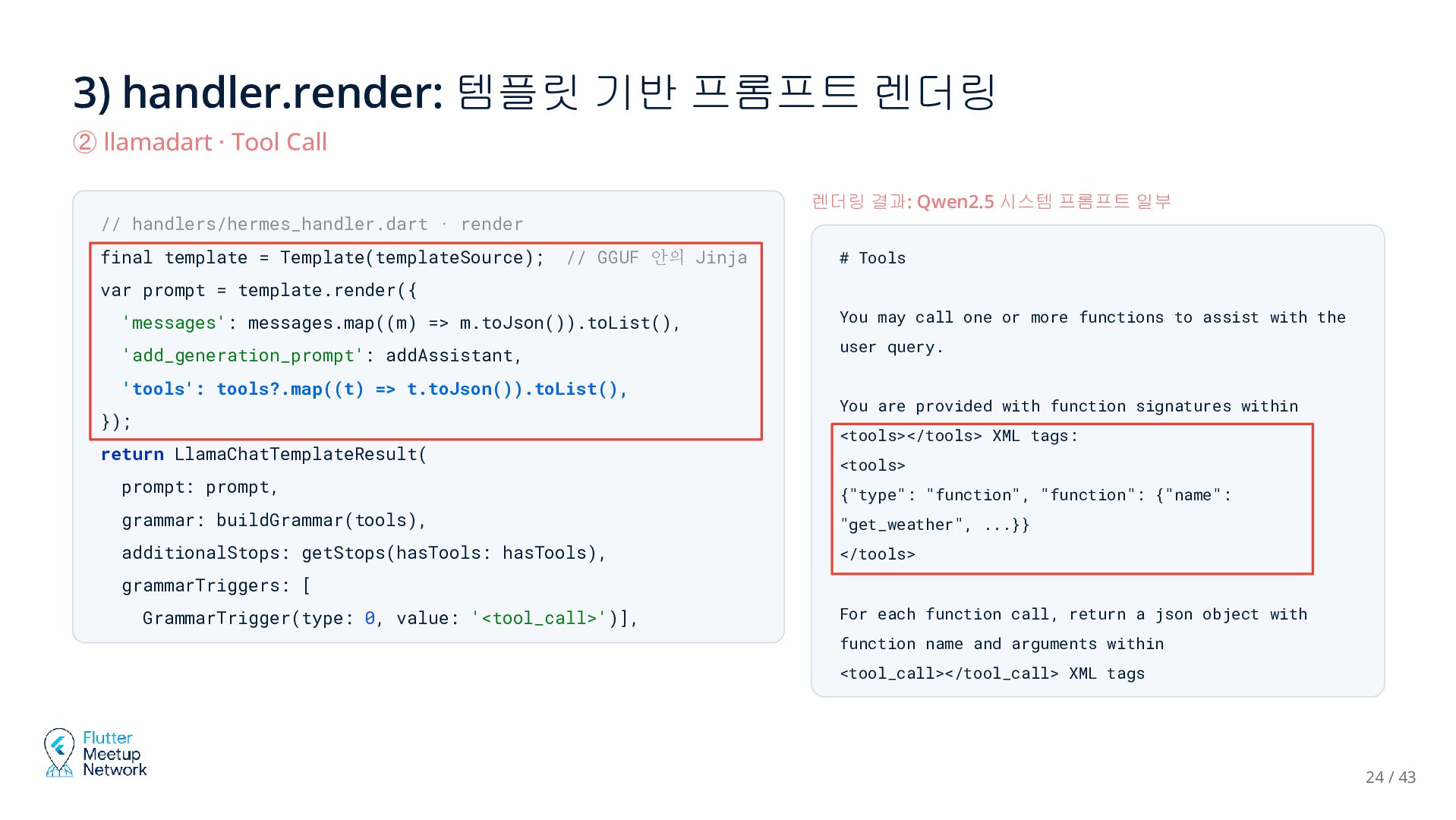
  21. 3) handler.render: 템플릿 기반 프롬프트 렌더링 ② llamadart · Tool

    Call 렌더링 결과: Qwen2.5 시스템 프롬프트 일부 // handlers/hermes_handler.dart · render final template = Template(templateSource); // GGUF 안의 Jinja # Tools var prompt = template.render({ 'messages': messages.map((m) => m.toJson()).toList(), You may call one or more functions to assist with the 'add_generation_prompt': addAssistant, user query. 'tools': tools?.map((t) => t.toJson()).toList(), }); return LlamaChatTemplateResult( prompt: prompt, You are provided with function signatures within <tools></tools> XML tags: <tools> {"type": "function", "function": {"name": grammar: buildGrammar(tools), "get_weather", ...}} additionalStops: getStops(hasTools: hasTools), </tools> grammarTriggers: [ GrammarTrigger(type: 0, value: '<tool_call>')], For each function call, return a json object with function name and arguments within <tool_call></tool_call> XML tags 24 / 43
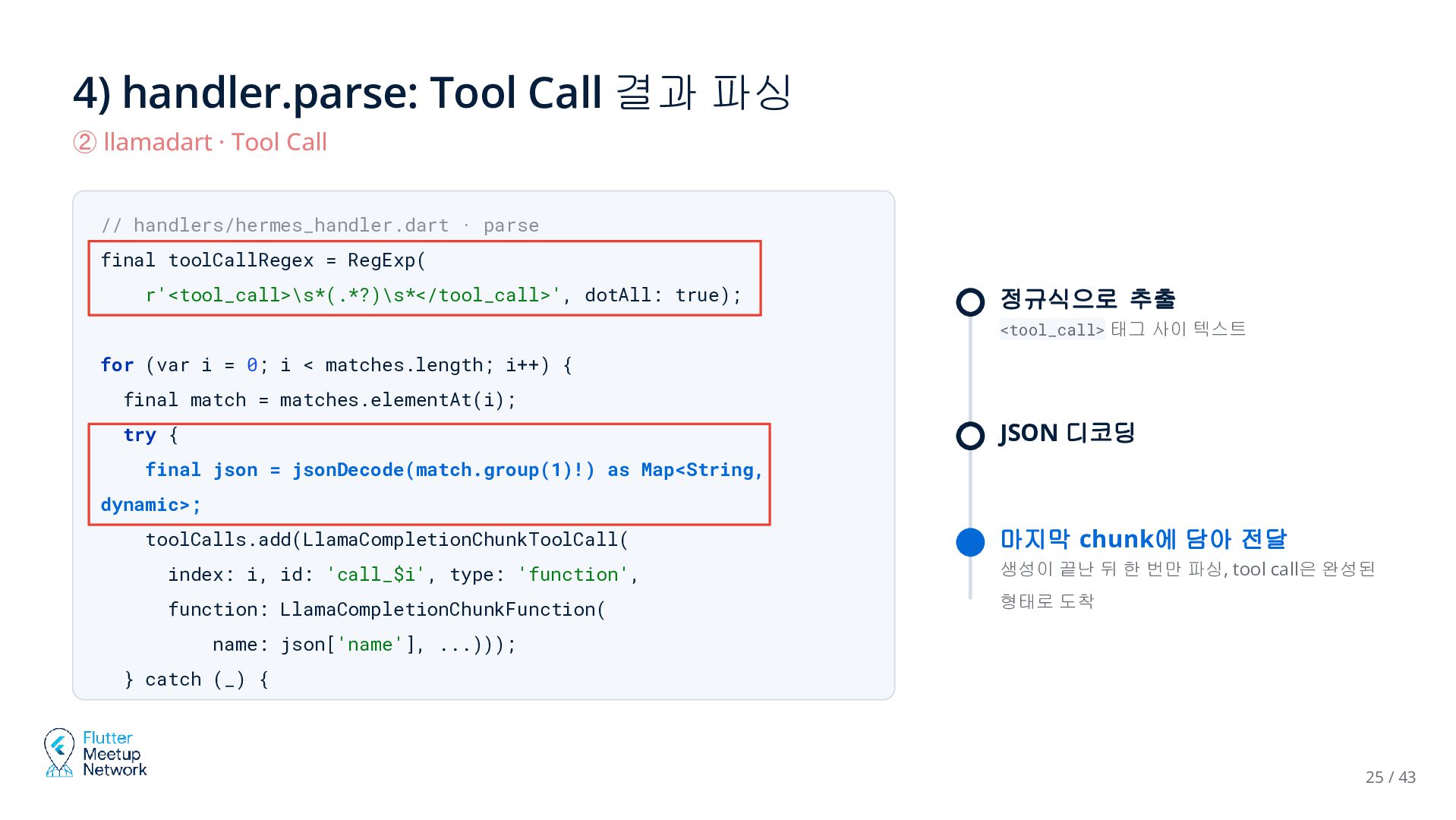
  22. 4) handler.parse: Tool Call 결과 파싱 ② llamadart · Tool

    Call // handlers/hermes_handler.dart · parse final toolCallRegex = RegExp( r'<tool_call>\s*(.*?)\s*</tool_call>', dotAll: true); 정규식으로 추출 <tool_call> 태그 사이 텍스트 for (var i = 0; i < matches.length; i++) { final match = matches.elementAt(i); JSON 디코딩 try { final json = jsonDecode(match.group(1)!) as Map<String, dynamic>; toolCalls.add(LlamaCompletionChunkToolCall( 마지막 chunk에 담아 전달 index: i, id: 'call_$i', type: 'function', 생성이 끝난 뒤 한 번만 파싱, tool call은 완성된 function: LlamaCompletionChunkFunction( 형태로 도착 name: json['name'], ...))); } catch (_) { 25 / 43
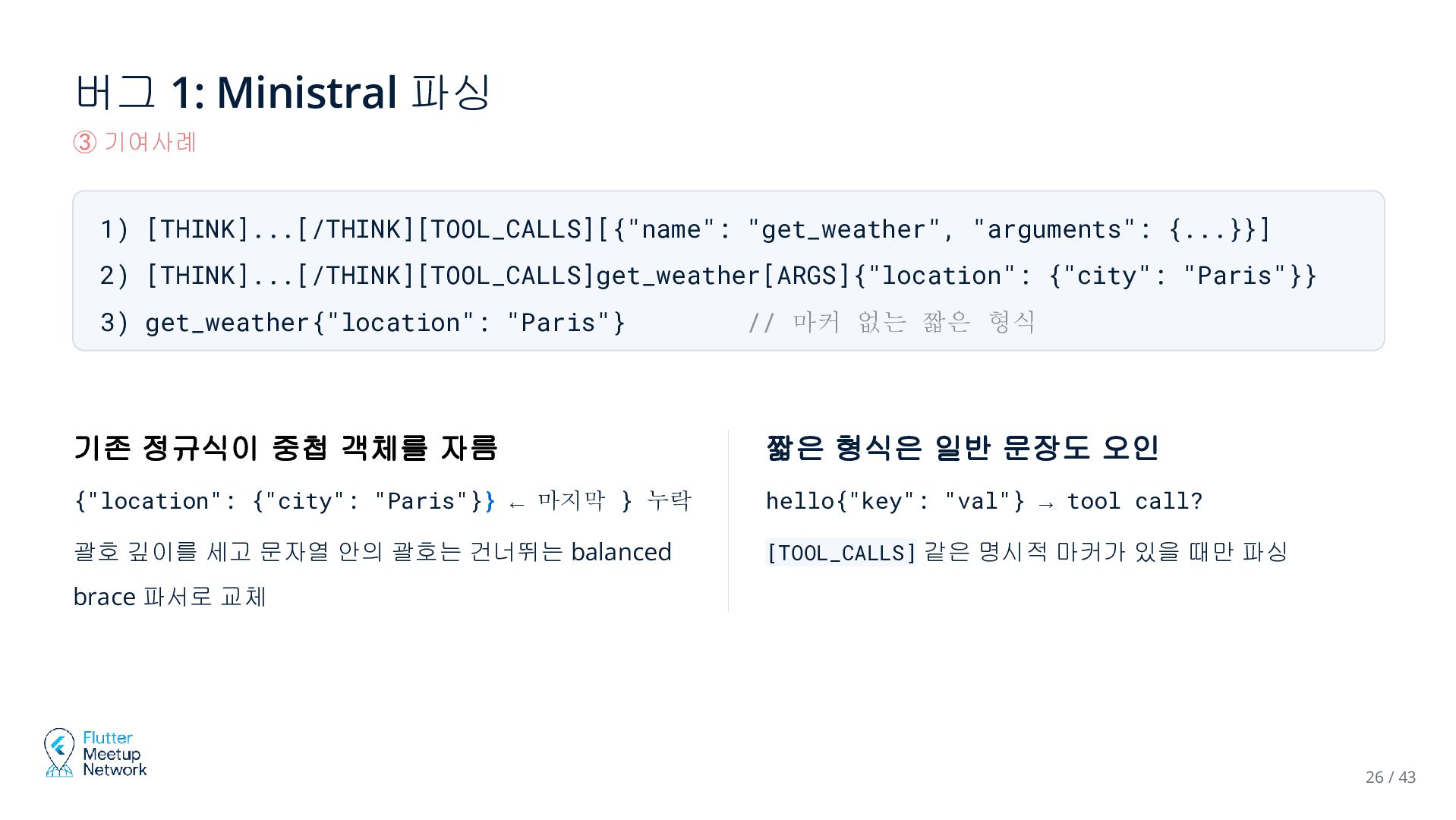
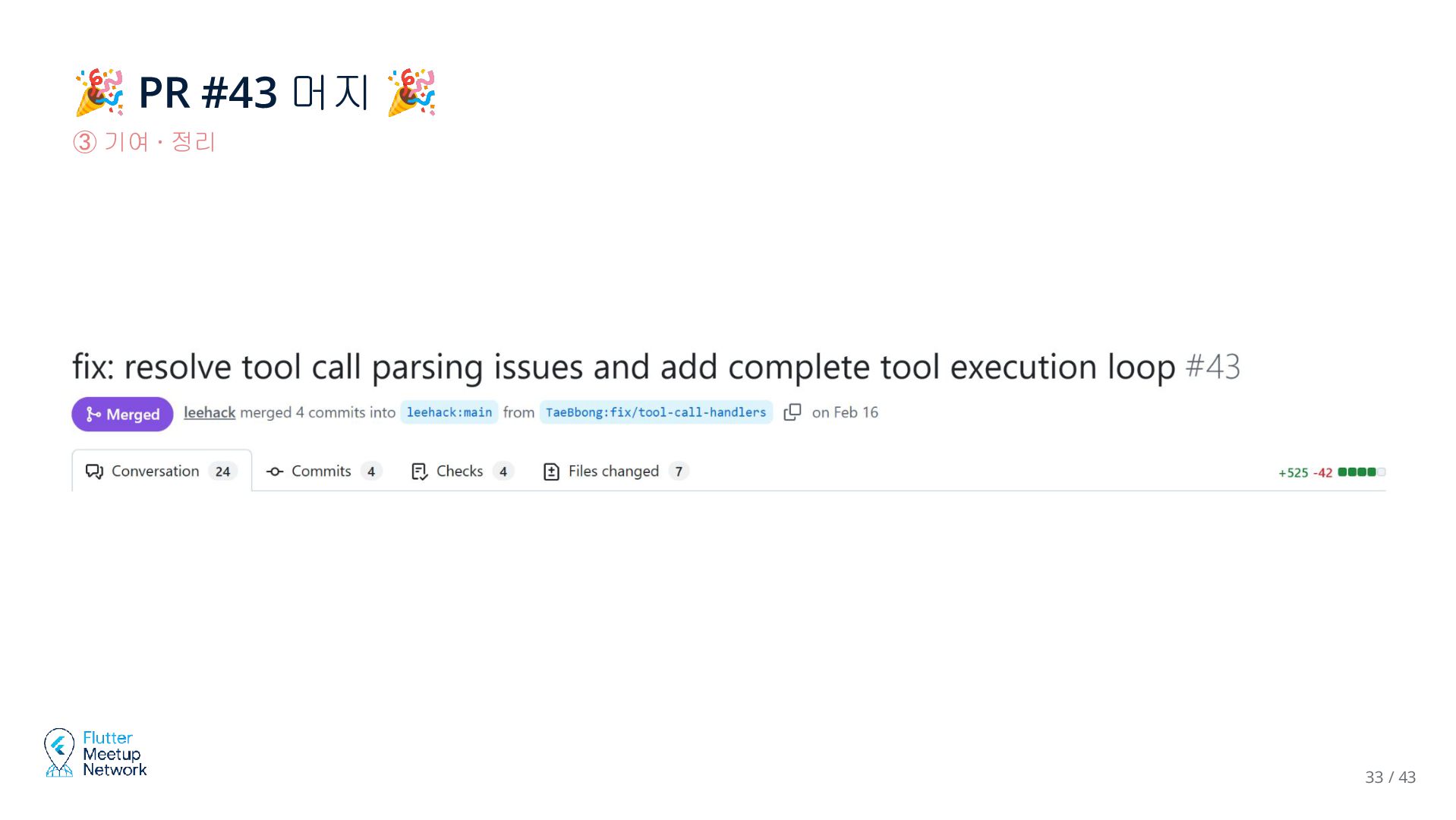
  23. 버그 1: Ministral 파싱 ③ 기여사례 1) [THINK]...[/THINK][TOOL_CALLS][{"name": "get_weather", "arguments":

    {...}}] 2) [THINK]...[/THINK][TOOL_CALLS]get_weather[ARGS]{"location": {"city": "Paris"}} 3) get_weather{"location": "Paris"} // 마커 없는 짧은 형식 기존 정규식이 중첩 객체를 자름 짧은 형식은 일반 문장도 오인 {"location": {"city": "Paris"}} ← 마지막 } 누락 hello{"key": "val"} → tool call? 괄호 깊이를 세고 문자열 안의 괄호는 건너뛰는 balanced [TOOL_CALLS] 같은 명시적 마커가 있을 때만 파싱 brace 파서로 교체 26 / 43
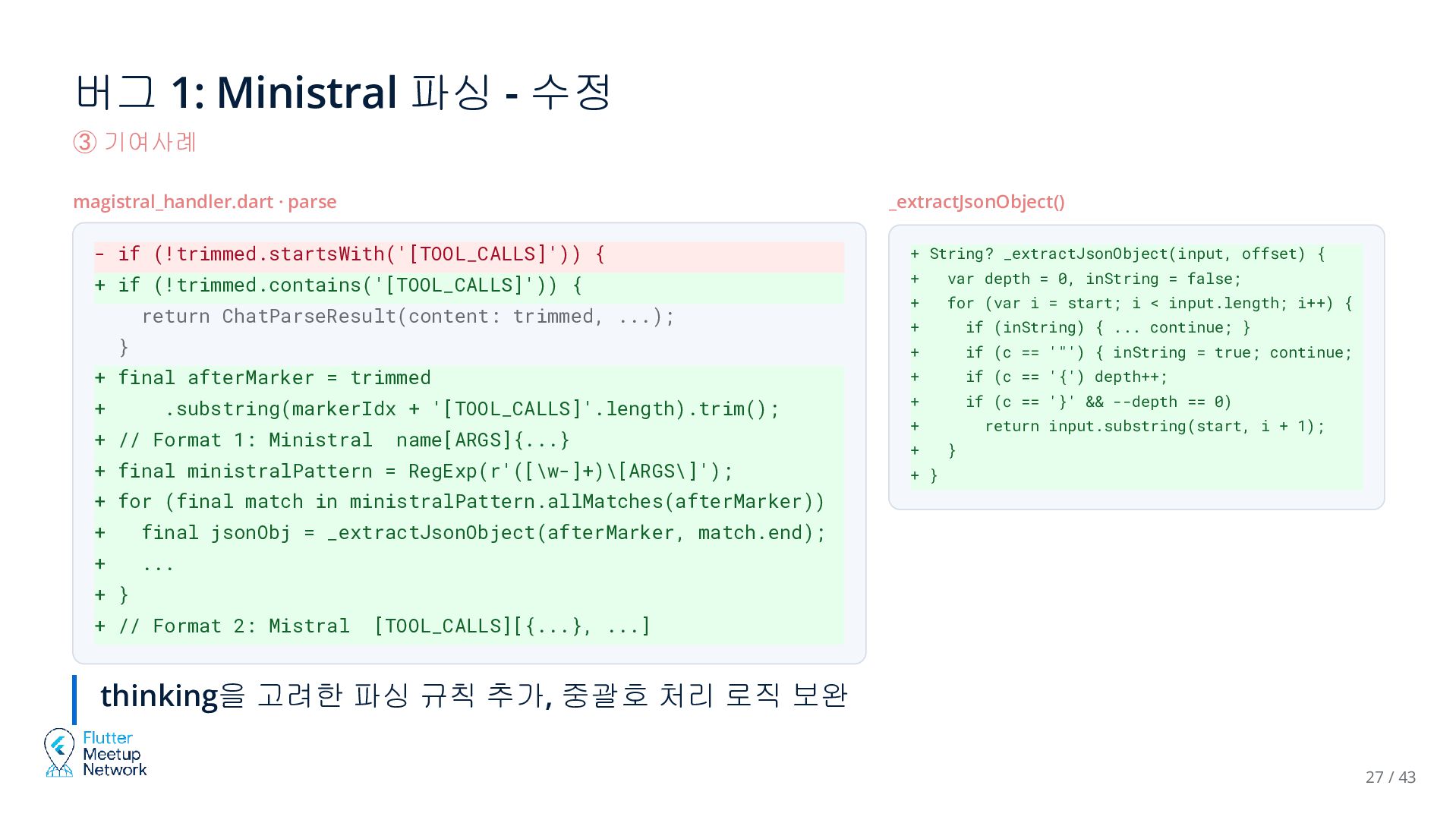
  24. 버그 1: Ministral 파싱 - 수정 ③ 기여사례 magistral_handler.dart ·

    parse _extractJsonObject() - if (!trimmed.startsWith('[TOOL_CALLS]')) { + String? _extractJsonObject(input, offset) { + if (!trimmed.contains('[TOOL_CALLS]')) { + var depth = 0, inString = false; + for (var i = start; i < input.length; i++) { return ChatParseResult(content: trimmed, ...); } + final afterMarker = trimmed + .substring(markerIdx + '[TOOL_CALLS]'.length).trim(); + // Format 1: Ministral name[ARGS]{...} + final ministralPattern = RegExp(r'([\w-]+)\[ARGS\]'); + if (inString) { ... continue; } + if (c == '"') { inString = true; continue; + } + if (c == '{') depth++; if (c == '}' && --depth == 0) + + return input.substring(start, i + 1); } + } + for (final match in ministralPattern.allMatches(afterMarker)) + { + final jsonObj = _extractJsonObject(afterMarker, match.end); ... + } + // Format 2: Mistral [TOOL_CALLS][{...}, ...] thinking을 고려한 파싱 규칙 추가, 중괄호 처리 로직 보완 27 / 43
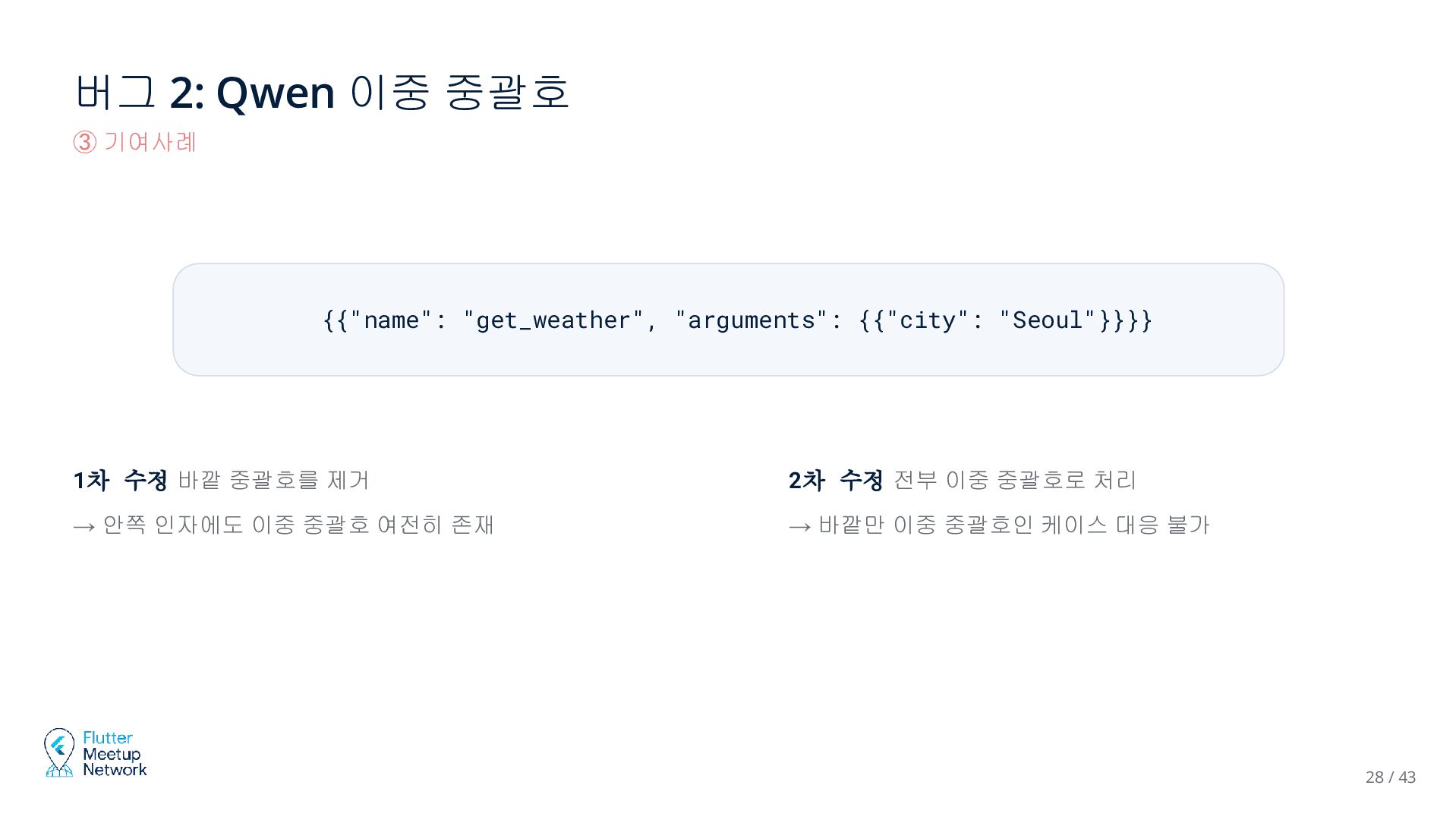
  25. 버그 2: Qwen 이중 중괄호 ③ 기여사례 {{"name": "get_weather", "arguments":

    {{"city": "Seoul"}}}} 1차 수정 바깥 중괄호를 제거 2차 수정 전부 이중 중괄호로 처리 → 안쪽 인자에도 이중 중괄호 여전히 존재 → 바깥만 이중 중괄호인 케이스 대응 불가 28 / 43
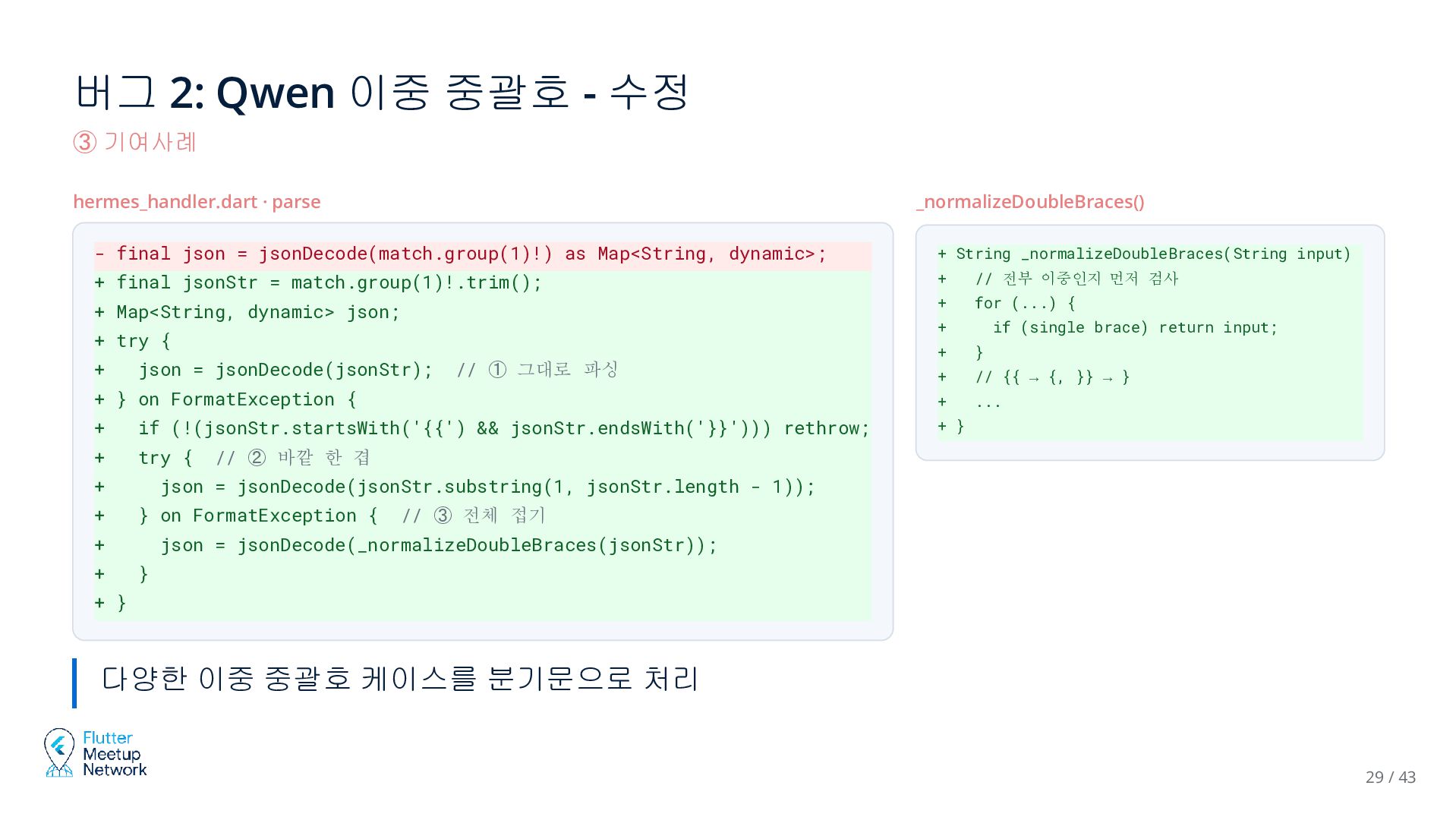
  26. 버그 2: Qwen 이중 중괄호 - 수정 ③ 기여사례 hermes_handler.dart

    · parse _normalizeDoubleBraces() - final json = jsonDecode(match.group(1)!) as Map<String, dynamic>; + String _normalizeDoubleBraces(String input) + final jsonStr = match.group(1)!.trim(); + { + + Map<String, dynamic> json; // 전부 이중인지 먼저 검사 for (...) { + + try { if (single brace) return input; + } + // {{ → {, }} → } + } on FormatException { + ... + if (!(jsonStr.startsWith('{{') && jsonStr.endsWith('}}'))) rethrow; + } + try { + json = jsonDecode(jsonStr); + + // ② 바깥 한 겹 json = jsonDecode(jsonStr.substring(1, jsonStr.length - 1)); } on FormatException { + + // ① 그대로 파싱 // ③ 전체 접기 json = jsonDecode(_normalizeDoubleBraces(jsonStr)); } + } 다양한 이중 중괄호 케이스를 분기문으로 처리 29 / 43
  27. 확장 1: 예제 앱의 Tool Call 루프 ③ 기여사례 example/basic_app/lib/services/llama_service.dart

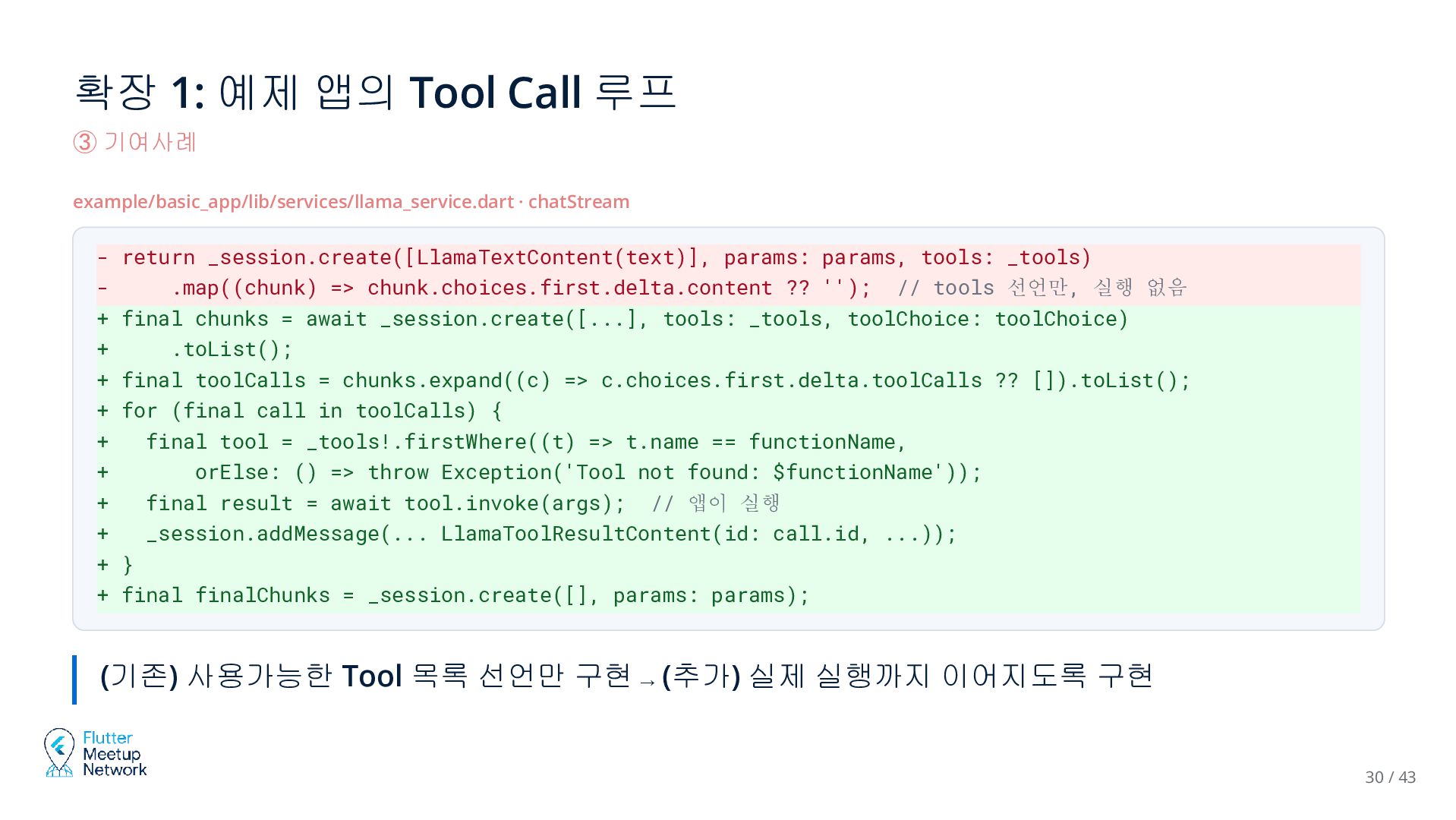
    · chatStream - return _session.create([LlamaTextContent(text)], params: params, tools: _tools) .map((chunk) => chunk.choices.first.delta.content ?? ''); // tools 선언만, 실행 없음 + final chunks = await _session.create([...], tools: _tools, toolChoice: toolChoice) + .toList(); + final toolCalls = chunks.expand((c) => c.choices.first.delta.toolCalls ?? []).toList(); + for (final call in toolCalls) { + final tool = _tools!.firstWhere((t) => t.name == functionName, + orElse: () => throw Exception('Tool not found: $functionName')); + final result = await tool.invoke(args); // 앱이 실행 + _session.addMessage(... LlamaToolResultContent(id: call.id, ...)); + } + final finalChunks = _session.create([], params: params); (기존) 사용가능한 Tool 목록 선언만 구현 → (추가) 실제 실행까지 이어지도록 구현 30 / 43
  28. 확장 1/리뷰 1: 예제 앱의 Tool Call 루프 ③ 기여사례

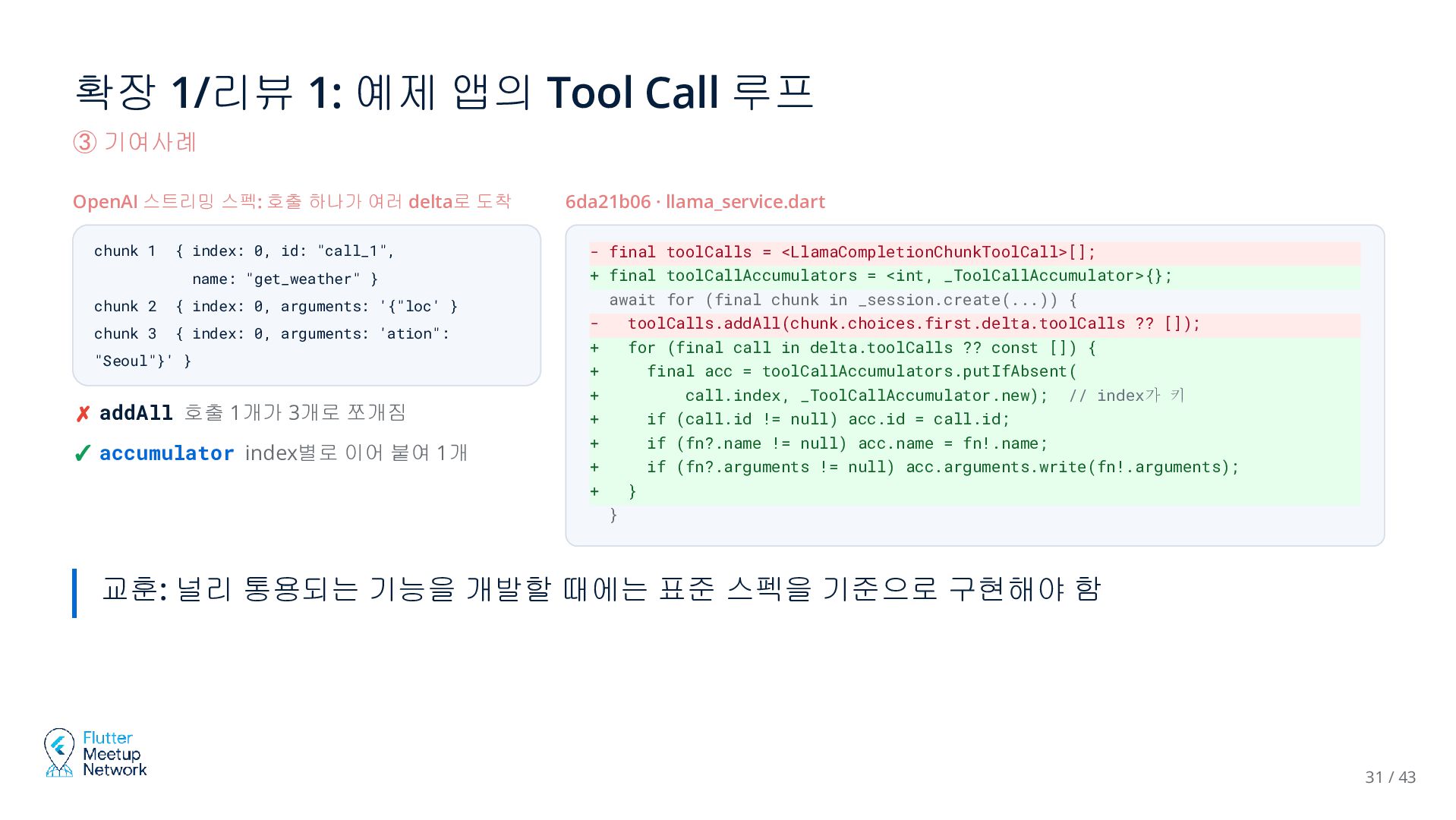
    OpenAI 스트리밍 스펙: 호출 하나가 여러 delta로 도착 chunk 1 { index: 0, id: "call_1", name: "get_weather" } chunk 2 { index: 0, arguments: '{"loc' } chunk 3 { index: 0, arguments: 'ation": "Seoul"}' } ✗ addAll 호출 1개가 3개로 쪼개짐 ✓ accumulator index별로 이어 붙여 1개 6da21b06 · llama_service.dart - final toolCalls = <LlamaCompletionChunkToolCall>[]; + final toolCallAccumulators = <int, _ToolCallAccumulator>{}; await for (final chunk in _session.create(...)) { toolCalls.addAll(chunk.choices.first.delta.toolCalls ?? []); + for (final call in delta.toolCalls ?? const []) { + final acc = toolCallAccumulators.putIfAbsent( + call.index, _ToolCallAccumulator.new); // index가 키 + if (call.id != null) acc.id = call.id; + if (fn?.name != null) acc.name = fn!.name; + if (fn?.arguments != null) acc.arguments.write(fn!.arguments); + } } 교훈: 널리 통용되는 기능을 개발할 때에는 표준 스펙을 기준으로 구현해야 함 31 / 43
  29. 확장 1/리뷰 2: 예제 앱의 Tool Call 루프 ③ 기여사례

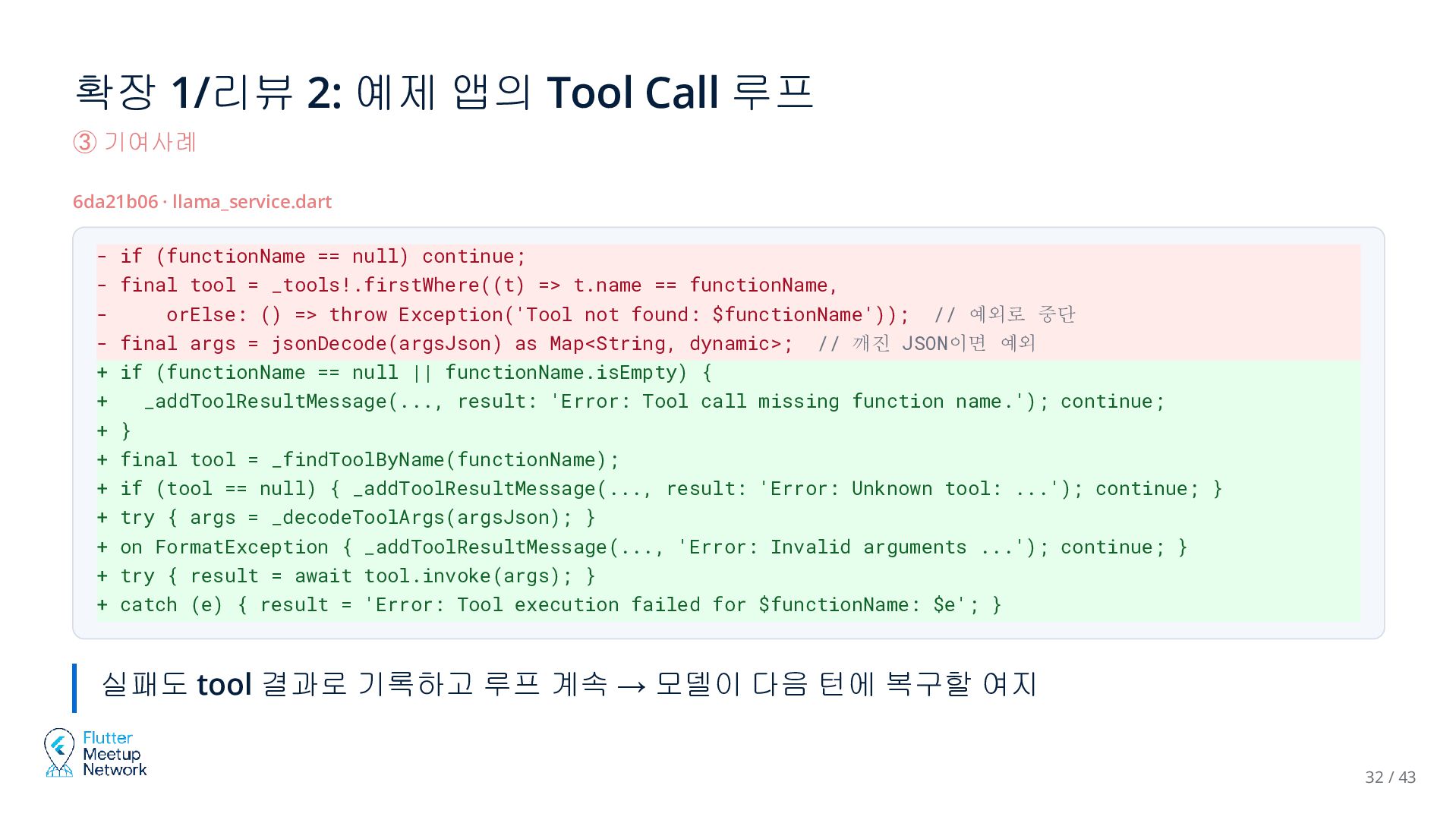
    6da21b06 · llama_service.dart - if (functionName == null) continue; - final tool = _tools!.firstWhere((t) => t.name == functionName, orElse: () => throw Exception('Tool not found: $functionName')); // 예외로 중단 - final args = jsonDecode(argsJson) as Map<String, dynamic>; // 깨진 JSON이면 예외 + if (functionName == null || functionName.isEmpty) { + _addToolResultMessage(..., result: 'Error: Tool call missing function name.'); continue; + } + final tool = _findToolByName(functionName); + if (tool == null) { _addToolResultMessage(..., result: 'Error: Unknown tool: ...'); continue; } + try { args = _decodeToolArgs(argsJson); } + on FormatException { _addToolResultMessage(..., 'Error: Invalid arguments ...'); continue; } + try { result = await tool.invoke(args); } + catch (e) { result = 'Error: Tool execution failed for $functionName: $e'; } 실패도 tool 결과로 기록하고 루프 계속 → 모델이 다음 턴에 복구할 여지 32 / 43
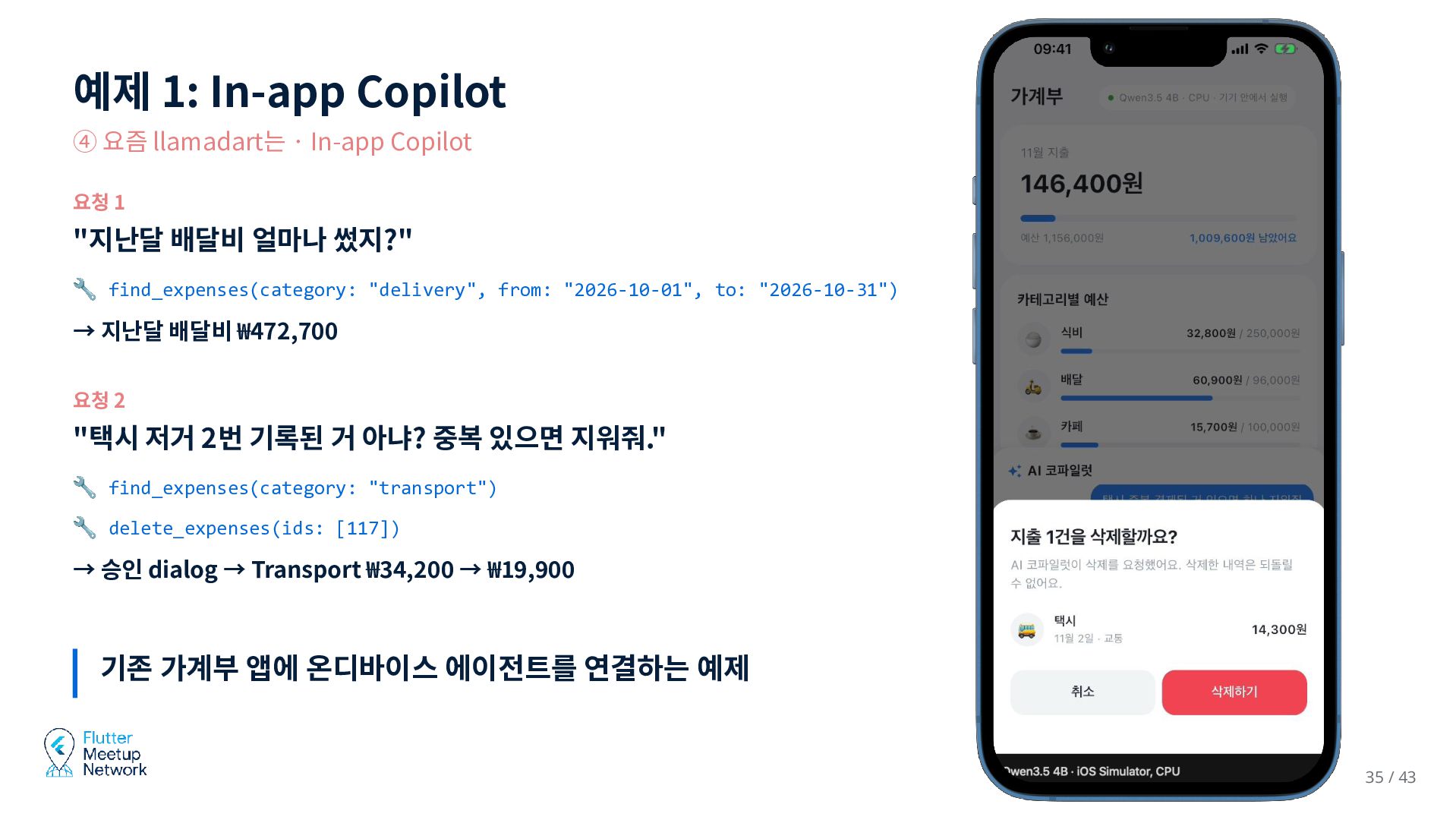
  30. 예제 1: In-app Copilot ④ 요즘 llamadart는 · In-app Copilot

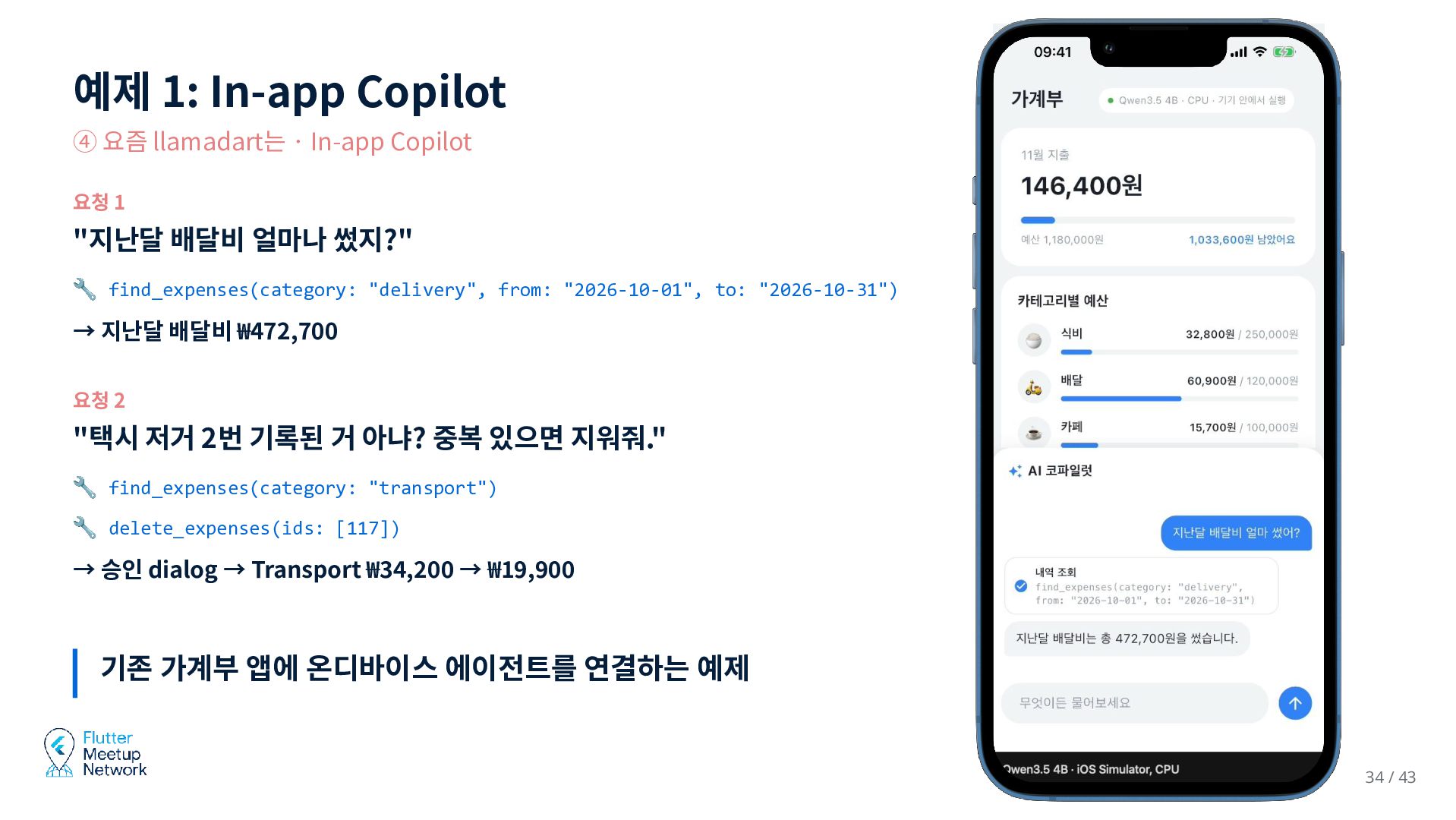
    요청 1 "지난달 배달비 얼마나 썼지?" 🔧 find_expenses(category: "delivery", from: "2026-10-01", to: "2026-10-31") → 지난달 배달비 ₩472,700 요청 2 "택시 저거 2번 기록된 거 아냐? 중복 있으면 지워줘." 🔧 find_expenses(category: "transport") 🔧 delete_expenses(ids: [117]) → 승인 dialog → Transport ₩34,200 → ₩19,900 기존 가계부 앱에 온디바이스 에이전트를 연결하는 예제 34 / 43
  31. 예제 1: In-app Copilot ④ 요즘 llamadart는 · In-app Copilot

    요청 1 "지난달 배달비 얼마나 썼지?" 🔧 find_expenses(category: "delivery", from: "2026-10-01", to: "2026-10-31") → 지난달 배달비 ₩472,700 요청 2 "택시 저거 2번 기록된 거 아냐? 중복 있으면 지워줘." 🔧 find_expenses(category: "transport") 🔧 delete_expenses(ids: [117]) → 승인 dialog → Transport ₩34,200 → ₩19,900 기존 가계부 앱에 온디바이스 에이전트를 연결하는 예제 35 / 43
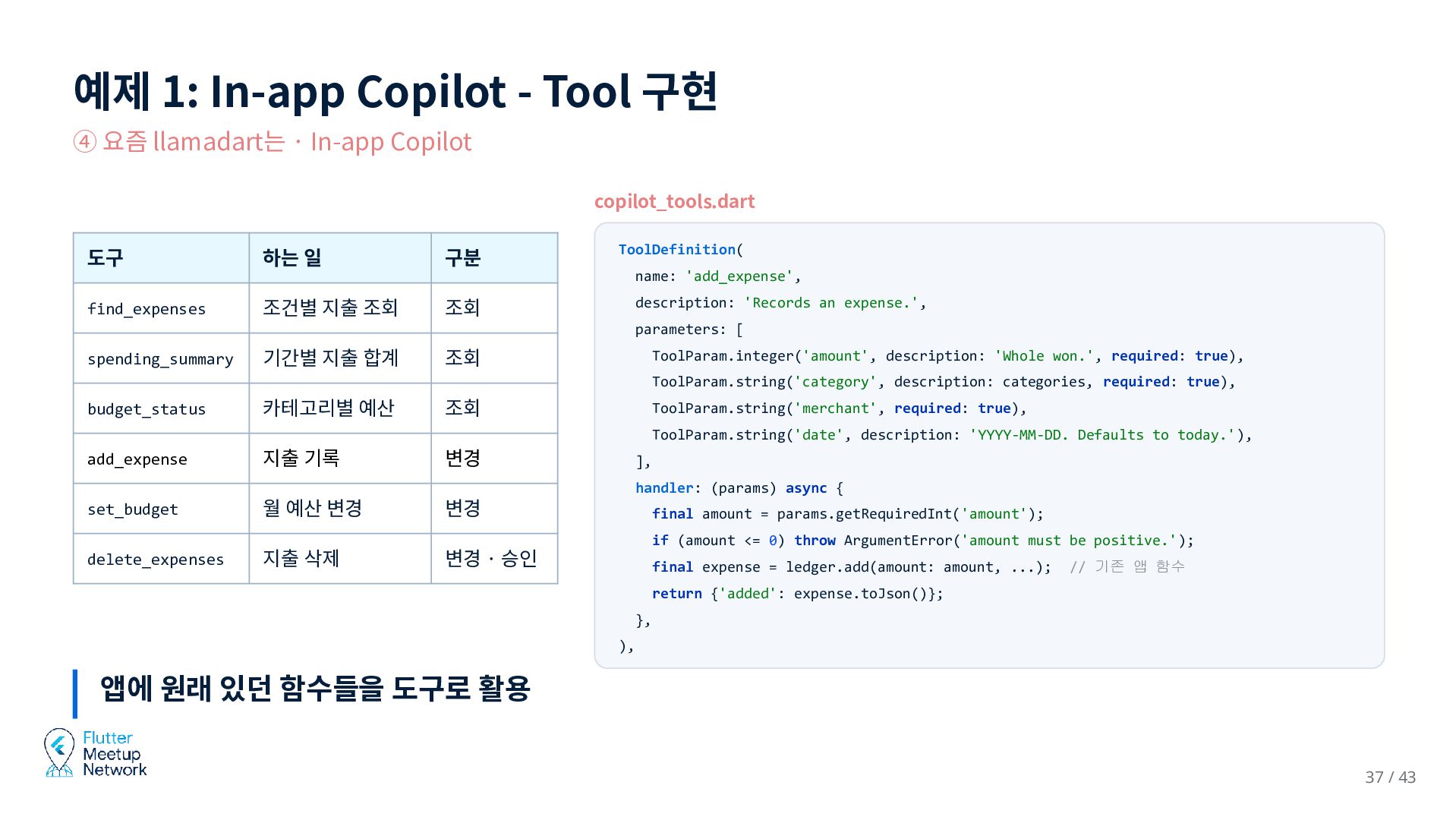
  32. 예제 1: In-app Copilot - Tool 구현 ④ 요즘 llamadart는

    · In-app Copilot copilot_tools.dart 도구 하는 일 구분 ToolDefinition( name: 'add_expense', find_expenses 조건별 지출 조회 description: 'Records an expense.', 조회 parameters: [ spending_summary 기간별 지출 합계 조회 ToolParam.integer('amount', description: 'Whole won.', required: true), ToolParam.string('category', description: categories, required: true), budget_status 카테고리별 예산 조회 ToolParam.string('merchant', required: true), ToolParam.string('date', description: 'YYYY-MM-DD. Defaults to today.'), add_expense 지출 기록 변경 set_budget 월 예산 변경 변경 ], handler: (params) async { delete_expenses 지출 삭제 final amount = params.getRequiredInt('amount'); if (amount <= 0) throw ArgumentError('amount must be positive.'); 변경 · 승인 final expense = ledger.add(amount: amount, ...); // 기존 앱 함수 return {'added': expense.toJson()}; }, ), 앱에 원래 있던 함수들을 도구로 활용 37 / 43
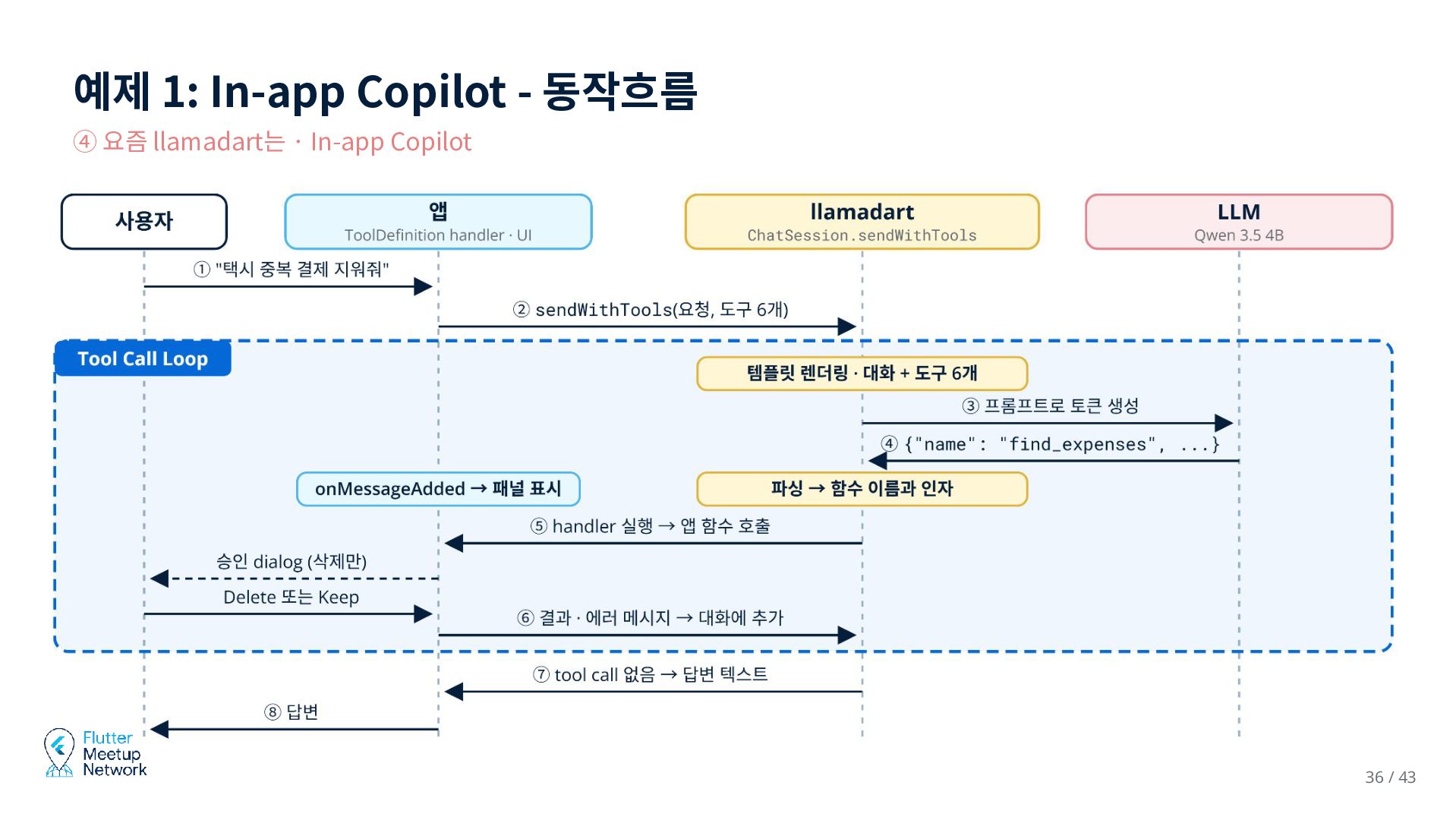
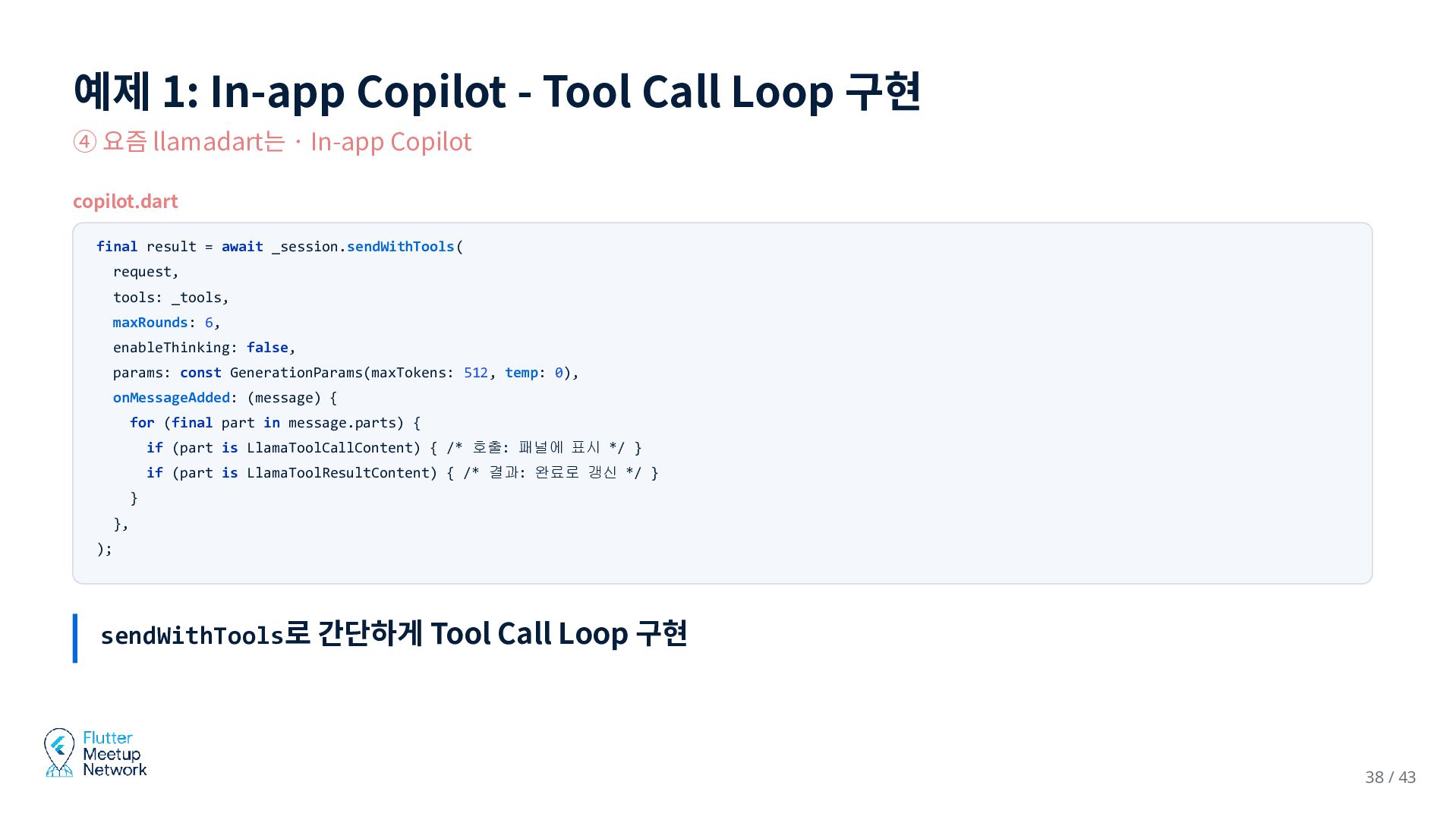
  33. 예제 1: In-app Copilot - Tool Call Loop 구현 ④

    요즘 llamadart는 · In-app Copilot copilot.dart final result = await _session.sendWithTools( request, tools: _tools, maxRounds: 6, enableThinking: false, params: const GenerationParams(maxTokens: 512, temp: 0), onMessageAdded: (message) { for (final part in message.parts) { if (part is LlamaToolCallContent) { /* 호출: 패널에 표시 */ } if (part is LlamaToolResultContent) { /* 결과: 완료로 갱신 */ } } }, ); sendWithTools로 간단하게 Tool Call Loop 구현 38 / 43
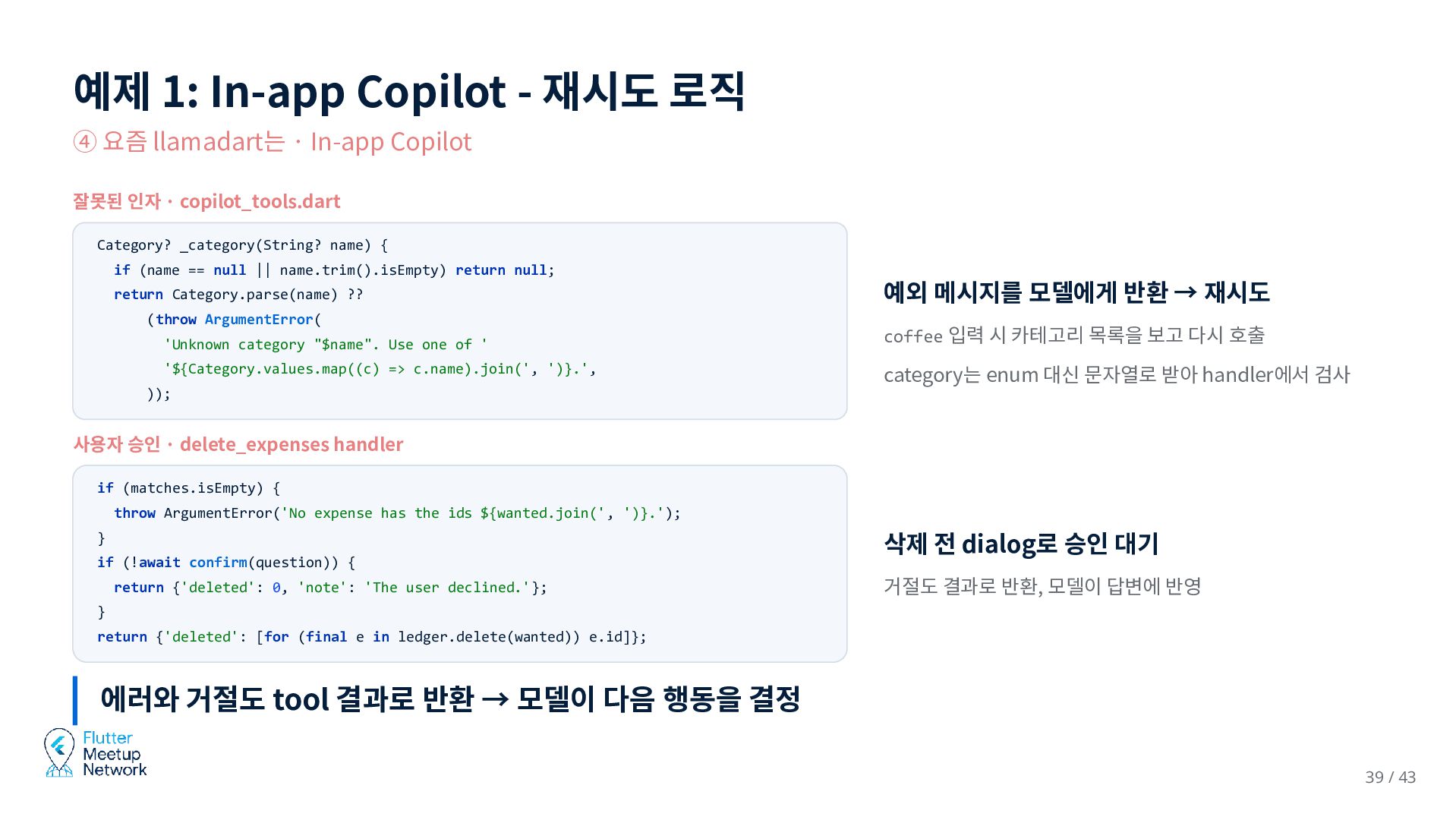
  34. 예제 1: In-app Copilot - 재시도 로직 ④ 요즘 llamadart는

    · In-app Copilot 잘못된 인자 · copilot_tools.dart Category? _category(String? name) { if (name == null || name.trim().isEmpty) return null; return Category.parse(name) ?? (throw ArgumentError( 예외 메시지를 모델에게 반환 → 재시도 'Unknown category "$name". Use one of ' coffee 입력 시 카테고리 목록을 보고 다시 호출 '${Category.values.map((c) => c.name).join(', ')}.', category는 enum 대신 문자열로 받아 handler에서 검사 )); 사용자 승인 · delete_expenses handler if (matches.isEmpty) { throw ArgumentError('No expense has the ids ${wanted.join(', ')}.'); } 삭제 전 dialog로 승인 대기 if (!await confirm(question)) { return {'deleted': 0, 'note': 'The user declined.'}; 거절도 결과로 반환, 모델이 답변에 반영 } return {'deleted': [for (final e in ledger.delete(wanted)) e.id]}; 에러와 거절도 tool 결과로 반환 → 모델이 다음 행동을 결정 39 / 43
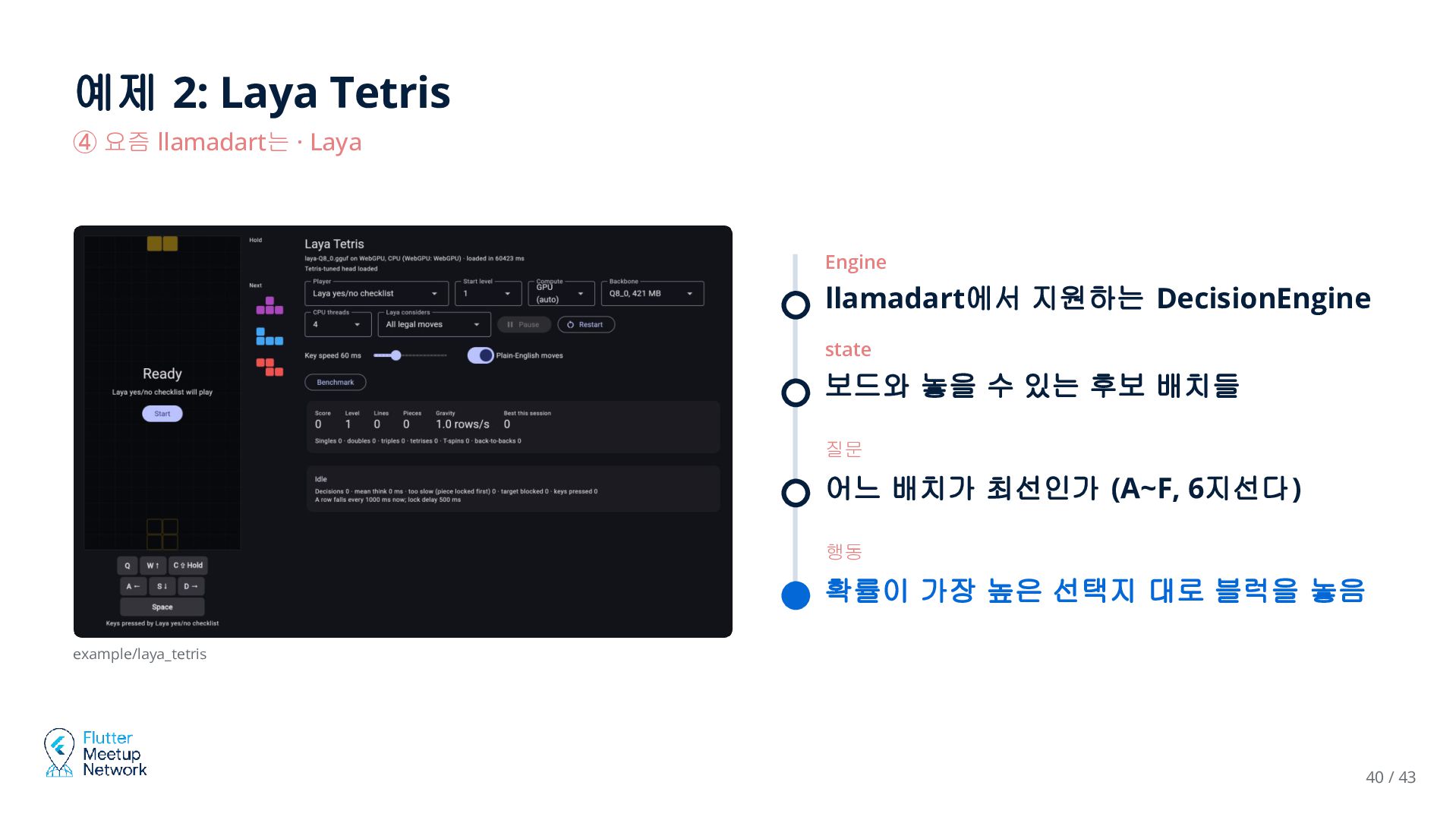
  35. 예제 2: Laya Tetris ④ 요즘 llamadart는 · Laya Engine

    llamadart에서 지원하는 DecisionEngine state 보드와 놓을 수 있는 후보 배치들 질문 어느 배치가 최선인가 (A~F, 6지선다) 행동 확률이 가장 높은 선택지 대로 블럭을 놓음 example/laya_tetris 40 / 43
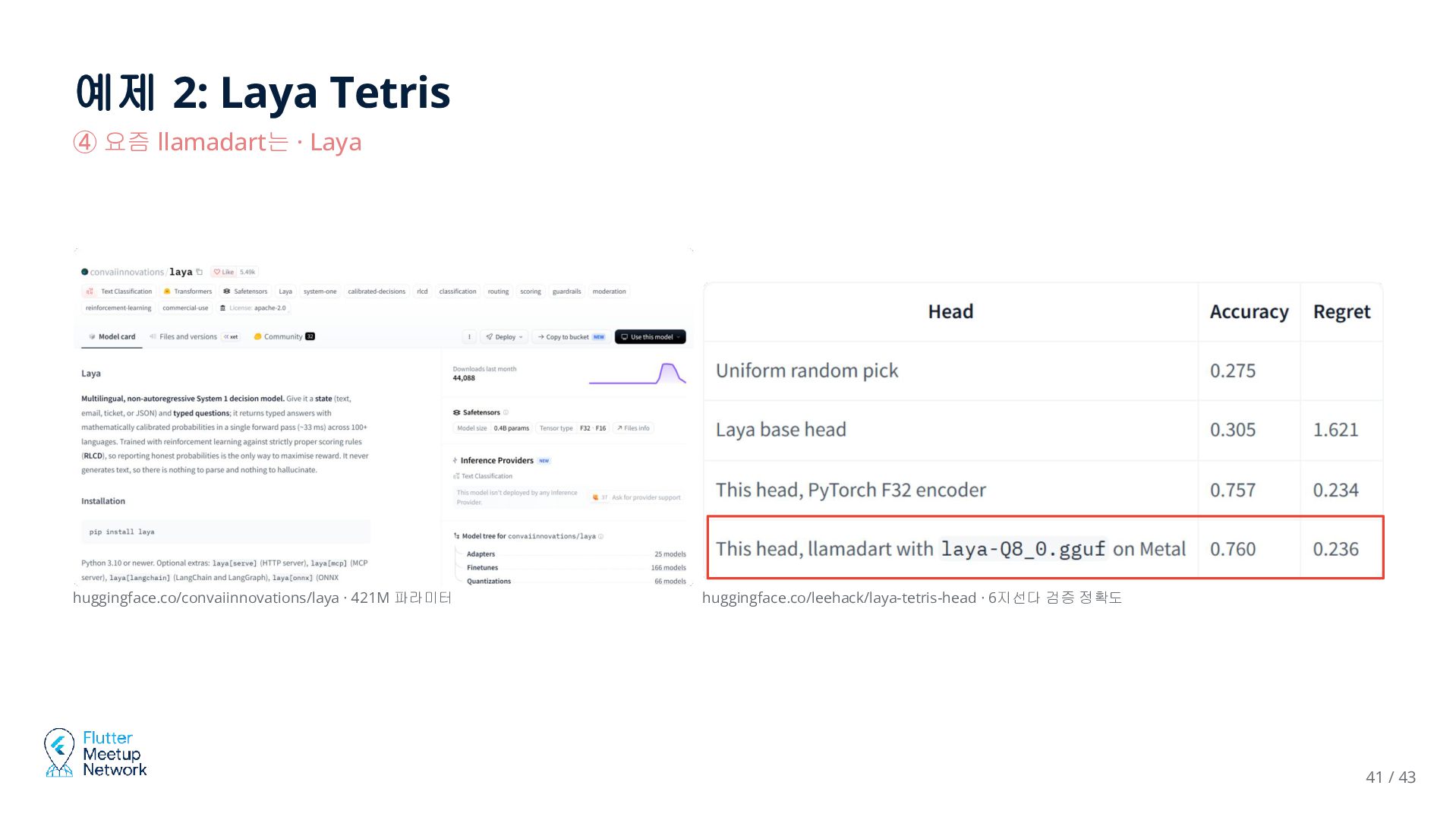
  36. 예제 2: Laya Tetris ④ 요즘 llamadart는 · Laya huggingface.co/convaiinnovations/laya

    · 421M 파라미터 huggingface.co/leehack/laya-tetris-head · 6지선다 검증 정확도 41 / 43
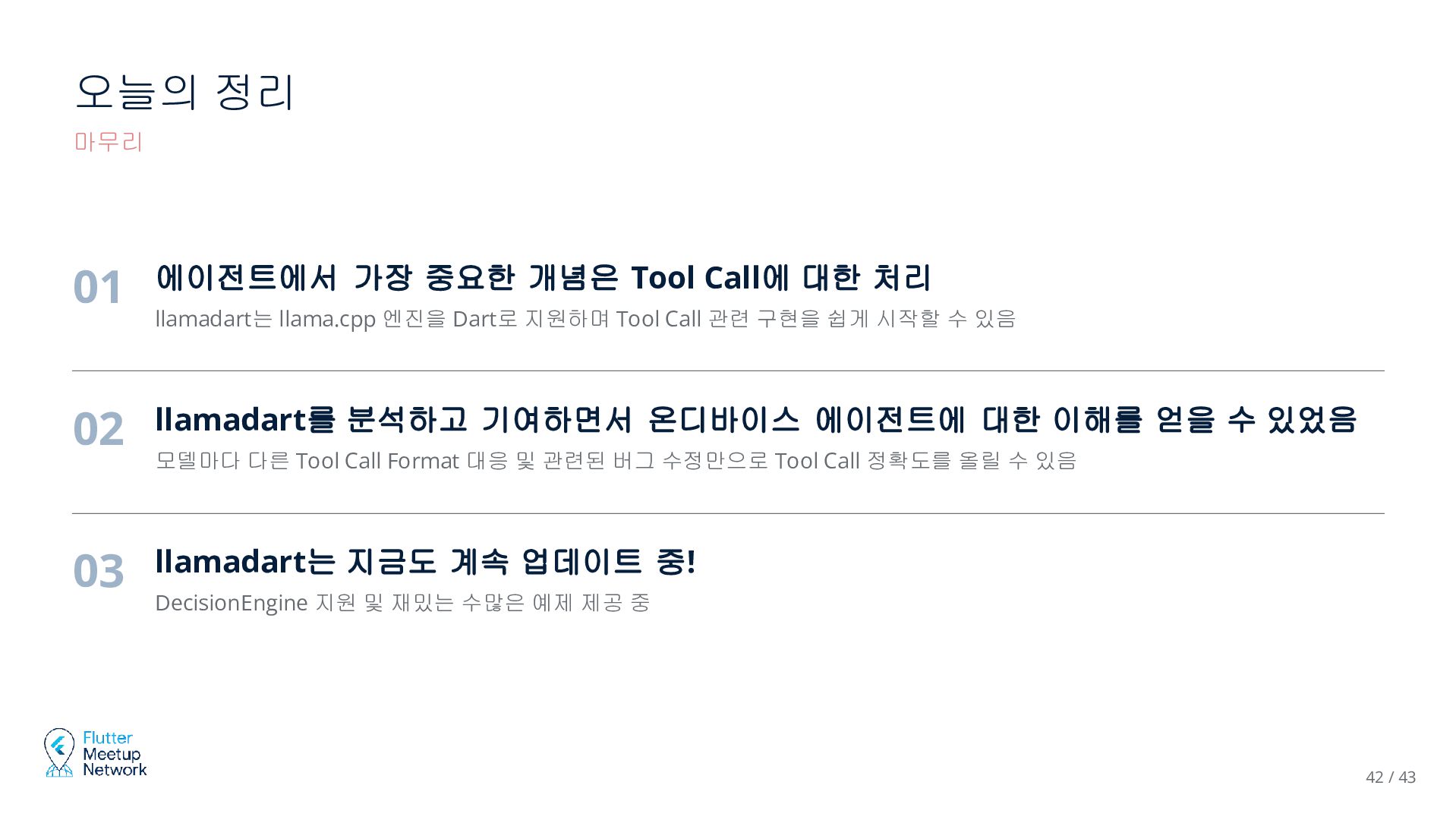
  37. 오늘의 정리 마무리 01 에이전트에서 가장 중요한 개념은 Tool Call에

    대한 처리 llamadart는 llama.cpp 엔진을 Dart로 지원하며 Tool Call 관련 구현을 쉽게 시작할 수 있음 02 llamadart를 분석하고 기여하면서 온디바이스 에이전트에 대한 이해를 얻을 수 있었음 모델마다 다른 Tool Call Format 대응 및 관련된 버그 수정만으로 Tool Call 정확도를 올릴 수 있음 03 llamadart는 지금도 계속 업데이트 중! DecisionEngine 지원 및 재밌는 수많은 예제 제공 중 42 / 43