Share
Embed
Transcript
44 slides
-
Objectives • What is slow? • Investigate performance issues. •
Indexes. • Better queries. • Checklist. -
Anna Filina • Project rescue expert • Dev, trainer, speaker
• 1 company • 2 conferences -
Multitude of Queries • Loops: • Reduce number
of queries. • Check for lazy loading in your ORM. foreach ($pictures as $id) { query_pic_details($id); } -
Lazy Loading • Data loaded on demand. • Use JOIN
to get all related data in one go. echo $picture->album->user->name; -
Count Queries • Manual: add custom code before queries. •
Auto: ORMs have listeners or data collectors. -
Slow Query log • Open my.cnf • Queries
taking 0.2s or longer will be logged. • Open the log file and analyze the queries. slow_query_log=ON long_query_time=0.2 slow_query_log_file=/path/to/file -
Example Schema 200 users 100 albums each 100 pictures each
2,000,000 pictures -
Simple Query • Get all pictures from user #1
• 38 seconds. SELECT picture.id, picture.title FROM picture LEFT JOIN album ON picture.album_id = album.id WHERE album.user_id = 1; -
Explain • Prefix with EXPLAIN: • Each
row = table scanned: EXPLAIN SELECT picture.id, picture.title FROM picture LEFT JOIN album ON picture.album_id = album.id WHERE album.user_id = 1; +----+-------------+---------+------+---------------+------+---------+------+---------+--------------------------------+ | id | select_type | table | type | possible_keys | key | key_len | ref | rows | Extra | +----+-------------+---------+------+---------------+------+---------+------+---------+--------------------------------+ | 1 | SIMPLE | album | ALL | NULL | NULL | NULL | NULL | 20000 | Using where | | 1 | SIMPLE | picture | ALL | NULL | NULL | NULL | NULL | 2000000 | Using where; Using join buffer | +----+-------------+---------+------+---------------+------+---------+------+---------+--------------------------------+ -
Explain • Details: • Because of the
join, we’re scanning all albums for each picture. • Total 40 billion rows scanned. table : album key : NULL rows : 20,000 table : picture key : NULL rows : 2,000,000 -
How do They Work? Flip through all pages of an
address book... ... or pull on the letter tab. -
Add an Index • album.id • Same query down to
2.38 sec. • We just saved 36 sec on every request! ALTER TABLE album ADD PRIMARY KEY(id); -
Under the Hood • Details: • With
the index, we find our album right away. • Total 2,000,000 rows scanned. table : album key : PRIMARY rows : 1 table : picture key : NULL rows : 2,000,000 -
Add a Better Index • picture.album_id • Now down
to 0.12 sec. • 317 times faster than original. ALTER TABLE picture ADD INDEX(album_id); -
Under the Hood • Details: • Total
200,000 rows scanned. table : album key : NULL rows : 20,000 table : picture key : album_id rows : 100 -
Add a Better Index • album.user_id • Now down
to 0.10 sec. • Gained another 17% in speed. ALTER TABLE album ADD INDEX(user_id); -
Under the Hood • Details: • With
the second index, we’re scanning 100 pics. • Total 10,000 rows scanned. table : album key : user_id rows : 100 table : picture key : album_id rows : 100 -
Don't Index Everything! There is an index on each field
And all selects take long to yield. Try finding which ones you need, Remove the rest and feel the speed. -- Anna Filina -
Indexes Used • Primary and foreign keys make for great
indexes. • Also whatever you use in JOIN, WHERE, ORDER BY. -
Index Criteria • Change frequency • Selectivity: how many different
values? • Good examples: ◦ user.id ◦ picture.date • Bad examples: ◦ user.is_active ◦ picture.views -
Airport Customs • 5 customs officers, 1 min to process
a traveller. • 5 travellers / min = fluid. • 6 travellers / min = queue slowly builds. • 1000 travellers / min = 3h wait if you arrive on 2nd minute. -
Smaller Indexes • BIGINT as index is slower than TINYINT.
• Use UNSIGNED to double the maximum value. -
Functions • Avoid functions on an indexed column: • The
index will be ignored here. SELECT id, title FROM picture WHERE YEAR(create_date) >= 2011; -
Limit • Now down to 0.0009 sec. • 100 times
faster than the last query. SELECT picture.id, picture.title FROM picture LEFT JOIN album ON picture.album.id = album.id WHERE album.user_id = 1 LIMIT 25; -
Other Constraints • Range: • Only
makes sense if that column is indexed: SELECT picture.id, picture.title FROM picture LEFT JOIN album ON picture.album.id = album.id WHERE album.user_id = 1 AND picture.id BETWEEN 26 AND 50; # 0.023 sec ALTER TABLE picture ADD INDEX(id); -
Other Constraints • IN clause:
SELECT picture.id, picture.title FROM picture LEFT JOIN album ON picture.album.id = album.id WHERE album.user_id = 1 AND picture.id IN (15,26,29,32,45); # 0.048 sec -
Problem • New features released before sale • Index was
not used • Creating too many tmp tables on disk • Slow queries • Long queue -
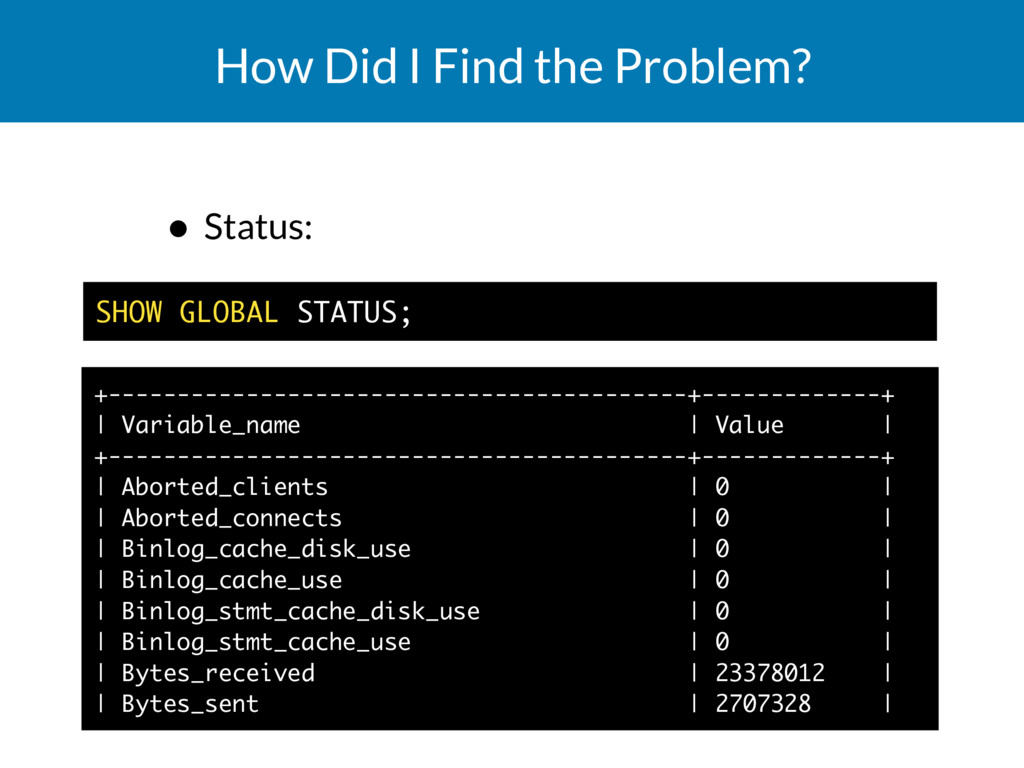
How Did I Find the Problem? • Status:
SHOW GLOBAL STATUS; +------------------------------------------+-------------+ | Variable_name | Value | +------------------------------------------+-------------+ | Aborted_clients | 0 | | Aborted_connects | 0 | | Binlog_cache_disk_use | 0 | | Binlog_cache_use | 0 | | Binlog_stmt_cache_disk_use | 0 | | Binlog_stmt_cache_use | 0 | | Bytes_received | 23378012 | | Bytes_sent | 2707328 | -
How Did I Find the Problem? • Created_tmp_disk_tables ◦ Temporary
tables created on order by, group by, etc. ◦ Stored on disk when can't fit in RAM ◦ Maybe too big resultset. ◦ Are we using index? • Handler_read_rnd_next ◦ Full or partial table scan -
Split Tables • MySQL can partition your tables transparently. ◦
Creates multiple files on disk. ◦ Shows data as a single table. -
Archives • MySQL ARCHIVE storage engine: ◦ Doesn’t support UPDATE
or DELETE ◦ Very fast for SELECT • You can archive old transactions, news, etc. -
Split Databases • Horizontal partitioning, sharding. • Users 1-1000 and
their data in database #1 • Users 1001-2000 and their data in database #2 -
Checklist ✓Count queries. ✓Log the slow ones. ✓Use EXPLAIN and
check number of rows scanned. ✓Try different indexes, remove unused ones. ✓Use small indexes, preferably numeric. ✓Don’t use functions on indexed columns. ✓Make sure indexes are used. ✓Limit number of results. ✓Split tables and databases. -
Further Reading • Storage engines: http://www.linux.org/ article/view/an-introduction-to-mysql- storage-engines • Sharding:
http:// www.jurriaanpersyn.com/archives/ 2009/02/12/database-sharding-at- netlog-with-mysql-and-php/ • Optimization manual: http:// dev.mysql.com/doc/refman/5.7/en/ optimization.html -
Even More Fun Stuff • Setup read slaves • Denormalize
where appropriate • SSD hard drive